check oil FORD ESCAPE 2013 3.G Owners Manual
[x] Cancel search | Manufacturer: FORD, Model Year: 2013, Model line: ESCAPE, Model: FORD ESCAPE 2013 3.GPages: 423, PDF Size: 4.59 MB
Page 4 of 423
Customer Assistance
Getting the Services You Need...............201
In California (U.S. Only)............................202
The Better Business Bureau (BBB) AutoLine Program (U.S. Only).....................203
Utilizing the Mediation/Arbitration Program (Canada Only).......................203
Getting Assistance Outside the U.S. and Canada.......................................................204
Ordering Additional Owner's Literature....................................................205
Reporting Safety Defects (U.S. Only)............................................................205
Reporting Safety Defects (Canada Only)............................................................206
Fuses
Changing a Fuse...........................................207
Fuse Specification Chart..........................208
Maintenance
General Information.....................................217
Opening and Closing the Hood................217
Under Hood Overview - 1.6L EcoBoost®..................................................218
Under Hood Overview - 2.0L EcoBoost®..................................................219
Under Hood Overview - 2.5L...................220
Engine Oil Dipstick - 1.6L EcoBoost®..................................................221
Engine Oil Dipstick - 2.5L/2.0L EcoBoost®..................................................221
Engine Oil Check...........................................221
Engine Coolant Check................................222
Automatic Transmission Fluid Check ............................................................225
Brake Fluid Check........................................225
Power Steering Fluid Check.....................225
Fuel Filter........................................................225
Washer Fluid Check....................................225
Changing the Vehicle Battery.................226
Checking the Wiper Blades......................227 Changing the Wiper Blades......................227
Changing the Engine Air Filter.................228
Adjusting the Headlamps.........................229
Removing a Headlamp...............................231
Changing a Bulb............................................231
Bulb Specification Chart...........................235
Vehicle Care
General Information...................................236
Cleaning Products.......................................236
Cleaning the Exterior..................................236
Repairing Minor Paint Damage...............237
Waxing..............................................................237
Cleaning the Engine....................................237
Cleaning the Windows and Wiper
Blades..........................................................238
Cleaning the Interior...................................238
Cleaning the Instrument Panel and Instrument Cluster Lens.......................239
Cleaning Leather Seats.............................239
Cleaning the Alloy Wheels.......................240
Vehicle Storage............................................240
Wheels and Tires
General Information...................................243
Tire Care..........................................................245
Using Snow Chains.....................................256
Tire Pressure Monitoring System...........257
Changing a Road Wheel...........................260
Technical Specifications...........................265
Capacities and Specific- ations
Engine Specifications.................................267
Motorcraft Parts...........................................267
Vehicle Identification Number...............269
Vehicle Certification Label.......................270
Transmission Code Designation............270
Technical Specifications............................271
4
Table of Contents
Page 81 of 423
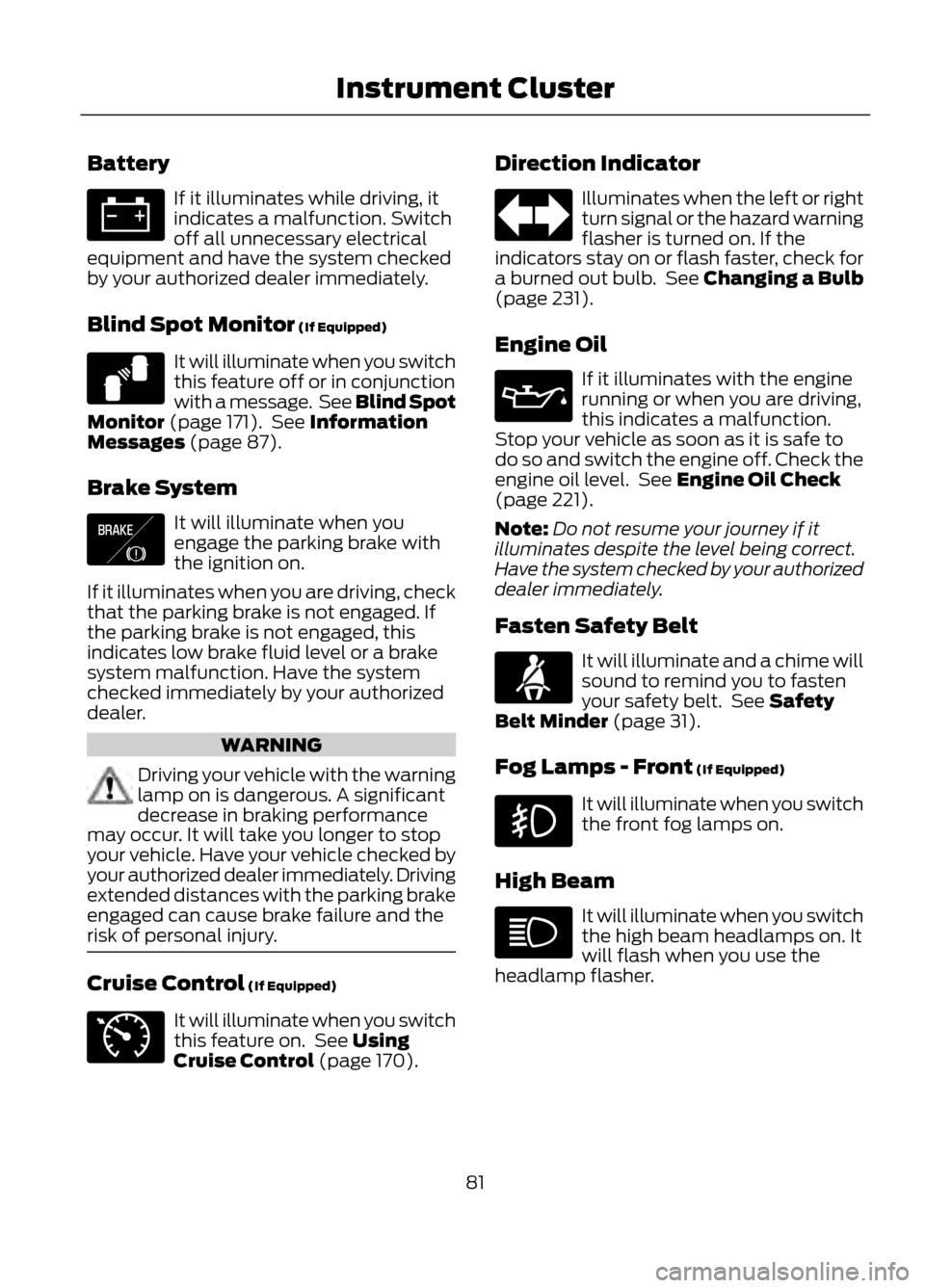
Battery
If it illuminates while driving, it
indicates a malfunction. Switch
off all unnecessary electrical
equipment and have the system checked
by your authorized dealer immediately.
Blind Spot Monitor (If Equipped)
It will illuminate when you switch
this feature off or in conjunction
with a message. See Blind Spot
Monitor (page 171). See Information
Messages (page 87).
Brake System
It will illuminate when you
engage the parking brake with
the ignition on.
If it illuminates when you are driving, check
that the parking brake is not engaged. If
the parking brake is not engaged, this
indicates low brake fluid level or a brake
system malfunction. Have the system
checked immediately by your authorized
dealer.
WARNING
Driving your vehicle with the warning
lamp on is dangerous. A significant
decrease in braking performance
may occur. It will take you longer to stop
your vehicle. Have your vehicle checked by
your authorized dealer immediately. Driving
extended distances with the parking brake
engaged can cause brake failure and the
risk of personal injury.
Cruise Control (If Equipped)
It will illuminate when you switch
this feature on. See Using
Cruise Control (page 170). Direction Indicator
Illuminates when the left or right
turn signal or the hazard warning
flasher is turned on. If the
indicators stay on or flash faster, check for
a burned out bulb. See Changing a Bulb
(page 231).
Engine Oil
If it illuminates with the engine
running or when you are driving,
this indicates a malfunction.
Stop your vehicle as soon as it is safe to
do so and switch the engine off. Check the
engine oil level. See Engine Oil Check
(page 221).
Note: Do not resume your journey if it
illuminates despite the level being correct.
Have the system checked by your authorized
dealer immediately.
Fasten Safety Belt
It will illuminate and a chime will
sound to remind you to fasten
your safety belt. See Safety
Belt Minder (page 31).
Fog Lamps - Front (If Equipped)
It will illuminate when you switch
the front fog lamps on.
High Beam
It will illuminate when you switch
the high beam headlamps on. It
will flash when you use the
headlamp flasher.
81
Instrument Cluster
E124823
E138644
E71340
Page 92 of 423
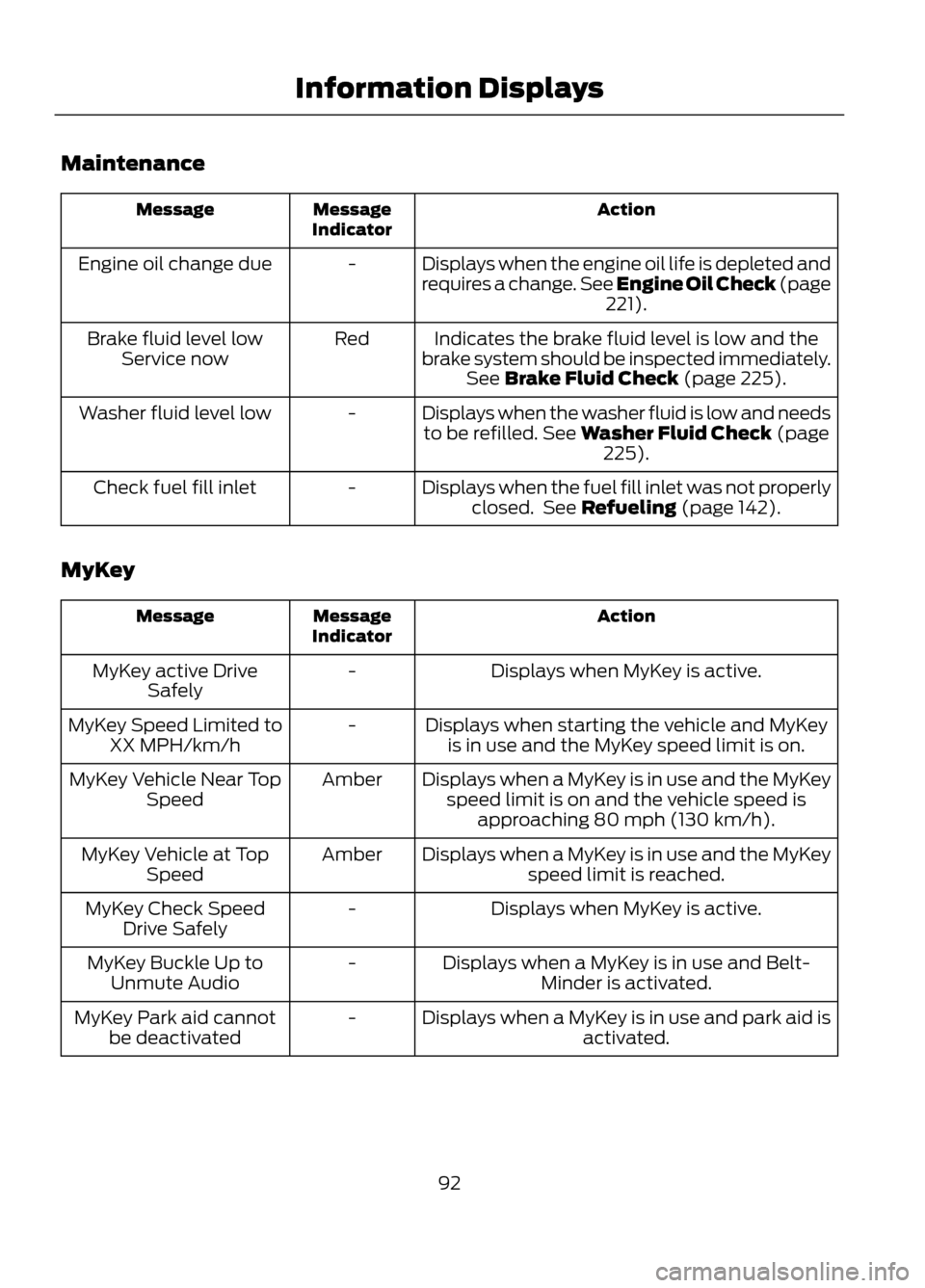
Maintenance
Action
Message
Indicator
Message
Displays when the engine oil life is depleted and
requires a change. See Engine Oil Check (page221).
-
Engine oil change due
Indicates the brake fluid level is low and the
brake system should be inspected immediately. See Brake Fluid Check (page 225).
Red
Brake fluid level low
Service now
Displays when the washer fluid is low and needsto be refilled. See Washer Fluid Check (page 225).
-
Washer fluid level low
Displays when the fuel fill inlet was not properlyclosed. See Refueling (page 142).
-
Check fuel fill inlet
MyKey
Action
Message
Indicator
Message
Displays when MyKey is active.
-
MyKey active Drive
Safely
Displays when starting the vehicle and MyKeyis in use and the MyKey speed limit is on.
-
MyKey Speed Limited to
XX MPH/km/h
Displays when a MyKey is in use and the MyKeyspeed limit is on and the vehicle speed is approaching 80 mph (130 km/h).
Amber
MyKey Vehicle Near Top
Speed
Displays when a MyKey is in use and the MyKeyspeed limit is reached.
Amber
MyKey Vehicle at Top
Speed
Displays when MyKey is active.
-
MyKey Check Speed
Drive Safely
Displays when a MyKey is in use and Belt-Minder is activated.
-
MyKey Buckle Up to
Unmute Audio
Displays when a MyKey is in use and park aid isactivated.
-
MyKey Park aid cannot
be deactivated
92
Information Displays
Page 221 of 423
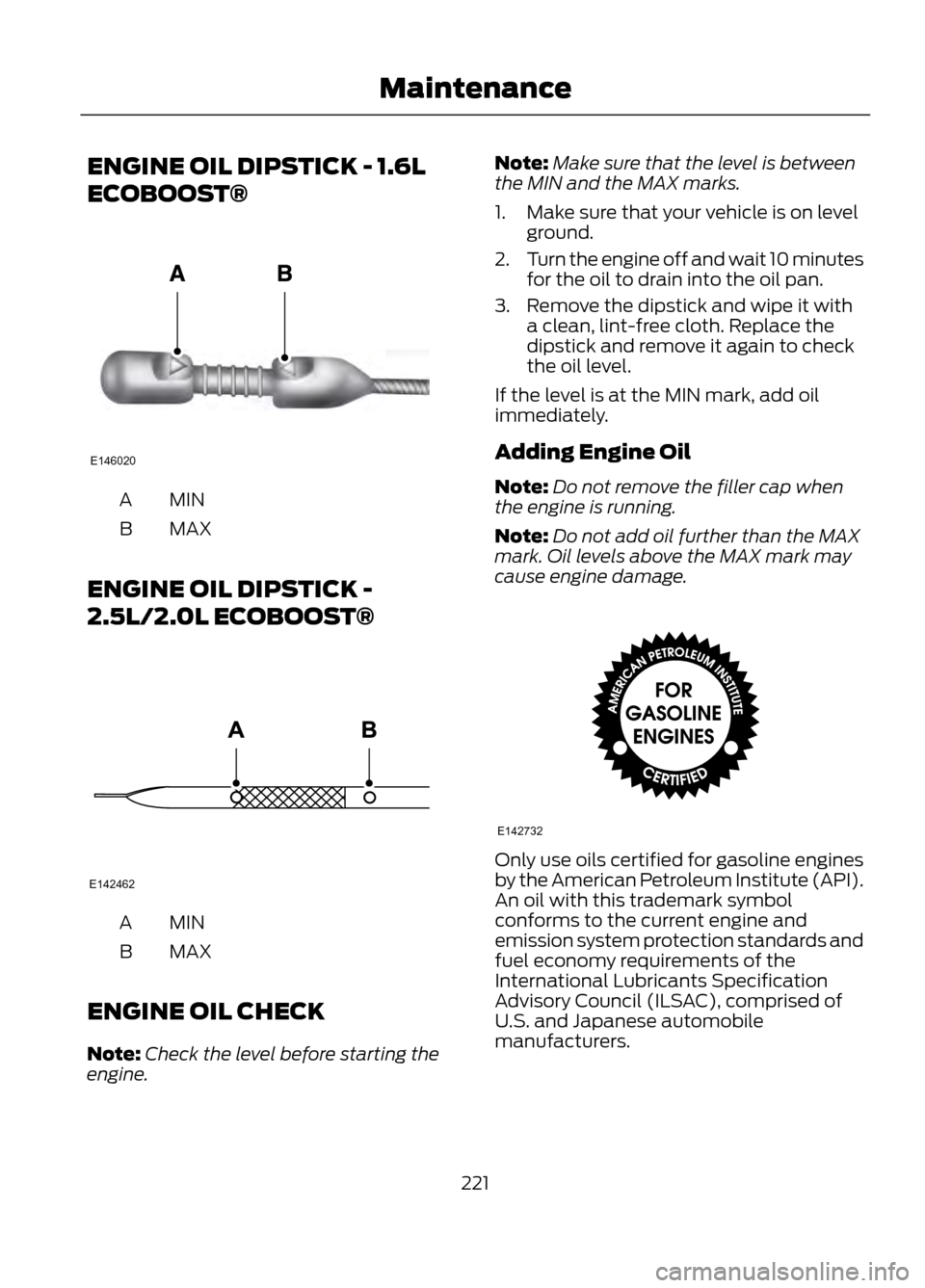
ENGINE OIL DIPSTICK - 1.6L
ECOBOOST®
MINA
MAX
B
ENGINE OIL DIPSTICK -
2.5L/2.0L ECOBOOST®
MINA
MAX
B
ENGINE OIL CHECK
Note: Check the level before starting the
engine. Note:
Make sure that the level is between
the MIN and the MAX marks.
1. Make sure that your vehicle is on level ground.
2. Turn the engine off and wait 10 minutes
for the oil to drain into the oil pan.
3. Remove the dipstick and wipe it with a clean, lint-free cloth. Replace the
dipstick and remove it again to check
the oil level.
If the level is at the MIN mark, add oil
immediately.
Adding Engine Oil
Note: Do not remove the filler cap when
the engine is running.
Note: Do not add oil further than the MAX
mark. Oil levels above the MAX mark may
cause engine damage.
Only use oils certified for gasoline engines
by the American Petroleum Institute (API).
An oil with this trademark symbol
conforms to the current engine and
emission system protection standards and
fuel economy requirements of the
International Lubricants Specification
Advisory Council (ILSAC), comprised of
U.S. and Japanese automobile
manufacturers.
221
Maintenance
E146020
E142462
E142732
Page 222 of 423
1. Remove the filler cap.
2. Add engine oil that meets the Fordspecifications. See Capacities and
Specifications (page 267).
3. Replace the filler cap. Turn it until you feel a strong resistance.
Resetting the Oil Life Monitoring
System
Note: Reset the oil life monitoring only after
an oil change.
1. Turn the ignition key to the on position.
Do not start the engine. For vehicles
with push-button start, press and hold
the start button for two seconds
without pressing the brake pedal. Do
not attempt to start the engine.
2. Press both the accelerator and brake pedals at the same time.
3. Keep both pedals fully pressed.
4. After three seconds, the Service: Oil reset in prog. message will be
displayed.
5. After 25 seconds, the Service: Oil reset
complete message will be displayed.
6. Release both the accelerator and brake
pedals.
7. The Service: Oil reset complete message will no longer be displayed.
8. Rotate the key to the off position. For vehicles with push-button start, press
the start button to turn the vehicle off
completely.
ENGINE COOLANT CHECK
Checking the Engine Coolant
When the engine is cold, check the
concentration and level of the engine
coolant at the intervals listed in the
scheduled maintenance information. See
Scheduled Maintenance (page 396). Note:
Make sure that the level is between
the MIN and MAX marks on the coolant
reservoir.
Note: Coolant expands when it is hot. The
level may extend beyond the MAX mark
Note: If the level is at the MIN mark, below
the MIN mark, or empty, add coolant
immediately. See Adding Engine Coolant
in this chapter.
The coolant concentration should be
maintained at 50%.
Note: For best results, coolant
concentration should be tested with a
refractometer such as Rotunda tool
ROB75240 available from your dealer. Ford
does not recommend the use of
hydrometers or coolant test strips for
measuring coolant concentrations.
Note: Automotive fluids are not
interchangeable. Do not use engine coolant
or antifreeze or windshield washer fluid
outside of its specified function and vehicle
location.
Adding Engine Coolant
WARNINGS
Do not add engine coolant when the
engine is hot. Steam and scalding
liquids released from a hot cooling
system can burn you badly. Also, you can
be burned if you spill coolant on hot engine
parts.
Do not put engine coolant in the
windshield washer fluid container. If
sprayed on the windshield, engine
coolant could make it difficult to see
through the windshield.
To reduce the risk of personal injury,
make sure the engine is cool before
unscrewing the coolant pressure
relief cap. The cooling system is under
pressure; steam and hot liquid can come
out forcefully when the cap is loosened
slightly.
222
Maintenance
Page 240 of 423
•For routine cleaning, wipe the surface
with a soft, damp cloth. For more
thorough cleaning, wipe the surface
with a mild soap and water solution. In
Canada, use Motorcraft® Vinyl Cleaner.
Dry the area with a soft cloth.
• If the leather cannot be completely
cleaned using a mild soap and water
solution, the leather may be cleaned
using a commercially available leather
cleaning product designed for
automotive interiors.
• To check for compatibility, first test any
cleaner or stain remover on an
inconspicuous part of the leather.
• Do not use household cleaning
products, alcohol solutions, solvents
or cleaners intended for rubber, vinyl
and plastics, or oil/petroleum-based
leather conditioners. These products
may cause premature wearing or
damage to the leather.
CLEANING THE ALLOY
WHEELS (IF EQUIPPED)
Note: Do not use chrome cleaner, metal
cleaner or polish on wheels and wheel
covers.
Aluminum wheels and wheel covers are
coated with a clear coat paint finish. In
order to maintain their shine:
• Clean weekly with Motorcraft® Wheel
and Tire Cleaner. Heavy dirt and brake
dust accumulation may require
agitation with a sponge. Rinse
thoroughly with a strong stream of
water.
• Never apply any cleaning chemical to
hot or warm wheel rims or covers. •
Some automatic car washes may
cause damage to the finish on your
wheel rims or covers.
Industrial-strength (heavy-duty)
cleaners, or cleaning chemicals, in
combination with brush agitation to
remove brake dust and dirt, could wear
away the clear coat finish over time.
• Do not use hydrofluoric acid-based or
high caustic-based wheel cleaners,
steel wool, fuels or strong household
detergent.
• To remove tar and grease, use
Motorcraft® Bug and Tar Remover.
VEHICLE STORAGE
If you plan on storing your vehicle for an
extended period of time (30 days or more),
read the following maintenance
recommendations to make sure your
vehicle stays in good operating condition.
All motor vehicles and their components
were engineered and tested for reliable,
regular driving. Long term storage under
various conditions may lead to component
degradation or failure unless specific
precautions are taken to preserve the
components.
General
• Store all vehicles in a dry, ventilated
place.
• Protect from sunlight, if possible.
• If vehicles are stored outside, they
require regular maintenance to protect
against rust and damage.
240
Vehicle Care
Page 241 of 423
Body
•Wash vehicle thoroughly to remove
dirt, grease, oil, tar or mud from exterior
surfaces, rear-wheel housing and
underside of front fenders.
• Periodically wash vehicles stored in
exposed locations.
• Touch-up raw or primed metal to
prevent rust
• Cover chrome and stainless steel parts
with a thick coat of auto wax to prevent
discoloration. Re-wax as necessary
when the vehicle is washed.
• Lubricate all hood, door and trunk lid
hinges, and latches with a light grade
oil.
• Cover interior trim to prevent fading.
• Keep all rubber parts free from oil and
solvents.
Engine
• The engine oil and filter should be
changed prior to storage, as used
engine oil contain contaminates that
may cause engine damage.
• Start the engine every 15 days. Run at
fast idle until it reaches normal
operating temperature
• With your foot on the brake, shift
through all the gears while the engine
is running.
Fuel system
• Fill the fuel tank with high-quality fuel
until the first automatic shutoff of the
fuel pump nozzle. Note:
During extended periods of vehicle
storage (30 days or more), fuel may
deteriorate due to oxidation. Add a quality
gas stabilizer product to the vehicle fuel
system whenever actual or expected
storage periods exceed 30 days. Follow the
instructions on the additive label. The
vehicle should then be operated at idle
speed to circulate the additive throughout
the fuel system.
Cooling system
• Protect against freezing temperatures.
• When removing vehicle from storage,
check coolant fluid level. Confirm there
are no cooling system leaks, and fluid
is at the recommended level.
Battery
• Check and recharge as necessary. Keep
connections clean.
• If storing your vehicle for more than 30
days without recharging the battery, it
may be advisable to disconnect the
battery cables to ensure battery charge
is maintained for quick starting.
Note: If battery cables are disconnected, it
will be necessary to reset memory features.
Brakes
• Make sure brakes and parking brake
are fully released.
Tires
• Maintain recommended air pressure.
Miscellaneous
• Make sure all linkages, cables, levers
and pins under vehicle are covered with
grease to prevent rust.
• Move vehicles at least 25 feet (8
meters) every 15 days to lubricate
working parts and prevent corrosion.
241
Vehicle Care
Page 242 of 423
Removing Vehicle From Storage
When your vehicle is ready to come out of
storage, do the following:
•Wash your vehicle to remove any dirt
or grease film build-up on window
surfaces.
• Check windshield wipers for any
deterioration.
• Check under the hood for any foreign
material that may have collected
during storage (mice/squirrel nests).
• Check the exhaust for any foreign
material that may have collected
during storage.
• Check tire pressures and set tire
inflation per the Tire Label.
• Check brake pedal operation. Drive the
vehicle 15 feet (4.5 meters) back and
forth to remove rust build-up.
• Check fluid levels (including coolant,
oil and gas) to make sure there are no
leaks, and fluids are at recommended
levels.
• If the battery was removed, clean the
battery cable ends and inspect.
Contact your authorized dealer if you have
any concerns or issues.
242
Vehicle Care
Page 273 of 423
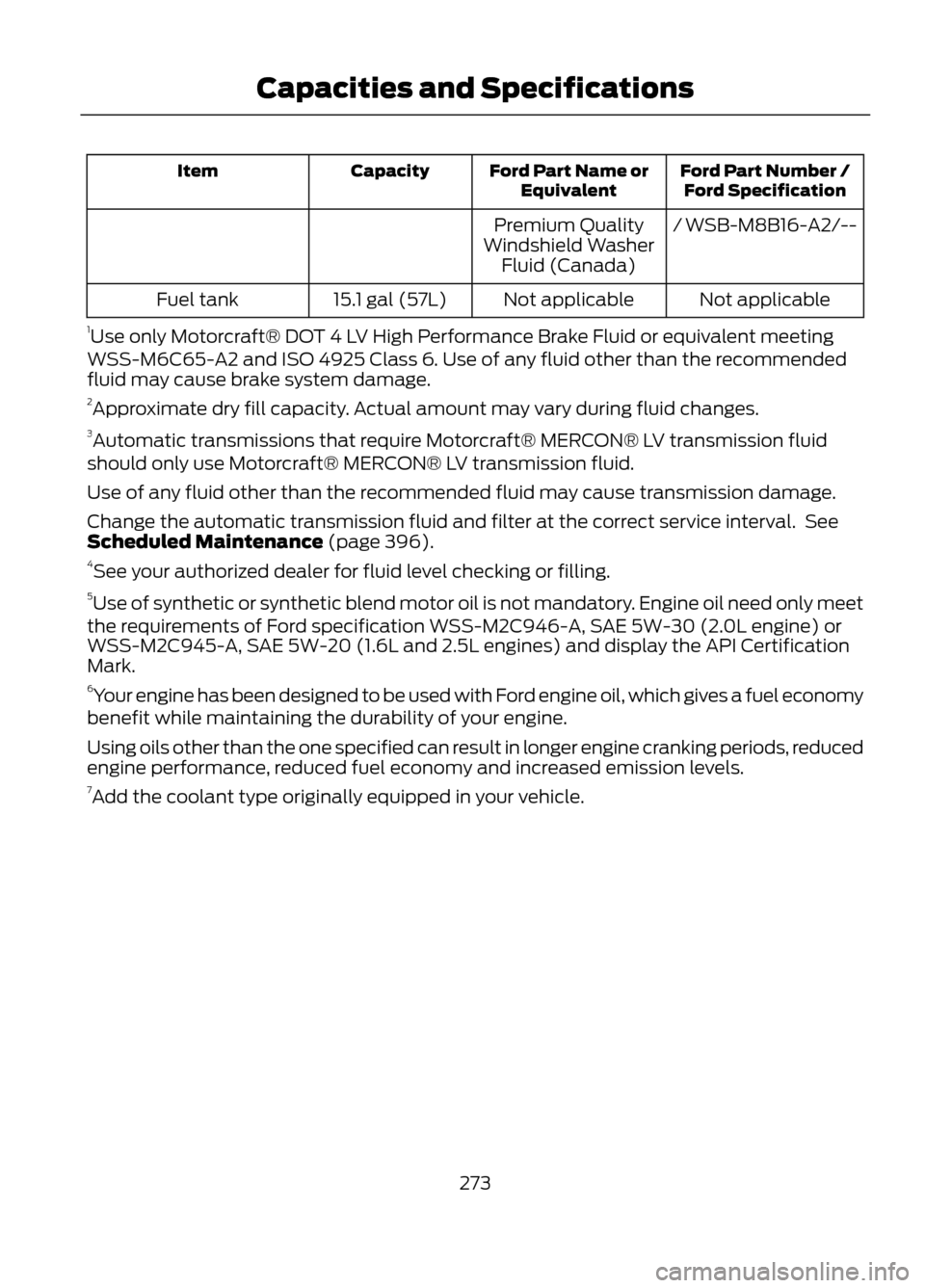
Ford Part Number /Ford Specification
Ford Part Name or
Equivalent
Capacity
Item
/ WSB-M8B16-A2/--
Premium Quality
Windshield Washer Fluid (Canada)
Not applicable
Not applicable
15.1 gal (57L)
Fuel tank
1 Use only Motorcraft® DOT 4 LV High Performance Brake Fluid or equivalent meeting
WSS-M6C65-A2 and ISO 4925 Class 6. Use of any fluid other than the recommended
fluid may cause brake system damage.
2 Approximate dry fill capacity. Actual amount may vary during fluid changes.
3 Automatic transmissions that require Motorcraft® MERCON® LV transmission fluid
should only use Motorcraft® MERCON® LV transmission fluid.
Use of any fluid other than the recommended fluid may cause transmission damage.
Change the automatic transmission fluid and filter at the correct service interval. See
Scheduled Maintenance (page 396).
4 See your authorized dealer for fluid level checking or filling.
5 Use of synthetic or synthetic blend motor oil is not mandatory. Engine oil need only meet
the requirements of Ford specification WSS-M2C946-A, SAE 5W-30 (2.0L engine) or
WSS-M2C945-A, SAE 5W-20 (1.6L and 2.5L engines) and display the API Certification
Mark.
6 Your engine has been designed to be used with Ford engine oil, which gives a fuel economy
benefit while maintaining the durability of your engine.
Using oils other than the one specified can result in longer engine cranking periods, reduced
engine performance, reduced fuel economy and increased emission levels.
7 Add the coolant type originally equipped in your vehicle.
273
Capacities and Specifications
Page 397 of 423
Your vehicle is equipped with the
Intelligent Oil Life Monitor® system which
displays a message in the message center
at the proper oil change service interval.
This interval may be up to one year or
10000 miles (16000 kilometers).
When ENGINE OIL CHANGE DUE or OIL
CHANGE REQUIRED appears in the
message center display, it is time for an oil
change. The oil change must be done
within two weeks or 500 miles (800
kilometers) of the ENGINE OIL CHANGE
DUE or OIL CHANGE REQUIRED message
appearing. The Intelligent Oil Life Monitor®
must be reset after each oil change. See
Engine Oil Check (page 221).
If your message center is prematurely reset
or becomes inoperative, you should
perform the oil change interval at six
months or 5000 miles (8000 km) from
your last oil change. Never exceed one year
or 10000 miles (16000 kilometers)
between oil change intervals.
Your vehicle is very sophisticated and built
with multiple complex performance
systems. Every manufacturer develops
these systems using different
specifications and performance features.
That is why it is important to rely upon your
dealership to properly diagnose and repair
your vehicle.
We recommend maintenance intervals for
various parts and component systems
based upon engineering testing. We rely
upon this testing to determine the most
appropriate mileage for replacement of
oils and fluids to protect your vehicle at
the lowest overall cost to you and
recommend against maintenance
schedules that deviate from the scheduled
maintenance information.
We strongly recommend the using only
genuine Ford, Motorcraft or
Ford-authorized re-manufactured
replacement for parts because they are
engineered for your vehicle.Additives and Chemicals
Recommended additives and chemicals
are listed in this Owner's Manual and in the
Workshop Manual. Additional chemicals
or additives not approved by Ford Motor
Company are not recommended as part
of normal maintenance. Please consult
your Warranty Manual for complete
warranty information.
Oils, Fluids and Flushing
In many cases, fluid discoloration is a
normal operating characteristic and, by
itself, does not necessarily indicate a
concern or that the fluid needs to be
changed. However, discolored fluids that
also show signs of overheating or foreign
material contamination should be
inspected immediately by a qualified
expert such as the factory-trained
technicians at your dealership.
Your vehicle
’s oils and fluids should be
changed at the specified intervals or in
conjunction with a repair. Flushing is a
viable way to change fluid for many vehicle
sub-systems during scheduled
maintenance. It is critical that systems are
flushed only with new fluid that is the same
as that required to fill and operate the
system or using a Ford-approved flushing
chemical.
Owner Checks and Services
Certain basic maintenance checks and
inspections should be performed every
month or at six months intervals.
Check Every Month
• Engine oil level.
• Function of all interior and exterior
lights.
• Tires for wear and proper pressure,
including the spare tire.
• Windshield washer fluid level.
397
Scheduled Maintenance