clock FORD ESCAPE 2014 3.G User Guide
[x] Cancel search | Manufacturer: FORD, Model Year: 2014, Model line: ESCAPE, Model: FORD ESCAPE 2014 3.GPages: 428, PDF Size: 16.6 MB
Page 260 of 428
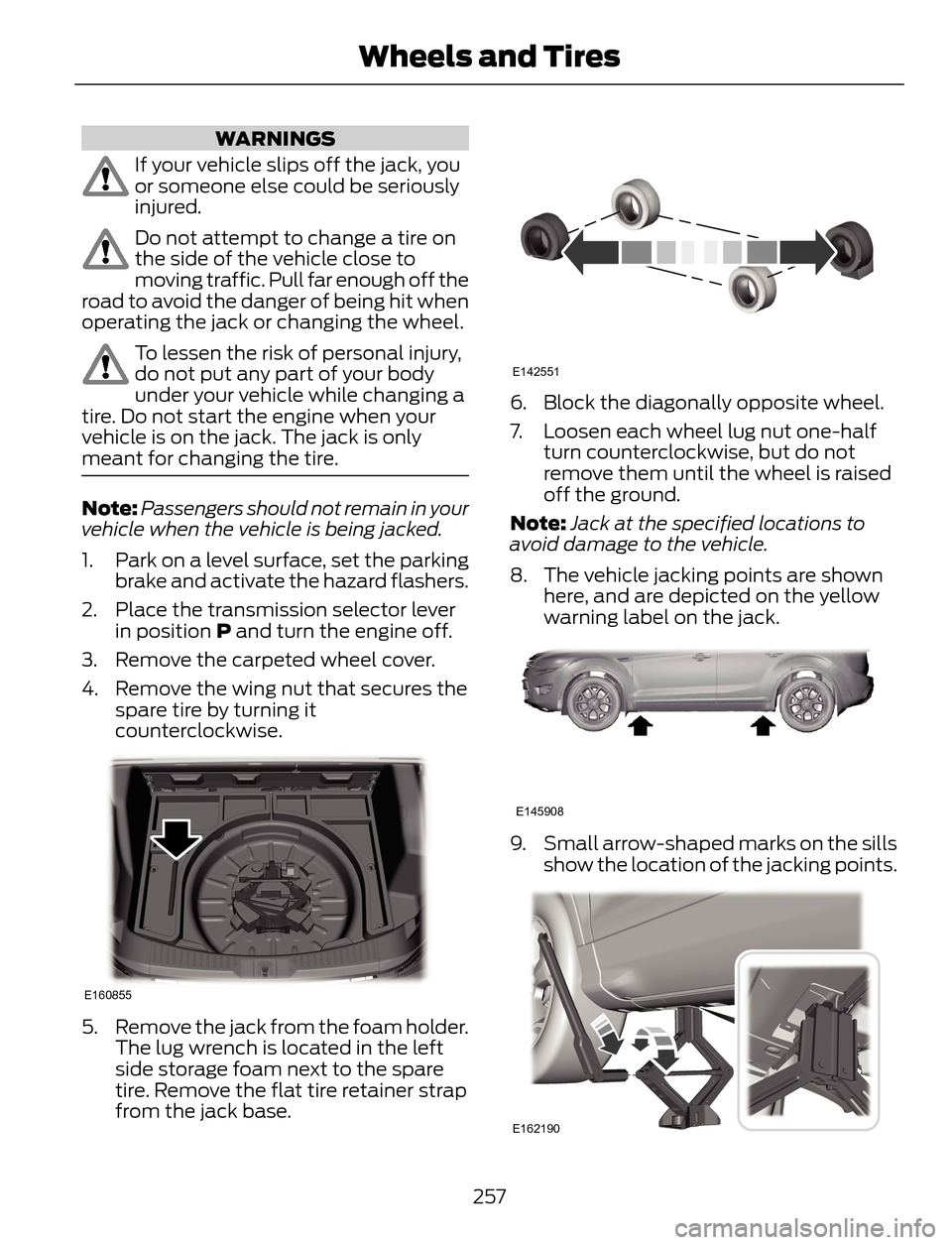
WARNINGS
If your vehicle slips off the jack, you
or someone else could be seriously
injured.
Do not attempt to change a tire on
the side of the vehicle close to
moving traffic. Pull far enough off the
road to avoid the danger of being hit when
operating the jack or changing the wheel.
To lessen the risk of personal injury,
do not put any part of your body
under your vehicle while changing a
tire. Do not start the engine when your
vehicle is on the jack. The jack is only
meant for changing the tire.
Note:Passengers should not remain in your
vehicle when the vehicle is being jacked.
1. Park on a level surface, set the parking
brake and activate the hazard flashers.
2. Place the transmission selector lever
in position P and turn the engine off.
3. Remove the carpeted wheel cover.
4. Remove the wing nut that secures the
spare tire by turning it
counterclockwise.
E160855
5. Remove the jack from the foam holder.
The lug wrench is located in the left
side storage foam next to the spare
tire. Remove the flat tire retainer strap
from the jack base.
E142551
6. Block the diagonally opposite wheel.
7. Loosen each wheel lug nut one-half
turn counterclockwise, but do not
remove them until the wheel is raised
off the ground.
Note:Jack at the specified locations to
avoid damage to the vehicle.
8. The vehicle jacking points are shown
here, and are depicted on the yellow
warning label on the jack.
E145908
9. Small arrow-shaped marks on the sills
show the location of the jacking points.
E162190
257
Wheels and Tires
Page 261 of 428
10. Remove the lug nuts with the lug
wrench.
Note:If equipped with full wheel covers
with exposed wheel nuts, remove the wheel
nuts prior to removing the wheel cover or
damage to the wheel cover may occur.
11. Replace the flat tire with the spare
tire, making sure the valve stem is
facing outward. Reinstall the lug nuts
until the wheel is snug against the
hub. Do not fully tighten the lug nuts
until the wheel has been lowered.
12. Lower the wheel by turning the jack
handle counterclockwise.
1
2 34
5
E75442
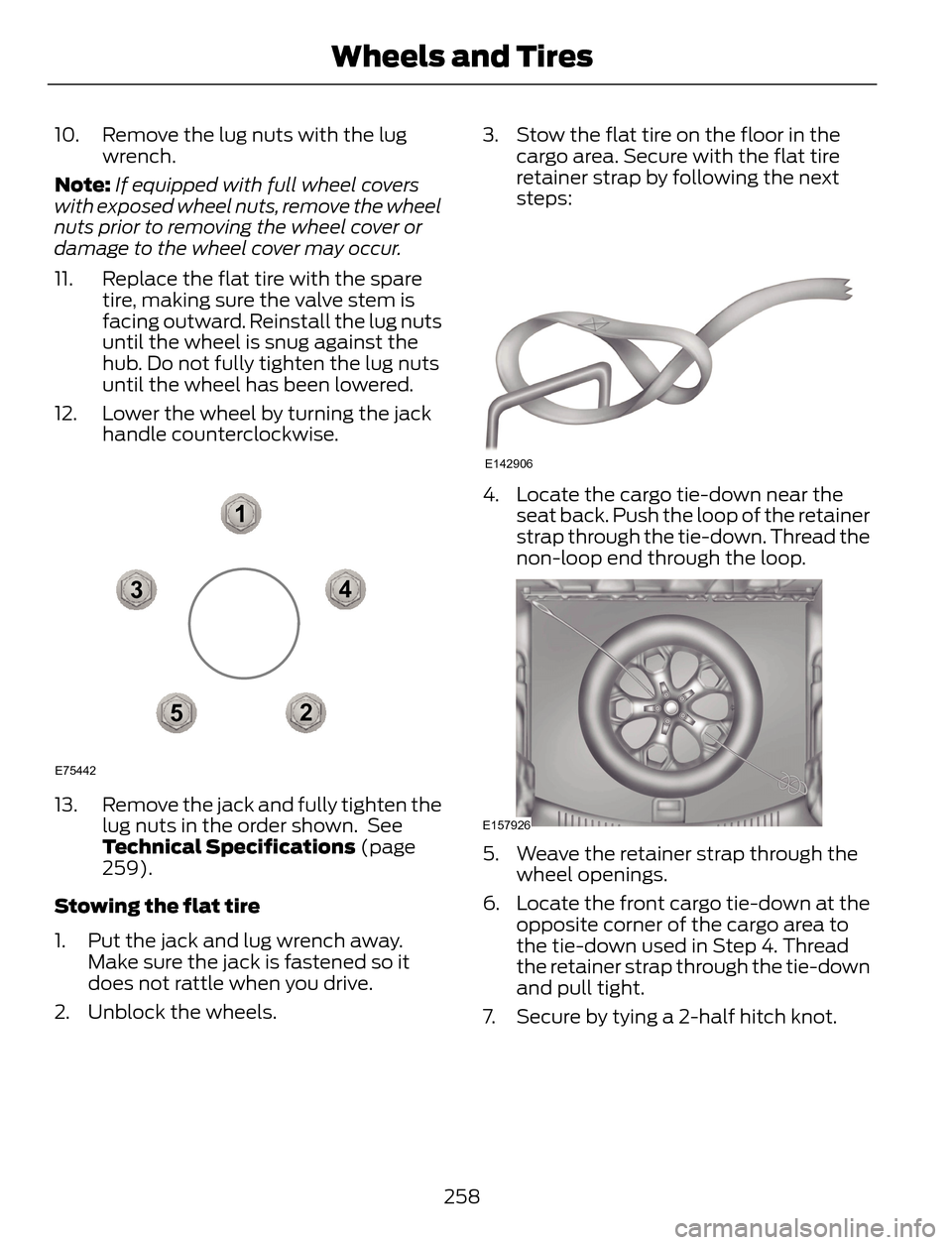
13. Remove the jack and fully tighten the
lug nuts in the order shown. See
Technical Specifications (page
259).
Stowing the flat tire
1. Put the jack and lug wrench away.
Make sure the jack is fastened so it
does not rattle when you drive.
2. Unblock the wheels.3. Stow the flat tire on the floor in the
cargo area. Secure with the flat tire
retainer strap by following the next
steps:
E142906
4. Locate the cargo tie-down near the
seat back. Push the loop of the retainer
strap through the tie-down. Thread the
non-loop end through the loop.
E157926
5. Weave the retainer strap through the
wheel openings.
6. Locate the front cargo tie-down at the
opposite corner of the cargo area to
the tie-down used in Step 4. Thread
the retainer strap through the tie-down
and pull tight.
7. Secure by tying a 2-half hitch knot.
258
Wheels and Tires
Page 272 of 428
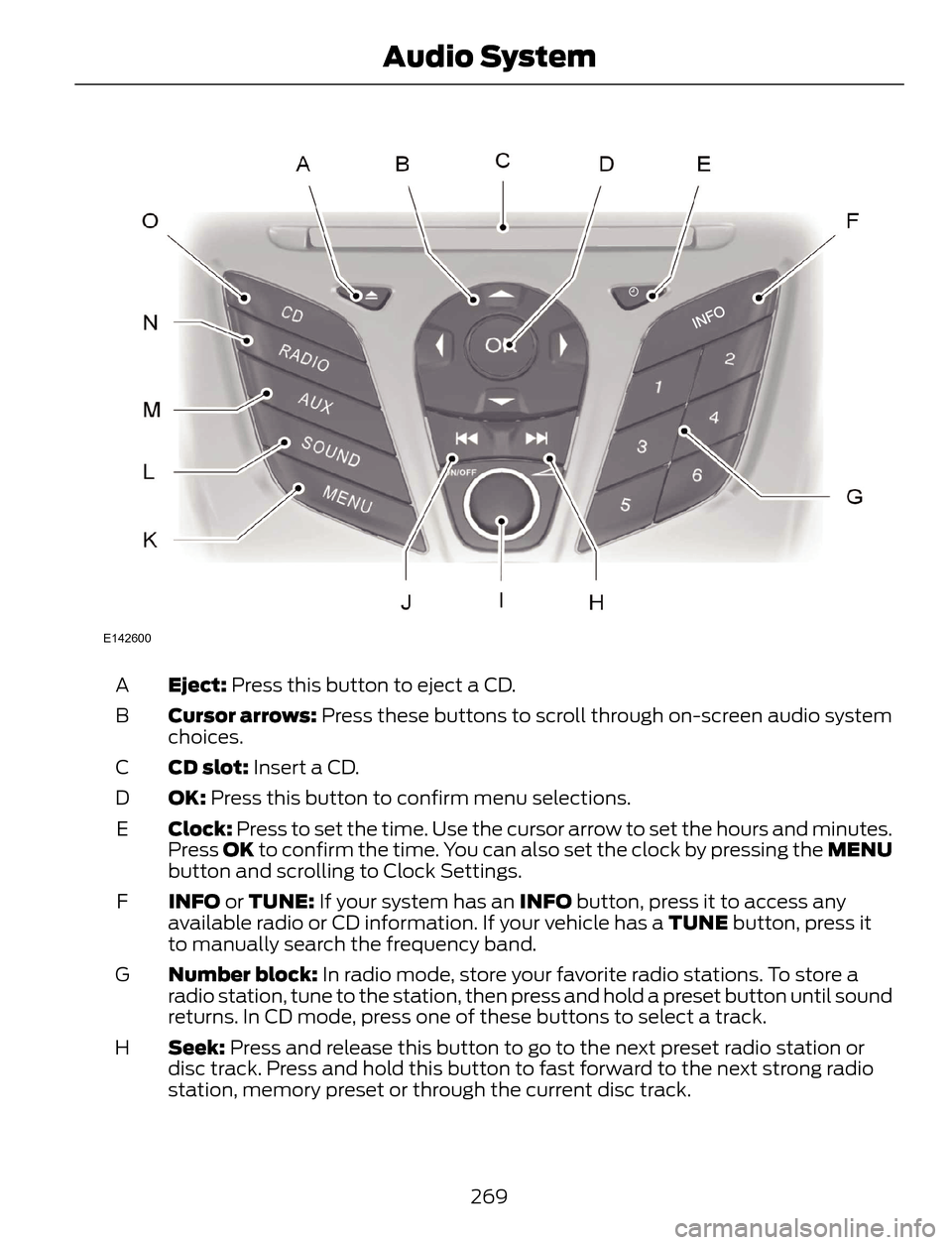
E142600
Eject: Press this button to eject a CD. A
Cursor arrows: Press these buttons to scroll through on-screen audio system
choices. B
CD slot: Insert a CD. C
OK: Press this button to confirm menu selections. D
Clock: Press to set the time. Use the cursor arrow to set the hours and minutes.
Press OK to confirm the time. You can also set the clock by pressing the MENU
button and scrolling to Clock Settings. E
INFO or TUNE: If your system has an INFO button, press it to access any
available radio or CD information. If your vehicle has a TUNE button, press it
to manually search the frequency band. F
Number block: In radio mode, store your favorite radio stations. To store a
radio station, tune to the station, then press and hold a preset button until sound
returns. In CD mode, press one of these buttons to select a track. G
Seek: Press and release this button to go to the next preset radio station or
disc track. Press and hold this button to fast forward to the next strong radio
station, memory preset or through the current disc track. H
269
Audio System
Page 274 of 428
ABDC
E
F
G
H
IJ
H
K
L
M
N
O
E162867
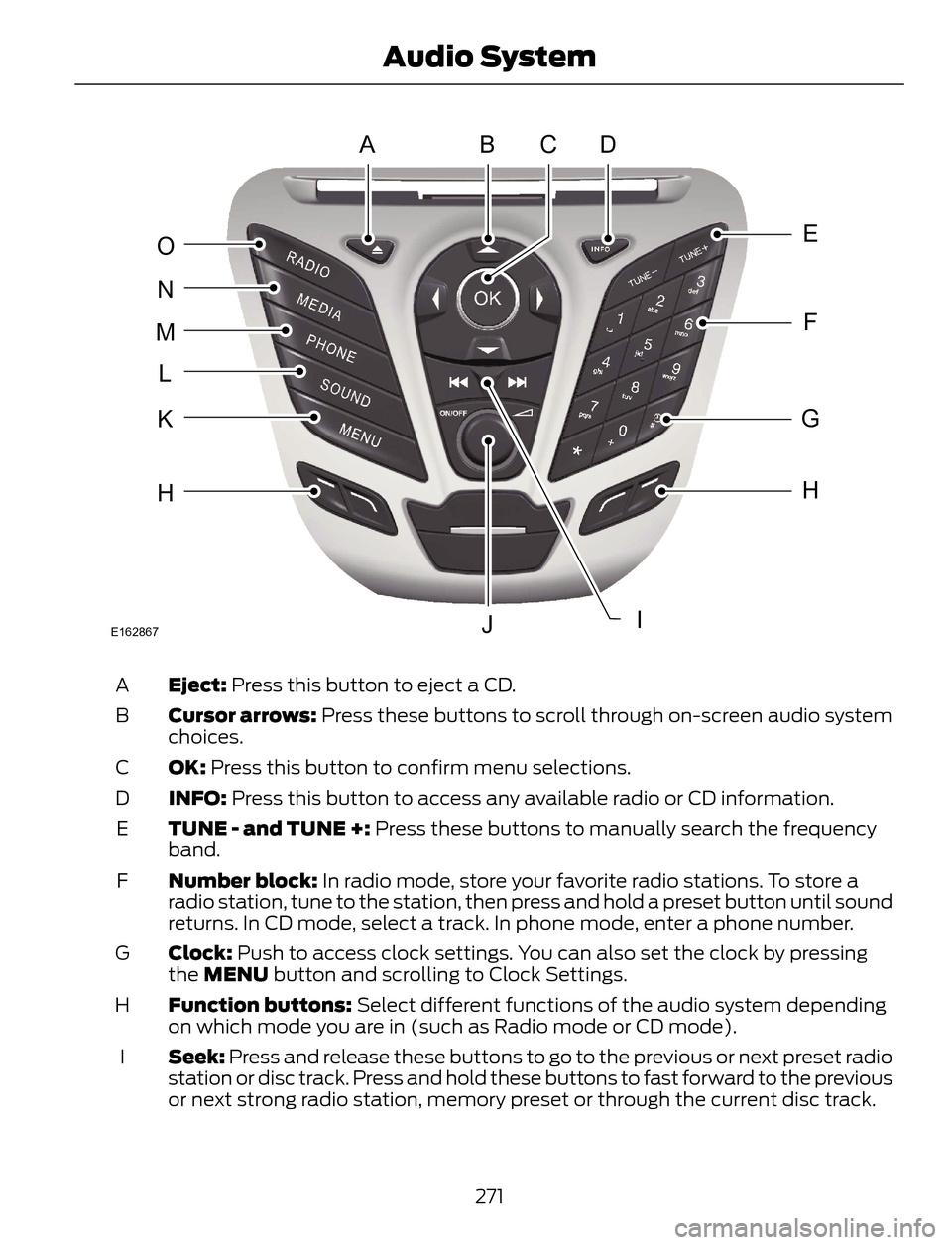
Eject: Press this button to eject a CD. A
Cursor arrows: Press these buttons to scroll through on-screen audio system
choices. B
OK: Press this button to confirm menu selections. C
INFO: Press this button to access any available radio or CD information. D
TUNE - and TUNE +: Press these buttons to manually search the frequency
band. E
Number block: In radio mode, store your favorite radio stations. To store a
radio station, tune to the station, then press and hold a preset button until sound
returns. In CD mode, select a track. In phone mode, enter a phone number. F
Clock: Push to access clock settings. You can also set the clock by pressing
the MENU button and scrolling to Clock Settings. G
Function buttons: Select different functions of the audio system depending
on which mode you are in (such as Radio mode or CD mode). H
Seek: Press and release these buttons to go to the previous or next preset radio
station or disc track. Press and hold these buttons to fast forward to the previous
or next strong radio station, memory preset or through the current disc track. I
271
Audio System
Page 276 of 428
ABDC
E
F
G
H
JK
H
L
M
N
O
P
IE162869
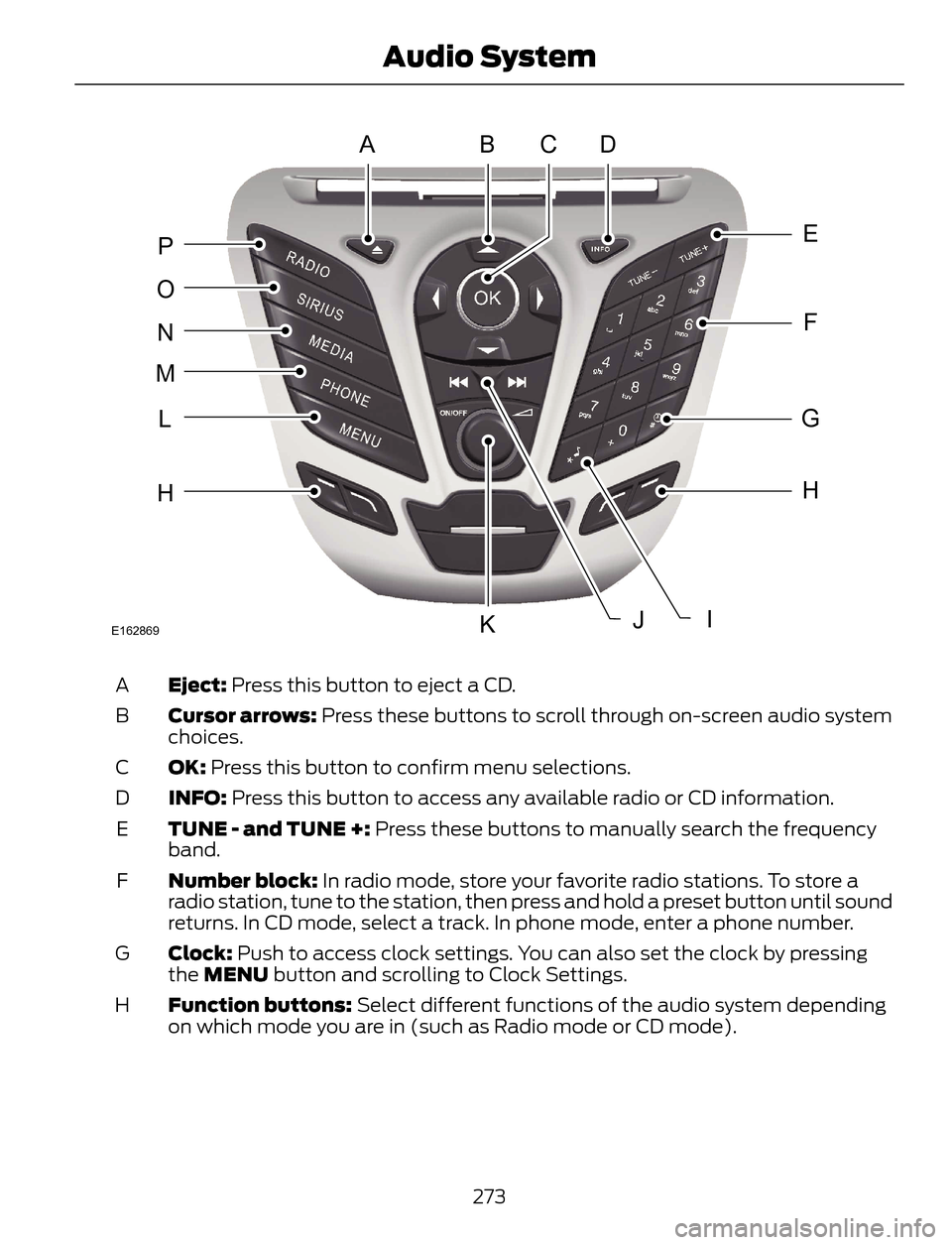
Eject: Press this button to eject a CD. A
Cursor arrows: Press these buttons to scroll through on-screen audio system
choices. B
OK: Press this button to confirm menu selections. C
INFO: Press this button to access any available radio or CD information. D
TUNE - and TUNE +: Press these buttons to manually search the frequency
band. E
Number block: In radio mode, store your favorite radio stations. To store a
radio station, tune to the station, then press and hold a preset button until sound
returns. In CD mode, select a track. In phone mode, enter a phone number. F
Clock: Push to access clock settings. You can also set the clock by pressing
the MENU button and scrolling to Clock Settings. G
Function buttons: Select different functions of the audio system depending
on which mode you are in (such as Radio mode or CD mode). H
273
Audio System
Page 282 of 428
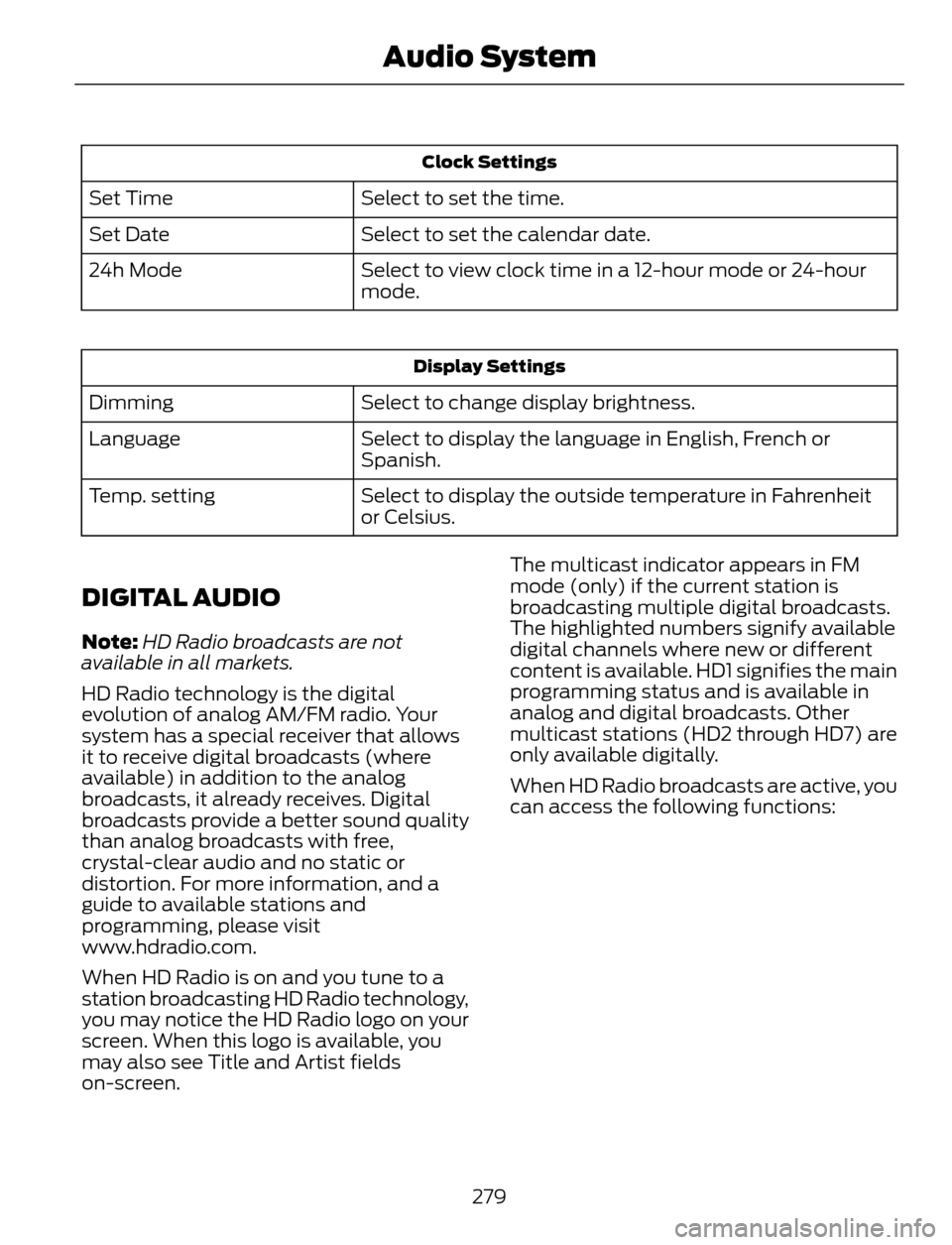
Clock Settings
Select to set the time. Set Time
Select to set the calendar date. Set Date
Select to view clock time in a 12-hour mode or 24-hour
mode. 24h Mode
Display Settings
Select to change display brightness. Dimming
Select to display the language in English, French or
Spanish. Language
Select to display the outside temperature in Fahrenheit
or Celsius. Temp. setting
DIGITAL AUDIO
Note:HD Radio broadcasts are not
available in all markets.
HD Radio technology is the digital
evolution of analog AM/FM radio. Your
system has a special receiver that allows
it to receive digital broadcasts (where
available) in addition to the analog
broadcasts, it already receives. Digital
broadcasts provide a better sound quality
than analog broadcasts with free,
crystal-clear audio and no static or
distortion. For more information, and a
guide to available stations and
programming, please visit
www.hdradio.com.
When HD Radio is on and you tune to a
station broadcasting HD Radio technology,
you may notice the HD Radio logo on your
screen. When this logo is available, you
may also see Title and Artist fields
on-screen.The multicast indicator appears in FM
mode (only) if the current station is
broadcasting multiple digital broadcasts.
The highlighted numbers signify available
digital channels where new or different
content is available. HD1 signifies the main
programming status and is available in
analog and digital broadcasts. Other
multicast stations (HD2 through HD7) are
only available digitally.
When HD Radio broadcasts are active, you
can access the following functions:
279
Audio System
Page 324 of 428
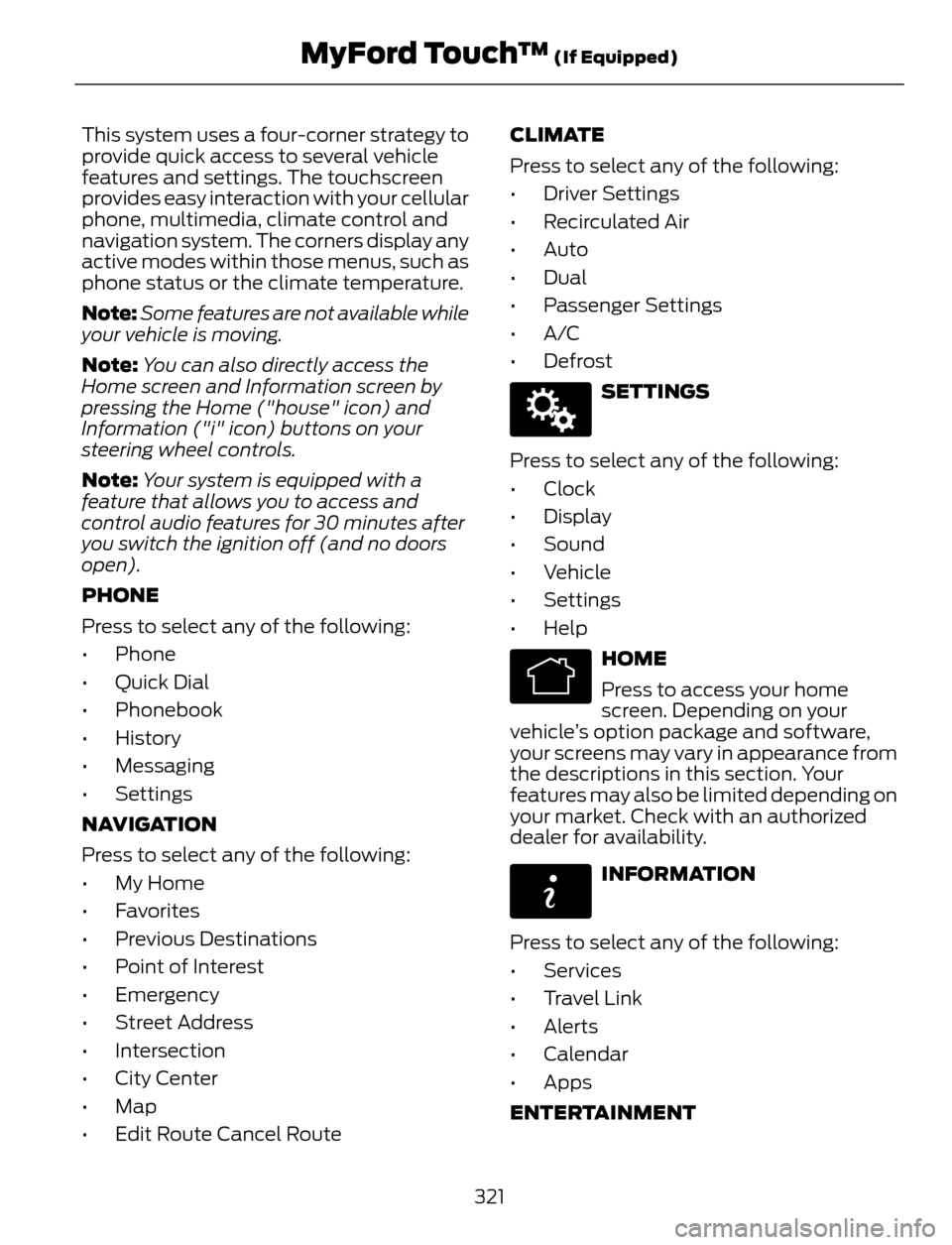
This system uses a four-corner strategy to
provide quick access to several vehicle
features and settings. The touchscreen
provides easy interaction with your cellular
phone, multimedia, climate control and
navigation system. The corners display any
active modes within those menus, such as
phone status or the climate temperature.
Note:Some features are not available while
your vehicle is moving.
Note:You can also directly access the
Home screen and Information screen by
pressing the Home ("house" icon) and
Information ("i" icon) buttons on your
steering wheel controls.
Note:Your system is equipped with a
feature that allows you to access and
control audio features for 30 minutes after
you switch the ignition off (and no doors
open).
PHONE
Press to select any of the following:
• Phone
• Quick Dial
• Phonebook
• History
• Messaging
• Settings
NAVIGATION
Press to select any of the following:
• My Home
• Favorites
• Previous Destinations
• Point of Interest
• Emergency
• Street Address
• Intersection
• City Center
• Map
• Edit Route Cancel RouteCLIMATE
Press to select any of the following:
• Driver Settings
• Recirculated Air
• Auto
•Dual
• Passenger Settings
•A/C
•Defrost
E142607
SETTINGS
Press to select any of the following:
• Clock
• Display
• Sound
• Vehicle
• Settings
• Help
E142613
HOME
Press to access your home
screen. Depending on your
vehicle’s option package and software,
your screens may vary in appearance from
the descriptions in this section. Your
features may also be limited depending on
your market. Check with an authorized
dealer for availability.
E142608
INFORMATION
Press to select any of the following:
• Services
• Travel Link
• Alerts
• Calendar
• Apps
ENTERTAINMENT
321
MyFord Touch™ (If Equipped)
Page 330 of 428
Voice settings using voice commands
"Interaction mode novice"
"Media candidate lists off"
"Media candidate lists on"
"Phone candidate lists off"
"Phone candidate lists on"
"Help"Using Voice Commands with the
Touchscreen Options
Your voice system has a dual mode feature
which allows you to switch between using
voice commands and making on-screen
selections. This is available only when the
system displays a list of candidates
generated during a voice session. For
example, when entering in a street address
or trying to call a contact from the phone
you paired to the system.
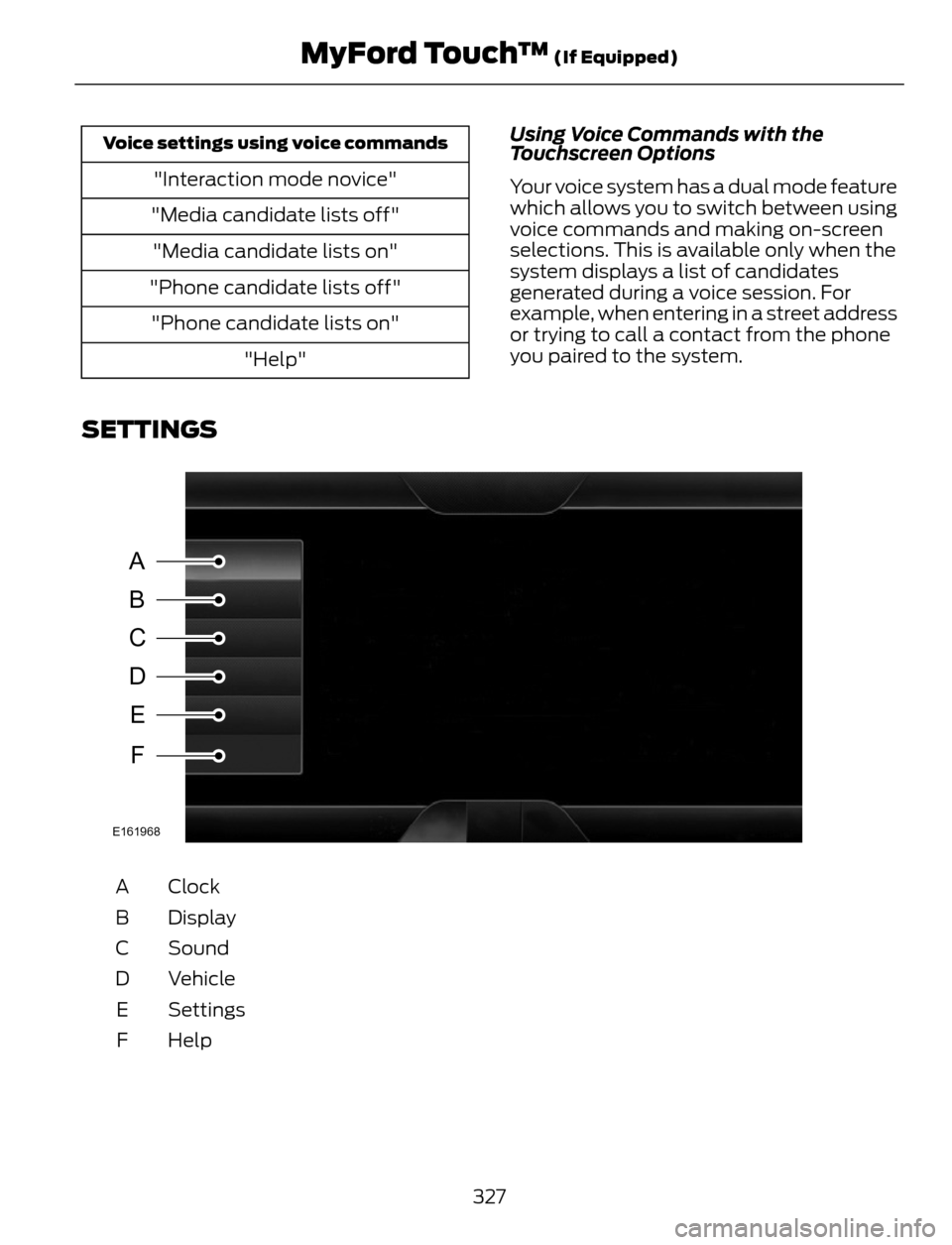
SETTINGS
A
B
C
D
E
F
E161968
Clock A
Display B
Sound C
Vehicle D
Settings E
Help F
327
MyFord Touch™ (If Equipped)
Page 331 of 428
E142607
Under this menu, you can set
your clock, access and adjust the
display, sound and vehicle
settings as well as access settings for
specific modes or the help feature.
Clock
Note:You cannot manually set the date.
Your vehicle’s GPS does this for you.
Note:If the battery has been disconnected,
your vehicle needs to acquire a GPS signal
to update the clock. Once your vehicle
acquires the signal, it may take a few
minutes for the update to display the correct
time.
E142607
1. Press the Settings icon > Clock.
2. Press + and - to adjust the time.
From this screen, you can also make other
adjustments such as 12-hour or 24-hour
mode, activate GPS time synchronization
and have the system automatically update
new time zones.
You can also turn the outside air
temperature display off and on. It appears
at the top center of the touchscreen, next
to the time and date.
The system automatically saves any
updates you make to the settings.
Display
You can adjust the touchscreen display
through the touchscreen or by pressing the
voice button on your steering wheel
controls and when prompted, say, "Display
settings".
E142607
Press the Settings icon >
Display, to access and make
adjustments using the
touchscreen.•Brightness allows you to make the
screen display brighter or dimmer.
•Auto DIM, when set to On, lets you use
the Auto Dim Manual Offset feature.
•Mode allows you to set the screen to
a certain brightness or have the system
automatically change based on the
outside light level, or turn the display
off.
• If you select AUTO or NIGHT, you
have the options of turning the
display's Auto Dim feature on or off
and changing the Auto Dim Manual
Offset feature.
•Auto Dim Manual Offset allows you
to adjust screen dimming as the
outside lighting conditions change from
day to night.
•Edit Wallpaper
• You can have your touchscreen
display the default photo or upload
your own.
Uploading Photos for Your Home
Screen Wallpaper
Note:You cannot load photos directly from
your camera. You must access the photos
either from your USB mass storage device
or from an SD card.
Note:Photographs with extremely large
dimensions (such as 2048 x 1536) may not
be compatible and appear as a blank
(black) image on the display.
Your system allows you to upload and view
up to 32 photos.
E142607
To access, press the Settings
icon > Display > Edit
Wallpaper, and then follow the
system prompts to upload your
photographs.
328
MyFord Touch™ (If Equipped)
Page 425 of 428
Safety Belts......................................................26Principle of Operation........................................26Safety Belt Warning Lamp and Indicator
Chime..............................................................30
Conditions of operation.....................................30Safety Canopy™.............................................41
Safety Precautions.......................................128
Satellite Radio...............................................281
Satellite Radio Electronic Serial Number
(ESN).................................................................282
Satellite Radio Reception Factors...............282
SIRIUS® Satellite Radio Service..................282
Troubleshooting.................................................283
Scheduled Maintenance Record..........408
Scheduled Maintenance..........................400
Seats.................................................................109
Security..............................................................64
Settings............................................................327
Clock.......................................................................328
Display...................................................................328
Settings.................................................................329
Sound.....................................................................329
Vehicle...................................................................329
Side Airbags.....................................................40
Sitting in the Correct Position.................109
Snow Chains
See: Using Snow Chains.................................250Special Notices................................................12New Vehicle Limited Warranty.........................12
Notice to Owners of Pickup Trucks and
Utility Type Vehicles........................................12
Special Instructions..............................................12
Using Your Vehicle as an Ambulance............12
Using Your Vehicle With a Snowplow............12
Special Operating Conditions Scheduled
Maintenance..............................................406
Speed Control
See: Cruise Control............................................159Stability Control............................................148Principle of Operation.......................................148Starter SwitchSee: Ignition Switch............................................123
Starting a Gasoline Engine........................124Failure to Start.....................................................125
Guarding Against Exhaust Fumes................126
Important Ventilating Information...............126
Stopping the Engine When Your Vehicle is
Moving................................................................126
Stopping the Engine When Your Vehicle is
Stationary.........................................................125
Vehicles with an Ignition Key..........................124
Vehicles with Keyless Start.............................124
Starting and Stopping the Engine..........123General Information...........................................123Steering............................................................164Electric Power Steering....................................164Steering Wheel...............................................66
Storage Compartments.............................122
Sunroof
See: Moonroof........................................................81Sun Visors..........................................................81Illuminated Vanity Mirror....................................81Supplementary Restraints System.........35Principle of Operation.........................................35Symbols Glossary.............................................7
SYNC™ Applications and Services.......301
911 Assist................................................................301
SYNC Services: Traffic, Directions &
Information (TDI).........................................304
Vehicle Health Report......................................303
SYNC™...........................................................286General Information.........................................286SYNC™ Troubleshooting..........................314
T
Technical SpecificationsSee: Capacities and Specifications.............261The Better Business Bureau (BBB) Auto
Line Program (U.S. Only)........................192
Tire Care..........................................................236
Glossary of Tire Terminology.........................237
Information About Uniform Tire Quality
Grading.............................................................236
Information Contained on the Tire
Sidewall............................................................238
Temperature A B C.............................................237
Traction AA A B C...............................................236
Treadwear............................................................236
422
Index