lights FORD ESCAPE 2014 3.G User Guide
[x] Cancel search | Manufacturer: FORD, Model Year: 2014, Model line: ESCAPE, Model: FORD ESCAPE 2014 3.GPages: 428, PDF Size: 16.6 MB
Page 165 of 428
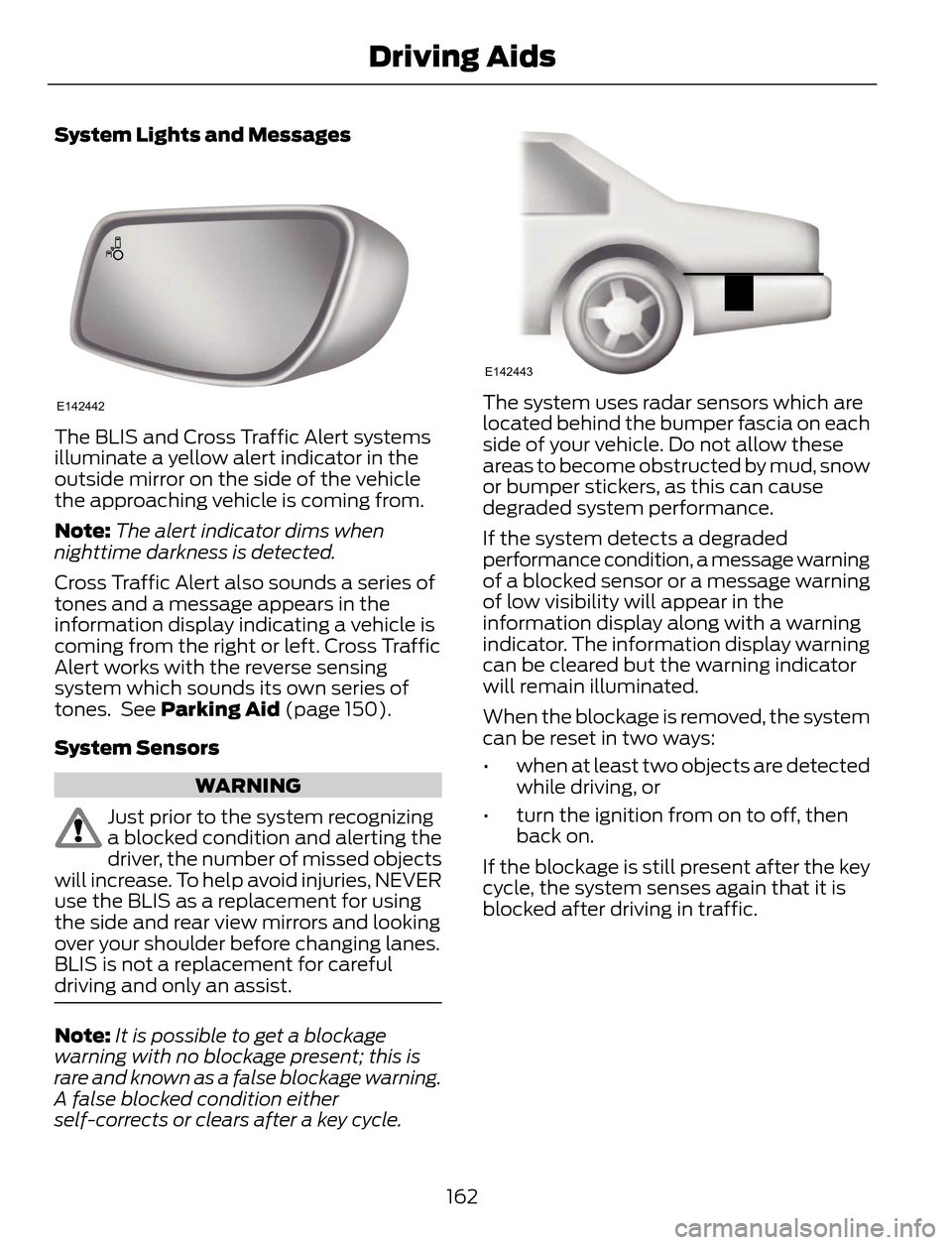
System Lights and Messages
E142442
The BLIS and Cross Traffic Alert systems
illuminate a yellow alert indicator in the
outside mirror on the side of the vehicle
the approaching vehicle is coming from.
Note:The alert indicator dims when
nighttime darkness is detected.
Cross Traffic Alert also sounds a series of
tones and a message appears in the
information display indicating a vehicle is
coming from the right or left. Cross Traffic
Alert works with the reverse sensing
system which sounds its own series of
tones. See Parking Aid (page 150).
System Sensors
WARNING
Just prior to the system recognizing
a blocked condition and alerting the
driver, the number of missed objects
will increase. To help avoid injuries, NEVER
use the BLIS as a replacement for using
the side and rear view mirrors and looking
over your shoulder before changing lanes.
BLIS is not a replacement for careful
driving and only an assist.
Note:It is possible to get a blockage
warning with no blockage present; this is
rare and known as a false blockage warning.
A false blocked condition either
self-corrects or clears after a key cycle.
E142443
The system uses radar sensors which are
located behind the bumper fascia on each
side of your vehicle. Do not allow these
areas to become obstructed by mud, snow
or bumper stickers, as this can cause
degraded system performance.
If the system detects a degraded
performance condition, a message warning
of a blocked sensor or a message warning
of low visibility will appear in the
information display along with a warning
indicator. The information display warning
can be cleared but the warning indicator
will remain illuminated.
When the blockage is removed, the system
can be reset in two ways:
• when at least two objects are detected
while driving, or
• turn the ignition from on to off, then
back on.
If the blockage is still present after the key
cycle, the system senses again that it is
blocked after driving in traffic.
162
Driving Aids
Page 182 of 428
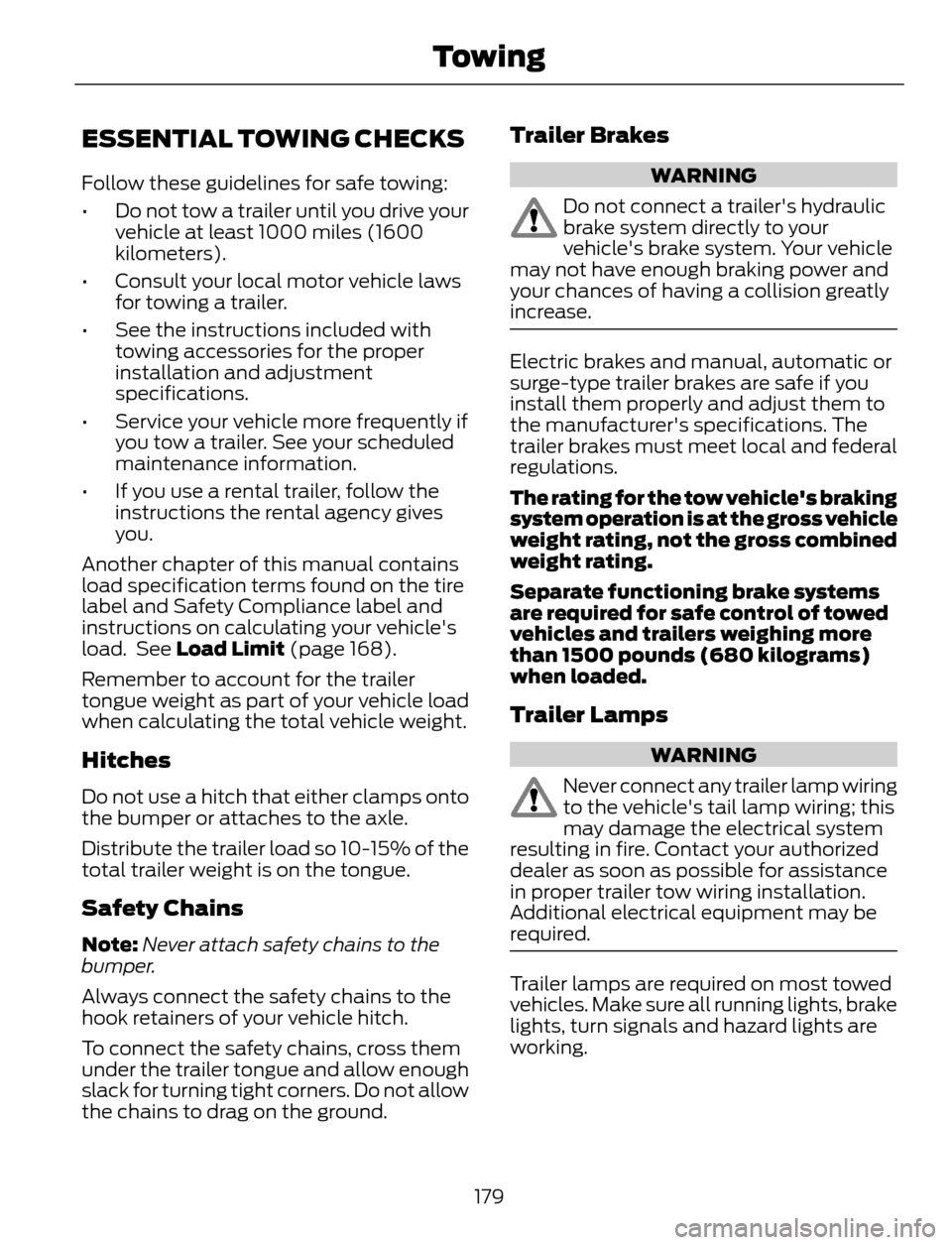
ESSENTIAL TOWING CHECKS
Follow these guidelines for safe towing:
• Do not tow a trailer until you drive your
vehicle at least 1000 miles (1600
kilometers).
• Consult your local motor vehicle laws
for towing a trailer.
• See the instructions included with
towing accessories for the proper
installation and adjustment
specifications.
• Service your vehicle more frequently if
you tow a trailer. See your scheduled
maintenance information.
• If you use a rental trailer, follow the
instructions the rental agency gives
you.
Another chapter of this manual contains
load specification terms found on the tire
label and Safety Compliance label and
instructions on calculating your vehicle's
load. See Load Limit (page 168).
Remember to account for the trailer
tongue weight as part of your vehicle load
when calculating the total vehicle weight.
Hitches
Do not use a hitch that either clamps onto
the bumper or attaches to the axle.
Distribute the trailer load so 10-15% of the
total trailer weight is on the tongue.
Safety Chains
Note:Never attach safety chains to the
bumper.
Always connect the safety chains to the
hook retainers of your vehicle hitch.
To connect the safety chains, cross them
under the trailer tongue and allow enough
slack for turning tight corners. Do not allow
the chains to drag on the ground.
Trailer Brakes
WARNING
Do not connect a trailer's hydraulic
brake system directly to your
vehicle's brake system. Your vehicle
may not have enough braking power and
your chances of having a collision greatly
increase.
Electric brakes and manual, automatic or
surge-type trailer brakes are safe if you
install them properly and adjust them to
the manufacturer's specifications. The
trailer brakes must meet local and federal
regulations.
The rating for the tow vehicle's braking
system operation is at the gross vehicle
weight rating, not the gross combined
weight rating.
Separate functioning brake systems
are required for safe control of towed
vehicles and trailers weighing more
than 1500 pounds (680 kilograms)
when loaded.
Trailer Lamps
WARNING
Never connect any trailer lamp wiring
to the vehicle's tail lamp wiring; this
may damage the electrical system
resulting in fire. Contact your authorized
dealer as soon as possible for assistance
in proper trailer tow wiring installation.
Additional electrical equipment may be
required.
Trailer lamps are required on most towed
vehicles. Make sure all running lights, brake
lights, turn signals and hazard lights are
working.
179
Towing
Page 229 of 428
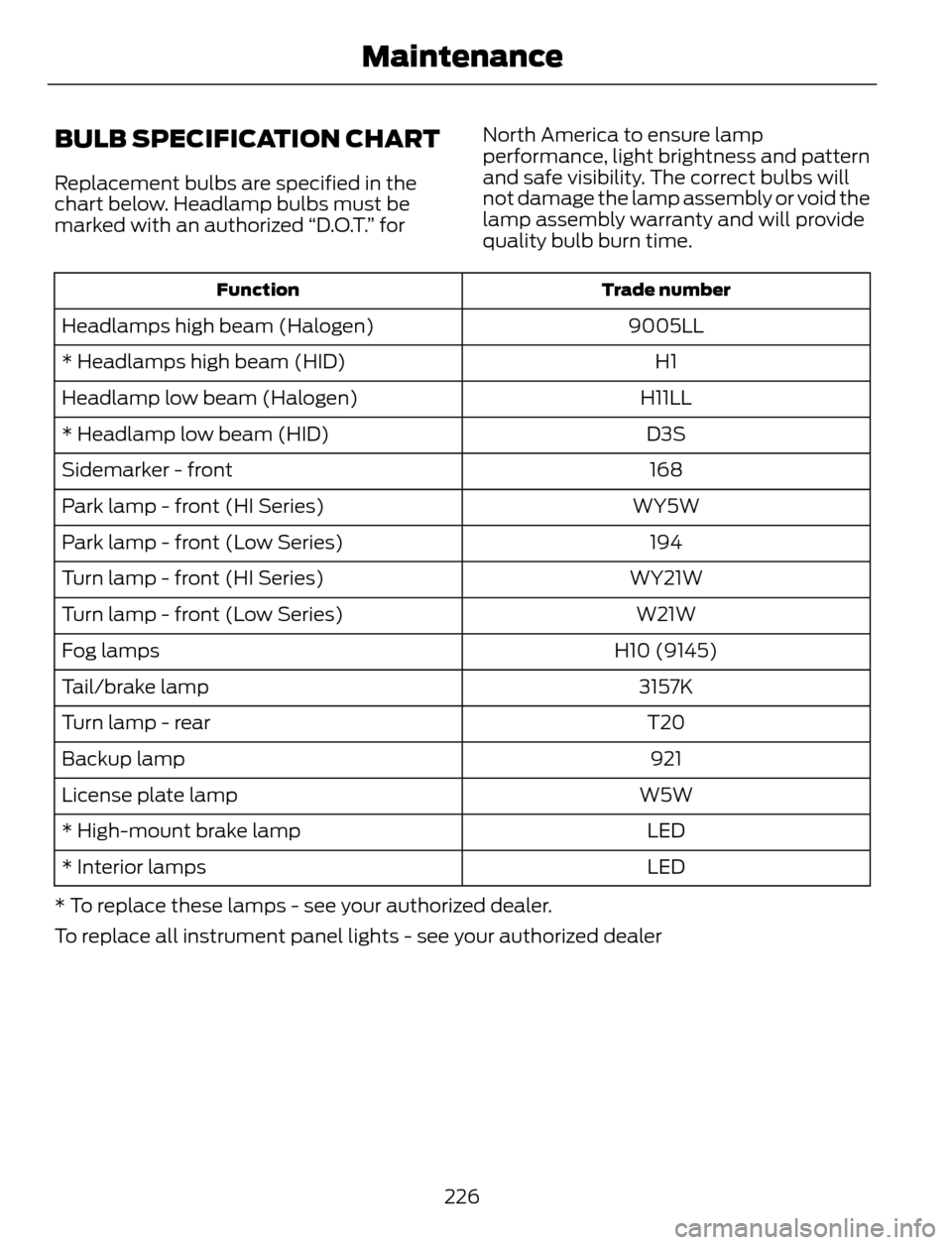
BULB SPECIFICATION CHART
Replacement bulbs are specified in the
chart below. Headlamp bulbs must be
marked with an authorized “D.O.T.” forNorth America to ensure lamp
performance, light brightness and pattern
and safe visibility. The correct bulbs will
not damage the lamp assembly or void the
lamp assembly warranty and will provide
quality bulb burn time.
Trade number Function
9005LL Headlamps high beam (Halogen)
H1 * Headlamps high beam (HID)
H11LL Headlamp low beam (Halogen)
D3S * Headlamp low beam (HID)
168 Sidemarker - front
WY5W Park lamp - front (HI Series)
194 Park lamp - front (Low Series)
WY21W Turn lamp - front (HI Series)
W21W Turn lamp - front (Low Series)
H10 (9145) Fog lamps
3157K Tail/brake lamp
T20 Turn lamp - rear
921 Backup lamp
W5W License plate lamp
LED * High-mount brake lamp
LED * Interior lamps
* To replace these lamps - see your authorized dealer.
To replace all instrument panel lights - see your authorized dealer
226
Maintenance
Page 405 of 428
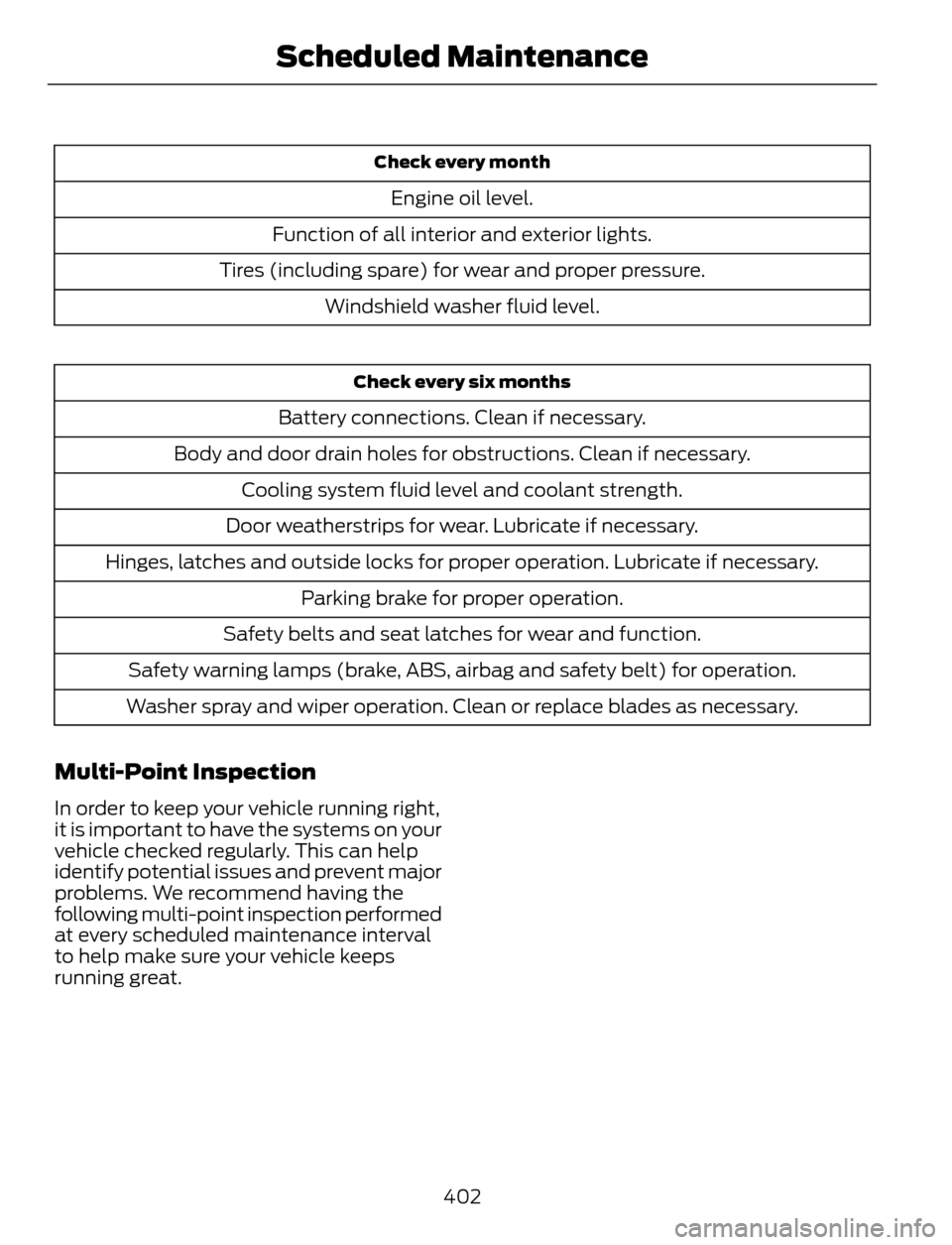
Check every month
Engine oil level.
Function of all interior and exterior lights.
Tires (including spare) for wear and proper pressure.
Windshield washer fluid level.
Check every six months
Battery connections. Clean if necessary.
Body and door drain holes for obstructions. Clean if necessary.
Cooling system fluid level and coolant strength.
Door weatherstrips for wear. Lubricate if necessary.
Hinges, latches and outside locks for proper operation. Lubricate if necessary.
Parking brake for proper operation.
Safety belts and seat latches for wear and function.
Safety warning lamps (brake, ABS, airbag and safety belt) for operation.
Washer spray and wiper operation. Clean or replace blades as necessary.
Multi-Point Inspection
In order to keep your vehicle running right,
it is important to have the systems on your
vehicle checked regularly. This can help
identify potential issues and prevent major
problems. We recommend having the
following multi-point inspection performed
at every scheduled maintenance interval
to help make sure your vehicle keeps
running great.
402
Scheduled Maintenance
Page 426 of 428
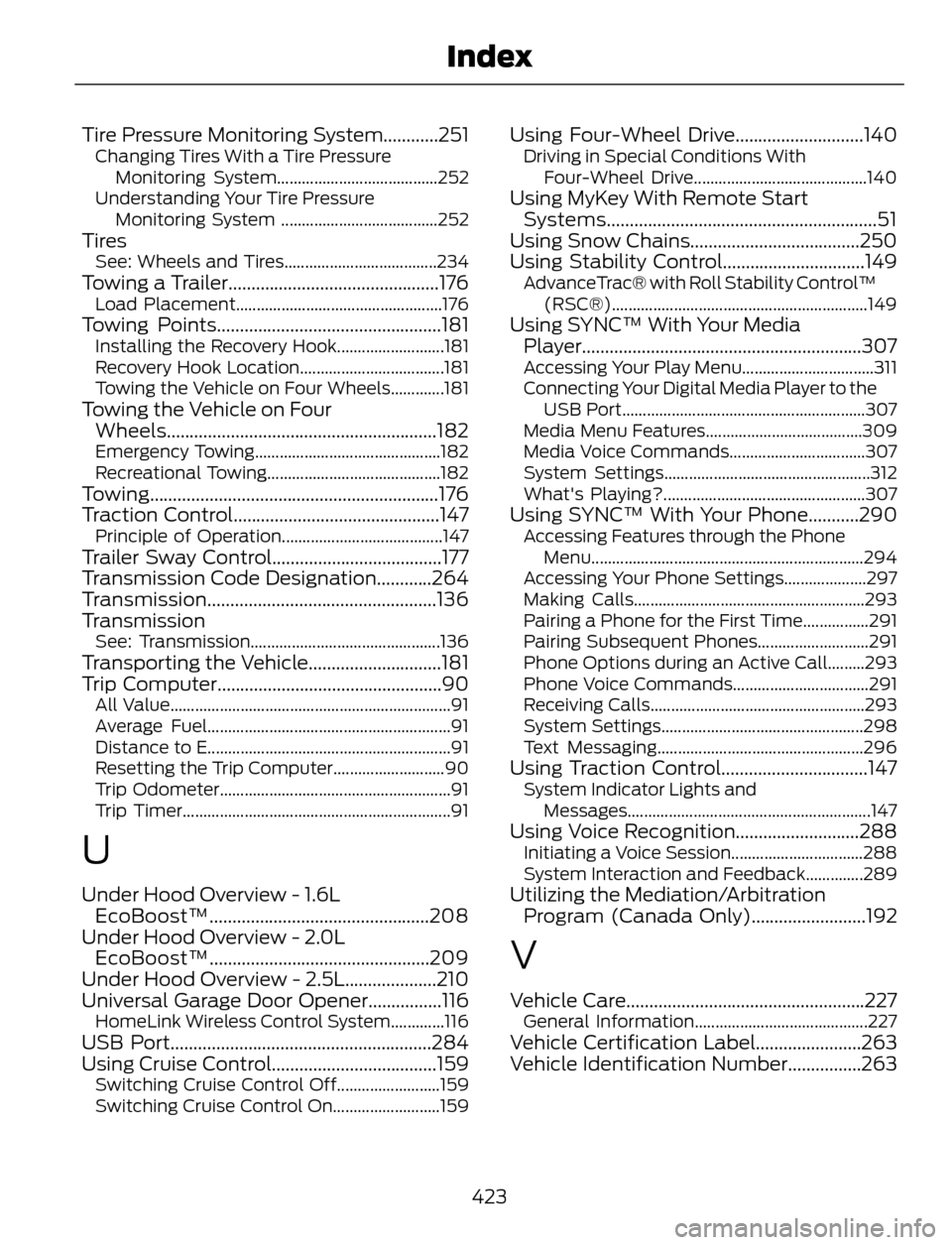
Tire Pressure Monitoring System............251Changing Tires With a Tire Pressure
Monitoring System.......................................252
Understanding Your Tire Pressure
Monitoring System ......................................252
TiresSee: Wheels and Tires.....................................234Towing a Trailer..............................................176Load Placement..................................................176Towing Points.................................................181Installing the Recovery Hook..........................181
Recovery Hook Location...................................181
Towing the Vehicle on Four Wheels.............181
Towing the Vehicle on Four
Wheels...........................................................182
Emergency Towing.............................................182
Recreational Towing..........................................182
Towing...............................................................176
Traction Control.............................................147
Principle of Operation.......................................147Trailer Sway Control.....................................177
Transmission Code Designation............264
Transmission..................................................136
Transmission
See: Transmission..............................................136Transporting the Vehicle.............................181
Trip Computer.................................................90
All Value....................................................................91
Average Fuel...........................................................91
Distance to E...........................................................91
Resetting the Trip Computer...........................90
Trip Odometer........................................................91
Trip Timer.................................................................91
U
Under Hood Overview - 1.6L
EcoBoost™................................................208
Under Hood Overview - 2.0L
EcoBoost™................................................209
Under Hood Overview - 2.5L....................210
Universal Garage Door Opener................116
HomeLink Wireless Control System.............116USB Port.........................................................284
Using Cruise Control....................................159
Switching Cruise Control Off.........................159
Switching Cruise Control On..........................159
Using Four-Wheel Drive............................140Driving in Special Conditions With
Four-Wheel Drive..........................................140
Using MyKey With Remote Start
Systems...........................................................51
Using Snow Chains.....................................250
Using Stability Control...............................149
AdvanceTrac® with Roll Stability Control™
(RSC®)..............................................................149
Using SYNC™ With Your Media
Player.............................................................307
Accessing Your Play Menu................................311
Connecting Your Digital Media Player to the
USB Port...........................................................307
Media Menu Features......................................309
Media Voice Commands.................................307
System Settings..................................................312
What's Playing?.................................................307
Using SYNC™ With Your Phone...........290Accessing Features through the Phone
Menu..................................................................294
Accessing Your Phone Settings....................297
Making Calls........................................................293
Pairing a Phone for the First Time................291
Pairing Subsequent Phones...........................291
Phone Options during an Active Call.........293
Phone Voice Commands.................................291
Receiving Calls....................................................293
System Settings.................................................298
Text Messaging..................................................296
Using Traction Control................................147System Indicator Lights and
Messages...........................................................147
Using Voice Recognition...........................288Initiating a Voice Session................................288
System Interaction and Feedback..............289
Utilizing the Mediation/Arbitration
Program (Canada Only).........................192
V
Vehicle Care....................................................227General Information..........................................227Vehicle Certification Label.......................263
Vehicle Identification Number................263
423
Index