set phone FORD ESCAPE 2014 3.G User Guide
[x] Cancel search | Manufacturer: FORD, Model Year: 2014, Model line: ESCAPE, Model: FORD ESCAPE 2014 3.GPages: 428, PDF Size: 16.6 MB
Page 294 of 428
Pairing a Phone for the First Time
Note:SYNC can support downloading up
to approximately 1000 entries per
Bluetooth-enabled cellular phone.
Note:Make sure to switch on the ignition
and the radio. Put the transmission in
position P.
Note:To scroll through the menus, press
the up and down arrows on your audio
system.
Wirelessly pairing your phone with SYNC
allows you to make and receive hands-free
calls.
1. Press the phone button. When the
display indicates there is no phone
paired, press OK.
2. When Find SYNC appears in the
display, press OK.
3. Put your phone into Bluetooth
discovery mode. See your device's
manual if necessary.
4. When prompted on your phone's
display, enter the six-digit PIN provided
by SYNC in the radio display. The
display indicates when the pairing is
successful.
Depending on your phone's capability and
your market, the system may prompt you
with questions, such as setting the current
phone as the primary phone (the phone
SYNC automatically tries to connect with
first upon vehicle start-up) and
downloading your phonebook.
Pairing Subsequent Phones
Note:Make sure to switch on the ignition
and the radio. Put the transmission in
position P.
Note:To scroll through the menus, press
the up and down arrows on your audio
system.1. Press the phone button, and then scroll
to System Settings. Press OK.
2. Scroll to Bluetooth Devices. Press OK.
3. Scroll to Add Bluetooth Device. Press
OK.
4. When Find SYNC appears in the
display, press OK.
5. Put your phone into Bluetooth
discovery mode. See your phone's
manual if necessary.
6. When prompted on your phone's
display, enter the six-digit PIN provided
by SYNC in the radio display. The
display indicates when the pairing is
successful.
The system then prompts with questions,
such as if you would like to set the current
phone as the primary phone (the phone
SYNC automatically tries to connect with
first upon vehicle start-up) and download
your phone book.
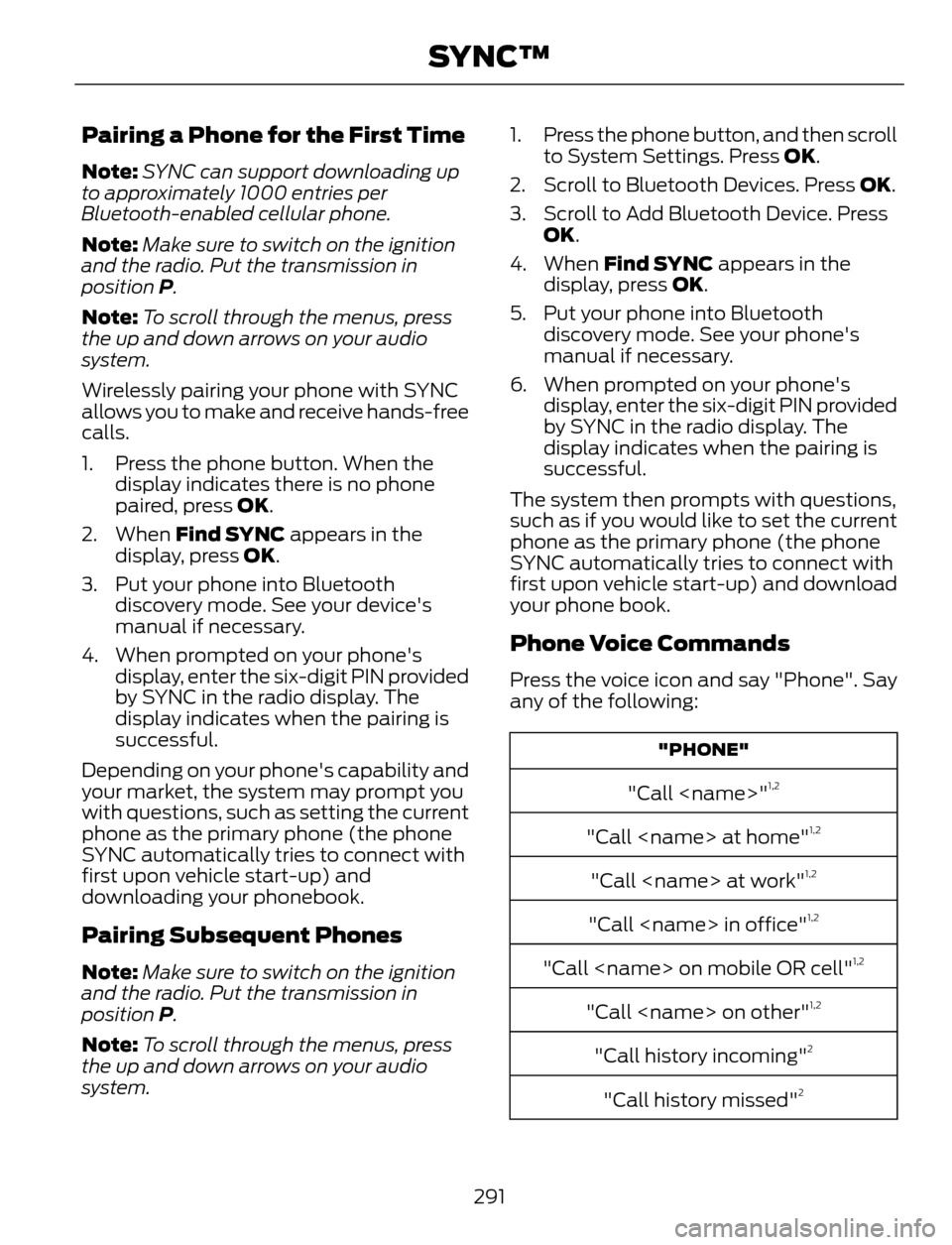
Phone Voice Commands
Press the voice icon and say "Phone". Say
any of the following:
"PHONE"
"Call
"Call
"Call
"Call
"Call
"Call
"Call history incoming"2
"Call history missed"2
291
SYNC™
Page 295 of 428
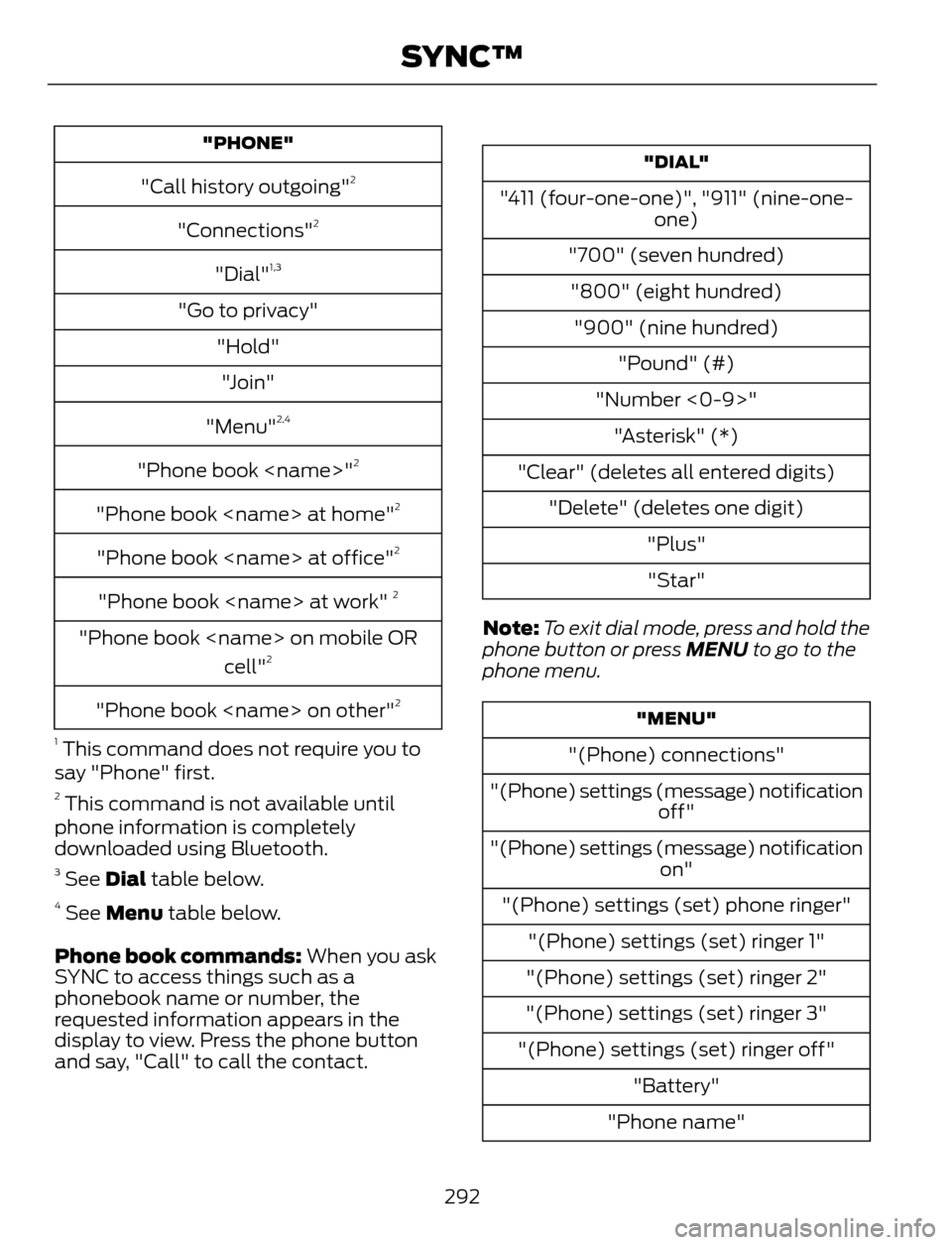
"PHONE"
"Call history outgoing"2
"Connections"2
"Dial"1,3
"Go to privacy"
"Hold"
"Join"
"Menu"
2,4
"Phone book
"Phone book
"Phone book
"Phone book
"Phone book
cell"2
"Phone book
1
This command does not require you to
say "Phone" first.
2 This command is not available until
phone information is completely
downloaded using Bluetooth.
3 See Dial table below.4 See Menu table below.
Phone book commands: When you ask
SYNC to access things such as a
phonebook name or number, the
requested information appears in the
display to view. Press the phone button
and say, "Call" to call the contact.
"DIAL"
"411 (four-one-one)", "911" (nine-one-
one)
"700" (seven hundred)
"800" (eight hundred)
"900" (nine hundred)
"Pound" (#)
"Number <0-9>"
"Asterisk" (*)
"Clear" (deletes all entered digits)
"Delete" (deletes one digit)
"Plus"
"Star"
Note:To exit dial mode, press and hold the
phone button or press MENU to go to the
phone menu.
"MENU"
"(Phone) connections"
"(Phone) settings (message) notification
off"
"(Phone) settings (message) notification
on"
"(Phone) settings (set) phone ringer"
"(Phone) settings (set) ringer 1"
"(Phone) settings (set) ringer 2"
"(Phone) settings (set) ringer 3"
"(Phone) settings (set) ringer off"
"Battery"
"Phone name"
292
SYNC™
Page 297 of 428
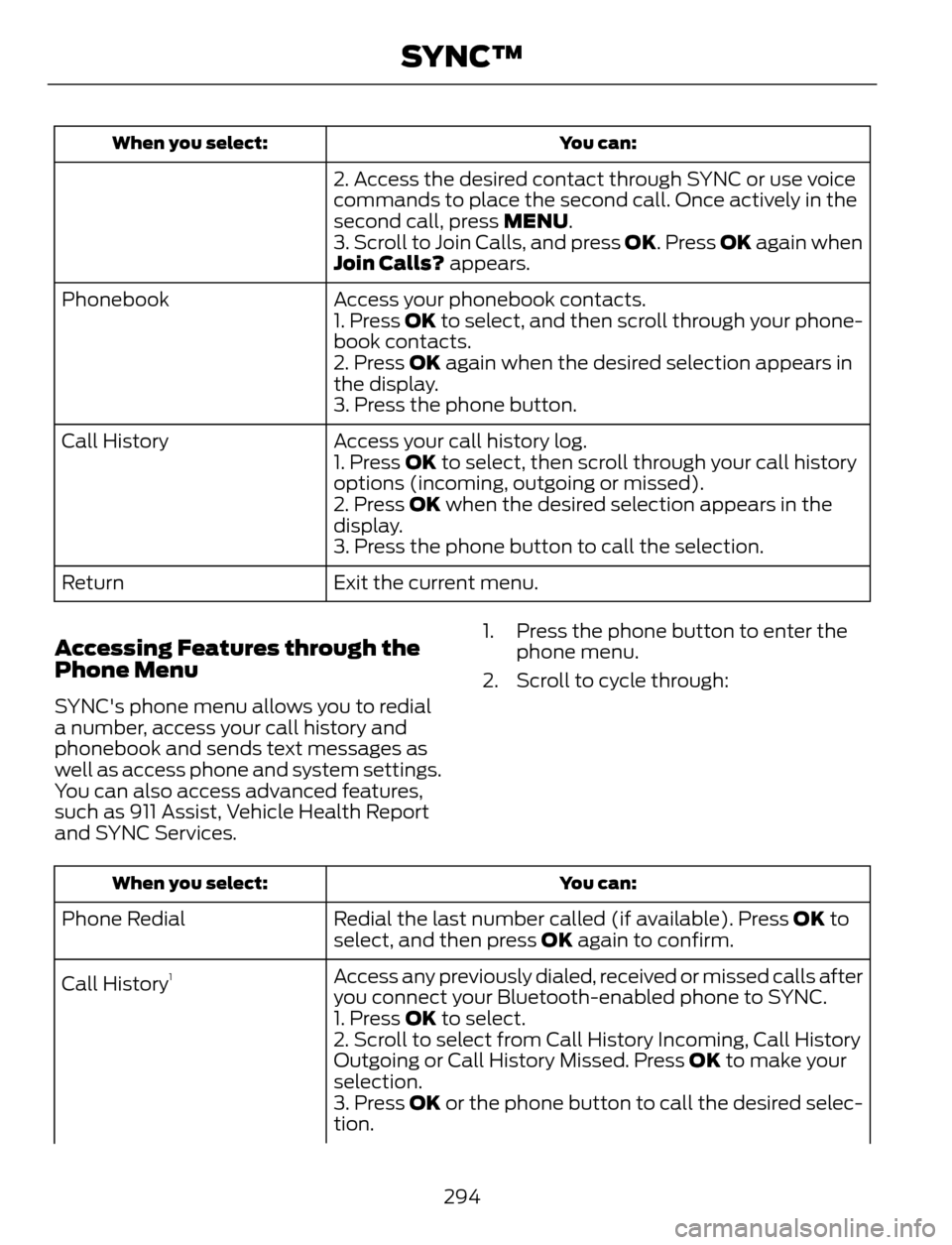
You can: When you select:
2. Access the desired contact through SYNC or use voice
commands to place the second call. Once actively in the
second call, press MENU.
3. Scroll to Join Calls, and press OK. Press OK again when
Join Calls? appears.
Access your phonebook contacts. Phonebook
1. Press OK to select, and then scroll through your phone-
book contacts.
2. Press OK again when the desired selection appears in
the display.
3. Press the phone button.
Access your call history log. Call History
1. Press OK to select, then scroll through your call history
options (incoming, outgoing or missed).
2. Press OK when the desired selection appears in the
display.
3. Press the phone button to call the selection.
Exit the current menu. Return
Accessing Features through the
Phone Menu
SYNC's phone menu allows you to redial
a number, access your call history and
phonebook and sends text messages as
well as access phone and system settings.
You can also access advanced features,
such as 911 Assist, Vehicle Health Report
and SYNC Services.1. Press the phone button to enter the
phone menu.
2. Scroll to cycle through:
You can: When you select:
Redial the last number called (if available). Press OK to
select, and then press OK again to confirm. Phone Redial
Access any previously dialed, received or missed calls after
you connect your Bluetooth-enabled phone to SYNC. Call History
1
1. Press OK to select.
2. Scroll to select from Call History Incoming, Call History
Outgoing or Call History Missed. Press OK to make your
selection.
3. Press OK or the phone button to call the desired selec-
tion.
294
SYNC™
Page 298 of 428
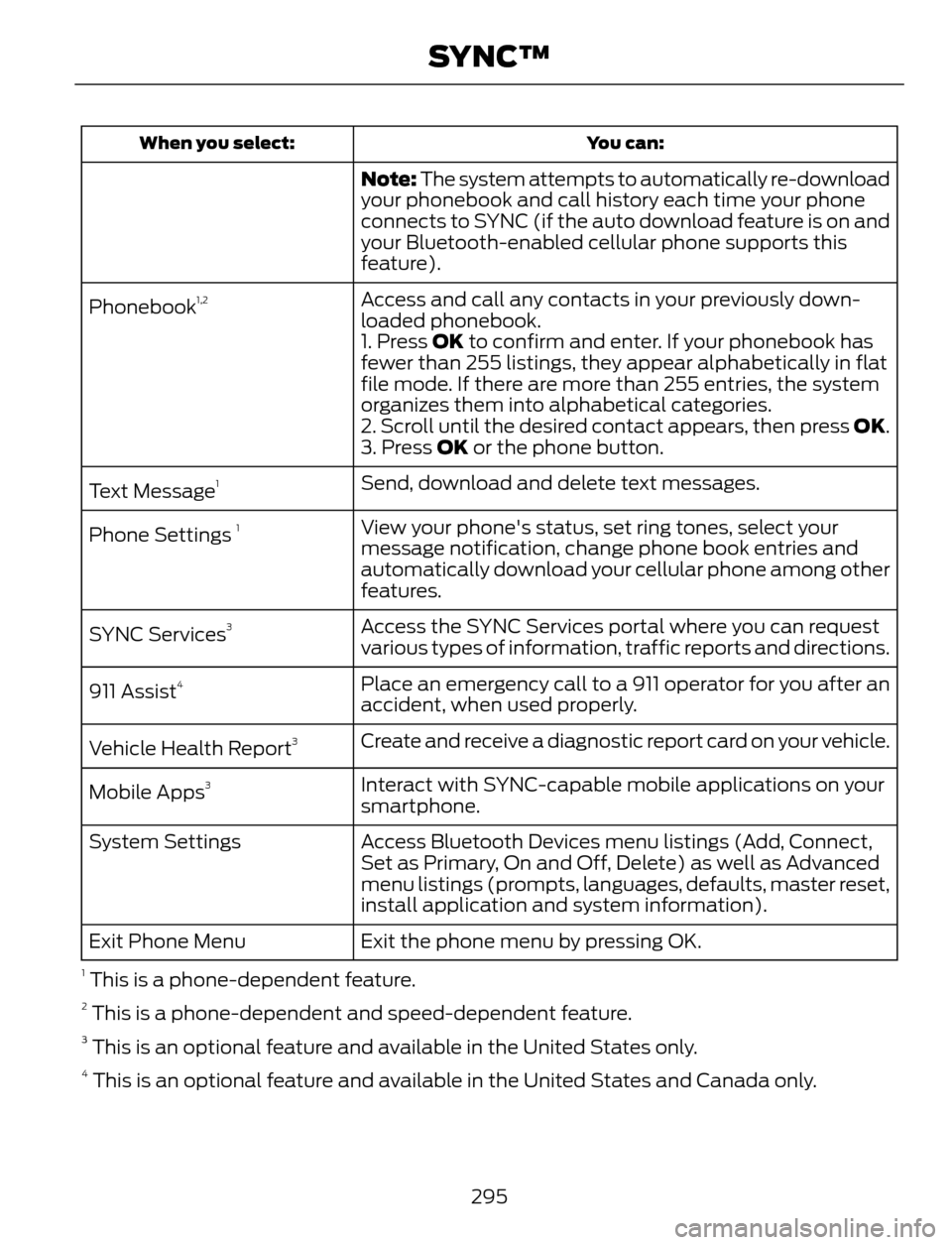
You can: When you select:
Note: The system attempts to automatically re-download
your phonebook and call history each time your phone
connects to SYNC (if the auto download feature is on and
your Bluetooth-enabled cellular phone supports this
feature).
Access and call any contacts in your previously down-
loaded phonebook. Phonebook
1,2
1. Press OK to confirm and enter. If your phonebook has
fewer than 255 listings, they appear alphabetically in flat
file mode. If there are more than 255 entries, the system
organizes them into alphabetical categories.
2. Scroll until the desired contact appears, then press OK.
3. Press OK or the phone button.
Send, download and delete text messages.
Text Message
1
View your phone's status, set ring tones, select your
message notification, change phone book entries and
automatically download your cellular phone among other
features. Phone Settings 1
Access the SYNC Services portal where you can request
various types of information, traffic reports and directions. SYNC Services3
Place an emergency call to a 911 operator for you after an
accident, when used properly. 911 Assist4
Create and receive a diagnostic report card on your vehicle.
Vehicle Health Report3
Interact with SYNC-capable mobile applications on your
smartphone. Mobile Apps3
Access Bluetooth Devices menu listings (Add, Connect,
Set as Primary, On and Off, Delete) as well as Advanced
menu listings (prompts, languages, defaults, master reset,
install application and system information). System Settings
Exit the phone menu by pressing OK. Exit Phone Menu
1 This is a phone-dependent feature.2 This is a phone-dependent and speed-dependent feature.3 This is an optional feature and available in the United States only.4 This is an optional feature and available in the United States and Canada only.
295
SYNC™
Page 299 of 428
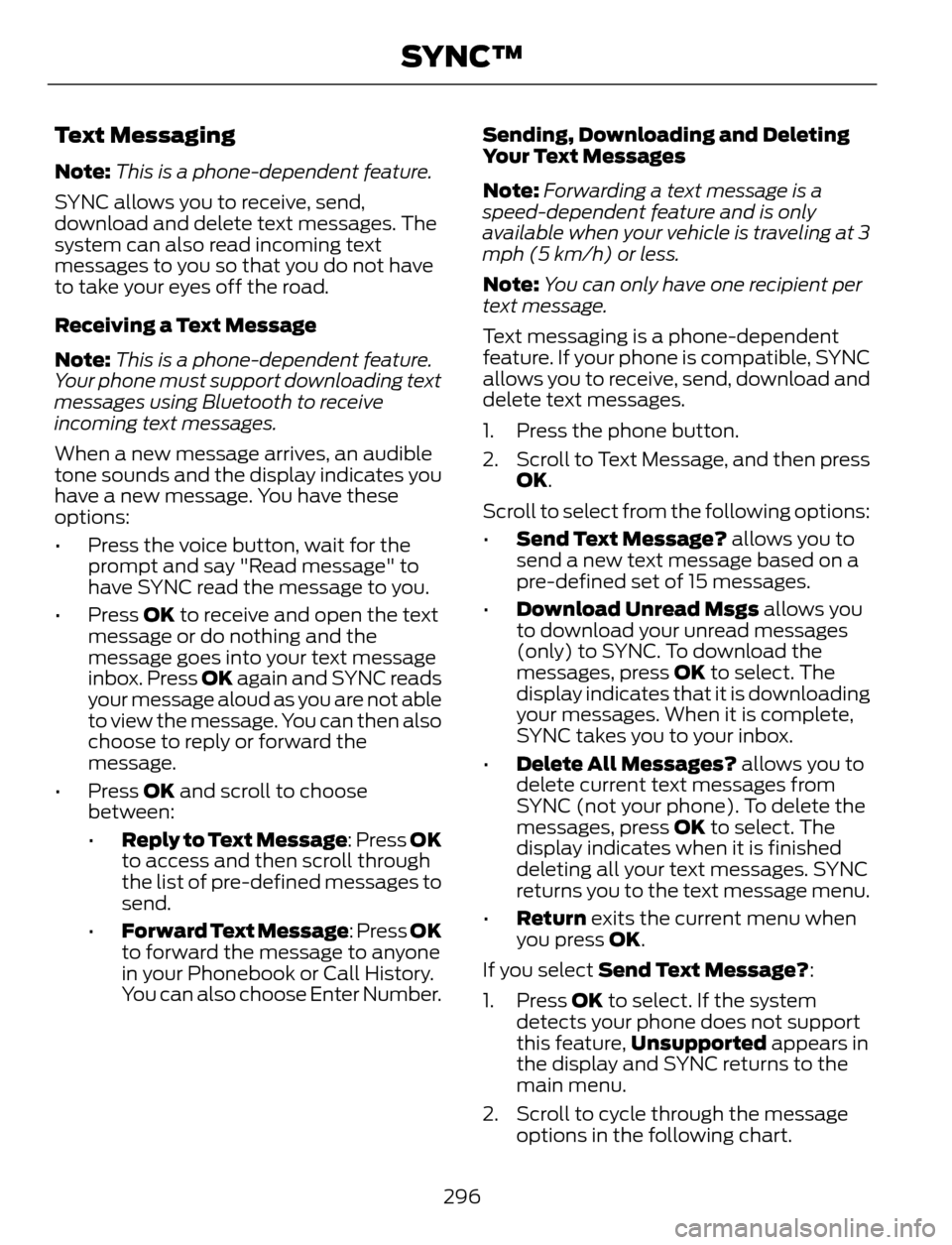
Text Messaging
Note:This is a phone-dependent feature.
SYNC allows you to receive, send,
download and delete text messages. The
system can also read incoming text
messages to you so that you do not have
to take your eyes off the road.
Receiving a Text Message
Note:This is a phone-dependent feature.
Your phone must support downloading text
messages using Bluetooth to receive
incoming text messages.
When a new message arrives, an audible
tone sounds and the display indicates you
have a new message. You have these
options:
• Press the voice button, wait for the
prompt and say "Read message" to
have SYNC read the message to you.
• Press OK to receive and open the text
message or do nothing and the
message goes into your text message
inbox. Press OK again and SYNC reads
your message aloud as you are not able
to view the message. You can then also
choose to reply or forward the
message.
• Press OK and scroll to choose
between:
•Reply to Text Message: Press OK
to access and then scroll through
the list of pre-defined messages to
send.
•Forward Text Message: Press OK
to forward the message to anyone
in your Phonebook or Call History.
You can also choose Enter Number.Sending, Downloading and Deleting
Your Text Messages
Note:Forwarding a text message is a
speed-dependent feature and is only
available when your vehicle is traveling at 3
mph (5 km/h) or less.
Note:You can only have one recipient per
text message.
Text messaging is a phone-dependent
feature. If your phone is compatible, SYNC
allows you to receive, send, download and
delete text messages.
1. Press the phone button.
2. Scroll to Text Message, and then press
OK.
Scroll to select from the following options:
•Send Text Message? allows you to
send a new text message based on a
pre-defined set of 15 messages.
•Download Unread Msgs allows you
to download your unread messages
(only) to SYNC. To download the
messages, press OK to select. The
display indicates that it is downloading
your messages. When it is complete,
SYNC takes you to your inbox.
•Delete All Messages? allows you to
delete current text messages from
SYNC (not your phone). To delete the
messages, press OK to select. The
display indicates when it is finished
deleting all your text messages. SYNC
returns you to the text message menu.
•Return exits the current menu when
you press OK.
If you select Send Text Message?:
1. Press OK to select. If the system
detects your phone does not support
this feature,Unsupported appears in
the display and SYNC returns to the
main menu.
2. Scroll to cycle through the message
options in the following chart.
296
SYNC™
Page 300 of 428
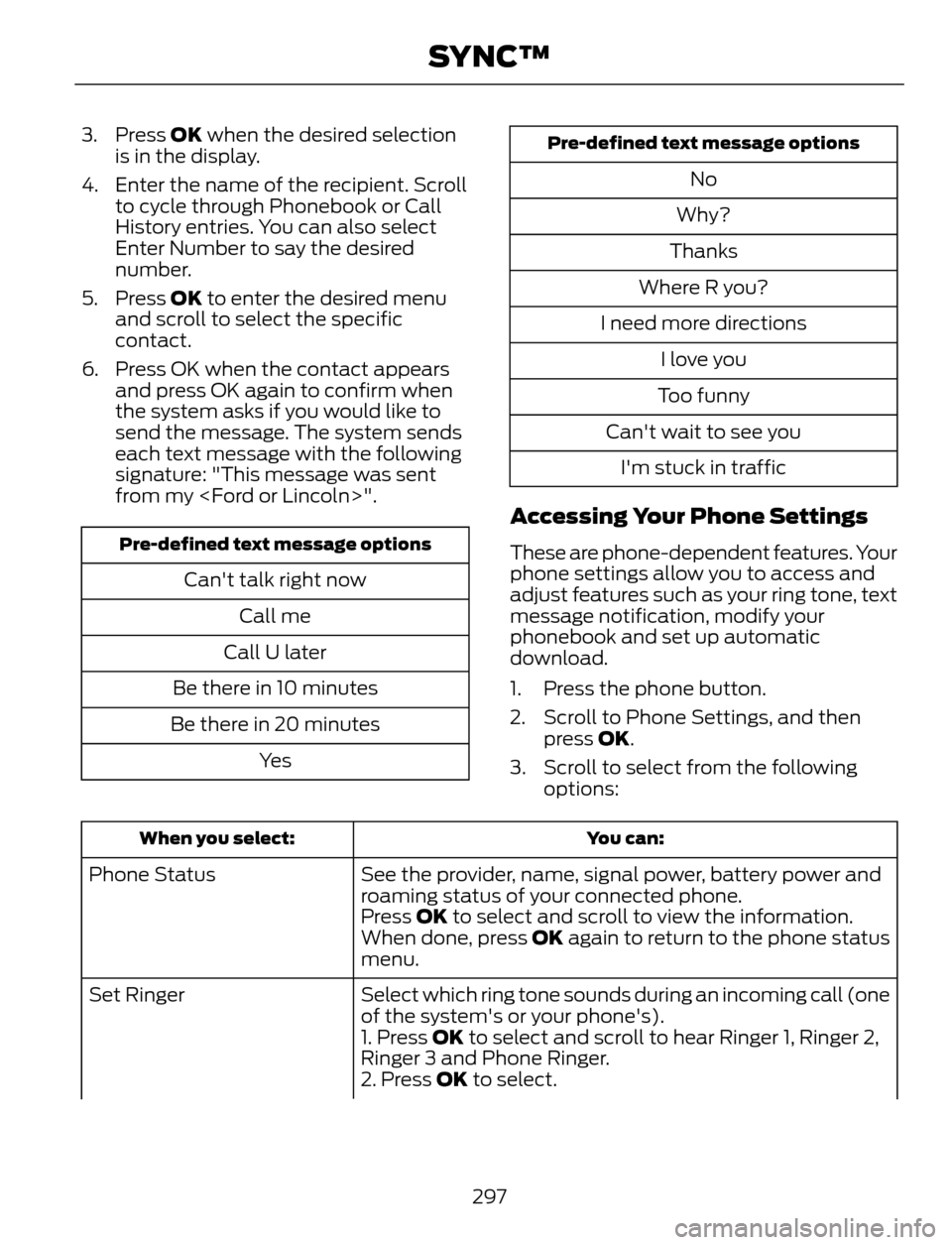
3. Press OK when the desired selection
is in the display.
4. Enter the name of the recipient. Scroll
to cycle through Phonebook or Call
History entries. You can also select
Enter Number to say the desired
number.
5. Press OK to enter the desired menu
and scroll to select the specific
contact.
6. Press OK when the contact appears
and press OK again to confirm when
the system asks if you would like to
send the message. The system sends
each text message with the following
signature: "This message was sent
from my
Pre-defined text message options
Can't talk right now
Call me
Call U later
Be there in 10 minutes
Be there in 20 minutes
Ye s
Pre-defined text message options
No
Why?
Thanks
Where R you?
I need more directions
I love you
Too funny
Can't wait to see you
I'm stuck in traffic
Accessing Your Phone Settings
These are phone-dependent features. Your
phone settings allow you to access and
adjust features such as your ring tone, text
message notification, modify your
phonebook and set up automatic
download.
1. Press the phone button.
2. Scroll to Phone Settings, and then
press OK.
3. Scroll to select from the following
options:
You can: When you select:
See the provider, name, signal power, battery power and
roaming status of your connected phone. Phone Status
Press OK to select and scroll to view the information.
When done, press OK again to return to the phone status
menu.
Select which ring tone sounds during an incoming call (one
of the system's or your phone's). Set Ringer
1. Press OK to select and scroll to hear Ringer 1, Ringer 2,
Ringer 3 and Phone Ringer.
2. Press OK to select.
297
SYNC™
Page 301 of 428
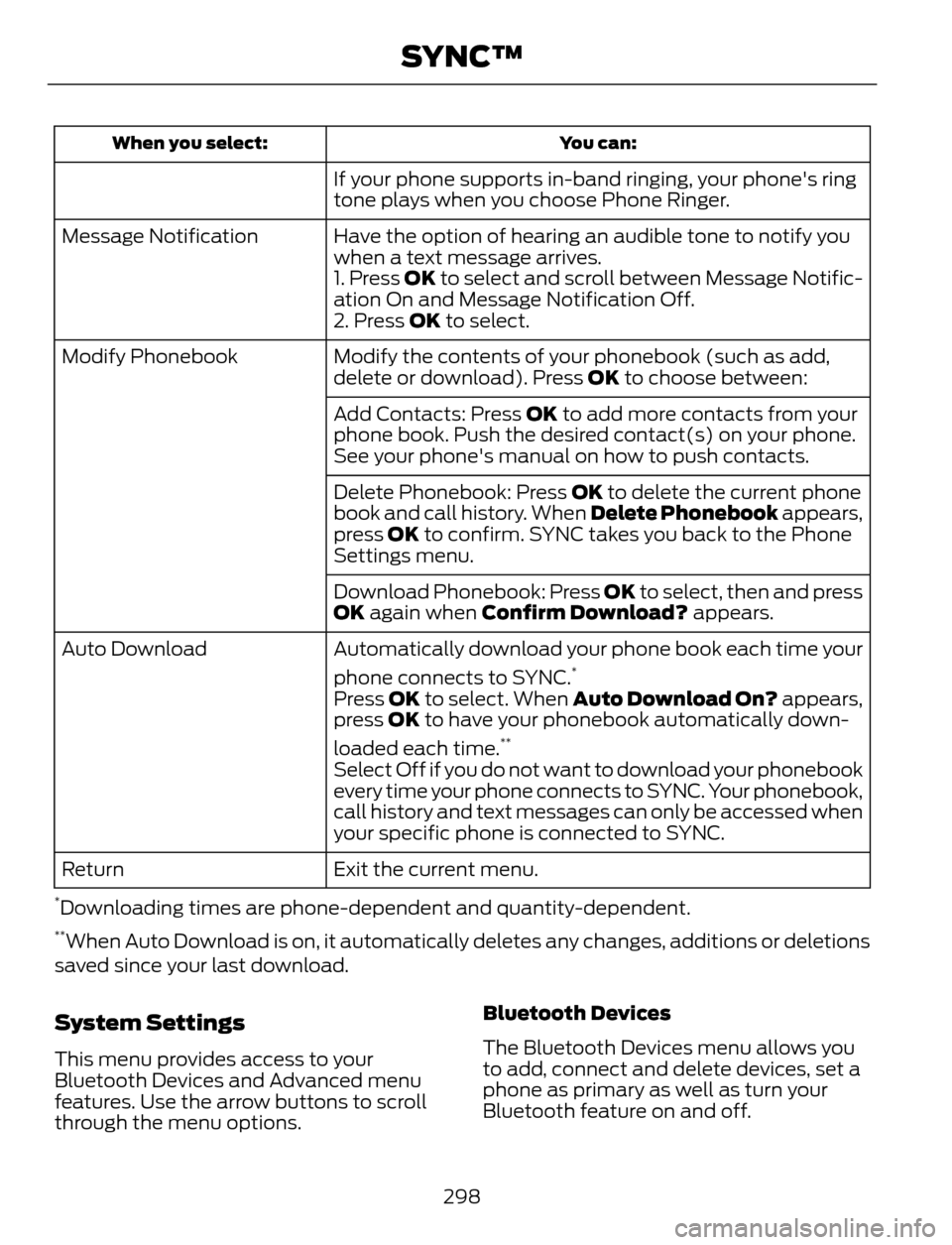
You can: When you select:
If your phone supports in-band ringing, your phone's ring
tone plays when you choose Phone Ringer.
Have the option of hearing an audible tone to notify you
when a text message arrives. Message Notification
1. Press OK to select and scroll between Message Notific-
ation On and Message Notification Off.
2. Press OK to select.
Modify the contents of your phonebook (such as add,
delete or download). Press OK to choose between: Modify Phonebook
Add Contacts: Press OK to add more contacts from your
phone book. Push the desired contact(s) on your phone.
See your phone's manual on how to push contacts.
Delete Phonebook: Press OK to delete the current phone
book and call history. When Delete Phonebook appears,
press OK to confirm. SYNC takes you back to the Phone
Settings menu.
Download Phonebook: Press OK to select, then and press
OK again when Confirm Download? appears.
Automatically download your phone book each time your
phone connects to SYNC.
*Auto Download
Press OK to select. When Auto Download On? appears,
press OK to have your phonebook automatically down-
loaded each time.
**
Select Off if you do not want to download your phonebook
every time your phone connects to SYNC. Your phonebook,
call history and text messages can only be accessed when
your specific phone is connected to SYNC.
Exit the current menu. Return
*Downloading times are phone-dependent and quantity-dependent.**When Auto Download is on, it automatically deletes any changes, additions or deletions
saved since your last download.
System Settings
This menu provides access to your
Bluetooth Devices and Advanced menu
features. Use the arrow buttons to scroll
through the menu options.Bluetooth Devices
The Bluetooth Devices menu allows you
to add, connect and delete devices, set a
phone as primary as well as turn your
Bluetooth feature on and off.
298
SYNC™
Page 302 of 428
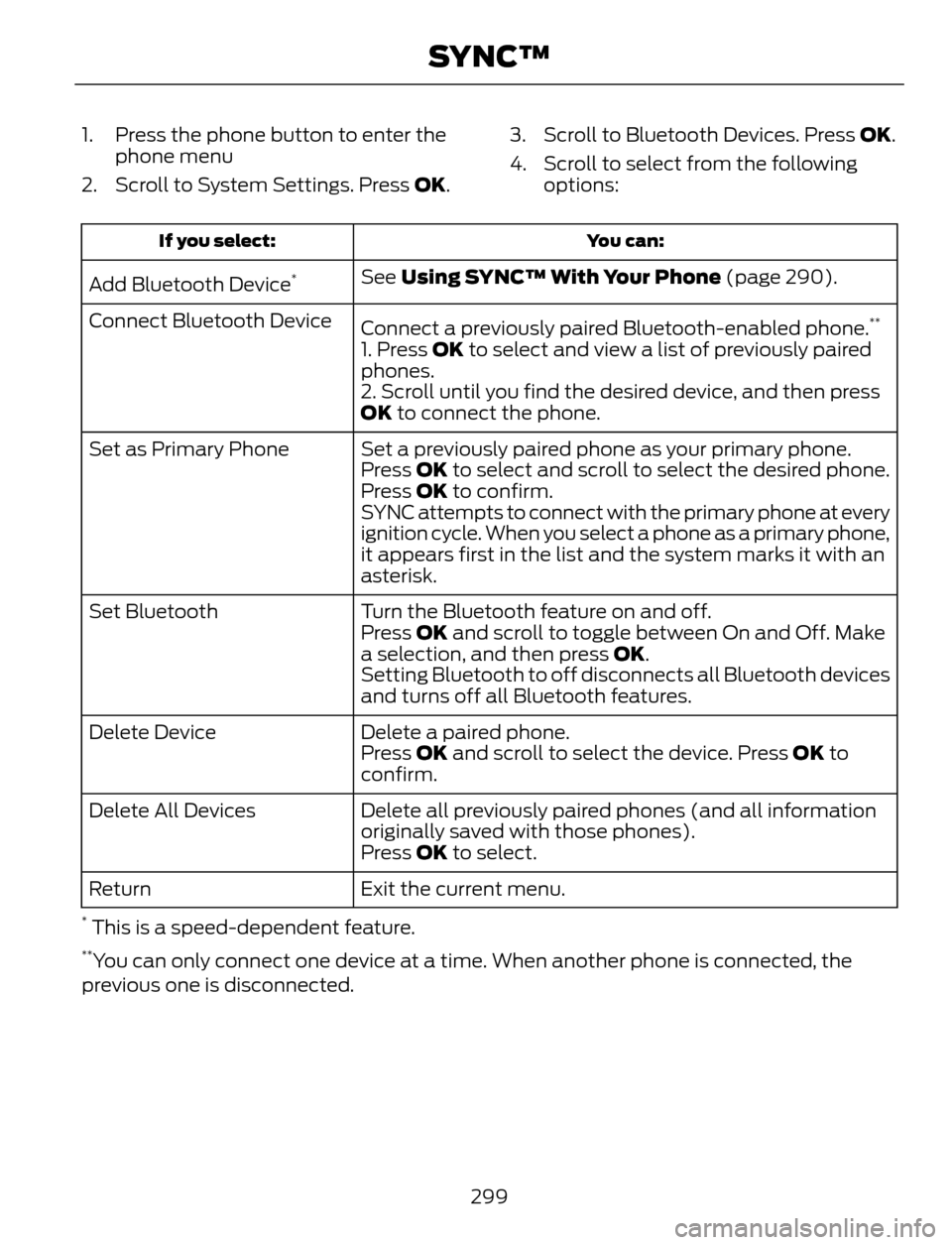
1. Press the phone button to enter the
phone menu
2. Scroll to System Settings. Press OK.3. Scroll to Bluetooth Devices. Press OK.
4. Scroll to select from the following
options:
You can: If you select:
See Using SYNC™ With Your Phone (page 290).
Add Bluetooth Device*
Connect a previously paired Bluetooth-enabled phone.**Connect Bluetooth Device
1. Press OK to select and view a list of previously paired
phones.
2. Scroll until you find the desired device, and then press
OK to connect the phone.
Set a previously paired phone as your primary phone. Set as Primary Phone
Press OK to select and scroll to select the desired phone.
Press OK to confirm.
SYNC attempts to connect with the primary phone at every
ignition cycle. When you select a phone as a primary phone,
it appears first in the list and the system marks it with an
asterisk.
Turn the Bluetooth feature on and off. Set Bluetooth
Press OK and scroll to toggle between On and Off. Make
a selection, and then press OK.
Setting Bluetooth to off disconnects all Bluetooth devices
and turns off all Bluetooth features.
Delete a paired phone. Delete Device
Press OK and scroll to select the device. Press OK to
confirm.
Delete all previously paired phones (and all information
originally saved with those phones). Delete All Devices
Press OK to select.
Exit the current menu. Return
* This is a speed-dependent feature.**You can only connect one device at a time. When another phone is connected, the
previous one is disconnected.
299
SYNC™
Page 303 of 428
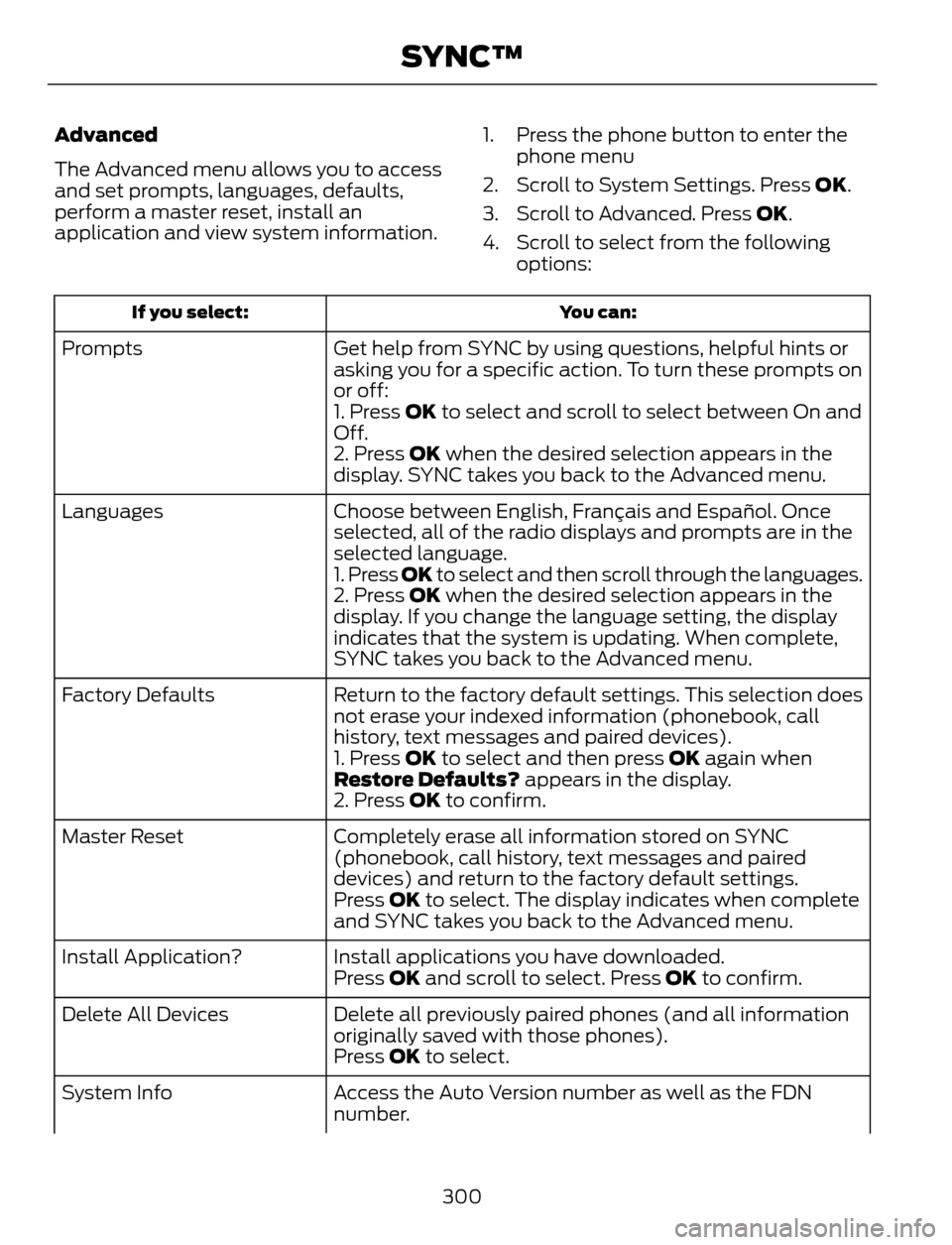
Advanced
The Advanced menu allows you to access
and set prompts, languages, defaults,
perform a master reset, install an
application and view system information.1. Press the phone button to enter the
phone menu
2. Scroll to System Settings. Press OK.
3. Scroll to Advanced. Press OK.
4. Scroll to select from the following
options:
You can: If you select:
Get help from SYNC by using questions, helpful hints or
asking you for a specific action. To turn these prompts on
or off: Prompts
1. Press OK to select and scroll to select between On and
Off.
2. Press OK when the desired selection appears in the
display. SYNC takes you back to the Advanced menu.
Choose between English, Français and Español. Once
selected, all of the radio displays and prompts are in the
selected language. Languages
1. Press OK to select and then scroll through the languages.
2. Press OK when the desired selection appears in the
display. If you change the language setting, the display
indicates that the system is updating. When complete,
SYNC takes you back to the Advanced menu.
Return to the factory default settings. This selection does
not erase your indexed information (phonebook, call
history, text messages and paired devices). Factory Defaults
1. Press OK to select and then press OK again when
Restore Defaults? appears in the display.
2. Press OK to confirm.
Completely erase all information stored on SYNC
(phonebook, call history, text messages and paired
devices) and return to the factory default settings. Master Reset
Press OK to select. The display indicates when complete
and SYNC takes you back to the Advanced menu.
Install applications you have downloaded. Install Application?
Press OK and scroll to select. Press OK to confirm.
Delete all previously paired phones (and all information
originally saved with those phones). Delete All Devices
Press OK to select.
Access the Auto Version number as well as the FDN
number. System Info
300
SYNC™
Page 304 of 428
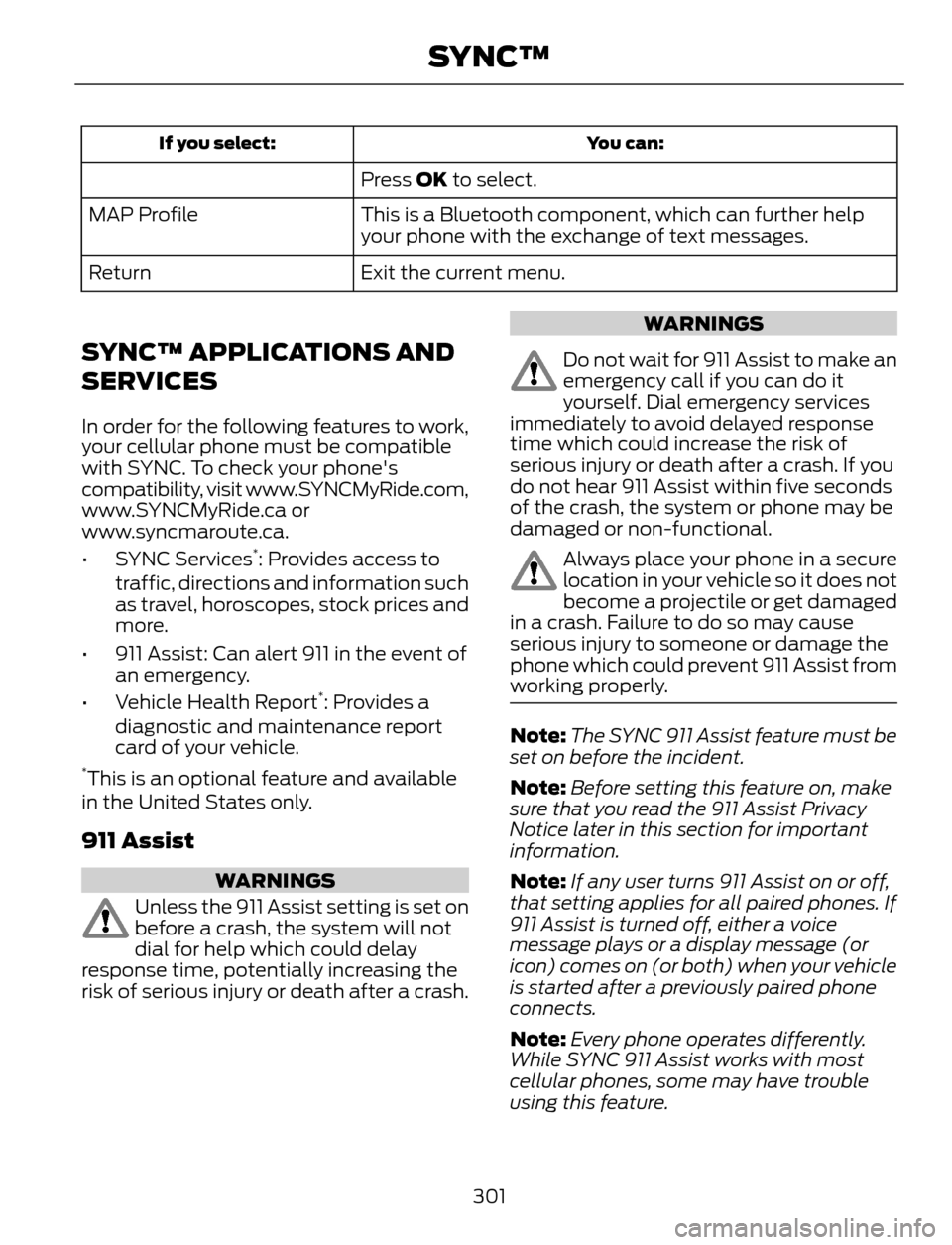
You can: If you select:
Press OK to select.
This is a Bluetooth component, which can further help
your phone with the exchange of text messages. MAP Profile
Exit the current menu. Return
SYNC™ APPLICATIONS AND
SERVICES
In order for the following features to work,
your cellular phone must be compatible
with SYNC. To check your phone's
compatibility, visit www.SYNCMyRide.com,
www.SYNCMyRide.ca or
www.syncmaroute.ca.
• SYNC Services
*: Provides access to
traffic, directions and information such
as travel, horoscopes, stock prices and
more.
• 911 Assist: Can alert 911 in the event of
an emergency.
• Vehicle Health Report
*: Provides a
diagnostic and maintenance report
card of your vehicle.
*This is an optional feature and available
in the United States only.
911 Assist
WARNINGS
Unless the 911 Assist setting is set on
before a crash, the system will not
dial for help which could delay
response time, potentially increasing the
risk of serious injury or death after a crash.
WARNINGS
Do not wait for 911 Assist to make an
emergency call if you can do it
yourself. Dial emergency services
immediately to avoid delayed response
time which could increase the risk of
serious injury or death after a crash. If you
do not hear 911 Assist within five seconds
of the crash, the system or phone may be
damaged or non-functional.
Always place your phone in a secure
location in your vehicle so it does not
become a projectile or get damaged
in a crash. Failure to do so may cause
serious injury to someone or damage the
phone which could prevent 911 Assist from
working properly.
Note:The SYNC 911 Assist feature must be
set on before the incident.
Note:Before setting this feature on, make
sure that you read the 911 Assist Privacy
Notice later in this section for important
information.
Note:If any user turns 911 Assist on or off,
that setting applies for all paired phones. If
911 Assist is turned off, either a voice
message plays or a display message (or
icon) comes on (or both) when your vehicle
is started after a previously paired phone
connects.
Note:Every phone operates differently.
While SYNC 911 Assist works with most
cellular phones, some may have trouble
using this feature.
301
SYNC™