turn indicator FORD ESCAPE 2014 3.G User Guide
[x] Cancel search | Manufacturer: FORD, Model Year: 2014, Model line: ESCAPE, Model: FORD ESCAPE 2014 3.GPages: 428, PDF Size: 16.6 MB
Page 88 of 428
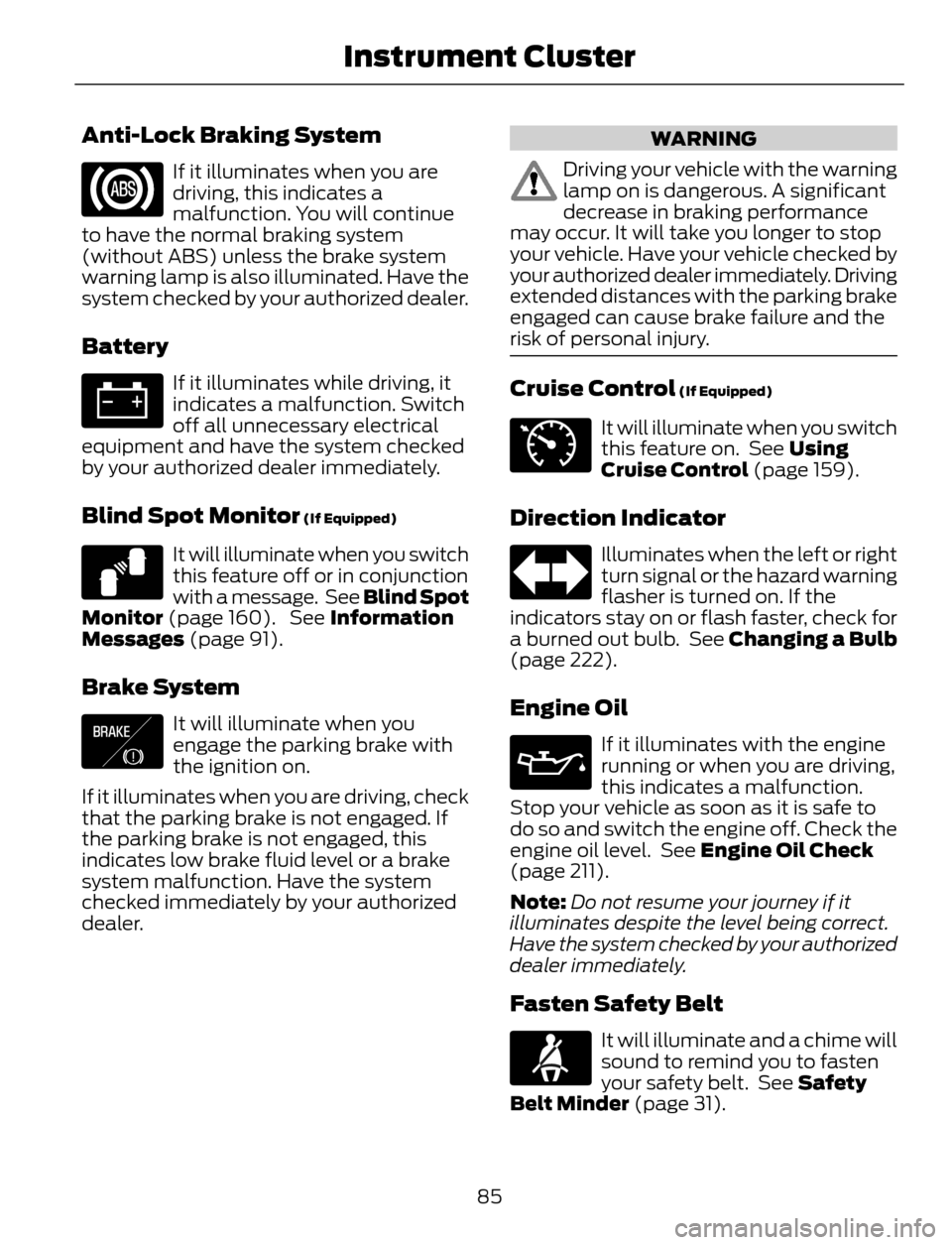
Anti-Lock Braking System
If it illuminates when you are
driving, this indicates a
malfunction. You will continue
to have the normal braking system
(without ABS) unless the brake system
warning lamp is also illuminated. Have the
system checked by your authorized dealer.
Battery
If it illuminates while driving, it
indicates a malfunction. Switch
off all unnecessary electrical
equipment and have the system checked
by your authorized dealer immediately.
Blind Spot Monitor (If Equipped)
E124823
It will illuminate when you switch
this feature off or in conjunction
with a message. See Blind Spot
Monitor (page 160). See Information
Messages (page 91).
Brake System
E138644
It will illuminate when you
engage the parking brake with
the ignition on.
If it illuminates when you are driving, check
that the parking brake is not engaged. If
the parking brake is not engaged, this
indicates low brake fluid level or a brake
system malfunction. Have the system
checked immediately by your authorized
dealer.
WARNING
Driving your vehicle with the warning
lamp on is dangerous. A significant
decrease in braking performance
may occur. It will take you longer to stop
your vehicle. Have your vehicle checked by
your authorized dealer immediately. Driving
extended distances with the parking brake
engaged can cause brake failure and the
risk of personal injury.
Cruise Control (If Equipped)
E71340
It will illuminate when you switch
this feature on. See Using
Cruise Control (page 159).
Direction Indicator
Illuminates when the left or right
turn signal or the hazard warning
flasher is turned on. If the
indicators stay on or flash faster, check for
a burned out bulb. See Changing a Bulb
(page 222).
Engine Oil
If it illuminates with the engine
running or when you are driving,
this indicates a malfunction.
Stop your vehicle as soon as it is safe to
do so and switch the engine off. Check the
engine oil level. See Engine Oil Check
(page 211).
Note:Do not resume your journey if it
illuminates despite the level being correct.
Have the system checked by your authorized
dealer immediately.
Fasten Safety Belt
It will illuminate and a chime will
sound to remind you to fasten
your safety belt. See Safety
Belt Minder (page 31).
85
Instrument Cluster
Page 89 of 428
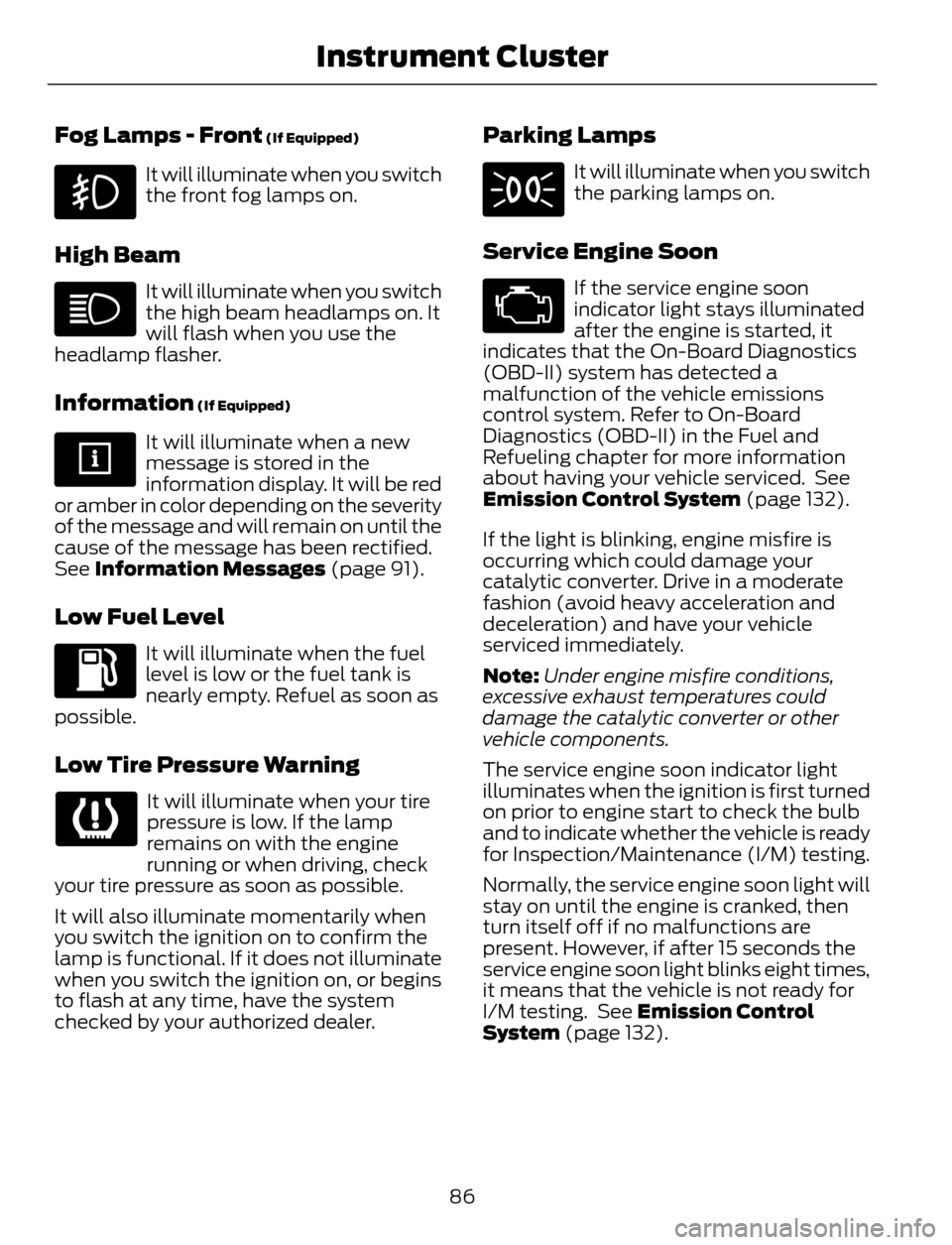
Fog Lamps - Front (If Equipped)
It will illuminate when you switch
the front fog lamps on.
High Beam
It will illuminate when you switch
the high beam headlamps on. It
will flash when you use the
headlamp flasher.
Information (If Equipped)
It will illuminate when a new
message is stored in the
information display. It will be red
or amber in color depending on the severity
of the message and will remain on until the
cause of the message has been rectified.
See Information Messages (page 91).
Low Fuel Level
It will illuminate when the fuel
level is low or the fuel tank is
nearly empty. Refuel as soon as
possible.
Low Tire Pressure Warning
It will illuminate when your tire
pressure is low. If the lamp
remains on with the engine
running or when driving, check
your tire pressure as soon as possible.
It will also illuminate momentarily when
you switch the ignition on to confirm the
lamp is functional. If it does not illuminate
when you switch the ignition on, or begins
to flash at any time, have the system
checked by your authorized dealer.
Parking Lamps
It will illuminate when you switch
the parking lamps on.
Service Engine Soon
If the service engine soon
indicator light stays illuminated
after the engine is started, it
indicates that the On-Board Diagnostics
(OBD-II) system has detected a
malfunction of the vehicle emissions
control system. Refer to On-Board
Diagnostics (OBD-II) in the Fuel and
Refueling chapter for more information
about having your vehicle serviced. See
Emission Control System (page 132).
If the light is blinking, engine misfire is
occurring which could damage your
catalytic converter. Drive in a moderate
fashion (avoid heavy acceleration and
deceleration) and have your vehicle
serviced immediately.
Note:Under engine misfire conditions,
excessive exhaust temperatures could
damage the catalytic converter or other
vehicle components.
The service engine soon indicator light
illuminates when the ignition is first turned
on prior to engine start to check the bulb
and to indicate whether the vehicle is ready
for Inspection/Maintenance (I/M) testing.
Normally, the service engine soon light will
stay on until the engine is cranked, then
turn itself off if no malfunctions are
present. However, if after 15 seconds the
service engine soon light blinks eight times,
it means that the vehicle is not ready for
I/M testing. See Emission Control
System (page 132).
86
Instrument Cluster
Page 95 of 428
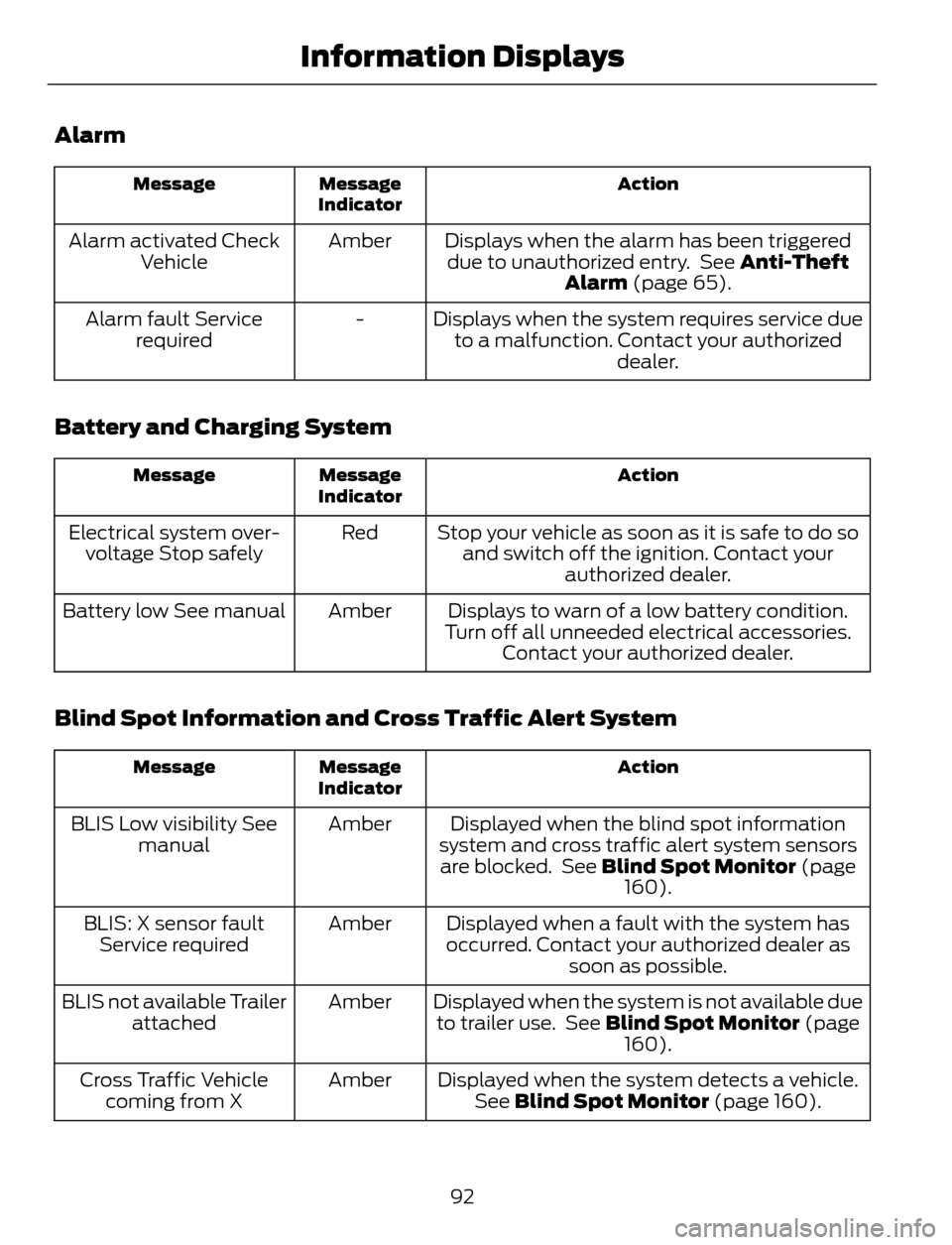
Alarm
Action Message
Indicator Message
Displays when the alarm has been triggered
due to unauthorized entry. See Anti-Theft
Alarm (page 65). Amber Alarm activated Check
Vehicle
Displays when the system requires service due
to a malfunction. Contact your authorized
dealer. - Alarm fault Service
required
Battery and Charging System
Action Message
Indicator Message
Stop your vehicle as soon as it is safe to do so
and switch off the ignition. Contact your
authorized dealer. Red Electrical system over-
voltage Stop safely
Displays to warn of a low battery condition.
Turn off all unneeded electrical accessories.
Contact your authorized dealer. Amber Battery low See manual
Blind Spot Information and Cross Traffic Alert System
Action Message
Indicator Message
Displayed when the blind spot information
system and cross traffic alert system sensors
are blocked. See Blind Spot Monitor (page
160). Amber BLIS Low visibility See
manual
Displayed when a fault with the system has
occurred. Contact your authorized dealer as
soon as possible. Amber BLIS: X sensor fault
Service required
Displayed when the system is not available due
to trailer use. See Blind Spot Monitor (page
160). Amber BLIS not available Trailer
attached
Displayed when the system detects a vehicle.
See Blind Spot Monitor (page 160). Amber Cross Traffic Vehicle
coming from X
92
Information Displays
Page 97 of 428
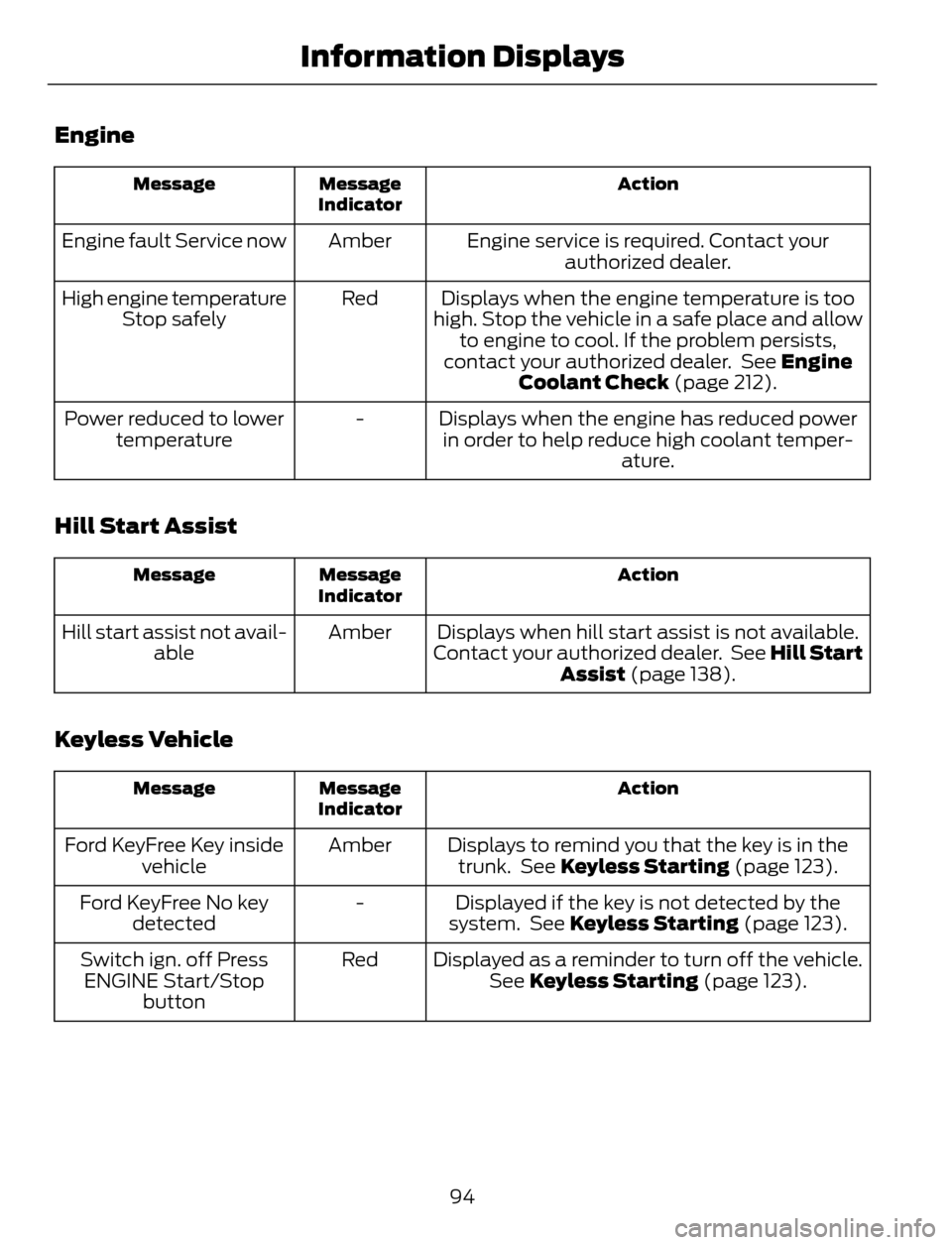
Engine
Action Message
Indicator Message
Engine service is required. Contact your
authorized dealer. Amber Engine fault Service now
Displays when the engine temperature is too
high. Stop the vehicle in a safe place and allow
to engine to cool. If the problem persists,
contact your authorized dealer. See Engine
Coolant Check (page 212). Red High engine temperature
Stop safely
Displays when the engine has reduced power
in order to help reduce high coolant temper-
ature. - Power reduced to lower
temperature
Hill Start Assist
Action Message
Indicator Message
Displays when hill start assist is not available.
Contact your authorized dealer. See Hill Start
Assist (page 138). Amber Hill start assist not avail-
able
Keyless Vehicle
Action Message
Indicator Message
Displays to remind you that the key is in the
trunk. See Keyless Starting (page 123). Amber Ford KeyFree Key inside
vehicle
Displayed if the key is not detected by the
system. See Keyless Starting (page 123). - Ford KeyFree No key
detected
Displayed as a reminder to turn off the vehicle.
See Keyless Starting (page 123). Red Switch ign. off Press
ENGINE Start/Stop
button
94
Information Displays
Page 120 of 428
3. Using both hands, simultaneously,
press and hold the desired HomeLink
button and the hand-held transmitter
button. DO NOT release either one until
the HomeLink indicator light flashes
slowly and then rapidly. When the
indicator light flashes rapidly, both
buttons may be released. The rapid
flashing indicates successful training.
4. Press and hold the HomeLink button
you programmed for five seconds, then
release. You may need to do this twice
to activate the door. If your garage door
does not operate, watch the HomeLink
indicator light.
If the indicator light stays on, the
programming is complete. See
Programming your garage door motor
later in this section.
If the indicator light flashes rapidly for 2
seconds and then turns to a constant light,
the HomeLink button is not programmed
yet. Do the following:
Press and hold the HomeLink button while
you press and release the hand-held
transmitter button every 2 seconds. The
HomeLink indicator light will flash slowly
and then rapidly once the HomeLink
function button recognizes and accepts
the hand-held transmitter’s radio
frequency signal.
After programming the HomeLink button,
begin programming your garage door
opener motor.
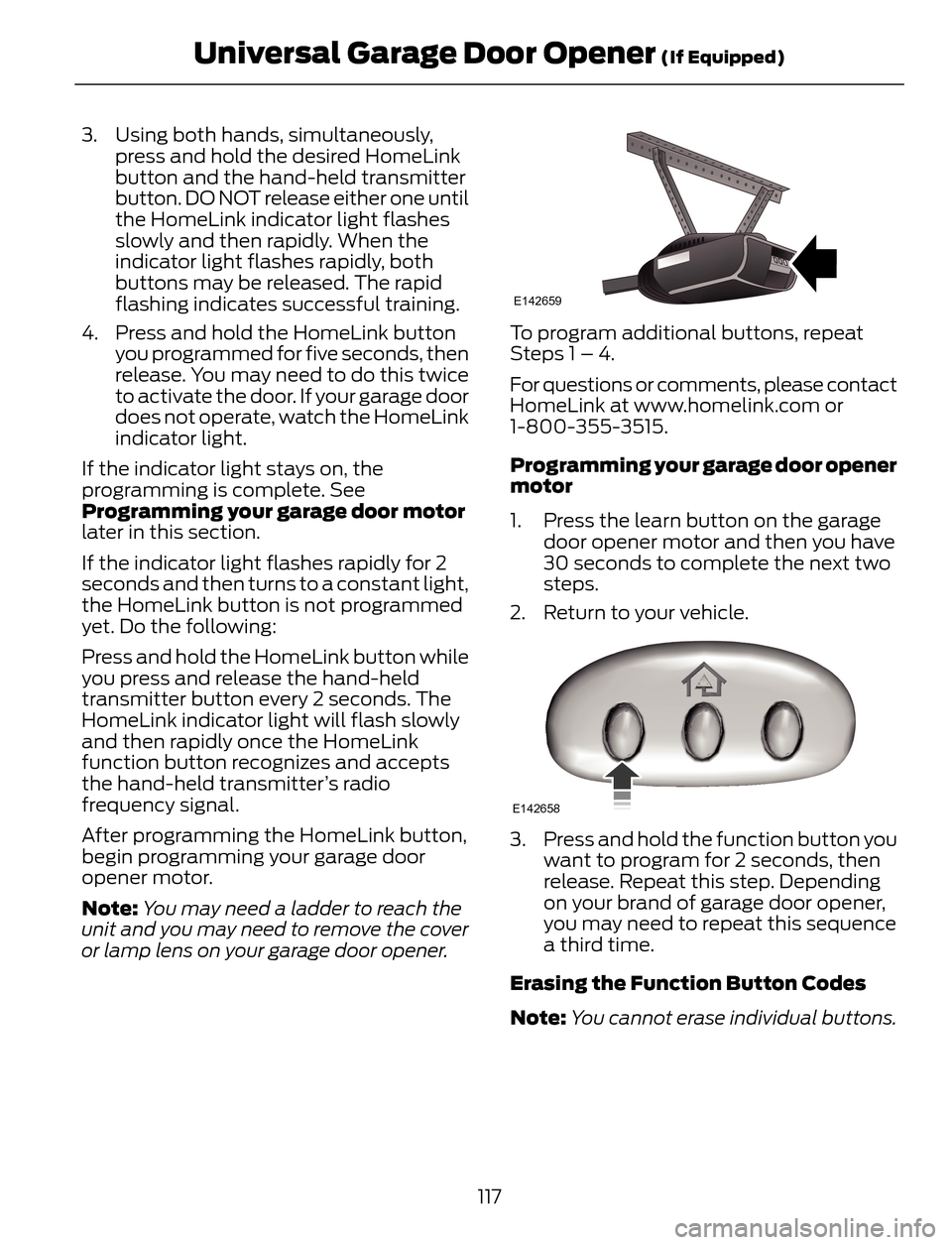
Note:You may need a ladder to reach the
unit and you may need to remove the cover
or lamp lens on your garage door opener.
E142659
To program additional buttons, repeat
Steps 1 – 4.
For questions or comments, please contact
HomeLink at www.homelink.com or
1-800-355-3515.
Programming your garage door opener
motor
1. Press the learn button on the garage
door opener motor and then you have
30 seconds to complete the next two
steps.
2. Return to your vehicle.
E142658
3. Press and hold the function button you
want to program for 2 seconds, then
release. Repeat this step. Depending
on your brand of garage door opener,
you may need to repeat this sequence
a third time.
Erasing the Function Button Codes
Note:You cannot erase individual buttons.
117
Universal Garage Door Opener (If Equipped)
Page 121 of 428
E142660
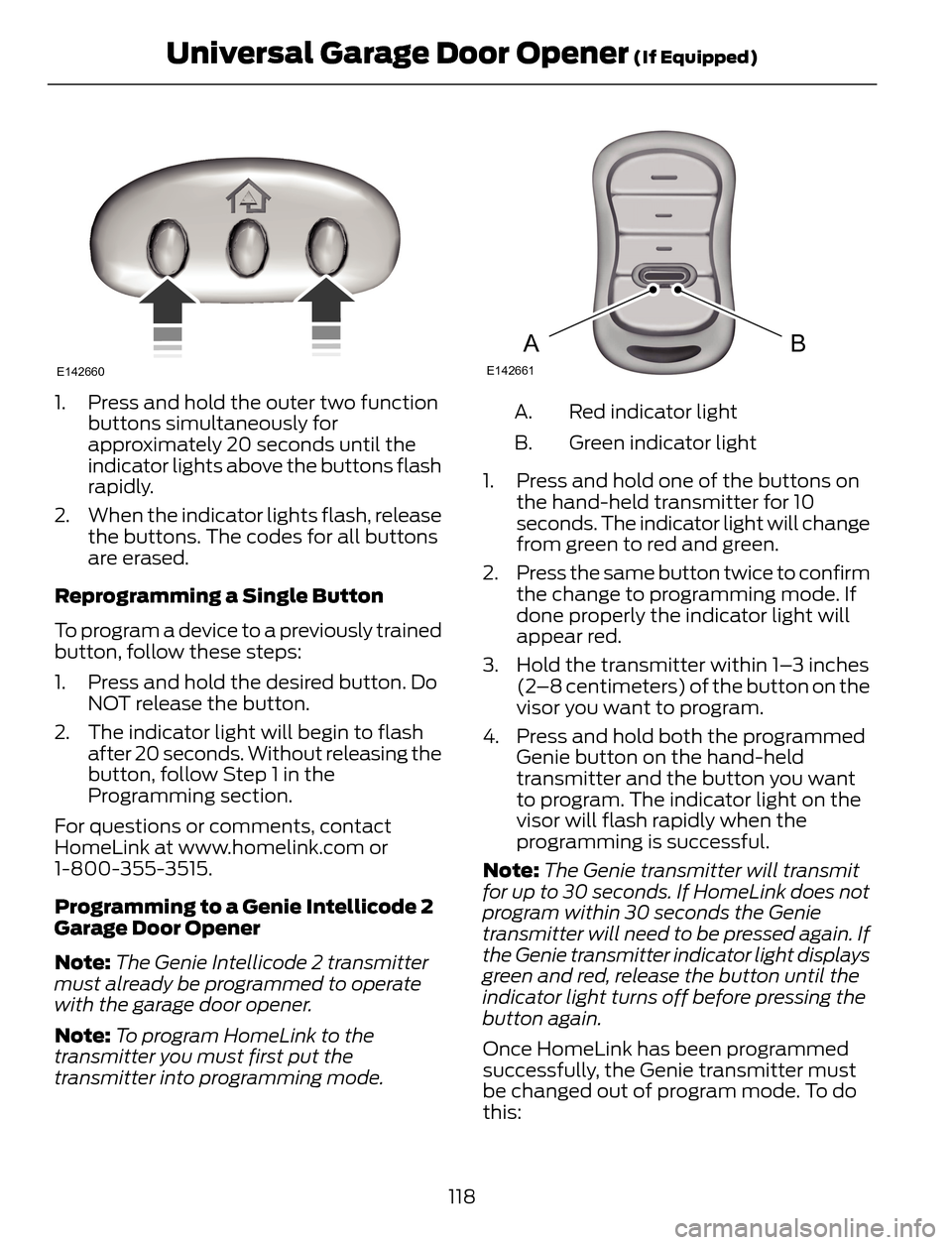
1. Press and hold the outer two function
buttons simultaneously for
approximately 20 seconds until the
indicator lights above the buttons flash
rapidly.
2. When the indicator lights flash, release
the buttons. The codes for all buttons
are erased.
Reprogramming a Single Button
To program a device to a previously trained
button, follow these steps:
1. Press and hold the desired button. Do
NOT release the button.
2. The indicator light will begin to flash
after 20 seconds. Without releasing the
button, follow Step 1 in the
Programming section.
For questions or comments, contact
HomeLink at www.homelink.com or
1-800-355-3515.
Programming to a Genie Intellicode 2
Garage Door Opener
Note:The Genie Intellicode 2 transmitter
must already be programmed to operate
with the garage door opener.
Note:To program HomeLink to the
transmitter you must first put the
transmitter into programming mode.
BAE142661
Red indicator light A.
Green indicator light B.
1. Press and hold one of the buttons on
the hand-held transmitter for 10
seconds. The indicator light will change
from green to red and green.
2. Press the same button twice to confirm
the change to programming mode. If
done properly the indicator light will
appear red.
3. Hold the transmitter within 1–3 inches
(2–8 centimeters) of the button on the
visor you want to program.
4. Press and hold both the programmed
Genie button on the hand-held
transmitter and the button you want
to program. The indicator light on the
visor will flash rapidly when the
programming is successful.
Note:The Genie transmitter will transmit
for up to 30 seconds. If HomeLink does not
program within 30 seconds the Genie
transmitter will need to be pressed again. If
the Genie transmitter indicator light displays
green and red, release the button until the
indicator light turns off before pressing the
button again.
Once HomeLink has been programmed
successfully, the Genie transmitter must
be changed out of program mode. To do
this:
118
Universal Garage Door Opener (If Equipped)
Page 122 of 428
1. Press and hold the previously
programmed Genie button on the
hand-held transmitter for 10 seconds.
The indicator light will change from red
to red and green.
2. Press the same button twice to confirm
the change. If done correctly the
indicator light will turn green.
Programming HomeLink to the Genie
Intellicode Garage Door Opener Motor
Note:You may need a ladder to access the
garage door opener motor.
E142662
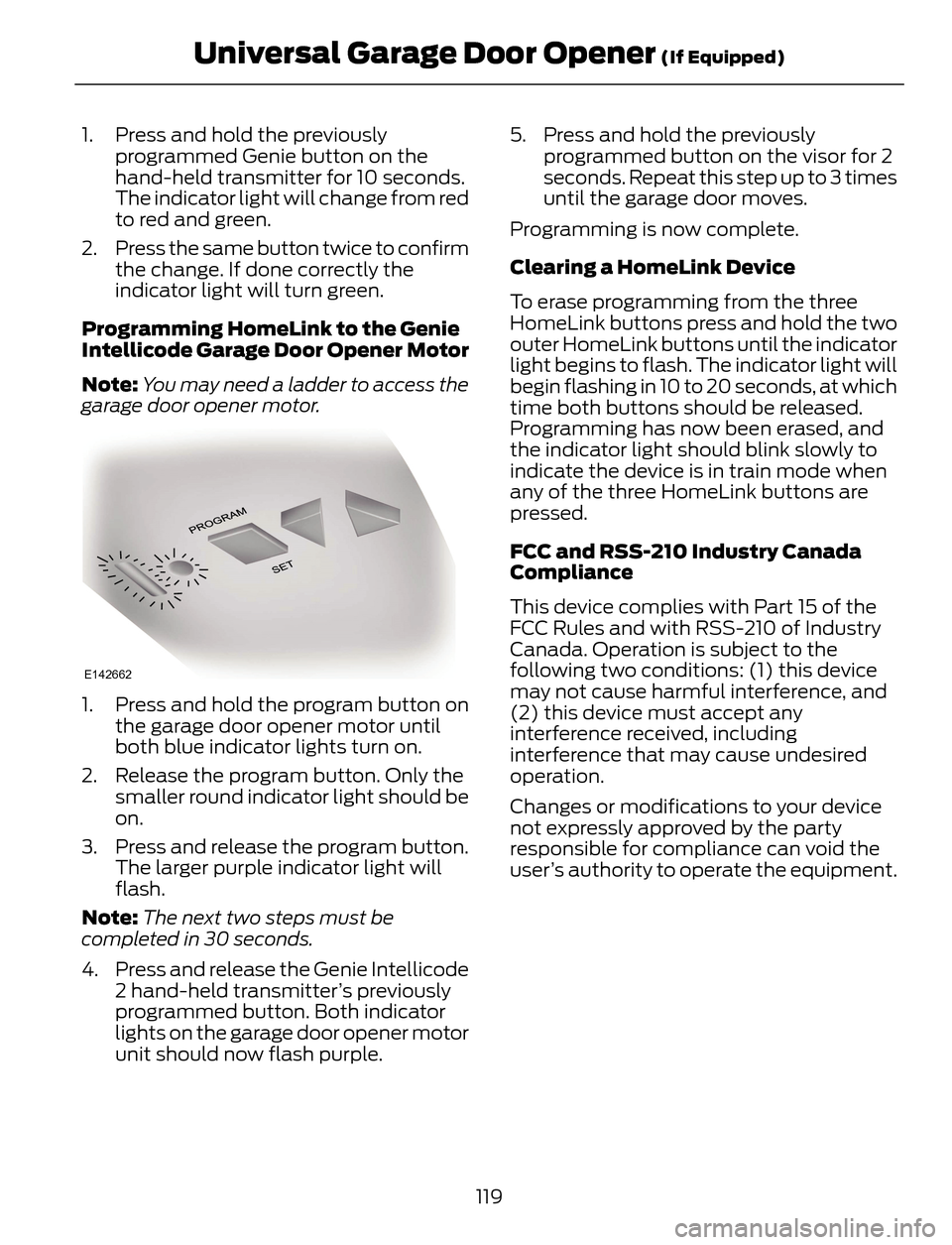
1. Press and hold the program button on
the garage door opener motor until
both blue indicator lights turn on.
2. Release the program button. Only the
smaller round indicator light should be
on.
3. Press and release the program button.
The larger purple indicator light will
flash.
Note:The next two steps must be
completed in 30 seconds.
4. Press and release the Genie Intellicode
2 hand-held transmitter’s previously
programmed button. Both indicator
lights on the garage door opener motor
unit should now flash purple.5. Press and hold the previously
programmed button on the visor for 2
seconds. Repeat this step up to 3 times
until the garage door moves.
Programming is now complete.
Clearing a HomeLink Device
To erase programming from the three
HomeLink buttons press and hold the two
outer HomeLink buttons until the indicator
light begins to flash. The indicator light will
begin flashing in 10 to 20 seconds, at which
time both buttons should be released.
Programming has now been erased, and
the indicator light should blink slowly to
indicate the device is in train mode when
any of the three HomeLink buttons are
pressed.
FCC and RSS-210 Industry Canada
Compliance
This device complies with Part 15 of the
FCC Rules and with RSS-210 of Industry
Canada. Operation is subject to the
following two conditions: (1) this device
may not cause harmful interference, and
(2) this device must accept any
interference received, including
interference that may cause undesired
operation.
Changes or modifications to your device
not expressly approved by the party
responsible for compliance can void the
user’s authority to operate the equipment.
119
Universal Garage Door Opener (If Equipped)
Page 124 of 428
When the indicator light, located on the
power point, is:
• on — power point is working, ignition is
on and a device is plugged in.
• off — power point is off, ignition is off
or no device is plugged in.
• flashing — power point is in fault mode.
The power point temporarily turns off
power if the 150 watt limit is exceeded. It
can also switch to a fault mode when it is
overloaded, overheated, or shorted. Unplug
your device and switch the ignition off then
on for overloading and shorting conditions.
Let the system cool off, then turn the
ignition off then on for an overheating
condition.
The power point is not designed for electric
devices such as:
• Cathode ray tube type televisions
• Motor loads, such as vacuum cleaners,
electric saws and other electric power
tools, compressor-driven refrigerators,
etc.
• Measuring devices, which process
precise data, such as medical
equipment, measuring equipment, etc.
• Other appliances requiring an
extremely stable power supply:
microcomputer-controlled electric
blankets, touch sensor lamps, etc.
121
Auxiliary Power Points
Page 127 of 428
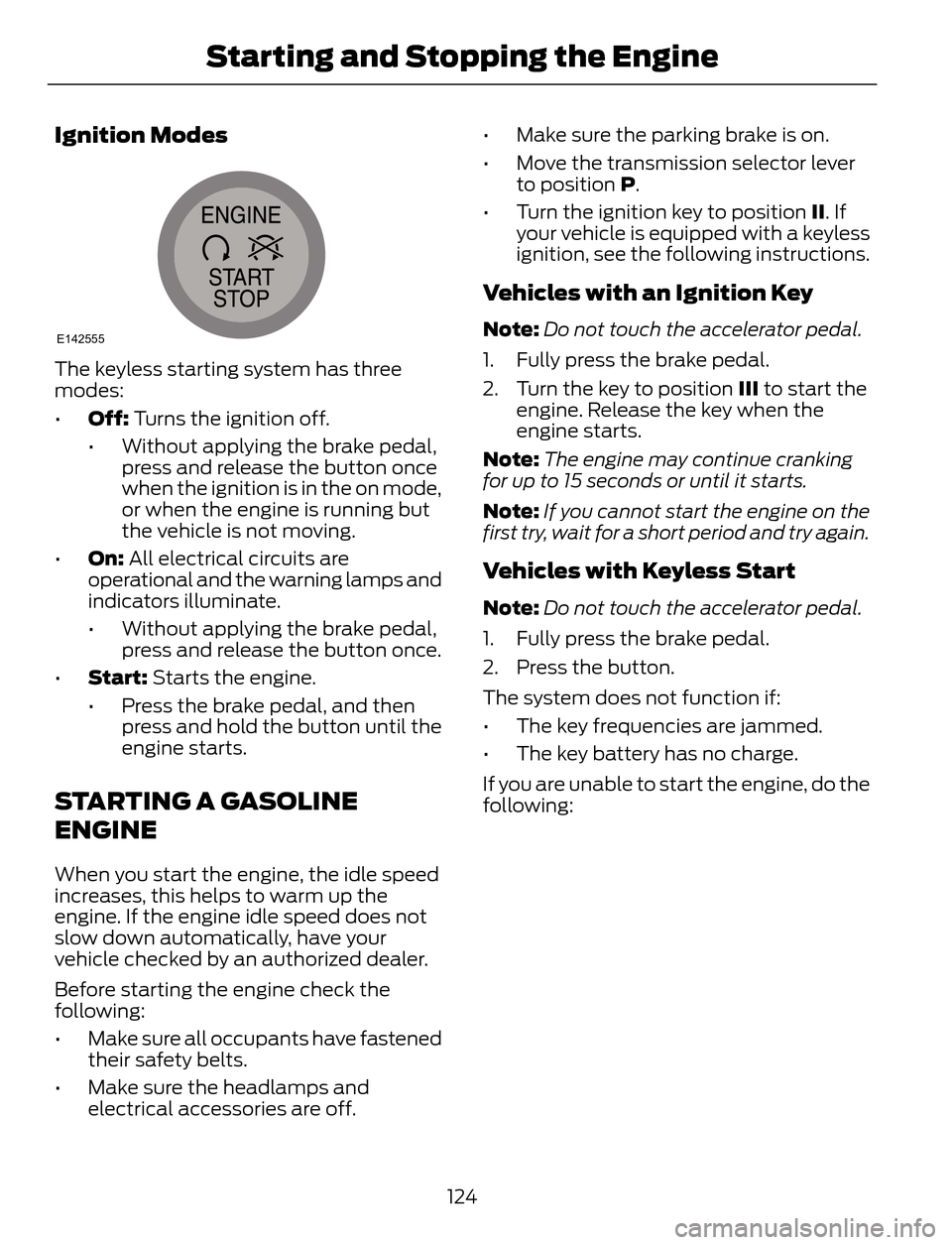
Ignition Modes
E142555
The keyless starting system has three
modes:
•Off: Turns the ignition off.
• Without applying the brake pedal,
press and release the button once
when the ignition is in the on mode,
or when the engine is running but
the vehicle is not moving.
•On: All electrical circuits are
operational and the warning lamps and
indicators illuminate.
• Without applying the brake pedal,
press and release the button once.
•Start: Starts the engine.
• Press the brake pedal, and then
press and hold the button until the
engine starts.
STARTING A GASOLINE
ENGINE
When you start the engine, the idle speed
increases, this helps to warm up the
engine. If the engine idle speed does not
slow down automatically, have your
vehicle checked by an authorized dealer.
Before starting the engine check the
following:
• Make sure all occupants have fastened
their safety belts.
• Make sure the headlamps and
electrical accessories are off.• Make sure the parking brake is on.
• Move the transmission selector lever
to position P.
• Turn the ignition key to position II. If
your vehicle is equipped with a keyless
ignition, see the following instructions.
Vehicles with an Ignition Key
Note:Do not touch the accelerator pedal.
1. Fully press the brake pedal.
2. Turn the key to position III to start the
engine. Release the key when the
engine starts.
Note:The engine may continue cranking
for up to 15 seconds or until it starts.
Note:If you cannot start the engine on the
first try, wait for a short period and try again.
Vehicles with Keyless Start
Note:Do not touch the accelerator pedal.
1. Fully press the brake pedal.
2. Press the button.
The system does not function if:
• The key frequencies are jammed.
• The key battery has no charge.
If you are unable to start the engine, do the
following:
124
Starting and Stopping the Engine
Page 128 of 428
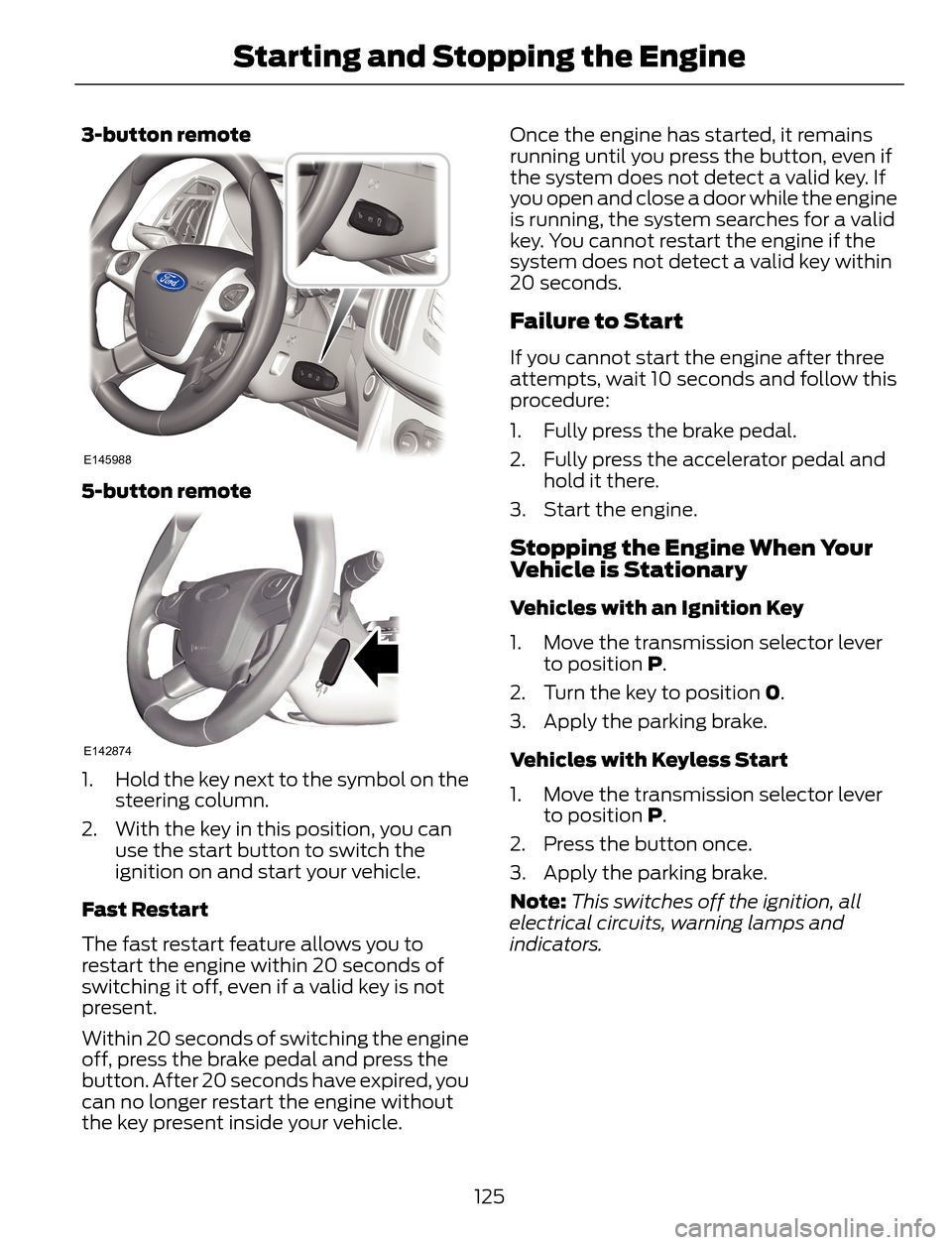
3-button remote
E145988
5-button remote
E142874
1. Hold the key next to the symbol on the
steering column.
2. With the key in this position, you can
use the start button to switch the
ignition on and start your vehicle.
Fast Restart
The fast restart feature allows you to
restart the engine within 20 seconds of
switching it off, even if a valid key is not
present.
Within 20 seconds of switching the engine
off, press the brake pedal and press the
button. After 20 seconds have expired, you
can no longer restart the engine without
the key present inside your vehicle.Once the engine has started, it remains
running until you press the button, even if
the system does not detect a valid key. If
you open and close a door while the engine
is running, the system searches for a valid
key. You cannot restart the engine if the
system does not detect a valid key within
20 seconds.
Failure to Start
If you cannot start the engine after three
attempts, wait 10 seconds and follow this
procedure:
1. Fully press the brake pedal.
2. Fully press the accelerator pedal and
hold it there.
3. Start the engine.
Stopping the Engine When Your
Vehicle is Stationary
Vehicles with an Ignition Key
1. Move the transmission selector lever
to position P.
2. Turn the key to position 0.
3. Apply the parking brake.
Vehicles with Keyless Start
1. Move the transmission selector lever
to position P.
2. Press the button once.
3. Apply the parking brake.
Note:This switches off the ignition, all
electrical circuits, warning lamps and
indicators.
125
Starting and Stopping the Engine