instrument panel FORD ESCAPE 2014 3.G Owner's Manual
[x] Cancel search | Manufacturer: FORD, Model Year: 2014, Model line: ESCAPE, Model: FORD ESCAPE 2014 3.GPages: 428, PDF Size: 16.6 MB
Page 355 of 428
Bluetooth Audio Voice Commands
E142599
If you are listening to a Bluetooth
audio device, press the voice
button on the steering wheel
control. When prompted, say "Next song",
"Pause", "Play" or "Previous song".
If you are not listening to a Bluetooth audio
device, press the voice button and, after
the tone, say "Next song", "Pause", "Play"
or "Previous song".
A/V Inputs
WARNINGS
Driving while distracted can result in
loss of vehicle control, crash and
injury. We strongly recommend that
you use extreme caution when using any
device that may take your focus off the
road. Your primary responsibility is the safe
operation of your vehicle. We recommend
against the use of any handheld device
while driving and encourage the use of
voice-operated systems when possible.
Make sure you are aware of all applicable
local laws that may affect the use of
electronic devices while driving.
For safety reasons, do not connect
or adjust the settings on your
portable music player while your
vehicle is moving.
Store the portable music player in a
secure location, such as the center
console or the glove box, when your
vehicle is moving. Hard objects may
become projectiles in a crash or sudden
stop, which may increase the risk of serious
injury. The audio extension cable must be
long enough to allow the portable music
player to be safely stored while your
vehicle is moving.
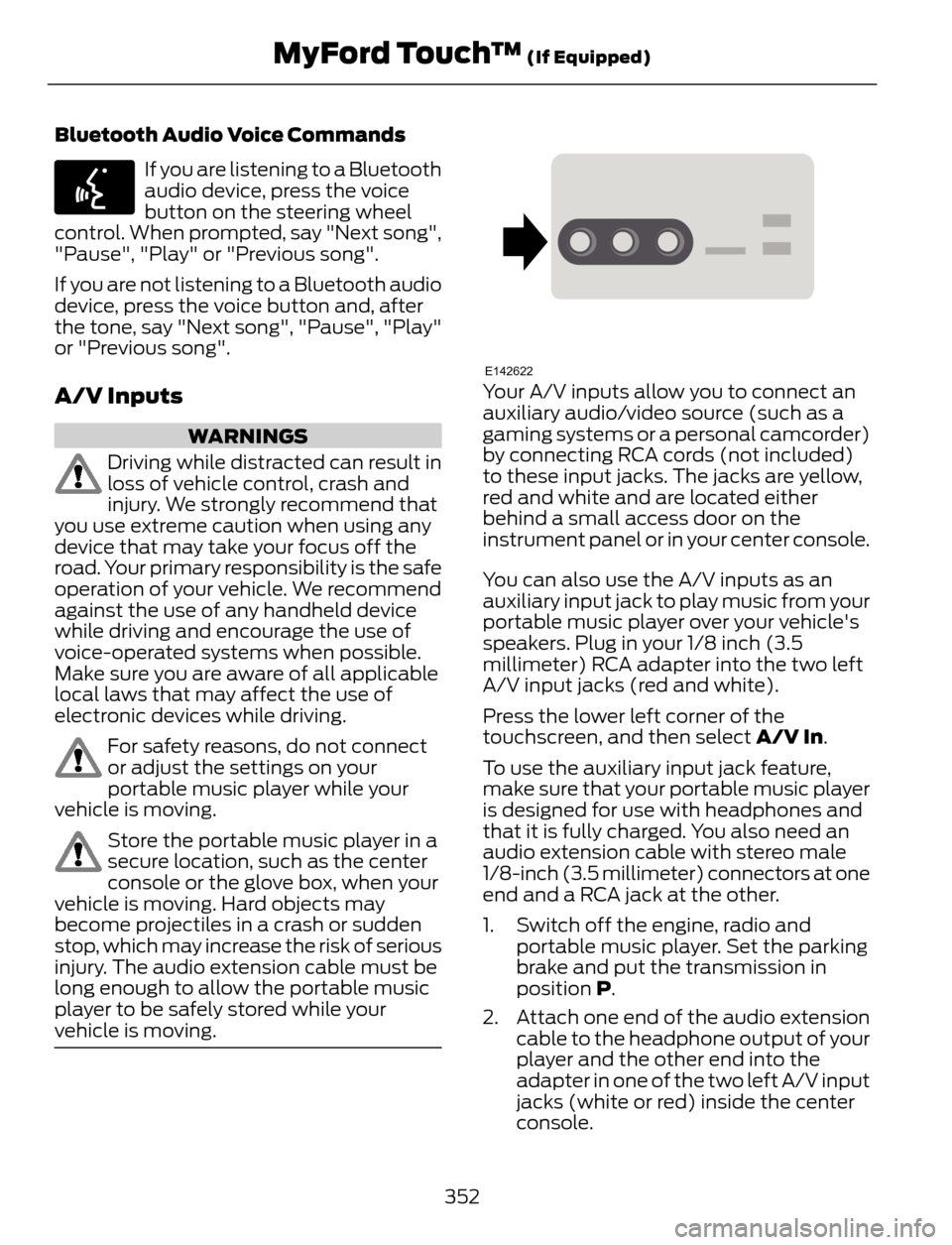
E142622Your A/V inputs allow you to connect an
auxiliary audio/video source (such as a
gaming systems or a personal camcorder)
by connecting RCA cords (not included)
to these input jacks. The jacks are yellow,
red and white and are located either
behind a small access door on the
instrument panel or in your center console.
You can also use the A/V inputs as an
auxiliary input jack to play music from your
portable music player over your vehicle's
speakers. Plug in your 1/8 inch (3.5
millimeter) RCA adapter into the two left
A/V input jacks (red and white).
Press the lower left corner of the
touchscreen, and then select A/V In.
To use the auxiliary input jack feature,
make sure that your portable music player
is designed for use with headphones and
that it is fully charged. You also need an
audio extension cable with stereo male
1/8-inch (3.5 millimeter) connectors at one
end and a RCA jack at the other.
1. Switch off the engine, radio and
portable music player. Set the parking
brake and put the transmission in
position P.
2. Attach one end of the audio extension
cable to the headphone output of your
player and the other end into the
adapter in one of the two left A/V input
jacks (white or red) inside the center
console.
352
MyFord Touch™ (If Equipped)
Page 372 of 428
Recirculated air: Touch to turn the recirculated air on or off which may reduce
the amount of time needed to cool down the interior and help reduce odors
from reaching the interior. Recirculated air also engages automatically when
MAX A/C or MAX defrost is selected and may be engaged manually in any
airflow mode except defrost. It may also turn off in all airflow modes except
MAX A/C and MAX defrost to reduce fog potential. E
MAX A/C: Touch to cool your vehicle with recirculated air. Touch again for
normal A/C operation. MAX A/C distributes air through instrument panel vents
and may help reduce odors from entering your vehicle. MAX A/C is more
economical and efficient than normal A/C mode. F
A/C: Touch to turn the air conditioning on or off. Use A/C with recirculated air
to improve cooling performance and efficiency. A/C engages automatically in
MAX A/C, defrost and footwell/defrost. G
AUTO: Touch to engage automatic operation, then set the temperature using
the temperature control. The system automatically controls fan speed, airflow
distribution, A/C on or off and the use of fresh or recirculated air. H
Manual airflow distribution controls:Footwell and Defrost: Distributes
air through the windshield defroster vents, demister vents, floor vents and rear
seat floor vents, and provides outside air to reduce window fogging.Panel:
Distributes air through the instrument panel vents.Panel and Floor: Distributes
air through the instrument panel vents, demister vents, floor vents and rear seat
floor vents.Floor: Distributes air through the demister vents, floor vents and I
rear seat floor vents.Defrost: Touch to clear the windshield of fog and thin ice.
Touch again to return to the previous airflow selection. When on, defrost provides
outside air to reduce window fogging and distributes air through the windshield
defroster vents and demister vents.MAX Defrost: Distributes outside air
through the windshield air vents and automatically switches the air conditioning
on. The fan is set to the highest speed and the temperature to HI. When the air
distribution is set in this position, you are unable to select recirculated air or
manually adjust the fan speed and temperature control.
Driver settings: Touch + or – adjust the temperature. J
Climate Control Voice Commands
E142599
Press the voice button on the
steering wheel controls. When
prompted, say any of the
following commands:
369
MyFord Touch™ (If Equipped)
Page 419 of 428
B
Blind Spot Monitor......................................160Blind Spot Information System (BLIS®)
with Cross Traffic Alert................................160
Bonnet LockSee: Opening and Closing the Hood..........206Booster Seats....................................................17Types of Booster Seats.......................................17Brake Fluid Check.........................................215
Brakes...............................................................145
General Information..........................................145Breaking-In......................................................183
Bulb Specification Chart...........................226
C
Cabin Air Filter................................................107
California Proposition 65..............................11
Capacities and Specifications.................261
Technical Specifications.................................265Car WashSee: Cleaning the Exterior...............................227Center Console..............................................122
Changing a Bulb...........................................222
Lamp Assembly Condensation....................222
Replacing Fog, Park and Turn Signal
Bulbs..................................................................224
Replacing Headlamp Bulbs...........................222
Replacing HID Headlamp Bulbs...................223
Replacing High-Mount Brake Lamp
Bulb....................................................................225
Replacing License Plate Lamp Bulb...........225
Replacing Reverse Lamp Assembly...........225
Replacing Side Marker Bulbs.........................224
Replacing Tail, Brake and Turn Signal
Bulbs..................................................................225
Changing a Fuse...........................................196Fuses.......................................................................196Changing a Road Wheel...........................255Dissimilar Spare Wheel and Tire Assembly
Information.....................................................255
Tire Change Procedure....................................256
Changing the 12V Battery..........................216
Changing the Engine Air Filter.................219
...................................................................................2 1 9
1.6L and 2.0L EcoBoost Engines...................219
2.5L Engine............................................................219
Changing the Wiper Blades......................218
Checking MyKey System Status..............50
Checking the Wiper Blades......................218
Child Restraint and Safety Belt
Maintenance.................................................32
Child Safety.......................................................14
General Information.............................................14Child Safety Locks..........................................24Left-Hand Side......................................................25
Right-Hand Side...................................................25
Child Seat Positioning...................................15
Cleaning Leather Seats..............................231
Cleaning Products........................................227
Cleaning the Alloy Wheels........................231
Cleaning the Engine....................................229
Cleaning the Exterior...................................227
Cleaning Plastic Exterior Parts.....................228
Exterior Chrome..................................................227
Stripes or Graphics (if equipped).................227
Underbody...........................................................228
Cleaning the Instrument Panel and
Instrument Cluster Lens........................230
Cleaning the Interior...................................229
Cleaning the Windows and Wiper
Blades...........................................................229
Clearing All MyKeys.......................................50
Climate............................................................368
Climate Control Voice Commands.............369Climate Control..............................................101
Coolant Check
See: Engine Coolant Check.............................212Crash Sensors and Airbag Indicator........42
Creating a MyKey...........................................50
Programming/Changing Configurable
Settings...............................................................50
Cruise Control.................................................68Principle of Operation.......................................159Cruise controlSee: Using Cruise Control................................159Customer Assistance.................................190
D
Data Recording..................................................9Event Data Recording...........................................9
Service Data Recording........................................9
416
Index
Page 421 of 428
Ford Credit..........................................................11(U.S. Only).................................................................11Ford Extended Service Plan (ESP).......397SERVICE PLANS (CANADA ONLY)............399
SERVICE PLANS (U.S. Only).........................397
Four-Wheel Drive.........................................140Principle of Operation......................................140Front Fog Lamps.............................................75
Front Passenger Sensing System.............37
Fuel and Refueling.......................................128
Fuel Consumption........................................134
Calculating Fuel Economy..............................134
Filling the Tank.....................................................134
Fuel Filter.........................................................216
Fuel Quality.....................................................129
Choosing the Right Fuel...................................129
Octane Recommendations............................129
Fuel Shutoff....................................................187
Fuses.................................................................196
Fuse Specification Chart............................197
Luggage Compartment Fuse Panel...........203
Passenger Compartment Fuse
Panel.................................................................200
Power Distribution Box.....................................197
Pre-Fuse Box........................................................197
G
Garage Door OpenerSee: Universal Garage Door Opener............116Gauges...............................................................83Engine Coolant Temperature Gauge............84
Fuel Gauge.............................................................84
Information Display.............................................83
General Information on Radio
Frequencies...................................................44
Intelligent Access.................................................44General Maintenance Information.......400Multi-Point Inspection.....................................402
Owner Checks and Services..........................401
Protecting Your Investment..........................400
Why Maintain Your Vehicle?........................400
Why Maintain Your Vehicle at Your
Dealership?....................................................400
Getting Assistance Outside the U.S. and
Canada..........................................................193
Getting the Services You Need...............190
Away From Home..............................................190
H
HandbrakeSee: Parking Brake.............................................146Hazard Warning Flashers...........................187
Headlamp Exit Delay.....................................74
Head Restraints............................................109
Adjusting the Head Restraint..........................110Heated Seats...................................................115
Heated Windows and Mirrors..................107
Heated Exterior Mirror.......................................107
Heated Rear Window........................................107
HeatingSee: Climate Control..........................................101Hill Start Assist..............................................138Using Hill Start Assist.......................................138Hints on Controlling the Interior
Climate..........................................................104
Cooling the Interior Quickly............................105
General Hints.......................................................104
Heating the Interior Quickly............................104
Maximum Cooling Performance in
Instrument Panel or Instrument Panel
and Footwell Positions................................107
Recommended Settings for Cooling .........105
Recommended Settings for Heating..........105
Side Window Defogging in Cold
Weather............................................................106
Vehicle Stationary for Extended Periods
during Extreme High Ambient
Temperatures.................................................106
Hints on Driving With Anti-Lock
Brakes............................................................145
Hood Lock
See: Opening and Closing the Hood..........206
I
Ignition Switch...............................................123
In California (U.S. Only)..............................191
Information Display Control......................68
Multimedia Controls...........................................69Information Displays....................................88General Information...........................................88
418
Index