lock FORD ESCAPE 2014 3.G Workshop Manual
[x] Cancel search | Manufacturer: FORD, Model Year: 2014, Model line: ESCAPE, Model: FORD ESCAPE 2014 3.GPages: 428, PDF Size: 16.6 MB
Page 163 of 428
BLIND SPOT MONITOR
Blind Spot Information System
(BLIS®) with Cross Traffic Alert (If
Equipped)
WARNING
To help avoid injuries, NEVER use the
BLIS as a replacement for using the
interior and exterior mirrors and
looking over your shoulder before changing
lanes. BLIS is not a replacement for careful
driving and only an assist.
A
A
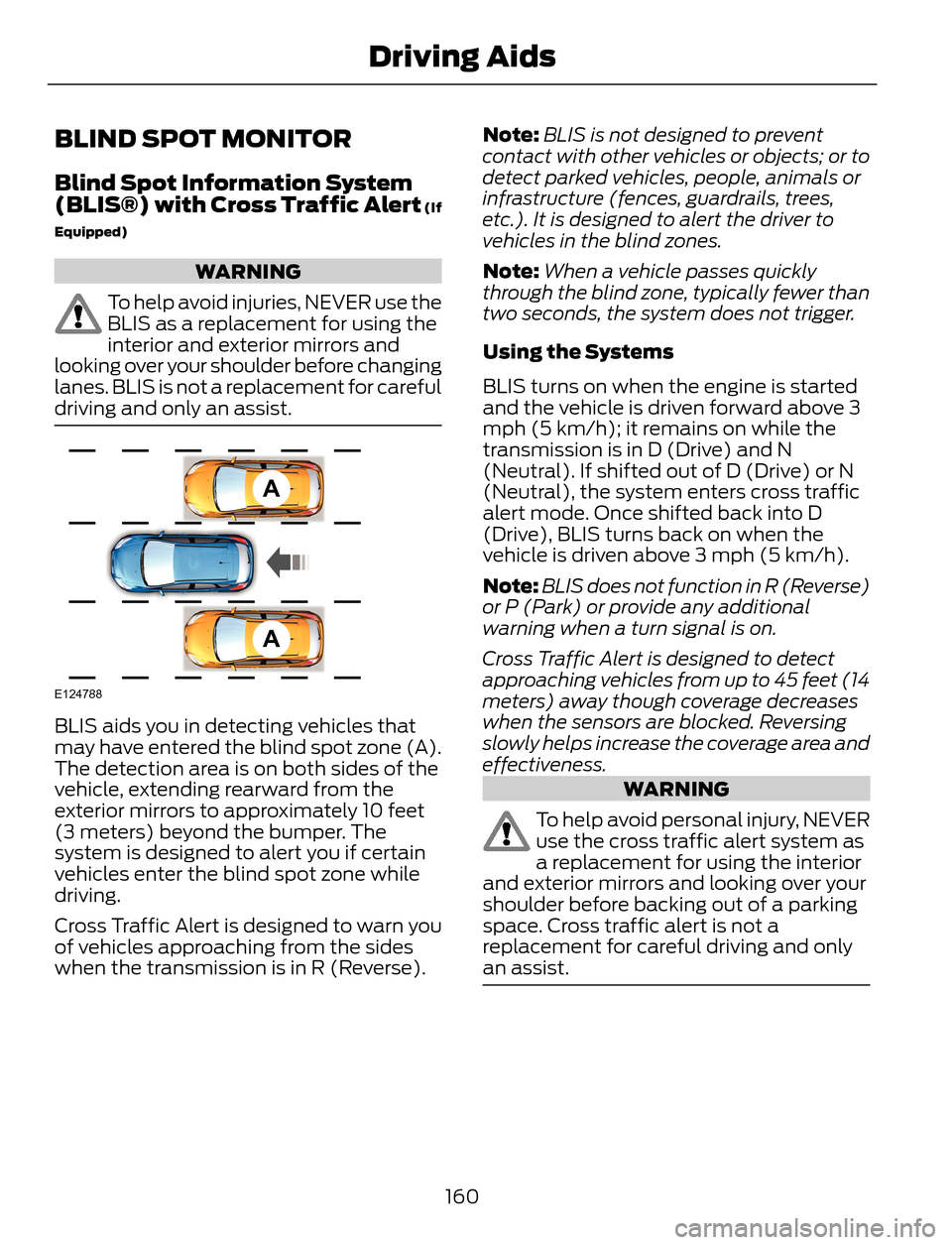
E124788
BLIS aids you in detecting vehicles that
may have entered the blind spot zone (A).
The detection area is on both sides of the
vehicle, extending rearward from the
exterior mirrors to approximately 10 feet
(3 meters) beyond the bumper. The
system is designed to alert you if certain
vehicles enter the blind spot zone while
driving.
Cross Traffic Alert is designed to warn you
of vehicles approaching from the sides
when the transmission is in R (Reverse).Note:BLIS is not designed to prevent
contact with other vehicles or objects; or to
detect parked vehicles, people, animals or
infrastructure (fences, guardrails, trees,
etc.). It is designed to alert the driver to
vehicles in the blind zones.
Note:When a vehicle passes quickly
through the blind zone, typically fewer than
two seconds, the system does not trigger.
Using the Systems
BLIS turns on when the engine is started
and the vehicle is driven forward above 3
mph (5 km/h); it remains on while the
transmission is in D (Drive) and N
(Neutral). If shifted out of D (Drive) or N
(Neutral), the system enters cross traffic
alert mode. Once shifted back into D
(Drive), BLIS turns back on when the
vehicle is driven above 3 mph (5 km/h).
Note:BLIS does not function in R (Reverse)
or P (Park) or provide any additional
warning when a turn signal is on.
Cross Traffic Alert is designed to detect
approaching vehicles from up to 45 feet (14
meters) away though coverage decreases
when the sensors are blocked. Reversing
slowly helps increase the coverage area and
effectiveness.
WARNING
To help avoid personal injury, NEVER
use the cross traffic alert system as
a replacement for using the interior
and exterior mirrors and looking over your
shoulder before backing out of a parking
space. Cross traffic alert is not a
replacement for careful driving and only
an assist.
160
Driving Aids
Page 165 of 428
System Lights and Messages
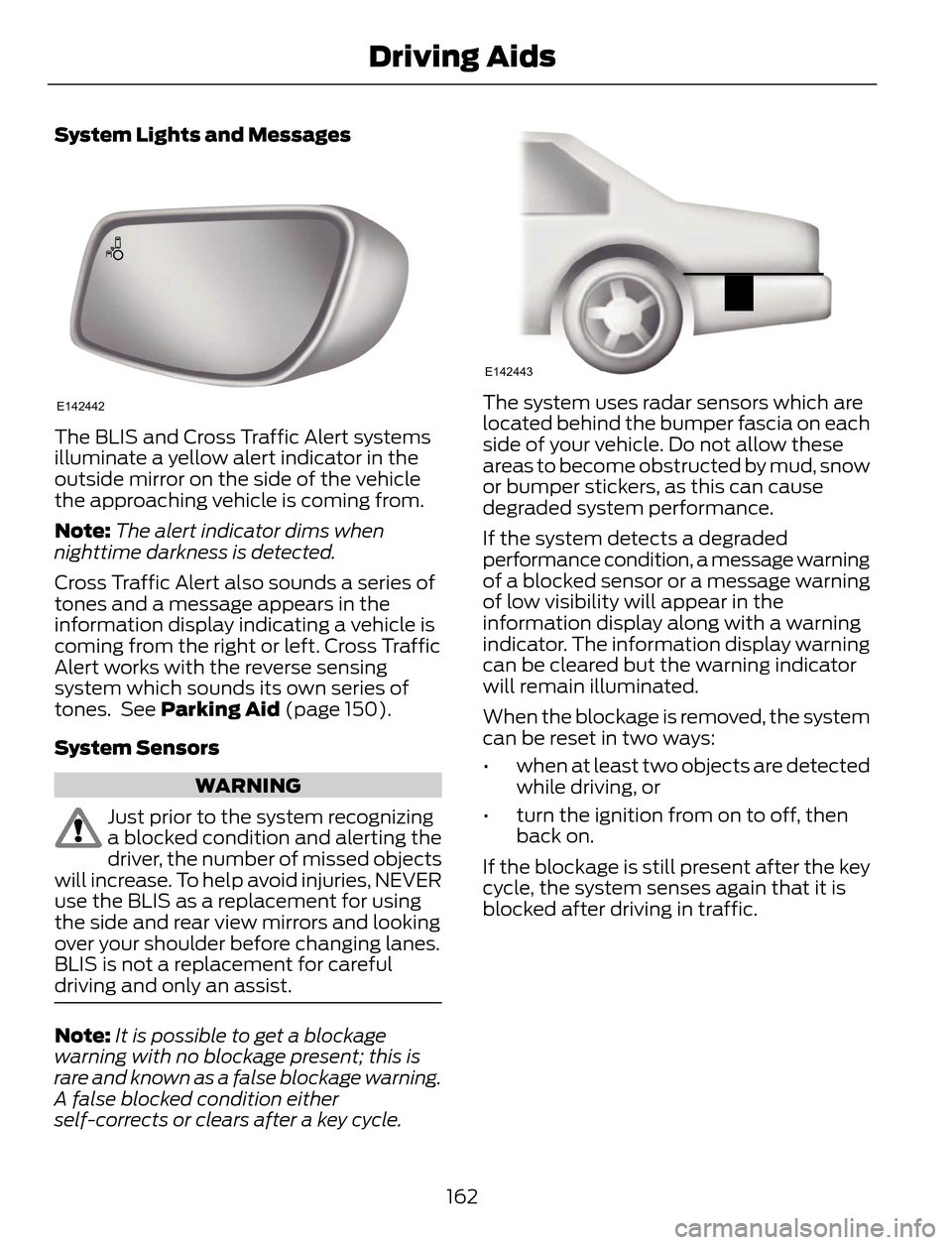
E142442
The BLIS and Cross Traffic Alert systems
illuminate a yellow alert indicator in the
outside mirror on the side of the vehicle
the approaching vehicle is coming from.
Note:The alert indicator dims when
nighttime darkness is detected.
Cross Traffic Alert also sounds a series of
tones and a message appears in the
information display indicating a vehicle is
coming from the right or left. Cross Traffic
Alert works with the reverse sensing
system which sounds its own series of
tones. See Parking Aid (page 150).
System Sensors
WARNING
Just prior to the system recognizing
a blocked condition and alerting the
driver, the number of missed objects
will increase. To help avoid injuries, NEVER
use the BLIS as a replacement for using
the side and rear view mirrors and looking
over your shoulder before changing lanes.
BLIS is not a replacement for careful
driving and only an assist.
Note:It is possible to get a blockage
warning with no blockage present; this is
rare and known as a false blockage warning.
A false blocked condition either
self-corrects or clears after a key cycle.
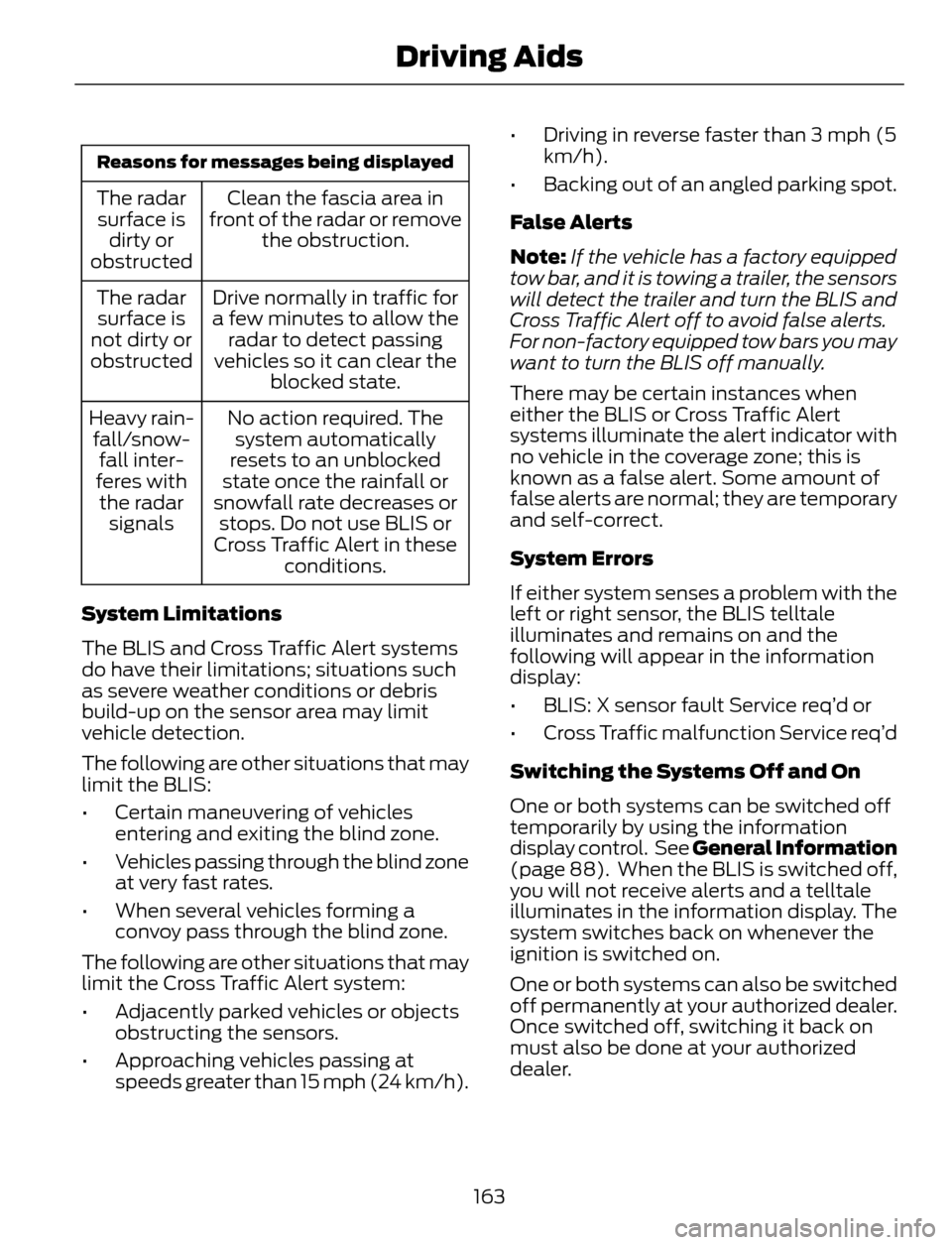
E142443
The system uses radar sensors which are
located behind the bumper fascia on each
side of your vehicle. Do not allow these
areas to become obstructed by mud, snow
or bumper stickers, as this can cause
degraded system performance.
If the system detects a degraded
performance condition, a message warning
of a blocked sensor or a message warning
of low visibility will appear in the
information display along with a warning
indicator. The information display warning
can be cleared but the warning indicator
will remain illuminated.
When the blockage is removed, the system
can be reset in two ways:
• when at least two objects are detected
while driving, or
• turn the ignition from on to off, then
back on.
If the blockage is still present after the key
cycle, the system senses again that it is
blocked after driving in traffic.
162
Driving Aids
Page 166 of 428
Reasons for messages being displayed
Clean the fascia area in
front of the radar or remove
the obstruction. The radar
surface is
dirty or
obstructed
Drive normally in traffic for
a few minutes to allow the
radar to detect passing
vehicles so it can clear the
blocked state. The radar
surface is
not dirty or
obstructed
No action required. The
system automatically
resets to an unblocked
state once the rainfall or
snowfall rate decreases or
stops. Do not use BLIS or
Cross Traffic Alert in these
conditions. Heavy rain-
fall/snow-
fall inter-
feres with
the radar
signals
System Limitations
The BLIS and Cross Traffic Alert systems
do have their limitations; situations such
as severe weather conditions or debris
build-up on the sensor area may limit
vehicle detection.
The following are other situations that may
limit the BLIS:
• Certain maneuvering of vehicles
entering and exiting the blind zone.
• Vehicles passing through the blind zone
at very fast rates.
• When several vehicles forming a
convoy pass through the blind zone.
The following are other situations that may
limit the Cross Traffic Alert system:
• Adjacently parked vehicles or objects
obstructing the sensors.
• Approaching vehicles passing at
speeds greater than 15 mph (24 km/h).• Driving in reverse faster than 3 mph (5
km/h).
• Backing out of an angled parking spot.
False Alerts
Note:If the vehicle has a factory equipped
tow bar, and it is towing a trailer, the sensors
will detect the trailer and turn the BLIS and
Cross Traffic Alert off to avoid false alerts.
For non-factory equipped tow bars you may
want to turn the BLIS off manually.
There may be certain instances when
either the BLIS or Cross Traffic Alert
systems illuminate the alert indicator with
no vehicle in the coverage zone; this is
known as a false alert. Some amount of
false alerts are normal; they are temporary
and self-correct.
System Errors
If either system senses a problem with the
left or right sensor, the BLIS telltale
illuminates and remains on and the
following will appear in the information
display:
• BLIS: X sensor fault Service req’d or
• Cross Traffic malfunction Service req’d
Switching the Systems Off and On
One or both systems can be switched off
temporarily by using the information
display control. See General Information
(page 88). When the BLIS is switched off,
you will not receive alerts and a telltale
illuminates in the information display. The
system switches back on whenever the
ignition is switched on.
One or both systems can also be switched
off permanently at your authorized dealer.
Once switched off, switching it back on
must also be done at your authorized
dealer.
163
Driving Aids
Page 170 of 428
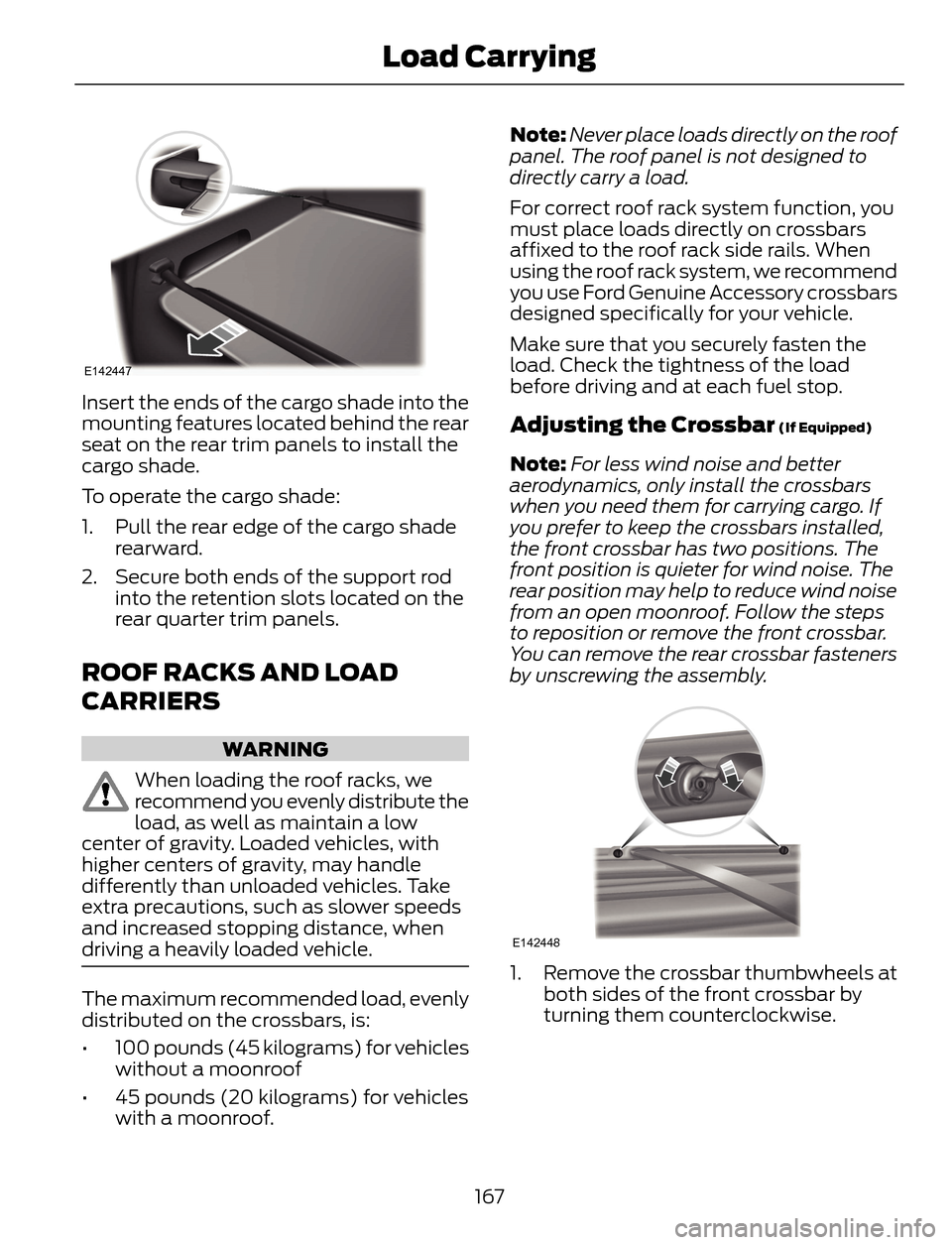
E142447
Insert the ends of the cargo shade into the
mounting features located behind the rear
seat on the rear trim panels to install the
cargo shade.
To operate the cargo shade:
1. Pull the rear edge of the cargo shade
rearward.
2. Secure both ends of the support rod
into the retention slots located on the
rear quarter trim panels.
ROOF RACKS AND LOAD
CARRIERS
WARNING
When loading the roof racks, we
recommend you evenly distribute the
load, as well as maintain a low
center of gravity. Loaded vehicles, with
higher centers of gravity, may handle
differently than unloaded vehicles. Take
extra precautions, such as slower speeds
and increased stopping distance, when
driving a heavily loaded vehicle.
The maximum recommended load, evenly
distributed on the crossbars, is:
• 100 pounds (45 kilograms) for vehicles
without a moonroof
• 45 pounds (20 kilograms) for vehicles
with a moonroof.Note:Never place loads directly on the roof
panel. The roof panel is not designed to
directly carry a load.
For correct roof rack system function, you
must place loads directly on crossbars
affixed to the roof rack side rails. When
using the roof rack system, we recommend
you use Ford Genuine Accessory crossbars
designed specifically for your vehicle.
Make sure that you securely fasten the
load. Check the tightness of the load
before driving and at each fuel stop.
Adjusting the Crossbar (If Equipped)
Note:For less wind noise and better
aerodynamics, only install the crossbars
when you need them for carrying cargo. If
you prefer to keep the crossbars installed,
the front crossbar has two positions. The
front position is quieter for wind noise. The
rear position may help to reduce wind noise
from an open moonroof. Follow the steps
to reposition or remove the front crossbar.
You can remove the rear crossbar fasteners
by unscrewing the assembly.
E142448
1. Remove the crossbar thumbwheels at
both sides of the front crossbar by
turning them counterclockwise.
167
Load Carrying
Page 171 of 428
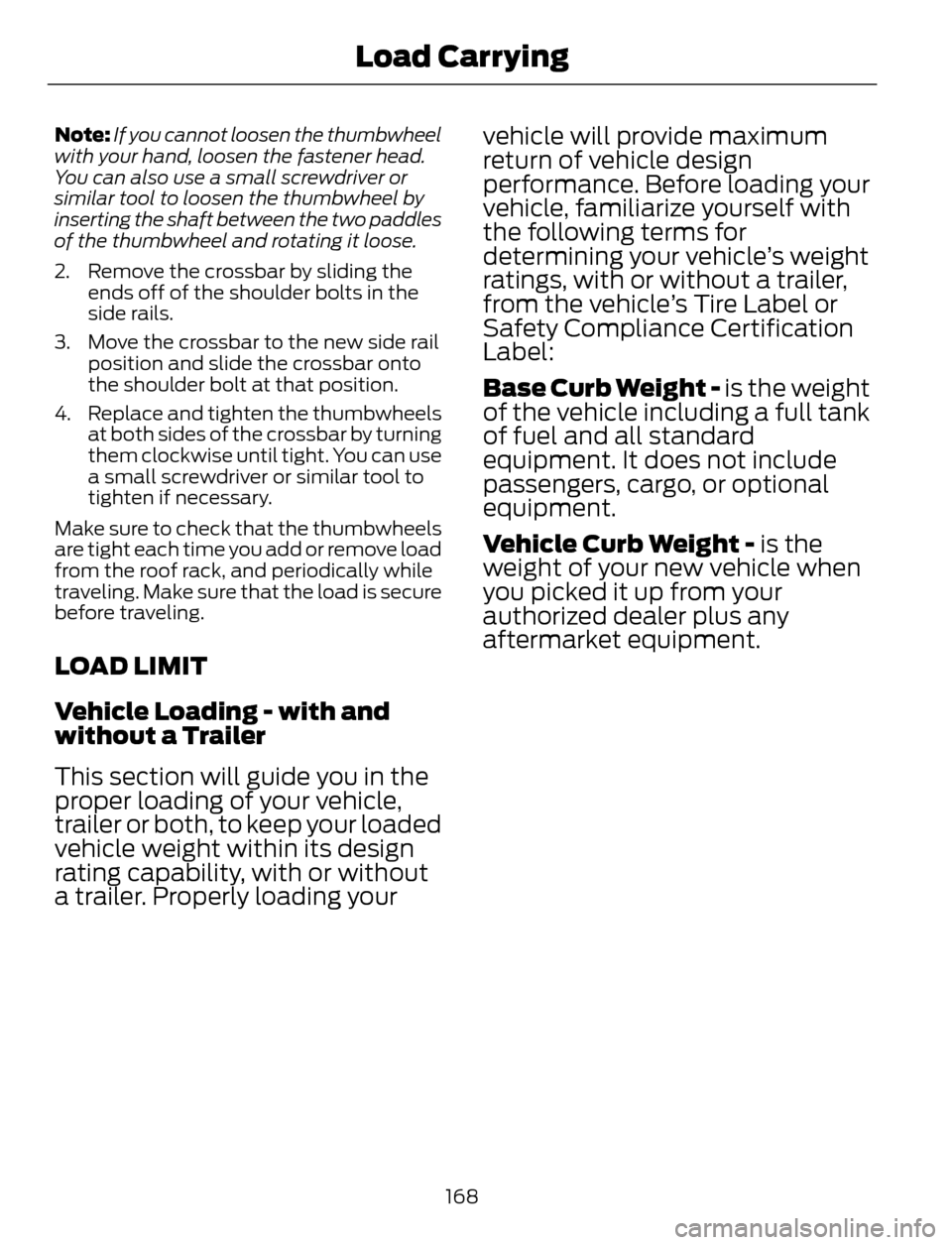
Note:If you cannot loosen the thumbwheel
with your hand, loosen the fastener head.
You can also use a small screwdriver or
similar tool to loosen the thumbwheel by
inserting the shaft between the two paddles
of the thumbwheel and rotating it loose.
2. Remove the crossbar by sliding the
ends off of the shoulder bolts in the
side rails.
3. Move the crossbar to the new side rail
position and slide the crossbar onto
the shoulder bolt at that position.
4. Replace and tighten the thumbwheels
at both sides of the crossbar by turning
them clockwise until tight. You can use
a small screwdriver or similar tool to
tighten if necessary.
Make sure to check that the thumbwheels
are tight each time you add or remove load
from the roof rack, and periodically while
traveling. Make sure that the load is secure
before traveling.
LOAD LIMIT
Vehicle Loading - with and
without a Trailer
This section will guide you in the
proper loading of your vehicle,
trailer or both, to keep your loaded
vehicle weight within its design
rating capability, with or without
a trailer. Properly loading yourvehicle will provide maximum
return of vehicle design
performance. Before loading your
vehicle, familiarize yourself with
the following terms for
determining your vehicle’s weight
ratings, with or without a trailer,
from the vehicle’s Tire Label or
Safety Compliance Certification
Label:
Base Curb Weight - is the weight
of the vehicle including a full tank
of fuel and all standard
equipment. It does not include
passengers, cargo, or optional
equipment.
Vehicle Curb Weight - is the
weight of your new vehicle when
you picked it up from your
authorized dealer plus any
aftermarket equipment.
168
Load Carrying
Page 184 of 428
TOWING POINTS
Due to local market requirements in some
countries, some vehicles may be equipped
with a recovery hook.
Recovery Hook Location
If your vehicle is equipped with a screw-in
recovery hook, it is located in the spare
wheel well.
If your vehicle is not equipped with a
recovery hook, you can purchase one from
your dealer.
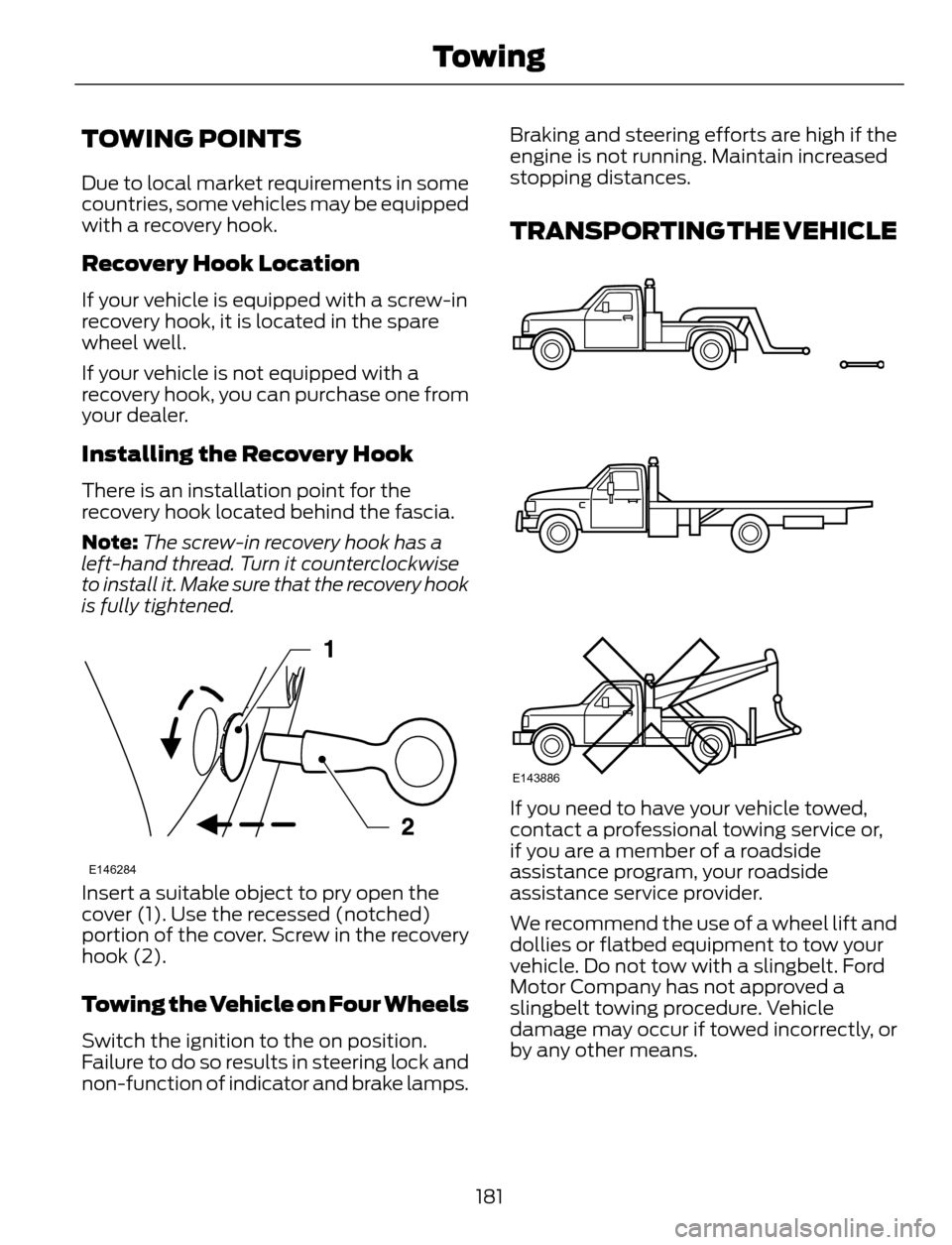
Installing the Recovery Hook
There is an installation point for the
recovery hook located behind the fascia.
Note:The screw-in recovery hook has a
left-hand thread. Turn it counterclockwise
to install it. Make sure that the recovery hook
is fully tightened.
E146284
Insert a suitable object to pry open the
cover (1). Use the recessed (notched)
portion of the cover. Screw in the recovery
hook (2).
Towing the Vehicle on Four Wheels
Switch the ignition to the on position.
Failure to do so results in steering lock and
non-function of indicator and brake lamps.Braking and steering efforts are high if the
engine is not running. Maintain increased
stopping distances.
TRANSPORTING THE VEHICLE
E143886
If you need to have your vehicle towed,
contact a professional towing service or,
if you are a member of a roadside
assistance program, your roadside
assistance service provider.
We recommend the use of a wheel lift and
dollies or flatbed equipment to tow your
vehicle. Do not tow with a slingbelt. Ford
Motor Company has not approved a
slingbelt towing procedure. Vehicle
damage may occur if towed incorrectly, or
by any other means.
181
Towing
Page 188 of 428
WARNINGS
Never place floor mats or any other
covering on top of already installed
floor mats. Floor mats should always
rest on top of vehicle carpeting surface and
not another floor mat or other covering.
Additional floor mats or any other covering
will reduce the pedal clearance and
potentially interfere with pedal operation.
Check attachment of floor mats on
a regular basis. Always properly
reinstall and secure floor mats that
have been removed for cleaning or
replacement.
Always make sure that objects
cannot fall into the driver foot well
while the vehicle is moving. Objects
that are loose can become trapped under
the pedals causing a loss of vehicle control.
Failure to properly follow floor mat
installation or attachment
instructions can potentially cause
interference with pedal operation causing
loss of control of vehicle.
To install floor mats, position the
floor mat so that the eyelet is over
the retention post and press down
to lock in.
To remove the floor mat, reverse the
installation procedure.
185
Driving Hints
Page 189 of 428
ROADSIDE ASSISTANCE
Vehicles Sold In The U.S.: Getting
Roadside Assistance
To fully assist you should you have a
vehicle concern, Ford Motor Company
offers a complimentary roadside
assistance program. This program is
separate from the New Vehicle Limited
Warranty. The service is available:
• 24 hours, seven days a week.
• for the coverage period listed on the
Roadside Assistance Card included in
your Owner's Manual portfolio.
Roadside assistance will cover:
• a flat tire change with a good spare, if
provided with the vehicle (except
vehicles that have been supplied with
a tire inflation kit).
• battery jump start.
• lock-out assistance (key replacement
cost is the customer's responsibility).
• fuel delivery — Independent Service
Contractors, if not prohibited by state,
local or municipal law, shall deliver up
to 2.0 gallons (7.5 liters) of gasoline or
5.0 gallons (18.9 liters) of diesel fuel
to a disabled vehicle. Fuel delivery
service is limited to two no-charge
occurrences within a 12-month period.
• winch out — available within 100 feet
(30.5 meters) of a paved or county
maintained road, no recoveries.
• towing — Ford and Lincoln eligible
vehicles towed to an authorized dealer
within 35 miles (56.3 kilometers) of the
disablement location or to the nearest
authorized dealer. If a member
requests to be towed to an authorized
dealer more than 35 miles (56.3
kilometers) from the disablement
location, the member shall be
responsible for any mileage costs in
excess of 35 miles (56.3 kilometers).Trailers shall be covered up to $200 if the
disabled eligible vehicle requires service at
the nearest authorized dealer. If the trailer
is disabled, but the towing vehicle is
operational, the trailer does not qualify for
any roadside services.
Vehicles Sold In The U.S. : Using
Roadside Assistance
Complete the roadside assistance
identification card and place it in your
wallet for quick reference. This card is
found in the owner's information portfolio
in the glove compartment.
U.S. Ford vehicle customers who require
Roadside Assistance, call 1-800-241-3673.
If you need to arrange roadside assistance
for yourself, Ford Motor Company will
reimburse a reasonable amount for towing
to the nearest dealership within 35 miles
(56.3 kilometers). To obtain
reimbursement information, U.S. Ford
vehicle customers call 1-800-241-3673.
Customers will be asked to submit their
original receipts.
Vehicles Sold In Canada : Getting
Roadside Assistance
Canadian customers who require roadside
assistance, call 1-800-665-2006.
Vehicles Sold In Canada : Using
Roadside Assistance
For your convenience, you may complete
the roadside assistance identification card
found in the centerfold of your warranty
guide and retain for future reference.
Canadian roadside coverage and benefits
may differ from the U.S. coverage. If you
require more information, please refer to
the coverage section of your warranty
guide, call us in Canada at
1-800-665-2006, or visit our website at
www.ford.ca.
186
Roadside Emergencies
Page 201 of 428
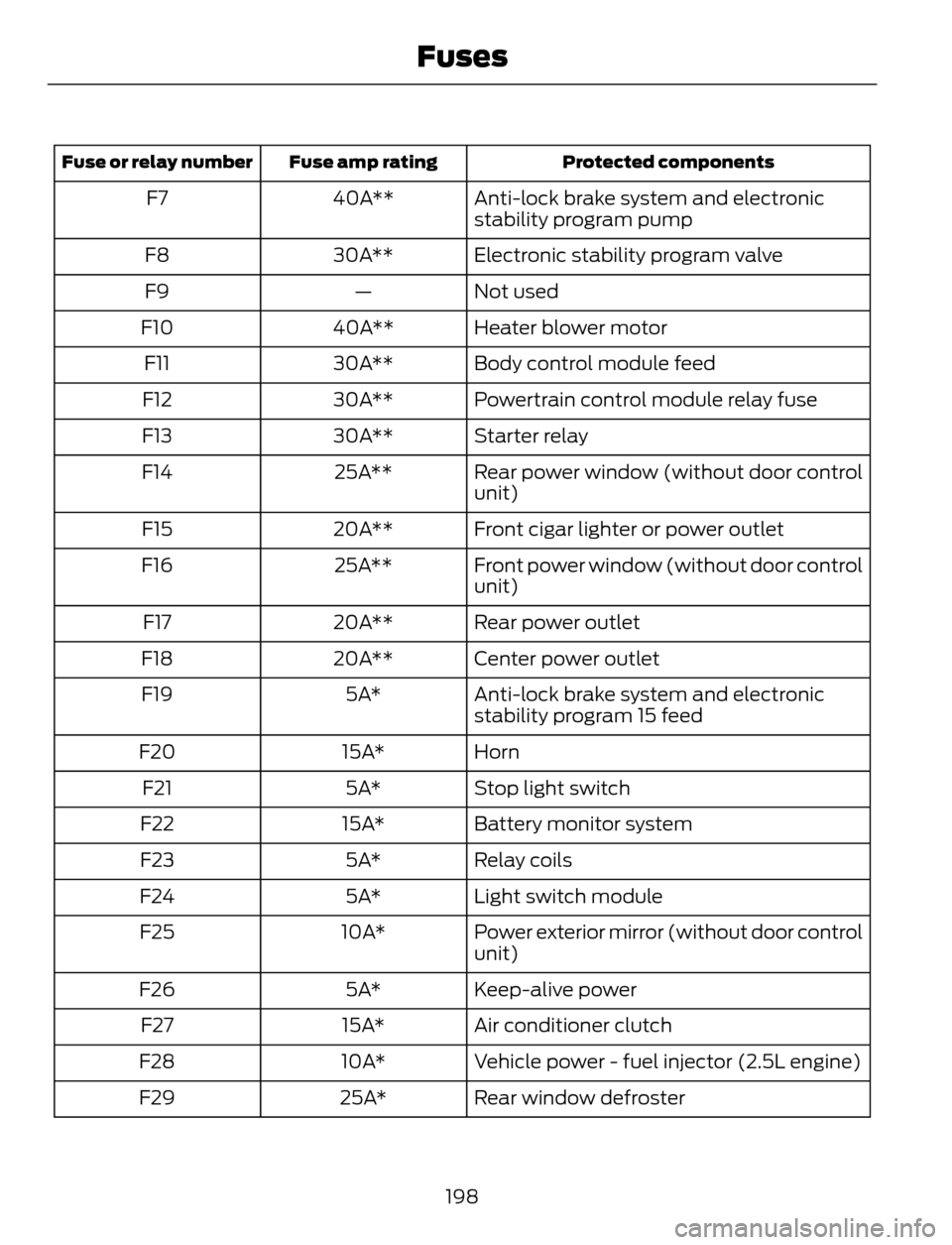
Protected components Fuse amp rating Fuse or relay number
Anti-lock brake system and electronic
stability program pump 40A** F7
Electronic stability program valve 30A** F8
Not used — F9
Heater blower motor 40A** F10
Body control module feed 30A** F11
Powertrain control module relay fuse 30A** F12
Starter relay 30A** F13
Rear power window (without door control
unit) 25A** F14
Front cigar lighter or power outlet 20A** F15
Front power window (without door control
unit) 25A** F16
Rear power outlet 20A** F17
Center power outlet 20A** F18
Anti-lock brake system and electronic
stability program 15 feed 5A* F19
Horn 15A* F20
Stop light switch 5A* F21
Battery monitor system 15A* F22
Relay coils 5A* F23
Light switch module 5A* F24
Power exterior mirror (without door control
unit) 10A* F25
Keep-alive power 5A* F26
Air conditioner clutch 15A* F27
Vehicle power - fuel injector (2.5L engine) 10A* F28
Rear window defroster 25A* F29
198
Fuses
Page 205 of 428
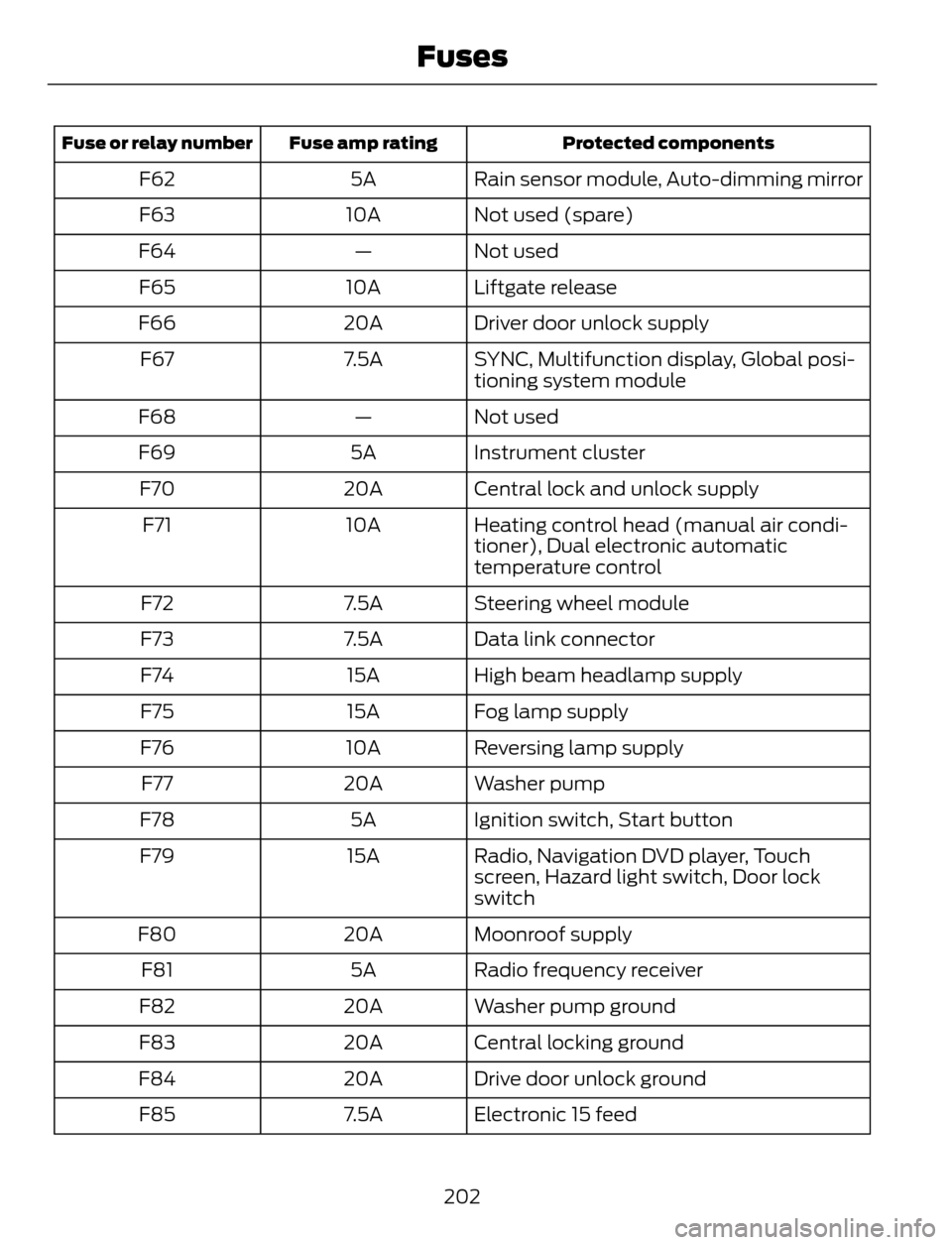
Protected components Fuse amp rating Fuse or relay number
Rain sensor module, Auto-dimming mirror 5A F62
Not used (spare) 10A F63
Not used — F64
Liftgate release 10A F65
Driver door unlock supply 20A F66
SYNC, Multifunction display, Global posi-
tioning system module 7.5A F67
Not used — F68
Instrument cluster 5A F69
Central lock and unlock supply 20A F70
Heating control head (manual air condi-
tioner), Dual electronic automatic
temperature control 10A F71
Steering wheel module 7.5A F72
Data link connector 7.5A F73
High beam headlamp supply 15A F74
Fog lamp supply 15A F75
Reversing lamp supply 10A F76
Washer pump 20A F77
Ignition switch, Start button 5A F78
Radio, Navigation DVD player, Touch
screen, Hazard light switch, Door lock
switch 15A F79
Moonroof supply 20A F80
Radio frequency receiver 5A F81
Washer pump ground 20A F82
Central locking ground 20A F83
Drive door unlock ground 20A F84
Electronic 15 feed 7.5A F85
202
Fuses