lock FORD ESCAPE 2014 3.G Manual PDF
[x] Cancel search | Manufacturer: FORD, Model Year: 2014, Model line: ESCAPE, Model: FORD ESCAPE 2014 3.GPages: 428, PDF Size: 16.6 MB
Page 259 of 428
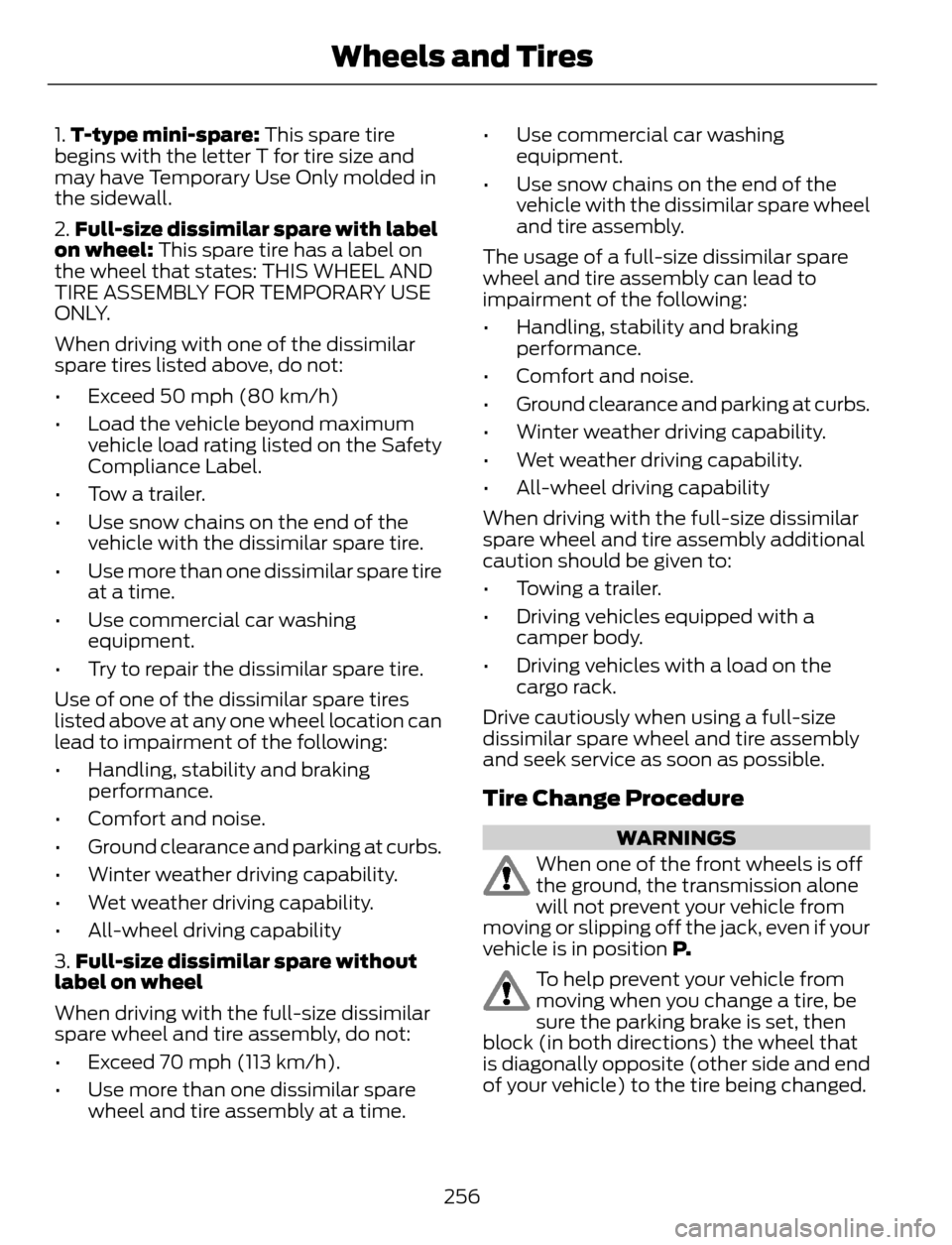
1.T-type mini-spare: This spare tire
begins with the letter T for tire size and
may have Temporary Use Only molded in
the sidewall.
2.Full-size dissimilar spare with label
on wheel: This spare tire has a label on
the wheel that states: THIS WHEEL AND
TIRE ASSEMBLY FOR TEMPORARY USE
ONLY.
When driving with one of the dissimilar
spare tires listed above, do not:
• Exceed 50 mph (80 km/h)
• Load the vehicle beyond maximum
vehicle load rating listed on the Safety
Compliance Label.
• Tow a trailer.
• Use snow chains on the end of the
vehicle with the dissimilar spare tire.
• Use more than one dissimilar spare tire
at a time.
• Use commercial car washing
equipment.
• Try to repair the dissimilar spare tire.
Use of one of the dissimilar spare tires
listed above at any one wheel location can
lead to impairment of the following:
• Handling, stability and braking
performance.
• Comfort and noise.
• Ground clearance and parking at curbs.
• Winter weather driving capability.
• Wet weather driving capability.
• All-wheel driving capability
3.Full-size dissimilar spare without
label on wheel
When driving with the full-size dissimilar
spare wheel and tire assembly, do not:
• Exceed 70 mph (113 km/h).
• Use more than one dissimilar spare
wheel and tire assembly at a time.• Use commercial car washing
equipment.
• Use snow chains on the end of the
vehicle with the dissimilar spare wheel
and tire assembly.
The usage of a full-size dissimilar spare
wheel and tire assembly can lead to
impairment of the following:
• Handling, stability and braking
performance.
• Comfort and noise.
• Ground clearance and parking at curbs.
• Winter weather driving capability.
• Wet weather driving capability.
• All-wheel driving capability
When driving with the full-size dissimilar
spare wheel and tire assembly additional
caution should be given to:
• Towing a trailer.
• Driving vehicles equipped with a
camper body.
• Driving vehicles with a load on the
cargo rack.
Drive cautiously when using a full-size
dissimilar spare wheel and tire assembly
and seek service as soon as possible.
Tire Change Procedure
WARNINGS
When one of the front wheels is off
the ground, the transmission alone
will not prevent your vehicle from
moving or slipping off the jack, even if your
vehicle is in position P.
To help prevent your vehicle from
moving when you change a tire, be
sure the parking brake is set, then
block (in both directions) the wheel that
is diagonally opposite (other side and end
of your vehicle) to the tire being changed.
256
Wheels and Tires
Page 260 of 428
WARNINGS
If your vehicle slips off the jack, you
or someone else could be seriously
injured.
Do not attempt to change a tire on
the side of the vehicle close to
moving traffic. Pull far enough off the
road to avoid the danger of being hit when
operating the jack or changing the wheel.
To lessen the risk of personal injury,
do not put any part of your body
under your vehicle while changing a
tire. Do not start the engine when your
vehicle is on the jack. The jack is only
meant for changing the tire.
Note:Passengers should not remain in your
vehicle when the vehicle is being jacked.
1. Park on a level surface, set the parking
brake and activate the hazard flashers.
2. Place the transmission selector lever
in position P and turn the engine off.
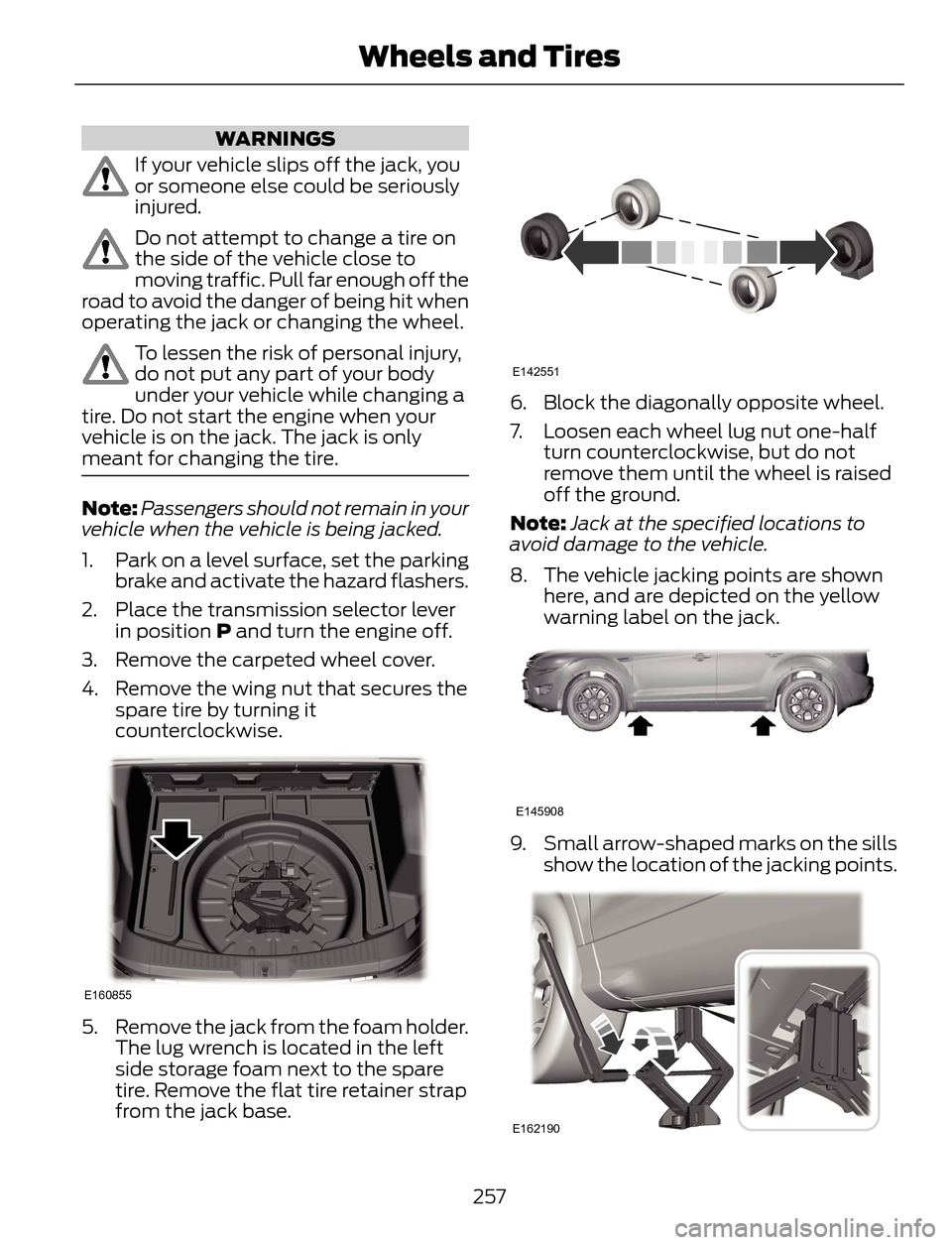
3. Remove the carpeted wheel cover.
4. Remove the wing nut that secures the
spare tire by turning it
counterclockwise.
E160855
5. Remove the jack from the foam holder.
The lug wrench is located in the left
side storage foam next to the spare
tire. Remove the flat tire retainer strap
from the jack base.
E142551
6. Block the diagonally opposite wheel.
7. Loosen each wheel lug nut one-half
turn counterclockwise, but do not
remove them until the wheel is raised
off the ground.
Note:Jack at the specified locations to
avoid damage to the vehicle.
8. The vehicle jacking points are shown
here, and are depicted on the yellow
warning label on the jack.
E145908
9. Small arrow-shaped marks on the sills
show the location of the jacking points.
E162190
257
Wheels and Tires
Page 261 of 428
10. Remove the lug nuts with the lug
wrench.
Note:If equipped with full wheel covers
with exposed wheel nuts, remove the wheel
nuts prior to removing the wheel cover or
damage to the wheel cover may occur.
11. Replace the flat tire with the spare
tire, making sure the valve stem is
facing outward. Reinstall the lug nuts
until the wheel is snug against the
hub. Do not fully tighten the lug nuts
until the wheel has been lowered.
12. Lower the wheel by turning the jack
handle counterclockwise.
1
2 34
5
E75442
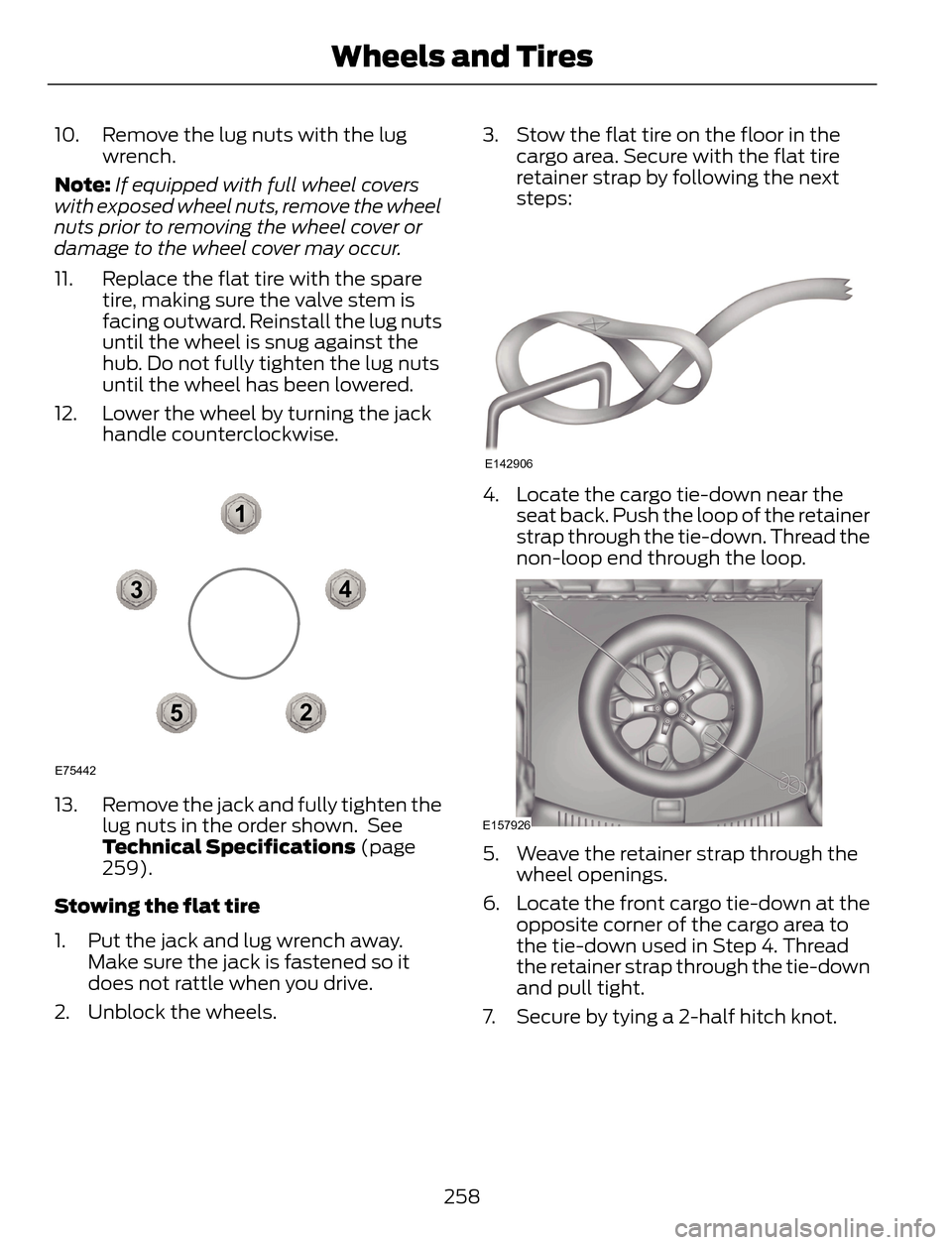
13. Remove the jack and fully tighten the
lug nuts in the order shown. See
Technical Specifications (page
259).
Stowing the flat tire
1. Put the jack and lug wrench away.
Make sure the jack is fastened so it
does not rattle when you drive.
2. Unblock the wheels.3. Stow the flat tire on the floor in the
cargo area. Secure with the flat tire
retainer strap by following the next
steps:
E142906
4. Locate the cargo tie-down near the
seat back. Push the loop of the retainer
strap through the tie-down. Thread the
non-loop end through the loop.
E157926
5. Weave the retainer strap through the
wheel openings.
6. Locate the front cargo tie-down at the
opposite corner of the cargo area to
the tie-down used in Step 4. Thread
the retainer strap through the tie-down
and pull tight.
7. Secure by tying a 2-half hitch knot.
258
Wheels and Tires
Page 268 of 428
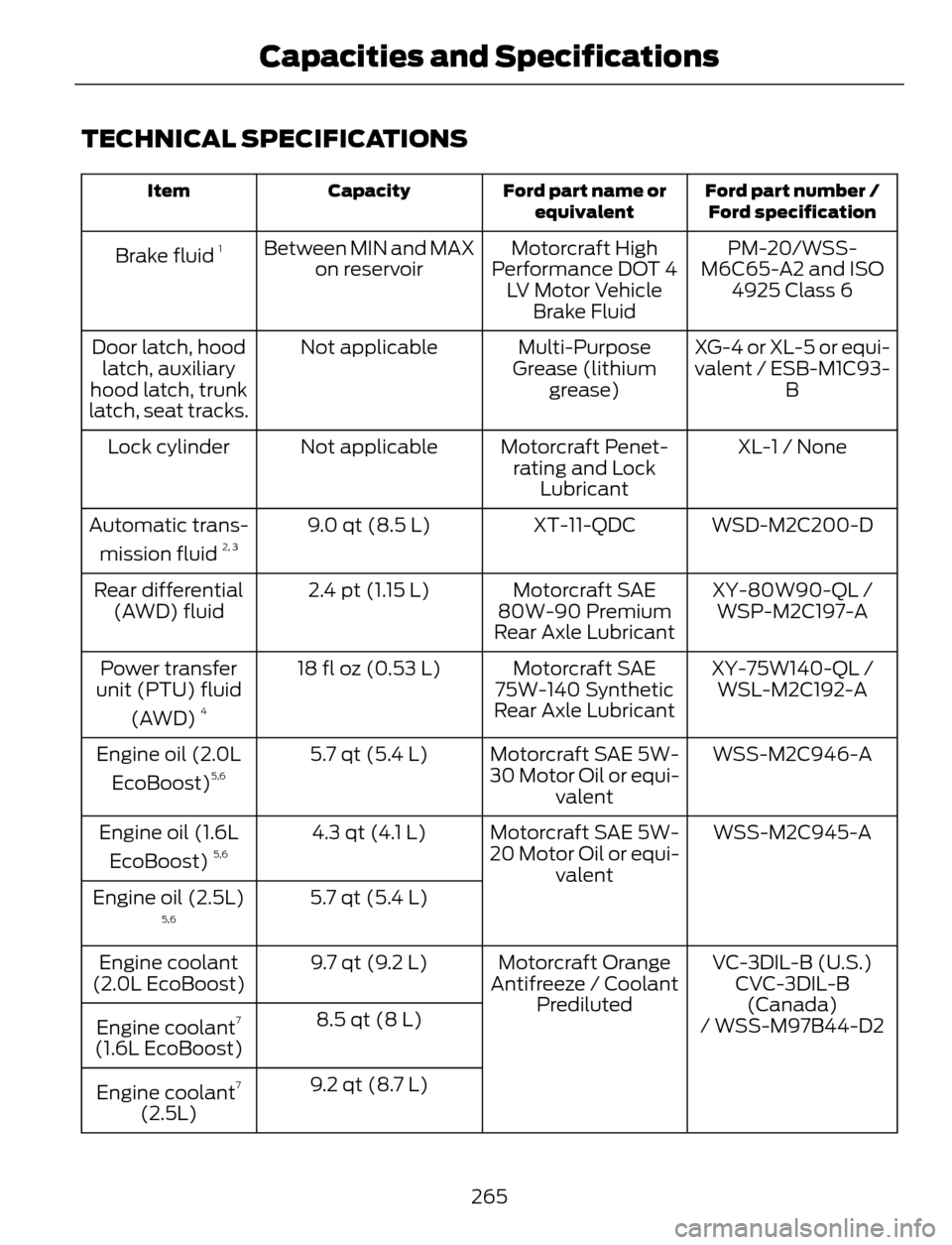
TECHNICAL SPECIFICATIONS
Ford part number /
Ford specification Ford part name or
equivalent Capacity Item
PM-20/WSS-
M6C65-A2 and ISO
4925 Class 6 Motorcraft High
Performance DOT 4
LV Motor Vehicle
Brake Fluid Between MIN and MAX
on reservoir Brake fluid 1
XG-4 or XL-5 or equi-
valent / ESB-M1C93-
B Multi-Purpose
Grease (lithium
grease) Not applicable Door latch, hood
latch, auxiliary
hood latch, trunk
latch, seat tracks.
XL-1 / None Motorcraft Penet-
rating and Lock
Lubricant Not applicable Lock cylinder
WSD-M2C200-D XT-11-QDC 9.0 qt (8.5 L) Automatic trans-
mission fluid
2, 3
XY-80W90-QL / Motorcraft SAE
80W-90 Premium
Rear Axle Lubricant 2.4 pt (1.15 L) Rear differential
(AWD) fluid WSP-M2C197-A
XY-75W140-QL /
WSL-M2C192-A Motorcraft SAE
75W-140 Synthetic
Rear Axle Lubricant 18 fl oz (0.53 L) Power transfer
unit (PTU) fluid
(AWD)
4
WSS-M2C946-A Motorcraft SAE 5W-
30 Motor Oil or equi-
valent 5.7 qt (5.4 L) Engine oil (2.0L
EcoBoost)5,6
WSS-M2C945-A Motorcraft SAE 5W-
20 Motor Oil or equi-
valent 4.3 qt (4.1 L) Engine oil (1.6L
EcoBoost) 5,6
5.7 qt (5.4 L) Engine oil (2.5L)5,6
VC-3DIL-B (U.S.) Motorcraft Orange
Antifreeze / Coolant
Prediluted 9.7 qt (9.2 L) Engine coolant
(2.0L EcoBoost) CVC-3DIL-B
(Canada)
8.5 qt (8 L)
Engine coolant
7
(1.6L EcoBoost)/ WSS-M97B44-D2
9.2 qt (8.7 L)
Engine coolant
7
(2.5L)
265
Capacities and Specifications
Page 272 of 428
E142600
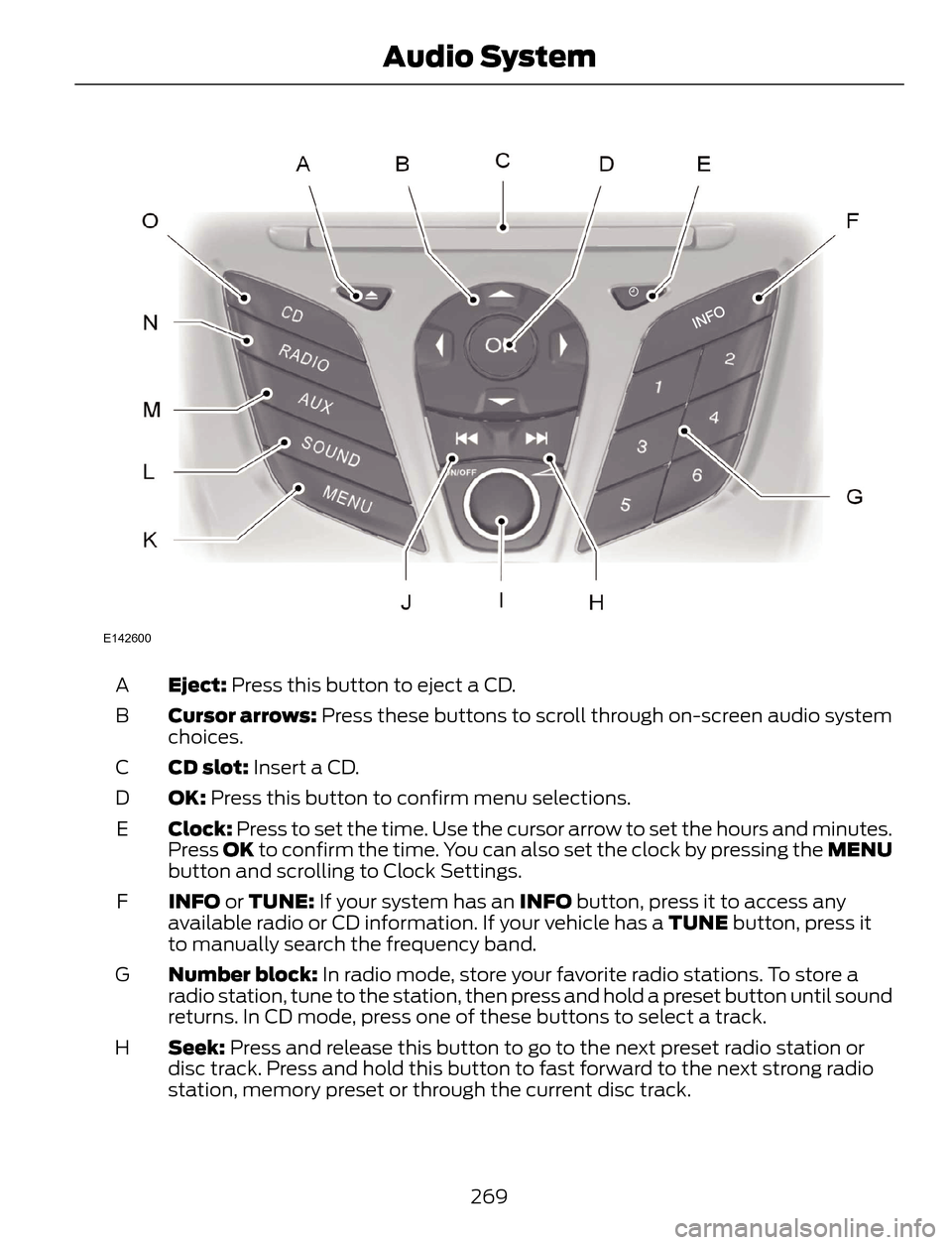
Eject: Press this button to eject a CD. A
Cursor arrows: Press these buttons to scroll through on-screen audio system
choices. B
CD slot: Insert a CD. C
OK: Press this button to confirm menu selections. D
Clock: Press to set the time. Use the cursor arrow to set the hours and minutes.
Press OK to confirm the time. You can also set the clock by pressing the MENU
button and scrolling to Clock Settings. E
INFO or TUNE: If your system has an INFO button, press it to access any
available radio or CD information. If your vehicle has a TUNE button, press it
to manually search the frequency band. F
Number block: In radio mode, store your favorite radio stations. To store a
radio station, tune to the station, then press and hold a preset button until sound
returns. In CD mode, press one of these buttons to select a track. G
Seek: Press and release this button to go to the next preset radio station or
disc track. Press and hold this button to fast forward to the next strong radio
station, memory preset or through the current disc track. H
269
Audio System
Page 274 of 428
ABDC
E
F
G
H
IJ
H
K
L
M
N
O
E162867
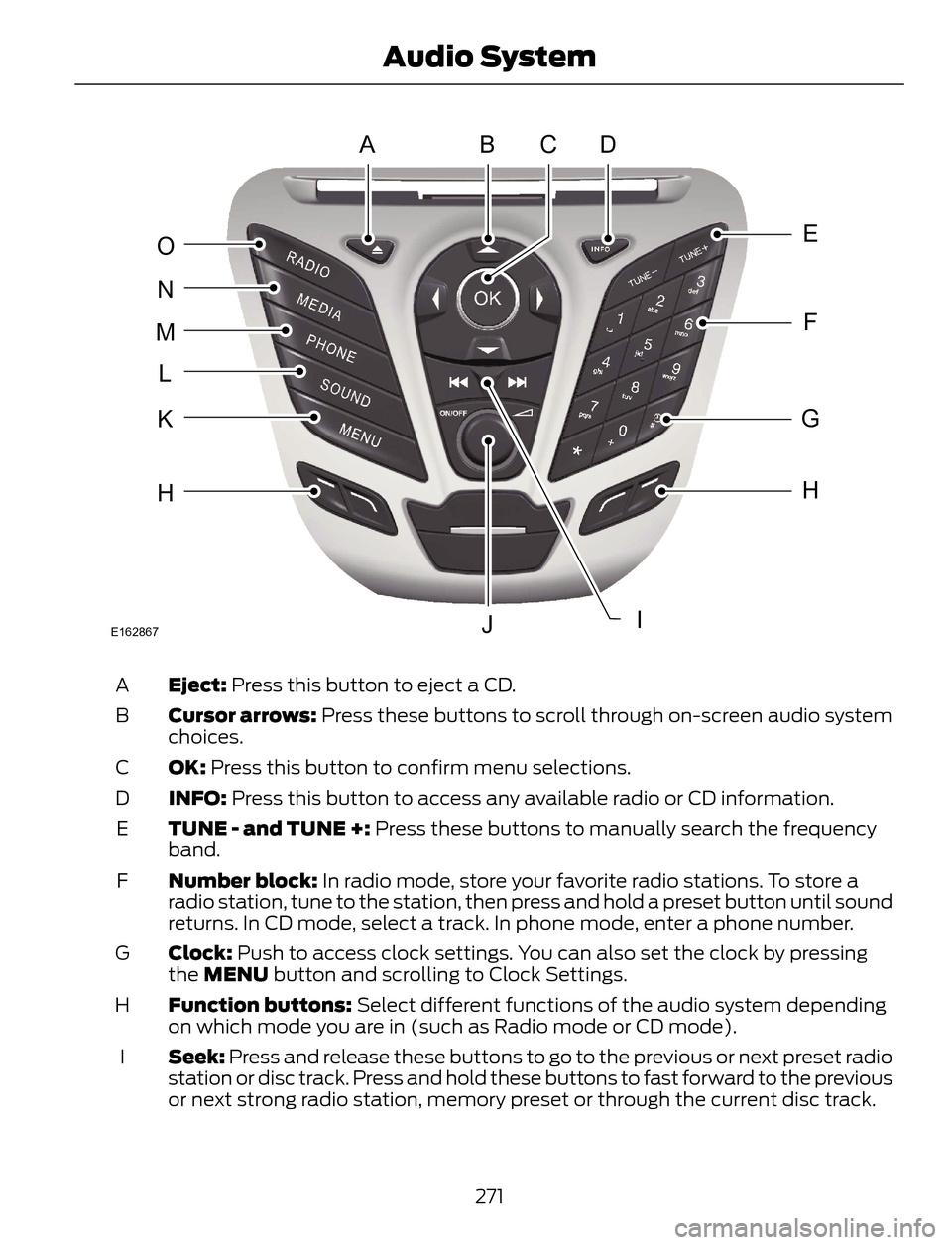
Eject: Press this button to eject a CD. A
Cursor arrows: Press these buttons to scroll through on-screen audio system
choices. B
OK: Press this button to confirm menu selections. C
INFO: Press this button to access any available radio or CD information. D
TUNE - and TUNE +: Press these buttons to manually search the frequency
band. E
Number block: In radio mode, store your favorite radio stations. To store a
radio station, tune to the station, then press and hold a preset button until sound
returns. In CD mode, select a track. In phone mode, enter a phone number. F
Clock: Push to access clock settings. You can also set the clock by pressing
the MENU button and scrolling to Clock Settings. G
Function buttons: Select different functions of the audio system depending
on which mode you are in (such as Radio mode or CD mode). H
Seek: Press and release these buttons to go to the previous or next preset radio
station or disc track. Press and hold these buttons to fast forward to the previous
or next strong radio station, memory preset or through the current disc track. I
271
Audio System
Page 276 of 428
ABDC
E
F
G
H
JK
H
L
M
N
O
P
IE162869
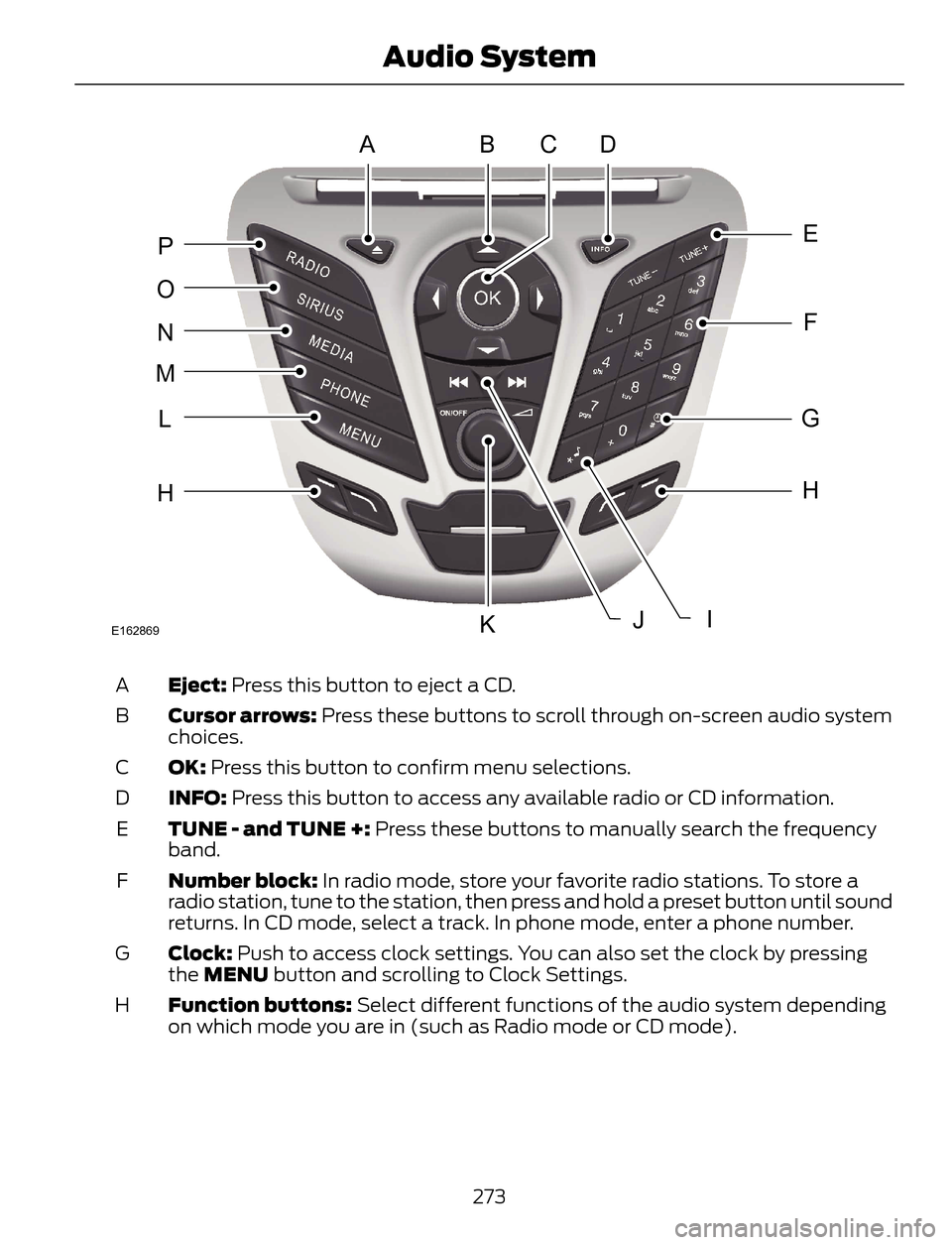
Eject: Press this button to eject a CD. A
Cursor arrows: Press these buttons to scroll through on-screen audio system
choices. B
OK: Press this button to confirm menu selections. C
INFO: Press this button to access any available radio or CD information. D
TUNE - and TUNE +: Press these buttons to manually search the frequency
band. E
Number block: In radio mode, store your favorite radio stations. To store a
radio station, tune to the station, then press and hold a preset button until sound
returns. In CD mode, select a track. In phone mode, enter a phone number. F
Clock: Push to access clock settings. You can also set the clock by pressing
the MENU button and scrolling to Clock Settings. G
Function buttons: Select different functions of the audio system depending
on which mode you are in (such as Radio mode or CD mode). H
273
Audio System
Page 280 of 428
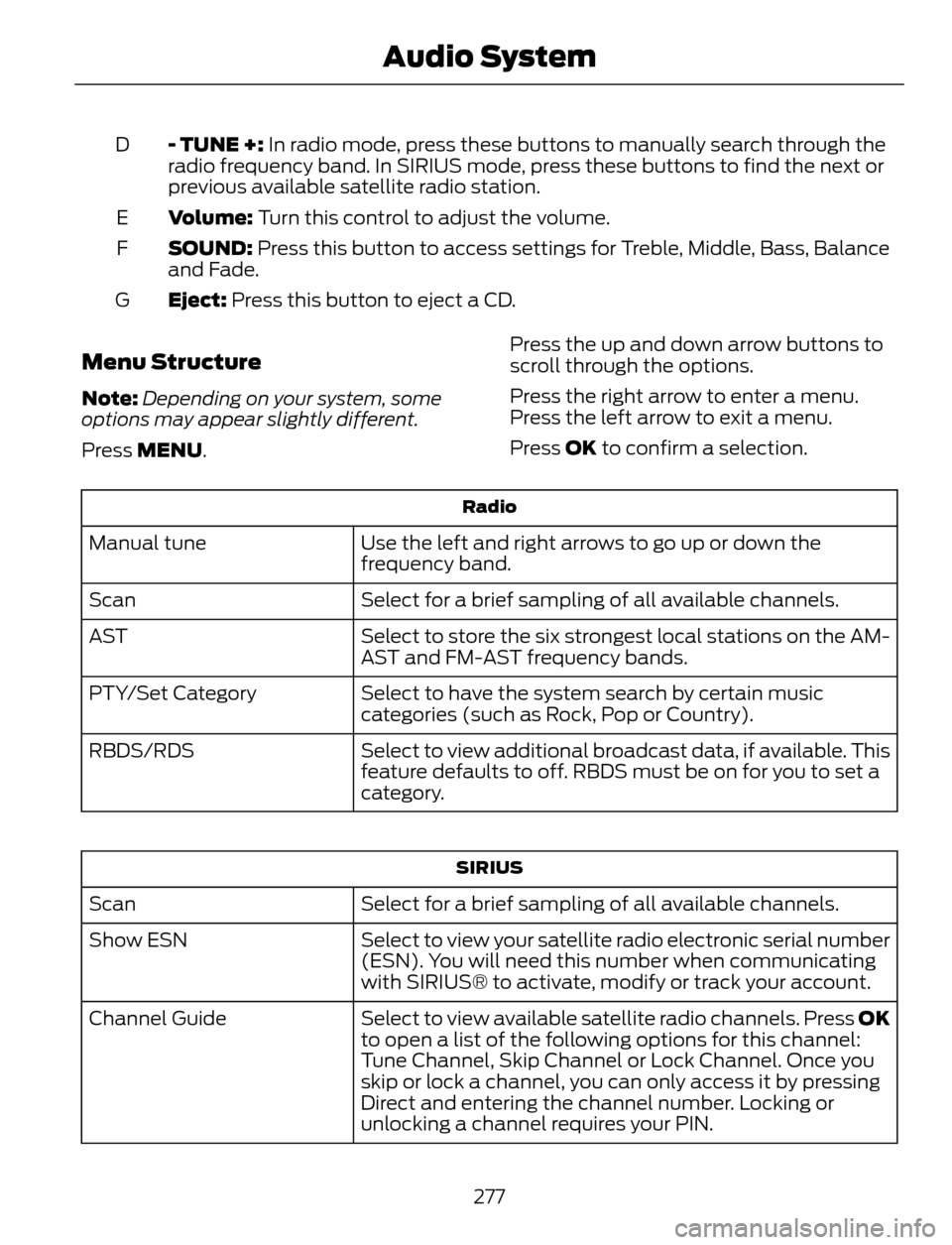
- TUNE +: In radio mode, press these buttons to manually search through the
radio frequency band. In SIRIUS mode, press these buttons to find the next or
previous available satellite radio station. D
Volume: Turn this control to adjust the volume. E
SOUND: Press this button to access settings for Treble, Middle, Bass, Balance
and Fade. F
Eject: Press this button to eject a CD. G
Menu Structure
Note:Depending on your system, some
options may appear slightly different.
Press MENU.Press the up and down arrow buttons to
scroll through the options.
Press the right arrow to enter a menu.
Press the left arrow to exit a menu.
Press OK to confirm a selection.
Radio
Use the left and right arrows to go up or down the
frequency band. Manual tune
Select for a brief sampling of all available channels. Scan
Select to store the six strongest local stations on the AM-
AST and FM-AST frequency bands. AST
Select to have the system search by certain music
categories (such as Rock, Pop or Country). PTY/Set Category
Select to view additional broadcast data, if available. This
feature defaults to off. RBDS must be on for you to set a
category. RBDS/RDS
SIRIUS
Select for a brief sampling of all available channels. Scan
Select to view your satellite radio electronic serial number
(ESN). You will need this number when communicating
with SIRIUS® to activate, modify or track your account. Show ESN
Select to view available satellite radio channels. Press OK
to open a list of the following options for this channel:
Tune Channel, Skip Channel or Lock Channel. Once you
skip or lock a channel, you can only access it by pressing
Direct and entering the channel number. Locking or
unlocking a channel requires your PIN. Channel Guide
277
Audio System
Page 281 of 428
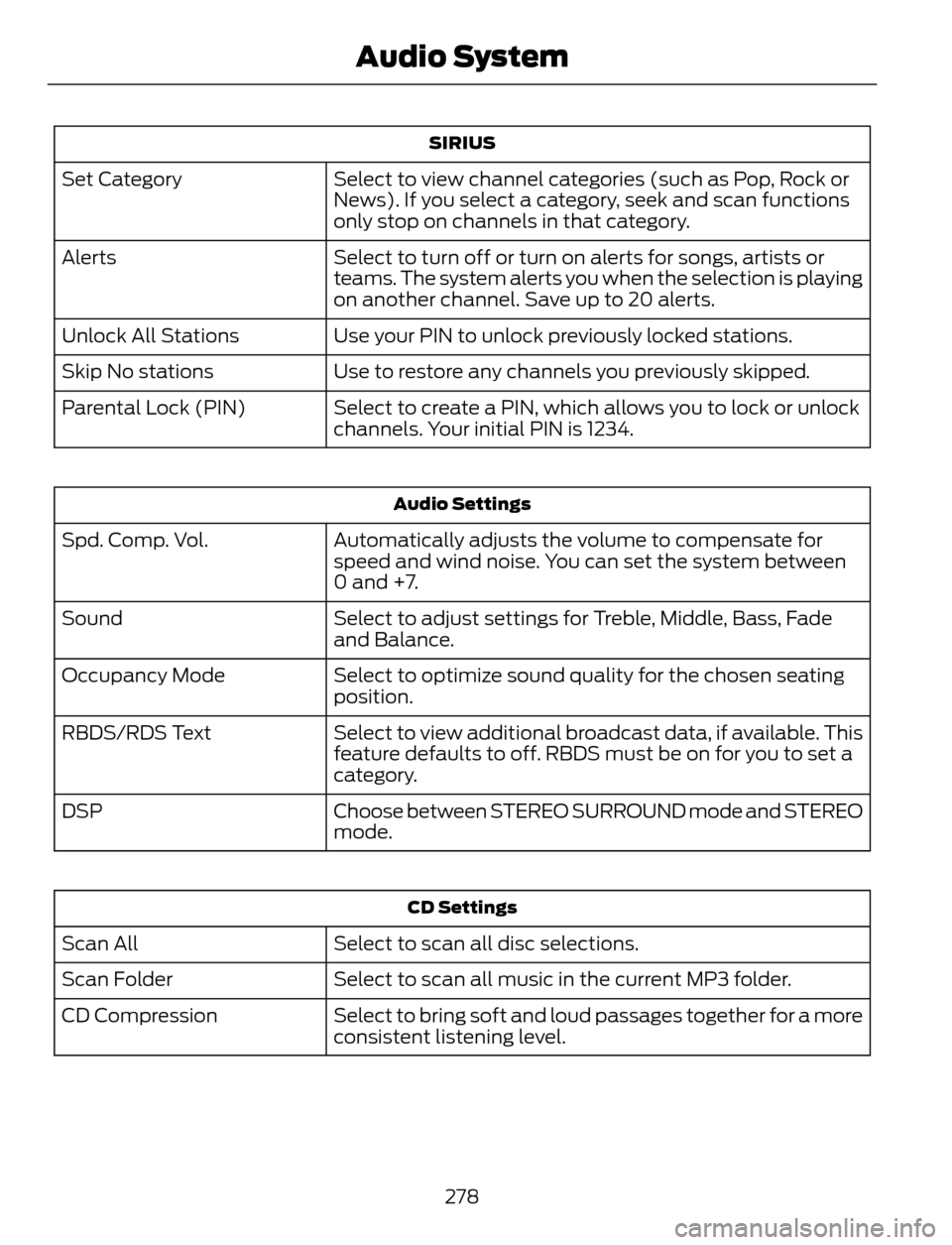
SIRIUS
Select to view channel categories (such as Pop, Rock or
News). If you select a category, seek and scan functions
only stop on channels in that category. Set Category
Select to turn off or turn on alerts for songs, artists or
teams. The system alerts you when the selection is playing
on another channel. Save up to 20 alerts. Alerts
Use your PIN to unlock previously locked stations. Unlock All Stations
Use to restore any channels you previously skipped. Skip No stations
Select to create a PIN, which allows you to lock or unlock
channels. Your initial PIN is 1234. Parental Lock (PIN)
Audio Settings
Automatically adjusts the volume to compensate for
speed and wind noise. You can set the system between
0 and +7. Spd. Comp. Vol.
Select to adjust settings for Treble, Middle, Bass, Fade
and Balance. Sound
Select to optimize sound quality for the chosen seating
position. Occupancy Mode
Select to view additional broadcast data, if available. This
feature defaults to off. RBDS must be on for you to set a
category. RBDS/RDS Text
Choose between STEREO SURROUND mode and STEREO
mode. DSP
CD Settings
Select to scan all disc selections. Scan All
Select to scan all music in the current MP3 folder. Scan Folder
Select to bring soft and loud passages together for a more
consistent listening level. CD Compression
278
Audio System
Page 282 of 428
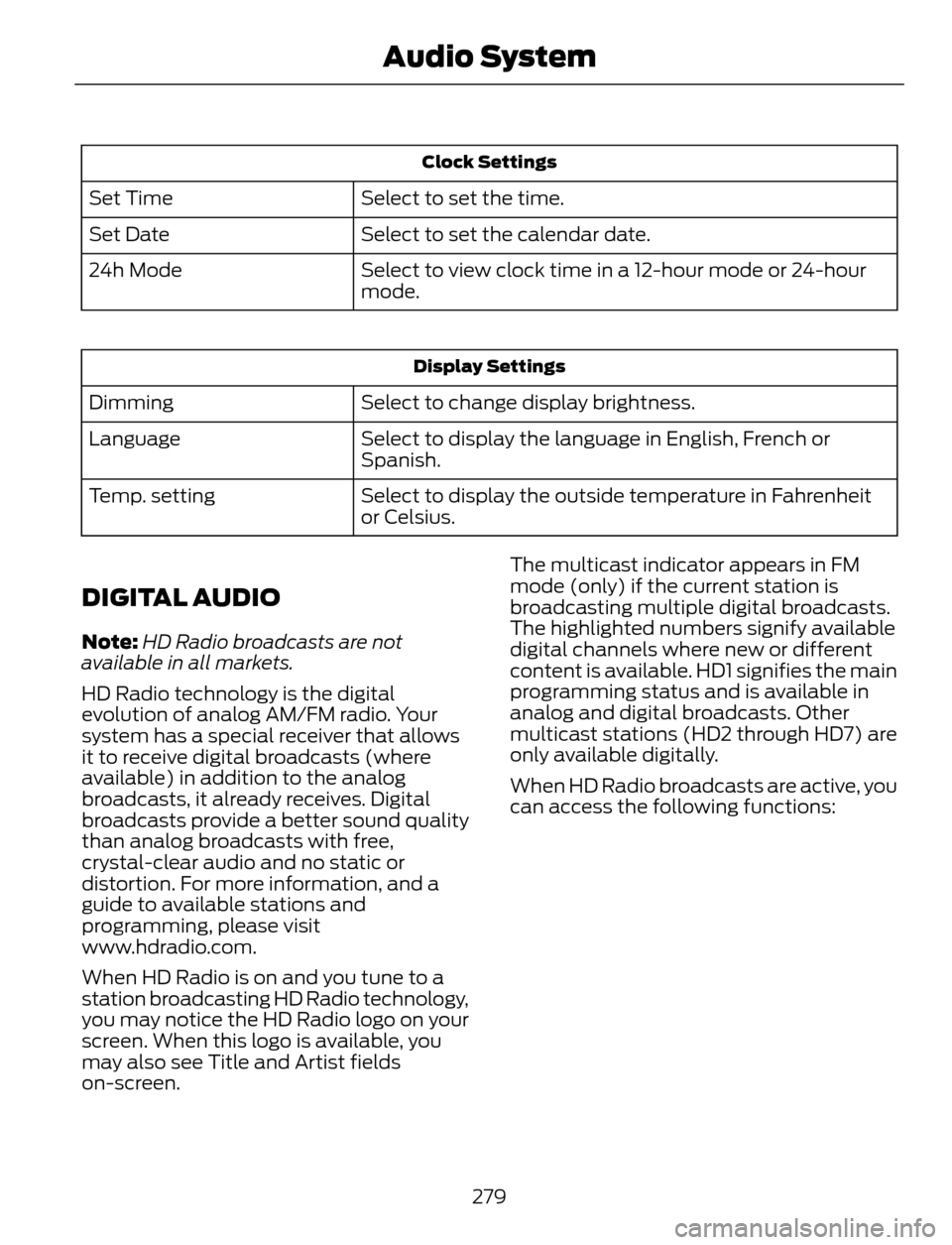
Clock Settings
Select to set the time. Set Time
Select to set the calendar date. Set Date
Select to view clock time in a 12-hour mode or 24-hour
mode. 24h Mode
Display Settings
Select to change display brightness. Dimming
Select to display the language in English, French or
Spanish. Language
Select to display the outside temperature in Fahrenheit
or Celsius. Temp. setting
DIGITAL AUDIO
Note:HD Radio broadcasts are not
available in all markets.
HD Radio technology is the digital
evolution of analog AM/FM radio. Your
system has a special receiver that allows
it to receive digital broadcasts (where
available) in addition to the analog
broadcasts, it already receives. Digital
broadcasts provide a better sound quality
than analog broadcasts with free,
crystal-clear audio and no static or
distortion. For more information, and a
guide to available stations and
programming, please visit
www.hdradio.com.
When HD Radio is on and you tune to a
station broadcasting HD Radio technology,
you may notice the HD Radio logo on your
screen. When this logo is available, you
may also see Title and Artist fields
on-screen.The multicast indicator appears in FM
mode (only) if the current station is
broadcasting multiple digital broadcasts.
The highlighted numbers signify available
digital channels where new or different
content is available. HD1 signifies the main
programming status and is available in
analog and digital broadcasts. Other
multicast stations (HD2 through HD7) are
only available digitally.
When HD Radio broadcasts are active, you
can access the following functions:
279
Audio System