clock FORD ESCAPE 2016 3.G User Guide
[x] Cancel search | Manufacturer: FORD, Model Year: 2016, Model line: ESCAPE, Model: FORD ESCAPE 2016 3.GPages: 393, PDF Size: 5.85 MB
Page 232 of 393
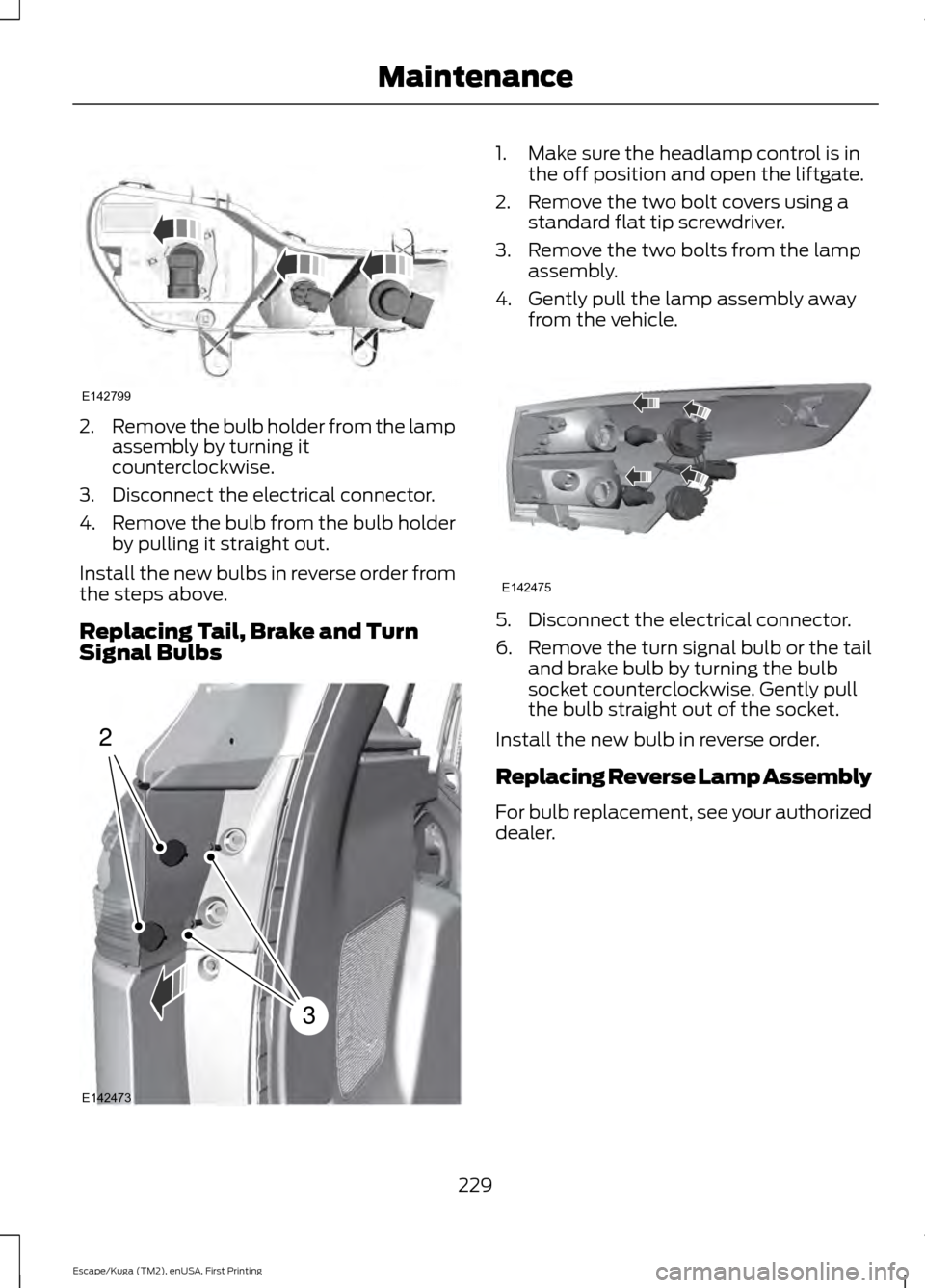
2.
Remove the bulb holder from the lamp
assembly by turning it
counterclockwise.
3. Disconnect the electrical connector.
4. Remove the bulb from the bulb holder
by pulling it straight out.
Install the new bulbs in reverse order from
the steps above.
Replacing Tail, Brake and Turn
Signal Bulbs 1. Make sure the headlamp control is in
the off position and open the liftgate.
2. Remove the two bolt covers using a standard flat tip screwdriver.
3. Remove the two bolts from the lamp assembly.
4. Gently pull the lamp assembly away from the vehicle. 5. Disconnect the electrical connector.
6.
Remove the turn signal bulb or the tail
and brake bulb by turning the bulb
socket counterclockwise. Gently pull
the bulb straight out of the socket.
Install the new bulb in reverse order.
Replacing Reverse Lamp Assembly
For bulb replacement, see your authorized
dealer.
229
Escape/Kuga (TM2), enUSA, First Printing MaintenanceE142799 2
3
E142473 E142475
Page 267 of 393
WARNINGS
Never get underneath a vehicle that
is supported only by a jack. If the
vehicle slips off the jack, you or
someone else could be seriously injured. Do not attempt to change a tire on
the side of the vehicle close to
moving traffic. Pull far enough off the
road to avoid the danger of being hit when
operating the jack or changing the wheel. Always use the jack provided as
original equipment with your vehicle.
If using a jack other than the one
provided as original equipment with your
vehicle, make sure the jack capacity is
adequate for the vehicle weight, including
any vehicle cargo or modifications. Note:
Passengers should not remain in your
vehicle when the vehicle is being jacked.
1. Park on a level surface, set the parking
brake and activate the hazard flashers.
2. Place the transmission in park (P) and
turn the engine off.
3. Remove the carpeted wheel cover.
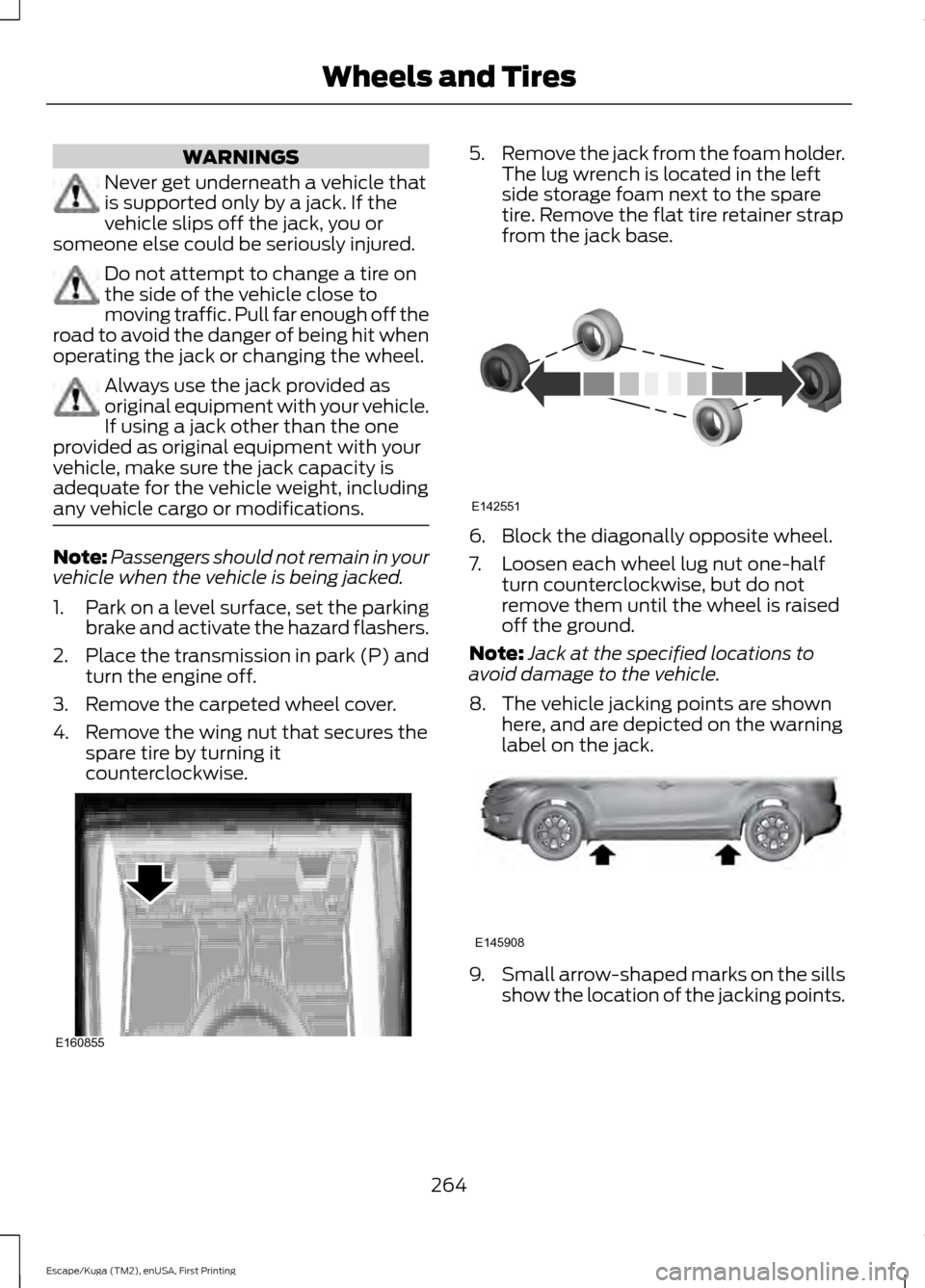
4. Remove the wing nut that secures the spare tire by turning it
counterclockwise. 5.
Remove the jack from the foam holder.
The lug wrench is located in the left
side storage foam next to the spare
tire. Remove the flat tire retainer strap
from the jack base. 6. Block the diagonally opposite wheel.
7. Loosen each wheel lug nut one-half
turn counterclockwise, but do not
remove them until the wheel is raised
off the ground.
Note: Jack at the specified locations to
avoid damage to the vehicle.
8. The vehicle jacking points are shown here, and are depicted on the warning
label on the jack. 9.
Small arrow-shaped marks on the sills
show the location of the jacking points.
264
Escape/Kuga (TM2), enUSA, First Printing Wheels and TiresE160855 E142551 E145908
Page 268 of 393
10. Remove the lug nuts with the lug
wrench.
Note: If equipped with full wheel covers
with exposed wheel nuts, remove the wheel
nuts prior to removing the wheel cover or
damage to the wheel cover may occur.
11. Replace the flat tire with the spare tire, making sure the valve stem is
facing outward. Reinstall the lug nuts
until the wheel is snug against the
hub. Do not fully tighten the lug nuts
until the wheel has been lowered.
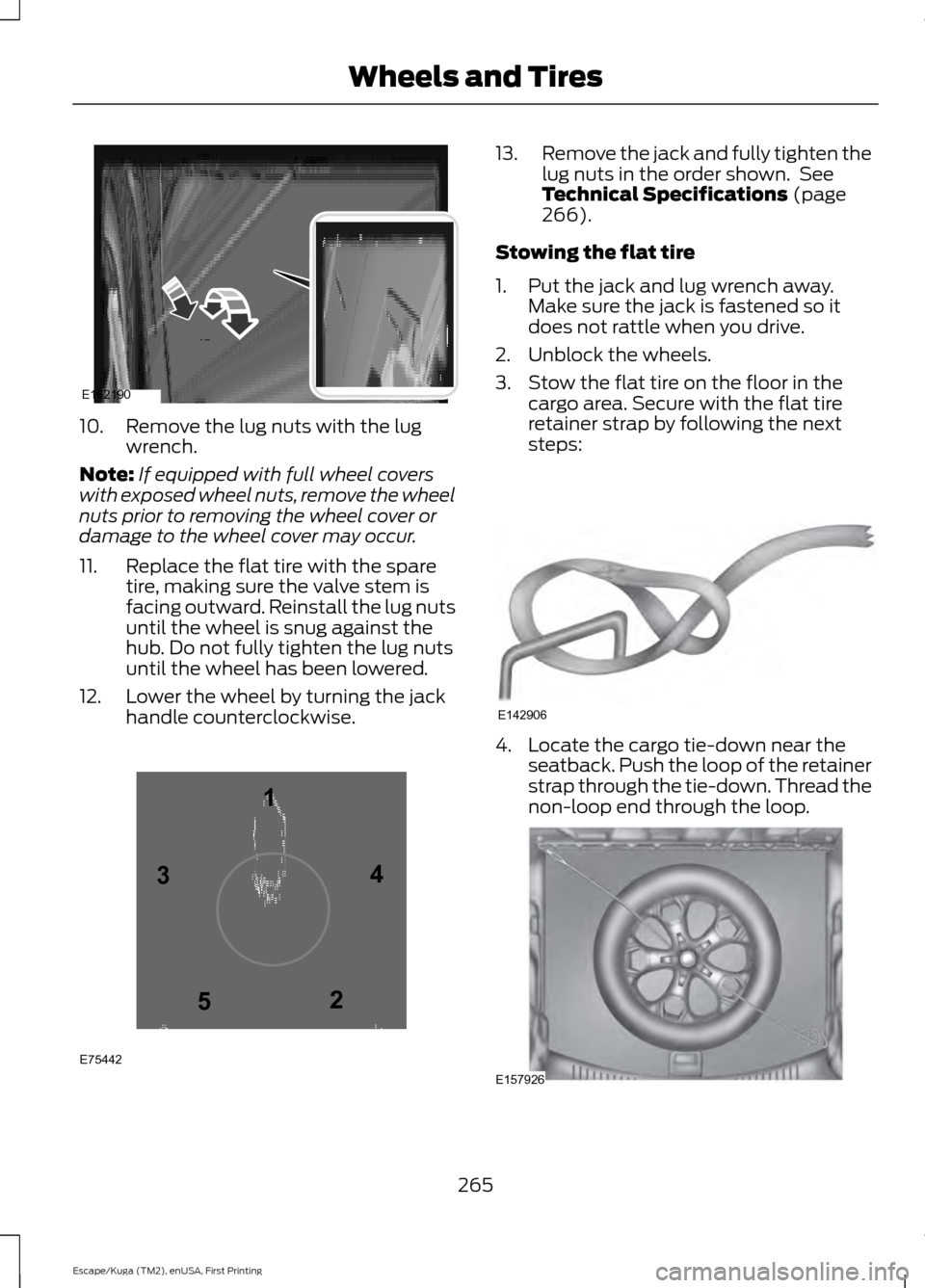
12. Lower the wheel by turning the jack handle counterclockwise. 13.
Remove the jack and fully tighten the
lug nuts in the order shown. See
Technical Specifications (page
266).
Stowing the flat tire
1. Put the jack and lug wrench away. Make sure the jack is fastened so it
does not rattle when you drive.
2. Unblock the wheels.
3. Stow the flat tire on the floor in the cargo area. Secure with the flat tire
retainer strap by following the next
steps: 4. Locate the cargo tie-down near the
seatback. Push the loop of the retainer
strap through the tie-down. Thread the
non-loop end through the loop. 265
Escape/Kuga (TM2), enUSA, First Printing Wheels and TiresE162190 12
3
4
5
E75442 E142906 E157926
Page 291 of 393
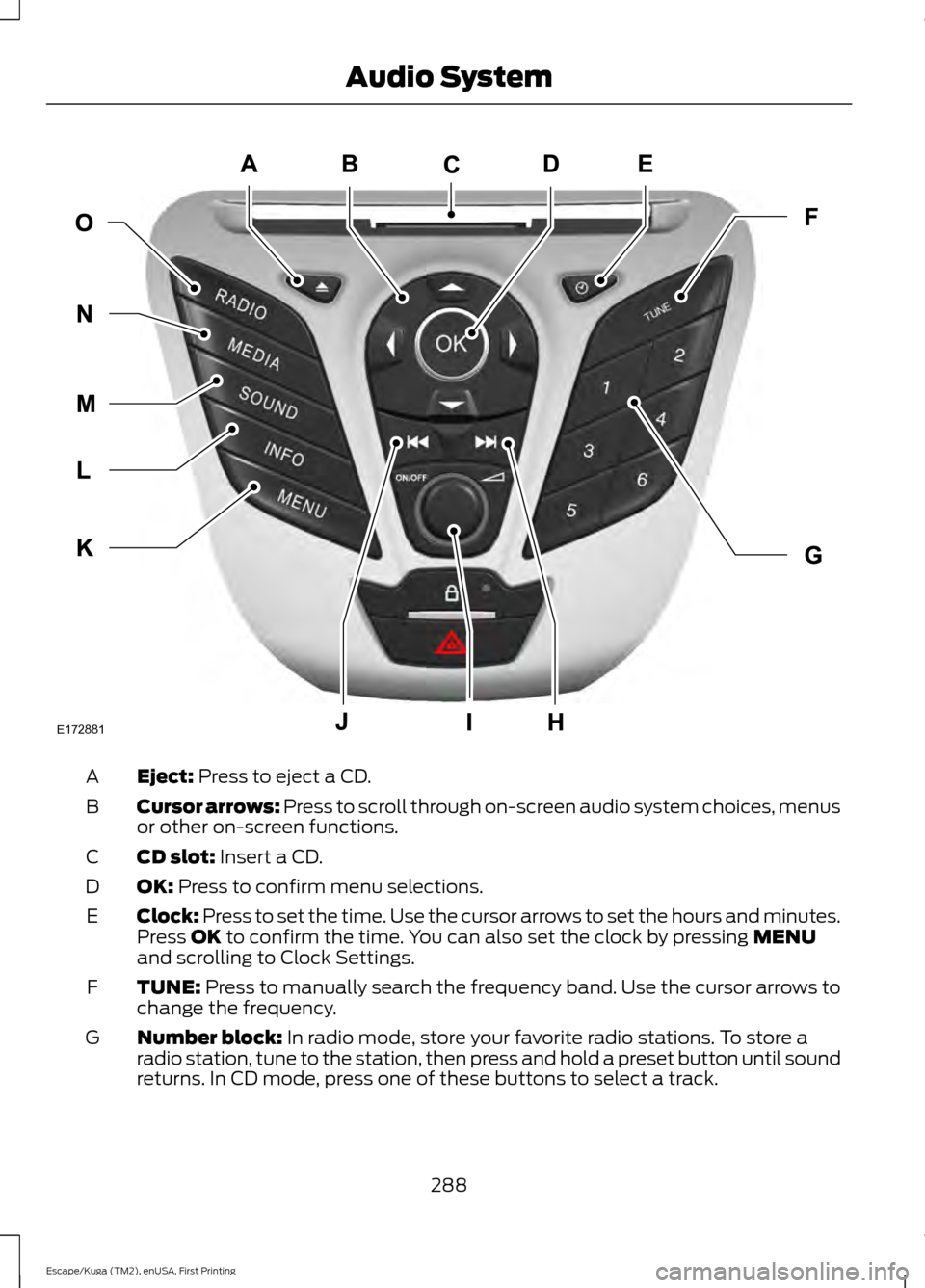
Eject: Press to eject a CD.
A
Cursor arrows:
Press to scroll through on-screen audio system choices, menus
or other on-screen functions.
B
CD slot:
Insert a CD.
C
OK:
Press to confirm menu selections.
D
Clock: Press to set the time. Use the cursor arrows to set the hours and minutes.
Press
OK to confirm the time. You can also set the clock by pressing MENU
and scrolling to Clock Settings.
E
TUNE:
Press to manually search the frequency band. Use the cursor arrows to
change the frequency.
F
Number block:
In radio mode, store your favorite radio stations. To store a
radio station, tune to the station, then press and hold a preset button until sound
returns. In CD mode, press one of these buttons to select a track.
G
288
Escape/Kuga (TM2), enUSA, First Printing Audio SystemE172881
Page 293 of 393
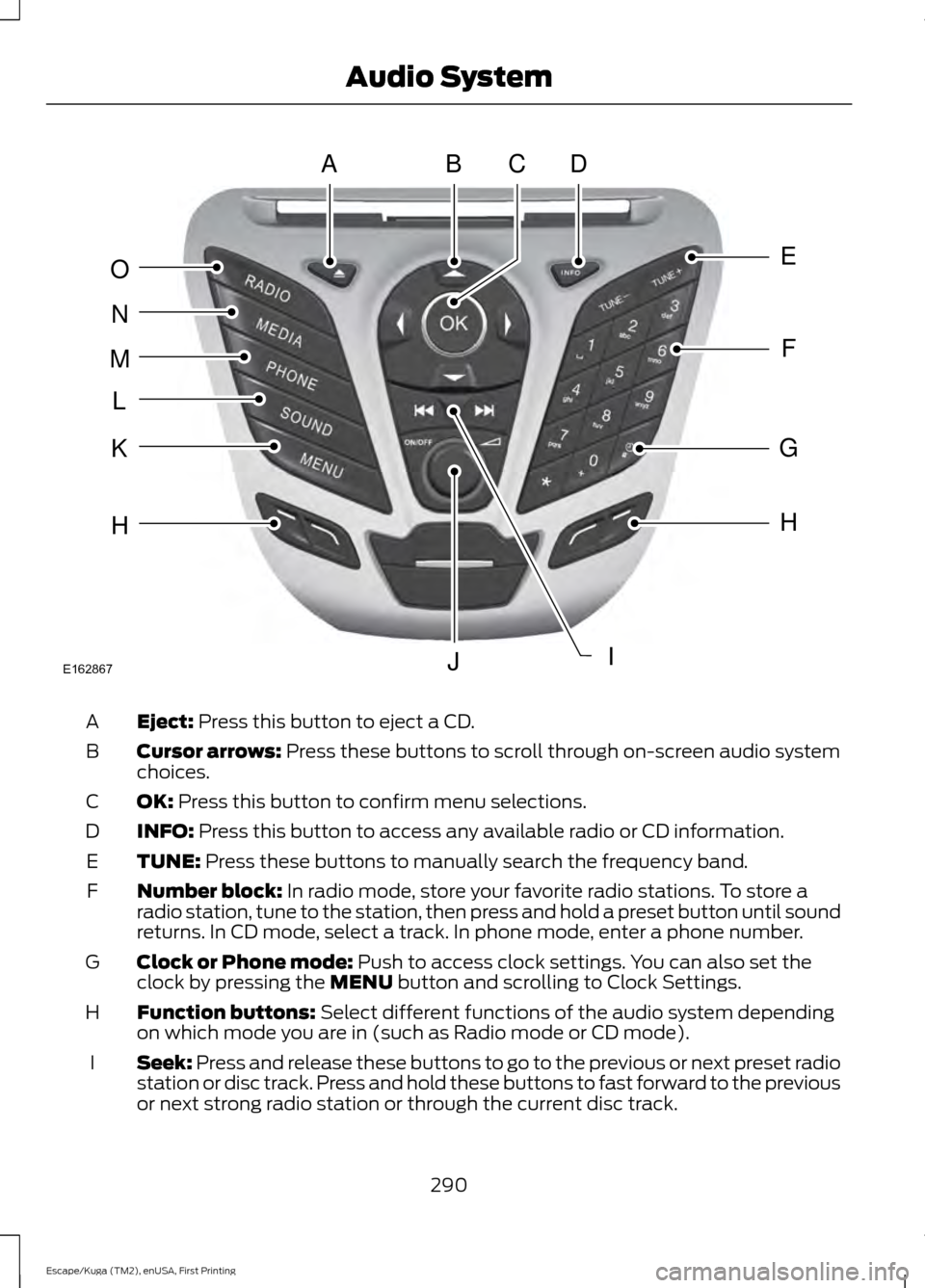
Eject: Press this button to eject a CD.
A
Cursor arrows:
Press these buttons to scroll through on-screen audio system
choices.
B
OK:
Press this button to confirm menu selections.
C
INFO:
Press this button to access any available radio or CD information.
D
TUNE:
Press these buttons to manually search the frequency band.
E
Number block:
In radio mode, store your favorite radio stations. To store a
radio station, tune to the station, then press and hold a preset button until sound
returns. In CD mode, select a track. In phone mode, enter a phone number.
F
Clock or Phone mode:
Push to access clock settings. You can also set the
clock by pressing the MENU button and scrolling to Clock Settings.
G
Function buttons:
Select different functions of the audio system depending
on which mode you are in (such as Radio mode or CD mode).
H
Seek:
Press and release these buttons to go to the previous or next preset radio
station or disc track. Press and hold these buttons to fast forward to the previous
or next strong radio station or through the current disc track.
I
290
Escape/Kuga (TM2), enUSA, First Printing Audio SystemABDC
E
F
G
H
IJ
H
K
L
M
N
O
E162867
Page 295 of 393
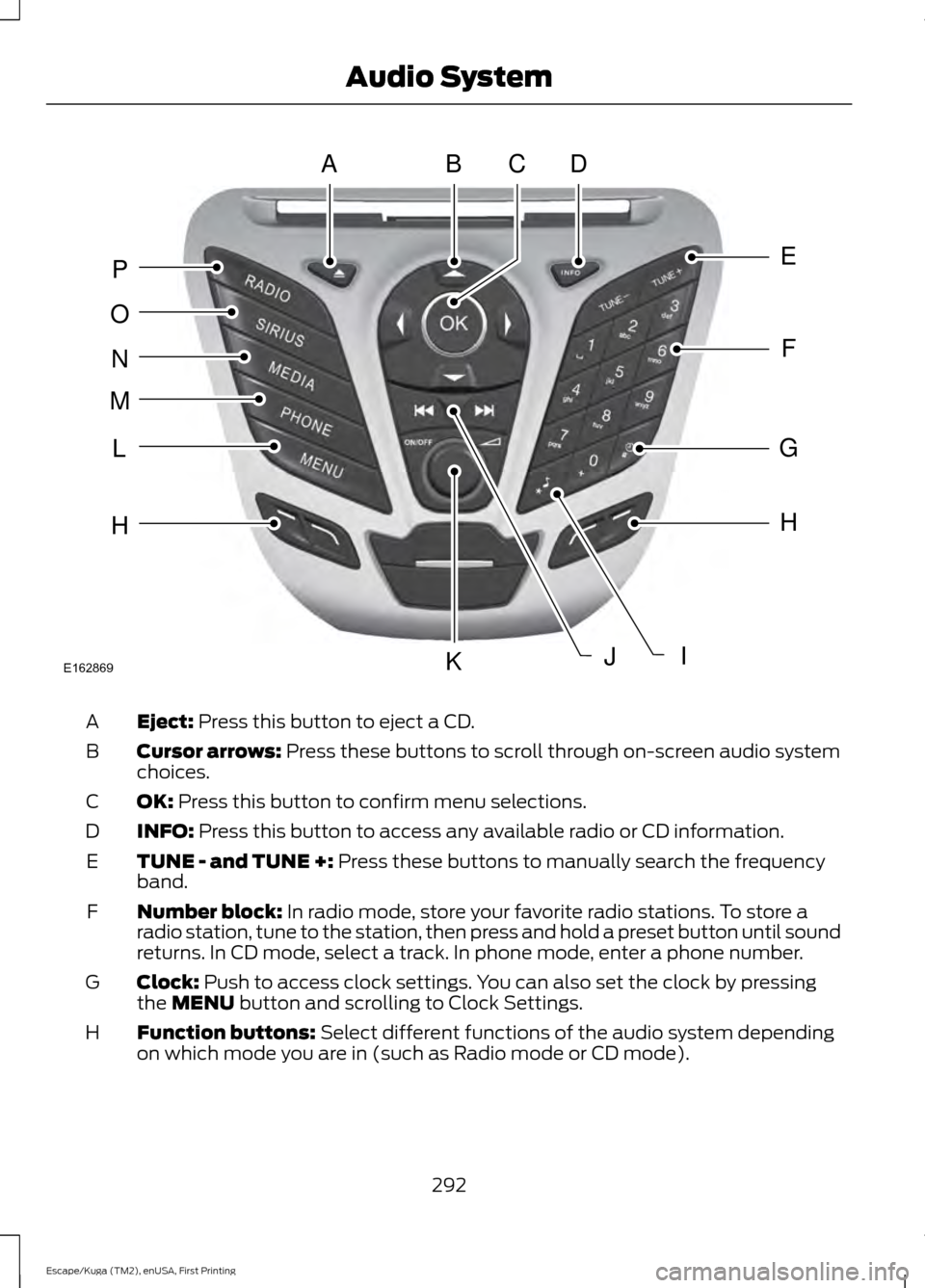
Eject: Press this button to eject a CD.
A
Cursor arrows:
Press these buttons to scroll through on-screen audio system
choices.
B
OK:
Press this button to confirm menu selections.
C
INFO:
Press this button to access any available radio or CD information.
D
TUNE - and TUNE +:
Press these buttons to manually search the frequency
band.
E
Number block:
In radio mode, store your favorite radio stations. To store a
radio station, tune to the station, then press and hold a preset button until sound
returns. In CD mode, select a track. In phone mode, enter a phone number.
F
Clock:
Push to access clock settings. You can also set the clock by pressing
the MENU button and scrolling to Clock Settings.
G
Function buttons:
Select different functions of the audio system depending
on which mode you are in (such as Radio mode or CD mode).
H
292
Escape/Kuga (TM2), enUSA, First Printing Audio SystemABDC
E
F
G
H
JK
H
L
M
N
O
P
IE162869
Page 301 of 393
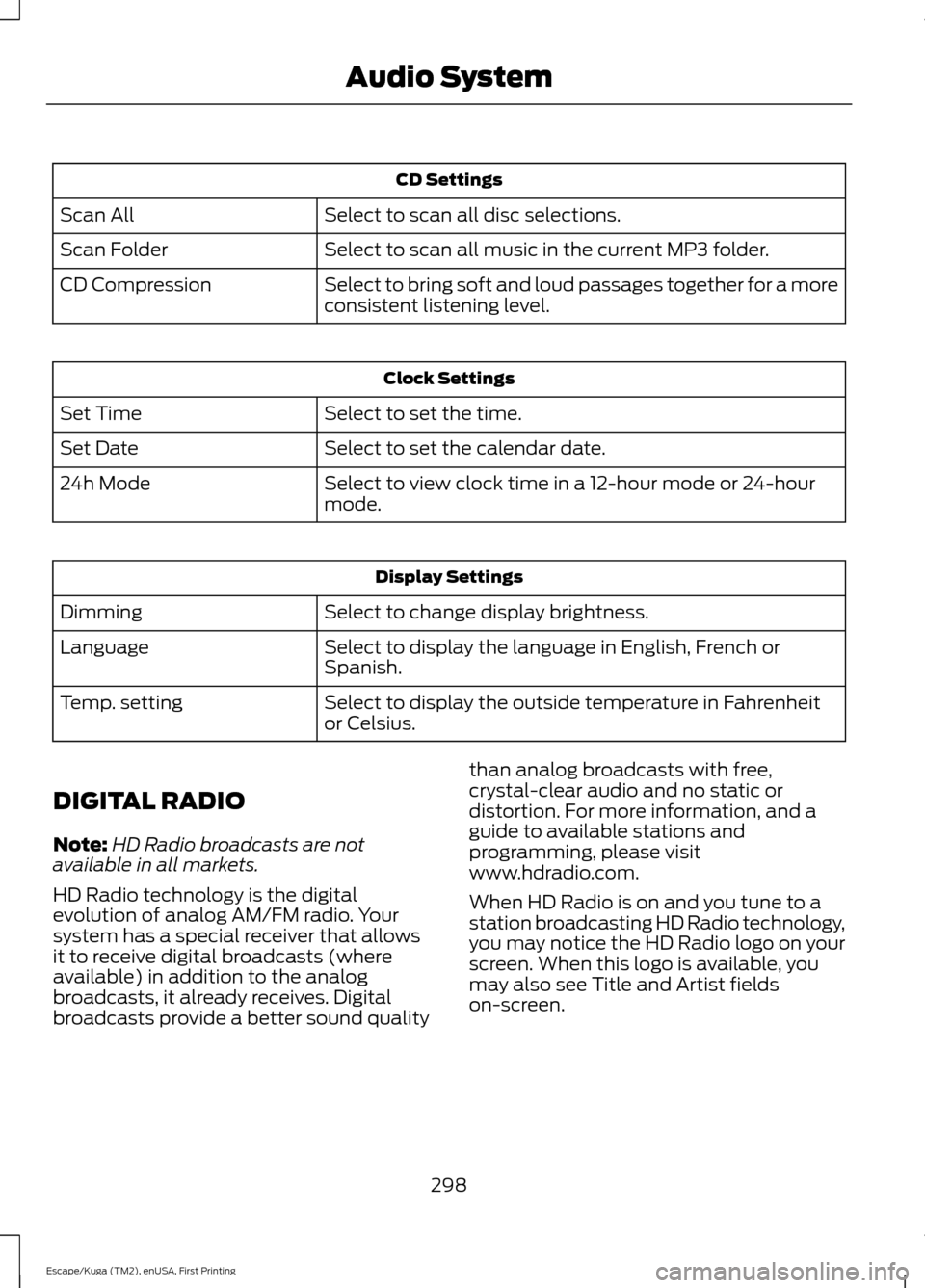
CD Settings
Select to scan all disc selections.
Scan All
Select to scan all music in the current MP3 folder.
Scan Folder
Select to bring soft and loud passages together for a more
consistent listening level.
CD Compression Clock Settings
Select to set the time.
Set Time
Select to set the calendar date.
Set Date
Select to view clock time in a 12-hour mode or 24-hour
mode.
24h Mode Display Settings
Select to change display brightness.
Dimming
Select to display the language in English, French or
Spanish.
Language
Select to display the outside temperature in Fahrenheit
or Celsius.
Temp. setting
DIGITAL RADIO
Note: HD Radio broadcasts are not
available in all markets.
HD Radio technology is the digital
evolution of analog AM/FM radio. Your
system has a special receiver that allows
it to receive digital broadcasts (where
available) in addition to the analog
broadcasts, it already receives. Digital
broadcasts provide a better sound quality than analog broadcasts with free,
crystal-clear audio and no static or
distortion. For more information, and a
guide to available stations and
programming, please visit
www.hdradio.com.
When HD Radio is on and you tune to a
station broadcasting HD Radio technology,
you may notice the HD Radio logo on your
screen. When this logo is available, you
may also see Title and Artist fields
on-screen.
298
Escape/Kuga (TM2), enUSA, First Printing Audio System