transmission FORD ESCAPE 2017 3.G Owners Manual
[x] Cancel search | Manufacturer: FORD, Model Year: 2017, Model line: ESCAPE, Model: FORD ESCAPE 2017 3.GPages: 486, PDF Size: 6.34 MB
Page 6 of 486
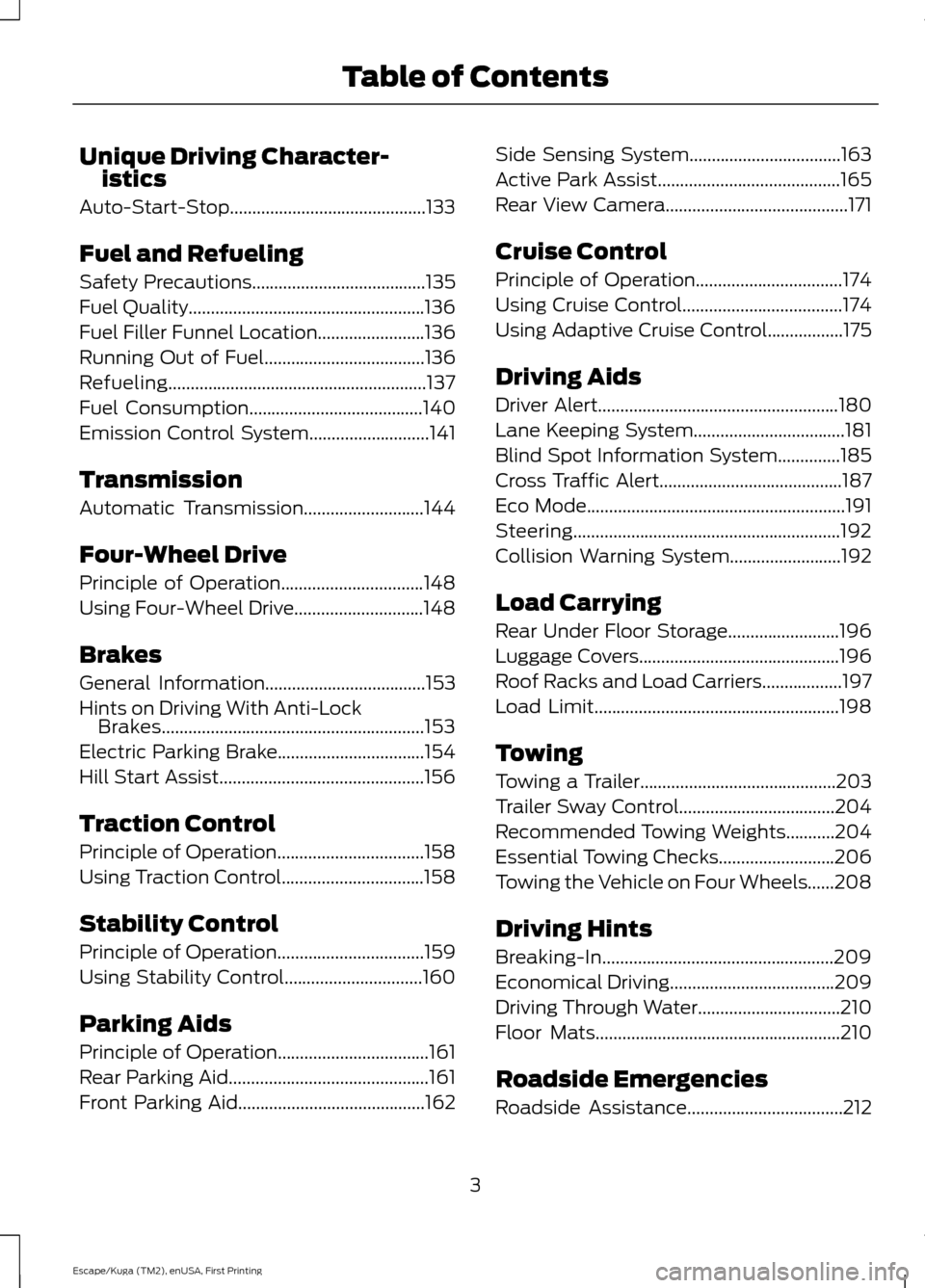
Unique Driving Character-
istics
Auto-Start-Stop............................................133
Fuel and Refueling
Safety Precautions.......................................135
Fuel Quality.....................................................136
Fuel Filler Funnel Location........................136
Running Out of Fuel
....................................136
Refueling..........................................................137
Fuel Consumption
.......................................140
Emission Control System...........................141
Transmission
Automatic Transmission...........................144
Four-Wheel Drive
Principle of Operation
................................148
Using Four-Wheel Drive.............................148
Brakes
General Information....................................153
Hints on Driving With Anti-Lock Brakes...........................................................153
Electric Parking Brake.................................154
Hill Start Assist..............................................156
Traction Control
Principle of Operation
.................................158
Using Traction Control................................158
Stability Control
Principle of Operation.................................159
Using Stability Control...............................160
Parking Aids
Principle of Operation..................................161
Rear Parking Aid.............................................161
Front Parking Aid
..........................................162 Side Sensing System..................................163
Active Park Assist.........................................165
Rear View Camera.........................................171
Cruise Control
Principle of Operation.................................174
Using Cruise Control....................................174
Using Adaptive Cruise Control
.................175
Driving Aids
Driver Alert
......................................................180
Lane Keeping System..................................181
Blind Spot Information System..............185
Cross Traffic Alert.........................................187
Eco Mode
..........................................................191
Steering............................................................192
Collision Warning System.........................192
Load Carrying
Rear Under Floor Storage.........................196
Luggage Covers.............................................196
Roof Racks and Load Carriers..................197
Load Limit.......................................................198
Towing
Towing a Trailer
............................................203
Trailer Sway Control
...................................204
Recommended Towing Weights...........204
Essential Towing Checks..........................206
Towing the Vehicle on Four Wheels......208
Driving Hints
Breaking-In....................................................209
Economical Driving
.....................................209
Driving Through Water................................210
Floor Mats
.......................................................210
Roadside Emergencies
Roadside Assistance
...................................212
3
Escape/Kuga (TM2), enUSA, First Printing Table of Contents
Page 7 of 486
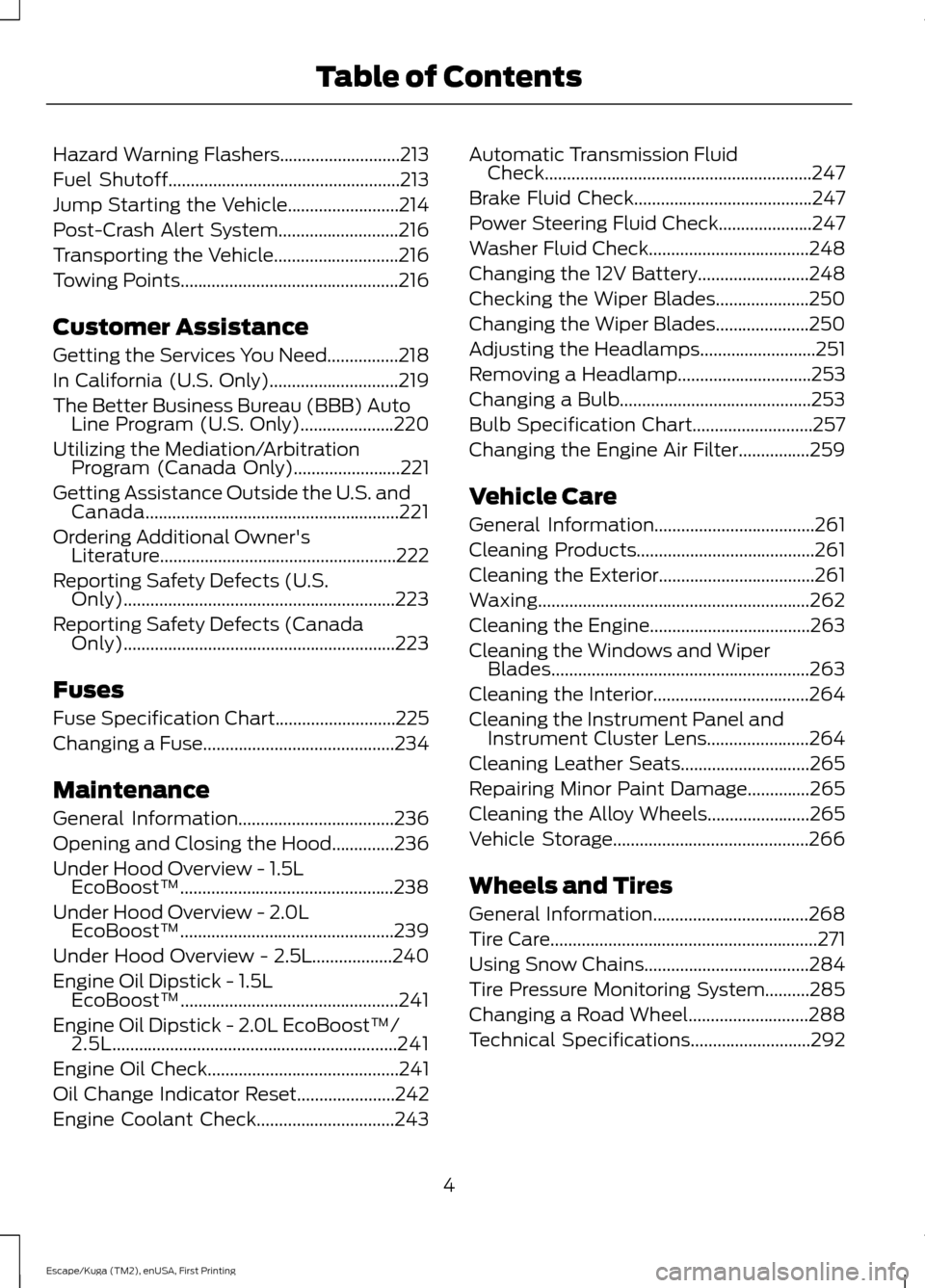
Hazard Warning Flashers...........................213
Fuel Shutoff
....................................................213
Jump Starting the Vehicle.........................214
Post-Crash Alert System...........................216
Transporting the Vehicle............................216
Towing Points.................................................216
Customer Assistance
Getting the Services You Need................218
In California (U.S. Only).............................219
The Better Business Bureau (BBB) Auto Line Program (U.S. Only).....................220
Utilizing the Mediation/Arbitration Program (Canada Only)
........................221
Getting Assistance Outside the U.S. and Canada.........................................................221
Ordering Additional Owner's Literature.....................................................222
Reporting Safety Defects (U.S. Only).............................................................223
Reporting Safety Defects (Canada Only).............................................................223
Fuses
Fuse Specification Chart
...........................225
Changing a Fuse
...........................................234
Maintenance
General Information
...................................236
Opening and Closing the Hood
..............236
Under Hood Overview - 1.5L EcoBoost™................................................238
Under Hood Overview - 2.0L EcoBoost™................................................239
Under Hood Overview - 2.5L..................240
Engine Oil Dipstick - 1.5L EcoBoost™.................................................241
Engine Oil Dipstick - 2.0L EcoBoost™/ 2.5L
................................................................241
Engine Oil Check...........................................241
Oil Change Indicator Reset
......................242
Engine Coolant Check
...............................243 Automatic Transmission Fluid
Check............................................................247
Brake Fluid Check
........................................247
Power Steering Fluid Check.....................247
Washer Fluid Check
....................................248
Changing the 12V Battery
.........................248
Checking the Wiper Blades.....................250
Changing the Wiper Blades.....................250
Adjusting the Headlamps
..........................251
Removing a Headlamp
..............................253
Changing a Bulb...........................................253
Bulb Specification Chart
...........................257
Changing the Engine Air Filter
................259
Vehicle Care
General Information....................................261
Cleaning Products........................................261
Cleaning the Exterior...................................261
Waxing.............................................................262
Cleaning the Engine....................................263
Cleaning the Windows and Wiper Blades..........................................................263
Cleaning the Interior...................................264
Cleaning the Instrument Panel and Instrument Cluster Lens.......................264
Cleaning Leather Seats.............................265
Repairing Minor Paint Damage
..............265
Cleaning the Alloy Wheels.......................265
Vehicle Storage
............................................266
Wheels and Tires
General Information...................................268
Tire Care
............................................................271
Using Snow Chains
.....................................284
Tire Pressure Monitoring System..........285
Changing a Road Wheel
...........................288
Technical Specifications...........................292
4
Escape/Kuga (TM2), enUSA, First Printing Table of Contents
Page 8 of 486
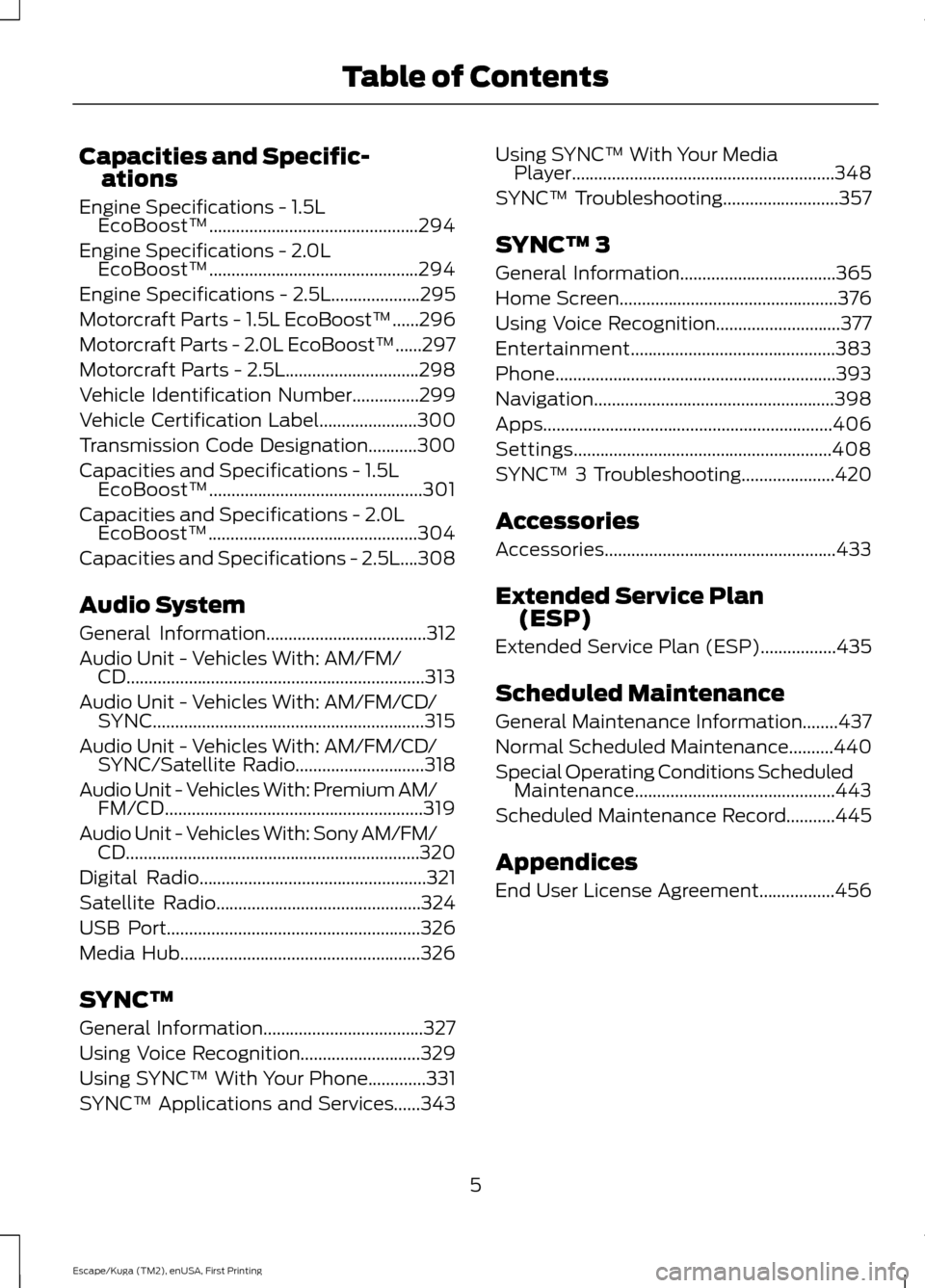
Capacities and Specific-
ations
Engine Specifications - 1.5L EcoBoost™...............................................294
Engine Specifications - 2.0L EcoBoost™...............................................294
Engine Specifications - 2.5L....................295
Motorcraft Parts - 1.5L EcoBoost™......296
Motorcraft Parts - 2.0L EcoBoost™......297
Motorcraft Parts - 2.5L..............................298
Vehicle Identification Number...............299
Vehicle Certification Label
......................300
Transmission Code Designation...........300
Capacities and Specifications - 1.5L EcoBoost™................................................301
Capacities and Specifications - 2.0L EcoBoost™...............................................304
Capacities and Specifications - 2.5L....308
Audio System
General Information
....................................312
Audio Unit - Vehicles With: AM/FM/ CD
...................................................................313
Audio Unit - Vehicles With: AM/FM/CD/ SYNC.............................................................315
Audio Unit - Vehicles With: AM/FM/CD/ SYNC/Satellite Radio.............................318
Audio Unit - Vehicles With: Premium AM/ FM/CD..........................................................319
Audio Unit - Vehicles With: Sony AM/FM/ CD..................................................................320
Digital Radio
...................................................321
Satellite Radio..............................................324
USB Port
.........................................................326
Media Hub......................................................326
SYNC™
General Information....................................327
Using Voice Recognition...........................329
Using SYNC™ With Your Phone.............331
SYNC™ Applications and Services......343 Using SYNC™ With Your Media
Player...........................................................348
SYNC™ Troubleshooting
..........................357
SYNC™ 3
General Information
...................................365
Home Screen.................................................376
Using Voice Recognition............................377
Entertainment..............................................383
Phone...............................................................393
Navigation
......................................................398
Apps.................................................................406
Settings..........................................................408
SYNC™ 3 Troubleshooting.....................420
Accessories
Accessories....................................................433
Extended Service Plan (ESP)
Extended Service Plan (ESP).................435
Scheduled Maintenance
General Maintenance Information
........437
Normal Scheduled Maintenance..........440
Special Operating Conditions Scheduled Maintenance.............................................443
Scheduled Maintenance Record...........445
Appendices
End User License Agreement
.................456
5
Escape/Kuga (TM2), enUSA, First Printing Table of Contents
Page 15 of 486
vehicle development we validate that
these parts deliver the intended level of
protection as a whole system. A great way
to know for sure you are getting this level
of protection is to use genuine Ford
replacement collision parts.
Warranty on Replacement Parts
Genuine Ford and Motorcraft replacement
parts are the only replacement parts that
benefit from a Ford Warranty. The Ford
Warranty may not cover damage caused
to your vehicle as a result of failed
non-Ford parts. For additional information,
refer to the terms and conditions of the
Ford Warranty.
SPECIAL NOTICES
New Vehicle Limited Warranty
For a detailed description of what is
covered and what is not covered by your
vehicle
’s New Vehicle Limited Warranty,
refer to the Warranty Manual that is
provided to you along with your Owner ’s
Manual.
Special Instructions
For your added safety, your vehicle is fitted
with sophisticated electronic controls. WARNINGS
You risk death or serious injury to
yourself and others if you do not
follow the instruction highlighted by
the warning symbol. Failure to follow the
specific warnings and instructions could
result in personal injury. Never place front seat mounted
rear-facing child or infant seats in
front of an active passenger airbag. On Board Diagnostics Data Link
Connector
WARNING
Use of wireless plug-in devices in the
OBD Data Link Connector (DLC) may
allow unauthorized third parties to
gain access to vehicle systems and data
which could impair the function of various
vehicle systems, including safety-related
systems. The DLC should only be used by
a repair facility that operates in accordance
with Ford ’s service and repair instructions. Your vehicle has an OBD Data Link
Connector (DLC) that is used in
conjunction with a diagnostic scan tool for
vehicle diagnostics, repairs and
reprogramming services. Installing an
aftermarket device that uses the DLC
during normal driving for purposes such as
remote insurance company monitoring,
transmission of vehicle data to other
devices or entities, or altering the
performance of the vehicle, may cause
interference with or even damage to
vehicle systems. We do not recommend
or endorse the use of aftermarket plug-in
devices unless approved by Ford. The
vehicle Warranty will not cover damage
caused by an aftermarket plug-in device.
Notice to Owners of Pickup Trucks
and Utility Type Vehicles
WARNING
Utility vehicles have a significantly
higher rollover rate than other types
of vehicles.
Before you drive your vehicle, please read
this Owner
’s Guide carefully. Your vehicle
is not a passenger car. As with other
vehicles of this type, failure to operate this
vehicle correctly may result in loss of
vehicle control, vehicle rollover, personal
injury or death.
12
Escape/Kuga (TM2), enUSA, First Printing Introduction
Page 35 of 486
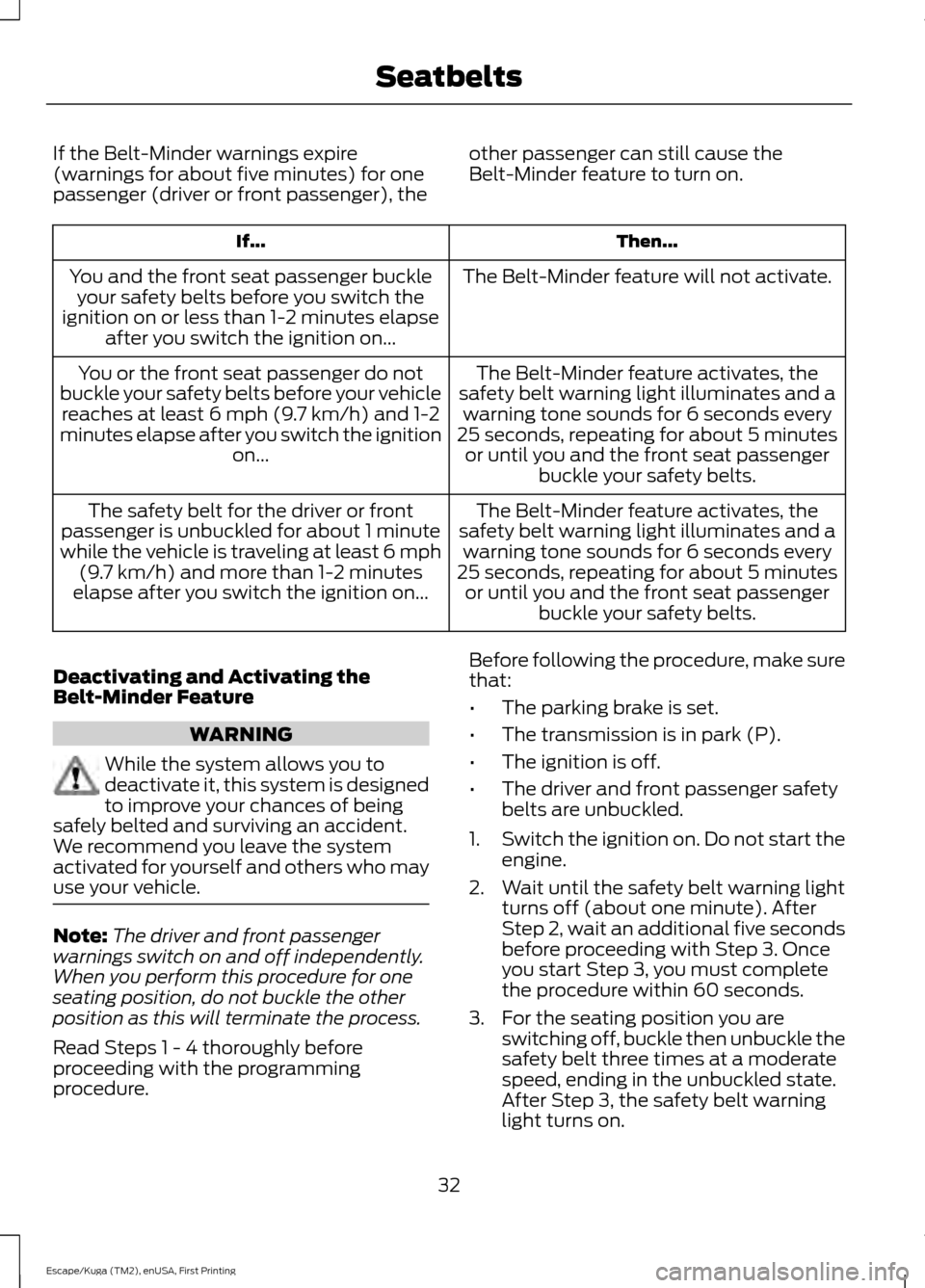
If the Belt-Minder warnings expire
(warnings for about five minutes) for one
passenger (driver or front passenger), the
other passenger can still cause the
Belt-Minder feature to turn on. Then...
If...
The Belt-Minder feature will not activate.
You and the front seat passenger buckle
your safety belts before you switch the
ignition on or less than 1-2 minutes elapse after you switch the ignition on...
The Belt-Minder feature activates, the
safety belt warning light illuminates and a warning tone sounds for 6 seconds every
25 seconds, repeating for about 5 minutes or until you and the front seat passenger buckle your safety belts.
You or the front seat passenger do not
buckle your safety belts before your vehicle reaches at least 6 mph (9.7 km/h) and 1-2
minutes elapse after you switch the ignition on...
The Belt-Minder feature activates, the
safety belt warning light illuminates and a warning tone sounds for 6 seconds every
25 seconds, repeating for about 5 minutes or until you and the front seat passenger buckle your safety belts.
The safety belt for the driver or front
passenger is unbuckled for about 1 minute
while the vehicle is traveling at least 6 mph (9.7 km/h) and more than 1-2 minutes
elapse after you switch the ignition on...
Deactivating and Activating the
Belt-Minder Feature WARNING
While the system allows you to
deactivate it, this system is designed
to improve your chances of being
safely belted and surviving an accident.
We recommend you leave the system
activated for yourself and others who may
use your vehicle. Note:
The driver and front passenger
warnings switch on and off independently.
When you perform this procedure for one
seating position, do not buckle the other
position as this will terminate the process.
Read Steps 1 - 4 thoroughly before
proceeding with the programming
procedure. Before following the procedure, make sure
that:
•
The parking brake is set.
• The transmission is in park (P).
• The ignition is off.
• The driver and front passenger safety
belts are unbuckled.
1. Switch the ignition on. Do not start the
engine.
2. Wait until the safety belt warning light turns off (about one minute). After
Step 2, wait an additional five seconds
before proceeding with Step 3. Once
you start Step 3, you must complete
the procedure within 60 seconds.
3. For the seating position you are switching off, buckle then unbuckle the
safety belt three times at a moderate
speed, ending in the unbuckled state.
After Step 3, the safety belt warning
light turns on.
32
Escape/Kuga (TM2), enUSA, First Printing Seatbelts
Page 50 of 486
5. Reinstall the battery cover and key
blade.
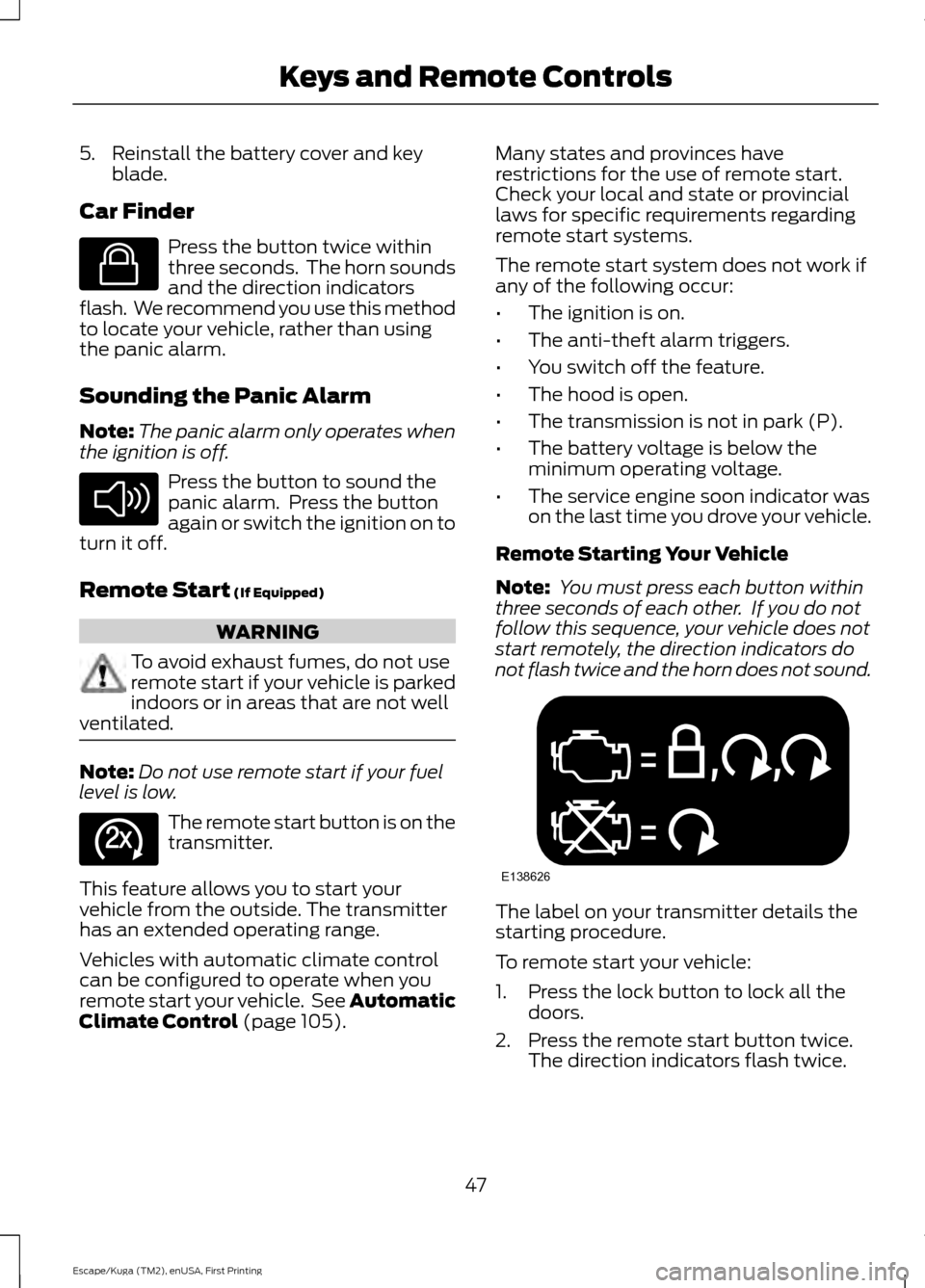
Car Finder Press the button twice within
three seconds. The horn sounds
and the direction indicators
flash. We recommend you use this method
to locate your vehicle, rather than using
the panic alarm.
Sounding the Panic Alarm
Note: The panic alarm only operates when
the ignition is off. Press the button to sound the
panic alarm. Press the button
again or switch the ignition on to
turn it off.
Remote Start (If Equipped) WARNING
To avoid exhaust fumes, do not use
remote start if your vehicle is parked
indoors or in areas that are not well
ventilated. Note:
Do not use remote start if your fuel
level is low. The remote start button is on the
transmitter.
This feature allows you to start your
vehicle from the outside. The transmitter
has an extended operating range.
Vehicles with automatic climate control
can be configured to operate when you
remote start your vehicle. See Automatic
Climate Control
(page 105). Many states and provinces have
restrictions for the use of remote start.
Check your local and state or provincial
laws for specific requirements regarding
remote start systems.
The remote start system does not work if
any of the following occur:
•
The ignition is on.
• The anti-theft alarm triggers.
• You switch off the feature.
• The hood is open.
• The transmission is not in park (P).
• The battery voltage is below the
minimum operating voltage.
• The service engine soon indicator was
on the last time you drove your vehicle.
Remote Starting Your Vehicle
Note: You must press each button within
three seconds of each other. If you do not
follow this sequence, your vehicle does not
start remotely, the direction indicators do
not flash twice and the horn does not sound. The label on your transmitter details the
starting procedure.
To remote start your vehicle:
1. Press the lock button to lock all the
doors.
2. Press the remote start button twice. The direction indicators flash twice.
47
Escape/Kuga (TM2), enUSA, First Printing Keys and Remote ControlsE138623 E138624 E138625 E138626
Page 58 of 486
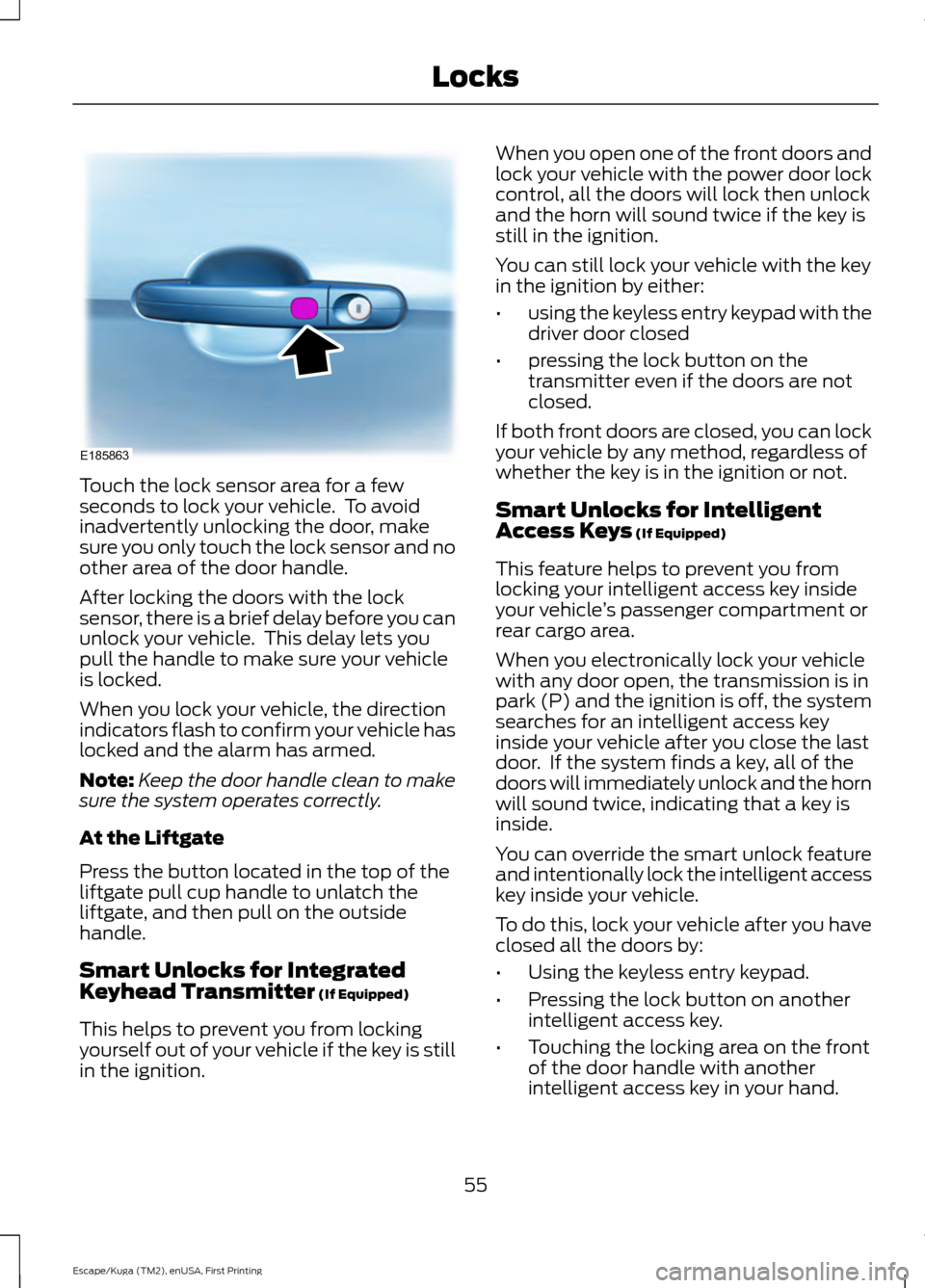
Touch the lock sensor area for a few
seconds to lock your vehicle. To avoid
inadvertently unlocking the door, make
sure you only touch the lock sensor and no
other area of the door handle.
After locking the doors with the lock
sensor, there is a brief delay before you can
unlock your vehicle. This delay lets you
pull the handle to make sure your vehicle
is locked.
When you lock your vehicle, the direction
indicators flash to confirm your vehicle has
locked and the alarm has armed.
Note:
Keep the door handle clean to make
sure the system operates correctly.
At the Liftgate
Press the button located in the top of the
liftgate pull cup handle to unlatch the
liftgate, and then pull on the outside
handle.
Smart Unlocks for Integrated
Keyhead Transmitter (If Equipped)
This helps to prevent you from locking
yourself out of your vehicle if the key is still
in the ignition. When you open one of the front doors and
lock your vehicle with the power door lock
control, all the doors will lock then unlock
and the horn will sound twice if the key is
still in the ignition.
You can still lock your vehicle with the key
in the ignition by either:
•
using the keyless entry keypad with the
driver door closed
• pressing the lock button on the
transmitter even if the doors are not
closed.
If both front doors are closed, you can lock
your vehicle by any method, regardless of
whether the key is in the ignition or not.
Smart Unlocks for Intelligent
Access Keys
(If Equipped)
This feature helps to prevent you from
locking your intelligent access key inside
your vehicle ’s passenger compartment or
rear cargo area.
When you electronically lock your vehicle
with any door open, the transmission is in
park (P) and the ignition is off, the system
searches for an intelligent access key
inside your vehicle after you close the last
door. If the system finds a key, all of the
doors will immediately unlock and the horn
will sound twice, indicating that a key is
inside.
You can override the smart unlock feature
and intentionally lock the intelligent access
key inside your vehicle.
To do this, lock your vehicle after you have
closed all the doors by:
• Using the keyless entry keypad.
• Pressing the lock button on another
intelligent access key.
• Touching the locking area on the front
of the door handle with another
intelligent access key in your hand.
55
Escape/Kuga (TM2), enUSA, First Printing LocksE185863
Page 61 of 486
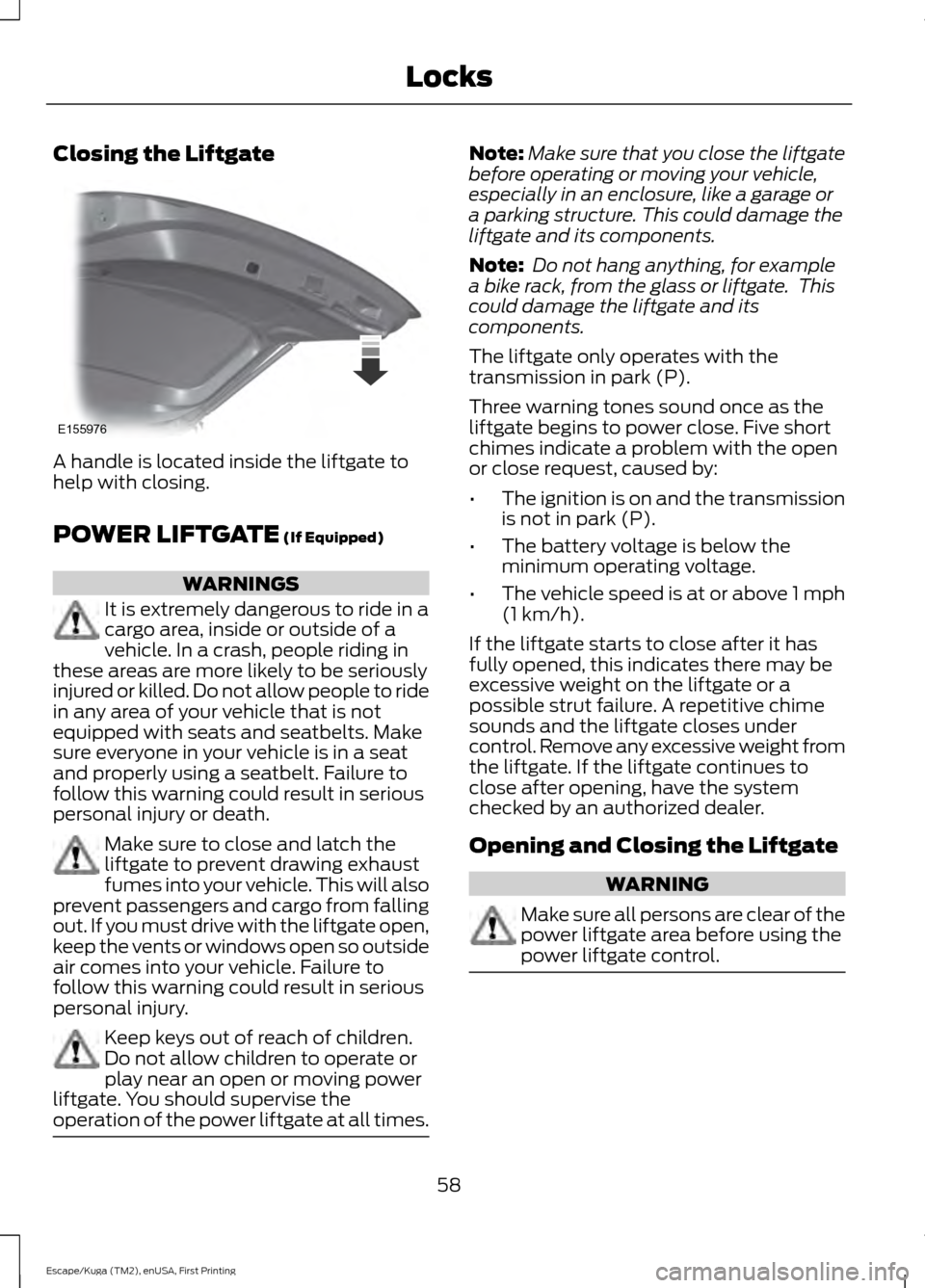
Closing the Liftgate
A handle is located inside the liftgate to
help with closing.
POWER LIFTGATE (If Equipped)
WARNINGS
It is extremely dangerous to ride in a
cargo area, inside or outside of a
vehicle. In a crash, people riding in
these areas are more likely to be seriously
injured or killed. Do not allow people to ride
in any area of your vehicle that is not
equipped with seats and seatbelts. Make
sure everyone in your vehicle is in a seat
and properly using a seatbelt. Failure to
follow this warning could result in serious
personal injury or death. Make sure to close and latch the
liftgate to prevent drawing exhaust
fumes into your vehicle. This will also
prevent passengers and cargo from falling
out. If you must drive with the liftgate open,
keep the vents or windows open so outside
air comes into your vehicle. Failure to
follow this warning could result in serious
personal injury. Keep keys out of reach of children.
Do not allow children to operate or
play near an open or moving power
liftgate. You should supervise the
operation of the power liftgate at all times. Note:
Make sure that you close the liftgate
before operating or moving your vehicle,
especially in an enclosure, like a garage or
a parking structure. This could damage the
liftgate and its components.
Note: Do not hang anything, for example
a bike rack, from the glass or liftgate. This
could damage the liftgate and its
components.
The liftgate only operates with the
transmission in park (P).
Three warning tones sound once as the
liftgate begins to power close. Five short
chimes indicate a problem with the open
or close request, caused by:
• The ignition is on and the transmission
is not in park (P).
• The battery voltage is below the
minimum operating voltage.
• The vehicle speed is at or above 1 mph
(1 km/h)
.
If the liftgate starts to close after it has
fully opened, this indicates there may be
excessive weight on the liftgate or a
possible strut failure. A repetitive chime
sounds and the liftgate closes under
control. Remove any excessive weight from
the liftgate. If the liftgate continues to
close after opening, have the system
checked by an authorized dealer.
Opening and Closing the Liftgate WARNING
Make sure all persons are clear of the
power liftgate area before using the
power liftgate control.
58
Escape/Kuga (TM2), enUSA, First Printing LocksE155976
Page 77 of 486
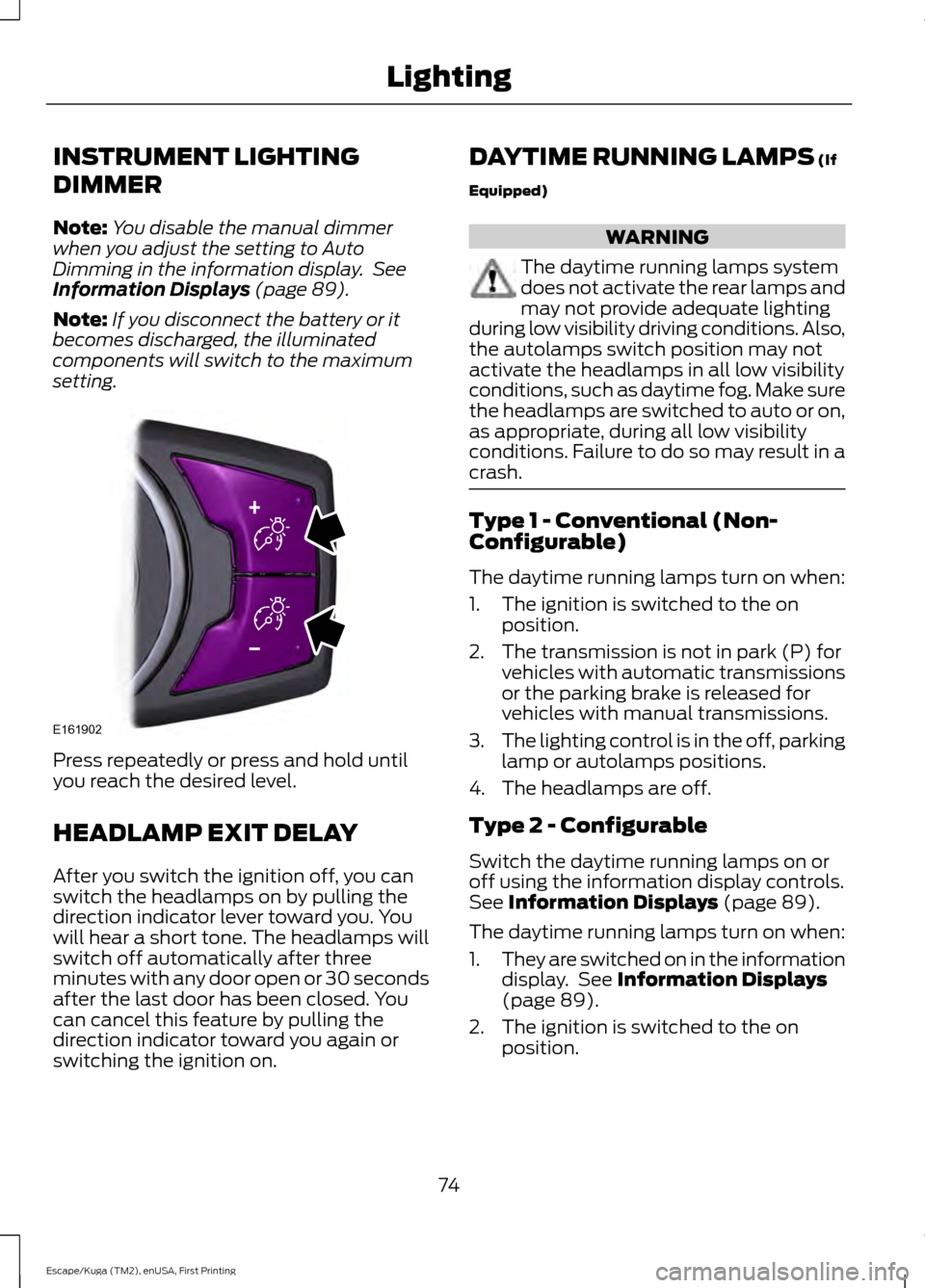
INSTRUMENT LIGHTING
DIMMER
Note:
You disable the manual dimmer
when you adjust the setting to Auto
Dimming in the information display. See
Information Displays (page 89).
Note: If you disconnect the battery or it
becomes discharged, the illuminated
components will switch to the maximum
setting. Press repeatedly or press and hold until
you reach the desired level.
HEADLAMP EXIT DELAY
After you switch the ignition off, you can
switch the headlamps on by pulling the
direction indicator lever toward you. You
will hear a short tone. The headlamps will
switch off automatically after three
minutes with any door open or 30 seconds
after the last door has been closed. You
can cancel this feature by pulling the
direction indicator toward you again or
switching the ignition on. DAYTIME RUNNING LAMPS
(If
Equipped) WARNING
The daytime running lamps system
does not activate the rear lamps and
may not provide adequate lighting
during low visibility driving conditions. Also,
the autolamps switch position may not
activate the headlamps in all low visibility
conditions, such as daytime fog. Make sure
the headlamps are switched to auto or on,
as appropriate, during all low visibility
conditions. Failure to do so may result in a
crash. Type 1 - Conventional (Non-
Configurable)
The daytime running lamps turn on when:
1. The ignition is switched to the on
position.
2. The transmission is not in park (P) for vehicles with automatic transmissions
or the parking brake is released for
vehicles with manual transmissions.
3. The lighting control is in the off, parking
lamp or autolamps positions.
4. The headlamps are off.
Type 2 - Configurable
Switch the daytime running lamps on or
off using the information display controls.
See
Information Displays (page 89).
The daytime running lamps turn on when:
1. They are switched on in the information
display. See
Information Displays
(page 89).
2. The ignition is switched to the on position.
74
Escape/Kuga (TM2), enUSA, First Printing LightingE161902
Page 78 of 486
3. The transmission is not in park (P) for
vehicles with automatic transmissions
or the parking brake is released for
vehicles with manual transmissions.
4. The lighting control is in the autolamps
position.
5. The headlamps are off.
The other lighting control switch positions
do not activate the daytime running lamps,
and you can use them to temporarily
override autolamp control.
When switched off in the information
display, the daytime running lamps are off
in all lighting control switch positions.
AUTOMATIC HIGH BEAM
CONTROL (If Equipped)
The system automatically turns on the high
beams if it is dark enough and no other
traffic is present. When it detects the
headlights of an approaching vehicle, the
rear lamps of the preceding vehicle or
street lighting, the system turns off the high
beams before they distract other drivers.
The low beams remain on.
Note: If it appears that automatic high
beam is not functioning properly, check the
windshield in front of the camera for a
blockage. A clear view of the road is required
for proper system operation. Make sure that
authorized personnel repair any windshield
damage in the area of the camera's field of
view.
Note: If the system detects a blockage such
as bird droppings, bug splatter, snow or ice,
and you do not observe changes, the system
may go into low beam mode until you clear
the blockage. A message may also appear
in the information display noting the front
camera is blocked. Note:
Typical road dust, dirt and water
spots do not affect the performance of the
automatic high beam control. However, in
cold or inclement weather conditions, you
may notice a decrease in the availability of
the automatic high beam control, especially
at start up. If you want to change the beam
state independently of the system, you may
switch the high beams on or off using the
lighting control switch. Automatic high
beam control resumes when conditions are
correct.
Note: Modification of your vehicle ride
height such as using much larger tires, may
degrade feature performance.
A camera sensor, centrally mounted
behind the windshield of your vehicle,
continuously monitors conditions to decide
when to switch the high beams off and on.
Once the system is active, the high beams
switch on if:
• The ambient light level is low enough.
• There is no traffic in front of the vehicle.
• The vehicle speed is greater than
approximately
31 mph (50 km/h).
The high beams turn off if:
• The system detects the headlamps of
an approaching vehicle or the rear
lamps of a preceding vehicle.
• Vehicle speed falls below
approximately
26 mph (42 km/h).
• The ambient light level is high enough
that high beams are not required.
• The system detects severe rain, snow
or fog.
• The camera is blocked.
Activating the System
Switch on the system in the information
display and switch the lighting control to
the autolamps position. See Information
Displays
(page 89). See Autolamps
(page 73).
75
Escape/Kuga (TM2), enUSA, First Printing Lighting