camera FORD ESCAPE 2018 User Guide
[x] Cancel search | Manufacturer: FORD, Model Year: 2018, Model line: ESCAPE, Model: FORD ESCAPE 2018Pages: 517, PDF Size: 6.62 MB
Page 196 of 517
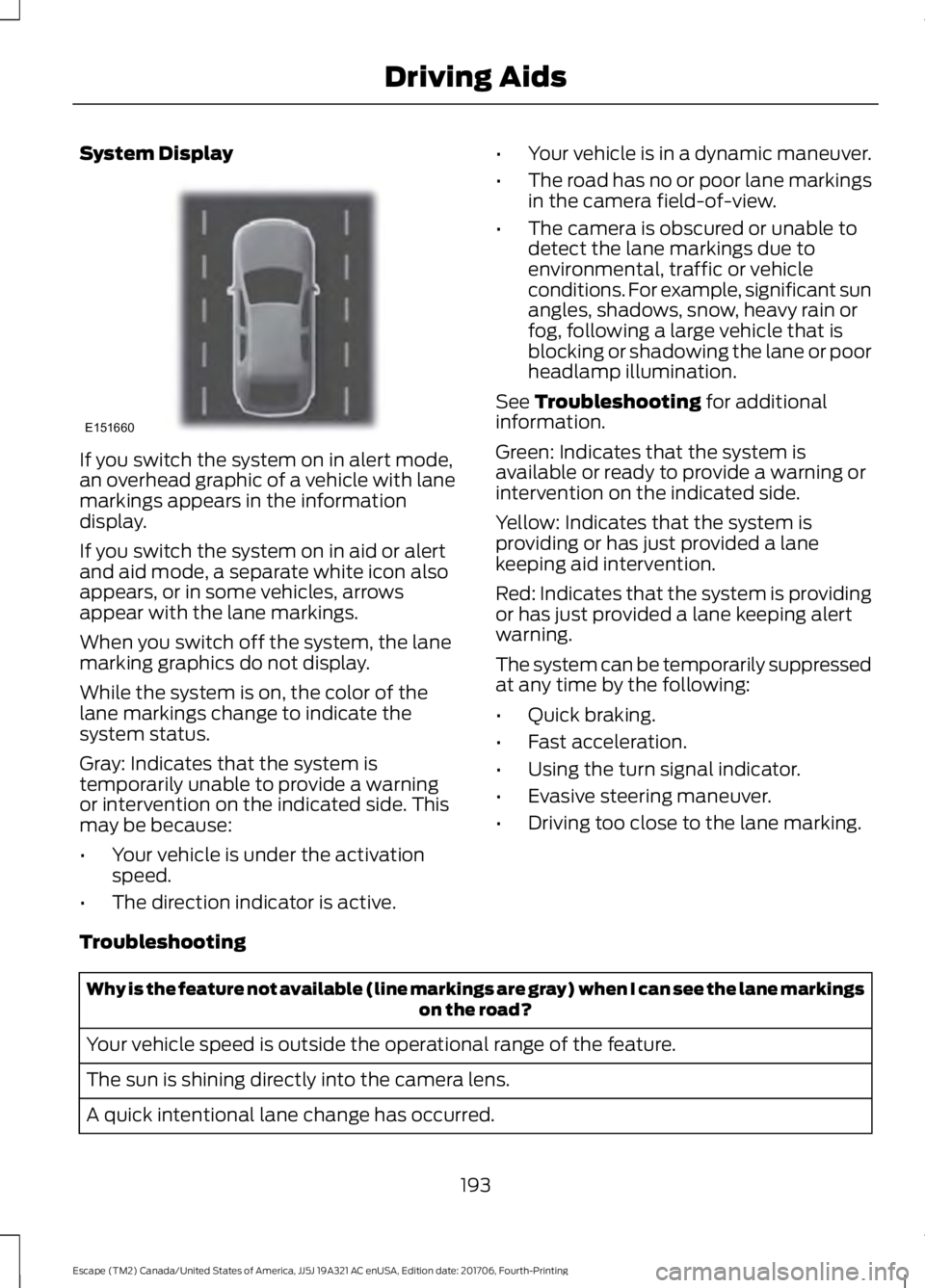
System Display
If you switch the system on in alert mode,
an overhead graphic of a vehicle with lane
markings appears in the information
display.
If you switch the system on in aid or alert
and aid mode, a separate white icon also
appears, or in some vehicles, arrows
appear with the lane markings.
When you switch off the system, the lane
marking graphics do not display.
While the system is on, the color of the
lane markings change to indicate the
system status.
Gray: Indicates that the system is
temporarily unable to provide a warning
or intervention on the indicated side. This
may be because:
•
Your vehicle is under the activation
speed.
• The direction indicator is active. •
Your vehicle is in a dynamic maneuver.
• The road has no or poor lane markings
in the camera field-of-view.
• The camera is obscured or unable to
detect the lane markings due to
environmental, traffic or vehicle
conditions. For example, significant sun
angles, shadows, snow, heavy rain or
fog, following a large vehicle that is
blocking or shadowing the lane or poor
headlamp illumination.
See Troubleshooting for additional
information.
Green: Indicates that the system is
available or ready to provide a warning or
intervention on the indicated side.
Yellow: Indicates that the system is
providing or has just provided a lane
keeping aid intervention.
Red: Indicates that the system is providing
or has just provided a lane keeping alert
warning.
The system can be temporarily suppressed
at any time by the following:
• Quick braking.
• Fast acceleration.
• Using the turn signal indicator.
• Evasive steering maneuver.
• Driving too close to the lane marking.
Troubleshooting Why is the feature not available (line markings are gray) when I can see the lane markings
on the road?
Your vehicle speed is outside the operational range of the feature.
The sun is shining directly into the camera lens.
A quick intentional lane change has occurred.
193
Escape (TM2) Canada/United States of America, JJ5J 19A321 AC enUSA, Edition date: 201706, Fourth-Printing Driving AidsE151660
Page 197 of 517
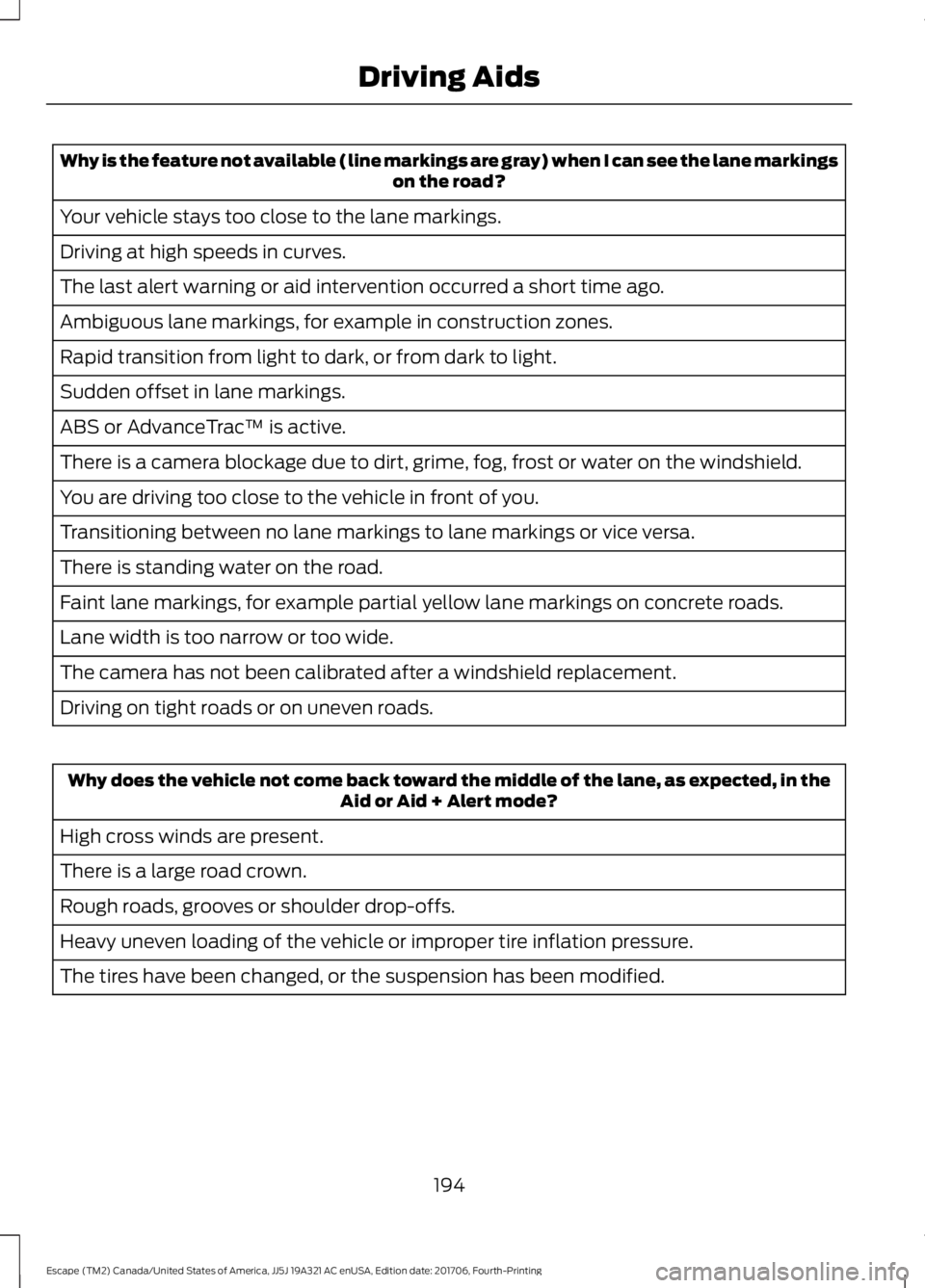
Why is the feature not available (line markings are gray) when I can see the lane markings
on the road?
Your vehicle stays too close to the lane markings.
Driving at high speeds in curves.
The last alert warning or aid intervention occurred a short time ago.
Ambiguous lane markings, for example in construction zones.
Rapid transition from light to dark, or from dark to light.
Sudden offset in lane markings.
ABS or AdvanceTrac ™ is active.
There is a camera blockage due to dirt, grime, fog, frost or water on the windshield.
You are driving too close to the vehicle in front of you.
Transitioning between no lane markings to lane markings or vice versa.
There is standing water on the road.
Faint lane markings, for example partial yellow lane markings on concrete roads.
Lane width is too narrow or too wide.
The camera has not been calibrated after a windshield replacement.
Driving on tight roads or on uneven roads. Why does the vehicle not come back toward the middle of the lane, as expected, in the
Aid or Aid + Alert mode?
High cross winds are present.
There is a large road crown.
Rough roads, grooves or shoulder drop-offs.
Heavy uneven loading of the vehicle or improper tire inflation pressure.
The tires have been changed, or the suspension has been modified.
194
Escape (TM2) Canada/United States of America, JJ5J 19A321 AC enUSA, Edition date: 201706, Fourth-Printing Driving Aids
Page 237 of 517
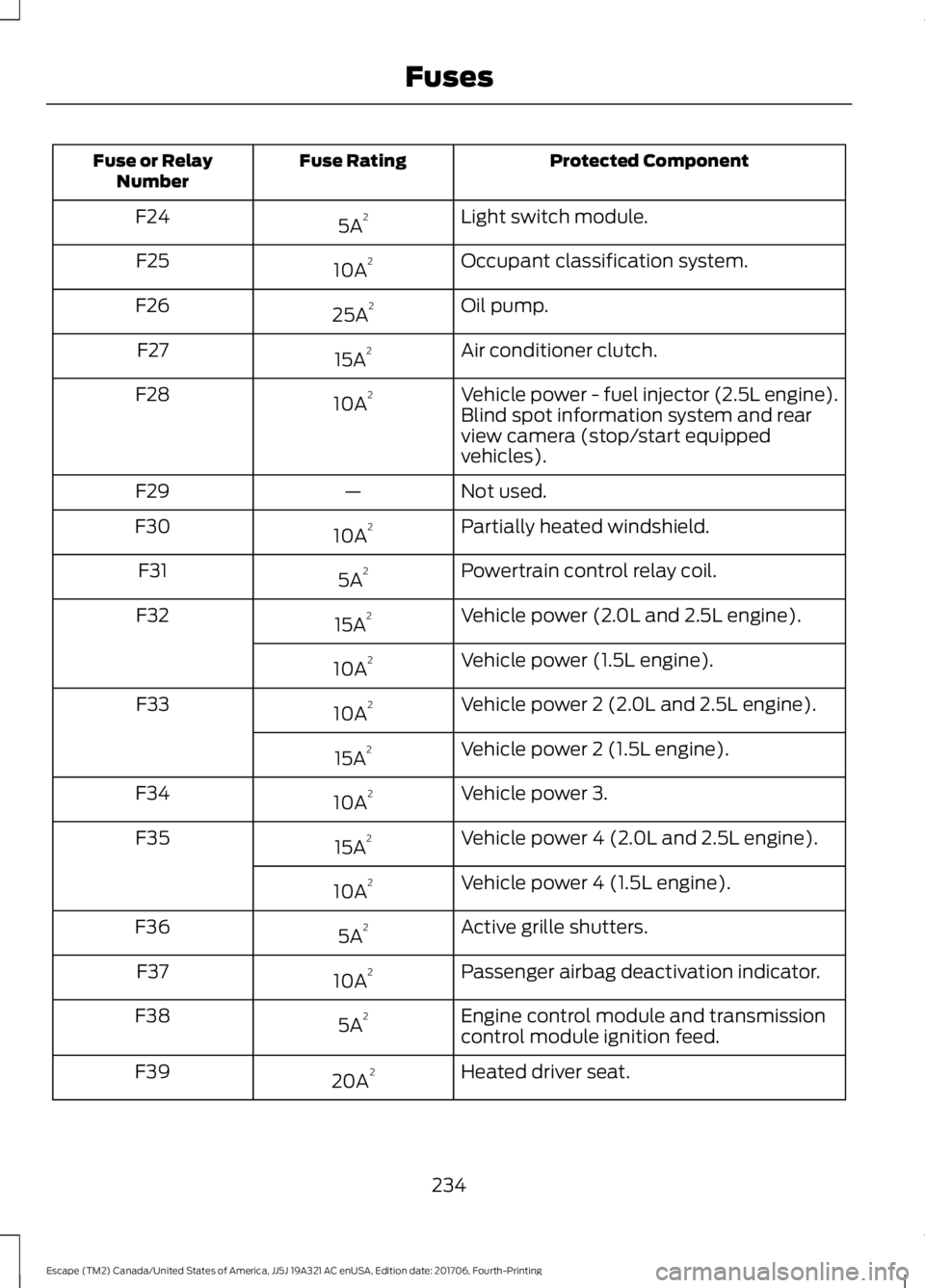
Protected Component
Fuse Rating
Fuse or Relay
Number
Light switch module.
5A 2
F24
Occupant classification system.
10A 2
F25
Oil pump.
25A 2
F26
Air conditioner clutch.
15A 2
F27
Vehicle power - fuel injector (2.5L engine).
10A 2
F28
Blind spot information system and rear
view camera (stop/start equipped
vehicles).
Not used.
—
F29
Partially heated windshield.
10A 2
F30
Powertrain control relay coil.
5A 2
F31
Vehicle power (2.0L and 2.5L engine).
15A 2
F32
Vehicle power (1.5L engine).
10A 2
Vehicle power 2 (2.0L and 2.5L engine).
10A 2
F33
Vehicle power 2 (1.5L engine).
15A 2
Vehicle power 3.
10A 2
F34
Vehicle power 4 (2.0L and 2.5L engine).
15A 2
F35
Vehicle power 4 (1.5L engine).
10A 2
Active grille shutters.
5A 2
F36
Passenger airbag deactivation indicator.
10A 2
F37
Engine control module and transmission
control module ignition feed.
5A 2
F38
Heated driver seat.
20A 2
F39
234
Escape (TM2) Canada/United States of America, JJ5J 19A321 AC enUSA, Edition date: 201706, Fourth-Printing Fuses
Page 243 of 517
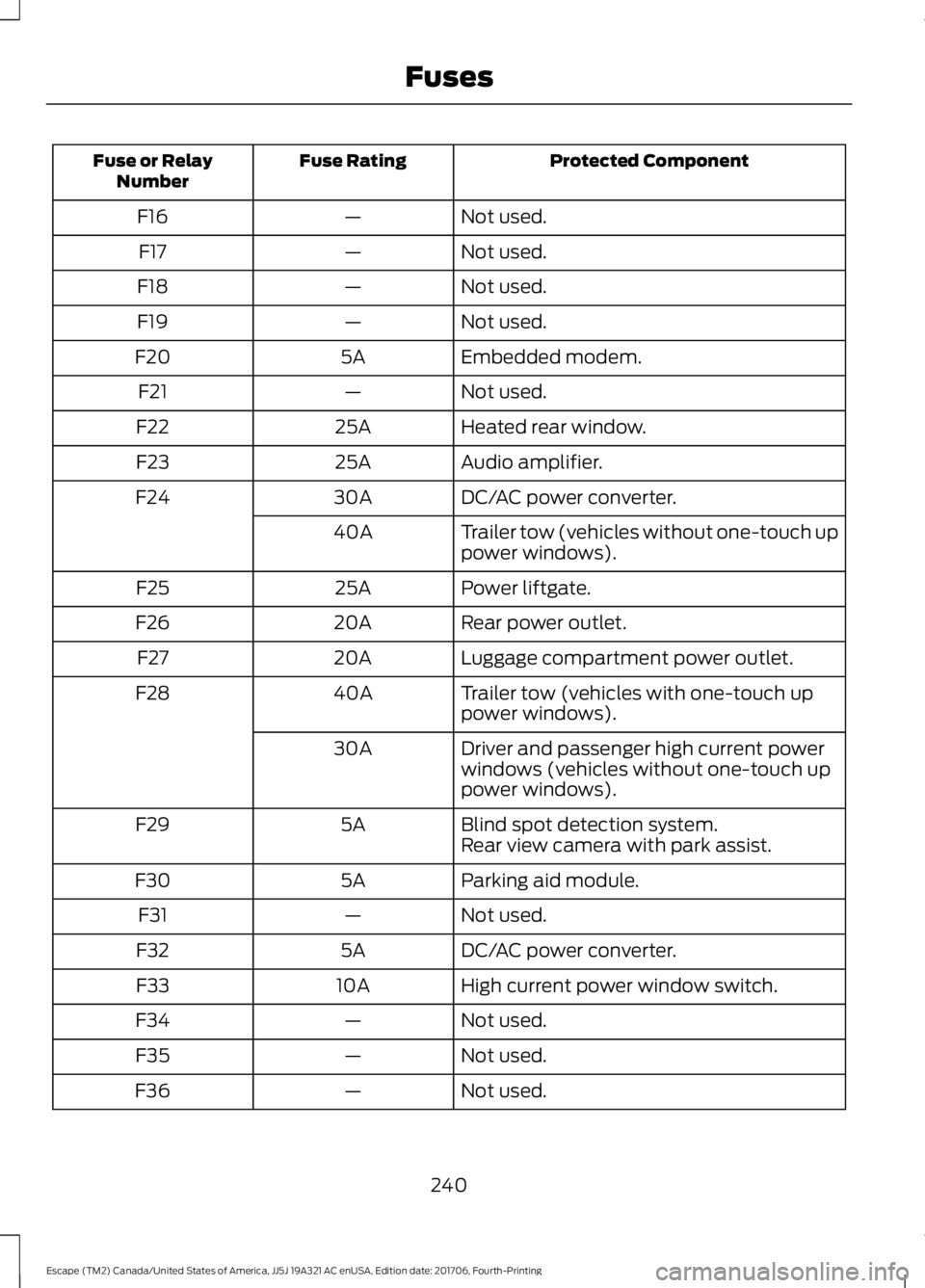
Protected Component
Fuse Rating
Fuse or Relay
Number
Not used.
—
F16
Not used.
—
F17
Not used.
—
F18
Not used.
—
F19
Embedded modem.
5A
F20
Not used.
—
F21
Heated rear window.
25A
F22
Audio amplifier.
25A
F23
DC/AC power converter.
30A
F24
Trailer tow (vehicles without one-touch up
power windows).
40A
Power liftgate.
25A
F25
Rear power outlet.
20A
F26
Luggage compartment power outlet.
20A
F27
Trailer tow (vehicles with one-touch up
power windows).
40A
F28
Driver and passenger high current power
windows (vehicles without one-touch up
power windows).
30A
Blind spot detection system.
5A
F29
Rear view camera with park assist.
Parking aid module.
5A
F30
Not used.
—
F31
DC/AC power converter.
5A
F32
High current power window switch.
10A
F33
Not used.
—
F34
Not used.
—
F35
Not used.
—
F36
240
Escape (TM2) Canada/United States of America, JJ5J 19A321 AC enUSA, Edition date: 201706, Fourth-Printing Fuses
Page 388 of 517
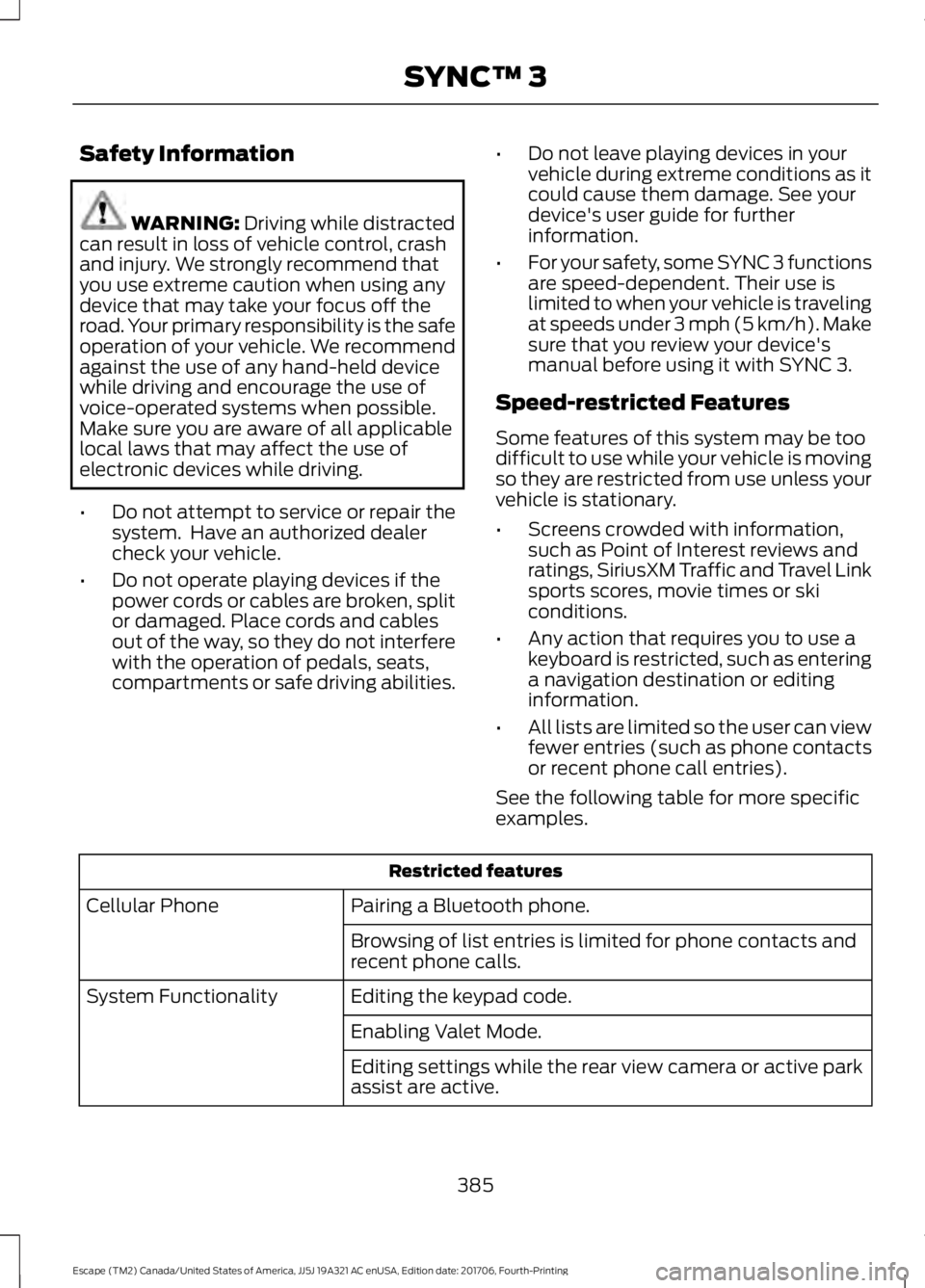
Safety Information
WARNING: Driving while distracted
can result in loss of vehicle control, crash
and injury. We strongly recommend that
you use extreme caution when using any
device that may take your focus off the
road. Your primary responsibility is the safe
operation of your vehicle. We recommend
against the use of any hand-held device
while driving and encourage the use of
voice-operated systems when possible.
Make sure you are aware of all applicable
local laws that may affect the use of
electronic devices while driving.
• Do not attempt to service or repair the
system. Have an authorized dealer
check your vehicle.
• Do not operate playing devices if the
power cords or cables are broken, split
or damaged. Place cords and cables
out of the way, so they do not interfere
with the operation of pedals, seats,
compartments or safe driving abilities. •
Do not leave playing devices in your
vehicle during extreme conditions as it
could cause them damage. See your
device's user guide for further
information.
• For your safety, some SYNC 3 functions
are speed-dependent. Their use is
limited to when your vehicle is traveling
at speeds under 3 mph (5 km/h). Make
sure that you review your device's
manual before using it with SYNC 3.
Speed-restricted Features
Some features of this system may be too
difficult to use while your vehicle is moving
so they are restricted from use unless your
vehicle is stationary.
• Screens crowded with information,
such as Point of Interest reviews and
ratings, SiriusXM Traffic and Travel Link
sports scores, movie times or ski
conditions.
• Any action that requires you to use a
keyboard is restricted, such as entering
a navigation destination or editing
information.
• All lists are limited so the user can view
fewer entries (such as phone contacts
or recent phone call entries).
See the following table for more specific
examples. Restricted features
Pairing a Bluetooth phone.
Cellular Phone
Browsing of list entries is limited for phone contacts and
recent phone calls.
Editing the keypad code.
System Functionality
Enabling Valet Mode.
Editing settings while the rear view camera or active park
assist are active.
385
Escape (TM2) Canada/United States of America, JJ5J 19A321 AC enUSA, Edition date: 201706, Fourth-Printing SYNC™ 3
Page 438 of 517
Note:
: Data, e.g. the Vehicle Identification
Number (VIN), SIM Card ID, and data plan
usage, is shared between Ford and the
vehicle network carrier to provide the
Vehicle Hotspot service in accordance with
your vehicle network carrier agreement,
coverage and availability, and may be used
to enable a seamless transition from an old
to new embedded modem and to confirm
any updates are successfully delivered.
Note: : For your convenience data usage
may be available for monitoring under
Settings but may not reflect actual or
current usage. The vehicle network carrier
is responsible for providing information
about your account. Please contact the
vehicle network carrier for more information.
Note: : Ford may need to update operating
system software on your vehicle, including
security updates and bug fixes, to keep
connected services current, like Vehicle
Hotspot, without prior notice to you.
Note: If you do not have an active vehicle
hotspot data plan, open your web browser
and go to a website using the HTTP protocol
to be automatically redirected to the vehicle
network carrier landing page where you can
purchase data. Websites using HTTPS will
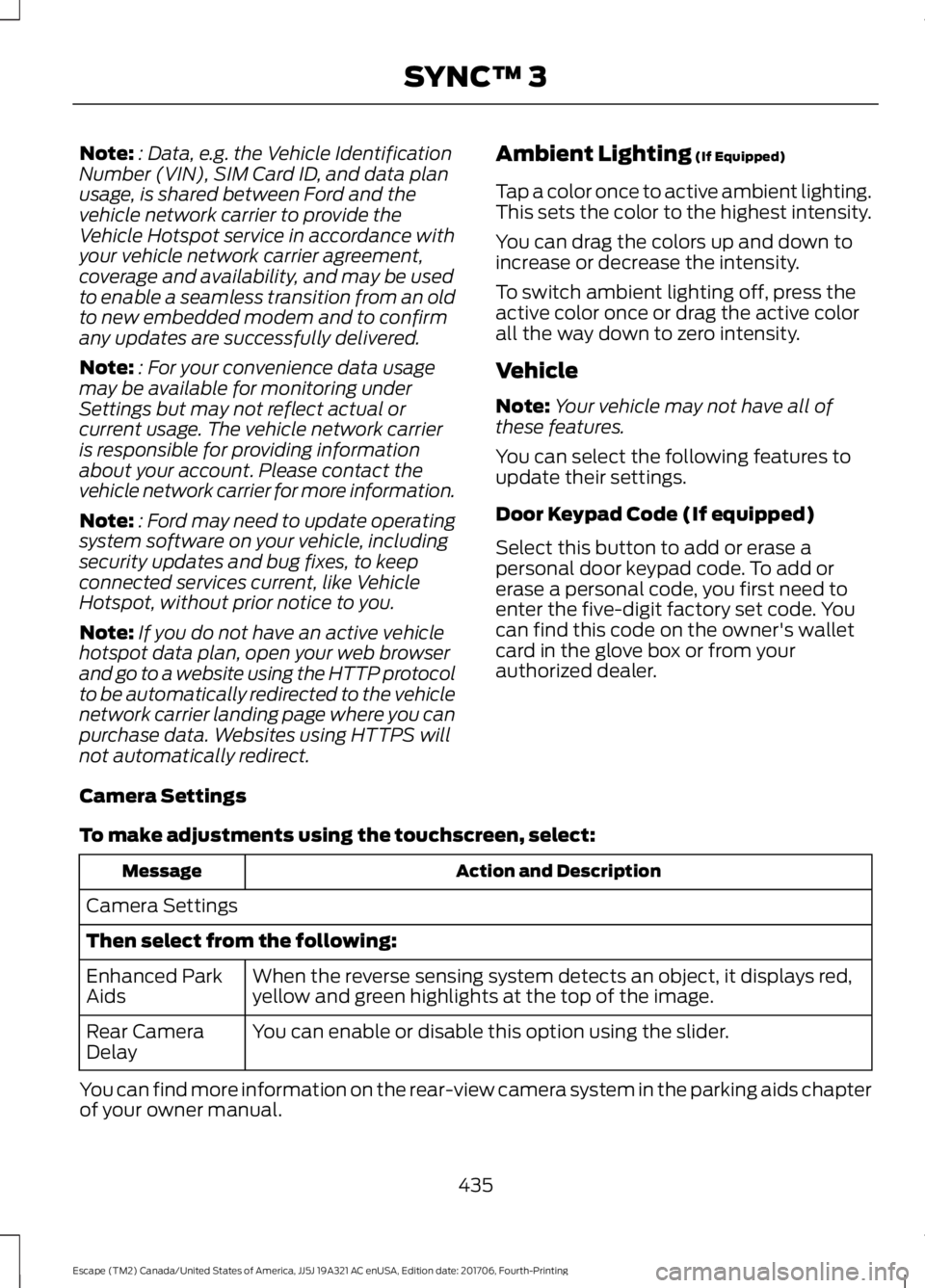
not automatically redirect. Ambient Lighting (If Equipped)
Tap a color once to active ambient lighting.
This sets the color to the highest intensity.
You can drag the colors up and down to
increase or decrease the intensity.
To switch ambient lighting off, press the
active color once or drag the active color
all the way down to zero intensity.
Vehicle
Note: Your vehicle may not have all of
these features.
You can select the following features to
update their settings.
Door Keypad Code (If equipped)
Select this button to add or erase a
personal door keypad code. To add or
erase a personal code, you first need to
enter the five-digit factory set code. You
can find this code on the owner's wallet
card in the glove box or from your
authorized dealer.
Camera Settings
To make adjustments using the touchscreen, select: Action and Description
Message
Camera Settings
Then select from the following: When the reverse sensing system detects an object, it displays red,
yellow and green highlights at the top of the image.
Enhanced Park
Aids
You can enable or disable this option using the slider.
Rear Camera
Delay
You can find more information on the rear-view camera system in the parking aids chapter
of your owner manual.
435
Escape (TM2) Canada/United States of America, JJ5J 19A321 AC enUSA, Edition date: 201706, Fourth-Printing SYNC™ 3
Page 513 of 517
R
Rear Parking Aid...........................................168
Obstacle Distance Indicator.......................... 169
Rear Seat Armrest........................................130
Rear Seats
........................................................122
Folding the Seatback........................................ 122
Recline Adjustment............................................ 122
Unfolding the Seatback.................................... 122
Rear Under Floor Storage.........................202 Adjustable Load Floor...................................... 202
Cargo Management System......................... 202
Rear View Camera........................................178 Using the Rear View Camera System.........179
Rear View Camera See: Rear View Camera.................................... 178
Rear Window Wiper and Washers...........75 Rear Window Washer......................................... 76
Recommended Towing Weights............210
Refueling..........................................................142 Refueling System Overview............................ 142
Refueling System Warning............................. 144
Refueling Your Vehicle...................................... 143
Remote Control..............................................48 Car Finder................................................................. 51
Integrated Keyhead Transmitter.................... 48
Intelligent Access Key........................................ 49
Remote Start.......................................................... 51
Replacing the Battery......................................... 49
Sounding a Panic Alarm..................................... 51
Remote Start...................................................115 Automatic Settings............................................. 115
Previous Settings................................................. 115
Repairing Minor Paint Damage...............273
Replacement Parts Recommendation........................................12
Collision Repairs.................................................... 12
Scheduled Maintenance and Mechanical Repairs.................................................................. 12
Warranty on Replacement Parts..................... 12
Replacing a Lost Key or Remote Control.............................................................52
Reporting Safety Defects (Canada Only)
..............................................................230
Reporting Safety Defects (U.S. Only)
..............................................................230 Roadside Assistance
...................................219
Vehicles Sold in Canada: Getting Roadside
Assistance....................................................... 220
Vehicles Sold in Canada: Roadside Assistance Program Coverage................220
Vehicles Sold in Canada: Using Roadside Assistance....................................................... 220
Vehicles Sold in the United States: Getting Roadside Assistance.................................... 219
Vehicles Sold in the United States: Using Roadside Assistance.................................... 219
Roadside Emergencies...............................219
Roof Racks and Load Carriers................203 Adjusting the Crossbar.................................... 203
Running-In See: Breaking-In.................................................. 216
Running Out of Fuel
......................................141
Adding Fuel From a Portable Fuel
Container........................................................... 141
Filling a Portable Fuel Container................... 141
S
Safety Canopy ™
............................................45
Safety Precautions.......................................139
Satellite Radio
..............................................334
Satellite Radio Electronic Serial Number
(ESN)................................................................. 335
Satellite Radio Reception Factors...............335
SiriusXM Satellite Radio Service.................. 335
Troubleshooting................................................. 336
Scheduled Maintenance Record
...........463
Scheduled Maintenance...........................455
Seatbelt Extension
.........................................37
Seatbelt Height Adjustment......................34
Seatbelt Reminder.........................................35
Belt-Minder™........................................................ 35
Seatbelts............................................................31 Principle of Operation.......................................... 31
Seatbelt Warning Lamp and Indicator Chime...............................................................35
Conditions of operation..................................... 35
Seats
..................................................................116
Security..............................................................69
Settings...........................................................423 911 Assist............................................................... 428
Ambient Lighting............................................... 435
Bluetooth.............................................................. 425
510
Escape (TM2) Canada/United States of America, JJ5J 19A321 AC enUSA, Edition date: 201706, Fourth-Printing Index
Page 516 of 517
Climate Voice Commands..............................
391
Initiating a Voice Session............................... 340
Mobile App Voice Commands...................... 394
Navigation Voice Commands....................... 393
Phone Voice Commands................................ 392
SiriusXM Traffic and Travel Link Voice Commands..................................................... 395
System Interaction and Feedback...............341
Voice Settings Commands............................ 395
Utilizing the Mediation/Arbitration Program (Canada Only)........................228
V
Vehicle Care...................................................268 General Information......................................... 268
Vehicle Certification Label.......................307
Vehicle Identification Number
...............306
Vehicle Storage.............................................273
Battery.................................................................... 274
Body........................................................................\
273
Brakes..................................................................... 274
Cooling system.................................................... 274
Engine..................................................................... 274
Fuel system.......................................................... 274
General................................................................... 273
Miscellaneous...................................................... 274
Removing Vehicle From Storage.................. 274
Tires........................................................................\
. 274
Ventilation See: Climate Control......................................... 108
VIN See: Vehicle Identification Number...........306
Voice Control
....................................................72
W
Warning Lamps and Indicators................89 Adaptive Cruise Control.................................... 89
Airbag - Front........................................................ 90
Anti-Lock Braking System................................ 90
Auto Start-Stop................................................... 90
Battery..................................................................... 90
Blind Spot Monitor.............................................. 90
Brake System........................................................ 90
Cruise Control....................................................... 90
Direction Indicator............................................... 90
Electric Park Brake.............................................. 90Engine Oil.................................................................
91
Fasten Seatbelt..................................................... 91
Fog Lamps - Front................................................ 91
High Beam............................................................... 91
Information.............................................................. 91
Low Fuel Level........................................................ 91
Low Tire Pressure Warning................................ 91
Parking Lamps....................................................... 91
Service Engine Soon............................................ 91
Traction and Stability Control......................... 92
Traction and Stability Control Off.................. 92
Washer Fluid Check
....................................255
Washers See: Cleaning the Exterior.............................. 268
Waxing.............................................................270
Wheel Nuts See: Changing a Road Wheel....................... 295
Wheels and Tires
.........................................276
General Information.......................................... 276
Technical Specifications................................. 299
Windows and Mirrors
....................................83
Windshield Washers......................................75 Front Camera Washer......................................... 75
Windshield Wipers.........................................74 Intermittent Wipe................................................. 74
Speed Dependent Wipers................................. 74
Wiper Blades See: Checking the Wiper Blades.................. 257
Wipers and Washers.....................................74
513
Escape (TM2) Canada/United States of America, JJ5J 19A321 AC enUSA, Edition date: 201706, Fourth-Printing Index