climate control FORD ESCAPE 2018 Owner's Manual
[x] Cancel search | Manufacturer: FORD, Model Year: 2018, Model line: ESCAPE, Model: FORD ESCAPE 2018Pages: 517, PDF Size: 6.62 MB
Page 380 of 517
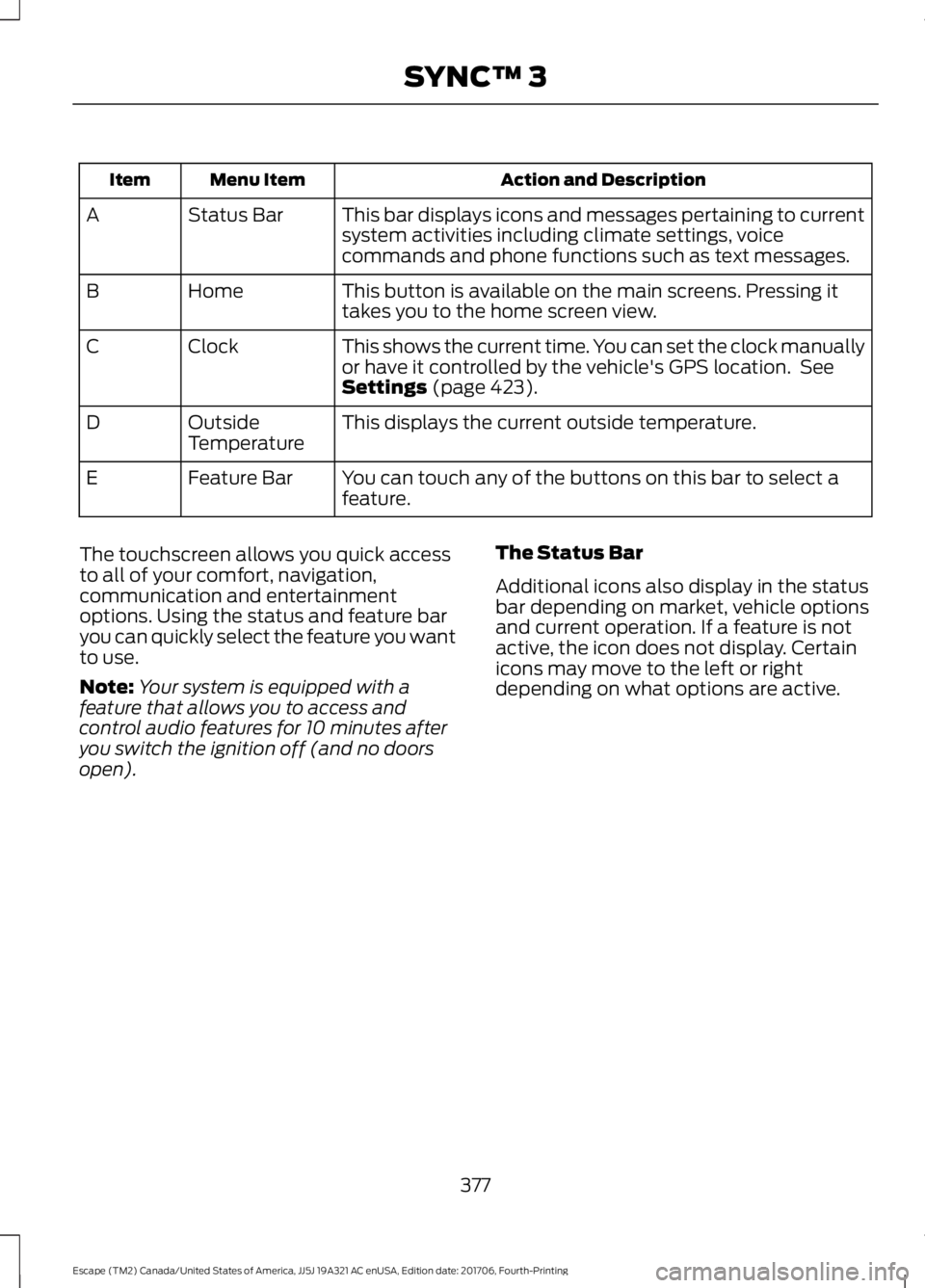
Action and Description
Menu Item
Item
This bar displays icons and messages pertaining to current
system activities including climate settings, voice
commands and phone functions such as text messages.
Status Bar
A
This button is available on the main screens. Pressing it
takes you to the home screen view.
Home
B
This shows the current time. You can set the clock manually
or have it controlled by the vehicle's GPS location. See
Settings (page 423).
Clock
C
This displays the current outside temperature.
Outside
Temperature
D
You can touch any of the buttons on this bar to select a
feature.
Feature Bar
E
The touchscreen allows you quick access
to all of your comfort, navigation,
communication and entertainment
options. Using the status and feature bar
you can quickly select the feature you want
to use.
Note: Your system is equipped with a
feature that allows you to access and
control audio features for 10 minutes after
you switch the ignition off (and no doors
open). The Status Bar
Additional icons also display in the status
bar depending on market, vehicle options
and current operation. If a feature is not
active, the icon does not display. Certain
icons may move to the left or right
depending on what options are active.
377
Escape (TM2) Canada/United States of America, JJ5J 19A321 AC enUSA, Edition date: 201706, Fourth-Printing SYNC™ 3
Page 381 of 517
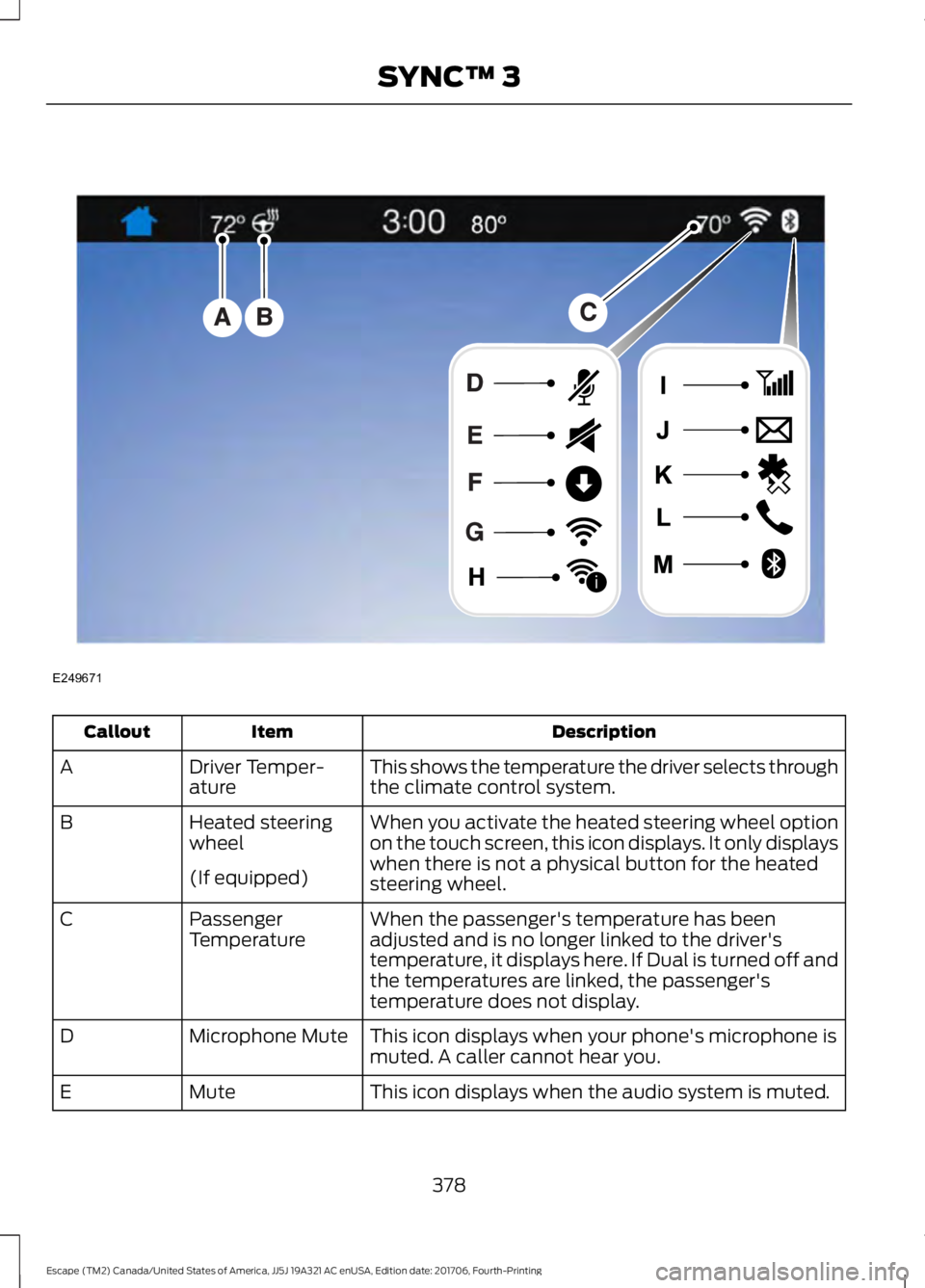
Description
Item
Callout
This shows the temperature the driver selects through
the climate control system.
Driver Temper-
ature
A
When you activate the heated steering wheel option
on the touch screen, this icon displays. It only displays
when there is not a physical button for the heated
steering wheel.
Heated steering
wheel
B
(If equipped) When the passenger's temperature has been
adjusted and is no longer linked to the driver's
temperature, it displays here. If Dual is turned off and
the temperatures are linked, the passenger's
temperature does not display.
Passenger
Temperature
C
This icon displays when your phone's microphone is
muted. A caller cannot hear you.
Microphone Mute
D
This icon displays when the audio system is muted.
Mute
E
378
Escape (TM2) Canada/United States of America, JJ5J 19A321 AC enUSA, Edition date: 201706, Fourth-Printing SYNC™ 3E249671
i
Page 382 of 517
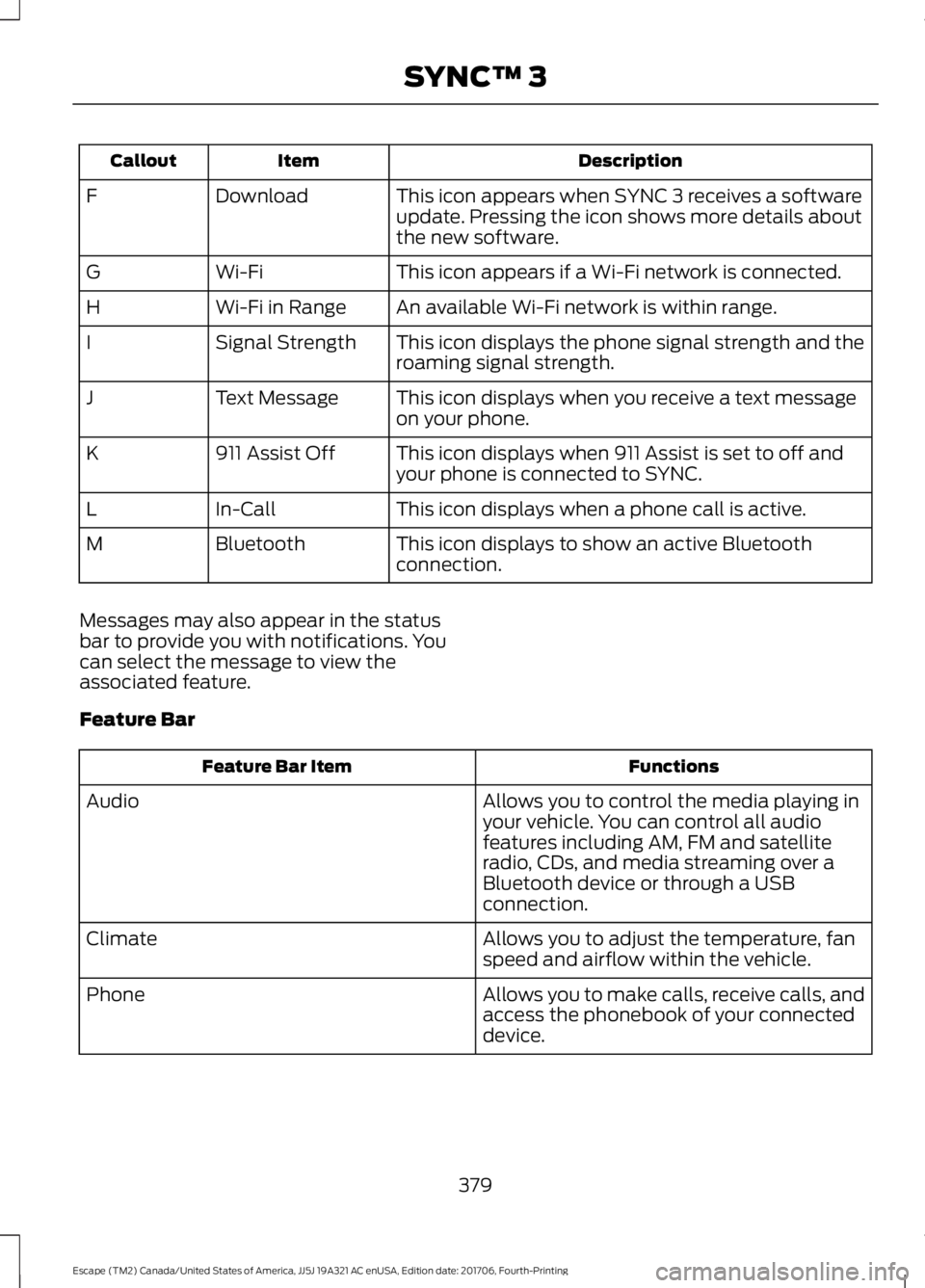
Description
Item
Callout
This icon appears when SYNC 3 receives a software
update. Pressing the icon shows more details about
the new software.
Download
F
This icon appears if a Wi-Fi network is connected.
Wi-Fi
G
An available Wi-Fi network is within range.
Wi-Fi in Range
H
This icon displays the phone signal strength and the
roaming signal strength.
Signal Strength
I
This icon displays when you receive a text message
on your phone.
Text Message
J
This icon displays when 911 Assist is set to off and
your phone is connected to SYNC.
911 Assist Off
K
This icon displays when a phone call is active.
In-Call
L
This icon displays to show an active Bluetooth
connection.
Bluetooth
M
Messages may also appear in the status
bar to provide you with notifications. You
can select the message to view the
associated feature.
Feature Bar Functions
Feature Bar Item
Allows you to control the media playing in
your vehicle. You can control all audio
features including AM, FM and satellite
radio, CDs, and media streaming over a
Bluetooth device or through a USB
connection.
Audio
Allows you to adjust the temperature, fan
speed and airflow within the vehicle.
Climate
Allows you to make calls, receive calls, and
access the phonebook of your connected
device.
Phone
379
Escape (TM2) Canada/United States of America, JJ5J 19A321 AC enUSA, Edition date: 201706, Fourth-Printing SYNC™ 3
Page 386 of 517
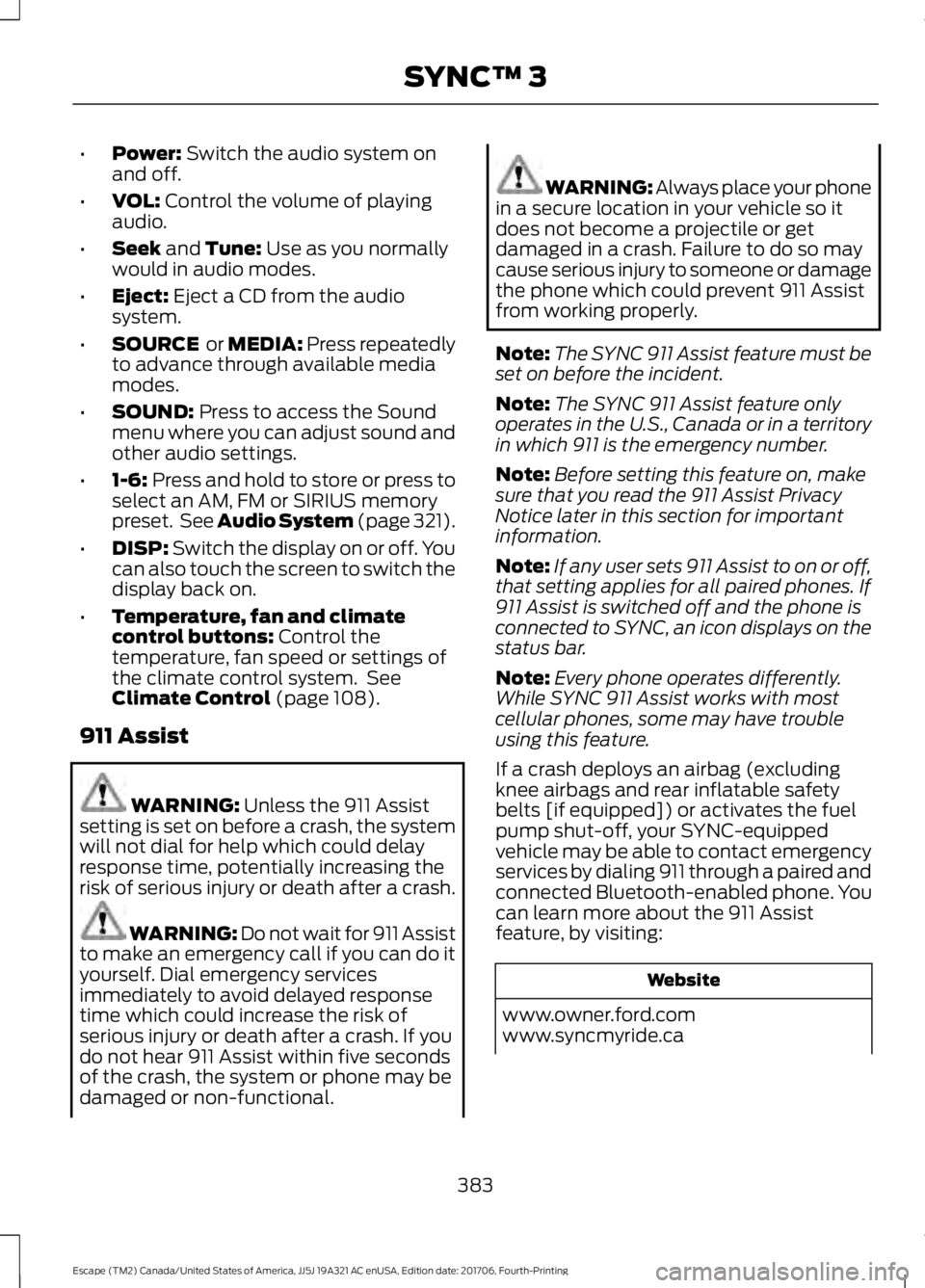
•
Power: Switch the audio system on
and off.
• VOL:
Control the volume of playing
audio.
• Seek
and Tune: Use as you normally
would in audio modes.
• Eject:
Eject a CD from the audio
system.
• SOURCE
or MEDIA: Press repeatedly
to advance through available media
modes.
• SOUND:
Press to access the Sound
menu where you can adjust sound and
other audio settings.
• 1-6:
Press and hold to store or press to
select an AM, FM or SIRIUS memory
preset. See Audio System (page 321).
• DISP:
Switch the display on or off. You
can also touch the screen to switch the
display back on.
• Temperature, fan and climate
control buttons:
Control the
temperature, fan speed or settings of
the climate control system. See
Climate Control
(page 108).
911 Assist WARNING:
Unless the 911 Assist
setting is set on before a crash, the system
will not dial for help which could delay
response time, potentially increasing the
risk of serious injury or death after a crash. WARNING: Do not wait for 911 Assist
to make an emergency call if you can do it
yourself. Dial emergency services
immediately to avoid delayed response
time which could increase the risk of
serious injury or death after a crash. If you
do not hear 911 Assist within five seconds
of the crash, the system or phone may be
damaged or non-functional. WARNING: Always place your phone
in a secure location in your vehicle so it
does not become a projectile or get
damaged in a crash. Failure to do so may
cause serious injury to someone or damage
the phone which could prevent 911 Assist
from working properly.
Note: The SYNC 911 Assist feature must be
set on before the incident.
Note: The SYNC 911 Assist feature only
operates in the U.S., Canada or in a territory
in which 911 is the emergency number.
Note: Before setting this feature on, make
sure that you read the 911 Assist Privacy
Notice later in this section for important
information.
Note: If any user sets 911 Assist to on or off,
that setting applies for all paired phones. If
911 Assist is switched off and the phone is
connected to SYNC, an icon displays on the
status bar.
Note: Every phone operates differently.
While SYNC 911 Assist works with most
cellular phones, some may have trouble
using this feature.
If a crash deploys an airbag (excluding
knee airbags and rear inflatable safety
belts [if equipped]) or activates the fuel
pump shut-off, your SYNC-equipped
vehicle may be able to contact emergency
services by dialing 911 through a paired and
connected Bluetooth-enabled phone. You
can learn more about the 911 Assist
feature, by visiting: Website
www.owner.ford.com
www.syncmyride.ca
383
Escape (TM2) Canada/United States of America, JJ5J 19A321 AC enUSA, Edition date: 201706, Fourth-Printing SYNC™ 3
Page 393 of 517
You can touch any of the feature displays
to access that feature.
Anytime you select the home button, the
system returns you to this screen.
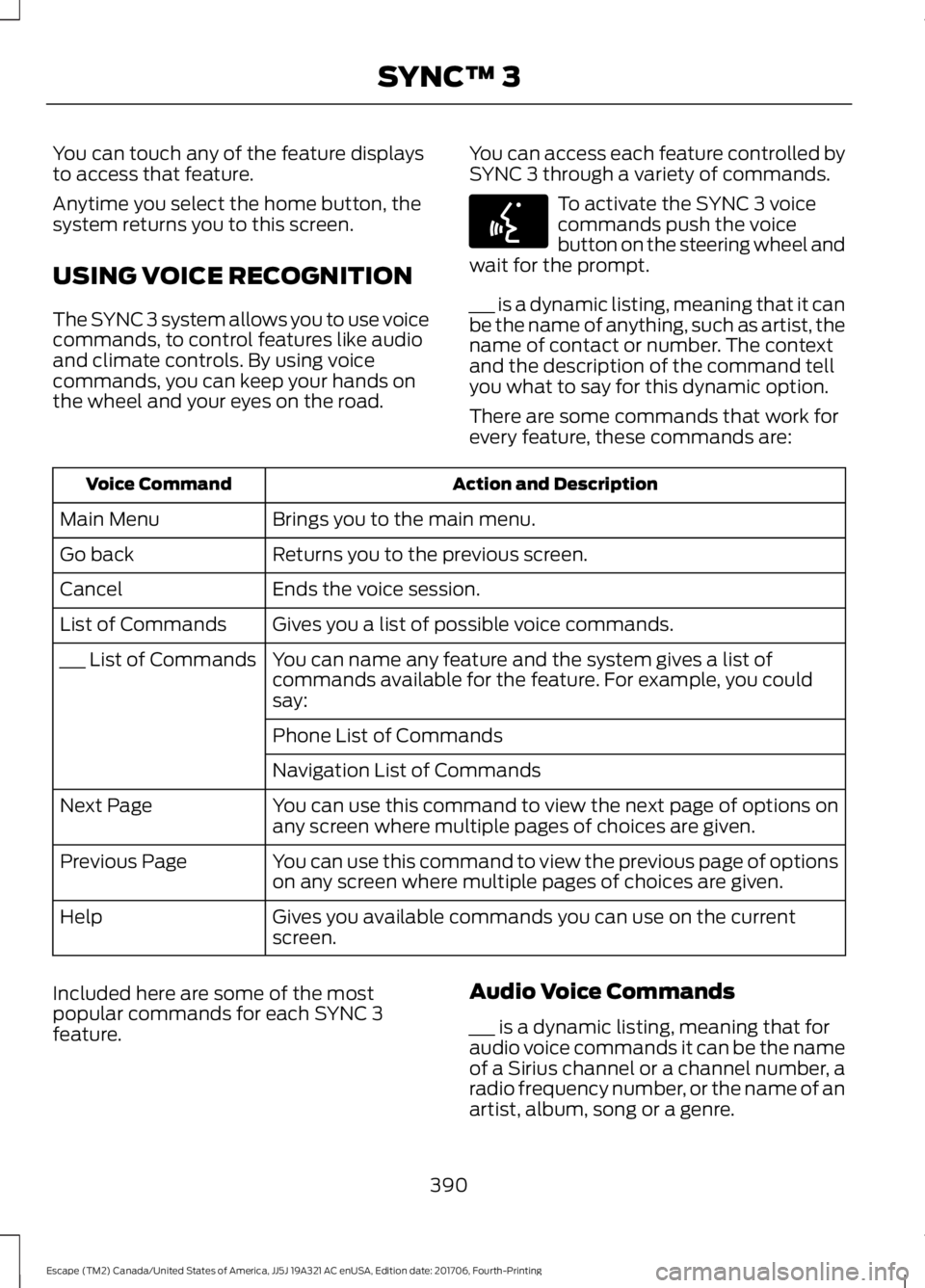
USING VOICE RECOGNITION
The SYNC 3 system allows you to use voice
commands, to control features like audio
and climate controls. By using voice
commands, you can keep your hands on
the wheel and your eyes on the road.
You can access each feature controlled by
SYNC 3 through a variety of commands. To activate the SYNC 3 voice
commands push the voice
button on the steering wheel and
wait for the prompt.
___ is a dynamic listing, meaning that it can
be the name of anything, such as artist, the
name of contact or number. The context
and the description of the command tell
you what to say for this dynamic option.
There are some commands that work for
every feature, these commands are: Action and Description
Voice Command
Brings you to the main menu.
Main Menu
Returns you to the previous screen.
Go back
Ends the voice session.
Cancel
Gives you a list of possible voice commands.
List of Commands
You can name any feature and the system gives a list of
commands available for the feature. For example, you could
say:
___ List of Commands
Phone List of Commands
Navigation List of Commands
You can use this command to view the next page of options on
any screen where multiple pages of choices are given.
Next Page
You can use this command to view the previous page of options
on any screen where multiple pages of choices are given.
Previous Page
Gives you available commands you can use on the current
screen.
Help
Included here are some of the most
popular commands for each SYNC 3
feature. Audio Voice Commands
___ is a dynamic listing, meaning that for
audio voice commands it can be the name
of a Sirius channel or a channel number, a
radio frequency number, or the name of an
artist, album, song or a genre.
390
Escape (TM2) Canada/United States of America, JJ5J 19A321 AC enUSA, Edition date: 201706, Fourth-Printing SYNC™ 3E142599
Page 394 of 517
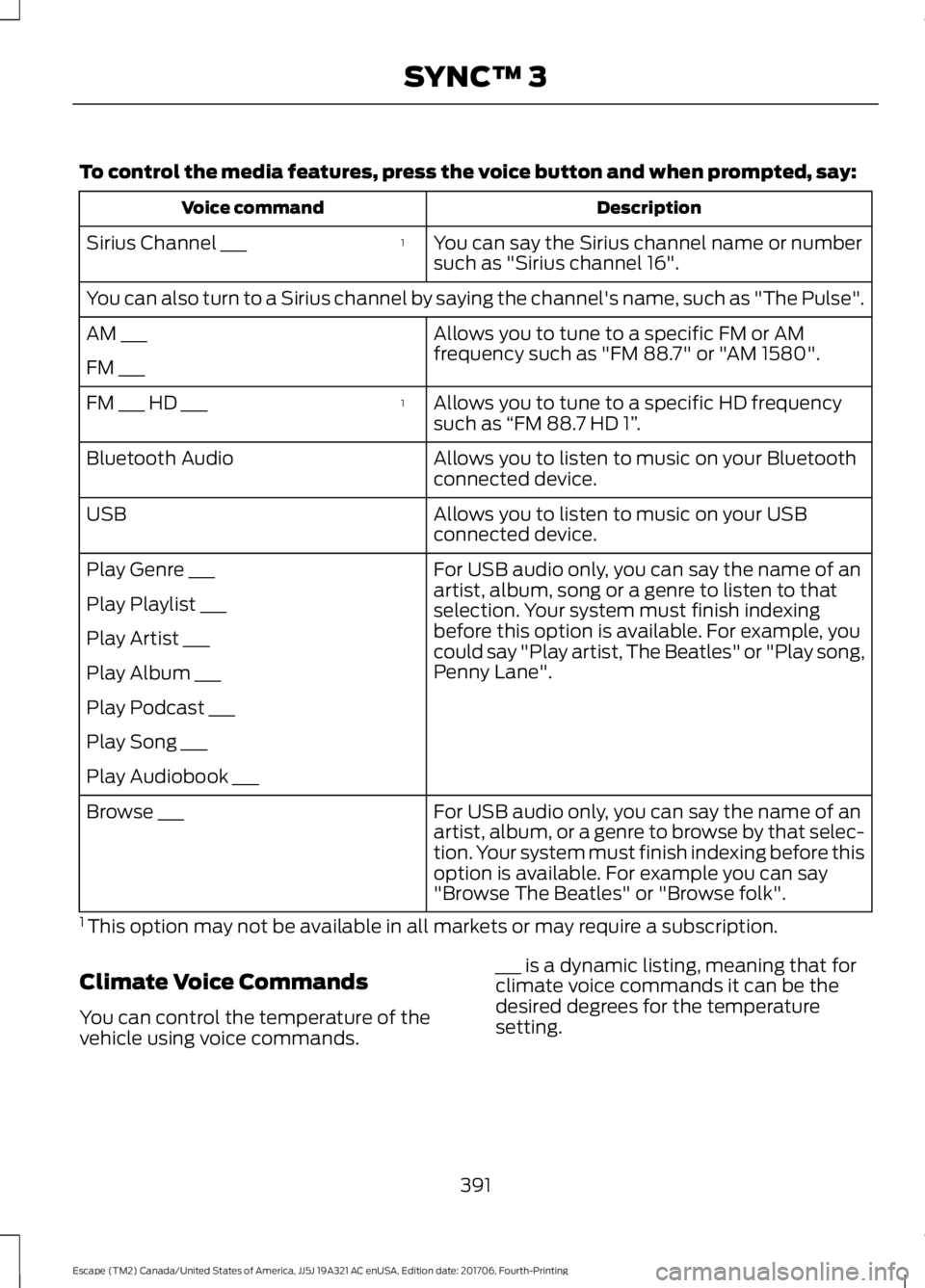
To control the media features, press the voice button and when prompted, say:
Description
Voice command
You can say the Sirius channel name or number
such as "Sirius channel 16".
1
Sirius Channel ___
You can also turn to a Sirius channel by saying the channel's name, such as "The Pulse".
Allows you to tune to a specific FM or AM
frequency such as "FM 88.7" or "AM 1580".
AM ___
FM ___
Allows you to tune to a specific HD frequency
such as “FM 88.7 HD 1” .
1
FM ___ HD ___
Allows you to listen to music on your Bluetooth
connected device.
Bluetooth Audio
Allows you to listen to music on your USB
connected device.
USB
For USB audio only, you can say the name of an
artist, album, song or a genre to listen to that
selection. Your system must finish indexing
before this option is available. For example, you
could say "Play artist, The Beatles" or "Play song,
Penny Lane".
Play Genre ___
Play Playlist ___
Play Artist ___
Play Album ___
Play Podcast ___
Play Song ___
Play Audiobook ___
For USB audio only, you can say the name of an
artist, album, or a genre to browse by that selec-
tion. Your system must finish indexing before this
option is available. For example you can say
"Browse The Beatles" or "Browse folk".
Browse ___
1 This option may not be available in all markets or may require a subscription.
Climate Voice Commands
You can control the temperature of the
vehicle using voice commands. ___ is a dynamic listing, meaning that for
climate voice commands it can be the
desired degrees for the temperature
setting.
391
Escape (TM2) Canada/United States of America, JJ5J 19A321 AC enUSA, Edition date: 201706, Fourth-Printing SYNC™ 3
Page 399 of 517
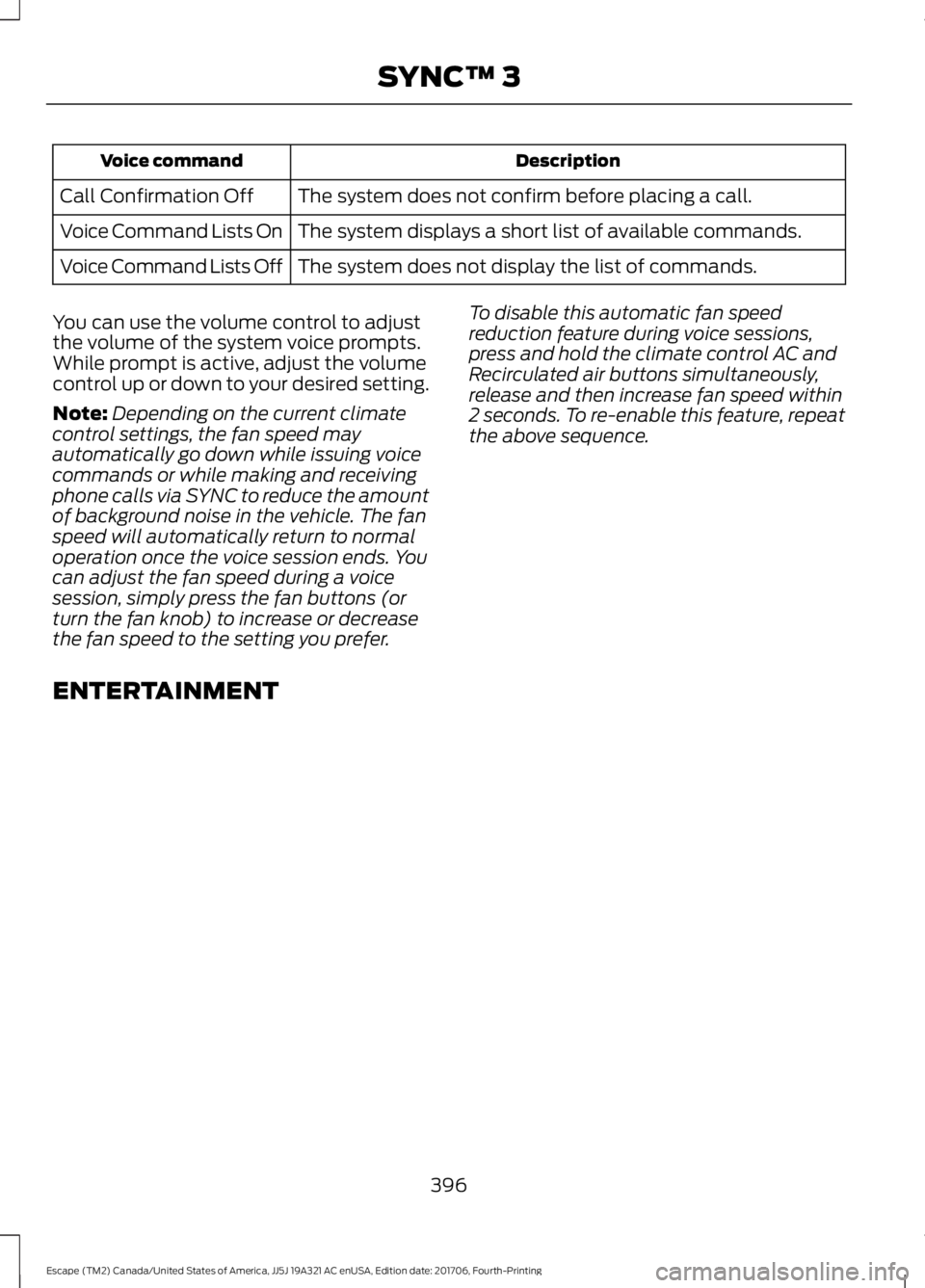
Description
Voice command
The system does not confirm before placing a call.
Call Confirmation Off
The system displays a short list of available commands.
Voice Command Lists On
The system does not display the list of commands.
Voice Command Lists Off
You can use the volume control to adjust
the volume of the system voice prompts.
While prompt is active, adjust the volume
control up or down to your desired setting.
Note: Depending on the current climate
control settings, the fan speed may
automatically go down while issuing voice
commands or while making and receiving
phone calls via SYNC to reduce the amount
of background noise in the vehicle. The fan
speed will automatically return to normal
operation once the voice session ends. You
can adjust the fan speed during a voice
session, simply press the fan buttons (or
turn the fan knob) to increase or decrease
the fan speed to the setting you prefer. To disable this automatic fan speed
reduction feature during voice sessions,
press and hold the climate control AC and
Recirculated air buttons simultaneously,
release and then increase fan speed within
2 seconds. To re-enable this feature, repeat
the above sequence.
ENTERTAINMENT
396
Escape (TM2) Canada/United States of America, JJ5J 19A321 AC enUSA, Edition date: 201706, Fourth-Printing SYNC™ 3
Page 506 of 517
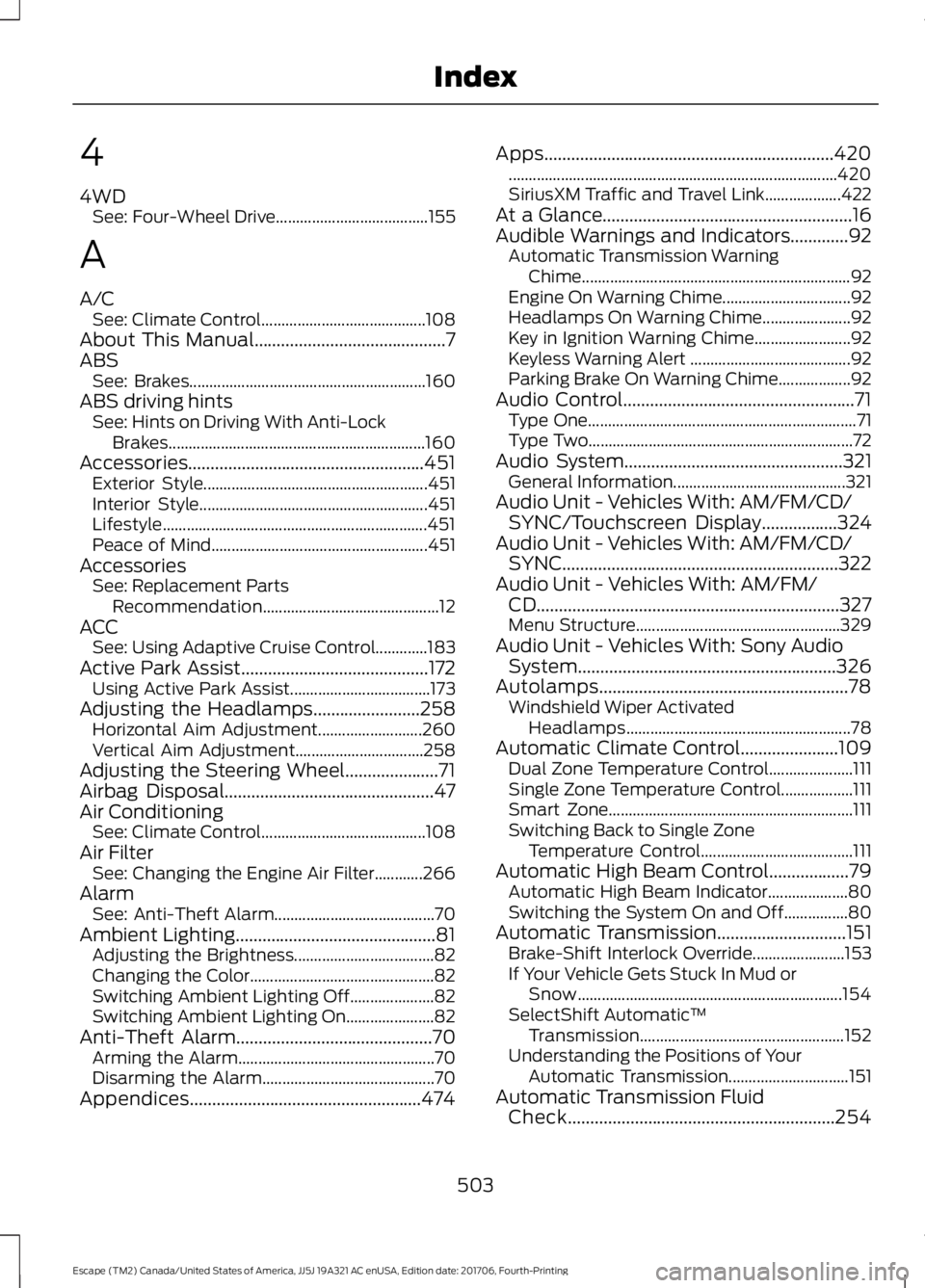
4
4WD
See: Four-Wheel Drive...................................... 155
A
A/C See: Climate Control......................................... 108
About This Manual...........................................7
ABS See: Brakes........................................................... 160
ABS driving hints See: Hints on Driving With Anti-Lock
Brakes................................................................ 160
Accessories.....................................................451 Exterior Style........................................................ 451
Interior Style......................................................... 451
Lifestyle.................................................................. 451
Peace of Mind...................................................... 451
Accessories See: Replacement Parts
Recommendation............................................ 12
ACC See: Using Adaptive Cruise Control.............183
Active Park Assist
..........................................172
Using Active Park Assist................................... 173
Adjusting the Headlamps........................258 Horizontal Aim Adjustment.......................... 260
Vertical Aim Adjustment................................ 258
Adjusting the Steering Wheel.....................71
Airbag Disposal...............................................47
Air Conditioning See: Climate Control......................................... 108
Air Filter See: Changing the Engine Air Filter............266
Alarm See: Anti-Theft Alarm........................................ 70
Ambient Lighting.............................................81 Adjusting the Brightness................................... 82
Changing the Color.............................................. 82
Switching Ambient Lighting Off..................... 82
Switching Ambient Lighting On...................... 82
Anti-Theft Alarm............................................70 Arming the Alarm................................................. 70
Disarming the Alarm........................................... 70
Appendices....................................................474 Apps
.................................................................420
........................................................................\
.......... 420
SiriusXM Traffic and Travel Link................... 422
At a Glance........................................................16
Audible Warnings and Indicators.............92 Automatic Transmission Warning
Chime................................................................... 92
Engine On Warning Chime................................ 92
Headlamps On Warning Chime...................... 92
Key in Ignition Warning Chime........................ 92
Keyless Warning Alert ........................................ 92
Parking Brake On Warning Chime.................. 92
Audio Control....................................................71 Type One................................................................... 71
Type Two.................................................................. 72
Audio System
.................................................321
General Information........................................... 321
Audio Unit - Vehicles With: AM/FM/CD/ SYNC/Touchscreen Display
.................324
Audio Unit - Vehicles With: AM/FM/CD/ SYNC..............................................................322
Audio Unit - Vehicles With: AM/FM/ CD....................................................................327
Menu Structure................................................... 329
Audio Unit - Vehicles With: Sony Audio System..........................................................326
Autolamps........................................................78 Windshield Wiper Activated
Headlamps........................................................ 78
Automatic Climate Control......................109 Dual Zone Temperature Control..................... 111
Single Zone Temperature Control.................. 111
Smart Zone............................................................. 111
Switching Back to Single Zone Temperature Control...................................... 111
Automatic High Beam Control..................79 Automatic High Beam Indicator.................... 80
Switching the System On and Off................80
Automatic Transmission.............................151 Brake-Shift Interlock Override....................... 153
If Your Vehicle Gets Stuck In Mud or Snow.................................................................. 154
SelectShift Automatic ™
Transmission................................................... 152
Understanding the Positions of Your Automatic Transmission.............................. 151
Automatic Transmission Fluid Check
............................................................254
503
Escape (TM2) Canada/United States of America, JJ5J 19A321 AC enUSA, Edition date: 201706, Fourth-Printing Index
Page 508 of 517
Cleaning Products.......................................268
Materials............................................................... 268
Cleaning the Engine....................................270
Cleaning the Exterior..................................268 Cleaning the Headlamps................................ 269
Exterior Chrome Parts..................................... 269
Exterior Plastic Parts........................................ 269
Stripes or Graphics........................................... 269
Underbody........................................................... 269
Under Hood......................................................... 269
Cleaning the Instrument Panel and Instrument Cluster Lens..........................271
Cleaning the Interior.....................................271
Cleaning the Wheels
...................................273
Cleaning the Windows and Wiper Blades...........................................................270
Clearing All MyKeys
.......................................54
Climate Control............................................108
Collision Warning System.........................199 PRINCIPLE OF OPERATION........................... 199
Coolant Check See: Engine Coolant Check........................... 250
Crash Sensors and Airbag Indicator.......46
Creating a MyKey
...........................................54
Programming/Changing Configurable
Settings............................................................... 54
Cross Traffic Alert.........................................196 Blocked Sensors................................................. 198
Switching the System Off and On...............198
System Errors....................................................... 198
System Lights, Messages and Audible Alerts.................................................................. 198
System Limitations............................................ 198
Using the Cross Traffic Alert System..........196
Cruise Control
..................................................72
Principle of Operation....................................... 182
Type One.................................................................. 72
Type Two.................................................................. 73
Cruise control See: Using Cruise Control................................ 182
Customer Assistance.................................225
D
Data Recording
..................................................9
Event Data Recording.......................................... 10
Service Data Recording........................................ 9Daytime Running Lamps.............................79
Type One - Conventional
(Non-Configurable)........................................ 79
Type Two - Configurable................................... 79
Digital Radio..................................................332 HD Radio Reception and Station
Troubleshooting............................................ 333
Direction Indicators
........................................81
Doors and Locks.............................................59
Driver Alert......................................................189 PRINCIPLE OF OPERATION........................... 189
USING DRIVER ALERT..................................... 189
Driver and Passenger Airbags
...................40
Children and Airbags............................................ 41
Proper Driver and Front Passenger Seating Adjustment....................................................... 40
Driver Knee Airbag
.........................................45
Driving Aids.....................................................189
Driving Hints
...................................................216
Driving Through Water................................217
DRL See: Daytime Running Lamps......................... 79
E
Economical Driving
......................................216
Electric Parking Brake..................................161 Applying the Electric Parking brake..............161
Battery With No Charge................................... 163
Releasing the Electric Parking Brake...........162
Electromagnetic Compatibility...............474
Emission Law
..................................................147
Noise Emissions Warranty, Prohibited
Tampering Acts and Maintenance.........148
Tampering With a Noise Control System............................................................... 147
End User License Agreement..................476 VEHICLE SOFTWARE END USER LICENSE
AGREEMENT (EULA) ................................. 476
Engine Block Heater....................................135 Using the Engine Block Heater...................... 135
Engine Coolant Check...............................250 Adding Coolant.................................................. 250
Coolant Change.................................................. 252
Engine Coolant Temperature Management.................................................. 253
Fail-Safe Cooling................................................ 252
Recycled Coolant............................................... 252
505
Escape (TM2) Canada/United States of America, JJ5J 19A321 AC enUSA, Edition date: 201706, Fourth-Printing Index
Page 509 of 517
Severe Climates..................................................
252
Engine Emission Control............................147
Engine Immobilizer See: Passive Anti-Theft System..................... 69
Engine Oil Check..........................................248
Adding Engine Oil.............................................. 248
Engine Oil Dipstick - 1.5L EcoBoost™.................................................248
Engine Oil Dipstick - 2.0L EcoBoost™/ 2.5L................................................................248
Engine Specifications - 1.5L EcoBoost™..................................................301
Drivebelt Routing................................................ 301
Engine Specifications - 2.0L EcoBoost™..................................................301
Drivebelt Routing............................................... 302
Engine Specifications - 2.5L....................302 Drivebelt Routing............................................... 303
Entertainment..............................................396 AM/FM Radio...................................................... 398
Apps....................................................................... 406
Bluetooth Stereo or USB................................ 405
CD........................................................................\
... 404
HD Radio ™ Information (If
Available)......................................................... 401
SiriusXM® Satellite Radio (If Activated)....................................................... 398
Sources.................................................................. 397
Supported Media Players, Formats and Metadata Information................................ 406
USB Ports............................................................ 406
Environment
......................................................15
EPB See: Electric Parking Brake.............................. 161
Essential Towing Checks...........................212 Before Towing a Trailer..................................... 213
Hitches.................................................................... 212
Launching or Retrieving a Boat or Personal Watercraft (PWC)......................................... 214
Safety Chains....................................................... 212
Trailer Brakes........................................................ 213
Trailer Lamps........................................................ 213
Trailer Towing Connector................................. 212
When Towing a Trailer....................................... 213
Event Data Recording See: Data Recording.............................................. 9
Export Unique Options.................................14 Exterior Mirrors
................................................84
Blind Spot Monitor.............................................. 85
Fold-Away Exterior Mirrors............................... 84
Heated Exterior Mirrors...................................... 84
Integrated Blind Spot Mirrors.......................... 85
Memory Mirrors..................................................... 84
Power Exterior Mirrors........................................ 84
Puddle Lamps ...................................................... 84
Signal Indicator Mirrors...................................... 84
F
Fastening the Seatbelts...............................32 How to Extract Seatbelts in the Rear
Outermost Positions...................................... 34
Seatbelt Locking Modes.................................... 33
Using Seatbelts During Pregnancy................33
Flat Tire See: Changing a Road Wheel....................... 295
Floor Mats
........................................................217
Fog Lamps - Front See: Front Fog Lamps........................................ 80
Ford Credit
..........................................................11
US Only...................................................................... 11
Ford Protect...................................................453 Ford Protect Extended Service Plan
(CANADA ONLY).......................................... 454
Ford Protect Extended Service Plans (U.S. Only).................................................................. 453
Four-Wheel Drive
.........................................155
Principle of Operation....................................... 155
Front Fog Lamps............................................80
Front Parking Aid..........................................169 Obstacle Distance Indicator........................... 170
Front Passenger Sensing System.............41
Fuel and Refueling.......................................139
Fuel Consumption
........................................145
Advertised Capacity.......................................... 145
Calculating Fuel Economy.............................. 145
Filling the Fuel Tank........................................... 145
Fuel Filler Funnel Location.......................140
Fuel Filter........................................................255
Fuel Quality.....................................................139 Choosing the Right Fuel - Flex Fuel
Vehicles............................................................. 139
Switching Between E85 and Gasoline............................................................ 140
Fuel Shutoff...................................................220
506
Escape (TM2) Canada/United States of America, JJ5J 19A321 AC enUSA, Edition date: 201706, Fourth-Printing Index