458 FORD ESCAPE 2018 Owners Manual
[x] Cancel search | Manufacturer: FORD, Model Year: 2018, Model line: ESCAPE, Model: FORD ESCAPE 2018Pages: 517, PDF Size: 6.62 MB
Page 8 of 517
Tire Care
.........................................................278
Using Snow Chains .....................................
291
Tire Pressure Monitoring System ...........
291
Changing a Road Wheel ..........................
295
Technical Specifications .........................
299
Capacities and Specifications
Engine Specifications - 1.5L EcoBoost™ ........................................................................\
.
301
Engine Specifications - 2.0L EcoBoost™ ........................................................................\
.
301
Engine Specifications - 2.5L ...................
302
Motorcraft Parts - 1.5L EcoBoost™ ......
303
Motorcraft Parts - 2.0L EcoBoost™ ....
304
Motorcraft Parts - 2.5L .............................
305
Vehicle Identification Number ..............
306
Vehicle Certification Label ......................
307
Transmission Code Designation ...........
307
Capacities and Specifications - 1.5L EcoBoost™ ..............................................
308
Capacities and Specifications - 2.0L EcoBoost™ ................................................
312
Capacities and Specifications - 2.5L ........................................................................\
.
316
Audio System
General Information ...................................
321
Audio Unit - Vehicles With: AM/FM/CD/ SYNC ...........................................................
322
Audio Unit - Vehicles With: AM/FM/CD/ SYNC/Touchscreen Display ...............
324
Audio Unit - Vehicles With: Sony Audio System ........................................................
326
Audio Unit - Vehicles With: AM/FM/CD ........................................................................\
.
327
Digital Radio ..................................................
332
Satellite Radio .............................................
334
USB Port .........................................................
337
SYNC™
General Information ..................................
338Using Voice Recognition
..........................
340
Using SYNC™ With Your Phone ...........
342
SYNC™ Applications and Services ......
354
Using SYNC™ With Your Media Player ........................................................................\
359
SYNC™ Troubleshooting ........................
368
SYNC™ 3
General Information ..................................
376
Home Screen ...............................................
388
Using Voice Recognition ..........................
390
Entertainment .............................................
396
Phone ..............................................................
407
Navigation ......................................................
412
Apps ................................................................
420
Settings ..........................................................
423
SYNC™ 3 Troubleshooting .....................
437
Accessories
Accessories ....................................................
451
Ford Protect
Ford Protect ..................................................
453
Scheduled Maintenance
General Maintenance Information ......
455
Normal Scheduled Maintenance .........
458
Special Operating Conditions Scheduled Maintenance .............................................
461
Scheduled Maintenance Record ..........
463
Appendices
Electromagnetic Compatibility .............
474
End User License Agreement .................
476
5
Escape (TM2) Canada/United States of America, JJ5J 19A321 AC enUSA, Edition date: 201706, Fourth-Printing Table of Contents
Page 95 of 517
Normally, it illuminates until the engine is
cranked and automatically turns off if no
malfunctions are present. However, if after
15 seconds it flashes eight times, this
indicates that your vehicle is not ready for
Inspection and Maintenance (I/M) testing.
See Emission Law (page 147).
Traction and Stability Control It will flash when the system is
active. If it remains illuminated
or does not illuminate when you
switch the ignition on, this indicates a
malfunction. During a malfunction the
system will switch off. Have the system
checked by your authorized dealer
immediately.
Traction and Stability Control Off It illuminates when you switch
the system off. It will go out
when you switch the system
back on or when you switch the ignition
off.
AUDIBLE WARNINGS AND
INDICATORS
Key in Ignition Warning Chime
(If
Equipped)
Sounds when you open the driver's door
and you have left the key in the ignition.
Engine On Warning Chime
A warning chime will sound when any door
is opened if the vehicle exceeds a relatively
low speed.
Keyless Warning Alert
(If Equipped)
Sounds the horn twice when you exit the
vehicle and the keyless vehicle is in RUN,
indicating the vehicle is still on. Headlamps On Warning Chime
Sounds when you remove the key from the
ignition and open the driver's door and you
have left the headlamps or parking lamps
on.
Parking Brake On Warning Chime
Sounds when you have left the parking
brake on and drive your vehicle. If the
warning chime remains on after you have
released the parking brake, have the
system checked by your authorized dealer
immediately.
Automatic Transmission Warning
Chime
Sounds when you have not moved the
transmission selector lever to position
P.
A message will be shown in the display.
92
Escape (TM2) Canada/United States of America, JJ5J 19A321 AC enUSA, Edition date: 201706, Fourth-Printing Instrument ClusterE138639 E130458
Page 168 of 517
PRINCIPLE OF OPERATION
The traction control system helps avoid
drive wheel spin and loss of traction.
If your vehicle begins to slide, the system
applies the brakes to individual wheels
and, when needed, reduces engine power
at the same time. If the wheels spin when
accelerating on slippery or loose surfaces,
the system reduces engine power in order
to increase traction.
USING TRACTION CONTROL
WARNING: The stability and traction
control light illuminates steadily if the
system detects a failure. Make sure you
did not manually disable the traction
control system using the information
display controls or the switch. If the
stability control and traction control light
is still illuminating steadily, have the
system serviced by an authorized dealer
immediately. Operating your vehicle with
the traction control disabled could lead to
an increased risk of loss of vehicle control,
vehicle rollover, personal injury and death.
The system automatically turns on each
time you switch the ignition on.
If your vehicle is stuck in mud or snow,
switching traction control off may be
beneficial as this allows the wheels to spin.
Note: When you switch traction control off,
stability control remains fully active.
Switching the System Off
When you switch the system off or on, a
message appears in the information
display showing system status.
You can switch the system off by either
using the information display controls or
the switch. Using the Information Display
Controls
You can switch this feature off or on in the
information display. See General
Information (page 93).
Using a Switch
(If Equipped)
Use the traction control switch on the
instrument panel to switch the system off
or on.
System Indicator Lights and
Messages The stability and traction control
light:
• Temporarily illuminates on engine
start-up.
• Flashes when a driving condition
activates either of the systems.
• Illuminates if a problem occurs in either
of the systems. The stability and traction control
off light temporarily illuminates
on engine start-up and stays on
when you switch the traction control
system off.
165
Escape (TM2) Canada/United States of America, JJ5J 19A321 AC enUSA, Edition date: 201706, Fourth-Printing Traction ControlE138639 E130458
Page 247 of 517
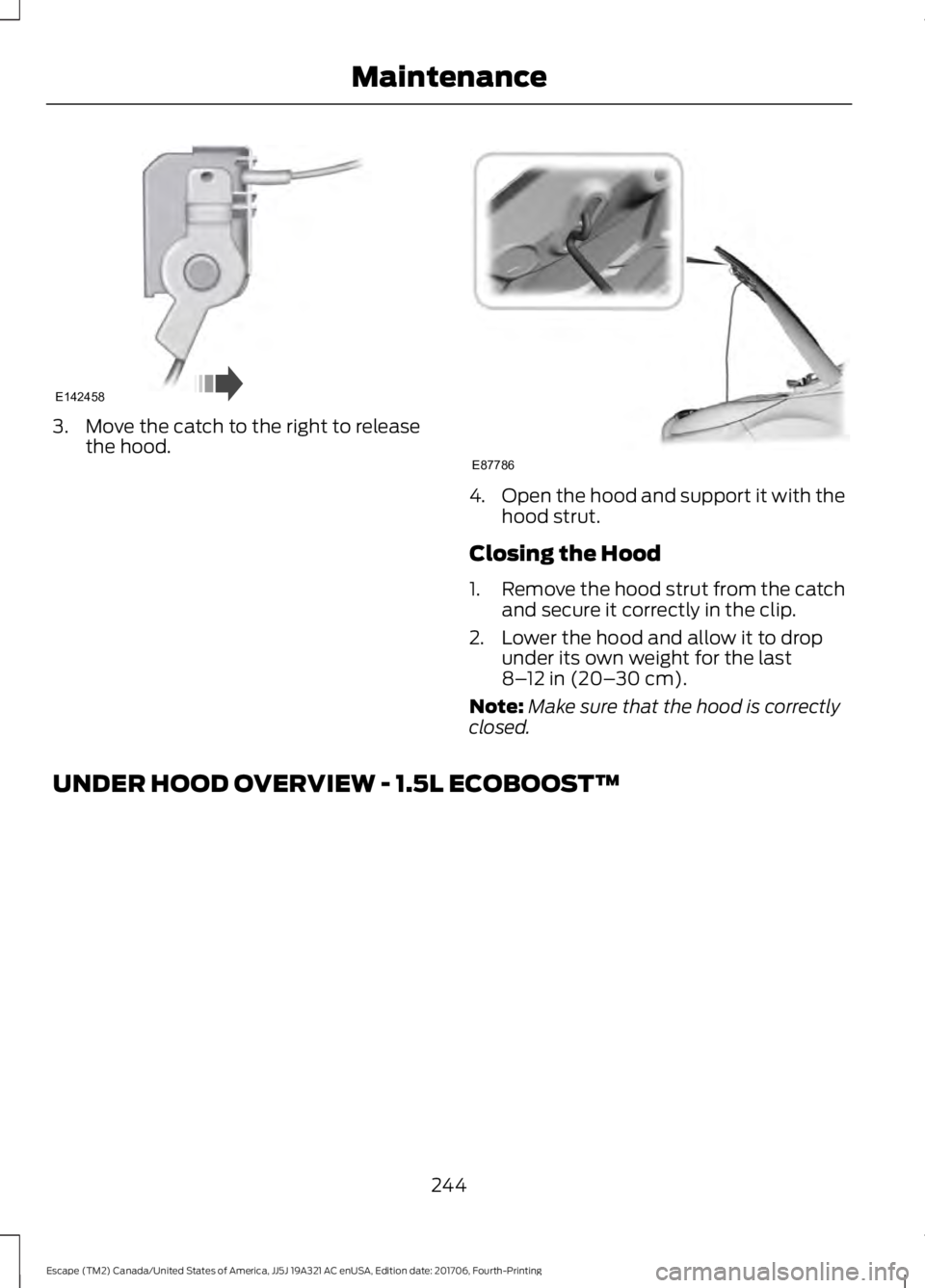
3. Move the catch to the right to release
the hood. 4.
Open the hood and support it with the
hood strut.
Closing the Hood
1. Remove the hood strut from the catch
and secure it correctly in the clip.
2. Lower the hood and allow it to drop under its own weight for the last
8–12 in (20– 30 cm).
Note: Make sure that the hood is correctly
closed.
UNDER HOOD OVERVIEW - 1.5L ECOBOOST™
244
Escape (TM2) Canada/United States of America, JJ5J 19A321 AC enUSA, Edition date: 201706, Fourth-Printing MaintenanceE142458 E87786
Page 461 of 517
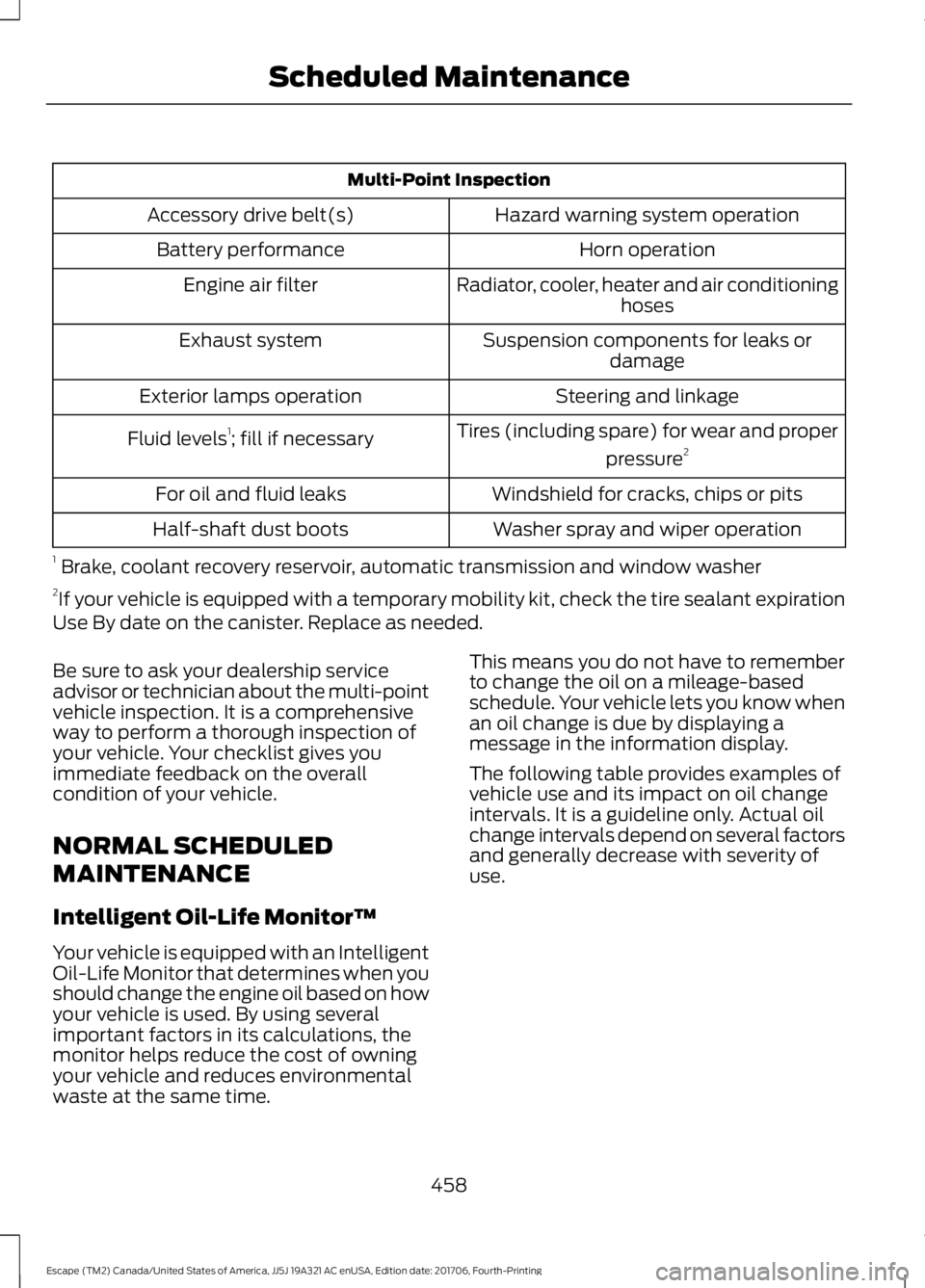
Multi-Point Inspection
Hazard warning system operation
Accessory drive belt(s)
Horn operation
Battery performance
Radiator, cooler, heater and air conditioninghoses
Engine air filter
Suspension components for leaks ordamage
Exhaust system
Steering and linkage
Exterior lamps operation
Tires (including spare) for wear and properpressure2
Fluid levels 1
; fill if necessary
Windshield for cracks, chips or pits
For oil and fluid leaks
Washer spray and wiper operation
Half-shaft dust boots
1 Brake, coolant recovery reservoir, automatic transmission and window washer
2 If your vehicle is equipped with a temporary mobility kit, check the tire sealant expiration
Use By date on the canister. Replace as needed.
Be sure to ask your dealership service
advisor or technician about the multi-point
vehicle inspection. It is a comprehensive
way to perform a thorough inspection of
your vehicle. Your checklist gives you
immediate feedback on the overall
condition of your vehicle.
NORMAL SCHEDULED
MAINTENANCE
Intelligent Oil-Life Monitor™
Your vehicle is equipped with an Intelligent
Oil-Life Monitor that determines when you
should change the engine oil based on how
your vehicle is used. By using several
important factors in its calculations, the
monitor helps reduce the cost of owning
your vehicle and reduces environmental
waste at the same time. This means you do not have to remember
to change the oil on a mileage-based
schedule. Your vehicle lets you know when
an oil change is due by displaying a
message in the information display.
The following table provides examples of
vehicle use and its impact on oil change
intervals. It is a guideline only. Actual oil
change intervals depend on several factors
and generally decrease with severity of
use.
458
Escape (TM2) Canada/United States of America, JJ5J 19A321 AC enUSA, Edition date: 201706, Fourth-Printing Scheduled Maintenance
Page 512 of 517
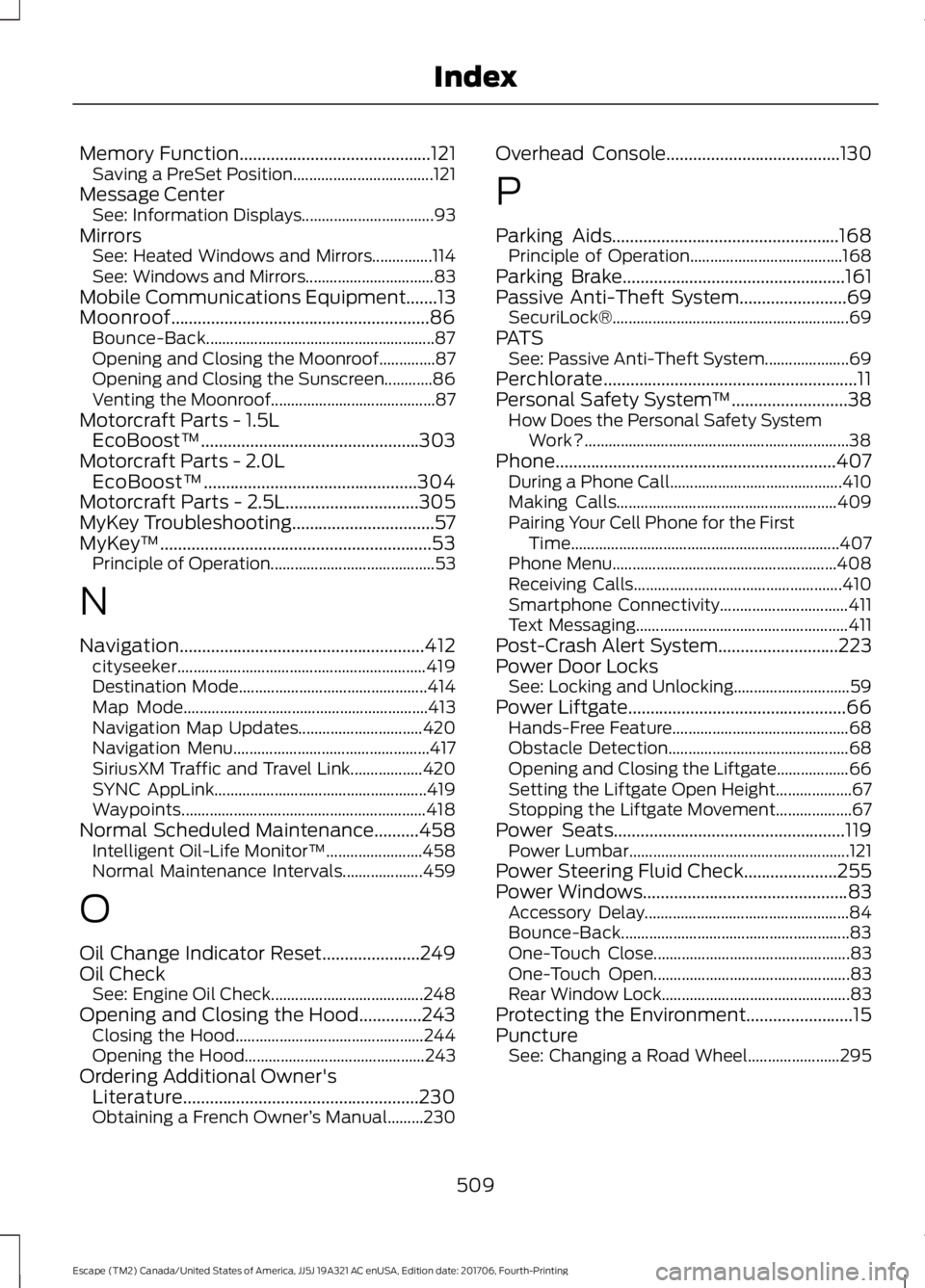
Memory Function...........................................121
Saving a PreSet Position................................... 121
Message Center See: Information Displays................................. 93
Mirrors See: Heated Windows and Mirrors...............114
See: Windows and Mirrors................................ 83
Mobile Communications Equipment.......13
Moonroof..........................................................86 Bounce-Back......................................................... 87
Opening and Closing the Moonroof..............87
Opening and Closing the Sunscreen............86
Venting the Moonroof......................................... 87
Motorcraft Parts - 1.5L EcoBoost™.................................................303
Motorcraft Parts - 2.0L EcoBoost™................................................304
Motorcraft Parts - 2.5L..............................305
MyKey Troubleshooting
................................57
MyKey ™.............................................................53
Principle of Operation......................................... 53
N
Navigation.......................................................412 cityseeker.............................................................. 419
Destination Mode............................................... 414
Map Mode............................................................. 413
Navigation Map Updates............................... 420
Navigation Menu................................................. 417
SiriusXM Traffic and Travel Link.................. 420
SYNC AppLink..................................................... 419
Waypoints............................................................. 418
Normal Scheduled Maintenance..........458 Intelligent Oil-Life Monitor™........................ 458
Normal Maintenance Intervals.................... 459
O
Oil Change Indicator Reset
......................249
Oil Check See: Engine Oil Check...................................... 248
Opening and Closing the Hood..............243 Closing the Hood............................................... 244
Opening the Hood............................................. 243
Ordering Additional Owner's Literature
.....................................................230
Obtaining a French Owner ’s Manual.........230 Overhead Console.......................................130
P
Parking Aids
...................................................168
Principle of Operation...................................... 168
Parking Brake
..................................................161
Passive Anti-Theft System........................69
SecuriLock® ........................................................... 69
PATS See: Passive Anti-Theft System..................... 69
Perchlorate.........................................................11
Personal Safety System ™
..........................38
How Does the Personal Safety System
Work?.................................................................. 38
Phone...............................................................407 During a Phone Call........................................... 410
Making Calls....................................................... 409
Pairing Your Cell Phone for the First Time................................................................... 407
Phone Menu........................................................ 408
Receiving Calls.................................................... 410
Smartphone Connectivity................................ 411
Text Messaging..................................................... 411
Post-Crash Alert System
...........................223
Power Door Locks See: Locking and Unlocking............................. 59
Power Liftgate.................................................66 Hands-Free Feature............................................ 68
Obstacle Detection............................................. 68
Opening and Closing the Liftgate.................. 66
Setting the Liftgate Open Height................... 67
Stopping the Liftgate Movement................... 67
Power Seats....................................................119 Power Lumbar....................................................... 121
Power Steering Fluid Check.....................255
Power Windows
..............................................83
Accessory Delay................................................... 84
Bounce-Back......................................................... 83
One-Touch Close................................................. 83
One-Touch Open................................................. 83
Rear Window Lock............................................... 83
Protecting the Environment........................15
Puncture See: Changing a Road Wheel....................... 295
509
Escape (TM2) Canada/United States of America, JJ5J 19A321 AC enUSA, Edition date: 201706, Fourth-Printing Index