traction control FORD ESCAPE 2018 Owners Manual
[x] Cancel search | Manufacturer: FORD, Model Year: 2018, Model line: ESCAPE, Model: FORD ESCAPE 2018Pages: 517, PDF Size: 6.62 MB
Page 6 of 517
Keyless Starting
.............................................131
Starting a Gasoline Engine .......................
132
Engine Block Heater ...................................
135
Unique Driving Characteristics
Auto-Start-Stop ...........................................
137
Fuel and Refueling
Safety Precautions ......................................
139
Fuel Quality ....................................................
139
Fuel Filler Funnel Location ......................
140
Running Out of Fuel .....................................
141
Refueling .........................................................
142
Fuel Consumption .......................................
145
Engine Emission Control
Emission Law ................................................
147
Catalytic Converter .....................................
148
Transmission
Automatic Transmission ............................
151
Four-Wheel Drive
Principle of Operation ................................
155
Using Four-Wheel Drive ............................
155
Brakes
General Information ...................................
160
Hints on Driving With Anti-Lock Brakes ........................................................................\
160
Parking Brake .................................................
161
Electric Parking Brake .................................
161
Hill Start Assist .............................................
163
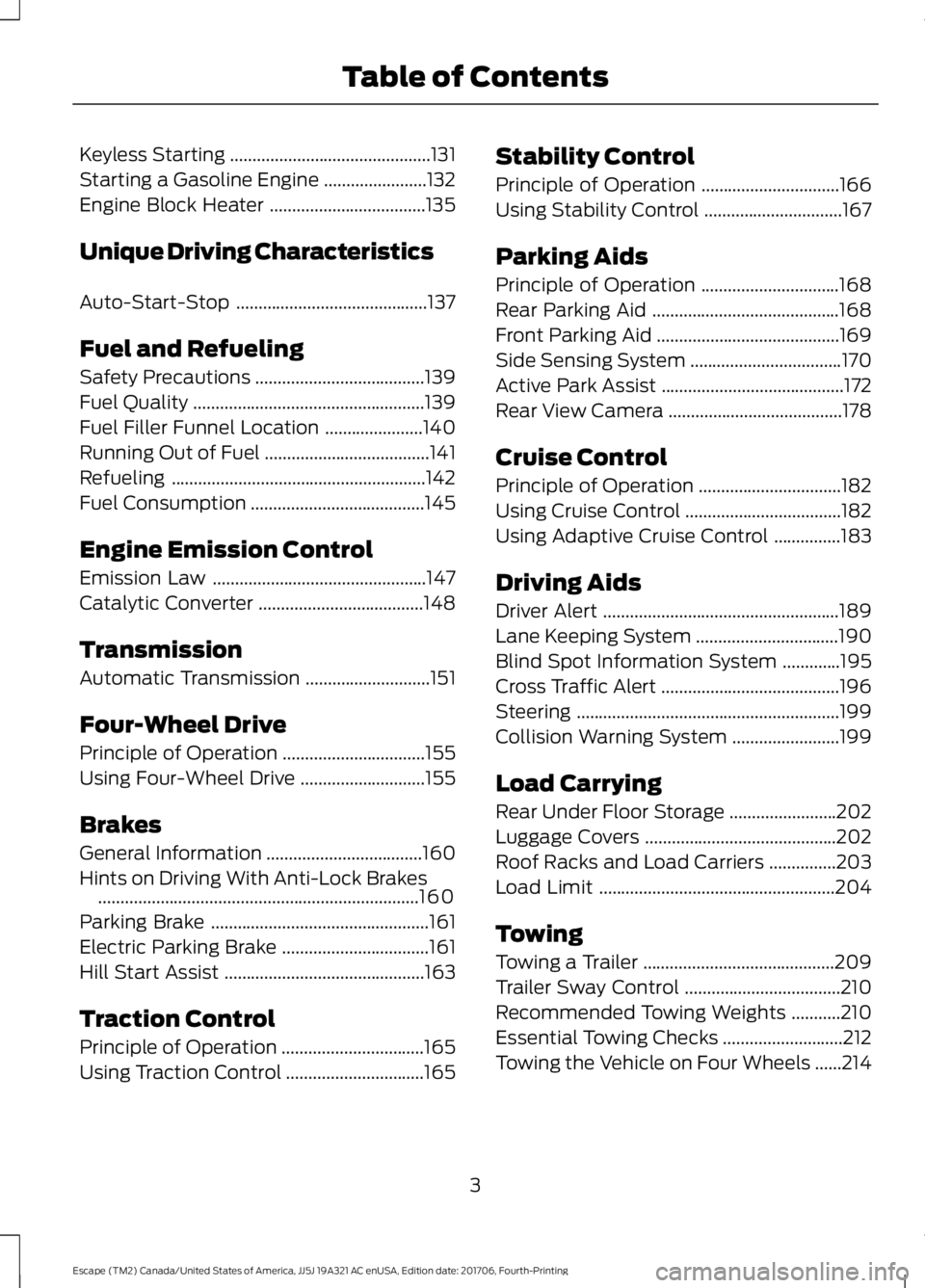
Traction Control
Principle of Operation ................................
165
Using Traction Control ...............................
165Stability Control
Principle of Operation
...............................
166
Using Stability Control ...............................
167
Parking Aids
Principle of Operation ...............................
168
Rear Parking Aid ..........................................
168
Front Parking Aid .........................................
169
Side Sensing System ..................................
170
Active Park Assist .........................................
172
Rear View Camera .......................................
178
Cruise Control
Principle of Operation ................................
182
Using Cruise Control ...................................
182
Using Adaptive Cruise Control ...............
183
Driving Aids
Driver Alert .....................................................
189
Lane Keeping System ................................
190
Blind Spot Information System .............
195
Cross Traffic Alert ........................................
196
Steering ...........................................................
199
Collision Warning System ........................
199
Load Carrying
Rear Under Floor Storage ........................
202
Luggage Covers ...........................................
202
Roof Racks and Load Carriers ...............
203
Load Limit .....................................................
204
Towing
Towing a Trailer ...........................................
209
Trailer Sway Control ...................................
210
Recommended Towing Weights ...........
210
Essential Towing Checks ...........................
212
Towing the Vehicle on Four Wheels ......
214
3
Escape (TM2) Canada/United States of America, JJ5J 19A321 AC enUSA, Edition date: 201706, Fourth-Printing Table of Contents
Page 57 of 517
•
Vehicle speed minders. Once you select
a speed, it will be shown in the display
followed by an audible tone when the
set vehicle speed is exceeded.
• Audio system maximum volume of
45%. A message will be shown in the
display when you attempt to exceed
the limited volume. Also, the speed
sensitive compensated volume
(automatic volume control) feature
will be disabled.
• Always on setting. When this is
selected you will not be able to disable
the traction control system (if your
vehicle is equipped with this feature).
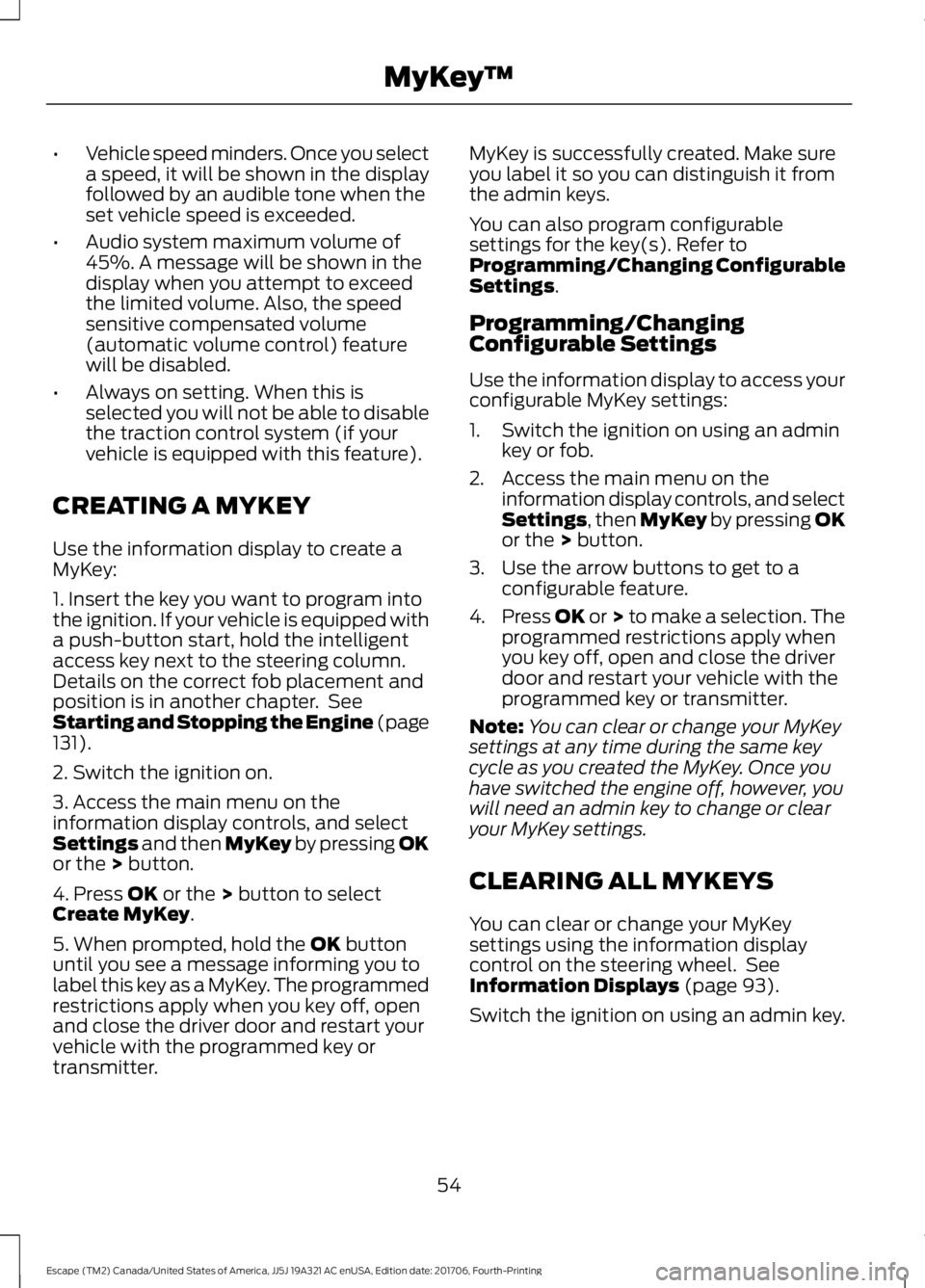
CREATING A MYKEY
Use the information display to create a
MyKey:
1. Insert the key you want to program into
the ignition. If your vehicle is equipped with
a push-button start, hold the intelligent
access key next to the steering column.
Details on the correct fob placement and
position is in another chapter. See
Starting and Stopping the Engine (page
131).
2. Switch the ignition on.
3. Access the main menu on the
information display controls, and select
Settings
and then MyKey by pressing OK
or the > button.
4. Press
OK or the > button to select
Create MyKey.
5. When prompted, hold the
OK button
until you see a message informing you to
label this key as a MyKey. The programmed
restrictions apply when you key off, open
and close the driver door and restart your
vehicle with the programmed key or
transmitter. MyKey is successfully created. Make sure
you label it so you can distinguish it from
the admin keys.
You can also program configurable
settings for the key(s). Refer to
Programming/Changing Configurable
Settings
.
Programming/Changing
Configurable Settings
Use the information display to access your
configurable MyKey settings:
1. Switch the ignition on using an admin key or fob.
2. Access the main menu on the information display controls, and select
Settings
, then MyKey by pressing OK
or the > button.
3. Use the arrow buttons to get to a configurable feature.
4. Press OK or > to make a selection. The
programmed restrictions apply when
you key off, open and close the driver
door and restart your vehicle with the
programmed key or transmitter.
Note: You can clear or change your MyKey
settings at any time during the same key
cycle as you created the MyKey. Once you
have switched the engine off, however, you
will need an admin key to change or clear
your MyKey settings.
CLEARING ALL MYKEYS
You can clear or change your MyKey
settings using the information display
control on the steering wheel. See
Information Displays
(page 93).
Switch the ignition on using an admin key.
54
Escape (TM2) Canada/United States of America, JJ5J 19A321 AC enUSA, Edition date: 201706, Fourth-Printing MyKey
™
Page 95 of 517
Normally, it illuminates until the engine is
cranked and automatically turns off if no
malfunctions are present. However, if after
15 seconds it flashes eight times, this
indicates that your vehicle is not ready for
Inspection and Maintenance (I/M) testing.
See Emission Law (page 147).
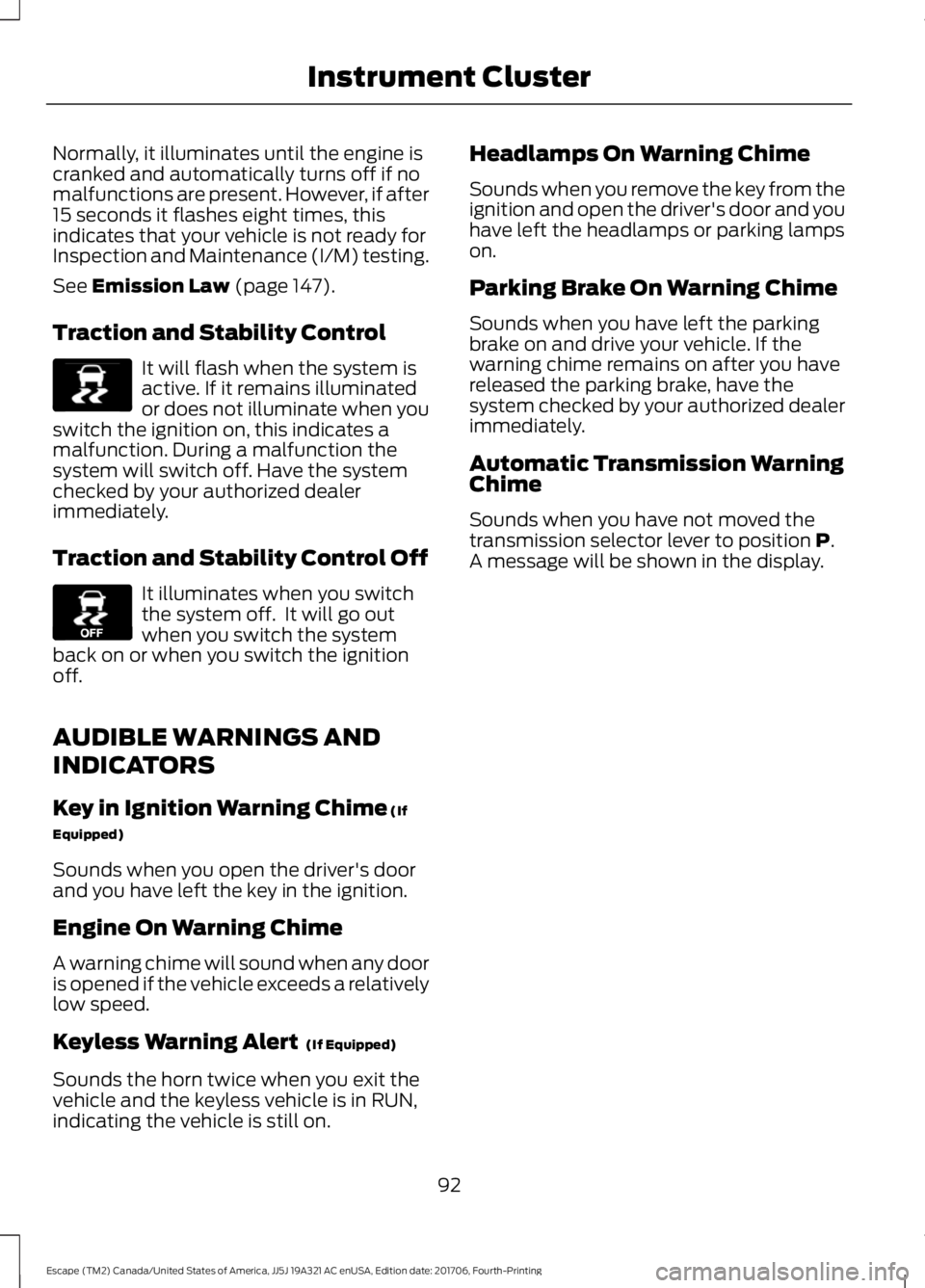
Traction and Stability Control It will flash when the system is
active. If it remains illuminated
or does not illuminate when you
switch the ignition on, this indicates a
malfunction. During a malfunction the
system will switch off. Have the system
checked by your authorized dealer
immediately.
Traction and Stability Control Off It illuminates when you switch
the system off. It will go out
when you switch the system
back on or when you switch the ignition
off.
AUDIBLE WARNINGS AND
INDICATORS
Key in Ignition Warning Chime
(If
Equipped)
Sounds when you open the driver's door
and you have left the key in the ignition.
Engine On Warning Chime
A warning chime will sound when any door
is opened if the vehicle exceeds a relatively
low speed.
Keyless Warning Alert
(If Equipped)
Sounds the horn twice when you exit the
vehicle and the keyless vehicle is in RUN,
indicating the vehicle is still on. Headlamps On Warning Chime
Sounds when you remove the key from the
ignition and open the driver's door and you
have left the headlamps or parking lamps
on.
Parking Brake On Warning Chime
Sounds when you have left the parking
brake on and drive your vehicle. If the
warning chime remains on after you have
released the parking brake, have the
system checked by your authorized dealer
immediately.
Automatic Transmission Warning
Chime
Sounds when you have not moved the
transmission selector lever to position
P.
A message will be shown in the display.
92
Escape (TM2) Canada/United States of America, JJ5J 19A321 AC enUSA, Edition date: 201706, Fourth-Printing Instrument ClusterE138639 E130458
Page 98 of 517
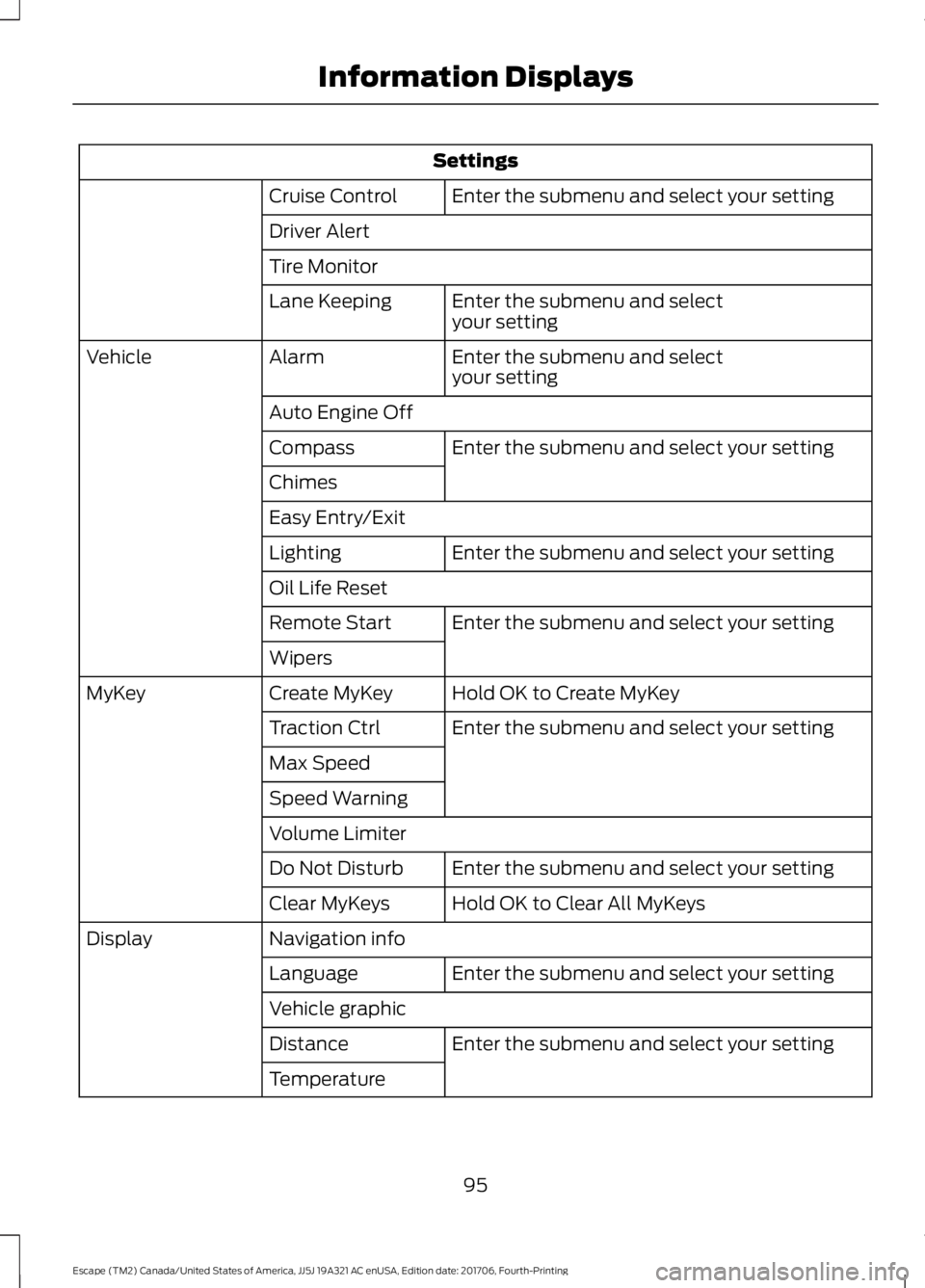
Settings
Enter the submenu and select your setting
Cruise Control
Driver Alert
Tire Monitor
Enter the submenu and select
your setting
Lane Keeping
Enter the submenu and select
your setting
Alarm
Vehicle
Auto Engine OffEnter the submenu and select your setting
Compass
Chimes
Easy Entry/Exit
Enter the submenu and select your setting
Lighting
Oil Life Reset
Enter the submenu and select your setting
Remote Start
Wipers
Hold OK to Create MyKey
Create MyKey
MyKey
Enter the submenu and select your setting
Traction Ctrl
Max Speed
Speed Warning
Volume Limiter
Enter the submenu and select your setting
Do Not Disturb
Hold OK to Clear All MyKeys
Clear MyKeys
Navigation info
Display
Enter the submenu and select your setting
Language
Vehicle graphic
Enter the submenu and select your setting
Distance
Temperature
95
Escape (TM2) Canada/United States of America, JJ5J 19A321 AC enUSA, Edition date: 201706, Fourth-Printing Information Displays
Page 109 of 517
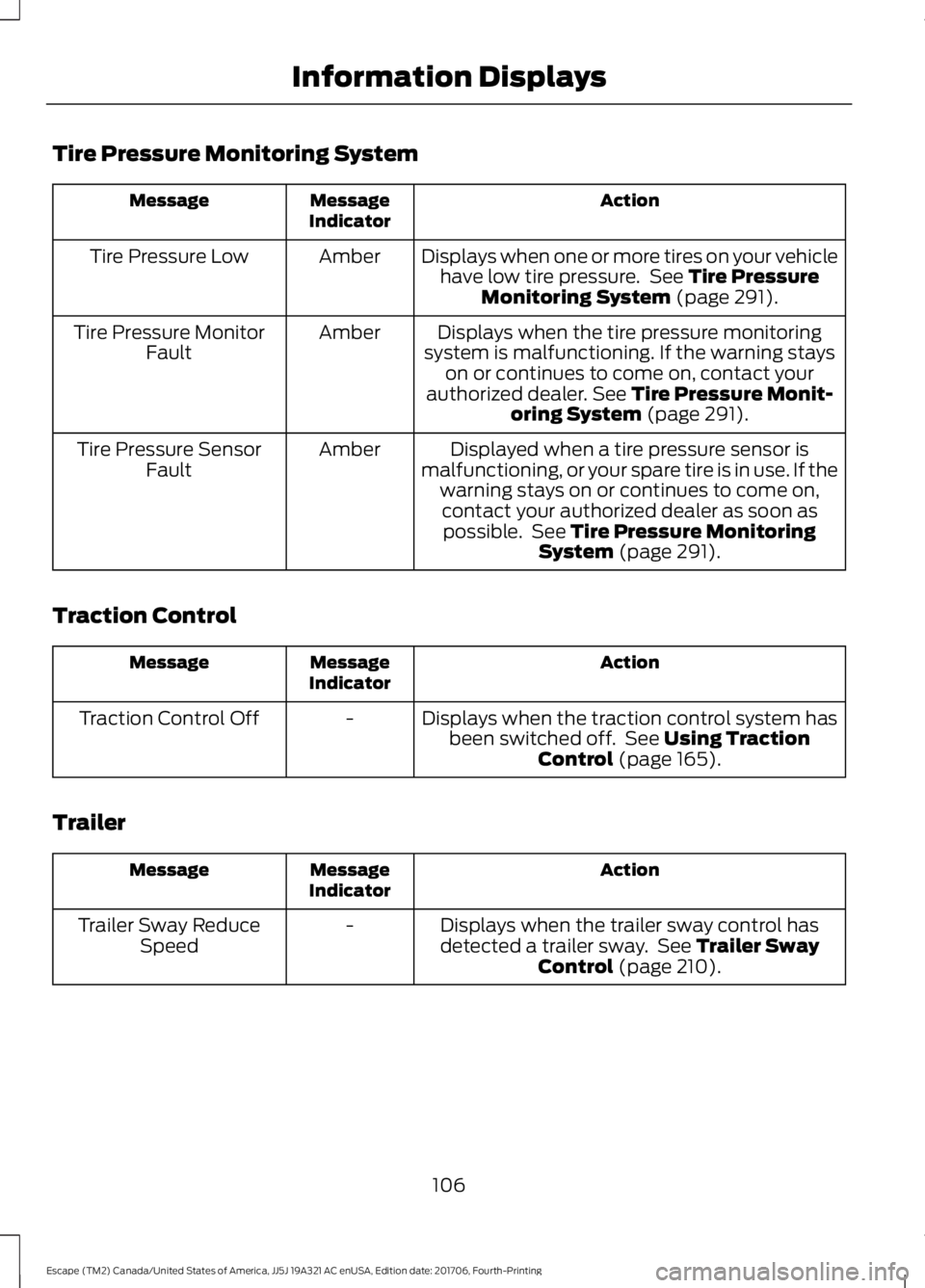
Tire Pressure Monitoring System
Action
Message
Indicator
Message
Displays when one or more tires on your vehiclehave low tire pressure. See Tire Pressure
Monitoring System (page 291).
Amber
Tire Pressure Low
Displays when the tire pressure monitoring
system is malfunctioning. If the warning stays on or continues to come on, contact your
authorized dealer.
See Tire Pressure Monit-
oring System (page 291).
Amber
Tire Pressure Monitor
Fault
Displayed when a tire pressure sensor is
malfunctioning, or your spare tire is in use. If the warning stays on or continues to come on,contact your authorized dealer as soon aspossible. See
Tire Pressure Monitoring
System (page 291).
Amber
Tire Pressure Sensor
Fault
Traction Control Action
Message
Indicator
Message
Displays when the traction control system hasbeen switched off. See
Using Traction
Control (page 165).
-
Traction Control Off
Trailer Action
Message
Indicator
Message
Displays when the trailer sway control has
detected a trailer sway. See
Trailer Sway
Control (page 210).
-
Trailer Sway Reduce
Speed
106
Escape (TM2) Canada/United States of America, JJ5J 19A321 AC enUSA, Edition date: 201706, Fourth-Printing Information Displays
Page 156 of 517
SelectShift in sport (S):
•
Provides a permanent manual gear
selection where full control of gear
selection is required.
To exit SelectShift mode, shift the
transmission into drive (D).
The instrument cluster displays your
currently selected gear. If a gear is
requested but not available due to vehicle
conditions, low speed, too high engine
speed for requested gear selection, the
current gear flashes three times.
Note: At full accelerator pedal travel, the
transmission downshifts to ensure
maximum performance.
Note: In low traction conditions, you can
pull away in second gear using SelectShift.
To perform this operation select drive (D)
or sport (S) mode and press either the +
toggle or pull the + paddle until 2 is
displayed on the cluster. Your vehicle is now
ready to move in 2nd gear.
Brake-Shift Interlock Override WARNING: Do not drive your vehicle
until you verify that the stoplamps are
working. WARNING: When doing this
procedure, you need to take the
transmission out of park (P) which means
your vehicle can roll freely. To avoid
unwanted vehicle movement, always fully
apply the parking brake prior to doing this
procedure. Use wheels chocks if
appropriate. WARNING:
If the parking brake is
fully released, but the brake warning lamp
remains illuminated, the brakes may not
be working properly. Have your vehicle
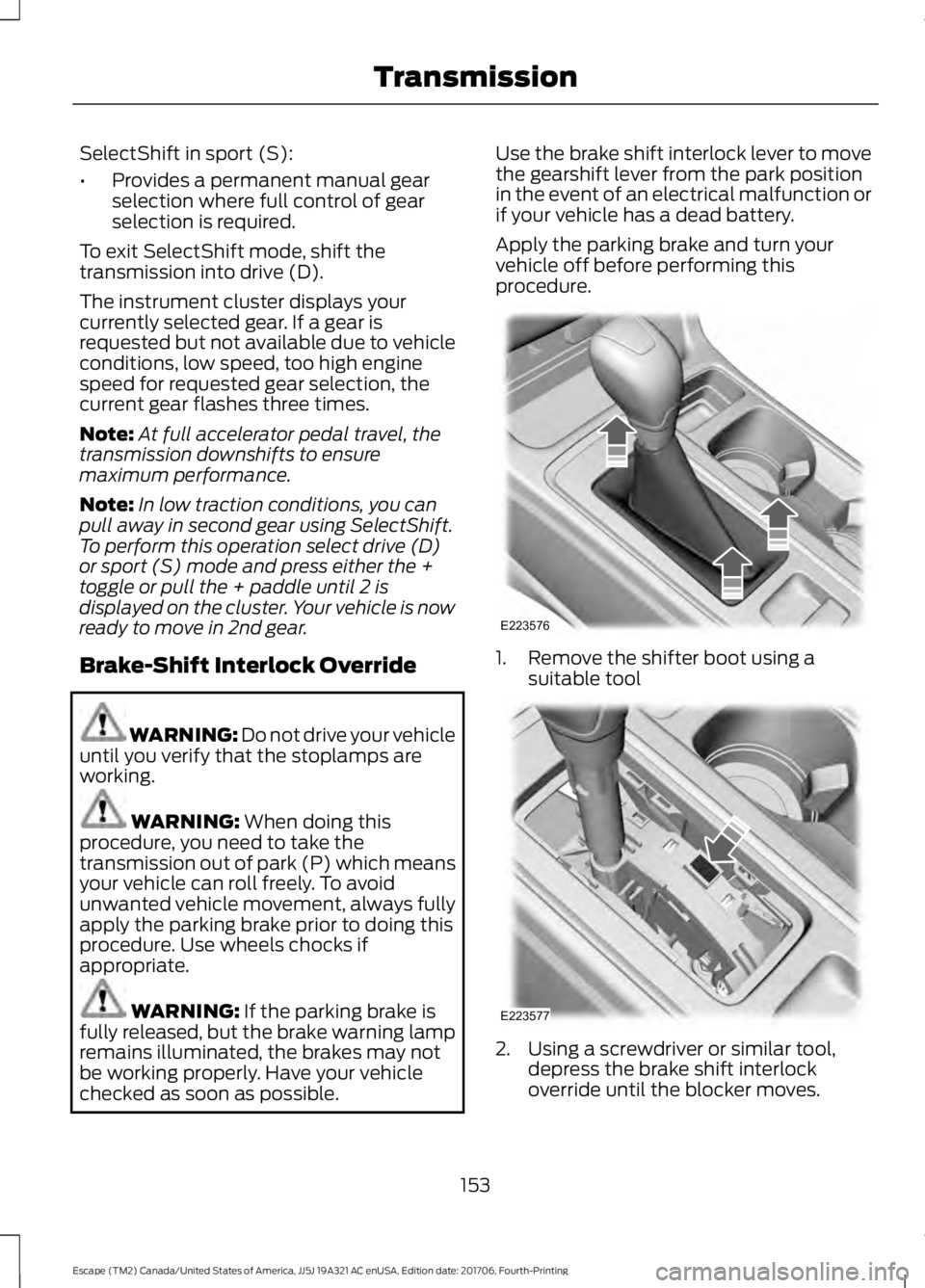
checked as soon as possible. Use the brake shift interlock lever to move
the gearshift lever from the park position
in the event of an electrical malfunction or
if your vehicle has a dead battery.
Apply the parking brake and turn your
vehicle off before performing this
procedure.
1. Remove the shifter boot using a
suitable tool 2. Using a screwdriver or similar tool,
depress the brake shift interlock
override until the blocker moves.
153
Escape (TM2) Canada/United States of America, JJ5J 19A321 AC enUSA, Edition date: 201706, Fourth-Printing TransmissionE223576 E223577
Page 158 of 517
PRINCIPLE OF OPERATION
This system is a proactive system. It has
the ability to anticipate wheel slip and
transfer torque to the rear wheels before
slip occurs. Even when wheel slip is not
present, the system is continuously making
adjustments to the torque distribution, in
an attempt to improve straight line and
cornering behavior, both on and off road.
The system automatically turns on every
time you switch the ignition on.
All components of the system are sealed
and do not require maintenance.
USING FOUR-WHEEL DRIVE
Note:
When a system malfunction is
present, a warning message will be
displayed in the information display. See
General Information (page 93). This
means the system is not functioning
correctly and has defaulted to front-wheel
drive only. Have your vehicle checked by an
authorized dealer.
Note: A message will be displayed in the
information display when the system
overheats and switches to front-wheel drive.
This condition may occur if you operate your
vehicle in extreme high load conditions or
with excessive wheel slip, (i.e. deep sand).
To resume four-wheel drive function as soon
as possible, stop your vehicle in a safe
location and switch the ignition off. After
the system cools and normal four-wheel
drive functionality resumes, a message will
be displayed for approximately five seconds.
Note: If a warning message appears in the
information display when using the spare
tire, it should turn off after reinstalling the
repaired or replaced road tire and you switch
the ignition on. Note:
It is recommended that you reinstall
the repaired tire or replace the tire as soon
as possible. Major dissimilar tire sizes
between the front and rear axles could
cause system damage or default the system
to front-wheel drive.
The system gives your vehicle some limited
off-road capabilities. Operating your
vehicle in conditions other than moderate
sand, snow, mud or rough roads could
subject it to excessive stress and heat
which could result in system damage. This
will not be covered by your vehicle
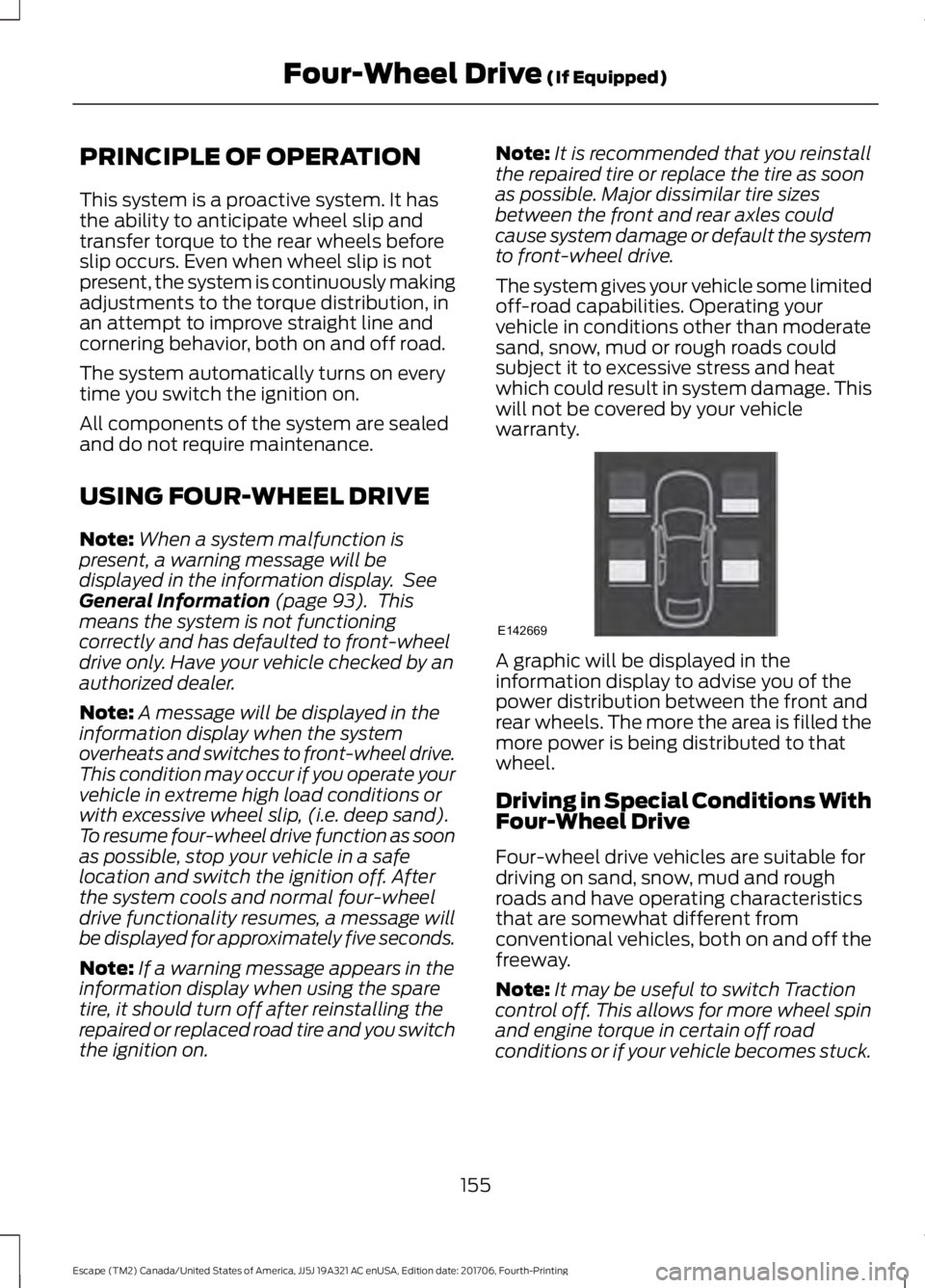
warranty. A graphic will be displayed in the
information display to advise you of the
power distribution between the front and
rear wheels. The more the area is filled the
more power is being distributed to that
wheel.
Driving in Special Conditions With
Four-Wheel Drive
Four-wheel drive vehicles are suitable for
driving on sand, snow, mud and rough
roads and have operating characteristics
that are somewhat different from
conventional vehicles, both on and off the
freeway.
Note:
It may be useful to switch Traction
control off. This allows for more wheel spin
and engine torque in certain off road
conditions or if your vehicle becomes stuck.
155
Escape (TM2) Canada/United States of America, JJ5J 19A321 AC enUSA, Edition date: 201706, Fourth-Printing Four-Wheel Drive
(If Equipped)E142669
Page 160 of 517
Avoid driving at excessive speeds, this
causes vehicle momentum to work against
you and your vehicle could become stuck
to the point that assistance may be
required from another vehicle. Remember,
you may be able to back out the way you
came if you proceed with caution.
Mud and Water
Mud
Be cautious of sudden changes in vehicle
speed or direction when you are driving in
mud. Even four-wheel drive vehicles can
lose traction in slick mud. If your vehicle
does slide, steer in the direction of the slide
until you regain control of your vehicle.
After driving through mud, clean off residue
stuck to rotating driveshafts and tires.
Excess mud stuck on tires and rotating
driveshafts can cause an imbalance that
could damage drive components.
Water
If you must drive through high water, drive
slowly. Traction or brake capability may
be limited.
When driving through water, determine the
depth and avoid water higher than the
bottom of the wheel rims. If the ignition
system gets wet, your vehicle may stall.
Once through water, always try the brakes.
Wet brakes do not stop your vehicle as
effectively as dry brakes. Drying can be
improved by applying light pressure to the
brake pedal while moving slowly.
Note:
Driving through deep water may
damage the transmission. If the front or rear
axle is submerged in water, the axle
lubricant and power transfer unit lubricant
should be checked and changed if
necessary. Driving on Hilly or Sloping Terrain
Although natural obstacles may make it
necessary to travel diagonally up or down
a hill or steep incline, you should always
try to drive straight up or straight down.
Note:
Avoid turning on steep slopes or hills.
A danger lies in losing traction, slipping
sideways and possible vehicle roll over.
Whenever driving on a hill, determine
beforehand the route you will use. Do not
drive over the crest of a hill without seeing
what conditions are on the other side. Do
not drive in reverse over a hill without the
aid of an observer.
When climbing a steep slope or hill, start
in a lower gear rather than downshifting to
a lower gear from a higher gear once the
ascent has started. This reduces strain on
the engine and the possibility of stalling.
If your vehicle stalls, do not try to turn
around because this could cause vehicle
roll over. It is better to reverse back to a
safe location.
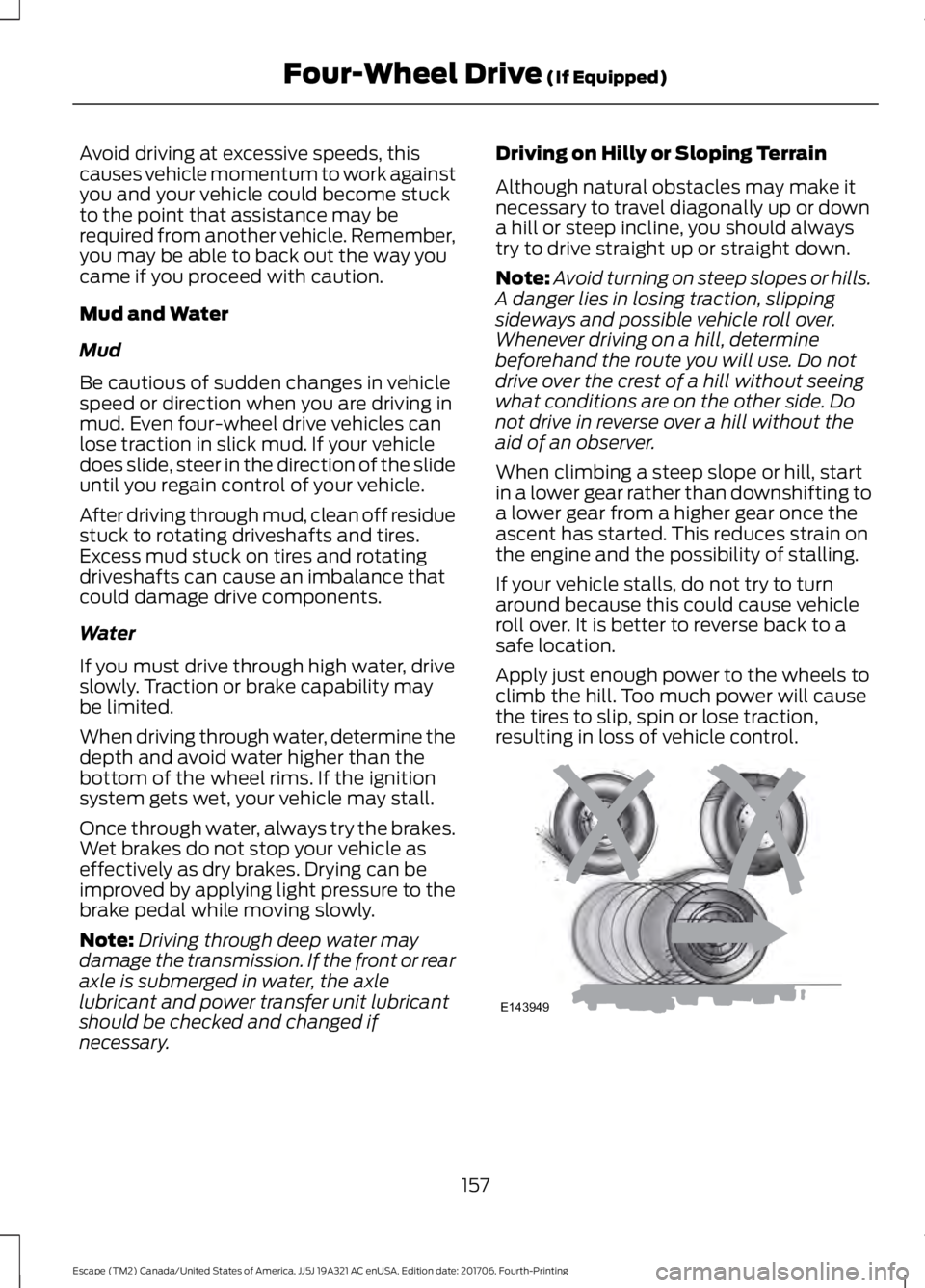
Apply just enough power to the wheels to
climb the hill. Too much power will cause
the tires to slip, spin or lose traction,
resulting in loss of vehicle control. 157
Escape (TM2) Canada/United States of America, JJ5J 19A321 AC enUSA, Edition date: 201706, Fourth-Printing Four-Wheel Drive (If Equipped)E143949
Page 168 of 517
PRINCIPLE OF OPERATION
The traction control system helps avoid
drive wheel spin and loss of traction.
If your vehicle begins to slide, the system
applies the brakes to individual wheels
and, when needed, reduces engine power
at the same time. If the wheels spin when
accelerating on slippery or loose surfaces,
the system reduces engine power in order
to increase traction.
USING TRACTION CONTROL
WARNING: The stability and traction
control light illuminates steadily if the
system detects a failure. Make sure you
did not manually disable the traction
control system using the information
display controls or the switch. If the
stability control and traction control light
is still illuminating steadily, have the
system serviced by an authorized dealer
immediately. Operating your vehicle with
the traction control disabled could lead to
an increased risk of loss of vehicle control,
vehicle rollover, personal injury and death.
The system automatically turns on each
time you switch the ignition on.
If your vehicle is stuck in mud or snow,
switching traction control off may be
beneficial as this allows the wheels to spin.
Note: When you switch traction control off,
stability control remains fully active.
Switching the System Off
When you switch the system off or on, a
message appears in the information
display showing system status.
You can switch the system off by either
using the information display controls or
the switch. Using the Information Display
Controls
You can switch this feature off or on in the
information display. See General
Information (page 93).
Using a Switch
(If Equipped)
Use the traction control switch on the
instrument panel to switch the system off
or on.
System Indicator Lights and
Messages The stability and traction control
light:
• Temporarily illuminates on engine
start-up.
• Flashes when a driving condition
activates either of the systems.
• Illuminates if a problem occurs in either
of the systems. The stability and traction control
off light temporarily illuminates
on engine start-up and stays on
when you switch the traction control
system off.
165
Escape (TM2) Canada/United States of America, JJ5J 19A321 AC enUSA, Edition date: 201706, Fourth-Printing Traction ControlE138639 E130458
Page 169 of 517
PRINCIPLE OF OPERATION
WARNING: Vehicle modifications
involving braking system, aftermarket roof
racks, suspension, steering system, tire
construction and wheel and tire size may
change the handling characteristics of your
vehicle and may adversely affect the
performance of the electronic stability
control system. In addition, installing any
stereo loudspeakers may interfere with
and adversely affect the electronic stability
control system. Install any aftermarket
stereo loudspeaker as far as possible from
the front center console, the tunnel, and
the front seats in order to minimize the risk
of interfering with the electronic stability
control sensors. Reducing the
effectiveness of the electronic stability
control system could lead to an increased
risk of loss of vehicle control, vehicle
rollover, personal injury and death. WARNING:
Remember that even
advanced technology cannot defy the laws
of physics. It’ s always possible to lose
control of a vehicle due to inappropriate
driver input for the conditions. Aggressive
driving on any road condition can cause
you to lose control of your vehicle
increasing the risk of personal injury or
property damage. Activation of the
electronic stability control system is an
indication that at least some of the tires
have exceeded their ability to grip the road;
this could reduce the operator ’s ability to
control the vehicle potentially resulting in
a loss of vehicle control, vehicle rollover,
personal injury and death. If your electronic
stability control system activates, SLOW
DOWN.
The system automatically turns on each
time you switch the ignition on. If a fault occurs in either the stability
control or the traction control system, you
may experience the following conditions:
•
The stability and traction control light
illuminates steadily.
• The stability control and traction
control systems do not enhance your
vehicle's ability to maintain traction of
the wheels.
If a driving condition activates either the
stability control or the traction control
system you may experience the following
conditions:
• The stability and traction control light
flashes.
• Your vehicle slows down.
• Reduced engine power.
• A vibration in the brake pedal.
• The brake pedal is stiffer than usual.
• If the driving condition is severe and
your foot is not on the brake, the brake
pedal may move as the system applies
higher brake force.
The stability control system has several
features built into it to help you maintain
control of your vehicle:
Electronic Stability Control
The system enhances your vehicle ’s ability
to prevent skids or lateral slides by
applying brakes to one or more of the
wheels individually and, if necessary,
reducing engine power.
Roll Stability Control
The system enhances your vehicle ’s ability
to prevent rollovers by detecting your
vehicle ’s roll motion and the rate at which
it changes by applying the brakes to one
or more wheels individually.
166
Escape (TM2) Canada/United States of America, JJ5J 19A321 AC enUSA, Edition date: 201706, Fourth-Printing Stability Control