open hood FORD ESCAPE 2019 User Guide
[x] Cancel search | Manufacturer: FORD, Model Year: 2019, Model line: ESCAPE, Model: FORD ESCAPE 2019Pages: 509, PDF Size: 6.69 MB
Page 248 of 509
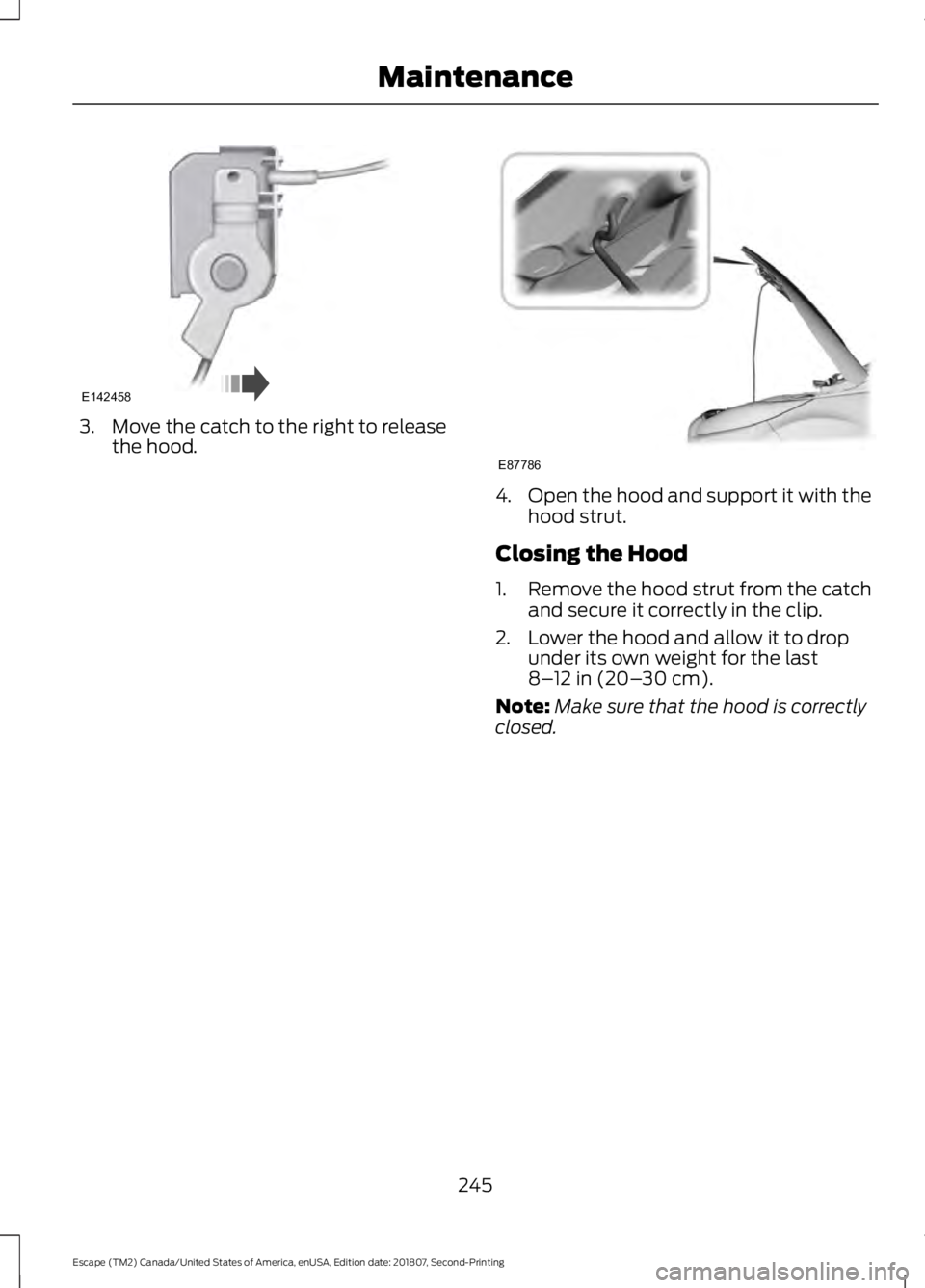
3. Move the catch to the right to release
the hood. 4.
Open the hood and support it with the
hood strut.
Closing the Hood
1. Remove the hood strut from the catch
and secure it correctly in the clip.
2. Lower the hood and allow it to drop under its own weight for the last
8–12 in (20– 30 cm).
Note: Make sure that the hood is correctly
closed.
245
Escape (TM2) Canada/United States of America, enUSA, Edition date: 201807, Second-Printing MaintenanceE142458 E87786
Page 252 of 509
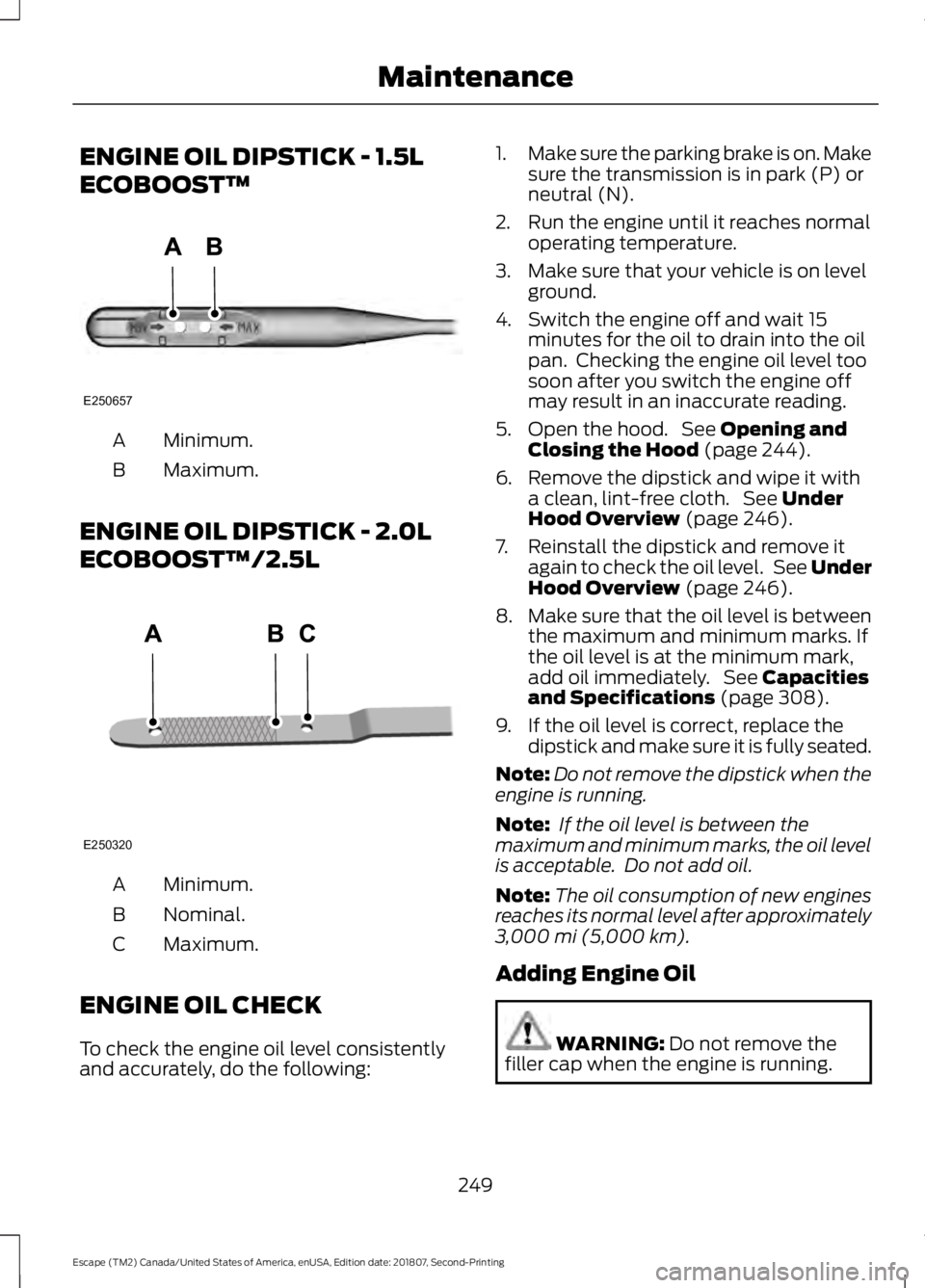
ENGINE OIL DIPSTICK - 1.5L
ECOBOOST™
Minimum.
A
Maximum.
B
ENGINE OIL DIPSTICK - 2.0L
ECOBOOST™/2.5L Minimum.
A
Nominal.
B
Maximum.
C
ENGINE OIL CHECK
To check the engine oil level consistently
and accurately, do the following: 1.
Make sure the parking brake is on. Make
sure the transmission is in park (P) or
neutral (N).
2. Run the engine until it reaches normal operating temperature.
3. Make sure that your vehicle is on level ground.
4. Switch the engine off and wait 15 minutes for the oil to drain into the oil
pan. Checking the engine oil level too
soon after you switch the engine off
may result in an inaccurate reading.
5. Open the hood. See Opening and
Closing the Hood (page 244).
6. Remove the dipstick and wipe it with a clean, lint-free cloth. See
Under
Hood Overview (page 246).
7. Reinstall the dipstick and remove it again to check the oil level. See Under
Hood Overview
(page 246).
8. Make sure that the oil level is between
the maximum and minimum marks. If
the oil level is at the minimum mark,
add oil immediately. See
Capacities
and Specifications (page 308).
9. If the oil level is correct, replace the dipstick and make sure it is fully seated.
Note: Do not remove the dipstick when the
engine is running.
Note: If the oil level is between the
maximum and minimum marks, the oil level
is acceptable. Do not add oil.
Note: The oil consumption of new engines
reaches its normal level after approximately
3,000 mi (5,000 km)
.
Adding Engine Oil WARNING:
Do not remove the
filler cap when the engine is running.
249
Escape (TM2) Canada/United States of America, enUSA, Edition date: 201807, Second-Printing MaintenanceE250657 E250320
Page 253 of 509
Do not use supplemental engine oil
additives because they are unnecessary
and could lead to engine damage that may
not be covered by the vehicle Warranty.
Only use oils certified for gasoline engines
by the American Petroleum Institute (API).
An oil with this trademark symbol
conforms to the current engine and
emission system protection standards and
fuel economy requirements of the
International Lubricants Specification
Advisory Committee (ILSAC).
To top up the engine oil level do the
following:
1. Clean the area surrounding the engine
oil filler cap before you remove it.
2. Remove the engine oil filler cap. See Under Hood Overview (page 246).
Turn it counterclockwise and remove
it.
3. Add engine oil that meets our specifications. See
Capacities and
Specifications (page 308). You may
have to use a funnel to pour the engine
oil into the opening.
4. Recheck the oil level.
5. If the oil level is correct, replace the dipstick and make sure it is fully seated.
6. Replace the engine oil filler cap. Turn it clockwise until you feel a strong
resistance. Note:
Do not add oil further than the
maximum mark. Oil levels above the
maximum mark may cause engine damage.
Note: Make sure you install the oil filler cap
correctly.
Note: Soak up any spillage with an
absorbent cloth immediately.
OIL CHANGE INDICATOR
RESET
Use the information display controls on
the steering wheel to reset the oil change
indicator.
From the main menu scroll to: Action and description
Message
Press the right arrow button,
then from this menu scroll
to the following message.
Settings
Press the right arrow button,
then from this menu scroll
to the following message.
Vehicle
Press the right arrow button,
then from this menu scroll
to the following message.
Oil Life
Press and hold the
OK
button until the instrument
cluster displays the
following message.
Hold OK to
Reset
Reset Successful
When the oil change indic-
ator resets the instrument
cluster displays 100%.
Remaining Life
{00}%
250
Escape (TM2) Canada/United States of America, enUSA, Edition date: 201807, Second-Printing MaintenanceE142732
Page 263 of 509
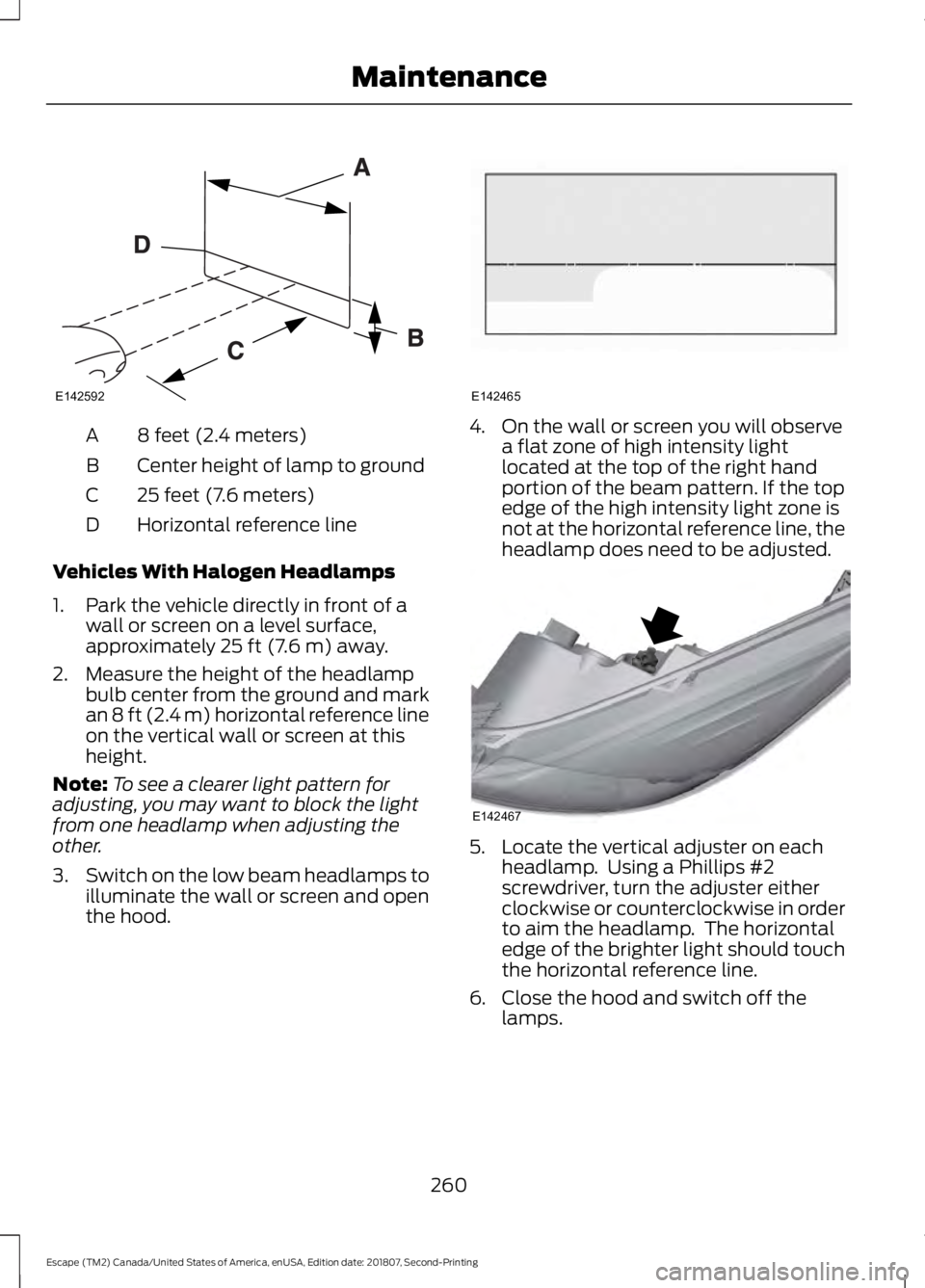
8 feet (2.4 meters)
A
Center height of lamp to ground
B
25 feet (7.6 meters)
C
Horizontal reference line
D
Vehicles With Halogen Headlamps
1. Park the vehicle directly in front of a wall or screen on a level surface,
approximately 25 ft (7.6 m) away.
2. Measure the height of the headlamp bulb center from the ground and mark
an
8 ft (2.4 m) horizontal reference line
on the vertical wall or screen at this
height.
Note: To see a clearer light pattern for
adjusting, you may want to block the light
from one headlamp when adjusting the
other.
3. Switch on the low beam headlamps to
illuminate the wall or screen and open
the hood. 4. On the wall or screen you will observe
a flat zone of high intensity light
located at the top of the right hand
portion of the beam pattern. If the top
edge of the high intensity light zone is
not at the horizontal reference line, the
headlamp does need to be adjusted. 5. Locate the vertical adjuster on each
headlamp. Using a Phillips #2
screwdriver, turn the adjuster either
clockwise or counterclockwise in order
to aim the headlamp. The horizontal
edge of the brighter light should touch
the horizontal reference line.
6. Close the hood and switch off the lamps.
260
Escape (TM2) Canada/United States of America, enUSA, Edition date: 201807, Second-Printing MaintenanceE142592 E142465 E142467
Page 264 of 509
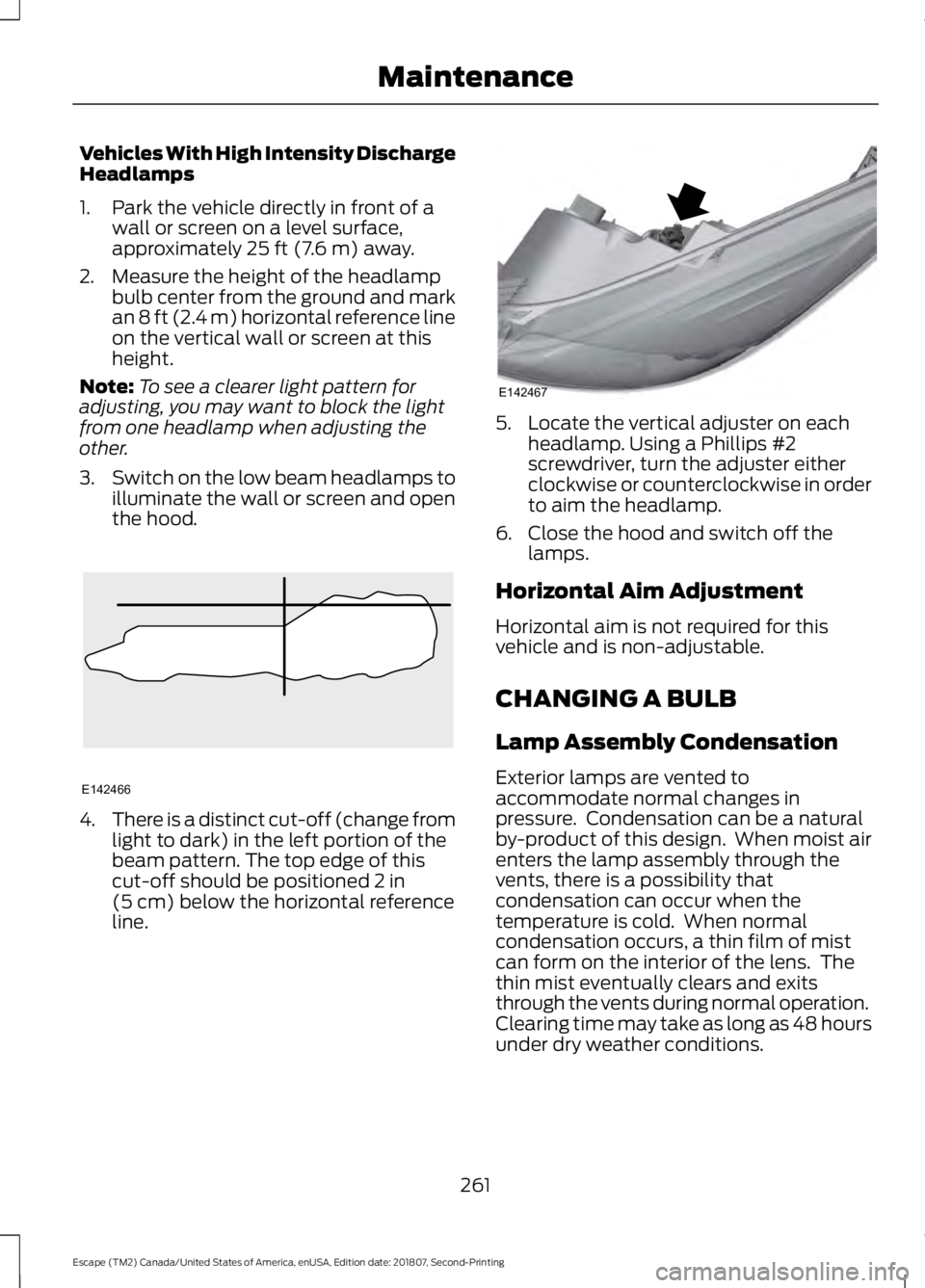
Vehicles With High Intensity Discharge
Headlamps
1. Park the vehicle directly in front of a
wall or screen on a level surface,
approximately 25 ft (7.6 m) away.
2. Measure the height of the headlamp bulb center from the ground and mark
an
8 ft (2.4 m) horizontal reference line
on the vertical wall or screen at this
height.
Note: To see a clearer light pattern for
adjusting, you may want to block the light
from one headlamp when adjusting the
other.
3. Switch on the low beam headlamps to
illuminate the wall or screen and open
the hood. 4.
There is a distinct cut-off (change from
light to dark) in the left portion of the
beam pattern. The top edge of this
cut-off should be positioned
2 in
(5 cm) below the horizontal reference
line. 5. Locate the vertical adjuster on each
headlamp. Using a Phillips #2
screwdriver, turn the adjuster either
clockwise or counterclockwise in order
to aim the headlamp.
6. Close the hood and switch off the lamps.
Horizontal Aim Adjustment
Horizontal aim is not required for this
vehicle and is non-adjustable.
CHANGING A BULB
Lamp Assembly Condensation
Exterior lamps are vented to
accommodate normal changes in
pressure. Condensation can be a natural
by-product of this design. When moist air
enters the lamp assembly through the
vents, there is a possibility that
condensation can occur when the
temperature is cold. When normal
condensation occurs, a thin film of mist
can form on the interior of the lens. The
thin mist eventually clears and exits
through the vents during normal operation.
Clearing time may take as long as 48 hours
under dry weather conditions.
261
Escape (TM2) Canada/United States of America, enUSA, Edition date: 201807, Second-Printing MaintenanceE142466 E142467
Page 499 of 509
Muting the Audio................................................
323
Playing or Pausing Media................................ 323
Switching the Audio Unit On and Off.........323
Using Seek, Fast Forward and Reverse............................................................. 324
Using the Display Control............................... 324
Using the Number Block................................. 324
Autolamps........................................................79 Windshield Wiper Activated
Headlamps........................................................ 79
Automatic Climate Control.........................111 Directing the Airflow............................................ 111
Dual Zone Temperature Control.................... 113
Setting the Blower Motor Speed.................... 111
Setting the Temperature.................................... 111
Single Zone Temperature Control.................113
Smart Zone............................................................ 113
Switching Auto Mode On and Off.................112
Switching Back to Single Zone Temperature Control..................................... 113
Switching Maximum Air Conditioning On and Off................................................................ 112
Switching Maximum Defrost On and Off........................................................................\
. 112
Switching Recirculated Air On and Off........................................................................\
. 112
Switching the Air Conditioning On and Off........................................................................\
. 112
Switching the Climate Control On and Off........................................................................\
. 112
Switching the Heated Seats On and Off........................................................................\
. 112
Automatic High Beam Control.................80 Automatic High Beam Indicator...................... 81
Switching the System On and Off.................. 81
Automatic Transmission............................154 Brake-Shift Interlock Override....................... 156
If Your Vehicle Gets Stuck In Mud or Snow................................................................... 157
SelectShift Automatic ™
Transmission................................................... 155
Understanding the Positions of Your Automatic Transmission............................. 154
Automatic Transmission Fluid Check.............................................................255
Auto-Start-Stop...........................................139 Disabling Auto-Start-Stop............................. 140
Enabling Auto-Start-Stop............................... 139Autowipers........................................................75
Autowipers Settings............................................ 76
Auxiliary Power Points.................................131 110 Volt AC Power Point.....................................131
12 Volt DC Power Point...................................... 131
Locations................................................................. 131
B
Battery See: Changing the 12V Battery..................... 256
Blind Spot Information System...............197 Switching the System Off and On...............198
System Errors....................................................... 198
Using the Blind Spot Information System............................................................... 197
BLIS See: Blind Spot Information System...........197
Body Styling Kits..........................................274
Bonnet Lock See: Opening and Closing the Hood..........244
Booster Seats
...................................................27
Types of Booster Seats...................................... 28
Brake Fluid Check........................................255
Brakes
...............................................................163
General Information.......................................... 163
Breaking-In......................................................218
Bulb Specification Chart............................321
C
Cabin Air Filter
................................................116
Capacities and Specifications - 1.5L EcoBoost™................................................308
Alternative Engine Oil for Extremely Cold Climates............................................................. 311
Specifications..................................................... 309
Capacities and Specifications - 2.0L EcoBoost™..................................................312
Alternative Engine Oil for Extremely Cold Climates............................................................ 316
Specifications....................................................... 313
Capacities and Specifications - 2.5L..................................................................317
Alternative Engine Oil for Extremely Cold Climates........................................................... 320
Specifications....................................................... 317
Capacities and Specifications
.................301
496
Escape (TM2) Canada/United States of America, enUSA, Edition date: 201807, Second-Printing Index
Page 503 of 509
Getting the Services You Need...............226
Away From Home.............................................. 226
H
Hazard Flashers............................................222
Headlamp Adjusting See: Adjusting the Headlamps..................... 259
Headlamp Exit Delay
...................................80
Headrest See: Head Restraints.......................................... 118
Head Restraints
.............................................118
Folding the Rear Seat Outermost Head
Restraint............................................................ 120
Installing the Head Restraint......................... 120
Lowering the Head Restraint......................... 120
Raising the Head Restraint............................. 120
Removing the Head Restraint....................... 120
Tilting the Front Seat Head Restraint.........120
Heated Exterior Mirrors................................116
Heated Rear Window...................................116
Heated Seats
..................................................124
Heated Steering Wheel................................74
Heated Windshield
.......................................116
Windshield Wiper De-Icer................................ 116
Heating See: Climate Control.......................................... 110
Hill Start Assist
..............................................165
Switching the System On and Off...............166
Using Hill Start Assist....................................... 166
Hints on Controlling the Interior Climate...........................................................113
Defogging the Side Windows in Cold Weather.............................................................. 115
General Hints......................................................... 113
Quickly Cooling the Interior.............................. 115
Quickly Heating the Interior............................. 114
Recommended Settings for Cooling............115
Recommended Settings for Heating...........114
Hints on Driving With Anti-Lock Brakes............................................................163
Home Screen................................................383
Hood Lock See: Opening and Closing the Hood..........244
I
Ignition Switch
...............................................134 In California (U.S. Only).............................227
Information Display Control.......................74
Information Displays
.....................................95
General Information............................................ 95
Information Messages
.................................98
Airbag....................................................................... 99
Alarm........................................................................\
99
Automatic Engine Shutdown.......................... 99
Auto Start-Stop.................................................. 100
Battery and Charging System....................... 100
Blind Spot Information and Cross Traffic Alert System..................................................... 101
Collision Warning and Adaptive Cruise Control (ACC)................................................. 102
Doors....................................................................... 102
Engine..................................................................... 103
Four-Wheel Drive............................................... 103
Hill Start Assist................................................... 104
Keyless Vehicle.................................................... 104
Lighting.................................................................. 105
Maintenance........................................................ 105
Message Indicator............................................... 98
MyKey..................................................................... 105
Park Aid.................................................................. 106
Park Brake............................................................. 106
Power Steering.................................................... 107
Remote Start........................................................ 107
Starting System .................................................. 107
Tire Pressure Monitoring System.................108
Traction Control.................................................. 108
Trailer...................................................................... 108
Transmission........................................................ 109
Installing Child Restraints...........................22 Child Restraints..................................................... 22
Using Lap and Shoulder Belts......................... 22
Using Lower Anchors and Tethers for CHildren (LATCH)........................................... 24
Using Tether Straps............................................. 26
Instrument Cluster
........................................90
Instrument Lighting Dimmer......................79
Instrument Panel
............................................18
Instrument Panel Overview.............................. 18
Interior Lamps
.................................................83
Front Interior Lamps........................................... 83
Rear Interior Lamps............................................. 83
Interior Mirror...................................................88 Automatic Dimming Mirror.............................. 88
Manual Dimming Mirror.................................... 88
500
Escape (TM2) Canada/United States of America, enUSA, Edition date: 201807, Second-Printing Index
Page 505 of 509
Motorcraft Parts - 1.5L
EcoBoost™.................................................303
Motorcraft Parts - 2.0L EcoBoost™................................................304
Motorcraft Parts - 2.5L..............................305
MyKey – Troubleshooting...........................58
MyKey ™.............................................................55
Principle of Operation........................................ 55
N
Navigation.....................................................406 cityseeker............................................................... 413
Destination Mode............................................. 408
Map Mode............................................................ 406
Navigation Map Updates................................. 414
Navigation Menu.................................................. 411
SiriusXM Traffic and Travel Link.................... 414
SYNC AppLink..................................................... 413
Waypoints.............................................................. 412
Normal Scheduled Maintenance...........451 Intelligent Oil-Life Monitor™......................... 451
Normal Maintenance Intervals..................... 452
O
Oil Change Indicator Reset......................250
Oil Check See: Engine Oil Check...................................... 249
Opening and Closing the Hood..............244 Closing the Hood............................................... 245
Opening the Hood............................................. 244
Ordering Additional Owner's Literature.......................................................231
Obtaining a French Owner ’s Manual...........231
Overhead Console........................................133
P
Parking Aids....................................................170 Principle of Operation....................................... 170
Passive Anti-Theft System.........................70 SecuriLock®........................................................... 70
PATS See: Passive Anti-Theft System..................... 70
Perchlorate........................................................13 Personal Safety System
™.........................40
How Does the Personal Safety System
Work?.................................................................. 40
Phone...............................................................401 During a Phone Call......................................... 404
Making Calls........................................................ 403
Pairing Your Cell Phone for the First Time................................................................... 401
Phone Menu........................................................ 402
Receiving Calls................................................... 404
Smartphone Connectivity............................. 405
Text Messaging.................................................. 405
Post-Crash Alert System..........................224
Power Door Locks See: Locking and Unlocking............................ 60
Power Liftgate.................................................67 Hands-Free Feature............................................ 69
Obstacle Detection............................................. 69
Opening and Closing the Liftgate.................. 67
Setting the Liftgate Open Height.................. 68
Stopping the Liftgate Movement.................. 68
Switching the Power Liftgate On or Off........................................................................\
. 69
Power Seats
.....................................................121
Adjusting the Lumbar Support...................... 122
Adjusting the Seat Backrest........................... 122
Adjusting the Seat Cushion............................. 122
Adjusting the Seat Height................................ 122
Moving the Seat Backward and Forward.............................................................. 122
Power Steering Fluid Check.....................256
Power Windows.............................................85 Accessory Delay................................................... 86
Bounce-Back......................................................... 85
One-Touch Close................................................. 85
One-Touch Open................................................. 85
Rear Window Lock............................................... 85
Protecting the Environment........................17
Puncture See: Changing a Road Wheel....................... 295
R
Rear Parking Aid
............................................170
Obstacle Distance Indicator............................ 171
Rear Seat Armrest........................................133
Rear Seats
.......................................................124
Folding the Seatback........................................ 124
502
Escape (TM2) Canada/United States of America, enUSA, Edition date: 201807, Second-Printing Index
Page 508 of 509
Transporting the Vehicle...........................225
Trip Computer.................................................98
All Value.................................................................. 98
Average Fuel.......................................................... 98
Digital Speedo...................................................... 98
Distance to E.......................................................... 98
Instantaneous Fuel............................................. 98
Resetting the Trip Computer........................... 98
Trip Odometer....................................................... 98
Trip Timer................................................................ 98
U
Under Hood Overview - 1.5L EcoBoost™.................................................246
Under Hood Overview - 2.0L EcoBoost™..................................................247
Under Hood Overview - 2.5L
...................248
Unique Driving Characteristics................139
Universal Garage Door Opener...............126 HomeLink Wireless Control System............126
USB Port..........................................................332
Using Adaptive Cruise Control................185 Automatic Cancellation................................... 188
Blocked Sensor................................................... 189
Canceling the Set Speed................................. 188
Changing the Set Speed................................. 188
Detection Issues................................................. 188
Following a Vehicle............................................ 186
Hilly Condition Usage....................................... 188
Overriding the Set Speed................................. 187
Resuming the Set Speed................................ 188
Setting the Adaptive Cruise Speed.............186
Setting the Gap Distance................................. 187
Switching Adaptive Cruise Control Off....................................................................... 188
Switching Adaptive Cruise Control On........................................................................\
186
Switching to Normal Cruise Control...........190
System Not Available....................................... 189
Using Cruise Control...................................184 Canceling the Set Speed................................. 185
Changing the Set Speed.................................. 184
Resuming the Set Speed................................. 185
Setting the Cruise Speed................................ 184
Switching Cruise Control Off......................... 185
Switching Cruise Control On.......................... 184Using Four-Wheel Drive
.............................158
Driving in Special Conditions With
Four-Wheel Drive.......................................... 158
Using MyKey With Remote Start Systems..........................................................58
Using Snow Chains......................................291
Using Stability Control
...............................169
Using Summer Tires...................................290
Using SYNC™ With Your Media Player............................................................354
Accessing Your USB Song Library...............358
Bluetooth Devices and System Settings............................................................ 360
Connecting Your Digital Media Player to the USB Port.......................................................... 354
Media Menu Features....................................... 357
Media Voice Commands................................. 355
USB 2..................................................................... 360
Voice Commands for Audio Sources..........361
Using SYNC™ With Your Phone.............337 Accessing Features through the Phone
Menu.................................................................. 342
Accessing Your Phone Settings................... 345
Bluetooth Devices............................................. 346
Making Calls......................................................... 341
Pairing a Phone for the First Time...............338
Pairing Subsequent Phones.......................... 339
Phone Options during an Active Call..........341
Phone Voice Commands................................ 339
Receiving Calls..................................................... 341
System Settings................................................. 347
Text Messaging................................................... 343
Using Traction Control
................................167
Switching the System Off................................ 167
System Indicator Lights and Messages.......................................................... 167
Using a Switch..................................................... 167
Using the Information Display Controls............................................................. 167
Using Voice Recognition
...........................335
Audio Voice Commands................................. 385
Climate Voice Commands............................. 386
Initiating a Voice Session................................ 335
Mobile App Voice Commands...................... 389
Navigation Voice Commands....................... 388
Phone Voice Commands............................... 386
SiriusXM Traffic and Travel Link Voice Commands..................................................... 389
505
Escape (TM2) Canada/United States of America, enUSA, Edition date: 201807, Second-Printing Index