brake sensor FORD ESCAPE 2020 User Guide
[x] Cancel search | Manufacturer: FORD, Model Year: 2020, Model line: ESCAPE, Model: FORD ESCAPE 2020Pages: 553, PDF Size: 7.73 MB
Page 244 of 553
ADAPTIVE CRUISE CONTROL
LIMITATIONS - VEHICLES
WITH: ADAPTIVE CRUISE
CONTROL WITH STOP AND GO
Sensor Limitations
WARNING: On rare occasions,
detection issues can occur due to the
road infrastructures, for example bridges,
tunnels and safety barriers. In these
cases, the system may brake late or
unexpectedly. At all times, you are
responsible for controlling your vehicle,
supervising the system and intervening,
if required. WARNING:
If the system
malfunctions, have your vehicle checked
as soon as possible. WARNING:
Large contrasts in
outside lighting can limit sensor
performance. WARNING:
The system only warns
of vehicles detected by the radar sensor.
In some cases there may be no warning
or a delayed warning. Apply the brakes
when necessary. Failure to follow this
instruction could result in personal injury
or death. WARNING:
The system may not
detect stationary or slow moving
vehicles below
6 mph (10 km/h). WARNING:
The system does not
detect pedestrians or objects in the road. WARNING:
The system does not
detect oncoming vehicles in the same
lane. WARNING:
The system may not
operate properly if the sensor is blocked.
Keep the windshield free from
obstruction. WARNING:
The sensor may
incorrectly track lane markings as other
structures or objects. This can result in
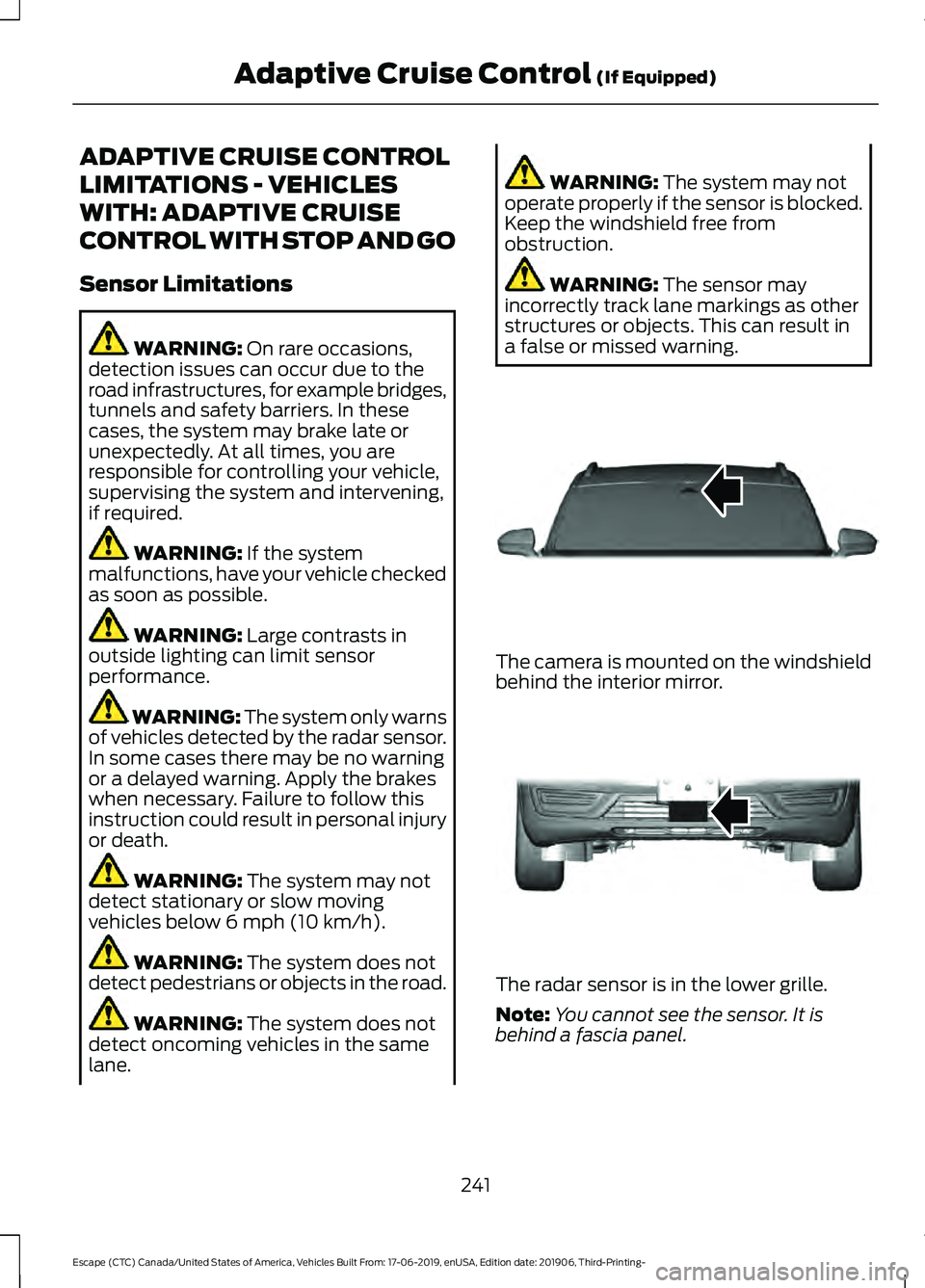
a false or missed warning. The camera is mounted on the windshield
behind the interior mirror.
The radar sensor is in the lower grille.
Note:
You cannot see the sensor. It is
behind a fascia panel.
241
Escape (CTC) Canada/United States of America, Vehicles Built From: 17-06-2019, enUSA, Edition date: 201906, Third-Printing- Adaptive Cruise Control
(If Equipped)E307893 E307892
Page 245 of 553
Note:
Keep the front of your vehicle free of
dirt, metal badges or objects. Vehicle front
protectors, aftermarket lights, additional
paint or plastic coatings could also degrade
sensor performance.
A message displays if something obstructs
the camera or the sensor. When something
blocks the sensor, the system cannot
detect a vehicle ahead and does not
function. See Adaptive Cruise Control
– Information Messages (page 247).
The radar sensor has a limited field of view.
It may not detect vehicles at all or detect
a vehicle later than expected in some
situations. The lead vehicle image does
not illuminate if the system does not
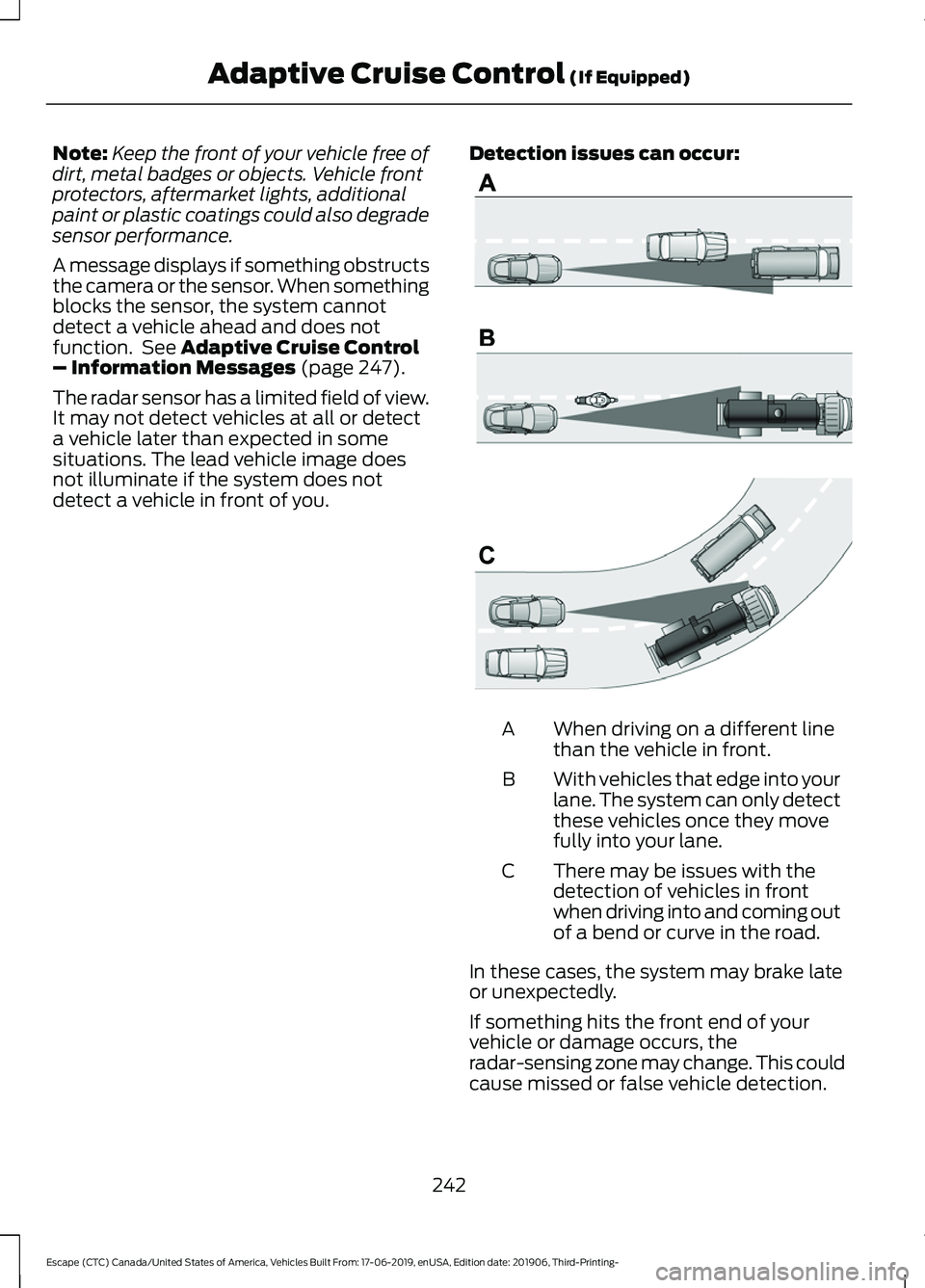
detect a vehicle in front of you. Detection issues can occur: When driving on a different line
than the vehicle in front.
A
With vehicles that edge into your
lane. The system can only detect
these vehicles once they move
fully into your lane.
B
There may be issues with the
detection of vehicles in front
when driving into and coming out
of a bend or curve in the road.
C
In these cases, the system may brake late
or unexpectedly.
If something hits the front end of your
vehicle or damage occurs, the
radar-sensing zone may change. This could
cause missed or false vehicle detection.
242
Escape (CTC) Canada/United States of America, Vehicles Built From: 17-06-2019, enUSA, Edition date: 201906, Third-Printing- Adaptive Cruise Control
(If Equipped)E71621
Page 246 of 553
Optimal system performance requires a
clear view of the road by the
windshield-mounted camera.
Optimal performance may not occur if:
•
The camera is blocked.
• There is poor visibility or lighting
conditions.
• There are bad weather conditions.
SWITCHING ADAPTIVE
CRUISE CONTROL ON AND OFF
The cruise controls are on the steering
wheel. See Cruise Control (page 80).
Switching Adaptive Cruise Control
On Press the button to set the
system in standby mode.
The indicator, current gap setting and set
speed appear in the information display.
Switching Adaptive Cruise Control
Off Press the button when the
system is in standby mode, or
switch the ignition off.
Note: You erase the set speed when you
switch the system off.
Automatic Cancellation or
Deactivation
The system may cancel if:
• The tires lose traction.
• You apply the parking brake. The system may cancel and set the parking
brake if:
•
You unbuckle the seatbelt and open
the driver door after you stop your
vehicle.
• Your vehicle is at a stop continuously
for more than three minutes.
The system may deactivate or prevent
activating when requested if:
• The vehicle has a blocked sensor.
• The brake temperature is too high.
• There is a failure in the system or a
related system.
SETTING THE ADAPTIVE
CRUISE CONTROL SPEED
Drive to the speed you prefer. Press the toggle button upward
or downward to set the current
speed.
Take your foot off the accelerator pedal.
The indicator, current gap setting and set
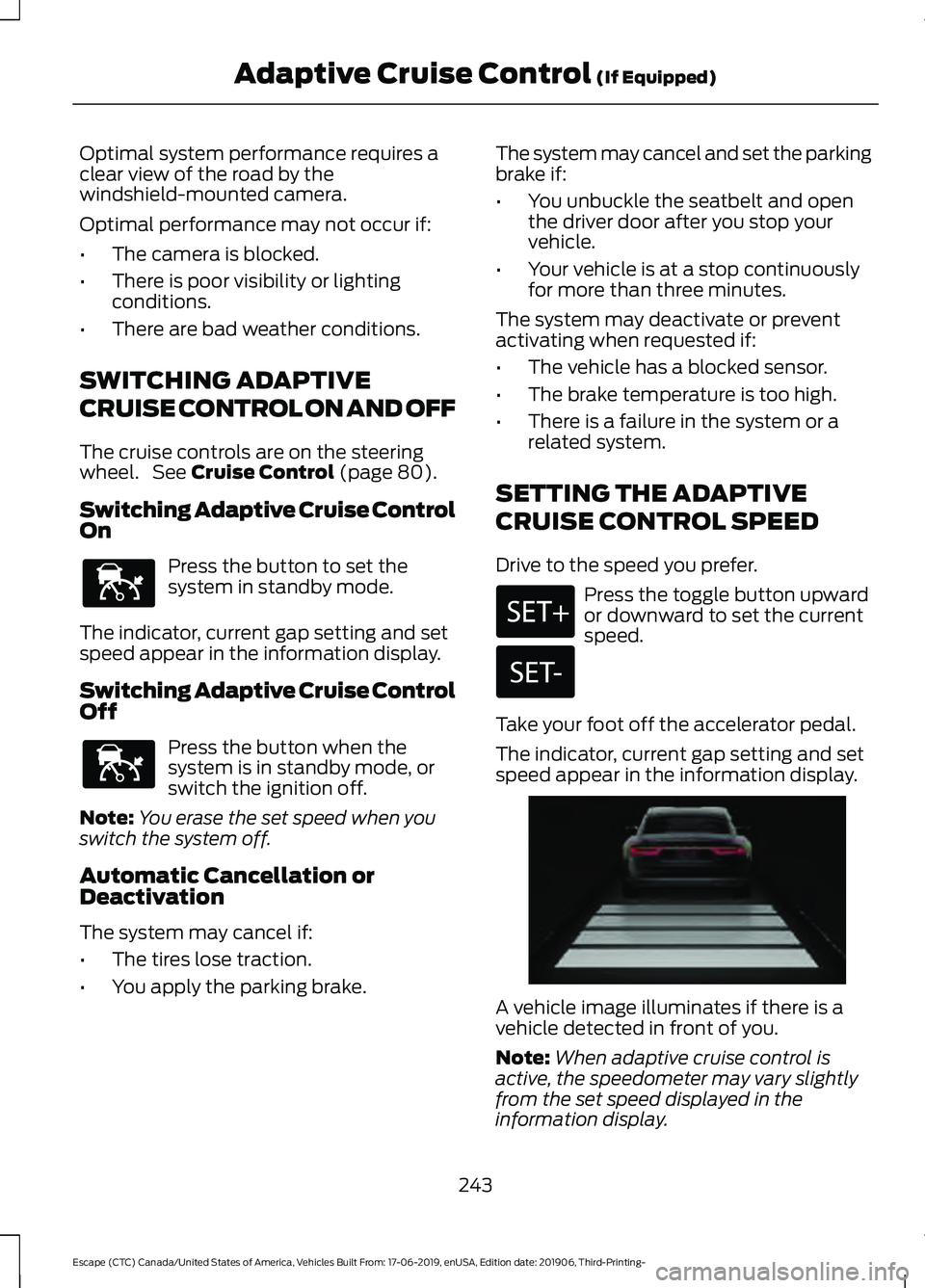
speed appear in the information display. A vehicle image illuminates if there is a
vehicle detected in front of you.
Note:
When adaptive cruise control is
active, the speedometer may vary slightly
from the set speed displayed in the
information display.
243
Escape (CTC) Canada/United States of America, Vehicles Built From: 17-06-2019, enUSA, Edition date: 201906, Third-Printing- Adaptive Cruise Control
(If Equipped)E144529 E144529 E255686
Page 252 of 553
Adaptive Cruise Control –
Information Messages - Vehicles
With: Adaptive Cruise Control With
Stop and Go
Note:
Depending on your vehicle options
and instrument cluster type, not all
messages display or are available.
Note: The system could abbreviate or
shorten certain messages depending upon
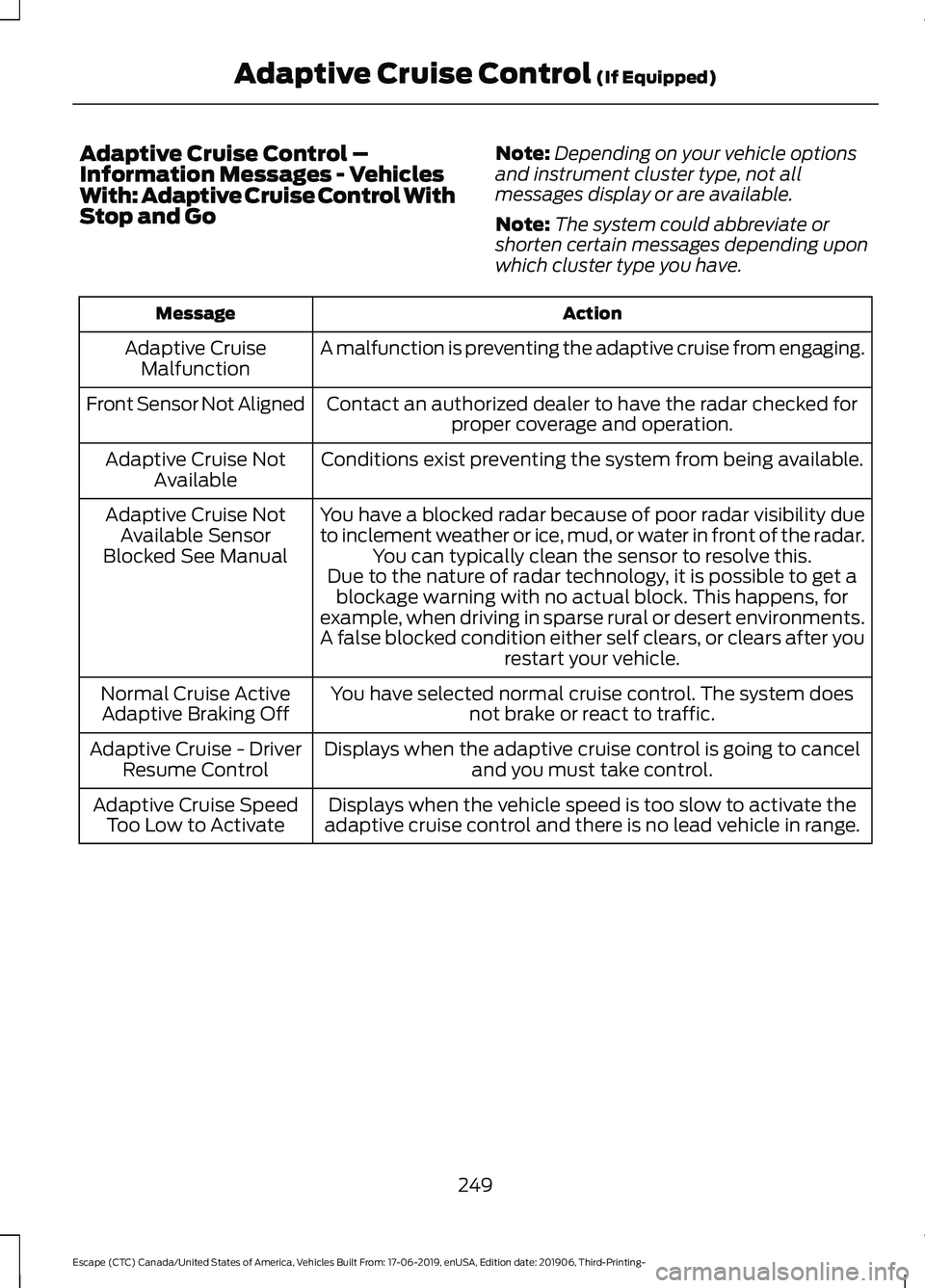
which cluster type you have. Action
Message
A malfunction is preventing the adaptive cruise from engaging.
Adaptive Cruise
Malfunction
Front Sensor Not Aligned Contact an authorized dealer to have the radar checked for
proper coverage and operation.
Conditions exist preventing the system from being available.
Adaptive Cruise Not
Available
You have a blocked radar because of poor radar visibility due
to inclement weather or ice, mud, or water in front of the radar.You can typically clean the sensor to resolve this.
Adaptive Cruise Not
Available Sensor
Blocked See Manual Due to the nature of radar technology, it is possible to get ablockage warning with no actual block. This happens, for
example, when driving in sparse rural or desert environments.
A false blocked condition either self clears, or clears after you restart your vehicle.
You have selected normal cruise control. The system does not brake or react to traffic.
Normal Cruise Active
Adaptive Braking Off
Displays when the adaptive cruise control is going to canceland you must take control.
Adaptive Cruise - Driver
Resume Control
Displays when the vehicle speed is too slow to activate the
adaptive cruise control and there is no lead vehicle in range.
Adaptive Cruise Speed
Too Low to Activate
249
Escape (CTC) Canada/United States of America, Vehicles Built From: 17-06-2019, enUSA, Edition date: 201906, Third-Printing- Adaptive Cruise Control (If Equipped)
Page 265 of 553
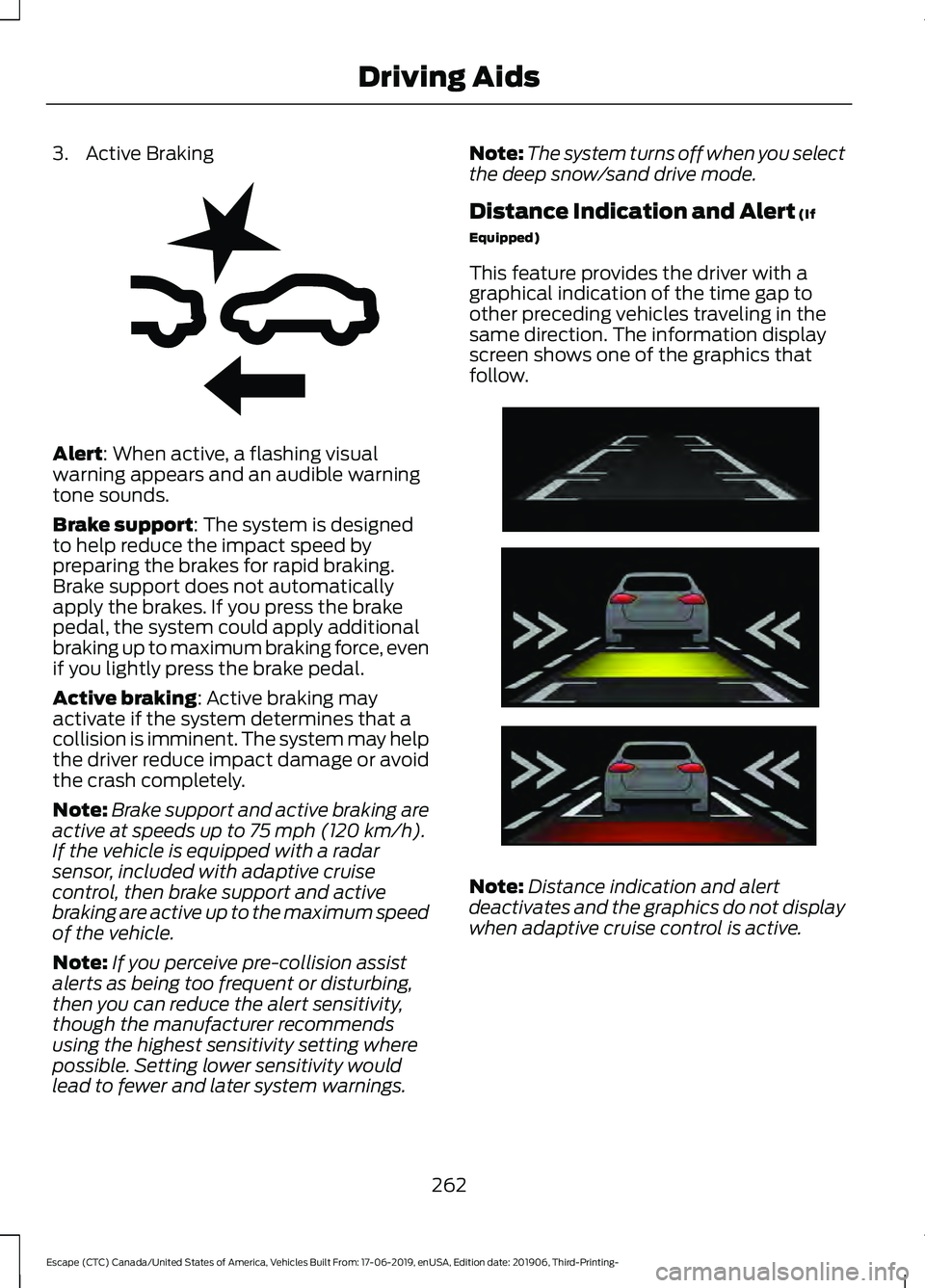
3. Active Braking
Alert: When active, a flashing visual
warning appears and an audible warning
tone sounds.
Brake support
: The system is designed
to help reduce the impact speed by
preparing the brakes for rapid braking.
Brake support does not automatically
apply the brakes. If you press the brake
pedal, the system could apply additional
braking up to maximum braking force, even
if you lightly press the brake pedal.
Active braking
: Active braking may
activate if the system determines that a
collision is imminent. The system may help
the driver reduce impact damage or avoid
the crash completely.
Note: Brake support and active braking are
active at speeds up to
75 mph (120 km/h).
If the vehicle is equipped with a radar
sensor, included with adaptive cruise
control, then brake support and active
braking are active up to the maximum speed
of the vehicle.
Note: If you perceive pre-collision assist
alerts as being too frequent or disturbing,
then you can reduce the alert sensitivity,
though the manufacturer recommends
using the highest sensitivity setting where
possible. Setting lower sensitivity would
lead to fewer and later system warnings. Note:
The system turns off when you select
the deep snow/sand drive mode.
Distance Indication and Alert
(If
Equipped)
This feature provides the driver with a
graphical indication of the time gap to
other preceding vehicles traveling in the
same direction. The information display
screen shows one of the graphics that
follow. Note:
Distance indication and alert
deactivates and the graphics do not display
when adaptive cruise control is active.
262
Escape (CTC) Canada/United States of America, Vehicles Built From: 17-06-2019, enUSA, Edition date: 201906, Third-Printing- Driving AidsE255268 E254791
Page 349 of 553
General Information
WARNING: Failure to follow these
guidelines could result in an increased
risk of loss of vehicle control, injury or
death.
Note: Do not use the kit if a tire has become
severely damaged. Only punctures located
within the tire tread can be sealed with the
kit.
Do not attempt to repair punctures larger
than 0.24 in (6 mm) or damage to the tire's
sidewall. The tire may not completely seal.
Loss of air pressure may adversely affect
tire performance. For this reason:
Note: Do not drive the vehicle above
50 mph (80 km/h)
.
Note: Do not drive further than
120 mi
(200 km). Drive only to the closest
authorized Ford dealer or tire repair shop to
have your tire inspected.
• Drive carefully and avoid abrupt
steering maneuvers.
• Periodically monitor tire inflation
pressure in the affected tire; if the tire
is losing pressure, have the vehicle
towed.
• Read the information in the Tips for
Use of the Kit section to make sure safe
operation of the kit and your vehicle.
Tips for Use of the Kit
To ensure safe operation of the kit:
• Read all instructions and cautions fully.
• Before operating the kit, make sure
your vehicle is safely off the road and
away from moving traffic. Turn on the
hazard lights.
• Always set the parking brake to ensure
the vehicle doesn't move unexpectedly. •
Do not remove any foreign objects,
such as nails or screws, from the tire.
• When using the kit, leave the engine
running (only if the vehicle is outdoors
or in a well-ventilated area) so the
compressor does not drain the
vehicle's battery.
• Do not allow the compressor to
operate continuously for more than 15
minutes. This will help prevent the
compressor from overheating.
• Never leave the kit unattended during
operation.
• Sealant compound contains latex.
Those with latex sensitivities should
use appropriate precautions to avoid
an allergic reaction.
• Keep the kit away from children.
• Only use the kit when the ambient
temperature is between -22°F (-30°C)
and 158°F (70°C).
• Only use the sealing compound before
the use-by date. The use-by date is on
a label on the sealant canister and can
be seen through the rectangular
viewing window on the bottom of the
compressor. Check the use-by date
regularly and replace the canister when
the sealant expires.
• Do not store the kit unsecured inside
the passenger compartment of the
vehicle as it may cause injury during a
sudden stop or crash. Always store the
kit in its original location.
• After sealant use, the tire pressure
monitoring system sensor and valve
stem on the wheel must be replaced
by an authorized Ford dealer.
• Operating the kit could cause an
electrical disturbance in radio, CD, and
DVD player operation.
346
Escape (CTC) Canada/United States of America, Vehicles Built From: 17-06-2019, enUSA, Edition date: 201906, Third-Printing- Wheels and Tires
Page 368 of 553
Follow these guidelines when using snow
tires and traction devices
•
If possible, avoid fully loading your
vehicle
• Purchase chains or cables from a
manufacturer that clearly labels body
to tire dimension restrictions.
• Use 10 mm cables or chains only on
front axle with 225/65R17 tires.
• Not all S-class snow chains or cables
meet these restrictions. Chains of this
size restriction will include a tensioning
device.
• The snow chains or cables must be
mounted in pairs on the front axle.
• Do not use chains or cables on
225/60R18 and 225/55R19 tires.
• Install cables securely, verifying that
the cables do not touch any wiring,
brake lines or fuel lines.
• When driving with tire cables do not
exceed 30 mph (48 km/h) or the
maximum speed recommended by the
chain manufacturer, whichever is less.
• Drive cautiously. If you hear the cables
rub or bang against the vehicle, stop
and retighten them. If this does not
work, remove the cables to prevent
vehicle damage.
• Remove the cables when they are no
longer needed. Do not use cables on
dry roads.
If you have any questions regarding snow
chains or cables, please contact your
authorized dealer. TIRE PRESSURE MONITORING
SYSTEM WARNING: The tire pressure
monitoring system is not a substitute for
manually checking tire pressures. You
should periodically check tire pressures
using a pressure gauge. Failure to
correctly maintain tire pressures could
increase the risk of tire failure, loss of
control, vehicle rollover and personal
injury.
Note: You should only use tire sealants in
roadside emergencies as they may cause
damage to the tire pressure monitoring
system sensor.
Note: If the tire pressure monitoring system
sensor becomes damaged, it may not
function. Each tire, including the spare (if
provided), should be checked
monthly when cold and inflated
to the inflation pressure recommended by
the vehicle manufacturer on the vehicle
placard or tire inflation pressure label. (If
your vehicle has tires of a different size
than the size indicated on the vehicle
placard or tire inflation pressure label, you
should determine the proper tire inflation
pressure for those tires).
As an added safety feature, your vehicle
has been equipped with a Tire Pressure
Monitoring System (TPMS) that
illuminates a low tire pressure telltale
when one or more of your tires is
significantly under-inflated. Accordingly,
when the low tire pressure telltale
illuminates, you should stop and check
your tires as soon as possible, and inflate
365
Escape (CTC) Canada/United States of America, Vehicles Built From: 17-06-2019, enUSA, Edition date: 201906, Third-Printing- Wheels and Tires
Page 372 of 553
How Temperature Affects Your Tire
Pressure
The tire pressure monitoring system
monitors tire pressure in each pneumatic
tire. While driving in a normal manner, a
typical passenger tire inflation pressure
may increase about 2
–4 psi (14– 28 kPa)
from a cold start situation. If the vehicle is
stationary overnight with the outside
temperature significantly lower than the
daytime temperature, the tire pressure may
decrease about 3 psi (21 kPa) for a drop of
30°F (17°C) in ambient temperature. This
lower pressure value may be detected by
the tire pressure monitoring system as
being significantly lower than the
recommended inflation pressure and
activate the system warning light for low
tire pressure. If the low tire pressure
warning light is on, visually check each tire
to verify that no tire is flat. If one or more
tires are flat, repair as necessary. Check
the air pressure in the road tires. If any tire
is under-inflated, carefully drive the vehicle
to the nearest location where air can be
added to the tires. Inflate all the tires to
the recommended inflation pressure.
CHANGING A ROAD WHEEL
(IF
EQUIPPED) WARNING:
The tire pressure
monitoring system is not a substitute for
manually checking tire pressures. You
should periodically check tire pressures
using a pressure gauge. Failure to
correctly maintain tire pressures could
increase the risk of tire failure, loss of
control, vehicle rollover and personal
injury. WARNING:
If the tire pressure
monitor sensor becomes damaged it
may not function. Note:
Only use tire sealants in roadside
emergencies as they may cause damage to
the tire pressure monitoring system sensor.
Note: The tire pressure monitoring system
indicator light illuminates when the spare
tire is in use. To restore the full function of
the monitoring system, all road wheels
equipped with tire pressure monitoring
sensors must be mounted on the vehicle.
If you get a flat tire when driving, do not
apply the brake heavily. Instead, gradually
decrease your speed. Hold the steering
wheel firmly and slowly move to a safe
place on the side of the road.
Have a flat serviced by an authorized
dealer in order to prevent damage to the
tire pressure monitoring system sensors.
See
Tire Pressure Monitoring System
(page 365). Replace the spare tire with a
road tire as soon as possible. During
repairing or replacing of the flat tire, have
the authorized dealer inspect the tire
pressure monitoring system sensor for
damage.
Dissimilar Spare Wheel and Tire
Assembly Information WARNING:
Failure to follow these
guidelines could result in an increased
risk of loss of vehicle control, injury or
death.
If you have a dissimilar spare wheel and
tire, then it is intended for temporary use
only. This means that if you need to use it,
you should replace it as soon as possible
with a road wheel and tire assembly that
is the same size and type as the road tires
and wheels that we provided with the
vehicle. If the dissimilar spare tire or wheel
is damaged, replace it instead of repairing
it.
369
Escape (CTC) Canada/United States of America, Vehicles Built From: 17-06-2019, enUSA, Edition date: 201906, Third-Printing- Wheels and Tires
Page 538 of 553
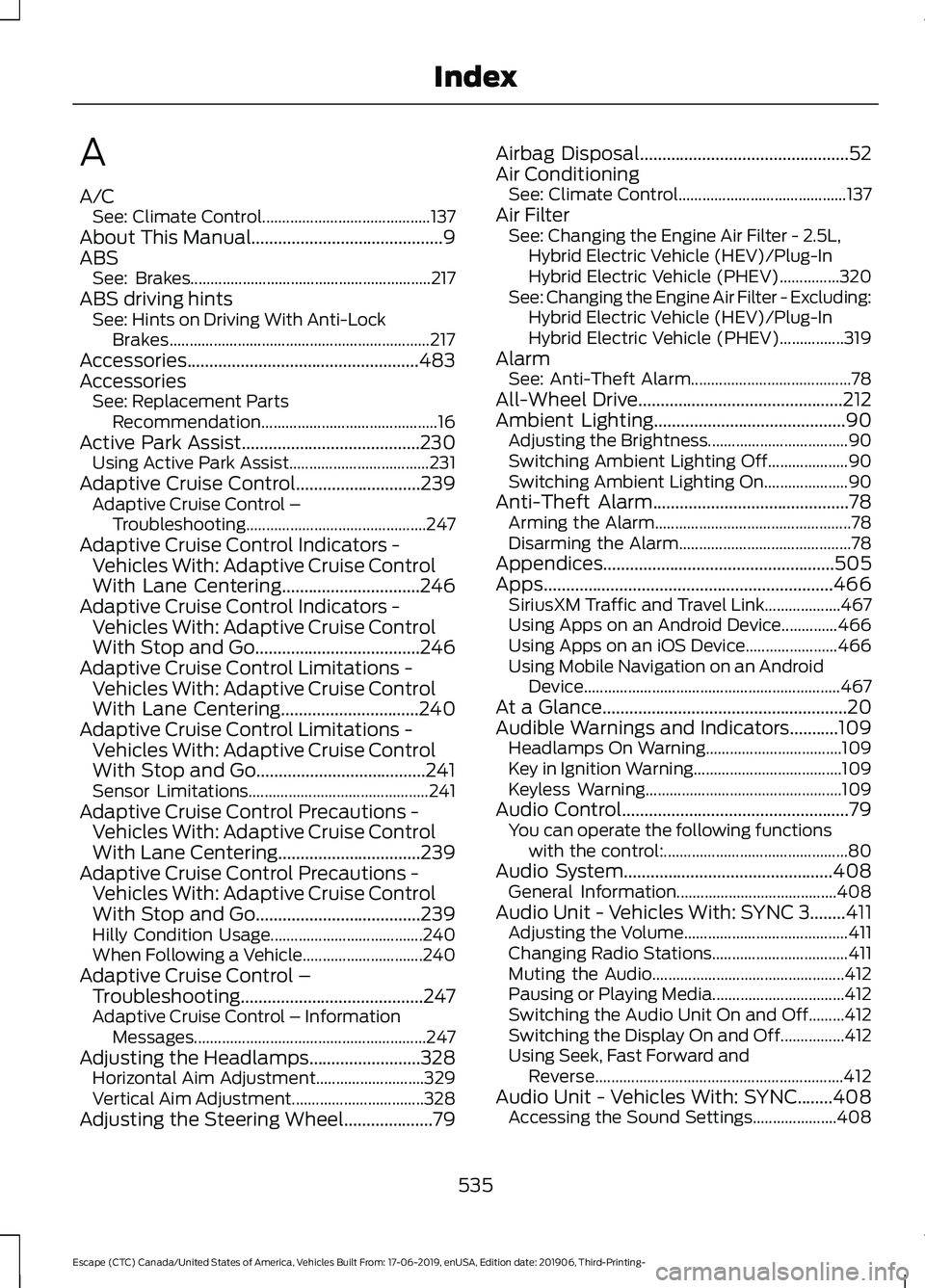
A
A/C
See: Climate Control.......................................... 137
About This Manual...........................................9
ABS See: Brakes............................................................ 217
ABS driving hints See: Hints on Driving With Anti-Lock
Brakes................................................................. 217
Accessories....................................................483
Accessories See: Replacement Parts
Recommendation............................................ 16
Active Park Assist........................................230
Using Active Park Assist................................... 231
Adaptive Cruise Control
............................239
Adaptive Cruise Control –
Troubleshooting............................................. 247
Adaptive Cruise Control Indicators - Vehicles With: Adaptive Cruise Control
With Lane Centering
...............................246
Adaptive Cruise Control Indicators - Vehicles With: Adaptive Cruise Control
With Stop and Go.....................................246
Adaptive Cruise Control Limitations - Vehicles With: Adaptive Cruise Control
With Lane Centering...............................240
Adaptive Cruise Control Limitations - Vehicles With: Adaptive Cruise Control
With Stop and Go......................................241
Sensor Limitations............................................. 241
Adaptive Cruise Control Precautions - Vehicles With: Adaptive Cruise Control
With Lane Centering................................239
Adaptive Cruise Control Precautions - Vehicles With: Adaptive Cruise Control
With Stop and Go.....................................239
Hilly Condition Usage...................................... 240
When Following a Vehicle.............................. 240
Adaptive Cruise Control – Troubleshooting.........................................247
Adaptive Cruise Control – Information Messages.......................................................... 247
Adjusting the Headlamps.........................328 Horizontal Aim Adjustment........................... 329
Vertical Aim Adjustment................................. 328
Adjusting the Steering Wheel
....................79 Airbag Disposal
...............................................52
Air Conditioning See: Climate Control.......................................... 137
Air Filter See: Changing the Engine Air Filter - 2.5L,
Hybrid Electric Vehicle (HEV)/Plug-In
Hybrid Electric Vehicle (PHEV)...............320
See: Changing the Engine Air Filter - Excluding: Hybrid Electric Vehicle (HEV)/Plug-In
Hybrid Electric Vehicle (PHEV)................319
Alarm See: Anti-Theft Alarm........................................ 78
All-Wheel Drive
..............................................212
Ambient Lighting...........................................90 Adjusting the Brightness................................... 90
Switching Ambient Lighting Off.................... 90
Switching Ambient Lighting On..................... 90
Anti-Theft Alarm............................................78 Arming the Alarm................................................. 78
Disarming the Alarm........................................... 78
Appendices....................................................505
Apps.................................................................466 SiriusXM Traffic and Travel Link................... 467
Using Apps on an Android Device..............466
Using Apps on an iOS Device....................... 466
Using Mobile Navigation on an Android Device................................................................ 467
At a Glance.......................................................20
Audible Warnings and Indicators...........109 Headlamps On Warning.................................. 109
Key in Ignition Warning..................................... 109
Keyless Warning................................................. 109
Audio Control
...................................................79
You can operate the following functions
with the control:.............................................. 80
Audio System
...............................................408
General Information........................................ 408
Audio Unit - Vehicles With: SYNC 3........411 Adjusting the Volume......................................... 411
Changing Radio Stations.................................. 411
Muting the Audio................................................ 412
Pausing or Playing Media................................. 412
Switching the Audio Unit On and Off.........412
Switching the Display On and Off................412
Using Seek, Fast Forward and Reverse.............................................................. 412
Audio Unit - Vehicles With: SYNC........408 Accessing the Sound Settings..................... 408
535
Escape (CTC) Canada/United States of America, Vehicles Built From: 17-06-2019, enUSA, Edition date: 201906, Third-Printing- Index
Page 541 of 553
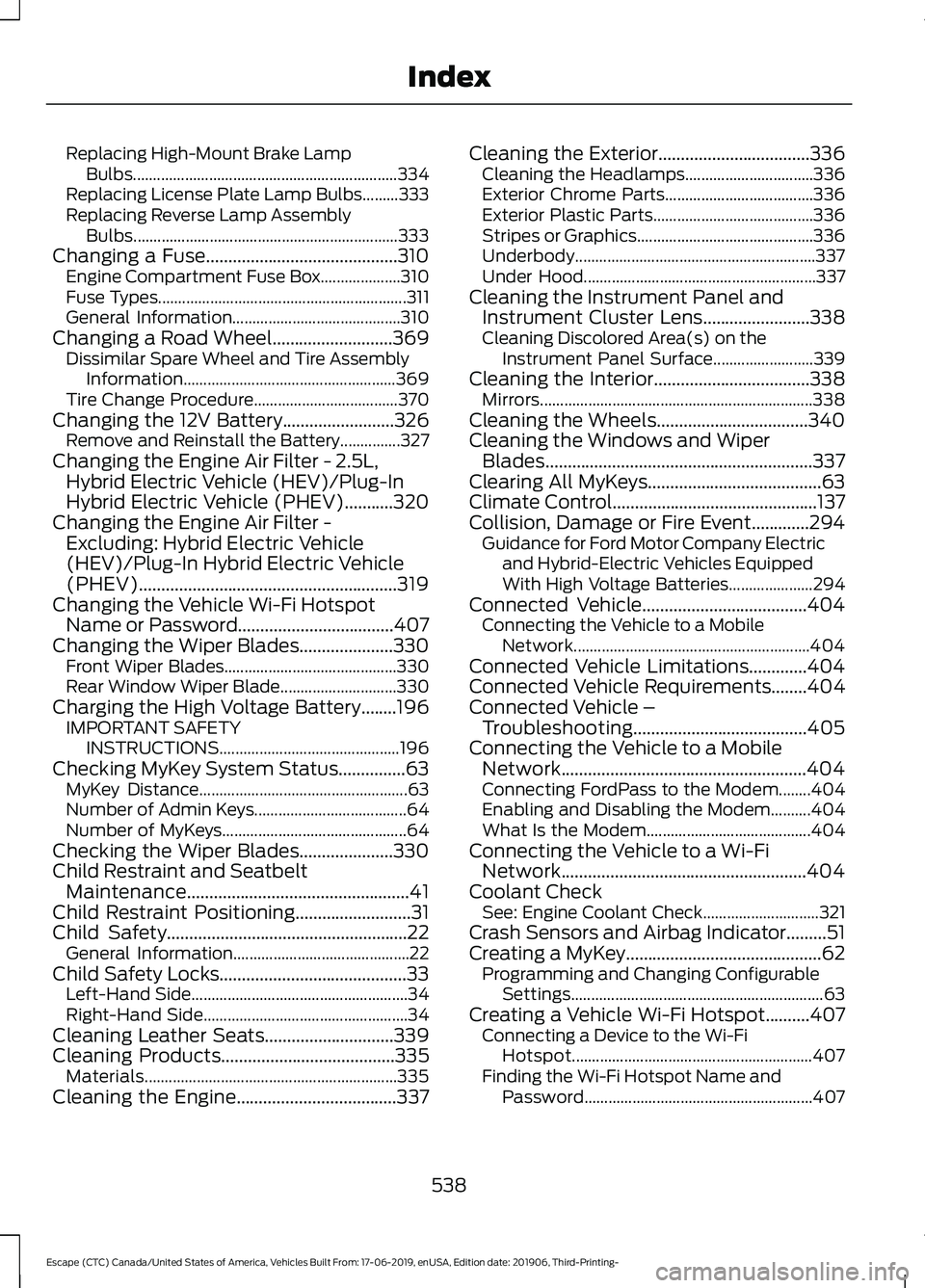
Replacing High-Mount Brake Lamp
Bulbs.................................................................. 334
Replacing License Plate Lamp Bulbs.........333
Replacing Reverse Lamp Assembly Bulbs.................................................................. 333
Changing a Fuse...........................................310 Engine Compartment Fuse Box.................... 310
Fuse Types.............................................................. 311
General Information.......................................... 310
Changing a Road Wheel...........................369 Dissimilar Spare Wheel and Tire Assembly
Information..................................................... 369
Tire Change Procedure.................................... 370
Changing the 12V Battery.........................326 Remove and Reinstall the Battery...............327
Changing the Engine Air Filter - 2.5L, Hybrid Electric Vehicle (HEV)/Plug-In
Hybrid Electric Vehicle (PHEV)...........320
Changing the Engine Air Filter - Excluding: Hybrid Electric Vehicle
(HEV)/Plug-In Hybrid Electric Vehicle
(PHEV)..........................................................319
Changing the Vehicle Wi-Fi Hotspot Name or Password
...................................407
Changing the Wiper Blades.....................330
Front Wiper Blades........................................... 330
Rear Window Wiper Blade............................. 330
Charging the High Voltage Battery........196 IMPORTANT SAFETY
INSTRUCTIONS............................................. 196
Checking MyKey System Status...............63 MyKey Distance.................................................... 63
Number of Admin Keys...................................... 64
Number of MyKeys.............................................. 64
Checking the Wiper Blades.....................330
Child Restraint and Seatbelt Maintenance..................................................41
Child Restraint Positioning
..........................31
Child Safety......................................................22
General Information............................................ 22
Child Safety Locks..........................................33 Left-Hand Side...................................................... 34
Right-Hand Side................................................... 34
Cleaning Leather Seats.............................339
Cleaning Products
.......................................335
Materials............................................................... 335
Cleaning the Engine....................................337 Cleaning the Exterior..................................336
Cleaning the Headlamps................................ 336
Exterior Chrome Parts..................................... 336
Exterior Plastic Parts........................................ 336
Stripes or Graphics............................................ 336
Underbody............................................................ 337
Under Hood.......................................................... 337
Cleaning the Instrument Panel and Instrument Cluster Lens........................338
Cleaning Discolored Area(s) on the Instrument Panel Surface......................... 339
Cleaning the Interior...................................338 Mirrors.................................................................... 338
Cleaning the Wheels..................................340
Cleaning the Windows and Wiper Blades............................................................337
Clearing All MyKeys.......................................63
Climate Control
..............................................137
Collision, Damage or Fire Event.............294 Guidance for Ford Motor Company Electric
and Hybrid-Electric Vehicles Equipped
With High Voltage Batteries..................... 294
Connected Vehicle.....................................404 Connecting the Vehicle to a Mobile
Network........................................................... 404
Connected Vehicle Limitations.............404
Connected Vehicle Requirements
........404
Connected Vehicle – Troubleshooting.......................................
405
Connecting the Vehicle to a Mobile Network.......................................................404
Connecting FordPass to the Modem........404
Enabling and Disabling the Modem..........404
What Is the Modem......................................... 404
Connecting the Vehicle to a Wi-Fi Network.......................................................404
Coolant Check See: Engine Coolant Check............................. 321
Crash Sensors and Airbag Indicator.........51
Creating a MyKey
............................................62
Programming and Changing Configurable
Settings............................................................... 63
Creating a Vehicle Wi-Fi Hotspot..........407 Connecting a Device to the Wi-Fi
Hotspot............................................................ 407
Finding the Wi-Fi Hotspot Name and Password......................................................... 407
538
Escape (CTC) Canada/United States of America, Vehicles Built From: 17-06-2019, enUSA, Edition date: 201906, Third-Printing- Index