wheel FORD ESCAPE 2020 User Guide
[x] Cancel search | Manufacturer: FORD, Model Year: 2020, Model line: ESCAPE, Model: FORD ESCAPE 2020Pages: 553, PDF Size: 7.73 MB
Page 82 of 553
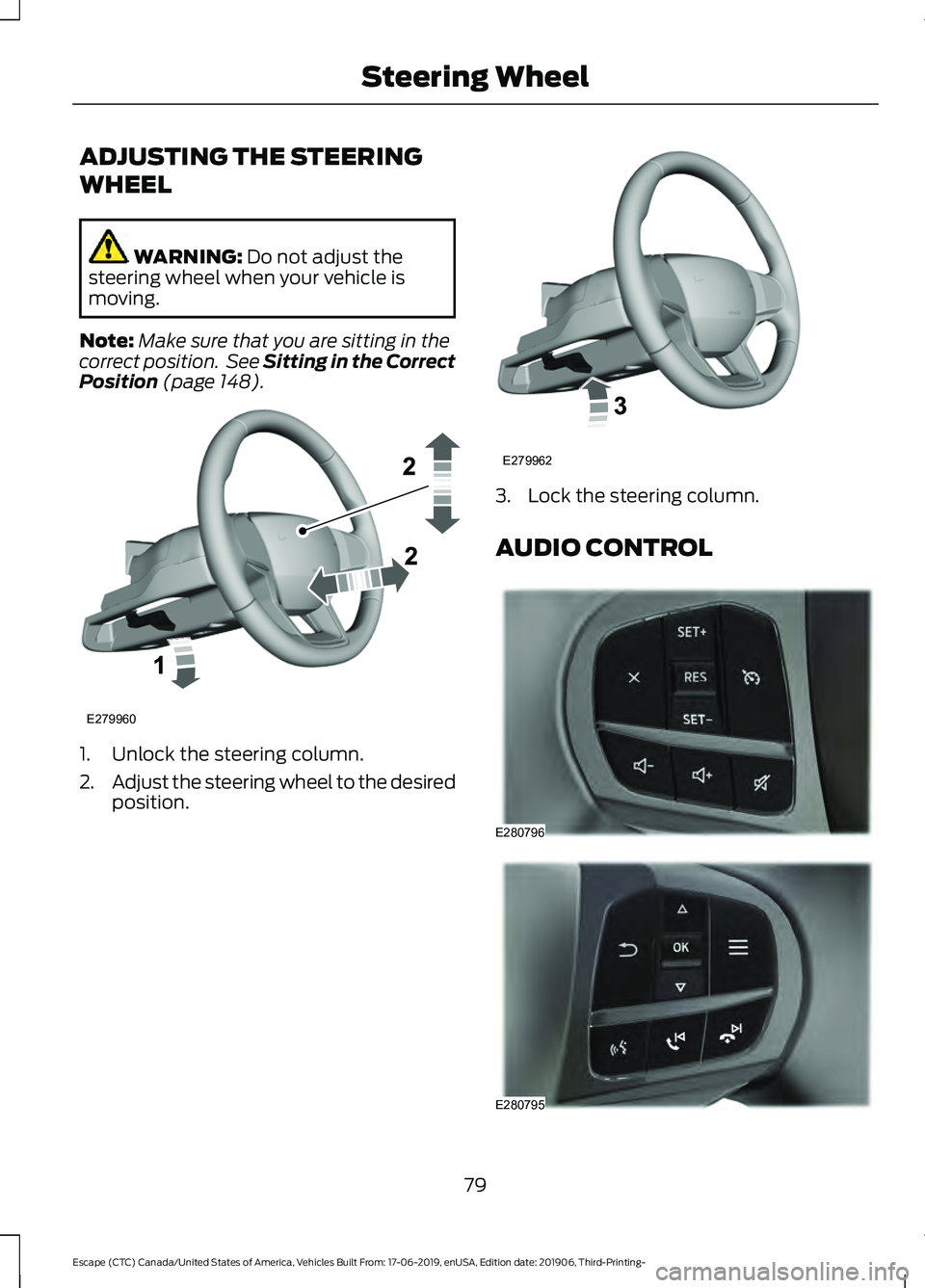
ADJUSTING THE STEERING
WHEEL
WARNING: Do not adjust the
steering wheel when your vehicle is
moving.
Note: Make sure that you are sitting in the
correct position. See Sitting in the Correct
Position
(page 148). 1. Unlock the steering column.
2.
Adjust the steering wheel to the desired
position. 3. Lock the steering column.
AUDIO CONTROL
79
Escape (CTC) Canada/United States of America, Vehicles Built From: 17-06-2019, enUSA, Edition date: 201906, Third-Printing- Steering WheelE279960 E279962 E280796 E280795
Page 83 of 553
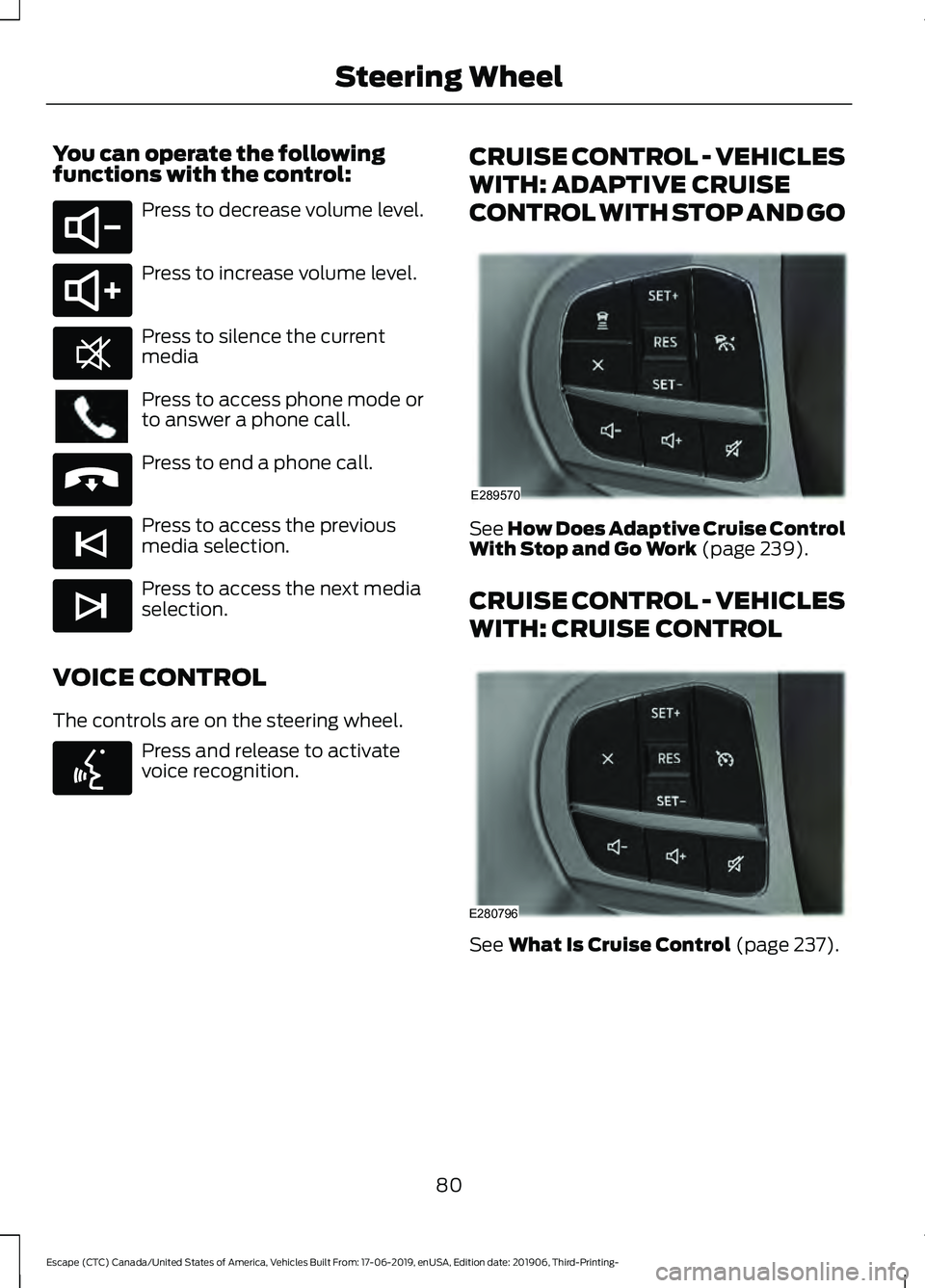
You can operate the following
functions with the control:
Press to decrease volume level.
Press to increase volume level.
Press to silence the current
media
Press to access phone mode or
to answer a phone call.
Press to end a phone call.
Press to access the previous
media selection.
Press to access the next media
selection.
VOICE CONTROL
The controls are on the steering wheel. Press and release to activate
voice recognition. CRUISE CONTROL - VEHICLES
WITH: ADAPTIVE CRUISE
CONTROL WITH STOP AND GO See How Does Adaptive Cruise Control
With Stop and Go Work (page 239).
CRUISE CONTROL - VEHICLES
WITH: CRUISE CONTROL See
What Is Cruise Control (page 237).
80
Escape (CTC) Canada/United States of America, Vehicles Built From: 17-06-2019, enUSA, Edition date: 201906, Third-Printing- Steering WheelE280802 E280803 E268549 E265040 E265045 E265044 E142599 E289570 E280796
Page 84 of 553
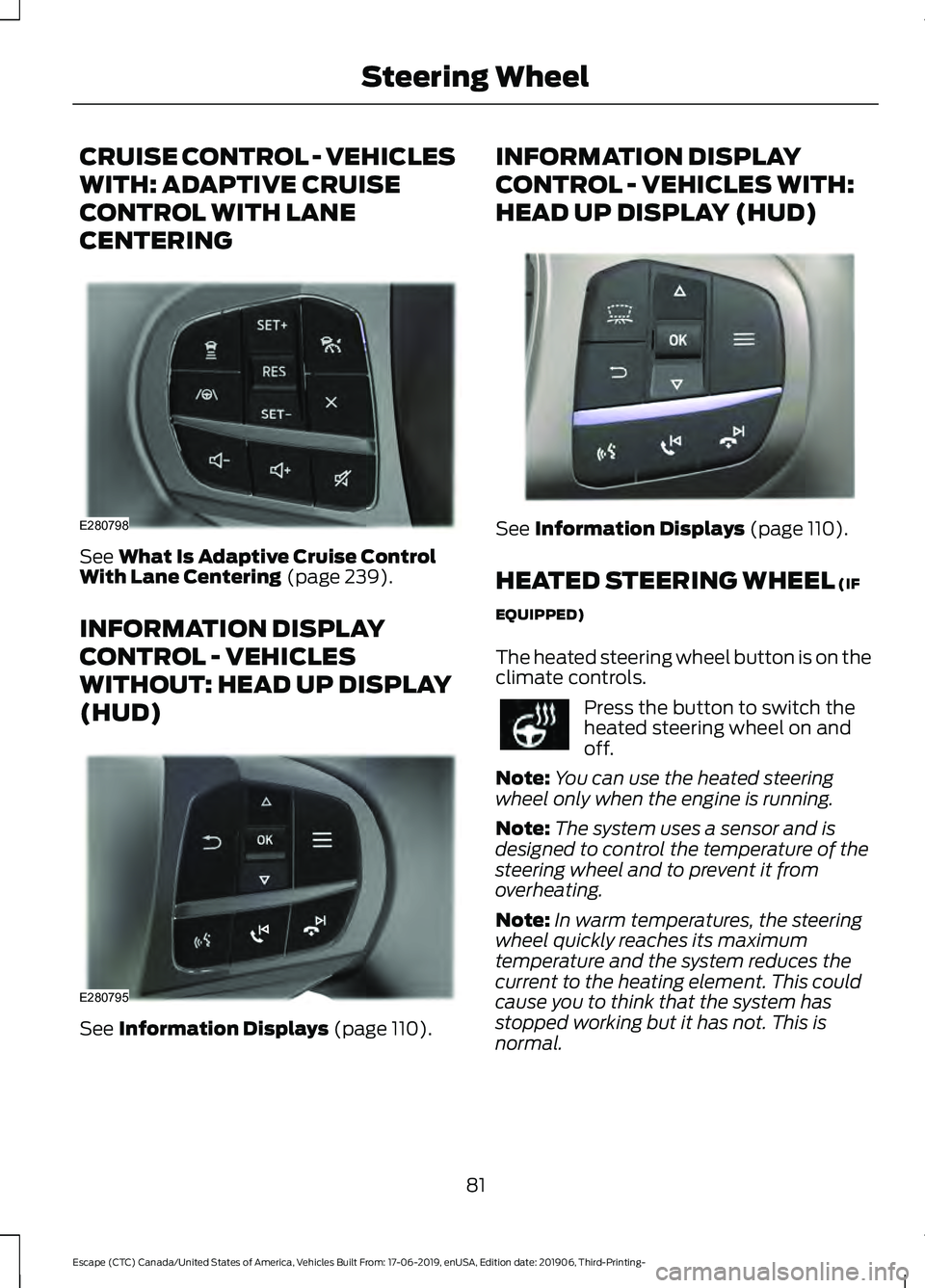
CRUISE CONTROL - VEHICLES
WITH: ADAPTIVE CRUISE
CONTROL WITH LANE
CENTERING
See What Is Adaptive Cruise Control
With Lane Centering (page 239).
INFORMATION DISPLAY
CONTROL - VEHICLES
WITHOUT: HEAD UP DISPLAY
(HUD) See
Information Displays (page 110). INFORMATION DISPLAY
CONTROL - VEHICLES WITH:
HEAD UP DISPLAY (HUD)
See
Information Displays (page 110).
HEATED STEERING WHEEL
(IF
EQUIPPED)
The heated steering wheel button is on the
climate controls. Press the button to switch the
heated steering wheel on and
off.
Note: You can use the heated steering
wheel only when the engine is running.
Note: The system uses a sensor and is
designed to control the temperature of the
steering wheel and to prevent it from
overheating.
Note: In warm temperatures, the steering
wheel quickly reaches its maximum
temperature and the system reduces the
current to the heating element. This could
cause you to think that the system has
stopped working but it has not. This is
normal.
81
Escape (CTC) Canada/United States of America, Vehicles Built From: 17-06-2019, enUSA, Edition date: 201906, Third-Printing- Steering WheelE280798 E280795 E285282
Page 85 of 553
HORN
82
Escape (CTC) Canada/United States of America, Vehicles Built From: 17-06-2019, enUSA, Edition date: 201906, Third-Printing- Steering WheelE270945
Page 103 of 553
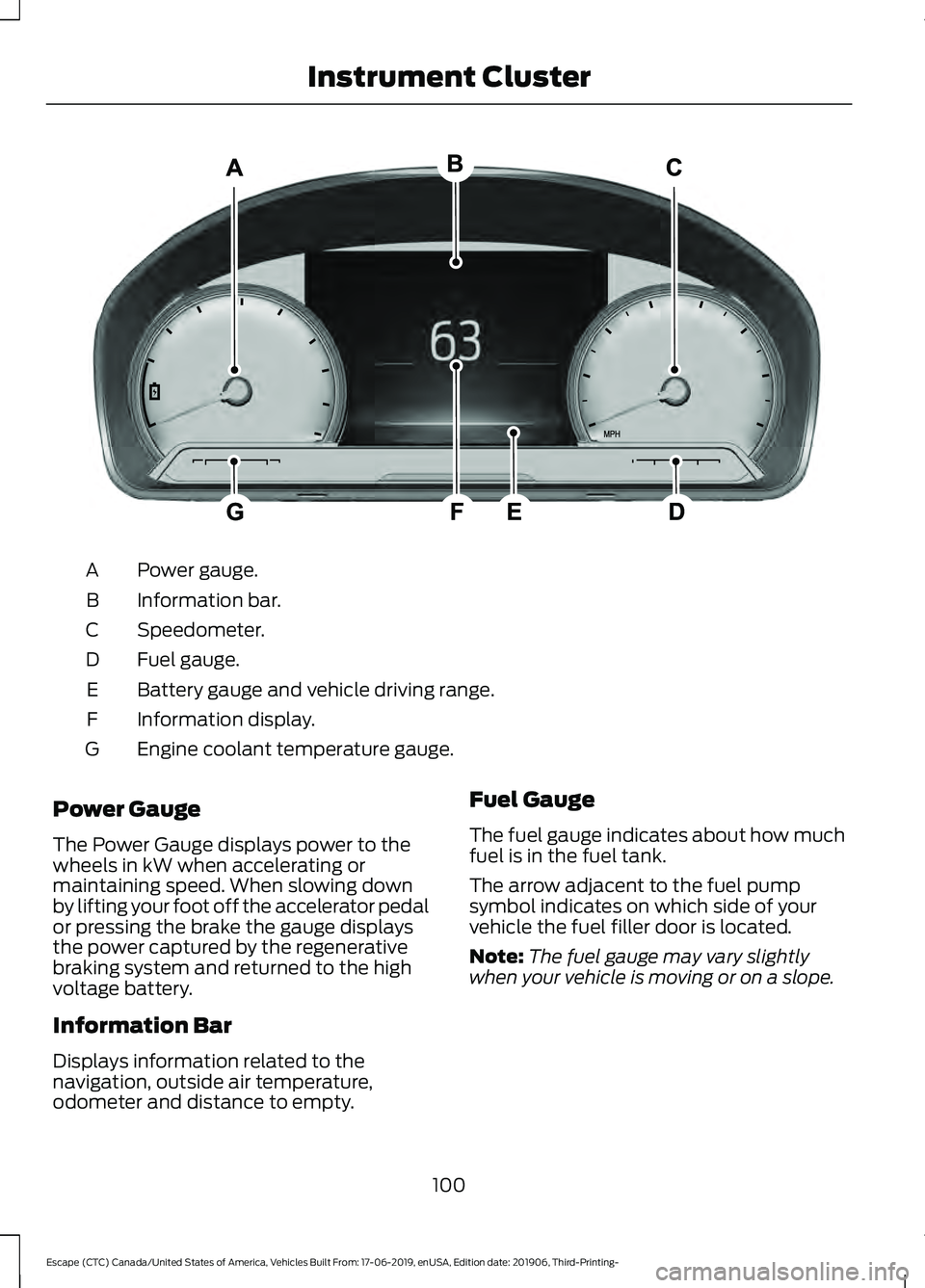
Power gauge.
A
Information bar.
B
Speedometer.
C
Fuel gauge.
D
Battery gauge and vehicle driving range.
E
Information display.
F
Engine coolant temperature gauge.
G
Power Gauge
The Power Gauge displays power to the
wheels in kW when accelerating or
maintaining speed. When slowing down
by lifting your foot off the accelerator pedal
or pressing the brake the gauge displays
the power captured by the regenerative
braking system and returned to the high
voltage battery.
Information Bar
Displays information related to the
navigation, outside air temperature,
odometer and distance to empty. Fuel Gauge
The fuel gauge indicates about how much
fuel is in the fuel tank.
The arrow adjacent to the fuel pump
symbol indicates on which side of your
vehicle the fuel filler door is located.
Note:
The fuel gauge may vary slightly
when your vehicle is moving or on a slope.
100
Escape (CTC) Canada/United States of America, Vehicles Built From: 17-06-2019, enUSA, Edition date: 201906, Third-Printing- Instrument ClusterE307890
Page 107 of 553
Note:
It is normal for vehicle range
estimates to vary due to changes in average
energy usage. This is why you typically see
different range estimates each time you fill
up your fuel tank or fully charge your battery.
Gasoline Distance to Empty
Indicates the approximate distance your
vehicle can travel on the fuel remaining in
the tank.
Electric Range
Indicates the approximate distance your
vehicle can travel on electric power only
with the engine off. Power Gauge
The Power Gauge displays power to the
wheels in kW when accelerating or
maintaining speed. The high voltage
battery power and engine power
contributions are distinguished by color
and added together to indicate total power
to the wheels. When slowing down by
lifting your foot off the accelerator pedal
or pressing the brake, the power captured
by the regenerative braking system and
returned to the high voltage battery is
displayed in green.
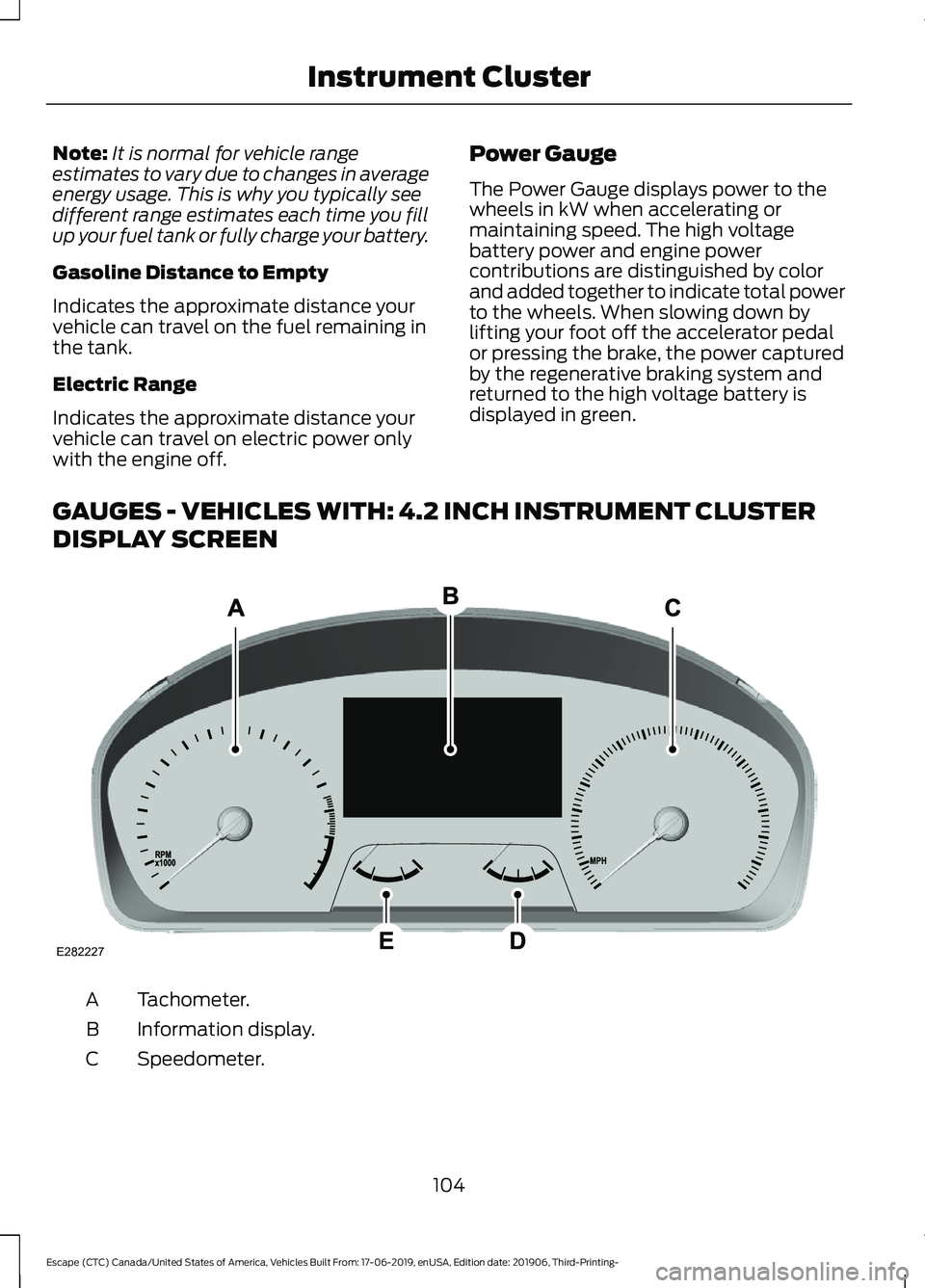
GAUGES - VEHICLES WITH: 4.2 INCH INSTRUMENT CLUSTER
DISPLAY SCREEN Tachometer.
A
Information display.
B
Speedometer.
C
104
Escape (CTC) Canada/United States of America, Vehicles Built From: 17-06-2019, enUSA, Edition date: 201906, Third-Printing- Instrument ClusterE282227
Page 113 of 553
GENERAL INFORMATION
WARNING: Driving while distracted
can result in loss of vehicle control, crash
and injury. We strongly recommend that
you use extreme caution when using any
device that may take your focus off the
road. Your primary responsibility is the
safe operation of your vehicle. We
recommend against the use of any
hand-held device while driving and
encourage the use of voice-operated
systems when possible. Make sure you
are aware of all applicable local laws
that may affect the use of electronic
devices while driving.
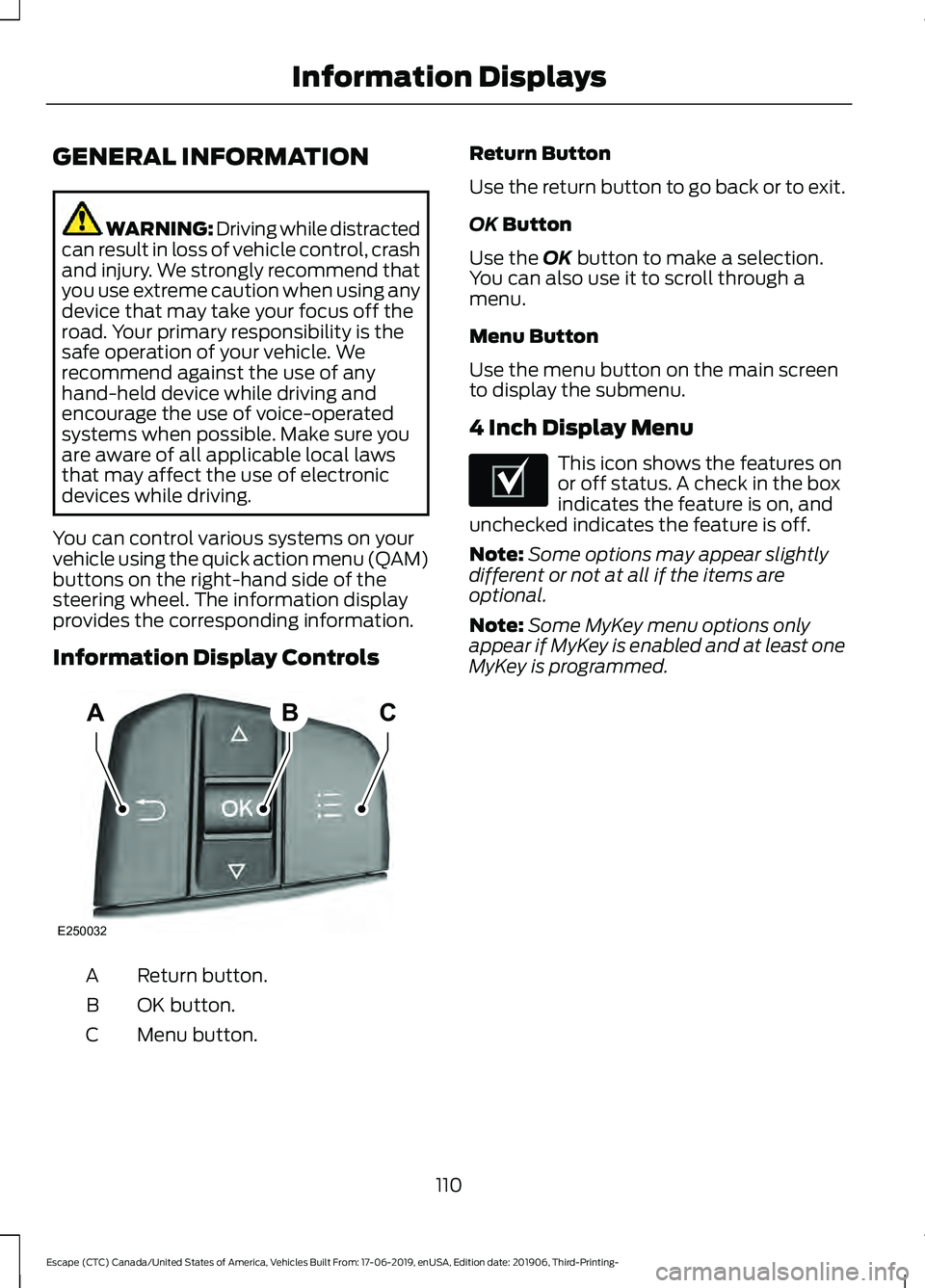
You can control various systems on your
vehicle using the quick action menu (QAM)
buttons on the right-hand side of the
steering wheel. The information display
provides the corresponding information.
Information Display Controls Return button.
A
OK button.
B
Menu button.
C Return Button
Use the return button to go back or to exit.
OK Button
Use the
OK button to make a selection.
You can also use it to scroll through a
menu.
Menu Button
Use the menu button on the main screen
to display the submenu.
4 Inch Display Menu This icon shows the features on
or off status. A check in the box
indicates the feature is on, and
unchecked indicates the feature is off.
Note: Some options may appear slightly
different or not at all if the items are
optional.
Note: Some MyKey menu options only
appear if MyKey is enabled and at least one
MyKey is programmed.
110
Escape (CTC) Canada/United States of America, Vehicles Built From: 17-06-2019, enUSA, Edition date: 201906, Third-Printing- Information DisplaysABC
E250032 E204495
Page 122 of 553
Action
Message
The status of the AdvanceTrac sport mode after you switched it on.
AdvanceTrac SPORT
MODE
The status of the traction control system after you switched it off.
Traction Control Off
The status of the traction control system after you switched it on.
Traction Control On
Alarm Action
Message
Alarm triggered due to unauthorized entry. See Anti-Theft
Alarm (page 78).
Vehicle Alarm To Stop
Alarm, Start Vehicle.
AWD Action
Message
The all-wheel drive system temporarily turns off to protectitself from overheating.
AWD Temporarily
Disabled
The all-wheel drive system is locking up the torque transferclutch to help reduce clutch temperature.
AWD Temporarily
Locked
The all-wheel drive system temporarily turns off to protect
itself from overheating or if you are using the temporary spare tire.
AWD OFF
The all-wheel drive system will resume normal function and
clear this message after driving a short distance with the road tire re-installed or after the system cools.
AWD Restored
The all-wheel drive system is not operating properly. If the
warning stays on or continues to come on, have the system checked as soon as possible.
AWD Fault Service
Required
Displays when the transfer case fluid requires service.
Change AWD Power
Transfer Unit Lube
Displays when you have the transfer case fluid changed and reset to new.
AWD Power Transfer
Unit Lube Set to New
119
Escape (CTC) Canada/United States of America, Vehicles Built From: 17-06-2019, enUSA, Edition date: 201906, Third-Printing- Information Displays
Page 128 of 553
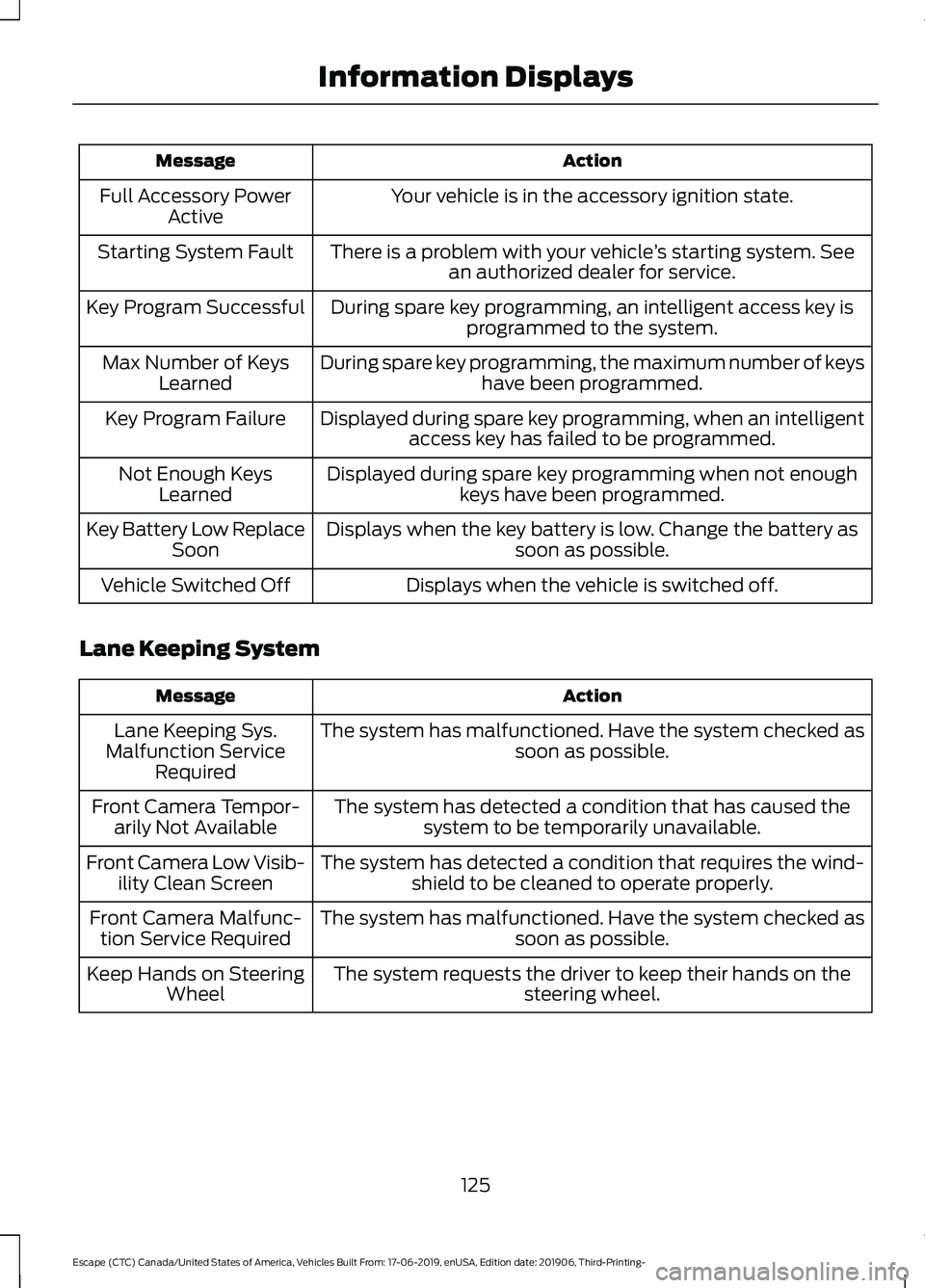
Action
Message
Your vehicle is in the accessory ignition state.
Full Accessory Power
Active
There is a problem with your vehicle ’s starting system. See
an authorized dealer for service.
Starting System Fault
During spare key programming, an intelligent access key isprogrammed to the system.
Key Program Successful
During spare key programming, the maximum number of keyshave been programmed.
Max Number of Keys
Learned
Displayed during spare key programming, when an intelligentaccess key has failed to be programmed.
Key Program Failure
Displayed during spare key programming when not enoughkeys have been programmed.
Not Enough Keys
Learned
Displays when the key battery is low. Change the battery as soon as possible.
Key Battery Low Replace
Soon
Displays when the vehicle is switched off.
Vehicle Switched Off
Lane Keeping System Action
Message
The system has malfunctioned. Have the system checked as soon as possible.
Lane Keeping Sys.
Malfunction Service Required
The system has detected a condition that has caused thesystem to be temporarily unavailable.
Front Camera Tempor-
arily Not Available
The system has detected a condition that requires the wind-shield to be cleaned to operate properly.
Front Camera Low Visib-
ility Clean Screen
The system has malfunctioned. Have the system checked assoon as possible.
Front Camera Malfunc-
tion Service Required
The system requests the driver to keep their hands on thesteering wheel.
Keep Hands on Steering
Wheel
125
Escape (CTC) Canada/United States of America, Vehicles Built From: 17-06-2019, enUSA, Edition date: 201906, Third-Printing- Information Displays
Page 137 of 553
Cleaning the Head Up Display
Use a damp, lint-free cloth to clean the
head up display.
Note:
Do not touch the display screen or
mirror.
Note: Do not use household cleaning
products or glass cleaners. This can cause
damage not covered by the vehicle
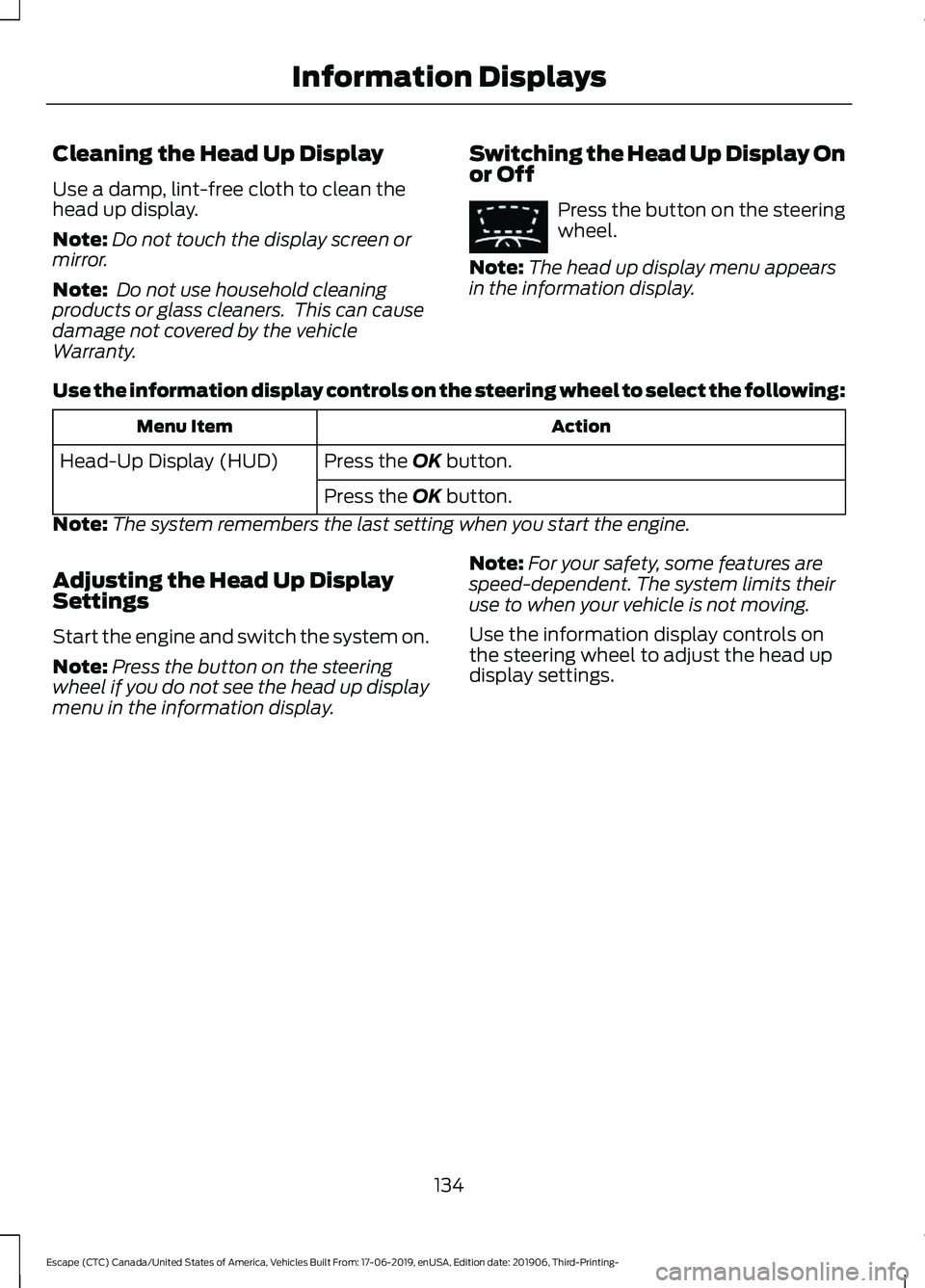
Warranty. Switching the Head Up Display On
or Off Press the button on the steering
wheel.
Note: The head up display menu appears
in the information display.
Use the information display controls on the steering wheel to select the following: Action
Menu Item
Press the OK button.
Head-Up Display (HUD)
Press the
OK button.
Note: The system remembers the last setting when you start the engine.
Adjusting the Head Up Display
Settings
Start the engine and switch the system on.
Note: Press the button on the steering
wheel if you do not see the head up display
menu in the information display. Note:
For your safety, some features are
speed-dependent. The system limits their
use to when your vehicle is not moving.
Use the information display controls on
the steering wheel to adjust the head up
display settings.
134
Escape (CTC) Canada/United States of America, Vehicles Built From: 17-06-2019, enUSA, Edition date: 201906, Third-Printing- Information DisplaysE265900