battery FORD ESCAPE 2020 Owner's Manual
[x] Cancel search | Manufacturer: FORD, Model Year: 2020, Model line: ESCAPE, Model: FORD ESCAPE 2020Pages: 553, PDF Size: 7.73 MB
Page 109 of 553
Engaged (green light): Illuminates when
you engage the adaptive cruise control
system. Turns off when you disengage the
speed control system.
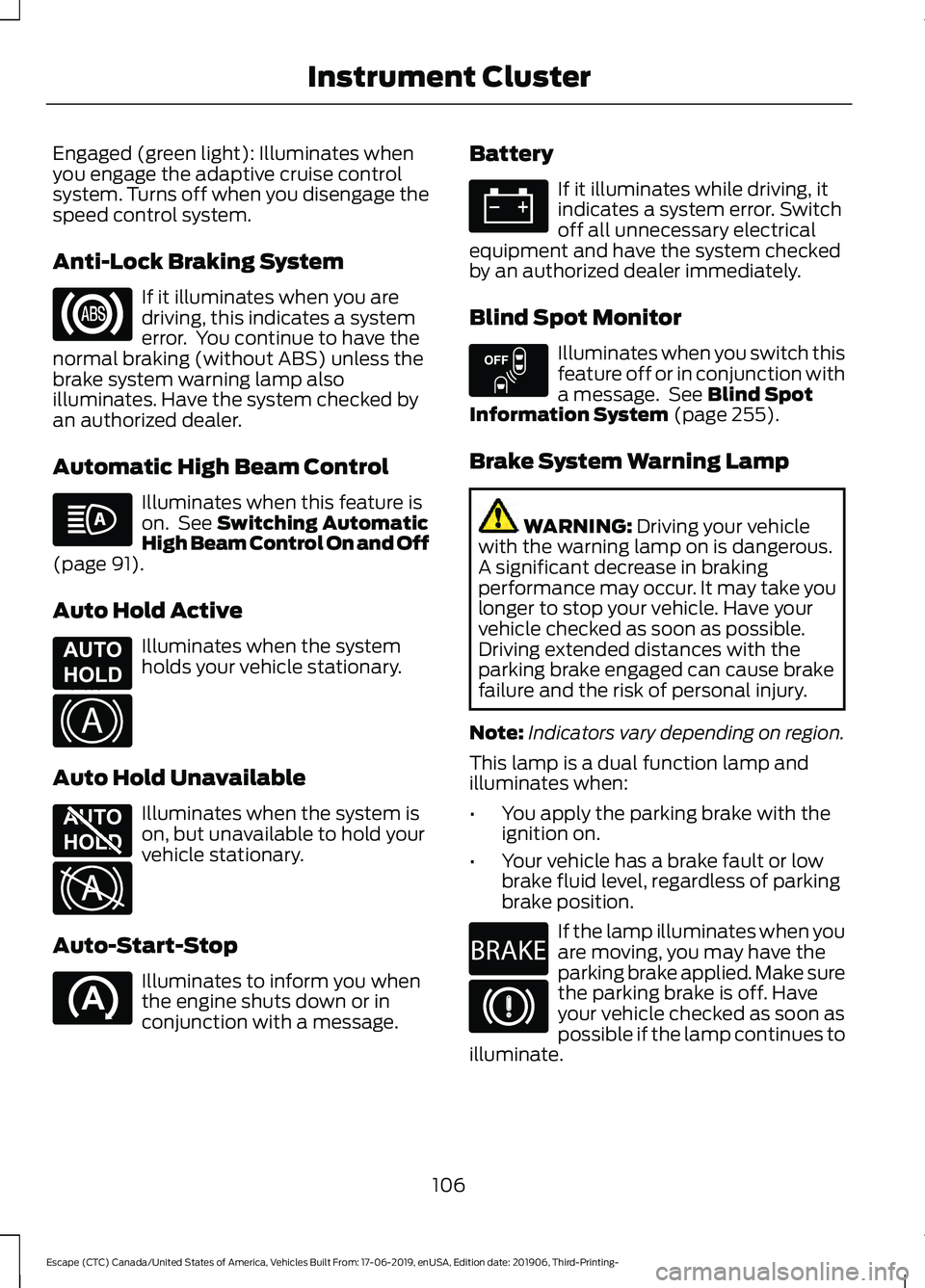
Anti-Lock Braking System
If it illuminates when you are
driving, this indicates a system
error. You continue to have the
normal braking (without ABS) unless the
brake system warning lamp also
illuminates. Have the system checked by
an authorized dealer.
Automatic High Beam Control Illuminates when this feature is
on. See Switching Automatic
High Beam Control On and Off
(page
91).
Auto Hold Active Illuminates when the system
holds your vehicle stationary.
Auto Hold Unavailable Illuminates when the system is
on, but unavailable to hold your
vehicle stationary.
Auto-Start-Stop Illuminates to inform you when
the engine shuts down or in
conjunction with a message. Battery If it illuminates while driving, it
indicates a system error. Switch
off all unnecessary electrical
equipment and have the system checked
by an authorized dealer immediately.
Blind Spot Monitor Illuminates when you switch this
feature off or in conjunction with
a message. See
Blind Spot
Information System (page 255).
Brake System Warning Lamp WARNING:
Driving your vehicle
with the warning lamp on is dangerous.
A significant decrease in braking
performance may occur. It may take you
longer to stop your vehicle. Have your
vehicle checked as soon as possible.
Driving extended distances with the
parking brake engaged can cause brake
failure and the risk of personal injury.
Note: Indicators vary depending on region.
This lamp is a dual function lamp and
illuminates when:
• You apply the parking brake with the
ignition on.
• Your vehicle has a brake fault or low
brake fluid level, regardless of parking
brake position. If the lamp illuminates when you
are moving, you may have the
parking brake applied. Make sure
the parking brake is off. Have
your vehicle checked as soon as
possible if the lamp continues to
illuminate.
106
Escape (CTC) Canada/United States of America, Vehicles Built From: 17-06-2019, enUSA, Edition date: 201906, Third-Printing- Instrument Cluster E197933 E322410 E197934 E322411 E151262 E270480
Page 120 of 553
•
When your power level is within the box
the color of the bar will be blue. This
means you are in Electric operation and
the engine is off.
• When your power level is outside of the
box the color of the bar will be white.
This means you are in Hybrid operation
with a combination of the electric
motor and the engine providing vehicle
power.
When you are decelerating with either your
foot off the accelerator pedal or on the
brake pedal you will see a green or white
solid bar indicating the power being used
to slow down the vehicle. You may also
see a green rectangular box which shows
the amount of power that can be
recaptured by the regenerative braking
system and returned to the high voltage
battery.
• When your power level is completely
within the box the color of the bar will
be all green. This means that the
regenerative braking system is being
used to efficiently slow the vehicle
down and return the maximum
percentage of energy to the high
voltage battery.
• When your power level is outside of the
green box then the bar will be white.
This means that both the regenerative
braking system and conventional
braking system are being used.
Electric Efficiency
Note: This feature applies to Plug-in
vehicles only.
This screen shows your average driving
distance per kWh of electricity used on
your plug-in hybrid vehicle. The value is
calculated only when your available
electric range is being used and the
gasoline engine is off. Distance per full charge is also shown. This
is an estimate of the electric range you
would have if you plugged in and fully
charged your vehicle right now. The higher
your electric efficiency, the higher your
distance per full charge.
Your electric efficiency is affected by your
driving style and route, climate control use,
outside temperature and other factors.
Best efficiency is achieved in mild ambient
temperatures with mild to moderate
acceleration and braking, moderate speeds
and low climate control usage.
INFORMATION MESSAGES
Depending on your vehicle options and
instrument cluster type, not all messages
display or are available.
Note:
The system abbreviates or shortens
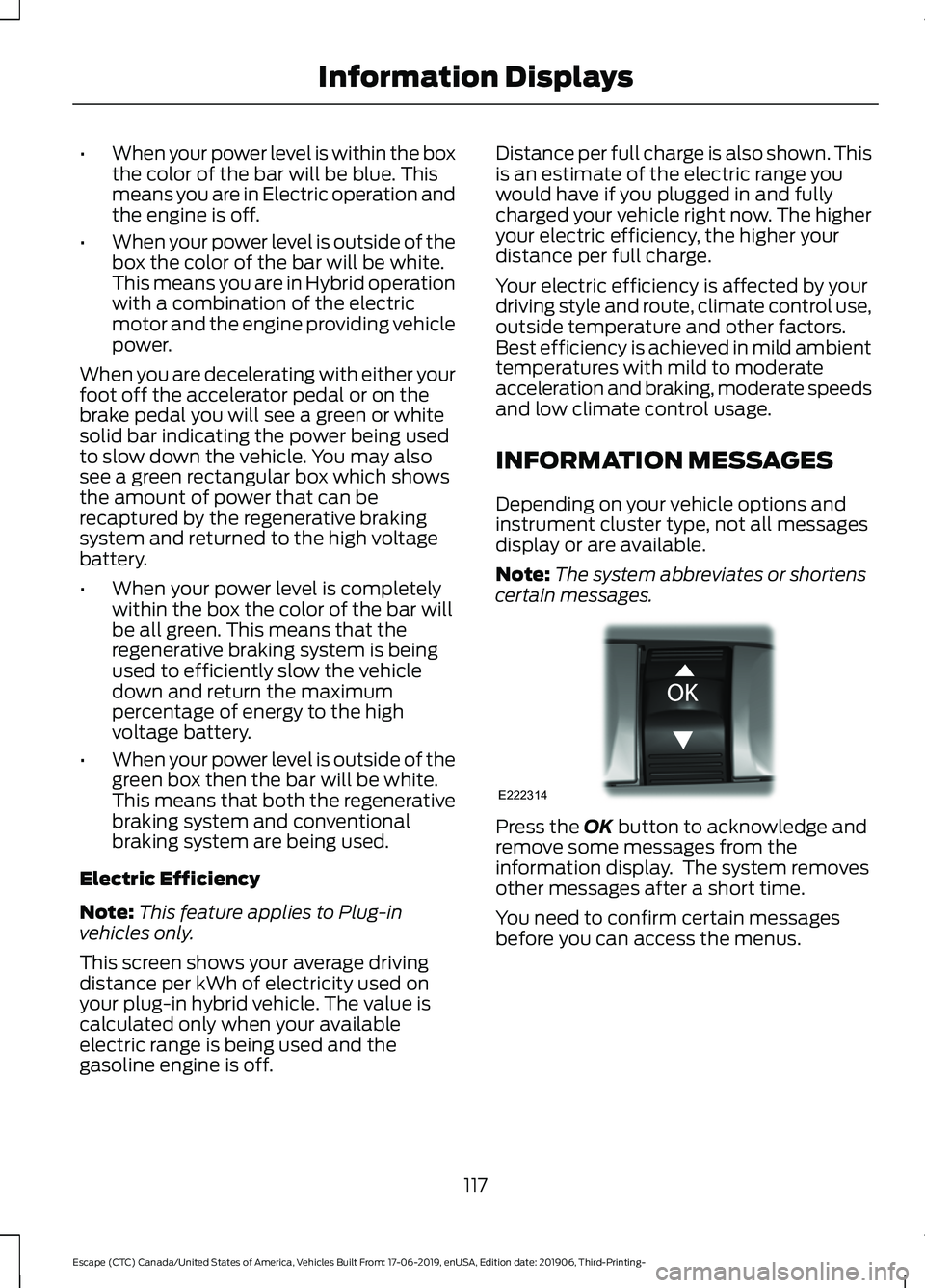
certain messages. Press the OK button to acknowledge and
remove some messages from the
information display. The system removes
other messages after a short time.
You need to confirm certain messages
before you can access the menus.
117
Escape (CTC) Canada/United States of America, Vehicles Built From: 17-06-2019, enUSA, Edition date: 201906, Third-Printing- Information DisplaysE222314
Page 124 of 553
Battery and Charging System (12 volt)
Action
Message
The charging system needs servicing. If the warning stays onor continues to come on, have the system checked as soon as possible.
Check Charging System
The charging system needs servicing. If the warning stays onor continues to come on, have the system checked as soon as possible.
Charging System Service
Soon
The charging system needs servicing. Have the systemchecked as soon as possible.
Charging System Service
Now
The battery management system determines that the 12V
battery is at a low state of charge. Start the engine to charge
the battery or charge the battery using an aftermarket battery charger. This message clears once you restart your vehicle and the battery state of charge recovers.
Battery State of Charge
Low
The battery management system determines that the batteryis at a low state of charge. Switch the ignition off as soon as
possible to protect the battery. This message clears once you restart your vehicle and the battery state of charge recovers. Turning off unnecessary electrical loads allows for a faster battery state-of-charge recovery.
Turn Power Off To Save
Battery
Battery and Charging System (High Voltage) (If Equipped) Action
Message
Your vehicle needs confirmation that you unplugged it before
allowing a start. You must make sure your vehicle is unplugged
and you respond to the message prompt before starting your
vehicle.
Vehicle Plugged In ? Yes
No
Your vehicle detects it is still plugged in after you attempt to
start it.
Unplug Prior to Starting
Vehicle
Your vehicle is ready to drive.
Ready to Drive
Your vehicle is ready to drive. You have XXX% plug-in energy
available.
Ready to Drive {percent
charged:##0}% Charged
You selected EV Now mode with the EV button.
EV Now All Electric
Driving
121
Escape (CTC) Canada/United States of America, Vehicles Built From: 17-06-2019, enUSA, Edition date: 201906, Third-Printing- Information Displays
Page 125 of 553
Action
Message
You selected EV Later mode with the EV button.
EV Later XX% Electric
Energy Saved for Later
You selected EV Charge mode with the EV button.
EV Charge Battery
Charged by Engine
You selected Auto EV mode with the EV button.
Auto EV Normal Opera-
tion
Your vehicle enables the engine due to the climate control
defrost setting. This is normal operation.
Engine Enabled Due to
Defrost Setting
For full defrost heat, press the EV button to select either EV
Later or EV Auto. The engine may run to provide more cabin
heat.
Press EV Button for Full
Defrost
Your vehicle enables the engine for system performance. This
is normal operation.
Engine Enabled for
System Performance
You can press OK to enable the engine temporarily for
increased performance when in EV Now mode.
Press OK to Enable
Engine
Displays when in neutral gear with the vehicle on. Shift out of
neutral to maintain full vehicle function.
In Neutral Depletes HV
Battery, Shift Out of
Neutral for Full Vehicle Function
Blind Spot Information and Cross Traffic Alert System Action
Message
A system error has occurred. Have the system checked as soon as possible.
Blind Spot System Fault
The system sensors are blocked. See Blind Spot Informa-
tion System (page 255).
Blind Spot Not Available
Sensor Blocked See Manual
The blind spot information system and cross traffic alert
system sensors are blocked. See Cross Traffic Alert (page 257
).
Cross Traffic Not Avail-
able Sensor Blocked See Manual
122
Escape (CTC) Canada/United States of America, Vehicles Built From: 17-06-2019, enUSA, Edition date: 201906, Third-Printing- Information Displays
Page 128 of 553
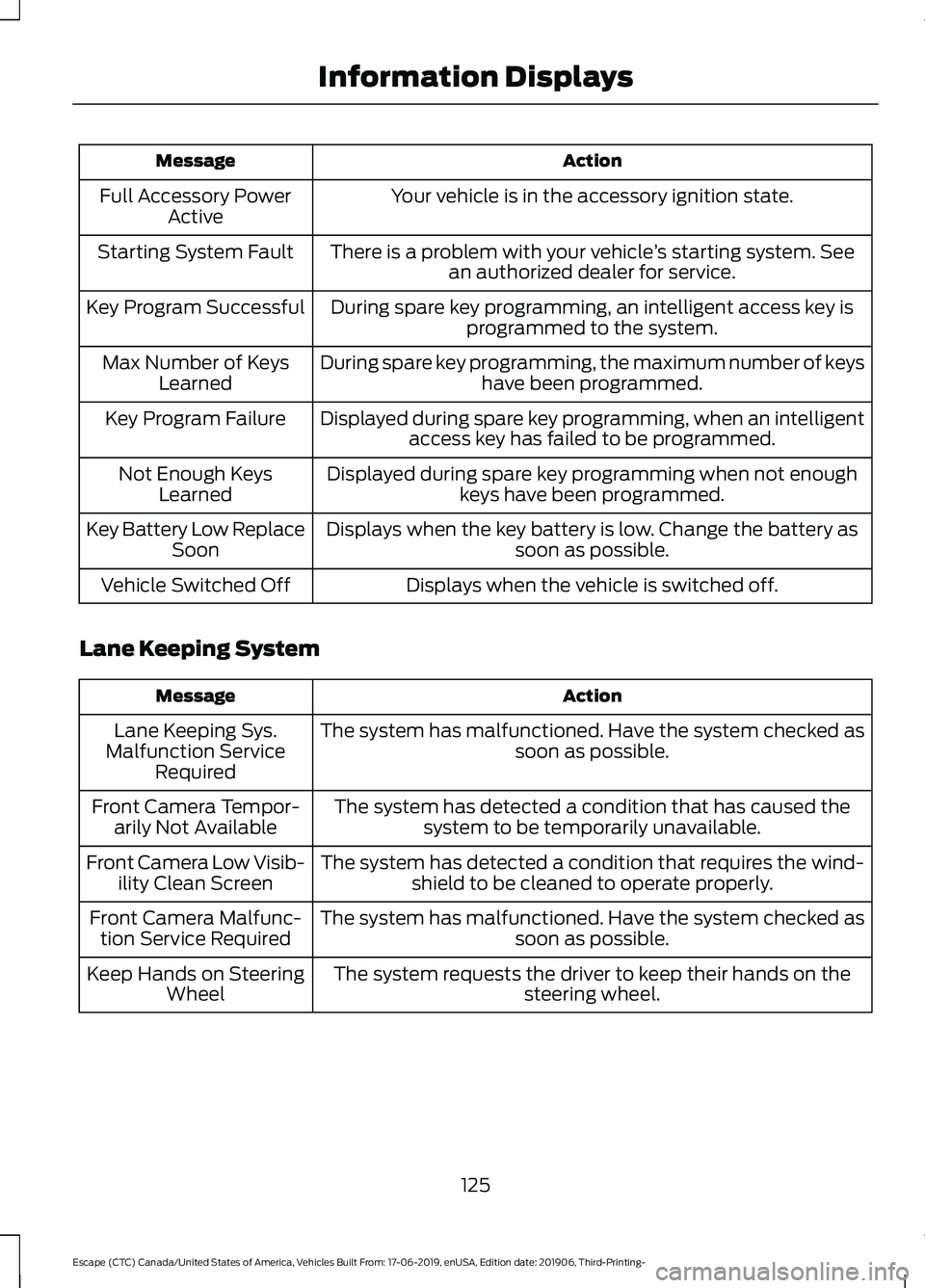
Action
Message
Your vehicle is in the accessory ignition state.
Full Accessory Power
Active
There is a problem with your vehicle ’s starting system. See
an authorized dealer for service.
Starting System Fault
During spare key programming, an intelligent access key isprogrammed to the system.
Key Program Successful
During spare key programming, the maximum number of keyshave been programmed.
Max Number of Keys
Learned
Displayed during spare key programming, when an intelligentaccess key has failed to be programmed.
Key Program Failure
Displayed during spare key programming when not enoughkeys have been programmed.
Not Enough Keys
Learned
Displays when the key battery is low. Change the battery as soon as possible.
Key Battery Low Replace
Soon
Displays when the vehicle is switched off.
Vehicle Switched Off
Lane Keeping System Action
Message
The system has malfunctioned. Have the system checked as soon as possible.
Lane Keeping Sys.
Malfunction Service Required
The system has detected a condition that has caused thesystem to be temporarily unavailable.
Front Camera Tempor-
arily Not Available
The system has detected a condition that requires the wind-shield to be cleaned to operate properly.
Front Camera Low Visib-
ility Clean Screen
The system has malfunctioned. Have the system checked assoon as possible.
Front Camera Malfunc-
tion Service Required
The system requests the driver to keep their hands on thesteering wheel.
Keep Hands on Steering
Wheel
125
Escape (CTC) Canada/United States of America, Vehicles Built From: 17-06-2019, enUSA, Edition date: 201906, Third-Printing- Information Displays
Page 134 of 553
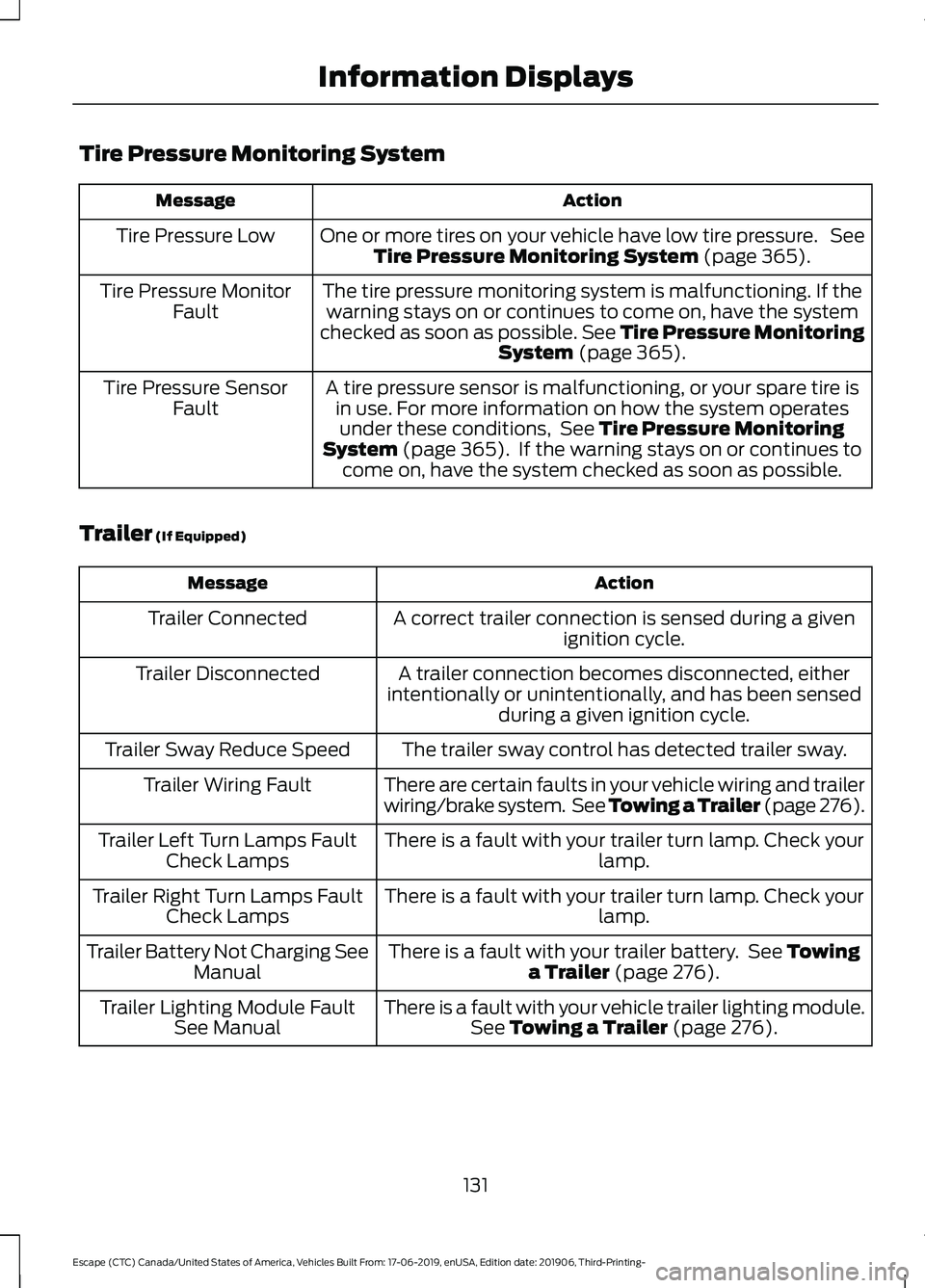
Tire Pressure Monitoring System
Action
Message
One or more tires on your vehicle have low tire pressure. SeeTire Pressure Monitoring System (page 365).
Tire Pressure Low
The tire pressure monitoring system is malfunctioning. If thewarning stays on or continues to come on, have the system
checked as soon as possible. See Tire Pressure Monitoring System
(page 365).
Tire Pressure Monitor
Fault
A tire pressure sensor is malfunctioning, or your spare tire isin use. For more information on how the system operatesunder these conditions, See
Tire Pressure Monitoring
System (page 365). If the warning stays on or continues to
come on, have the system checked as soon as possible.
Tire Pressure Sensor
Fault
Trailer
(If Equipped) Action
Message
A correct trailer connection is sensed during a givenignition cycle.
Trailer Connected
A trailer connection becomes disconnected, either
intentionally or unintentionally, and has been sensed during a given ignition cycle.
Trailer Disconnected
The trailer sway control has detected trailer sway.
Trailer Sway Reduce Speed
There are certain faults in your vehicle wiring and trailer
wiring/brake system. See Towing a Trailer (page 276).
Trailer Wiring Fault
There is a fault with your trailer turn lamp. Check yourlamp.
Trailer Left Turn Lamps Fault
Check Lamps
There is a fault with your trailer turn lamp. Check yourlamp.
Trailer Right Turn Lamps Fault
Check Lamps
There is a fault with your trailer battery. See
Towing
a Trailer (page 276).
Trailer Battery Not Charging See
Manual
There is a fault with your vehicle trailer lighting module.See
Towing a Trailer (page 276).
Trailer Lighting Module Fault
See Manual
131
Escape (CTC) Canada/United States of America, Vehicles Built From: 17-06-2019, enUSA, Edition date: 201906, Third-Printing- Information Displays
Page 135 of 553
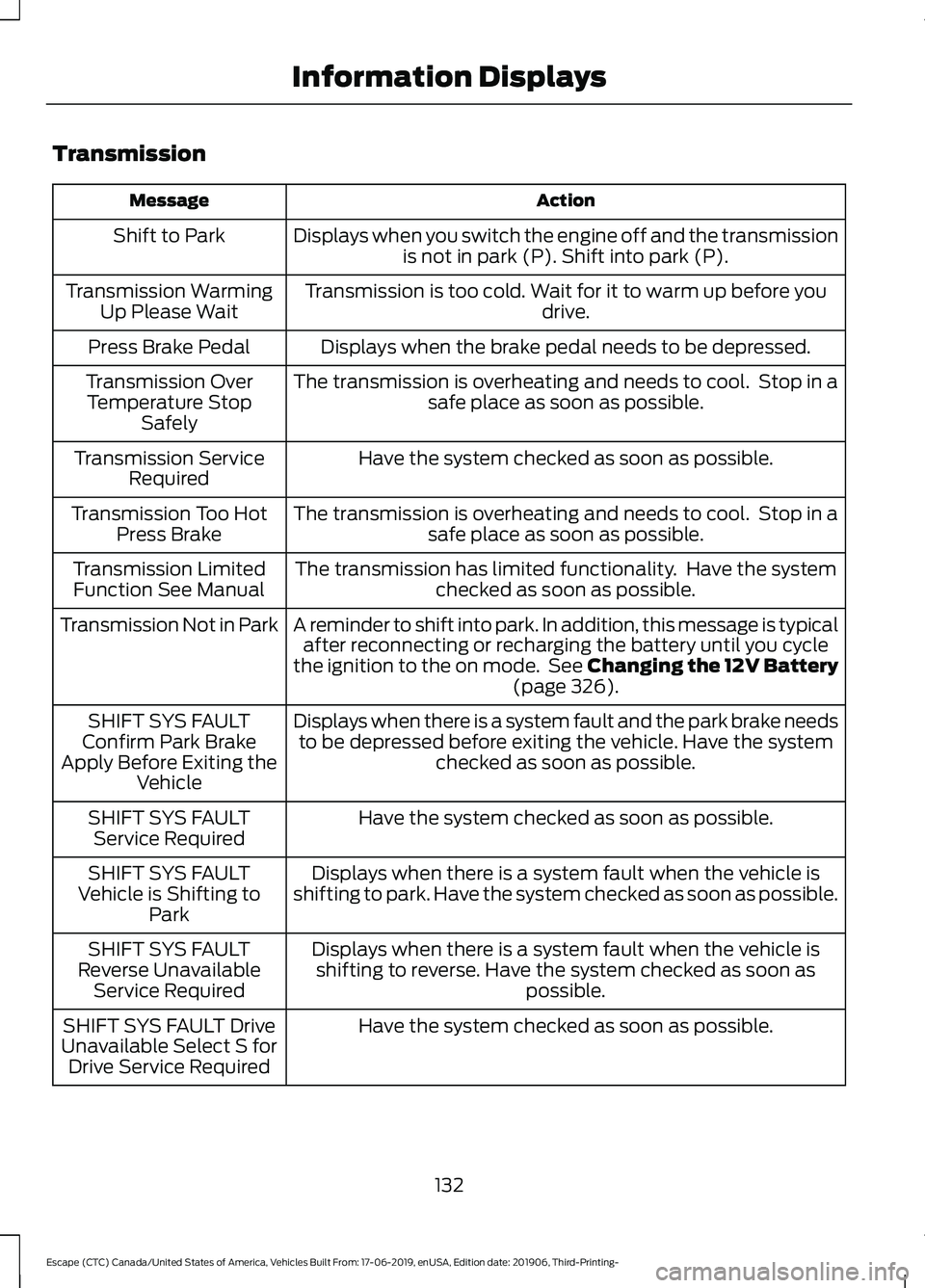
Transmission
Action
Message
Displays when you switch the engine off and the transmissionis not in park (P). Shift into park (P).
Shift to Park
Transmission is too cold. Wait for it to warm up before you drive.
Transmission Warming
Up Please Wait
Displays when the brake pedal needs to be depressed.
Press Brake Pedal
The transmission is overheating and needs to cool. Stop in asafe place as soon as possible.
Transmission Over
Temperature Stop Safely
Have the system checked as soon as possible.
Transmission Service
Required
The transmission is overheating and needs to cool. Stop in asafe place as soon as possible.
Transmission Too Hot
Press Brake
The transmission has limited functionality. Have the systemchecked as soon as possible.
Transmission Limited
Function See Manual
A reminder to shift into park. In addition, this message is typicalafter reconnecting or recharging the battery until you cycle
the ignition to the on mode. See Changing the 12V Battery (page 326).
Transmission Not in Park
Displays when there is a system fault and the park brake needsto be depressed before exiting the vehicle. Have the system checked as soon as possible.
SHIFT SYS FAULT
Confirm Park Brake
Apply Before Exiting the Vehicle
Have the system checked as soon as possible.
SHIFT SYS FAULT
Service Required
Displays when there is a system fault when the vehicle is
shifting to park. Have the system checked as soon as possible.
SHIFT SYS FAULT
Vehicle is Shifting to Park
Displays when there is a system fault when the vehicle isshifting to reverse. Have the system checked as soon as possible.
SHIFT SYS FAULT
Reverse Unavailable Service Required
Have the system checked as soon as possible.
SHIFT SYS FAULT Drive
Unavailable Select S for Drive Service Required
132
Escape (CTC) Canada/United States of America, Vehicles Built From: 17-06-2019, enUSA, Edition date: 201906, Third-Printing- Information Displays
Page 158 of 553
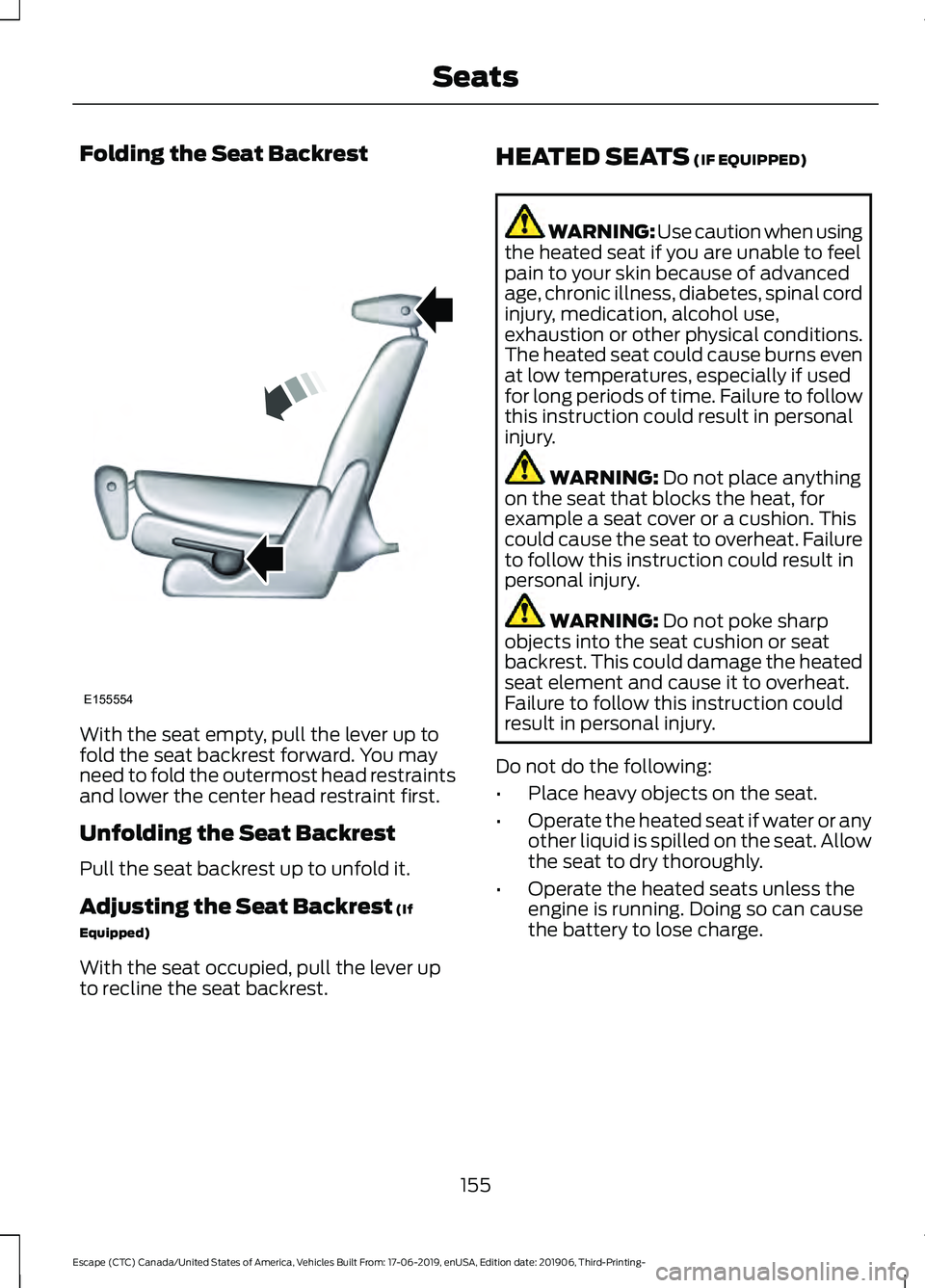
Folding the Seat Backrest
With the seat empty, pull the lever up to
fold the seat backrest forward. You may
need to fold the outermost head restraints
and lower the center head restraint first.
Unfolding the Seat Backrest
Pull the seat backrest up to unfold it.
Adjusting the Seat Backrest (If
Equipped)
With the seat occupied, pull the lever up
to recline the seat backrest. HEATED SEATS
(IF EQUIPPED) WARNING: Use caution when using
the heated seat if you are unable to feel
pain to your skin because of advanced
age, chronic illness, diabetes, spinal cord
injury, medication, alcohol use,
exhaustion or other physical conditions.
The heated seat could cause burns even
at low temperatures, especially if used
for long periods of time. Failure to follow
this instruction could result in personal
injury. WARNING:
Do not place anything
on the seat that blocks the heat, for
example a seat cover or a cushion. This
could cause the seat to overheat. Failure
to follow this instruction could result in
personal injury. WARNING:
Do not poke sharp
objects into the seat cushion or seat
backrest. This could damage the heated
seat element and cause it to overheat.
Failure to follow this instruction could
result in personal injury.
Do not do the following:
• Place heavy objects on the seat.
• Operate the heated seat if water or any
other liquid is spilled on the seat. Allow
the seat to dry thoroughly.
• Operate the heated seats unless the
engine is running. Doing so can cause
the battery to lose charge.
155
Escape (CTC) Canada/United States of America, Vehicles Built From: 17-06-2019, enUSA, Edition date: 201906, Third-Printing- SeatsE155554
Page 162 of 553
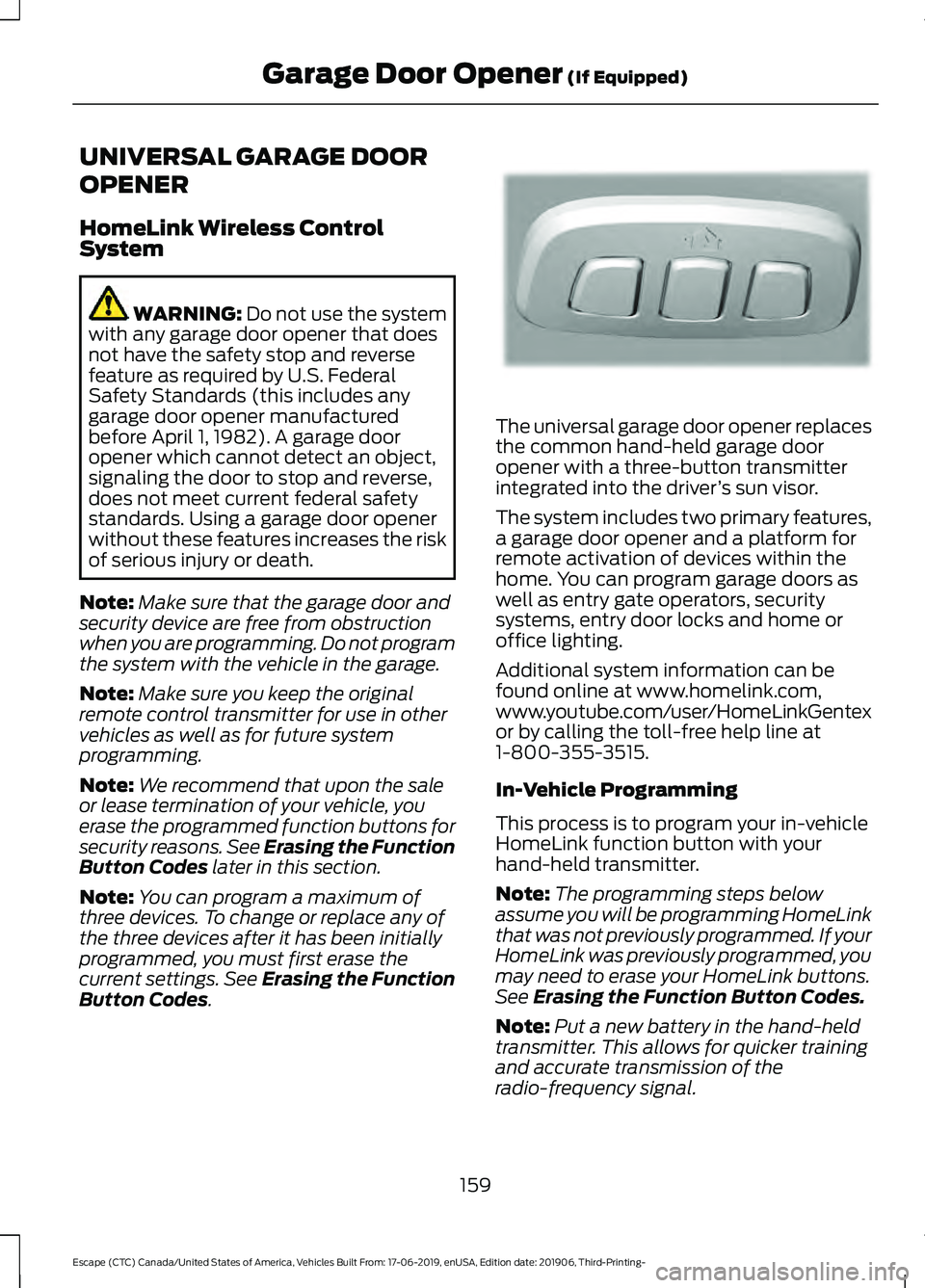
UNIVERSAL GARAGE DOOR
OPENER
HomeLink Wireless Control
System
WARNING: Do not use the system
with any garage door opener that does
not have the safety stop and reverse
feature as required by U.S. Federal
Safety Standards (this includes any
garage door opener manufactured
before April 1, 1982). A garage door
opener which cannot detect an object,
signaling the door to stop and reverse,
does not meet current federal safety
standards. Using a garage door opener
without these features increases the risk
of serious injury or death.
Note: Make sure that the garage door and
security device are free from obstruction
when you are programming. Do not program
the system with the vehicle in the garage.
Note: Make sure you keep the original
remote control transmitter for use in other
vehicles as well as for future system
programming.
Note: We recommend that upon the sale
or lease termination of your vehicle, you
erase the programmed function buttons for
security reasons. See Erasing the Function
Button Codes
later in this section.
Note: You can program a maximum of
three devices. To change or replace any of
the three devices after it has been initially
programmed, you must first erase the
current settings. See Erasing the Function
Button Codes
. The universal garage door opener replaces
the common hand-held garage door
opener with a three-button transmitter
integrated into the driver
’s sun visor.
The system includes two primary features,
a garage door opener and a platform for
remote activation of devices within the
home. You can program garage doors as
well as entry gate operators, security
systems, entry door locks and home or
office lighting.
Additional system information can be
found online at www.homelink.com,
www.youtube.com/user/HomeLinkGentex
or by calling the toll-free help line at
1-800-355-3515.
In-Vehicle Programming
This process is to program your in-vehicle
HomeLink function button with your
hand-held transmitter.
Note: The programming steps below
assume you will be programming HomeLink
that was not previously programmed. If your
HomeLink was previously programmed, you
may need to erase your HomeLink buttons.
See Erasing the Function Button Codes.
Note: Put a new battery in the hand-held
transmitter. This allows for quicker training
and accurate transmission of the
radio-frequency signal.
159
Escape (CTC) Canada/United States of America, Vehicles Built From: 17-06-2019, enUSA, Edition date: 201906, Third-Printing- Garage Door Opener
(If Equipped)E188211
Page 166 of 553
12 Volt DC Power Point
WARNING: Do not plug optional
electrical accessories into the cigar
lighter socket. Incorrect use of the cigar
lighter can cause damage not covered
by the vehicle warranty, and can result
in fire or serious injury.
Note: When you switch the ignition on, you
can use the socket to power 12 volt
appliances with a maximum current rating
of 15 amps.
Note: If the power supply does not work
after you switch the ignition off, switch the
ignition on.
Note: Do not hang any accessory from the
accessory plug.
Note: Do not use the power point over the
vehicle capacity of 12 volt DC 180 watts or
a fuse may blow.
Note: Always keep the power point caps
closed when not in use.
Do not insert objects other than an
accessory plug into the power point. This
damages the power point and may blow
the fuse. Run the vehicle for full capacity
use of the power point.
To prevent the battery from running out of
charge:
• Do not use the power point longer than
necessary when the vehicle is not
running.
• Do not leave devices plugged in
overnight or when you park your vehicle
for extended periods.
Locations
Power points may be in the following
locations:
• On the front of the center console.
• Inside the center console. •
On the rear of the center console.
• In the cargo area.
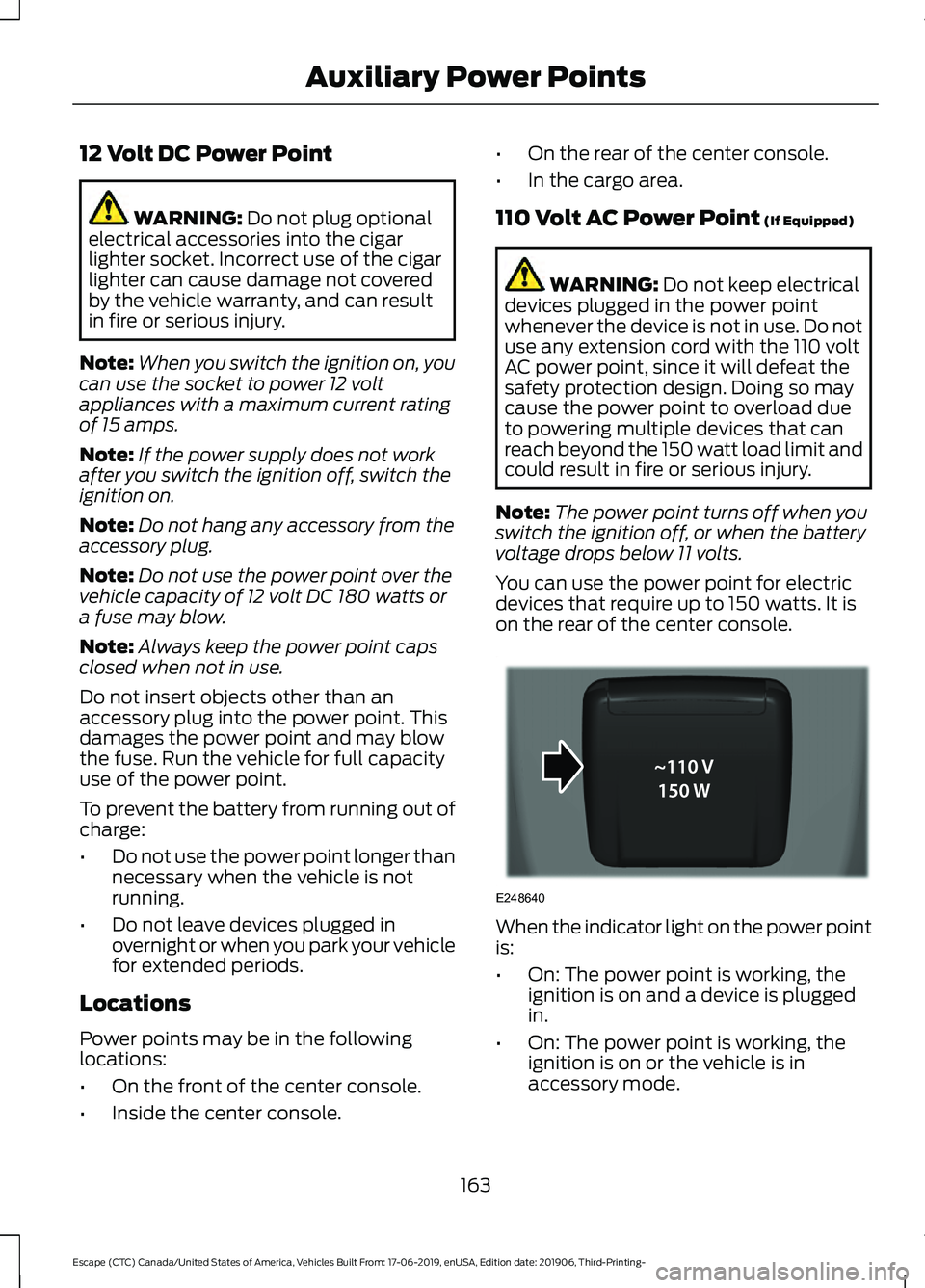
110 Volt AC Power Point (If Equipped) WARNING:
Do not keep electrical
devices plugged in the power point
whenever the device is not in use. Do not
use any extension cord with the 110 volt
AC power point, since it will defeat the
safety protection design. Doing so may
cause the power point to overload due
to powering multiple devices that can
reach beyond the 150 watt load limit and
could result in fire or serious injury.
Note: The power point turns off when you
switch the ignition off, or when the battery
voltage drops below 11 volts.
You can use the power point for electric
devices that require up to 150 watts. It is
on the rear of the center console. When the indicator light on the power point
is:
•
On: The power point is working, the
ignition is on and a device is plugged
in.
• On: The power point is working, the
ignition is on or the vehicle is in
accessory mode.
163
Escape (CTC) Canada/United States of America, Vehicles Built From: 17-06-2019, enUSA, Edition date: 201906, Third-Printing- Auxiliary Power PointsE248640