cruise control FORD ESCAPE 2021 Owner's Manual
[x] Cancel search | Manufacturer: FORD, Model Year: 2021, Model line: ESCAPE, Model: FORD ESCAPE 2021Pages: 589, PDF Size: 9.2 MB
Page 264 of 589

Adaptive Cruise Control –
Information Messages - Vehicles
With: Intelligent Adaptive Cruise
Control
Note:
Depending on your vehicle options
and instrument cluster type, not all
messages display or are available.
Note: Certain messages may be
abbreviated or shortened depending upon
which cluster type you have. Action
Message
Conditions exist preventing the system from being available.
Intelligent Cruise Control
Speed Sign Recognition Not Available
261
Escape (CTC) Canada/United States of America, Vehicles Built From: 02-11-2020, enUSA, Edition date: 202011, First-Printing Adaptive Cruise Control (If Equipped)
Page 272 of 589
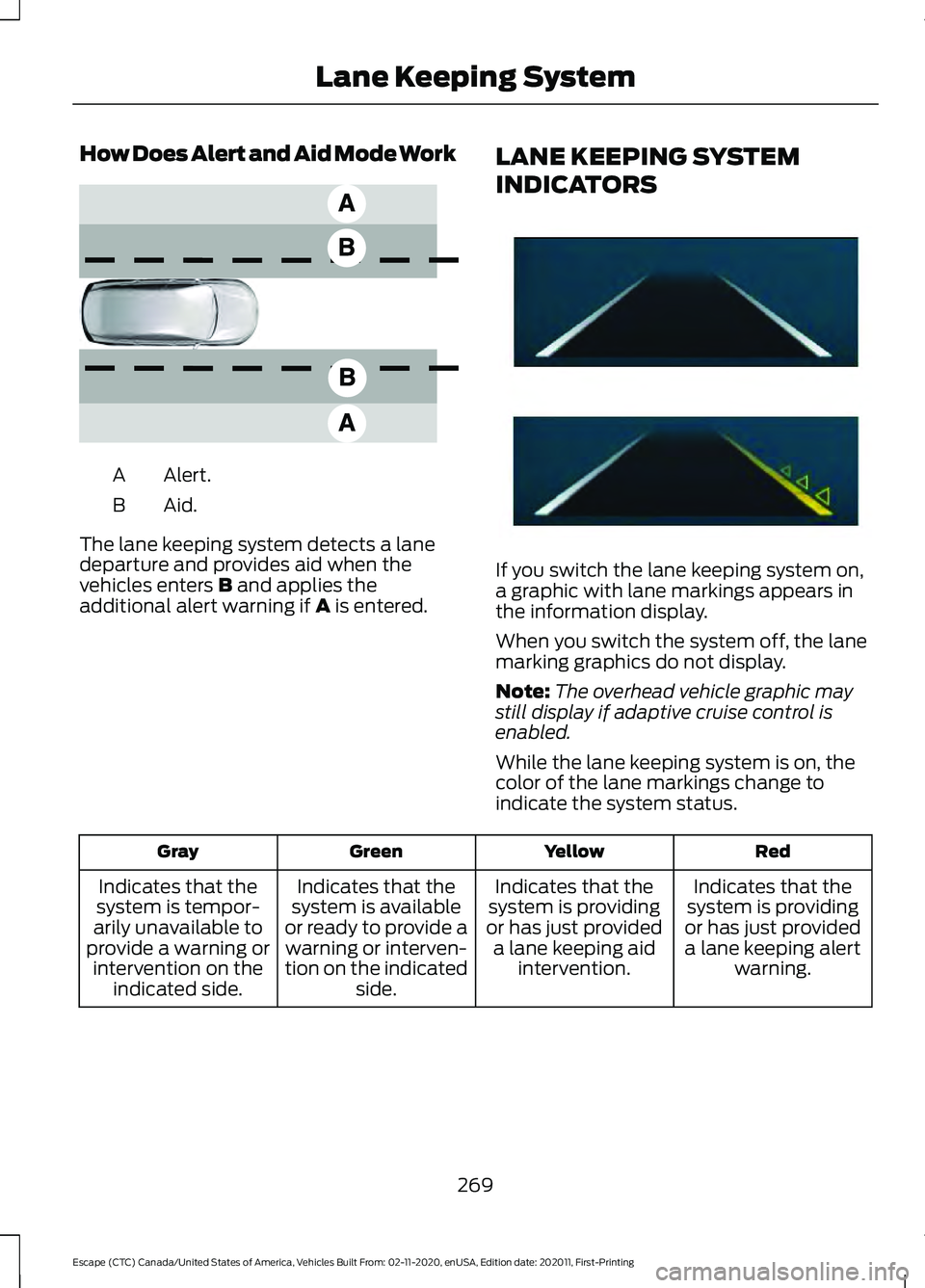
How Does Alert and Aid Mode Work
Alert.
A
Aid.B
The lane keeping system detects a lane
departure and provides aid when the
vehicles enters B and applies the
additional alert warning if A is entered. LANE KEEPING SYSTEM
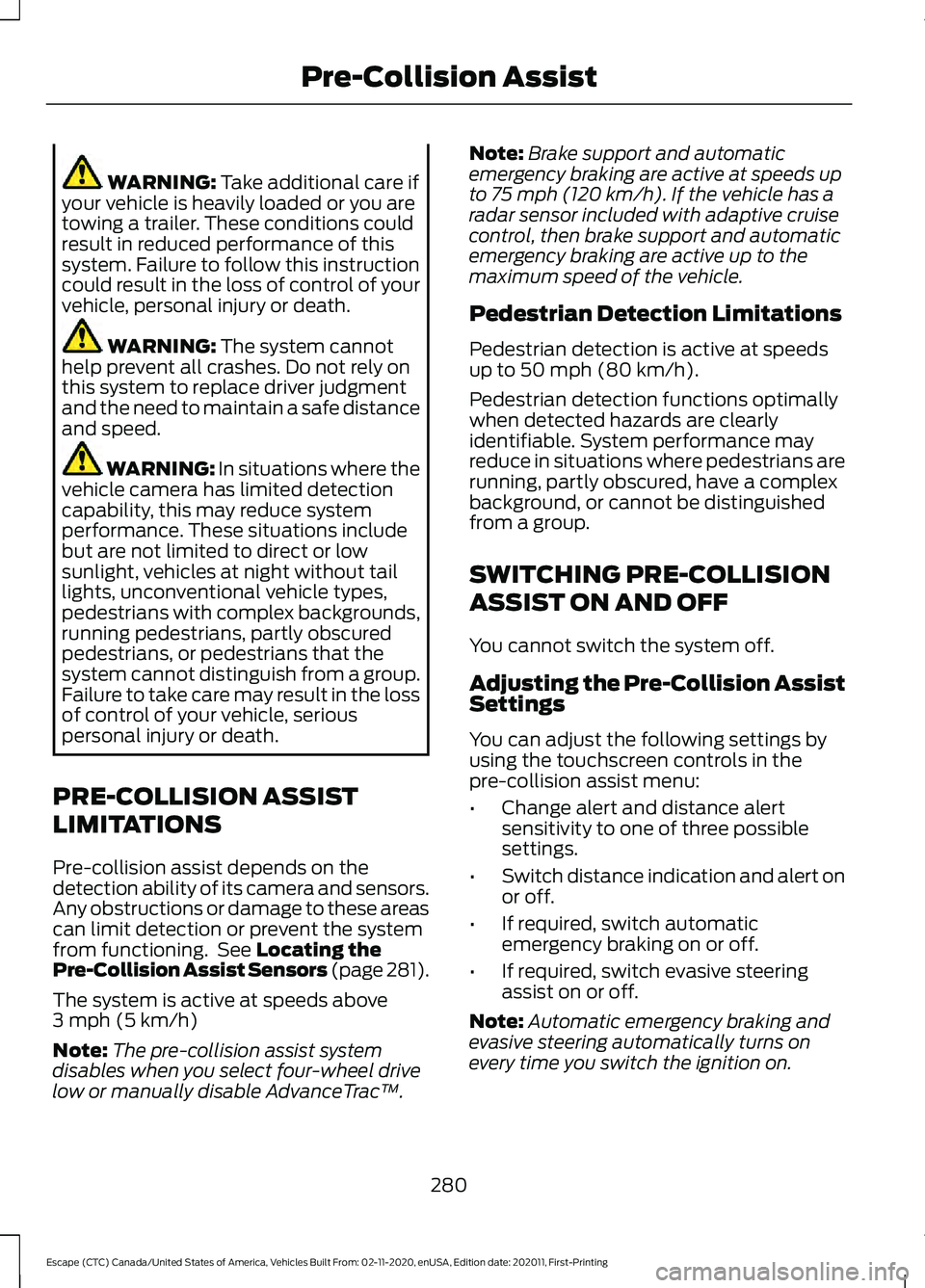
INDICATORS If you switch the lane keeping system on,
a graphic with lane markings appears in
the information display.
When you switch the system off, the lane
marking graphics do not display.
Note:
The overhead vehicle graphic may
still display if adaptive cruise control is
enabled.
While the lane keeping system is on, the
color of the lane markings change to
indicate the system status. Red
Yellow
Green
Gray
Indicates that the
system is providing
or has just provided a lane keeping alert warning.
Indicates that the
system is providing
or has just provided a lane keeping aid intervention.
Indicates that the
system is available
or ready to provide a warning or interven-
tion on the indicated side.
Indicates that the
system is tempor-
arily unavailable to
provide a warning or intervention on the indicated side.
269
Escape (CTC) Canada/United States of America, Vehicles Built From: 02-11-2020, enUSA, Edition date: 202011, First-Printing Lane Keeping SystemE165517 E294544
Page 283 of 589
WARNING: Take additional care if
your vehicle is heavily loaded or you are
towing a trailer. These conditions could
result in reduced performance of this
system. Failure to follow this instruction
could result in the loss of control of your
vehicle, personal injury or death. WARNING:
The system cannot
help prevent all crashes. Do not rely on
this system to replace driver judgment
and the need to maintain a safe distance
and speed. WARNING:
In situations where the
vehicle camera has limited detection
capability, this may reduce system
performance. These situations include
but are not limited to direct or low
sunlight, vehicles at night without tail
lights, unconventional vehicle types,
pedestrians with complex backgrounds,
running pedestrians, partly obscured
pedestrians, or pedestrians that the
system cannot distinguish from a group.
Failure to take care may result in the loss
of control of your vehicle, serious
personal injury or death.
PRE-COLLISION ASSIST
LIMITATIONS
Pre-collision assist depends on the
detection ability of its camera and sensors.
Any obstructions or damage to these areas
can limit detection or prevent the system
from functioning. See
Locating the
Pre-Collision Assist Sensors (page 281).
The system is active at speeds above
3 mph (5 km/h)
Note: The pre-collision assist system
disables when you select four-wheel drive
low or manually disable AdvanceTrac ™.Note:
Brake support and automatic
emergency braking are active at speeds up
to
75 mph (120 km/h). If the vehicle has a
radar sensor included with adaptive cruise
control, then brake support and automatic
emergency braking are active up to the
maximum speed of the vehicle.
Pedestrian Detection Limitations
Pedestrian detection is active at speeds
up to
50 mph (80 km/h).
Pedestrian detection functions optimally
when detected hazards are clearly
identifiable. System performance may
reduce in situations where pedestrians are
running, partly obscured, have a complex
background, or cannot be distinguished
from a group.
SWITCHING PRE-COLLISION
ASSIST ON AND OFF
You cannot switch the system off.
Adjusting the Pre-Collision Assist
Settings
You can adjust the following settings by
using the touchscreen controls in the
pre-collision assist menu:
• Change alert and distance alert
sensitivity to one of three possible
settings.
• Switch distance indication and alert on
or off.
• If required, switch automatic
emergency braking on or off.
• If required, switch evasive steering
assist on or off.
Note: Automatic emergency braking and
evasive steering automatically turns on
every time you switch the ignition on.
280
Escape (CTC) Canada/United States of America, Vehicles Built From: 02-11-2020, enUSA, Edition date: 202011, First-Printing Pre-Collision Assist
Page 284 of 589
Note:
If you switch automatic emergency
braking off, evasive steering assist switches
off.
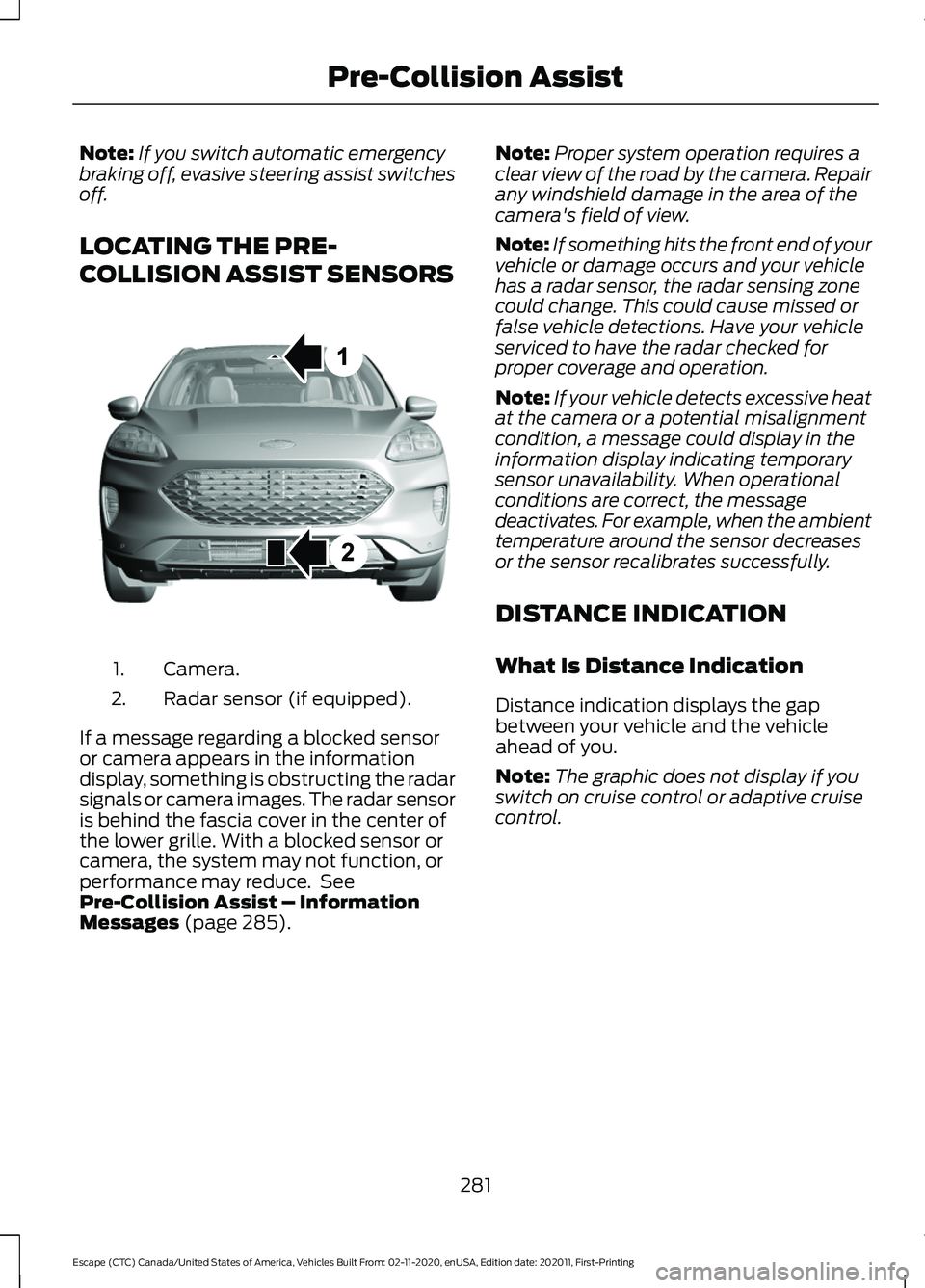
LOCATING THE PRE-
COLLISION ASSIST SENSORS Camera.
1.
Radar sensor (if equipped).
2.
If a message regarding a blocked sensor
or camera appears in the information
display, something is obstructing the radar
signals or camera images. The radar sensor
is behind the fascia cover in the center of
the lower grille. With a blocked sensor or
camera, the system may not function, or
performance may reduce. See
Pre-Collision Assist – Information
Messages (page 285). Note:
Proper system operation requires a
clear view of the road by the camera. Repair
any windshield damage in the area of the
camera's field of view.
Note: If something hits the front end of your
vehicle or damage occurs and your vehicle
has a radar sensor, the radar sensing zone
could change. This could cause missed or
false vehicle detections. Have your vehicle
serviced to have the radar checked for
proper coverage and operation.
Note: If your vehicle detects excessive heat
at the camera or a potential misalignment
condition, a message could display in the
information display indicating temporary
sensor unavailability. When operational
conditions are correct, the message
deactivates. For example, when the ambient
temperature around the sensor decreases
or the sensor recalibrates successfully.
DISTANCE INDICATION
What Is Distance Indication
Distance indication displays the gap
between your vehicle and the vehicle
ahead of you.
Note: The graphic does not display if you
switch on cruise control or adaptive cruise
control.
281
Escape (CTC) Canada/United States of America, Vehicles Built From: 02-11-2020, enUSA, Edition date: 202011, First-Printing Pre-Collision AssistE307090
Page 286 of 589
Switching Distance Indication On
and Off
To switch the system on or off, use the
touchscreen:
1. Press Settings on the touchscreen.
2. Press
Driver Assistance.
3. Press
Pre-Collision Assist.
4. Press
Distance Indication.
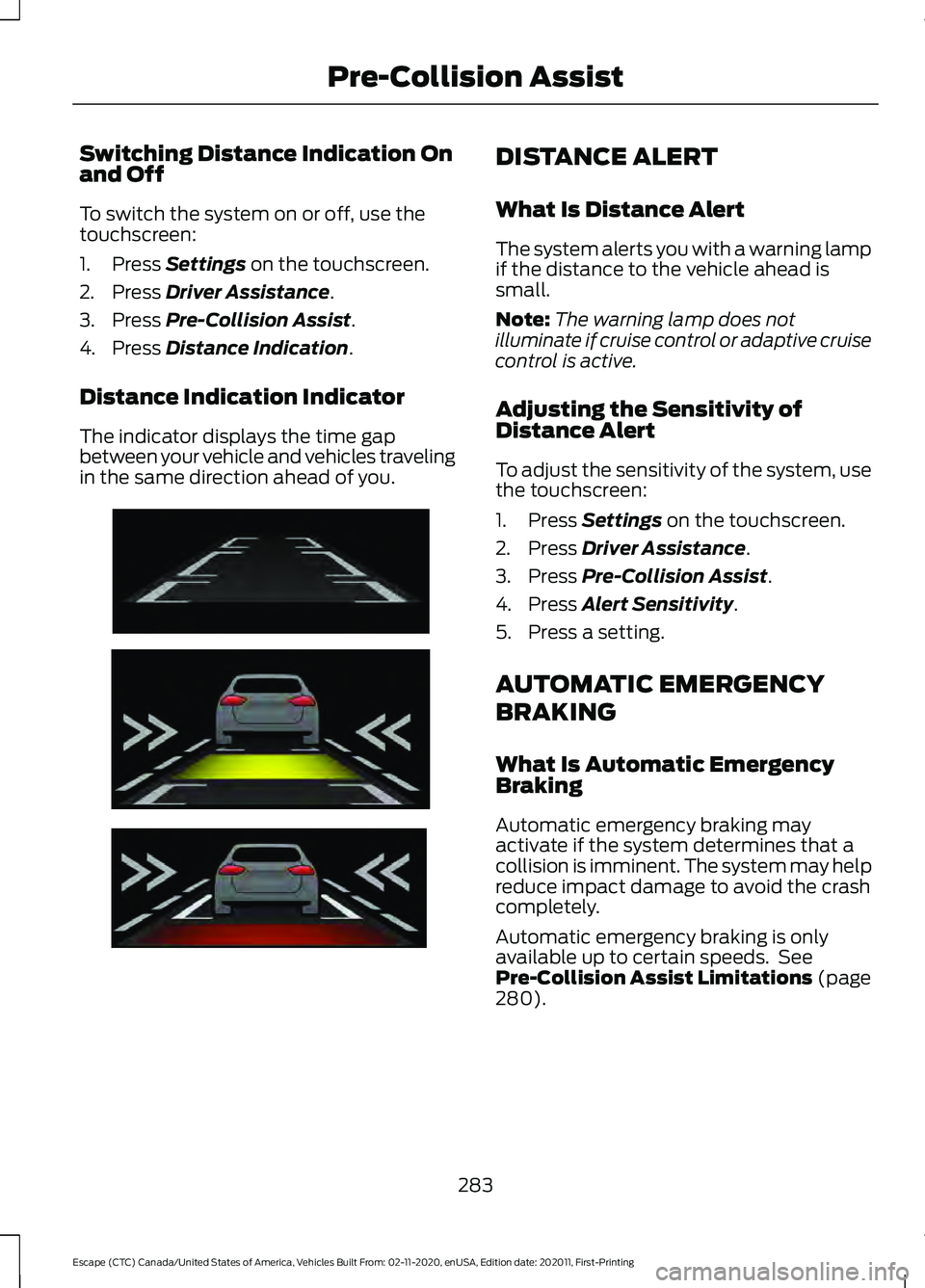
Distance Indication Indicator
The indicator displays the time gap
between your vehicle and vehicles traveling
in the same direction ahead of you. DISTANCE ALERT
What Is Distance Alert
The system alerts you with a warning lamp
if the distance to the vehicle ahead is
small.
Note:
The warning lamp does not
illuminate if cruise control or adaptive cruise
control is active.
Adjusting the Sensitivity of
Distance Alert
To adjust the sensitivity of the system, use
the touchscreen:
1. Press
Settings on the touchscreen.
2. Press
Driver Assistance.
3. Press
Pre-Collision Assist.
4. Press
Alert Sensitivity.
5. Press a setting.
AUTOMATIC EMERGENCY
BRAKING
What Is Automatic Emergency
Braking
Automatic emergency braking may
activate if the system determines that a
collision is imminent. The system may help
reduce impact damage to avoid the crash
completely.
Automatic emergency braking is only
available up to certain speeds. See
Pre-Collision Assist Limitations
(page
280).
283
Escape (CTC) Canada/United States of America, Vehicles Built From: 02-11-2020, enUSA, Edition date: 202011, First-Printing Pre-Collision AssistE254791
Page 330 of 589
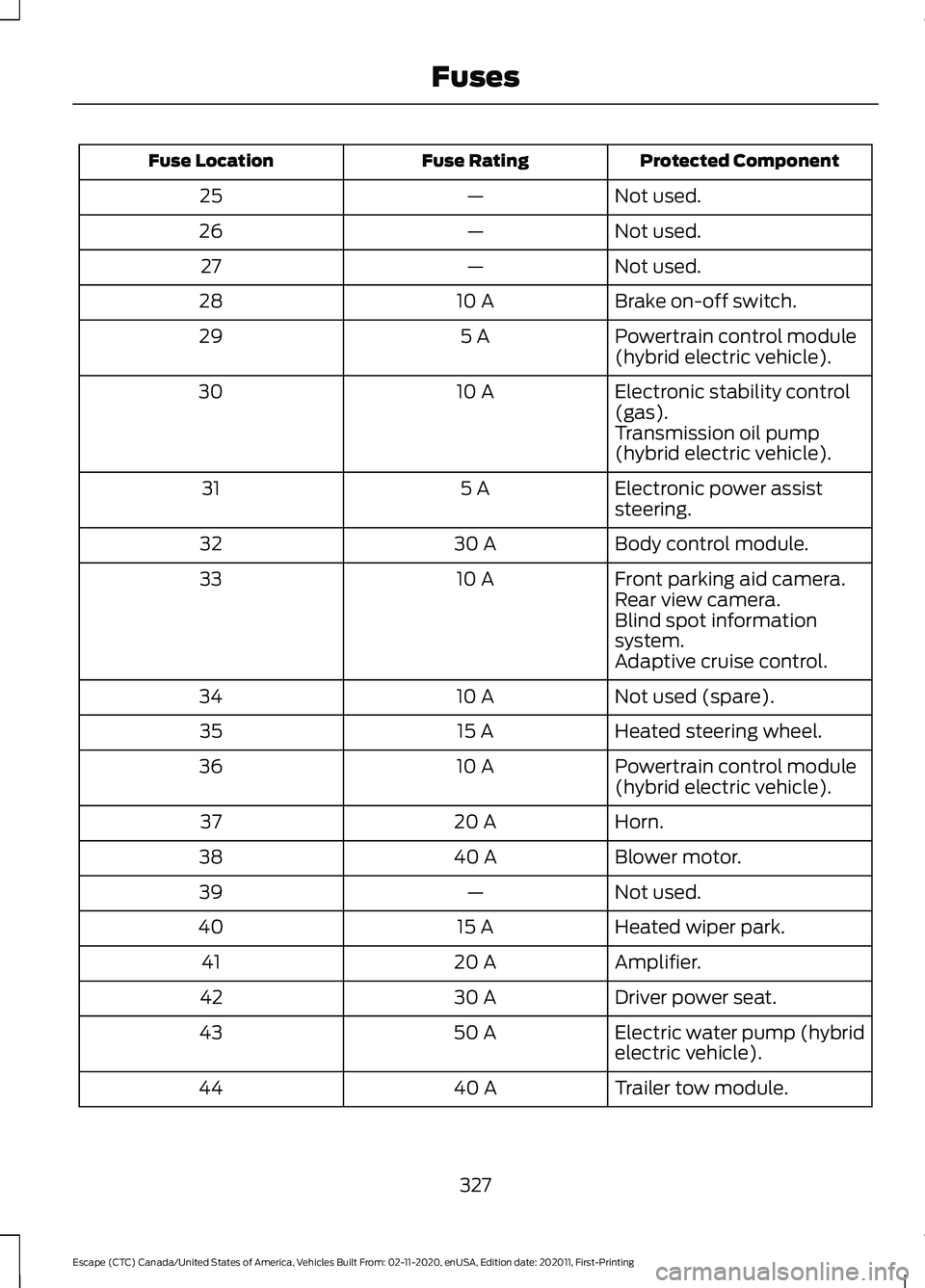
Protected Component
Fuse Rating
Fuse Location
Not used.
—
25
Not used.
—
26
Not used.
—
27
Brake on-off switch.
10 A
28
Powertrain control module
(hybrid electric vehicle).
5 A
29
Electronic stability control
(gas).
10 A
30
Transmission oil pump
(hybrid electric vehicle).
Electronic power assist
steering.
5 A
31
Body control module.
30 A
32
Front parking aid camera.
10 A
33
Rear view camera.
Blind spot information
system.
Adaptive cruise control.
Not used (spare).
10 A
34
Heated steering wheel.
15 A
35
Powertrain control module
(hybrid electric vehicle).
10 A
36
Horn.
20 A
37
Blower motor.
40 A
38
Not used.
—
39
Heated wiper park.
15 A
40
Amplifier.
20 A
41
Driver power seat.
30 A
42
Electric water pump (hybrid
electric vehicle).
50 A
43
Trailer tow module.
40 A
44
327
Escape (CTC) Canada/United States of America, Vehicles Built From: 02-11-2020, enUSA, Edition date: 202011, First-Printing Fuses
Page 508 of 589
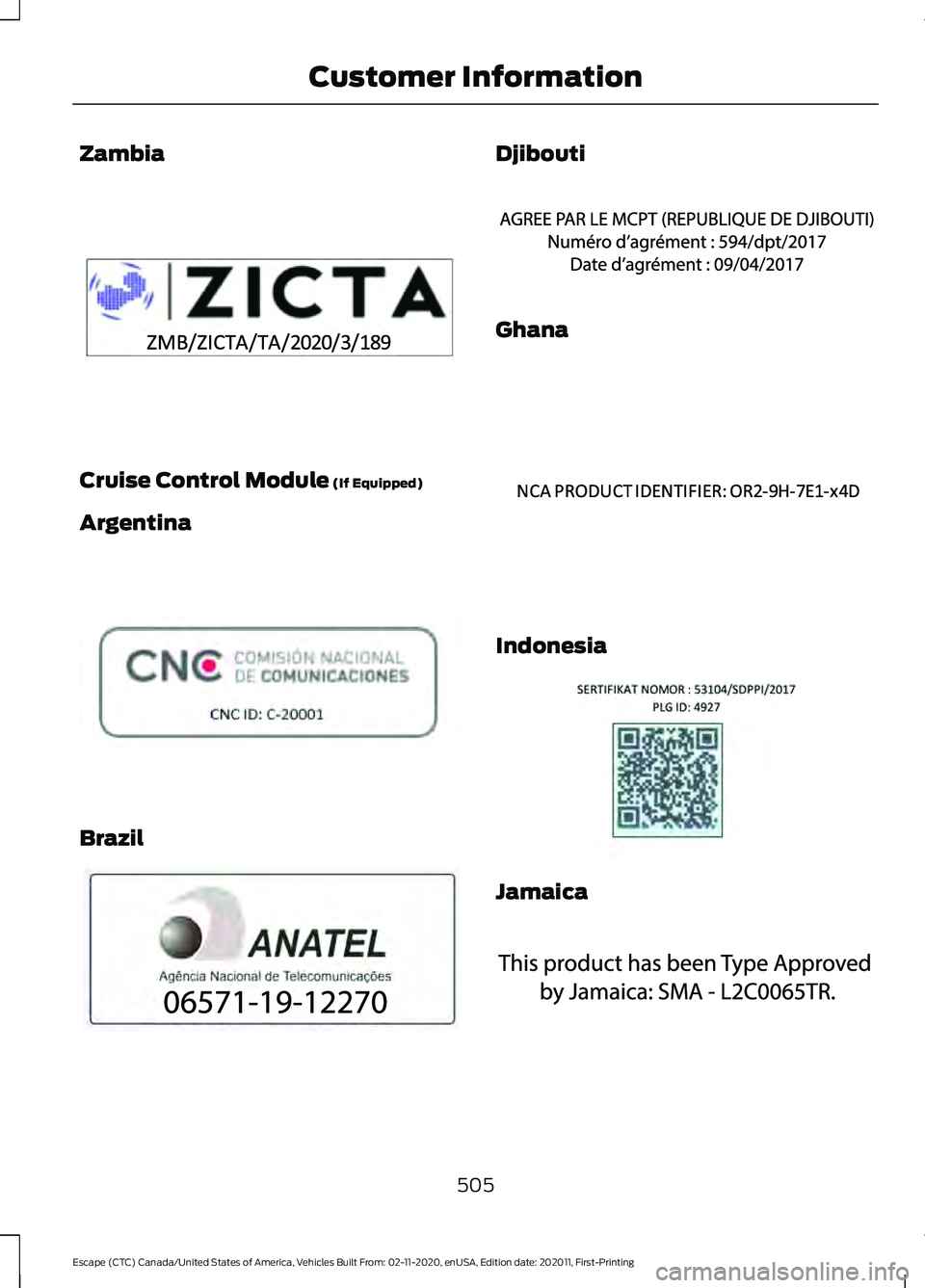
Zambia
Cruise Control Module (If Equipped)
Argentina Brazil Djibouti
Ghana
Indonesia
Jamaica
505
Escape (CTC) Canada/United States of America, Vehicles Built From: 02-11-2020, enUSA, Edition date: 202011, First-Printing Customer InformationE345310 E308030 E340118 E342394 E340191 E342395 E340518
Page 566 of 589
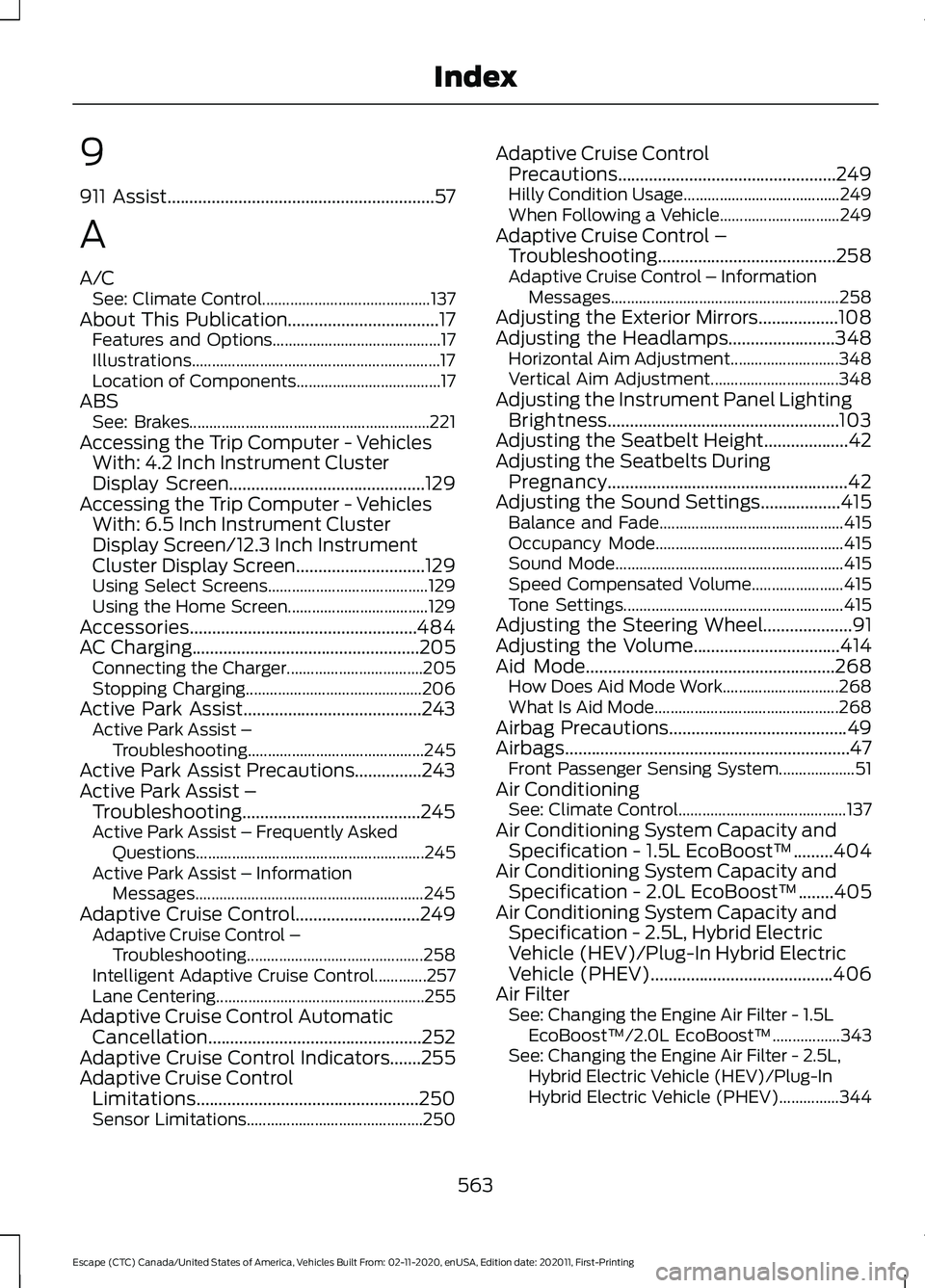
9
911 Assist............................................................57
A
A/C See: Climate Control.......................................... 137
About This Publication..................................17 Features and Options.......................................... 17
Illustrations.............................................................. 17
Location of Components.................................... 17
ABS See: Brakes............................................................ 221
Accessing the Trip Computer - Vehicles With: 4.2 Inch Instrument Cluster
Display Screen
............................................129
Accessing the Trip Computer - Vehicles With: 6.5 Inch Instrument Cluster
Display Screen/12.3 Inch Instrument
Cluster Display Screen.............................129
Using Select Screens........................................ 129
Using the Home Screen................................... 129
Accessories...................................................484
AC Charging
...................................................205
Connecting the Charger.................................. 205
Stopping Charging............................................ 206
Active Park Assist........................................243 Active Park Assist –
Troubleshooting............................................ 245
Active Park Assist Precautions...............243
Active Park Assist – Troubleshooting........................................245
Active Park Assist – Frequently Asked Questions......................................................... 245
Active Park Assist – Information Messages......................................................... 245
Adaptive Cruise Control
............................249
Adaptive Cruise Control –
Troubleshooting............................................ 258
Intelligent Adaptive Cruise Control.............257
Lane Centering.................................................... 255
Adaptive Cruise Control Automatic Cancellation................................................252
Adaptive Cruise Control Indicators.......255
Adaptive Cruise Control Limitations
..................................................250
Sensor Limitations............................................ 250Adaptive Cruise Control
Precautions.................................................249
Hilly Condition Usage....................................... 249
When Following a Vehicle.............................. 249
Adaptive Cruise Control – Troubleshooting........................................
258
Adaptive Cruise Control – Information
Messages......................................................... 258
Adjusting the Exterior Mirrors..................108
Adjusting the Headlamps........................348 Horizontal Aim Adjustment........................... 348
Vertical Aim Adjustment................................ 348
Adjusting the Instrument Panel Lighting Brightness....................................................103
Adjusting the Seatbelt Height...................42
Adjusting the Seatbelts During Pregnancy......................................................42
Adjusting the Sound Settings..................415 Balance and Fade.............................................. 415
Occupancy Mode............................................... 415
Sound Mode......................................................... 415
Speed Compensated Volume....................... 415
Tone Settings....................................................... 415
Adjusting the Steering Wheel....................91
Adjusting the Volume.................................414
Aid Mode
........................................................268
How Does Aid Mode Work............................. 268
What Is Aid Mode.............................................. 268
Airbag Precautions
........................................49
Airbags................................................................47 Front Passenger Sensing System................... 51
Air Conditioning See: Climate Control.......................................... 137
Air Conditioning System Capacity and Specification - 1.5L EcoBoost™.........404
Air Conditioning System Capacity and Specification - 2.0L EcoBoost™........405
Air Conditioning System Capacity and Specification - 2.5L, Hybrid Electric
Vehicle (HEV)/Plug-In Hybrid Electric
Vehicle (PHEV).........................................406
Air Filter See: Changing the Engine Air Filter - 1.5L
EcoBoost™/2.0L EcoBoost™.................343
See: Changing the Engine Air Filter - 2.5L, Hybrid Electric Vehicle (HEV)/Plug-In
Hybrid Electric Vehicle (PHEV)...............344
563
Escape (CTC) Canada/United States of America, Vehicles Built From: 02-11-2020, enUSA, Edition date: 202011, First-Printing Index
Page 571 of 589
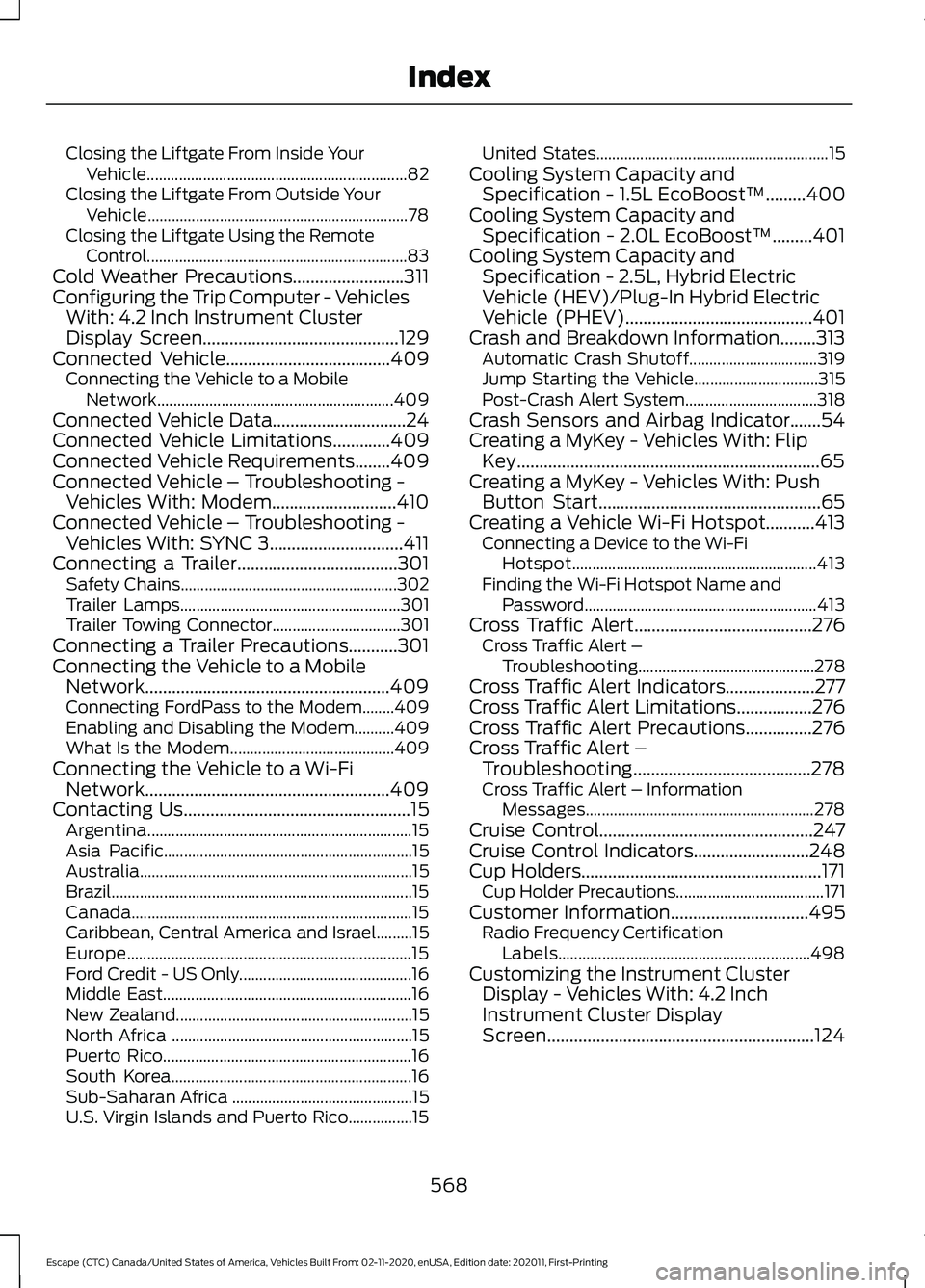
Closing the Liftgate From Inside Your
Vehicle................................................................. 82
Closing the Liftgate From Outside Your Vehicle................................................................. 78
Closing the Liftgate Using the Remote Control................................................................. 83
Cold Weather Precautions.........................311
Configuring the Trip Computer - Vehicles With: 4.2 Inch Instrument Cluster
Display Screen
............................................129
Connected Vehicle.....................................409
Connecting the Vehicle to a Mobile
Network........................................................... 409
Connected Vehicle Data
..............................24
Connected Vehicle Limitations.............409
Connected Vehicle Requirements........409
Connected Vehicle – Troubleshooting - Vehicles With: Modem............................410
Connected Vehicle – Troubleshooting - Vehicles With: SYNC 3..............................411
Connecting a Trailer....................................301 Safety Chains...................................................... 302
Trailer Lamps....................................................... 301
Trailer Towing Connector................................ 301
Connecting a Trailer Precautions
...........301
Connecting the Vehicle to a Mobile Network.......................................................409
Connecting FordPass to the Modem........409
Enabling and Disabling the Modem..........409
What Is the Modem......................................... 409
Connecting the Vehicle to a Wi-Fi Network.......................................................409
Contacting Us
...................................................15
Argentina.................................................................. 15
Asia Pacific.............................................................. 15
Australia.................................................................... 15
Brazil........................................................................\
... 15
Canada...................................................................... 15
Caribbean, Central America and Israel.........15
Europe....................................................................... 15
Ford Credit - US Only........................................... 16
Middle East.............................................................. 16
New Zealand........................................................... 15
North Africa ............................................................ 15
Puerto Rico.............................................................. 16
South Korea............................................................ 16
Sub-Saharan Africa ............................................. 15
U.S. Virgin Islands and Puerto Rico................15 United States..........................................................
15
Cooling System Capacity and Specification - 1.5L EcoBoost™
.........400
Cooling System Capacity and Specification - 2.0L EcoBoost™.........401
Cooling System Capacity and Specification - 2.5L, Hybrid Electric
Vehicle (HEV)/Plug-In Hybrid Electric
Vehicle (PHEV)
..........................................401
Crash and Breakdown Information........313 Automatic Crash Shutoff................................ 319
Jump Starting the Vehicle............................... 315
Post-Crash Alert System................................. 318
Crash Sensors and Airbag Indicator.......54
Creating a MyKey - Vehicles With: Flip Key....................................................................65
Creating a MyKey - Vehicles With: Push Button Start..................................................65
Creating a Vehicle Wi-Fi Hotspot...........413 Connecting a Device to the Wi-Fi
Hotspot............................................................. 413
Finding the Wi-Fi Hotspot Name and Password.......................................................... 413
Cross Traffic Alert........................................276 Cross Traffic Alert –
Troubleshooting............................................ 278
Cross Traffic Alert Indicators....................277
Cross Traffic Alert Limitations.................276
Cross Traffic Alert Precautions...............276
Cross Traffic Alert – Troubleshooting........................................278
Cross Traffic Alert – Information Messages......................................................... 278
Cruise Control
................................................247
Cruise Control Indicators..........................248
Cup Holders
......................................................171
Cup Holder Precautions..................................... 171
Customer Information...............................495 Radio Frequency Certification
Labels............................................................... 498
Customizing the Instrument Cluster Display - Vehicles With: 4.2 Inch
Instrument Cluster Display
Screen............................................................124
568
Escape (CTC) Canada/United States of America, Vehicles Built From: 02-11-2020, enUSA, Edition date: 202011, First-Printing Index
Page 576 of 589
Vehicle Stationary for Extended Periods
During Extreme High Ambient
Temperatures.................................................. 145
Hood Lock See: Opening and Closing the Hood..........333
Horn......................................................................91
How Does Active Park Assist Work...............................................................243
How Does Adaptive Cruise Control With Stop and Go Work....................................249
How Does a Hybrid Electric Vehicle Work...............................................................180
........................................................................\
........... 180
How Does All-Wheel Drive Work............217
How Does Auto Hold Work......................228
How Does Blind Spot Information System Work...............................................273
How Does Cross Traffic Alert Work...............................................................276
How Does Driver Alert Work....................287
How Does Easy Entry and Exit Work.......77
How Does Hill Start Assist Work
............227
How Does Pre-Collision Assist Work...............................................................279
How Does Speed Sign Recognition Work..............................................................289
How Does Stability Control Work...........231 Electronic Stability Control............................. 231
How Does the Garage Door Opener Work...............................................................162
How Does the Lane Keeping System Work..............................................................266
How Does the Memory Function Work...............................................................160
How Does the Personal Safety System Work.................................................................46
How Does the Rear Occupant Alert System Work
...............................................158
How Does the Safety Canopy ™
Work.................................................................48
How Does Traction Control Work..........229
How Does Trailer Sway Control Work...............................................................310
How Do the Front Airbags Work...............47
How Do the Knee Airbags Work...............48
How Do the Side Airbags Work.................47
Hybrid Electric Vehicle Driving Characteristics...........................................180 Hybrid Electric Vehicle Indicators..........180
Hybrid Electric Vehicle
Information..................................................180
Hybrid Electric Vehicle Information – Troubleshooting.............................................. 181
Plug-In Hybrid Electric Vehicle Information...................................................... 182
Plug-In Hybrid Electric Vehicle Information – Troubleshooting......................................... 183
Hybrid Electric Vehicle Information – Troubleshooting..........................................
181
Hybrid Electric Vehicle Information –
Frequently Asked Questions...................... 181
Hybrid Electric Vehicle Information – Information Messages.................................. 181
Hybrid Electric Vehicle Information – Warning Lamps............................................... 181
I
Identifying Fuse Types...............................332
Ignition Switch................................................172 Starting the Engine............................................. 173
Switching the Ignition Off................................ 172
Switching the Ignition On................................. 172
Switching the Ignition to Accessory Mode................................................................... 172
Inflating the Tires.........................................372
Information on the Tire Sidewall............361 Information on P Type Tires.......................... 362
Inspecting the Tire for Damage..............373 Safety Practices.................................................. 373
Inspecting the Tire for Wear.....................373
Inspecting the Wheel Valve Stems.......374
Installing and Removing the Luggage Compartment Cover
...............................299
Installing the Luggage Cover......................... 299
Removing the Luggage Cover....................... 299
Installing Child Restraints............................31 Combining the Seatbelt and Lower Anchors
for Attaching Child Restraints.................... 35
Installing a Child Restraint in a Center Seat...................................................................... 34
Using Lower Anchors and Tethers for Children............................................................... 33
Using Seatbelts...................................................... 31
Using Tether Straps............................................. 35
573
Escape (CTC) Canada/United States of America, Vehicles Built From: 02-11-2020, enUSA, Edition date: 202011, First-Printing Index