wheel FORD ESCAPE 2021 Owner's Manual
[x] Cancel search | Manufacturer: FORD, Model Year: 2021, Model line: ESCAPE, Model: FORD ESCAPE 2021Pages: 589, PDF Size: 9.2 MB
Page 136 of 589
HEAD UP DISPLAY – TROUBLESHOOTING
Head Up Display – Information Messages
Action
Message
The system is malfunctioning or somethingis obstructing the display. Make sure that
the head up display is free from obstruction. If the message continues to appear, have
your vehicle checked as soon as possible.
Head Up Display System Fault See Manual
Press the button on the steering wheel or
center console. The head up display menu appears in the instrument cluster display.
Make sure the blue frame is fully visible. Do not manually move the screen. This can
cause damage not covered by your vehicle's warranty.
Head Up Display To Position Use the
Information Display
133
Escape (CTC) Canada/United States of America, Vehicles Built From: 02-11-2020, enUSA, Edition date: 202011, First-Printing Head Up Display (If Equipped)
Page 138 of 589
Press the button on the remote
control.
Within three seconds, press the
button on the remote control.
Within three seconds, press the
button again.
If the duration is set to 15 minutes, the
duration extends by another 15 minutes.
This provides a total of 30 minutes.
Note: Remote start can only be extended
once.
Note: A maximum of two remote starts, or
one remote start with an extension, are
allowed. To reset the restart procedure
switch the vehicle to on, then to off.
REMOTE START REMOTE
CONTROL INDICATORS
Remote Control Feedback
An LED on the remote control provides
status feedback of remote start or stop
commands. Status
LED
Remote startsuccessful.
Solid green.
Remote stopsuccessful.
Solid red.
Request failed or
status not received.
Blinking red.
Status incomplete.
Blinking green.
REMOTE START SETTINGS
Switching Climate Control Auto
Mode On and Off
1. Press Settings on the touchscreen. 2. Press
Remote Start Setup.
3. Press
Climate Control.
4. Select
Vehicle.
5. Switch
Auto on or off.
Note: If you switch the auto mode on, the
system attempts to heat or cool the interior
to
72°F (22°C).
Note: When you switch the ignition on, the
climate control system returns to the last
used settings.
Switching Climate Control Last
Settings On and Off
1. Press
Settings on the touchscreen.
2. Press
Vehicle Settings.
3. Press
Remote Start Setup.
4. Switch
Last settings on or off.
Note: If you switch the last settings on, the
system remembers the last used settings.
Switching the Heated Seat
Settings On and Off
1. Press
Settings on the touchscreen.
2. Press
Vehicle Settings.
3. Press
Remote Start Setup.
4. Press
Seats.
5. Switch
Auto on or off.
Note: If you switch the heated seat settings
on, the heated seats turn on during cold
weather.
Switching the Heated Steering
Wheel Settings On and Off
1. Press
Settings on the touchscreen.
2. Press
Vehicle Settings.
3. Press
Remote Start Setup.
4. Press
Seats and Steering Wheel.
135
Escape (CTC) Canada/United States of America, Vehicles Built From: 02-11-2020, enUSA, Edition date: 202011, First-Printing Remote Start
(If Equipped)E138623 E138625
Page 139 of 589
5. Switch Auto on or off.
Note: If you switch the heated steering
wheel settings on, the heated steering wheel
turns on during cold weather.
Setting the Remote Start Duration
1. Press
Settings on the touchscreen.
2. Press
Vehicle Settings.
3. Press
Remote Start Setup.
4. Press
Duration.
Note: Wait a few seconds before remotely
starting the vehicle after the vehicle stops
running.
136
Escape (CTC) Canada/United States of America, Vehicles Built From: 02-11-2020, enUSA, Edition date: 202011, First-Printing Remote Start
(If Equipped)
Page 151 of 589
FRONT SEAT PRECAUTIONS
WARNING: Sitting improperly, out
of position or with the seatback reclined
too far can take weight off the seat
cushion and affect the decision of the
passenger sensing system, resulting in
serious injury or death in the event of a
crash. Always sit upright against your
seat back, with your feet on the floor. WARNING: Do not recline the seat
backrest too far as this can cause the
occupant to slide under the seatbelt,
resulting in personal injury in the event
of a crash. WARNING:
Do not place objects
higher than the top of the seat backrest.
Failure to follow this instruction could
result in personal injury or death in the
event of a sudden stop or crash. WARNING: Do not adjust the driver
seat or seat backrest when your vehicle
is moving. This may result in sudden seat
movement, causing the loss of control
of your vehicle. SITTING IN THE CORRECT
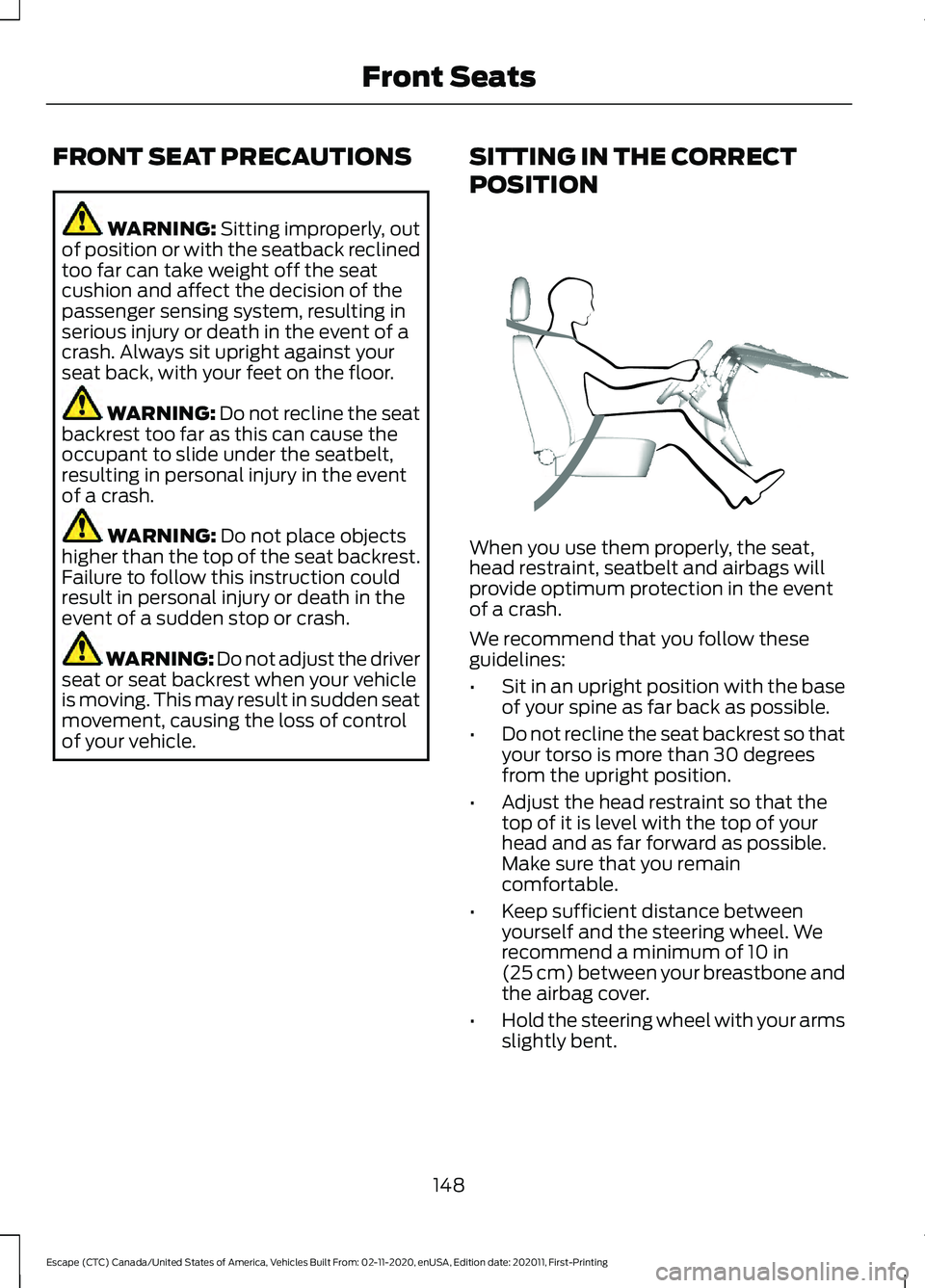
POSITION When you use them properly, the seat,
head restraint, seatbelt and airbags will
provide optimum protection in the event
of a crash.
We recommend that you follow these
guidelines:
•
Sit in an upright position with the base
of your spine as far back as possible.
• Do not recline the seat backrest so that
your torso is more than 30 degrees
from the upright position.
• Adjust the head restraint so that the
top of it is level with the top of your
head and as far forward as possible.
Make sure that you remain
comfortable.
• Keep sufficient distance between
yourself and the steering wheel. We
recommend a minimum of
10 in
(25 cm) between your breastbone and
the airbag cover.
• Hold the steering wheel with your arms
slightly bent.
148
Escape (CTC) Canada/United States of America, Vehicles Built From: 02-11-2020, enUSA, Edition date: 202011, First-Printing Front SeatsE68595
Page 180 of 589
2.
Shift into neutral and use the brakes to
bring your vehicle to a safe stop.
3. Shift into park (P).
4. Apply the parking brake.
AUTOMATIC ENGINE STOP
What Is Automatic Engine Stop
Automatic engine stop is a feature that
switches the engine off if it has been idling
for an extended period to help you save
fuel.
How Does Automatic Engine Stop
Work
Automatic engine stop turns the engine
off. The ignition also turns off in order to
save battery power. Before the engine
shuts down, a message appears in the
information display showing a timer
counting down. If you do not intervene
within 30 seconds, the engine shuts down.
Another message appears in the
information display to inform you that the
engine has shut down in order to save fuel.
Start your vehicle as you normally do.
Switching Automatic Engine Stop
On and Off
4.2 Inch Instrument Cluster
Display Screen/Push Button Start
1. Using the information display controls on the steering wheel, select Settings.
2. Select Vehicle Settings.
3. Switch
30min Max Idle on or off. 12.3 Inch Instrument Cluster
Display Screen/Push Button Start
1.
Press the menu button on the steering
wheel to enter the information display
main menu.
2. Select
Settings.
3. Switch
Auto Engine Off on or off.
Overriding Automatic Engine Stop
Note: You cannot permanently switch off
the automatic engine shutdown feature.
When you switch it off temporarily, it turns
on at the next ignition cycle.
You can stop the engine shutdown, or reset
the timer, at any point before the
30-second countdown has expired by
doing any of the following:
• Pressing the brake pedal or accelerator
pedal.
• Pressing the
OK or RESET button
during the countdown.
STARTING AND STOPPING
THE ENGINE –
TROUBLESHOOTING
Starting and Stopping the Engine
– Warning Lamps
Malfunction Indicator Lamp If it illuminates when the engine
is running, the on-board
diagnostics system is detecting
a malfunction of the vehicle emission
control system.
177
Escape (CTC) Canada/United States of America, Vehicles Built From: 02-11-2020, enUSA, Edition date: 202011, First-Printing Starting and Stopping the Engine
Page 181 of 589
If it flashes, engine misfire could be
occurring. Increased exhaust gas
temperatures could damage the catalytic
converter or other vehicle components.
Avoid heavy acceleration and deceleration,
and have your vehicle checked as soon as
possible.
Powertrain Warning Lamp If it illuminates when the engine
is running, this indicates a
powertrain or four-wheel drive
fault. If it flashes when you are driving,
immediately reduce the vehicle speed.
Avoid heavy acceleration and deceleration,
and have your vehicle checked as soon as
possible.
If both lamps illuminate when the engine
is running, stop your vehicle as soon as it
is safe to do so. Continuing to drive your
vehicle could cause reduced power or the
engine to stop. Switch the ignition off and
attempt to restart the engine. Have your
vehicle checked as soon as possible.
Starting and Stopping the Engine – Information Messages Action
Message
Displays if you exceed the starting time limit. You cannot
attempt to start the engine for 15 minutes. If you cannot start
the engine after 15 minutes passes, have your vehicle imme-
diately checked.
Cranking Time Exceeded
Displays if you are unable to start your vehicle with a correctly
coded key. The system has detected a fault that requires
service. Have your vehicle checked as soon as possible.
Starting System Fault
Displays if the system does not detect a valid passive key.
No Key Detected
178
Escape (CTC) Canada/United States of America, Vehicles Built From: 02-11-2020, enUSA, Edition date: 202011, First-Printing Starting and Stopping the Engine
Page 199 of 589
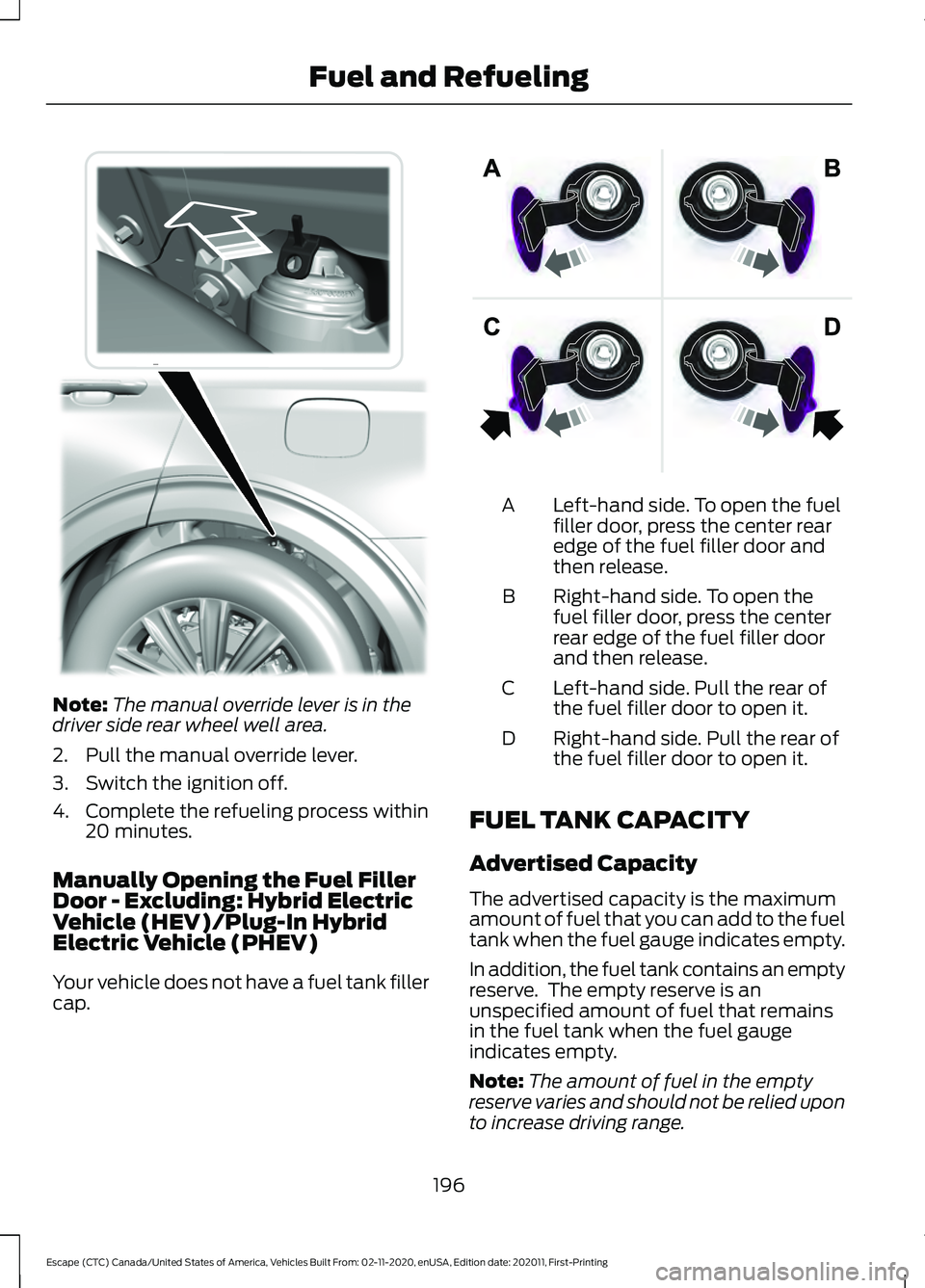
Note:
The manual override lever is in the
driver side rear wheel well area.
2. Pull the manual override lever.
3. Switch the ignition off.
4. Complete the refueling process within 20 minutes.
Manually Opening the Fuel Filler
Door - Excluding: Hybrid Electric
Vehicle (HEV)/Plug-In Hybrid
Electric Vehicle (PHEV)
Your vehicle does not have a fuel tank filler
cap. Left-hand side. To open the fuel
filler door, press the center rear
edge of the fuel filler door and
then release.
A
Right-hand side. To open the
fuel filler door, press the center
rear edge of the fuel filler door
and then release.
B
Left-hand side. Pull the rear of
the fuel filler door to open it.
C
Right-hand side. Pull the rear of
the fuel filler door to open it.
D
FUEL TANK CAPACITY
Advertised Capacity
The advertised capacity is the maximum
amount of fuel that you can add to the fuel
tank when the fuel gauge indicates empty.
In addition, the fuel tank contains an empty
reserve. The empty reserve is an
unspecified amount of fuel that remains
in the fuel tank when the fuel gauge
indicates empty.
Note: The amount of fuel in the empty
reserve varies and should not be relied upon
to increase driving range.
196
Escape (CTC) Canada/United States of America, Vehicles Built From: 02-11-2020, enUSA, Edition date: 202011, First-Printing Fuel and RefuelingE297793 E206911
Page 207 of 589
What to Do
What it Means
Convenience Cord LED
Indicators
Check
Outlet
(Amber)
Fault
(Red)
Power
(Green)
Request vehicleservice.
The convenience cord is experiencing a
ground fault at the charge port. The
cordset retry mode has been exhausted. Your vehicle is not charging. Call for service.
Off
On
On
Connect to a prop-erly grounded AC outlet.
Missing ground at AC outlet. Your
vehicle is not charging. The convenience cord is in retry mode.
Two
flash
interval
On/Two
flash
interval
On
Request cordsetservice. Replace the cordset.
The convenience cord is experiencing
an internal fault. Call for service.
Off
On/
Flashing
On
Note: If charging for your plug-in vehicle
fails, please call the Customer Relationship
Center, or click on Call for support or Live
chat at our website.
MOVING AND STORAGE
INSTRUCTIONS
Note: Do not hold the convenience cord by
the flexible power cable.
Make sure that you completely wrap the
convenience cord after charging.
When complete, replace the convenience
cord in the luggage compartment.
Note: Store the convenience cord in a clean,
dry place between the temperature of
-39.9– 193.9°F (-40–90°C).
LOCATING THE CHARGE PORT
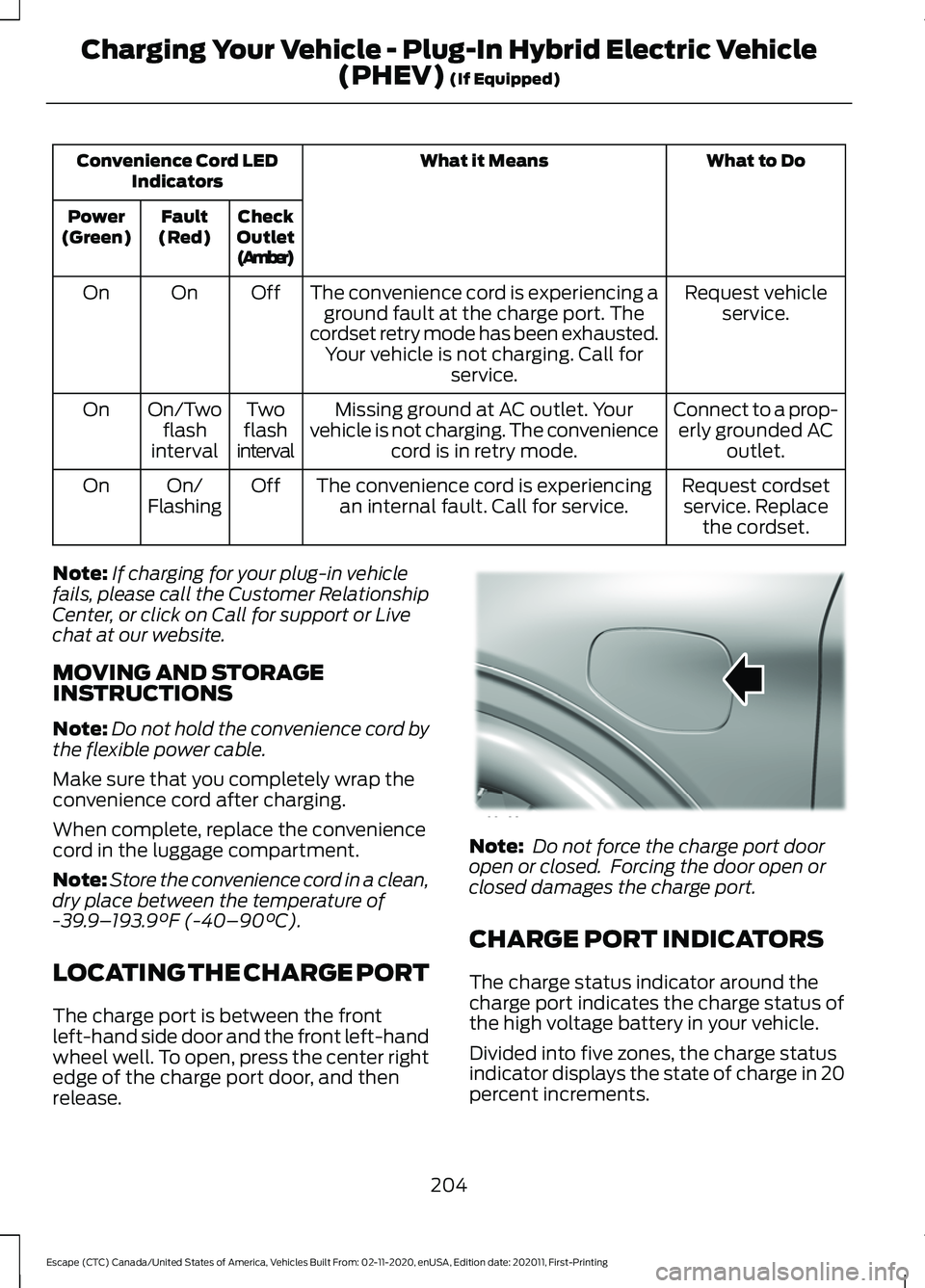
The charge port is between the front
left-hand side door and the front left-hand
wheel well. To open, press the center right
edge of the charge port door, and then
release. Note:
Do not force the charge port door
open or closed. Forcing the door open or
closed damages the charge port.
CHARGE PORT INDICATORS
The charge status indicator around the
charge port indicates the charge status of
the high voltage battery in your vehicle.
Divided into five zones, the charge status
indicator displays the state of charge in 20
percent increments.
204
Escape (CTC) Canada/United States of America, Vehicles Built From: 02-11-2020, enUSA, Edition date: 202011, First-Printing Charging Your Vehicle - Plug-In Hybrid Electric Vehicle
(PHEV)
(If Equipped)E295258
Page 213 of 589
AUTOMATIC TRANSMISSION
PRECAUTIONS
WARNING: When your vehicle is
stationary, keep the brake pedal fully
pressed when shifting gears. Failure to
follow this instruction could result in
personal injury, death or property
damage. WARNING:
Do not apply the brake
pedal and accelerator pedal
simultaneously. Applying both pedals
simultaneously for more than a few
seconds will limit power, which may
result in difficulty maintaining speed in
traffic and could lead to serious injury.
Note: You may not be able to shift out of
park (P) unless the intelligent access key is
inside your vehicle.
AUTOMATIC TRANSMISSION
POSITIONS
Park (P)
This position locks the driveline and
prevents the wheels from turning.
The engine can start with the shifter in this
position.
The electric parking brake could apply if:
• You shift to park (P) on a slope.
• You shift to park (P) without the brake
pedal fully pressed.
Note: A warning tone sounds if you open
the driver door and you have not shifted the
transmission selector to park (P). Reverse (R)
This position allows your vehicle to move
backward. Come to a complete stop
before shifting into and out of reverse (R).
Neutral (N) WARNING:
In neutral (N) your
vehicle has the ability to roll freely. If you
intend to leave your vehicle, make sure
you apply the parking brake.
This position allows your vehicle to roll
freely. Hold the brake pedal down when in
this position.
The engine can start with the shifter in this
position.
Drive (D)
This position, drive (D), is the normal
driving position, and allows your vehicle to
move forward.
Low (L)
This mode is for driving on steep slopes.
The transmission will hold low gear for
maximum torque driving uphill and
maximum engine braking driving downhill.
You can enter this mode at any vehicle
speed.
Note: Prolonged use of this mode could
lower fuel economy. With your vehicle in
drive (D), press the L button to enter this
mode.
210
Escape (CTC) Canada/United States of America, Vehicles Built From: 02-11-2020, enUSA, Edition date: 202011, First-Printing Automatic Transmission
Page 216 of 589
Switching Grade Assist On and Off
Press the grade assist button to activate
grade assist. The grade assist lamp
appears in the instrument cluster. Press
the button again to switch it off.
Your vehicle determines the amount of
engine motoring and high-voltage battery
charging. You could notice the engine
speed increasing and decreasing to help
maintain your vehicle speed when
descending a slope.
Grade Assist Indicators
MANUAL PARK RELEASE -
GASOLINE
What Is Manual Park Release
Manual park release is used to move your
transmission from the park (P) position in
the event of an electrical malfunction or
emergency.
Manual Park Release Precautions WARNING: When doing this
procedure, you need to take the
transmission out of park (P) which
means your vehicle can roll freely. To
avoid unwanted vehicle movement,
always fully apply the parking brake prior
to doing this procedure. Use wheels
chocks if appropriate. WARNING:
If the parking brake is
fully released, but the brake warning
lamp remains illuminated, the brakes
may not be working properly. Have your
vehicle checked as soon as possible. WARNING:
Do not drive your
vehicle until you verify that the
stoplamps are working.
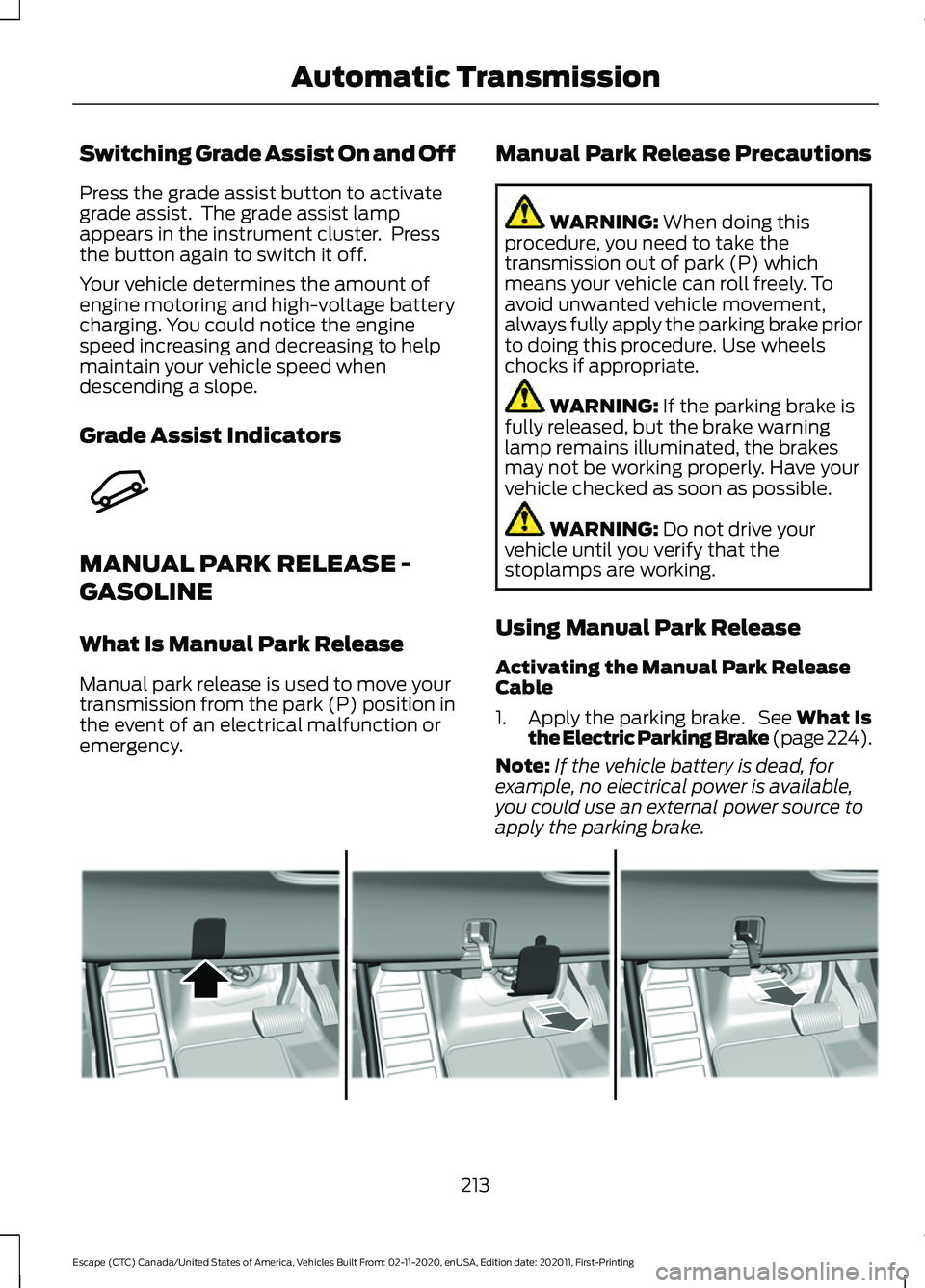
Using Manual Park Release
Activating the Manual Park Release
Cable
1. Apply the parking brake. See What Is
the Electric Parking Brake (page 224).
Note: If the vehicle battery is dead, for
example, no electrical power is available,
you could use an external power source to
apply the parking brake. 213
Escape (CTC) Canada/United States of America, Vehicles Built From: 02-11-2020, enUSA, Edition date: 202011, First-Printing Automatic TransmissionE345122 E307867