key FORD ESCAPE 2021 Workshop Manual
[x] Cancel search | Manufacturer: FORD, Model Year: 2021, Model line: ESCAPE, Model: FORD ESCAPE 2021Pages: 589, PDF Size: 9.2 MB
Page 334 of 589
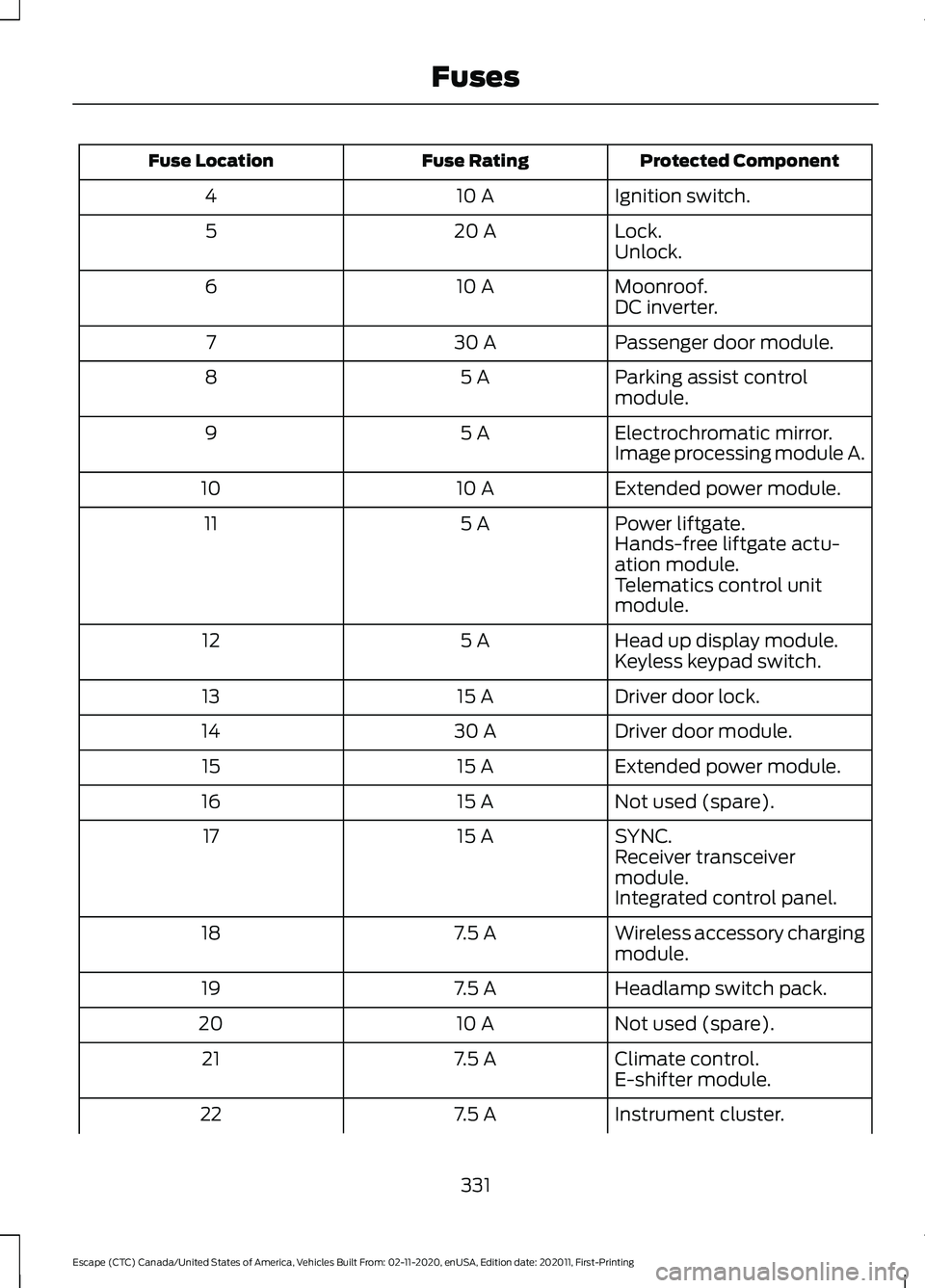
Protected Component
Fuse Rating
Fuse Location
Ignition switch.
10 A
4
Lock.
20 A
5
Unlock.
Moonroof.
10 A
6
DC inverter.
Passenger door module.
30 A
7
Parking assist control
module.
5 A
8
Electrochromatic mirror.
5 A
9
Image processing module A.
Extended power module.
10 A
10
Power liftgate.
5 A
11
Hands-free liftgate actu-
ation module.
Telematics control unit
module.
Head up display module.
5 A
12
Keyless keypad switch.
Driver door lock.
15 A
13
Driver door module.
30 A
14
Extended power module.
15 A
15
Not used (spare).
15 A
16
SYNC.
15 A
17
Receiver transceiver
module.
Integrated control panel.
Wireless accessory charging
module.
7.5 A
18
Headlamp switch pack.
7.5 A
19
Not used (spare).
10 A
20
Climate control.
7.5 A
21
E-shifter module.
Instrument cluster.
7.5 A
22
331
Escape (CTC) Canada/United States of America, Vehicles Built From: 02-11-2020, enUSA, Edition date: 202011, First-Printing Fuses
Page 429 of 589
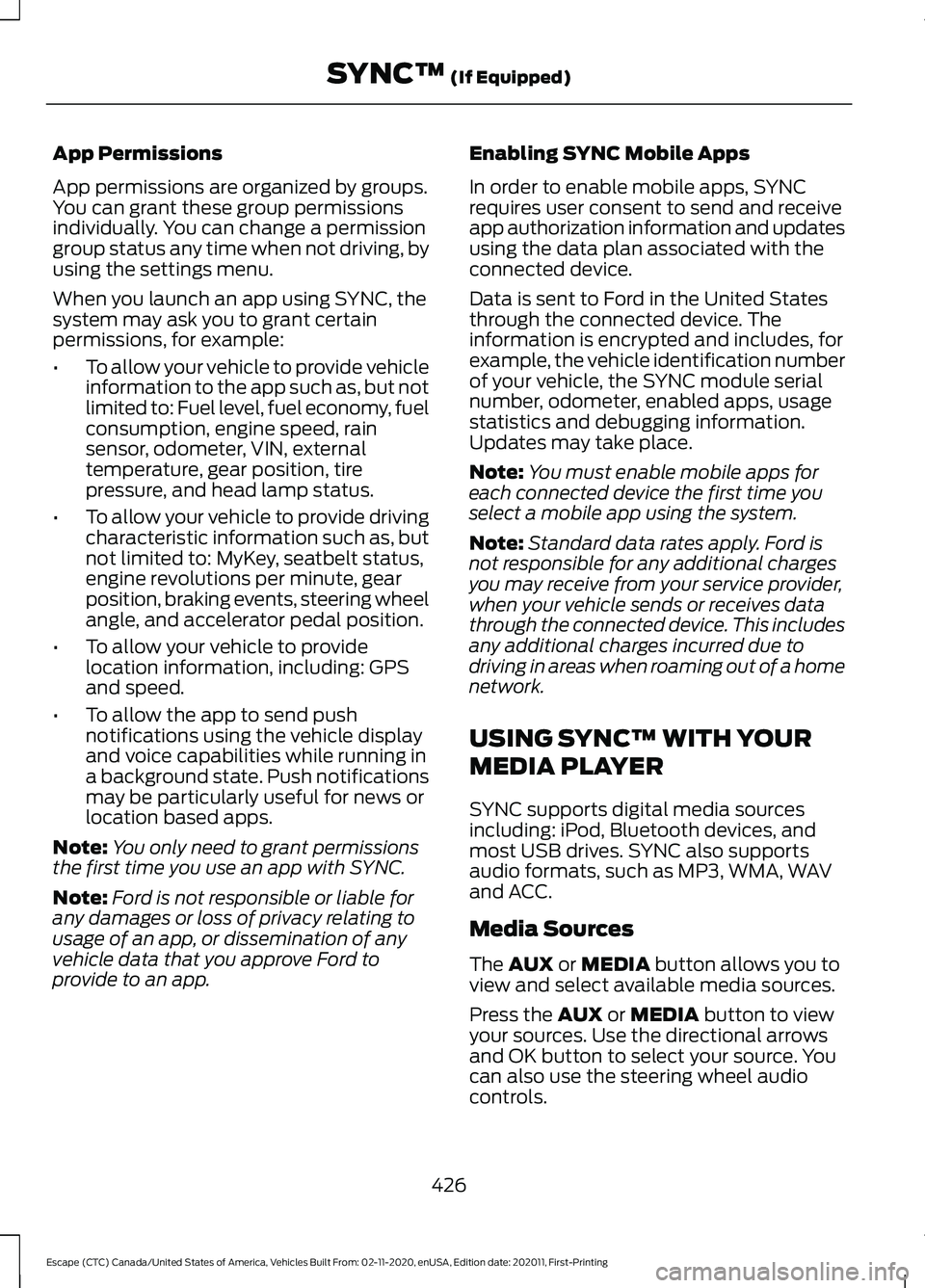
App Permissions
App permissions are organized by groups.
You can grant these group permissions
individually. You can change a permission
group status any time when not driving, by
using the settings menu.
When you launch an app using SYNC, the
system may ask you to grant certain
permissions, for example:
•
To allow your vehicle to provide vehicle
information to the app such as, but not
limited to: Fuel level, fuel economy, fuel
consumption, engine speed, rain
sensor, odometer, VIN, external
temperature, gear position, tire
pressure, and head lamp status.
• To allow your vehicle to provide driving
characteristic information such as, but
not limited to: MyKey, seatbelt status,
engine revolutions per minute, gear
position, braking events, steering wheel
angle, and accelerator pedal position.
• To allow your vehicle to provide
location information, including: GPS
and speed.
• To allow the app to send push
notifications using the vehicle display
and voice capabilities while running in
a background state. Push notifications
may be particularly useful for news or
location based apps.
Note: You only need to grant permissions
the first time you use an app with SYNC.
Note: Ford is not responsible or liable for
any damages or loss of privacy relating to
usage of an app, or dissemination of any
vehicle data that you approve Ford to
provide to an app. Enabling SYNC Mobile Apps
In order to enable mobile apps, SYNC
requires user consent to send and receive
app authorization information and updates
using the data plan associated with the
connected device.
Data is sent to Ford in the United States
through the connected device. The
information is encrypted and includes, for
example, the vehicle identification number
of your vehicle, the SYNC module serial
number, odometer, enabled apps, usage
statistics and debugging information.
Updates may take place.
Note:
You must enable mobile apps for
each connected device the first time you
select a mobile app using the system.
Note: Standard data rates apply. Ford is
not responsible for any additional charges
you may receive from your service provider,
when your vehicle sends or receives data
through the connected device. This includes
any additional charges incurred due to
driving in areas when roaming out of a home
network.
USING SYNC™ WITH YOUR
MEDIA PLAYER
SYNC supports digital media sources
including: iPod, Bluetooth devices, and
most USB drives. SYNC also supports
audio formats, such as MP3, WMA, WAV
and ACC.
Media Sources
The AUX or MEDIA button allows you to
view and select available media sources.
Press the
AUX or MEDIA button to view
your sources. Use the directional arrows
and OK button to select your source. You
can also use the steering wheel audio
controls.
426
Escape (CTC) Canada/United States of America, Vehicles Built From: 02-11-2020, enUSA, Edition date: 202011, First-Printing SYNC™
(If Equipped)
Page 452 of 589
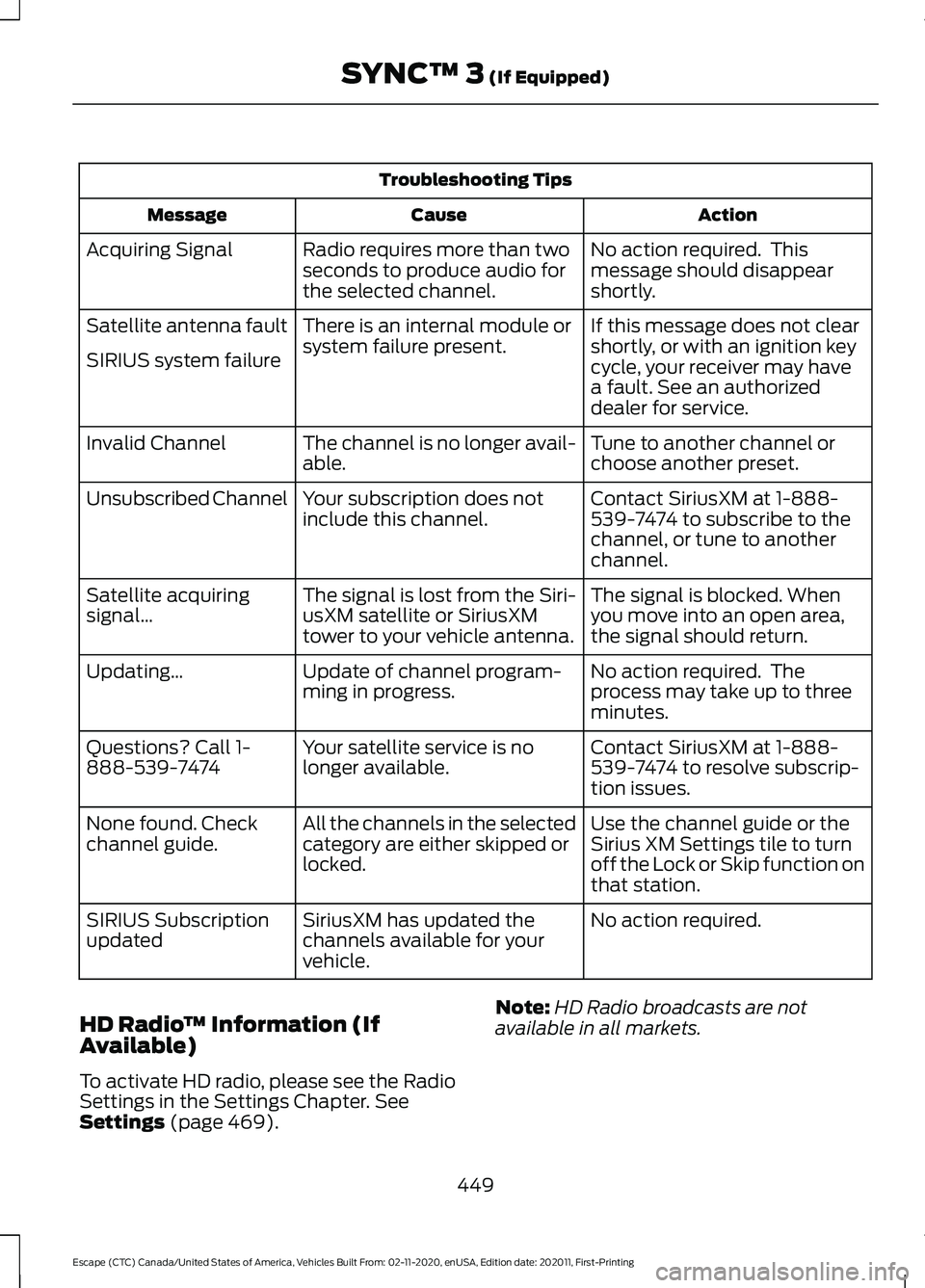
Troubleshooting Tips
Action
Cause
Message
No action required. This
message should disappear
shortly.
Radio requires more than two
seconds to produce audio for
the selected channel.
Acquiring Signal
If this message does not clear
shortly, or with an ignition key
cycle, your receiver may have
a fault. See an authorized
dealer for service.
There is an internal module or
system failure present.
Satellite antenna fault
SIRIUS system failure
Tune to another channel or
choose another preset.
The channel is no longer avail-
able.
Invalid Channel
Contact SiriusXM at 1-888-
539-7474 to subscribe to the
channel, or tune to another
channel.
Your subscription does not
include this channel.
Unsubscribed Channel
The signal is blocked. When
you move into an open area,
the signal should return.
The signal is lost from the Siri-
usXM satellite or SiriusXM
tower to your vehicle antenna.
Satellite acquiring
signal…
No action required. The
process may take up to three
minutes.
Update of channel program-
ming in progress.
Updating…
Contact SiriusXM at 1-888-
539-7474 to resolve subscrip-
tion issues.
Your satellite service is no
longer available.
Questions? Call 1-
888-539-7474
Use the channel guide or the
Sirius XM Settings tile to turn
off the Lock or Skip function on
that station.
All the channels in the selected
category are either skipped or
locked.
None found. Check
channel guide.
No action required.
SiriusXM has updated the
channels available for your
vehicle.
SIRIUS Subscription
updated
HD Radio ™ Information (If
Available)
To activate HD radio, please see the Radio
Settings in the Settings Chapter. See
Settings (page 469). Note:
HD Radio broadcasts are not
available in all markets.
449
Escape (CTC) Canada/United States of America, Vehicles Built From: 02-11-2020, enUSA, Edition date: 202011, First-Printing SYNC™ 3
(If Equipped)
Page 459 of 589
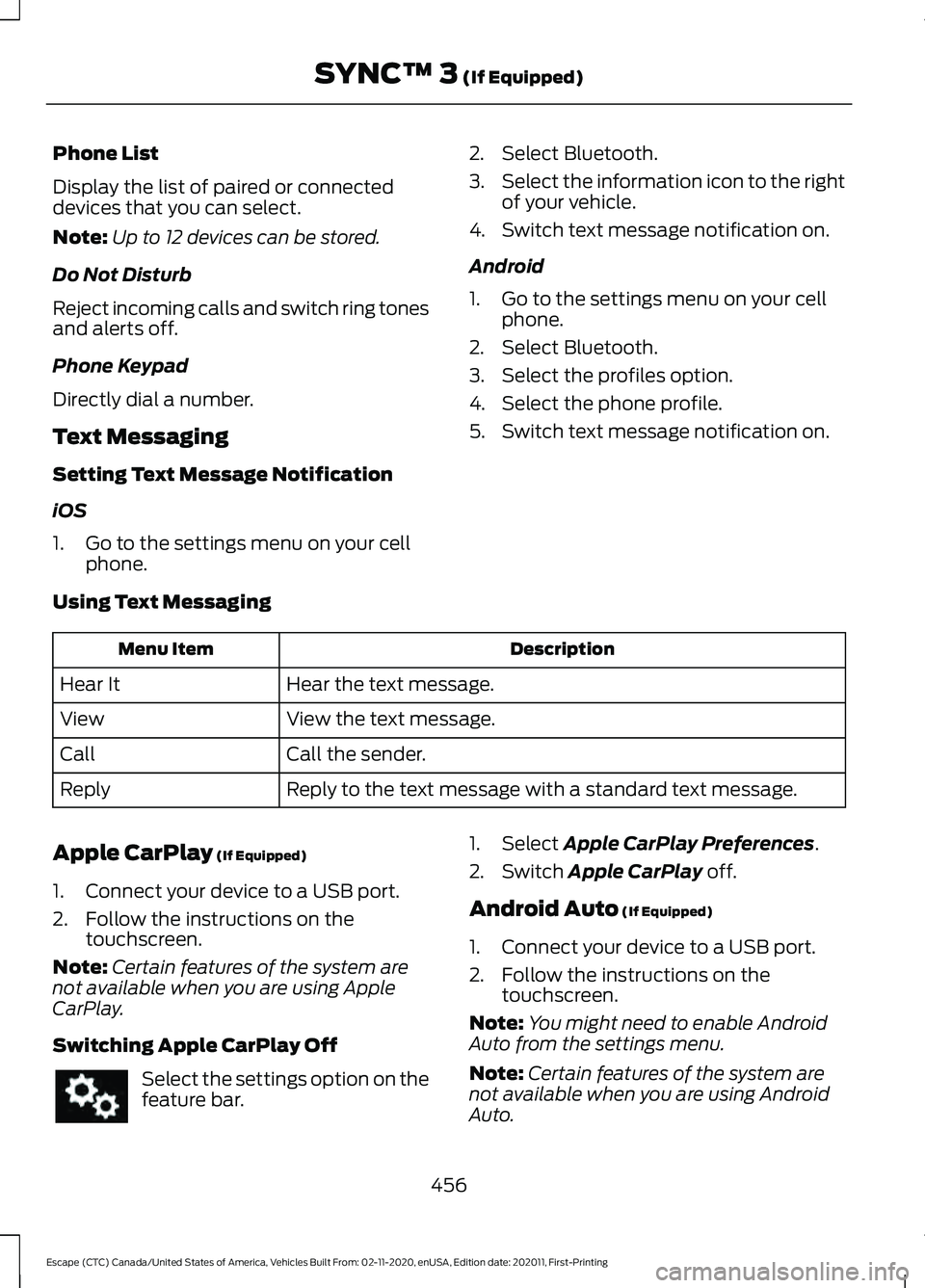
Phone List
Display the list of paired or connected
devices that you can select.
Note:
Up to 12 devices can be stored.
Do Not Disturb
Reject incoming calls and switch ring tones
and alerts off.
Phone Keypad
Directly dial a number.
Text Messaging
Setting Text Message Notification
iOS
1. Go to the settings menu on your cell phone. 2. Select Bluetooth.
3.
Select the information icon to the right
of your vehicle.
4. Switch text message notification on.
Android
1. Go to the settings menu on your cell phone.
2. Select Bluetooth.
3. Select the profiles option.
4. Select the phone profile.
5. Switch text message notification on.
Using Text Messaging Description
Menu Item
Hear the text message.
Hear It
View the text message.
View
Call the sender.
Call
Reply to the text message with a standard text message.
Reply
Apple CarPlay (If Equipped)
1. Connect your device to a USB port.
2. Follow the instructions on the touchscreen.
Note: Certain features of the system are
not available when you are using Apple
CarPlay.
Switching Apple CarPlay Off Select the settings option on the
feature bar. 1. Select Apple CarPlay Preferences.
2. Switch
Apple CarPlay off.
Android Auto
(If Equipped)
1. Connect your device to a USB port.
2. Follow the instructions on the touchscreen.
Note: You might need to enable Android
Auto from the settings menu.
Note: Certain features of the system are
not available when you are using Android
Auto.
456
Escape (CTC) Canada/United States of America, Vehicles Built From: 02-11-2020, enUSA, Edition date: 202011, First-Printing SYNC™ 3
(If Equipped)
Page 461 of 589
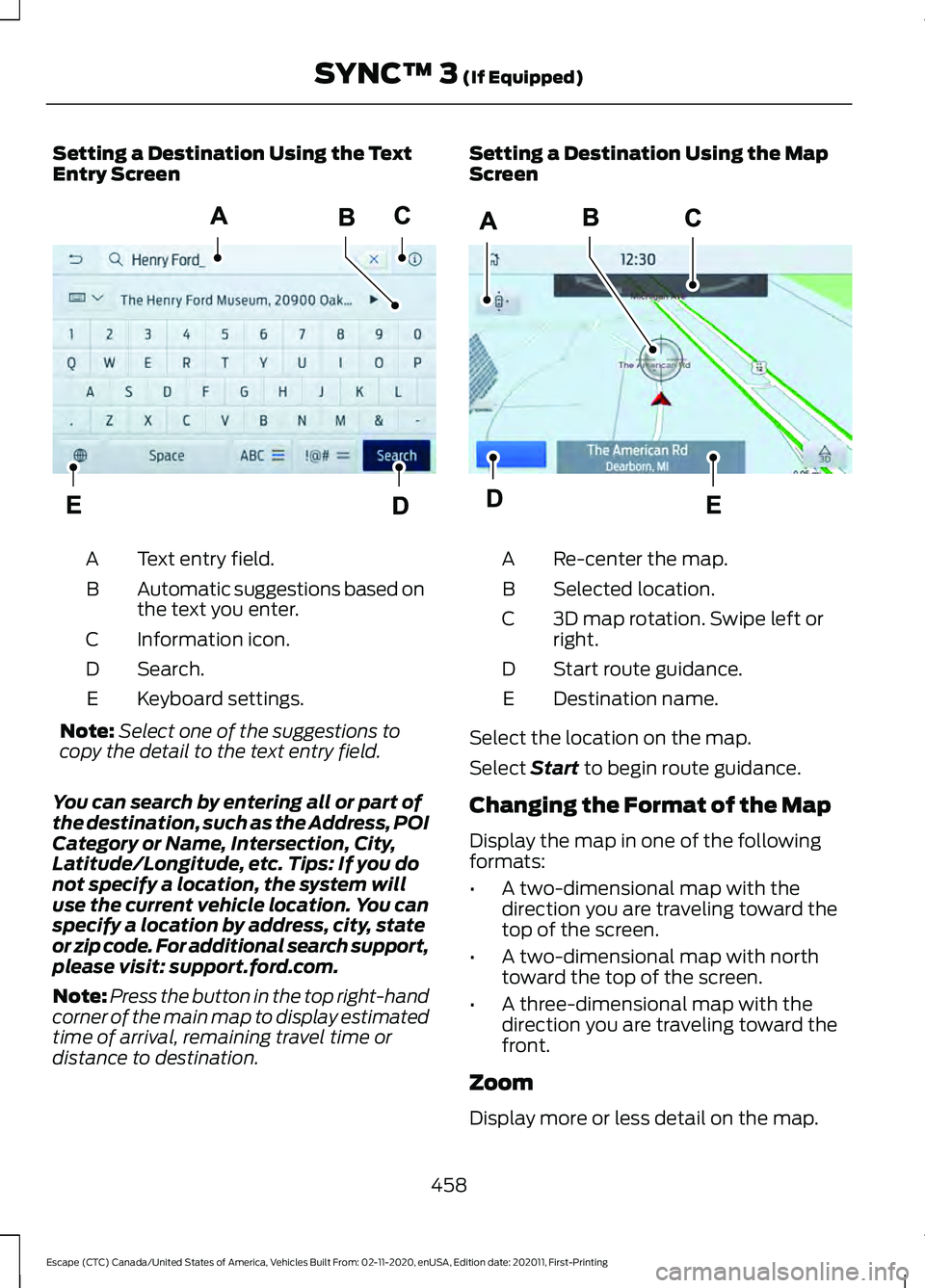
Setting a Destination Using the Text
Entry Screen
Text entry field.
A
Automatic suggestions based on
the text you enter.
B
Information icon.
C
Search.
D
Keyboard settings.
E
Note: Select one of the suggestions to
copy the detail to the text entry field.
You can search by entering all or part of
the destination, such as the Address, POI
Category or Name, Intersection, City,
Latitude/Longitude, etc. Tips: If you do
not specify a location, the system will
use the current vehicle location. You can
specify a location by address, city, state
or zip code. For additional search support,
please visit: support.ford.com.
Note: Press the button in the top right-hand
corner of the main map to display estimated
time of arrival, remaining travel time or
distance to destination. Setting a Destination Using the Map
Screen
Re-center the map.
A
Selected location.
B
3D map rotation. Swipe left or
right.
C
Start route guidance.
D
Destination name.
E
Select the location on the map.
Select Start to begin route guidance.
Changing the Format of the Map
Display the map in one of the following
formats:
• A two-dimensional map with the
direction you are traveling toward the
top of the screen.
• A two-dimensional map with north
toward the top of the screen.
• A three-dimensional map with the
direction you are traveling toward the
front.
Zoom
Display more or less detail on the map.
458
Escape (CTC) Canada/United States of America, Vehicles Built From: 02-11-2020, enUSA, Edition date: 202011, First-Printing SYNC™ 3
(If Equipped)E297558 E297559
Page 472 of 589
Action and Description
Menu Item
Touch this button to view the nearby weather, current weather,
or the five-day forecast for the chosen area.
Weather
Select to see the weather map,
which can show storms, radar
information, charts and winds.
Map
Select to choose from a listing of
weather locations.
Area
Touch this button to view scores and schedules from a variety
of sports. You can also save up to 10 favorite teams for easier
access. The score automatically refreshes when a game is in
progress.
Sports Info
Touch this button to view ski conditions for a specific area.
Ski Conditions
SETTINGS Press the button to enter the
settings menu.
Once you select a tile, press the
button next to a menu item to
view an explanation of the
feature or setting.
Sound
Select this tile to adjust the sound settings.
Clock
Select this tile to adjust the clock settings.
Bluetooth
Select this tile to switch Bluetooth on and
off and adjust the settings.
Phone
Select this tile to connect, disconnect, and
manage the connected device settings. Audio
Select this tile to adjust the audio settings.
Driver Assist (If Equipped)
Select this tile to adjust Driver Assist
features like Parking Aids, Lane Keeping
System, Pedestrian Detection, and
Auto-Start-Stop.
Vehicle
Select this tile to adjust vehicle settings
like windows, alarm, lighting, and MyKey
settings.
FordPass
Select this tile to adjust the FordPass
settings
General
Select this tile to adjust settings like
language, measurement units, or to reset
the system.
911 Assist
(If Equipped)
Select this tile to switch 911 Assist on and
off.
469
Escape (CTC) Canada/United States of America, Vehicles Built From: 02-11-2020, enUSA, Edition date: 202011, First-Printing SYNC™ 3
(If Equipped)E280315 E268570
Page 512 of 589
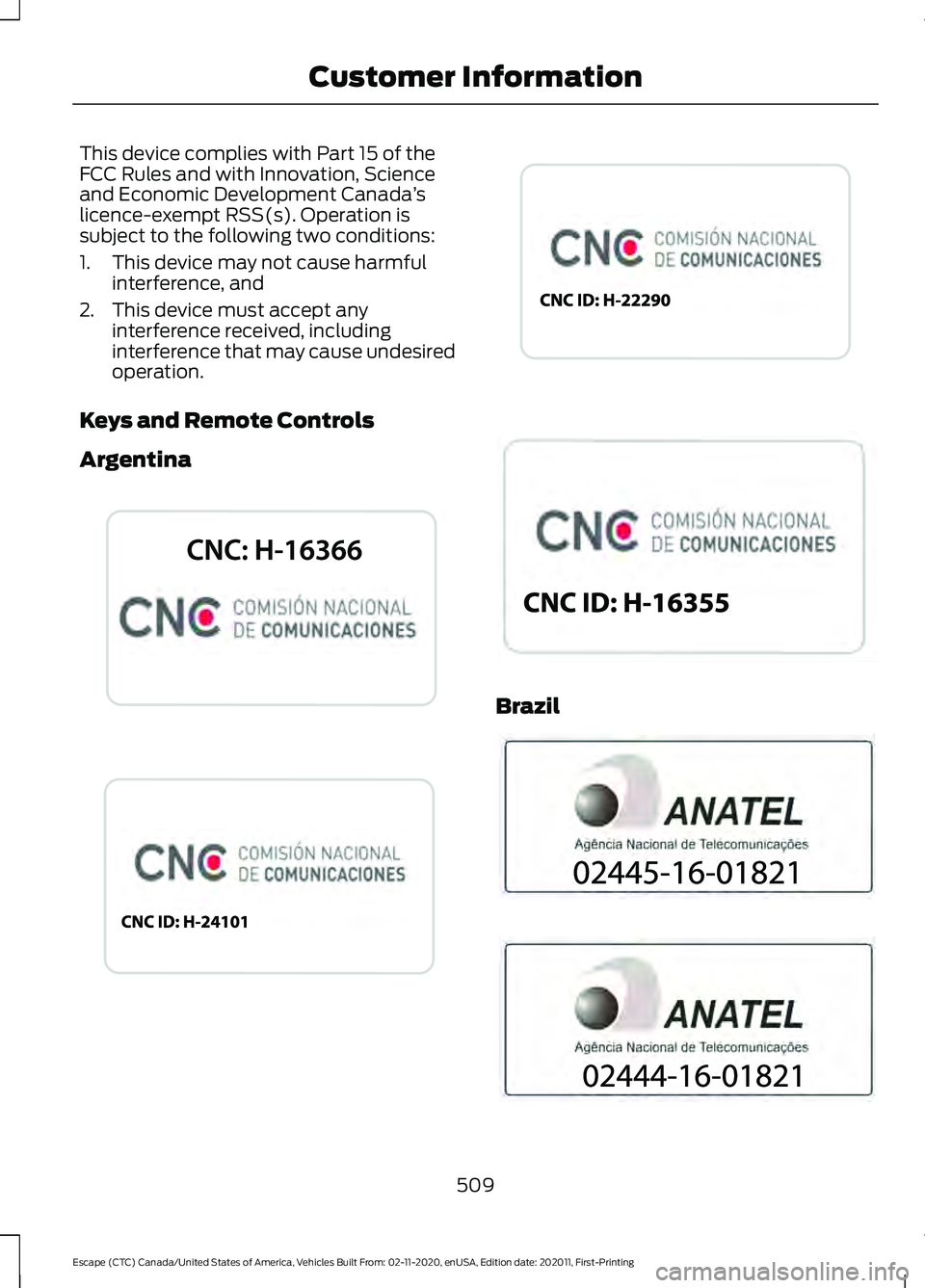
This device complies with Part 15 of the
FCC Rules and with Innovation, Science
and Economic Development Canada
’s
licence-exempt RSS(s). Operation is
subject to the following two conditions:
1. This device may not cause harmful interference, and
2. This device must accept any interference received, including
interference that may cause undesired
operation.
Keys and Remote Controls
Argentina Brazil
509
Escape (CTC) Canada/United States of America, Vehicles Built From: 02-11-2020, enUSA, Edition date: 202011, First-Printing Customer InformationE339844 E342143 E340316 E340119 E340121 E340120
Page 570 of 589
Changing the Engine Air Filter - 2.5L,
Hybrid Electric Vehicle (HEV)/Plug-In
Hybrid Electric Vehicle (PHEV)...........344
Changing the Fuel Filter - Gasoline, Hybrid Electric Vehicle (HEV)..............344
Changing the Remote Control Battery - Vehicles With: Flip Key...............................61
Battery Replacement Procedure..................... 61
Changing the Remote Control Battery - Vehicles With: Push Button Start.........60
Changing the Vehicle Wi-Fi Hotspot Name or Password
....................................413
Charge Port Indicators..............................204
Charging a Device.........................................167
Charging a Wireless Device
......................169
Charging Equipment...................................201
........................................................................\
........... 201
MOVING AND STORAGE INSTRUCTIONS............................................ 204
Charging Your Vehicle.................................201 AC Charging......................................................... 205
Charging Your Vehicle – Troubleshooting........................................... 208
Charging Your Vehicle Precautions
........201
Charging Your Vehicle – Troubleshooting.......................................208
Charging Your Vehicle – Frequently Asked Questions........................................................ 209
Charging Your Vehicle – Information Messages......................................................... 208
Checking MyKey System Status..............66
Checking the Brake Fluid...........................222
Checking the Coolant................................339 Adding Coolant.................................................. 339
Coolant Change.................................................. 341
Engine Coolant Temperature Management
.................................................. 342
Fail-Safe Cooling................................................ 341
Severe Climates................................................. 340
Checking the Seatbelts...............................44
Checking the Tire Pressures.....................372
Checking the Wiper Blades
........................94
Children and Airbags....................................50
Child Restraint Anchor Points...................29 Locating the Child Restraint Lower Anchor
Points................................................................... 29
Locating the Child Restraint Top Tether Anchor Points................................................... 30What Are the Child Restraint Anchor
Points................................................................... 29
Child Restraints
..............................................30
Child Restraint Position Information............30
Child Restraints Recommendation................31
Child Safety......................................................28 Child Restraint Anchor Points......................... 29
Child Restraints.................................................... 30
Installing Child Restraints.................................. 31
Child Safety Locks.........................................38 Left-Hand Side..................................................... 38
Right-Hand Side................................................... 38
Child Safety Precautions
.............................28
Cleaning Products.......................................352
Materials................................................................ 352
Cleaning the Exterior
..................................352
Cleaning Camera Lenses and
Sensors............................................................. 354
Cleaning Chrome, Aluminium or Stainless Steel................................................................... 353
Cleaning Headlamps and Rear Lamps............................................................... 352
Cleaning Stripes or Graphics......................... 354
Cleaning the Engine Compartment............353
Cleaning the Exterior Precautions...............352
Cleaning the Underbody................................. 354
Cleaning Wheels................................................ 353
Cleaning Windows and Wiper Blades............................................................... 353
Cleaning the Interior...................................354 Cleaning Carpets and Floor Mats................355
Cleaning Displays and Screens.................... 354
Cleaning Fabric Seats and Headliners....................................................... 355
Cleaning Leather and Vinyl ........................... 355
Cleaning Moonroof Tracks............................. 356
Cleaning Plastic.................................................. 354
Cleaning Seatbelts............................................ 355
Cleaning Storage Compartments...............356
Cleaning the Instrument Panel.................... 354
Clearing All MyKeys.......................................66
Clearing the Garage Door Opener.........164
Climate Control
..............................................137
Closing the Liftgate.......................................78 Closing the Hands-Free Liftgate.................... 83
567
Escape (CTC) Canada/United States of America, Vehicles Built From: 02-11-2020, enUSA, Edition date: 202011, First-Printing Index
Page 571 of 589
Closing the Liftgate From Inside Your
Vehicle................................................................. 82
Closing the Liftgate From Outside Your Vehicle................................................................. 78
Closing the Liftgate Using the Remote Control................................................................. 83
Cold Weather Precautions.........................311
Configuring the Trip Computer - Vehicles With: 4.2 Inch Instrument Cluster
Display Screen
............................................129
Connected Vehicle.....................................409
Connecting the Vehicle to a Mobile
Network........................................................... 409
Connected Vehicle Data
..............................24
Connected Vehicle Limitations.............409
Connected Vehicle Requirements........409
Connected Vehicle – Troubleshooting - Vehicles With: Modem............................410
Connected Vehicle – Troubleshooting - Vehicles With: SYNC 3..............................411
Connecting a Trailer....................................301 Safety Chains...................................................... 302
Trailer Lamps....................................................... 301
Trailer Towing Connector................................ 301
Connecting a Trailer Precautions
...........301
Connecting the Vehicle to a Mobile Network.......................................................409
Connecting FordPass to the Modem........409
Enabling and Disabling the Modem..........409
What Is the Modem......................................... 409
Connecting the Vehicle to a Wi-Fi Network.......................................................409
Contacting Us
...................................................15
Argentina.................................................................. 15
Asia Pacific.............................................................. 15
Australia.................................................................... 15
Brazil........................................................................\
... 15
Canada...................................................................... 15
Caribbean, Central America and Israel.........15
Europe....................................................................... 15
Ford Credit - US Only........................................... 16
Middle East.............................................................. 16
New Zealand........................................................... 15
North Africa ............................................................ 15
Puerto Rico.............................................................. 16
South Korea............................................................ 16
Sub-Saharan Africa ............................................. 15
U.S. Virgin Islands and Puerto Rico................15 United States..........................................................
15
Cooling System Capacity and Specification - 1.5L EcoBoost™
.........400
Cooling System Capacity and Specification - 2.0L EcoBoost™.........401
Cooling System Capacity and Specification - 2.5L, Hybrid Electric
Vehicle (HEV)/Plug-In Hybrid Electric
Vehicle (PHEV)
..........................................401
Crash and Breakdown Information........313 Automatic Crash Shutoff................................ 319
Jump Starting the Vehicle............................... 315
Post-Crash Alert System................................. 318
Crash Sensors and Airbag Indicator.......54
Creating a MyKey - Vehicles With: Flip Key....................................................................65
Creating a MyKey - Vehicles With: Push Button Start..................................................65
Creating a Vehicle Wi-Fi Hotspot...........413 Connecting a Device to the Wi-Fi
Hotspot............................................................. 413
Finding the Wi-Fi Hotspot Name and Password.......................................................... 413
Cross Traffic Alert........................................276 Cross Traffic Alert –
Troubleshooting............................................ 278
Cross Traffic Alert Indicators....................277
Cross Traffic Alert Limitations.................276
Cross Traffic Alert Precautions...............276
Cross Traffic Alert – Troubleshooting........................................278
Cross Traffic Alert – Information Messages......................................................... 278
Cruise Control
................................................247
Cruise Control Indicators..........................248
Cup Holders
......................................................171
Cup Holder Precautions..................................... 171
Customer Information...............................495 Radio Frequency Certification
Labels............................................................... 498
Customizing the Instrument Cluster Display - Vehicles With: 4.2 Inch
Instrument Cluster Display
Screen............................................................124
568
Escape (CTC) Canada/United States of America, Vehicles Built From: 02-11-2020, enUSA, Edition date: 202011, First-Printing Index
Page 578 of 589
Interior Bulbs..................................................351
Interior Bulb Specification Chart.................. 351
Interior Lamp Function...............................103 Switching the Interior Lamp Function On
and Off.............................................................. 103
What Is the Interior Lamp Function............103
Interior Lighting
.............................................103
Ambient Lighting................................................ 103
Interior Lamp Function..................................... 103
Interior Lighting – Troubleshooting.............104
Interior Lighting – Troubleshooting
.......104
Interior Lighting – Frequently Asked
Questions......................................................... 104
Interior Mirror
..................................................107
Auto-Dimming Interior Mirror......................... 107
Interior Mirror Precautions.........................107
Introduction.......................................................17
J
Jump Starting the Vehicle
.........................315
Jump Starting Precautions.............................. 315
Jump Starting the Vehicle............................... 316
Preparing the Vehicle........................................ 316
K
Keyless Entry....................................................73 Keyless Entry Settings........................................ 74
Keyless Entry – Troubleshooting.................... 75
Locking and Unlocking the Doors Using Keyless Entry..................................................... 75
Master Access Code............................................ 73
Keyless Entry Limitations............................73
Keyless Entry Settings..................................74 Clearing All Personal Access Codes..............74
Creating Personal Access Codes.................... 74
Reprogramming the Unlocking Function.............................................................. 74
Switching Keyless Entry On and Off..............74
Keyless Entry – Troubleshooting..............75 Keyless Entry – Frequently Asked
Questions........................................................... 75
Keys and Remote Controls.........................58 Keys and Remote Controls –
Troubleshooting............................................... 63Keys and Remote Controls –
Troubleshooting..........................................63
Keys and Remote Controls – Information Messages............................................................ 63
L
Lane Centering
.............................................255
How Does Lane Centering Work.................. 255
Lane Centering Alerts...................................... 256
Lane Centering Automatic Cancellation.................................................... 257
Lane Centering Indicators............................... 257
Lane Centering Limitations........................... 256
Lane Centering Precautions.......................... 255
Lane Centering Requirements...................... 255
Switching Lane Centering On and Off...................................................................... 256
Lane Keeping System Indicators...........269
Lane Keeping System................................266 Aid Mode.............................................................. 268
Alert and Aid Mode........................................... 268
Alert Mode............................................................ 267
Lane Keeping System – Troubleshooting............................................ 270
Lane Keeping System Limitations........266
Lane Keeping System Precautions
.................................................266
Lane Keeping System – Troubleshooting........................................270
Lane Keeping System – Frequently Asked Questions.......................................................... 271
Lane Keeping System – Information Messages......................................................... 270
Launching or Retrieving a Boat or Personal Watercraft................................305
Liftgate...............................................................78 Closing the Liftgate.............................................. 78
Liftgate – Troubleshooting............................... 85
Opening the Liftgate........................................... 78
Liftgate Obstacle Detection
......................84
Closing the Liftgate............................................. 84
Opening the Liftgate........................................... 85
Liftgate Precautions
.....................................80
Liftgate – Troubleshooting.........................85
Liftgate – Frequently Asked
Questions ........................................................... 86
Liftgate – Information Messages................... 85
575
Escape (CTC) Canada/United States of America, Vehicles Built From: 02-11-2020, enUSA, Edition date: 202011, First-Printing Index