roof FORD ESCAPE 2022 User Guide
[x] Cancel search | Manufacturer: FORD, Model Year: 2022, Model line: ESCAPE, Model: FORD ESCAPE 2022Pages: 585, PDF Size: 6.15 MB
Page 307 of 585
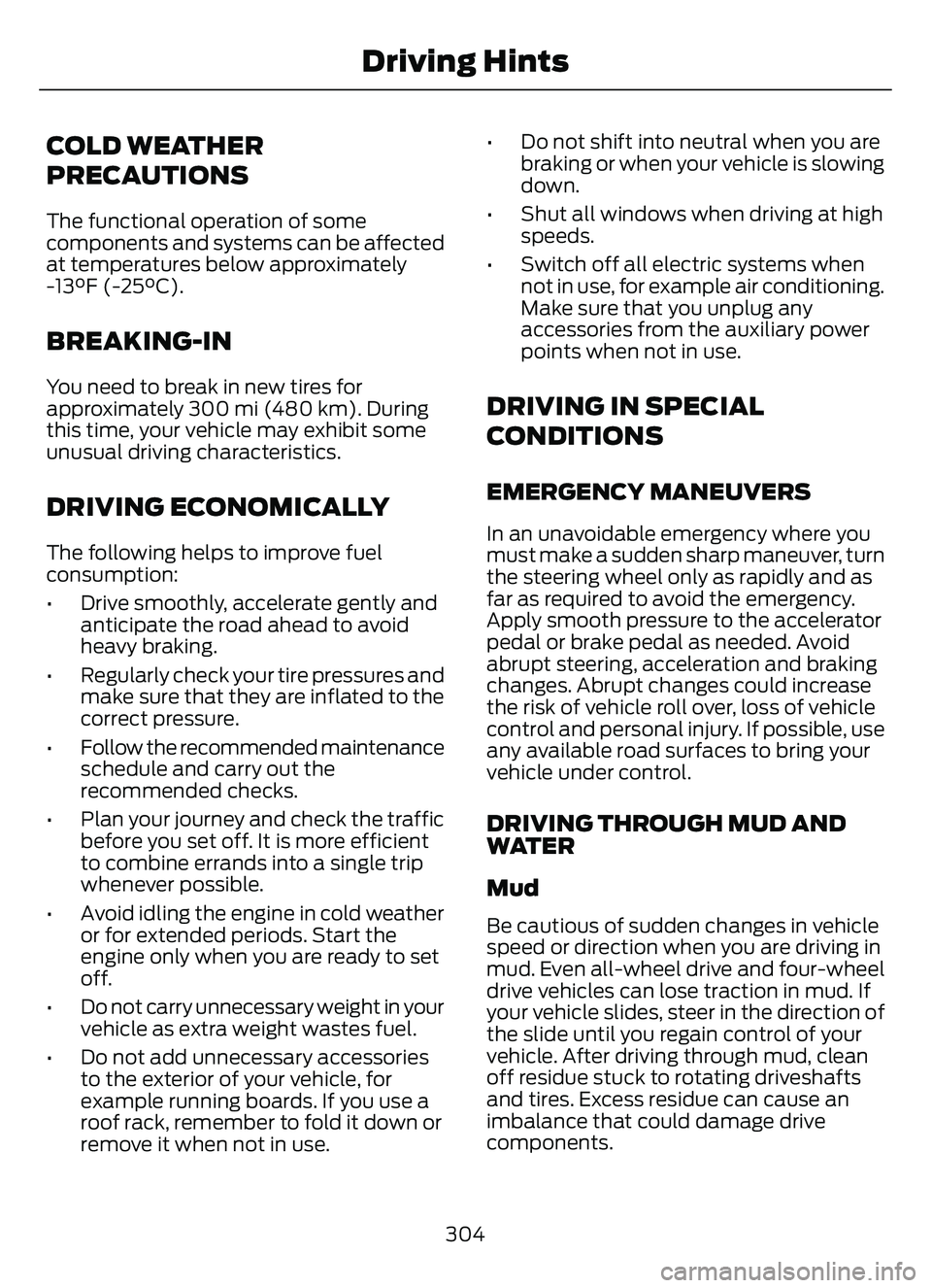
COLD WEATHER
PRECAUTIONS
The functional operation of some
components and systems can be affected
at temperatures below approximately
-13°F (-25°C).
BREAKING-IN
You need to break in new tires for
approximately 300 mi (480 km). During
this time, your vehicle may exhibit some
unusual driving characteristics.
DRIVING ECONOMICALLY
The following helps to improve fuel
consumption:
• Drive smoothly, accelerate gently andanticipate the road ahead to avoid
heavy braking.
• Regularly check your tire pressures and make sure that they are inflated to the
correct pressure.
• Follow the recommended maintenance schedule and carry out the
recommended checks.
• Plan your journey and check the traffic before you set off. It is more efficient
to combine errands into a single trip
whenever possible.
• Avoid idling the engine in cold weather or for extended periods. Start the
engine only when you are ready to set
off.
• Do not carry unnecessary weight in your vehicle as extra weight wastes fuel.
• Do not add unnecessary accessories to the exterior of your vehicle, for
example running boards. If you use a
roof rack, remember to fold it down or
remove it when not in use. • Do not shift into neutral when you are
braking or when your vehicle is slowing
down.
• Shut all windows when driving at high speeds.
• Switch off all electric systems when not in use, for example air conditioning.
Make sure that you unplug any
accessories from the auxiliary power
points when not in use.
DRIVING IN SPECIAL
CONDITIONS
EMERGENCY MANEUVERS
In an unavoidable emergency where you
must make a sudden sharp maneuver, turn
the steering wheel only as rapidly and as
far as required to avoid the emergency.
Apply smooth pressure to the accelerator
pedal or brake pedal as needed. Avoid
abrupt steering, acceleration and braking
changes. Abrupt changes could increase
the risk of vehicle roll over, loss of vehicle
control and personal injury. If possible, use
any available road surfaces to bring your
vehicle under control.
DRIVING THROUGH MUD AND
WATER
Mud
Be cautious of sudden changes in vehicle
speed or direction when you are driving in
mud. Even all-wheel drive and four-wheel
drive vehicles can lose traction in mud. If
your vehicle slides, steer in the direction of
the slide until you regain control of your
vehicle. After driving through mud, clean
off residue stuck to rotating driveshafts
and tires. Excess residue can cause an
imbalance that could damage drive
components.
304
Driving Hints
Page 326 of 585
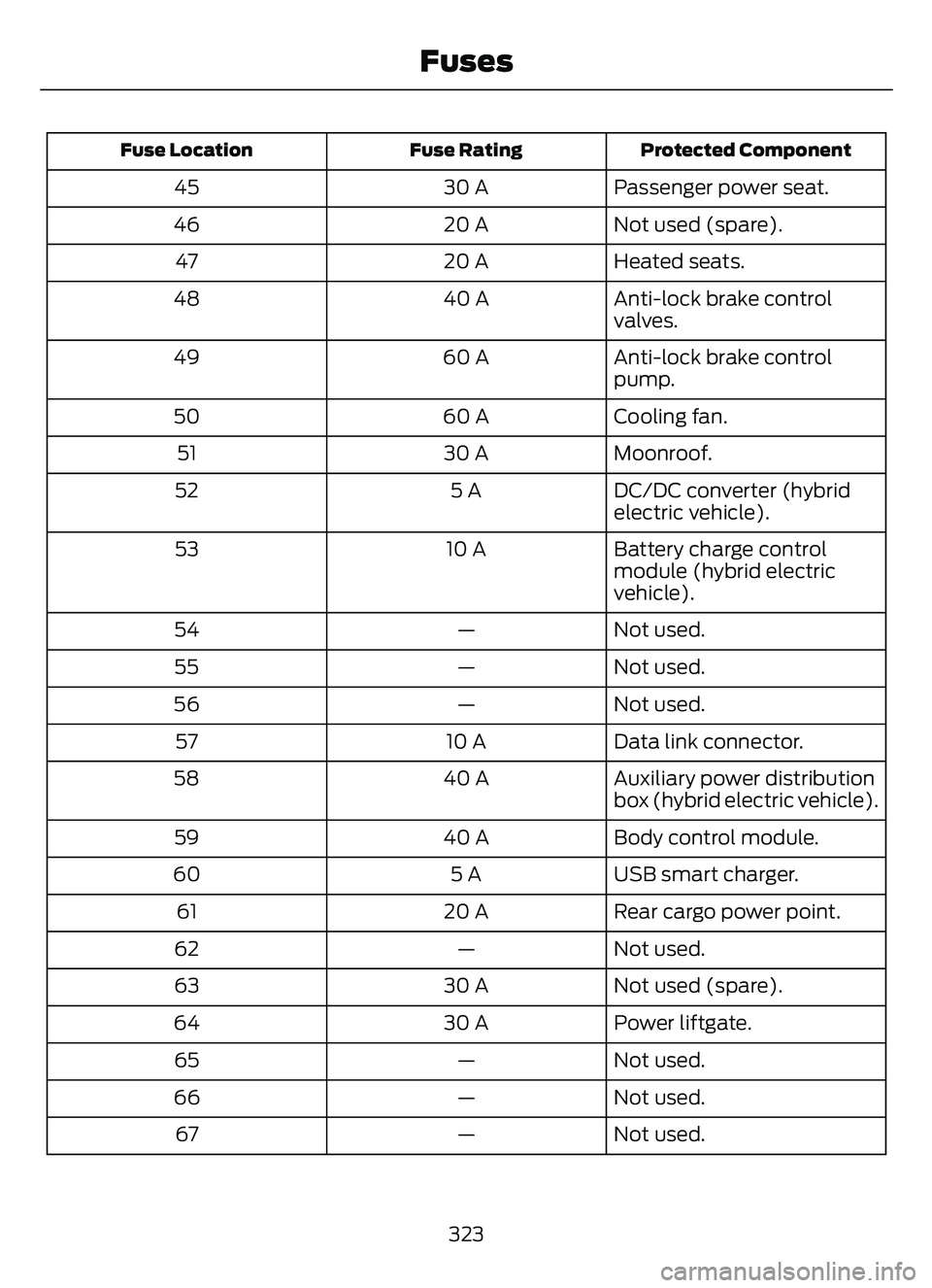
Protected Component
Fuse Rating
Fuse Location
Passenger power seat.
30 A
45
Not used (spare).
20 A
46
Heated seats.
20 A
47
Anti-lock brake control
valves.
40 A
48
Anti-lock brake control
pump.
60 A
49
Cooling fan.
60 A
50
Moonroof.
30 A
51
DC/DC converter (hybrid
electric vehicle).
5 A
52
Battery charge control
module (hybrid electric
vehicle).
10 A
53
Not used.
—
54
Not used.
—
55
Not used.
—
56
Data link connector.
10 A
57
Auxiliary power distribution
box (hybrid electric vehicle).
40 A
58
Body control module.
40 A
59
USB smart charger.
5 A
60
Rear cargo power point.
20 A
61
Not used.
—
62
Not used (spare).
30 A
63
Power liftgate.
30 A
64
Not used.
—
65
Not used.
—
66
Not used.
—
67
323
Fuses
Page 329 of 585
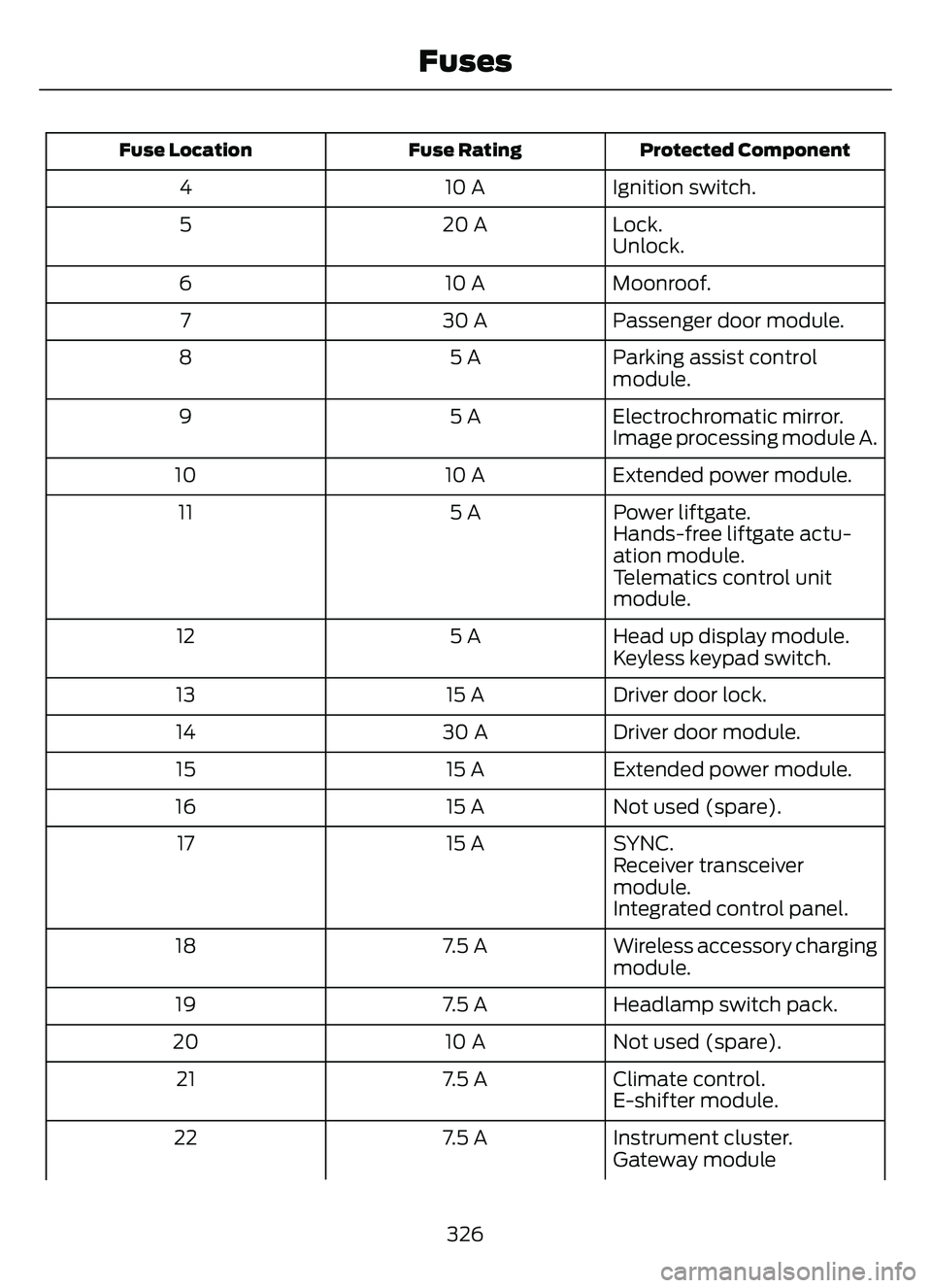
Protected Component
Fuse Rating
Fuse Location
Ignition switch.
10 A
4
Lock.
20 A
5
Unlock.
Moonroof.
10 A
6
Passenger door module.
30 A
7
Parking assist control
module.
5 A
8
Electrochromatic mirror.
5 A
9
Image processing module A.
Extended power module.
10 A
10
Power liftgate.
5 A
11
Hands-free liftgate actu-
ation module.
Telematics control unit
module.
Head up display module.
5 A
12
Keyless keypad switch.
Driver door lock.
15 A
13
Driver door module.
30 A
14
Extended power module.
15 A
15
Not used (spare).
15 A
16
SYNC.
15 A
17
Receiver transceiver
module.
Integrated control panel.
Wireless accessory charging
module.
7.5 A
18
Headlamp switch pack.
7.5 A
19
Not used (spare).
10 A
20
Climate control.
7.5 A
21
E-shifter module.
Instrument cluster.
7.5 A
22
Gateway module
326
Fuses
Page 356 of 585
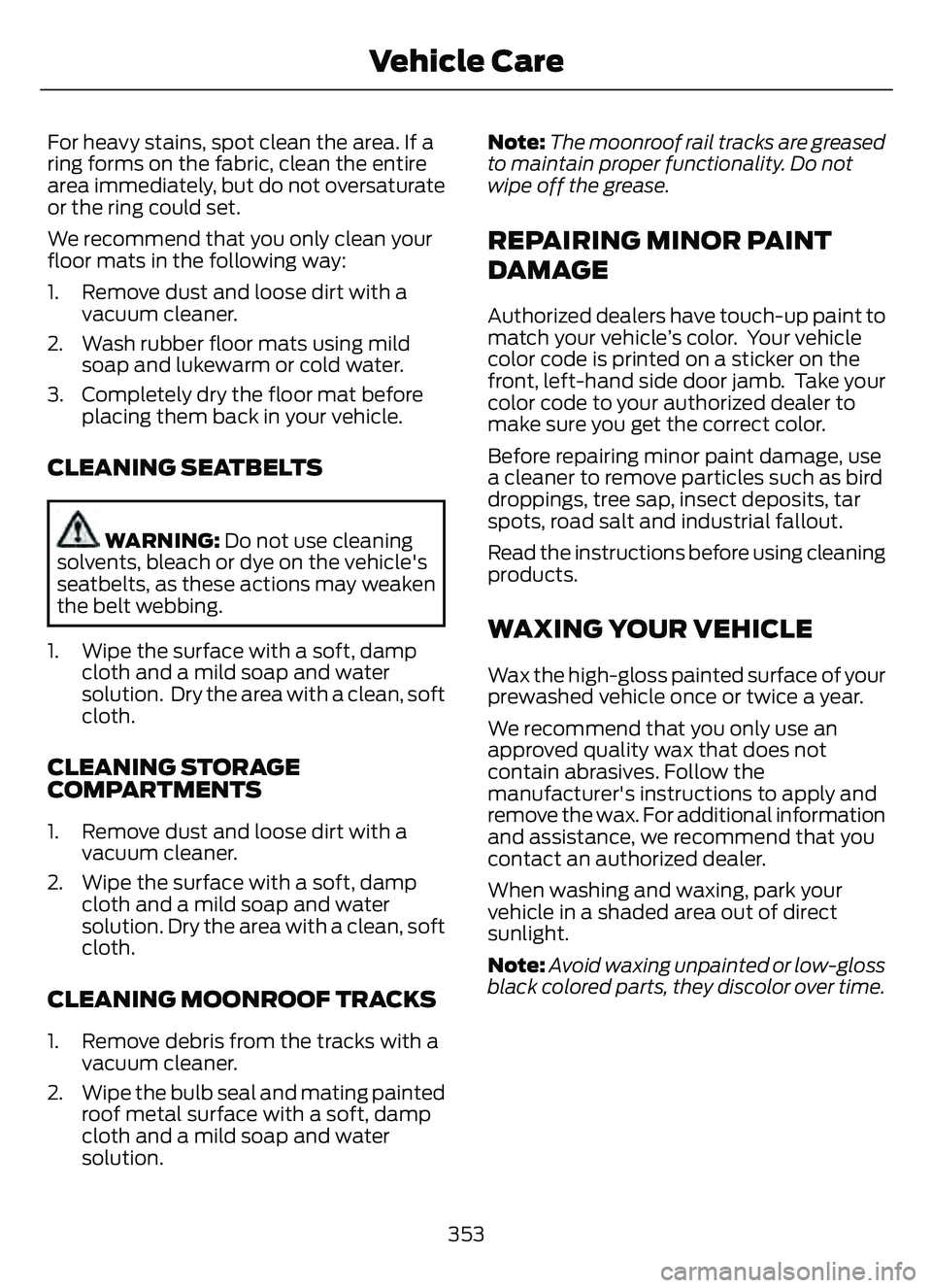
For heavy stains, spot clean the area. If a
ring forms on the fabric, clean the entire
area immediately, but do not oversaturate
or the ring could set.
We recommend that you only clean your
floor mats in the following way:
1. Remove dust and loose dirt with avacuum cleaner.
2. Wash rubber floor mats using mild soap and lukewarm or cold water.
3. Completely dry the floor mat before placing them back in your vehicle.
CLEANING SEATBELTS
WARNING: Do not use cleaning
solvents, bleach or dye on the vehicle's
seatbelts, as these actions may weaken
the belt webbing.
1. Wipe the surface with a soft, damp cloth and a mild soap and water
solution. Dry the area with a clean, soft
cloth.
CLEANING STORAGE
COMPARTMENTS
1. Remove dust and loose dirt with avacuum cleaner.
2. Wipe the surface with a soft, damp cloth and a mild soap and water
solution. Dry the area with a clean, soft
cloth.
CLEANING MOONROOF TRACKS
1. Remove debris from the tracks with avacuum cleaner.
2. Wipe the bulb seal and mating painted roof metal surface with a soft, damp
cloth and a mild soap and water
solution. Note:
The moonroof rail tracks are greased
to maintain proper functionality. Do not
wipe off the grease.
REPAIRING MINOR PAINT
DAMAGE
Authorized dealers have touch-up paint to
match your vehicle’s color. Your vehicle
color code is printed on a sticker on the
front, left-hand side door jamb. Take your
color code to your authorized dealer to
make sure you get the correct color.
Before repairing minor paint damage, use
a cleaner to remove particles such as bird
droppings, tree sap, insect deposits, tar
spots, road salt and industrial fallout.
Read the instructions before using cleaning
products.
WAXING YOUR VEHICLE
Wax the high-gloss painted surface of your
prewashed vehicle once or twice a year.
We recommend that you only use an
approved quality wax that does not
contain abrasives. Follow the
manufacturer's instructions to apply and
remove the wax. For additional information
and assistance, we recommend that you
contact an authorized dealer.
When washing and waxing, park your
vehicle in a shaded area out of direct
sunlight.
Note: Avoid waxing unpainted or low-gloss
black colored parts, they discolor over time.
353
Vehicle Care
Page 417 of 585
SATELLITE RADIO
WHAT IS SATELLITE RADIO
Your factory-installed SiriusXM radio
system includes a limited subscription
term, which begins on the date of sale or
lease of your vehicle. See an authorized
dealer for availability.
For additional information about extended
subscription terms, visit www
.SiriusXM.comin the United States,www.SiriusXM.ca in
Canada, or call SiriusXM at
1-888-539-7474.
Note: SiriusXM reserves the unrestricted
right to change, rearrange, add or delete
programming including canceling, moving
or adding particular channels, and its prices,
at any time, with or without notice to you.
Neither SiriusXM and its affiliates nor Ford
Motor Company and its affiliates will be
liable to you or any third party for any such
modification, suspension or termination.
SATELLITE RADIO LIMITATIONS
For optimal reception performance, keep
the antenna clear of snow and ice build-up
and keep luggage and other material as
far away from the antenna as possible.
Placing luggage over the antenna may
reduce performance. Factory-installed and
aftermarket vehicle structures including,
but not limited to, roof racks and soft top
roofs in a partially open position could
reduce reception performance.
Hills, mountains, tall buildings, bridges,
tunnels, freeway overpasses, parking
garages, dense tree foliage and
thunderstorms can interfere with your
reception. When you pass a ground-based
broadcast-repeating tower, a stronger
signal may overtake a weaker one and
could result in the audio system muting.
Your display could show an error message
to indicate the interference.
LOCATING THE SATELLITE RADIO
IDENTIFICATION NUMBER
1. Select SiriusXM as the audio source.
2. Tune to channel 0.
414
Audio System
Page 494 of 585
already taken to try to resolve them. A
Customer Claim Form will be mailed that
needs to be completed, signed and
returned to the BBB along with proof of
ownership. Upon receipt, the BBB reviews
the claim for eligibility under the Program
Summary Guidelines.
You can get more information by
calling BBB AUTO LINE at
1-800-955-5100, or writing to:
BBB AUTO LINE a Division of BBB
National Programs, Inc.
1676 International Drive, Suite 550
McLean, VA 22102
BBB AUTO LINE applications can also be
requested by calling the Ford Motor
Company Customer Relationship Center
at 1-800-392-3673.
For additional information, refer to the
Better Business Bureau website.
Note:Ford Motor Company reserves the
right to change eligibility limitations, modify
procedures, or to discontinue this process
at any time without notice and without
obligation.
THE MEDIATION AND
ARBITRATION PROGRAM
For vehicles delivered to authorized
Canadian dealers. In those cases where
you continue to feel that the efforts by Ford
of Canada and the authorized dealer to
resolve a factory-related vehicle service
concern have been unsatisfactory, Ford of
Canada participates in an impartial third
party mediation/arbitration program
administered by the Canadian Motor
Vehicle Arbitration Plan (CAMVAP). The CAMVAP program is a straightforward
and relatively speedy alternative to resolve
a disagreement when all other efforts to
produce a settlement have failed. This
procedure is without cost to you and is
designed to eliminate the need for lengthy
and expensive legal proceedings.
In the CAMVAP program, impartial
third-party arbitrators conduct hearings at
mutually convenient times and places in
an informal environment. These impartial
arbitrators review the positions of the
parties, make decisions and, when
appropriate, render awards to resolve
disputes. CAMVAP decisions are fast, fair,
and final as the arbitrator’s award is
binding on both you and Ford of Canada.
CAMVAP services are available in all
Canadian territories and provinces. For
more information, without charge or
obligation, call your CAMVAP Provincial
Administrator directly at 1-800-207-0685
or visit www.camvap.ca.
ORDERING A CANADIAN
FRENCH OWNER'S MANUAL
You can obtain a French owner's manual
from an authorized dealer or by contacting
Helm, LLC at:
HELM, LLC
47911 Halyard Drive, Suite 200
Plymouth, Michigan 48170
Attention: Customer Service
Call toll free: 1-800-782-4356
Monday-Friday 8:00 a.m. - 6:00 p.m. EST
For additional information, visit
www
.helminc.com.
491
Customer Information
Page 556 of 585
Customer Remedies
NAV2 and its suppliers’ entire liability and
your exclusive remedy shall be, at NAV2’s
sole discretion, either (a) return of the price
paid, if any, or (b) repair or replacement of
the Data that do not meet NAV2’s Limited
Warranty and that are returned to NAV2
with a copy of your receipt. This Limited
Warranty is void if failure of the Data has
resulted from accident, abuse, or
misapplication. Any replacement Data will
be warranted for the remainder of the
original warranty period or thirty (30) days,
whichever is longer. Neither these remedies
nor any product support services offered
by NAV2 are available without proof of
purchase from an authorized international
source.
No Other Warranty:
EXCEPT FOR THE LMITED WARRANTY
SET FORTH ABOVE AND TO THE EXTENT
PERMITTED BY APPLICABLE LAW, NAV2
AND ITS LICENSORS (INCLUDING THEIR
LICENSORS AND SUPPLIERS) DISCLAIM
ANY WARRANTIES, EXPRESS OR IMPLIED,
OF QUALITY, PERFORMANCE,
MERCHANTABILITY, FITNESS FOR A
PARTICULAR PURPOSE, OWNERSHIP OR
NON-INFRINGEMENT. Certain warranty
exclusions may not be permitted under
applicable law, so to that extent the above
exclusion may not apply to you.
Limited Liability:
TO THE EXTENT PERMITTED BY
APPLICABLE LAW, NAV2 AND ITS
LICENSORS (INCLUDING THEIR
LICENSORS AND SUPPLIERS) SHALL NOT
BE LIABLE TO YOU: IN RESPECT OF ANY
CLAIM, DEMAND OR ACTION,
IRRESPECTIVE OF THE NATURE OF THE
CAUSE OF THE CLAIM, DEMAND OR
ACTION ALLEGING ANY LOSS, INJURY OR
DAMAGES, DIRECT OR INDIRECT, WHICH
MAY RESULT FROM THE USE OR
POSSESSION OF THE INFORMATION; OR FOR ANY LOSS OF PROFIT, REVENUE,
CONTRACTS OR SAVINGS, OR ANY
OTHER DIRECT, INDIRECT, INCIDENTAL,
SPECIAL OR CONSEQUENTIAL DAMAGES
ARISING OUT OF YOUR USE OF OR
INABILITY TO USE THIS INFORMATION,
ANY DEFECT IN THE INFROMATION, OR
THE BREACH OF THESE TERMS OR
CONDITIONS, WHETHER IN AN ACTION
IN CONTRACT OR TORT OR BASED ON A
WARRANTY, EVEN IF NAV2 OR ITS
LICENSORS HAVE BEEN ADVISED OF THE
POSSIBILITY OF SUCH DAMAGES. UNDER
NO CIRCUMSTANCES SHALL NAV2’s OR
ITS SUPPLIERS’ LIABILITY HEREUNDER
EXCEED THE PRICE PAID. Certain liability
exclusions may not be permitted under
applicable law, so to that extent the above
exclusion may not apply to you.
Export Control
You agree not to export to anywhere any
part of the Data provided to you or any
direct product thereof except in
compliance with, and with all licenses and
approvals required under, applicable
export laws, rules and regulations.
IP Protection
The Data are owned by NAV2 or its
suppliers and are protected by applicable
copyright and other intellectual property
law and treaties. The Data are provided
solely on the basis of a license to use, not
sale.
Entire Agreement
These terms and conditions constitute the
entire agreement between NAV2(and its
licensors, including their licensors and
suppliers) and you pertaining to the subject
matter hereof, and supersedes in their
entirety any and all written or oral
agreements previously existing between
us with respect to such subject matter.
553
Customer Information
Page 570 of 585
Cleaning Chrome, Aluminium or StainlessSteel..................................................................350
Cleaning Headlamps and Rear Lamps...............................................................349
Cleaning Stripes or Graphics..........................351
Cleaning the Engine Compartment...........350
Cleaning the Exterior Precautions...............349
Cleaning the Underbody..................................351
Cleaning Wheels................................................350
Cleaning Windows and Wiper Blades...............................................................350
Cleaning the Interior....................................351Cleaning Carpets and Floor Mats................352
Cleaning Displays and Screens....................352
Cleaning Fabric Seats andHeadliners........................................................352
Cleaning Leather and Vinyl............................352
Cleaning Moonroof Tracks.............................353
Cleaning Plastic...................................................351
Cleaning Seatbelts............................................353
Cleaning Storage Compartments...............353
Cleaning the Instrument Panel.....................351
Clearing All MyKeys.......................................66
Clearing the Garage Door Opener.........164
Climate Control..............................................137
Closing the Liftgate.......................................78
Closing the Hands-Free Liftgate....................83
Closing the Liftgate From Inside Your Vehicle.................................................................82
Closing the Liftgate From Outside Your Vehicle.................................................................78
Closing the Liftgate Using the Remote Control.................................................................83
Cold Weather Precautions......................304
Configuring the Trip Computer - VehiclesWith: 4.2 Inch Instrument Cluster
Display Screen............................................129
Connected Vehicle.....................................405
Connecting the Vehicle to a Mobile
Network...........................................................405
Connected Vehicle Data..............................24
Connected Vehicle Limitations..............405
Connected Vehicle Requirements........405
Connected Vehicle – Troubleshooting -Vehicles With: Modem...........................406
Connected Vehicle – Troubleshooting - Vehicles With: SYNC 3............................407
Connecting a Trailer...................................296 Connecting a Trailer Precautions..........296
Connecting the Vehicle to a Mobile
Network.......................................................405
Connecting FordPass to the Modem.........405
Enabling and Disabling the Modem..........405
What Is the Modem.........................................405
Connecting the Vehicle to a Wi-FiNetwork.......................................................405
Contacting Us...................................................15
Cooling System Capacity and Specification - 1.5L EcoBoost™.........396
Cooling System Capacity and Specification - 2.0L EcoBoost™.........397
Cooling System Capacity and Specification - 2.5L, Hybrid Electric
Vehicle (HEV)/Plug-In Hybrid Electric
Vehicle (PHEV)..........................................397
Crash and Breakdown Information.................................................308
Automatic Crash Shutoff.................................314
Jump Starting the Vehicle...............................310
Post-Crash Alert System.................................313
Crash Sensors and Airbag Indicator.......54
Creating a MyKey - Vehicles With: FlipKey....................................................................65
Creating a MyKey - Vehicles With: Push Button Start..................................................65
Creating a Vehicle Wi-Fi Hotspot.........409
Cross Traffic Alert..........................................271
Cross Traffic Alert –
Troubleshooting.............................................273
Cross Traffic Alert Indicators....................272
Cross Traffic Alert Limitations..................271
Cross Traffic Alert Precautions................271
Cross Traffic Alert –Troubleshooting.........................................273
Cross Traffic Alert – Information
Messages..........................................................273
Cruise Control................................................242
Cruise Control Indicators..........................243
Cup Holders....................................................170
Cup Holder Precautions...................................170Customer Information..............................490Radio Frequency CertificationLabels...............................................................493
567
Index
Page 576 of 585
J
Jump Starting the Vehicle.........................310Jump Starting Precautions.............................310
Jump Starting the Vehicle................................311
Preparing the Vehicle.........................................311
K
Keyless Entry....................................................73Keyless Entry Settings........................................74
Keyless Entry – Troubleshooting....................75
Locking and Unlocking the Doors UsingKeyless Entry.....................................................75
Master Access Code............................................73
Keyless Entry Limitations............................73
Keyless Entry Settings..................................74
Clearing All Personal Access Codes..............74
Creating Personal Access Codes....................74
Reprogramming the Unlocking Function..............................................................74
Switching Keyless Entry On and Off..............74
Keyless Entry – Troubleshooting..............75Keyless Entry – Frequently Asked Questions...........................................................75
Keys and Remote Controls.........................58Keys and Remote Controls –Troubleshooting...............................................63
Keys and Remote Controls –Troubleshooting..........................................63
Keys and Remote Controls – Information
Messages............................................................63
L
Lane Centering.............................................250How Does Lane Centering Work..................250
Lane Centering Alerts.......................................252
Lane Centering AutomaticCancellation.................................................... 252
Lane Centering Indicators...............................252
Lane Centering Limitations.............................251
Lane Centering Precautions..........................250
Lane Centering Requirements.......................251
Switching Lane Centering On and Off........251
Lane Keeping System Indicators...........264
Lane Keeping System.................................261
Aid Mode...............................................................2\
63 Alert and Aid Mode...........................................263
Alert Mode............................................................262
Lane Keeping System –
Troubleshooting ............................................265
Lane Keeping System Limitations.........261
Lane Keeping System Precautions........261
Lane Keeping System –
Troubleshooting ........................................265
Lane Keeping System – Frequently Asked
Questions ........................................................266
Lane Keeping System – Information Messages.........................................................265
Launching or Retrieving a Boat orPersonal Watercraft................................300
Liftgate...............................................................78
Closing the Liftgate..............................................78
Liftgate – Troubleshooting...............................85
Opening the Liftgate...........................................78
Liftgate Obstacle Detection......................84
Liftgate Precautions.....................................80
Liftgate – Troubleshooting.........................85
Liftgate – Frequently Asked
Questions...........................................................86
Liftgate – Information Messages...................85
Liftgate – Warning Lamps................................85
Load Carrying................................................287Roof Rack.............................................................292Load Carrying Precautions.......................287
Loading Your Trailer....................................299
Locating the Blind Spot Information System Sensors........................................269
Locating the Brake Fluid Reservoir.........218
Locating the Charge Port.........................203
Locating the Cross Traffic Alert Sensors..........................................................272
Locating the Fuel Filler Funnel................189
Locating the Keyless Entry Keypad..........73
Locating the Memory Function Buttons.........................................................160
Locating the Power Outlets.....................168
Locating the Pre-Collision Assist Sensors.........................................................276
Locating the Rear View Camera............235
Locating the Safety Compliance Certification Labels.................................288
Locating the Tire label................................357
Locating the Tire Sealant and Inflator Kit....................................................................372
573
Index
Page 577 of 585
Locating the USB Ports.............................166
Locating the Wireless AccessoryCharger..........................................................169
Locating Your Vehicle...................................59
Locking and Unlocking the Doors Using Keyless Entry.................................................75
Locking the Doors.................................................75
Unlocking the Doors............................................75
Locking the Rear WindowControls........................................................106
Luggage Compartment............................294
M
Maintenance.................................................32812V Battery............................................................341
Engine Oil..............................................................\
333
Exterior Bulbs......................................................345
Interior Bulbs.......................................................348
Maintenance Precautions........................328
Manual Climate Control.............................137
Manually Dimming the Interior Mirror..............................................................107
Manually Releasing the Electric Parking Brake.............................................................220
Manual Park Release - Gasoline.............212
Manual Park Release Precautions................212
Using Manual Park Release............................213
What Is Manual Park Release.........................212
Manual Seats.................................................149Adjusting the Head Restraint.........................149
Adjusting the Seat Backrest...........................150
Adjusting the Seat Height................................151
Folding the Seat Backrest...............................156
Head Restraint Components.........................149
Installing the Head Restraint.........................150
Moving the Seat Backward and
Forward............................................................. 150
Removing the Head Restraint.......................150
Unfolding the Seat Backrest...........................157
Master Access Code......................................73Displaying the Master Access Code..............73
What Is the Master Access Code....................73
Memory Function.........................................160
Memory Function Precautions................160
Mislock...............................................................70
Mislock Limitations...............................................71
Switching Mislock On and Off..........................71 What Is Mislock.....................................................70
Mobile Communications
Equipment....................................................531
Mobile Device Data........................................25
Moonroof Bounce-Back.............................110
Overriding Moonroof Bounce-Back.............110
What Is Moonroof Bounce-Back...................110
Moonroof.........................................................109Moonroof Bounce-Back...................................110Motorcraft Parts - 1.5L EcoBoost™................................................390
Motorcraft Parts - 2.0L EcoBoost™................................................390
Motorcraft Parts - 2.5L, Hybrid Electric Vehicle (HEV)/Plug-In Hybrid Electric
Vehicle (PHEV)..........................................391
Muting the Audio...........................................411
MyKey Settings...............................................64
Configurable MyKey Settings..........................64
Non-Configurable MyKey Settings................64
MyKey – Troubleshooting...........................66MyKey – Frequently Asked Questions.........68
MyKey – Information Messages.....................66
MyKey™.............................................................64MyKey Settings.....................................................64
MyKey – Troubleshooting.................................66
N
Navigation......................................................452
Normal Scheduled Maintenance..........485
O
Opening and Closing the Flip Key............58
Opening and Closing the Hood..............328
Opening and Closing the Moonroof......................................................109
Opening and Closing the Sun Shade............................................................109
Opening and Closing the Windows.......105
Opening the Liftgate.....................................78
Opening the Hands-Free Liftgate...................81
Opening the Liftgate From Inside Your
Vehicle................................................................80
Opening the Liftgate From Outside Your Vehicle.................................................................78
574
Index