warning FORD ESCAPE 2022 Owners Manual
[x] Cancel search | Manufacturer: FORD, Model Year: 2022, Model line: ESCAPE, Model: FORD ESCAPE 2022Pages: 585, PDF Size: 6.15 MB
Page 534 of 585
MOBILE COMMUNICATIONS
EQUIPMENT
WARNING: Driving while distracted
can result in loss of vehicle control, crash
and injury. We strongly recommend that
you use extreme caution when using any
device that may take your focus off the
road. Your primary responsibility is the
safe operation of your vehicle. We
recommend against the use of any
hand-held device while driving and
encourage the use of voice-operated
systems when possible. Make sure you
are aware of all applicable local laws
that may affect the use of electronic
devices while driving.
Using mobile communications equipment
is becoming increasingly important in the
conduct of business and personal affairs.
However, you must not compromise your
own or others’ safety when using such
equipment. Mobile communications can
enhance personal safety and security when
appropriately used, particularly in
emergency situations. Safety must be
paramount when using mobile
communications equipment to avoid
negating these benefits. Mobile
communication equipment includes, but
is not limited to, cellular phones, pagers,
portable email devices, text messaging
devices and portable two-way radios.
FEDERAL HIGHWAY
ADMINISTRATION
REGULATION
Regulations such as those issued by the
Federal Highway Administration or issued
pursuant to the Occupational Safety and
Health Act (OSHA), and state and local
laws and regulations may require
additional equipment for the way you
intend to use your vehicle. It is the
responsibility of the registered owner to
determine the applicability of such laws
and regulations to your intended use for
the vehicle, and to arrange for the
installation of required equipment. The
dealer has information about the
availability of equipment which can be
ordered for your vehicle.
531
Customer Information
Page 547 of 585
HERE holds a non-exclusive license from
the United States Postal Service® to
publish and sell ZIP+4® information.
©United States Postal Service® 2014.
Prices are not established, controlled or
approved by the United States Postal
Service®. The following trademarks and
registrations are owned by the USPS:
United States Postal Service, USPS, and
ZIP+4
The Data for Mexico includes certain data
from Instituto Nacional de Estadística y
Geografía.
9.2 End User Terms Required by NAV2
(Shanghai) Co., Ltd
The data (“Data”) is provided for your
personal, internal use only and not for
resale. It is protected by copyright, and is
subject to the following terms and
conditions which are agreed to by you, on
the one hand, and NAV2 (Shanghai) Co.,
Ltd (“NAV2”) and its licensors (including
their licensors and suppliers) on the other
hand. 20xx. All rights reserved
Terms and Conditions
Permitted Use. You agree to use this Data
together with the Telenav Software solely
for the internal business and personal
purposes for which you were licensed, and
not for service bureau, time-sharing or
other similar purposes. Accordingly, but
subject to the restrictions set forth in the
following paragraphs, you agree not to
otherwise reproduce, copy, modify,
decompile, disassemble, create any
derivative works of, or reverse engineer any
portion of this Data, and may not transfer
or distribute it in any form, for any purpose,
except to the extent permitted by
mandatory laws.Restrictions. Except where you have been
specifically licensed to do so by Telenav,
and without limiting the preceding
paragraph, you may not use this Data (a)
with any products, systems, or applications
installed or otherwise connected to or in
communication with vehicles, capable of
vehicle navigation, positioning, dispatch,
real time route guidance, fleet
management or similar applications; or (b)
with or in communication with any
positioning devices or any mobile or
wireless-connected electronic or computer
devices, including without limitation
cellular phones, palmtop and handheld
computers, pagers, and personal digital
assistants or PDAs.
Warning. The Data may contain
inaccurate or incomplete information due
to the passage of time, changing
circumstances, sources used and the
nature of collecting comprehensive
geographic data, any of which may lead to
incorrect results.
No Warranty. This Data is provided to you
“as is,” and you agree to use it at your own
risk. Telenav and its licensors (and their
licensors and suppliers) make no
guarantees, representations or warranties
of any kind, express or implied, arising by
law or otherwise, including but not limited
to, content, quality, accuracy,
completeness, effectiveness, reliability,
fitness for a particular purpose, usefulness,
use or results to be obtained from this
Data, or that the Data or server will be
uninterrupted or error-free.
Disclaimer of Warranty:
TELENAV AND
ITS LICENSORS (INCLUDING THEIR
LICENSORS AND SUPPLIERS) DISCLAIM
ANY WARRANTIES, EXPRESS OR IMPLIED,
OF QUALITY, PERFORMANCE,
MERCHANTABILITY, FITNESS FOR A
544
Customer Information
Page 560 of 585
Services even if Intelematics or a Supplier
has been advised of the possibility of such
damages. You also acknowledge that the
neither Intelematics nor any Supplier
guarantees nor make any warranties that
relate to the availability, accuracy or
completeness of SUNA Products and/or
Services, and to the extent which it is
lawful to do so, both Intelematics and each
Supplier excludes any warranties which
might otherwise be implied by any State
or Federal legislation in relation to SUNA
Products and/or Services.
7. Please Note
Great care has been taken in preparing this
manual. Constant product development
may mean that some information is not
entirely up-to-date. The information in this
document is subject to change without
notice.
EMISSION LAW
WARNING: Do not remove or alter
the original equipment floor covering or
insulation between it and the metal floor
of the vehicle. The floor covering and
insulation protect occupants of the
vehicle from the engine and exhaust
system heat and noise. On vehicles with
no original equipment floor covering
insulation, do not carry passengers in a
manner that permits prolonged skin
contact with the metal floor. Failure to
follow these instructions may result in
fire or personal injury.
U.S. federal laws and certain state laws
prohibit removing or rendering inoperative
emission control system components.
Similar federal or provincial laws may
apply in Canada. We do not approve of any
vehicle modification without first
determining applicable laws.
Tampering with emissions
control systems including
related sensors or the Diesel
Exhaust Fluid system can result in reduced
engine power and the illumination of the
service engine soon light.
Tampering With a Noise Control
System
Federal laws prohibit the following acts:
• Removal or rendering inoperative by any person other than for purposes of
maintenance.
• Repair or replacement of any device or element of the design incorporated into
a new vehicle for the purpose of noise
control prior to its sale or delivery to
the ultimate purchaser or while it is in
use.
• The use of the vehicle after any person removes or renders inoperative any
device or element of the design.
The U.S. Environmental Protection Agency
may presume to constitute tampering as
follows:
• Removal of hood blanket, fender apron absorbers, fender apron barriers,
underbody noise shields or acoustically
absorptive material.
• Tampering or rendering inoperative the engine speed governor, to allow engine
speed to exceed manufacturer
specifications.
If the engine does not start, runs rough,
experiences a decrease in engine
performance, experiences excess fuel
consumption or produces excessive
exhaust smoke, check for the following:
• A plugged or disconnected air inlet system hose.
• A plugged engine air filter element.
• Water in the fuel filter and water separator.
557
Customer Information
Page 562 of 585
ELECTROMAGNETIC
COMPATIBILITY
WARNING: Do not place objects
or mount equipment on or near the
airbag cover, on the side of the front or
rear seatbacks, or in areas that may
come into contact with a deploying
airbag. Failure to follow these
instructions may increase the risk of
personal injury in the event of a crash.
WARNING: Do not fasten antenna
cables to vehicle wiring, fuel pipes and
brake pipes.
WARNING: Keep antenna and
power cables at least 4 in (10 cm) from
any electronic modules and airbags. Note:
We test and certify your vehicle to
meet electromagnetic compatibility
legislation. It is your responsibility to make
sure that any equipment an authorized
dealer installs on your vehicle complies with
applicable local legislation and other
requirements. Installation of some
aftermarket electronic devices could
degrade the performance of vehicle
functions, which use radio frequency signals
such as broadcast radio receiver, tire
pressure monitoring system, push button
start, Bluetooth® connectivity or satellite
navigation.
Note: Any radio frequency transmitter
equipment in your vehicle (such as cellular
telephones and amateur radio transmitters)
must keep to the parameters in the
following illustrations and table. We do not
provide any other special provisions or
conditions for installations or use.
Car
E239120
559
Appendices
Page 564 of 585
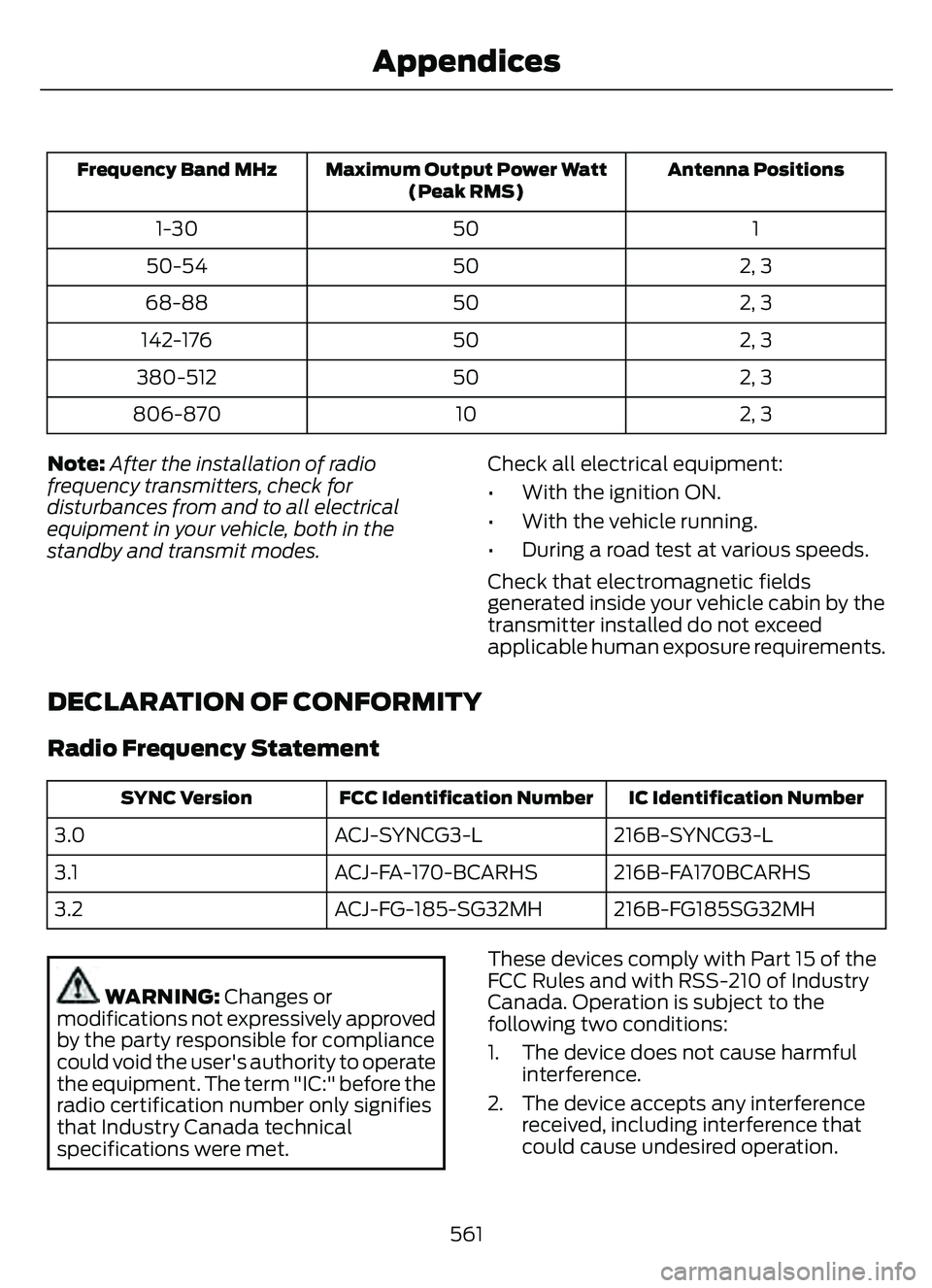
Antenna Positions
Maximum Output Power Watt
(Peak RMS)
Frequency Band MHz
1
50
1-30
2, 3
50
50-54
2, 3
50
68-88
2, 3
50
142-176
2, 3
50
380-512
2, 3
10
806-870
Note: After the installation of radio
frequency transmitters, check for
disturbances from and to all electrical
equipment in your vehicle, both in the
standby and transmit modes. Check all electrical equipment:
• With the ignition ON.
• With the vehicle running.
• During a road test at various speeds.
Check that electromagnetic fields
generated inside your vehicle cabin by the
transmitter installed do not exceed
applicable human exposure requirements.
DECLARATION OF CONFORMITY
Radio Frequency Statement
IC Identification Number
FCC Identification Number
SYNC Version
216B-SYNCG3-L
ACJ-SYNCG3-L
3.0
216B-FA170BCARHS
ACJ-FA-170-BCARHS
3.1
216B-FG185SG32MH
ACJ-FG-185-SG32MH
3.2
WARNING: Changes or
modifications not expressively approved
by the party responsible for compliance
could void the user's authority to operate
the equipment. The term "IC:" before the
radio certification number only signifies
that Industry Canada technical
specifications were met. These devices comply with Part 15 of the
FCC Rules and with RSS-210 of Industry
Canada. Operation is subject to the
following two conditions:
1. The device does not cause harmful
interference.
2. The device accepts any interference received, including interference that
could cause undesired operation.
561
Appendices
Page 568 of 585
Automatic High Beam ControlLimitations........................................................101
Automatic High Beam Control Precautions.......................................................101
Automatic High Beam Control Requirements..................................................101
How Does Automatic High Beam Control Work...................................................................100
Overriding Automatic High Beam Control............................................................... 102
Switching Automatic High Beam Control On and Off........................................................101
Automatic High Beam Control –Trouble shooting.........................................102
Automatic High Beam Control –
Information Messages.................................102
Automatic Locking Mode.............................41Disengaging Automatic Locking Mode.........41
Engaging Automatic Locking Mode...............41
What Is Automatic Locking Mode..................41
Automatic Return to Park (P)...................211Automatic Return to Park (P)Limitations........................................................212
How Does Automatic Return to Park (P) Work....................................................................212
What Is Automatic Return to Park (P).........211
Automatic Transmission Audible Warnings.......................................................214
Automatic Transmission..........................209
Automatic Return to Park (P).........................211
Automatic Transmission Positions............209
Automatic Transmission –
Troubleshooting .............................................214
Grade Assist - Hybrid Electric Vehicle (HEV)..................................................................212
Manual Park Release - Gasoline...................212
Temporary Neutral Mode..................................211
Automatic Transmission Position Indicator s...................................................... 210
Automatic Transmission Positions......................................................209
Drive (D).................................................................210
Low (L).................................................................\
..210
Neutral (N)............................................................210
Park (P)...............................................................\
..209
Reverse (R)..........................................................209
Automatic TransmissionPrecautions................................................209 Automatic Transmission –
Troubleshooting .........................................214
Automatic Transmission – Information
Messages..........................................................214
Auto-Start-Stop...........................................184Auto-Start-Stop – Troubleshooting...........185Auto-Start-Stop Indicators......................184
Auto-Start-Stop Precautions..................184
Auto-Start-Stop –Troubleshooting.........................................185
Auto-Start-Stop – Frequently Asked
Questions.........................................................186
Auto-Start-Stop – Information Messages..........................................................185
Autounlock.......................................................70Autounlock Requirements................................70
Switching Autounlock On and Off.................70
What Is Autounlock.............................................70
Autowipers........................................................92Adjusting the Sensitivity of the RainSensor.................................................................93
Autowipers Settings............................................92
What Are Autowipers.........................................92
AW DSee: All-Wheel Drive.........................................216
B
BatterySee: Changing the 12V Battery.....................343Blind Spot Information System.............268Blind Spot Information System – Troubleshooti ng............................................270
Blind Spot Information System
Indicator s.....................................................269
Blind Spot Information System Limitations..................................................268
Blind Spot Information System Precautions................................................268
Blind Spot Information System Requirements............................................268
Blind Spot Information System – Troubleshooting ........................................270
Blind Spot Information System –
Information Messages................................270
Body Control Module Fuse Box..............325Accessing the Body Control Module FuseBox......................................................................325
565
Index
Page 569 of 585
Identifying the Fuses in the Body ControlModule Fuse Box...........................................325
Locating the Body Control Module Fuse Box......................................................................325
Body Styling Kit Precautions...................354
Body Styling Kits..........................................354
Bonnet Lock
See: Opening and Closing the Hood..........328Booster Seats..................................................36
Brake Fluid Specification...........................218
Brake Over Accelerator...............................217
Brake Precautions.........................................217
Brakes................................................................217
Anti-Lock Braking System...............................217
Brakes – Troubleshooting...............................219
Brakes – Troubleshooting.........................219Brakes – Frequently AskedQuestions.........................................................219
Brakes – Warning Lamps.................................219
Breaking-In....................................................304
C
Calculating Payload...................................290
Calculating the Load Limit......................290
Canceling the Set Speed..........................243
Capacities and Specifications................387
Catalytic Converter......................................198
Catalytic Converter – Troubleshooting.............................................198
Catalytic Converter Precautions............198
Catalytic Converter –Troubleshooting........................................198
Catalytic Converter – Warning
Lamps................................................................198
Changing a Flat Tire....................................382
Changing a Road Wheel...........................382
Changing the 12V Battery.........................343
Changing the Engine Air Filter - 1.5LEcoBoost™/2.0L EcoBoost™.............338
Changing the Engine Air Filter - 2.5L, Hybrid Electric Vehicle (HEV)/Plug-In
Hybrid Electric Vehicle (PHEV)...........339
Changing the Fuel Filter - Gasoline, Hybrid Electric Vehicle (HEV)..............340
Changing the Remote Control Battery - Vehicles With: Flip Key...............................61 Changing the Remote Control Battery -
Vehicles With: Push Button Start.........60
Changing the Vehicle Wi-Fi Hotspot Name or Password..................................409
Charge Port Indicators..............................204
Charging a Device.........................................167
Charging a Wireless Device......................169
Charging Equipment..................................200
Charging Your Vehicle...............................200
AC Charging.........................................................205
Charging Your Vehicle –
Troubleshooting............................................207
Charging Your VehiclePrecautions................................................200
Charging Your Vehicle – Troubleshooting........................................207
Charging Your Vehicle – Frequently Asked
Questions........................................................ 208
Charging Your Vehicle – Information Messages.........................................................207
Checking MyKey System Status..............66
Checking the Brake Fluid...........................218
Checking the Coolant................................334
Checking the Seatbelts...............................44
Checking the Tire Pressures....................368
Checking the Wiper Blades........................94
Children and Airbags....................................50
Child Restraint Anchor Points...................29
Locating the Child Restraint Lower AnchorPoints...................................................................29
Locating the Child Restraint Top Tether Anchor Points...................................................30
What Are the Child Restraint Anchor Points...................................................................29
Child Restraints..............................................30Child Restraint Position Information............30
Child Restraints Recommendation................31
Child Safety......................................................28Child Restraint Anchor Points.........................29
Child Restraints....................................................30
Installing Child Restraints..................................31
Child Safety Locks.........................................38
Child Safety Precautions.............................28
Cleaning Products.......................................349
Cleaning the Exterior..................................349
Cleaning Camera Lenses andSensors..............................................................351
566
Index
Page 571 of 585
Customizing the Instrument ClusterDisplay - Vehicles With: 4.2 Inch
Instrument Cluster Display
Screen............................................................124
Customizing the Instrument Cluster Display - Vehicles With: 6.5 Inch
Instrument Cluster Display Screen/ 12.3
Inch Instrument Cluster Display
Screen............................................................124
D
Data Privacy......................................................22
Declaration of Conformity........................561
Department of Transportation UniformTire Quality Grades...................................357
Digital Radio...................................................412
Digital Radio Indicators....................................413
Digital Radio Limitations.................................413
How Does Digital Radio Work........................412
Switching Digital Radio Reception On and
Off.....................................................................\
...413
What Is Digital Radio.........................................412
Disposing of Airbags.....................................55
Distance Alert................................................278
Adjusting the Sensitivity of Distance Alert....................................................................278
What Is Distance Alert.....................................278
Distance Indication......................................276Distance Indication Indicator.........................278
Switching Distance Indication On and Off.......................................................................2\
78
What Is Distance Indication...........................276
Doors and Locks Audible Warnings..........71
Doors and Locks.............................................69
Autolock...................................................................70\
Autounlock.............................................................70
Doors and Locks – Troubleshooting...............71
Mislock.....................................................................70
Operating the Doors From Inside Your Vehicle.................................................................69
Operating the Doors From Outside Your Vehicle.................................................................69
Doors and Locks – Troubleshooting........71Doors and Locks – Frequently AskedQuestions............................................................72
Doors and Locks – Information Messages.............................................................71 Doors and Locks – Warning Lamps................71
Drive Belt Routing Overview - 1.5L
EcoBoost™................................................340
Drive Belt Routing Overview - 2.0L EcoBoost™..................................................341
Drive Mode Control......................................257
Drive Modes.........................................................258
Plug-In Hybrid Electric Vehicle Drive
Modes...............................................................259
Drive Modes...................................................258Deep Snow/Sand..............................................258
Eco........................................................................\
..258
Normal...................................................................258
Slippery.................................................................258
Sport....................................................................\
...258
Driver Alert......................................................282Driver Alert – Troubleshooting.....................283Driver Alert Indicators................................283
Driver Alert Limitations..............................282
Driver Alert Precautions............................282
Driver Alert – Troubleshooting...............283
Driver Alert – Information Messages..........283Driving Economically.................................304
Driving Hints..................................................304
Driving in Special Conditions........................304Driving in Special Conditions..................304Driving In Sand...................................................306
Driving on Hilly or Sloping Terrain...............305
Driving Through Mud and Water.................304
Emergency Maneuvers....................................304
Driving Through Shallow Water............306
E
Easy Entry and Exit.........................................77
Electric Parking Brake AudibleWarning..........................................................221
Electric Parking Brake................................220
Electric Parking Brake –
Troubleshooting .............................................221
Electric Parking Brake –
Troubleshooting.........................................221
Electric Parking Brake – Information
Messages..........................................................222
Electric Parking Brake – Warning Lamps.................................................................22\
1
Electric Power Steering.............................229Electric Power Steering Precautions..........229
568
Index
Page 572 of 585
Electric Vehicle Information.....................457
Electromagnetic Compatibility..............559
Emergency Call Limitations........................57
Emergency Call Requirements..................57
Emergency Call System Data....................25
Emergency Towing - 8-Speed AutomaticTransmission – 8F24................................317
Emergency Towing - 8-Speed Automatic Transmission – 8F35...............................318
Emergency Towing - Hybrid Electric Vehicle (HEV)/Plug-In Hybrid Electric
Vehicle (PHEV)...........................................317
Emission Law.................................................557
Enabling Remote Start...............................134
End User License Agreement..................532
Engine Block Heater.....................................174
Engine Block Heater Precautions..................174
How Does the Engine Block Heater
Work....................................................................174
Using the Engine Block Heater.......................174
Engine Coolant Temperature Gauge..............................................................119
Engine Oil Capacity and Specification - 1.5L EcoBoost™........................................392
Engine Oil Capacity and Specification - 2.0L EcoBoost™.......................................393
Engine Oil Capacity and Specification - 2.5L, Hybrid Electric Vehicle (HEV)/
Plug-In Hybrid Electric Vehicle
(PHEV).........................................................395
Engine Oil........................................................333
Adding Engine Oil...............................................333
Checking the Engine Oil Level.......................333
Engine Oil Capacity and
Specification...................................................334
Engine Oil Dipstick Overview.........................333
Resetting the Engine Oil Change Reminder.........................................................334
Engine Specifications - 1.5LEcoBoost™.................................................387
Engine Specifications - 2.0L EcoBoost™................................................388
Engine Specifications - 2.5L, Hybrid Electric Vehicle (HEV)/Plug-In Hybrid
Electric Vehicle (PHEV).........................389
Entering a Parallel Parking Space.........238
Entering a Perpendicular Parking Space............................................................239 Entertainment..............................................440
Evasive Steering Assist..............................279
Evasive Steering Assist Limitations............279
Switching Evasive Steering Assist On and
Off.......................................................................2\
79
What Is Evasive Steering Assist....................279
EV Coach - Hybrid Electric Vehicle (HEV)/Plug-In Hybrid Electric Vehicle
(PHEV)...........................................................127
Event Data.........................................................23
Exiting a Parking Space.............................239
Extending the Remote Start Duration.........................................................134
Exterior Bulbs................................................345
Changing a Front Fog Lamp Bulb................347
Changing a Front Turn Signal Lamp
Bulb...................................................................346
Changing a Headlamp Bulb..........................345
Changing a Reversing Lamp Bulb...............348
Exterior Bulb Specification Chart................345
Exterior Lamps................................................99Exterior Lamp Audible Warning...................100
Exterior Lamp Indicators.................................100
Switching the Daytime Running Lamps On and Off................................................................9\
9
Switching the Front Fog Lamps On and Off........................................................................\
.99
Switching the Turn Signal Lamps On and Off........................................................................\
.99
Exterior Lighting Control..............................97
Exterior Lighting..............................................97
Autolamps..............................................................98
Automatic High Beam Control.....................100
Automatic High Beam Control –Troubleshooting.............................................102
Exterior Lamps......................................................99
Headlamps.............................................................97
Headlamps – Troubleshooting......................98
Exterior Mirrors..............................................108
F
Fastening the Seatbelts..............................40
Federal Highway Administration Regulation....................................................531
Flat Tire
See: Changing a Flat Tire................................382Floor Mats......................................................306
569
Index
Page 573 of 585
Folding the Exterior Mirrors......................108
Ford Protect..................................................480
Front Parking Aid...........................................231
Front Parking Aid Audible Warnings...........232
Front Parking Aid Limitations.........................231
Locating the Front Parking AidSensors.............................................................232
What is the Front Parking Aid.........................231
Front Passenger Sensing System.............51Front Passenger Sensing System Indicator s............................................................53
Front Passenger Sensing System Precautions........................................................53
How Does the Front Passenger Sensing System Work......................................................51
What Is the Front Passenger Sensing System..................................................................51
Front Seat Precautions..............................148
Front Seats.....................................................148
Heated Seats........................................................154
Manual Seats.......................................................149
Power Seats...........................................................151
Fuel and Refueling.......................................187Fuel and Refueling –Troubleshooting.............................................196
Fuel Quality..........................................................188
Refueling.................................................................191
Running Out of Fuel..........................................189
Fuel and Refueling Precautions..............187
Fuel and Refueling – Troubleshooting........................................196
Fuel and Refueling – Information
Messages..........................................................196
Fuel and Refueling – Warning Lamps........196
Fuel Economy Display................................126
Fuel Economy Display - Gasoline...........127
Fuel Economy Display - Plug-In Hybrid Electric Vehicle (PHEV)...........................127
Fuel Gauge.......................................................118
Fuel Gauge Limitations.....................................118
Locating the Fuel Filler Door...........................118
What Is Distance to Empty..............................118
What Is the Fuel Gauge.....................................118
What Is the Low Fuel Reminder.....................118
Fuel Quality....................................................188Selecting the Correct Fuel..............................188
Fuel Tank Capacity - Excluding: Hybrid Electric Vehicle (HEV)/Plug-In Hybrid
Electric Vehicle (PHEV).........................398
Fuel Tank Capacity......................................195
Fuel Tank Capacity - Hybrid Electric Vehicle (HEV)/Plug-In Hybrid Electric
Vehicle (PHEV).........................................399
Fuse Precautions..........................................319
Fuses.................................................................319
Body Control Module Fuse Box....................325
Fuses – Troubleshooting.................................327
Under Hood Fuse Box.......................................319
Fuses – Troubleshooting...........................327Fuses – Frequently Asked Questions.........327
G
Garage Door Opener...................................162
Garage Door Opener Limitations...........162
Garage Door Opener Precautions..........162
Garage Door Opener Radio Frequencies.................................................165
General Maintenance Information.......482
Glasses Holder...............................................170
Locating the Glasses Holder...........................170Glossary of Tire Terminology..................363
Grade Assist - Hybrid Electric Vehicle (HEV)..............................................................212\
Grade Assist Indicators.....................................212
Switching Grade Assist On and Off.............212
What Is Grade Assist.........................................212
H
Headlamp AdjustingSee: Adjusting the Headlamps.....................344Headlamps.......................................................97Headlamp Indicators..........................................97
Switching Headlamp Exit Delay On and
Off........................................................................\
.97
Using the High Beam Headlamps..................97
Headlamps – Troubleshooting................98Headlamps – Frequently Asked Questions...........................................................98
Head Up Display.............................................131Head Up Display – Troubleshooting............133Head Up Display Indicators.......................132
Head Up Display Settings...........................131
570
Index