warning FORD ESCAPE 2022 Owner's Guide
[x] Cancel search | Manufacturer: FORD, Model Year: 2022, Model line: ESCAPE, Model: FORD ESCAPE 2022Pages: 585, PDF Size: 6.15 MB
Page 60 of 585
WHAT IS 911 ASSIST
911 Assist is a SYNC system feature that
can call for help.
For more information, visit
www
.owner.ford.com.
EMERGENCY CALL
REQUIREMENTS
WARNING: Do not wait for 911
Assist to make an emergency call if you
can do it yourself. Dial emergency
services immediately to avoid delayed
response time which could increase the
risk of serious injury or death after a
crash. If you do not hear 911 Assist within
five seconds of the crash, the system or
phone may be damaged or
non-functional.
WARNING: Always place your
phone in a secure location in your vehicle
so it does not become a projectile or get
damaged in a crash. Failure to do so may
cause serious injury to someone or
damage the phone which could prevent
911 Assist from working properly.
WARNING: Unless the 911 Assist
setting is set on before a crash, the
system will not dial for help which could
delay response time, potentially
increasing the risk of serious injury or
death after a crash.
• SYNC is powered and working properly at the time of the incident and
throughout feature activation and use.
• The 911 Assist feature must be set on before the incident.
• You must pair and connect a Bluetooth® enabled and compatible
cell phone to SYNC. • A connected Bluetooth® enabled
phone must have the ability to make
and maintain an outgoing call at the
time of the incident.
• A connected Bluetooth® enabled phone must have adequate network
coverage, batt ery power and signal
strength.
• The vehicle must have battery power and be located in the U.S., Canada or
in a territory in which 911 is the
emergency number.
Note: If any user sets 911 Assist to on or off,
that setting applies for all paired phones. If
911 Assist is off and the phone connected
to SYNC, an icon displays on the status bar.
Note: Every phone operates differently.
While SYNC 911 Assist works with most
cellular phones, some may have trouble
using this feature.
EMERGENCY CALL
LIMITATIONS
The SYNC 911 Assist feature only operates
in the U.S., Canada or in a territory in which
911 is the emergency number. The following
are limitations of this feature:
• Your cellular phone or 911 Assist hardware sustains damage in a crash.
• The vehicle's battery or the SYNC system has no power.
• The phone(s) thrown from your vehicle are the ones paired and connected to
the system.
57
911 Assist
Page 61 of 585
REMOTE CONTROL
LIMITATIONS
WARNING: Changes or
modifications not expressively approved
by the party responsible for compliance
could void the user's authority to operate
the equipment. The term "IC:" before the
radio certification number only signifies
that Industry Canada technical
specifications were met.
This device complies with Part 15 of the
FCC Rules and with Industry Canada
license-exempt RSS standard(s).
Operation is subject to the following two
conditions: (1) This device may not cause
harmful interference, and (2) This device
must accept any interference received,
including interference that may cause
undesired operation.
Make sure a valid remote control is within
5 ft (1.5 m) from the front door handles
and rear of vehicle.
The system may not function if:
• The remote control remains stationary for about a minute.
• The vehicle battery has no charge.
• The remote control battery has no charge.
• There is interference causing issues with the remote control frequencies.
• The remote control is too close to metal objects or electronic devices, for
example keys or a cell phone.
USING THE REMOTE CONTROL
Use your remote control to access various
vehicle systems.
Note: The buttons on your remote may vary
depending on the vehicle region or options.
Unlock
E138629
Press the button to unlock all
doors. See Unlocking and
Locking the Doors Using the
Remote Control (page 69).
Lock
E138623
Press the button to lock all
doors. See Unlocking and
Locking the Doors Using the
Remote Control (page 69).
Remote Start (If Equipped)
E138625
Press the button to remote start.
See Remotely Starting and
Stopping the Vehicle (page
134).
Liftgate (If Equipped)
E267940
Press the button to open or close
the liftgate. See Opening the
Liftgate Using the Remote
Control (page 81).
Panic Alarm
E138624
Press the button to sound the
panic alarm. See Sounding the
Panic Alarm (page 59).
OPENING AND CLOSING THE
FLIP KEY
Opening Your Flip Key
Press the round button on the remote
control to extend the flip key.
58
Keys and Remote Controls
Page 63 of 585
CHANGING THE REMOTE
CONTROL BATTERY -
VEHICLES WITH: PUSH
BUTTON START
WARNING: Keep batteries away
from children to prevent ingestion.
Failure to follow this instruction could
result in personal injury or death. If
ingested, immediately seek medical
attention.
WARNING: If the battery
compartment does not securely close,
stop using the remote control and
replace it as soon as possible. In the
meantime, keep the remote control away
from children. Failure to follow this
instruction could result in personal injury
or death.
The remote control uses one coin-type
3-volt lithium battery CR2450 or
equivalent.
E322866E322866
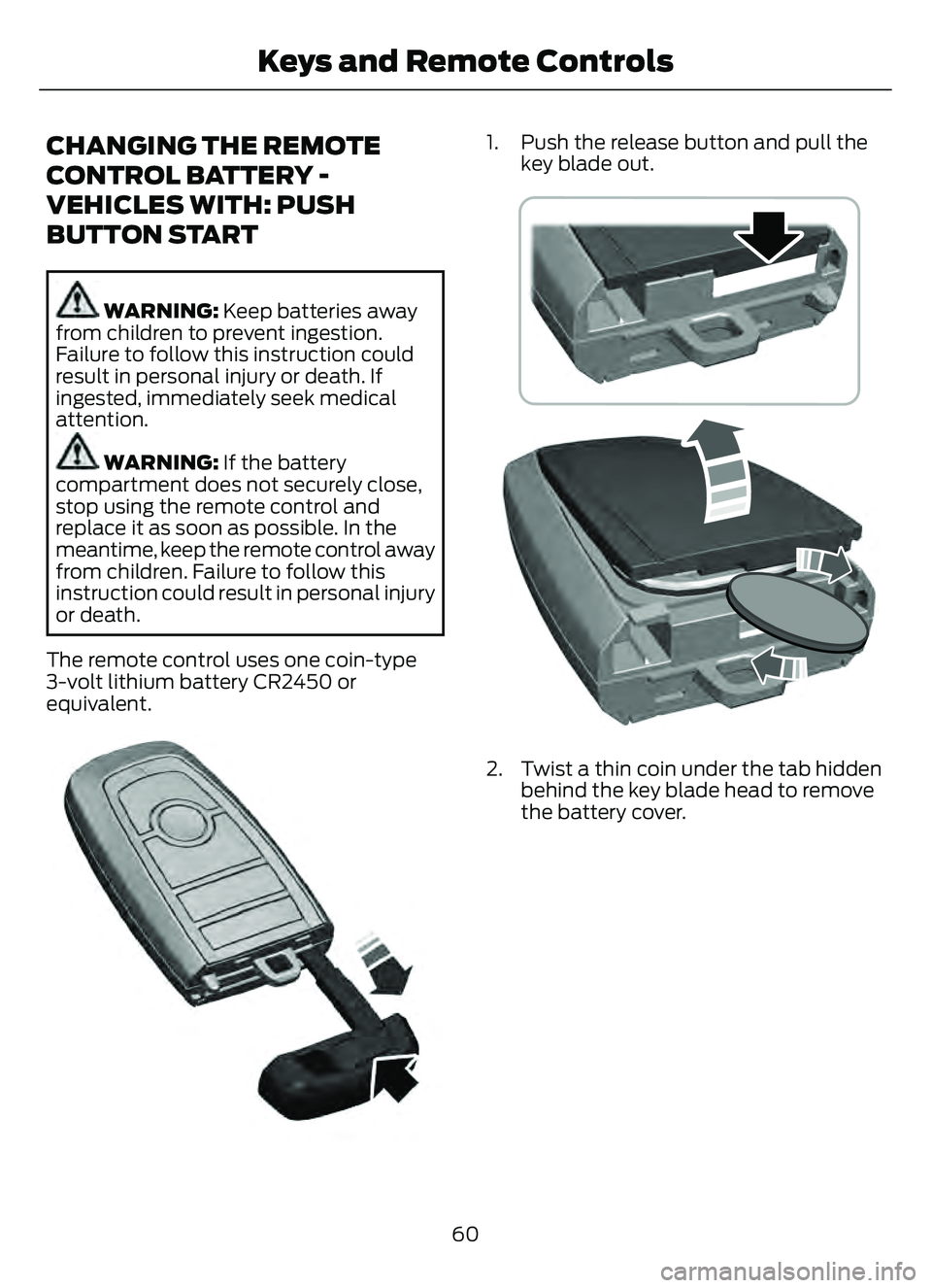
1. Push the release button and pull the key blade out.
E303824
2. Twist a thin coin under the tab hiddenbehind the key blade head to remove
the battery cover.
60
Keys and Remote Controls
Page 64 of 585
E218402
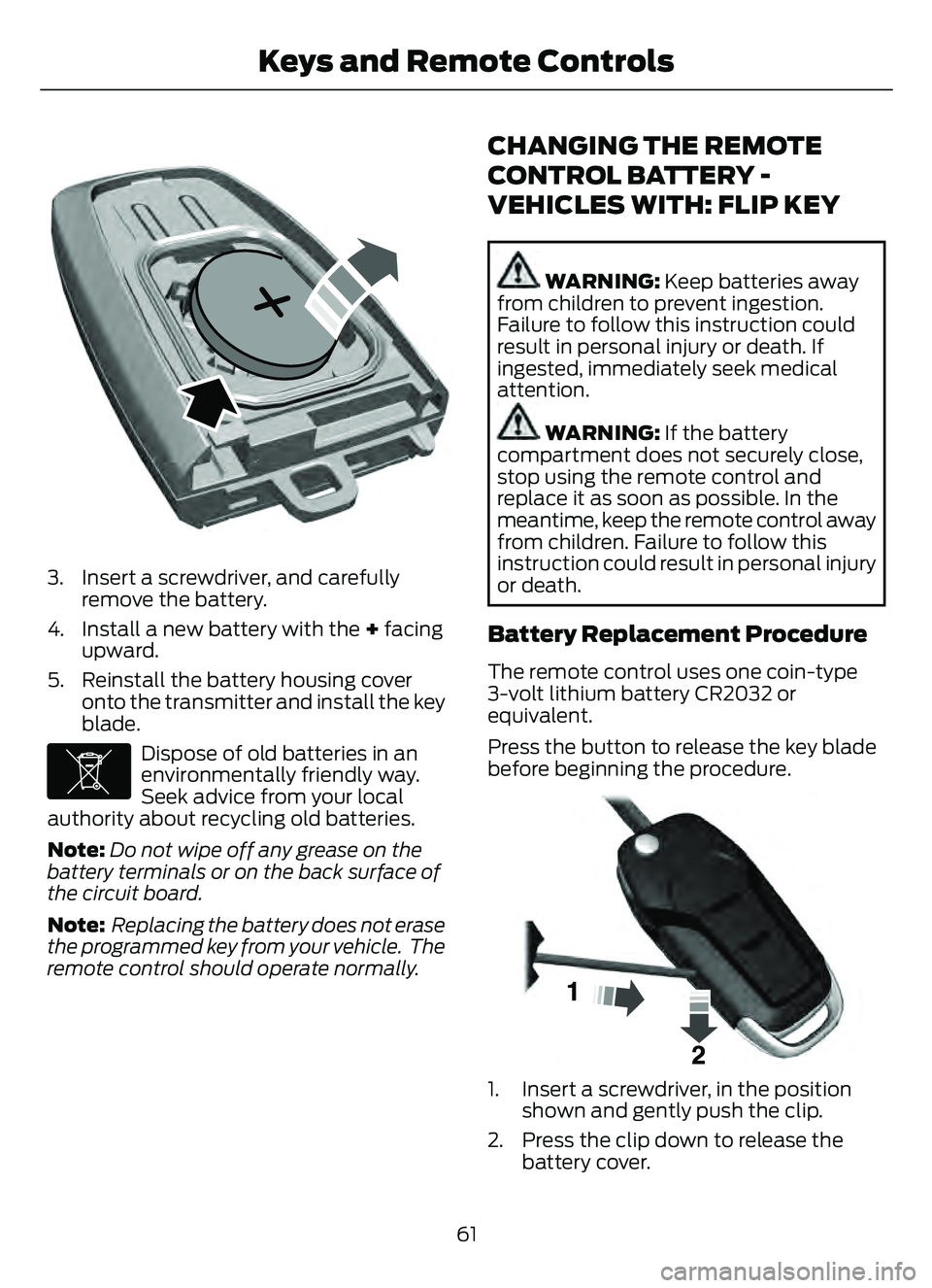
3. Insert a screwdriver, and carefullyremove the battery.
4. Install a new battery with the + facing upward.
5. Reinstall the battery housing cover onto the transmitter and install the key
blade.
E107998
Dispose of old batteries in an
environmentally friendly way.
Seek advice from your local
authority about recycling old batteries.
Note: Do not wipe off any grease on the
battery terminals or on the back surface of
the circuit board.
Note: Replacing the battery does not erase
the programmed key from your vehicle. The
remote control should operate normally.
CHANGING THE REMOTE
CONTROL BATTERY -
VEHICLES WITH: FLIP KEY
WARNING: Keep batteries away
from children to prevent ingestion.
Failure to follow this instruction could
result in personal injury or death. If
ingested, immediately seek medical
attention.
WARNING: If the battery
compartment does not securely close,
stop using the remote control and
replace it as soon as possible. In the
meantime, keep the remote control away
from children. Failure to follow this
instruction could result in personal injury
or death.
Battery Replacement Procedure
The remote control uses one coin-type
3-volt lithium battery CR2032 or
equivalent.
Press the button to release the key blade
before beginning the procedure.
E1991533
1. Insert a screwdriver, in the position shown and gently push the clip.
2. Press the clip down to release the battery cover.
61
Keys and Remote Controls
Page 67 of 585
WHAT IS MYKEY
MyKey allows you to program keys with
restricted driving modes to promote good
driving habits.
MYKEY SETTINGS
NON-CONFIGURABLE MYKEY
SETTINGS
Seatbelt Reminder or Belt-
Minder™
MyKey mutes the audio system until the
front seat passengers buckle the front seat
belts.
Note:If your vehicle includes an AM/FM
radio or a very basic audio system, then the
radio may not mute.
Satellite Radio (If Equipped)
Some Satellite radio channels have
restricted access to adult radio content.
Early Low Fuel
The low fuel level warning lamp turns on
earlier.
Driving and Parking Aids
You cannot configure settings for parking
aids, blind spot information system, and
cross traffic alert. These systems turn on
when the vehicle turns on, and you cannot
switch them off with a MyKey.
You cannot configure settings for
pre-collision assist and lane keeping. These
systems turn on when the vehicle turns on,
but you can switch them off with a MyKey.
A new destination in the navigation system
can only be set using voice commands
when using a MyKey, and with your vehicle
moving. Note:
MyKey drivers may be able to switch
the lane departure warning feature off, but
this feature turns back on automatically
with every new key cycle.
CONFIGURABLE MYKEY
SETTINGS
You can configure the following settings
after creating a MyKey. See Creating a
MyKey (page 65).
Speed Limit
WARNING: Do not set MyKey
maximum speed limit to a limit that will
prevent the driver from maintaining a
safe speed considering posted speed
limits and prevailing road conditions. The
driver is always responsible to drive in
accordance with local laws and
prevailing conditions. Failure to do so
could result in accident or injury.
You can set a speed limit for your vehicle.
Warning messages appear in the
information display and a tone sounds if
your vehicle reaches the set speed. You
cannot override the set speed when using
a MyKey.
Speed Minder
You can set a speed reminder for your
vehicle. Warning messages appear in the
information display and a tone sounds if
your vehicle exceeds the set speed.
Audio System Volume Limit
The audio system maximum volume
reduces. A message appears in the
information display if you attempt to
exceed the volume limit. Automatic
volume control turns off.
64
MyKey™
Page 74 of 585
MISLOCK LIMITATIONS
When you press the lock button once, the
direction indicators do not flash if:
• Any door or the liftgate is open.
• The hood is open.
When you press the lock button twice
within three seconds, the horn sounds if:
• Any door or the liftgate is open.
• The hood is open.
If you switch mislock off, the horn does not
sound if you press the lock button on the
remote control when a door is open.
SWITCHING MISLOCK ON AND
OFF
1. Press Settings on the touchscreen.
2. Press Vehicle Settings .3. Switch Mislock Chirp on or off.
DOORS AND LOCKS AUDIBLE
WARNINGS
Door Ajar Audible Warning
Sounds when a door is not fully closed and
your vehicle is moving.
DOORS AND LOCKS –
TROUBLESHOOTING
DOORS AND LOCKS – WARNING
LAMPS
Door Ajar Warning Lamp
E249859
It illuminates when you switch
the ignition on and remains on if
any door or the hood is open.
DOORS AND LOCKS – INFORMATION MESSAGES
Action
Message
Displays if a door is open. Fully close the door.
Driver Door Ajar
Passenger Door Ajar
Rear Left Door Ajar
Rear Right Door Ajar
71
Doors and Locks
Page 77 of 585
5. Within 10 seconds, place a secondprogrammed intelligent access key in
the backup slot and press the push
button ignition switch.
The factory-set code appears in the
information display for a few seconds.
Note: You need to have two programmed
intelligent access keys for this procedure.
Note: The code may not display until after
any other warning messages first display.
KEYLESS ENTRY SETTINGS
SWITCHING KEYLESS ENTRY ON
AND OFF
1. Switch the ignition on using an original key that has not been created as a
MyKey.
2. Press Settings on the touchscreen.
3. Press Vehicle Settings .
4. Press Locks.
REPROGRAMMING THE
UNLOCKING FUNCTION
You can enable two-stage unlocking
function allowing you to unlock only the
driver door when you touch the unlock
sensor.
Press and hold both the lock and unlock
buttons on the remote control for four
seconds to disable or enable two-stage
unlocking.
If you program the unlocking function so
that only the driver door unlocks, you can
unlock all of the other doors from inside
your vehicle using the power door lock
control. You can unlock individual doors
by pulling the interior door handles on
those doors.
CREATING PERSONAL ACCESS
CODES
To create your own personal access code:
1. Enter the factory-set code.
2. Press 1·2 on the keypad within five
seconds.
3. Enter your personal five-digit code.
4. Press 1·2 on the keypad to save
personal code one.
The doors lock then unlock to confirm that
programming was successful.
To program additional personal access
codes, repeat Steps 1-3, then for Step 4:
• Press 3·4 to save personal code two.
• Press 5·6 to save personal code three.
• Press 7·8 to save personal code four.
• Press 9·0 to save personal code five.
Hints:
• Do not set a code that uses five of the same number.
• Do not use five numbers in sequential order.
• The factory-set code works even if you have set your own personal code.
CLEARING ALL PERSONAL
ACCESS CODES
1. Enter the factory-set five-digit code.
2. Press and release 1·2 on the keypadwithin five seconds.
3. Press and hold 1·2 for a few seconds. This must be done within five seconds
of completing Step 2.
All personal codes erase and only the
factory-set five-digit code works.
74
Keyless Entry (If Equipped)
Page 81 of 585
OPENING THE LIFTGATE
OPENING THE LIFTGATE FROM
OUTSIDE YOUR VEHICLE
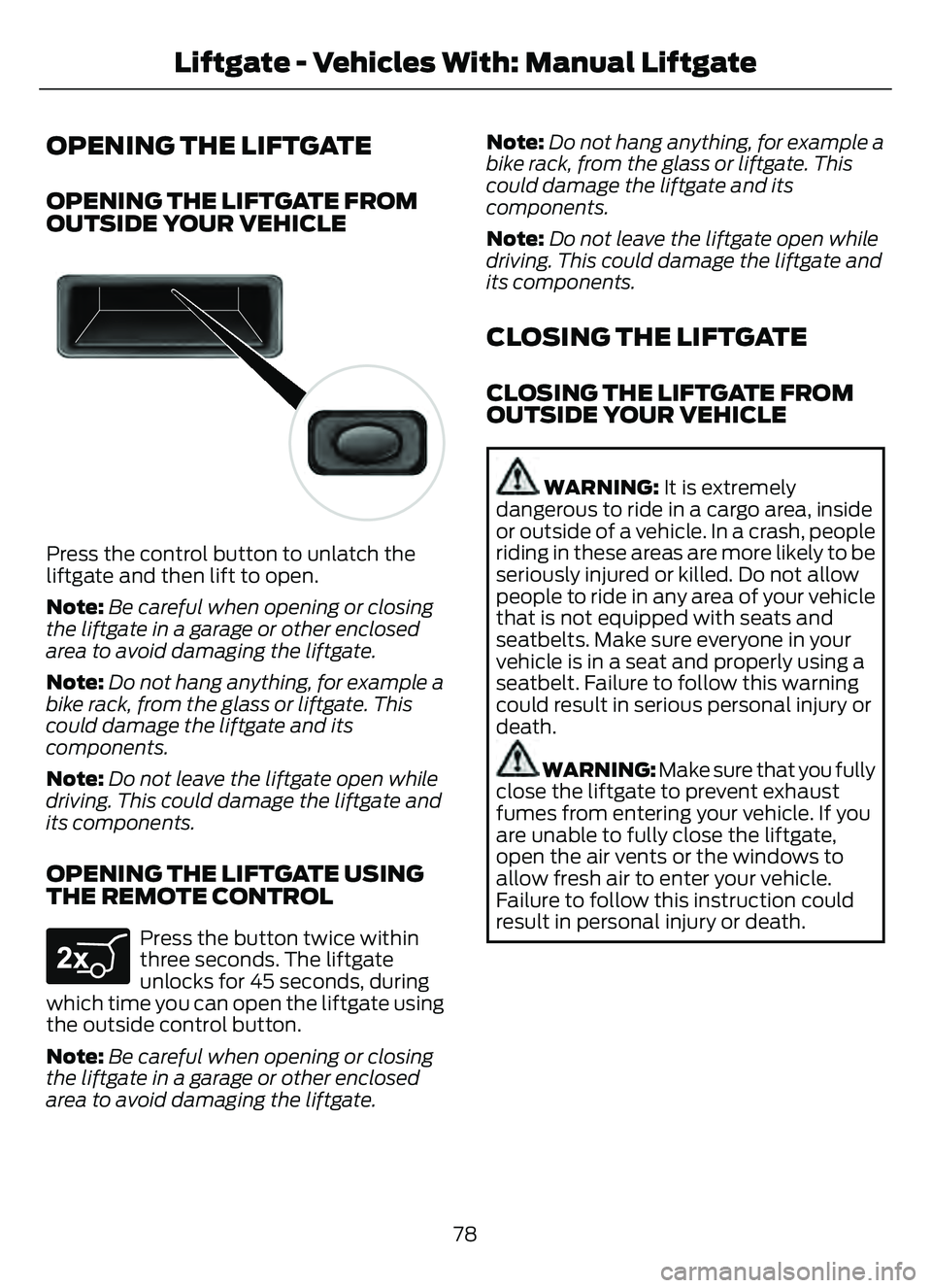
E138632
Press the control button to unlatch the
liftgate and then lift to open.
Note:Be careful when opening or closing
the liftgate in a garage or other enclosed
area to avoid damaging the liftgate.
Note: Do not hang anything, for example a
bike rack, from the glass or liftgate. This
could damage the liftgate and its
components.
Note: Do not leave the liftgate open while
driving. This could damage the liftgate and
its components.
OPENING THE LIFTGATE USING
THE REMOTE CONTROL
E267940
Press the button twice within
three seconds. The liftgate
unlocks for 45 seconds, during
which time you can open the liftgate using
the outside control button.
Note: Be careful when opening or closing
the liftgate in a garage or other enclosed
area to avoid damaging the liftgate. Note:
Do not hang anything, for example a
bike rack, from the glass or liftgate. This
could damage the liftgate and its
components.
Note: Do not leave the liftgate open while
driving. This could damage the liftgate and
its components.
CLOSING THE LIFTGATE
CLOSING THE LIFTGATE FROM
OUTSIDE YOUR VEHICLE
WARNING: It is extremely
dangerous to ride in a cargo area, inside
or outside of a vehicle. In a crash, people
riding in these areas are more likely to be
seriously injured or killed. Do not allow
people to ride in any area of your vehicle
that is not equipped with seats and
seatbelts. Make sure everyone in your
vehicle is in a seat and properly using a
seatbelt. Failure to follow this warning
could result in serious personal injury or
death.
WARNING: Make sure that you fully
close the liftgate to prevent exhaust
fumes from entering your vehicle. If you
are unable to fully close the liftgate,
open the air vents or the windows to
allow fresh air to enter your vehicle.
Failure to follow this instruction could
result in personal injury or death.
78
Liftgate - Vehicles With: Manual Liftgate
Page 83 of 585
LIFTGATE PRECAUTIONS
WARNING: It is extremely
dangerous to ride in a cargo area, inside
or outside of a vehicle. In a crash, people
riding in these areas are more likely to be
seriously injured or killed. Do not allow
people to ride in any area of your vehicle
that is not equipped with seats and
seatbelts. Make sure everyone in your
vehicle is in a seat and properly using a
seatbelt. Failure to follow this warning
could result in serious personal injury or
death.
WARNING: Make sure that you fully
close the liftgate to prevent exhaust
fumes from entering your vehicle. If you
are unable to fully close the liftgate,
open the air vents or the windows to
allow fresh air to enter your vehicle.
Failure to follow this instruction could
result in personal injury or death.
WARNING: Keep keys out of reach
of children. Do not allow children to
operate or play near an open or moving
power liftgate. You should supervise the
operation of the power liftgate at all
times.
OPENING THE LIFTGATE
OPENING THE LIFTGATE FROM
INSIDE YOUR VEHICLE
E138633
With the transmission in park
(P), press the button on the
instrument panel.
Note: Be careful when opening or closing
the liftgate in a garage or other enclosed
area to avoid damaging the liftgate. Note:
Do not hang anything, for example
a bike rack, from the glass or liftgate. This
could damage the liftgate and its
components.
Note: Do not leave the liftgate open while
driving. This could damage the liftgate and
its components.
OPENING THE LIFTGATE FROM
OUTSIDE YOUR VEHICLE
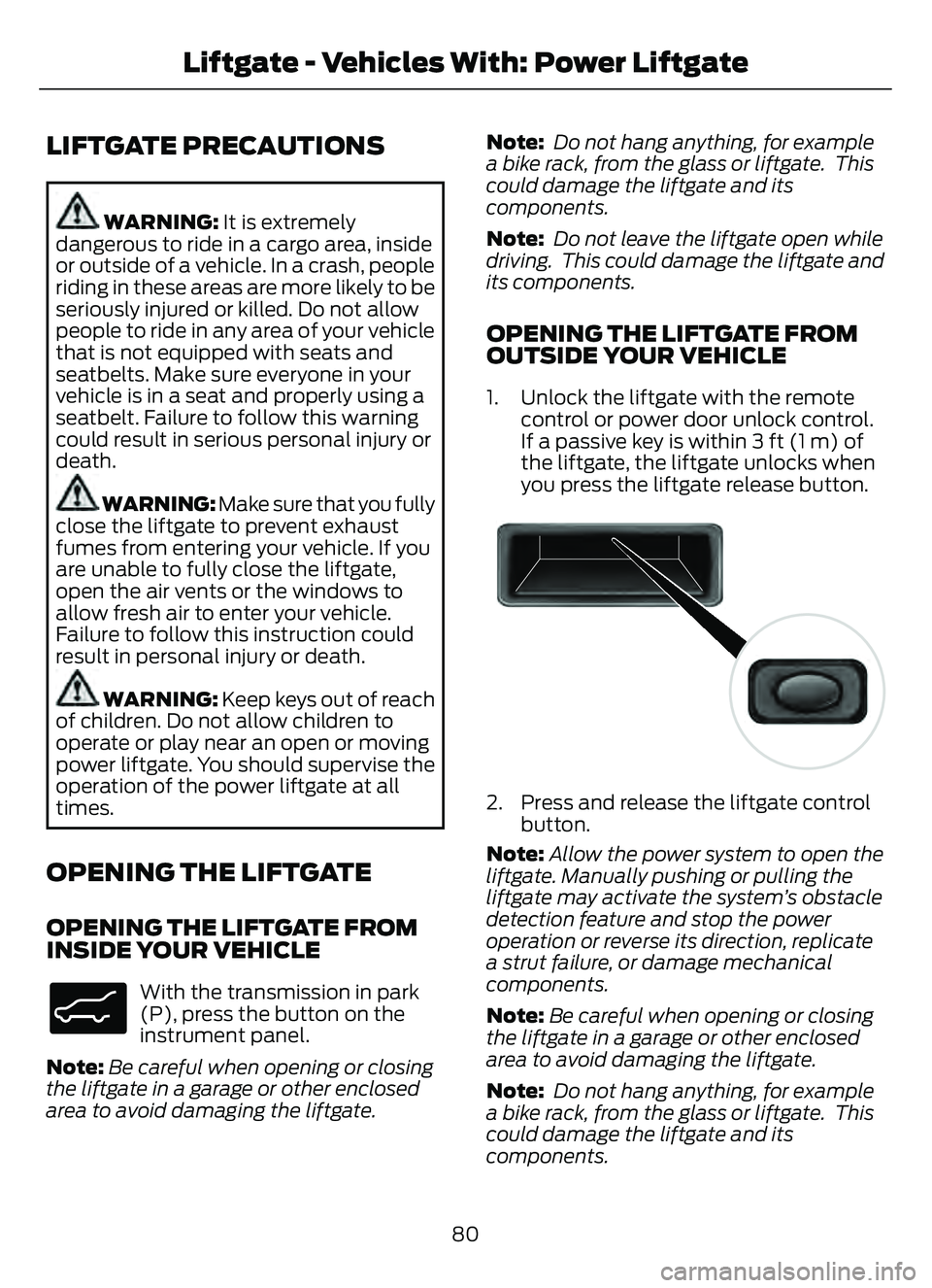
1. Unlock the liftgate with the remote control or power door unlock control.
If a passive key is within 3 ft (1 m) of
the liftgate, the liftgate unlocks when
you press the liftgate release button.
E138632
2. Press and release the liftgate controlbutton.
Note: Allow the power system to open the
liftgate. Manually pushing or pulling the
liftgate may activate the system’s obstacle
detection feature and stop the power
operation or reverse its direction, replicate
a strut failure, or damage mechanical
components.
Note: Be careful when opening or closing
the liftgate in a garage or other enclosed
area to avoid damaging the liftgate.
Note: Do not hang anything, for example
a bike rack, from the glass or liftgate. This
could damage the liftgate and its
components.
80
Liftgate - Vehicles With: Power Liftgate
Page 85 of 585
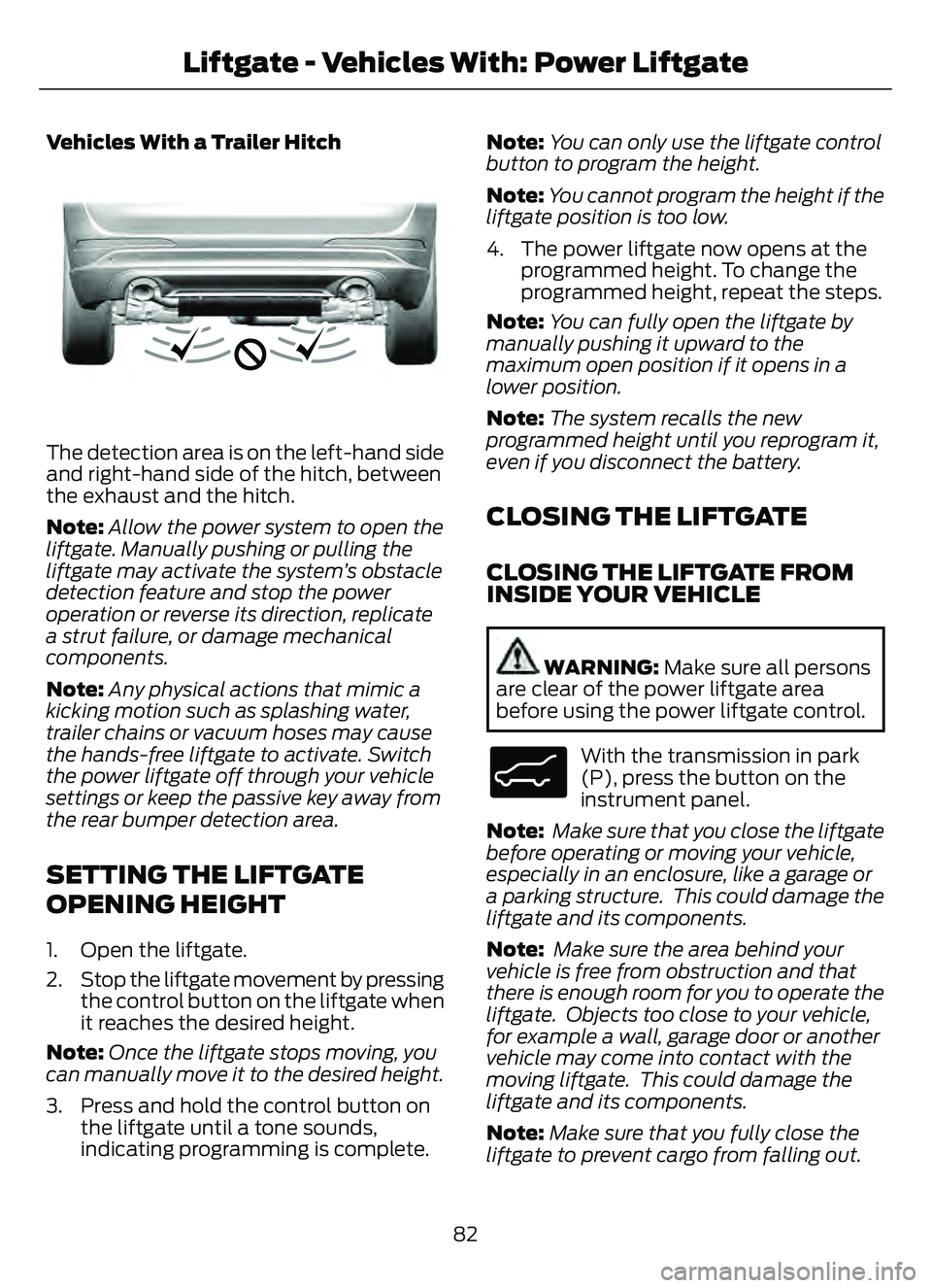
Vehicles With a Trailer Hitch
E310718E310718
The detection area is on the left-hand side
and right-hand side of the hitch, between
the exhaust and the hitch.
Note:Allow the power system to open the
liftgate. Manually pushing or pulling the
liftgate may activate the system’s obstacle
detection feature and stop the power
operation or reverse its direction, replicate
a strut failure, or damage mechanical
components.
Note: Any physical actions that mimic a
kicking motion such as splashing water,
trailer chains or vacuum hoses may cause
the hands-free liftgate to activate. Switch
the power liftgate off through your vehicle
settings or keep the passive key away from
the rear bumper detection area.
SETTING THE LIFTGATE
OPENING HEIGHT
1. Open the liftgate.
2. Stop the liftgate movement by pressing the control button on the liftgate when
it reaches the desired height.
Note: Once the liftgate stops moving, you
can manually move it to the desired height.
3. Press and hold the control button on the liftgate until a tone sounds,
indicating programming is complete. Note:
You can only use the liftgate control
button to program the height.
Note: You cannot program the height if the
liftgate position is too low.
4. The power liftgate now opens at the programmed height. To change the
programmed height, repeat the steps.
Note: You can fully open the liftgate by
manually pushing it upward to the
maximum open position if it opens in a
lower position.
Note: The system recalls the new
programmed height until you reprogram it,
even if you disconnect the battery.
CLOSING THE LIFTGATE
CLOSING THE LIFTGATE FROM
INSIDE YOUR VEHICLE
WARNING: Make sure all persons
are clear of the power liftgate area
before using the power liftgate control.
E138633
With the transmission in park
(P), press the button on the
instrument panel.
Note: Make sure that you close the liftgate
before operating or moving your vehicle,
especially in an enclosure, like a garage or
a parking structure. This could damage the
liftgate and its components.
Note: Make sure the area behind your
vehicle is free from obstruction and that
there is enough room for you to operate the
liftgate. Objects too close to your vehicle,
for example a wall, garage door or another
vehicle may come into contact with the
moving liftgate. This could damage the
liftgate and its components.
Note: Make sure that you fully close the
liftgate to prevent cargo from falling out.
82
Liftgate - Vehicles With: Power Liftgate