warning FORD ESCAPE 2022 Workshop Manual
[x] Cancel search | Manufacturer: FORD, Model Year: 2022, Model line: ESCAPE, Model: FORD ESCAPE 2022Pages: 585, PDF Size: 6.15 MB
Page 110 of 585
INTERIOR MIRROR
PRECAUTIONS
WARNING: Do not adjust the
mirrors when your vehicle is moving. This
could result in the loss of control of your
vehicle, serious personal injury or death.
Note: Do not clean the mirror housing or
glass with harsh abrasives, fuel or other
petroleum-based cleaning products.
MANUALLY DIMMING THE
INTERIOR MIRROR
Pull the tab below the mirror toward you
to reduce glare at night.
AUTO-DIMMING INTERIOR
MIRROR
(IF EQUIPPED)
WHAT IS THE AUTO-DIMMING
INTERIOR MIRROR
The mirror dims to reduce the effect of
bright light from behind. It returns to
normal when the bright light from behind
is no longer present or when you shift into
reverse (R).
AUTO-DIMMING INTERIOR
MIRROR LIMITATIONS
Do not block the sensors on the front and
back of the mirror.
Note: A rear center passenger or raised rear
center head restraint could prevent light
from reaching the sensor.
107
Interior Mirror
Page 111 of 585
ADJUSTING THE EXTERIOR
MIRRORS
WARNING: Do not adjust the
mirrors when your vehicle is moving. This
could result in the loss of control of your
vehicle, serious personal injury or death.
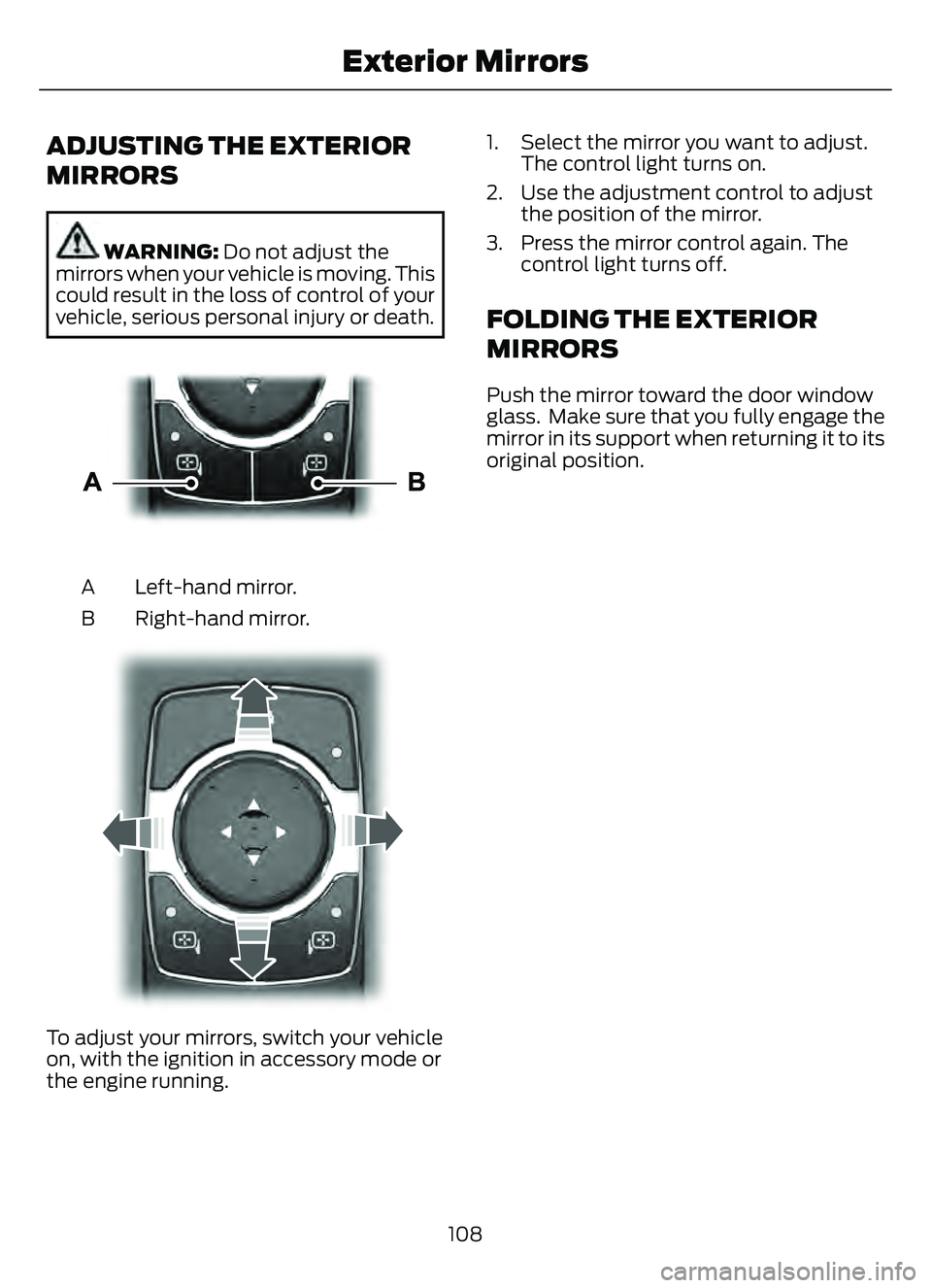
E303926E303926
Left-hand mirror.
A
Right-hand mirror.
B
E30392E30392
To adjust your mirrors, switch your vehicle
on, with the ignition in accessory mode or
the engine running. 1. Select the mirror you want to adjust.
The control light turns on.
2. Use the adjustment control to adjust the position of the mirror.
3. Press the mirror control again. The control light turns off.
FOLDING THE EXTERIOR
MIRRORS
Push the mirror toward the door window
glass. Make sure that you fully engage the
mirror in its support when returning it to its
original position.
108
Exterior Mirrors
Page 112 of 585
OPENING AND CLOSING THE
SUN SHADE
WARNING: Do not leave children
unattended in your vehicle and do not
let them play with the sun shades.
Failure to follow this instruction could
result in personal injury.
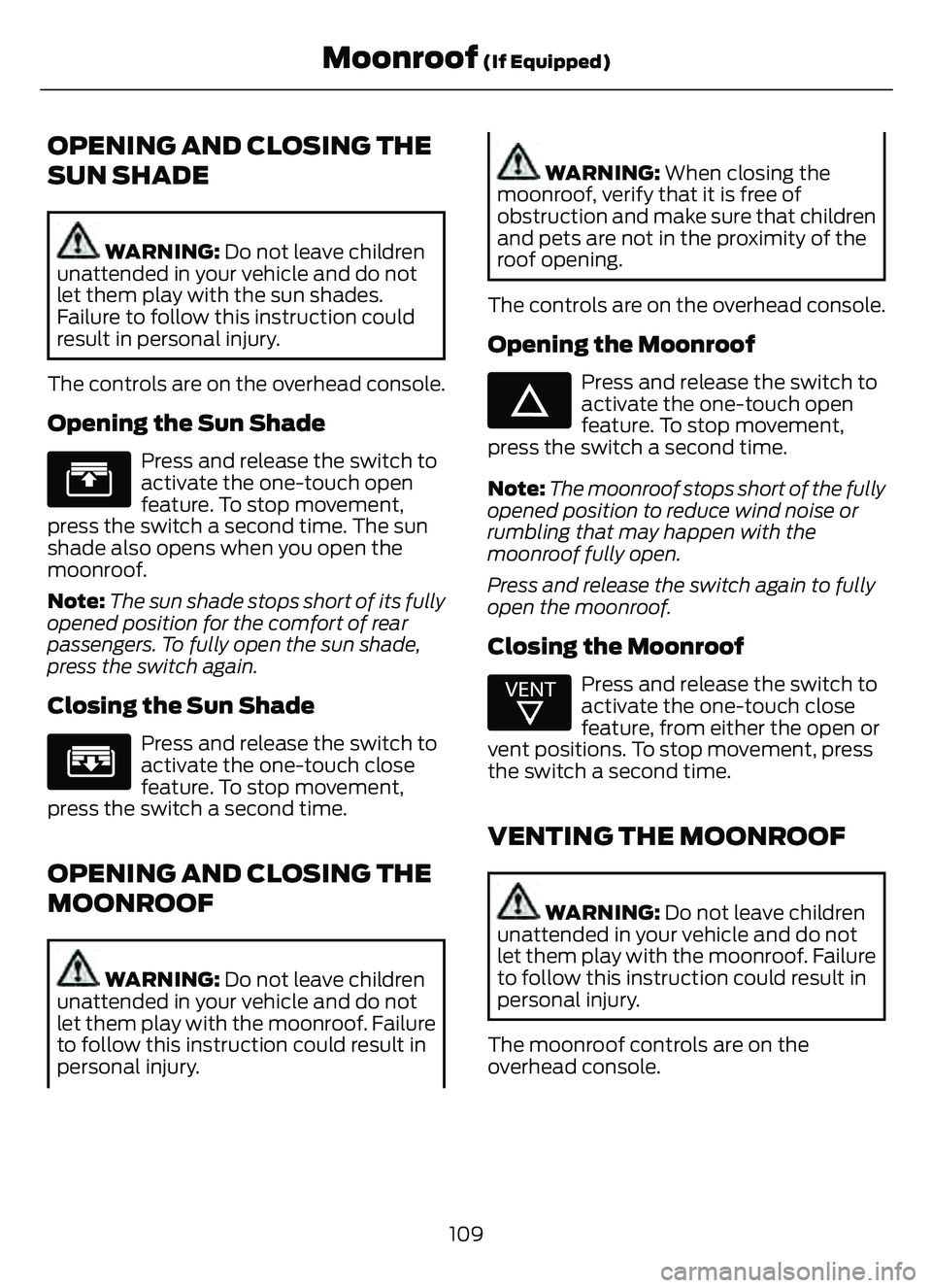
The controls are on the overhead console.
Opening the Sun Shade
E312249
Press and release the switch to
activate the one-touch open
feature. To stop movement,
press the switch a second time. The sun
shade also opens when you open the
moonroof.
Note: The sun shade stops short of its fully
opened position for the comfort of rear
passengers. To fully open the sun shade,
press the switch again.
Closing the Sun Shade
E312250E312250
Press and release the switch to
activate the one-touch close
feature. To stop movement,
press the switch a second time.
OPENING AND CLOSING THE
MOONROOF
WARNING: Do not leave children
unattended in your vehicle and do not
let them play with the moonroof. Failure
to follow this instruction could result in
personal injury.
WARNING: When closing the
moonroof, verify that it is free of
obstruction and make sure that children
and pets are not in the proximity of the
roof opening.
The controls are on the overhead console.
Opening the Moonroof
E312251E312251
Press and release the switch to
activate the one-touch open
feature. To stop movement,
press the switch a second time.
Note: The moonroof stops short of the fully
opened position to reduce wind noise or
rumbling that may happen with the
moonroof fully open.
Press and release the switch again to fully
open the moonroof.
Closing the Moonroof
E312252E31225225
Press and release the switch to
activate the one-touch close
feature, from either the open or
vent positions. To stop movement, press
the switch a second time.
VENTING THE MOONROOF
WARNING: Do not leave children
unattended in your vehicle and do not
let them play with the moonroof. Failure
to follow this instruction could result in
personal injury.
The moonroof controls are on the
overhead console.
109
Moonroof (If Equipped)
Page 122 of 585
VEHICLE RANGE DISPLAY -
PLUG-IN HYBRID ELECTRIC
VEHICLE (PHEV)
E308653E308653
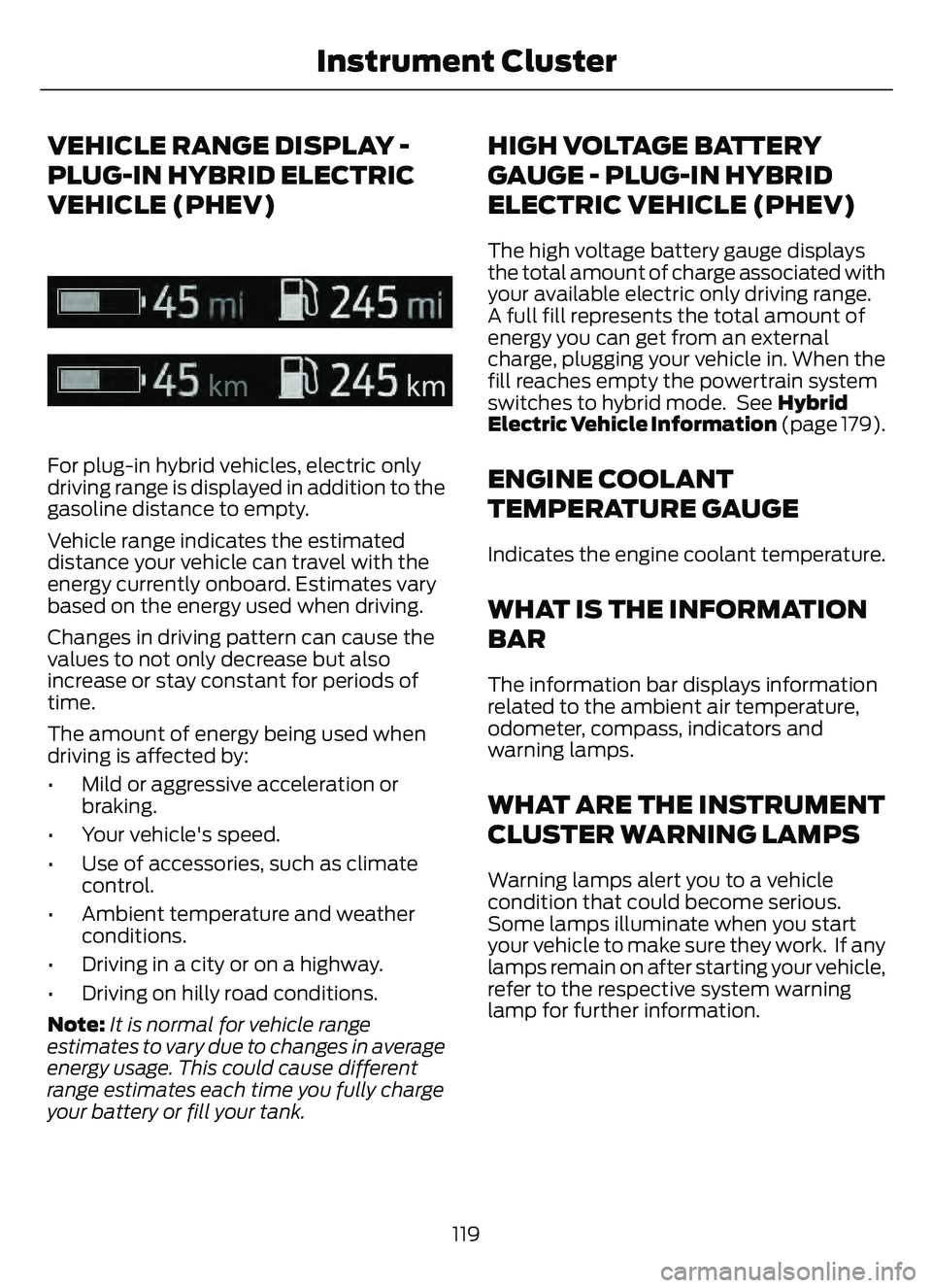
For plug-in hybrid vehicles, electric only
driving range is displayed in addition to the
gasoline distance to empty.
Vehicle range indicates the estimated
distance your vehicle can travel with the
energy currently onboard. Estimates vary
based on the energy used when driving.
Changes in driving pattern can cause the
values to not only decrease but also
increase or stay constant for periods of
time.
The amount of energy being used when
driving is affected by:
• Mild or aggressive acceleration orbraking.
• Your vehicle's speed.
• Use of accessories, such as climate control.
• Ambient temperature and weather conditions.
• Driving in a city or on a highway.
• Driving on hilly road conditions.
Note: It is normal for vehicle range
estimates to vary due to changes in average
energy usage. This could cause different
range estimates each time you fully charge
your battery or fill your tank.
HIGH VOLTAGE BATTERY
GAUGE - PLUG-IN HYBRID
ELECTRIC VEHICLE (PHEV)
The high voltage battery gauge displays
the total amount of charge associated with
your available electric only driving range.
A full fill represents the total amount of
energy you can get from an external
charge, plugging your vehicle in. When the
fill reaches empty the powertrain system
switches to hybrid mode. See Hybrid
Electric Vehicle Information (page 179).
ENGINE COOLANT
TEMPERATURE GAUGE
Indicates the engine coolant temperature.
WHAT IS THE INFORMATION
BAR
The information bar displays information
related to the ambient air temperature,
odometer, compass, indicators and
warning lamps.
WHAT ARE THE INSTRUMENT
CLUSTER WARNING LAMPS
Warning lamps alert you to a vehicle
condition that could become serious.
Some lamps illuminate when you start
your vehicle to make sure they work. If any
lamps remain on after starting your vehicle,
refer to the respective system warning
lamp for further information.
119
Instrument Cluster
Page 123 of 585
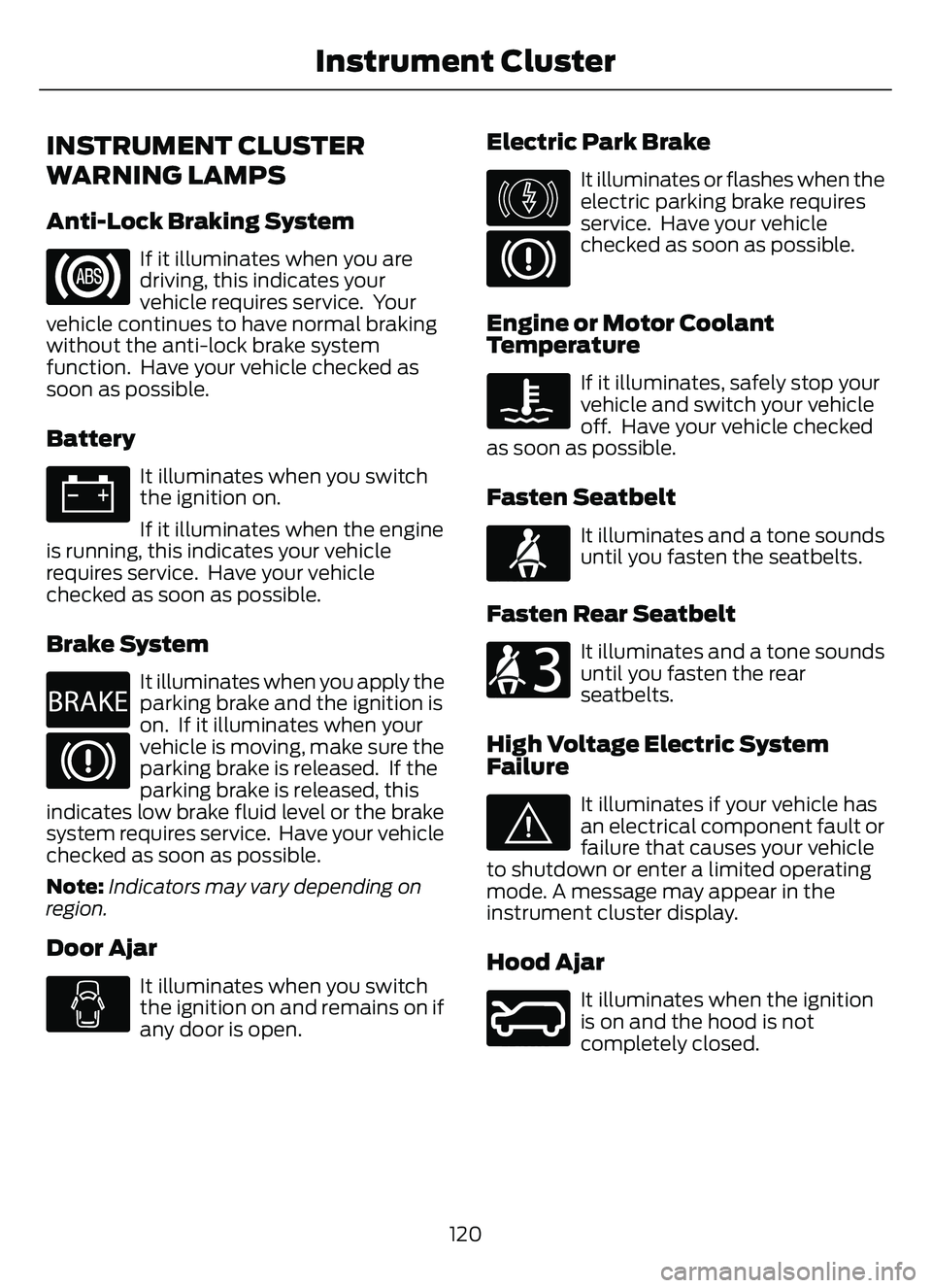
INSTRUMENT CLUSTER
WARNING LAMPS
Anti-Lock Braking System
If it illuminates when you are
driving, this indicates your
vehicle requires service. Your
vehicle continues to have normal braking
without the anti-lock brake system
function. Have your vehicle checked as
soon as possible.
Battery
It illuminates when you switch
the ignition on.
If it illuminates when the engine
is running, this indicates your vehicle
requires service. Have your vehicle
checked as soon as possible.
Brake System
E270480
It illuminates when you apply the
parking brake and the ignition is
on. If it illuminates when your
vehicle is moving, make sure the
parking brake is released. If the
parking brake is released, this
indicates low brake fluid level or the brake
system requires service. Have your vehicle
checked as soon as possible.
Note: Indicators may vary depending on
region.
Door Ajar
It illuminates when you switch
the ignition on and remains on if
any door is open.
Electric Park Brake
E146190
It illuminates or flashes when the
electric parking brake requires
service. Have your vehicle
checked as soon as possible.
Engine or Motor Coolant
Temperature
If it illuminates, safely stop your
vehicle and switch your vehicle
off. Have your vehicle checked
as soon as possible.
Fasten Seatbelt
E71880
It illuminates and a tone sounds
until you fasten the seatbelts.
Fasten Rear Seatbelt
E206718
It illuminates and a tone sounds
until you fasten the rear
seatbelts.
High Voltage Electric System
Failure
E144693
It illuminates if your vehicle has
an electrical component fault or
failure that causes your vehicle
to shutdown or enter a limited operating
mode. A message may appear in the
instrument cluster display.
Hood Ajar
E246598
It illuminates when the ignition
is on and the hood is not
completely closed.
120
Instrument Cluster
Page 124 of 585
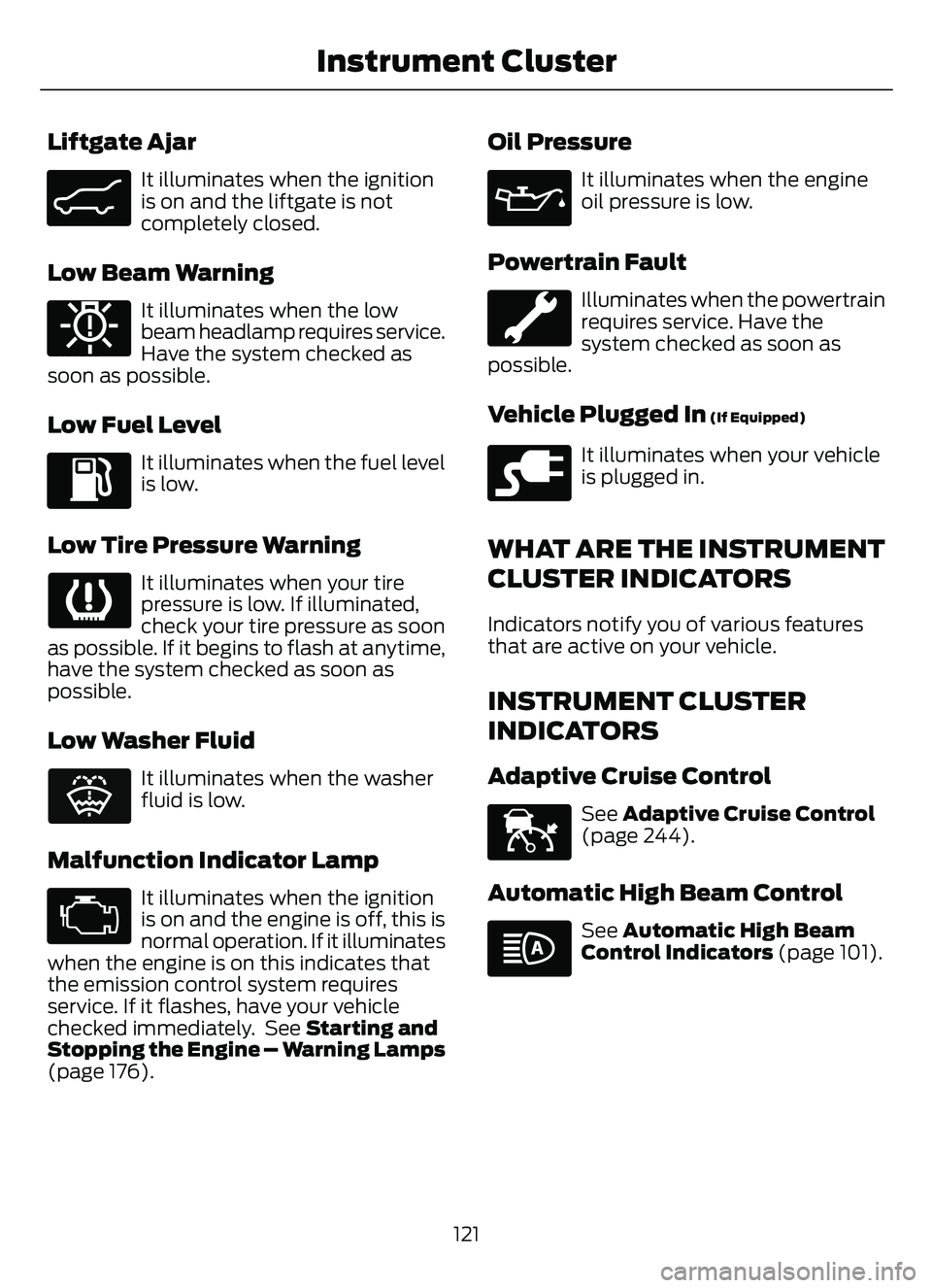
Liftgate Ajar
E162453
It illuminates when the ignition
is on and the liftgate is not
completely closed.
Low Beam Warning
E181350
It illuminates when the low
beam headlamp requires service.
Have the system checked as
soon as possible.
Low Fuel Level
It illuminates when the fuel level
is low.
Low Tire Pressure Warning
It illuminates when your tire
pressure is low. If illuminated,
check your tire pressure as soon
as possible. If it begins to flash at anytime,
have the system checked as soon as
possible.
Low Washer Fluid
E132353
It illuminates when the washer
fluid is low.
Malfunction Indicator Lamp
It illuminates when the ignition
is on and the engine is off, this is
normal operation. If it illuminates
when the engine is on this indicates that
the emission control system requires
service. If it flashes, have your vehicle
checked immediately. See Starting and
Stopping the Engine – Warning Lamps
(page 176).
Oil Pressure
It illuminates when the engine
oil pressure is low.
Powertrain Fault
Illuminates when the powertrain
requires service. Have the
system checked as soon as
possible.
Vehicle Plugged In (If Equipped)
E228962
It illuminates when your vehicle
is plugged in.
WHAT ARE THE INSTRUMENT
CLUSTER INDICATORS
Indicators notify you of various features
that are active on your vehicle.
INSTRUMENT CLUSTER
INDICATORS
Adaptive Cruise Control
E144524
See Adaptive Cruise Control
(page 244).
Automatic High Beam Control
See Automatic High Beam
Control Indicators (page 101).
121
Instrument Cluster
Page 126 of 585
USING THE INSTRUMENT
CLUSTER DISPLAY CONTROLS
WARNING: Driving while distracted
can result in loss of vehicle control, crash
and injury. We strongly recommend that
you use extreme caution when using any
device that may take your focus off the
road. Your primary responsibility is the
safe operation of your vehicle. We
recommend against the use of any
hand-held device while driving and
encourage the use of voice-operated
systems when possible. Make sure you
are aware of all applicable local laws
that may affect the use of electronic
devices while driving.
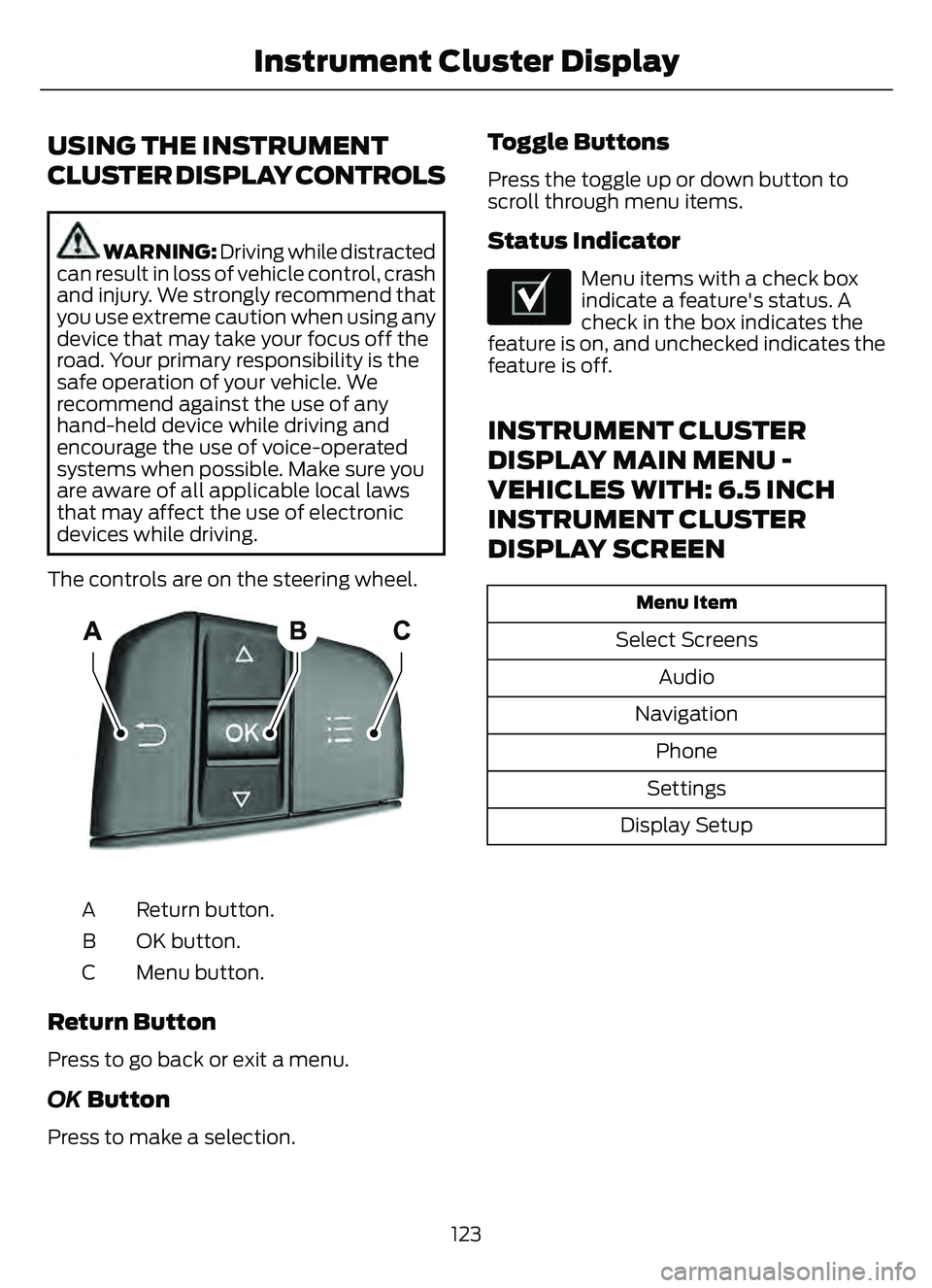
The controls are on the steering wheel.
5003E2500320032
Return button.
A
OK button.
B
Menu button.
C
Return Button
Press to go back or exit a menu.
OK Button
Press to make a selection.
Toggle Buttons
Press the toggle up or down button to
scroll through menu items.
Status Indicator
E204495
Menu items with a check box
indicate a feature's status. A
check in the box indicates the
feature is on, and unchecked indicates the
feature is off.
INSTRUMENT CLUSTER
DISPLAY MAIN MENU -
VEHICLES WITH: 6.5 INCH
INSTRUMENT CLUSTER
DISPLAY SCREEN
Menu Item
Select Screens
Audio
Navigation Phone
Settings
Display Setup
123
Instrument Cluster Display
Page 137 of 585
WHAT IS REMOTE START
The system allows you to remotely start
your vehicle and to adjust the interior
temperature according to the settings that
you chose.
REMOTE START
PRECAUTIONS
WARNING: Do not start the engine
in a closed garage or in other enclosed
areas. Exhaust fumes are toxic. Always
open the garage door before you start
the engine. Failure to follow this
instruction could result in personal injury
or death.
REMOTE START LIMITATIONS
Remote start does not work under the
following conditions:
• The alarm horn is sounding.
• The hood is open.
• The transmission is not in park (P).
• The ignition is on.
• The battery voltage is below the minimum operating voltage.
• Remote start is not enabled.
Note: Do not use remote start if the fuel
level is low.
Note: You can use remote start with
FordPass. See Connecting the Vehicle to
a Wi-Fi Network (page 405).
ENABLING REMOTE START
1. Press Settings on the touchscreen.
2. Press Vehicle Settings .
3. Press Remote Start Setup .4. Switch Remote Start on or off.
Note:
To remote start with FordPass, make
sure that the modem is enabled. See
Connected Vehicle Requirements (page
405).
REMOTELY STARTING AND
STOPPING THE VEHICLE
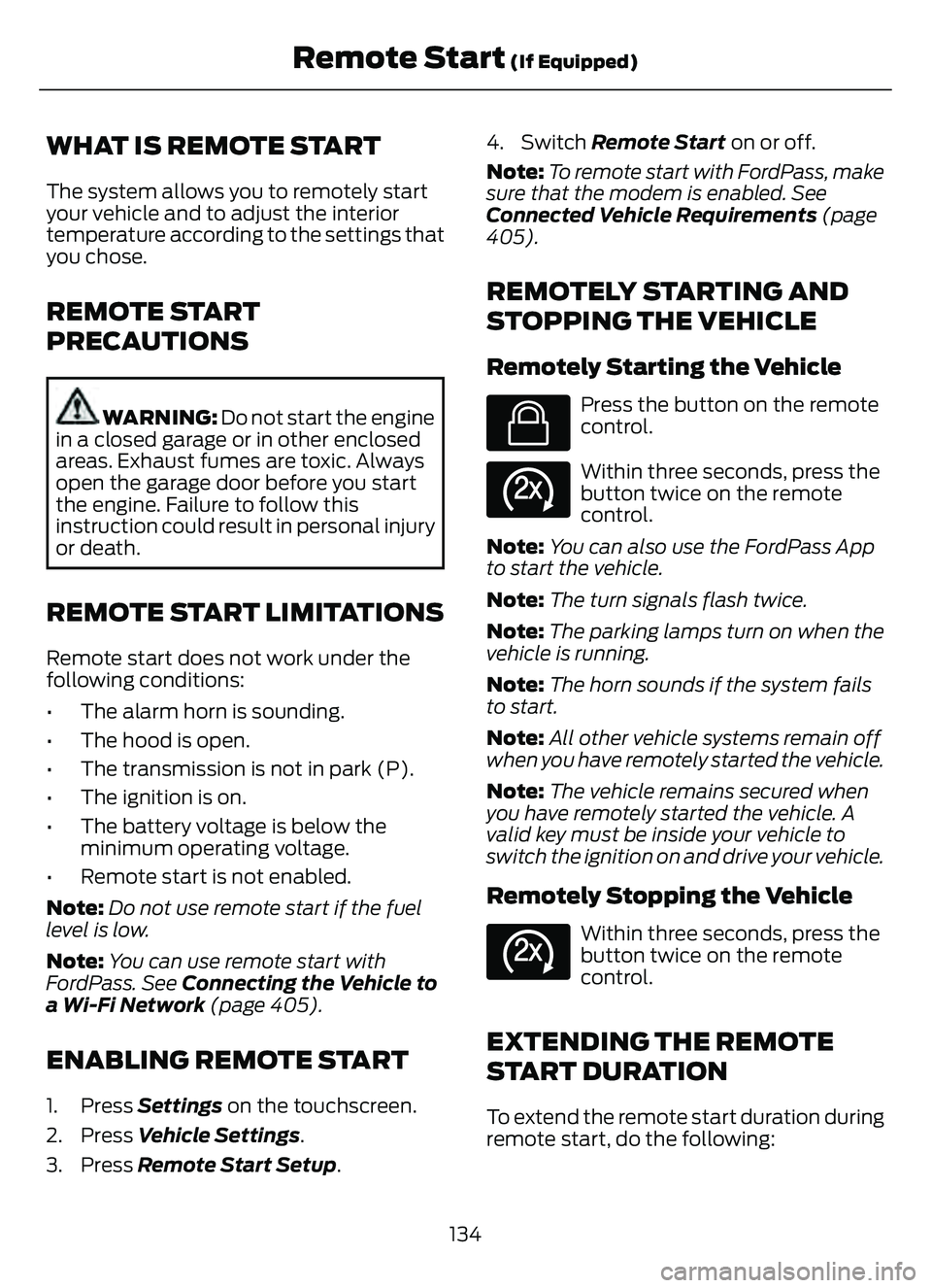
Remotely Starting the Vehicle
E138623
Press the button on the remote
control.
E138625
Within three seconds, press the
button twice on the remote
control.
Note: You can also use the FordPass App
to start the vehicle.
Note: The turn signals flash twice.
Note: The parking lamps turn on when the
vehicle is running.
Note: The horn sounds if the system fails
to start.
Note: All other vehicle systems remain off
when you have remotely started the vehicle.
Note: The vehicle remains secured when
you have remotely started the vehicle. A
valid key must be inside your vehicle to
switch the ignition on and drive your vehicle.
Remotely Stopping the Vehicle
E138625
Within three seconds, press the
button twice on the remote
control.
EXTENDING THE REMOTE
START DURATION
To extend the remote start duration during
remote start, do the following:
134
Remote Start (If Equipped)
Page 151 of 585
FRONT SEAT PRECAUTIONS
WARNING: Sitting improperly, out
of position or with the seatback reclined
too far can take weight off the seat
cushion and affect the decision of the
passenger sensing system, resulting in
serious injury or death in the event of a
crash. Always sit upright against your
seat back, with your feet on the floor.
WARNING: Do not recline the seat
backrest too far as this can cause the
occupant to slide under the seatbelt,
resulting in personal injury in the event
of a crash.
WARNING: Do not place objects
higher than the top of the seat backrest.
Failure to follow this instruction could
result in personal injury or death in the
event of a sudden stop or crash.
WARNING: Do not adjust the driver
seat or seat backrest when your vehicle
is moving. This may result in sudden seat
movement, causing the loss of control
of your vehicle.
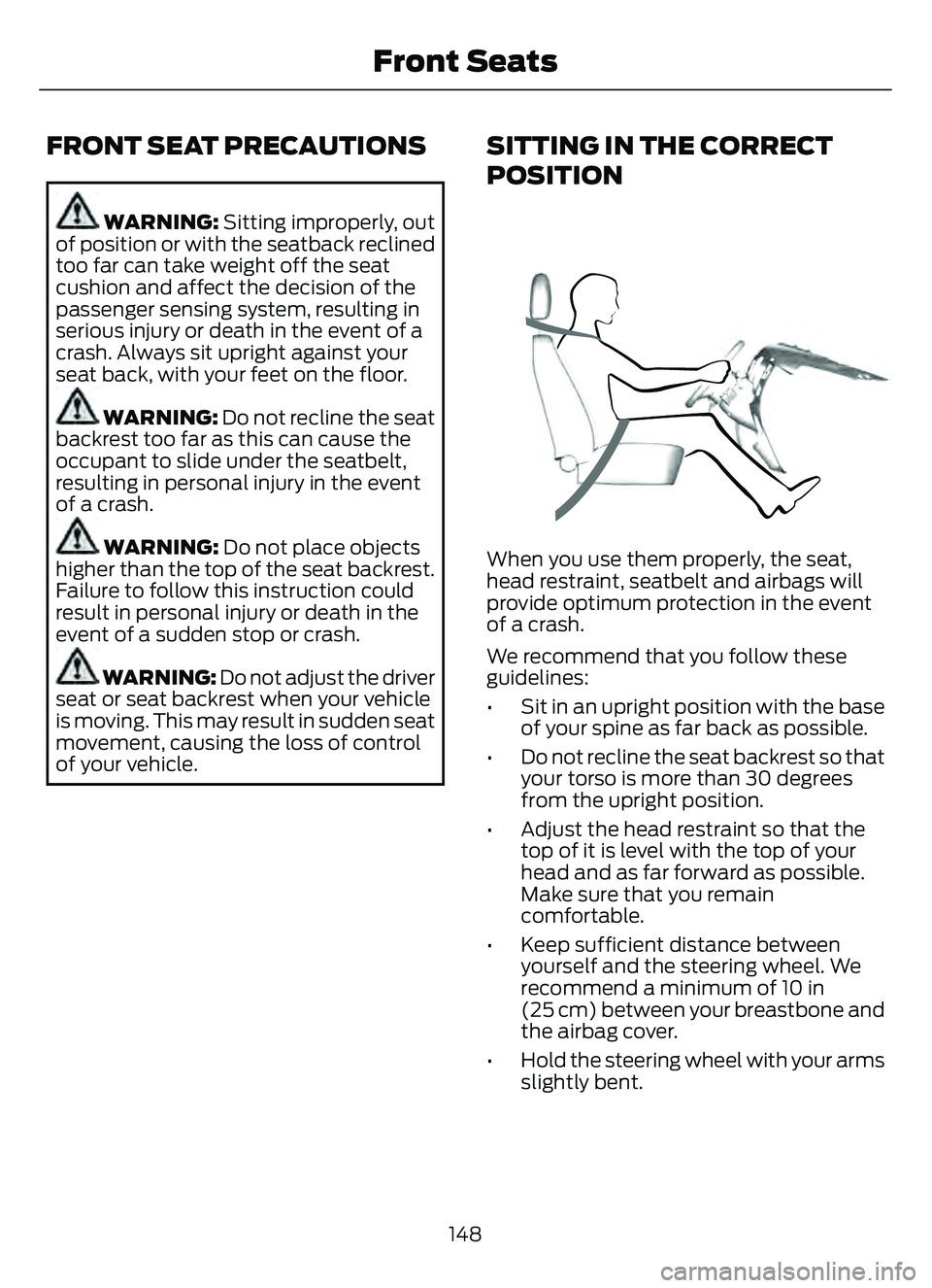
SITTING IN THE CORRECT
POSITION
When you use them properly, the seat,
head restraint, seatbelt and airbags will
provide optimum protection in the event
of a crash.
We recommend that you follow these
guidelines:
• Sit in an upright position with the base of your spine as far back as possible.
• Do not recline the seat backrest so that your torso is more than 30 degrees
from the upright position.
• Adjust the head restraint so that the top of it is level with the top of your
head and as far forward as possible.
Make sure that you remain
comfortable.
• Keep sufficient distance between yourself and the steering wheel. We
recommend a minimum of 10 in
(25 cm) between your breastbone and
the airbag cover.
• Hold the steering wheel with your arms slightly bent.
148
Front Seats
Page 152 of 585
• Bend your legs slightly so that you canpress the pedals fully.
• Position the shoulder strap of the seatbelt over the center of your
shoulder and position the lap strap
tightly across your hips.
Make sure that your driving position is
comfortable and that you can maintain full
control of your vehicle.
MANUAL SEATS
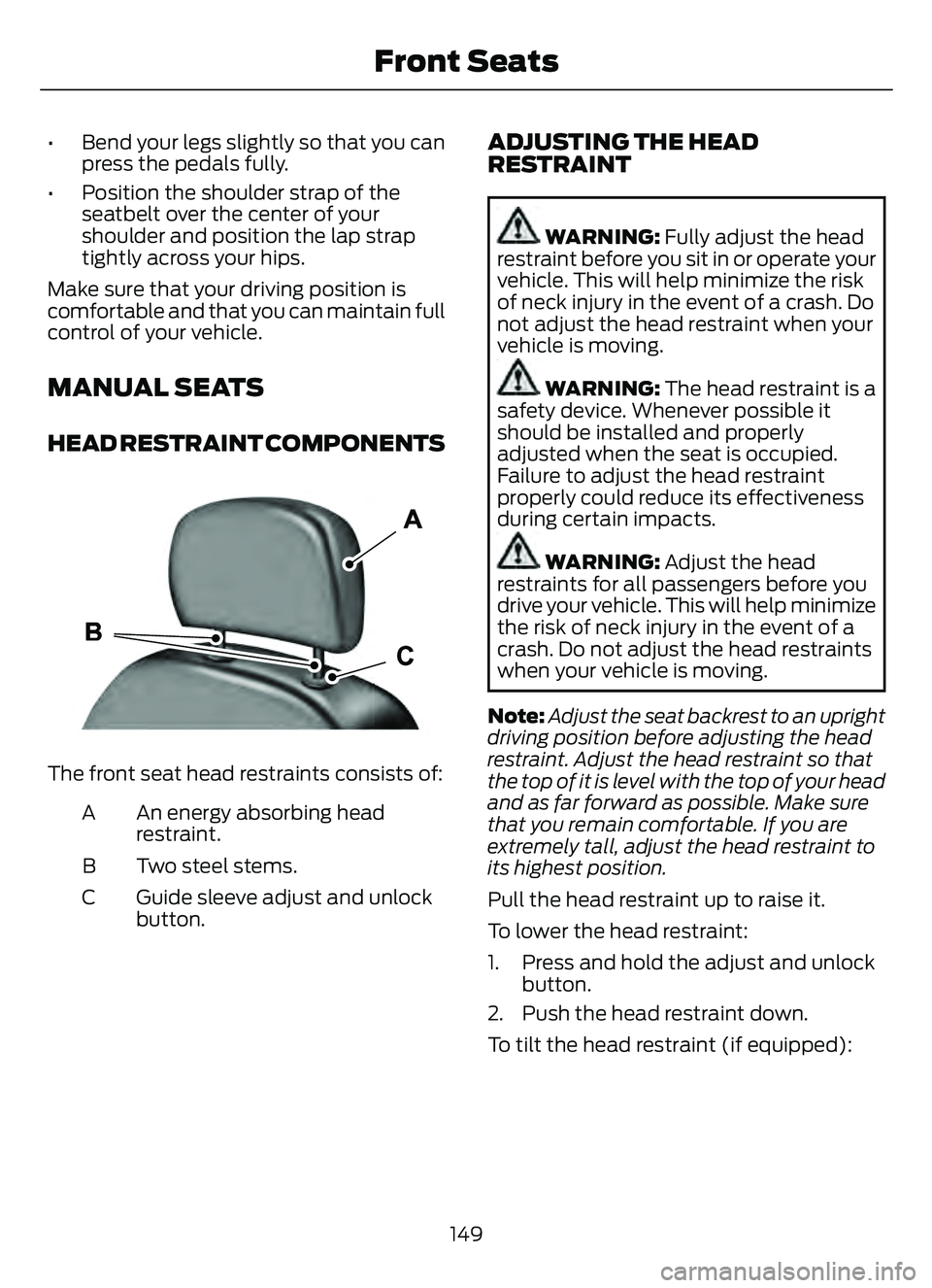
HEAD RESTRAINT COMPONENTS
E291E29139139
The front seat head restraints consists of:
An energy absorbing head
restraint.
A
Two steel stems.
B
Guide sleeve adjust and unlock
button.
C
ADJUSTING THE HEAD
RESTRAINT
WARNING: Fully adjust the head
restraint before you sit in or operate your
vehicle. This will help minimize the risk
of neck injury in the event of a crash. Do
not adjust the head restraint when your
vehicle is moving.
WARNING: The head restraint is a
safety device. Whenever possible it
should be installed and properly
adjusted when the seat is occupied.
Failure to adjust the head restraint
properly could reduce its effectiveness
during certain impacts.
WARNING: Adjust the head
restraints for all passengers before you
drive your vehicle. This will help minimize
the risk of neck injury in the event of a
crash. Do not adjust the head restraints
when your vehicle is moving.
Note: Adjust the seat backrest to an upright
driving position before adjusting the head
restraint. Adjust the head restraint so that
the top of it is level with the top of your head
and as far forward as possible. Make sure
that you remain comfortable. If you are
extremely tall, adjust the head restraint to
its highest position.
Pull the head restraint up to raise it.
To lower the head restraint:
1. Press and hold the adjust and unlock button.
2. Push the head restraint down.
To tilt the head restraint (if equipped):
149
Front Seats