phone FORD ESCAPE 2022 Workshop Manual
[x] Cancel search | Manufacturer: FORD, Model Year: 2022, Model line: ESCAPE, Model: FORD ESCAPE 2022Pages: 585, PDF Size: 6.15 MB
Page 474 of 585
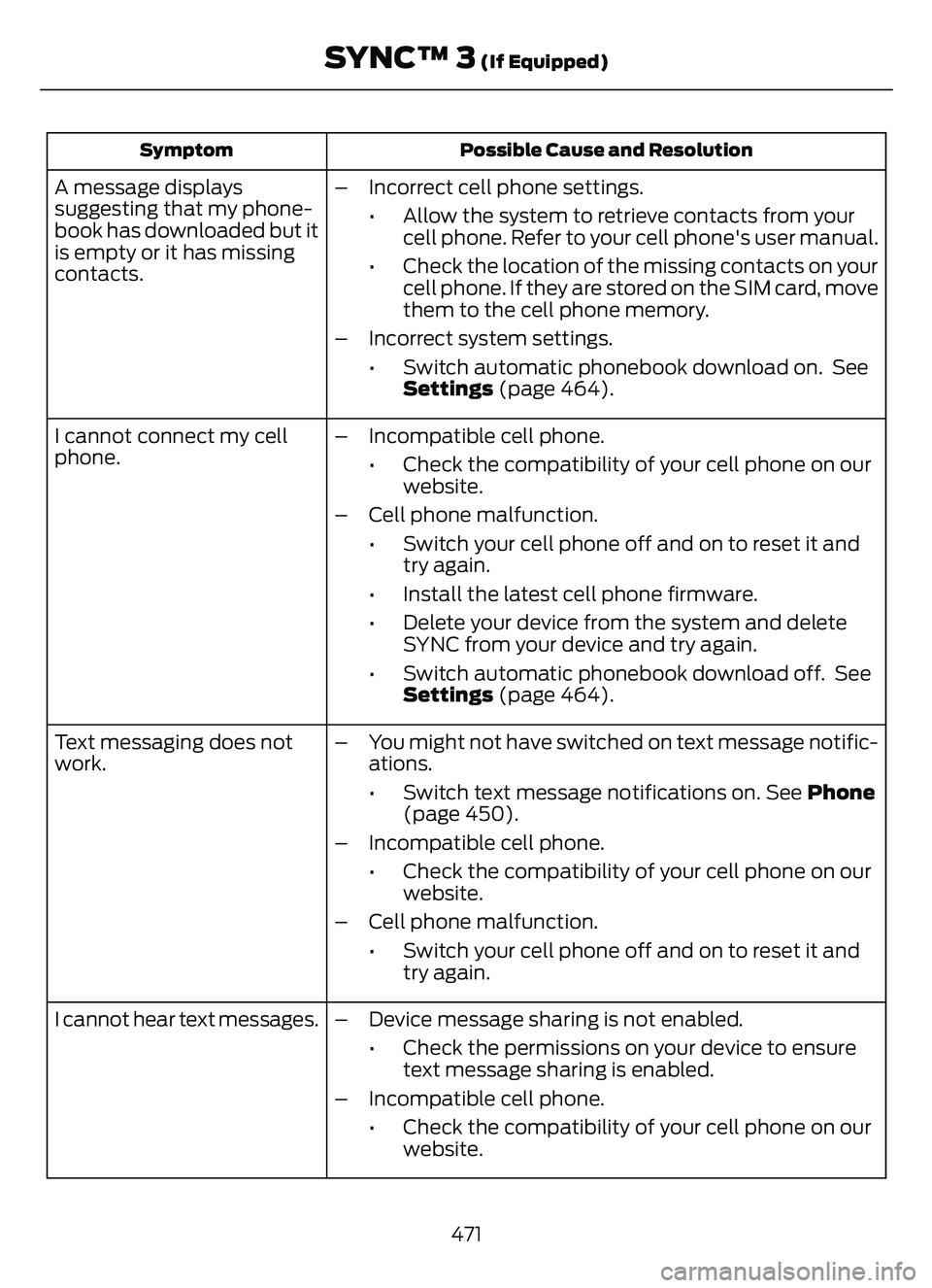
Possible Cause and Resolution
Symptom
– Incorrect cell phone settings.
• Allow the system to retrieve contacts from yourcell phone. Refer to your cell phone's user manual.
• Check the location of the missing contacts on your cell phone. If they are stored on the SIM card, move
them to the cell phone memory.
– Incorrect system settings. • Switch automatic phonebook download on. SeeSettings (page 464).
A message displays
suggesting that my phone-
book has downloaded but it
is empty or it has missing
contacts.
– Incompatible cell phone.• Check the compatibility of your cell phone on ourwebsite.
– Cell phone malfunction. • Switch your cell phone off and on to reset it andtry again.
• Install the latest cell phone firmware.
• Delete your device from the system and delete SYNC from your device and try again.
• Switch automatic phonebook download off. See Settings (page 464).
I cannot connect my cell
phone.
Text messaging does not
work.
– You might not have switched on text message notific-
ations.
• Switch text message notifications on. See Phone(page 450).
– Incompatible cell phone. • Check the compatibility of your cell phone on ourwebsite.
– Cell phone malfunction. • Switch your cell phone off and on to reset it andtry again.
– Device message sharing is not enabled. • Check the permissions on your device to ensuretext message sharing is enabled.
– Incompatible cell phone. • Check the compatibility of your cell phone on ourwebsite.
I cannot hear text messages.
471
SYNC™ 3 (If Equipped)
Page 479 of 585
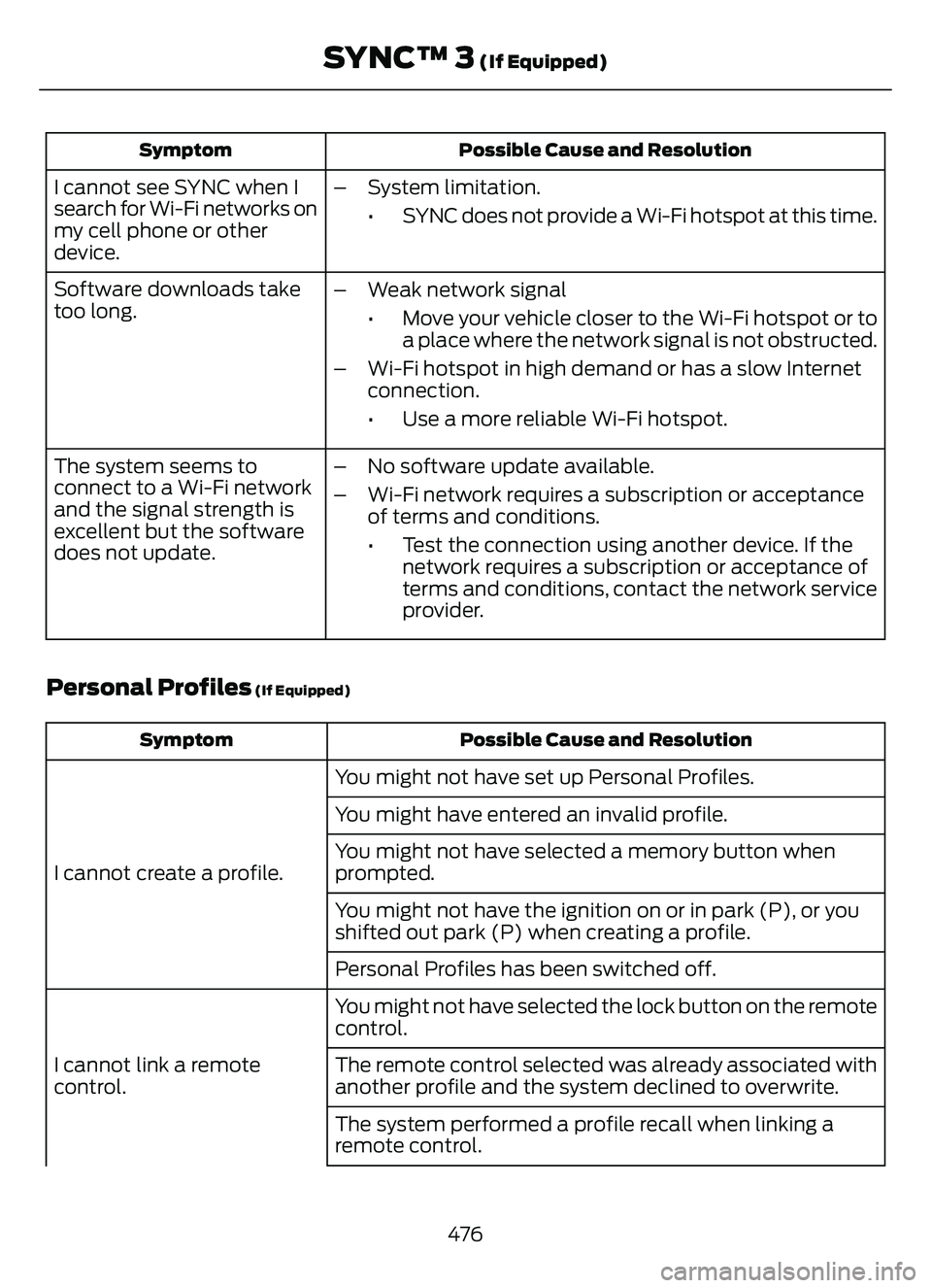
Possible Cause and Resolution
Symptom
I cannot see SYNC when I
search for Wi-Fi networks on
my cell phone or other
device. – System limitation.
• SYNC does not provide a Wi-Fi hotspot at this time.
– Weak network signal • Move your vehicle closer to the Wi-Fi hotspot or toa place where the network signal is not obstructed.
– Wi-Fi hotspot in high demand or has a slow Internet connection.
• Use a more reliable Wi-Fi hotspot.
Software downloads take
too long.
– No software update available.
– Wi-Fi network requires a subscription or acceptanceof terms and conditions.
• Test the connection using another device. If thenetwork requires a subscription or acceptance of
terms and conditions, contact the network service
provider.
The system seems to
connect to a Wi-Fi network
and the signal strength is
excellent but the software
does not update.
Personal Profiles (If Equipped)
Possible Cause and Resolution
Symptom
You might not have set up Personal Profiles.
I cannot create a profile. You might have entered an invalid profile.
You might not have selected a memory button when
prompted.
You might not have the ignition on or in park (P), or you
shifted out park (P) when creating a profile.
Personal Profiles has been switched off.
You might not have selected the lock button on the remote
control.
I cannot link a remote
control. The remote control selected was already associated with
another profile and the system declined to overwrite.
The system performed a profile recall when linking a
remote control.
476
SYNC™ 3 (If Equipped)
Page 482 of 585
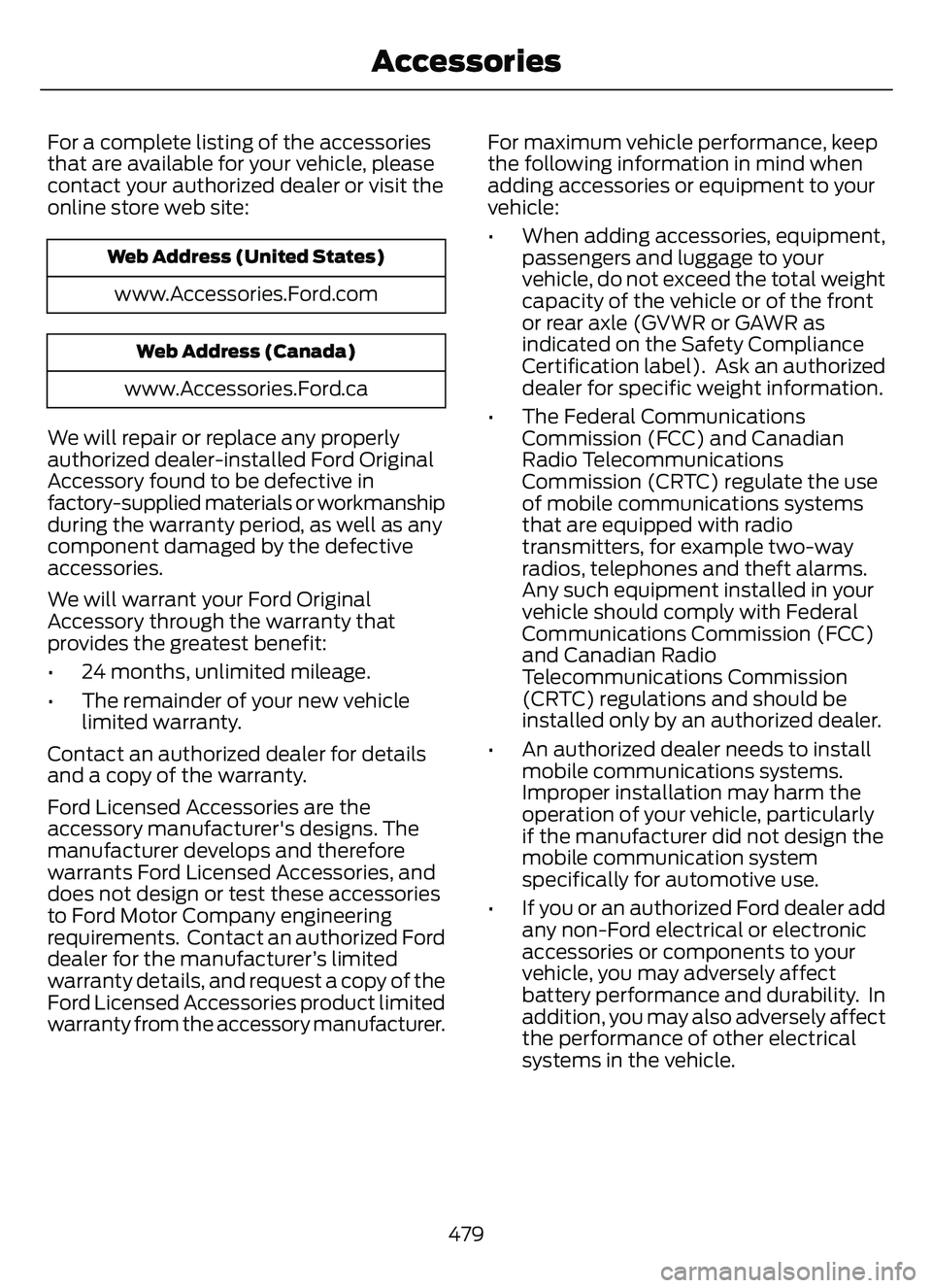
For a complete listing of the accessories
that are available for your vehicle, please
contact your authorized dealer or visit the
online store web site:
Web Address (United States)
www.Accessories.Ford.com
Web Address (Canada)
www.Accessories.Ford.ca
We will repair or replace any properly
authorized dealer-installed Ford Original
Accessory found to be defective in
factory-supplied materials or workmanship
during the warranty period, as well as any
component damaged by the defective
accessories.
We will warrant your Ford Original
Accessory through the warranty that
provides the greatest benefit:
• 24 months, unlimited mileage.
• The remainder of your new vehicle limited warranty.
Contact an authorized dealer for details
and a copy of the warranty.
Ford Licensed Accessories are the
accessory manufacturer's designs. The
manufacturer develops and therefore
warrants Ford Licensed Accessories, and
does not design or test these accessories
to Ford Motor Company engineering
requirements. Contact an authorized Ford
dealer for the manufacturer’s limited
warranty details, and request a copy of the
Ford Licensed Accessories product limited
warranty from the accessory manufacturer. For maximum vehicle performance, keep
the following information in mind when
adding accessories or equipment to your
vehicle:
• When adding accessories, equipment,
passengers and luggage to your
vehicle, do not exceed the total weight
capacity of the vehicle or of the front
or rear axle (GVWR or GAWR as
indicated on the Safety Compliance
Certification label). Ask an authorized
dealer for specific weight information.
• The Federal Communications Commission (FCC) and Canadian
Radio Telecommunications
Commission (CRTC) regulate the use
of mobile communications systems
that are equipped with radio
transmitters, for example two-way
radios, telephones and theft alarms.
Any such equipment installed in your
vehicle should comply with Federal
Communications Commission (FCC)
and Canadian Radio
Telecommunications Commission
(CRTC) regulations and should be
installed only by an authorized dealer.
• An authorized dealer needs to install mobile communications systems.
Improper installation may harm the
operation of your vehicle, particularly
if the manufacturer did not design the
mobile communication system
specifically for automotive use.
• If you or an authorized Ford dealer add any non-Ford electrical or electronic
accessories or components to your
vehicle, you may adversely affect
battery performance and durability. In
addition, you may also adversely affect
the performance of other electrical
systems in the vehicle.
479
Accessories
Page 495 of 585
REPORTING SAFETY DEFECTS
IN THE UNITED STATES
If you believe that your vehicle has
a defect which could cause a
crash or could cause injury or
death, you should immediately
inform the National Highway
Traffic Safety Administration
(NHTSA) in addition to notifying
Ford Motor Company.
If NHTSA receives similar
complaints, it may open an
investigation, and if it finds that a
safety defect exists in a group of
vehicles, it may order a recall and
remedy campaign. However,
NHTSA cannot become involved
in individual problems between
you, your dealer, or Ford Motor
Company.To contact NHTSA, you may call
the Vehicle Safety Hotline
toll-free at 1-888-327-4236 (TTY:
1-800-424-9153); go to
www.safercar.gov; or write to:
Administrator
1200 New Jersey Avenue,
Southeast
Washington, D.C. 20590
You can also obtain other
information about motor vehicle
safety from www.safercar.gov.
REPORTING SAFETY DEFECTS
IN CANADA
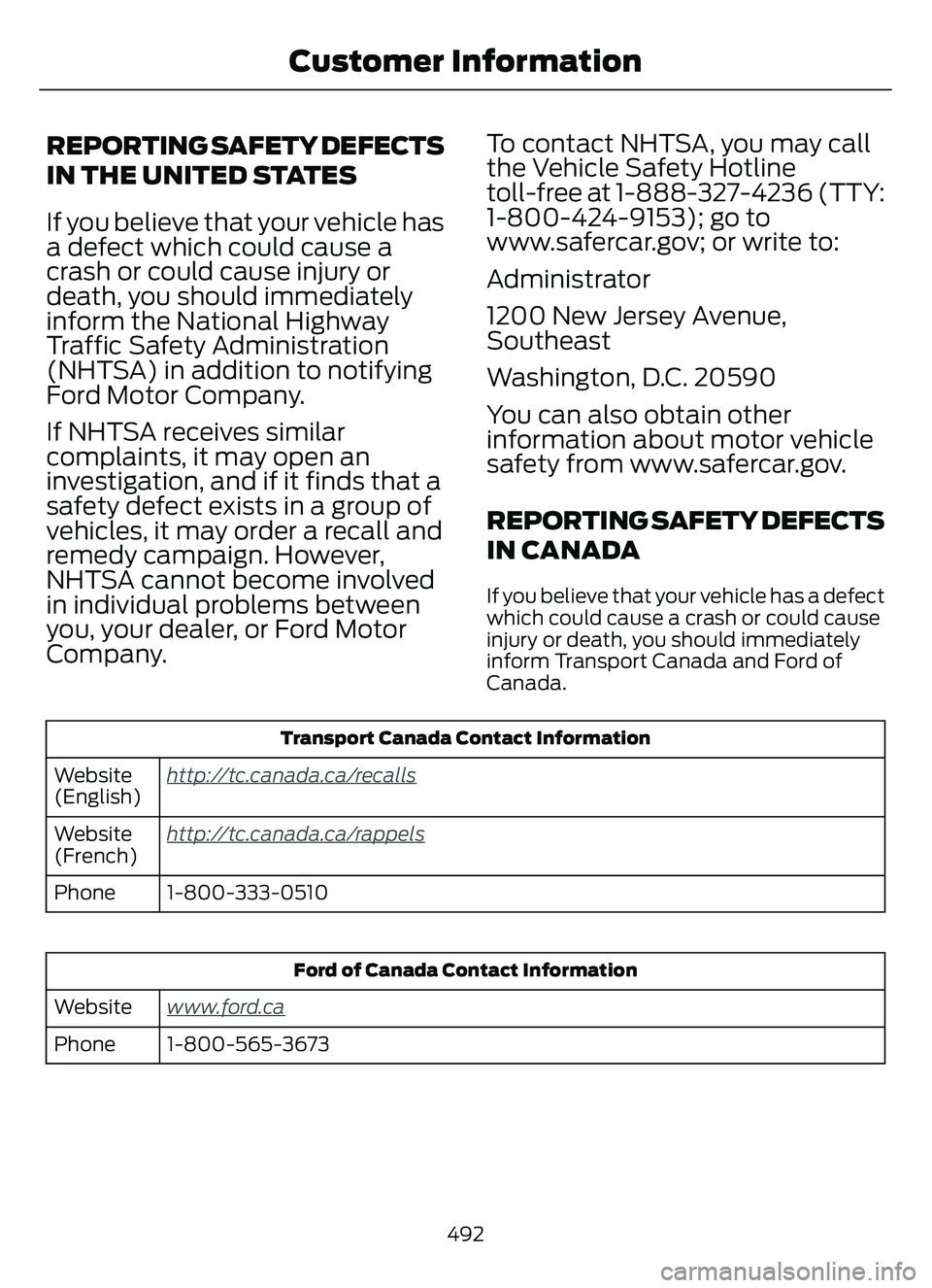
If you believe that your vehicle has a defect
which could cause a crash or could cause
injury or death, you should immediately
inform Transport Canada and Ford of
Canada.
Transport Canada Contact Information
http://tc.canada.ca/recallsWebsite
(English)
ht
tp://tc.canada.ca/rappelsWebsite
(French)1-800-333-0510
Phone
Ford of Canada Contact Information
www.ford.caWebsite
1-800-565-3673
Phone
492
Customer Information
Page 534 of 585
MOBILE COMMUNICATIONS
EQUIPMENT
WARNING: Driving while distracted
can result in loss of vehicle control, crash
and injury. We strongly recommend that
you use extreme caution when using any
device that may take your focus off the
road. Your primary responsibility is the
safe operation of your vehicle. We
recommend against the use of any
hand-held device while driving and
encourage the use of voice-operated
systems when possible. Make sure you
are aware of all applicable local laws
that may affect the use of electronic
devices while driving.
Using mobile communications equipment
is becoming increasingly important in the
conduct of business and personal affairs.
However, you must not compromise your
own or others’ safety when using such
equipment. Mobile communications can
enhance personal safety and security when
appropriately used, particularly in
emergency situations. Safety must be
paramount when using mobile
communications equipment to avoid
negating these benefits. Mobile
communication equipment includes, but
is not limited to, cellular phones, pagers,
portable email devices, text messaging
devices and portable two-way radios.
FEDERAL HIGHWAY
ADMINISTRATION
REGULATION
Regulations such as those issued by the
Federal Highway Administration or issued
pursuant to the Occupational Safety and
Health Act (OSHA), and state and local
laws and regulations may require
additional equipment for the way you
intend to use your vehicle. It is the
responsibility of the registered owner to
determine the applicability of such laws
and regulations to your intended use for
the vehicle, and to arrange for the
installation of required equipment. The
dealer has information about the
availability of equipment which can be
ordered for your vehicle.
531
Customer Information
Page 547 of 585
HERE holds a non-exclusive license from
the United States Postal Service® to
publish and sell ZIP+4® information.
©United States Postal Service® 2014.
Prices are not established, controlled or
approved by the United States Postal
Service®. The following trademarks and
registrations are owned by the USPS:
United States Postal Service, USPS, and
ZIP+4
The Data for Mexico includes certain data
from Instituto Nacional de Estadística y
Geografía.
9.2 End User Terms Required by NAV2
(Shanghai) Co., Ltd
The data (“Data”) is provided for your
personal, internal use only and not for
resale. It is protected by copyright, and is
subject to the following terms and
conditions which are agreed to by you, on
the one hand, and NAV2 (Shanghai) Co.,
Ltd (“NAV2”) and its licensors (including
their licensors and suppliers) on the other
hand. 20xx. All rights reserved
Terms and Conditions
Permitted Use. You agree to use this Data
together with the Telenav Software solely
for the internal business and personal
purposes for which you were licensed, and
not for service bureau, time-sharing or
other similar purposes. Accordingly, but
subject to the restrictions set forth in the
following paragraphs, you agree not to
otherwise reproduce, copy, modify,
decompile, disassemble, create any
derivative works of, or reverse engineer any
portion of this Data, and may not transfer
or distribute it in any form, for any purpose,
except to the extent permitted by
mandatory laws.Restrictions. Except where you have been
specifically licensed to do so by Telenav,
and without limiting the preceding
paragraph, you may not use this Data (a)
with any products, systems, or applications
installed or otherwise connected to or in
communication with vehicles, capable of
vehicle navigation, positioning, dispatch,
real time route guidance, fleet
management or similar applications; or (b)
with or in communication with any
positioning devices or any mobile or
wireless-connected electronic or computer
devices, including without limitation
cellular phones, palmtop and handheld
computers, pagers, and personal digital
assistants or PDAs.
Warning. The Data may contain
inaccurate or incomplete information due
to the passage of time, changing
circumstances, sources used and the
nature of collecting comprehensive
geographic data, any of which may lead to
incorrect results.
No Warranty. This Data is provided to you
“as is,” and you agree to use it at your own
risk. Telenav and its licensors (and their
licensors and suppliers) make no
guarantees, representations or warranties
of any kind, express or implied, arising by
law or otherwise, including but not limited
to, content, quality, accuracy,
completeness, effectiveness, reliability,
fitness for a particular purpose, usefulness,
use or results to be obtained from this
Data, or that the Data or server will be
uninterrupted or error-free.
Disclaimer of Warranty:
TELENAV AND
ITS LICENSORS (INCLUDING THEIR
LICENSORS AND SUPPLIERS) DISCLAIM
ANY WARRANTIES, EXPRESS OR IMPLIED,
OF QUALITY, PERFORMANCE,
MERCHANTABILITY, FITNESS FOR A
544
Customer Information
Page 555 of 585
MAKES NO WARRANTY, EXPRESS OR
IMPLIED, OF MERCHANTABILITY OR
FITNESS FOR A PARTICULAR PURPOSE,
SUITABILITY, OR PERFORMANCE
REGARDING ANY SERVICES OR GOODS,
AND IN NO EVENT SHALL AT&T BE
LIABLE, WHETHER OR NOT DUE TO ITS
OWN NEGLIGENCE, FOR ANY: (A) ACT OR
OMISSION OF A THIRD PARTY; (B)
MISTAKES, OMISSIONS, INTERRUPTIONS,
ERRORS, FAILURES TO TRANSMIT,
DELAYS, OR DEFECTS IN THE SERVICE
PROVIDED BY OR THROUGH THE
UNDERLYING CARRIER; (C) DAMAGE OR
INJURY CAUSED BY SUSPENSION OR
TERMINATION BY THE UNDERLYING
CARRIER; OR (D) DAMAGE OR INJURY
CAUSED BY A FAILURE OR DELAY IN
CONNECTING A CALL TO ANY ENTITY,
INCLUDING 911 OR ANY OTHER
EMERGENCY SERVICE. TO THE FULL
EXTENT ALLOWED BY LAW, THE END
USER RELEASES, INDEMNIFIES AND
HOLDS THE UNDERLYING CARRIER
HARMLESS FROM AND AGAINST ANY
AND ALL CLAIMS OF ANY PERSON OR
ENTITY FOR DAMAGES OF ANY NATURE
ARISING IN ANY WAY FROM OR RELATING
TO, DIRECTLY OR INDIRECTLY, SERVICES
PROVIDED BY THE UNDERLYING CARRIER
OR ANY PERSON’S USE THEREOF,
INCLUDING CLAIMS ARISING IN WHOLE
OR IN PART FROM THE ALLEGED
NEGLIGENCE OF THE UNDERLYING
CARRIER.
VII. China Territory
Personal Use Only
You agree to use this Data together with
[insert name of Client Application] for the
solely personal, non-commercial purposes
for which you were licensed, and not for
service bureau, time-sharing or other
similar purposes. Accordingly, but subject
to the restrictions set forth in the following
paragraphs, you may copy this Data only
as necessary for your personal use to (i)view it, and (ii) save it, provided that you
do not remove any copyright notices that
appear and do not modify the Data in any
way. You agree not to otherwise reproduce,
copy, modify, decompile, disassemble or
reverse engineer any portion of this Data,
and may not transfer or distribute it in any
form, for any purpose, except to the extent
permitted by mandatory laws.
Restrictions
Except where you have been specifically
licensed to do so by NAV2 , and without
limiting the preceding paragraph, you may
not (a) use this Data with any products,
systems, or applications installed or
otherwise connected to or in
communication with vehicles, capable of
vehicle navigation, positioning, dispatch,
real time route guidance, fleet
management or similar applications; or (b)
with or in communication with any
positioning devices or any mobile or
wireless-connected electronic or computer
devices, including without limitation
cellular phones, palmtop and handheld
computers, pagers, and personal digital
assistants or PDAs. You agree to cease
using this Data if you fail to comply with
these terms and conditions.
Limited Warranty
NAV2 warrants that (a) the Data will
perform substantially in accordance with
the accompanying written materials for a
period of ninety (90) days from the date
of receipt, and (b) any support services
provided by NAV2 shall be substantially as
described in applicable written materials
provided to you by NAV2, and NAV2’s
support engineers will make commercially
reasonable efforts to solve any problem
issues.
552
Customer Information
Page 562 of 585
ELECTROMAGNETIC
COMPATIBILITY
WARNING: Do not place objects
or mount equipment on or near the
airbag cover, on the side of the front or
rear seatbacks, or in areas that may
come into contact with a deploying
airbag. Failure to follow these
instructions may increase the risk of
personal injury in the event of a crash.
WARNING: Do not fasten antenna
cables to vehicle wiring, fuel pipes and
brake pipes.
WARNING: Keep antenna and
power cables at least 4 in (10 cm) from
any electronic modules and airbags. Note:
We test and certify your vehicle to
meet electromagnetic compatibility
legislation. It is your responsibility to make
sure that any equipment an authorized
dealer installs on your vehicle complies with
applicable local legislation and other
requirements. Installation of some
aftermarket electronic devices could
degrade the performance of vehicle
functions, which use radio frequency signals
such as broadcast radio receiver, tire
pressure monitoring system, push button
start, Bluetooth® connectivity or satellite
navigation.
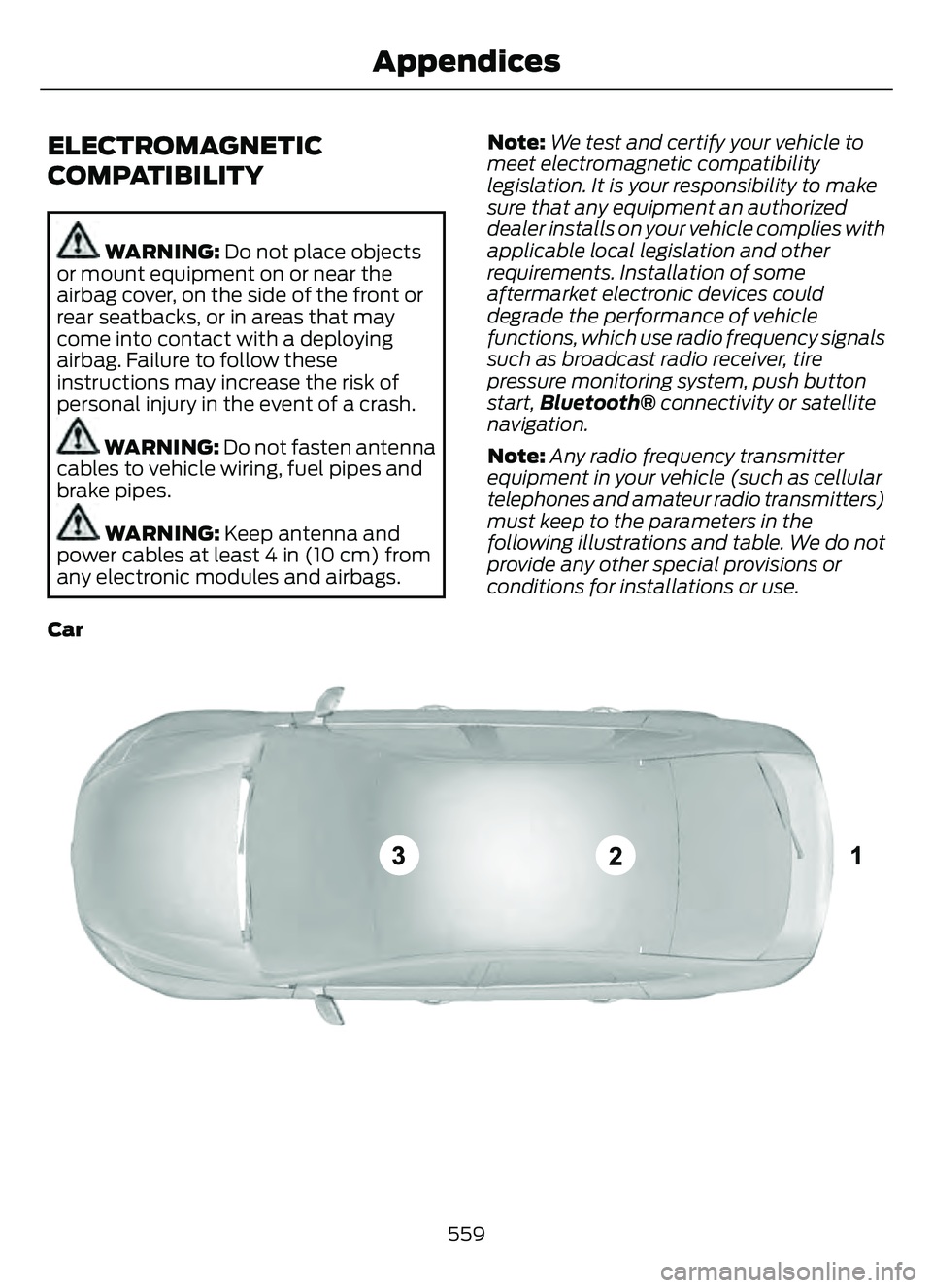
Note: Any radio frequency transmitter
equipment in your vehicle (such as cellular
telephones and amateur radio transmitters)
must keep to the parameters in the
following illustrations and table. We do not
provide any other special provisions or
conditions for installations or use.
Car
E239120
559
Appendices
Page 578 of 585
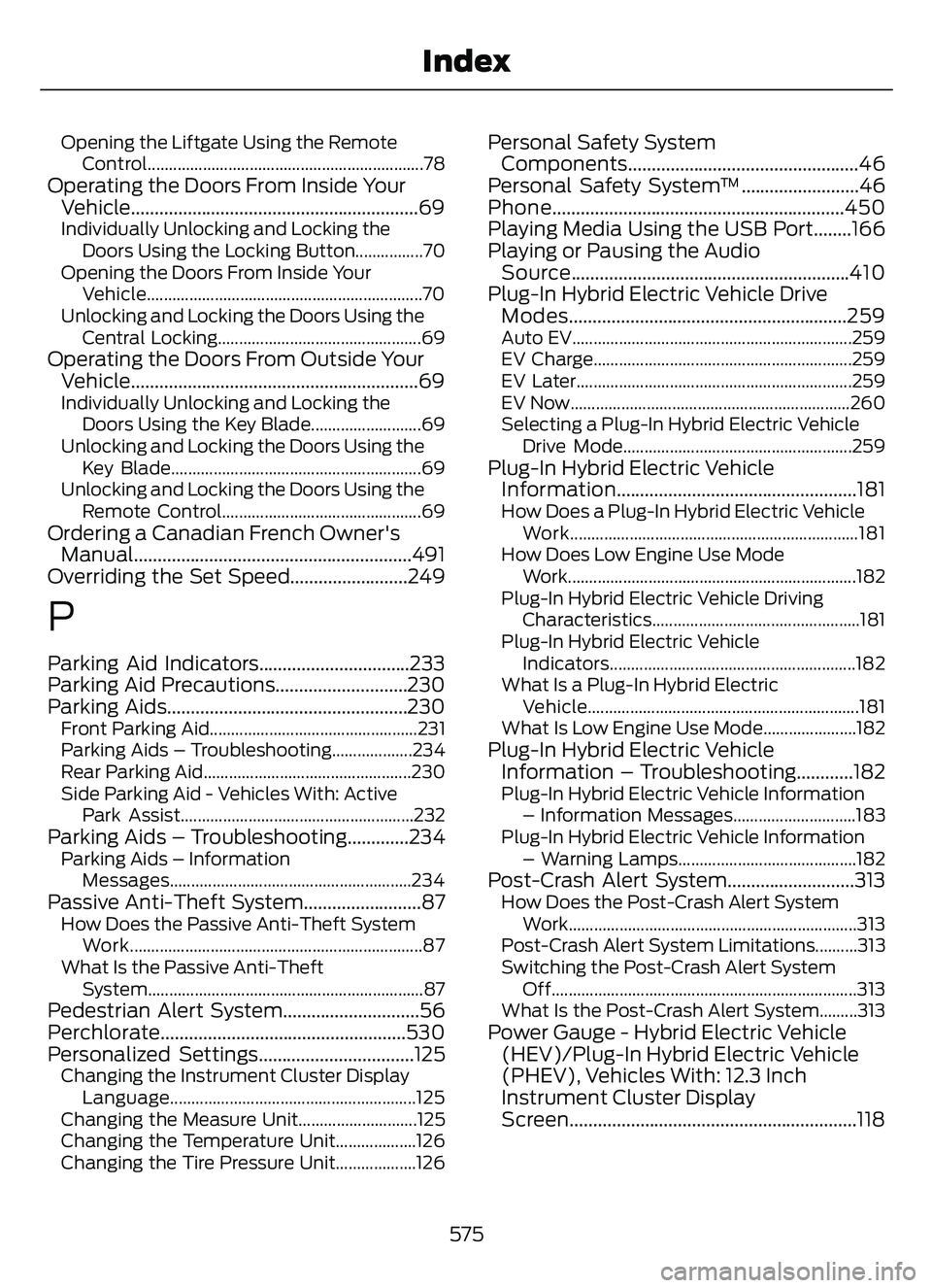
Opening the Liftgate Using the RemoteControl.................................................................78
Operating the Doors From Inside YourVehicle.............................................................69
Individually Unlocking and Locking the
Doors Using the Locking Button................70
Opening the Doors From Inside Your Vehicle.................................................................70
Unlocking and Locking the Doors Using the Central Locking................................................69
Operating the Doors From Outside YourVehicle.............................................................69
Individually Unlocking and Locking the
Doors Using the Key Blade..........................69
Unlocking and Locking the Doors Using the Key Blade...........................................................69
Unlocking and Locking the Doors Using the Remote Control...............................................69
Ordering a Canadian French Owner'sManual...........................................................491
Overriding the Set Speed.........................249
P
Parking Aid Indicators................................233
Parking Aid Precautions............................230
Parking Aids...................................................230
Front Parking Aid.................................................231
Parking Aids – Troubleshooting...................234
Rear Parking Aid.................................................230
Side Parking Aid - Vehicles With: Active
Park Assist.......................................................232
Parking Aids – Troubleshooting.............234Parking Aids – InformationMessages.........................................................234
Passive Anti-Theft System.........................87How Does the Passive Anti-Theft SystemWork.....................................................................87
What Is the Passive Anti-Theft System.................................................................87
Pedestrian Alert System.............................56
Perchlorate....................................................530
Personalized Settings.................................125
Changing the Instrument Cluster DisplayLanguage..........................................................125
Changing the Measure Unit............................125
Changing the Temperature Unit...................126
Changing the Tire Pressure Unit...................126
Personal Safety System Components.................................................46
Personal Safety System™.........................46
Phone..............................................................450
Playing Media Using the USB Port........166
Playing or Pausing the Audio Source...........................................................410
Plug-In Hybrid Electric Vehicle Drive Modes...........................................................259
Auto EV..................................................................25\
9
EV Charge.............................................................259
EV Later.................................................................259
EV Now..................................................................260
Selecting a Plug-In Hybrid Electric Vehicle
Drive Mode......................................................259
Plug-In Hybrid Electric VehicleInformation...................................................181
How Does a Plug-In Hybrid Electric Vehicle
Work....................................................................181
How Does Low Engine Use Mode Work....................................................................1\
82
Plug-In Hybrid Electric Vehicle Driving Characteristics.................................................181
Plug-In Hybrid Electric Vehicle Indicators..........................................................182
What Is a Plug-In Hybrid Electric Vehicle................................................................181
What Is Low Engine Use Mode......................182
Plug-In Hybrid Electric Vehicle Information – Troubleshooting............182
Plug-In Hybrid Electric Vehicle Information
– Information Messages.............................183
Plug-In Hybrid Electric Vehicle Information – Warning Lamps..........................................182
Post-Crash Alert System...........................313How Does the Post-Crash Alert SystemWork....................................................................313
Post-Crash Alert System Limitations..........313
Switching the Post-Crash Alert System Off........................................................................\
313
What Is the Post-Crash Alert System.........313
Power Gauge - Hybrid Electric Vehicle (HEV)/Plug-In Hybrid Electric Vehicle
(PHEV), Vehicles With: 12.3 Inch
Instrument Cluster Display
Screen.............................................................118
575
Index
Page 583 of 585
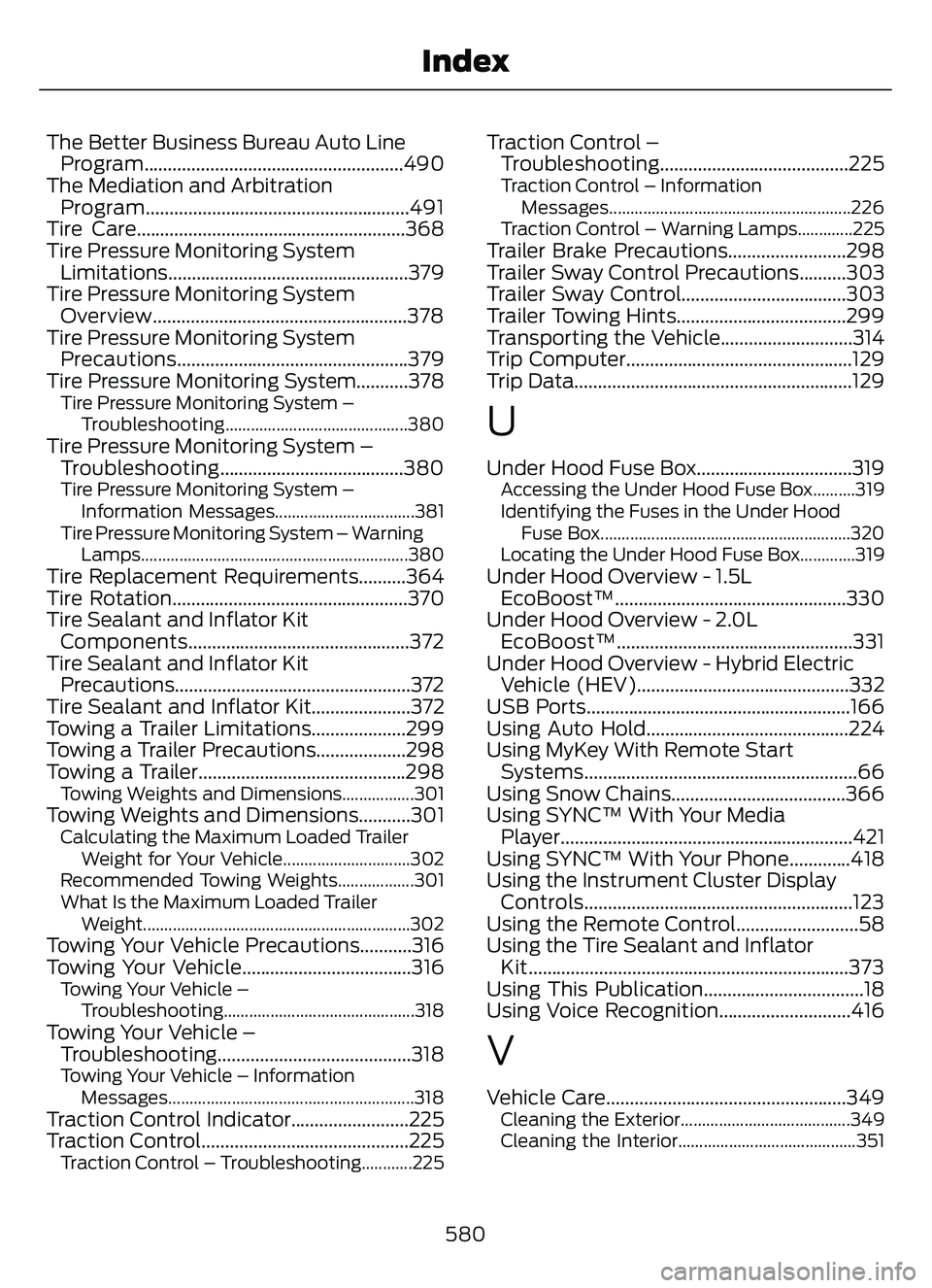
The Better Business Bureau Auto LineProgram.......................................................490
The Mediation and Arbitration Program........................................................491
Tire Care.........................................................368
Tire Pressure Monitoring System Limitations...................................................379
Tire Pressure Monitoring System Overview......................................................378
Tire Pressure Monitoring System Precautions.................................................379
Tire Pressure Monitoring System...........378
Tire Pressure Monitoring System –
Troubleshooting...........................................380
Tire Pressure Monitoring System –Troubleshooting.......................................380
Tire Pressure Monitoring System –
Information Messages.................................381
Tire Pressure Monitoring System – Warning Lamps...............................................................380
Tire Replacement Requirements..........364
Tire Rotation..................................................370
Tire Sealant and Inflator KitComponents...............................................372
Tire Sealant and Inflator Kit Precautions..................................................372
Tire Sealant and Inflator Kit.....................372
Towing a Trailer Limitations....................299
Towing a Trailer Precautions...................298
Towing a Trailer............................................298
Towing Weights and Dimensions.................301Towing Weights and Dimensions...........301Calculating the Maximum Loaded Trailer
Weight for Your Vehicle..............................302
Recommended Towing Weights..................301
What Is the Maximum Loaded Trailer Weight...............................................................302
Towing Your Vehicle Precautions...........316
Towing Your Vehicle....................................316
Towing Your Vehicle –Troubleshooting.............................................318
Towing Your Vehicle –Trouble shooting......................................... 318
Towing Your Vehicle – Information
Messages..........................................................318
Traction Control Indicator.........................225
Traction Control............................................225
Traction Control – Troubleshooting............225
Traction Control –Troubleshooting........................................225
Traction Control – Information
Messages.........................................................226
Traction Control – Warning Lamps.............225
Trailer Brake Precautions.........................298
Trailer Sway Control Precautions..........303
Trailer Sway Control...................................303
Trailer Towing Hints....................................299
Transporting the Vehicle............................314
Trip Computer................................................129
Trip Data...........................................................129
U
Under Hood Fuse Box.................................319Accessing the Under Hood Fuse Box..........319
Identifying the Fuses in the Under Hood Fuse Box...........................................................320
Locating the Under Hood Fuse Box.............319
Under Hood Overview - 1.5L EcoBoost™.................................................330
Under Hood Overview - 2.0L EcoBoost™..................................................331
Under Hood Overview - Hybrid Electric Vehicle (HEV).............................................332
USB Ports........................................................166
Using Auto Hold...........................................224
Using MyKey With Remote Start Systems..........................................................66
Using Snow Chains.....................................366
Using SYNC™ With Your Media Player..............................................................421
Using SYNC™ With Your Phone.............418
Using the Instrument Cluster Display Controls.........................................................123
Using the Remote Control..........................58
Using the Tire Sealant and Inflator Kit....................................................................373
Using This Publication..................................18
Using Voice Recognition............................416
V
Vehicle Care...................................................349Cleaning the Exterior........................................349
Cleaning the Interior..........................................351
580
Index