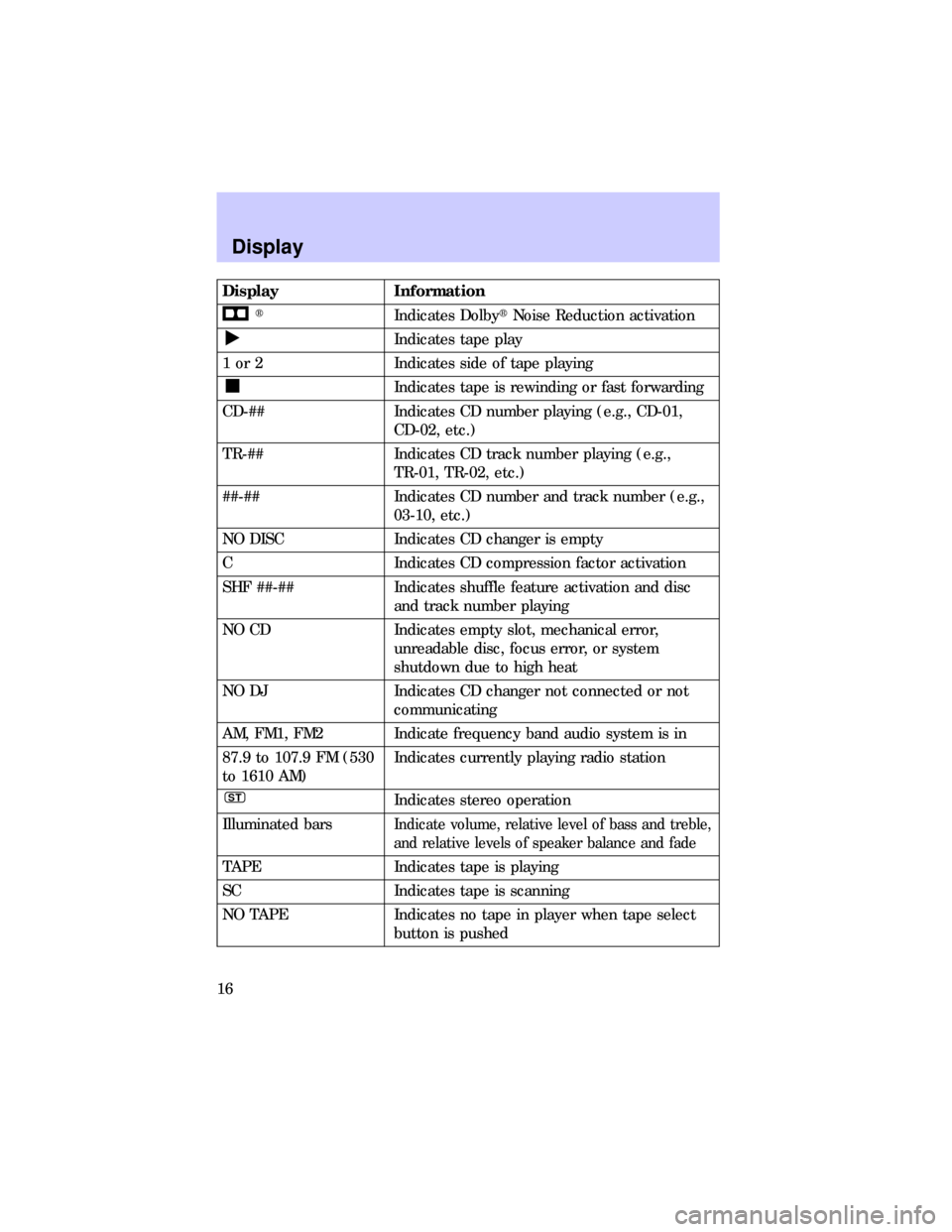
Display Information
tIndicates DolbytNoise Reduction activation
Indicates tape play
1 or 2 Indicates side of tape playing
Indicates tape is rewinding or fast forwarding
CD-## Indicates CD number playing (e.g., CD-01,
CD-02, etc.)
TR-## Indicates CD track number playing (e.g.,
TR-01, TR-02, etc.)
##-## Indicates CD number and track number (e.g.,
03-10, etc.)
NO DISC Indicates CD changer is empty
C Indicates CD compression factor activation
SHF ##-## Indicates shuffle feature activation and disc
and track number playing
NO CD Indicates empty slot, mechanical error,
unreadable disc, focus error, or system
shutdown due to high heat
NO DJ Indicates CD changer not connected or not
communicating
AM, FM1, FM2 Indicate frequency band audio system is in
87.9 to 107.9 FM (530
to 1610 AM)Indicates currently playing radio station
STIndicates stereo operation
Illuminated bars
Indicate volume, relative level of bass and treble,
and relative levels of speaker balance and fade
TAPE Indicates tape is playing
SC Indicates tape is scanning
NO TAPE Indicates no tape in player when tape select
button is pushed
Display
16
Moving away from the
interfering structure (out of its
ªshadowº) returns your
reception to normal.
²Station overload.Weak
stations are sometimes captured
by stronger stations when you
pass a broadcast tower. A
stronger station may temporarily
overtake a weaker station and
play while the weak station 's
frequency is displayed.
The audio system automatically
switches to single channel
reception if it will improve the
reception of a station normally
received in stereo.
Radio Frequency Information
20
AM/FM select ................................6
Audio power ..................................6
Bass adjust ....................................9
Cassette player
operation ..............................10,18
CD select .....................................11
Cleaning your vehicle
CD player and discs .................17
Clock
setting the clock .......................13
Compact disc changer
care ............................................17
operation ...................................14
troubleshooting .........................17
Compression adjust ....................12
Display .........................................16
Dolbytnoise reduction ..............12Fast forward function .................11
Memory preset buttons ................9
Power button ................................6
Radio frequency
information ................................19
reception ...................................19
Rewind function ..........................11
Scan function ................................8
Seek function ................................7
Shuffle mode ...............................13
Speaker balance adjust ..............10
Stations
selecting ......................................9
Tape direction select ..................12
Tape select ..................................11
Treble adjust .................................9
Tune adjust ...................................7
Index
21