oil FORD EXPEDITION 2008 3.G User Guide
[x] Cancel search | Manufacturer: FORD, Model Year: 2008, Model line: EXPEDITION, Model: FORD EXPEDITION 2008 3.GPages: 392, PDF Size: 3.34 MB
Page 137 of 392
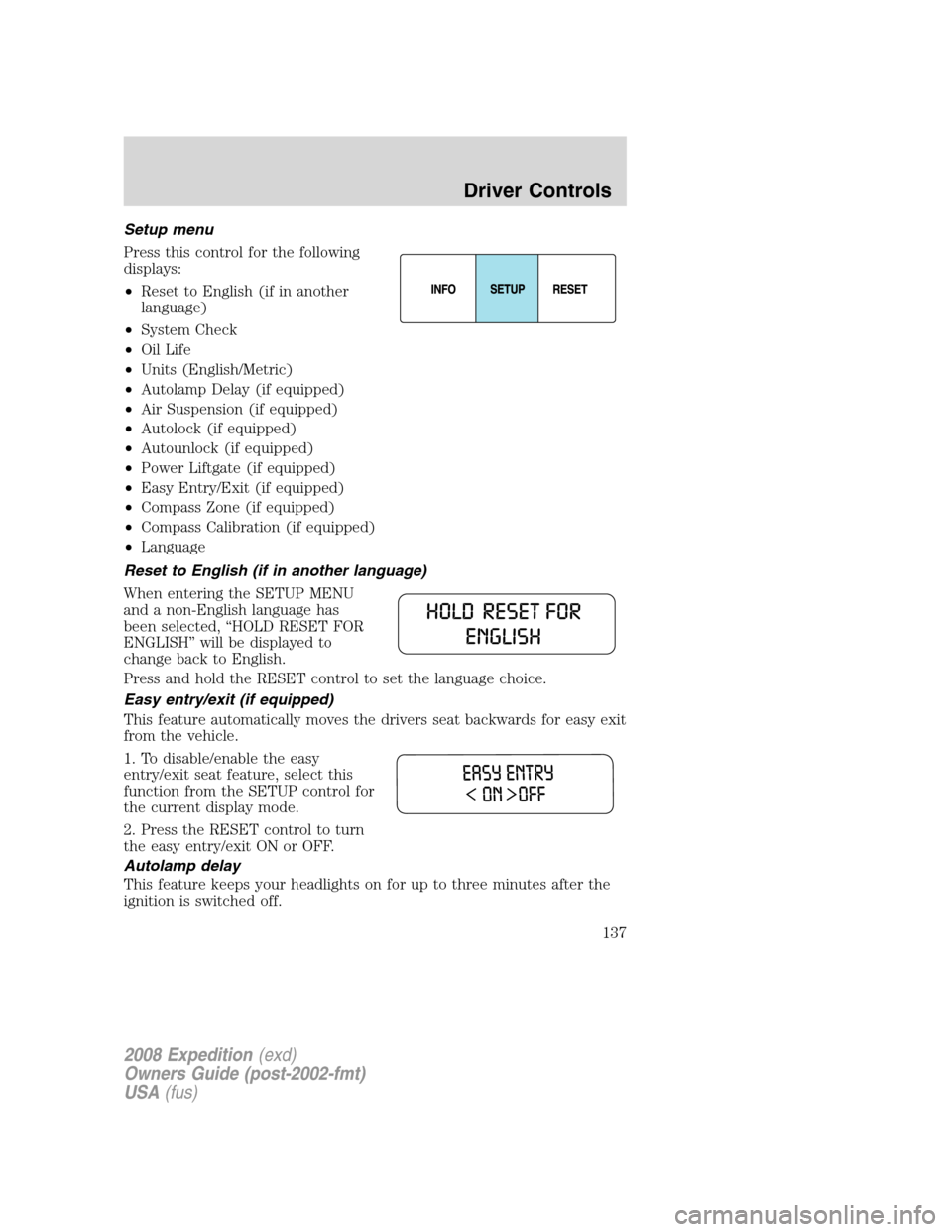
Setup menu
Press this control for the following
displays:
•Reset to English (if in another
language)
•System Check
•Oil Life
•Units (English/Metric)
•Autolamp Delay (if equipped)
•Air Suspension (if equipped)
•Autolock (if equipped)
•Autounlock (if equipped)
•Power Liftgate (if equipped)
•Easy Entry/Exit (if equipped)
•Compass Zone (if equipped)
•Compass Calibration (if equipped)
•Language
Reset to English (if in another language)
When entering the SETUP MENU
and a non-English language has
been selected, “HOLD RESET FOR
ENGLISH” will be displayed to
change back to English.
Press and hold the RESET control to set the language choice.
Easy entry/exit (if equipped)
This feature automatically moves the drivers seat backwards for easy exit
from the vehicle.
1. To disable/enable the easy
entry/exit seat feature, select this
function from the SETUP control for
the current display mode.
2. Press the RESET control to turn
the easy entry/exit ON or OFF.
Autolamp delay
This feature keeps your headlights on for up to three minutes after the
ignition is switched off.
2008 Expedition(exd)
Owners Guide (post-2002-fmt)
USA(fus)
Driver Controls
137
Page 140 of 392
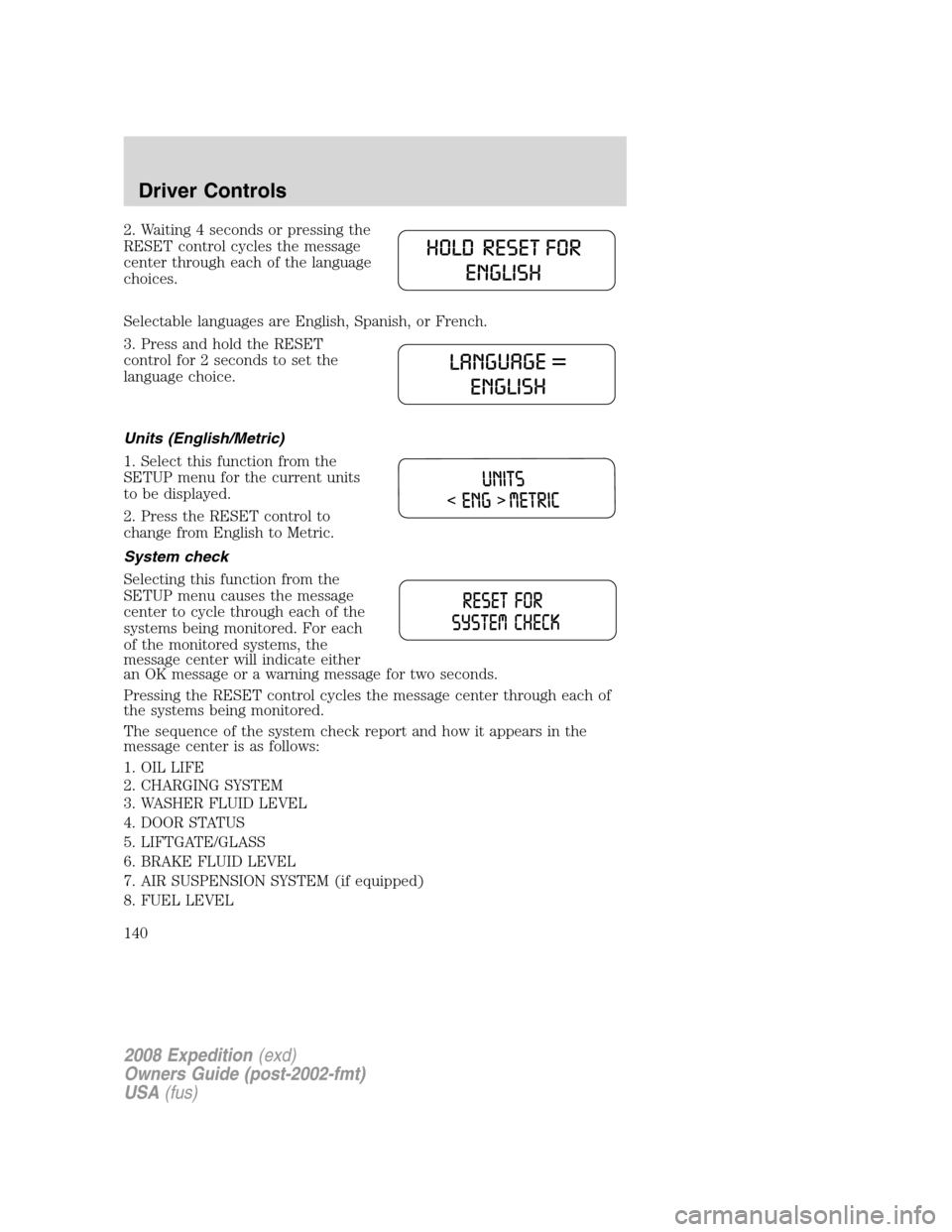
2. Waiting 4 seconds or pressing the
RESET control cycles the message
center through each of the language
choices.
Selectable languages are English, Spanish, or French.
3. Press and hold the RESET
control for 2 seconds to set the
language choice.
Units (English/Metric)
1. Select this function from the
SETUP menu for the current units
to be displayed.
2. Press the RESET control to
change from English to Metric.
System check
Selecting this function from the
SETUP menu causes the message
center to cycle through each of the
systems being monitored. For each
of the monitored systems, the
message center will indicate either
an OK message or a warning message for two seconds.
Pressing the RESET control cycles the message center through each of
the systems being monitored.
The sequence of the system check report and how it appears in the
message center is as follows:
1. OIL LIFE
2. CHARGING SYSTEM
3. WASHER FLUID LEVEL
4. DOOR STATUS
5. LIFTGATE/GLASS
6. BRAKE FLUID LEVEL
7. AIR SUSPENSION SYSTEM (if equipped)
8. FUEL LEVEL
2008 Expedition(exd)
Owners Guide (post-2002-fmt)
USA(fus)
Driver Controls
140
Page 142 of 392
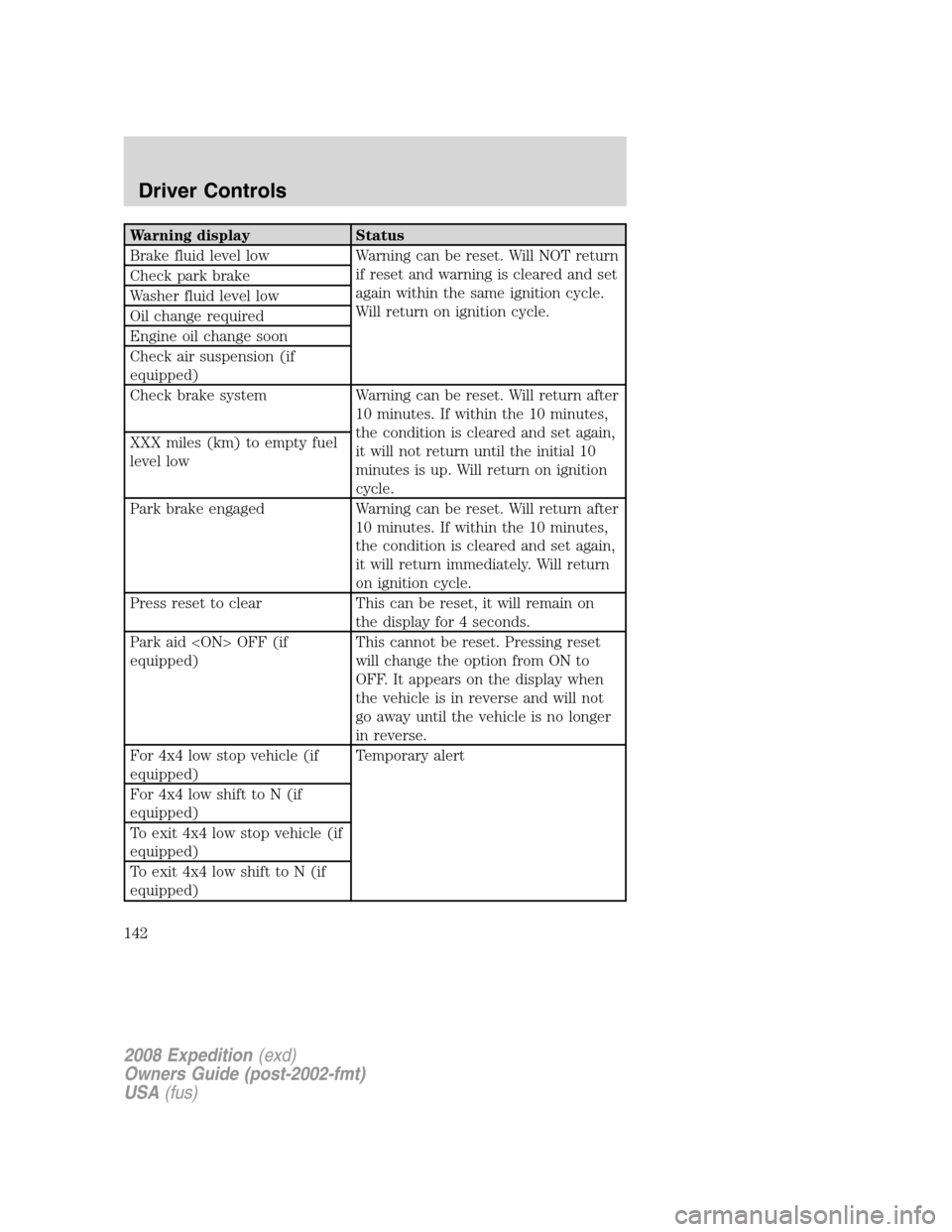
Warning display Status
Brake fluid level low Warning can be reset. Will NOT return
if reset and warning is cleared and set
again within the same ignition cycle.
Will return on ignition cycle. Check park brake
Washer fluid level low
Oil change required
Engine oil change soon
Check air suspension (if
equipped)
Check brake system Warning can be reset. Will return after
10 minutes. If within the 10 minutes,
the condition is cleared and set again,
it will not return until the initial 10
minutes is up. Will return on ignition
cycle. XXX miles (km) to empty fuel
level low
Park brake engaged Warning can be reset. Will return after
10 minutes. If within the 10 minutes,
the condition is cleared and set again,
it will return immediately. Will return
on ignition cycle.
Press reset to clear This can be reset, it will remain on
the display for 4 seconds.
Park aid
equipped)This cannot be reset. Pressing reset
will change the option from ON to
OFF. It appears on the display when
the vehicle is in reverse and will not
go away until the vehicle is no longer
in reverse.
For 4x4 low stop vehicle (if
equipped)Temporary alert
For 4x4 low shift to N (if
equipped)
To exit 4x4 low stop vehicle (if
equipped)
To exit 4x4 low shift to N (if
equipped)
2008 Expedition(exd)
Owners Guide (post-2002-fmt)
USA(fus)
Driver Controls
142
Page 144 of 392
WASHER FLUID LEVEL LOW.Indicates the washer fluid reservoir is
less than one quarter full. Check the washer fluid level. Refer to
Windshield washer fluidin theMaintenance and Specifications
chapter.
CHECK AIR SUSPENSION (if equipped).Displayed when the air
suspension system is not operating properly. If this message is displayed
while driving, pull off the road as soon as safely possible. For more
information, refer toAir suspensionin theDrivingchapter.
CHECK BRAKE SYSTEM.Displayed when the braking system is not
operating properly. If the warning stays on or continues to come on,
contact your authorized dealer as soon as possible.
PARK BRAKE ENGAGED.Displayed when the manual park brake is
set, the engine is running and the vehicle is driven more than 3 mph
(5 km). If the warning stays on after the park brake is released, contact
your authorized dealer as soon as possible.
PARK AID
transmission is in R (Reverse). Refer toReverse Sensing Systemin this
section to enable.
OIL CHANGE REQUIRED/ENGINE OIL CHANGE SOON.Displayed
when the engine oil life remaining is 5 percent or less. When oil life left
is between 5% and 0%, the ENGINE OIL CHANGE SOON message will
be displayed. When oil life left reaches 0%, the OIL CHANGE REQUIRED
message will be displayed.
An oil change is required whenever indicated by the message center and
according to the recommended maintenance schedule. USE ONLY
RECOMMENDED ENGINE OILS.
To reset the oil monitoring system to 100% after each oil change
[approximately 7,500 miles (12,070 km) or 6 months] perform the
following:
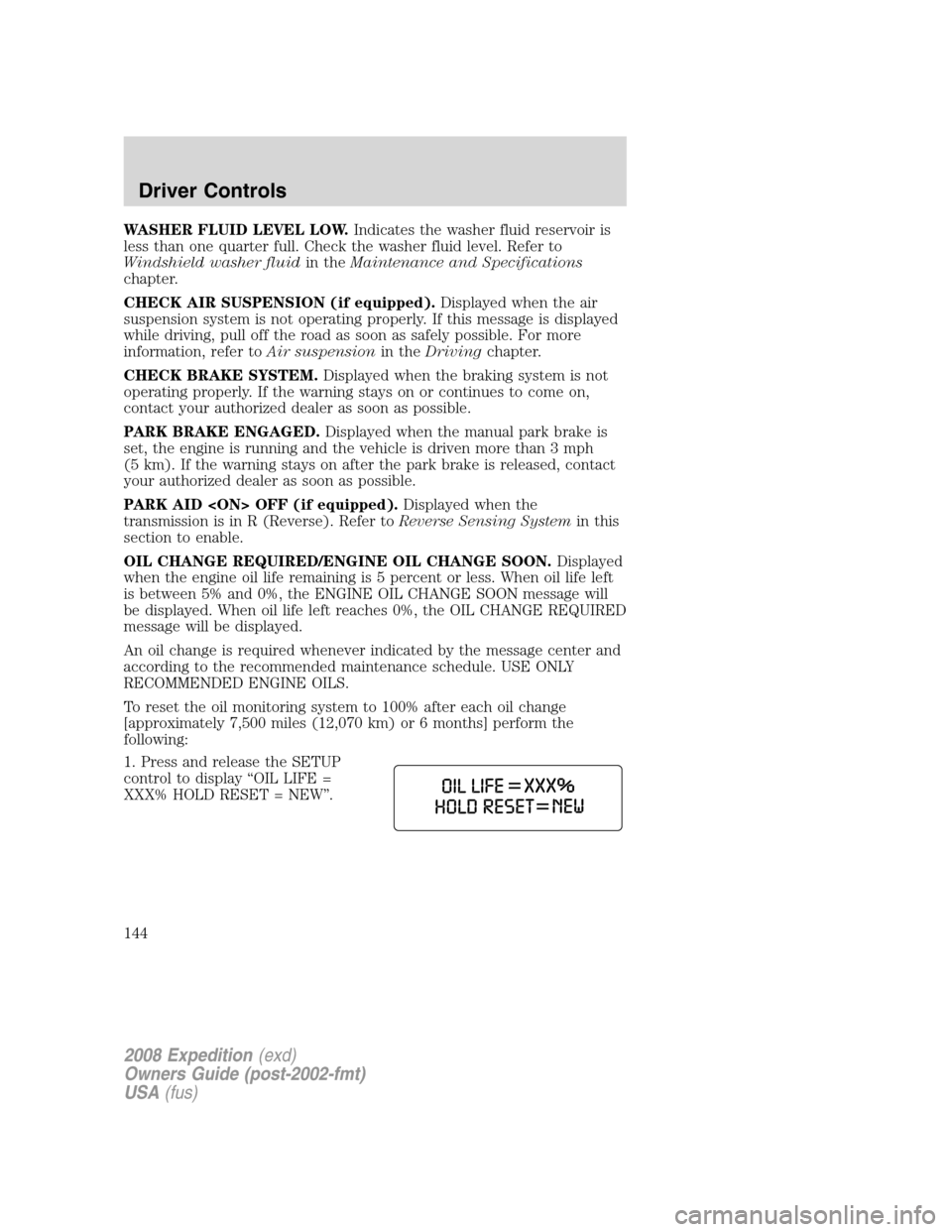
1. Press and release the SETUP
control to display “OIL LIFE =
XXX% HOLD RESET = NEW”.
2008 Expedition(exd)
Owners Guide (post-2002-fmt)
USA(fus)
Driver Controls
144
Page 145 of 392
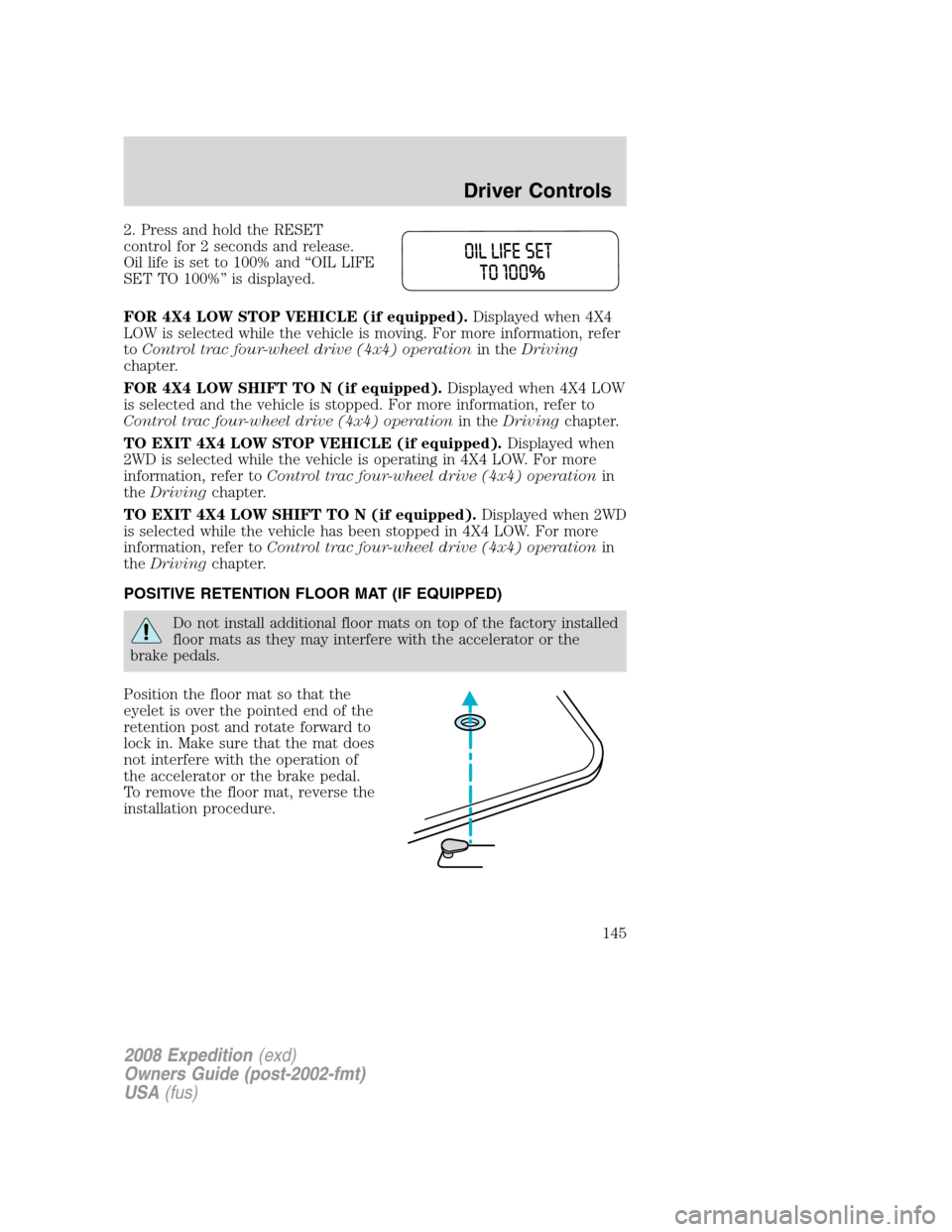
2. Press and hold the RESET
control for 2 seconds and release.
Oil life is set to 100% and “OIL LIFE
SET TO 100%” is displayed.
FOR 4X4 LOW STOP VEHICLE (if equipped).Displayed when 4X4
LOW is selected while the vehicle is moving. For more information, refer
toControl trac four-wheel drive (4x4) operationin theDriving
chapter.
FOR 4X4 LOW SHIFT TO N (if equipped).Displayed when 4X4 LOW
is selected and the vehicle is stopped. For more information, refer to
Control trac four-wheel drive (4x4) operationin theDrivingchapter.
TO EXIT 4X4 LOW STOP VEHICLE (if equipped).Displayed when
2WD is selected while the vehicle is operating in 4X4 LOW. For more
information, refer toControl trac four-wheel drive (4x4) operationin
theDrivingchapter.
TO EXIT 4X4 LOW SHIFT TO N (if equipped).Displayed when 2WD
is selected while the vehicle has been stopped in 4X4 LOW. For more
information, refer toControl trac four-wheel drive (4x4) operationin
theDrivingchapter.
POSITIVE RETENTION FLOOR MAT (IF EQUIPPED)
Do not install additional floor mats on top of the factory installed
floor mats as they may interfere with the accelerator or the
brake pedals.
Position the floor mat so that the
eyelet is over the pointed end of the
retention post and rotate forward to
lock in. Make sure that the mat does
not interfere with the operation of
the accelerator or the brake pedal.
To remove the floor mat, reverse the
installation procedure.
2008 Expedition(exd)
Owners Guide (post-2002-fmt)
USA(fus)
Driver Controls
145
Page 306 of 392
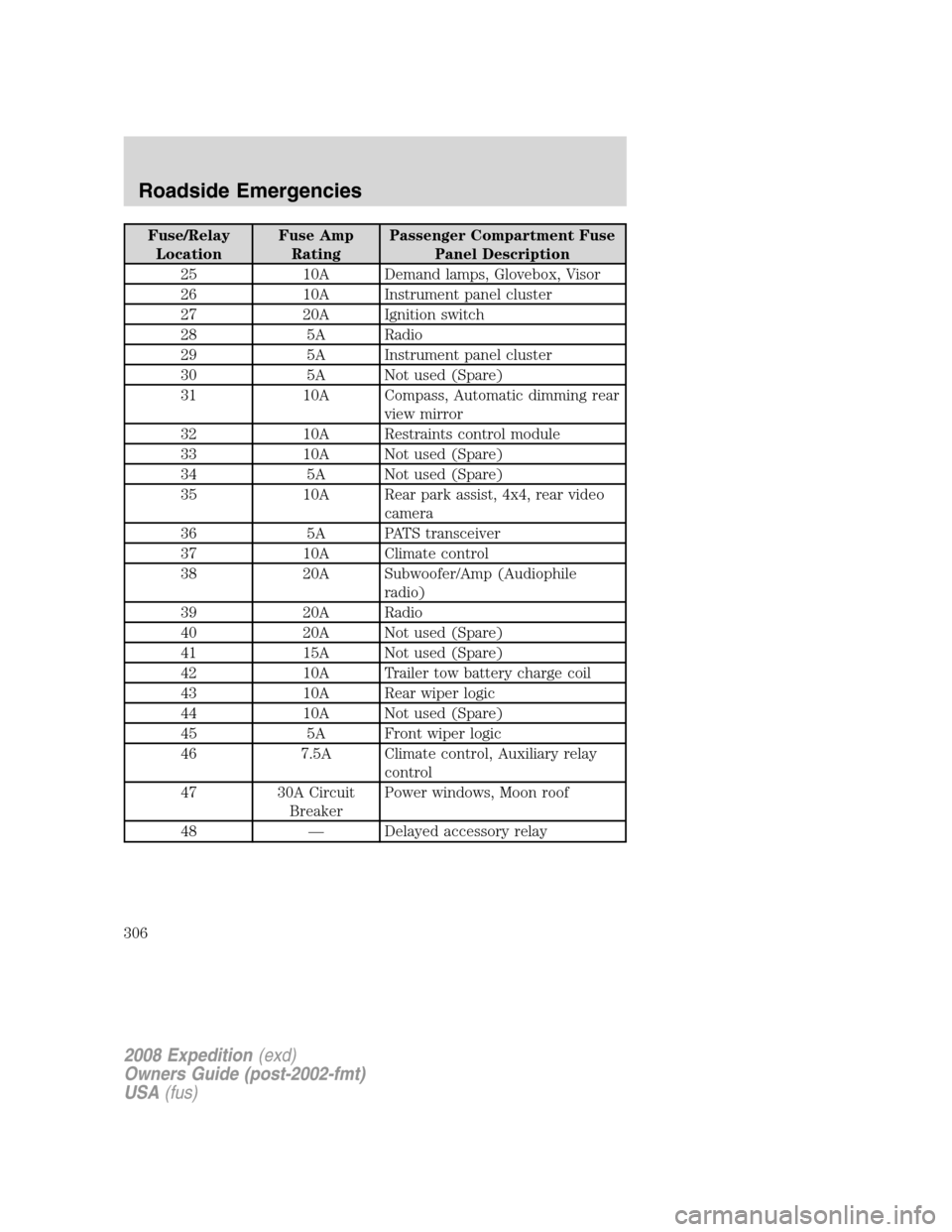
Fuse/Relay
LocationFuse Amp
RatingPassenger Compartment Fuse
Panel Description
25 10A Demand lamps, Glovebox, Visor
26 10A Instrument panel cluster
27 20A Ignition switch
28 5A Radio
29 5A Instrument panel cluster
30 5A Not used (Spare)
31 10A Compass, Automatic dimming rear
view mirror
32 10A Restraints control module
33 10A Not used (Spare)
34 5A Not used (Spare)
35 10A Rear park assist, 4x4, rear video
camera
36 5A PATS transceiver
37 10A Climate control
38 20A Subwoofer/Amp (Audiophile
radio)
39 20A Radio
40 20A Not used (Spare)
41 15A Not used (Spare)
42 10A Trailer tow battery charge coil
43 10A Rear wiper logic
44 10A Not used (Spare)
45 5A Front wiper logic
46 7.5A Climate control, Auxiliary relay
control
47 30A Circuit
BreakerPower windows, Moon roof
48 — Delayed accessory relay
2008 Expedition(exd)
Owners Guide (post-2002-fmt)
USA(fus)
Roadside Emergencies
306
Page 310 of 392
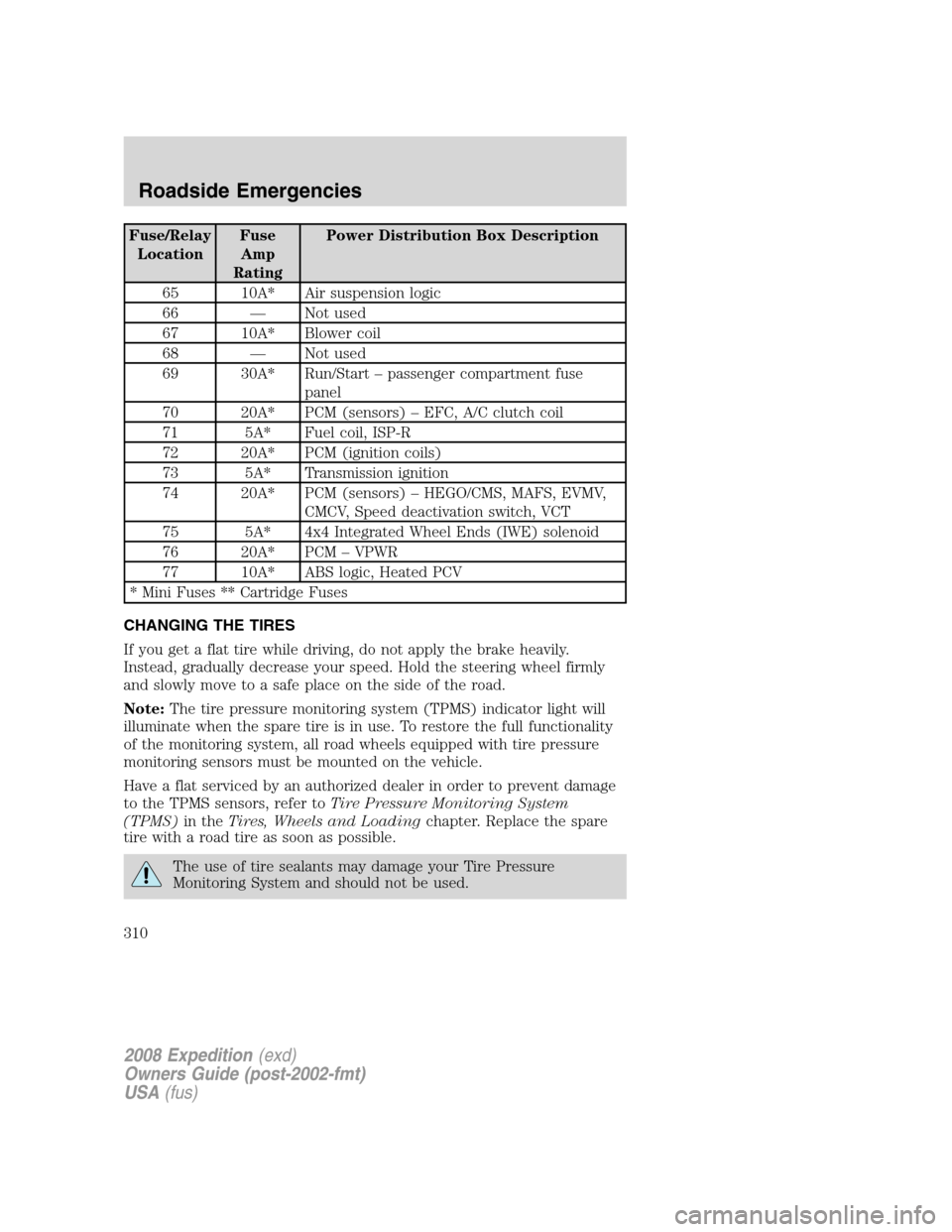
Fuse/Relay
LocationFuse
Amp
RatingPower Distribution Box Description
65 10A* Air suspension logic
66 — Not used
67 10A* Blower coil
68 — Not used
69 30A* Run/Start – passenger compartment fuse
panel
70 20A* PCM (sensors) – EFC, A/C clutch coil
71 5A* Fuel coil, ISP-R
72 20A* PCM (ignition coils)
73 5A* Transmission ignition
74 20A* PCM (sensors) – HEGO/CMS, MAFS, EVMV,
CMCV, Speed deactivation switch, VCT
75 5A* 4x4 Integrated Wheel Ends (IWE) solenoid
76 20A* PCM – VPWR
77 10A* ABS logic, Heated PCV
* Mini Fuses ** Cartridge Fuses
CHANGING THE TIRES
If you get a flat tire while driving, do not apply the brake heavily.
Instead, gradually decrease your speed. Hold the steering wheel firmly
and slowly move to a safe place on the side of the road.
Note:The tire pressure monitoring system (TPMS) indicator light will
illuminate when the spare tire is in use. To restore the full functionality
of the monitoring system, all road wheels equipped with tire pressure
monitoring sensors must be mounted on the vehicle.
Have a flat serviced by an authorized dealer in order to prevent damage
to the TPMS sensors, refer toTire Pressure Monitoring System
(TPMS)in theTires, Wheels and Loadingchapter. Replace the spare
tire with a road tire as soon as possible.
The use of tire sealants may damage your Tire Pressure
Monitoring System and should not be used.
2008 Expedition(exd)
Owners Guide (post-2002-fmt)
USA(fus)
Roadside Emergencies
310
Page 340 of 392
![FORD EXPEDITION 2008 3.G User Guide 1. Wipe up spilled liquid using a clean, white, cotton cloth.
2. Apply Motorcraft Deluxe Leather and Vinyl Cleaner (ZC-11-A) [In
Canada use Motorcraft Multi-Purpose Cleaner (CXC-101)] to the wiped
are](/img/11/4924/w960_4924-339.png "FORD EXPEDITION 2008 3.G User Guide 1. Wipe up spilled liquid using a clean, white, cotton cloth.
2. Apply Motorcraft Deluxe Leather and Vinyl Cleaner (ZC-11-A) [In
Canada use Motorcraft Multi-Purpose Cleaner (CXC-101)] to the wiped
are")
1. Wipe up spilled liquid using a clean, white, cotton cloth.
2. Apply Motorcraft Deluxe Leather and Vinyl Cleaner (ZC-11-A) [In
Canada use Motorcraft Multi-Purpose Cleaner (CXC-101)] to the wiped
area and spread around evenly.
3. Apply more Motorcraft cleaner to a clean, white, cotton cloth and
press the cloth onto the soiled area–allow this to set at room
temperature for 30 minutes.
4. Remove the soaked cloth, and if it is not soiled badly, use this cloth to
clean the area by using a rubbing motion for 60 seconds.
5. Following this, wipe area dry with a clean, white, cotton cloth.
INTERIOR
For fabric, carpets, cloth seats, safety belts and seats equipped with side
airbags:
•Remove dust and loose dirt with a vacuum cleaner.
•Remove light stains and soil with Motorcraft Professional Strength
Carpet & Upholstery Cleaner (ZC-54).
•If grease or tar is present on the material, spot-clean the area first
with Motorcraft Spot and Stain Remover (ZC-14).
•If a ring forms on the fabric after spot cleaning, clean the entire area
immediately (but do not oversaturate) or the ring will set.
•Do not use household cleaning products or glass cleaners, which can
stain and discolor the fabric and affect the flame retardant abilities of
the seat materials.
Do not use cleaning solvents, bleach or dye on the vehicle’s
safety belts, as these actions may weaken the belt webbing.
Do not use chemical solvents or strong detergents when cleaning
the seat-mounted side airbag (vehicles equipped with
seat-mounted side airbags only). Such products could contaminate the
side airbag system and affect performance of the side airbag in a
collision.
CLEANING THE CLIMATE CONTROLLED SEATS (IF EQUIPPED)
Remove dust and loose dirt with a whisk broom or a vacuum cleaner.
Remove fresh spots immediately. Clean the seat with a damp cloth, using
a mild soap and water solution, if necessary.
2008 Expedition(exd)
Owners Guide (post-2002-fmt)
USA(fus)
Cleaning
340
Page 341 of 392
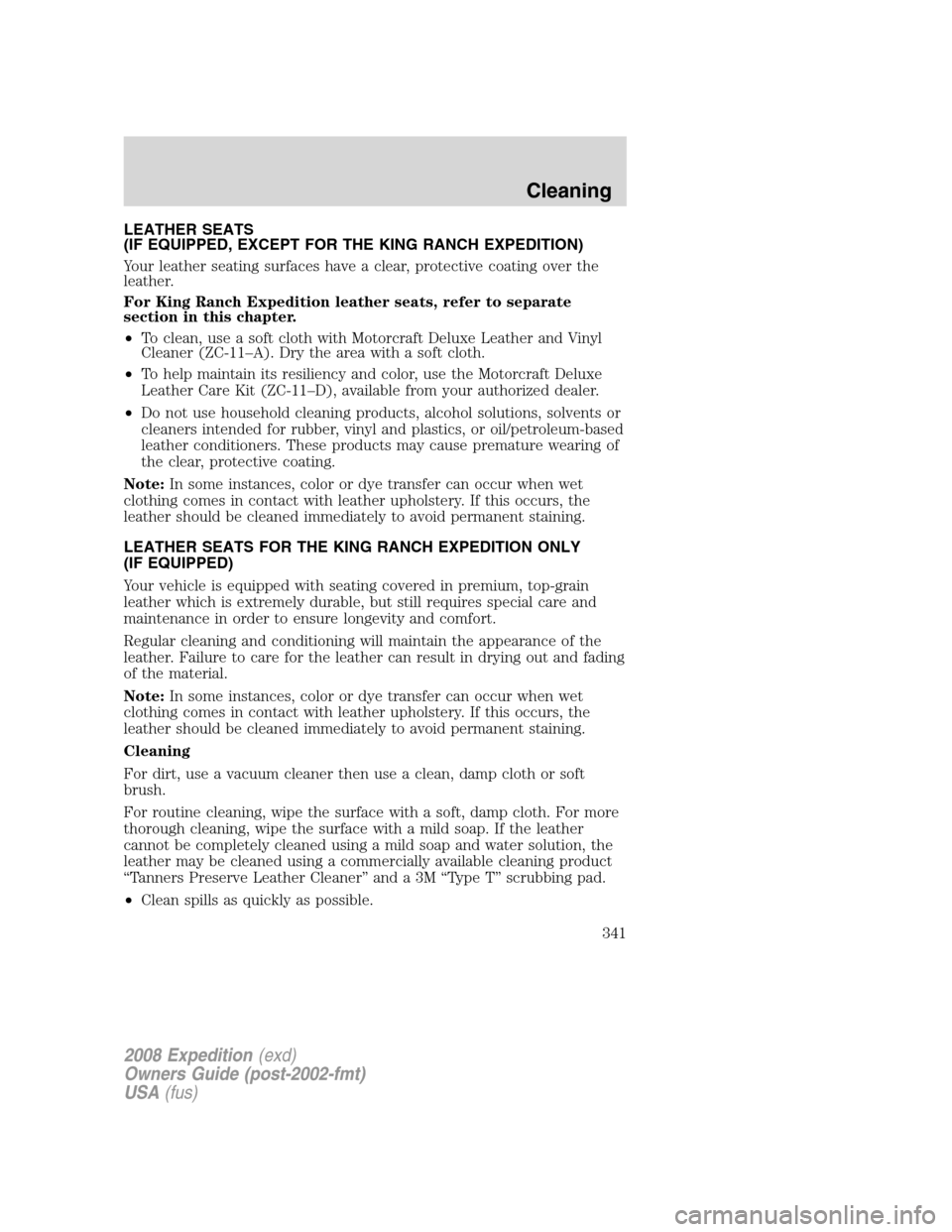
LEATHER SEATS
(IF EQUIPPED, EXCEPT FOR THE KING RANCH EXPEDITION)
Your leather seating surfaces have a clear, protective coating over the
leather.
For King Ranch Expedition leather seats, refer to separate
section in this chapter.
•To clean, use a soft cloth with Motorcraft Deluxe Leather and Vinyl
Cleaner (ZC-11–A). Dry the area with a soft cloth.
•To help maintain its resiliency and color, use the Motorcraft Deluxe
Leather Care Kit (ZC-11–D), available from your authorized dealer.
•Do not use household cleaning products, alcohol solutions, solvents or
cleaners intended for rubber, vinyl and plastics, or oil/petroleum-based
leather conditioners. These products may cause premature wearing of
the clear, protective coating.
Note:In some instances, color or dye transfer can occur when wet
clothing comes in contact with leather upholstery. If this occurs, the
leather should be cleaned immediately to avoid permanent staining.
LEATHER SEATS FOR THE KING RANCH EXPEDITION ONLY
(IF EQUIPPED)
Your vehicle is equipped with seating covered in premium, top-grain
leather which is extremely durable, but still requires special care and
maintenance in order to ensure longevity and comfort.
Regular cleaning and conditioning will maintain the appearance of the
leather. Failure to care for the leather can result in drying out and fading
of the material.
Note:In some instances, color or dye transfer can occur when wet
clothing comes in contact with leather upholstery. If this occurs, the
leather should be cleaned immediately to avoid permanent staining.
Cleaning
For dirt, use a vacuum cleaner then use a clean, damp cloth or soft
brush.
For routine cleaning, wipe the surface with a soft, damp cloth. For more
thorough cleaning, wipe the surface with a mild soap. If the leather
cannot be completely cleaned using a mild soap and water solution, the
leather may be cleaned using a commercially available cleaning product
“Tanners Preserve Leather Cleaner” and a 3M “Type T” scrubbing pad.
•Clean spills as quickly as possible.
2008 Expedition(exd)
Owners Guide (post-2002-fmt)
USA(fus)
Cleaning
341
Page 342 of 392
•Test any cleaner or stain remover on an inconspicuous part of the
leather as cleaners may darken the leather. For more specific cleaning
information, contact the King Ranch Saddle Shop at 1–800–282–KING
(5464).
•Do not spill coffee, ketchup, mustard, orange juice or oil-based
products on the leather as they may permanently stain the leather.
•Do not use household cleaning products, alcohol solutions, solvents or
cleaners intended for rubber, vinyl or plastics.
Scratches
Natural Markings - Because the leather in the seat comes from genuine
steer hides, there will be evidence of naturally occurring markings, such
as small scars. These markings give character to the seating covers and
should be considered as proof of a genuine leather product.
In order to lessen the appearance of certain scratches and other wear
marks, apply conditioner on the affected area following the same
instructions as in theConditioningsection.
Conditioning
Bottles of King Ranch Leather Conditioner are available at the King
Ranch Saddle Shop. Visit the Web site atwww.krsaddleshop.com,or
telephone (in the United States) 1–800–282–KING (5464). If you are
unable to obtain King Ranch Leather Conditioner, use another premium
leather conditioner.
•Apply your first conditioning treatment within six months of taking
delivery of your vehicle. Condition twice yearly in order to replenish
lost oils and revitalize the aroma, suppleness and resilience of the
leather.
•Clean the surfaces using the steps outlined in theCleaningsection.
•Ensure the leather is dry then apply a nickel-sized amount of
conditioner to a clean, dry cloth
•Rub the conditioner into leather until it disappears. Allow the
conditioner to dry and repeat the process for the entire interior. If a
film appears, wipe off film with a dry, clean cloth.
UNDERBODY
Flush the complete underside of your vehicle frequently. Keep body and
door drain holes free from packed dirt.
2008 Expedition(exd)
Owners Guide (post-2002-fmt)
USA(fus)
Cleaning
342