buttons FORD EXPEDITION 2011 3.G User Guide
[x] Cancel search | Manufacturer: FORD, Model Year: 2011, Model line: EXPEDITION, Model: FORD EXPEDITION 2011 3.GPages: 395, PDF Size: 2.72 MB
Page 116 of 395
2. Press and release the RESET button. HOLD RESET TO CONFIRM
MYKEY will be displayed.
3. Press and hold the RESET button for two seconds until MARK THIS
AS RESTRICTED is displayed.
4. Wait until KEY RESTRICTED AT NEXT START is displayed.
MyKey™ is successfully programmed. Make sure you label it so you can
distinguish it from the admin keys.Note:To program the optional
settings go to Step 2 in theProgramming MyKey™ optional settings
section. If your vehicle is equipped with remote start, see theUsing
MyKey™ with remote start systemssection.
Note:The MyKey™ can be cleared within the same key cycle that it was
created, otherwise a standard key (administrator key) is required to
clear the MyKey™ programming. To clear all MyKeys™ go to Step 2 in
theClear MyKey™section.
Programming MyKey™ optional settings
Turn the ignition on using an admin key. To program the optional
settings, use the message center buttons to do the following:
1. Press SETUP until RESET FOR MYKEY SETTINGS is displayed.
2. Press and release the RESET button to display MyKey™ setup menus.
The first menu shown is:
MYKEY MAX MPH <80 MPH> OFF
3. If you don’t want to change the maximum speed setting, press the
SETUP button to display the next menu. The remaining menus appear as
follows with the default settings shown:
MYKEY MPH TONES 45 55 65
MYKEY VOLUME LIMIT
MYKEY ADVTRAC CTRL ON
4. On any of the menus press RESET to highlight your choice with the
<…>.
5. Press SETUP to enter your choice. The next optional setting will be
displayed.
6. Repeat Steps 4 and 5 until you are done changing the optional settings.
Clear MyKey™
To reset all MyKeys™ as admin keys do the following:
1. Turn the vehicle on using the admin key.
2. Press SETUP until PRESS RESET TO CLEAR MYKEY is displayed.
Locks and Security
116
2011 Expedition(exd)
Owners Guide, 1st Printing
USA(fus)
Page 158 of 395
Third row power folding seat (if equipped)
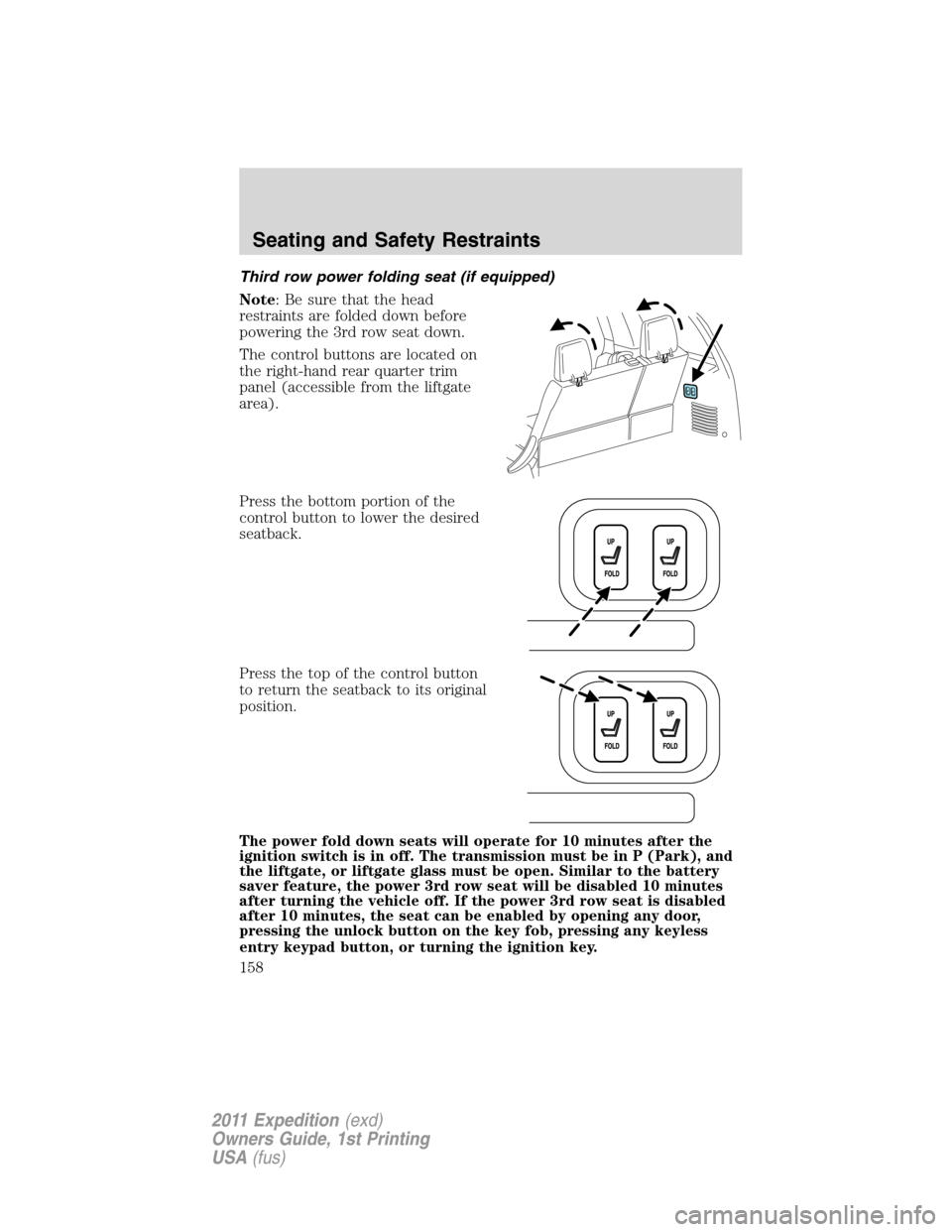
Note: Be sure that the head
restraints are folded down before
powering the 3rd row seat down.
The control buttons are located on
the right-hand rear quarter trim
panel (accessible from the liftgate
area).
Press the bottom portion of the
control button to lower the desired
seatback.
Press the top of the control button
to return the seatback to its original
position.
The power fold down seats will operate for 10 minutes after the
ignition switch is in off. The transmission must be in P (Park), and
the liftgate, or liftgate glass must be open. Similar to the battery
saver feature, the power 3rd row seat will be disabled 10 minutes
after turning the vehicle off. If the power 3rd row seat is disabled
after 10 minutes, the seat can be enabled by opening any door,
pressing the unlock button on the key fob, pressing any keyless
entry keypad button, or turning the ignition key.
Seating and Safety Restraints
158
2011 Expedition(exd)
Owners Guide, 1st Printing
USA(fus)
Page 167 of 395
Safety belt height adjustment
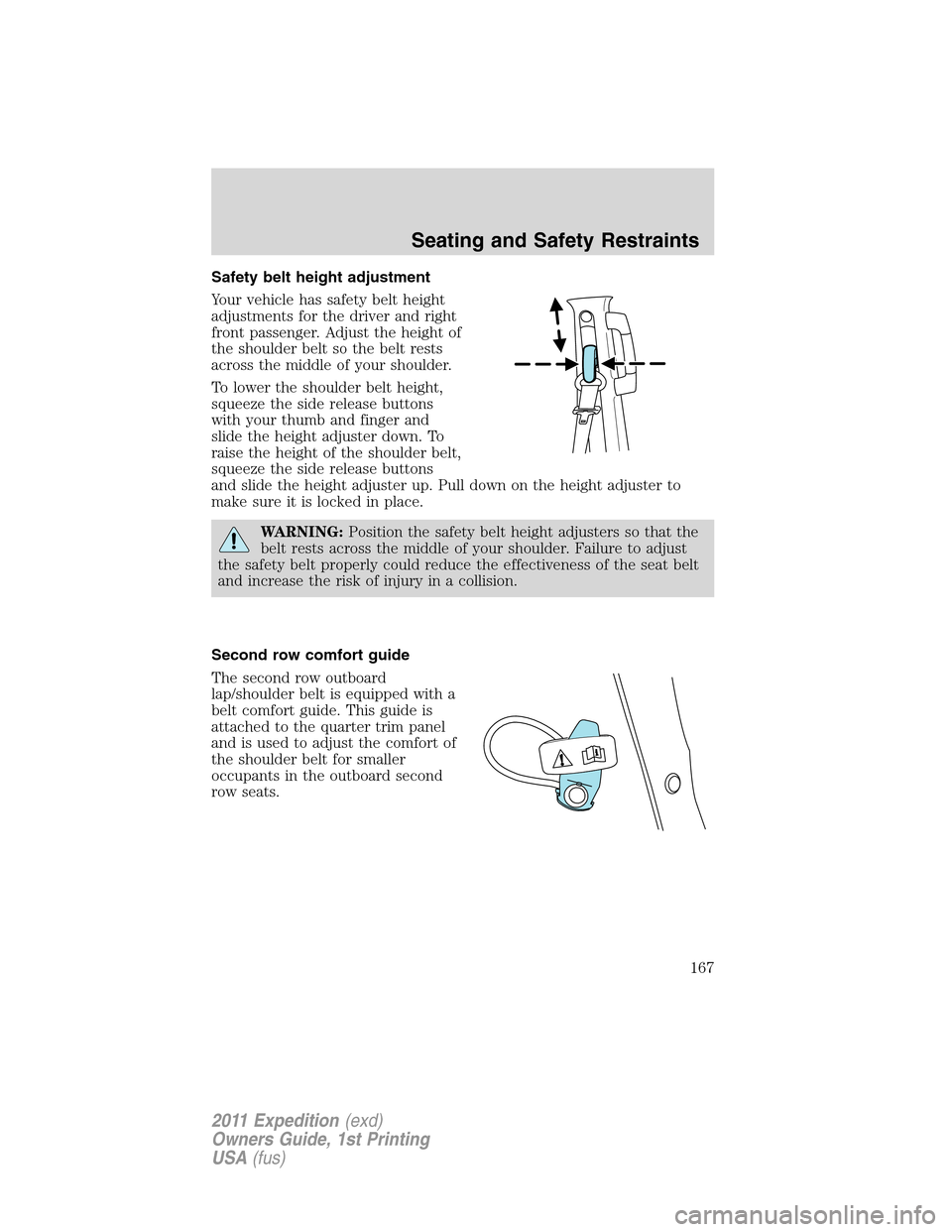
Your vehicle has safety belt height
adjustments for the driver and right
front passenger. Adjust the height of
the shoulder belt so the belt rests
across the middle of your shoulder.
To lower the shoulder belt height,
squeeze the side release buttons
with your thumb and finger and
slide the height adjuster down. To
raise the height of the shoulder belt,
squeeze the side release buttons
and slide the height adjuster up. Pull down on the height adjuster to
make sure it is locked in place.
WARNING:Position the safety belt height adjusters so that the
belt rests across the middle of your shoulder. Failure to adjust
the safety belt properly could reduce the effectiveness of the seat belt
and increase the risk of injury in a collision.
Second row comfort guide
The second row outboard
lap/shoulder belt is equipped with a
belt comfort guide. This guide is
attached to the quarter trim panel
and is used to adjust the comfort of
the shoulder belt for smaller
occupants in the outboard second
row seats.
Seating and Safety Restraints
167
2011 Expedition(exd)
Owners Guide, 1st Printing
USA(fus)
Page 192 of 395
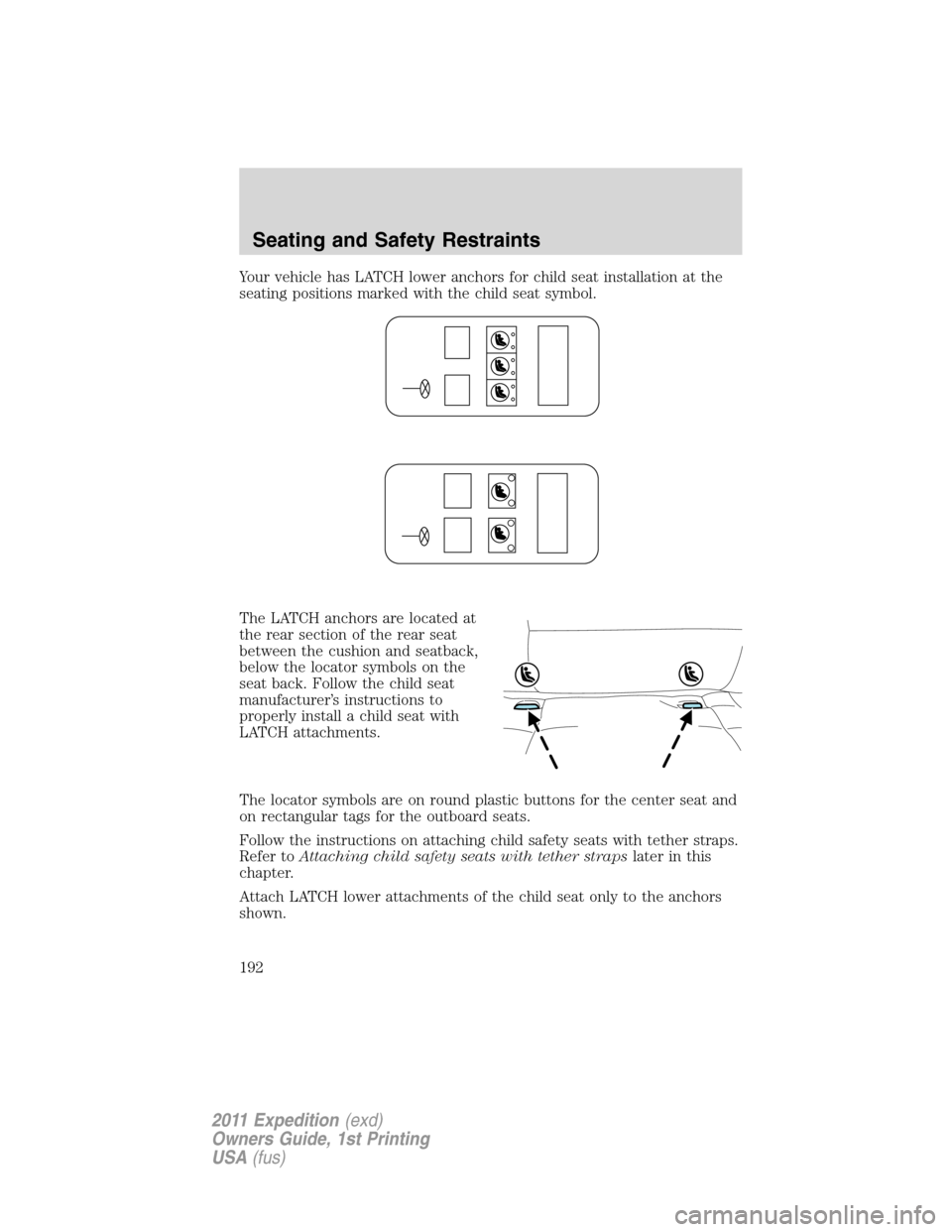
Your vehicle has LATCH lower anchors for child seat installation at the
seating positions marked with the child seat symbol.
The LATCH anchors are located at
the rear section of the rear seat
between the cushion and seatback,
below the locator symbols on the
seat back. Follow the child seat
manufacturer’s instructions to
properly install a child seat with
LATCH attachments.
The locator symbols are on round plastic buttons for the center seat and
on rectangular tags for the outboard seats.
Follow the instructions on attaching child safety seats with tether straps.
Refer toAttaching child safety seats with tether strapslater in this
chapter.
Attach LATCH lower attachments of the child seat only to the anchors
shown.
Seating and Safety Restraints
192
2011 Expedition(exd)
Owners Guide, 1st Printing
USA(fus)