display FORD EXPEDITION 2014 3.G Owners Manual
[x] Cancel search | Manufacturer: FORD, Model Year: 2014, Model line: EXPEDITION, Model: FORD EXPEDITION 2014 3.GPages: 519, PDF Size: 6.9 MB
Page 455 of 519
Jukebox
Your system has a Jukebox feature, which allows you to save desired
tracks or CDs to the hard drive for later access. The hard drive can store
up to 10 GB* (164 hours; approximately 2472 tracks) of music. The
system contains a Gracenote media database that allows for display of
song title, album title, and album cover art. After saving music to the
hard drive, you can access and play your music by specific tracks, artists,
albums or genres. You can even choose to create and access your own
playlists.
*Note:1 GB equals one billion bytes (1000000000B).
Recording Music to Your Jukebox
To record music to your jukebox:
1. Insert a CD, and then select Record on the touchscreen.
2. Select individual tracks or press Select All to record the entire CD.
Note:The system automatically saves all tracks if you do not select
any.
3. Press the Start Recording button.
The progress shows at the bottom of the screen.
Note:If you are not actively listening to the disc during recording, the
record rate is much quicker (as fast as five minutes).
Accessing the Music in Your Jukebox
Once you have saved music to your jukebox, you can then choose
different ways to play the music.
1. Press the MEDIA hard button on the navigation system.
2. Select the Jukebox tab on the touchscreen. You can then select from
the following options:
When you select: You can:
ScanHear a brief sampling of all listenable tracks.
RepeatHear the selected track continuously.
ShufflePlay the tracks in a random order.
454Navigation System (If Equipped)
2014 Expedition(exd)
Owners Guide gf, 1st Printing, June 2013
USA(fus)
Page 462 of 519
SOUND
The sound menu allows you to access and adjust settings, such as Bass,
Treble, Fade, Balance, Speed Compensated Volume (SCV) and the
visualizer. Press the SOUND hard button.
When you select: You can:
Bass/TrebleIncrease or decrease levels by pressing + or -.
Balance/FadeAdjust the sound between the left and right
speakers and front and rear speakers.
SCVHave the system automatically adjust radio
volume according to vehicle speed to
compensate for road and wind noise. Select a
level of compensation between 1 and 7 by
pressing the corresponding button.
VisualizerTurn the audio visualizer display on or off.
Note:Turning the visualizer setting to off
does not remove the visualizer on the home
screen. You need to select a different view in
order to remove the visualizer.
NAVIGATION SYSTEM
Your navigation system allows you to set a destination by using your
touchscreen or voice commands.
The navigation system contains map coverage for the United States,
Puerto Rico and U.S. Virgin Islands, Canada and Mexico.
Disclaimer
A disclaimer appears once per ignition cycle when theDESTbutton is
pressed. PressAcceptto agree to the terms and access navigation
functions. If you do not press Accept, you only have access to
non-navigation functions. The disclaimer has information similar
to the following:
•Always obey local traffic regulations.
•We recommend you program the system only when your vehicle is at
a stop.
•Some functions are unavailable while your vehicle is moving to help
minimize distraction.
•Periodic map updates are available at an additional cost.
Navigation System (If Equipped)461
2014 Expedition(exd)
Owners Guide gf, 1st Printing, June 2013
USA(fus)
Page 463 of 519
Route Guidance in Incompletely Mapped Areas
There are some rural areas in the map database without fully verified
roads. When the system is in route guidance mode, and the navigation
system encounters these incompletely mapped areas, the system alerts
you by:
•Announcing, “Entering an area with incomplete map data; please
follow with caution”
•Saying, “with caution” in the first route guidance instruction before
each turn
•Highlighting the route on the map in yellow
•Highlighting the incomplete mapped streets in yellow on the turn list
•Coloring the guidance arrows yellow.
Please drive using extra caution when driving in these areas as the
mapping information may be somewhat inaccurate.
Programming a Destination Using the Touchscreen
1. Press theDESThard button.
2. Select from the following:
Quick
Note:Items on this screen are selectable at any speed.
Cancel RouteTouch this button to cancel the current route.
EmergencyTouch this button to find hospitals and police
stations close to your vehicle’s location. The
system may display up to 25 locations.
Favorite
DestinationsThis feature stores your home location and up
to five address book entries. To set an entry,
touch a preset button, and then follow the
screen prompts. The system displays the icon
and name associated with the location.
462Navigation System (If Equipped)
2014 Expedition(exd)
Owners Guide gf, 1st Printing, June 2013
USA(fus)
Page 464 of 519
Quick
Note:Items on this screen are selectable at any speed.
Find Nearest POISelect up to five different points of interest
(POI) favorites that you can search for while
your vehicle is moving. You can change these
categories at any time but the default
categories are:
•Gas Station
•AT M
•Restaurant
•Accommodations
•Parking Garage
When you select a category, the system
displays a list in order of distance from your
vehicle’s location. The Quick POI search range
automatically increases to a 50 mile (80 km)
radius if no point of interest is found within
the default 25 mile (40 km) radius.
You also have the option to select List All
Categories, which displays a list of all
categories.
Previous
DestinationTouch this button to select one of your
previous destinations.
Address BookTouch this button to set an entry in your
address book as your destination.
Navigation System (If Equipped)463
2014 Expedition(exd)
Owners Guide gf, 1st Printing, June 2013
USA(fus)
Page 469 of 519
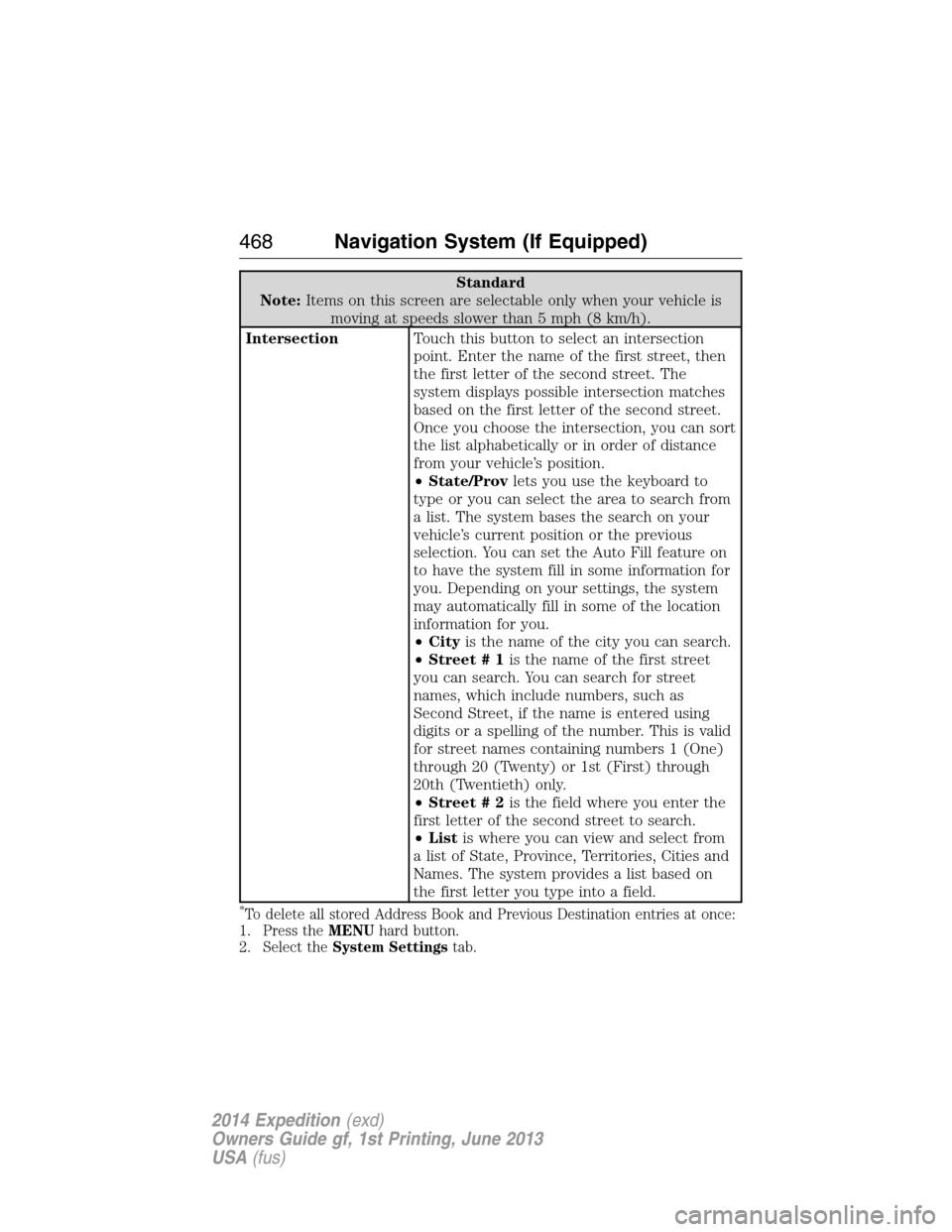
Standard
Note:Items on this screen are selectable only when your vehicle is
moving at speeds slower than 5 mph (8 km/h).
IntersectionTouch this button to select an intersection
point. Enter the name of the first street, then
the first letter of the second street. The
system displays possible intersection matches
based on the first letter of the second street.
Once you choose the intersection, you can sort
the list alphabetically or in order of distance
from your vehicle’s position.
•State/Provlets you use the keyboard to
type or you can select the area to search from
a list. The system bases the search on your
vehicle’s current position or the previous
selection. You can set the Auto Fill feature on
to have the system fill in some information for
you. Depending on your settings, the system
may automatically fill in some of the location
information for you.
•Cityis the name of the city you can search.
•Street # 1is the name of the first street
you can search. You can search for street
names, which include numbers, such as
Second Street, if the name is entered using
digits or a spelling of the number. This is valid
for street names containing numbers 1 (One)
through 20 (Twenty) or 1st (First) through
20th (Twentieth) only.
•Street # 2is the field where you enter the
first letter of the second street to search.
•Listis where you can view and select from
a list of State, Province, Territories, Cities and
Names. The system provides a list based on
the first letter you type into a field.
*To delete all stored Address Book and Previous Destination entries at once:
1. Press theMENUhard button.
2. Select theSystem Settingstab.
468Navigation System (If Equipped)
2014 Expedition(exd)
Owners Guide gf, 1st Printing, June 2013
USA(fus)
Page 470 of 519
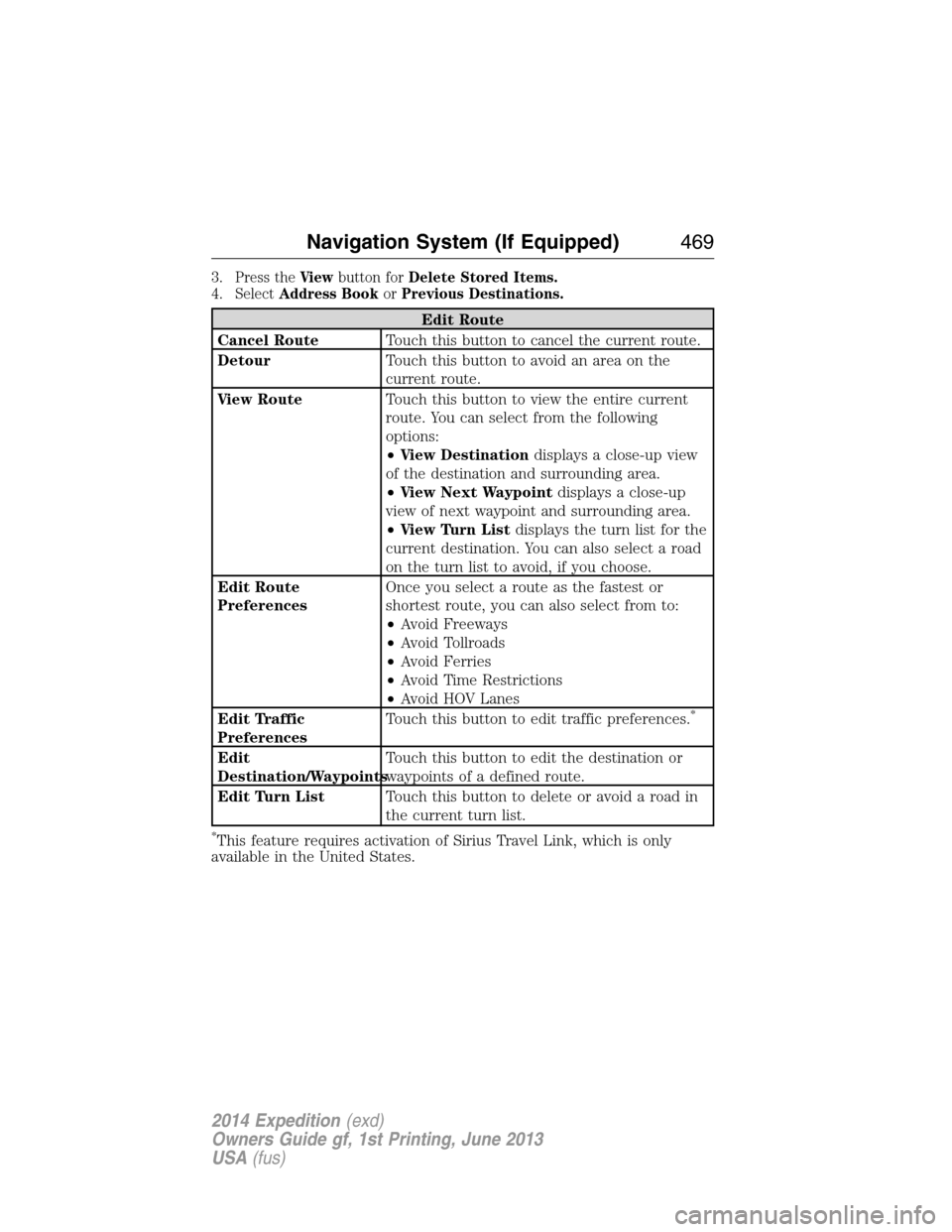
3. Press theViewbutton forDelete Stored Items.
4. SelectAddress BookorPrevious Destinations.
Edit Route
Cancel RouteTouch this button to cancel the current route.
DetourTouch this button to avoid an area on the
current route.
View RouteTouch this button to view the entire current
route. You can select from the following
options:
•View Destinationdisplays a close-up view
of the destination and surrounding area.
•View Next Waypointdisplays a close-up
view of next waypoint and surrounding area.
•View Turn Listdisplays the turn list for the
current destination. You can also select a road
on the turn list to avoid, if you choose.
Edit Route
PreferencesOnce you select a route as the fastest or
shortest route, you can also select from to:
•Avoid Freeways
•Avoid Tollroads
•Avoid Ferries
•Avoid Time Restrictions
•Avoid HOV Lanes
Edit Traffic
PreferencesTouch this button to edit traffic preferences.
*
Edit
Destination/WaypointsTouch this button to edit the destination or
waypoints of a defined route.
Edit Turn ListTouch this button to delete or avoid a road in
the current turn list.
*This feature requires activation of Sirius Travel Link, which is only
available in the United States.
Navigation System (If Equipped)469
2014 Expedition(exd)
Owners Guide gf, 1st Printing, June 2013
USA(fus)
Page 472 of 519
Subcategories
Parking
Public Transit
Home & Garden
Education
Personal Care Services
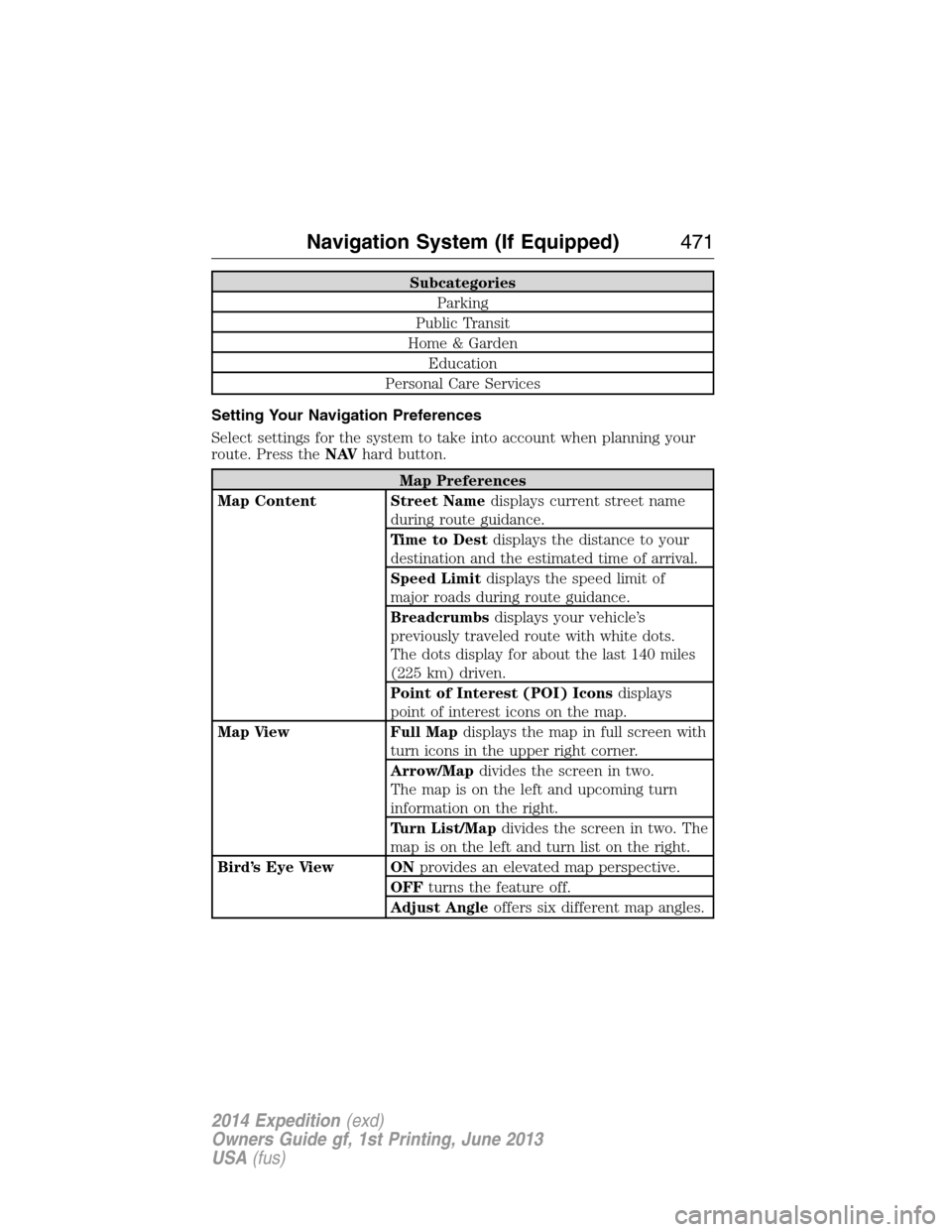
Setting Your Navigation Preferences
Select settings for the system to take into account when planning your
route. Press theNAVhard button.
Map Preferences
Map Content Street Namedisplays current street name
during route guidance.
Time to Destdisplays the distance to your
destination and the estimated time of arrival.
Speed Limitdisplays the speed limit of
major roads during route guidance.
Breadcrumbsdisplays your vehicle’s
previously traveled route with white dots.
The dots display for about the last 140 miles
(225 km) driven.
Point of Interest (POI) Iconsdisplays
point of interest icons on the map.
Map View Full Mapdisplays the map in full screen with
turn icons in the upper right corner.
Arrow/Mapdivides the screen in two.
The map is on the left and upcoming turn
information on the right.
Turn List/Mapdivides the screen in two. The
map is on the left and turn list on the right.
Bird’s Eye View ONprovides an elevated map perspective.
OFFturns the feature off.
Adjust Angleoffers six different map angles.
Navigation System (If Equipped)471
2014 Expedition(exd)
Owners Guide gf, 1st Printing, June 2013
USA(fus)
Page 473 of 519
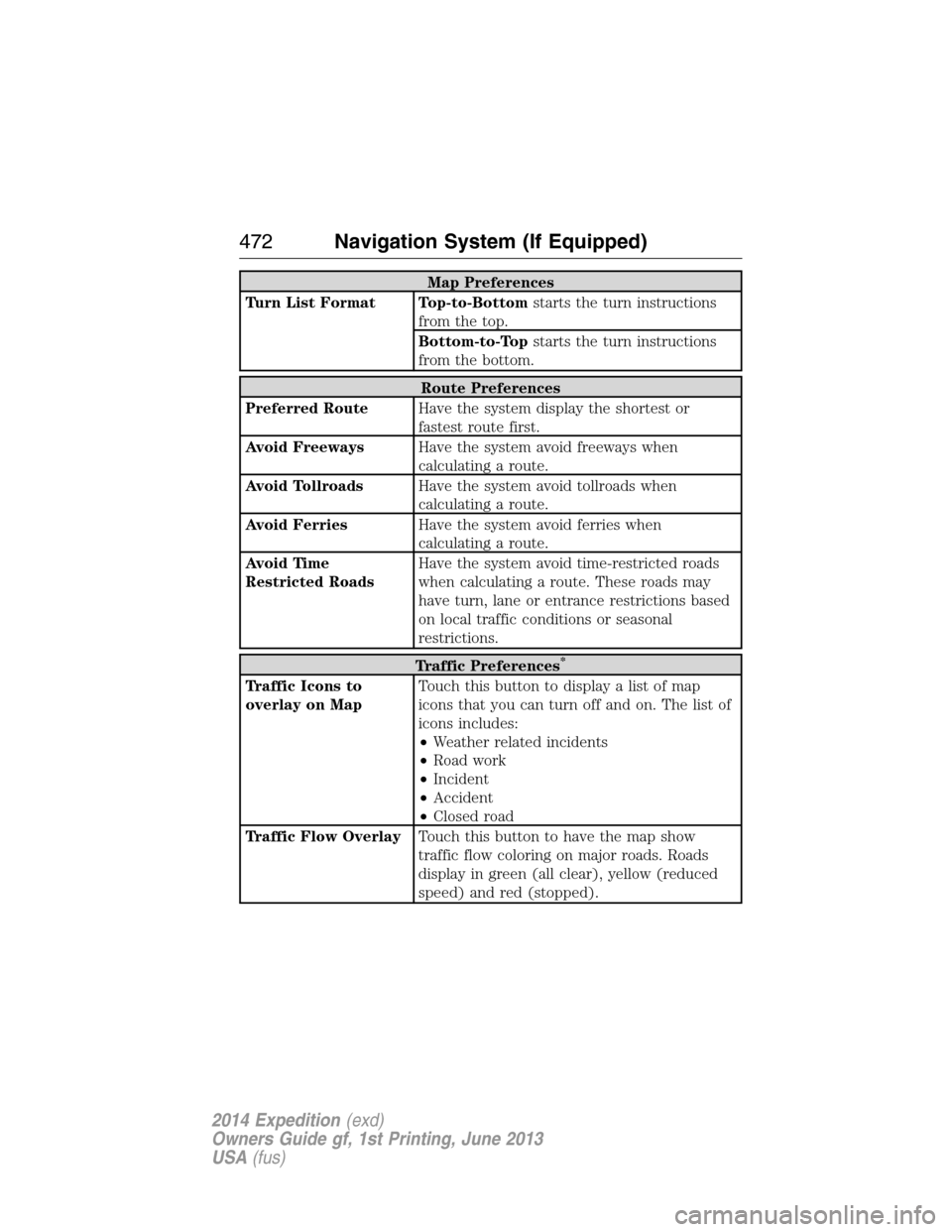
Map Preferences
Turn List Format Top-to-Bottomstarts the turn instructions
from the top.
Bottom-to-Topstarts the turn instructions
from the bottom.
Route Preferences
Preferred RouteHave the system display the shortest or
fastest route first.
Avoid FreewaysHave the system avoid freeways when
calculating a route.
Avoid TollroadsHave the system avoid tollroads when
calculating a route.
Avoid FerriesHave the system avoid ferries when
calculating a route.
Avoid Time
Restricted RoadsHave the system avoid time-restricted roads
when calculating a route. These roads may
have turn, lane or entrance restrictions based
on local traffic conditions or seasonal
restrictions.
Traffic Preferences*
Traffic Icons to
overlay on MapTouch this button to display a list of map
icons that you can turn off and on. The list of
icons includes:
•Weather related incidents
•Road work
•Incident
•Accident
•Closed road
Traffic Flow OverlayTouch this button to have the map show
traffic flow coloring on major roads. Roads
display in green (all clear), yellow (reduced
speed) and red (stopped).
472Navigation System (If Equipped)
2014 Expedition(exd)
Owners Guide gf, 1st Printing, June 2013
USA(fus)
Page 474 of 519
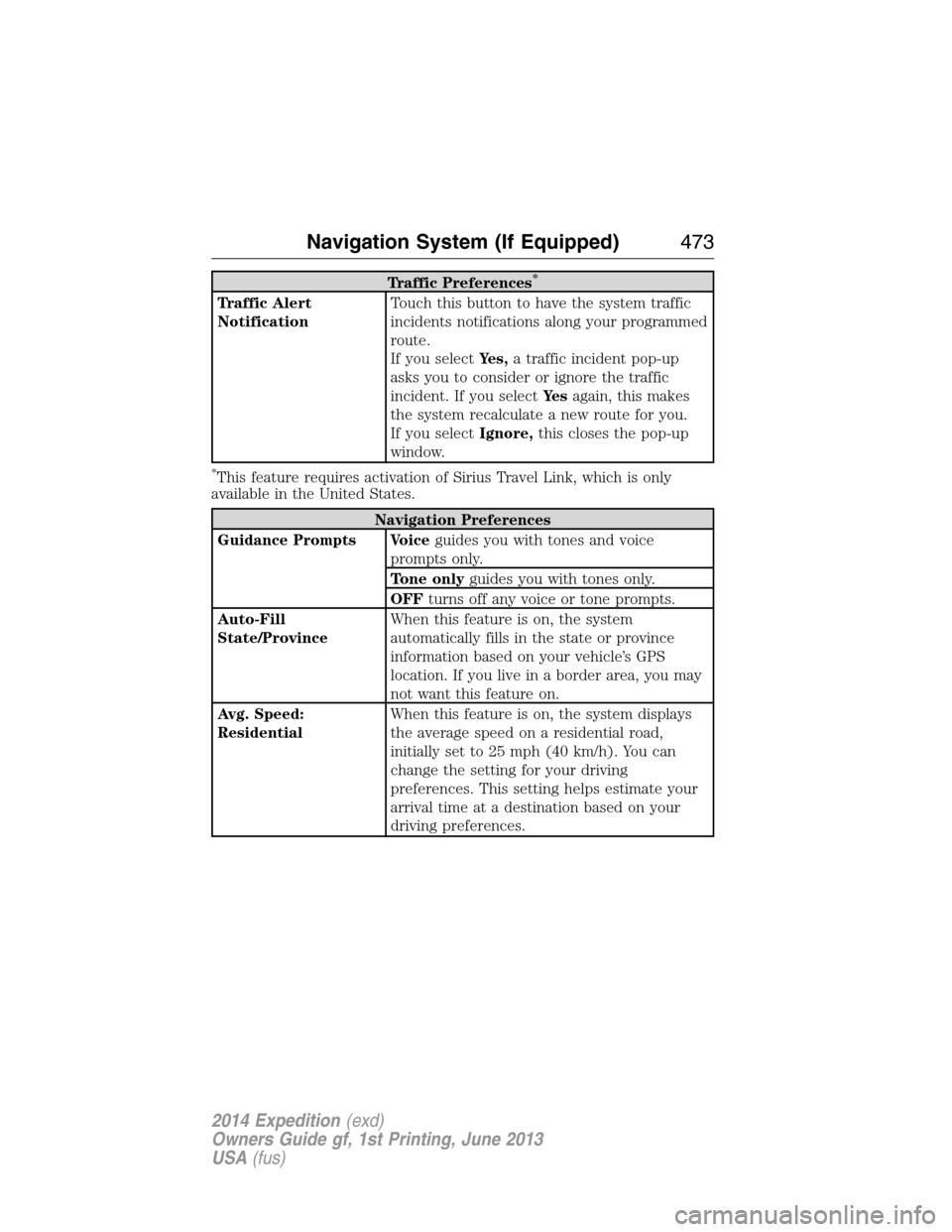
Traffic Preferences*
Traffic Alert
NotificationTouch this button to have the system traffic
incidents notifications along your programmed
route.
If you selectYes,a traffic incident pop-up
asks you to consider or ignore the traffic
incident. If you selectYe sagain, this makes
the system recalculate a new route for you.
If you selectIgnore,this closes the pop-up
window.
*This feature requires activation of Sirius Travel Link, which is only
available in the United States.
Navigation Preferences
Guidance Prompts Voiceguides you with tones and voice
prompts only.
Tone onlyguides you with tones only.
OFFturns off any voice or tone prompts.
Auto-Fill
State/ProvinceWhen this feature is on, the system
automatically fills in the state or province
information based on your vehicle’s GPS
location. If you live in a border area, you may
not want this feature on.
Avg. Speed:
ResidentialWhen this feature is on, the system displays
the average speed on a residential road,
initially set to 25 mph (40 km/h). You can
change the setting for your driving
preferences. This setting helps estimate your
arrival time at a destination based on your
driving preferences.
Navigation System (If Equipped)473
2014 Expedition(exd)
Owners Guide gf, 1st Printing, June 2013
USA(fus)
Page 475 of 519
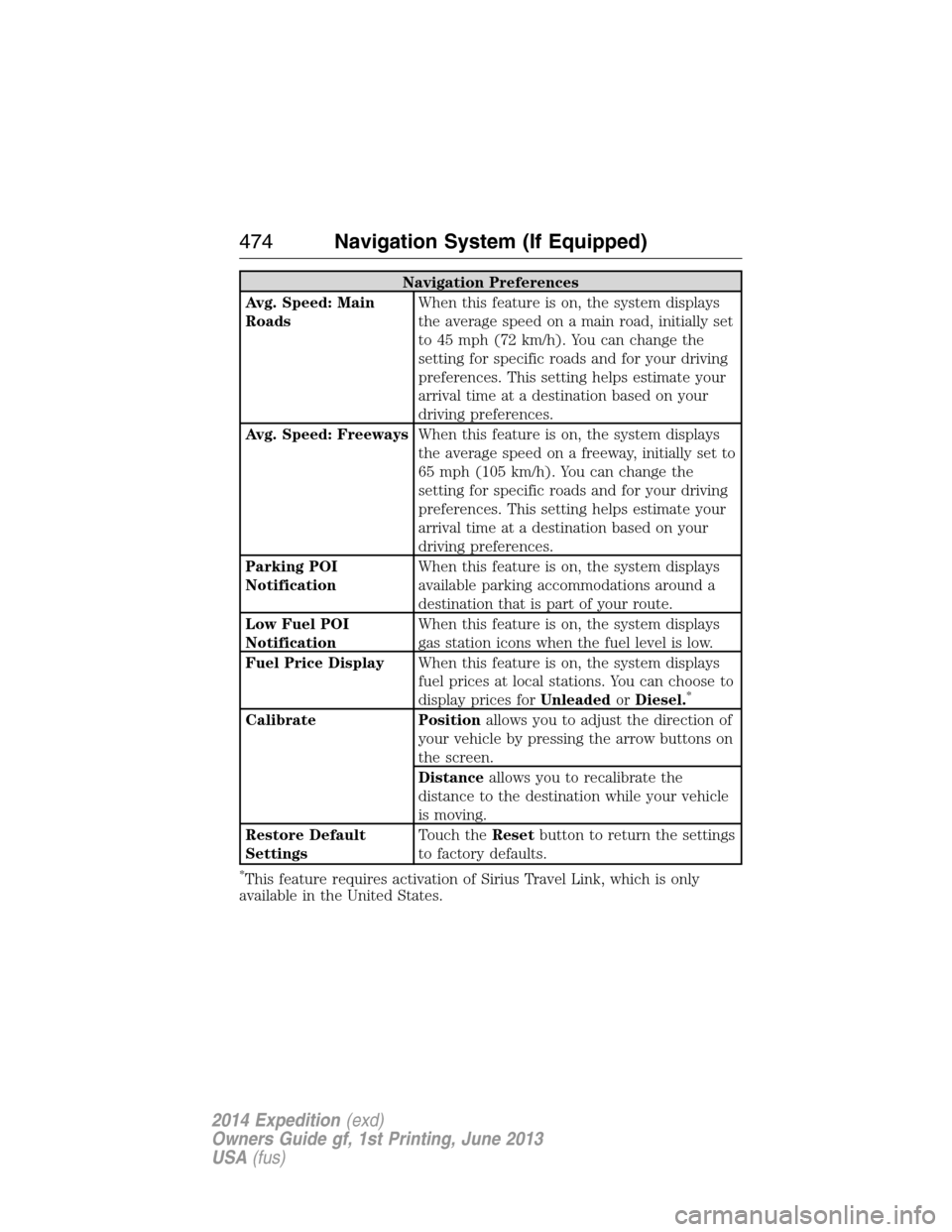
Navigation Preferences
Avg. Speed: Main
RoadsWhen this feature is on, the system displays
the average speed on a main road, initially set
to 45 mph (72 km/h). You can change the
setting for specific roads and for your driving
preferences. This setting helps estimate your
arrival time at a destination based on your
driving preferences.
Avg. Speed: FreewaysWhen this feature is on, the system displays
the average speed on a freeway, initially set to
65 mph (105 km/h). You can change the
setting for specific roads and for your driving
preferences. This setting helps estimate your
arrival time at a destination based on your
driving preferences.
Parking POI
NotificationWhen this feature is on, the system displays
available parking accommodations around a
destination that is part of your route.
Low Fuel POI
NotificationWhen this feature is on, the system displays
gas station icons when the fuel level is low.
Fuel Price DisplayWhen this feature is on, the system displays
fuel prices at local stations. You can choose to
display prices forUnleadedorDiesel.
*
Calibrate Positionallows you to adjust the direction of
your vehicle by pressing the arrow buttons on
the screen.
Distanceallows you to recalibrate the
distance to the destination while your vehicle
is moving.
Restore Default
SettingsTouch theResetbutton to return the settings
to factory defaults.
*This feature requires activation of Sirius Travel Link, which is only
available in the United States.
474Navigation System (If Equipped)
2014 Expedition(exd)
Owners Guide gf, 1st Printing, June 2013
USA(fus)