display FORD EXPEDITION 2014 3.G Repair Manual
[x] Cancel search | Manufacturer: FORD, Model Year: 2014, Model line: EXPEDITION, Model: FORD EXPEDITION 2014 3.GPages: 519, PDF Size: 6.9 MB
Page 362 of 519
4. Adjust the volume as desired.
5. Switch your portable music player on and adjust its volume to half its
maximum level.
6. PressAUXuntilLINEorLINE INappears in the display. You
should hear music from your device even if it is low.
7. Adjust the volume on your portable music player until it reaches the
volume level of the FM station or CD. Do this by switching back and
forth between the AUX and FM or CD controls.
USB PORT (IF EQUIPPED)
WARNING:Driving while distracted can result in loss of vehicle
control, crash and injury. We strongly recommend that you use
extreme caution when using any device that may take your focus off
the road. Your primary responsibility is the safe operation of your
vehicle. We recommend against the use of any hand-held device while
driving and encourage the use of voice-operated systems when possible.
Make sure you are aware of all applicable local laws that may affect the
use of electronic devices while driving.
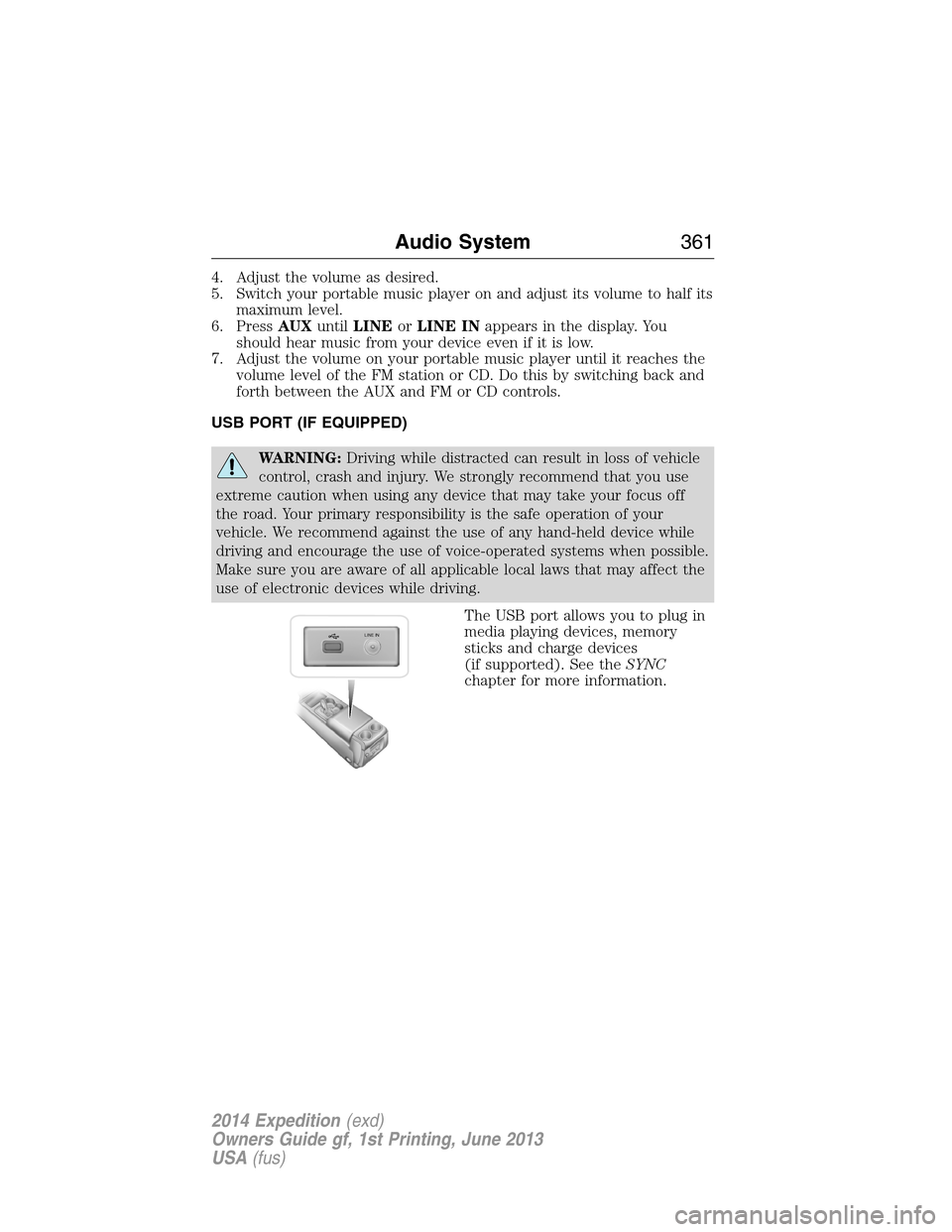
The USB port allows you to plug in
media playing devices, memory
sticks and charge devices
(if supported). See theSYNC
chapter for more information.
LINE IN
Audio System361
2014 Expedition(exd)
Owners Guide gf, 1st Printing, June 2013
USA(fus)
Page 363 of 519
REAR SEAT ENTERTAINMENT SYSTEM (IF EQUIPPED)
WARNING:Driving while distracted can result in loss of vehicle
control, crash and injury. We strongly recommend that you use
extreme caution when using any device that may take your focus off
the road. Your primary responsibility is the safe operation of your
vehicle. We recommend against the use of any hand-held device while
driving and encourage the use of voice-operated systems when possible.
Make sure you are aware of all applicable local laws that may affect the
use of electronic devices while driving.
Note:Make sure you run the engine while using the device. To avoid
discharging your vehicle battery:
•Do not use this device without the engine running.
•Turn off the device when your vehicle is not in use for long periods.
The system consists of the following features:
•Seven-inch color TFT-LCD panel (480x234) with 16:9 aspect
•Built-in, top-loading slot load DVD player
•Infrared transmitters for infrared wireless headphones
•Audio/Video source input (three RCA jacks)
•USB 2.0 (optional)
•One-eighth inch stereo headphone jack
•Forward remote sensor on the front panel
•Full-function remote control
•Five control buttons on the front panel: POWER, SOURCE, STOP,
PLAY and EJECT
•On-screen display control
•12V DC power input
•FM transmitter (may be optional)
Note:Do not touch the inner pins of the jacks on the front panel.
Electrostatic discharge may cause permanent damage to the device.
Your system plays the following types of discs:
•DVD-Video:DVD contains video.
•DVD +/- R:DVD contains video.
•CD-DA:CD contains musical or sound content only.
•CD-Video:CD contains movie only.
•CD-R/RW:CD contains audio files (such as a CD-R with MP3 files),
MPEG or JPEG files.
362Audio System
2014 Expedition(exd)
Owners Guide gf, 1st Printing, June 2013
USA(fus)
Page 367 of 519
D.STOP*:Press this button to stop playing the disc.
E.PLAY*:Press this button to play the disc.
F.Headphone jack:Plug in your wired headphones with a 1/8-inch
(3.5 millimeter) stereo connector plug to listen to audio from the
program.
G.Video input jack (red):Connect an RCA cable to this port.
H.Video input jack (white):Connect an RCA cable to this port.
I.Video input jack (yellow):Connect an RCA cable to this port.
J.USB port (optional):Listen to music or view images you stored on a
USB device such as a USB memory stick or a memory card reader.
K.SOURCE:Press this button to select Monitor A, Monitor B, AUX/TV
(if available), and AUX 2 (if available).
L.POWER:Press this button to turn the system off and on.
M.TFT LCD panel:Seven-inch TFT LCD panel.
N.Level lock and release latch:Use this latch to change the viewing
angle of the LCD panel or lock the panel into the secured position.
O.Infrared sensor - forward sensor eye:This allows the remote
control to navigate the on-screen display.
Remote Control
Note:The remote control uses infrared light to send commands to the
DVD player, just as many home video systems do. Just point the remote
control at the DVD player infrared window located above each screen in
order to control that DVD player. While you can connect a second device
such as a VCR through the auxiliary inputs, and view the playback on
the screen, you cannot control that device by aiming its remote control
at the Ford DVD player. The Ford DVD system remote control is the
only remote control you can use with the system. For example, if you
connect a VCR to the DVD system, you must point the VCR remote
control at the VCR to control it.
Installing the Battery
Before using your remote control, install the batteries as follows:
1. Turn the remote control face down. Press down on the ridged area of
the battery cover and slide it off.
2. Install two AAA batteries. Make sure you install the batteries
properly, with the + and – facing the correct way, as shown in the
battery compartment.
3. Slide the cover back until it clicks.
366Audio System
2014 Expedition(exd)
Owners Guide gf, 1st Printing, June 2013
USA(fus)
Page 368 of 519
Note:Different types of batteries have different characteristics. Do not
mix different types.
Note:Do not mix old and new batteries. Mixing old and new batteries
can shorten battery life and cause chemical leaks from the old batteries.
Note:Keep the batteries out of the reach of children. If someone
swallows a battery, immediately consult a doctor. When you dispose of
used batteries, keep to governmental regulations or environmental public
institution rules that apply in your area.
Note:Remove the batteries if the remote control is not used for a month
or longer.
Button Function Descriptions
Note:The remote control only operates this device. It is not a universal
remote control and does not control other equipment.
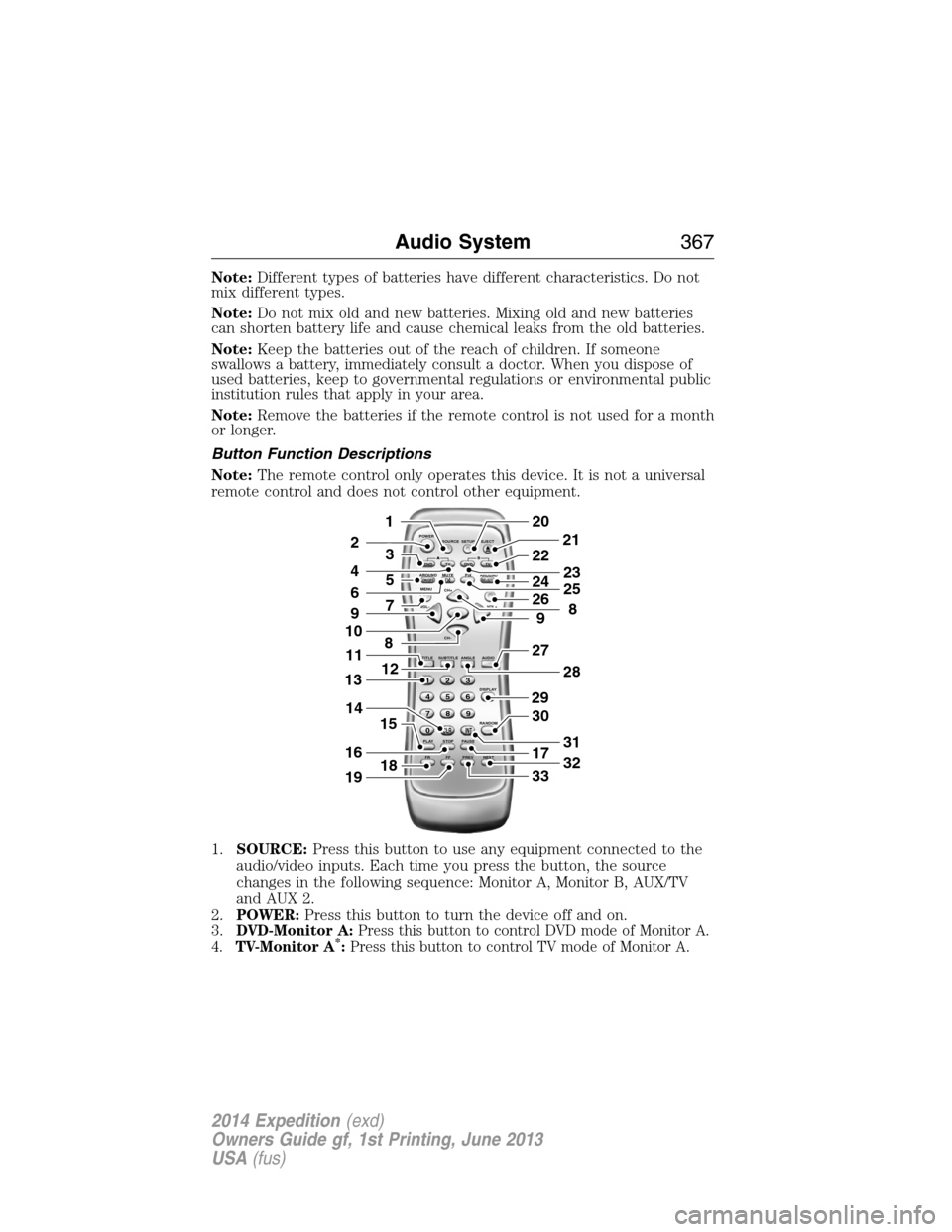
1.SOURCE:Press this button to use any equipment connected to the
audio/video inputs. Each time you press the button, the source
changes in the following sequence: Monitor A, Monitor B, AUX/TV
and AUX 2.
2.POWER:Press this button to turn the device off and on.
3.
DVD-Monitor A:Press this button to control DVD mode of Monitor A.
4.TV-Monitor A*:Press this button to control TV mode of Monitor A.
POWER
SOURCE
A
SOUND
AROUNDSOUND
AROUND MUTE
MENU REPEAT
CH+
CH-
TITLESUBTITLE ANGLE AUDIO
DISPLAY
RANDOM
PLAY
123
6 5 4
789
0
CLR INT
FR FF PREV NEXTSTOP PAUSE VOL- VOL+PIX A
D
VD
ON/OFFSELECT
TV DVD TVSETUP EJECTB
5
9
29
27
30
17
33
28
32
31
201
2
7
8
12
4
3
15
21
22
24
2625
8
23
6
9
10
16
13
18
11
14
19
Audio System367
2014 Expedition(exd)
Owners Guide gf, 1st Printing, June 2013
USA(fus)
Page 369 of 519
5.SOUND AROUND ON/OFF*:Press this button to turn the FM
transmitter off and on.
6.MUTE:Press this button to turn off the sound sent to the headphones.
The screen displays that the sound is muted. Pressing the button again
restores sound to the previously set level. This feature is only
functional in DVD mode.
7.MENU:Press this button to go to the disc’s root menu.
8.CH + and CH -:
•In DVD mode, press these buttons to move the select bar to items
among the menu or file list.
•In TV mode, press these buttons to go to the next channel or
previous channel.
•In on-screen display mode, press these buttons to change the
setting of a selected item.
9.VOL + and VOL -:
•In DVD mode, press these buttons to move the select bar to items
to one of the items in the menu or file list.
•When not in on-screen display mode, press these buttons to change
the volume of the playing media.
10.ENTER:Press this button to select from the on-screen display, or
begin disc playback.
11.TITLE:Press this button to go to a disc’s title menu.
12.SUBTITLE:If a disc has subtitle options, press this button to display
the subtitle menu. Keep pressing the button until you reach your
desired option.
13.Numbers:Decimal numbers: 0 to 9.
14.CLR:Press this button to clear any numeric input from the number
keypad.
15.P L AY:Press this button to play a disc in the DVD player.
16.STOP:Press this button to stop the playing media.
•Pressing STOP once, then PLAY, resumes disc playback from where
it left off.
•Pressing STOP twice, then PLAY, resumes disc playback from the
beginning.
17.PAUSE:Press this button to pause the disc.
18.FR (Fast Rewind):Press this button to search the disc backward
continuously. There are five speed options to choose: 2X, 4X, 8X, 16X,
and 32X.
19.FF (Fast Forward):Press this button to search the disc forward
continuously. There are five speed options to choose: 2X, 4X, 8X, 16X,
and 32X.
20.SETUP:Press this button to navigate the Setup Menu. SeeHow to
use the DVD on-screen display (OSD) menufor more information.
368Audio System
2014 Expedition(exd)
Owners Guide gf, 1st Printing, June 2013
USA(fus)
Page 370 of 519
21.EJECT:Press this button to eject or load a disc.
22.TV-Monitor B*:Press this button to control TV mode of Monitor B.
23.DVD-Monitor B:Press this button to control DVD mode of Monitor
B.
24.SOUND AROUND SELECT
*:Press this button to select an FM
transmitter channel.
25.PIX:Press this button to access settings for BRIGHTNESS,
CONTRAST, SATURATION, HUE, SHARPNESS, IR HEADPHONE, and
RESET. When you find the desired setting, useCH +andCH -to
change the setting. The bar display automatically disappears if no
changes are made within six seconds, or if any button is pressed.
26.REPEAT:Press this button to switch the repeat mode by ALL, TITLE,
CHAPTER and cancel the repeat mode while playing DVD-video.
Other disc types such as VCD, CD, and SVCD only have two repeat
modes that you can select: TRACK and ALL.Note:Both repeat
functions of VCD and SVCD need the PBC status set to ON, when
available.
27.AUDIO:Press this button if a disc has different language options.
Press this button repeatedly until you reach your desired option.
28.ANGLE:Press this button to view with a different camera angle.
Press this button repeatedly until you have reached your desired
viewing angle. This feature is only available on DVDs that support
frames with multiple angles.
29.DISPLAY:Press this button display information on the screen
including title, chapter or track, time elapsed and time remaining.
You can also press this button to turn off the display.
30.RANDOM:Press this button to play titles in a random order
31.INT:Press this button to play each audio file for 10 seconds as a
review or scan.
32.NEXT:When a disc has more than one chapter, track or file, press
this button to move to the next chapter, track or file. Press the button
briefly during play to select the next chapter for DVD-video or track
and file for media such as VCD, SVCD, MP3 and CD.
33.PREV:When a disc has more than one chapter, track or file, press this
button to move to the previous chapter, track or file. Press the button
briefly during play to select the next chapter for DVD-video or track
and file for media such as VCD, SVCD, MP3 and CD.
*If available
Audio System369
2014 Expedition(exd)
Owners Guide gf, 1st Printing, June 2013
USA(fus)
Page 371 of 519
Turning the Device On and Off
1. Pivot the screen downward until you reach a comfortable viewing
angle.
2. PressPOWERon the lower-left corner of the front panel or on the
remote control. The controls illuminate when the system is in use.
3. When the device is on and is displaying a picture, pivot the screen to
change the viewing angle to optimize the picture quality.
4. Remember to turn the device off and pivot the LCD panel to the
locked position when not in use.
DVD Basics
To get the most use out of each DVD, make sure you read this section
completely.
Regional Coding
Both the DVD player and disc have specific region codes. These regional
codes must match in order for the disc to play. If the codes do not
match, the disc does not play. The system is set to the region code
designated for your area by the DVD Copy Control Association. Other
regions do not play in this system.
Loading and Playing Discs
When you pressPOWER,the system turns on in DVD mode. Place the
disc about halfway into the disc compartment slot, with the disc’s label
facing the rear of your vehicle. Insert the disc straight into the player; do
not insert the disc at an angle.
The disc loads automatically and begins to play. Some discs start at the
root menu, where you have to select disc play manually.
Depending on the disc and playback location on the disc, the icon may
display in the upper-left corner of the screen indicating that still
playback is not possible.
Notes
•To keep a disc clean, do not touch its surface. Handle the disc by its
edge.
•Keep your discs in their cases or disc magazines when not in use.
Also, do not subject a disc to heat or high temperatures. Avoid
leaving them in a parked vehicle, on a dashboard or on a rear tray.
•Do not attach labels, or use discs with sticky ink or residue. Such
discs may stop spinning, causing a system malfunction, or ruining the
disc.
370Audio System
2014 Expedition(exd)
Owners Guide gf, 1st Printing, June 2013
USA(fus)
Page 372 of 519
•Do not use any discs with labels or stickers attached. The following
malfunctions may result from using such discs:
•The system cannot eject a disc due to a label or sticker peeling off
and jamming the eject mechanism.
•The system cannot read audio data correctly, such as playback
skipping or no playback at all, due to heat shrinking of a sticker or
label causing the disc to warp.
•Before playing a disc, clean it with a commercially available cleaning
cloth. Wipe each disc from the center out. Do not use solvents such
as benzene, thinner, commercially available cleaners, or antistatic
spray intended for analog discs.
•Do not use any irregularly shaped discs. If you insert an irregular,
non-round, shaped disc, it may jam in the DVD player or not play
properly.
How to Use the DVD On-screen Display Menus
You can use the on-screen display menu screen to adjust all the settings
on your screen.
General Setup
PressSETUPon the remote control, and then useCH +, CH -, VOL +
andVOL -to navigate the Setup Page. PressENTERto make a
selection, and thenVOL -to return to the submenu.
To exit the Setup Display, pressSETUPagain.
OSD Language
The OSD Lang submenu allows the user to select the language for the
on-screen display. PressVOL +,and then useCH +andCH -on the
remote control to select the desired language. The user can select
English, Simple/Traditional Chinese, French, German, Italian, Spanish,
Portuguese or Korean. PressENTERto make a selection, and thenVOL
-to return to the submenu.
Angle Mark
The angle mark is an option for different viewing angles on the DVD.
PressVOL +andVOL -to turn the angle mark setting off and on. Press
ENTERto make a selection, and thenVOL -to return to the submenu.
Audio Setup
PressSETUPon the remote control, and then useCH +, CH -, VOL +
andVOL -to navigate the Setup Page. PressENTERto make a
selection, and thenVOL -to return to the submenu.
Audio System371
2014 Expedition(exd)
Owners Guide gf, 1st Printing, June 2013
USA(fus)
Page 374 of 519
How to Use the Device On-screen Display Menus
PressSETUPon the remote control, and then useCH +, CH -, VOL +
andVOL -to navigate the Setup Page. PressENTERto make a
selection, and thenVOL -to return to the submenu.
Audio
This allows the user to control the audio stream in the selected language
for playback automatically.
Subtitle
This allows the user to turn the subtitles on and off in the selected
language for playback automatically.
Disc Menu
This allows the user to control the DVD disc menu in the selected language.
Parental
This section of the Setup Menu allows user to control the content of
movie playback from G to ADULT. The parental control function allows
you to limit viewing to your preference. The rating levels are 1 through 8
and are country-dependent.
After navigating to the Parental submenu, useVOL +and theCH +and
CH -buttons to select:
•KID SAFE (Children)
•G
•PG
•PG 13
•PGR
•R
•NC 17
•ADULT
Note:The lower you make the value, the stricter the limitation is.
Password
PressSETUPand navigate to the Password submenu under the
Password Setup Page.
1. PressVOL +,and then pressENTERon the remote control to enter
the submenu.
2. Input the old six-digit password or the default password. The default
password is 136900.
3. Input a new six-digit password using the numeric buttons.
4. Confirm the new password by entering the same new password again.
5. Scroll to OK, and then pressENTERto finish.
Audio System373
2014 Expedition(exd)
Owners Guide gf, 1st Printing, June 2013
USA(fus)
Page 375 of 519
Default
PressSETUPon the remote control, and then navigate to the Default
submenu under the Preference page usingCH +, CH -andVOL +.
PressVOL +,and then pressENTERto carry out the reset. This
function does not affect the parental settings.
Playing an Audio CD
When playing an audio CD, the DISPLAY banner appears automatically.
It displays the current track and the amount of time the track has been
playing, the total amount of time on the disc and the current time
running on the disc.
PressDISPLAYon the remote control to see the DISPLAY banner.
•PressDISPLAYonce: Single Elapsed appears along with the current
track playing and the time of that track.
•PressDISPLAYtwice: Single Remain appears along with the current
track playing and the amount of time left.
•PressDISPLAYthree times: Total Elapsed appears along with the
current track playing and the total time playing on CD.
•PressDISPLAYfour times: Total Remain appears along with the
current track playing and the amount of time left on CD.
Press theREPEATon the remote control to repeat either the currently
playing track or the entire CD.
Playing an MP3 Disc
MP3 is a format for storing digital audio. An audio CD-quality song
compressed into the MP3 format has very little loss of quality, while
taking up much less space. You can play CD-R discs encoded in MP3
format in your DVD player.
Selecting Folders and Songs
When you insert an MP3 disc in the player, an MP3 audio-navigation
screen appears automatically. You can change folders and songs by
navigating the file system. The DVD player plays the songs in the order
you burned them to the disc.
1. If a disc is playing, pressDISPLAYon the remote control, and then
pressCH +andCH -to go through the folder list on the left side of
the navigation screen.
2. Highlight the folder you want, and then pressENTER.
3. PressCH +andCH -to go through the song list and highlight the
song you want. PressENTERto begin playing the highlighted song.
374Audio System
2014 Expedition(exd)
Owners Guide gf, 1st Printing, June 2013
USA(fus)