ECO mode FORD EXPEDITION 2014 3.G User Guide
[x] Cancel search | Manufacturer: FORD, Model Year: 2014, Model line: EXPEDITION, Model: FORD EXPEDITION 2014 3.GPages: 519, PDF Size: 6.9 MB
Page 109 of 519
Compass calibration adjustment
Note:For optimum calibration, drive to an open, level location away
from large metallic objects or structures. Switch off all non-essential
electrical accessories (heated rear window, heater, A/C, map lamps,
wiper, etc.) and make sure all the doors are closed
Note:If the SELECT/RESET stem is pressed during the calibration or
three minutes has elapsed since the beginning of the calibration without
driving the vehicle, the message center reverts back to normal operation
and the CAL will display until a successful calibration is carried out.
1. Press and release the SELECT/RESET stem to scroll through the
information displays until the message center displays HOLD RESET
FOR SETUP MENU.
2. Press and hold the SELECT/RESET stem to get into the setup menu.
Repeatedly press it again to scroll through the setup menu until the
message center displays HOLD RESET FOR CALIBRATION.
3. Press and hold the SELECT/RESET stem for approximately two
seconds until the message center enters the compass zone adjustment
mode.
4. Press and hold the SELECT/RESET stem until the message center
displays CIRCLE SLOWLY TO CALIBRATE.
5. Slowly drive the vehicle in a circle less than 3 mph (5 km/h ) until the
CIRCLE SLOWLY TO CALIBRATE message changes to CALIBRATION
COMPLETED. This may require up to five circles to complete the
calibration.
•TBC GAIN (if equipped): Displays the level of trailer brake gain or if
the trailer is not connected.
System Check and Vehicle Feature Customization
Note:When returning to the setup menu and a non-English language
has been selected, HOLD RESET FOR ENGLISH will be displayed to
change back to English. Press and hold the SELECT/RESET stem to
change back to English.
Note:Some systems show a message only if a condition is present.
108Information Displays
2014 Expedition(exd)
Owners Guide gf, 1st Printing, June 2013
USA(fus)
Page 110 of 519
Press and hold the SELECT/RESET stem to get into the setup menu
sequence for the following displays:
SETUP
HOLD RESET
FOR SYSTEM
CHECKpress and hold
the
SELECT/RESET
stemOIL LIFE
CHARGING SYSTEM
WASHER FLUID LEVEL
DOOR AJAR STATUS
LIFTGATE/GLASS AJAR STATUS
BRAKE SYSTEM
MYKEY DISTANCE
(if programmed)
X MYKEYS PROGRAMMED
X ADMIN KEYS PROGRAMMED
MILES TO EMPTY
TBC GAIN = XX.X (if equipped)
OIL LIFE
UNITS ENG /
METRICpress and hold
the
SELECT/RESET
stemEnglish or Metric
AUTOLAMP 0 to 180 seconds
AUTOLOCK On or Off
AUTOUNLOCK On or Off
TRAILER SWAY
(if equipped)On or Off
TBC MODE Electric or EOH
CREATE MYKEY / MYKEY SETUP / CLEAR MYKEY
LANGUAGE =
ENGLISH /
SPANISH /
FRENCHpress and hold
the
SELECT/RESET
stemEnglish / Spanish / French
•HOLD RESET FOR SYSTEM CHECK: The message center will begin
to cycle through the vehicle systems and provide a status of the item
if needed. Some systems show a message only if a condition is
present.
Information Displays109
2014 Expedition(exd)
Owners Guide gf, 1st Printing, June 2013
USA(fus)
Page 111 of 519
•OIL LIFE: This displays the remaining oil life. An oil change is
required whenever indicated by the message center and according to
the recommended maintenance schedule. USE ONLY
RECOMMENDED ENGINE OILS.
To reset the oil monitoring system to 100% after each oil change,
perform the following:
1. Press and release the SETUP button to display “OIL LIFE XXX%
HOLD RESET = NEW”.
2. Press and hold the RESET button for two seconds and release to reset
the oil life to 100%.
Note:To change oil life 100% value (if equipped with this feature) to
another value, proceed to Step 3.
3. Once “OIL LIFE SET TO XXX%” is displayed, release and press the
RESET button to change the Oil Life Start Value. Each release and press
will reduce the value by 10%.
•UNITS ENG / METRIC: Displays the current units in English or Metric.
•AUTOLAMP: This feature keeps your headlights on for up to three
minutes after the ignition is switched off.
•AUTOLOCK: This feature automatically locks all vehicle doors when
the vehicle is shifted into any gear, putting the vehicle in motion.
•AUTOUNLOCK: This feature automatically unlocks all vehicle doors
when the driver’s door is opened within 10 minutes of the ignition
being turned off.
•TRAILER SWAY (if equipped): This feature uses the electronic
stability control to mitigate trailer sway.
•TBC MODE (if equipped): Allows you to choose the trailer brake
mode.
•CREATE MYKEY / MYKEY SETUP / CLEAR MYKEY: For more
information refer to theMyKey®chapter.
•LANGUAGE = ENGLISH / SPANISH / FRENCH: Allows you to choose
which language the message center will display in.
Waiting four seconds or pressing the SELECT/RESET stem cycles the
message center through each of the language choices.
Press the SELECT/RESET stem to set the language choice when the
language you want appears.
11 0Information Displays
2014 Expedition(exd)
Owners Guide gf, 1st Printing, June 2013
USA(fus)
Page 112 of 519
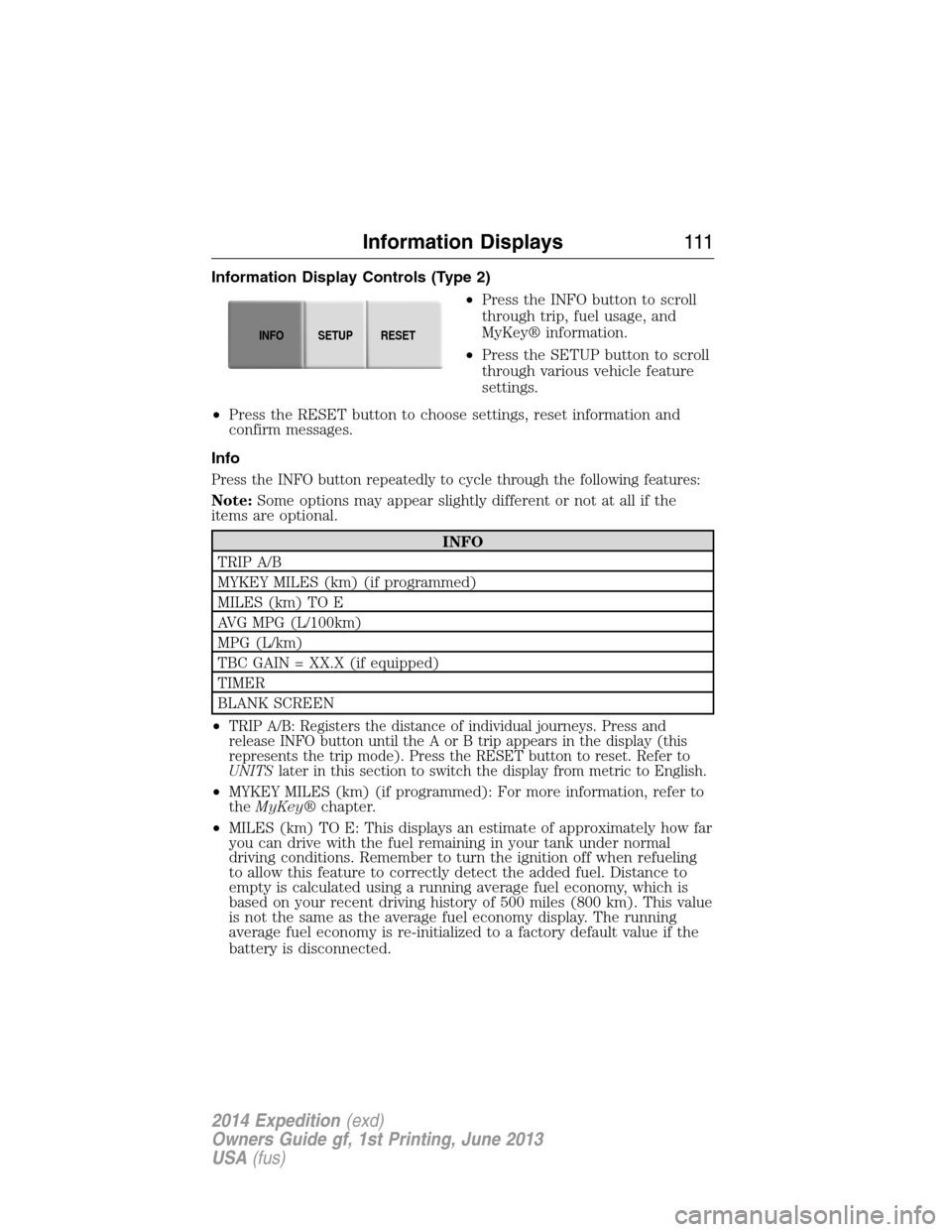
Information Display Controls (Type 2)
•Press the INFO button to scroll
through trip, fuel usage, and
MyKey® information.
•Press the SETUP button to scroll
through various vehicle feature
settings.
•Press the RESET button to choose settings, reset information and
confirm messages.
Info
Press the INFO button repeatedly to cycle through the following features:
Note:Some options may appear slightly different or not at all if the
items are optional.
INFO
TRIP A/B
MYKEY MILES (km) (if programmed)
MILES (km) TO E
AVG MPG (L/100km)
MPG (L/km)
TBC GAIN = XX.X (if equipped)
TIMER
BLANK SCREEN
•
TRIP A/B: Registers the distance of individual journeys. Press and
release INFO button until the A or B trip appears in the display (this
represents the trip mode). Press the RESET button to reset. Refer to
UNITSlater in this section to switch the display from metric to English.
•MYKEY MILES (km) (if programmed): For more information, refer to
theMyKey®chapter.
•MILES (km) TO E: This displays an estimate of approximately how far
you can drive with the fuel remaining in your tank under normal
driving conditions. Remember to turn the ignition off when refueling
to allow this feature to correctly detect the added fuel. Distance to
empty is calculated using a running average fuel economy, which is
based on your recent driving history of 500 miles (800 km). This value
is not the same as the average fuel economy display. The running
average fuel economy is re-initialized to a factory default value if the
battery is disconnected.
INFOSETUP
RESET
Information Displays111
2014 Expedition(exd)
Owners Guide gf, 1st Printing, June 2013
USA(fus)
Page 114 of 519
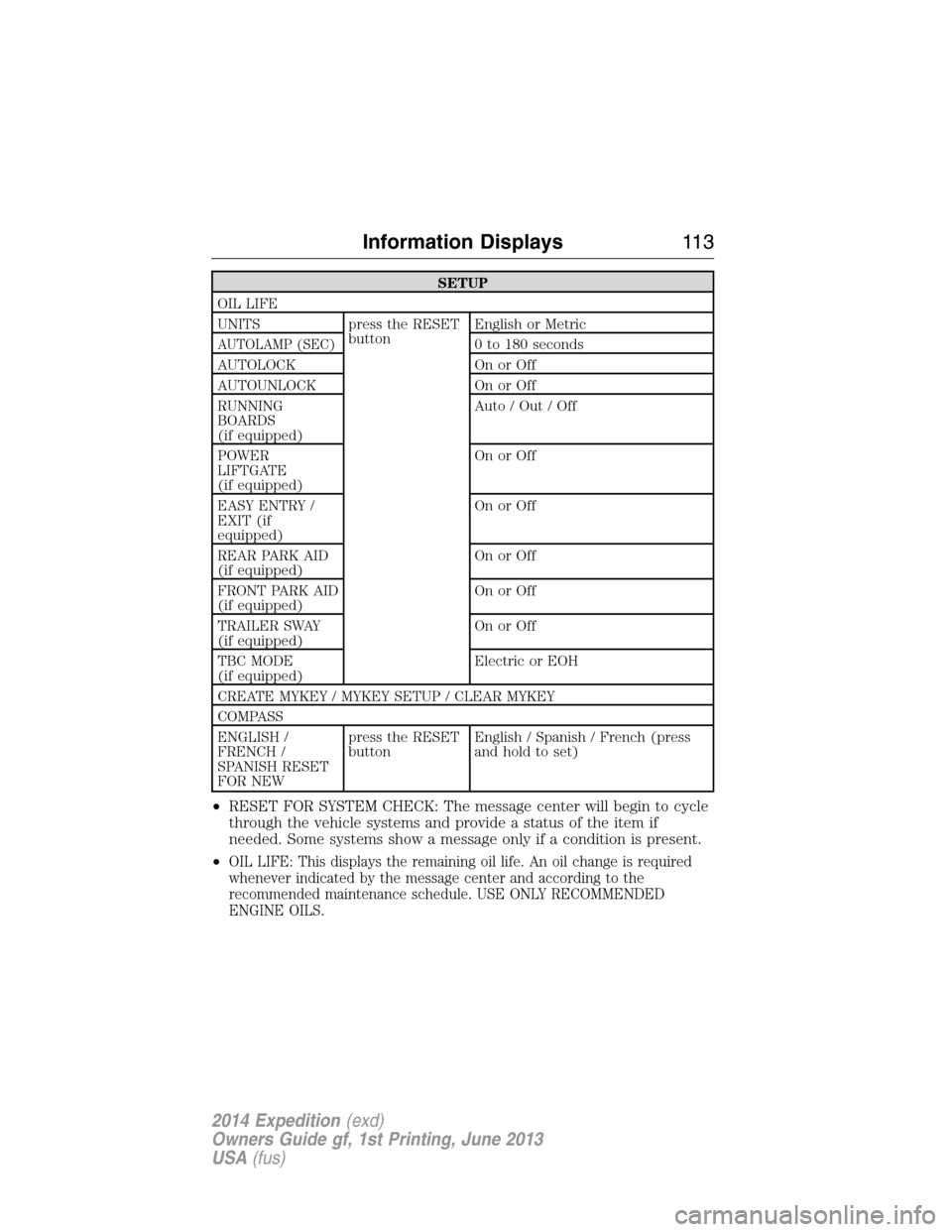
SETUP
OIL LIFE
UNITS press the RESET
buttonEnglish or Metric
AUTOLAMP (SEC)0 to 180 seconds
AUTOLOCK On or Off
AUTOUNLOCK On or Off
RUNNING
BOARDS
(if equipped)Auto / Out / Off
POWER
LIFTGATE
(if equipped)On or Off
EASY ENTRY /
EXIT (if
equipped)On or Off
REAR PARK AID
(if equipped)On or Off
FRONT PARK AID
(if equipped)On or Off
TRAILER SWAY
(if equipped)On or Off
TBC MODE
(if equipped)Electric or EOH
CREATE MYKEY / MYKEY SETUP / CLEAR MYKEY
COMPASS
ENGLISH /
FRENCH /
SPANISH RESET
FOR NEWpress the RESET
buttonEnglish / Spanish / French (press
and hold to set)
•RESET FOR SYSTEM CHECK: The message center will begin to cycle
through the vehicle systems and provide a status of the item if
needed. Some systems show a message only if a condition is present.
•
OIL LIFE: This displays the remaining oil life. An oil change is required
whenever indicated by the message center and according to the
recommended maintenance schedule. USE ONLY RECOMMENDED
ENGINE OILS.
Information Displays11 3
2014 Expedition(exd)
Owners Guide gf, 1st Printing, June 2013
USA(fus)
Page 115 of 519
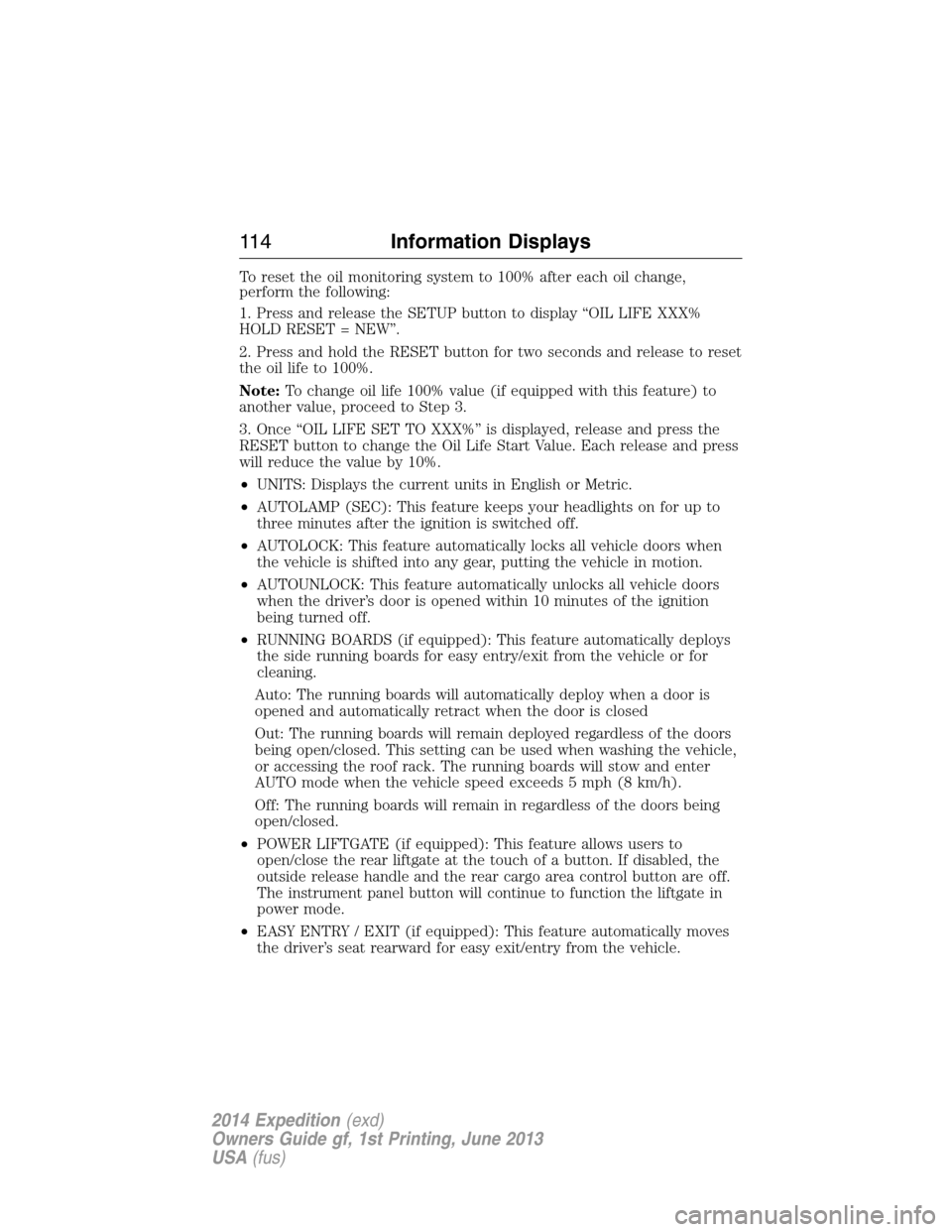
To reset the oil monitoring system to 100% after each oil change,
perform the following:
1. Press and release the SETUP button to display “OIL LIFE XXX%
HOLD RESET = NEW”.
2. Press and hold the RESET button for two seconds and release to reset
the oil life to 100%.
Note:To change oil life 100% value (if equipped with this feature) to
another value, proceed to Step 3.
3. Once “OIL LIFE SET TO XXX%” is displayed, release and press the
RESET button to change the Oil Life Start Value. Each release and press
will reduce the value by 10%.
•UNITS: Displays the current units in English or Metric.
•AUTOLAMP (SEC): This feature keeps your headlights on for up to
three minutes after the ignition is switched off.
•AUTOLOCK: This feature automatically locks all vehicle doors when
the vehicle is shifted into any gear, putting the vehicle in motion.
•AUTOUNLOCK: This feature automatically unlocks all vehicle doors
when the driver’s door is opened within 10 minutes of the ignition
being turned off.
•RUNNING BOARDS (if equipped): This feature automatically deploys
the side running boards for easy entry/exit from the vehicle or for
cleaning.
Auto: The running boards will automatically deploy when a door is
opened and automatically retract when the door is closed
Out: The running boards will remain deployed regardless of the doors
being open/closed. This setting can be used when washing the vehicle,
or accessing the roof rack. The running boards will stow and enter
AUTO mode when the vehicle speed exceeds 5 mph (8 km/h).
Off: The running boards will remain in regardless of the doors being
open/closed.
•POWER LIFTGATE (if equipped): This feature allows users to
open/close the rear liftgate at the touch of a button. If disabled, the
outside release handle and the rear cargo area control button are off.
The instrument panel button will continue to function the liftgate in
power mode.
•EASY ENTRY / EXIT (if equipped): This feature automatically moves
the driver’s seat rearward for easy exit/entry from the vehicle.
11 4Information Displays
2014 Expedition(exd)
Owners Guide gf, 1st Printing, June 2013
USA(fus)
Page 146 of 519
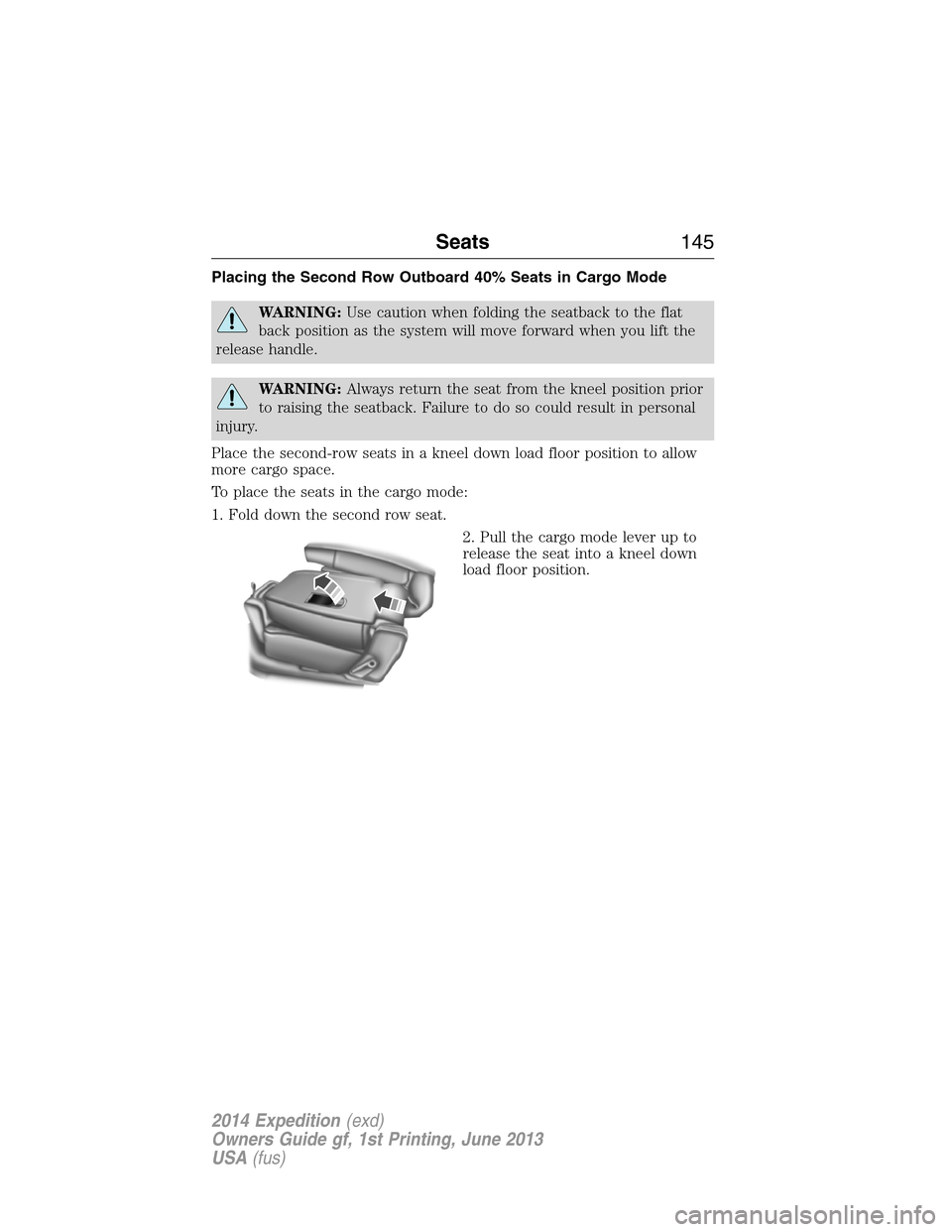
Placing the Second Row Outboard 40% Seats in Cargo Mode
WARNING:Use caution when folding the seatback to the flat
back position as the system will move forward when you lift the
release handle.
WARNING:Always return the seat from the kneel position prior
to raising the seatback. Failure to do so could result in personal
injury.
Place the second-row seats in a kneel down load floor position to allow
more cargo space.
To place the seats in the cargo mode:
1. Fold down the second row seat.
2. Pull the cargo mode lever up to
release the seat into a kneel down
load floor position.
Seats145
2014 Expedition(exd)
Owners Guide gf, 1st Printing, June 2013
USA(fus)
Page 156 of 519
Note:Make sure you keep the original remote control transmitter for
use in other vehicles as well as for future system programming.
Note:We recommend that upon the sale or lease termination of your
vehicle, you erase the programmed function buttons for security reasons.
SeeErasing the Function Button Codeslater in this section.
Note:You can program a maximum of three devices. To change or
replace any of the three devices after it has been initially programmed,
you must first erase the current settings. SeeErasing the Function
Button Codeslater in this section.
Note:Programming the system to a community gate will require a
unique set of instructions depending on the gate system model. Contact
the help line at 1-866-572-2728 for further information.
Note:If you accidently enter the program mode by pressing and
releasing the outer two buttons or all three buttons simultaneously, do
not press any button until the module times out after a few seconds and
resets to normal mode. When the module has timed out, all three LED
lamps will flash rapidly for a few seconds then turn off. Any settings
should remain as previously set.
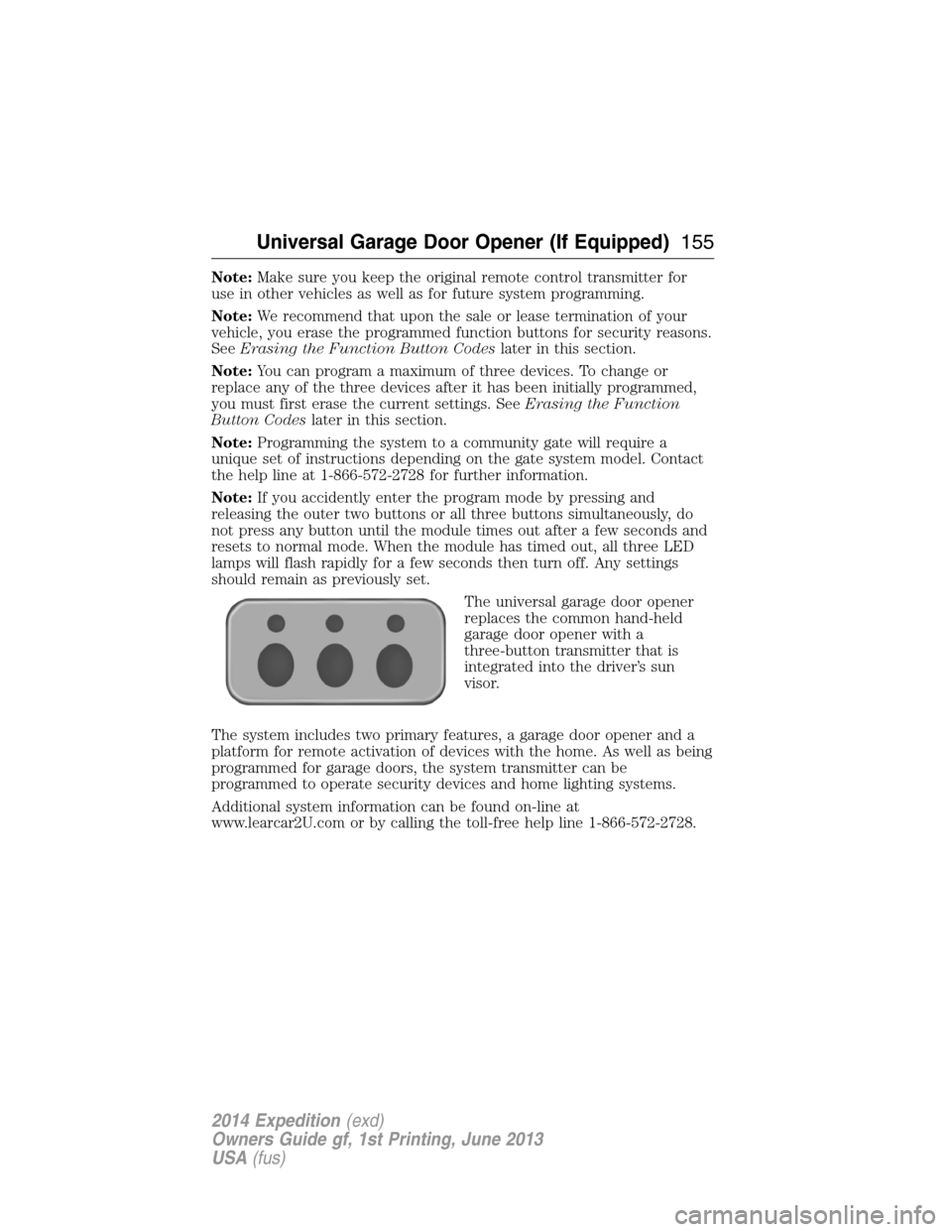
The universal garage door opener
replaces the common hand-held
garage door opener with a
three-button transmitter that is
integrated into the driver’s sun
visor.
The system includes two primary features, a garage door opener and a
platform for remote activation of devices with the home. As well as being
programmed for garage doors, the system transmitter can be
programmed to operate security devices and home lighting systems.
Additional system information can be found on-line at
www.learcar2U.com or by calling the toll-free help line 1-866-572-2728.
Universal Garage Door Opener (If Equipped)155
2014 Expedition(exd)
Owners Guide gf, 1st Printing, June 2013
USA(fus)
Page 162 of 519
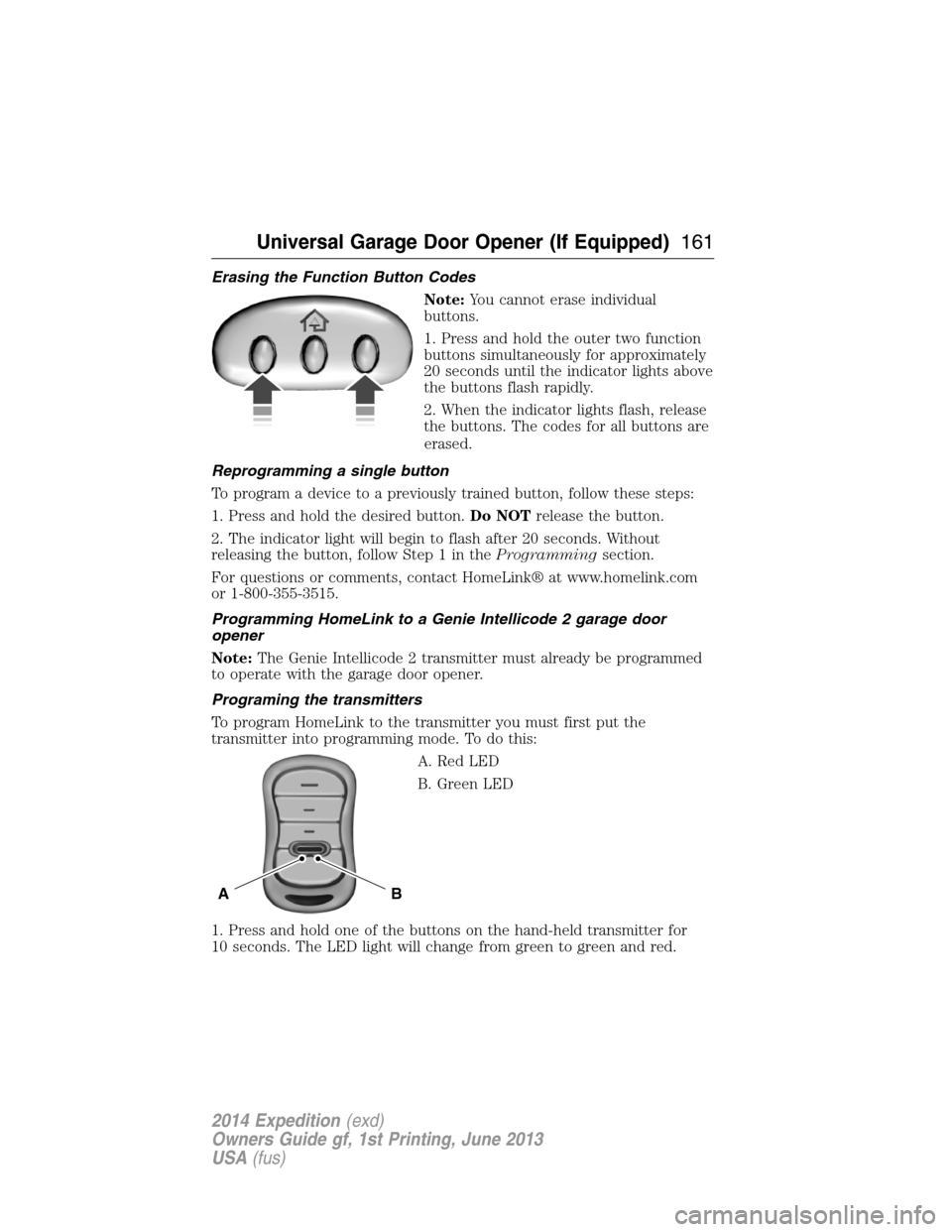
Erasing the Function Button Codes
Note:You cannot erase individual
buttons.
1. Press and hold the outer two function
buttons simultaneously for approximately
20 seconds until the indicator lights above
the buttons flash rapidly.
2. When the indicator lights flash, release
the buttons. The codes for all buttons are
erased.
Reprogramming a single button
To program a device to a previously trained button, follow these steps:
1. Press and hold the desired button.Do NOTrelease the button.
2. The indicator light will begin to flash after 20 seconds. Without
releasing the button, follow Step 1 in theProgrammingsection.
For questions or comments, contact HomeLink® at www.homelink.com
or 1-800-355-3515.
Programming HomeLink to a Genie Intellicode 2 garage door
opener
Note:The Genie Intellicode 2 transmitter must already be programmed
to operate with the garage door opener.
Programing the transmitters
To program HomeLink to the transmitter you must first put the
transmitter into programming mode. To do this:
A. Red LED
B. Green LED
1. Press and hold one of the buttons on the hand-held transmitter for
10 seconds. The LED light will change from green to green and red.
BA
Universal Garage Door Opener (If Equipped)161
2014 Expedition(exd)
Owners Guide gf, 1st Printing, June 2013
USA(fus)
Page 163 of 519
2. Press the same button twice to confirm the change to Programming
mode. If done properly the LED light will appear red.
3. Hold the transmitter within 1–3 inches (2–8 centimeters) of the
button on the sun visor you want to program.
4. Press and hold both the programmed Genie button on the hand-held
transmitter and the button on the sun visor you want to program. The
indicator light on the sun visor will flash rapidly when the programming
is successful.
Note:the Genie transmitter will transmit for up to 30 seconds. If
HomeLink does not program within 30 seconds the Genie transmitter will
need to be pressed again. If the Genie transmitter LED displays green
and red, release the button until the LED turns off before pressing the
button again.
Once HomeLink has been programmed successfully, the Genie
transmitter must be changed out of program mode. To do this:
1. Press and hold the previously programmed Genie button on the
hand-held transmitter for 10 seconds. The indicator light will change
from red to red and green.
2. Press the same button twice to confirm the change. If done correctly
the LED will turn green.
Programming HomeLink to the Genie Intellicode garage door
opener motor
Note:You may need a ladder to access the garage door opener motor.
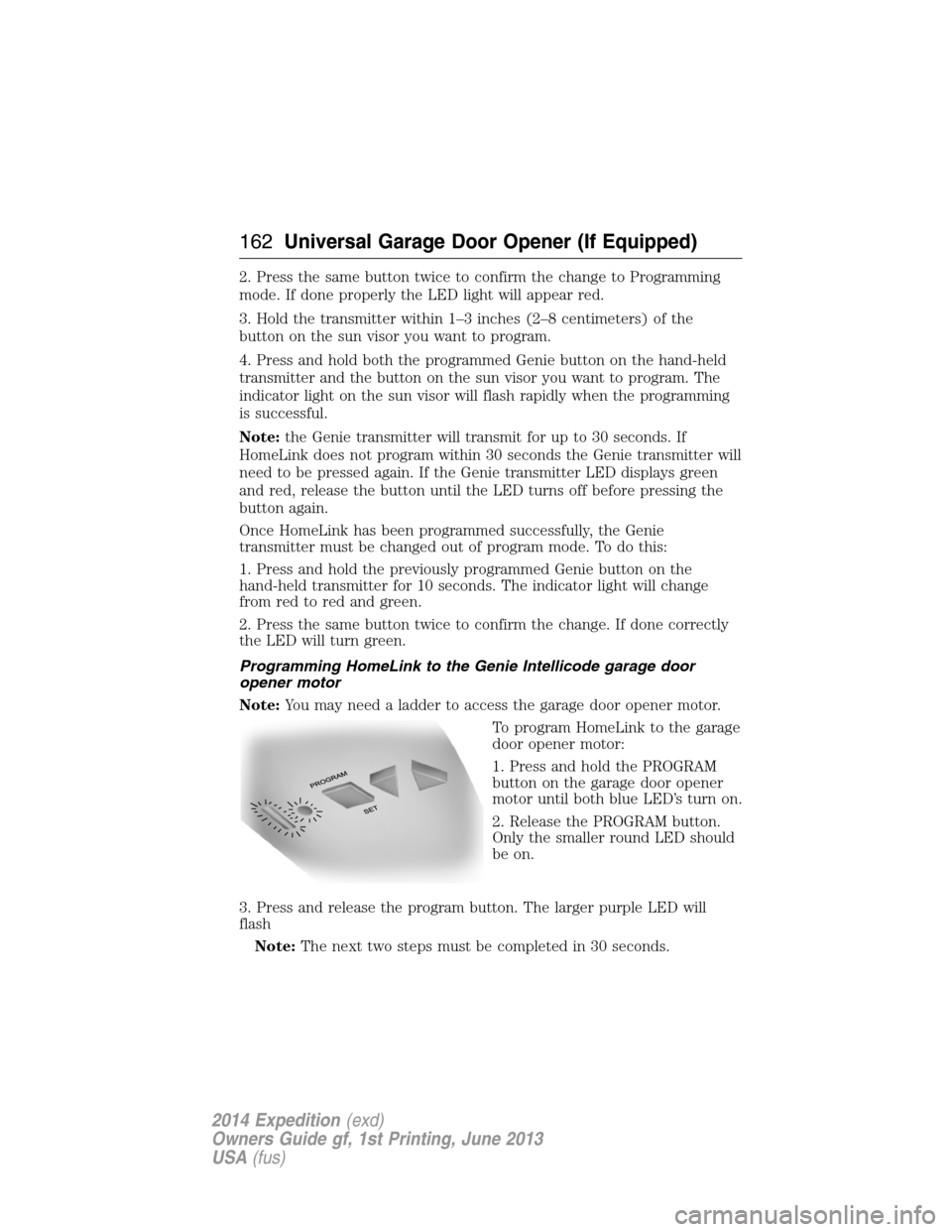
To program HomeLink to the garage
door opener motor:
1. Press and hold the PROGRAM
button on the garage door opener
motor until both blue LED’s turn on.
2. Release the PROGRAM button.
Only the smaller round LED should
be on.
3. Press and release the program button. The larger purple LED will
flash
Note:The next two steps must be completed in 30 seconds.
162Universal Garage Door Opener (If Equipped)
2014 Expedition(exd)
Owners Guide gf, 1st Printing, June 2013
USA(fus)