engine FORD EXPEDITION 2014 3.G User Guide
[x] Cancel search | Manufacturer: FORD, Model Year: 2014, Model line: EXPEDITION, Model: FORD EXPEDITION 2014 3.GPages: 519, PDF Size: 6.9 MB
Page 100 of 519
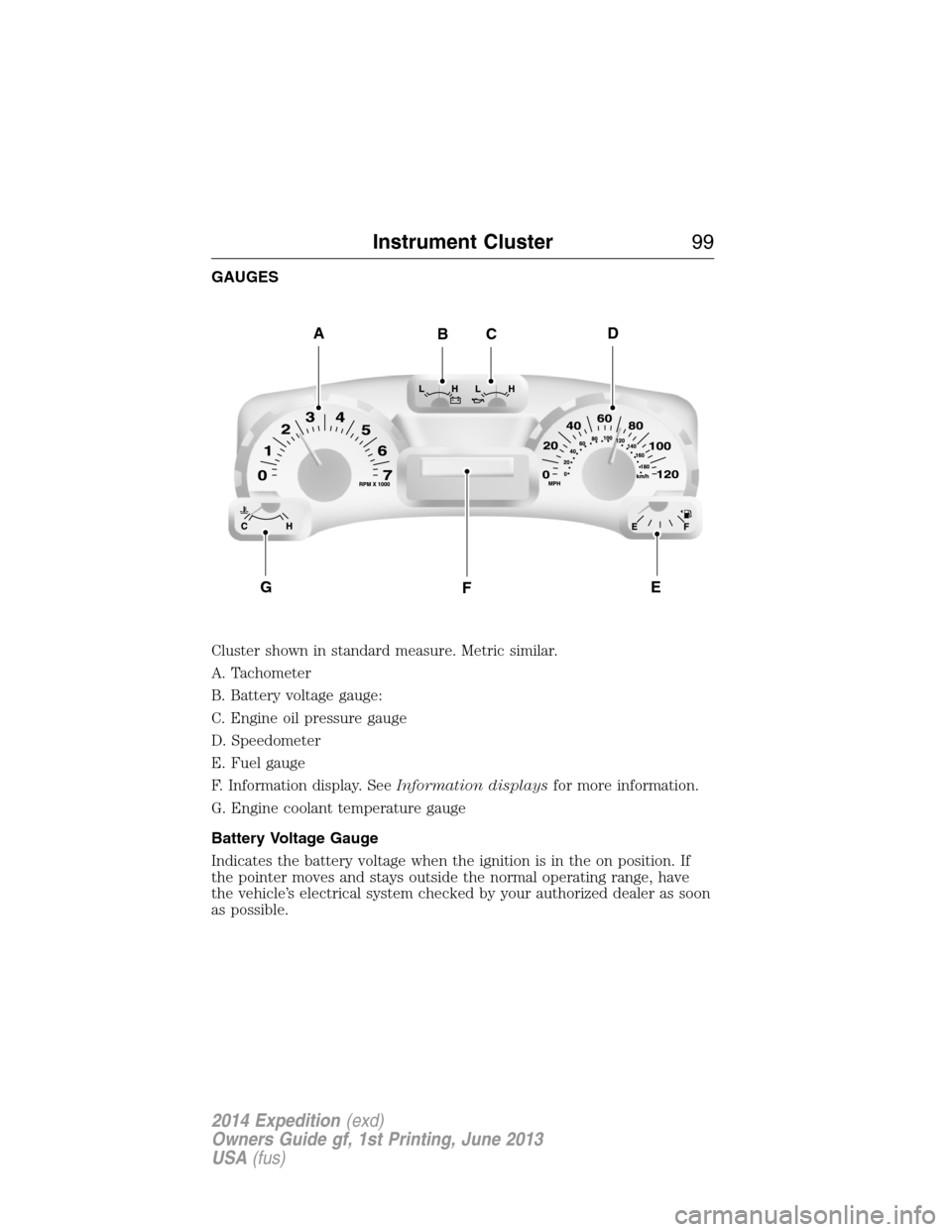
GAUGES
Cluster shown in standard measure. Metric similar.
A. Tachometer
B. Battery voltage gauge:
C. Engine oil pressure gauge
D. Speedometer
E. Fuel gauge
F. Information display. SeeInformation displaysfor more information.
G. Engine coolant temperature gauge
Battery Voltage Gauge
Indicates the battery voltage when the ignition is in the on position. If
the pointer moves and stays outside the normal operating range, have
the vehicle’s electrical system checked by your authorized dealer as soon
as possible.
ADBC
FGE
Instrument Cluster99
2014 Expedition(exd)
Owners Guide gf, 1st Printing, June 2013
USA(fus)
Page 101 of 519
Engine Oil Pressure Gauge
Indicates engine oil pressure. The needle should stay in the normal
operating range. If the needle falls below the normal range, stop the
vehicle, turn off the engine and check the engine oil level. Add oil if
needed. If the oil level is correct, have your vehicle checked at your
authorized dealer.
Fuel Gauge
Indicates approximately how much fuel is left in the fuel tank (when the
ignition is on). The fuel gauge may vary slightly when the vehicle is in
motion or on a grade. The fuel icon and arrow indicates which side of
the vehicle the fuel filler door is located.
Information Display
Odometer
Located in the bottom of the information display Registers the
accumulated distance your vehicle has travelled.
Trip Computer
SeeTrip A/BinInformation Displays.
Vehicle Settings and Personalization
SeeInformation Displays.
Engine Coolant Temperature Gauge
Indicates engine coolant temperature. At normal operating temperature,
the level indicator will be in the normal range. If the engine coolant
temperature exceeds the normal range, stop the vehicle as soon as safely
possible, switch off the engine and let the engine cool.
WARNING:Never remove the coolant reservoir cap while the
engine is running or hot.
100Instrument Cluster
2014 Expedition(exd)
Owners Guide gf, 1st Printing, June 2013
USA(fus)
Page 103 of 519
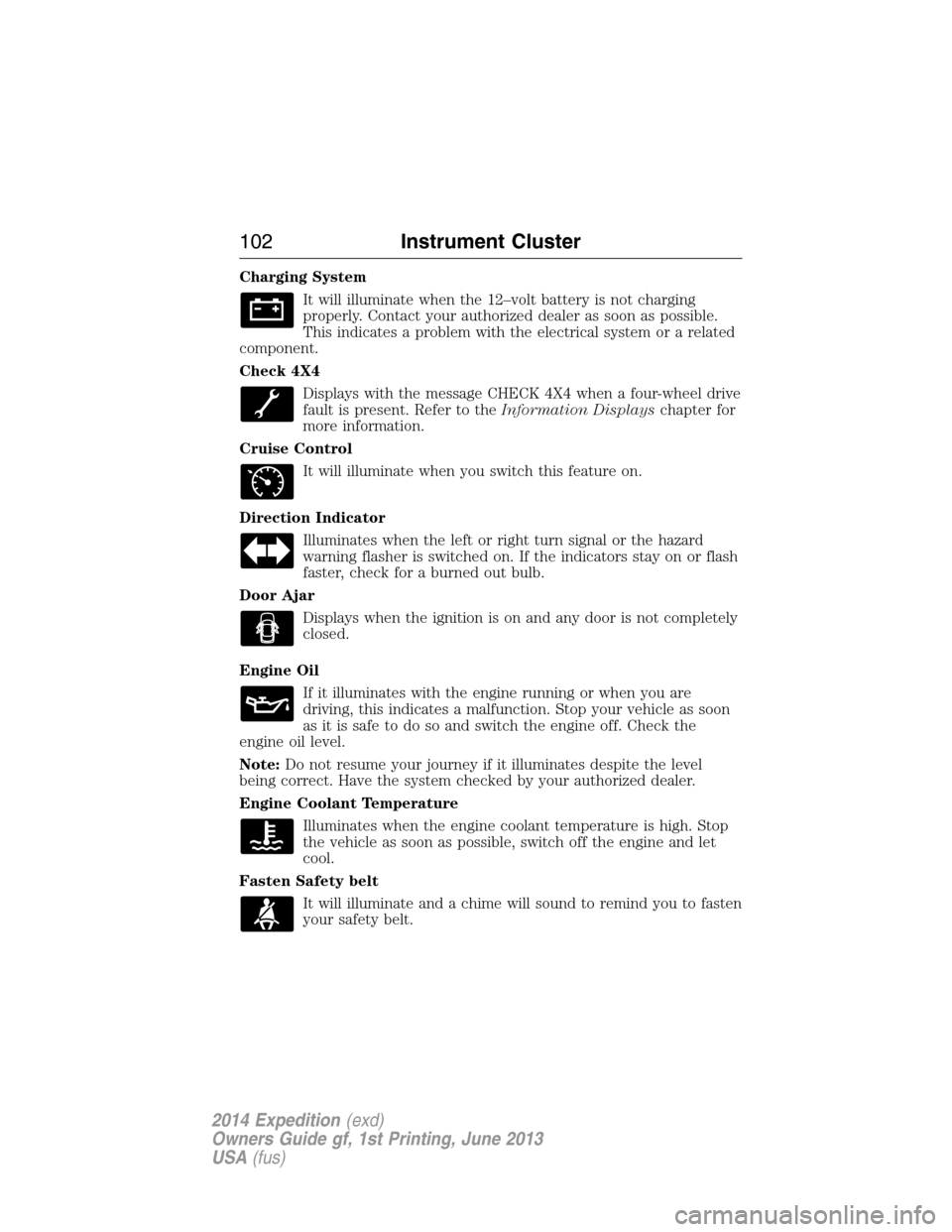
Charging System
It will illuminate when the 12–volt battery is not charging
properly. Contact your authorized dealer as soon as possible.
This indicates a problem with the electrical system or a related
component.
Check 4X4
Displays with the message CHECK 4X4 when a four-wheel drive
fault is present. Refer to theInformation Displayschapter for
more information.
Cruise Control
It will illuminate when you switch this feature on.
Direction Indicator
Illuminates when the left or right turn signal or the hazard
warning flasher is switched on. If the indicators stay on or flash
faster, check for a burned out bulb.
Door Ajar
Displays when the ignition is on and any door is not completely
closed.
Engine Oil
If it illuminates with the engine running or when you are
driving, this indicates a malfunction. Stop your vehicle as soon
as it is safe to do so and switch the engine off. Check the
engine oil level.
Note:Do not resume your journey if it illuminates despite the level
being correct. Have the system checked by your authorized dealer.
Engine Coolant Temperature
Illuminates when the engine coolant temperature is high. Stop
the vehicle as soon as possible, switch off the engine and let
cool.
Fasten Safety belt
It will illuminate and a chime will sound to remind you to fasten
your safety belt.
102Instrument Cluster
2014 Expedition(exd)
Owners Guide gf, 1st Printing, June 2013
USA(fus)
Page 104 of 519
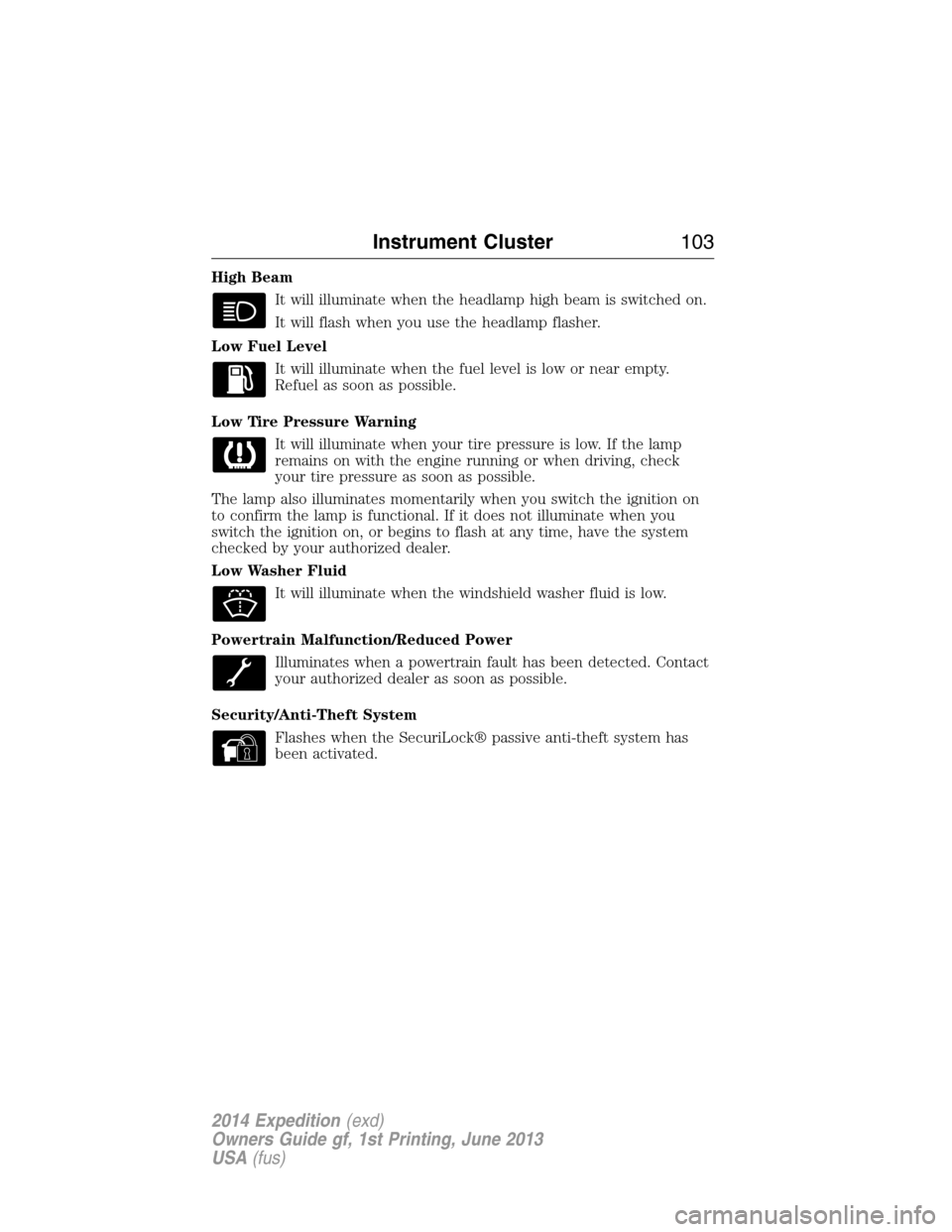
High Beam
It will illuminate when the headlamp high beam is switched on.
It will flash when you use the headlamp flasher.
Low Fuel Level
It will illuminate when the fuel level is low or near empty.
Refuel as soon as possible.
Low Tire Pressure Warning
It will illuminate when your tire pressure is low. If the lamp
remains on with the engine running or when driving, check
your tire pressure as soon as possible.
The lamp also illuminates momentarily when you switch the ignition on
to confirm the lamp is functional. If it does not illuminate when you
switch the ignition on, or begins to flash at any time, have the system
checked by your authorized dealer.
Low Washer Fluid
It will illuminate when the windshield washer fluid is low.
Powertrain Malfunction/Reduced Power
Illuminates when a powertrain fault has been detected. Contact
your authorized dealer as soon as possible.
Security/Anti-Theft System
Flashes when the SecuriLock® passive anti-theft system has
been activated.
Instrument Cluster103
2014 Expedition(exd)
Owners Guide gf, 1st Printing, June 2013
USA(fus)
Page 105 of 519
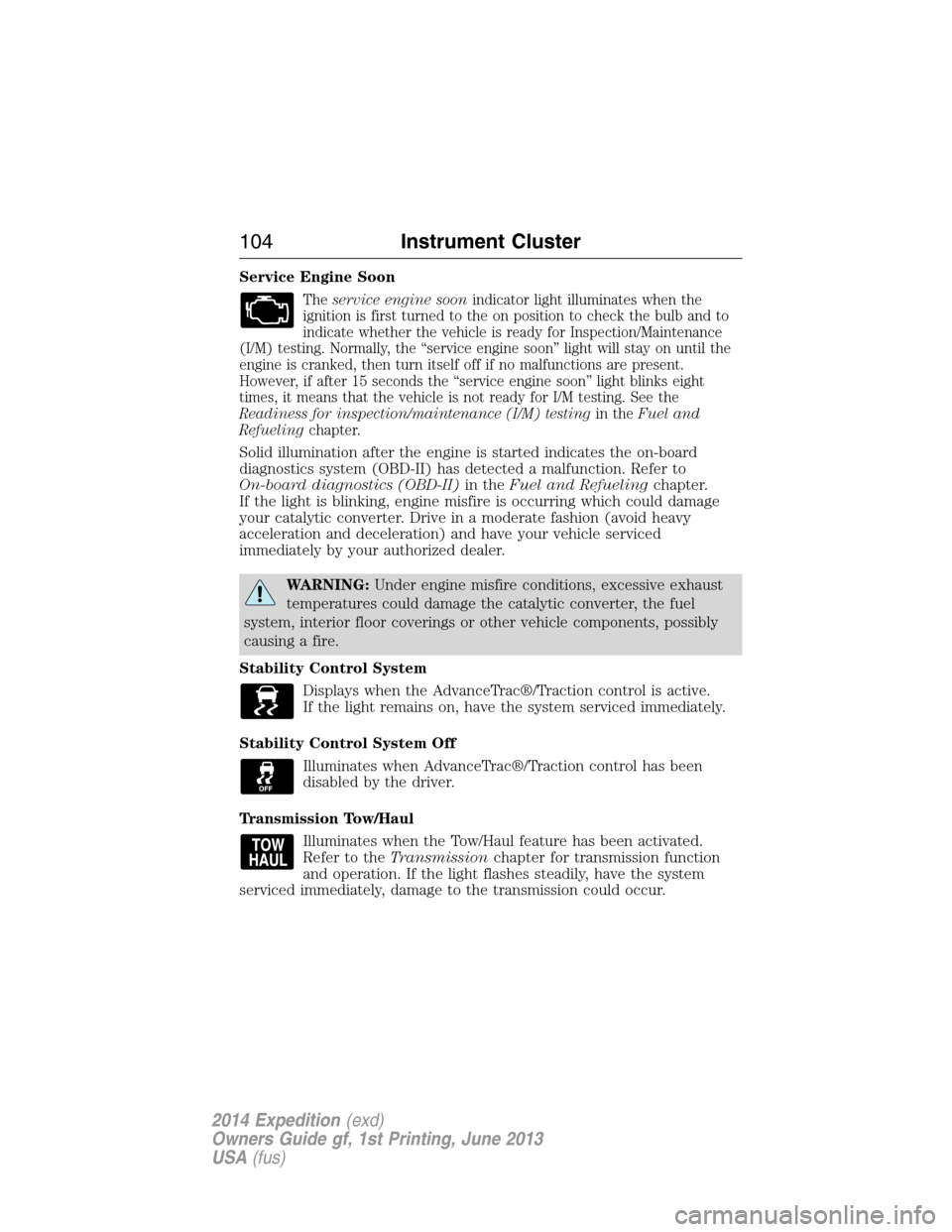
Service Engine Soon
Theservice engine soonindicator light illuminates when the
ignition is first turned to the on position to check the bulb and to
indicate whether the vehicle is ready for Inspection/Maintenance
(I/M) testing. Normally, the “service engine soon” light will stay on until the
engine is cranked, then turn itself off if no malfunctions are present.
However, if after 15 seconds the “service engine soon” light blinks eight
times, it means that the vehicle is not ready for I/M testing. See the
Readiness for inspection/maintenance (I/M) testingin theFuel and
Refuelingchapter.
Solid illumination after the engine is started indicates the on-board
diagnostics system (OBD-II) has detected a malfunction. Refer to
On-board diagnostics (OBD-II)in theFuel and Refuelingchapter.
If the light is blinking, engine misfire is occurring which could damage
your catalytic converter. Drive in a moderate fashion (avoid heavy
acceleration and deceleration) and have your vehicle serviced
immediately by your authorized dealer.
WARNING:Under engine misfire conditions, excessive exhaust
temperatures could damage the catalytic converter, the fuel
system, interior floor coverings or other vehicle components, possibly
causing a fire.
Stability Control System
Displays when the AdvanceTrac®/Traction control is active.
If the light remains on, have the system serviced immediately.
Stability Control System Off
Illuminates when AdvanceTrac®/Traction control has been
disabled by the driver.
Transmission Tow/Haul
Illuminates when the Tow/Haul feature has been activated.
Refer to theTransmissionchapter for transmission function
and operation. If the light flashes steadily, have the system
serviced immediately, damage to the transmission could occur.
104Instrument Cluster
2014 Expedition(exd)
Owners Guide gf, 1st Printing, June 2013
USA(fus)
Page 111 of 519
•OIL LIFE: This displays the remaining oil life. An oil change is
required whenever indicated by the message center and according to
the recommended maintenance schedule. USE ONLY
RECOMMENDED ENGINE OILS.
To reset the oil monitoring system to 100% after each oil change,
perform the following:
1. Press and release the SETUP button to display “OIL LIFE XXX%
HOLD RESET = NEW”.
2. Press and hold the RESET button for two seconds and release to reset
the oil life to 100%.
Note:To change oil life 100% value (if equipped with this feature) to
another value, proceed to Step 3.
3. Once “OIL LIFE SET TO XXX%” is displayed, release and press the
RESET button to change the Oil Life Start Value. Each release and press
will reduce the value by 10%.
•UNITS ENG / METRIC: Displays the current units in English or Metric.
•AUTOLAMP: This feature keeps your headlights on for up to three
minutes after the ignition is switched off.
•AUTOLOCK: This feature automatically locks all vehicle doors when
the vehicle is shifted into any gear, putting the vehicle in motion.
•AUTOUNLOCK: This feature automatically unlocks all vehicle doors
when the driver’s door is opened within 10 minutes of the ignition
being turned off.
•TRAILER SWAY (if equipped): This feature uses the electronic
stability control to mitigate trailer sway.
•TBC MODE (if equipped): Allows you to choose the trailer brake
mode.
•CREATE MYKEY / MYKEY SETUP / CLEAR MYKEY: For more
information refer to theMyKey®chapter.
•LANGUAGE = ENGLISH / SPANISH / FRENCH: Allows you to choose
which language the message center will display in.
Waiting four seconds or pressing the SELECT/RESET stem cycles the
message center through each of the language choices.
Press the SELECT/RESET stem to set the language choice when the
language you want appears.
11 0Information Displays
2014 Expedition(exd)
Owners Guide gf, 1st Printing, June 2013
USA(fus)
Page 114 of 519
SETUP
OIL LIFE
UNITS press the RESET
buttonEnglish or Metric
AUTOLAMP (SEC)0 to 180 seconds
AUTOLOCK On or Off
AUTOUNLOCK On or Off
RUNNING
BOARDS
(if equipped)Auto / Out / Off
POWER
LIFTGATE
(if equipped)On or Off
EASY ENTRY /
EXIT (if
equipped)On or Off
REAR PARK AID
(if equipped)On or Off
FRONT PARK AID
(if equipped)On or Off
TRAILER SWAY
(if equipped)On or Off
TBC MODE
(if equipped)Electric or EOH
CREATE MYKEY / MYKEY SETUP / CLEAR MYKEY
COMPASS
ENGLISH /
FRENCH /
SPANISH RESET
FOR NEWpress the RESET
buttonEnglish / Spanish / French (press
and hold to set)
•RESET FOR SYSTEM CHECK: The message center will begin to cycle
through the vehicle systems and provide a status of the item if
needed. Some systems show a message only if a condition is present.
•
OIL LIFE: This displays the remaining oil life. An oil change is required
whenever indicated by the message center and according to the
recommended maintenance schedule. USE ONLY RECOMMENDED
ENGINE OILS.
Information Displays11 3
2014 Expedition(exd)
Owners Guide gf, 1st Printing, June 2013
USA(fus)
Page 116 of 519
•REAR PARK AID (if equipped): This feature sounds a tone to warn
the driver of obstacles near the rear bumper, and functions only when
R (Reverse) gear is selected.
•FRONT PARK AID (if equipped): This feature sounds a warning tone
to warn the driver of obstacles near the front bumper.
•TRAILER SWAY (if equipped): This feature uses the electronic
stability control to mitigate trailer sway.
•TBC MODE (if equipped): Allows you to choose the trailer brake
mode.
•CREATE MYKEY / MYKEY SETUP / CLEAR MYKEY: For more
information refer to theMyKey®chapter.
•COMPASS: Displays the vehicle’s heading direction.
The compass reading may be affected when you drive near large
buildings, bridges, power lines and powerful broadcast antenna. Magnetic
or metallic objects placed in, on or near the vehicle may also affect
compass accuracy. If the compass appears to be inaccurate, a manual
calibration may be necessary. Refer toCompass zone adjustment
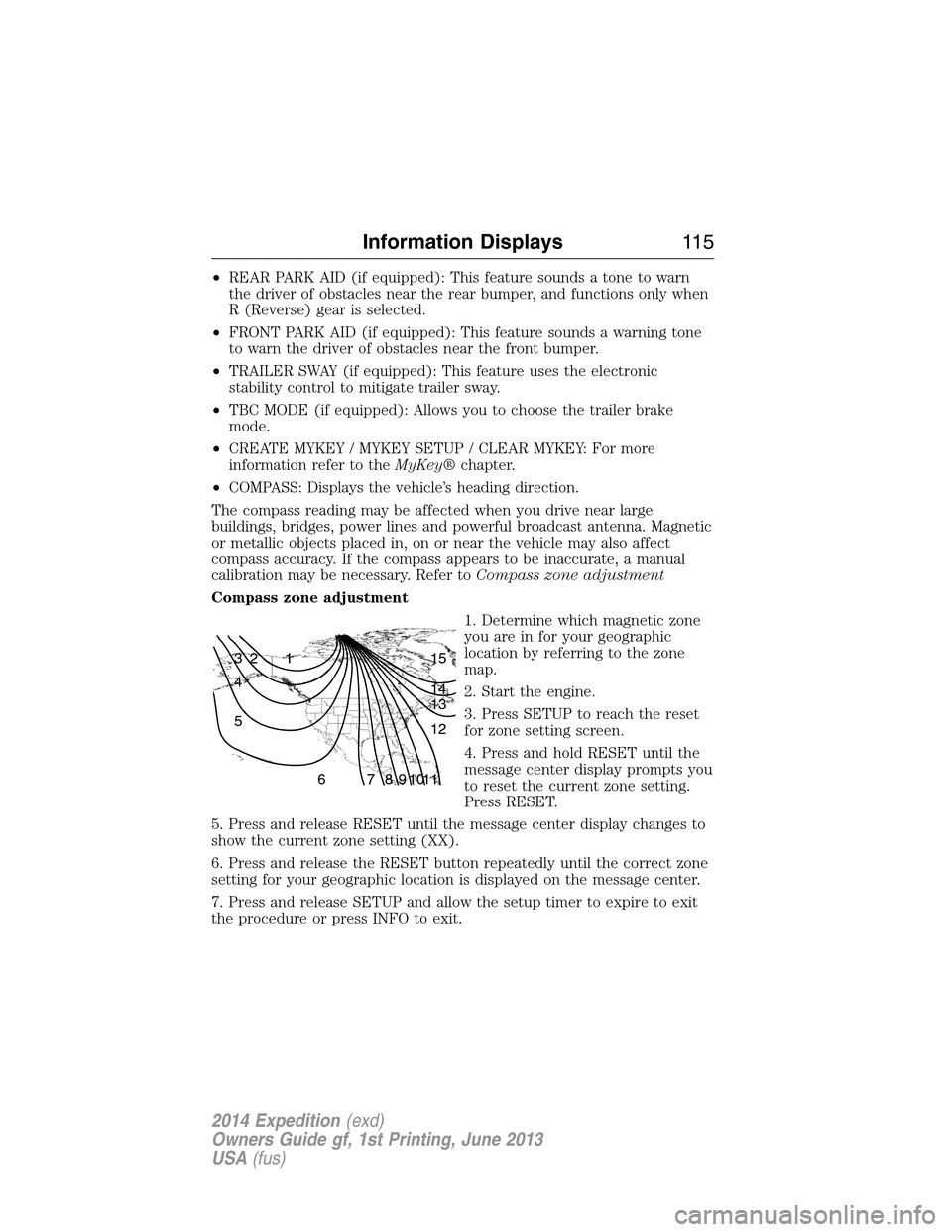
Compass zone adjustment
1. Determine which magnetic zone
you are in for your geographic
location by referring to the zone
map.
2. Start the engine.
3. Press SETUP to reach the reset
for zone setting screen.
4. Press and hold RESET until the
message center display prompts you
to reset the current zone setting.
Press RESET.
5. Press and release RESET until the message center display changes to
show the current zone setting (XX).
6. Press and release the RESET button repeatedly until the correct zone
setting for your geographic location is displayed on the message center.
7. Press and release SETUP and allow the setup timer to expire to exit
the procedure or press INFO to exit.
1 2 3
4
5
6 7 8 9 101112 13 14 15
Information Displays11 5
2014 Expedition(exd)
Owners Guide gf, 1st Printing, June 2013
USA(fus)
Page 119 of 519
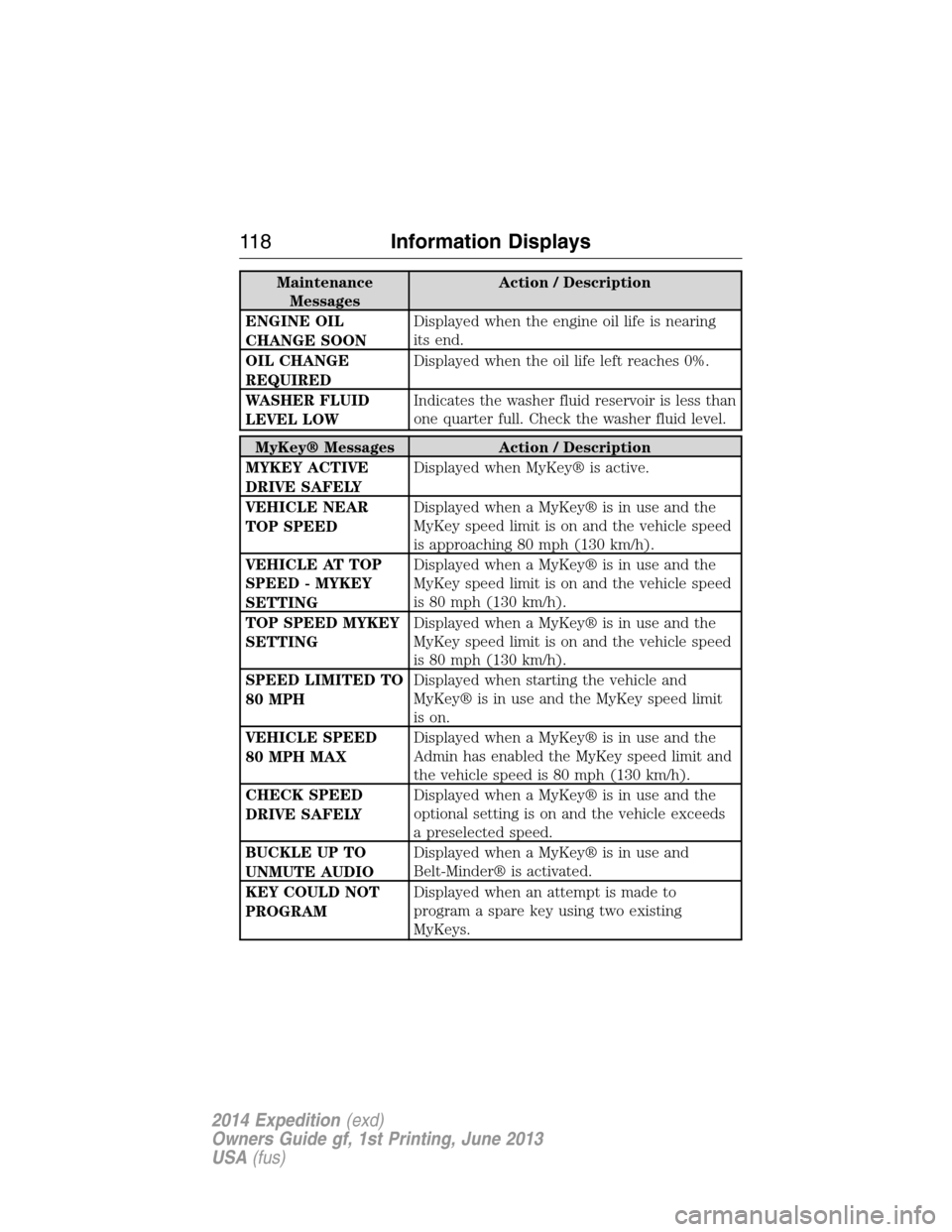
Maintenance
MessagesAction / Description
ENGINE OIL
CHANGE SOONDisplayed when the engine oil life is nearing
its end.
OIL CHANGE
REQUIREDDisplayed when the oil life left reaches 0%.
WASHER FLUID
LEVEL LOWIndicates the washer fluid reservoir is less than
one quarter full. Check the washer fluid level.
MyKey® Messages Action / Description
MYKEY ACTIVE
DRIVE SAFELYDisplayed when MyKey® is active.
VEHICLE NEAR
TOP SPEEDDisplayed when a MyKey® is in use and the
MyKey speed limit is on and the vehicle speed
is approaching 80 mph (130 km/h).
VEHICLE AT TOP
SPEED - MYKEY
SETTINGDisplayed when a MyKey® is in use and the
MyKey speed limit is on and the vehicle speed
is 80 mph (130 km/h).
TOP SPEED MYKEY
SETTINGDisplayed when a MyKey® is in use and the
MyKey speed limit is on and the vehicle speed
is 80 mph (130 km/h).
SPEED LIMITED TO
80 MPHDisplayed when starting the vehicle and
MyKey® is in use and the MyKey speed limit
is on.
VEHICLE SPEED
80 MPH MAXDisplayed when a MyKey® is in use and the
Admin has enabled the MyKey speed limit and
the vehicle speed is 80 mph (130 km/h).
CHECK SPEED
DRIVE SAFELYDisplayed when a MyKey® is in use and the
optional setting is on and the vehicle exceeds
a preselected speed.
BUCKLE UP TO
UNMUTE AUDIODisplayed when a MyKey® is in use and
Belt-Minder® is activated.
KEY COULD NOT
PROGRAMDisplayed when an attempt is made to
program a spare key using two existing
MyKeys.
11 8Information Displays
2014 Expedition(exd)
Owners Guide gf, 1st Printing, June 2013
USA(fus)
Page 142 of 519
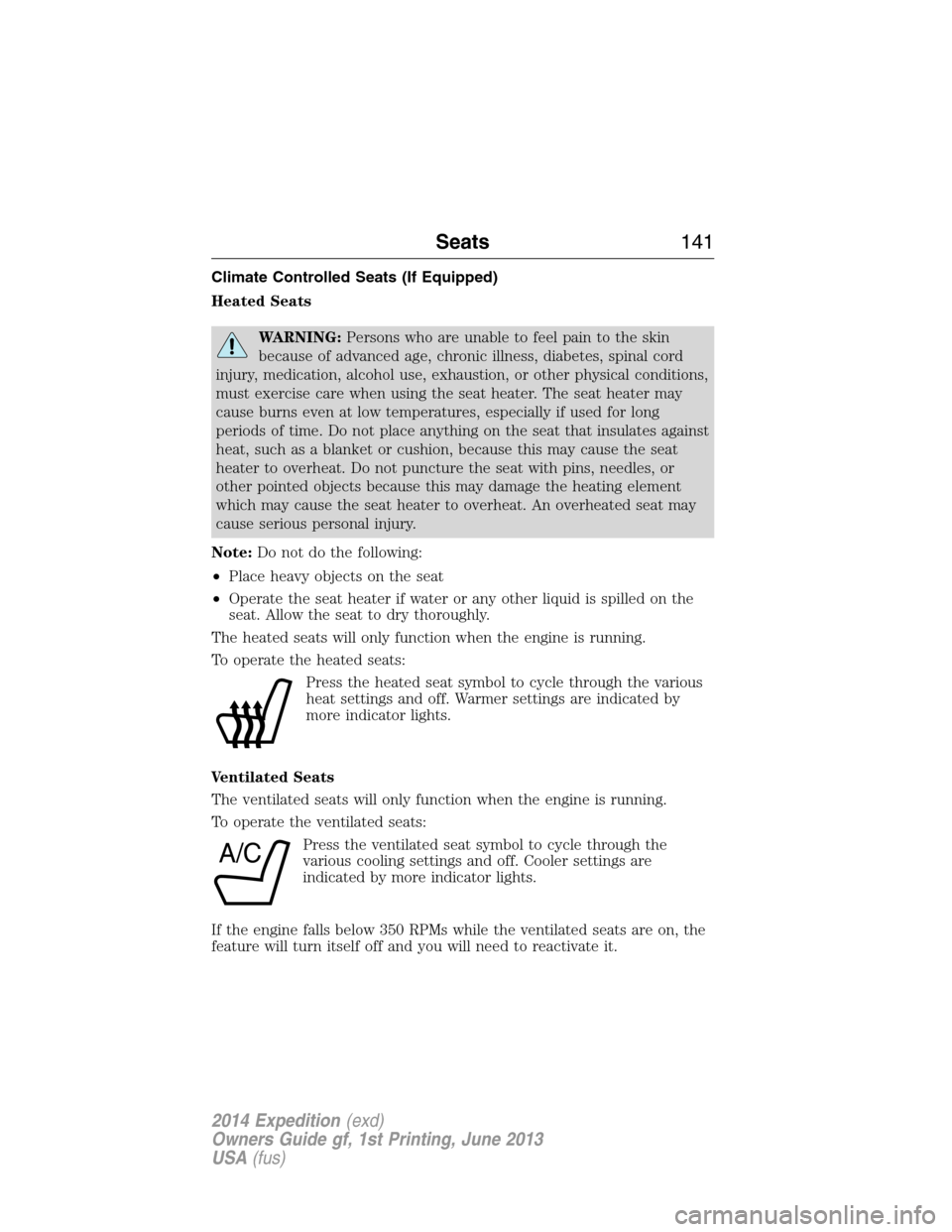
Climate Controlled Seats (If Equipped)
Heated Seats
WARNING:Persons who are unable to feel pain to the skin
because of advanced age, chronic illness, diabetes, spinal cord
injury, medication, alcohol use, exhaustion, or other physical conditions,
must exercise care when using the seat heater. The seat heater may
cause burns even at low temperatures, especially if used for long
periods of time. Do not place anything on the seat that insulates against
heat, such as a blanket or cushion, because this may cause the seat
heater to overheat. Do not puncture the seat with pins, needles, or
other pointed objects because this may damage the heating element
which may cause the seat heater to overheat. An overheated seat may
cause serious personal injury.
Note:Do not do the following:
•Place heavy objects on the seat
•Operate the seat heater if water or any other liquid is spilled on the
seat. Allow the seat to dry thoroughly.
The heated seats will only function when the engine is running.
To operate the heated seats:
Press the heated seat symbol to cycle through the various
heat settings and off. Warmer settings are indicated by
more indicator lights.
Ventilated Seats
The ventilated seats will only function when the engine is running.
To operate the ventilated seats:
Press the ventilated seat symbol to cycle through the
various cooling settings and off. Cooler settings are
indicated by more indicator lights.
If the engine falls below 350 RPMs while the ventilated seats are on, the
feature will turn itself off and you will need to reactivate it.
A/C
Seats141
2014 Expedition(exd)
Owners Guide gf, 1st Printing, June 2013
USA(fus)