engine FORD EXPEDITION 2014 3.G Owners Manual
[x] Cancel search | Manufacturer: FORD, Model Year: 2014, Model line: EXPEDITION, Model: FORD EXPEDITION 2014 3.GPages: 519, PDF Size: 6.9 MB
Page 5 of 519
Auxiliary Power Points 164
Storage Compartments 167
Center console.......................................167
Overhead console.....................................167
Starting and Stopping the Engine 169
Ignition switch.......................................170
Engine block heater...................................172
Fuel and Refueling 174
Fuel quality.........................................175
Refueling...........................................178
Fuel consumption.....................................180
Transmission 184
Four-Wheel Drive (If Equipped) 190
Four wheel drive.....................................190
Brakes 200
Brakes.............................................200
Hints on driving with anti-lock brakes......................201
Parking brake........................................201
Traction Control 202
TractionControl™ ....................................202
Stability Control 203
AdvanceTrac®.......................................204
Parking Aids 205
Sensing system.......................................205
Rear-view camera system...............................208
Cruise Control 211
Usingcruisecontrol ...................................211
4Table of Contents
2014 Expedition(exd)
Owners Guide gf, 1st Printing, June 2013
USA(fus)
Page 7 of 519
Maintenance 269
General information...................................269
Opening and closing the hood............................270
Under hood overview..................................271
Engine oil dipstick....................................272
Engine oil check......................................272
Engine coolant check..................................273
Automatic transmission fluid check........................278
Brake fluid check.....................................278
Fuel filter...........................................279
Washer fluid check....................................279
Battery ............................................279
Checking the wiper blades..............................281
Changing the wiper blades..............................282
Air filter(s).........................................283
Adjusting the headlamps................................286
Changing a bulb......................................287
Removing a headlamp..................................288
Vehicle Care 293
Cleaning products.....................................293
Cleaning the exterior..................................293
Waxing.............................................295
Repairing minor paint damage............................295
Cleaning the engine...................................295
Cleaning the windows and wiper blades.....................296
Cleaning the interior...................................297
Cleaning the instrument panel and instrument cluster lens.......298
Cleaning the alloy wheels...............................300
Vehicle storage.......................................301
6Table of Contents
2014 Expedition(exd)
Owners Guide gf, 1st Printing, June 2013
USA(fus)
Page 8 of 519
Wheels and Tires 304
Tire care...........................................306
Tire Pressure Monitoring System (TPMS)...................323
Changing a road wheel.................................327
Technical specifications.................................335
Wheel lug nut torque..................................335
Capacities and Specifications 336
Engine specifications..................................336
Part numbers........................................341
Vehicle identification number............................342
Vehicle certification label...............................343
Transmission code designation............................343
Accessories 344
Accessories.........................................344
Ford Extended Service Plan 346
Audio System 349
AM/FM/CD with SYNC.................................351
Rear seat controls.....................................354
Satellite radio information...............................357
Auxiliary input jack...................................360
USBport...........................................361
Rear seat entertainment system...........................362
SYNC® 381
Pairing your phone for the first time.......................386
911 Assist™.........................................400
Vehicle Health Report..................................403
Table of Contents7
2014 Expedition(exd)
Owners Guide gf, 1st Printing, June 2013
USA(fus)
Page 11 of 519
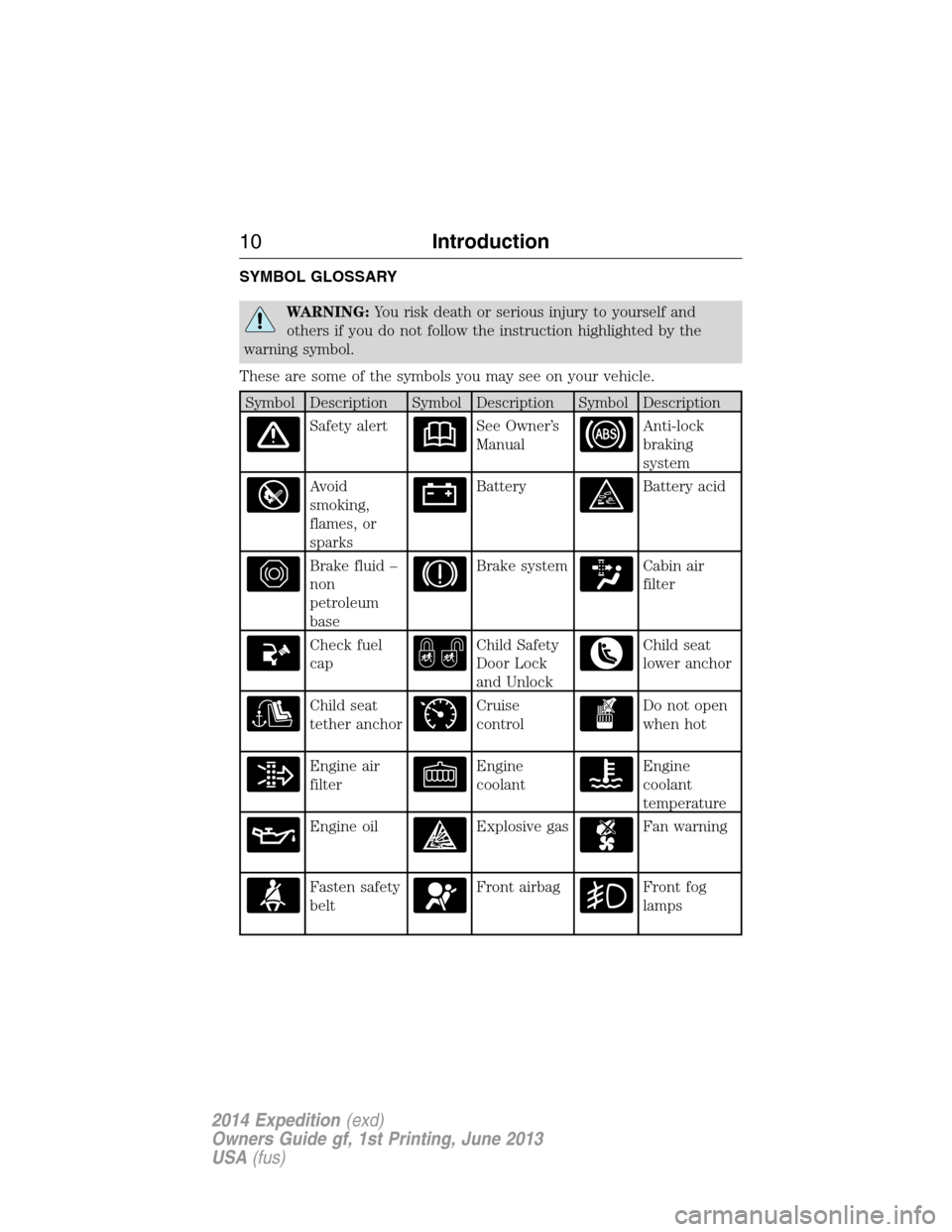
SYMBOL GLOSSARY
WARNING:You risk death or serious injury to yourself and
others if you do not follow the instruction highlighted by the
warning symbol.
These are some of the symbols you may see on your vehicle.
Symbol Description Symbol Description Symbol Description
Safety alertSee Owner’s
ManualAnti-lock
braking
system
Avoid
smoking,
flames, or
sparksBatteryBattery acid
Brake fluid –
non
petroleum
baseBrake systemCabin air
filter
Check fuel
capChild Safety
Door Lock
and UnlockChild seat
lower anchor
Child seat
tether anchorCruise
controlDo not open
when hot
Engine air
filterEngine
coolantEngine
coolant
temperature
Engine oilExplosive gasFan warning
Fasten safety
beltFront airbagFront fog
lamps
10Introduction
2014 Expedition(exd)
Owners Guide gf, 1st Printing, June 2013
USA(fus)
Page 12 of 519
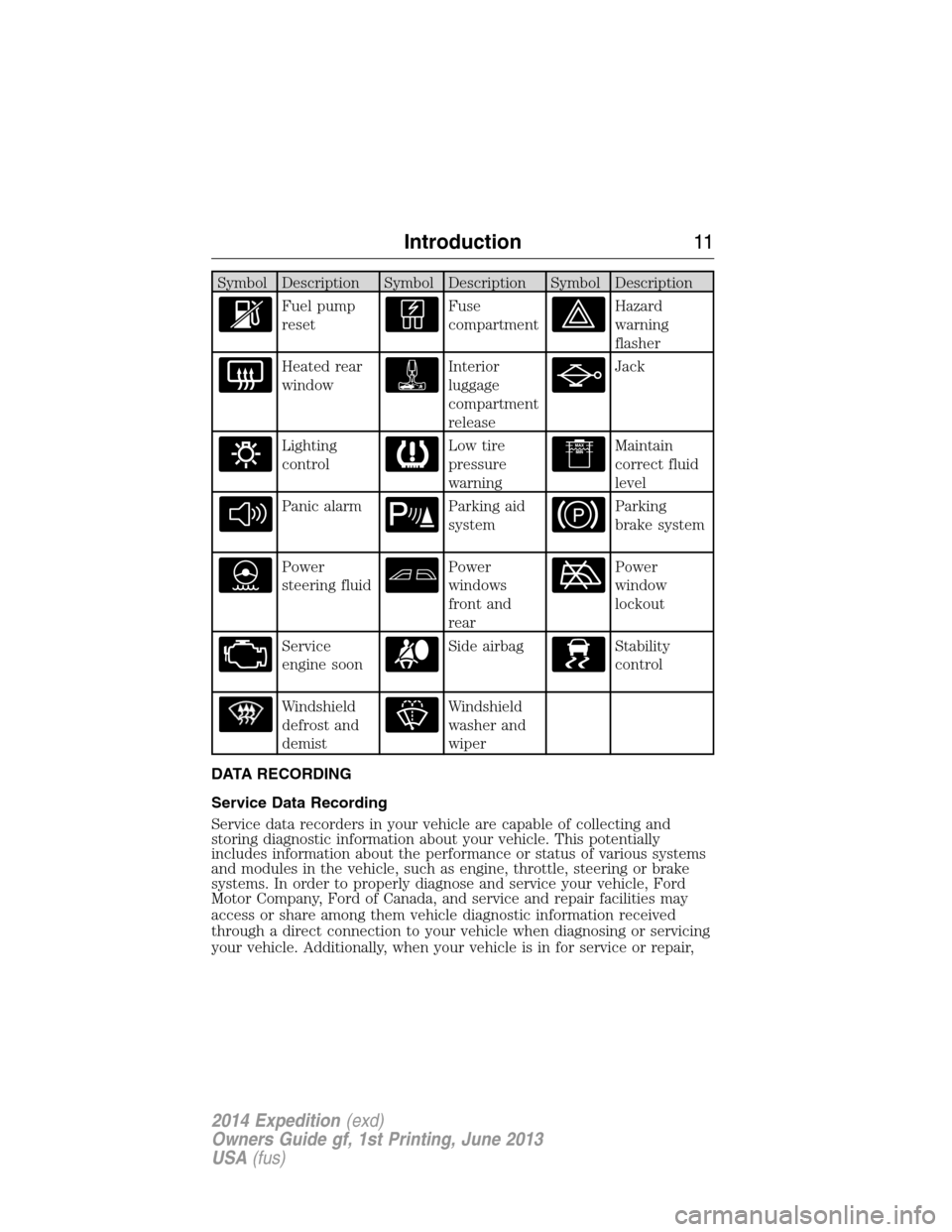
Symbol Description Symbol Description Symbol Description
Fuel pump
resetFuse
compartmentHazard
warning
flasher
Heated rear
windowInterior
luggage
compartment
releaseJack
Lighting
controlLow tire
pressure
warningMaintain
correct fluid
level
Panic alarmParking aid
systemParking
brake system
Power
steering fluidPower
windows
front and
rearPower
window
lockout
Service
engine soonSide airbagStability
control
Windshield
defrost and
demistWindshield
washer and
wiper
DATA RECORDING
Service Data Recording
Service data recorders in your vehicle are capable of collecting and
storing diagnostic information about your vehicle. This potentially
includes information about the performance or status of various systems
and modules in the vehicle, such as engine, throttle, steering or brake
systems. In order to properly diagnose and service your vehicle, Ford
Motor Company, Ford of Canada, and service and repair facilities may
access or share among them vehicle diagnostic information received
through a direct connection to your vehicle when diagnosing or servicing
your vehicle. Additionally, when your vehicle is in for service or repair,
Introduction11
2014 Expedition(exd)
Owners Guide gf, 1st Printing, June 2013
USA(fus)
Page 14 of 519
they have access to the vehicle or the EDR. Ford Motor Company
and Ford of Canada do not access event data recorder
information without obtaining consent, unless pursuant to court
order or where required by law enforcement, other government
authorities or other third parties acting with lawful authority.
Other parties may seek to access the information independently
of Ford Motor Company and Ford of Canada.
Note: Including to the extent that any law pertaining to Event
Data Recorders applies to SYNC® or its features, please note the
following: Once 911 Assist (if equipped) is enabled (set ON), 911
Assist may, through any paired and connected cell phone, disclose
to emergency services that the vehicle has been in a crash
involving the deployment of an airbag or, in certain vehicles, the
activation of the fuel pump shut-off. Certain versions or updates
to 911 Assist may also be capable of being used to electronically
or verbally provide to 911 operators the vehicle location (such as
latitude and longitude), and/or other details about the vehicle or
crash or personal information about the occupants to assist 911
operators to provide the most appropriate emergency services.
If you do not want to disclose this information, do not activate
the 911 Assist feature. See your SYNC® chapter for more
information.
Additionally, when you connect to Traffic, Directions and
Information (if equipped, U.S. only), the service uses GPS
technology and advanced vehicle sensors to collect the vehicle’s
current location, travel direction, and speed (“vehicle travel
information”), only to help provide you with the directions,
traffic reports, or business searches that you request. If you do
not want Ford or its vendors to receive this information, do not
activate the service. Ford Motor Company and the vendors it uses
to provide you with this information do not store your vehicle
travel information. For more information, see Traffic, Directions
and Information, Terms and Conditions. See your SYNC® chapter
for more information.
CALIFORNIA PROPOSITION 65
WARNING:Some constituents of engine exhaust, certain vehicle
components, certain fluids contained in vehicles and certain
products of component wear contain or emit chemicals known to
the State of California to cause cancer and birth defects or other
reproductive harm.
Introduction13
2014 Expedition(exd)
Owners Guide gf, 1st Printing, June 2013
USA(fus)
Page 45 of 519
Deactivating and Activating the Belt-Minder® Feature
WARNING:While the design allows you to deactivate your
Belt-Minder, this system is designed to improve your chances of
being safely belted and surviving an accident. We recommend you leave
the Belt-Minder system activated for yourself and others who may use
the vehicle. To reduce the risk of injury, do not deactivate or activate
the Belt-Minder feature while driving the vehicle.
Read Steps1-4thoroughly before proceeding with the programming
procedure.
The Belt-Minder feature can be deactivated or activated by performing
the following procedure.
Before following the procedure, make sure that:
•the parking brake is set.
•the transmission selector lever is in positionP.
•the ignition is off.
•all vehicle doors are closed.
•the driver’s safety belt is unbuckled.
1. Switch the ignition on. Do not start the engine.
2. Wait until the safety belt warning light turns off (about 1 to
2 minutes).
•Steps 3 and 4 must be completed within 60 seconds or the procedure
will have to be repeated.
3. Buckle then unbuckle the safety belt three times, ending with the
safety belt unbuckled. The safety belt warning light will come on for
about three seconds.
4. Within seven seconds of the safety belt warning light turning off,
buckle then unbuckle the safety belt. The safety warning light will flash.
This will disable Belt-Minder if it is currently enabled, or enable
Belt-Minder if it is currently disabled.
44Safety Belts
2014 Expedition(exd)
Owners Guide gf, 1st Printing, June 2013
USA(fus)
Page 79 of 519
SECURILOCK® PASSIVE ANTI-THEFT SYSTEM
Note:The system is not compatible with non-Ford aftermarket remote
start systems. Use of these systems may result in vehicle starting
problems and a loss of security protection.
Note:Metallic objects, electronic devices or a second coded key on the
same key chain may cause vehicle starting issues if they are too close to
the key when starting your vehicle. Prevent these objects from touching
the coded key while starting the engine. Switch the ignition off, move all
objects on the key chain away from the coded key and restart your
vehicle if a problem occurs.
Note:Do not leave a duplicate coded key in your vehicle. Always take
your keys and lock all doors when leaving your vehicle.
The system helps prevent the engine from starting unless you use a
coded key programmed to your vehicle. Using the wrong key may
prevent your vehicle from starting. A message may appear in the
information display.
If you are unable to start your vehicle with a correctly coded key, a
malfunction has occurred. A message may appear in the information display.
Automatic Arming
Your vehicle arms immediately after you switch the ignition off.
Anti-Theft Indicator
The anti-theft indicator is located in the instrument cluster.
•When the ignition is off, the indicator will flash once every
two seconds to indicate the SecuriLock system is functioning
as a theft deterrent.
•When the ignition is on, the indicator will glow for three seconds, then
turn off to indicate normal system functionality.
If a problem occurs with the SecuriLock system, the indicator will flash
rapidly or glow steadily when the ignition is on. If this occurs, switch
the ignition off then back on to make sure there was no electronic
interference with the programmed key. If your vehicle does not start, try
to start it with the second programmed key and if successful contact
your authorized dealership for key replacement. If the indicator still
flashes rapidly or glows steadily, your vehicle will not start. Contact
your authorized dealer as soon as possible for service.
78Security
2014 Expedition(exd)
Owners Guide gf, 1st Printing, June 2013
USA(fus)
Page 80 of 519
Automatic Disarming
Your vehicle disarms when you switch the ignition on with a coded key.
Replacement Keys
Note:Your vehicle may come with two integrated keyhead transmitters.
The integrated keyhead transmitter functions as a programmed ignition
key that operates all the locks and starts the vehicle, as well as a remote
control.
If your programmed transmitters or standard SecuriLock coded keys are
lost or stolen and you do not have an extra coded key, you will need to
have your vehicle towed to an authorized dealer. The key codes need
to be erased from your vehicle and new coded keys will need to be
programmed.
Store an extra programmed key away from the vehicle in a safe place to
help prevent any inconveniences. See an authorized dealer to purchase
additional spare or replacement keys.
Programming a Spare Key
Note:A maximum of eight coded keys can be programmed to your
vehicle. Only four of these eight can be integrated keyhead transmitters.
You can program your own integrated keyhead transmitters or standard
SecuriLock coded keys to your vehicle. This procedure will program both
the engine immobilizer key code and the remote entry portion of the
remote control to your vehicle.
Only use integrated keyhead transmitters or standard SecuriLock keys.
You must have two previously programmed coded keys and the new
unprogrammed key readily accessible. See your authorized dealer to have
the spare key programmed if two previously programmed coded keys are
not available.
Read and understand the entire procedure before you begin.
1. Insert the first previously programmed coded key into the ignition.
2. Turn the ignition from off to on. Keep the ignition on for at least three
seconds, but no more than 10 seconds.
3. Turn the ignition off and remove the first coded key from the ignition.
4. After three seconds but within 10 seconds of turning the ignition off,
insert the second previously coded key into the ignition.
5. Turn the ignition from off to on. Keep the ignition on for at least three
seconds, but no more than 10 seconds.
Security79
2014 Expedition(exd)
Owners Guide gf, 1st Printing, June 2013
USA(fus)
Page 81 of 519
6. Turn the ignition off and remove the second previously programmed
coded key from the ignition.
7. After three seconds but within 20 seconds of turning the ignition off
and removing the previously programmed coded key, insert the new
unprogrammed key into the ignition.
8. Turn the ignition from off to on. Keep the ignition on for at least six
seconds.
9. Remove the newly programmed coded key from the ignition.
The key will start the vehicle’s engine and will operate the remote entry
system (if the new key is an integrated keyhead transmitter) if it has
been successfully programmed. The theft indicator light will illuminate
for three seconds and then go out to indicate successful programming.
If the key was not successfully programmed, the theft indicator light may
flash on and off. Wait 20 seconds and repeat Steps 1 through 8. Take
your vehicle to your authorized dealer to have the new key programmed
if you are still unsuccessful.
Wait 20 seconds and then repeat this procedure from Step 1 to program
an additional key.
ANTI-THEFT ALARM
The system will warn you of unauthorized entry to your vehicle.
The turn signal lamps will flash and the horn will sound when:
•any door or the hood is opened without using the key or the remote
control
•the ignition is turned on with an invalid key.
Take all keys and remote controls to your authorized dealer if there is
any potential alarm problem with your vehicle.
Arming the Alarm
The system is ready to arm whenever the ignition is off. Lock the vehicle
to arm the alarm.
The turn signal lamps will flash once after locking the vehicle to indicate
the alarm is in the pre-armed mode and will become fully armed in
20 seconds.
80Security
2014 Expedition(exd)
Owners Guide gf, 1st Printing, June 2013
USA(fus)