ignition FORD EXPEDITION 2014 3.G User Guide
[x] Cancel search | Manufacturer: FORD, Model Year: 2014, Model line: EXPEDITION, Model: FORD EXPEDITION 2014 3.GPages: 519, PDF Size: 6.9 MB
Page 69 of 519
Power Liftgate or Liftgate Window (If Equipped)
WARNING:Make sure all persons are clear of the power liftgate
area before using the control.
WARNING:Make sure to close and latch the liftgate to prevent
drawing exhaust fumes into your vehicle. This will also prevent
passengers and cargo from falling out. If you must drive with the
liftgate open, keep the vents or windows open so outside air comes into
your vehicle. Failure to follow this warning could result in serious
personal injury.
Note:Be careful when opening or closing the liftgate in a garage or
other enclosed area to avoid damaging the liftgate.
Note:If equipped with a power liftgate, this control will not operate the
liftgate window.
Press twice within three seconds to open or close the liftgate,
or to reverse movement.
Press twice within three seconds to unlatch the liftgate window.
Smart Unlocks
This feature helps to prevent you from locking yourself out of your
vehicle if your key is still in the ignition.
When you open one of the front doors or the liftgate and lock your
vehicle with the power door lock control, all the doors will lock then
unlock if your key is still in the ignition.
Your vehicle can still be locked with the key in the ignition by:
•locking the driver door with a key
•using the lock control on the remote control
•using the keyless entry keypad.
If both front doors and the liftgate are closed, your vehicle can be locked
from any method, regardless of whether the key is in the ignition or not.
68Locks
2014 Expedition(exd)
Owners Guide gf, 1st Printing, June 2013
USA(fus)
Page 70 of 519
Autolock and Unlock
The autolock feature will lock all the doors, the liftgate and the liftgate
window when:
•all doors are closed,
•the ignition is on,
•you shift into any gear putting the vehicle in motion, and
•the vehicle attains a speed greater than 12 mph (20 km/h).
If the vehicle was autolocked, the autounlock feature will unlock all
doors when the driver’s door is opened within 10 minutes of switching
the ignition off.
Enabling or Disabling Autolock and Autounlock
These features can be enabled or disabled:
•by your authorized dealer
•through the information display
•using the power door lock procedure.
To enable or disable using the power door locks, do the following:
Note:You will have 30 seconds to complete the procedure.
1. Switch the ignition on.
2. Press the power door unlock button three times.
3. Switch the ignition off.
4. Press the power door unlock button three times.
5. Switch the ignition on. The horn will chirp indicating the programming
mode has been entered.
Autolock:Once in programming mode, press the power door unlock
button then the lock button. The horn will chirp once if autolock was
deactivated or twice (one short and one long chirp) if autolock was
activated.
Autounlock:Once in programming mode, press the power door lock
button then the unlock button. The horn will chirp once if autounlock
was deactivated or twice (one short and one long chirp) if autounlock
was activated.
6. Turn the ignition off. The horn will chirp once to confirm the
procedure is complete.
Note:The autounlock feature can be enabled or disabled independently
of the autolock feature.
Locks69
2014 Expedition(exd)
Owners Guide gf, 1st Printing, June 2013
USA(fus)
Page 71 of 519
Illuminated Entry
The interior lamps and parking lamps illuminate when the remote entry
system is used to unlock the door(s).
The system will turn off the lights if:
•the ignition is turned on
•the lock button on the remote control is pressed
•the vehicle is locked using the keyless entry keypad
•after 25 seconds of illumination.
The dome lamp control (if equipped) must not be set to the off position
for the illuminated entry system to operate.
The lights will not turn off if:
•they have been turned on with the dimmer control
•any door is open.
Illuminated Exit
The interior lamps and parking lamps illuminate when doors are closed
and the key is removed from the ignition.
The lamps will turn off if all the doors remain closed and:
•25 seconds elapse
•the key is inserted in the ignition.
Battery Saver
If you leave the courtesy lamps, dome lamps or headlamps on, the
battery saver shuts them off 10 minutes after you switch the ignition off.
70Locks
2014 Expedition(exd)
Owners Guide gf, 1st Printing, June 2013
USA(fus)
Page 73 of 519
Power Liftgate (If Equipped)
WARNING:Make sure to close and latch the liftgate to prevent
drawing exhaust fumes into your vehicle. This will also prevent
passengers and cargo from falling out. If you must drive with the
liftgate open, keep the vents or windows open so outside air comes into
your vehicle. Failure to follow this warning could result in serious
personal injury.
WARNING:Make sure all persons are clear of the power liftgate
area before using the power liftgate control.
WARNING:Keep keys out of the reach of children. Do not allow
children to operate the power liftgate, or to play near to an open
or moving power liftgate.
Note:Cycling the ignition prior to completely latching the liftgate could
result in damage to the liftgate or its power components. Make sure the
liftgate is fully latched before operating the vehicle.
If the ignition is cycled during a liftgate power close cycle and the
liftgate is 6-10 inches (15-24 centimeters) from being latched, the liftgate
may reverse to the full open position. Verify that the liftgate is closed
before operating or moving the vehicle, especially in an enclosure, like a
garage or a parking structure. The liftgate or it components could be
damaged in an enclosure, if the liftgate is open.
When power operating the liftgate at temperatures below 32°F (0°C), the
liftgate may stop about 5 inches (13 centimeters) from the full open
position. The liftgate can be fully opened by pushing it upward to the
maximum open position.
72Locks
2014 Expedition(exd)
Owners Guide gf, 1st Printing, June 2013
USA(fus)
Page 74 of 519
Opening and Closing the Power Liftgate
Note:The liftgate can be reversed with a second press on a control
button or transmitter and can be manually closed at any time.
The liftgate will only operate with your vehicle inP. The chime will beep
once if conditions are not correct to start an operation. These conditions
include:
•The ignition is in on and the transmission is not inP.
•The battery voltage is below the minimum operating voltage.
•The vehicle speed is at or above 3 mph (5 km/h).
If the liftgate reverses and starts to close after a open request, a fast
continuous chime indicates excessive load on the liftgate or a possible
strut failure. If any excessive load is removed and you still have a faster
chime, have the system serviced immediately by your authorized dealer.
Do not attempt to manually force the liftgate to travel faster than the
power system will permit. This will activate the obstacle detection
feature.
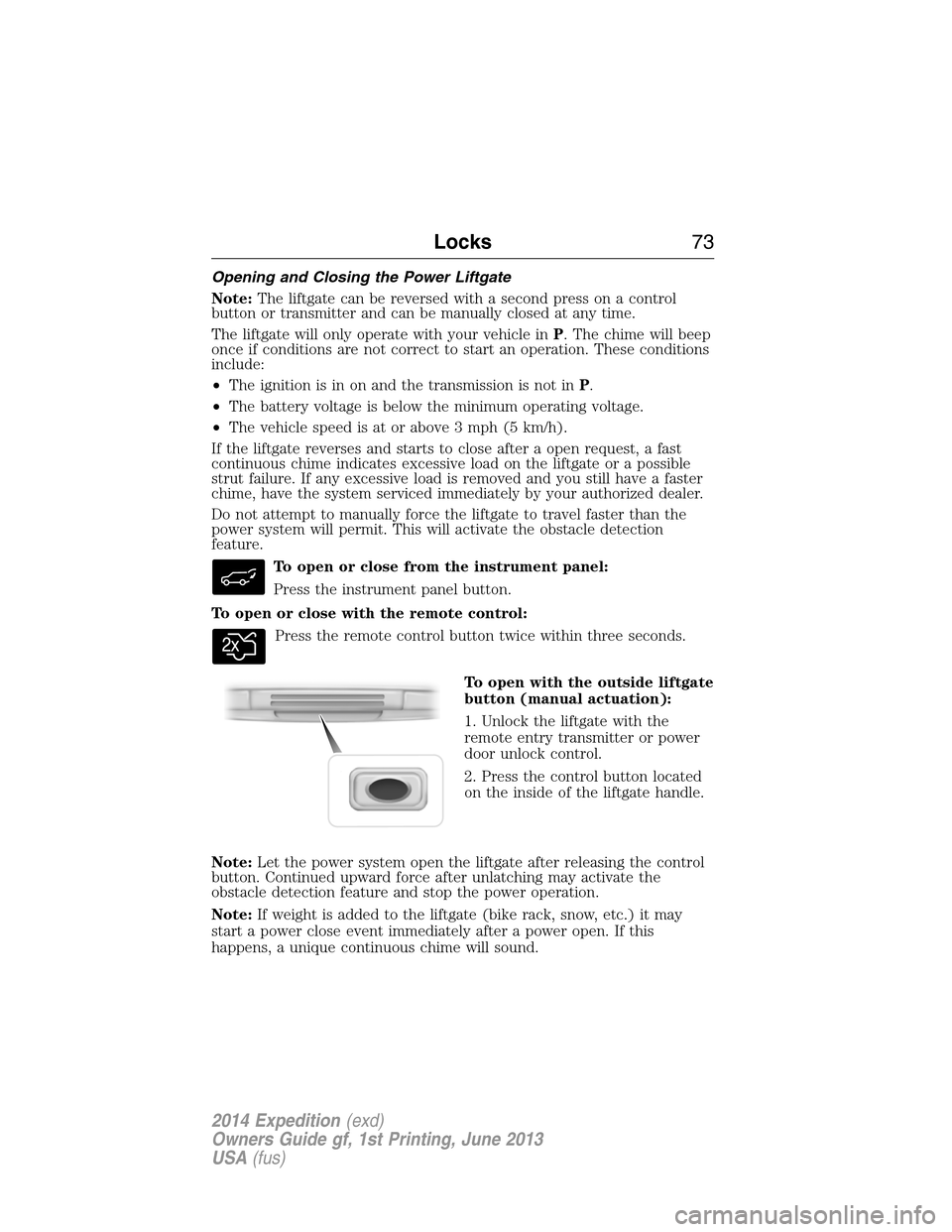
To open or close from the instrument panel:
Press the instrument panel button.
To open or close with the remote control:
Press the remote control button twice within three seconds.
To open with the outside liftgate
button (manual actuation):
1. Unlock the liftgate with the
remote entry transmitter or power
door unlock control.
2. Press the control button located
on the inside of the liftgate handle.
Note:Let the power system open the liftgate after releasing the control
button. Continued upward force after unlatching may activate the
obstacle detection feature and stop the power operation.
Note:If weight is added to the liftgate (bike rack, snow, etc.) it may
start a power close event immediately after a power open. If this
happens, a unique continuous chime will sound.
Locks73
2014 Expedition(exd)
Owners Guide gf, 1st Printing, June 2013
USA(fus)
Page 78 of 519
•Pressing3•4in Step 4 will program the code to driver memory
setting 2.
Note:Pressing5•6,7•8,or9•0keypad numbers in Step 4 will not
program the code to recall a driver memory setting.
Note:The factory-set code cannot be associated with a memory setting.
Erasing a Personal Code
1. Enter the factory-set 5-digit code.
2. Press and release the1•2on the keypad within five seconds.
The doors will lock and then unlock to confirm that the system is in
programming mode.
3. Press and hold the1•2for two seconds. You must do this within five
seconds of completing Step 2.
All personal codes are now erased and only the factory-set 5-digit code
will work.
Anti-Scan Feature
The keypad will go into an anti-scan mode if you enter the wrong code
seven times (35 consecutive button presses). This mode disables the
keypad for one minute and the keypad lamp will flash.
The anti-scan feature will turn off after:
•one minute of keypad inactivity
•pressing the unlock button on the remote control
•the ignition is turned on.
Unlocking and Locking the Doors and Liftgate
To unlock the driver door:Enter the factory-set 5-digit code or your
personal code. You must press each number within five seconds of each
other. The interior lamps will illuminate.
To unlock all doors and liftgate:Enter the factory-set 5-digit code or
your personal code, then press3•4within five seconds.
To lock all doors and liftgate:Press and hold7•8and9•0at the
same time with the driver door closed. You do not need to enter the
keypad code first.
To open the liftgate glass:Enter the factory-set 5-digit code or your
personal code, then press5•6.
Locks77
2014 Expedition(exd)
Owners Guide gf, 1st Printing, June 2013
USA(fus)
Page 79 of 519
SECURILOCK® PASSIVE ANTI-THEFT SYSTEM
Note:The system is not compatible with non-Ford aftermarket remote
start systems. Use of these systems may result in vehicle starting
problems and a loss of security protection.
Note:Metallic objects, electronic devices or a second coded key on the
same key chain may cause vehicle starting issues if they are too close to
the key when starting your vehicle. Prevent these objects from touching
the coded key while starting the engine. Switch the ignition off, move all
objects on the key chain away from the coded key and restart your
vehicle if a problem occurs.
Note:Do not leave a duplicate coded key in your vehicle. Always take
your keys and lock all doors when leaving your vehicle.
The system helps prevent the engine from starting unless you use a
coded key programmed to your vehicle. Using the wrong key may
prevent your vehicle from starting. A message may appear in the
information display.
If you are unable to start your vehicle with a correctly coded key, a
malfunction has occurred. A message may appear in the information display.
Automatic Arming
Your vehicle arms immediately after you switch the ignition off.
Anti-Theft Indicator
The anti-theft indicator is located in the instrument cluster.
•When the ignition is off, the indicator will flash once every
two seconds to indicate the SecuriLock system is functioning
as a theft deterrent.
•When the ignition is on, the indicator will glow for three seconds, then
turn off to indicate normal system functionality.
If a problem occurs with the SecuriLock system, the indicator will flash
rapidly or glow steadily when the ignition is on. If this occurs, switch
the ignition off then back on to make sure there was no electronic
interference with the programmed key. If your vehicle does not start, try
to start it with the second programmed key and if successful contact
your authorized dealership for key replacement. If the indicator still
flashes rapidly or glows steadily, your vehicle will not start. Contact
your authorized dealer as soon as possible for service.
78Security
2014 Expedition(exd)
Owners Guide gf, 1st Printing, June 2013
USA(fus)
Page 80 of 519
Automatic Disarming
Your vehicle disarms when you switch the ignition on with a coded key.
Replacement Keys
Note:Your vehicle may come with two integrated keyhead transmitters.
The integrated keyhead transmitter functions as a programmed ignition
key that operates all the locks and starts the vehicle, as well as a remote
control.
If your programmed transmitters or standard SecuriLock coded keys are
lost or stolen and you do not have an extra coded key, you will need to
have your vehicle towed to an authorized dealer. The key codes need
to be erased from your vehicle and new coded keys will need to be
programmed.
Store an extra programmed key away from the vehicle in a safe place to
help prevent any inconveniences. See an authorized dealer to purchase
additional spare or replacement keys.
Programming a Spare Key
Note:A maximum of eight coded keys can be programmed to your
vehicle. Only four of these eight can be integrated keyhead transmitters.
You can program your own integrated keyhead transmitters or standard
SecuriLock coded keys to your vehicle. This procedure will program both
the engine immobilizer key code and the remote entry portion of the
remote control to your vehicle.
Only use integrated keyhead transmitters or standard SecuriLock keys.
You must have two previously programmed coded keys and the new
unprogrammed key readily accessible. See your authorized dealer to have
the spare key programmed if two previously programmed coded keys are
not available.
Read and understand the entire procedure before you begin.
1. Insert the first previously programmed coded key into the ignition.
2. Turn the ignition from off to on. Keep the ignition on for at least three
seconds, but no more than 10 seconds.
3. Turn the ignition off and remove the first coded key from the ignition.
4. After three seconds but within 10 seconds of turning the ignition off,
insert the second previously coded key into the ignition.
5. Turn the ignition from off to on. Keep the ignition on for at least three
seconds, but no more than 10 seconds.
Security79
2014 Expedition(exd)
Owners Guide gf, 1st Printing, June 2013
USA(fus)
Page 81 of 519
6. Turn the ignition off and remove the second previously programmed
coded key from the ignition.
7. After three seconds but within 20 seconds of turning the ignition off
and removing the previously programmed coded key, insert the new
unprogrammed key into the ignition.
8. Turn the ignition from off to on. Keep the ignition on for at least six
seconds.
9. Remove the newly programmed coded key from the ignition.
The key will start the vehicle’s engine and will operate the remote entry
system (if the new key is an integrated keyhead transmitter) if it has
been successfully programmed. The theft indicator light will illuminate
for three seconds and then go out to indicate successful programming.
If the key was not successfully programmed, the theft indicator light may
flash on and off. Wait 20 seconds and repeat Steps 1 through 8. Take
your vehicle to your authorized dealer to have the new key programmed
if you are still unsuccessful.
Wait 20 seconds and then repeat this procedure from Step 1 to program
an additional key.
ANTI-THEFT ALARM
The system will warn you of unauthorized entry to your vehicle.
The turn signal lamps will flash and the horn will sound when:
•any door or the hood is opened without using the key or the remote
control
•the ignition is turned on with an invalid key.
Take all keys and remote controls to your authorized dealer if there is
any potential alarm problem with your vehicle.
Arming the Alarm
The system is ready to arm whenever the ignition is off. Lock the vehicle
to arm the alarm.
The turn signal lamps will flash once after locking the vehicle to indicate
the alarm is in the pre-armed mode and will become fully armed in
20 seconds.
80Security
2014 Expedition(exd)
Owners Guide gf, 1st Printing, June 2013
USA(fus)
Page 82 of 519
Disarming the Alarm
To disarm the alarm, do any of the following:
•Press the power door unlock button within the 20-second pre-armed
mode.
•Press the unlock button on the remote control.
•Unlock the doors with the keyless entry pad.
•Turn the ignition on with a valid key.
•Press the panic button on the remote control. The alarm system will
still be armed, but this shuts off the horn and turn lamps when the
alarm is sounding.
Note:If the driver’s door is unlocked with a key, a chime will sound
when you open the door. You will have 12 seconds to disarm the alarm
using any of the actions above, otherwise the alarm will trigger.
Security81
2014 Expedition(exd)
Owners Guide gf, 1st Printing, June 2013
USA(fus)