ignition FORD EXPEDITION 2014 3.G Manual PDF
[x] Cancel search | Manufacturer: FORD, Model Year: 2014, Model line: EXPEDITION, Model: FORD EXPEDITION 2014 3.GPages: 519, PDF Size: 6.9 MB
Page 360 of 519
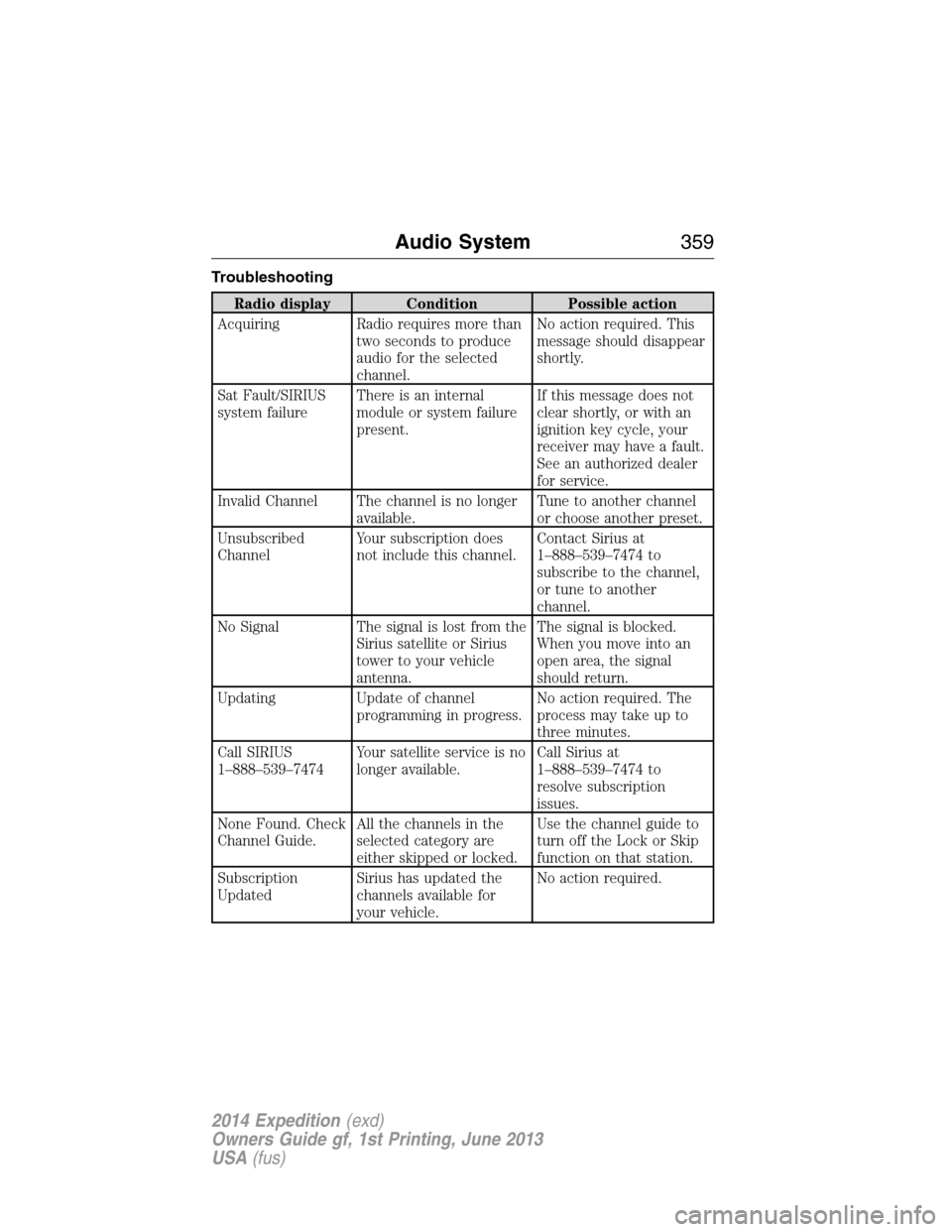
Troubleshooting
Radio display Condition Possible action
Acquiring Radio requires more than
two seconds to produce
audio for the selected
channel.No action required. This
message should disappear
shortly.
Sat Fault/SIRIUS
system failureThere is an internal
module or system failure
present.If this message does not
clear shortly, or with an
ignition key cycle, your
receiver may have a fault.
See an authorized dealer
for service.
Invalid Channel The channel is no longer
available.Tune to another channel
or choose another preset.
Unsubscribed
ChannelYour subscription does
not include this channel.Contact Sirius at
1–888–539–7474 to
subscribe to the channel,
or tune to another
channel.
No Signal The signal is lost from the
Sirius satellite or Sirius
tower to your vehicle
antenna.The signal is blocked.
When you move into an
open area, the signal
should return.
Updating Update of channel
programming in progress.No action required. The
process may take up to
three minutes.
Call SIRIUS
1–888–539–7474Your satellite service is no
longer available.Call Sirius at
1–888–539–7474 to
resolve subscription
issues.
None Found. Check
Channel Guide.All the channels in the
selected category are
either skipped or locked.Use the channel guide to
turn off the Lock or Skip
function on that station.
Subscription
UpdatedSirius has updated the
channels available for
your vehicle.No action required.
Audio System359
2014 Expedition(exd)
Owners Guide gf, 1st Printing, June 2013
USA(fus)
Page 377 of 519
•FR (Fast Rewind):Press this button to reverse through the file
continuously. There are five speed options to choose: 2X, 4X, 8X,
16X, and 32X.
•FF (Fast Forward):Press this button to fast forward through the
file continuously. There are five speed options to choose: 2X, 4X, 8X,
16X, and 32X.
•PREV:Press this button to go to the previous file.
•NEXT:Press this button to go to the next file.
Connecting an MP3 Device
Using a USB Cable
Plug the MP3 Dock Connector to USB cable into a high-power USB port
on your DVD-headrest module, and then connect the other end to the
player.
See the documentation that came with your device for more information.
Charging the MP3 Player Battery
After you turn the DVD-headrest module on, connect the device to the
USB port on your DVD-headrest module
Note:Not all devices are able to charge when connected to the USB
port.
Using an A/V Cable
1. Connect the device to the headphone port using an A/V cable.Note:
Use the A/V cable made specifically for the device. Other similar
RCA-type cables might not work.
2. Connect the video and audio connectors to the AV-IN ports on your
DVD-headrest module, matching the yellow, red and white
connectors to the appropriate jacks.
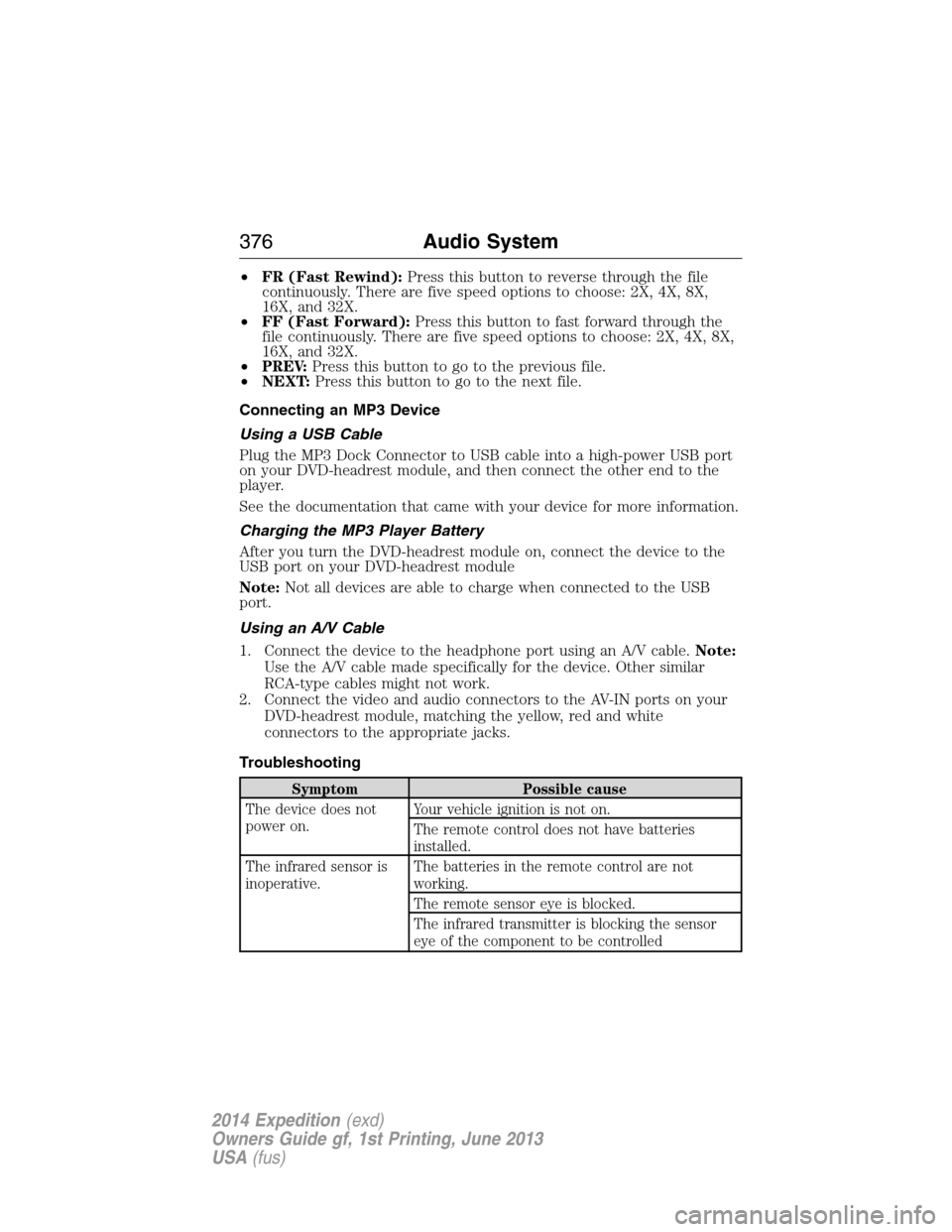
Troubleshooting
Symptom Possible cause
The device does not
power on.Your vehicle ignition is not on.
The remote control does not have batteries
installed.
The infrared sensor is
inoperative.The batteries in the remote control are not
working.
The remote sensor eye is blocked.
The infrared transmitter is blocking the sensor
eye of the component to be controlled
376Audio System
2014 Expedition(exd)
Owners Guide gf, 1st Printing, June 2013
USA(fus)
Page 387 of 519
•Speak naturally, without long pauses between words.
•At any time you can interrupt the system while it is speaking by
pressing the voice icon.
USING SYNC WITH YOUR PHONE
Hands-free calling is one of the main features of SYNC. While the system
supports a variety of features, many are dependent on your cellular
phone’s functionality. At a minimum, most cellular phones with Bluetooth
wireless technology support the following functions:
•Answering an incoming call
•Ending a call
•Using privacy mode
•Dialing a number
•Redialing
•Call waiting notification
•Caller ID.
Other features, such as text messaging using Bluetooth and automatic
phonebook download, are phone-dependent features. To check your
phone’s compatibility, see your phone’s user manual and visit
www.SYNCMyRide.com, www.SYNCMyRide.ca or www.syncmaroute.ca.
Pairing a Phone for the First Time
Note:SYNC can support downloading up to approximately 1000 entries
per Bluetooth-enabled cellular phone.
Note:Make sure the vehicle ignition and radio are turned on and the
transmission is in positionP.
Note:To scroll through the menus, press the up and down arrows on
your audio system.
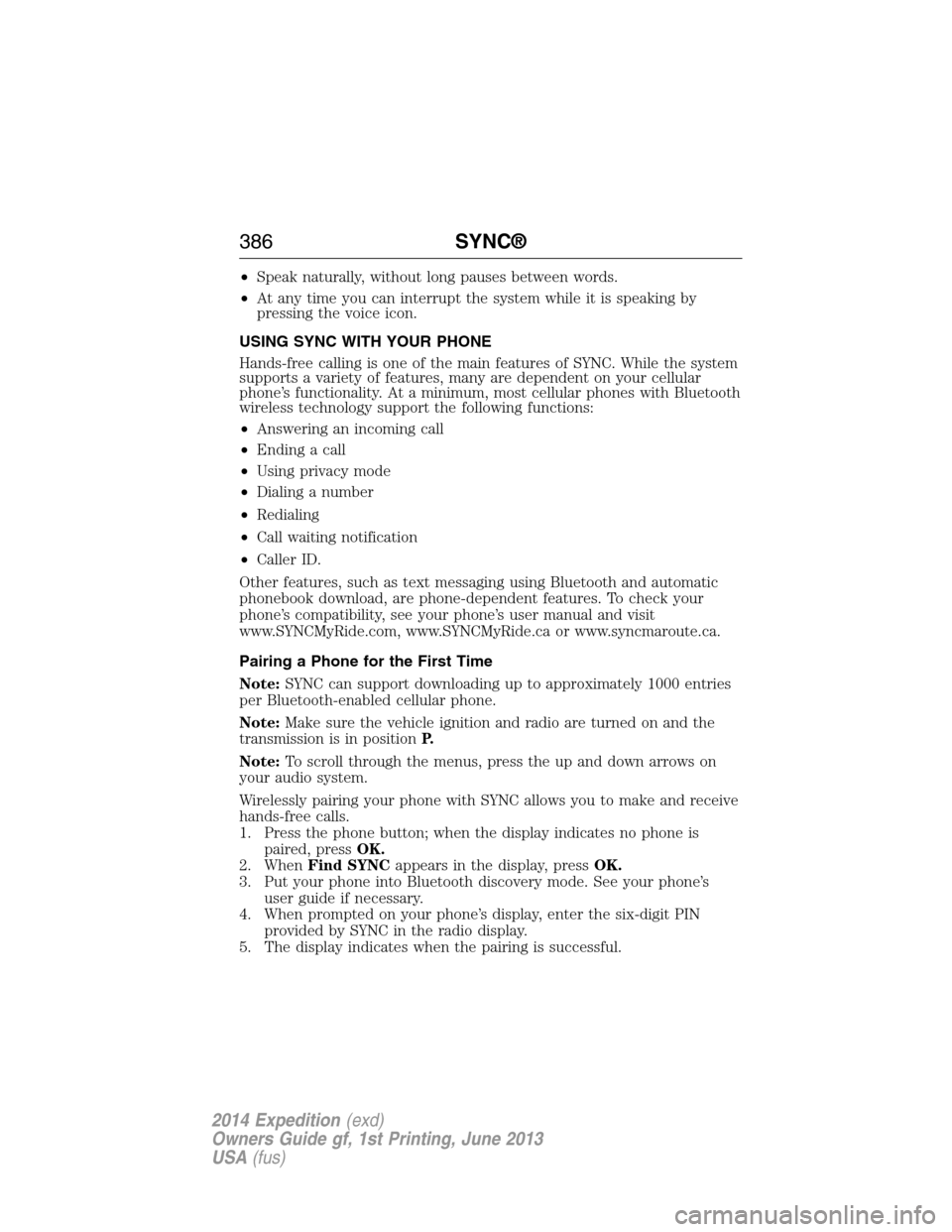
Wirelessly pairing your phone with SYNC allows you to make and receive
hands-free calls.
1. Press the phone button; when the display indicates no phone is
paired, pressOK.
2. WhenFind SYNCappears in the display, pressOK.
3. Put your phone into Bluetooth discovery mode. See your phone’s
user guide if necessary.
4. When prompted on your phone’s display, enter the six-digit PIN
provided by SYNC in the radio display.
5. The display indicates when the pairing is successful.
386SYNC®
2014 Expedition(exd)
Owners Guide gf, 1st Printing, June 2013
USA(fus)
Page 388 of 519
Depending on your phone’s capability and your market, the system may
prompt you with questions such as setting the current phone as the
primary phone (the phone SYNC automatically tries to connect with first
upon vehicle start-up), downloading your phone book, etc.
Pairing Subsequent Phones
Note:To scroll through the menus, press the up and down arrows on
your audio system.
Note:Make sure the vehicle ignition and radio are turned on and that
the transmission is in positionP.
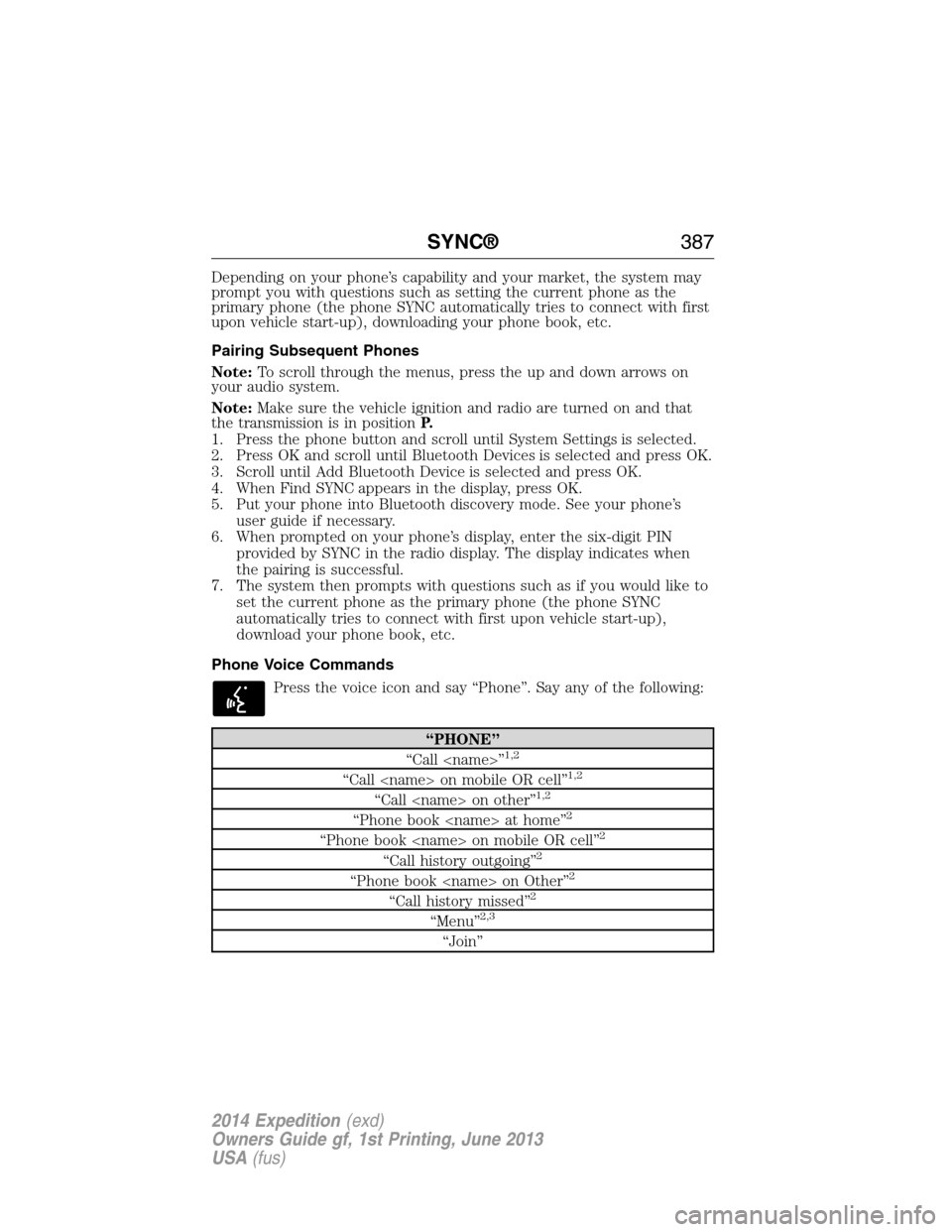
1. Press the phone button and scroll until System Settings is selected.
2. Press OK and scroll until Bluetooth Devices is selected and press OK.
3. Scroll until Add Bluetooth Device is selected and press OK.
4. When Find SYNC appears in the display, press OK.
5. Put your phone into Bluetooth discovery mode. See your phone’s
user guide if necessary.
6. When prompted on your phone’s display, enter the six-digit PIN
provided by SYNC in the radio display. The display indicates when
the pairing is successful.
7. The system then prompts with questions such as if you would like to
set the current phone as the primary phone (the phone SYNC
automatically tries to connect with first upon vehicle start-up),
download your phone book, etc.
Phone Voice Commands
Press the voice icon and say “Phone”. Say any of the following:
“PHONE”
“Call
“Call
“Call
“Phone book
“Phone book
“Call history outgoing”2
“Phone book
“Call history missed”2
“Menu”2,3
“Join”
SYNC®387
2014 Expedition(exd)
Owners Guide gf, 1st Printing, June 2013
USA(fus)
Page 395 of 519
Download Unread Msgsallows you to download your unread messages
(only) to SYNC. To download the messages, press OK to select. The
display indicates your messages are being downloaded. When complete,
SYNC takes you to your inbox.
Delete All Messages?allows you to delete current text messages from
SYNC (not your phone). To delete the messages, press OK to select. The
display indicates when all your text messages have been deleted and
SYNC returns you to the text message menu.
Note:SYNC does not automatically download all of your unread text
messages at every ignition cycle (as it does with call history and
phonebook if automatic download is set to on).
Returnexits the current menu when you press OK.
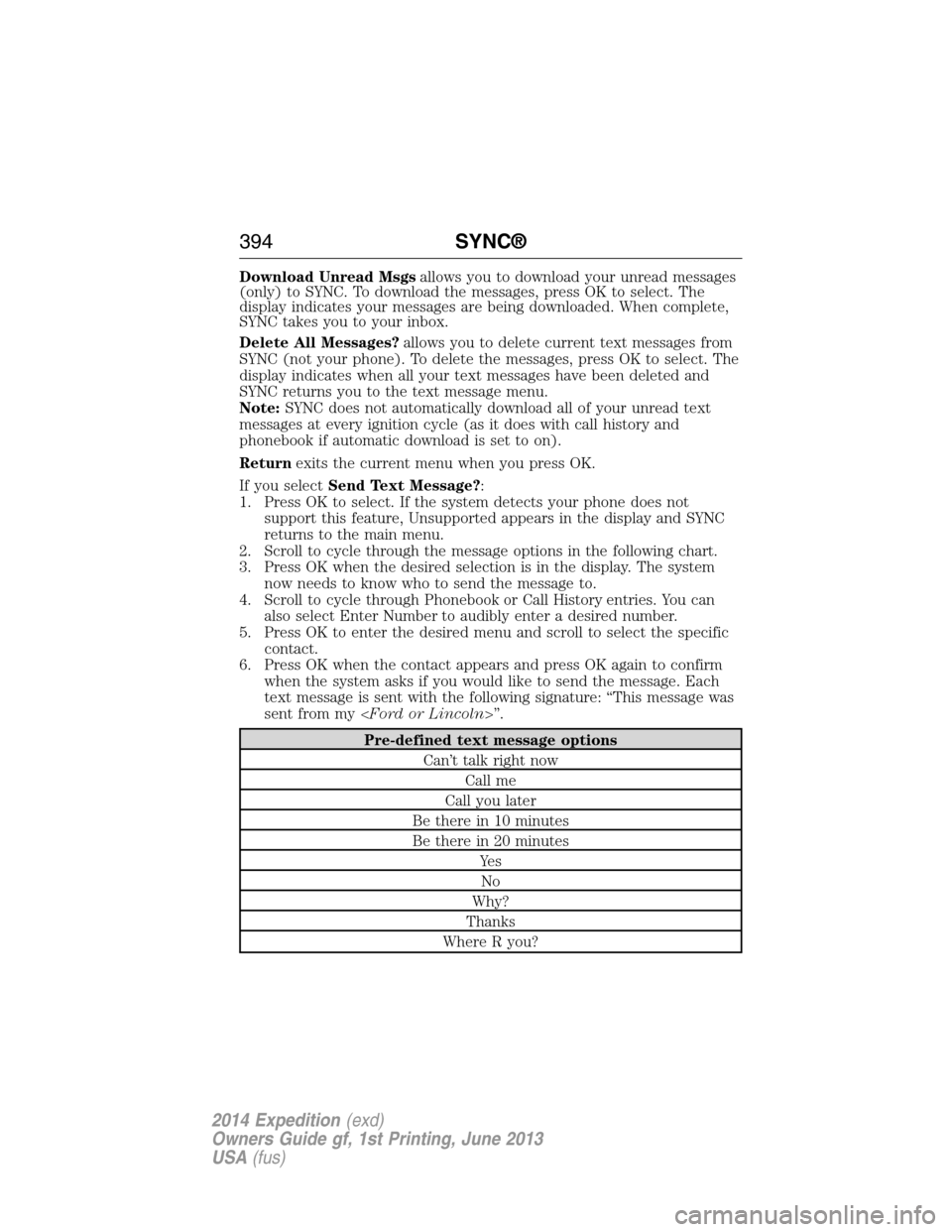
If you selectSend Text Message?:
1. Press OK to select. If the system detects your phone does not
support this feature, Unsupported appears in the display and SYNC
returns to the main menu.
2. Scroll to cycle through the message options in the following chart.
3. Press OK when the desired selection is in the display. The system
now needs to know who to send the message to.
4. Scroll to cycle through Phonebook or Call History entries. You can
also select Enter Number to audibly enter a desired number.
5. Press OK to enter the desired menu and scroll to select the specific
contact.
6. Press OK when the contact appears and press OK again to confirm
when the system asks if you would like to send the message. Each
text message is sent with the following signature: “This message was
sent from my
Pre-defined text message options
Can’t talk right now
Call me
Call you later
Be there in 10 minutes
Be there in 20 minutes
Ye s
No
Why?
Thanks
Where R you?
394SYNC®
2014 Expedition(exd)
Owners Guide gf, 1st Printing, June 2013
USA(fus)
Page 398 of 519
System Settings
System Settings provide access to your Bluetooth Devices and
Advanced menu features. Use the arrow buttons to scroll through the
menu options.
The Bluetooth Devices menu allows you to add, connect, delete and set a
phone as primary as well as turn your Bluetooth feature on and off.
The Advanced menu allows you to access and set prompts, languages,
defaults, perform a master reset, install an application and view system
information.
Bluetooth Devices Menu Options
This menu allows you to add, connect, delete, set a phone as primary,
and turn Bluetooth on or off.
1. Press the phone button to enter the Phone Menu.
2. Scroll until System Settings appears and press OK.
3. Scroll until Bluetooth Devices appears and select OK.
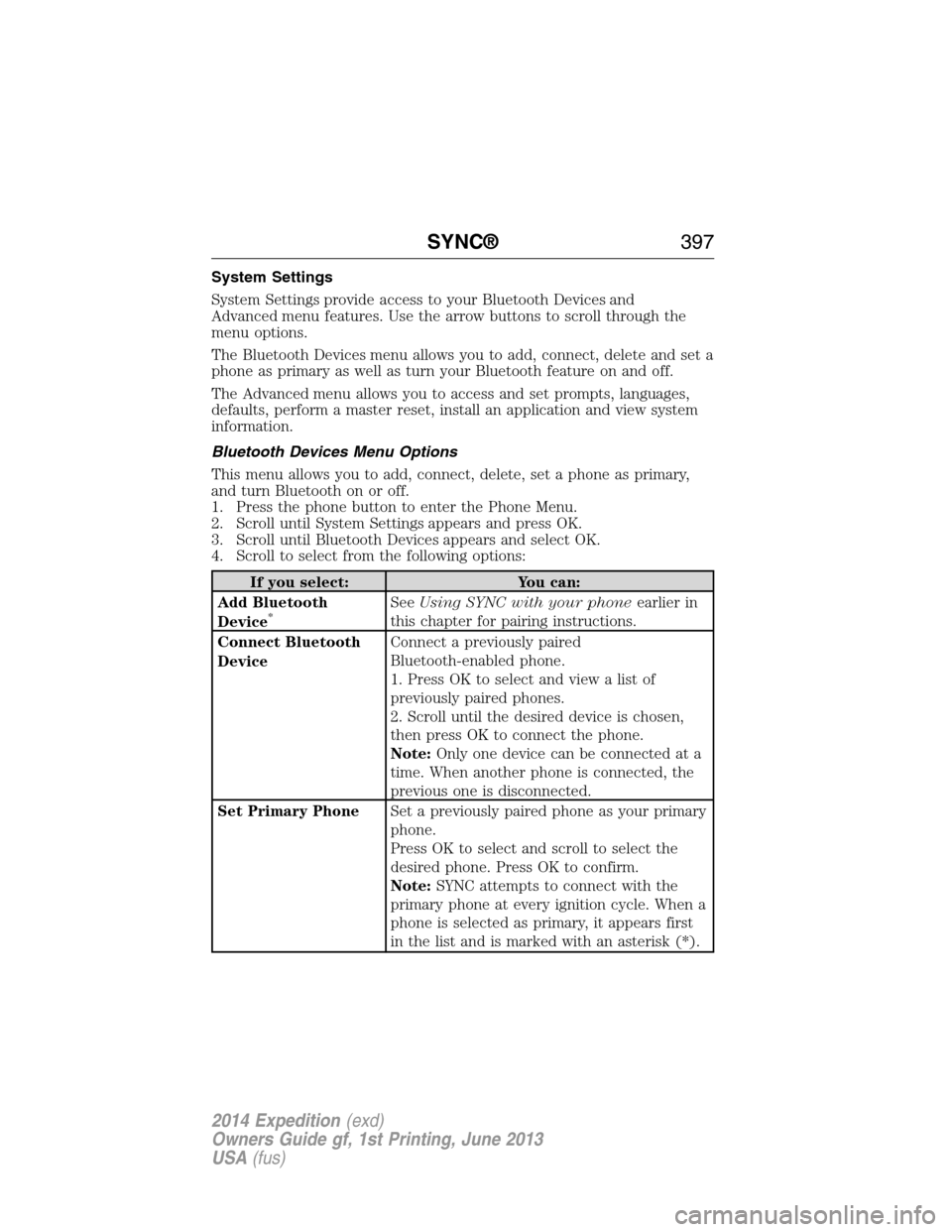
4. Scroll to select from the following options:
If you select: You can:
Add Bluetooth
Device
*SeeUsing SYNC with your phoneearlier in
this chapter for pairing instructions.
Connect Bluetooth
DeviceConnect a previously paired
Bluetooth-enabled phone.
1. Press OK to select and view a list of
previously paired phones.
2. Scroll until the desired device is chosen,
then press OK to connect the phone.
Note:Only one device can be connected at a
time. When another phone is connected, the
previous one is disconnected.
Set Primary PhoneSet a previously paired phone as your primary
phone.
Press OK to select and scroll to select the
desired phone. Press OK to confirm.
Note:SYNC attempts to connect with the
primary phone at every ignition cycle. When a
phone is selected as primary, it appears first
in the list and is marked with an asterisk (*).
SYNC®397
2014 Expedition(exd)
Owners Guide gf, 1st Printing, June 2013
USA(fus)
Page 449 of 519
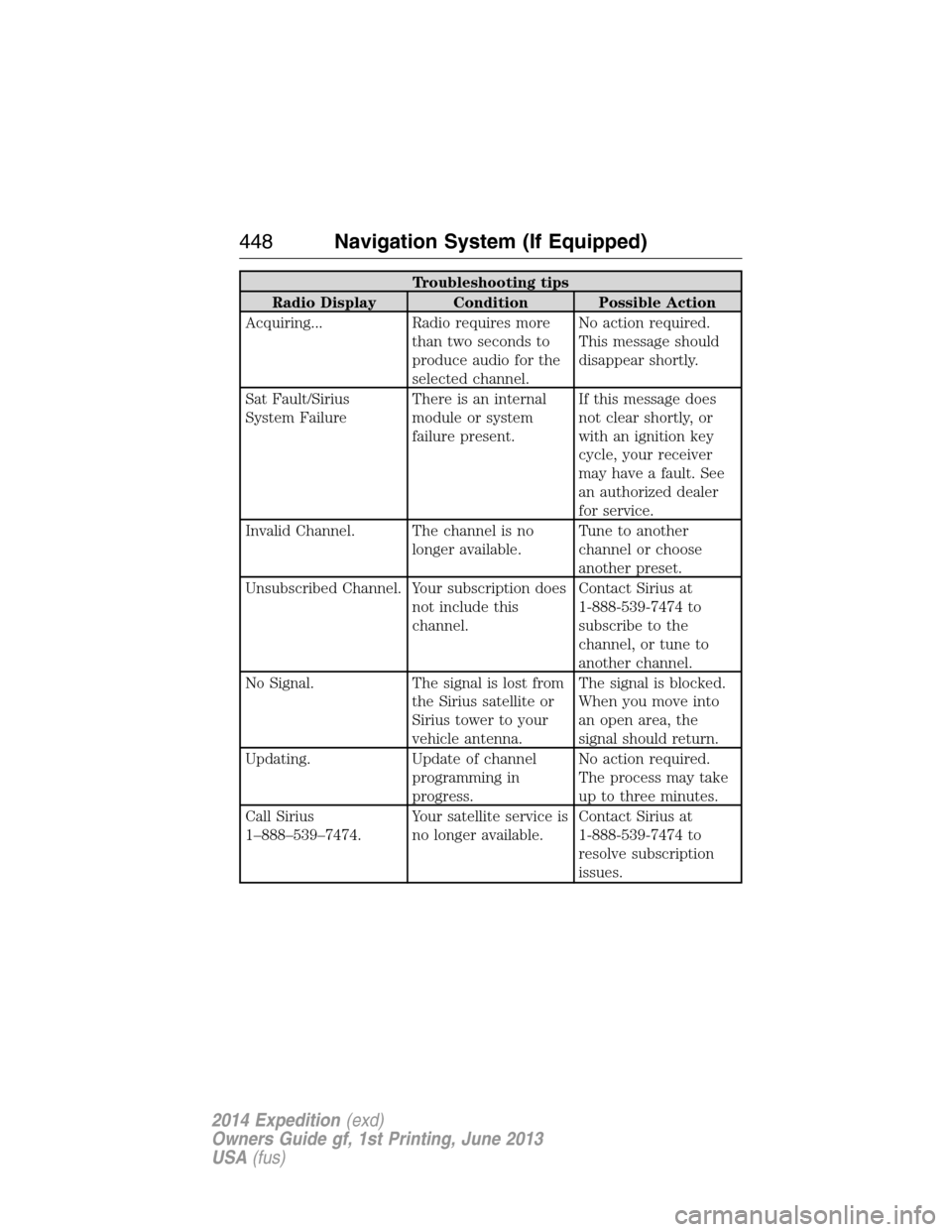
Troubleshooting tips
Radio Display Condition Possible Action
Acquiring... Radio requires more
than two seconds to
produce audio for the
selected channel.No action required.
This message should
disappear shortly.
Sat Fault/Sirius
System FailureThere is an internal
module or system
failure present.If this message does
not clear shortly, or
with an ignition key
cycle, your receiver
may have a fault. See
an authorized dealer
for service.
Invalid Channel. The channel is no
longer available.Tune to another
channel or choose
another preset.
Unsubscribed Channel. Your subscription does
not include this
channel.Contact Sirius at
1-888-539-7474 to
subscribe to the
channel, or tune to
another channel.
No Signal. The signal is lost from
the Sirius satellite or
Sirius tower to your
vehicle antenna.The signal is blocked.
When you move into
an open area, the
signal should return.
Updating. Update of channel
programming in
progress.No action required.
The process may take
up to three minutes.
Call Sirius
1–888–539–7474.Your satellite service is
no longer available.Contact Sirius at
1-888-539-7474 to
resolve subscription
issues.
448Navigation System (If Equipped)
2014 Expedition(exd)
Owners Guide gf, 1st Printing, June 2013
USA(fus)
Page 462 of 519
SOUND
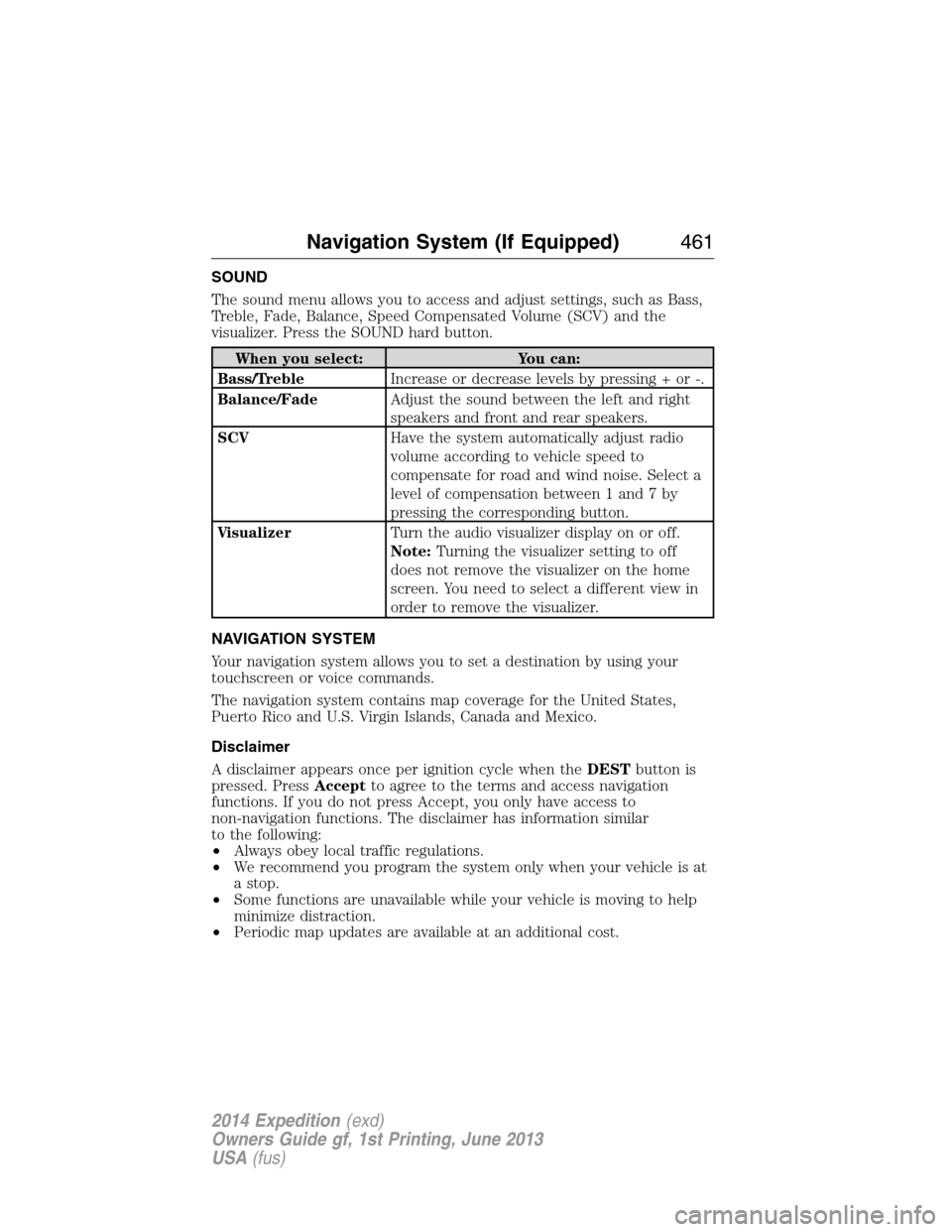
The sound menu allows you to access and adjust settings, such as Bass,
Treble, Fade, Balance, Speed Compensated Volume (SCV) and the
visualizer. Press the SOUND hard button.
When you select: You can:
Bass/TrebleIncrease or decrease levels by pressing + or -.
Balance/FadeAdjust the sound between the left and right
speakers and front and rear speakers.
SCVHave the system automatically adjust radio
volume according to vehicle speed to
compensate for road and wind noise. Select a
level of compensation between 1 and 7 by
pressing the corresponding button.
VisualizerTurn the audio visualizer display on or off.
Note:Turning the visualizer setting to off
does not remove the visualizer on the home
screen. You need to select a different view in
order to remove the visualizer.
NAVIGATION SYSTEM
Your navigation system allows you to set a destination by using your
touchscreen or voice commands.
The navigation system contains map coverage for the United States,
Puerto Rico and U.S. Virgin Islands, Canada and Mexico.
Disclaimer
A disclaimer appears once per ignition cycle when theDESTbutton is
pressed. PressAcceptto agree to the terms and access navigation
functions. If you do not press Accept, you only have access to
non-navigation functions. The disclaimer has information similar
to the following:
•Always obey local traffic regulations.
•We recommend you program the system only when your vehicle is at
a stop.
•Some functions are unavailable while your vehicle is moving to help
minimize distraction.
•Periodic map updates are available at an additional cost.
Navigation System (If Equipped)461
2014 Expedition(exd)
Owners Guide gf, 1st Printing, June 2013
USA(fus)
Page 515 of 519
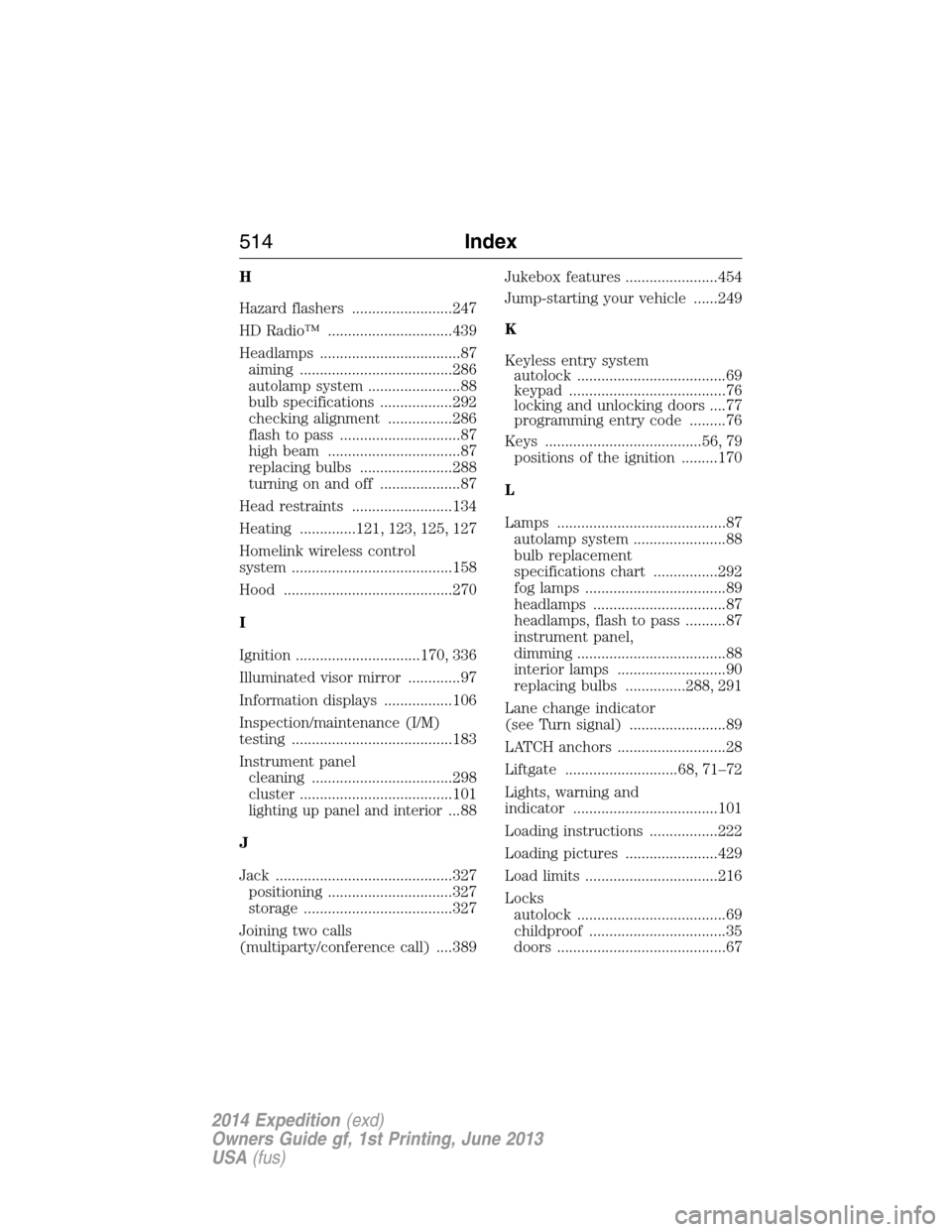
H
Hazard flashers .........................247
HD Radio™ ...............................439
Headlamps ...................................87
aiming ......................................286
autolamp system .......................88
bulb specifications ..................292
checking alignment ................286
flash to pass ..............................87
high beam .................................87
replacing bulbs .......................288
turning on and off ....................87
Head restraints .........................134
Heating ..............121, 123, 125, 127
Homelink wireless control
system ........................................158
Hood ..........................................270
I
Ignition ...............................170, 336
Illuminated visor mirror .............97
Information displays .................106
Inspection/maintenance (I/M)
testing ........................................183
Instrument panel
cleaning ...................................298
cluster ......................................101
lighting up panel and interior...88
J
Jack ............................................327
positioning ...............................327
storage .....................................327
Joining two calls
(multiparty/conference call) ....389Jukebox features .......................454
Jump-starting your vehicle ......249
K
Keyless entry system
autolock .....................................69
keypad .......................................76
locking and unlocking doors ....77
programming entry code .........76
Keys .......................................56, 79
positions of the ignition .........170
L
Lamps ..........................................87
autolamp system .......................88
bulb replacement
specifications chart ................292
fog lamps ...................................89
headlamps .................................87
headlamps, flash to pass ..........87
instrument panel,
dimming .....................................88
interior lamps ...........................90
replacing bulbs ...............288, 291
Lane change indicator
(see Turn signal) ........................89
LATCH anchors ...........................28
Liftgate ............................68, 71–72
Lights, warning and
indicator ....................................101
Loading instructions .................222
Loading pictures .......................429
Load limits .................................216
Locks
autolock .....................................69
childproof ..................................35
doors ..........................................67
514Index
2014 Expedition(exd)
Owners Guide gf, 1st Printing, June 2013
USA(fus)