buttons FORD EXPEDITION 2014 3.G Owner's Manual
[x] Cancel search | Manufacturer: FORD, Model Year: 2014, Model line: EXPEDITION, Model: FORD EXPEDITION 2014 3.GPages: 519, PDF Size: 6.9 MB
Page 356 of 519
E.Left arrow button
•In radio mode, press and release this button to scroll through
memory presets. Press and hold to go to the previous station
•In CD and SYNC modes, press and release this button to advance to
the previous track. Press and hold to rewind within that track.
F.Auxiliary audio input jacks:Plug in and play auxiliary audio
sources.
G.VOLUMEPress the up and down arrow buttons to increase or
decrease the headphone volume level. From the rear seat controls, the
volume cannot be higher than the current audio setting unless the
speakers are off.
H.Wired headphone jack
I.-Press the button to access the previous CD.
J.+Press to access the next CD.
Switching the Rear Audio Controls On
After you switch the ignition on, FULL rear controls are on and the
system is in Single Play mode.
Parental Control
The multimedia system allows for three varying levels of parental control.
By simultaneously pressing the 3 and 5 memory preset buttons, the rear
passengers may be allowed to access FULL or LOCAL control or be
LOCKED out of rear seat controls altogether.
1. Press the 3 and 5 memory preset buttons at the same time. LOCAL
illuminates in both front and rear audio displays, indicating that only
LOCAL rear control is available.Note:While in Single Play mode,
LOCAL is the same as LOCKED. In Dual Play mode, LOCAL allows
the driver to control the media selected at the radio, or over media
played through the rear auxiliary input jacks.
2. Pressing the 3 and 5 buttons a second time locks the rear control.
The rear passengers are restricted from control over media of any
kind (the rear controls are disabled).Note:If in Dual Play mode, the
headphone icon normally illuminated in the audio display when in
Dual Play turns off in the audio display.
3. Pressing the 3 and 5 buttons a third time restores full control to the
rear seat controls. Switching the ignition off and then on again has
the same effect.
Audio System355
2014 Expedition(exd)
Owners Guide gf, 1st Printing, June 2013
USA(fus)
Page 357 of 519
Switching Dual Play Mode On
You can switch Dual Play mode on by simultaneously pressing the 2 and
4 memory preset buttons on the audio or by doing the following:
1. Press the headphone/speaker control. The headphone icon
illuminates in both front and rear audio displays indicating the rear
seat speakers are off and the headphones are on.
2. Press MEDIA to change audio sources (as heard in the headphones
only).
3. Use the other controls to adjust the playing media.
Switching Off Dual Play Mode
Use any one of the following to switch off Dual Play mode:
•Press the 2 and 4 memory preset buttons simultaneously again.
•Press the 3 and 5 memory preset buttons simultaneously to LOCK
the rear seat controls.
•Press the headphone/speaker button again.
Using Dual Play Mode with Headphones
WARNING:Do not leave children unattended in your vehicle
and do not let children operate the system while unsupervised. If
wired headphones or auxiliary systems are used, children may become
entangled in the cords and seriously injure themselves.
Plug a 1/8–inch (3.5 millimeter) headphone (not included) into the
headphone jack. Press the speaker button, or the 2 and 4 memory preset
buttons simultaneously on the radio to switch on the headphones. DUAL
PLAY illuminates in the audio display, there is no sound from the rear
speakers and the fade control is inactive, signaling that Dual Play is on.
The front speakers remain on for the front passengers. Press the speaker
button, or the 2 and 4 memory preset buttons simultaneously on the
radio again to switch off the headphones and Dual Play mode. SINGLE
PLAY illuminates in the audio display; fade control is active and there is
sound from rear speakers, signaling that Single Play is on.
You need to switch the rear seat controls on to use any rear controls
(whether in Single Play or Dual Play mode). To use Dual Play, switch on
the rear seat controls; the headphone icon illuminates in the audio
display. SeeSwitching the rear audio controls onpreviously.
356Audio System
2014 Expedition(exd)
Owners Guide gf, 1st Printing, June 2013
USA(fus)
Page 363 of 519
REAR SEAT ENTERTAINMENT SYSTEM (IF EQUIPPED)
WARNING:Driving while distracted can result in loss of vehicle
control, crash and injury. We strongly recommend that you use
extreme caution when using any device that may take your focus off
the road. Your primary responsibility is the safe operation of your
vehicle. We recommend against the use of any hand-held device while
driving and encourage the use of voice-operated systems when possible.
Make sure you are aware of all applicable local laws that may affect the
use of electronic devices while driving.
Note:Make sure you run the engine while using the device. To avoid
discharging your vehicle battery:
•Do not use this device without the engine running.
•Turn off the device when your vehicle is not in use for long periods.
The system consists of the following features:
•Seven-inch color TFT-LCD panel (480x234) with 16:9 aspect
•Built-in, top-loading slot load DVD player
•Infrared transmitters for infrared wireless headphones
•Audio/Video source input (three RCA jacks)
•USB 2.0 (optional)
•One-eighth inch stereo headphone jack
•Forward remote sensor on the front panel
•Full-function remote control
•Five control buttons on the front panel: POWER, SOURCE, STOP,
PLAY and EJECT
•On-screen display control
•12V DC power input
•FM transmitter (may be optional)
Note:Do not touch the inner pins of the jacks on the front panel.
Electrostatic discharge may cause permanent damage to the device.
Your system plays the following types of discs:
•DVD-Video:DVD contains video.
•DVD +/- R:DVD contains video.
•CD-DA:CD contains musical or sound content only.
•CD-Video:CD contains movie only.
•CD-R/RW:CD contains audio files (such as a CD-R with MP3 files),
MPEG or JPEG files.
362Audio System
2014 Expedition(exd)
Owners Guide gf, 1st Printing, June 2013
USA(fus)
Page 369 of 519
5.SOUND AROUND ON/OFF*:Press this button to turn the FM
transmitter off and on.
6.MUTE:Press this button to turn off the sound sent to the headphones.
The screen displays that the sound is muted. Pressing the button again
restores sound to the previously set level. This feature is only
functional in DVD mode.
7.MENU:Press this button to go to the disc’s root menu.
8.CH + and CH -:
•In DVD mode, press these buttons to move the select bar to items
among the menu or file list.
•In TV mode, press these buttons to go to the next channel or
previous channel.
•In on-screen display mode, press these buttons to change the
setting of a selected item.
9.VOL + and VOL -:
•In DVD mode, press these buttons to move the select bar to items
to one of the items in the menu or file list.
•When not in on-screen display mode, press these buttons to change
the volume of the playing media.
10.ENTER:Press this button to select from the on-screen display, or
begin disc playback.
11.TITLE:Press this button to go to a disc’s title menu.
12.SUBTITLE:If a disc has subtitle options, press this button to display
the subtitle menu. Keep pressing the button until you reach your
desired option.
13.Numbers:Decimal numbers: 0 to 9.
14.CLR:Press this button to clear any numeric input from the number
keypad.
15.P L AY:Press this button to play a disc in the DVD player.
16.STOP:Press this button to stop the playing media.
•Pressing STOP once, then PLAY, resumes disc playback from where
it left off.
•Pressing STOP twice, then PLAY, resumes disc playback from the
beginning.
17.PAUSE:Press this button to pause the disc.
18.FR (Fast Rewind):Press this button to search the disc backward
continuously. There are five speed options to choose: 2X, 4X, 8X, 16X,
and 32X.
19.FF (Fast Forward):Press this button to search the disc forward
continuously. There are five speed options to choose: 2X, 4X, 8X, 16X,
and 32X.
20.SETUP:Press this button to navigate the Setup Menu. SeeHow to
use the DVD on-screen display (OSD) menufor more information.
368Audio System
2014 Expedition(exd)
Owners Guide gf, 1st Printing, June 2013
USA(fus)
Page 374 of 519
How to Use the Device On-screen Display Menus
PressSETUPon the remote control, and then useCH +, CH -, VOL +
andVOL -to navigate the Setup Page. PressENTERto make a
selection, and thenVOL -to return to the submenu.
Audio
This allows the user to control the audio stream in the selected language
for playback automatically.
Subtitle
This allows the user to turn the subtitles on and off in the selected
language for playback automatically.
Disc Menu
This allows the user to control the DVD disc menu in the selected language.
Parental
This section of the Setup Menu allows user to control the content of
movie playback from G to ADULT. The parental control function allows
you to limit viewing to your preference. The rating levels are 1 through 8
and are country-dependent.
After navigating to the Parental submenu, useVOL +and theCH +and
CH -buttons to select:
•KID SAFE (Children)
•G
•PG
•PG 13
•PGR
•R
•NC 17
•ADULT
Note:The lower you make the value, the stricter the limitation is.
Password
PressSETUPand navigate to the Password submenu under the
Password Setup Page.
1. PressVOL +,and then pressENTERon the remote control to enter
the submenu.
2. Input the old six-digit password or the default password. The default
password is 136900.
3. Input a new six-digit password using the numeric buttons.
4. Confirm the new password by entering the same new password again.
5. Scroll to OK, and then pressENTERto finish.
Audio System373
2014 Expedition(exd)
Owners Guide gf, 1st Printing, June 2013
USA(fus)
Page 376 of 519
Skipping Songs
PressNEXTon the remote control to move to the next song. Press
PREVto move to the beginning of the currently playing song. Press
PREVtwice to move to the previous song.
Selecting a Play Mode
You can choose what order the songs play on a disc temporarily. The
FOLDER play mode is the default. To access the play mode operations,
pressREPEATon the remote control. The play mode options are:
•Single:Play a selected song.
•Repeat One:Repeat the song that is playing.
•Folder:Play the folder in the order you recorded the songs.
•Folder Repeat:Repeat the folder that is playing.
•Random:Play the songs in the random order.
•Shuffle:Play the songs within the selected folder in random order.
Order of Tracks
The DVD-headrest module plays the files in the order that you added
them to the USB drive. Therefore, the playback order may not be the
same as what appears on the screen. To access the file structure and
menus, for the USB device, you need the remote control set to the
appropriate systems (A or B).
When you insert the USB device, the system may begin playing files
automatically, returning to the previous position, if it was unplugged
during a previous playback. To return to the menus, pressMENUor
VOL -,depending on the type of file you are playing. The current
directory appears, listing all file types.
Controls
•MENU:Press this button to return to the menu structure.
•CH + and CH -:Press these buttons to move the select bar up and
down within the selected menu or file list.
•VOL -:Press this button to move the menu up one level. Pressing
this button in some menu functions returns you to the menu
structure.
•VOL +:Press this button to select a menu item.
•ENTER:Press this button to make a selection or begin file playback.
•P L AY:Press this button to play a file.
•STOP:Press this button to stop the playing media.
•PAUSE:Press this button to stop the media playback temporarily.
Audio System375
2014 Expedition(exd)
Owners Guide gf, 1st Printing, June 2013
USA(fus)
Page 390 of 519
“DIAL”
“411” (four-one-one), “911” (nine-one-one)
“700 (seven hundred)” (seven hundred)
“800 (eight hundred)” (eight hundred)
“900 (nine hundred)” (nine hundred)
“#” (pound)
“
“Asterisk” (*)
“Clear” (deletes all entered digits)
“Delete” (deletes one digit)
“Plus”
“Star”
Note:To exit dial mode, press and hold the phone button or press
MENU to go to the PHONE menu.
Making Calls
Press the voice icon and when prompted say:
1. Say “Call
2. When the system confirms the number, say “Dial” again to initiate the
call.
To erase the last spoken digit, say “Delete” or press the left arrow
button. To erase all spoken digits, say “Clear” or press and hold the left
arrow button.
To end the call, press and hold the phone button.
Receiving Calls
When receiving a call, you can:
•Answer the call by pressing the phone button.
•Reject the call by pressing and holding the phone button.
•Ignore the call by doing nothing.
Phone Options during an Active Call
During an active call, you have additional menu features which become
available such as putting a call on hold, joining calls, etc. Use the arrow
buttons to scroll through the menu options.
SYNC®389
2014 Expedition(exd)
Owners Guide gf, 1st Printing, June 2013
USA(fus)
Page 398 of 519
System Settings
System Settings provide access to your Bluetooth Devices and
Advanced menu features. Use the arrow buttons to scroll through the
menu options.
The Bluetooth Devices menu allows you to add, connect, delete and set a
phone as primary as well as turn your Bluetooth feature on and off.
The Advanced menu allows you to access and set prompts, languages,
defaults, perform a master reset, install an application and view system
information.
Bluetooth Devices Menu Options
This menu allows you to add, connect, delete, set a phone as primary,
and turn Bluetooth on or off.
1. Press the phone button to enter the Phone Menu.
2. Scroll until System Settings appears and press OK.
3. Scroll until Bluetooth Devices appears and select OK.
4. Scroll to select from the following options:
If you select: You can:
Add Bluetooth
Device
*SeeUsing SYNC with your phoneearlier in
this chapter for pairing instructions.
Connect Bluetooth
DeviceConnect a previously paired
Bluetooth-enabled phone.
1. Press OK to select and view a list of
previously paired phones.
2. Scroll until the desired device is chosen,
then press OK to connect the phone.
Note:Only one device can be connected at a
time. When another phone is connected, the
previous one is disconnected.
Set Primary PhoneSet a previously paired phone as your primary
phone.
Press OK to select and scroll to select the
desired phone. Press OK to confirm.
Note:SYNC attempts to connect with the
primary phone at every ignition cycle. When a
phone is selected as primary, it appears first
in the list and is marked with an asterisk (*).
SYNC®397
2014 Expedition(exd)
Owners Guide gf, 1st Printing, June 2013
USA(fus)
Page 427 of 519
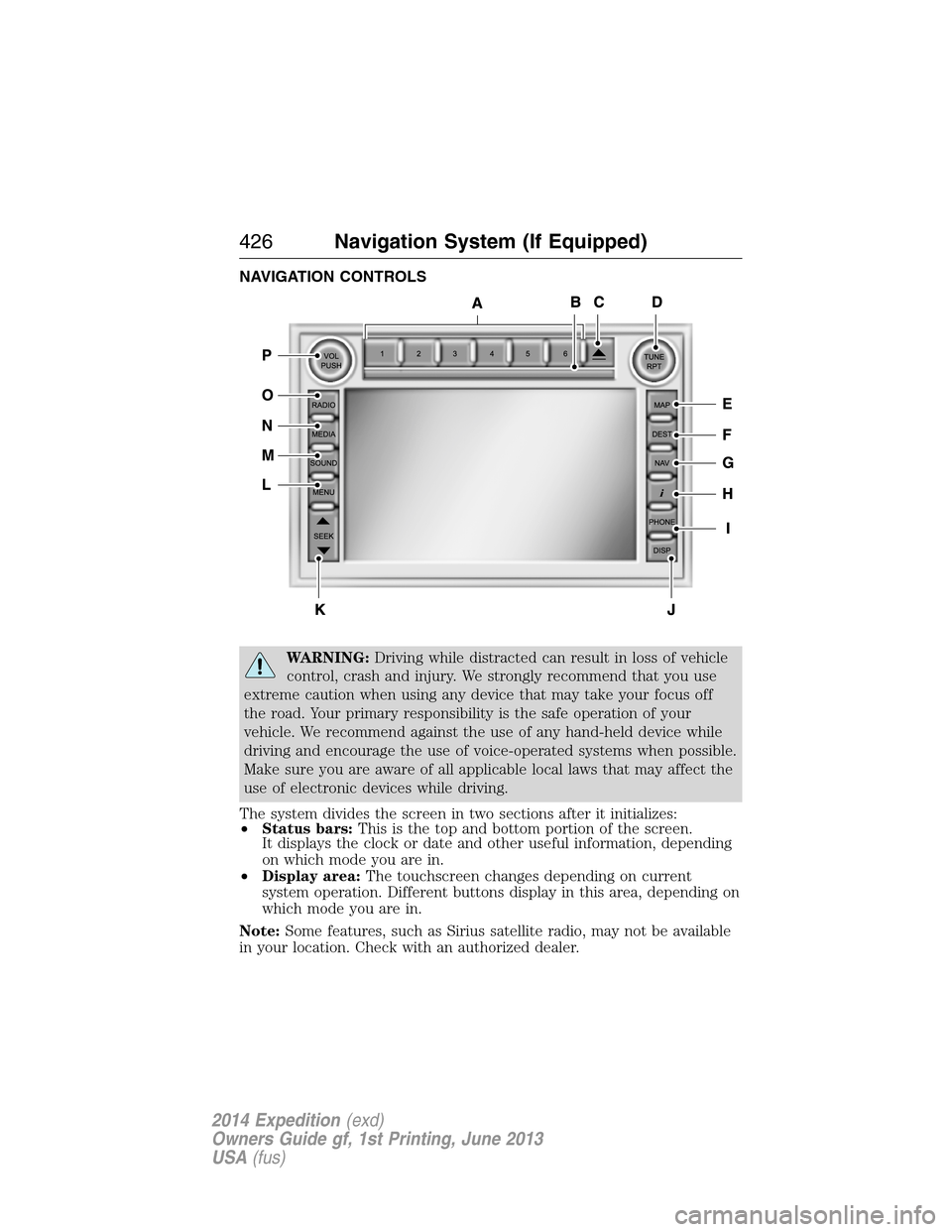
NAVIGATION CONTROLS
WARNING:Driving while distracted can result in loss of vehicle
control, crash and injury. We strongly recommend that you use
extreme caution when using any device that may take your focus off
the road. Your primary responsibility is the safe operation of your
vehicle. We recommend against the use of any hand-held device while
driving and encourage the use of voice-operated systems when possible.
Make sure you are aware of all applicable local laws that may affect the
use of electronic devices while driving.
The system divides the screen in two sections after it initializes:
•Status bars:This is the top and bottom portion of the screen.
It displays the clock or date and other useful information, depending
on which mode you are in.
•Display area:The touchscreen changes depending on current
system operation. Different buttons display in this area, depending on
which mode you are in.
Note:Some features, such as Sirius satellite radio, may not be available
in your location. Check with an authorized dealer.
426Navigation System (If Equipped)
2014 Expedition(exd)
Owners Guide gf, 1st Printing, June 2013
USA(fus)
Page 428 of 519
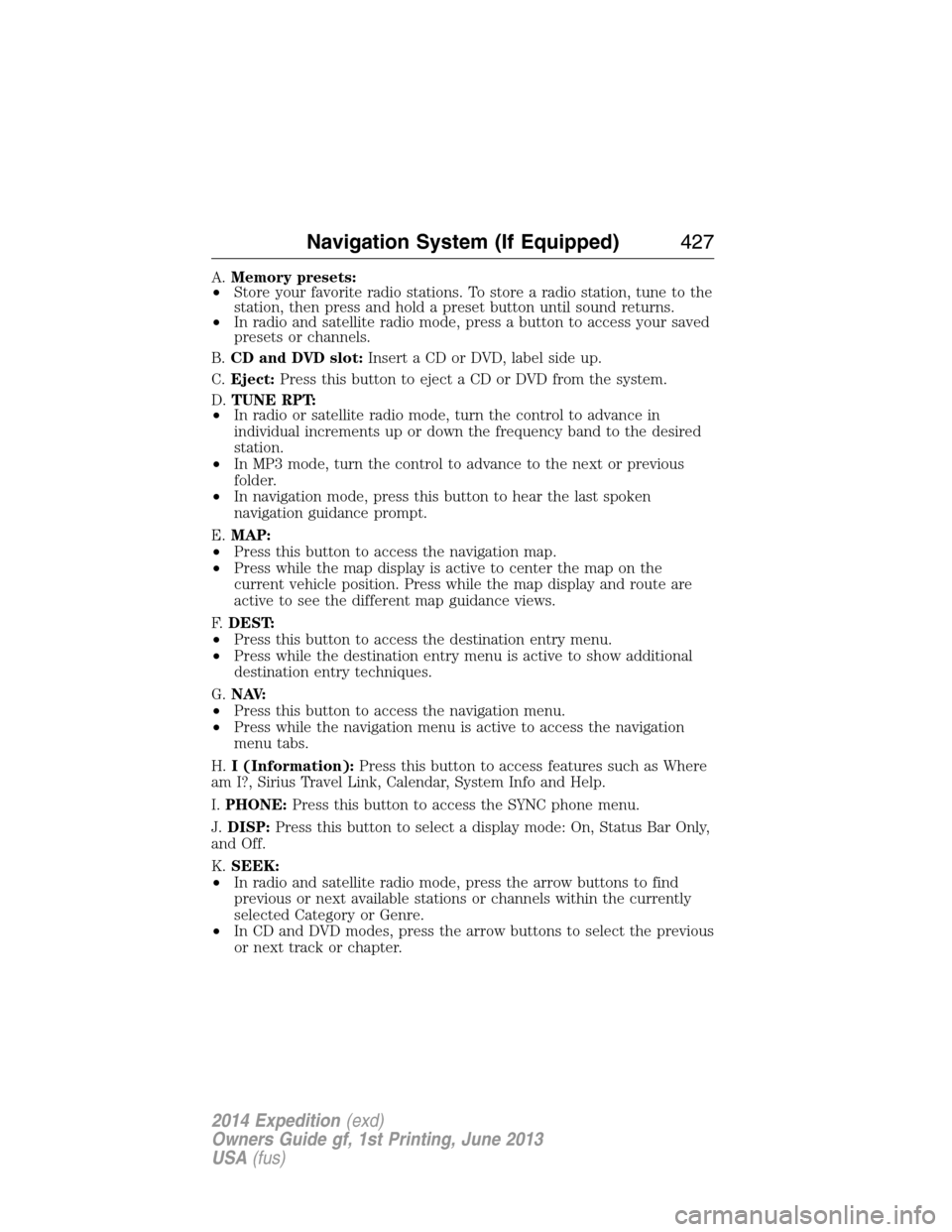
A.Memory presets:
•Store your favorite radio stations. To store a radio station, tune to the
station, then press and hold a preset button until sound returns.
•In radio and satellite radio mode, press a button to access your saved
presets or channels.
B.CD and DVD slot:Insert a CD or DVD, label side up.
C.Eject:Press this button to eject a CD or DVD from the system.
D.TUNE RPT:
•In radio or satellite radio mode, turn the control to advance in
individual increments up or down the frequency band to the desired
station.
•In MP3 mode, turn the control to advance to the next or previous
folder.
•In navigation mode, press this button to hear the last spoken
navigation guidance prompt.
E.MAP:
•Press this button to access the navigation map.
•Press while the map display is active to center the map on the
current vehicle position. Press while the map display and route are
active to see the different map guidance views.
F.DEST:
•Press this button to access the destination entry menu.
•Press while the destination entry menu is active to show additional
destination entry techniques.
G.N AV:
•Press this button to access the navigation menu.
•Press while the navigation menu is active to access the navigation
menu tabs.
H.I (Information):Press this button to access features such as Where
am I?, Sirius Travel Link, Calendar, System Info and Help.
I.PHONE:Press this button to access the SYNC phone menu.
J.DISP:Press this button to select a display mode: On, Status Bar Only,
and Off.
K.SEEK:
•In radio and satellite radio mode, press the arrow buttons to find
previous or next available stations or channels within the currently
selected Category or Genre.
•In CD and DVD modes, press the arrow buttons to select the previous
or next track or chapter.
Navigation System (If Equipped)427
2014 Expedition(exd)
Owners Guide gf, 1st Printing, June 2013
USA(fus)