display FORD EXPEDITION 2014 3.G Owner's Guide
[x] Cancel search | Manufacturer: FORD, Model Year: 2014, Model line: EXPEDITION, Model: FORD EXPEDITION 2014 3.GPages: 519, PDF Size: 6.9 MB
Page 121 of 519
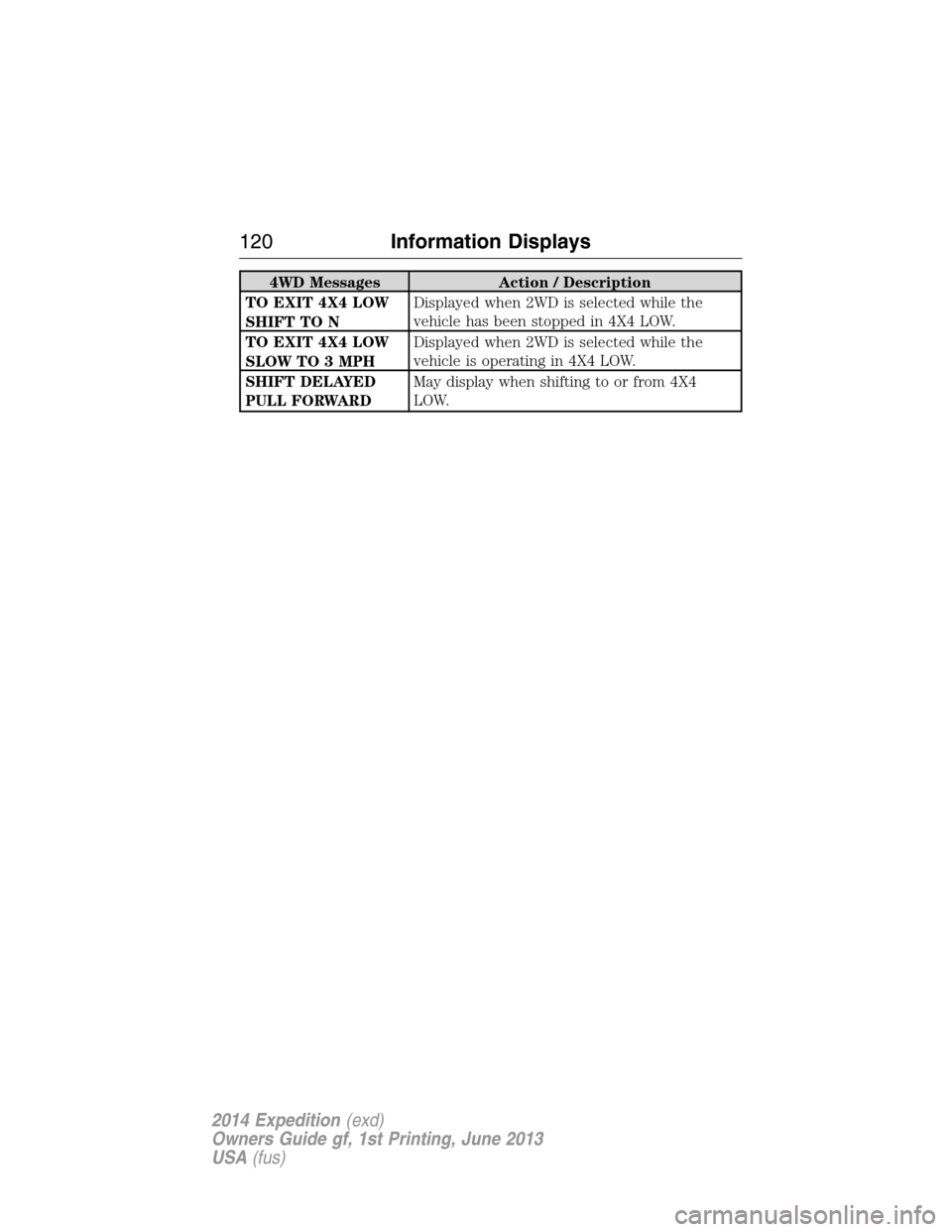
4WD Messages Action / Description
TO EXIT 4X4 LOW
SHIFT TO NDisplayed when 2WD is selected while the
vehicle has been stopped in 4X4 LOW.
TO EXIT 4X4 LOW
SLOW TO 3 MPHDisplayed when 2WD is selected while the
vehicle is operating in 4X4 LOW.
SHIFT DELAYED
PULL FORWARDMay display when shifting to or from 4X4
LOW.
120Information Displays
2014 Expedition(exd)
Owners Guide gf, 1st Printing, June 2013
USA(fus)
Page 126 of 519
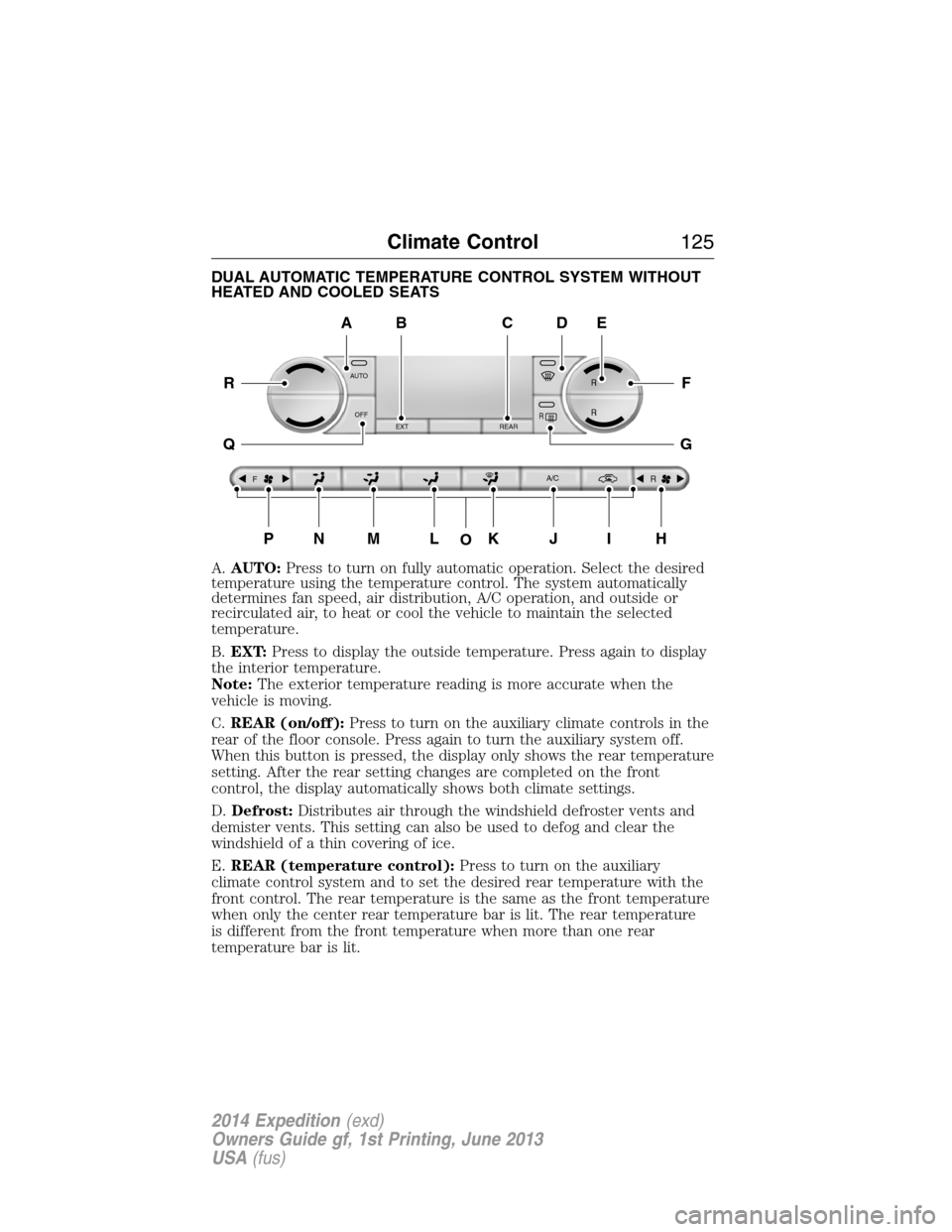
DUAL AUTOMATIC TEMPERATURE CONTROL SYSTEM WITHOUT
HEATED AND COOLED SEATS
A.AUTO:Press to turn on fully automatic operation. Select the desired
temperature using the temperature control. The system automatically
determines fan speed, air distribution, A/C operation, and outside or
recirculated air, to heat or cool the vehicle to maintain the selected
temperature.
B.EXT:Press to display the outside temperature. Press again to display
the interior temperature.
Note:The exterior temperature reading is more accurate when the
vehicle is moving.
C.REAR (on/off):Press to turn on the auxiliary climate controls in the
rear of the floor console. Press again to turn the auxiliary system off.
When this button is pressed, the display only shows the rear temperature
setting. After the rear setting changes are completed on the front
control, the display automatically shows both climate settings.
D.Defrost:Distributes air through the windshield defroster vents and
demister vents. This setting can also be used to defog and clear the
windshield of a thin covering of ice.
E.REAR (temperature control):Press to turn on the auxiliary
climate control system and to set the desired rear temperature with the
front control. The rear temperature is the same as the front temperature
when only the center rear temperature bar is lit. The rear temperature
is different from the front temperature when more than one rear
temperature bar is lit.
AUTO
OFF
EXT REAR
FA/C
R
R R
R
O
A
PNMLKJIH
DE
F
G
R
Q
BC
Climate Control125
2014 Expedition(exd)
Owners Guide gf, 1st Printing, June 2013
USA(fus)
Page 127 of 519
When this button is pressed, the display only shows the rear temperature
setting. After the rear setting changes are completed on the front
control, the display automatically shows both climate settings.
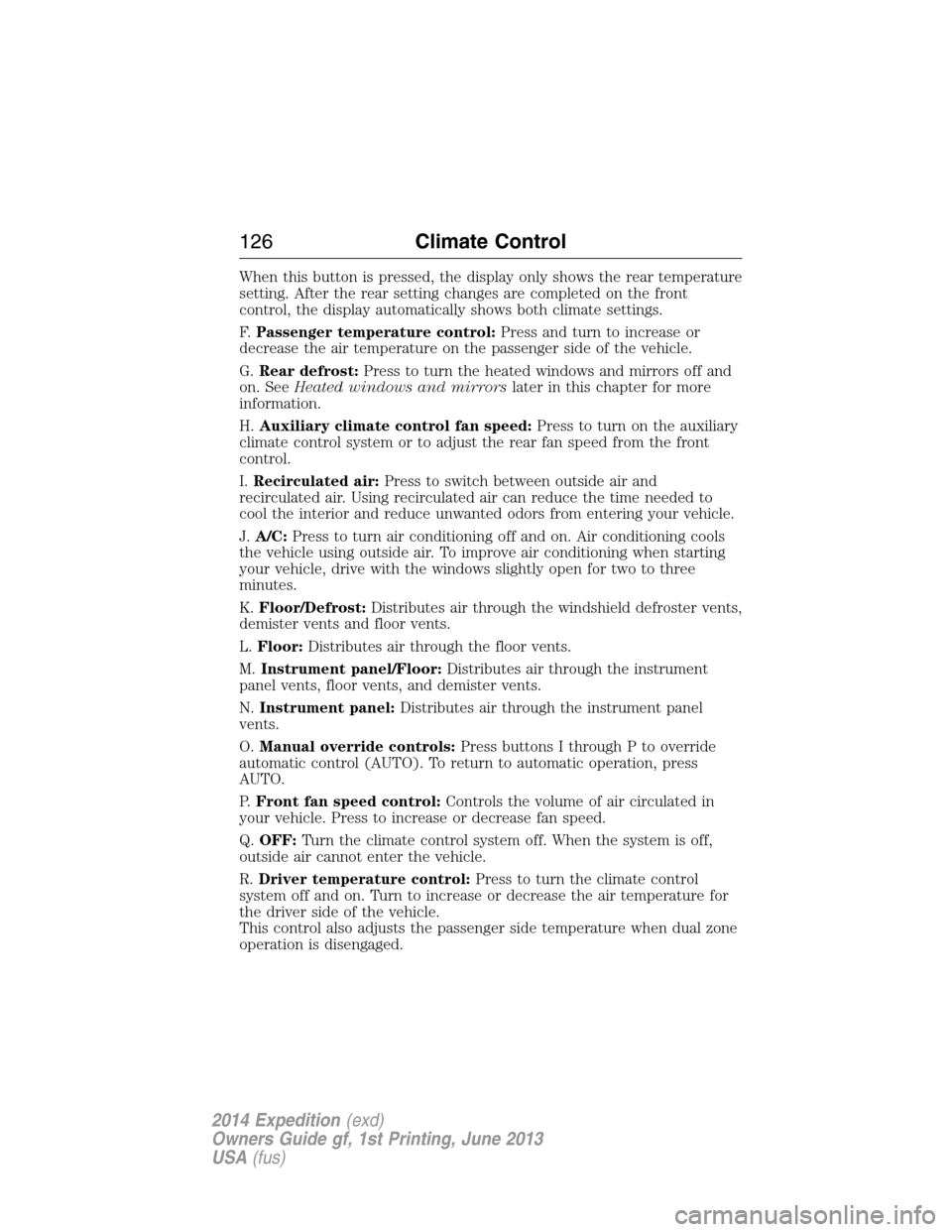
F.Passenger temperature control:Press and turn to increase or
decrease the air temperature on the passenger side of the vehicle.
G.Rear defrost:Press to turn the heated windows and mirrors off and
on. SeeHeated windows and mirrorslater in this chapter for more
information.
H.Auxiliary climate control fan speed:Press to turn on the auxiliary
climate control system or to adjust the rear fan speed from the front
control.
I.Recirculated air:Press to switch between outside air and
recirculated air. Using recirculated air can reduce the time needed to
cool the interior and reduce unwanted odors from entering your vehicle.
J.A/C:Press to turn air conditioning off and on. Air conditioning cools
the vehicle using outside air. To improve air conditioning when starting
your vehicle, drive with the windows slightly open for two to three
minutes.
K.Floor/Defrost:Distributes air through the windshield defroster vents,
demister vents and floor vents.
L.Floor:Distributes air through the floor vents.
M.Instrument panel/Floor:Distributes air through the instrument
panel vents, floor vents, and demister vents.
N.Instrument panel:Distributes air through the instrument panel
vents.
O.Manual override controls:Press buttons I through P to override
automatic control (AUTO). To return to automatic operation, press
AUTO.
P.Front fan speed control:Controls the volume of air circulated in
your vehicle. Press to increase or decrease fan speed.
Q.OFF:Turn the climate control system off. When the system is off,
outside air cannot enter the vehicle.
R.Driver temperature control:Press to turn the climate control
system off and on. Turn to increase or decrease the air temperature for
the driver side of the vehicle.
This control also adjusts the passenger side temperature when dual zone
operation is disengaged.
126Climate Control
2014 Expedition(exd)
Owners Guide gf, 1st Printing, June 2013
USA(fus)
Page 128 of 519
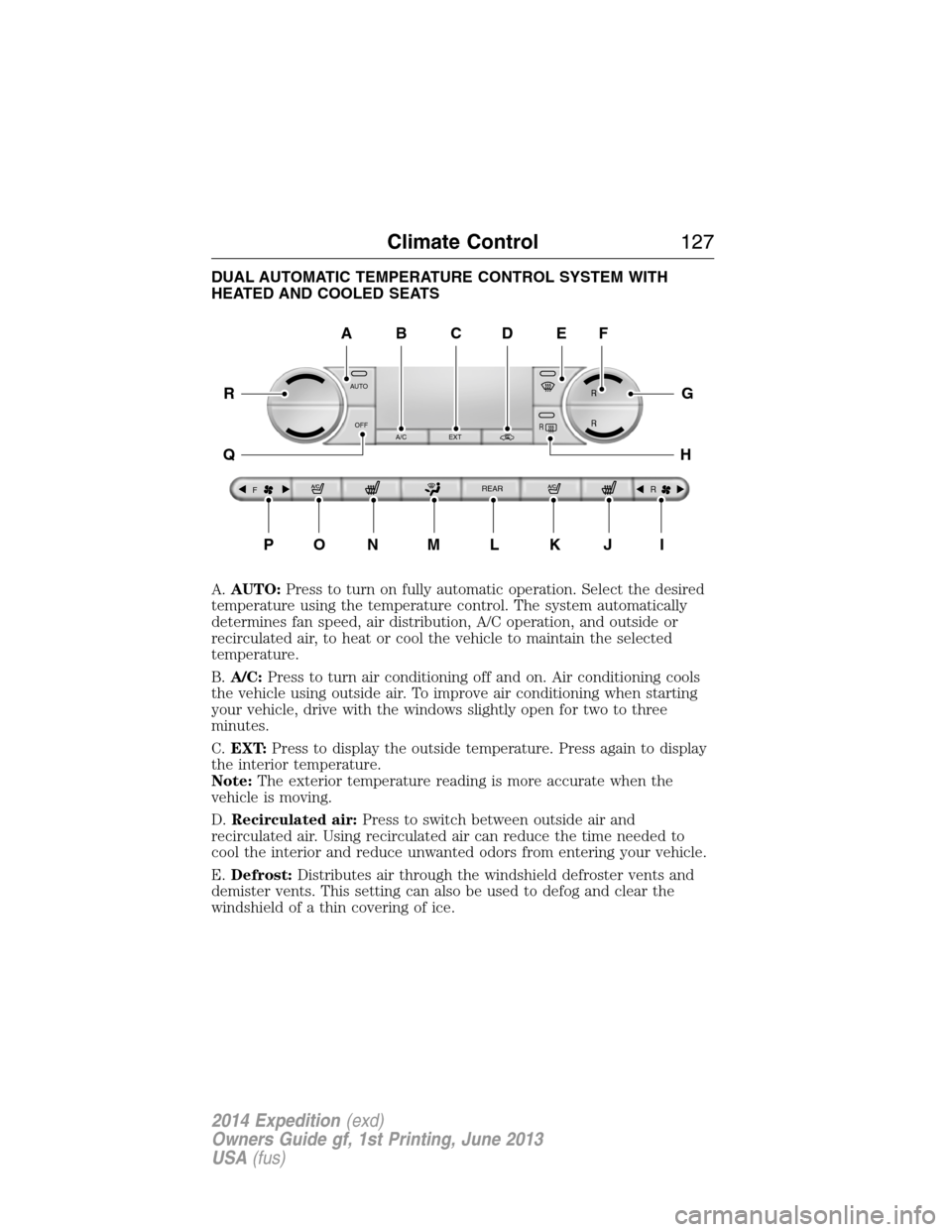
DUAL AUTOMATIC TEMPERATURE CONTROL SYSTEM WITH
HEATED AND COOLED SEATS
A.AUTO:Press to turn on fully automatic operation. Select the desired
temperature using the temperature control. The system automatically
determines fan speed, air distribution, A/C operation, and outside or
recirculated air, to heat or cool the vehicle to maintain the selected
temperature.
B.A/C:Press to turn air conditioning off and on. Air conditioning cools
the vehicle using outside air. To improve air conditioning when starting
your vehicle, drive with the windows slightly open for two to three
minutes.
C.EXT:Press to display the outside temperature. Press again to display
the interior temperature.
Note:The exterior temperature reading is more accurate when the
vehicle is moving.
D.Recirculated air:Press to switch between outside air and
recirculated air. Using recirculated air can reduce the time needed to
cool the interior and reduce unwanted odors from entering your vehicle.
E.Defrost:Distributes air through the windshield defroster vents and
demister vents. This setting can also be used to defog and clear the
windshield of a thin covering of ice.
AUTO
OFF
A/C EXT
FREAR
R
R R
R
A
PONMLKJI
EF
G
H
R
Q
BDC
Climate Control127
2014 Expedition(exd)
Owners Guide gf, 1st Printing, June 2013
USA(fus)
Page 129 of 519
F.REAR (temperature control):Press to turn on the auxiliary climate
control system and to set the desired rear temperature with the front
control. The rear temperature is the same as the front temperature when
only the center rear temperature bar is lit. The rear temperature is
different from the front temperature when more than one rear
temperature bar is lit.
When this button is pressed, the display only shows the rear temperature
setting. After the rear setting changes are completed on the front
control, the display automatically shows both climate settings.
G.Passenger temperature control:Press and turn to increase or
decrease the air temperature on the passenger side of the vehicle.
H.Rear defrost:Press to turn the heated windows and mirrors off and
on. SeeHeated windows and mirrorslater in this chapter for more
information.
I.Auxiliary climate control fan speed:Press to turn on the auxiliary
climate control system or to adjust the rear fan speed from the front
control.
J.Passenger heated seat control:Press to switch the passenger
heated seat off and on. SeeHeated seatsin theSeatschapter for more
information.
K.Passenger cooled seat control:Press to switch the passenger
cooled seat off and on. SeeHeated and cooled seatsin theSeats
chapter for more information.
L.REAR (on/off):Press to turn on the auxiliary climate controls in the
rear of the floor console. Press again to turn the auxiliary system off.
When this button is pressed, the display only shows the rear temperature
setting. After the rear setting changes are completed on the front
control, the display automatically shows both climate settings.
M.Air distribution control:Turn to set the air distribution to a
position listed below:
Distributes air through the instrument panel vents.
Distributes air through the instrument panel vents, floor vents,
and demister vents.
128Climate Control
2014 Expedition(exd)
Owners Guide gf, 1st Printing, June 2013
USA(fus)
Page 141 of 519
Recalling Saved Memory Positions
To recall position 1 settings, press and release memory button 1.
The memory features will move to the saved memory 1 position.
You can also recall the memory positions when you:
•press your remote control transmitter unlock button (if the remote
control is programmed to a memory position) or,
•enter a valid Securicode personal entry code that is programmed to a
memory position.
If the easy entry and exit feature is on, the mirrors and pedals will move
to the programmed memory position and the seat will move to the easy
entry position. The seat will move to the driving memory position when
the ignition is activated.
You can recall a programmed memory position:
•in any gearshift position if the ignition is not on.
•only in positionPorNif the ignition is on.
Easy Entry and Exit Feature (If Equipped)
If you enable the easy entry and exit feature, it automatically moves the
driver’s seat 2 inches (5 centimeters) rearward when the transmission
selector lever is in positionPand the key is removed from the ignition.
Note:If the seat is located less than 2 inches (5 centimeters) from
the rear of the seat track, the seat travel will be less than 2 inches
(5 centimeters) rearward.
The driver’s seat will return to the previous position when the key is put
in the ignition.
Enable or disable this feature through the information display. See the
Information Displayschapter for more information.
140Seats
2014 Expedition(exd)
Owners Guide gf, 1st Printing, June 2013
USA(fus)
Page 163 of 519
2. Press the same button twice to confirm the change to Programming
mode. If done properly the LED light will appear red.
3. Hold the transmitter within 1–3 inches (2–8 centimeters) of the
button on the sun visor you want to program.
4. Press and hold both the programmed Genie button on the hand-held
transmitter and the button on the sun visor you want to program. The
indicator light on the sun visor will flash rapidly when the programming
is successful.
Note:the Genie transmitter will transmit for up to 30 seconds. If
HomeLink does not program within 30 seconds the Genie transmitter will
need to be pressed again. If the Genie transmitter LED displays green
and red, release the button until the LED turns off before pressing the
button again.
Once HomeLink has been programmed successfully, the Genie
transmitter must be changed out of program mode. To do this:
1. Press and hold the previously programmed Genie button on the
hand-held transmitter for 10 seconds. The indicator light will change
from red to red and green.
2. Press the same button twice to confirm the change. If done correctly
the LED will turn green.
Programming HomeLink to the Genie Intellicode garage door
opener motor
Note:You may need a ladder to access the garage door opener motor.
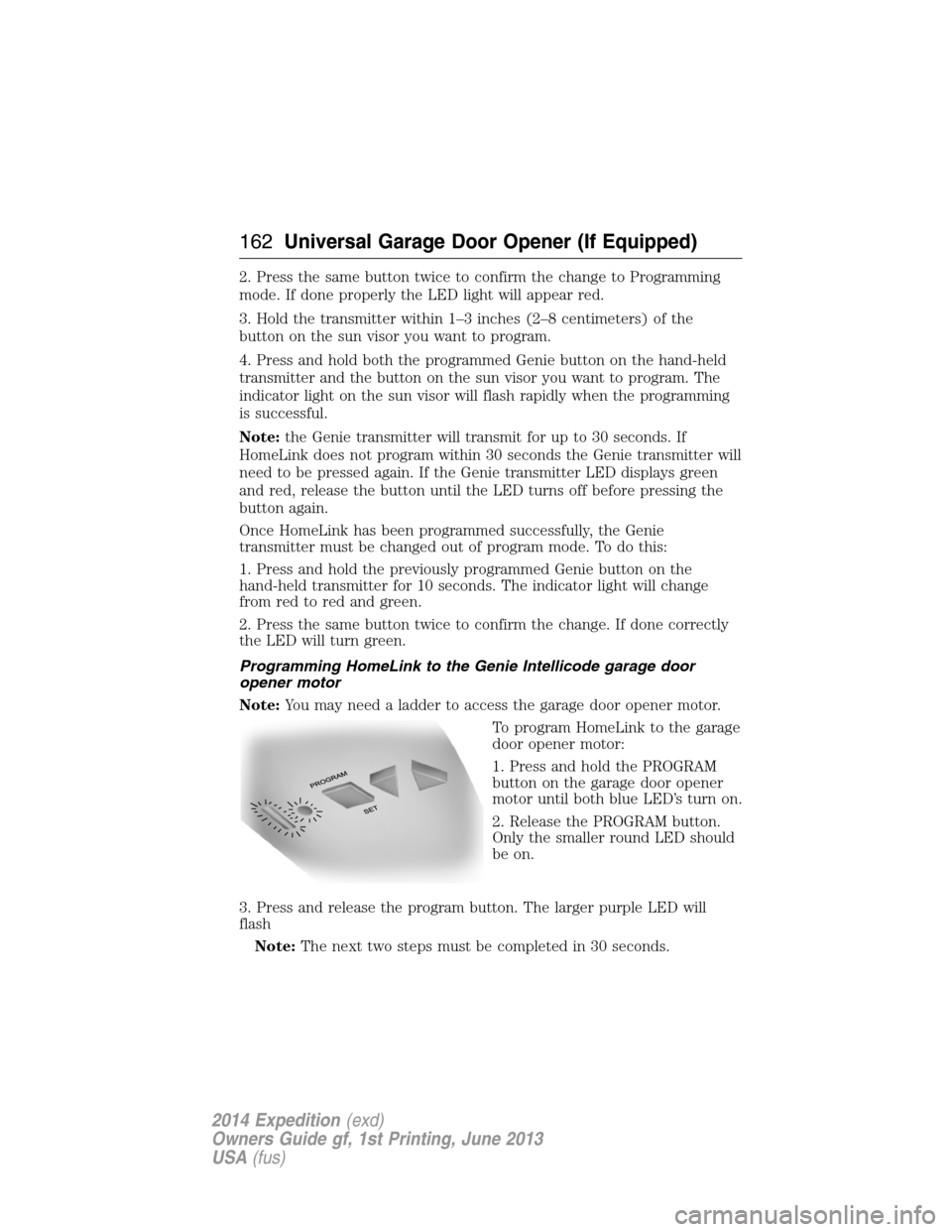
To program HomeLink to the garage
door opener motor:
1. Press and hold the PROGRAM
button on the garage door opener
motor until both blue LED’s turn on.
2. Release the PROGRAM button.
Only the smaller round LED should
be on.
3. Press and release the program button. The larger purple LED will
flash
Note:The next two steps must be completed in 30 seconds.
162Universal Garage Door Opener (If Equipped)
2014 Expedition(exd)
Owners Guide gf, 1st Printing, June 2013
USA(fus)
Page 180 of 519
Easy Fuel® “No Cap” Fuel System
WARNING:The fuel system may be under pressure. If you hear
a hissing sound near the fuel filler door, do not refuel until the
sound stops. Otherwise, fuel may spray out, which could cause serious
personal injury.
When fueling your vehicle:
1. Turn the engine off.
2. Open the fuel door by pulling the indent on the door.
3. Insert the fuel plug key (if equipped) into the locking plug and turn it
counterclockwise to unlock it.
4. Slowly insert the fuel filler nozzle fully into the fuel system, and leave
the nozzle fully inserted until you are done pumping.
5. After you are done pumping fuel, slowly remove the fuel filler
nozzle—allow about ten seconds after pumping fuel before removing the
fuel filler nozzle. This allows residual fuel to drain back into the fuel tank
and not spill onto the vehicle.
6. Reinstall the plug (if equipped) into the fuel fill inlet and turn the key
clockwise to lock.
Note:Do not overfill the tank or fuel spillage will occur.
If the fuel fill inlet was not properly closed, a Check Fuel Fill Inlet
message may appear on the information display. See theInformation
Displayschapter for more information.
At the next opportunity, do the following:
1. Safely pull off the road.
2. Turn off the engine.
3. Open the fuel filler door and remove any visible debris from the fuel
fill opening.
4. Insert either the fuel fill nozzle or the fuel fill funnel provided with the
vehicle several times to dislodge any debris and/or allow the inlet to
close properly.
If this action corrects the problem, the message may not reset
immediately. It may take several driving cycles for the message to turn
off. A driving cycle consists of an engine start-up (after four or more
hours with the engine off) followed by city/highway driving. Continuing
to drive with the message on may cause the service engine soon lamp to
turn on as well.
Fuel and Refueling179
2014 Expedition(exd)
Owners Guide gf, 1st Printing, June 2013
USA(fus)
Page 191 of 519
USING FOUR-WHEEL DRIVE (4WD) (IF EQUIPPED )
WARNING:For important information regarding safe operation
of this type of vehicle, seeGeneral Informationin theWheels
and Tireschapter.
Note:Do not use 4X4 mode on dry, hard surfaced roads. Doing so will
produce excessive noise, increase tire wear and may damage drive
components. 4X4 mode is only intended for consistently slippery or loose
surfaces.
Note:If 4X4 low is selected while the vehicle is moving above 3 mph
(5 km/h), the 4WD system will not perform a shift. This is normal and
should be no reason for concern. Refer toShifting to/from 4L
(4X4 Low)for proper operation.
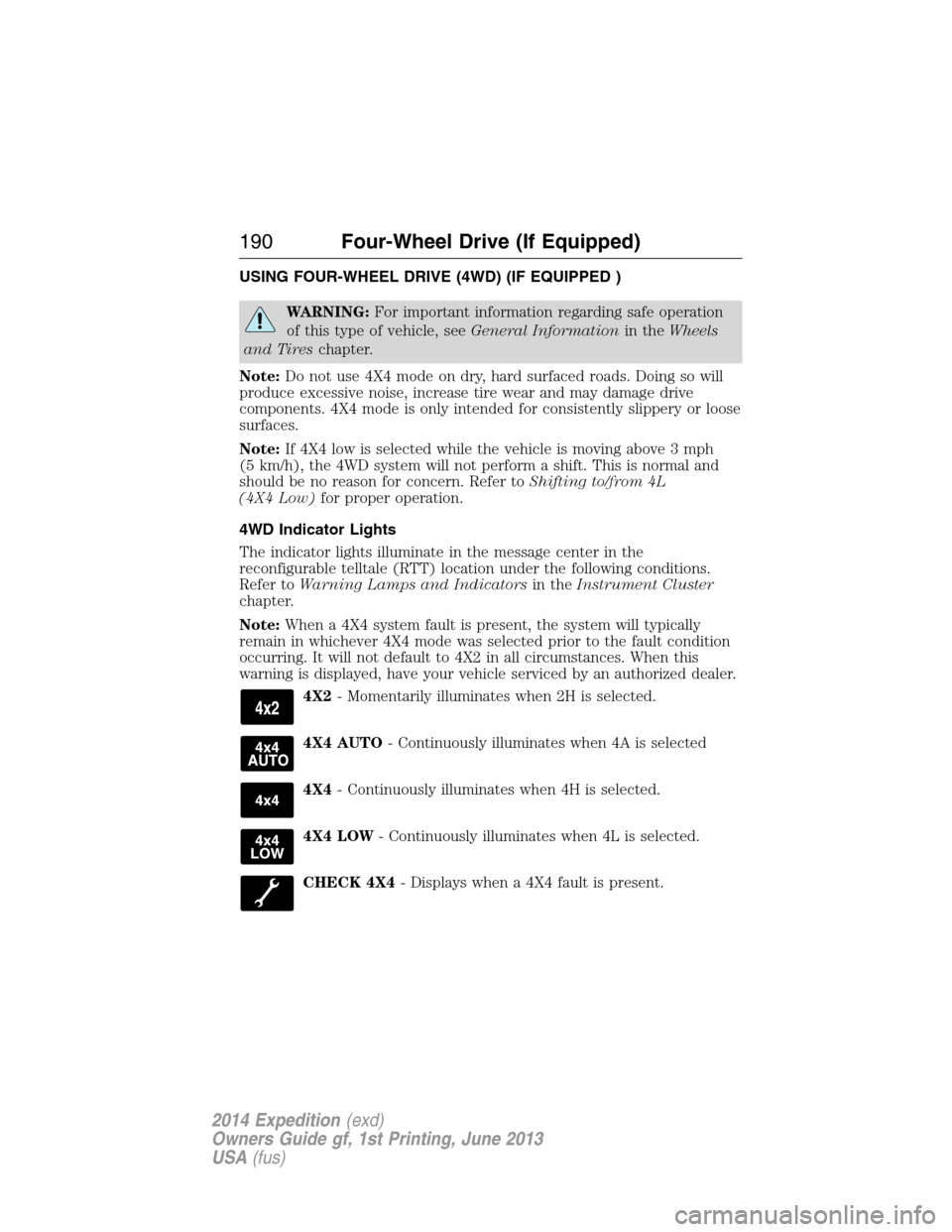
4WD Indicator Lights
The indicator lights illuminate in the message center in the
reconfigurable telltale (RTT) location under the following conditions.
Refer toWarning Lamps and Indicatorsin theInstrument Cluster
chapter.
Note:When a 4X4 system fault is present, the system will typically
remain in whichever 4X4 mode was selected prior to the fault condition
occurring. It will not default to 4X2 in all circumstances. When this
warning is displayed, have your vehicle serviced by an authorized dealer.
4X2- Momentarily illuminates when 2H is selected.
4X4 AUTO- Continuously illuminates when 4A is selected
4X4- Continuously illuminates when 4H is selected.
4X4 LOW- Continuously illuminates when 4L is selected.
CHECK 4X4- Displays when a 4X4 fault is present.
190Four-Wheel Drive (If Equipped)
2014 Expedition(exd)
Owners Guide gf, 1st Printing, June 2013
USA(fus)
Page 192 of 519
4WD switch positions
WARNING:Utility and four-wheel drive vehicles arenot
designed for cornering at speeds as high as passenger cars any
more than low-slung sports cars are designed to perform satisfactorily
under off-road conditions. Avoid sharp turns or abrupt maneuvers in
these vehicles.
Note:If your vehicle is equipped with AdvanceTrac® with RSC®, the
system will automatically turn off the stability enhancement feature
when you shift the 4WD system into 4L (4X4 LOW). You can manually
turn the system off by pressing the AdvanceTrac button, see the
Traction Controlchapter for more information. This will disable the
engine management feature, allowing the vehicle to maintain full power
and enhanced momentum through the obstacle. The brake traction
enhancement feature will still be enabled.
Note:The Control Trac® selector knob should not be changed while the
rear wheels are slipping.
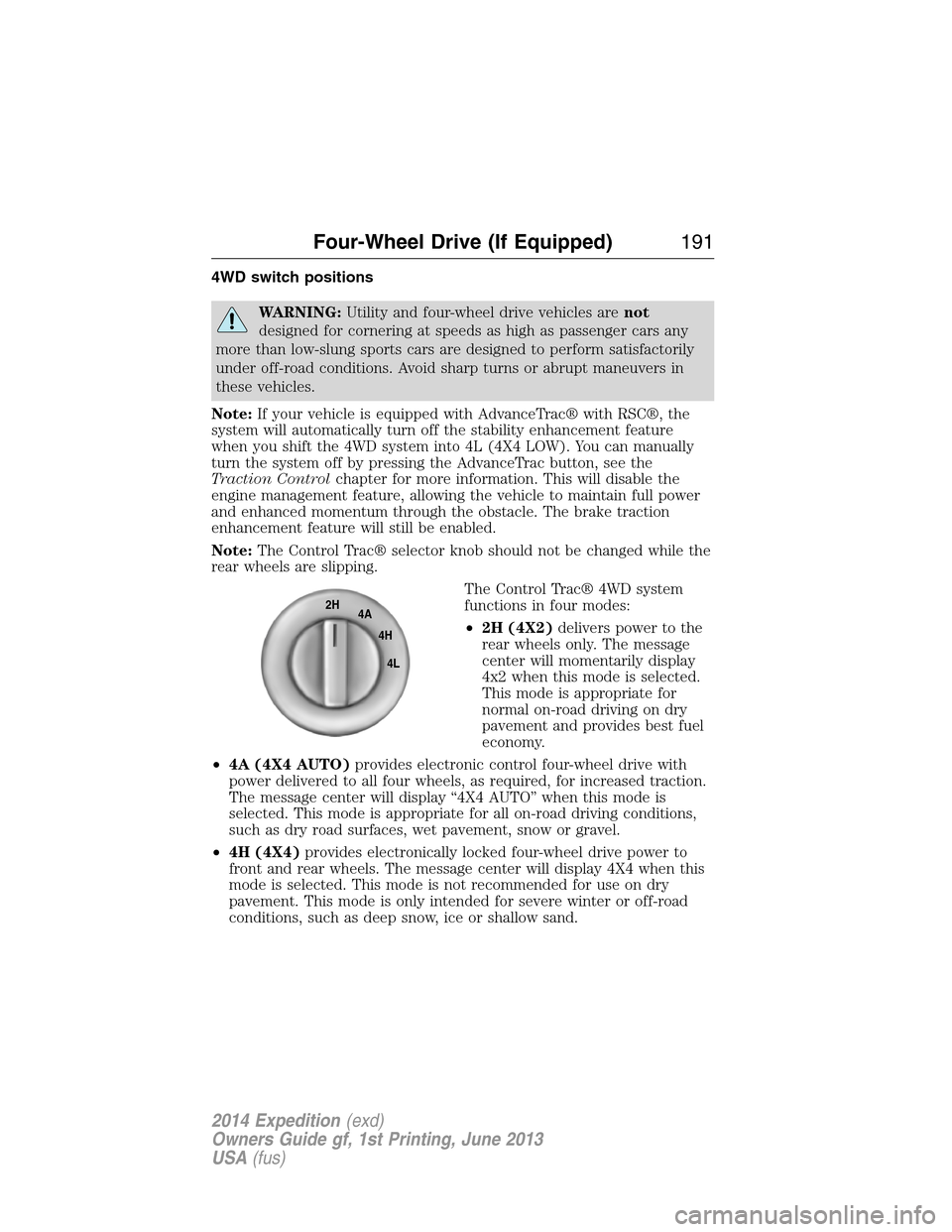
The Control Trac® 4WD system
functions in four modes:
•2H (4X2)delivers power to the
rear wheels only. The message
center will momentarily display
4x2 when this mode is selected.
This mode is appropriate for
normal on-road driving on dry
pavement and provides best fuel
economy.
•4A (4X4 AUTO)provides electronic control four-wheel drive with
power delivered to all four wheels, as required, for increased traction.
The message center will display “4X4 AUTO” when this mode is
selected. This mode is appropriate for all on-road driving conditions,
such as dry road surfaces, wet pavement, snow or gravel.
•4H (4X4)provides electronically locked four-wheel drive power to
front and rear wheels. The message center will display 4X4 when this
mode is selected. This mode is not recommended for use on dry
pavement. This mode is only intended for severe winter or off-road
conditions, such as deep snow, ice or shallow sand.
2H
4A
4H
4L
Four-Wheel Drive (If Equipped)191
2014 Expedition(exd)
Owners Guide gf, 1st Printing, June 2013
USA(fus)