navigation FORD EXPEDITION 2014 3.G Service Manual
[x] Cancel search | Manufacturer: FORD, Model Year: 2014, Model line: EXPEDITION, Model: FORD EXPEDITION 2014 3.GPages: 519, PDF Size: 6.9 MB
Page 457 of 519
4. Select the desired songs and then press Add. The system shows you
the currently selected songs. You can choose to Edit Name to change
the name of the playlist, Delete Playlist to remove it, Add Tracks to
the playlist or Sort Playlist.
5. After you change the playlist, select Edit Name to rename your
playlist.
Jukebox Voice Commands
If you are listening to music stored in the jukebox, press the
voice button on the steering wheel control. When prompted, say
any of the commands in the following chart.
If you are not listening to music stored in the jukebox, press the voice
button and, after the tone, say “Jukebox”, then any of the commands in
the following chart.
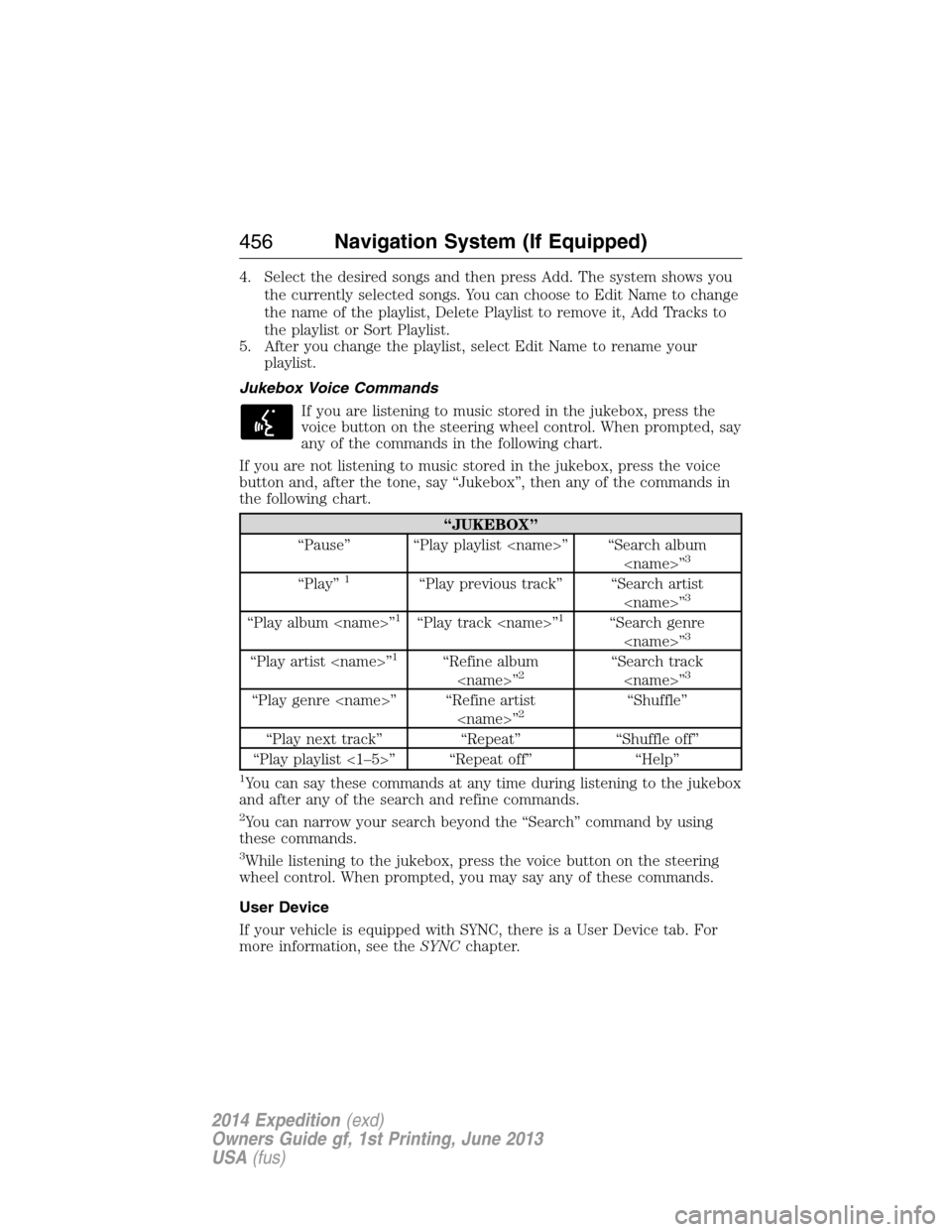
“JUKEBOX”
“Pause” “Play playlist
3
“Play”1“Play previous track” “Search artist
“Play album
“Play artist
“Play genre
“Play next track” “Repeat” “Shuffle off”
“Play playlist <1–5>” “Repeat off” “Help”
1You can say these commands at any time during listening to the jukebox
and after any of the search and refine commands.
2You can narrow your search beyond the “Search” command by using
these commands.
3While listening to the jukebox, press the voice button on the steering
wheel control. When prompted, you may say any of these commands.
User Device
If your vehicle is equipped with SYNC, there is a User Device tab. For
more information, see theSYNCchapter.
456Navigation System (If Equipped)
2014 Expedition(exd)
Owners Guide gf, 1st Printing, June 2013
USA(fus)
Page 458 of 519
Line In (Auxiliary Input Jack)
Your vehicle is equipped with an audio input jack, which allows you to
plug a portable audio device into your vehicle’s audio system. To turn
this feature on, press the MEDIA hard button on the system.
For more information on the auxiliary input jack, seeAuxiliary input
jackin theAudio Systemschapter.
INFORMATION
Under the Information menu, you can access features such as Where Am
I? and Sirius Travel Link, view your calendar, see system information and
get basic system help.
Press the I (Information) hard button to access these features.
Where Am I?
Press the I button and select the Where Am I? tab. The system gives you
your current GPS location (latitude and longitude), the current street
you are on as well as the street in front and behind your vehicle position
along with distance information.
Note:Not all tab selections shown here are available in all markets.
Check with an authorized dealer for availability.
Sirius® Travel Link™
WARNING:Driving while distracted can result in loss of vehicle
control, crash and injury. We strongly recommend that you use
extreme caution when using any device that may take your focus off
the road. Your primary responsibility is the safe operation of your
vehicle. We recommend against the use of any hand-held device while
driving and encourage the use of voice-operated systems when possible.
Make sure you are aware of all applicable local laws that may affect the
use of electronic devices while driving.
Note:A paid subscription is required to access and use these features.
Go to www.siriusxm.com/travellink for more information.
Sirius Travel Link can help you locate the best gas prices, find movie
listings, get current traffic alerts, access the current weather map, get
accurate ski conditions and scores to current sports games.
Navigation System (If Equipped)457
2014 Expedition(exd)
Owners Guide gf, 1st Printing, June 2013
USA(fus)
Page 459 of 519
Press the I (information) button, then select Sirius Travel Link.
Choose from any of the following services:
When you select: You can:
Traffic On RouteIdentify traffic incidents on your route, nearby
your vehicle’s current location or near any of
your favorite places (if programmed). Traffic Nearby
My Places
WeatherView the nearby weather, current weather,
or the 5–day forecast for the chosen area.
Select Weather Map to see storms, radar
information, charts and winds. Select Area
to select from a listing of weather locations.
In addition, you can view ski conditions for a
specific area.
Fuel PricesView fuel prices at stations close to your
vehicle’s location or on an active navigation
route.
Movie ListingsView nearby movie theaters and their show
times (if available).
Sports Info.View scores and schedules from a variety of
sports. You can also save up to 10 favorite
teams for easier access. The score
automatically refreshes when a game is in
progress.
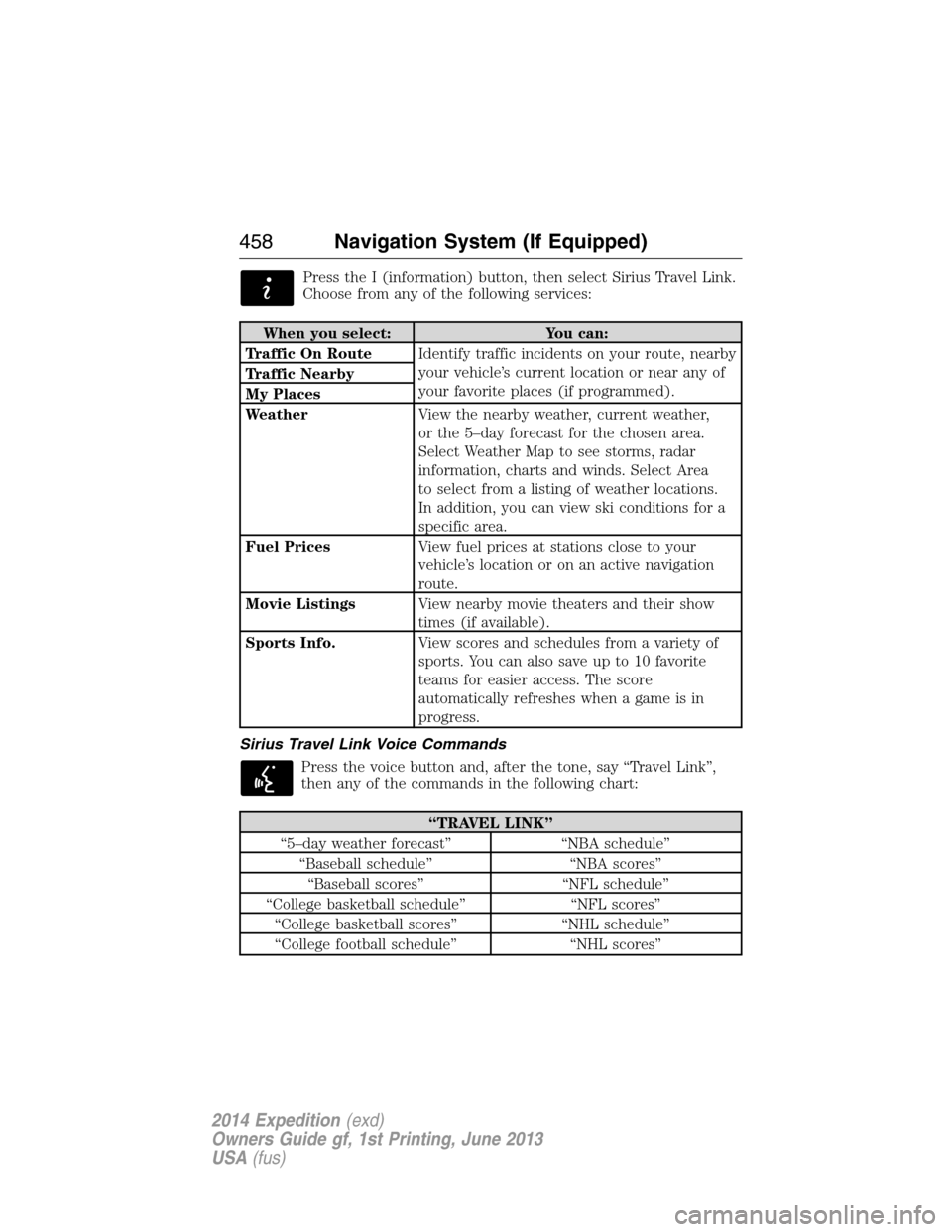
Sirius Travel Link Voice Commands
Press the voice button and, after the tone, say “Travel Link”,
then any of the commands in the following chart:
“TRAVEL LINK”
“5–day weather forecast” “NBA schedule”
“Baseball schedule” “NBA scores”
“Baseball scores” “NFL schedule”
“College basketball schedule” “NFL scores”
“College basketball scores” “NHL schedule”
“College football schedule” “NHL scores”
458Navigation System (If Equipped)
2014 Expedition(exd)
Owners Guide gf, 1st Printing, June 2013
USA(fus)
Page 460 of 519
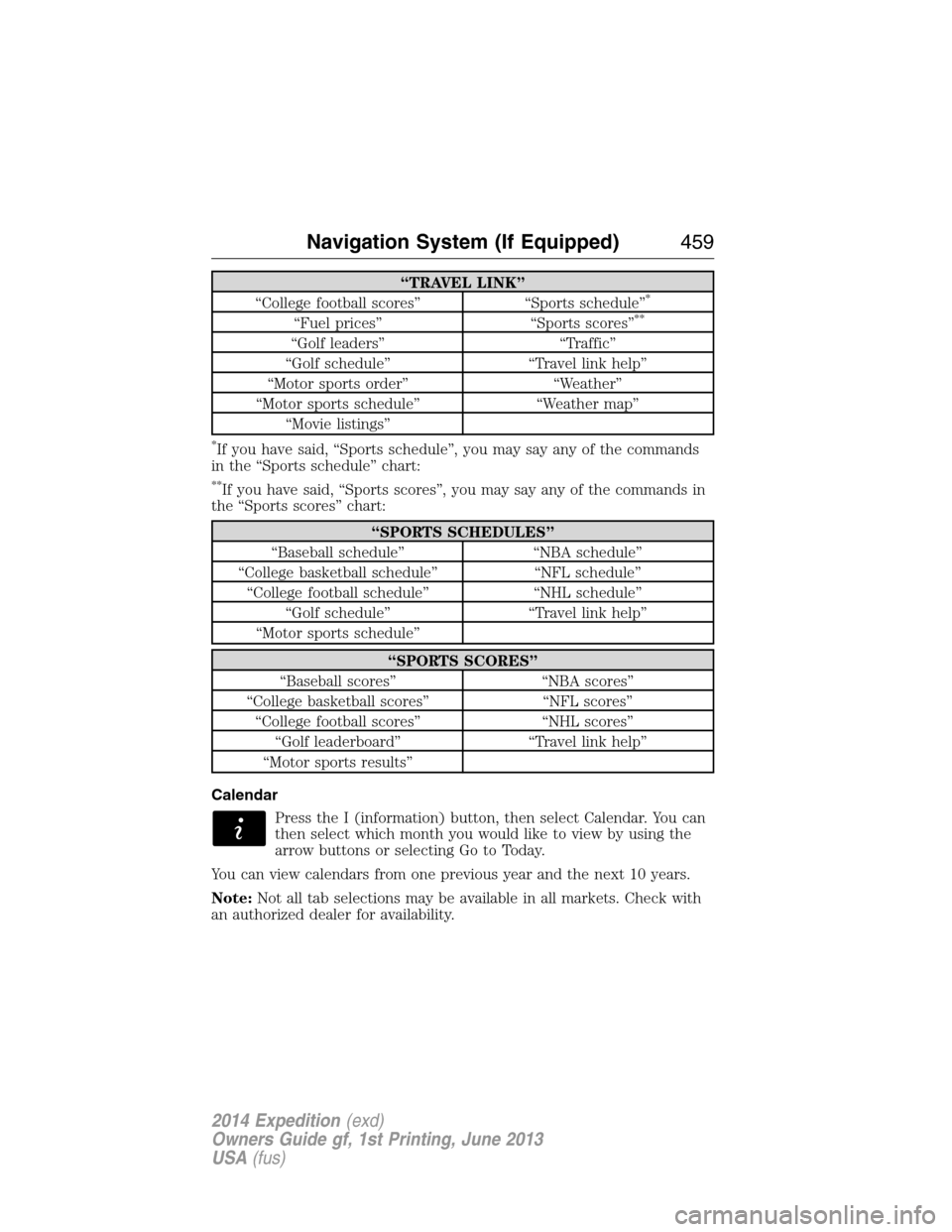
“TRAVEL LINK”
“College football scores” “Sports schedule”*
“Fuel prices” “Sports scores”**
“Golf leaders” “Traffic”
“Golf schedule” “Travel link help”
“Motor sports order” “Weather”
“Motor sports schedule” “Weather map”
“Movie listings”
*If you have said, “Sports schedule”, you may say any of the commands
in the “Sports schedule” chart:
**If you have said, “Sports scores”, you may say any of the commands in
the “Sports scores” chart:
“SPORTS SCHEDULES”
“Baseball schedule” “NBA schedule”
“College basketball schedule” “NFL schedule”
“College football schedule” “NHL schedule”
“Golf schedule” “Travel link help”
“Motor sports schedule”
“SPORTS SCORES”
“Baseball scores” “NBA scores”
“College basketball scores” “NFL scores”
“College football scores” “NHL scores”
“Golf leaderboard” “Travel link help”
“Motor sports results”
Calendar
Press the I (information) button, then select Calendar. You can
then select which month you would like to view by using the
arrow buttons or selecting Go to Today.
You can view calendars from one previous year and the next 10 years.
Note:Not all tab selections may be available in all markets. Check with
an authorized dealer for availability.
Navigation System (If Equipped)459
2014 Expedition(exd)
Owners Guide gf, 1st Printing, June 2013
USA(fus)
Page 461 of 519
System Information
Press the I (information) button, then select System
Information.
In this screen, you can view the following options:
•Phone number for your Customer Service Center
•Current system versions installed
•Current Sirius Radio ESN
•Sirius Travel Link ESN.
Note:Not all tab selections may be available in all markets. Check with
an authorized dealer for availability.
Help
The Help screen allows you to view basic information about controls and
driving restrictions as well as traffic legend information and basic voice
commands available in various modes.
If you select: You can:
Basic OperationView hard buttons on your navigation system.
Press the desired icon to view the button
description.
Driving RestrictionView the system’s driving restriction.
Traffic LegendView the color code for the Speed and Flow
of roads on the navigation system. You can
also select Traffic Incidents to help you
differentiate between viewed and unviewed
incidents.
Voice CommandsView a brief listing of possible voice
commands in a specific mode.
460Navigation System (If Equipped)
2014 Expedition(exd)
Owners Guide gf, 1st Printing, June 2013
USA(fus)
Page 462 of 519
SOUND
The sound menu allows you to access and adjust settings, such as Bass,
Treble, Fade, Balance, Speed Compensated Volume (SCV) and the
visualizer. Press the SOUND hard button.
When you select: You can:
Bass/TrebleIncrease or decrease levels by pressing + or -.
Balance/FadeAdjust the sound between the left and right
speakers and front and rear speakers.
SCVHave the system automatically adjust radio
volume according to vehicle speed to
compensate for road and wind noise. Select a
level of compensation between 1 and 7 by
pressing the corresponding button.
VisualizerTurn the audio visualizer display on or off.
Note:Turning the visualizer setting to off
does not remove the visualizer on the home
screen. You need to select a different view in
order to remove the visualizer.
NAVIGATION SYSTEM
Your navigation system allows you to set a destination by using your
touchscreen or voice commands.
The navigation system contains map coverage for the United States,
Puerto Rico and U.S. Virgin Islands, Canada and Mexico.
Disclaimer
A disclaimer appears once per ignition cycle when theDESTbutton is
pressed. PressAcceptto agree to the terms and access navigation
functions. If you do not press Accept, you only have access to
non-navigation functions. The disclaimer has information similar
to the following:
•Always obey local traffic regulations.
•We recommend you program the system only when your vehicle is at
a stop.
•Some functions are unavailable while your vehicle is moving to help
minimize distraction.
•Periodic map updates are available at an additional cost.
Navigation System (If Equipped)461
2014 Expedition(exd)
Owners Guide gf, 1st Printing, June 2013
USA(fus)
Page 463 of 519
Route Guidance in Incompletely Mapped Areas
There are some rural areas in the map database without fully verified
roads. When the system is in route guidance mode, and the navigation
system encounters these incompletely mapped areas, the system alerts
you by:
•Announcing, “Entering an area with incomplete map data; please
follow with caution”
•Saying, “with caution” in the first route guidance instruction before
each turn
•Highlighting the route on the map in yellow
•Highlighting the incomplete mapped streets in yellow on the turn list
•Coloring the guidance arrows yellow.
Please drive using extra caution when driving in these areas as the
mapping information may be somewhat inaccurate.
Programming a Destination Using the Touchscreen
1. Press theDESThard button.
2. Select from the following:
Quick
Note:Items on this screen are selectable at any speed.
Cancel RouteTouch this button to cancel the current route.
EmergencyTouch this button to find hospitals and police
stations close to your vehicle’s location. The
system may display up to 25 locations.
Favorite
DestinationsThis feature stores your home location and up
to five address book entries. To set an entry,
touch a preset button, and then follow the
screen prompts. The system displays the icon
and name associated with the location.
462Navigation System (If Equipped)
2014 Expedition(exd)
Owners Guide gf, 1st Printing, June 2013
USA(fus)
Page 464 of 519
Quick
Note:Items on this screen are selectable at any speed.
Find Nearest POISelect up to five different points of interest
(POI) favorites that you can search for while
your vehicle is moving. You can change these
categories at any time but the default
categories are:
•Gas Station
•AT M
•Restaurant
•Accommodations
•Parking Garage
When you select a category, the system
displays a list in order of distance from your
vehicle’s location. The Quick POI search range
automatically increases to a 50 mile (80 km)
radius if no point of interest is found within
the default 25 mile (40 km) radius.
You also have the option to select List All
Categories, which displays a list of all
categories.
Previous
DestinationTouch this button to select one of your
previous destinations.
Address BookTouch this button to set an entry in your
address book as your destination.
Navigation System (If Equipped)463
2014 Expedition(exd)
Owners Guide gf, 1st Printing, June 2013
USA(fus)
Page 465 of 519
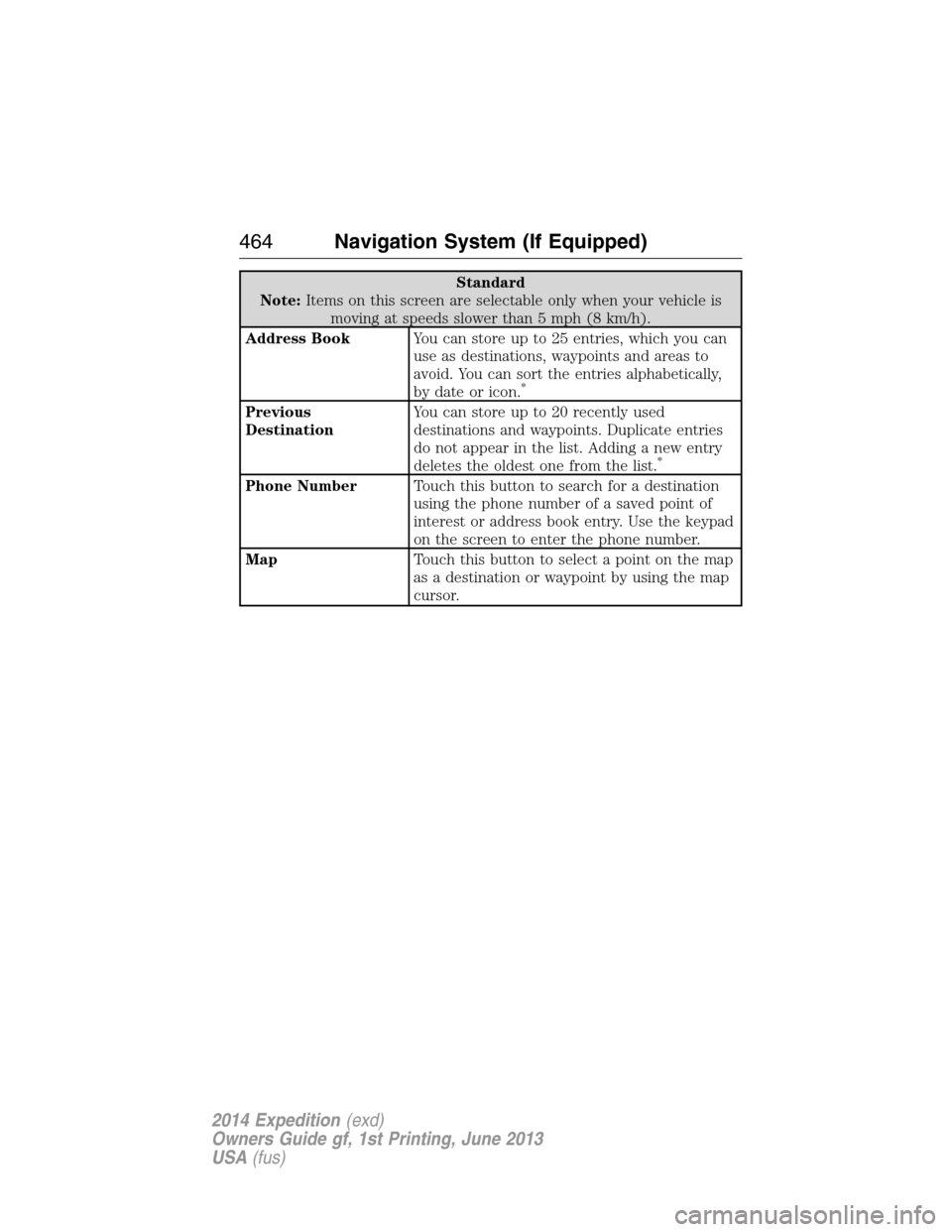
Standard
Note:Items on this screen are selectable only when your vehicle is
moving at speeds slower than 5 mph (8 km/h).
Address BookYou can store up to 25 entries, which you can
use as destinations, waypoints and areas to
avoid. You can sort the entries alphabetically,
by date or icon.
*
Previous
DestinationYou can store up to 20 recently used
destinations and waypoints. Duplicate entries
do not appear in the list. Adding a new entry
deletes the oldest one from the list.
*
Phone NumberTouch this button to search for a destination
using the phone number of a saved point of
interest or address book entry. Use the keypad
on the screen to enter the phone number.
MapTouch this button to select a point on the map
as a destination or waypoint by using the map
cursor.
464Navigation System (If Equipped)
2014 Expedition(exd)
Owners Guide gf, 1st Printing, June 2013
USA(fus)
Page 466 of 519
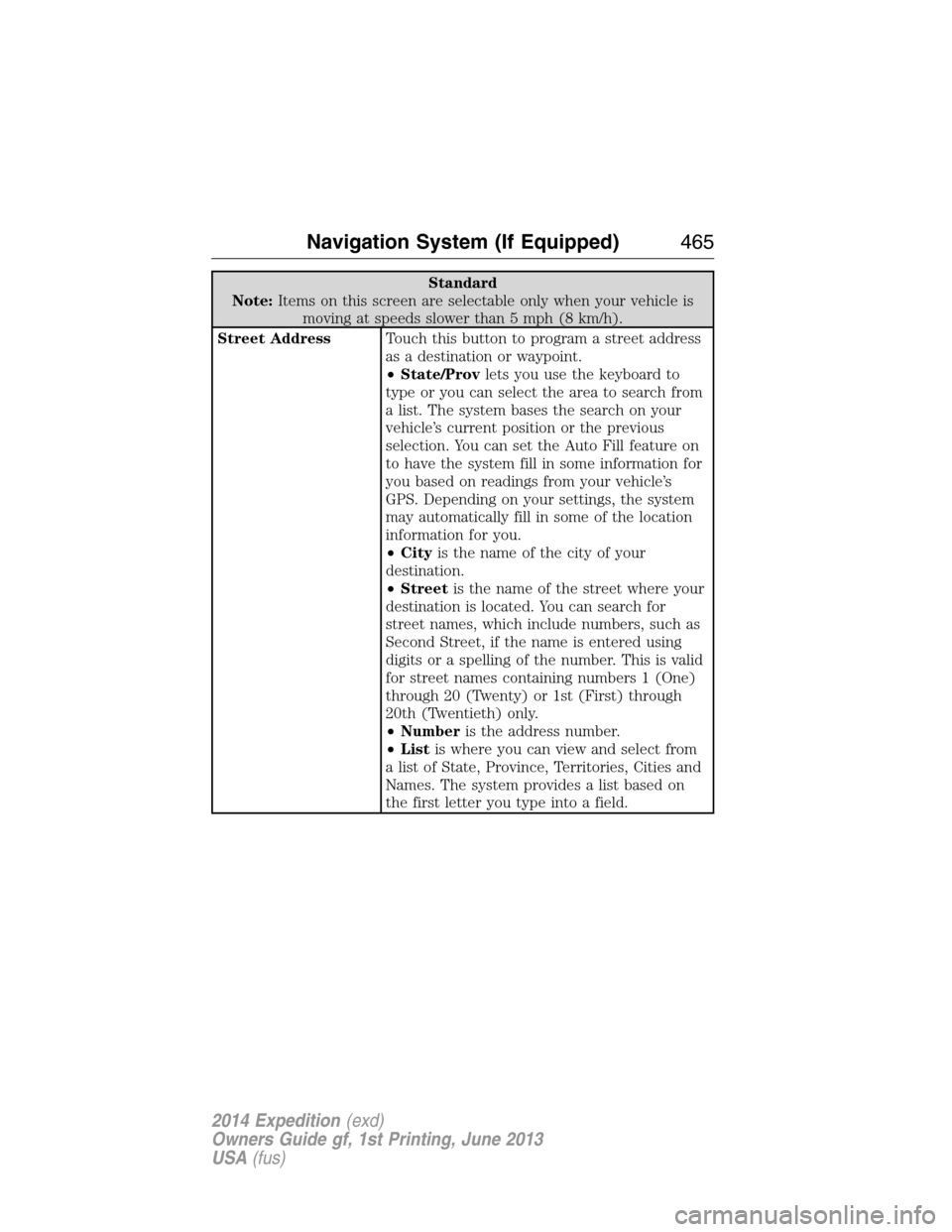
Standard
Note:Items on this screen are selectable only when your vehicle is
moving at speeds slower than 5 mph (8 km/h).
Street AddressTouch this button to program a street address
as a destination or waypoint.
•State/Provlets you use the keyboard to
type or you can select the area to search from
a list. The system bases the search on your
vehicle’s current position or the previous
selection. You can set the Auto Fill feature on
to have the system fill in some information for
you based on readings from your vehicle’s
GPS. Depending on your settings, the system
may automatically fill in some of the location
information for you.
•Cityis the name of the city of your
destination.
•Streetis the name of the street where your
destination is located. You can search for
street names, which include numbers, such as
Second Street, if the name is entered using
digits or a spelling of the number. This is valid
for street names containing numbers 1 (One)
through 20 (Twenty) or 1st (First) through
20th (Twentieth) only.
•Numberis the address number.
•Listis where you can view and select from
a list of State, Province, Territories, Cities and
Names. The system provides a list based on
the first letter you type into a field.
Navigation System (If Equipped)465
2014 Expedition(exd)
Owners Guide gf, 1st Printing, June 2013
USA(fus)