navigation FORD EXPEDITION 2014 3.G Owner's Guide
[x] Cancel search | Manufacturer: FORD, Model Year: 2014, Model line: EXPEDITION, Model: FORD EXPEDITION 2014 3.GPages: 519, PDF Size: 6.9 MB
Page 447 of 519
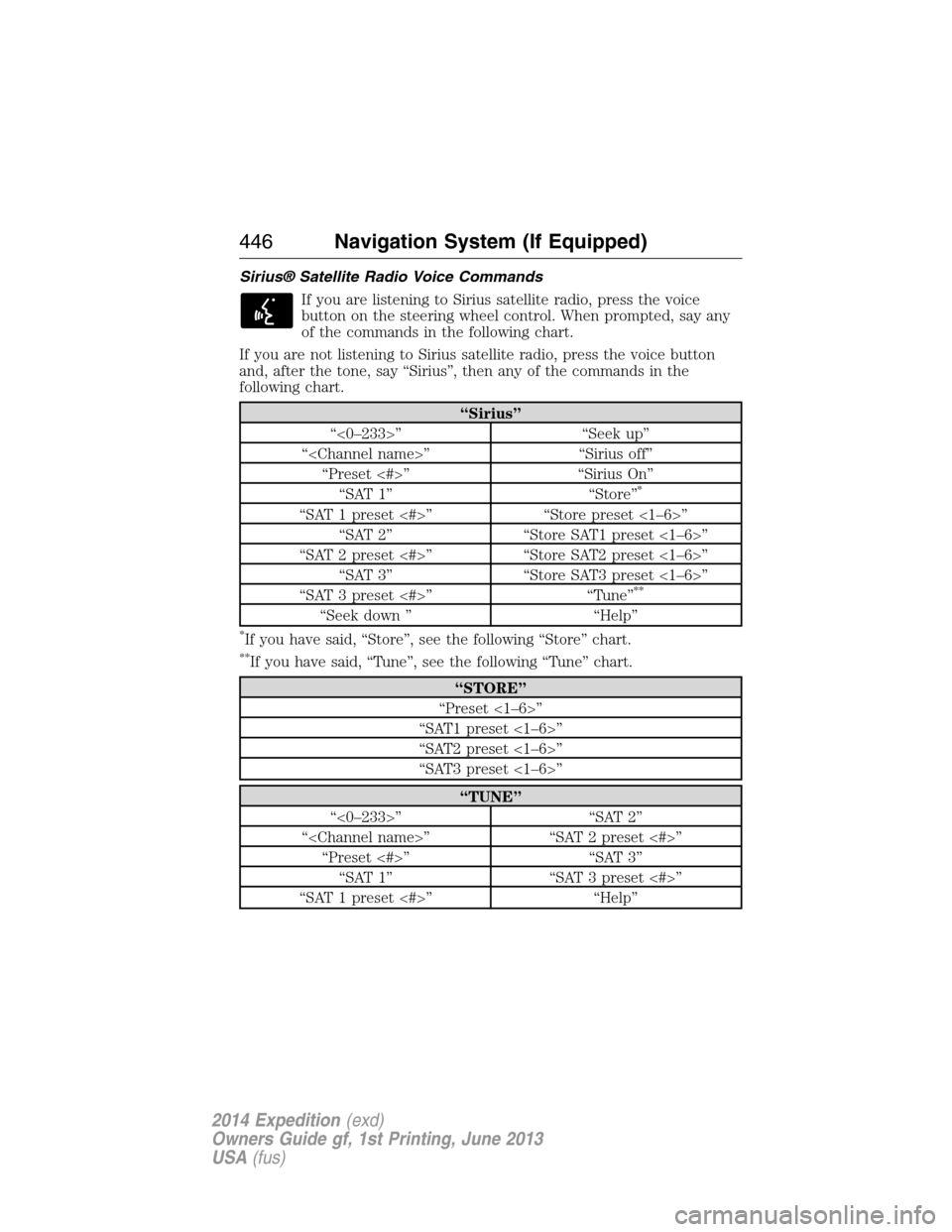
Sirius® Satellite Radio Voice Commands
If you are listening to Sirius satellite radio, press the voice
button on the steering wheel control. When prompted, say any
of the commands in the following chart.
If you are not listening to Sirius satellite radio, press the voice button
and, after the tone, say “Sirius”, then any of the commands in the
following chart.
“Sirius”
“<0–233>” “Seek up”
“
“Preset <#>” “Sirius On”
“SAT 1” “Store”
*
“SAT 1 preset <#>” “Store preset <1–6>”
“SAT 2” “Store SAT1 preset <1–6>”
“SAT 2 preset <#>” “Store SAT2 preset <1–6>”
“SAT 3” “Store SAT3 preset <1–6>”
“SAT 3 preset <#>” “Tune”
**
“Seek down ” “Help”
*If you have said, “Store”, see the following “Store” chart.
**If you have said, “Tune”, see the following “Tune” chart.
“STORE”
“Preset <1–6>”
“SAT1 preset <1–6>”
“SAT2 preset <1–6>”
“SAT3 preset <1–6>”
“TUNE”
“<0–233>” “SAT 2”
“
“Preset <#>” “SAT 3”
“SAT 1” “SAT 3 preset <#>”
“SAT 1 preset <#>” “Help”
446Navigation System (If Equipped)
2014 Expedition(exd)
Owners Guide gf, 1st Printing, June 2013
USA(fus)
Page 448 of 519
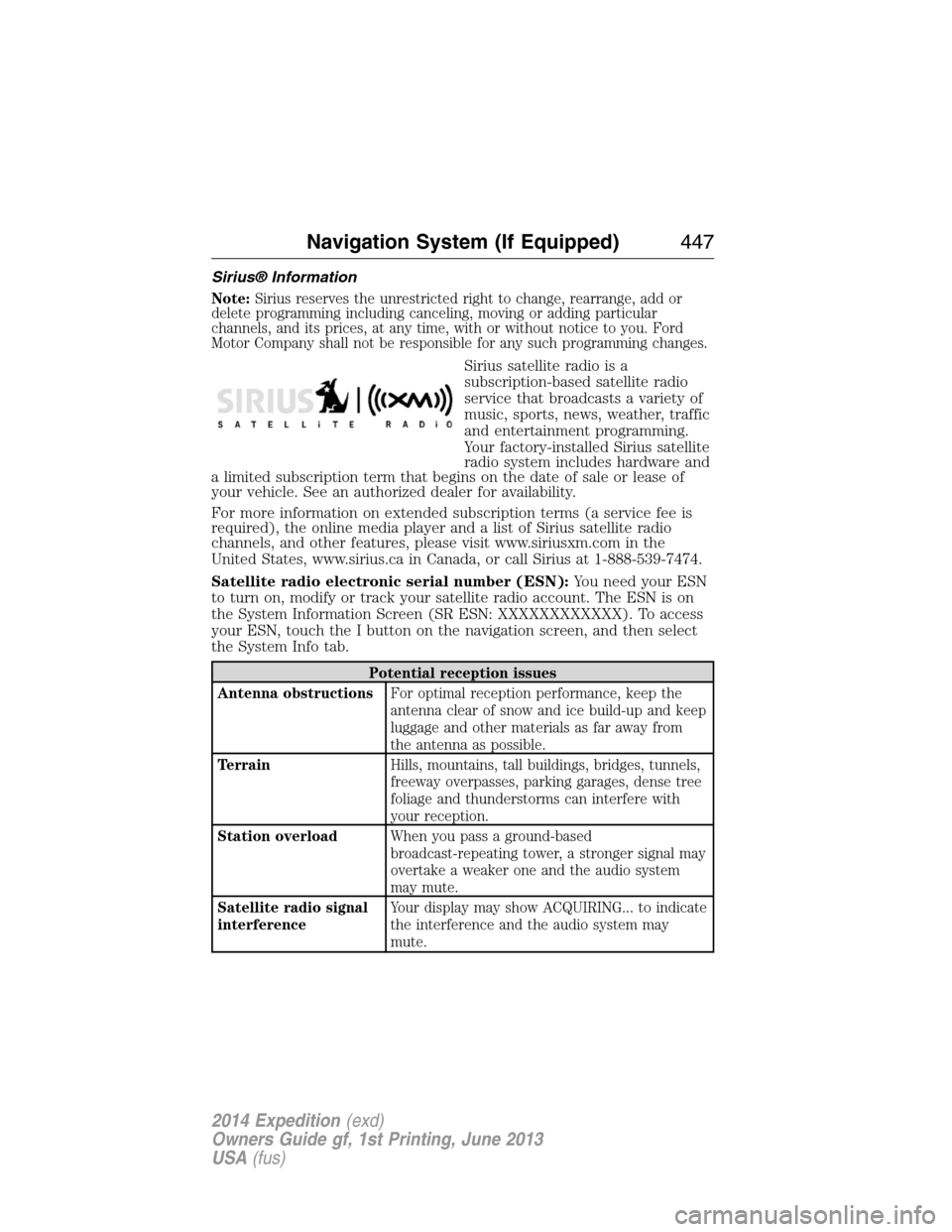
Sirius® Information
Note:Sirius reserves the unrestricted right to change, rearrange, add or
delete programming including canceling, moving or adding particular
channels, and its prices, at any time, with or without notice to you. Ford
Motor Company shall not be responsible for any such programming changes.
Sirius satellite radio is a
subscription-based satellite radio
service that broadcasts a variety of
music, sports, news, weather, traffic
and entertainment programming.
Your factory-installed Sirius satellite
radio system includes hardware and
a limited subscription term that begins on the date of sale or lease of
your vehicle. See an authorized dealer for availability.
For more information on extended subscription terms (a service fee is
required), the online media player and a list of Sirius satellite radio
channels, and other features, please visit www.siriusxm.com in the
United States, www.sirius.ca in Canada, or call Sirius at 1-888-539-7474.
Satellite radio electronic serial number (ESN):You need your ESN
to turn on, modify or track your satellite radio account. The ESN is on
the System Information Screen (SR ESN: XXXXXXXXXXXX). To access
your ESN, touch the I button on the navigation screen, and then select
the System Info tab.
Potential reception issues
Antenna obstructionsFor optimal reception performance, keep the
antenna clear of snow and ice build-up and keep
luggage and other materials as far away from
the antenna as possible.
TerrainHills, mountains, tall buildings, bridges, tunnels,
freeway overpasses, parking garages, dense tree
foliage and thunderstorms can interfere with
your reception.
Station overloadWhen you pass a ground-based
broadcast-repeating tower, a stronger signal may
overtake a weaker one and the audio system
may mute.
Satellite radio signal
interferenceYour display may show ACQUIRING... to indicate
the interference and the audio system may
mute.
Navigation System (If Equipped)447
2014 Expedition(exd)
Owners Guide gf, 1st Printing, June 2013
USA(fus)
Page 449 of 519
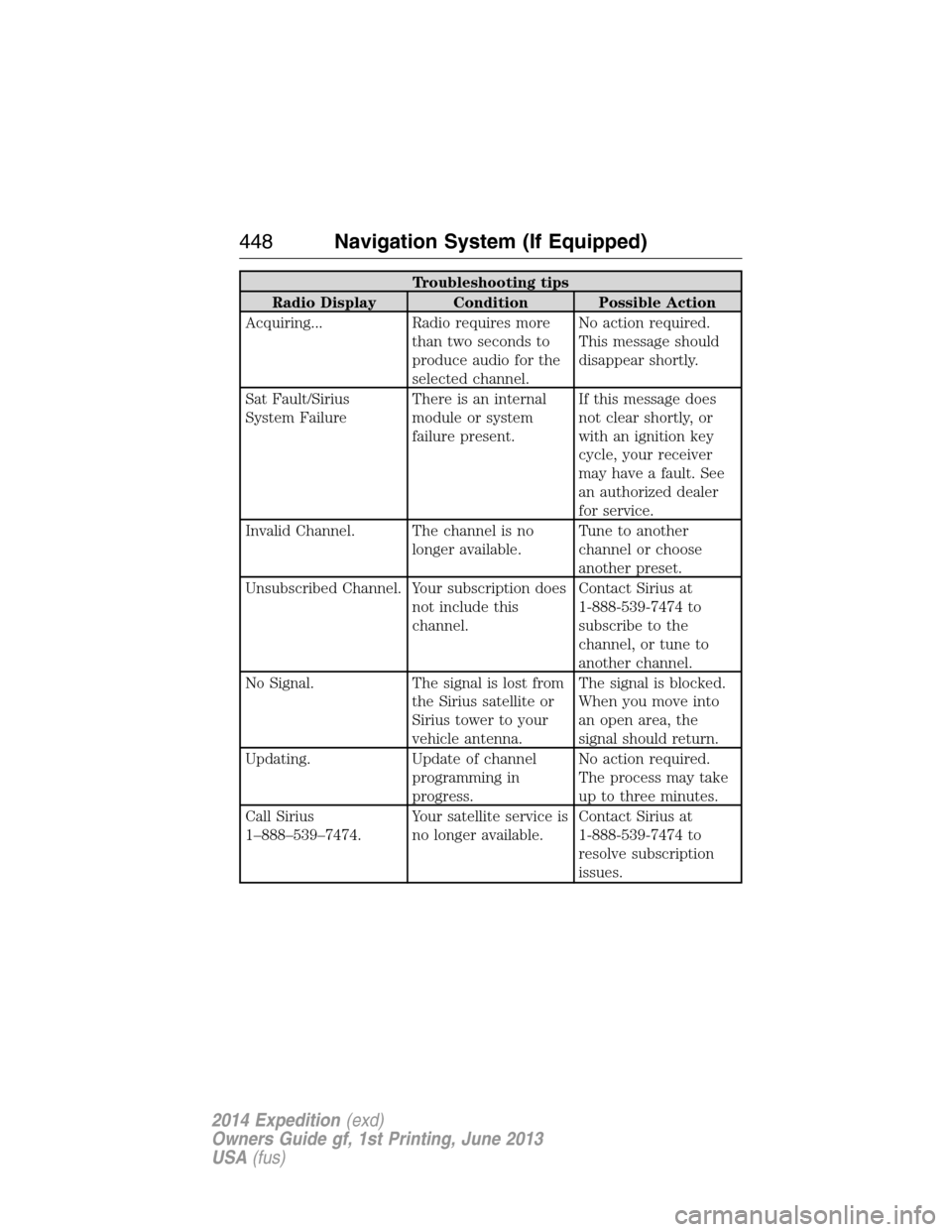
Troubleshooting tips
Radio Display Condition Possible Action
Acquiring... Radio requires more
than two seconds to
produce audio for the
selected channel.No action required.
This message should
disappear shortly.
Sat Fault/Sirius
System FailureThere is an internal
module or system
failure present.If this message does
not clear shortly, or
with an ignition key
cycle, your receiver
may have a fault. See
an authorized dealer
for service.
Invalid Channel. The channel is no
longer available.Tune to another
channel or choose
another preset.
Unsubscribed Channel. Your subscription does
not include this
channel.Contact Sirius at
1-888-539-7474 to
subscribe to the
channel, or tune to
another channel.
No Signal. The signal is lost from
the Sirius satellite or
Sirius tower to your
vehicle antenna.The signal is blocked.
When you move into
an open area, the
signal should return.
Updating. Update of channel
programming in
progress.No action required.
The process may take
up to three minutes.
Call Sirius
1–888–539–7474.Your satellite service is
no longer available.Contact Sirius at
1-888-539-7474 to
resolve subscription
issues.
448Navigation System (If Equipped)
2014 Expedition(exd)
Owners Guide gf, 1st Printing, June 2013
USA(fus)
Page 450 of 519
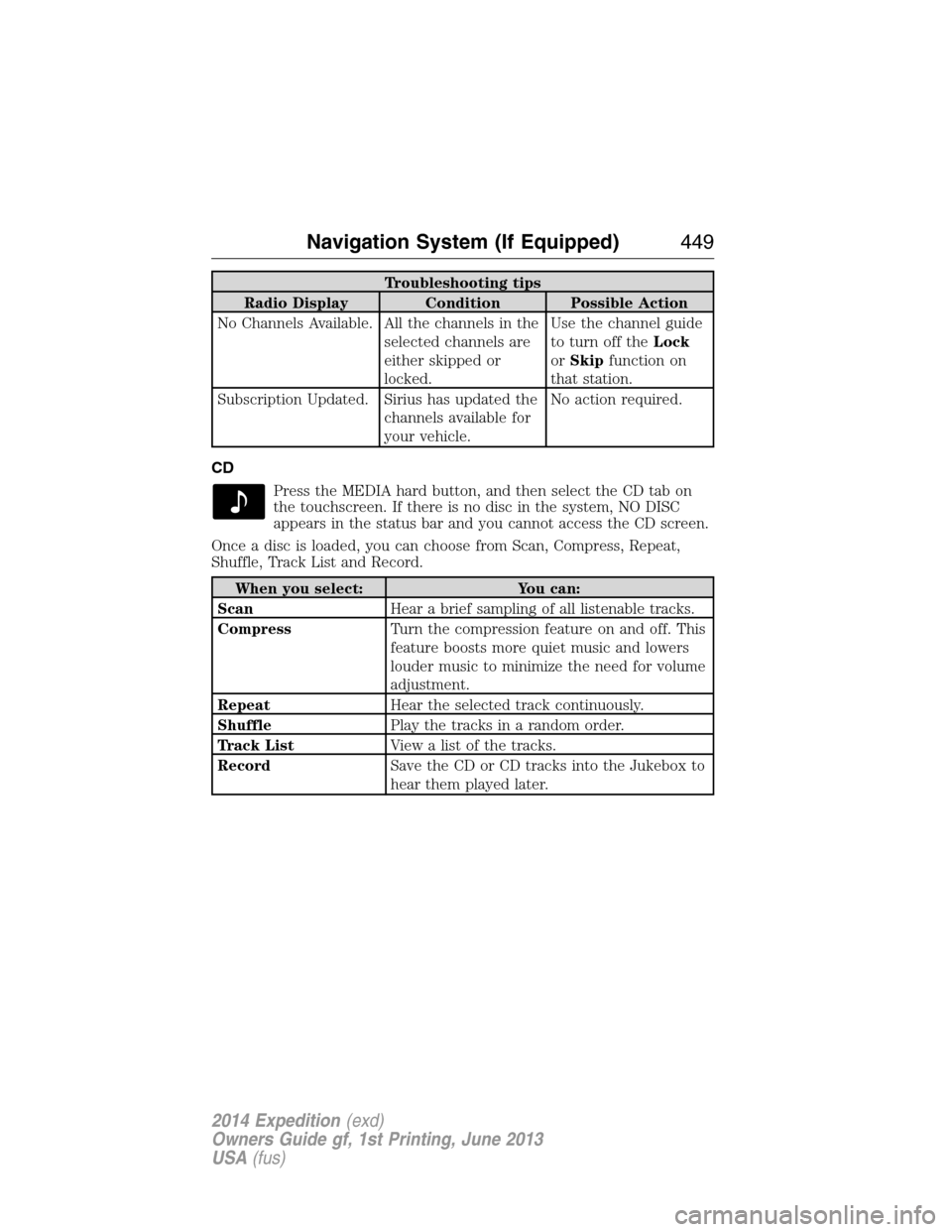
Troubleshooting tips
Radio Display Condition Possible Action
No Channels Available. All the channels in the
selected channels are
either skipped or
locked.Use the channel guide
to turn off theLock
orSkipfunction on
that station.
Subscription Updated. Sirius has updated the
channels available for
your vehicle.No action required.
CD
Press the MEDIA hard button, and then select the CD tab on
the touchscreen. If there is no disc in the system, NO DISC
appears in the status bar and you cannot access the CD screen.
Once a disc is loaded, you can choose from Scan, Compress, Repeat,
Shuffle, Track List and Record.
When you select: You can:
ScanHear a brief sampling of all listenable tracks.
CompressTurn the compression feature on and off. This
feature boosts more quiet music and lowers
louder music to minimize the need for volume
adjustment.
RepeatHear the selected track continuously.
ShufflePlay the tracks in a random order.
Track ListView a list of the tracks.
RecordSave the CD or CD tracks into the Jukebox to
hear them played later.
Navigation System (If Equipped)449
2014 Expedition(exd)
Owners Guide gf, 1st Printing, June 2013
USA(fus)
Page 451 of 519
CD Voice Commands
If you are listening to a CD, press the voice button on the
steering wheel control. When prompted, say any of the
commands in the following chart.
If you are not listening to a CD, press the voice button and, after the
tone, say “CD”, then any of the commands in the following chart.
“CD”
“Folder mode” “Play next folder” “Repeat folder”
“Folder mode off” “Play next track” “Repeat off”
“Pause” “Play previous folder” “Repeat track”
“Play” “Play previous track” “Shuffle”
“Play folder <1–255>” “Play track <1–512>” “Shuffle off”
“Play folder <1–255>
track <1–512>”“Repeat” “Help”
MP3
Press the MEDIA hard button, and then select the CD tab on
the touchscreen. If there is no disc in the system, NO DISC
appears in the status bar and you cannot access the CD screen.
Once a disc is loaded, you can choose from Scan, Compress, Repeat,
Shuffle, Folder Mode and Folder List.
When you select: You can:
ScanHear a brief sampling of all listenable tracks.
CompressTurn the compression feature on and off. This
feature boosts more quiet music and lowers
louder music to minimize the need for volume
adjustment.
RepeatHear the selected track continuously.
ShufflePlay the tracks in a random order.
Folder ModeListen to and seek through songs within the
current folder.
Folder ListPress this button to access and view folders
on the disc. Select the root folder (if
available), then any other folder on the disc.
450Navigation System (If Equipped)
2014 Expedition(exd)
Owners Guide gf, 1st Printing, June 2013
USA(fus)
Page 452 of 519
DVD
Note:Your system only plays NTSC formatted discs. The system does
not support PAL format.
Your system allows you to play DVD audio and video discs. Make sure
your vehicle is in positionP(vehicles equipped with an automatic
transmission) or the parking brake is engaged (vehicles equipped with a
manual transmission). This allows you to be able to view and hear the
DVD. If your vehicle is moving, the video does not play.
When you select: You can:
Ti t l eGo to the disc’s main title screen.
MenuGo to the disc’s main menu.
Cursor ControlsNavigate to the desired menu selections.
Settings Video Display Settingsallows you to adjust
the brightness and contrast. You can also
choose to return to the default settings by
pressing Restore Default.
Audio Languageallows you to choose which
language you would like the DVD audio track
to play in.
Subtitle Displayallows you to turn subtitles
off and on.
Subtitle Languageallows you to choose the
subtitle language.
Aspect Ratioallows you to choose wide, full,
normal or cinema display.
Angle Mark Notificationallows you to have
more viewing angles from which to select.
Once you have made your selection, press
ENTER to confirm.
SearchGo to a specific title or chapter using the
keypad.
Note:Some of the above settings are disc-dependent and availability and
operation may vary.
Navigation System (If Equipped)451
2014 Expedition(exd)
Owners Guide gf, 1st Printing, June 2013
USA(fus)
Page 453 of 519
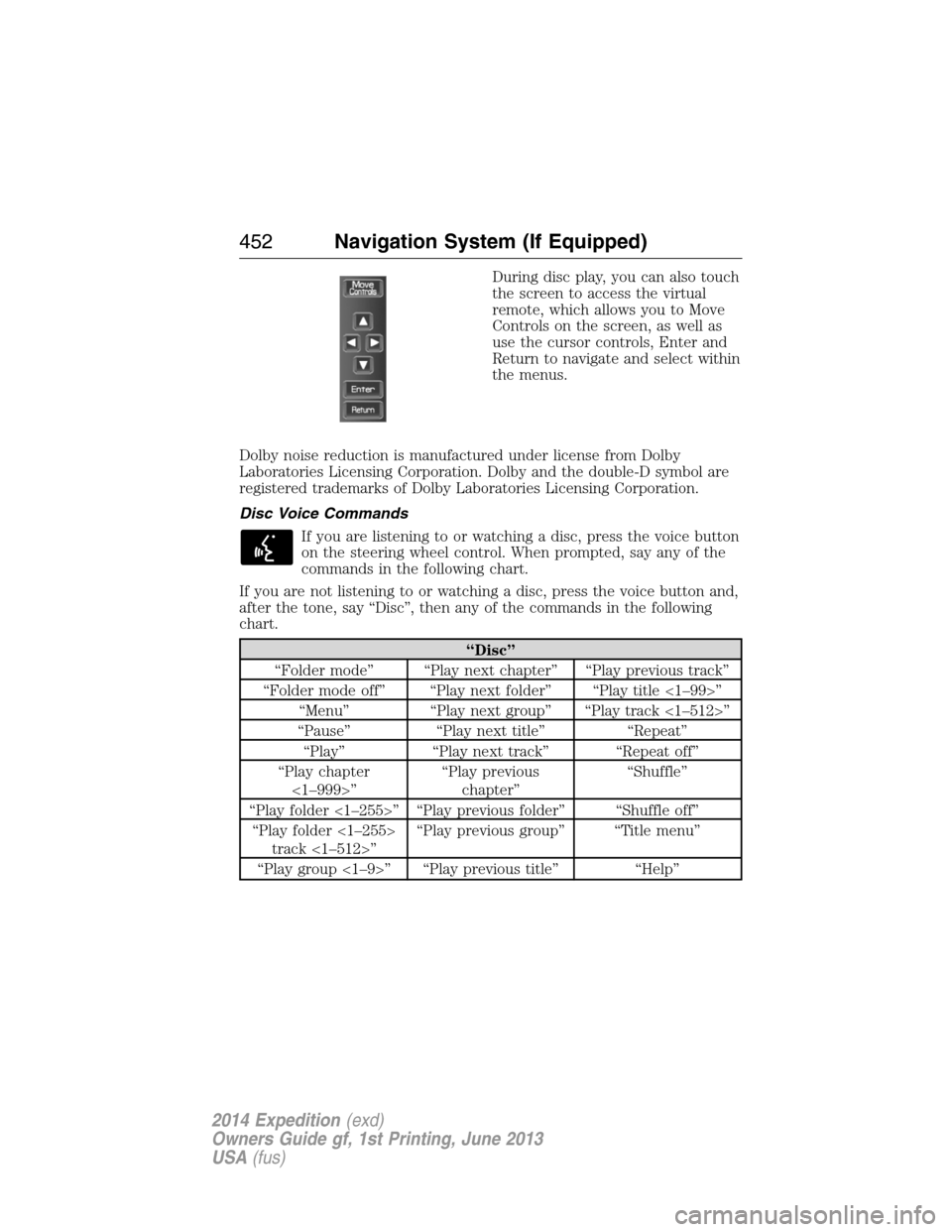
During disc play, you can also touch
the screen to access the virtual
remote, which allows you to Move
Controls on the screen, as well as
use the cursor controls, Enter and
Return to navigate and select within
the menus.
Dolby noise reduction is manufactured under license from Dolby
Laboratories Licensing Corporation. Dolby and the double-D symbol are
registered trademarks of Dolby Laboratories Licensing Corporation.
Disc Voice Commands
If you are listening to or watching a disc, press the voice button
on the steering wheel control. When prompted, say any of the
commands in the following chart.
If you are not listening to or watching a disc, press the voice button and,
after the tone, say “Disc”, then any of the commands in the following
chart.
“Disc”
“Folder mode” “Play next chapter” “Play previous track”
“Folder mode off” “Play next folder” “Play title <1–99>”
“Menu” “Play next group” “Play track <1–512>”
“Pause” “Play next title” “Repeat”
“Play” “Play next track” “Repeat off”
“Play chapter
<1–999>”“Play previous
chapter”“Shuffle”
“Play folder <1–255>” “Play previous folder” “Shuffle off”
“Play folder <1–255>
track <1–512>”“Play previous group” “Title menu”
“Play group <1–9>” “Play previous title” “Help”
452Navigation System (If Equipped)
2014 Expedition(exd)
Owners Guide gf, 1st Printing, June 2013
USA(fus)
Page 454 of 519
DVD Voice Commands
If you are watching a DVD, press the voice button on the
steering wheel control. When prompted, say any of the
commands in the following chart.
If you are not watching a DVD, press the voice button and, after the
tone, say “DVD”, then any of the commands in the following chart.
“DVD”
“Menu” “Play next title”
“Menu title” “Play next track <1–512>”
“Pause” “Play previous chapter”
“Play” “Play previous title”
“Play chapter <1–999>” “Play previous track”
“Play group <1–9>” “Play title <1–99>”
“Play next chapter” “Repeat”
“Play next group” “Repeat off”
Video CD Voice Commands
If you are watching a video CD, press the voice button on the
steering wheel control. When prompted, say any of the
commands in the following chart.
If you are not watching a video CD, press the voice button and, after the
tone, say “Video CD”, then any of the commands in the following chart.
Video CD voice commands
“Play”
“Pause”
“Play next track”
“Play previous track”
“Play track <1–512>”
“Help”
Navigation System (If Equipped)453
2014 Expedition(exd)
Owners Guide gf, 1st Printing, June 2013
USA(fus)
Page 455 of 519
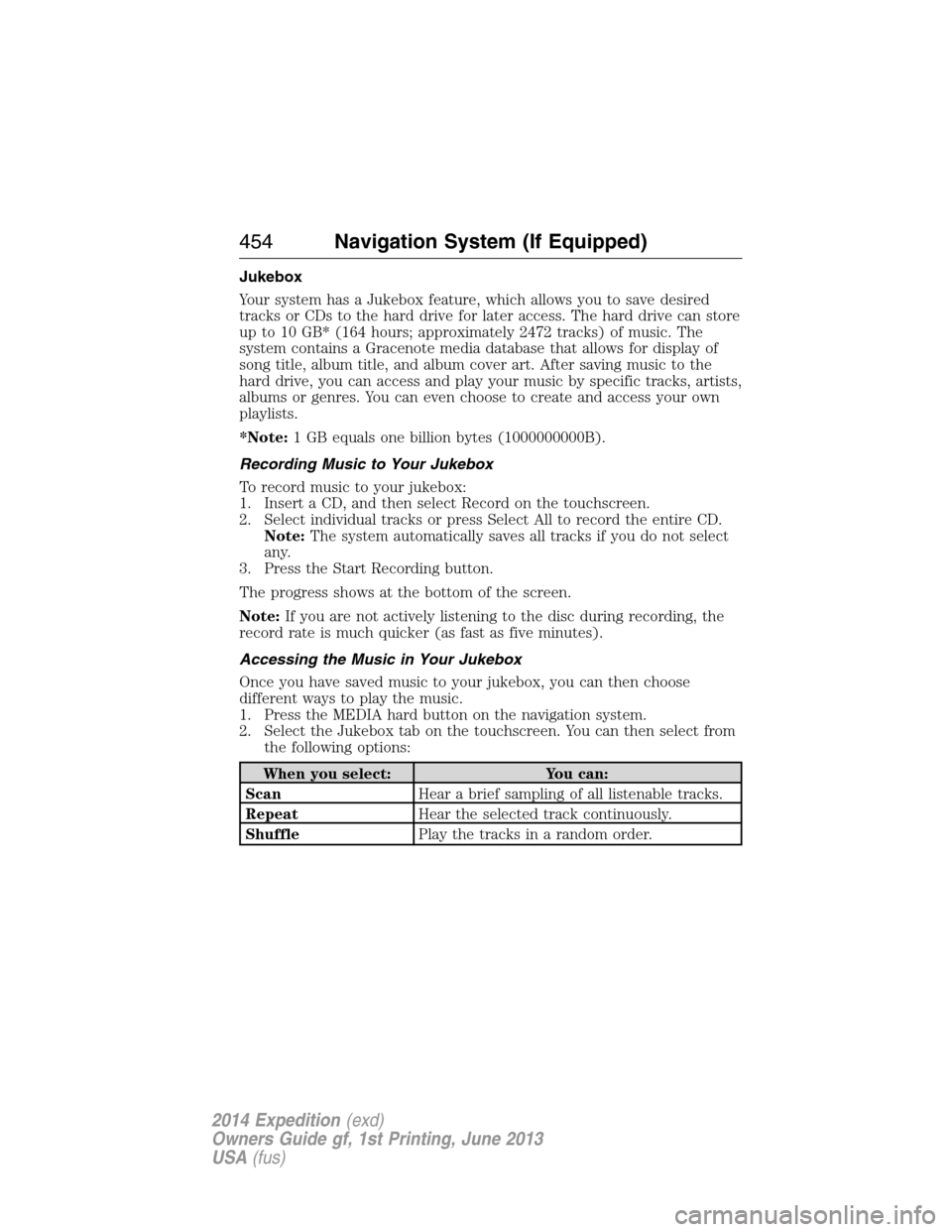
Jukebox
Your system has a Jukebox feature, which allows you to save desired
tracks or CDs to the hard drive for later access. The hard drive can store
up to 10 GB* (164 hours; approximately 2472 tracks) of music. The
system contains a Gracenote media database that allows for display of
song title, album title, and album cover art. After saving music to the
hard drive, you can access and play your music by specific tracks, artists,
albums or genres. You can even choose to create and access your own
playlists.
*Note:1 GB equals one billion bytes (1000000000B).
Recording Music to Your Jukebox
To record music to your jukebox:
1. Insert a CD, and then select Record on the touchscreen.
2. Select individual tracks or press Select All to record the entire CD.
Note:The system automatically saves all tracks if you do not select
any.
3. Press the Start Recording button.
The progress shows at the bottom of the screen.
Note:If you are not actively listening to the disc during recording, the
record rate is much quicker (as fast as five minutes).
Accessing the Music in Your Jukebox
Once you have saved music to your jukebox, you can then choose
different ways to play the music.
1. Press the MEDIA hard button on the navigation system.
2. Select the Jukebox tab on the touchscreen. You can then select from
the following options:
When you select: You can:
ScanHear a brief sampling of all listenable tracks.
RepeatHear the selected track continuously.
ShufflePlay the tracks in a random order.
454Navigation System (If Equipped)
2014 Expedition(exd)
Owners Guide gf, 1st Printing, June 2013
USA(fus)
Page 456 of 519
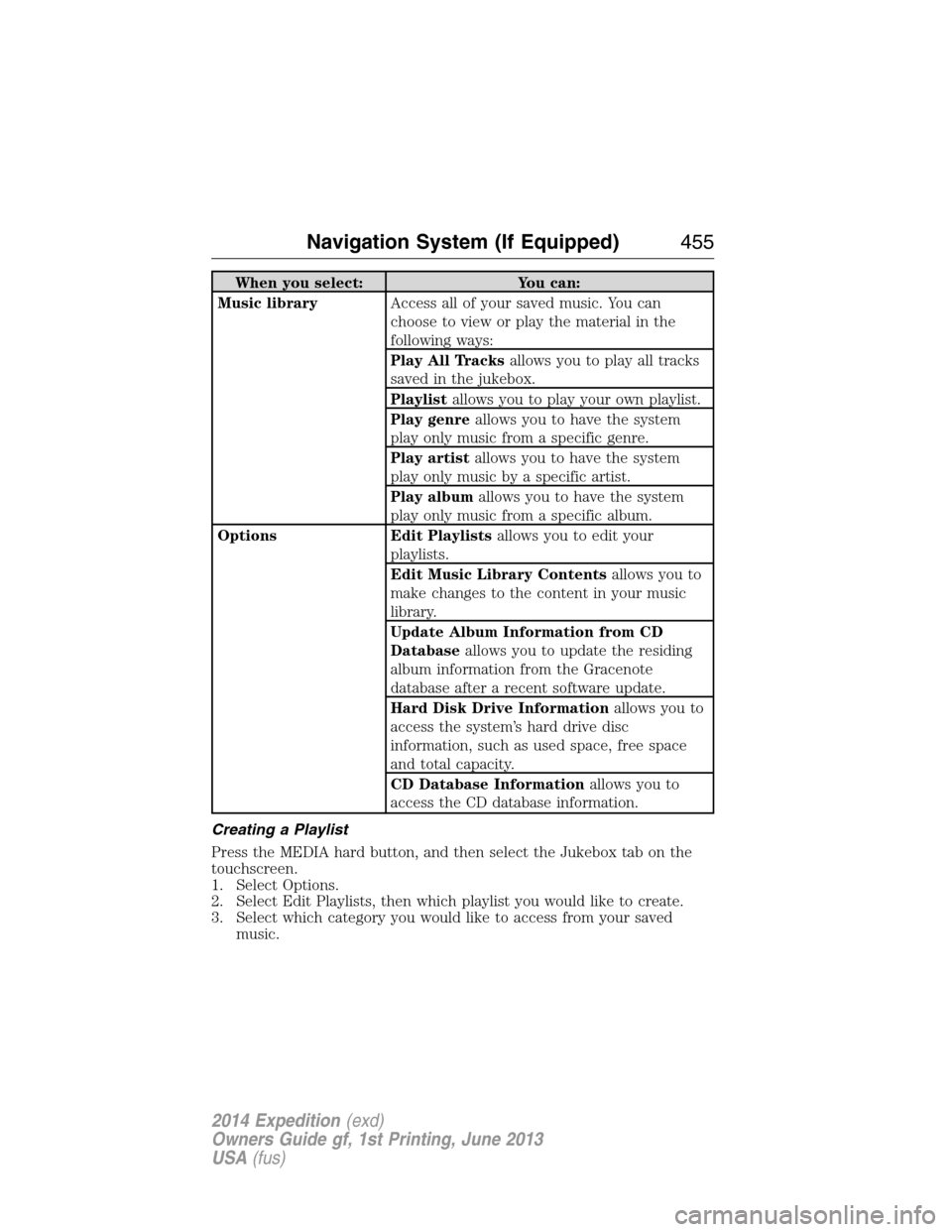
When you select: You can:
Music libraryAccess all of your saved music. You can
choose to view or play the material in the
following ways:
Play All Tracksallows you to play all tracks
saved in the jukebox.
Playlistallows you to play your own playlist.
Play genreallows you to have the system
play only music from a specific genre.
Play artistallows you to have the system
play only music by a specific artist.
Play albumallows you to have the system
play only music from a specific album.
Options Edit Playlistsallows you to edit your
playlists.
Edit Music Library Contentsallows you to
make changes to the content in your music
library.
Update Album Information from CD
Databaseallows you to update the residing
album information from the Gracenote
database after a recent software update.
Hard Disk Drive Informationallows you to
access the system’s hard drive disc
information, such as used space, free space
and total capacity.
CD Database Informationallows you to
access the CD database information.
Creating a Playlist
Press the MEDIA hard button, and then select the Jukebox tab on the
touchscreen.
1. Select Options.
2. Select Edit Playlists, then which playlist you would like to create.
3. Select which category you would like to access from your saved
music.
Navigation System (If Equipped)455
2014 Expedition(exd)
Owners Guide gf, 1st Printing, June 2013
USA(fus)