trailer FORD EXPEDITION 2014 3.G Owners Manual
[x] Cancel search | Manufacturer: FORD, Model Year: 2014, Model line: EXPEDITION, Model: FORD EXPEDITION 2014 3.GPages: 519, PDF Size: 6.9 MB
Page 6 of 519
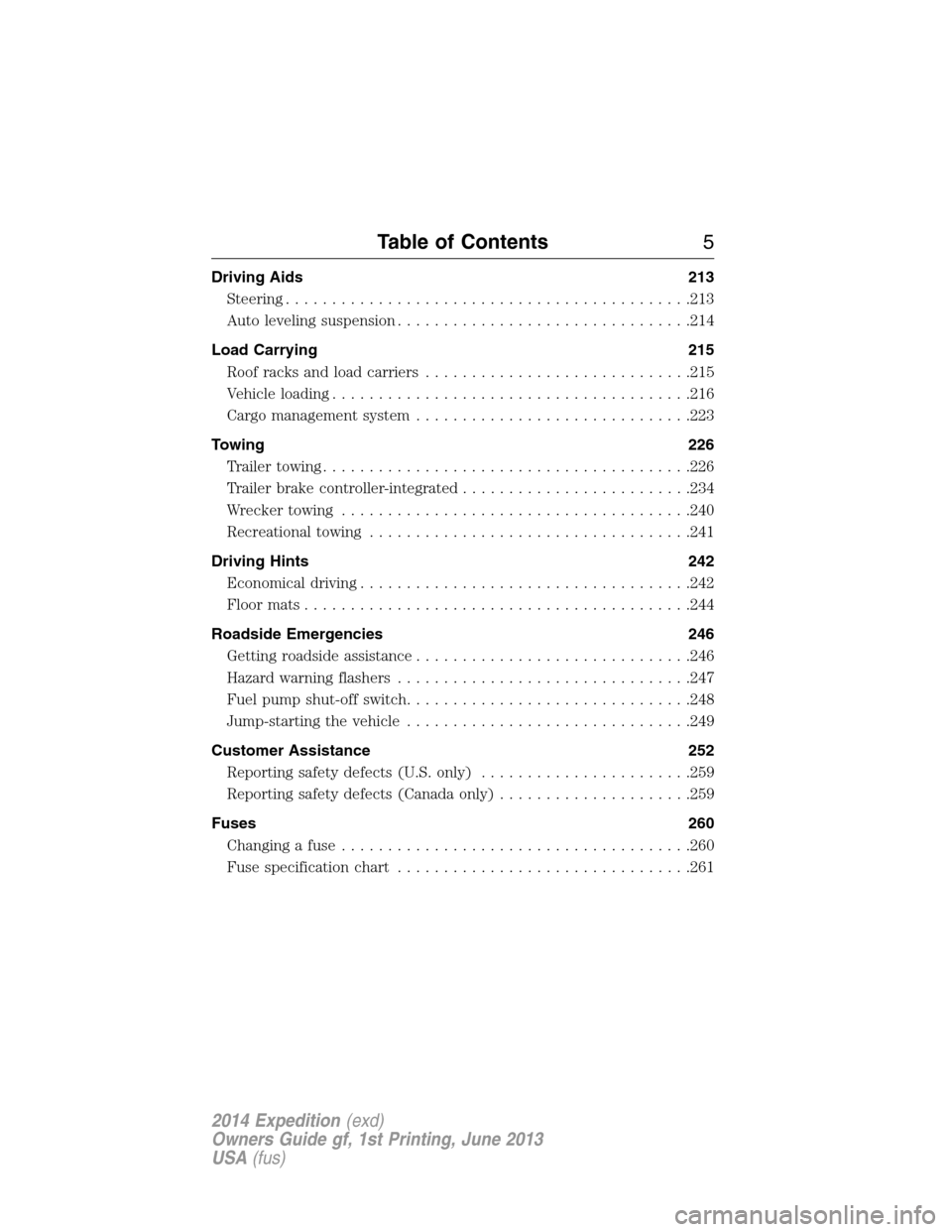
Driving Aids 213
Steering............................................213
Auto leveling suspension................................214
Load Carrying 215
Roof racks and load carriers.............................215
Vehicle loading.......................................216
Cargo management system..............................223
Towing 226
Trailertowing........................................226
Trailer brake controller-integrated.........................234
Wrecker towing......................................240
Recreational towing...................................241
Driving Hints 242
Economical driving....................................242
Floormats..........................................244
Roadside Emergencies 246
Getting roadside assistance..............................246
Hazard warning flashers................................247
Fuel pump shut-off switch...............................248
Jump-starting the vehicle...............................249
Customer Assistance 252
Reporting safety defects (U.S. only).......................259
Reporting safety defects (Canada only).....................259
Fuses 260
Changing a fuse......................................260
Fuse specification chart................................261
Table of Contents5
2014 Expedition(exd)
Owners Guide gf, 1st Printing, June 2013
USA(fus)
Page 109 of 519
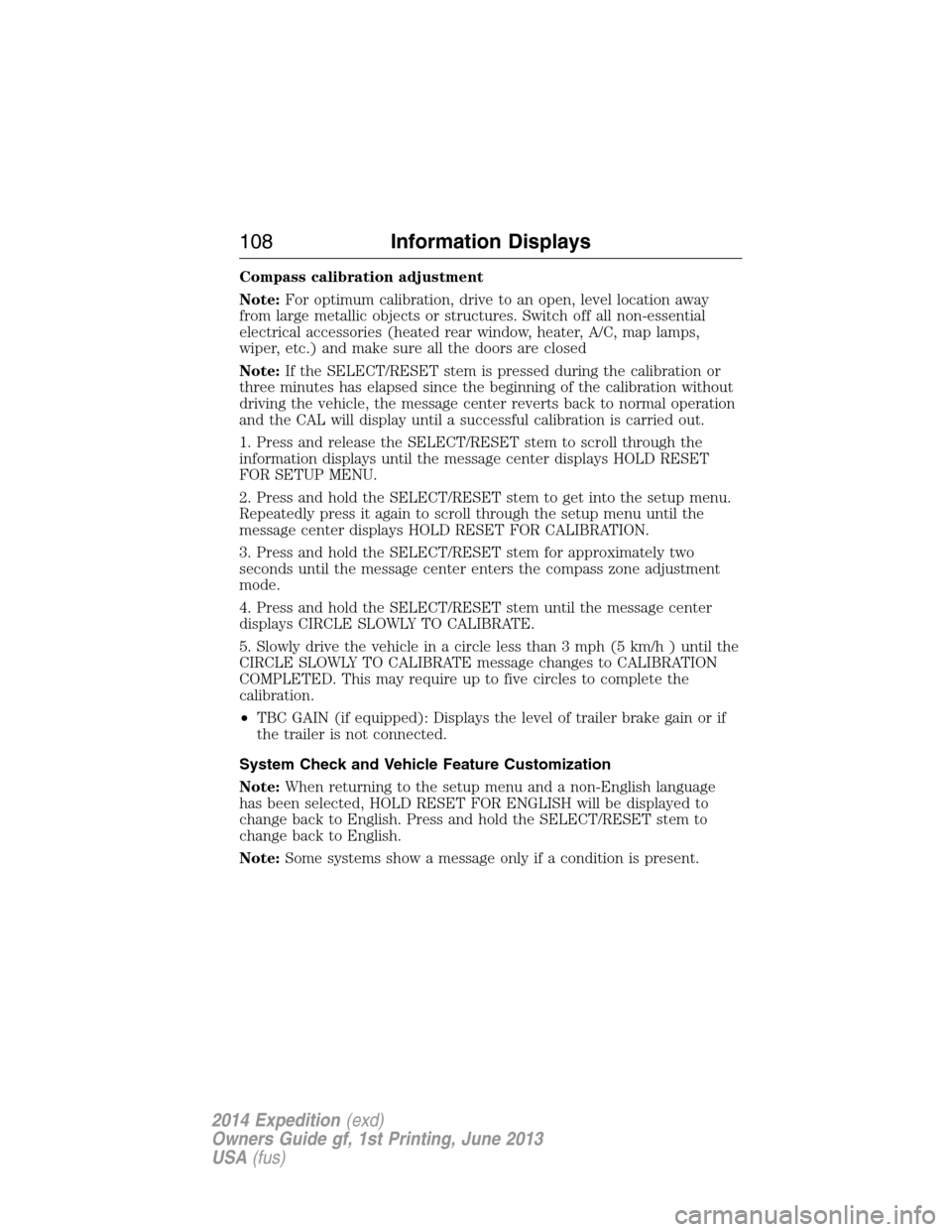
Compass calibration adjustment
Note:For optimum calibration, drive to an open, level location away
from large metallic objects or structures. Switch off all non-essential
electrical accessories (heated rear window, heater, A/C, map lamps,
wiper, etc.) and make sure all the doors are closed
Note:If the SELECT/RESET stem is pressed during the calibration or
three minutes has elapsed since the beginning of the calibration without
driving the vehicle, the message center reverts back to normal operation
and the CAL will display until a successful calibration is carried out.
1. Press and release the SELECT/RESET stem to scroll through the
information displays until the message center displays HOLD RESET
FOR SETUP MENU.
2. Press and hold the SELECT/RESET stem to get into the setup menu.
Repeatedly press it again to scroll through the setup menu until the
message center displays HOLD RESET FOR CALIBRATION.
3. Press and hold the SELECT/RESET stem for approximately two
seconds until the message center enters the compass zone adjustment
mode.
4. Press and hold the SELECT/RESET stem until the message center
displays CIRCLE SLOWLY TO CALIBRATE.
5. Slowly drive the vehicle in a circle less than 3 mph (5 km/h ) until the
CIRCLE SLOWLY TO CALIBRATE message changes to CALIBRATION
COMPLETED. This may require up to five circles to complete the
calibration.
•TBC GAIN (if equipped): Displays the level of trailer brake gain or if
the trailer is not connected.
System Check and Vehicle Feature Customization
Note:When returning to the setup menu and a non-English language
has been selected, HOLD RESET FOR ENGLISH will be displayed to
change back to English. Press and hold the SELECT/RESET stem to
change back to English.
Note:Some systems show a message only if a condition is present.
108Information Displays
2014 Expedition(exd)
Owners Guide gf, 1st Printing, June 2013
USA(fus)
Page 110 of 519
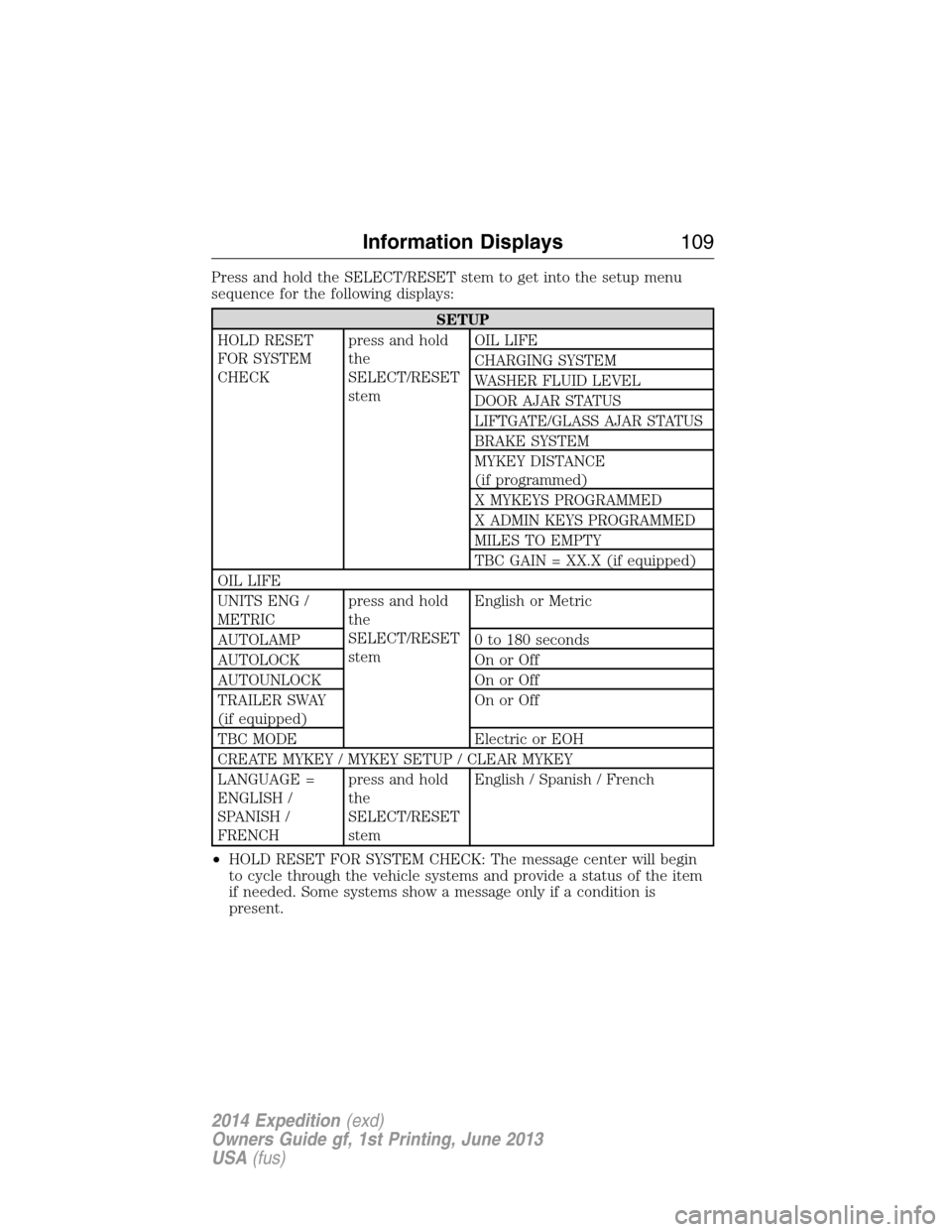
Press and hold the SELECT/RESET stem to get into the setup menu
sequence for the following displays:
SETUP
HOLD RESET
FOR SYSTEM
CHECKpress and hold
the
SELECT/RESET
stemOIL LIFE
CHARGING SYSTEM
WASHER FLUID LEVEL
DOOR AJAR STATUS
LIFTGATE/GLASS AJAR STATUS
BRAKE SYSTEM
MYKEY DISTANCE
(if programmed)
X MYKEYS PROGRAMMED
X ADMIN KEYS PROGRAMMED
MILES TO EMPTY
TBC GAIN = XX.X (if equipped)
OIL LIFE
UNITS ENG /
METRICpress and hold
the
SELECT/RESET
stemEnglish or Metric
AUTOLAMP 0 to 180 seconds
AUTOLOCK On or Off
AUTOUNLOCK On or Off
TRAILER SWAY
(if equipped)On or Off
TBC MODE Electric or EOH
CREATE MYKEY / MYKEY SETUP / CLEAR MYKEY
LANGUAGE =
ENGLISH /
SPANISH /
FRENCHpress and hold
the
SELECT/RESET
stemEnglish / Spanish / French
•HOLD RESET FOR SYSTEM CHECK: The message center will begin
to cycle through the vehicle systems and provide a status of the item
if needed. Some systems show a message only if a condition is
present.
Information Displays109
2014 Expedition(exd)
Owners Guide gf, 1st Printing, June 2013
USA(fus)
Page 111 of 519
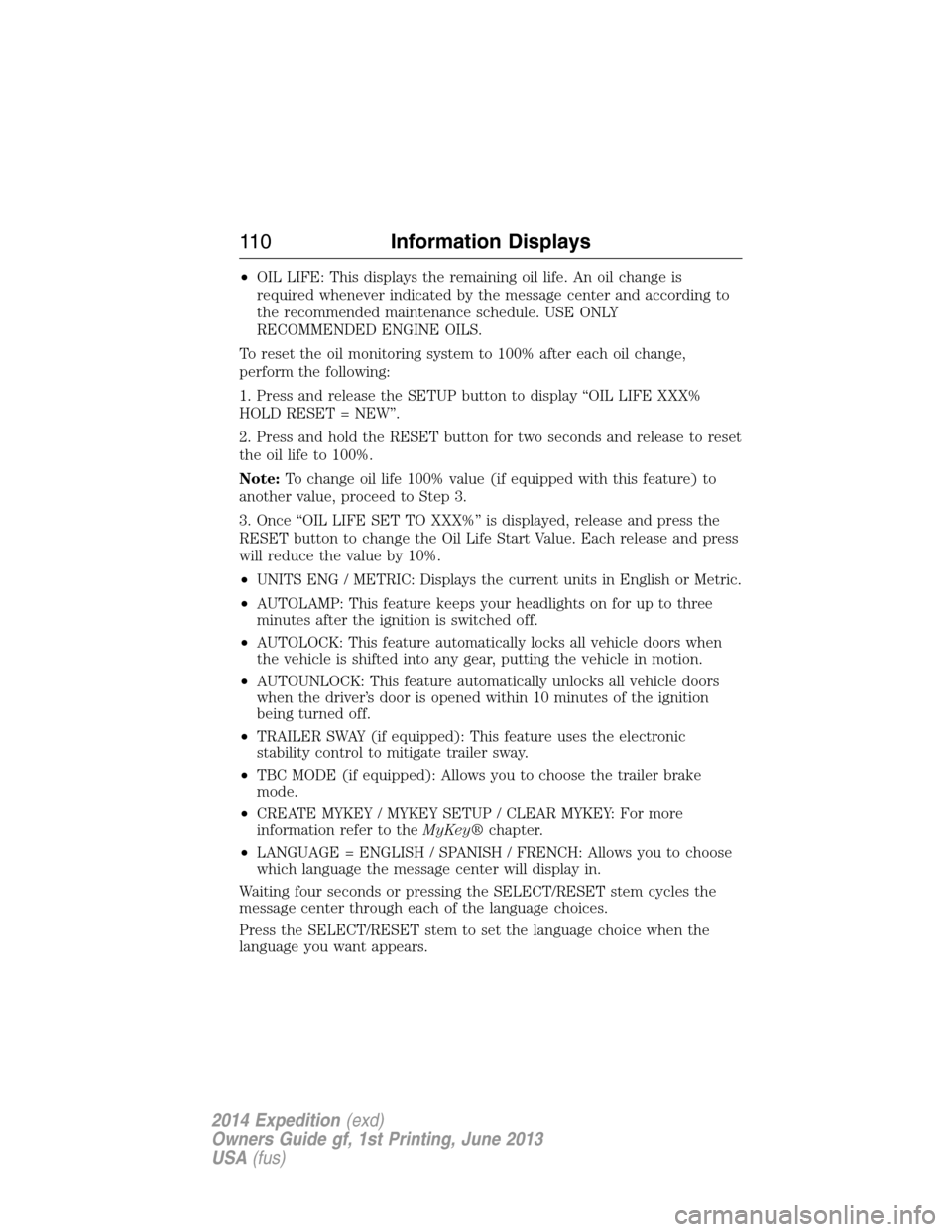
•OIL LIFE: This displays the remaining oil life. An oil change is
required whenever indicated by the message center and according to
the recommended maintenance schedule. USE ONLY
RECOMMENDED ENGINE OILS.
To reset the oil monitoring system to 100% after each oil change,
perform the following:
1. Press and release the SETUP button to display “OIL LIFE XXX%
HOLD RESET = NEW”.
2. Press and hold the RESET button for two seconds and release to reset
the oil life to 100%.
Note:To change oil life 100% value (if equipped with this feature) to
another value, proceed to Step 3.
3. Once “OIL LIFE SET TO XXX%” is displayed, release and press the
RESET button to change the Oil Life Start Value. Each release and press
will reduce the value by 10%.
•UNITS ENG / METRIC: Displays the current units in English or Metric.
•AUTOLAMP: This feature keeps your headlights on for up to three
minutes after the ignition is switched off.
•AUTOLOCK: This feature automatically locks all vehicle doors when
the vehicle is shifted into any gear, putting the vehicle in motion.
•AUTOUNLOCK: This feature automatically unlocks all vehicle doors
when the driver’s door is opened within 10 minutes of the ignition
being turned off.
•TRAILER SWAY (if equipped): This feature uses the electronic
stability control to mitigate trailer sway.
•TBC MODE (if equipped): Allows you to choose the trailer brake
mode.
•CREATE MYKEY / MYKEY SETUP / CLEAR MYKEY: For more
information refer to theMyKey®chapter.
•LANGUAGE = ENGLISH / SPANISH / FRENCH: Allows you to choose
which language the message center will display in.
Waiting four seconds or pressing the SELECT/RESET stem cycles the
message center through each of the language choices.
Press the SELECT/RESET stem to set the language choice when the
language you want appears.
11 0Information Displays
2014 Expedition(exd)
Owners Guide gf, 1st Printing, June 2013
USA(fus)
Page 113 of 519
•AVG MPG (L/100km): Average fuel economy displays your average fuel
economy in miles/gallon or liters/100 km.
•MPG (L/km): This displays instantaneous fuel economy as a bar graph.
Your vehicle must be moving to calculate instantaneous fuel economy.
Instantaneous fuel economy cannot be reset.
•TBC GAIN = XX.X (if equipped): Displays the level of trailer brake
gain or if the trailer is not connected.
•TIMER: Displays the trip elapsed drive time. Press and release RESET
to pause the timer. Press and hold RESET to reset the timer.
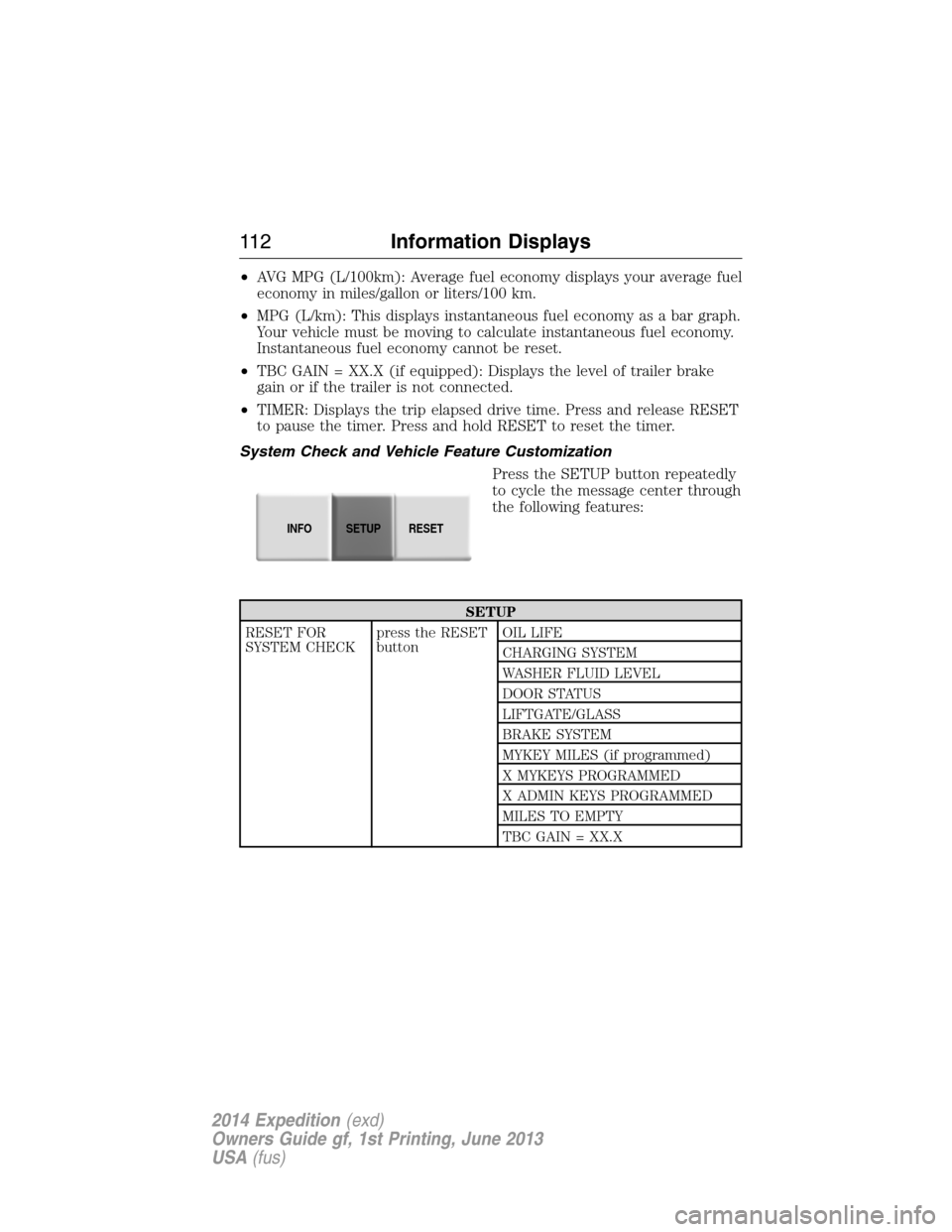
System Check and Vehicle Feature Customization
Press the SETUP button repeatedly
to cycle the message center through
the following features:
SETUP
RESET FOR
SYSTEM CHECKpress the RESET
buttonOIL LIFE
CHARGING SYSTEM
WASHER FLUID LEVEL
DOOR STATUS
LIFTGATE/GLASS
BRAKE SYSTEM
MYKEY MILES (if programmed)
X MYKEYS PROGRAMMED
X ADMIN KEYS PROGRAMMED
MILES TO EMPTY
TBC GAIN = XX.X
INFOSETUP
RESET
11 2Information Displays
2014 Expedition(exd)
Owners Guide gf, 1st Printing, June 2013
USA(fus)
Page 114 of 519
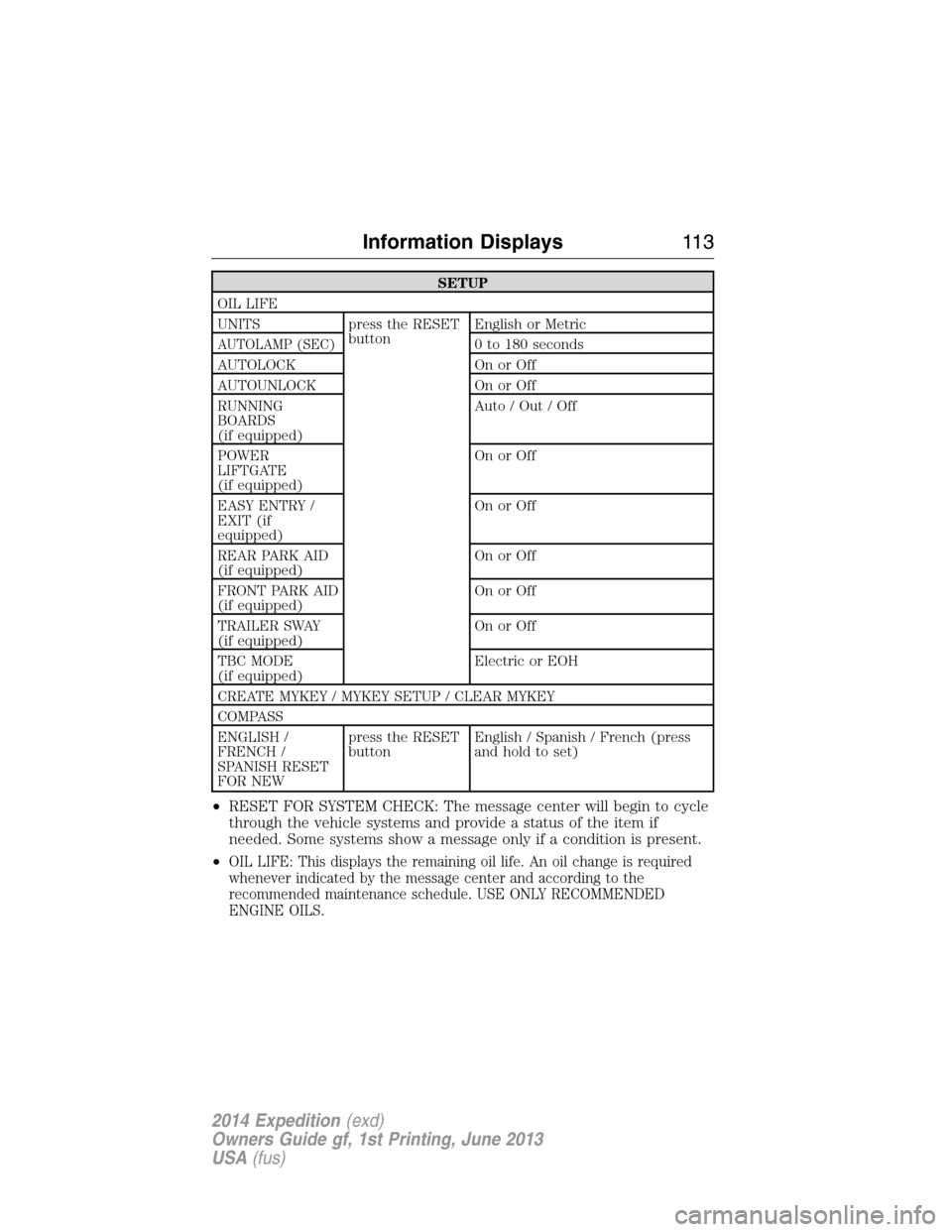
SETUP
OIL LIFE
UNITS press the RESET
buttonEnglish or Metric
AUTOLAMP (SEC)0 to 180 seconds
AUTOLOCK On or Off
AUTOUNLOCK On or Off
RUNNING
BOARDS
(if equipped)Auto / Out / Off
POWER
LIFTGATE
(if equipped)On or Off
EASY ENTRY /
EXIT (if
equipped)On or Off
REAR PARK AID
(if equipped)On or Off
FRONT PARK AID
(if equipped)On or Off
TRAILER SWAY
(if equipped)On or Off
TBC MODE
(if equipped)Electric or EOH
CREATE MYKEY / MYKEY SETUP / CLEAR MYKEY
COMPASS
ENGLISH /
FRENCH /
SPANISH RESET
FOR NEWpress the RESET
buttonEnglish / Spanish / French (press
and hold to set)
•RESET FOR SYSTEM CHECK: The message center will begin to cycle
through the vehicle systems and provide a status of the item if
needed. Some systems show a message only if a condition is present.
•
OIL LIFE: This displays the remaining oil life. An oil change is required
whenever indicated by the message center and according to the
recommended maintenance schedule. USE ONLY RECOMMENDED
ENGINE OILS.
Information Displays11 3
2014 Expedition(exd)
Owners Guide gf, 1st Printing, June 2013
USA(fus)
Page 116 of 519
•REAR PARK AID (if equipped): This feature sounds a tone to warn
the driver of obstacles near the rear bumper, and functions only when
R (Reverse) gear is selected.
•FRONT PARK AID (if equipped): This feature sounds a warning tone
to warn the driver of obstacles near the front bumper.
•TRAILER SWAY (if equipped): This feature uses the electronic
stability control to mitigate trailer sway.
•TBC MODE (if equipped): Allows you to choose the trailer brake
mode.
•CREATE MYKEY / MYKEY SETUP / CLEAR MYKEY: For more
information refer to theMyKey®chapter.
•COMPASS: Displays the vehicle’s heading direction.
The compass reading may be affected when you drive near large
buildings, bridges, power lines and powerful broadcast antenna. Magnetic
or metallic objects placed in, on or near the vehicle may also affect
compass accuracy. If the compass appears to be inaccurate, a manual
calibration may be necessary. Refer toCompass zone adjustment
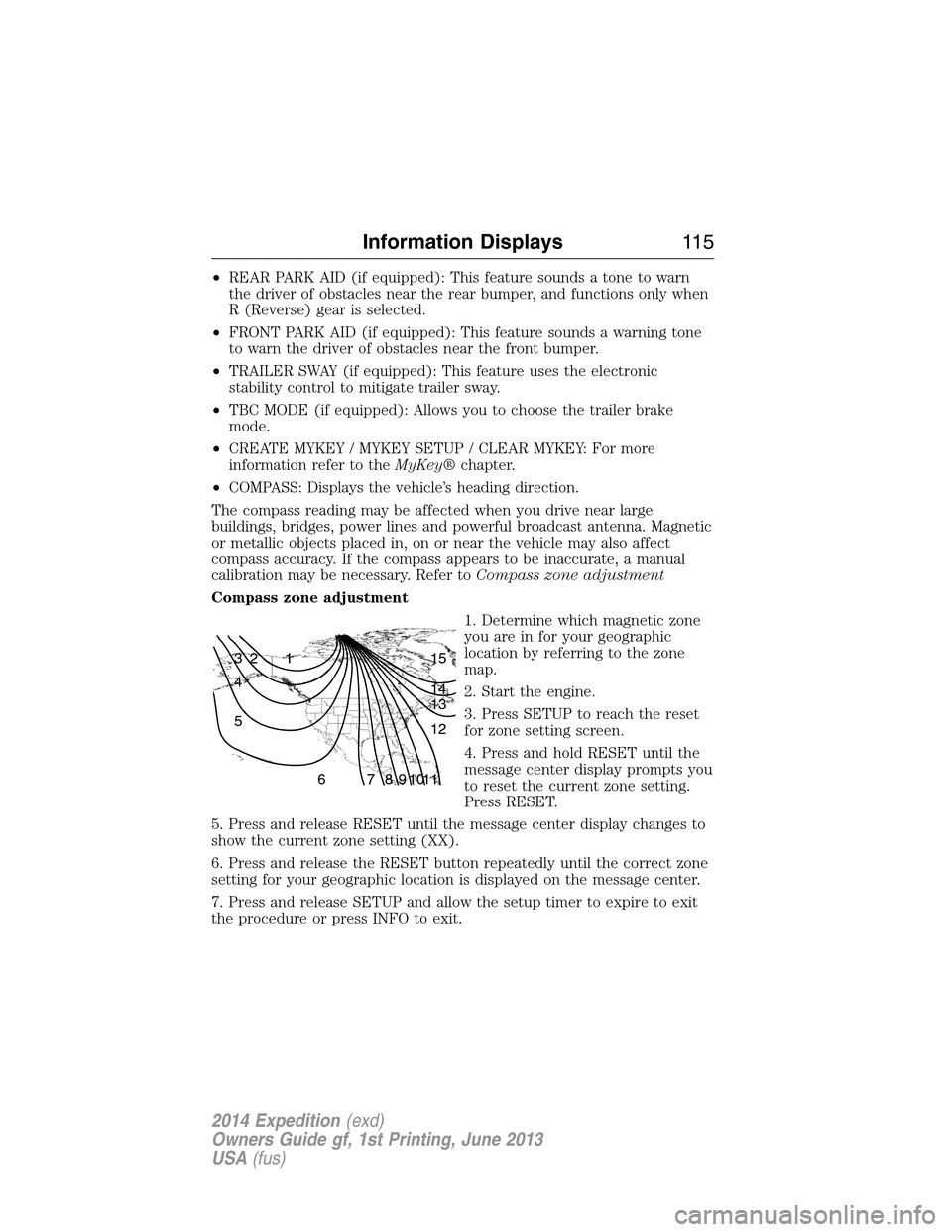
Compass zone adjustment
1. Determine which magnetic zone
you are in for your geographic
location by referring to the zone
map.
2. Start the engine.
3. Press SETUP to reach the reset
for zone setting screen.
4. Press and hold RESET until the
message center display prompts you
to reset the current zone setting.
Press RESET.
5. Press and release RESET until the message center display changes to
show the current zone setting (XX).
6. Press and release the RESET button repeatedly until the correct zone
setting for your geographic location is displayed on the message center.
7. Press and release SETUP and allow the setup timer to expire to exit
the procedure or press INFO to exit.
1 2 3
4
5
6 7 8 9 101112 13 14 15
Information Displays11 5
2014 Expedition(exd)
Owners Guide gf, 1st Printing, June 2013
USA(fus)
Page 120 of 519
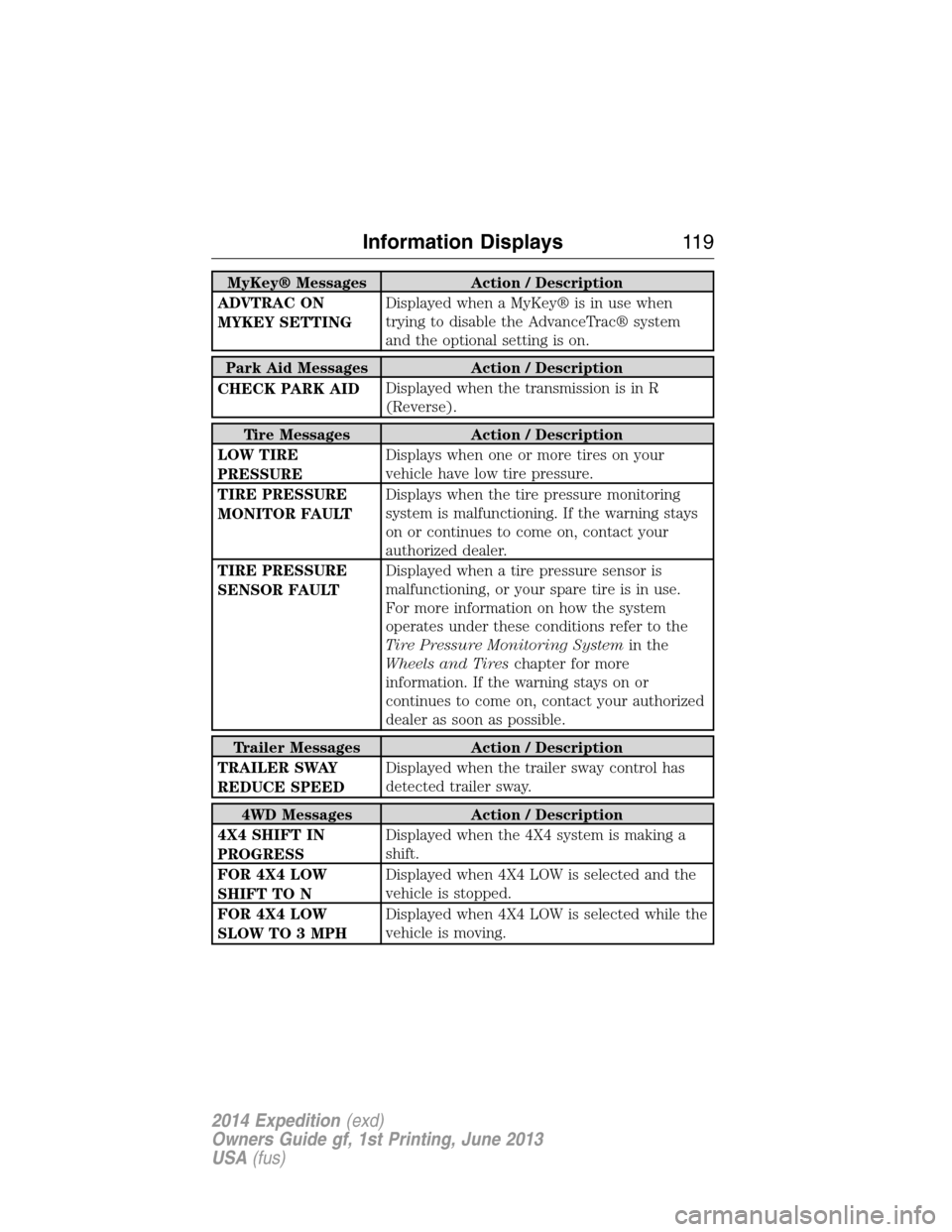
MyKey® Messages Action / Description
ADVTRAC ON
MYKEY SETTINGDisplayed when a MyKey® is in use when
trying to disable the AdvanceTrac® system
and the optional setting is on.
Park Aid Messages Action / Description
CHECK PARK AIDDisplayed when the transmission is in R
(Reverse).
Tire Messages Action / Description
LOW TIRE
PRESSUREDisplays when one or more tires on your
vehicle have low tire pressure.
TIRE PRESSURE
MONITOR FAULTDisplays when the tire pressure monitoring
system is malfunctioning. If the warning stays
on or continues to come on, contact your
authorized dealer.
TIRE PRESSURE
SENSOR FAULTDisplayed when a tire pressure sensor is
malfunctioning, or your spare tire is in use.
For more information on how the system
operates under these conditions refer to the
Tire Pressure Monitoring Systemin the
Wheels and Tireschapter for more
information. If the warning stays on or
continues to come on, contact your authorized
dealer as soon as possible.
Trailer Messages Action / Description
TRAILER SWAY
REDUCE SPEEDDisplayed when the trailer sway control has
detected trailer sway.
4WD Messages Action / Description
4X4 SHIFT IN
PROGRESSDisplayed when the 4X4 system is making a
shift.
FOR 4X4 LOW
SHIFT TO NDisplayed when 4X4 LOW is selected and the
vehicle is stopped.
FOR 4X4 LOW
SLOW TO 3 MPHDisplayed when 4X4 LOW is selected while the
vehicle is moving.
Information Displays11 9
2014 Expedition(exd)
Owners Guide gf, 1st Printing, June 2013
USA(fus)
Page 177 of 519
Choosing the Right Fuel With a Flex Fuel Vehicle (If Equipped)
Use only UNLEADED gasoline or UNLEADED gasoline blended with a
maximum of 85% ethanol (E-85) in your Flex Fuel Vehicle (FFV). If
your vehicle is flex fuel capable, it will have a yellow bezel placed over
the fuel fill inlet.
Do not use:
•fuels containing more than 85% ethanol or E-100 fuel
•fuels containing methanol
•fuels containing metallic based additives, including manganese-based
compounds
•fuels containing the octane booster additive, methylcyclopentadienyl
manganese tricarbonyl (MMT)
•leaded-fuel (The use of leaded fuel is prohibited by law)
Use of any fuel other than recommended fuel can cause powertrain
damage, impair the emission control system or cause loss of vehicle
performance. Any damage to a vehicle that is caused by use of fuel not
recommended will not be covered under warranty.
Octane Recommendations
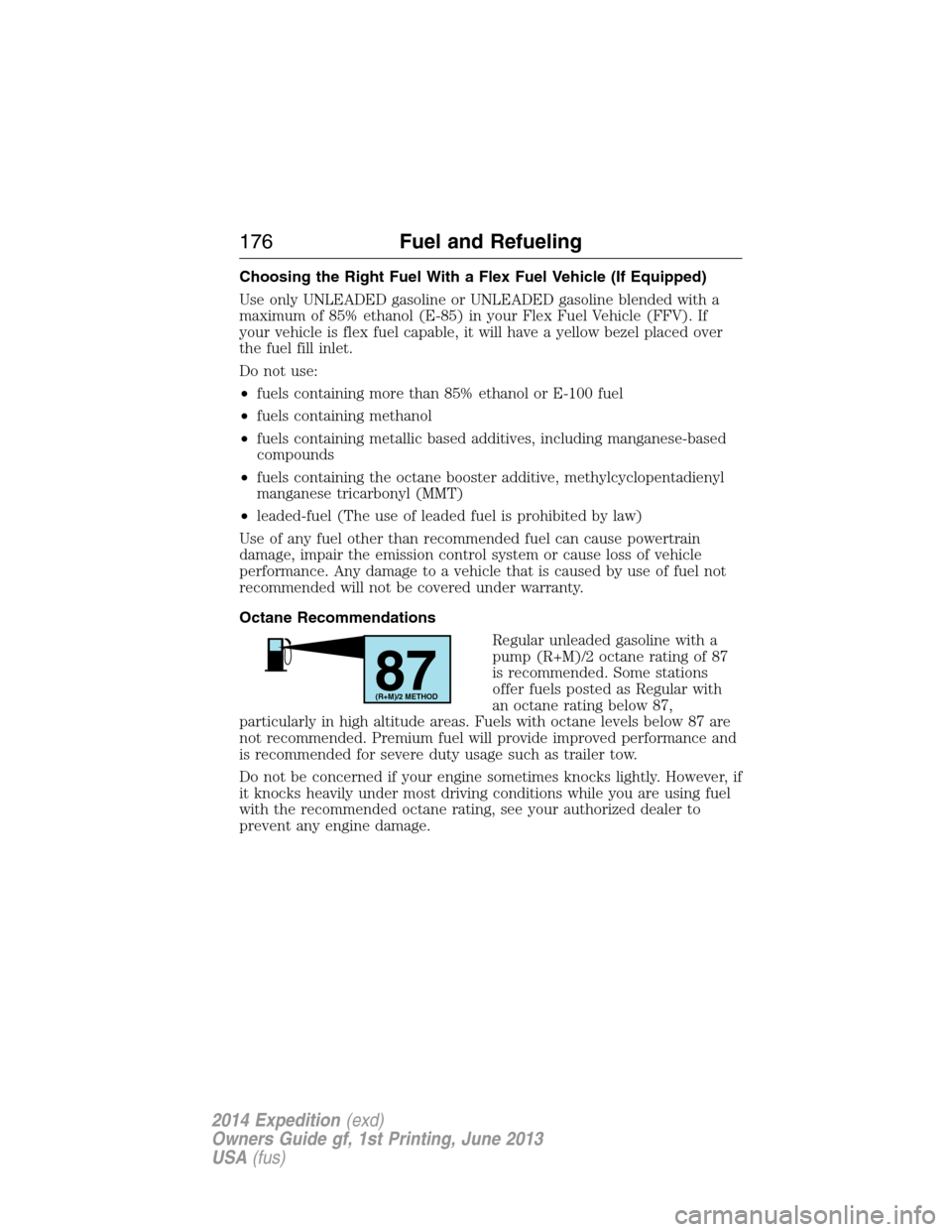
Regular unleaded gasoline with a
pump (R+M)/2 octane rating of 87
is recommended. Some stations
offer fuels posted as Regular with
an octane rating below 87,
particularly in high altitude areas. Fuels with octane levels below 87 are
not recommended. Premium fuel will provide improved performance and
is recommended for severe duty usage such as trailer tow.
Do not be concerned if your engine sometimes knocks lightly. However, if
it knocks heavily under most driving conditions while you are using fuel
with the recommended octane rating, see your authorized dealer to
prevent any engine damage.
87(R+M)/2 METHOD
176Fuel and Refueling
2014 Expedition(exd)
Owners Guide gf, 1st Printing, June 2013
USA(fus)
Page 186 of 519
N (Neutral)
With the gearshift lever in N (Neutral), the vehicle can be started and is
free to roll. Hold the brake pedal down while in this position.
D (Overdrive) with Tow/Haul Off
The normal driving position for the best fuel economy. Transmission
operates in gears one through six.
D (Overdrive) with Tow/Haul On
The Tow/Haul feature improves transmission operation when towing a
trailer or a heavy load. All transmission gear ranges are available when
using Tow/Haul.
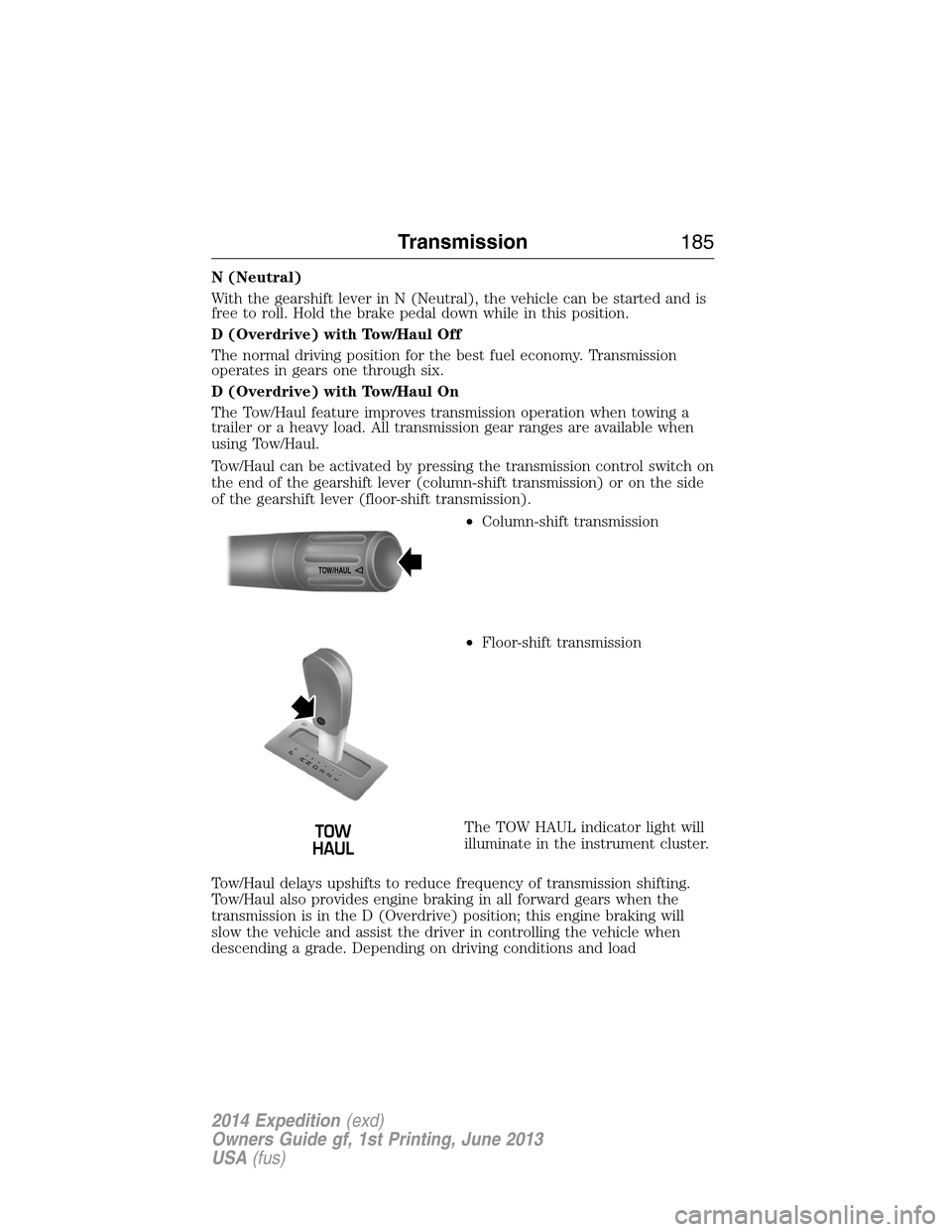
Tow/Haul can be activated by pressing the transmission control switch on
the end of the gearshift lever (column-shift transmission) or on the side
of the gearshift lever (floor-shift transmission).
•Column-shift transmission
•Floor-shift transmission
The TOW HAUL indicator light will
illuminate in the instrument cluster.
Tow/Haul delays upshifts to reduce frequency of transmission shifting.
Tow/Haul also provides engine braking in all forward gears when the
transmission is in the D (Overdrive) position; this engine braking will
slow the vehicle and assist the driver in controlling the vehicle when
descending a grade. Depending on driving conditions and load
TOW/H
AUL
T/H T/H
PR
N
D
3
2
1
Transmission185
2014 Expedition(exd)
Owners Guide gf, 1st Printing, June 2013
USA(fus)