sensor FORD EXPEDITION 2015 3.G User Guide
[x] Cancel search | Manufacturer: FORD, Model Year: 2015, Model line: EXPEDITION, Model: FORD EXPEDITION 2015 3.GPages: 564, PDF Size: 6.71 MB
Page 92 of 564
Keep the outside of the windshield clean, especially the area around the
interior mirror where the sensor is located, or sensor performance may
be affected.
WINDSHIELD WASHERS
Note:Do not operate the wipers on a dry windshield. This may scratch
the glass, damage the wiper blades or cause the wiper motor to burn out.
Always use the windshield washer before wiping a dry windshield.
Note:Do not operate the washer when the washer reservoir is empty.
This may cause the washer pump to overheat.
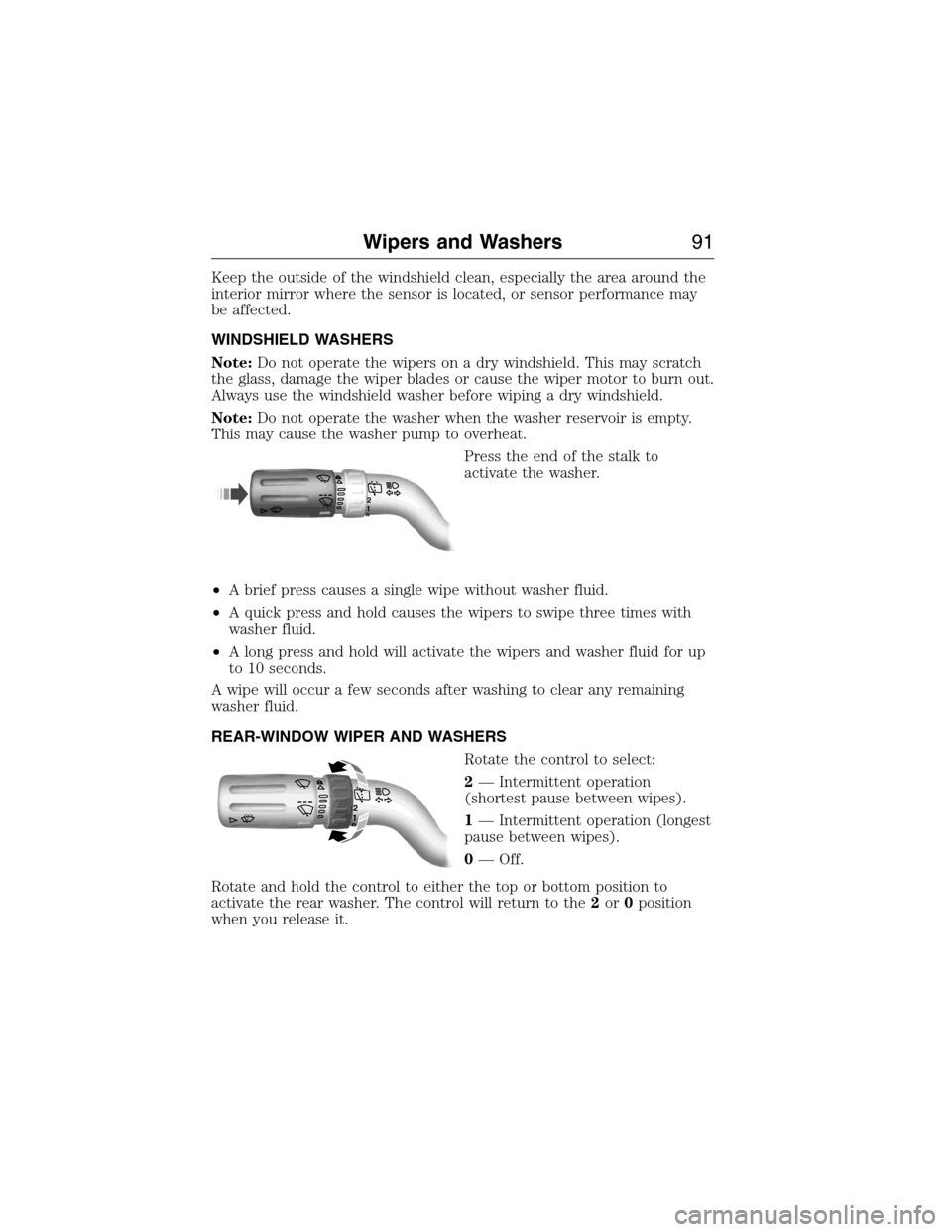
Press the end of the stalk to
activate the washer.
•A brief press causes a single wipe without washer fluid.
•A quick press and hold causes the wipers to swipe three times with
washer fluid.
•A long press and hold will activate the wipers and washer fluid for up
to 10 seconds.
A wipe will occur a few seconds after washing to clear any remaining
washer fluid.
REAR-WINDOW WIPER AND WASHERS
Rotate the control to select:
2— Intermittent operation
(shortest pause between wipes).
1— Intermittent operation (longest
pause between wipes).
0— Off.
Rotate and hold the control to either the top or bottom position to
activate the rear washer. The control will return to the2or0position
when you release it.
12
12
Wipers and Washers91
2015 Expedition(exd)
Owners Guide gf, 1st Printing, July 2014
USA(fus)
Page 101 of 564
Auto-Dimming Feature (If Equipped)
The driver’s side exterior mirror will automatically dim when the interior
auto-dimming mirror is activated.
Signal Indicator Mirrors (If Equipped)
The rear-facing portion of the appropriate mirror housing will blink when
the turn signal is activated.
Blind Spot Information System (BLIS®) with Cross Traffic Alert
(CTA) (If Equipped)
Refer toBlind Spot Information System (BLIS®) with Cross Traffic
Alert (CTA)in theDriving Aidschapter.
INTERIOR MIRROR
WARNING:Do not adjust the mirror when your vehicle is
moving.
Note:Do not clean the housing or glass of any mirror with harsh
abrasives, fuel or other petroleum or ammonia based cleaning products.
You can adjust the interior mirror to your preference. Some mirrors also
have a second pivot point. This lets you move the mirror head up or
down and from side to side.
Auto-Dimming Mirror
Note:Do not block the sensors on the front and back of the mirror.
Mirror performance may be affected. A rear center passenger or raised
rear center head restraint may also block light from reaching the sensor.
The mirror will dim automatically to reduce glare when bright lights are
detected from behind your vehicle. It will automatically return to normal
reflection when you select reverse gear to make sure you have a clear
view when backing up.
100Windows and Mirrors
2015 Expedition(exd)
Owners Guide gf, 1st Printing, July 2014
USA(fus)
Page 127 of 564
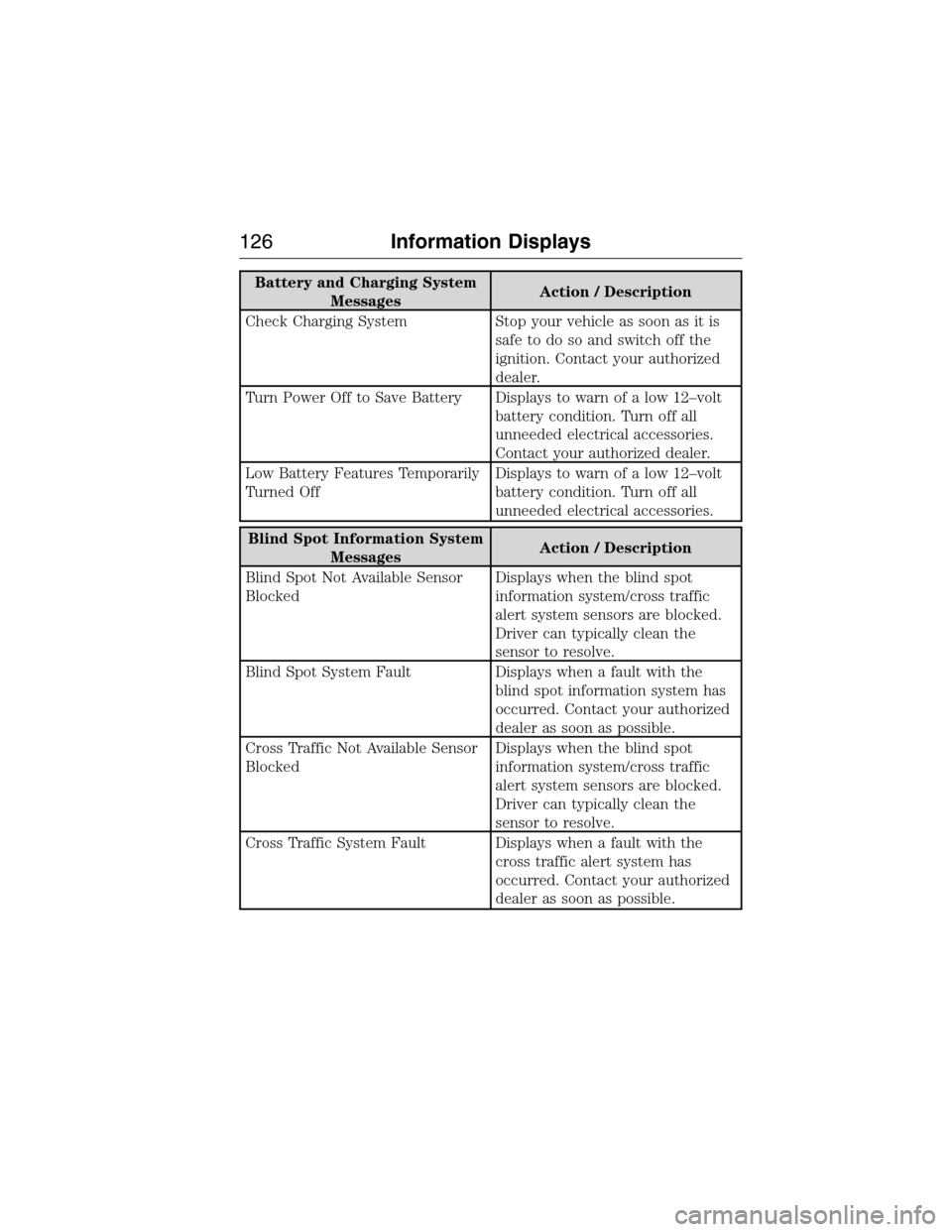
Battery and Charging System
MessagesAction / Description
Check Charging System Stop your vehicle as soon as it is
safetodosoandswitchoffthe
ignition. Contact your authorized
dealer.
Turn Power Off to Save Battery Displays to warn of a low 12–volt
battery condition. Turn off all
unneeded electrical accessories.
Contact your authorized dealer.
Low Battery Features Temporarily
Turned OffDisplays to warn of a low 12–volt
battery condition. Turn off all
unneeded electrical accessories.
Blind Spot Information System
MessagesAction / Description
Blind Spot Not Available Sensor
BlockedDisplays when the blind spot
information system/cross traffic
alert system sensors are blocked.
Driver can typically clean the
sensor to resolve.
Blind Spot System Fault Displays when a fault with the
blind spot information system has
occurred. Contact your authorized
dealer as soon as possible.
Cross Traffic Not Available Sensor
BlockedDisplays when the blind spot
information system/cross traffic
alert system sensors are blocked.
Driver can typically clean the
sensor to resolve.
Cross Traffic System Fault Displays when a fault with the
cross traffic alert system has
occurred. Contact your authorized
dealer as soon as possible.
126Information Displays
2015 Expedition(exd)
Owners Guide gf, 1st Printing, July 2014
USA(fus)
Page 134 of 564
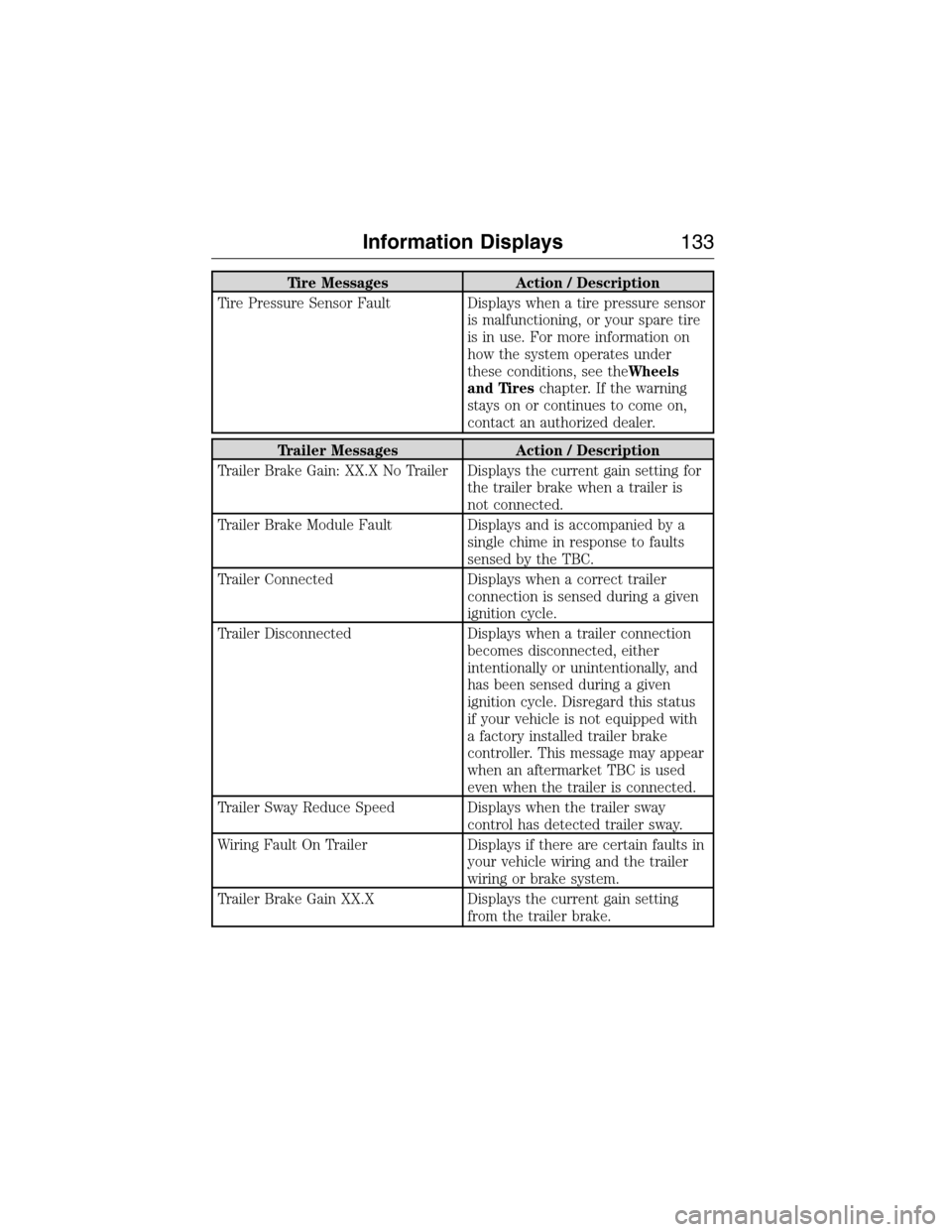
Tire Messages Action / Description
Tire Pressure Sensor Fault Displays when a tire pressure sensor
is malfunctioning, or your spare tire
is in use. For more information on
how the system operates under
these conditions, see theWheels
and Tireschapter. If the warning
stays on or continues to come on,
contact an authorized dealer.
Trailer Messages Action / Description
Trailer Brake Gain: XX.X No Trailer Displays the current gain setting for
the trailer brake when a trailer is
not connected.
Trailer Brake Module Fault Displays and is accompanied by a
single chime in response to faults
sensed by the TBC.
Trailer Connected Displays when a correct trailer
connection is sensed during a given
ignition cycle.
Trailer Disconnected Displays when a trailer connection
becomes disconnected, either
intentionally or unintentionally, and
has been sensed during a given
ignition cycle. Disregard this status
if your vehicle is not equipped with
a factory installed trailer brake
controller. This message may appear
when an aftermarket TBC is used
even when the trailer is connected.
Trailer Sway Reduce Speed Displays when the trailer sway
control has detected trailer sway.
Wiring Fault On Trailer Displays if there are certain faults in
your vehicle wiring and the trailer
wiring or brake system.
Trailer Brake Gain XX.X Displays the current gain setting
from the trailer brake.
Information Displays133
2015 Expedition(exd)
Owners Guide gf, 1st Printing, July 2014
USA(fus)
Page 175 of 564
110 Volt AC Power Point (If Equipped)
WARNING:Do not keep electrical devices plugged in the power
point whenever the device is not in use. Do not use any
extension cord with the 110 volt AC power point, since it will defeat
the safety protection design. Doing so may cause the power point to
overload due to powering multiple devices that can reach beyond the
150–watt load limit and could result in fire or serious injury.
Note:The cap should always be closed whenever the power point outlet
is not in use.
Note:The power point will turn off after 13 minutes if the ignition is on
without the engine running. Keep the engine running to use the power
point.
The 110–volt AC power point outlet is used for powering electrical
devices that require up to 150 watts. Exceeding the 150–watt limit will
cause the power point to cut off the power temporarily to provide
overload protection.
The power point is located on the
back of the center console.
The power point is not designed for the following electric appliances;
they may not work properly:
•Cathode-ray, tube-type televisions
•Motor loads, such as vacuum cleaners, electric saws and other electric
power tools, compressor-driven refrigerators, etc.
•Measuring devices that process precise data, such as medical
equipment, measuring equipment, etc.
•Other appliances requiring an extremely stable power supply:
microcomputer-controlled electric blankets, touch sensor lamps, etc.
174Auxiliary Power Points
2015 Expedition(exd)
Owners Guide gf, 1st Printing, July 2014
USA(fus)
Page 215 of 564
Hill start assist keeps your vehicle stationary long enough to move your
foot from the brake pedal to the accelerator pedal when your vehicle is
on a slope.
The brakes are released automatically once the engine has developed
sufficient drive to prevent the vehicle from rolling down the slope. This
is an advantage when pulling away on a slope, (for example from a car
park ramp, traffic lights or when reversing uphill into a parking space).
Using Hill Start Assist
1. Press the brake pedal to bring the vehicle to a complete standstill.
Keep the brake pedal pressed.
2. If the sensors detect that the vehicle is on a slope, the hill start assist
feature will be activated automatically.
3. When you remove your foot from the brake pedal, the vehicle will
remain on the slope without rolling away for approximately two or three
seconds. This hold time will automatically be extended if you are in the
process of driving off.
4. Drive off in the normal manner. The brakes will be released
automatically.
214Brakes
2015 Expedition(exd)
Owners Guide gf, 1st Printing, July 2014
USA(fus)
Page 217 of 564
PRINCIPLES OF OPERATION
WARNING:Vehicle modifications involving braking system,
aftermarket roof racks, suspension, steering system, tire
construction or wheel and tire size may change the handling
characteristics of the vehicle and may adversely affect the performance
of the AdvanceTrac® system. In addition, installing any stereo
loudspeakers may interfere with and adversely affect the AdvanceTrac®
system. Install any aftermarket stereo loudspeaker as far as possible
from the front center console, the tunnel, and the front seats in order
to minimize the risk of interfering with the AdvanceTrac® sensors.
Reducing the effectiveness of the AdvanceTrac® system could lead to
an increased risk of loss of vehicle control, vehicle rollover, personal
injury and death.
WARNING:Remember that even advanced technology cannot
defy the laws of physics. It’s always possible to lose control of a
vehicle due to inappropriate driver input for the conditions. Aggressive
driving on any road condition can cause you to lose control of your
vehicle increasing the risk of personal injury or property damage.
Activation of the AdvanceTrac® system is an indication that at least
some of the tires have exceeded their ability to grip the road; this could
reduce the operator’s ability to control the vehicle potentially resulting
in a loss of vehicle control, vehicle rollover, personal injury and death. If
your AdvanceTrac® system activates, SLOW DOWN.
The AdvanceTrac® with Roll Stability Control™ system helps you keep
control of your vehicle when on a slippery surface. The electronic
stability control portion of the system helps avoid skids and lateral slides
and roll stability control helps avoid a vehicle rollover. The traction
control system helps avoid drive wheel spin and loss of traction. See the
Traction Controlchapter for details on traction control system
operation.
216Stability Control
2015 Expedition(exd)
Owners Guide gf, 1st Printing, July 2014
USA(fus)
Page 222 of 564
SENSING SYSTEM (IF EQUIPPED)
WARNING:To help avoid personal injury, please read and
understand the limitations of the system as contained in this
section. Sensing is only an aid for some (generally large and fixed)
objects when moving in reverse on a flat surface at parking speeds.
Traffic control systems, inclement weather, air brakes, and external
motors and fans may also affect the function of the sensing system; this
may include reduced performance or a false activation.
WARNING:To help avoid personal injury, always use caution
when in R (Reverse) and when using the sensing system.
WARNING:This system is not designed to prevent contact with
small or moving objects. The system is designed to provide a
warning to assist the driver in detecting large stationary objects to
avoid damaging the vehicle. The system may not detect smaller objects,
particularly those close to the ground.
WARNING:Certain add-on devices such as large trailer hitches,
bike or surfboard racks and any device that may block the normal
detection zone of the system, may create false beeps.
Note:Keep the sensors (located on the bumper/fascia) free from snow,
ice and large accumulations of dirt. If the sensors are covered, the
system’s accuracy can be affected. Do not clean the sensors with sharp
objects.
Note:If your vehicle sustains damage to the bumper/fascia, leaving it
misaligned or bent, the sensing zone may be altered causing inaccurate
measurement of obstacles or false alarms.
Note:If your vehicle is equipped with MyKey®, it is possible to prevent
turning the sensing system off. Refer to theMyKey®chapter.
Note:When a trailer is connect to your vehicle, the Rear Sensing System
may detect the trailer and provide warnings. It is suggested that the
driver disables the Rear Sensing System when a trailer is connected to
your vehicle to prevent these warnings.
Parking Aids221
2015 Expedition(exd)
Owners Guide gf, 1st Printing, July 2014
USA(fus)
Page 223 of 564
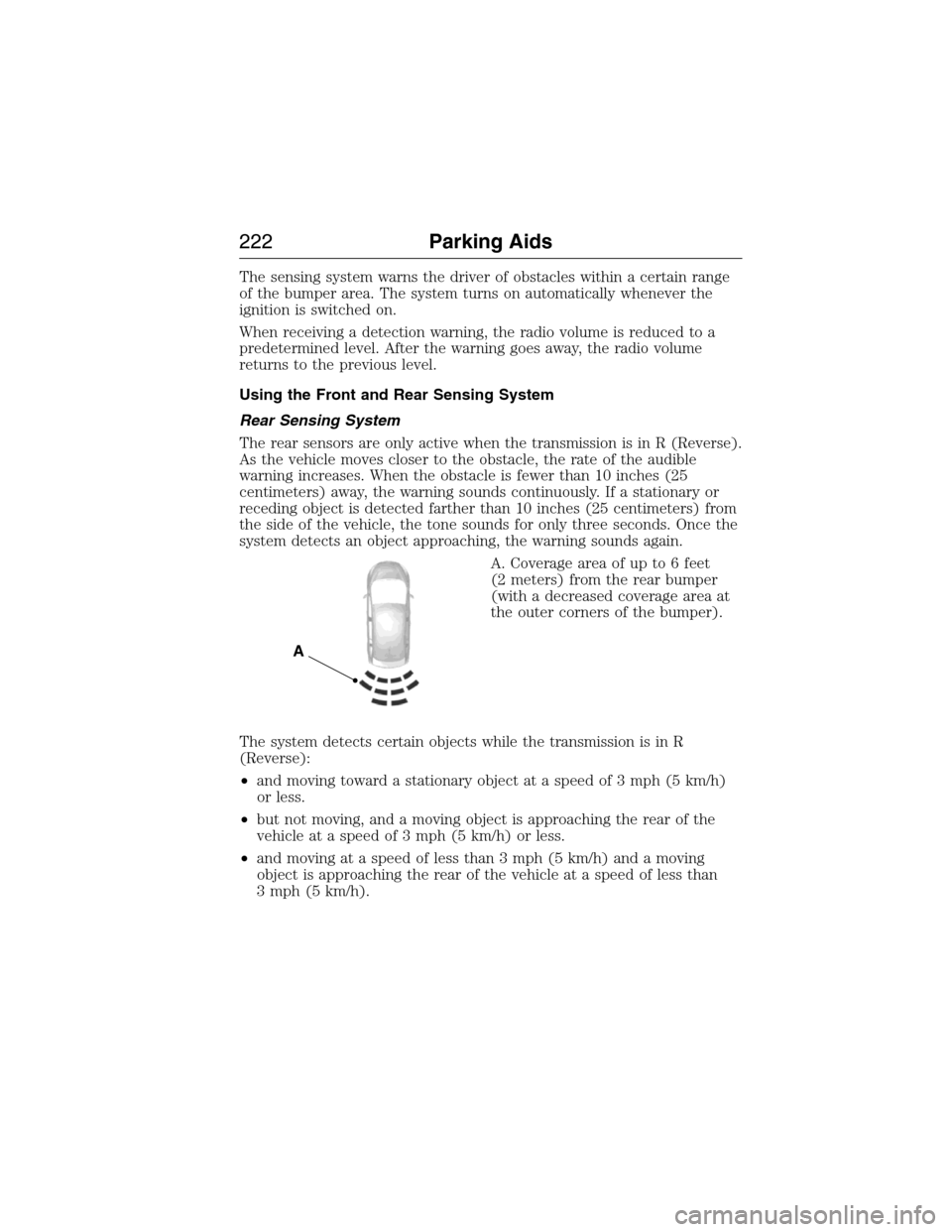
The sensing system warns the driver of obstacles within a certain range
of the bumper area. The system turns on automatically whenever the
ignition is switched on.
When receiving a detection warning, the radio volume is reduced to a
predetermined level. After the warning goes away, the radio volume
returns to the previous level.
Using the Front and Rear Sensing System
Rear Sensing System
The rear sensors are only active when the transmission is in R (Reverse).
As the vehicle moves closer to the obstacle, the rate of the audible
warning increases. When the obstacle is fewer than 10 inches (25
centimeters) away, the warning sounds continuously. If a stationary or
receding object is detected farther than 10 inches (25 centimeters) from
the side of the vehicle, the tone sounds for only three seconds. Once the
system detects an object approaching, the warning sounds again.
A. Coverage area of up to 6 feet
(2 meters) from the rear bumper
(with a decreased coverage area at
the outer corners of the bumper).
The system detects certain objects while the transmission is in R
(Reverse):
•and moving toward a stationary object at a speed of 3 mph (5 km/h)
or less.
•but not moving, and a moving object is approaching the rear of the
vehicle at a speed of 3 mph (5 km/h) or less.
•and moving at a speed of less than 3 mph (5 km/h) and a moving
object is approaching the rear of the vehicle at a speed of less than
3 mph (5 km/h).
A
222Parking Aids
2015 Expedition(exd)
Owners Guide gf, 1st Printing, July 2014
USA(fus)
Page 224 of 564
Front Sensing System
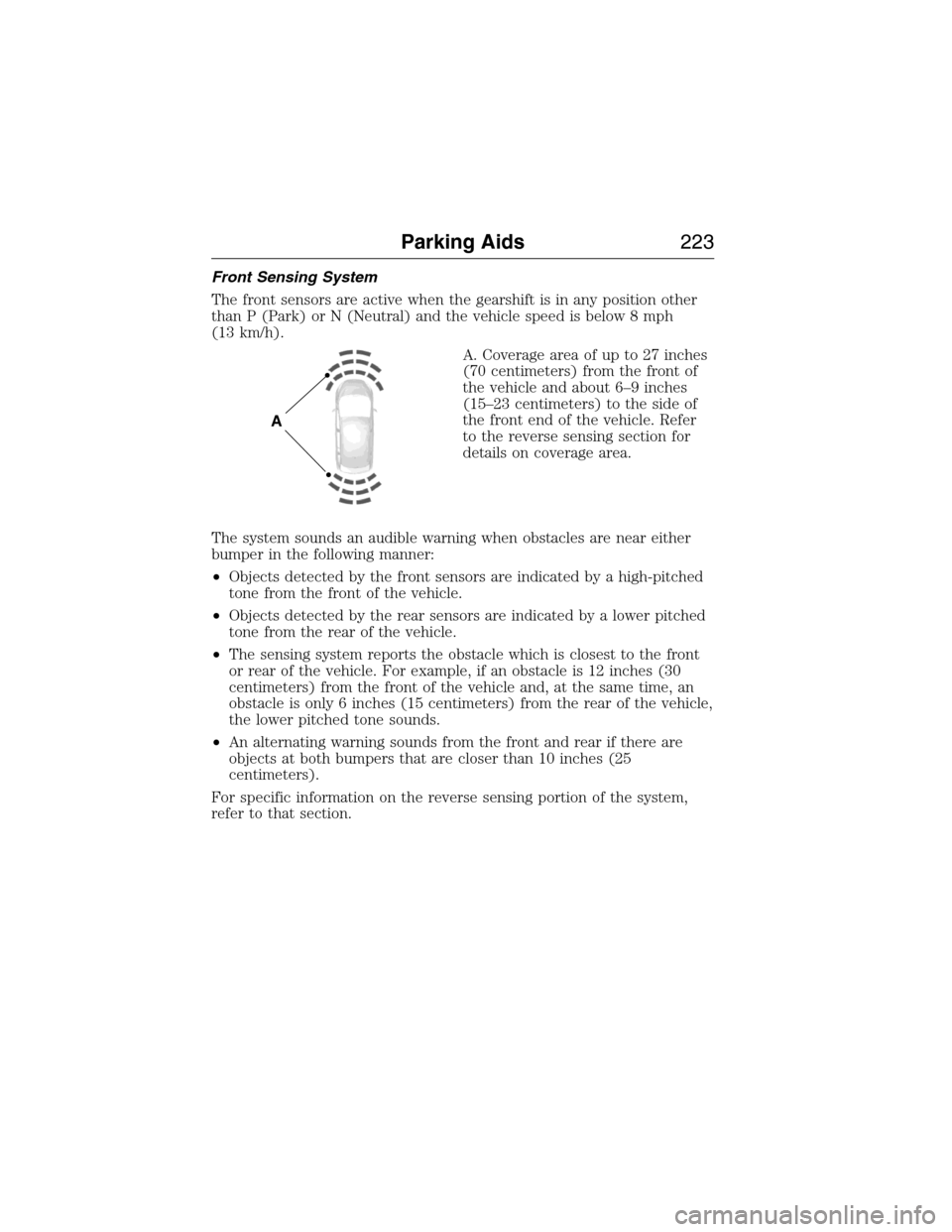
The front sensors are active when the gearshift is in any position other
than P (Park) or N (Neutral) and the vehicle speed is below 8 mph
(13 km/h).
A. Coverage area of up to 27 inches
(70 centimeters) from the front of
the vehicle and about 6–9 inches
(15–23 centimeters) to the side of
the front end of the vehicle. Refer
to the reverse sensing section for
details on coverage area.
The system sounds an audible warning when obstacles are near either
bumper in the following manner:
•Objects detected by the front sensors are indicated by a high-pitched
tone from the front of the vehicle.
•Objects detected by the rear sensors are indicated by a lower pitched
tone from the rear of the vehicle.
•The sensing system reports the obstacle which is closest to the front
or rear of the vehicle. For example, if an obstacle is 12 inches (30
centimeters) from the front of the vehicle and, at the same time, an
obstacle is only 6 inches (15 centimeters) from the rear of the vehicle,
the lower pitched tone sounds.
•An alternating warning sounds from the front and rear if there are
objects at both bumpers that are closer than 10 inches (25
centimeters).
For specific information on the reverse sensing portion of the system,
refer to that section.
A
Parking Aids223
2015 Expedition(exd)
Owners Guide gf, 1st Printing, July 2014
USA(fus)