tow FORD EXPEDITION 2015 3.G Owner's Manual
[x] Cancel search | Manufacturer: FORD, Model Year: 2015, Model line: EXPEDITION, Model: FORD EXPEDITION 2015 3.GPages: 564, PDF Size: 6.71 MB
Page 119 of 564
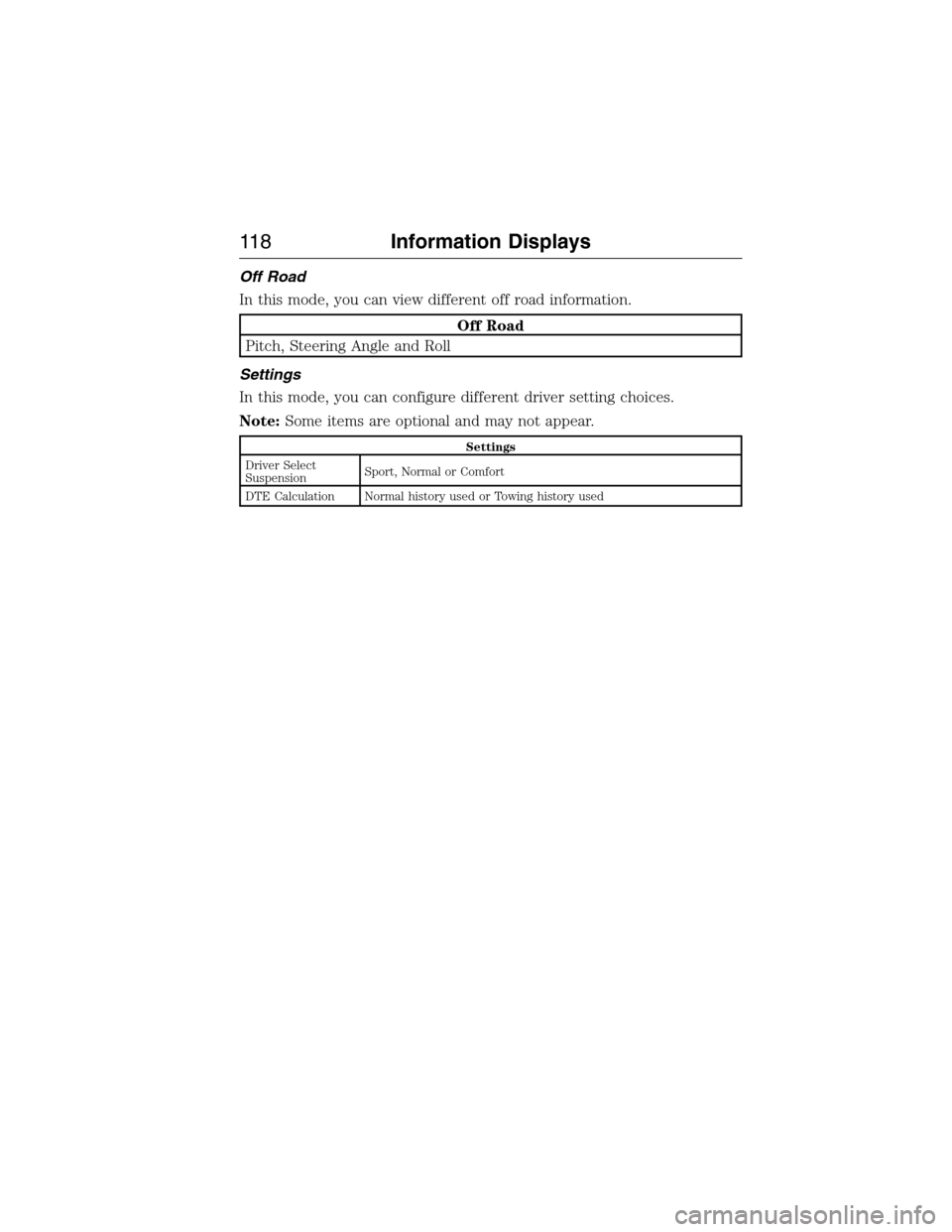
Off Road
In this mode, you can view different off road information.
Off Road
Pitch, Steering Angle and Roll
Settings
In this mode, you can configure different driver setting choices.
Note:Some items are optional and may not appear.
Settings
Driver Select
SuspensionSport, Normal or Comfort
DTE Calculation Normal history used or Towing history used
11 8Information Displays
2015 Expedition(exd)
Owners Guide gf, 1st Printing, July 2014
USA(fus)
Page 121 of 564
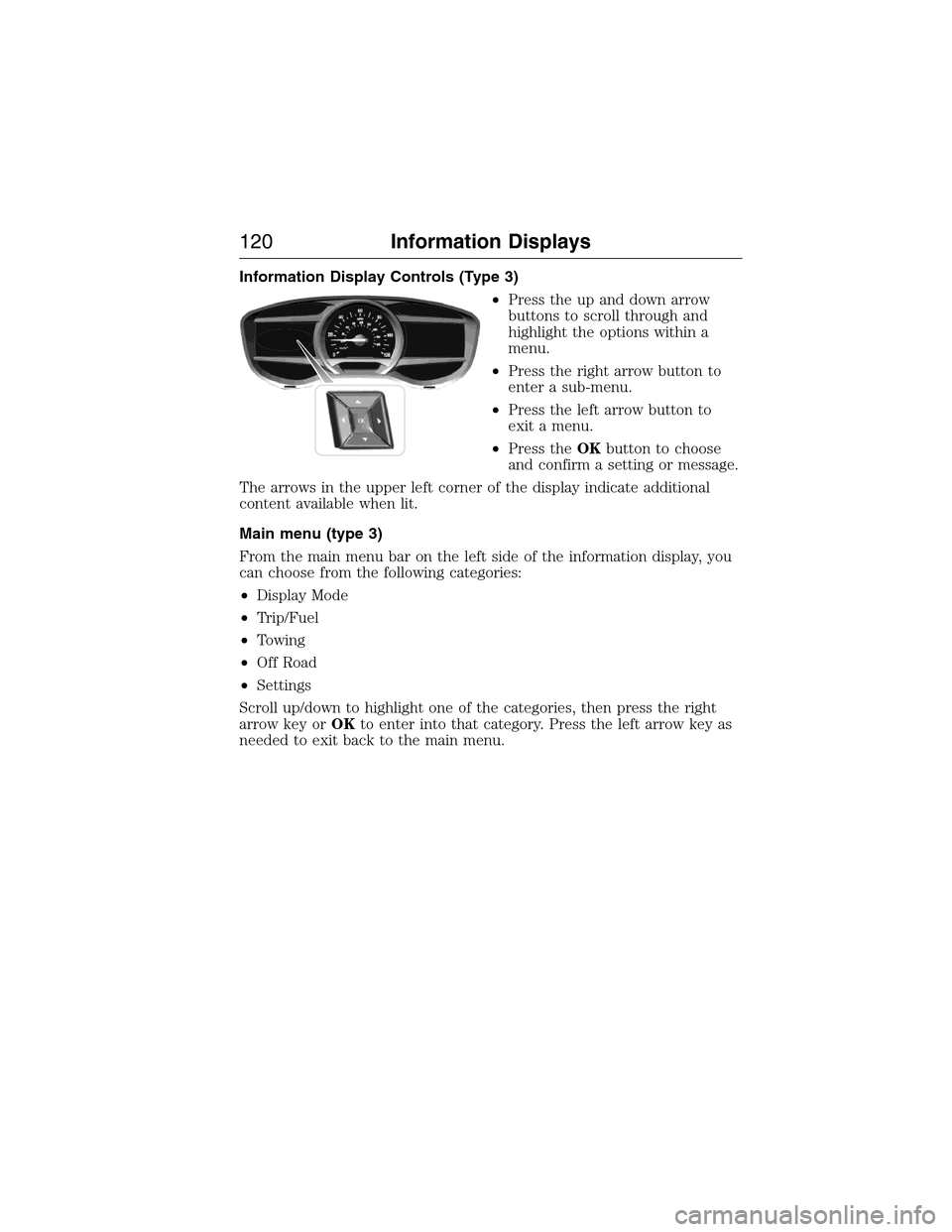
Information Display Controls (Type 3)
•Press the up and down arrow
buttons to scroll through and
highlight the options within a
menu.
•Press the right arrow button to
enter a sub-menu.
•Press the left arrow button to
exit a menu.
•Press theOKbutton to choose
and confirm a setting or message.
The arrows in the upper left corner of the display indicate additional
content available when lit.
Main menu (type 3)
From the main menu bar on the left side of the information display, you
can choose from the following categories:
•Display Mode
•Trip/Fuel
•Towing
•Off Road
•Settings
Scroll up/down to highlight one of the categories, then press the right
arrow key orOKto enter into that category. Press the left arrow key as
needed to exit back to the main menu.
120Information Displays
2015 Expedition(exd)
Owners Guide gf, 1st Printing, July 2014
USA(fus)
Page 123 of 564
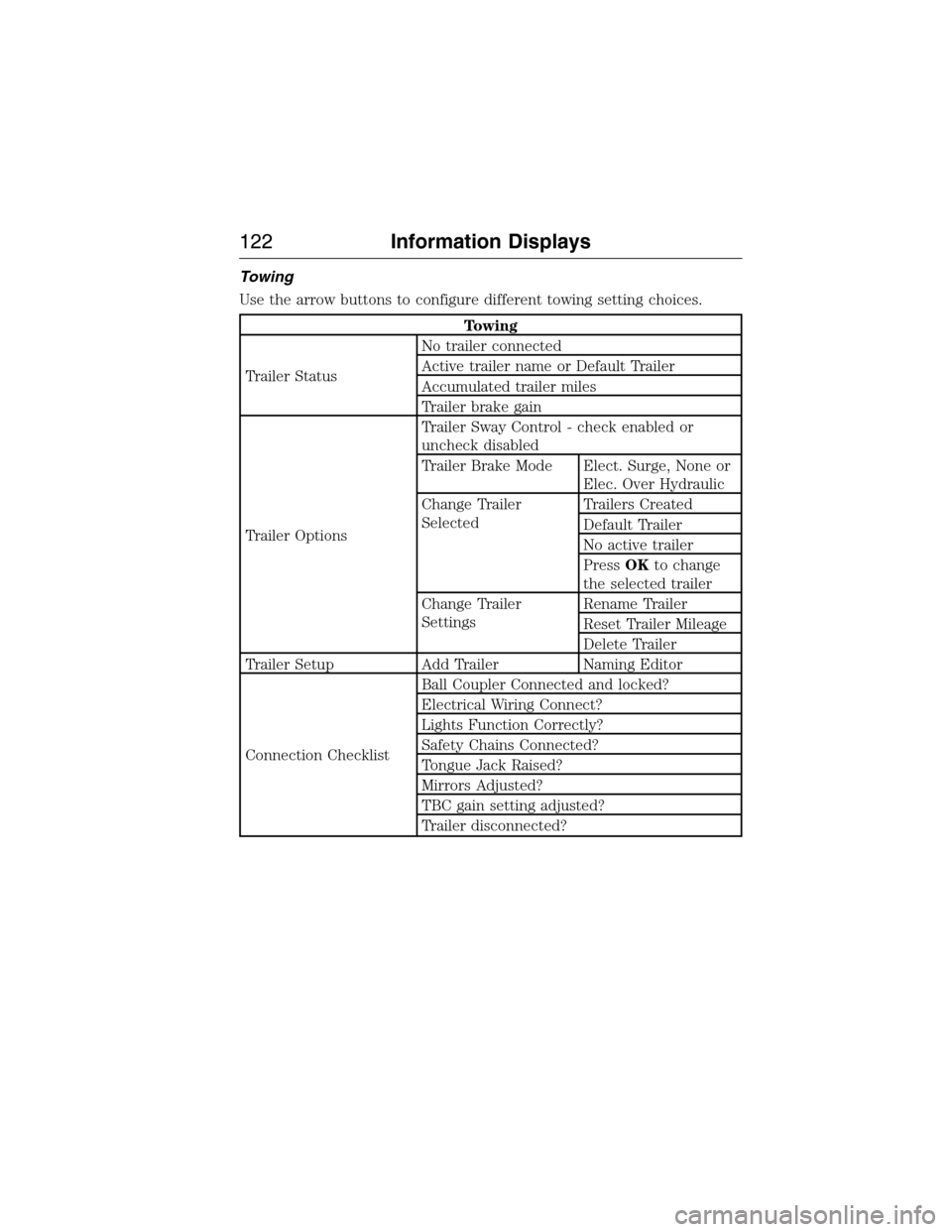
Towing
Use the arrow buttons to configure different towing setting choices.
Towing
Trailer StatusNo trailer connected
Active trailer name or Default Trailer
Accumulated trailer miles
Trailer brake gain
Trailer OptionsTrailer Sway Control - check enabled or
uncheck disabled
Trailer Brake Mode Elect. Surge, None or
Elec. Over Hydraulic
Change Trailer
SelectedTrailers Created
Default Trailer
No active trailer
PressOKto change
the selected trailer
Change Trailer
SettingsRename Trailer
Reset Trailer Mileage
Delete Trailer
Trailer Setup Add Trailer Naming Editor
Connection ChecklistBall Coupler Connected and locked?
Electrical Wiring Connect?
Lights Function Correctly?
Safety Chains Connected?
Tongue Jack Raised?
Mirrors Adjusted?
TBC gain setting adjusted?
Trailer disconnected?
122Information Displays
2015 Expedition(exd)
Owners Guide gf, 1st Printing, July 2014
USA(fus)
Page 124 of 564
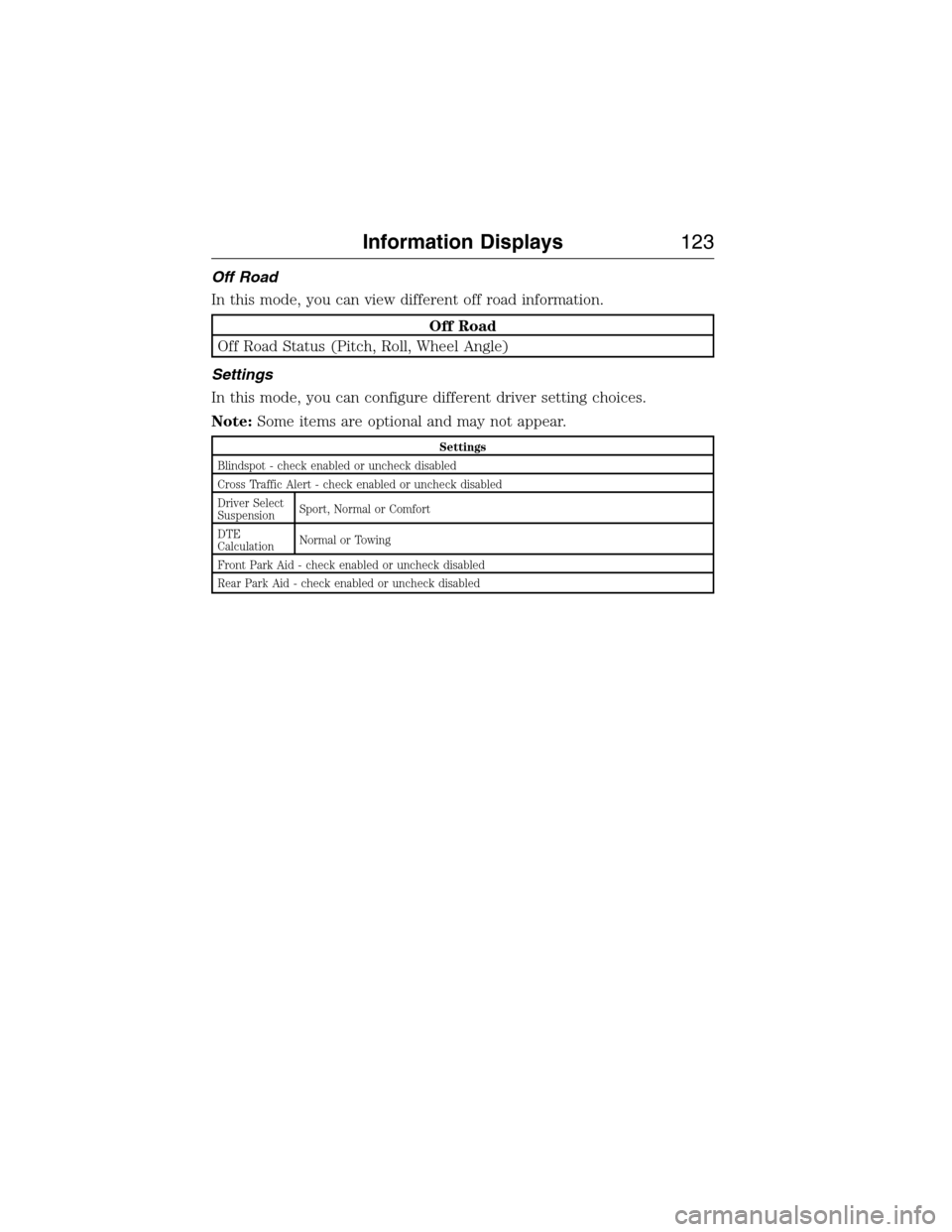
Off Road
In this mode, you can view different off road information.
Off Road
Off Road Status (Pitch, Roll, Wheel Angle)
Settings
In this mode, you can configure different driver setting choices.
Note:Some items are optional and may not appear.
Settings
Blindspot - check enabled or uncheck disabled
Cross Traffic Alert - check enabled or uncheck disabled
Driver Select
SuspensionSport, Normal or Comfort
DTE
CalculationNormal or Towing
Front Park Aid - check enabled or uncheck disabled
Rear Park Aid - check enabled or uncheck disabled
Information Displays123
2015 Expedition(exd)
Owners Guide gf, 1st Printing, July 2014
USA(fus)
Page 135 of 564
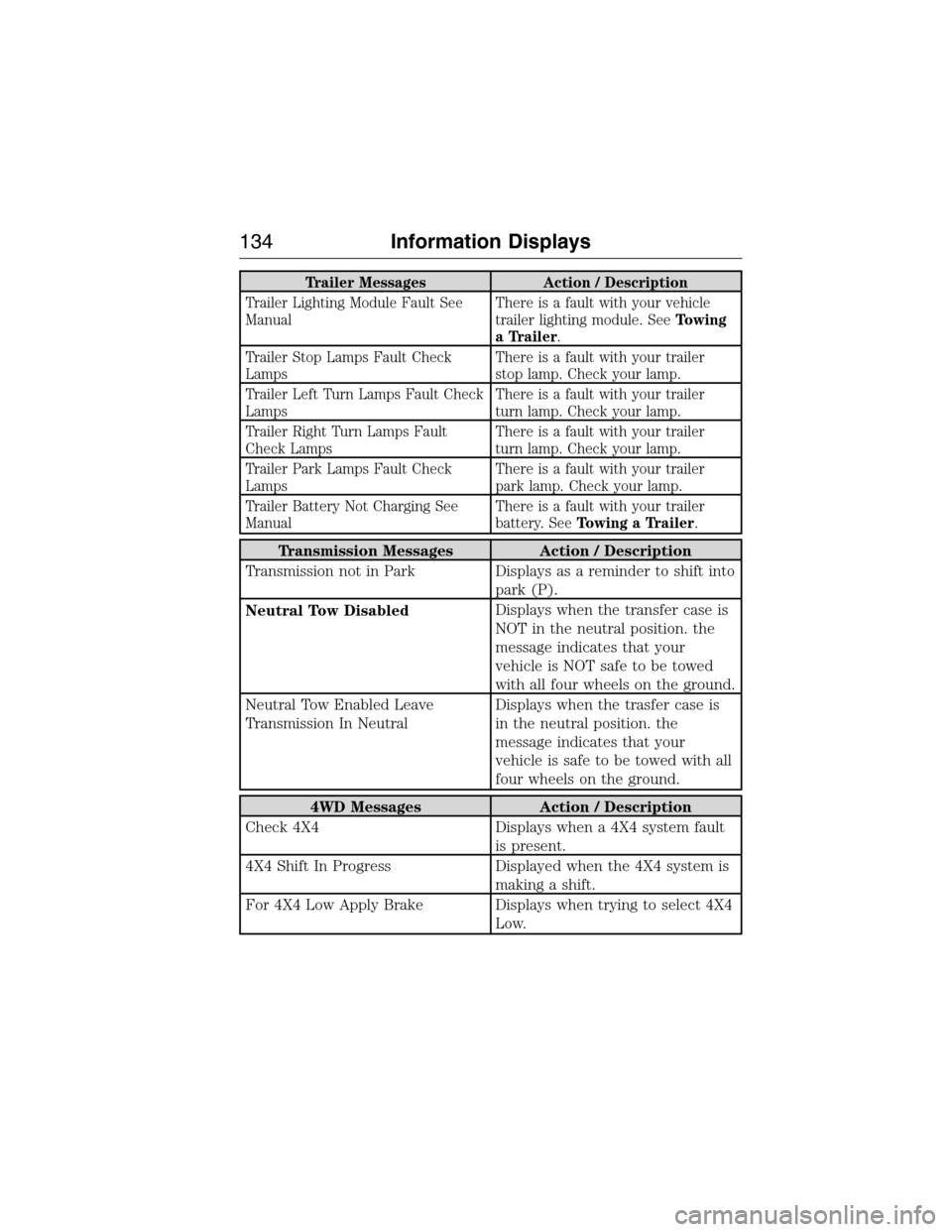
Trailer Messages Action / Description
Trailer Lighting Module Fault See
ManualThere is a fault with your vehicle
trailer lighting module. SeeTowing
a Trailer.
Trailer Stop Lamps Fault Check
LampsThere is a fault with your trailer
stop lamp. Check your lamp.
Trailer Left Turn Lamps Fault Check
LampsThere is a fault with your trailer
turn lamp. Check your lamp.
Trailer Right Turn Lamps Fault
Check LampsThere is a fault with your trailer
turn lamp. Check your lamp.
Trailer Park Lamps Fault Check
LampsThere is a fault with your trailer
park lamp. Check your lamp.
Trailer Battery Not Charging See
ManualThere is a fault with your trailer
battery. SeeTowing a Trailer.
Transmission Messages Action / Description
Transmission not in Park Displays as a reminder to shift into
park (P).
Neutral Tow DisabledDisplays when the transfer case is
NOT in the neutral position. the
message indicates that your
vehicle is NOT safe to be towed
with all four wheels on the ground.
Neutral Tow Enabled Leave
Transmission In NeutralDisplays when the trasfer case is
in the neutral position. the
message indicates that your
vehicle is safe to be towed with all
four wheels on the ground.
4WD Messages Action / Description
Check 4X4 Displays when a 4X4 system fault
is present.
4X4 Shift In Progress Displayed when the 4X4 system is
making a shift.
For 4X4 Low Apply Brake Displays when trying to select 4X4
Low.
134Information Displays
2015 Expedition(exd)
Owners Guide gf, 1st Printing, July 2014
USA(fus)
Page 146 of 564
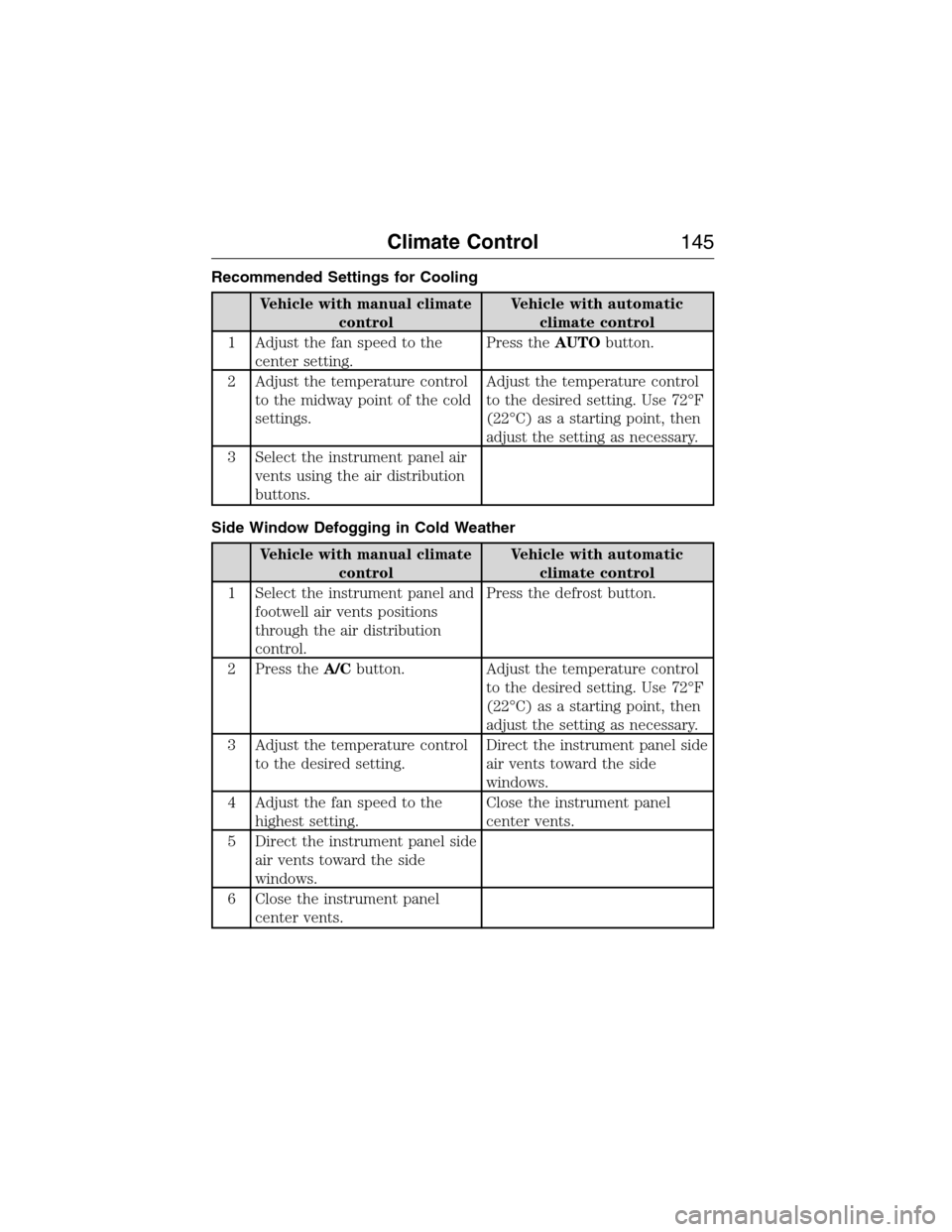
Recommended Settings for Cooling
Vehicle with manual climate
controlVehicle with automatic
climate control
1 Adjust the fan speed to the
center setting.Press theAUTObutton.
2 Adjust the temperature control
to the midway point of the cold
settings.Adjust the temperature control
to the desired setting. Use 72°F
(22°C) as a starting point, then
adjust the setting as necessary.
3 Select the instrument panel air
vents using the air distribution
buttons.
Side Window Defogging in Cold Weather
Vehicle with manual climate
controlVehicle with automatic
climate control
1 Select the instrument panel and
footwell air vents positions
through the air distribution
control.Press the defrost button.
2 Press theA/Cbutton. Adjust the temperature control
to the desired setting. Use 72°F
(22°C) as a starting point, then
adjust the setting as necessary.
3 Adjust the temperature control
to the desired setting.Direct the instrument panel side
air vents toward the side
windows.
4 Adjust the fan speed to the
highest setting.Close the instrument panel
center vents.
5 Direct the instrument panel side
air vents toward the side
windows.
6 Close the instrument panel
center vents.
Climate Control145
2015 Expedition(exd)
Owners Guide gf, 1st Printing, July 2014
USA(fus)
Page 160 of 564
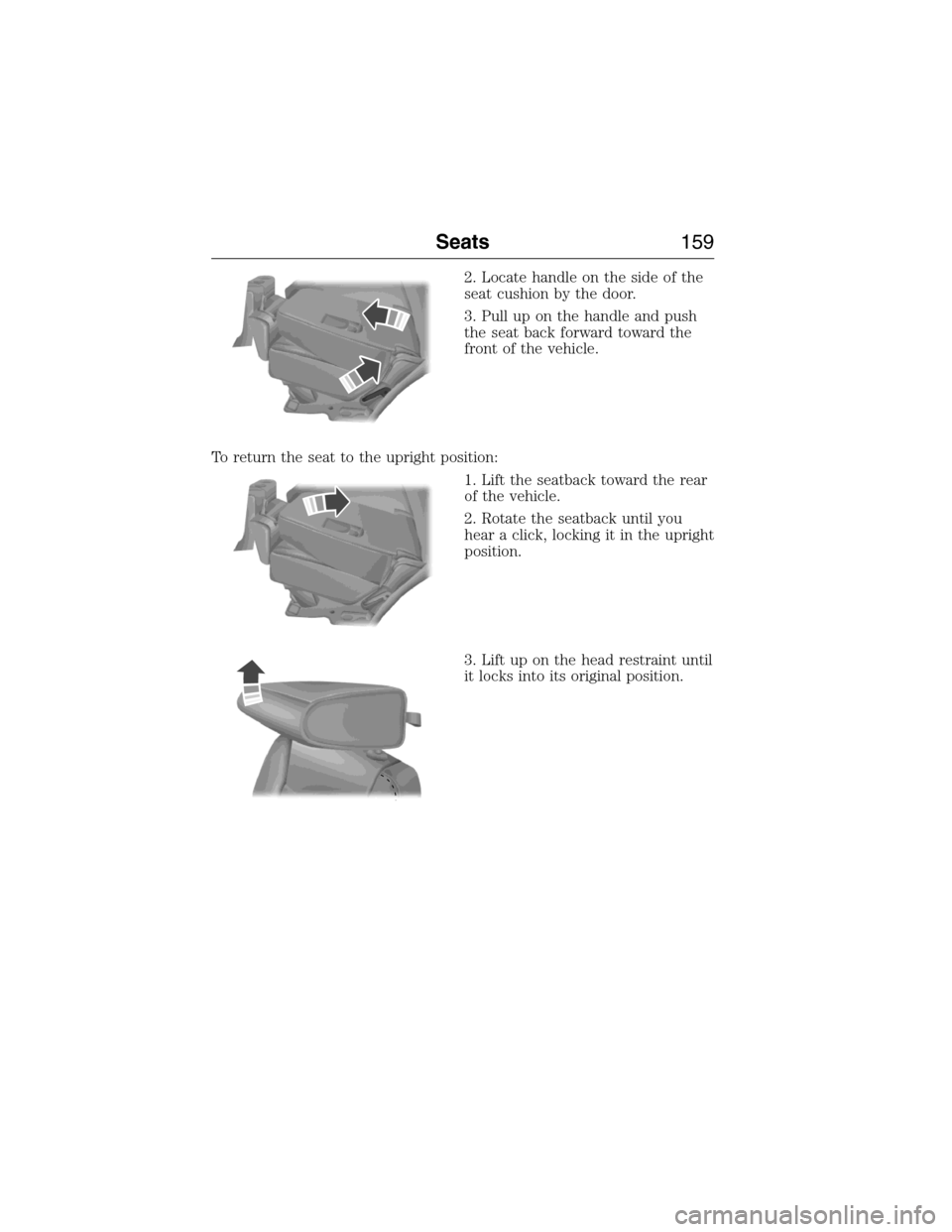
2. Locate handle on the side of the
seat cushion by the door.
3. Pull up on the handle and push
the seat back forward toward the
front of the vehicle.
To return the seat to the upright position:
1. Lift the seatback toward the rear
of the vehicle.
2. Rotate the seatback until you
hear a click, locking it in the upright
position.
3. Lift up on the head restraint until
it locks into its original position.
Seats159
2015 Expedition(exd)
Owners Guide gf, 1st Printing, July 2014
USA(fus)
Page 163 of 564
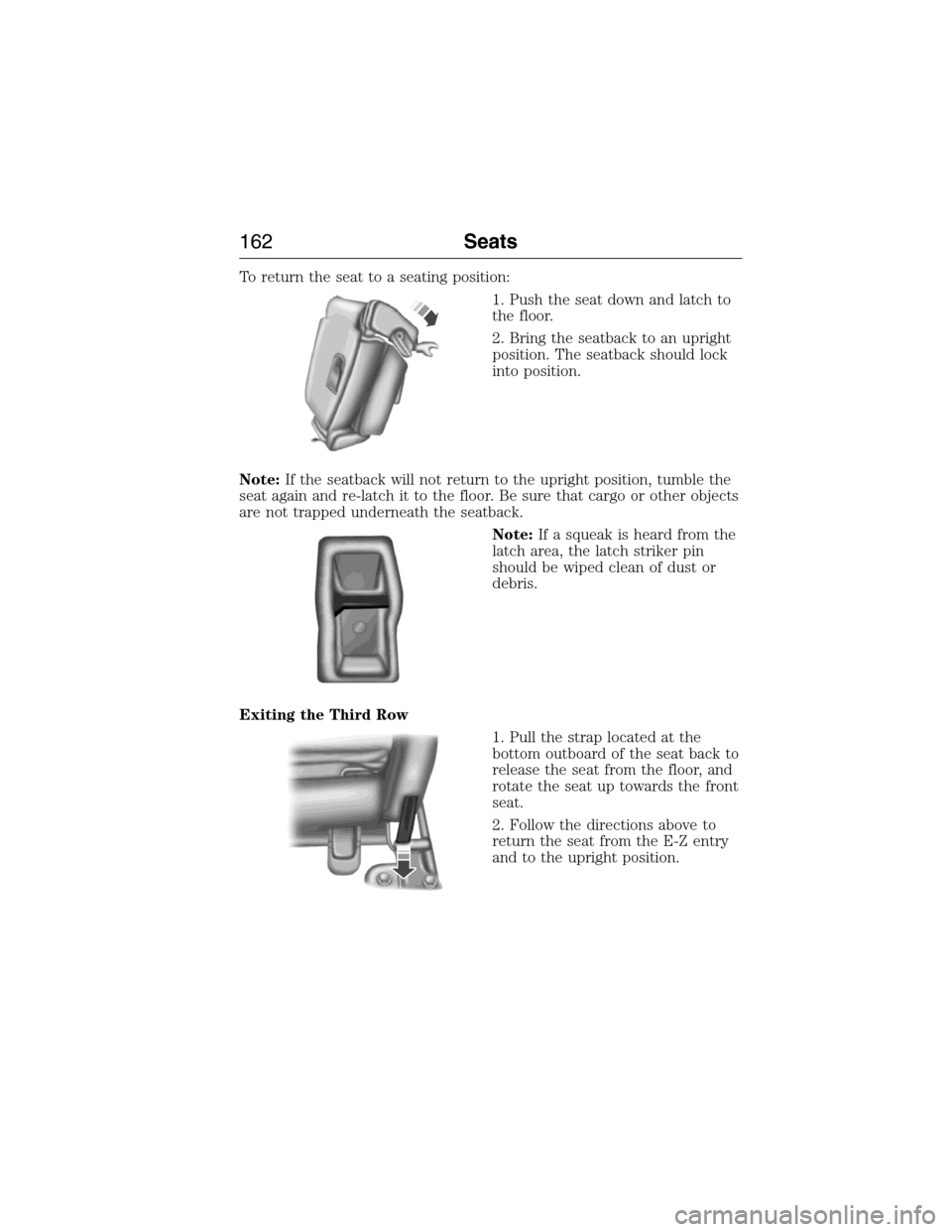
To return the seat to a seating position:
1. Push the seat down and latch to
the floor.
2. Bring the seatback to an upright
position. The seatback should lock
into position.
Note:If the seatback will not return to the upright position, tumble the
seat again and re-latch it to the floor. Be sure that cargo or other objects
are not trapped underneath the seatback.
Note:If a squeak is heard from the
latch area, the latch striker pin
should be wiped clean of dust or
debris.
Exiting the Third Row
1. Pull the strap located at the
bottom outboard of the seat back to
release the seat from the floor, and
rotate the seat up towards the front
seat.
2. Follow the directions above to
return the seat from the E-Z entry
and to the upright position.
162Seats
2015 Expedition(exd)
Owners Guide gf, 1st Printing, July 2014
USA(fus)
Page 177 of 564
CENTER CONSOLE (IF EQUIPPED)
Stow items in the cupholder carefully as items may become loose during
hard braking, acceleration or collisions, including hot drinks which may spill.
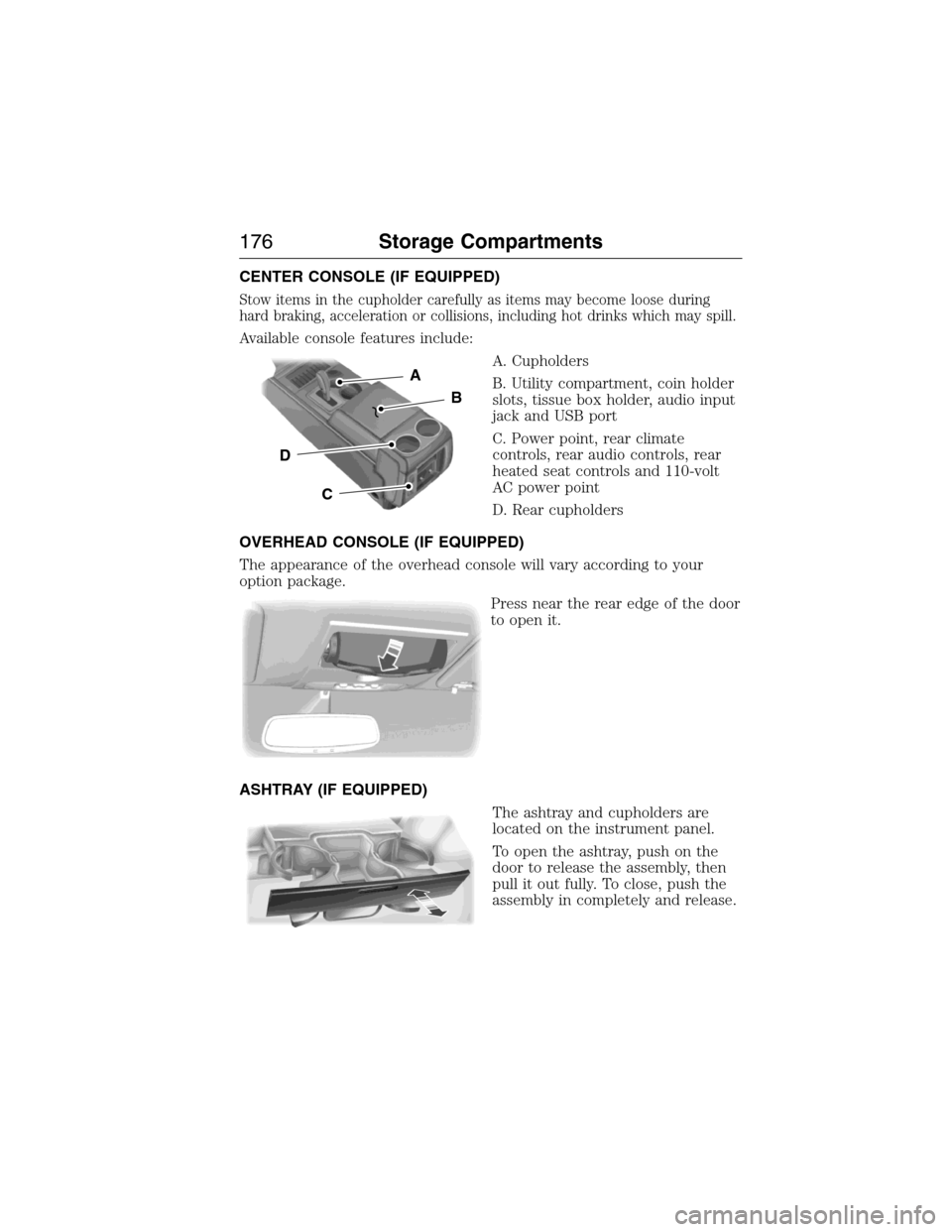
Available console features include:
A. Cupholders
B. Utility compartment, coin holder
slots, tissue box holder, audio input
jack and USB port
C. Power point, rear climate
controls, rear audio controls, rear
heated seat controls and 110-volt
AC power point
D. Rear cupholders
OVERHEAD CONSOLE (IF EQUIPPED)
The appearance of the overhead console will vary according to your
option package.
Press near the rear edge of the door
to open it.
ASHTRAY (IF EQUIPPED)
The ashtray and cupholders are
located on the instrument panel.
To open the ashtray, push on the
door to release the assembly, then
pull it out fully. To close, push the
assembly in completely and release.
A
B
C
D
176Storage Compartments
2015 Expedition(exd)
Owners Guide gf, 1st Printing, July 2014
USA(fus)
Page 184 of 564
We recommend that you do the following for safe and correct operation:
•Use a 16-gauge outdoor extension cord that is product certified by
Underwriter’s Laboratory or Canadian Standards Association. This
extension cord must be suitable for use outdoors, in cold
temperatures, and be clearly markedSuitable for Use with Outdoor
Appliances.Never use an indoor extension cord outdoors; it could
result in an electric shock or become a fire hazard.
•Use as short an extension cord as possible.
•Do not use multiple extension cords.
•Make sure that when in operation, the extension cord plug and the
heater cord plug connections are free and clear of water. This could
cause an electric shock or fire.
•Make sure your vehicle is parked in a clean area, clear of
combustibles.
•Make sure the heater, heater cord and extension cord are firmly
connected.
•Check for heat anywhere in the electrical hookup once the system has
been operating for approximately 30 minutes.
•Make sure the system is unplugged and properly stowed before driving
your vehicle. Make sure the protective cover seals the prongs of the
block heater cord plug when not in use.
•Keep plug terminals clean and free of dirt and corrosion.
•Make sure the heater system is checked for proper operation before
winter.
Using the Engine Block Heater
Make sure the receptacle terminals are clean and dry before use. To
clean them, use a dry cloth.
The heater uses 0.4 to 1.0 kilowatt-hours of energy per hour of use. The
system does not have a thermostat. It achieves maximum temperature
after approximately three hours of operation. Using the heater longer
than three hours does not improve system performance and
unnecessarily uses electricity.
Starting and Stopping the Engine183
2015 Expedition(exd)
Owners Guide gf, 1st Printing, July 2014
USA(fus)