instrument panel FORD EXPEDITION 2015 3.G Owner's Guide
[x] Cancel search | Manufacturer: FORD, Model Year: 2015, Model line: EXPEDITION, Model: FORD EXPEDITION 2015 3.GPages: 564, PDF Size: 6.71 MB
Page 488 of 564
Display
You can adjust the touchscreen display through the touchscreen or by
pressing the voice button on your steering wheel controls and when
prompted, say, “Display settings”.
Press the Settings icon >Display,to access and make
adjustments using the touchscreen.
•Brightnessallows you to make the screen display brighter or
dimmer.
•Auto DIM, when set toOn,lets you use the Auto Dim Manual Offset
feature. When set toOff,screen brightness does not change.
•Modeallows you to set the screen to a certain brightness or have the
system automatically change based on the outside light level, or turn
the display off.
•If you selectAUTOorNIGHT,you have the options of turning
the display’s Auto Dim feature on or off and changing the Auto
Dim Manual Offset feature.
•Auto Dim Manual Offsetallows you to adjust screen dimming as
the outside lighting conditions change from day to night. This feature
also allows you to adjust screen brightness using the instrument panel
dimming control.
Edit Wallpaper
•You can have your touchscreen display the default photo or upload
your own.
Uploading Photos for Your Home Screen Wallpaper
Note:You cannot load photos directly from your camera. You must
access the photos either from your USB mass storage device or from an
SD card.
Note:Photographs with extremely large dimensions (such as 2048 x
1536) may not be compatible and appear as a blank (black) image on the
display.
Your system allows you to upload and view up to 32 photos.
To access, press the Settings icon >Display>Edit Wallpaper,and
then follow the system prompts to upload your photographs.
Only the photograph(s), which meets the following conditions, display:
•Compatible file formats are as follows: .jpg, .gif, .png, .bmp.
•Each file must be 1.5 MB or less.
•Recommended dimensions: 800 x 384.
MyFord Touch® (If Equipped)487
2015 Expedition(exd)
Owners Guide gf, 1st Printing, July 2014
USA(fus)
Page 500 of 564
C.Fan speed:Touch+or-to increase or decrease the volume of air
circulated in your vehicle.
Note:When the system is controlling the fan speed automatically, all
the fan speed indicators turn off.
D.Rear:Touch to access the rear climate control. Rear climate control
settings appear at the bottom of the screen.
•Touch the power icon to turn the rear climate control functions off
and on.
•TouchRear Controlto allow the rear seat passengers to adjust the
rear climate settings. Touch it again to prevent the rear seat
passengers from adjusting the settings.Rear Controlautomatically
turns off when you use the touchscreen to adjust the rear climate
settings.
•Touch+or–to adjust the temperature.
•To adjust fan speed, touch+or–next to the fan icon.
•TouchRearagain to close the rear controls. Closing the rear climate
control functions does not affect their current settings.
E.Recirculated air:Touch the button to switch between outside air
and recirculated air. When you select recirculated air, the air currently in
the passenger compartment recirculates. This may reduce the time
needed to cool the interior (when used withA/C) and may reduce
unwanted odors from entering your vehicle.
Note:Recirculated air may turn off automatically (or be prevented
from turning on) in all airflow modes exceptMAX A/Cto reduce risk
of fogging.
F.MAX A/C:Touch the button to maximize cooling. Recirculated air
flows through the instrument panel vents, air conditioning automatically
turns on, and the fan automatically adjusts to the highest speed.
G.A/C:Touch the button to switch the air conditioning compressor on
or off. Use air conditioning with recirculated air to improve cooling
performance and efficiency.
Note:In certain conditions, the air conditioning compressor may
continue to operate even after you switch off the air conditioning with
theA/Cbutton.
H.AUTO:Touch the button to switch on automatic operation. Select the
desired temperature using the temperature control. The system adjusts
fan speed, air distribution, air conditioning operation, and selects outside
air or recirculated air to heat or cool the vehicle in order to maintain the
desired temperature. You can also use theAUTObutton to switch off
dual zone operation by touching and holding the button for more than
two seconds.
MyFord Touch® (If Equipped)499
2015 Expedition(exd)
Owners Guide gf, 1st Printing, July 2014
USA(fus)
Page 501 of 564
I.Heated rear window:Turns the heated rear window on and off. See
Heated windows and mirrorsin theClimate Controlchapter.
J.Defrost:Touch the button to distribute air to the windshield vents
and de-mister. Air distribution to instrument panel and footwell vents
turn off. You can use this setting to defog and clear the windshield of a
thin covering of ice.
K.Manual controls:Touch these buttons to switch airflow from the
windshield, instrument panel, or footwell vents on or off. The system can
distribute air through any combination of these vents.
L.Driver settings:Depending on your vehicle and option package, you
may have the following features:
•Touch the+or–to increase or decrease the air temperature on the
passenger side of the vehicle.
•Touch the heated seat icon to switch the heated seat off and on (if
equipped).
•Touch the climate-controlled seat icon to switch the
climate-controlled seat off and on (if equipped).
•TouchMyTempto select your preset temperature setpoint. Touch
and holdMyTempto save a new preset temperature setpoint.
•If your vehicle is equipped with a heated steering wheel, touch the
heated steering wheel icon to warm the steering wheel.
Note:If your vehicle is equipped with a wood-trimmed steering wheel, it
does not heat between the 10 o’clock and 2 o’clock positions.
Climate Control Voice Commands
The following voice commands are available at the main menu
level of a voice session. For example, press the voice button
and after the prompt, “Say a command”; say any of the
following commands:
Climate control voice commands
“Climate automatic”
“Climate my temperature”
“Climate off”
“Climate on”
“Climate temperature <15.5–29.5> degrees”
“Climate temperature <60–85> degrees”
“Help”
500MyFord Touch® (If Equipped)
2015 Expedition(exd)
Owners Guide gf, 1st Printing, July 2014
USA(fus)
Page 558 of 564
B
Battery .......................................300
acid, treating emergencies .....300
jumping a disabled battery ....271
maintenance-free ....................300
replacement, specifications ...360
servicing ..................................300
Blind Spot Information
System .......................................230
Booster seats ...............................30
Brakes ........................................212
anti-lock ...................................212
anti-lock brake system (ABS)
warning light ...........................212
brake warning light ................212
fluid, checking and adding ....299
fluid, refill capacities ..............356
fluid, specifications .................356
lubricant specifications ..........356
parking ....................................213
shift interlock ..................199–200
trailer ...............................254–255
C
Capacities for refilling fluids ....356
Cargo management system ......244
CD ......................................370, 375
CD player ..........................368, 460
CD voice commands .................461
Cell phone use ............................16
Changing a tire .........................347
Changing the air filter ..............304
Child safety seats
automatic locking mode
(retractor) .................................38
LATCH .......................................23Child safety seats -
booster seats ...............................30
Cleaning the touchscreen ........440
Cleaning your vehicle ...............313
engine compartment ..............315
instrument panel ....................318
interior .....................................317
plastic parts ............................314
washing ....................................313
waxing .....................................315
wheels ......................................320
wiper blades ............................316
Climate control
(see Air conditioning or
Heating) .............................136, 138
Climate voice commands .........500
Clock ..................................370, 486
Console
overhead ..........................101, 176
Controls
power seat ...............................153
Coolant ......................................294
checking and adding ..............294
refill capacities ........................356
specifications ..........................356
Cross Traffic Alert ....................230
Cruise control ...........................228
Customer Assistance ................268
Ford Extended Service
Plan ..........................................365
Getting roadside assistance ...268
Getting the service you
need .........................................274
Ordering additional owner’s
literature .................................280
Utilizing the
Mediation/Arbitration
Program ...................................278
Index557
2015 Expedition(exd)
Owners Guide gf, 1st Printing, July 2014
USA(fus)
Page 560 of 564
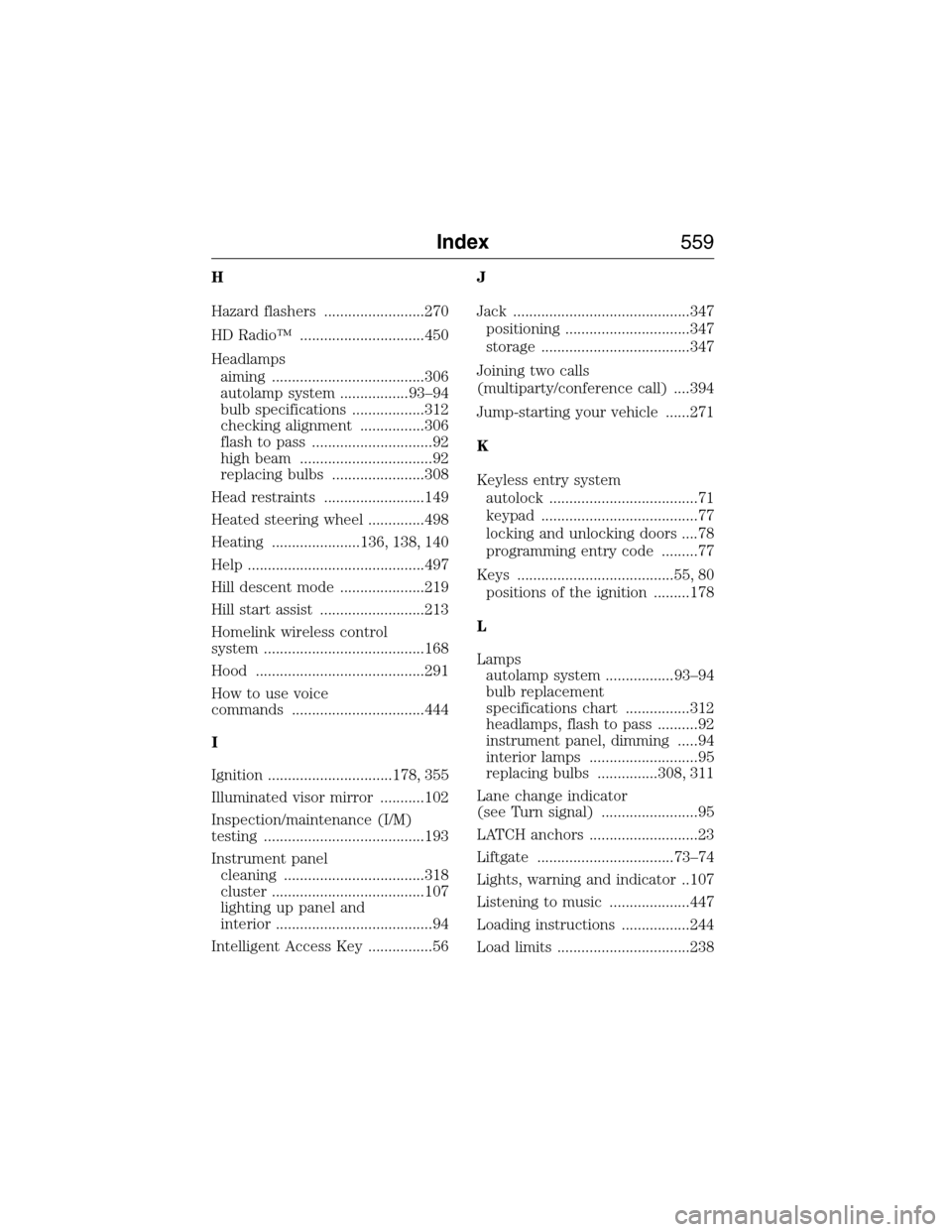
H
Hazard flashers .........................270
HD Radio™ ...............................450
Headlamps
aiming ......................................306
autolamp system .................93–94
bulb specifications ..................312
checking alignment ................306
flash to pass ..............................92
high beam .................................92
replacing bulbs .......................308
Head restraints .........................149
Heated steering wheel ..............498
Heating ......................136, 138, 140
Help ............................................497
Hill descent mode .....................219
Hill start assist ..........................213
Homelink wireless control
system ........................................168
Hood ..........................................291
How to use voice
commands .................................444
I
Ignition ...............................178, 355
Illuminated visor mirror ...........102
Inspection/maintenance (I/M)
testing ........................................193
Instrument panel
cleaning ...................................318
cluster ......................................107
lighting up panel and
interior .......................................94
Intelligent Access Key ................56J
Jack ............................................347
positioning ...............................347
storage .....................................347
Joining two calls
(multiparty/conference call) ....394
Jump-starting your vehicle ......271
K
Keyless entry system
autolock .....................................71
keypad .......................................77
locking and unlocking doors ....78
programming entry code .........77
Keys .......................................55, 80
positions of the ignition .........178
L
Lamps
autolamp system .................93–94
bulb replacement
specifications chart ................312
headlamps, flash to pass ..........92
instrument panel, dimming .....94
interior lamps ...........................95
replacing bulbs ...............308, 311
Lane change indicator
(see Turn signal) ........................95
LATCH anchors ...........................23
Liftgate ..................................73–74
Lights, warning and indicator ..107
Listening to music ....................447
Loading instructions .................244
Load limits .................................238
Index559
2015 Expedition(exd)
Owners Guide gf, 1st Printing, July 2014
USA(fus)