brake light FORD EXPEDITION 2015 3.G Owners Manual
[x] Cancel search | Manufacturer: FORD, Model Year: 2015, Model line: EXPEDITION, Model: FORD EXPEDITION 2015 3.GPages: 564, PDF Size: 6.71 MB
Page 12 of 564
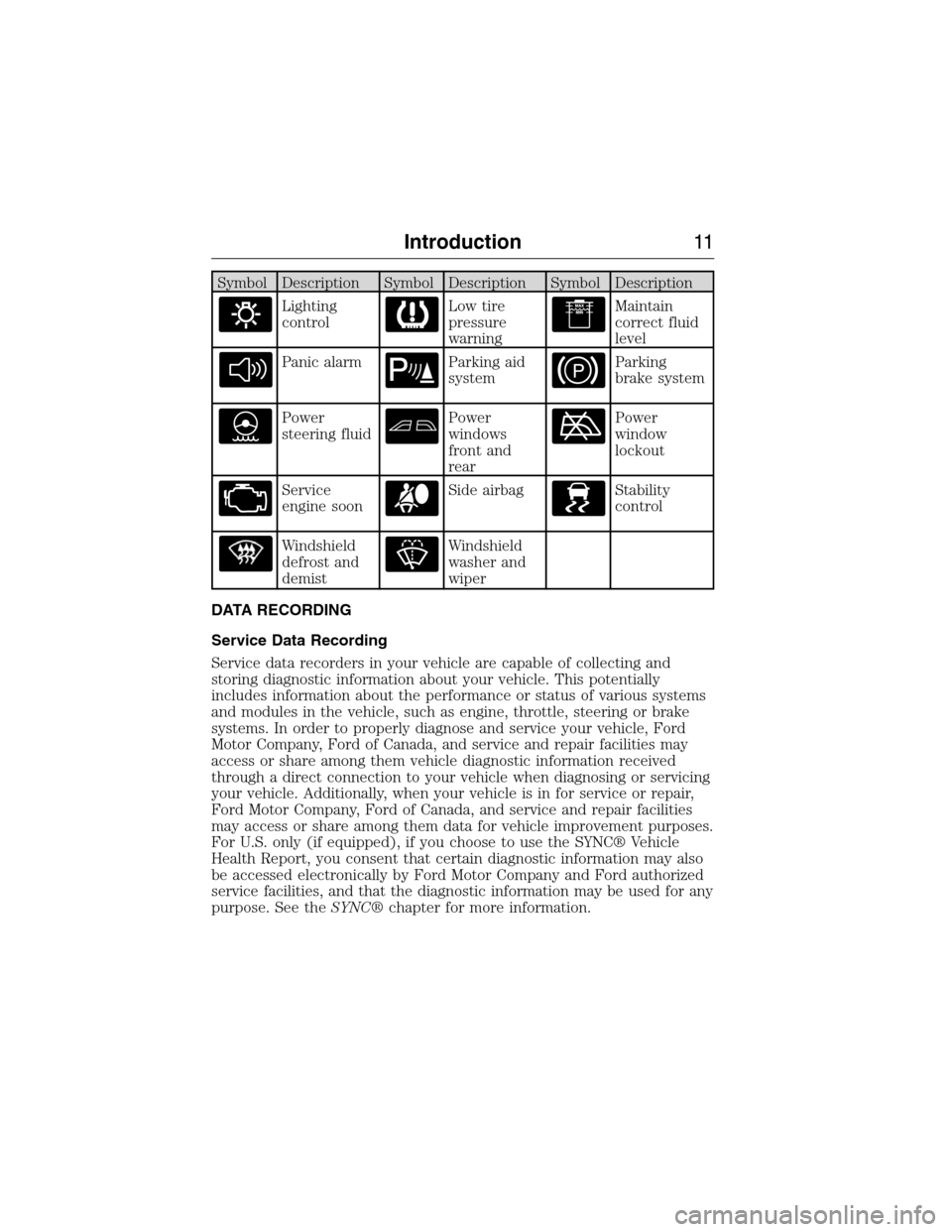
Symbol Description Symbol Description Symbol Description
Lighting
controlLow tire
pressure
warningMaintain
correct fluid
level
Panic alarmParking aid
systemParking
brake system
Power
steering fluidPower
windows
front and
rearPower
window
lockout
Service
engine soonSide airbagStability
control
Windshield
defrost and
demistWindshield
washer and
wiper
DATA RECORDING
Service Data Recording
Service data recorders in your vehicle are capable of collecting and
storing diagnostic information about your vehicle. This potentially
includes information about the performance or status of various systems
and modules in the vehicle, such as engine, throttle, steering or brake
systems. In order to properly diagnose and service your vehicle, Ford
Motor Company, Ford of Canada, and service and repair facilities may
access or share among them vehicle diagnostic information received
through a direct connection to your vehicle when diagnosing or servicing
your vehicle. Additionally, when your vehicle is in for service or repair,
Ford Motor Company, Ford of Canada, and service and repair facilities
may access or share among them data for vehicle improvement purposes.
For U.S. only (if equipped), if you choose to use the SYNC® Vehicle
Health Report, you consent that certain diagnostic information may also
be accessed electronically by Ford Motor Company and Ford authorized
service facilities, and that the diagnostic information may be used for any
purpose. See theSYNC®chapter for more information.
Introduction11
2015 Expedition(exd)
Owners Guide gf, 1st Printing, July 2014
USA(fus)
Page 39 of 564
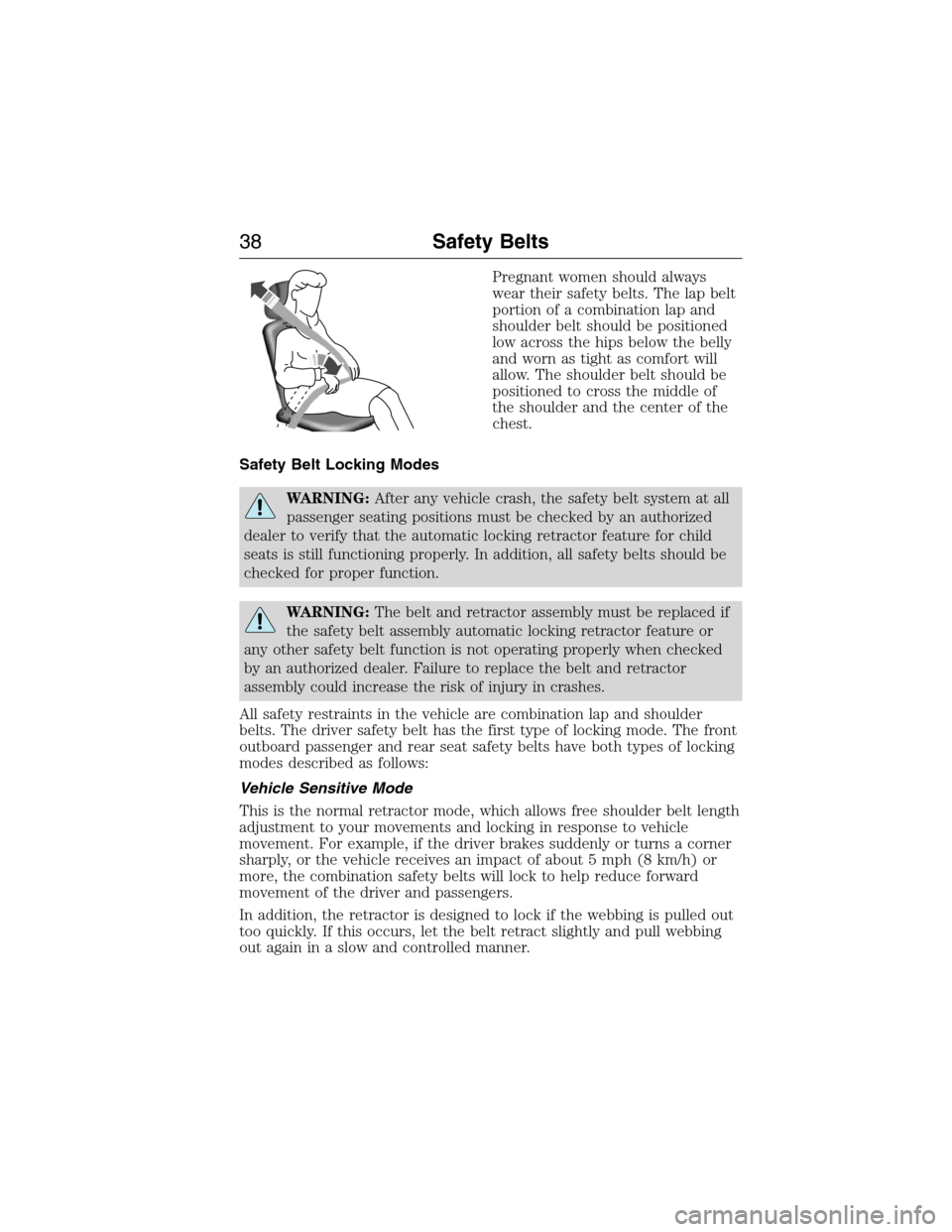
Pregnant women should always
wear their safety belts. The lap belt
portion of a combination lap and
shoulder belt should be positioned
low across the hips below the belly
and worn as tight as comfort will
allow. The shoulder belt should be
positioned to cross the middle of
the shoulder and the center of the
chest.
Safety Belt Locking Modes
WARNING:After any vehicle crash, the safety belt system at all
passenger seating positions must be checked by an authorized
dealer to verify that the automatic locking retractor feature for child
seats is still functioning properly. In addition, all safety belts should be
checked for proper function.
WARNING:The belt and retractor assembly must be replaced if
the safety belt assembly automatic locking retractor feature or
any other safety belt function is not operating properly when checked
by an authorized dealer. Failure to replace the belt and retractor
assembly could increase the risk of injury in crashes.
All safety restraints in the vehicle are combination lap and shoulder
belts. The driver safety belt has the first type of locking mode. The front
outboard passenger and rear seat safety belts have both types of locking
modes described as follows:
Vehicle Sensitive Mode
This is the normal retractor mode, which allows free shoulder belt length
adjustment to your movements and locking in response to vehicle
movement. For example, if the driver brakes suddenly or turns a corner
sharply, or the vehicle receives an impact of about 5 mph (8 km/h) or
more, the combination safety belts will lock to help reduce forward
movement of the driver and passengers.
In addition, the retractor is designed to lock if the webbing is pulled out
too quickly. If this occurs, let the belt retract slightly and pull webbing
out again in a slow and controlled manner.
38Safety Belts
2015 Expedition(exd)
Owners Guide gf, 1st Printing, July 2014
USA(fus)
Page 43 of 564
SAFETY BELT-MINDER™
This feature supplements the safety belt warning function by providing
additional reminders that intermittently sound a tone and illuminate the
safety belt warning light when you are in the driver seat and the safety
belt is unbuckled.
If... Then...
You buckle your safety belt
before you switch the ignition
on or less than 1-2 minutes
elapse after you switch the
ignition on...The Belt-Minder feature will not
activate.
You do not buckle your safety
belt before your vehicle
reaches at least 6 mph
(9.7 km/h) and 1-2 minutes
elapse after you switch the
ignition...The Belt-Minder feature activates, the
safety belt warning light illuminates
and a warning tone sounds for
6 seconds every 25 seconds, repeating
for about 5 minutes or until you
buckle your safety belt.
The driver safety belt is
unbuckled for about one
minute while the vehicle is
traveling at least 6 mph
(9.7 km/h) and more than
1-2 minutes elapse after you
switch the ignition on...The Belt-Minder feature activates, the
safety belt warning light illuminates
and a warning tone sounds for
6 seconds every 25 seconds, repeating
for about 5 minutes or until you
buckle your safety belt.
Deactivating and Activating the Belt-Minder™ Feature
WARNING:While the system allows you to deactivate it, this
system is designed to improve your chances of being safely
belted and surviving an accident. We recommend you leave the system
activated for yourself and others who may use the vehicle.
Read Steps1-4thoroughly before proceeding with the programming
procedure.
Before following the procedure, make sure that:
•The parking brake is set.
•The transmission is in park (P).
42Safety Belts
2015 Expedition(exd)
Owners Guide gf, 1st Printing, July 2014
USA(fus)
Page 108 of 564
WARNING LAMPS AND INDICATORS
The following warning lamps and indicators will alert you to a vehicle
condition that may become serious. Some lamps will illuminate when you
start your vehicle to make sure they work. If any lamps remain on after
starting your vehicle, refer to the respective system warning lamp for
further information.
Note:Some warning indicators appear in the information display and
function the same as a warning lamp but do not display when you start
your vehicle.
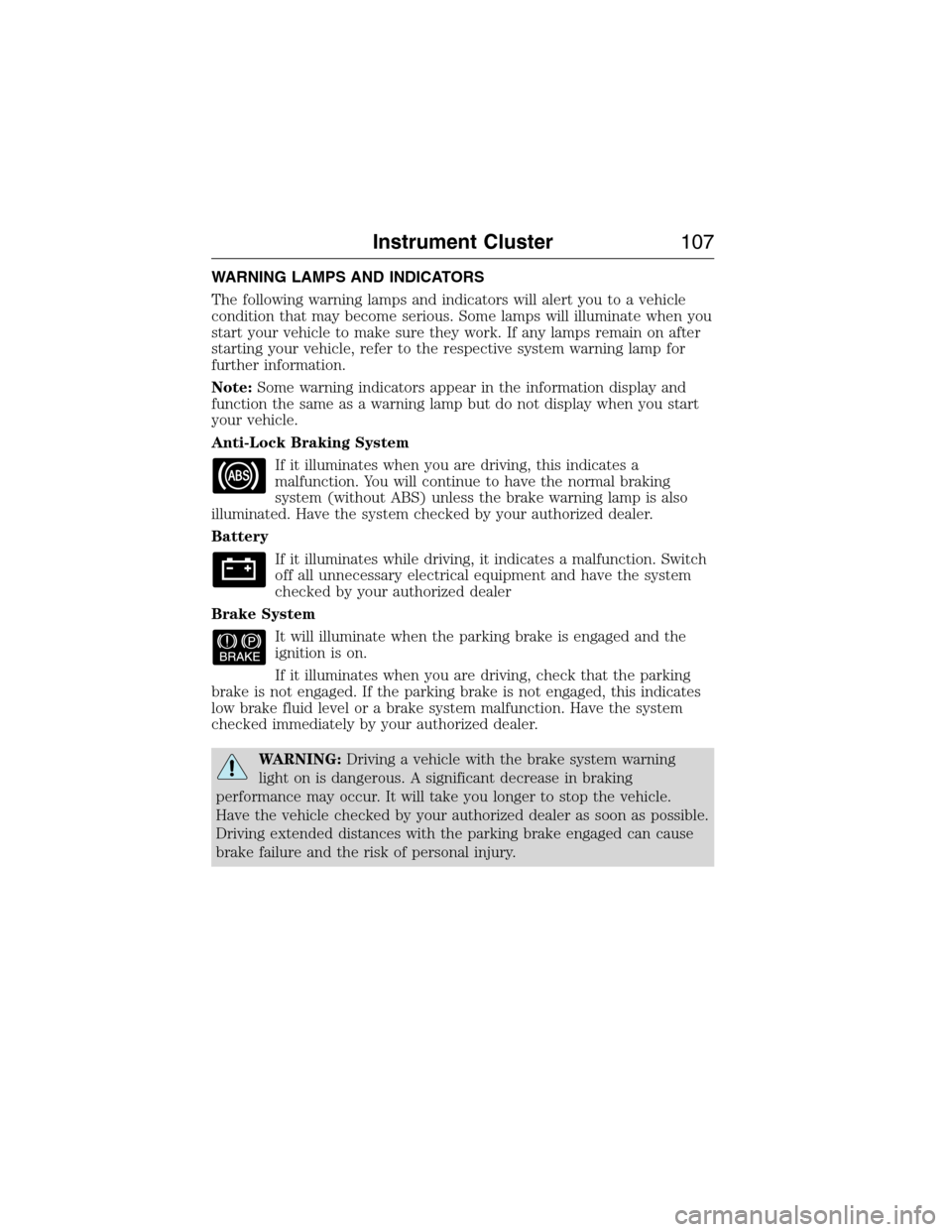
Anti-Lock Braking System
If it illuminates when you are driving, this indicates a
malfunction. You will continue to have the normal braking
system (without ABS) unless the brake warning lamp is also
illuminated. Have the system checked by your authorized dealer.
Battery
If it illuminates while driving, it indicates a malfunction. Switch
off all unnecessary electrical equipment and have the system
checked by your authorized dealer
Brake System
It will illuminate when the parking brake is engaged and the
ignition is on.
If it illuminates when you are driving, check that the parking
brake is not engaged. If the parking brake is not engaged, this indicates
low brake fluid level or a brake system malfunction. Have the system
checked immediately by your authorized dealer.
WARNING:Driving a vehicle with the brake system warning
light on is dangerous. A significant decrease in braking
performance may occur. It will take you longer to stop the vehicle.
Have the vehicle checked by your authorized dealer as soon as possible.
Driving extended distances with the parking brake engaged can cause
brake failure and the risk of personal injury.
Instrument Cluster107
2015 Expedition(exd)
Owners Guide gf, 1st Printing, July 2014
USA(fus)
Page 115 of 564
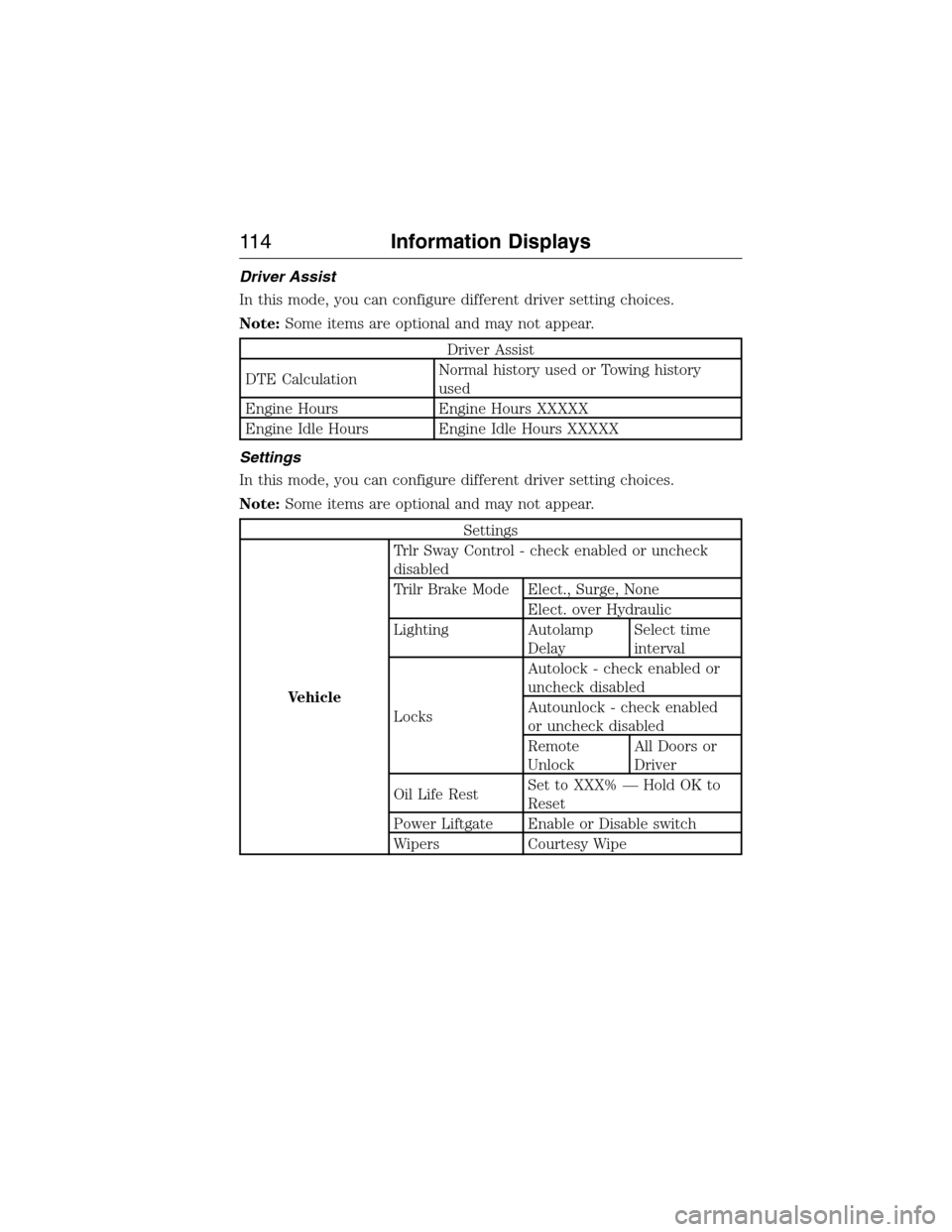
Driver Assist
In this mode, you can configure different driver setting choices.
Note:Some items are optional and may not appear.
Driver Assist
DTE CalculationNormal history used or Towing history
used
Engine Hours Engine Hours XXXXX
Engine Idle Hours Engine Idle Hours XXXXX
Settings
In this mode, you can configure different driver setting choices.
Note:Some items are optional and may not appear.
Settings
VehicleTrlr Sway Control - check enabled or uncheck
disabled
Trilr Brake Mode Elect., Surge, None
Elect. over Hydraulic
Lighting Autolamp
DelaySelect time
interval
LocksAutolock - check enabled or
uncheck disabled
Autounlock - check enabled
or uncheck disabled
Remote
UnlockAll Doors or
Driver
Oil Life RestSet to XXX% — Hold OK to
Reset
Power Liftgate Enable or Disable switch
Wipers Courtesy Wipe
11 4Information Displays
2015 Expedition(exd)
Owners Guide gf, 1st Printing, July 2014
USA(fus)
Page 118 of 564
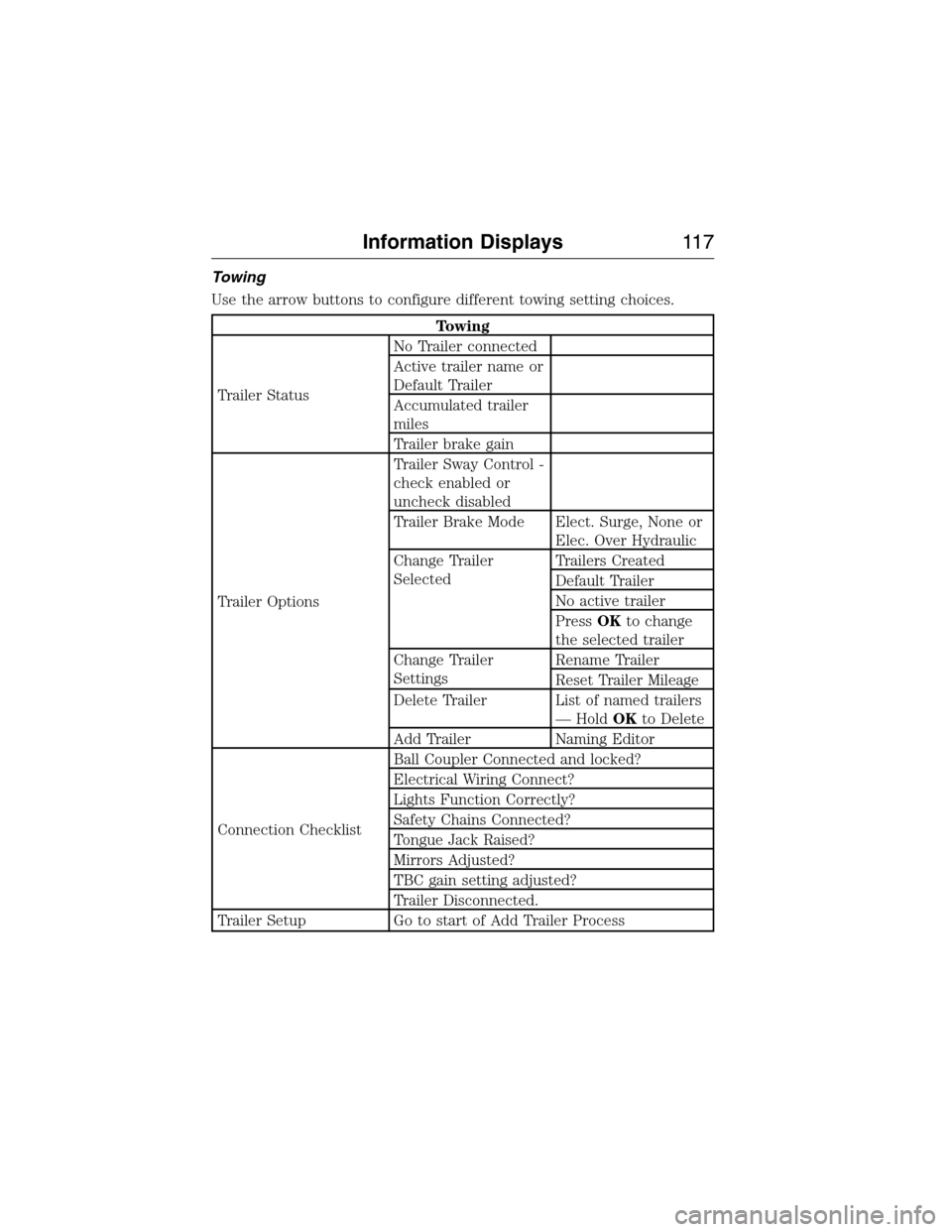
Towing
Use the arrow buttons to configure different towing setting choices.
Towing
Trailer StatusNo Trailer connected
Active trailer name or
Default Trailer
Accumulated trailer
miles
Trailer brake gain
Trailer OptionsTrailer Sway Control -
check enabled or
uncheck disabled
Trailer Brake Mode Elect. Surge, None or
Elec. Over Hydraulic
Change Trailer
SelectedTrailers Created
Default Trailer
No active trailer
PressOKto change
the selected trailer
Change Trailer
SettingsRename Trailer
Reset Trailer Mileage
Delete Trailer List of named trailers
— HoldOKto Delete
Add Trailer Naming Editor
Connection ChecklistBall Coupler Connected and locked?
Electrical Wiring Connect?
Lights Function Correctly?
Safety Chains Connected?
Tongue Jack Raised?
Mirrors Adjusted?
TBC gain setting adjusted?
Trailer Disconnected.
Trailer Setup Go to start of Add Trailer Process
Information Displays11 7
2015 Expedition(exd)
Owners Guide gf, 1st Printing, July 2014
USA(fus)
Page 123 of 564
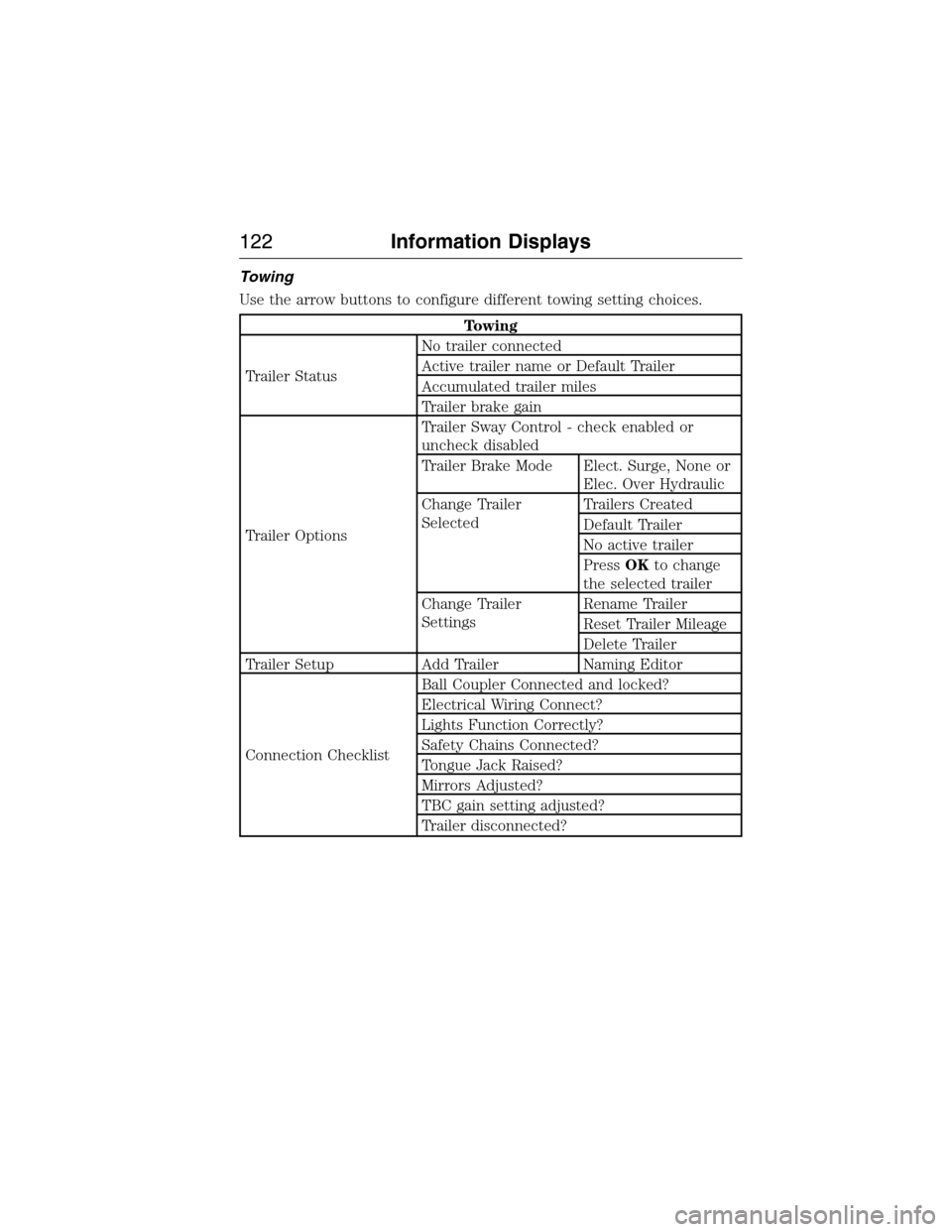
Towing
Use the arrow buttons to configure different towing setting choices.
Towing
Trailer StatusNo trailer connected
Active trailer name or Default Trailer
Accumulated trailer miles
Trailer brake gain
Trailer OptionsTrailer Sway Control - check enabled or
uncheck disabled
Trailer Brake Mode Elect. Surge, None or
Elec. Over Hydraulic
Change Trailer
SelectedTrailers Created
Default Trailer
No active trailer
PressOKto change
the selected trailer
Change Trailer
SettingsRename Trailer
Reset Trailer Mileage
Delete Trailer
Trailer Setup Add Trailer Naming Editor
Connection ChecklistBall Coupler Connected and locked?
Electrical Wiring Connect?
Lights Function Correctly?
Safety Chains Connected?
Tongue Jack Raised?
Mirrors Adjusted?
TBC gain setting adjusted?
Trailer disconnected?
122Information Displays
2015 Expedition(exd)
Owners Guide gf, 1st Printing, July 2014
USA(fus)
Page 135 of 564
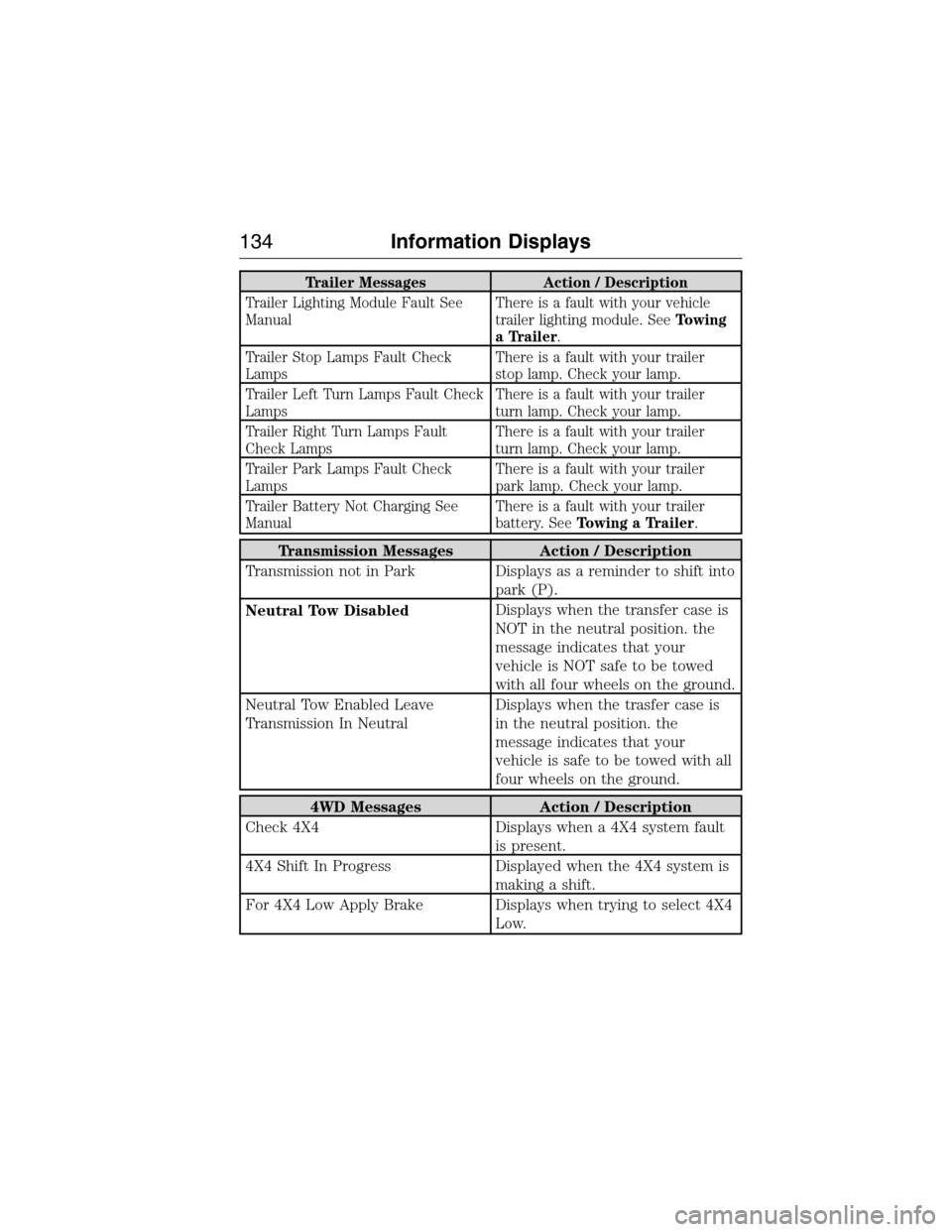
Trailer Messages Action / Description
Trailer Lighting Module Fault See
ManualThere is a fault with your vehicle
trailer lighting module. SeeTowing
a Trailer.
Trailer Stop Lamps Fault Check
LampsThere is a fault with your trailer
stop lamp. Check your lamp.
Trailer Left Turn Lamps Fault Check
LampsThere is a fault with your trailer
turn lamp. Check your lamp.
Trailer Right Turn Lamps Fault
Check LampsThere is a fault with your trailer
turn lamp. Check your lamp.
Trailer Park Lamps Fault Check
LampsThere is a fault with your trailer
park lamp. Check your lamp.
Trailer Battery Not Charging See
ManualThere is a fault with your trailer
battery. SeeTowing a Trailer.
Transmission Messages Action / Description
Transmission not in Park Displays as a reminder to shift into
park (P).
Neutral Tow DisabledDisplays when the transfer case is
NOT in the neutral position. the
message indicates that your
vehicle is NOT safe to be towed
with all four wheels on the ground.
Neutral Tow Enabled Leave
Transmission In NeutralDisplays when the trasfer case is
in the neutral position. the
message indicates that your
vehicle is safe to be towed with all
four wheels on the ground.
4WD Messages Action / Description
Check 4X4 Displays when a 4X4 system fault
is present.
4X4 Shift In Progress Displayed when the 4X4 system is
making a shift.
For 4X4 Low Apply Brake Displays when trying to select 4X4
Low.
134Information Displays
2015 Expedition(exd)
Owners Guide gf, 1st Printing, July 2014
USA(fus)
Page 180 of 564
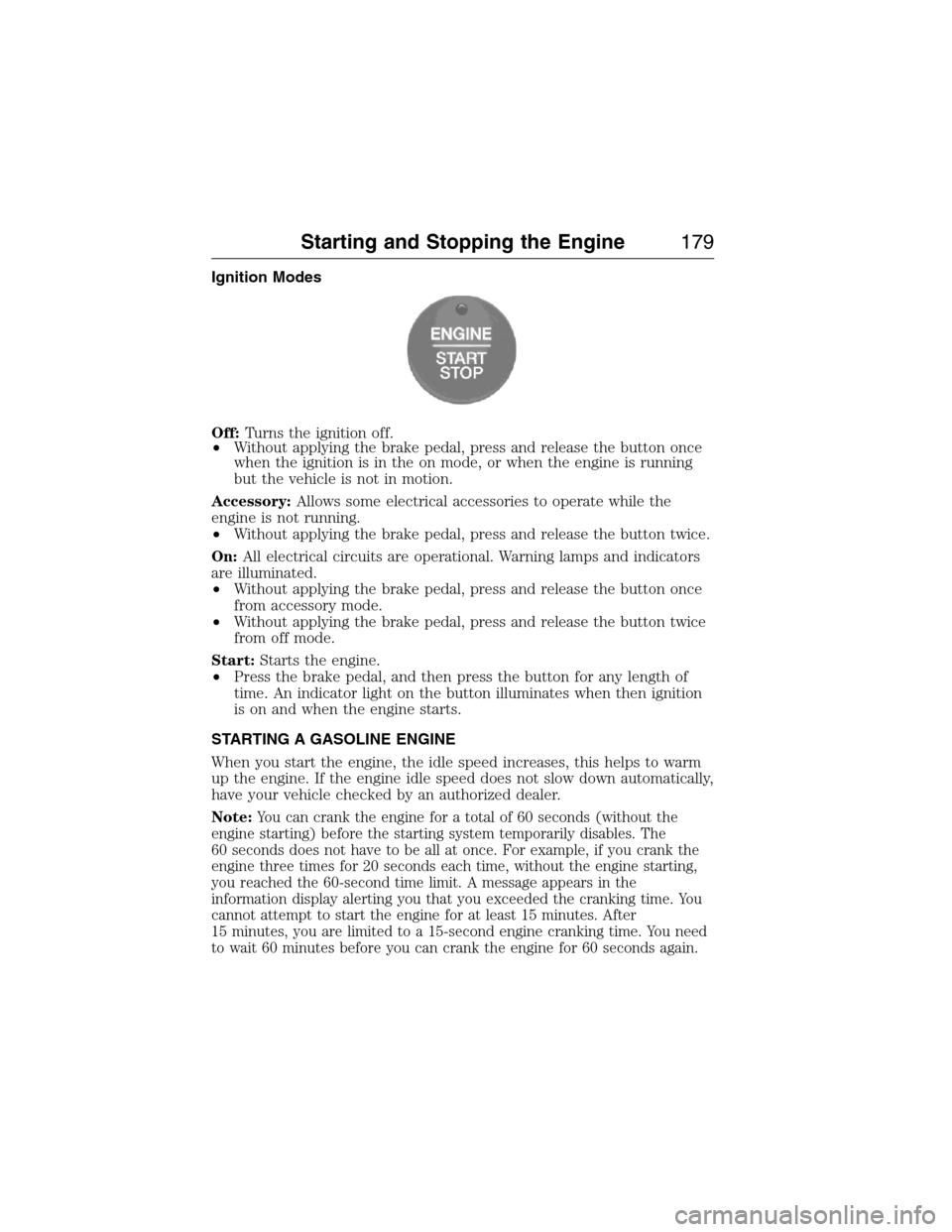
Ignition Modes
Off:Turns the ignition off.
•Without applying the brake pedal, press and release the button once
when the ignition is in the on mode, or when the engine is running
but the vehicle is not in motion.
Accessory:Allows some electrical accessories to operate while the
engine is not running.
•Without applying the brake pedal, press and release the button twice.
On:All electrical circuits are operational. Warning lamps and indicators
are illuminated.
•Without applying the brake pedal, press and release the button once
from accessory mode.
•Without applying the brake pedal, press and release the button twice
from off mode.
Start:Starts the engine.
•Press the brake pedal, and then press the button for any length of
time. An indicator light on the button illuminates when then ignition
is on and when the engine starts.
STARTING A GASOLINE ENGINE
When you start the engine, the idle speed increases, this helps to warm
up the engine. If the engine idle speed does not slow down automatically,
have your vehicle checked by an authorized dealer.
Note:
You can crank the engine for a total of 60 seconds (without the
engine starting) before the starting system temporarily disables. The
60 seconds does not have to be all at once. For example, if you crank the
engine three times for 20 seconds each time, without the engine starting,
you reached the 60-second time limit. A message appears in the
information display alerting you that you exceeded the cranking time. You
cannot attempt to start the engine for at least 15 minutes. After
15 minutes, you are limited to a 15-second engine cranking time. You need
to wait 60 minutes before you can crank the engine for 60 seconds again.
Starting and Stopping the Engine179
2015 Expedition(exd)
Owners Guide gf, 1st Printing, July 2014
USA(fus)
Page 196 of 564
R (Reverse)
With the gearshift lever in R (Reverse), the vehicle will move backward.
Always come to a complete stop before shifting into and out of R (Reverse).
N (Neutral)
With the gearshift lever in N (Neutral), the vehicle can be started and is
free to roll. Hold the brake pedal down while in this position.
D (Drive) with Tow/Haul Off
The normal driving position for the best fuel economy. Transmission
operates in gears one through six.
D (Drive) with Tow/Haul On
The Tow/Haul feature improves transmission operation when towing a
trailer or a heavy load. All transmission gear ranges are available when
using Tow/Haul.
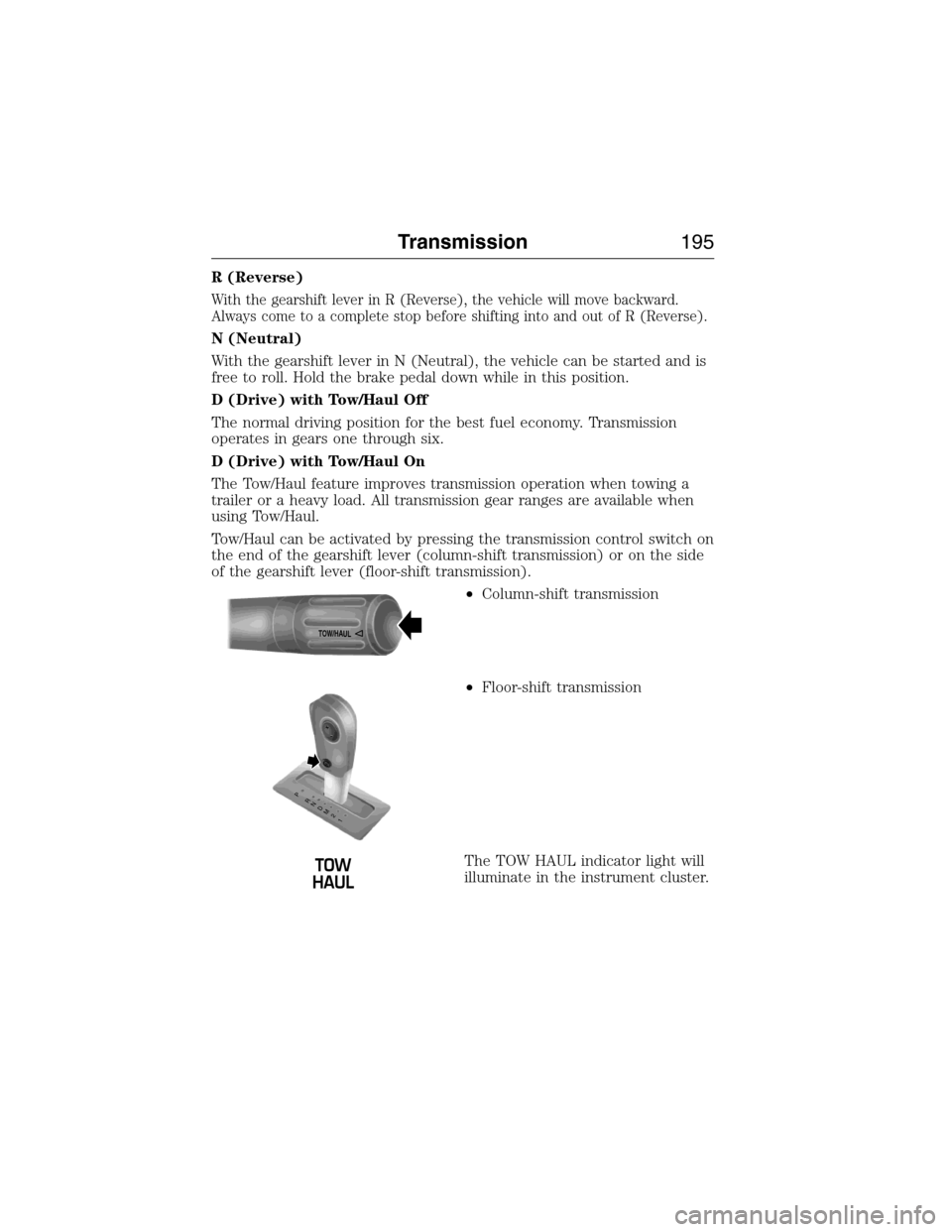
Tow/Haul can be activated by pressing the transmission control switch on
the end of the gearshift lever (column-shift transmission) or on the side
of the gearshift lever (floor-shift transmission).
•Column-shift transmission
•Floor-shift transmission
The TOW HAUL indicator light will
illuminate in the instrument cluster.
TOW/H
AUL
T
/H
T
/H
PR
N
D
M
2
1
+
- +
-
Transmission195
2015 Expedition(exd)
Owners Guide gf, 1st Printing, July 2014
USA(fus)