climate settings FORD EXPEDITION 2015 3.G Owners Manual
[x] Cancel search | Manufacturer: FORD, Model Year: 2015, Model line: EXPEDITION, Model: FORD EXPEDITION 2015 3.GPages: 564, PDF Size: 6.71 MB
Page 9 of 564
MyFord Touch® (If Equipped) 436
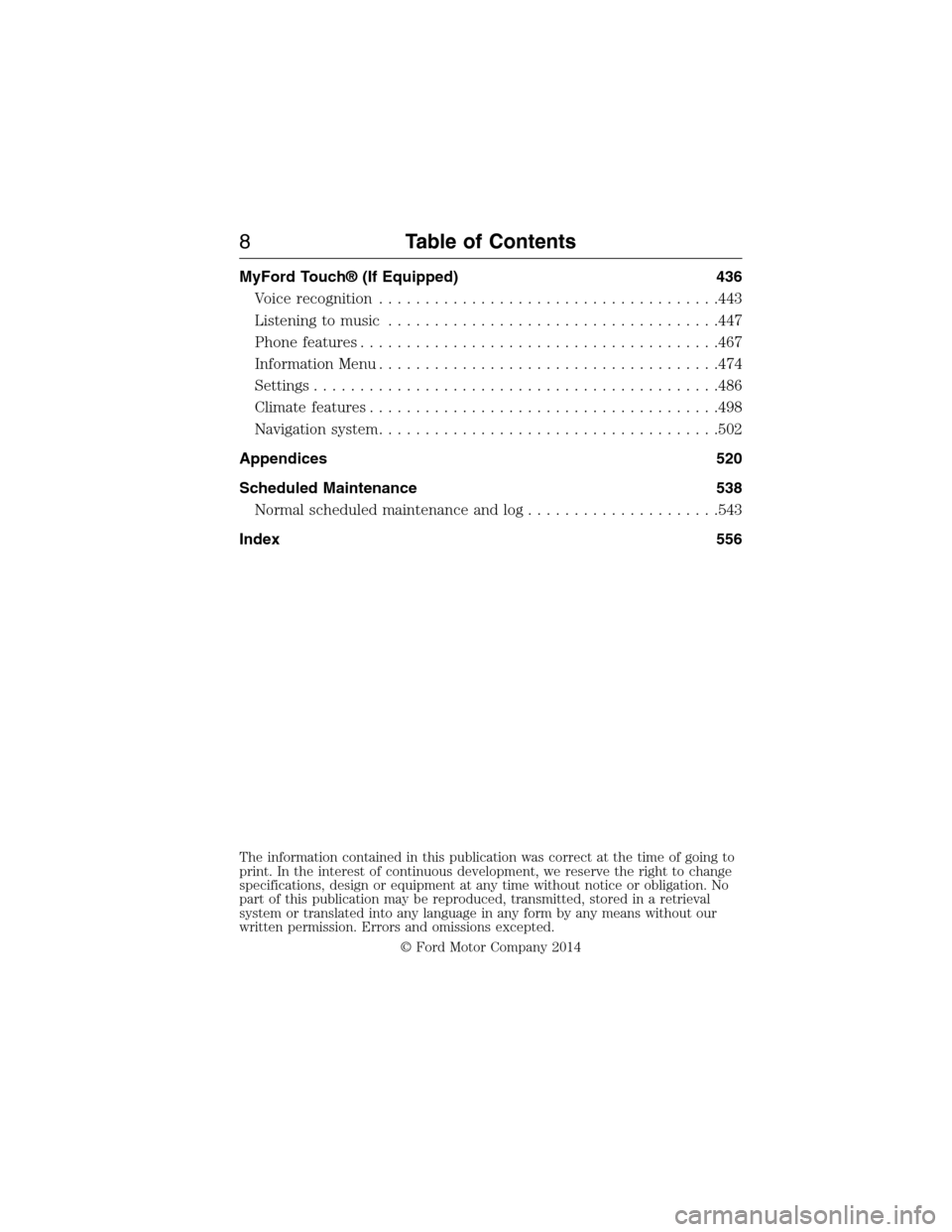
Voice recognition.....................................443
Listening to music....................................447
Phone features.......................................467
Information Menu.....................................474
Settings............................................486
Climatefeatures......................................498
Navigation system.....................................502
Appendices 520
Scheduled Maintenance 538
Normal scheduled maintenance and log.....................543
Index 556
The information contained in this publication was correct at the time of going to
print. In the interest of continuous development, we reserve the right to change
specifications, design or equipment at any time without notice or obligation. No
part of this publication may be reproduced, transmitted, stored in a retrieval
system or translated into any language in any form by any means without our
written permission. Errors and omissions excepted.
© Ford Motor Company 2014
8Table of Contents
2015 Expedition(exd)
Owners Guide gf, 1st Printing, July 2014
USA(fus)
Page 125 of 564
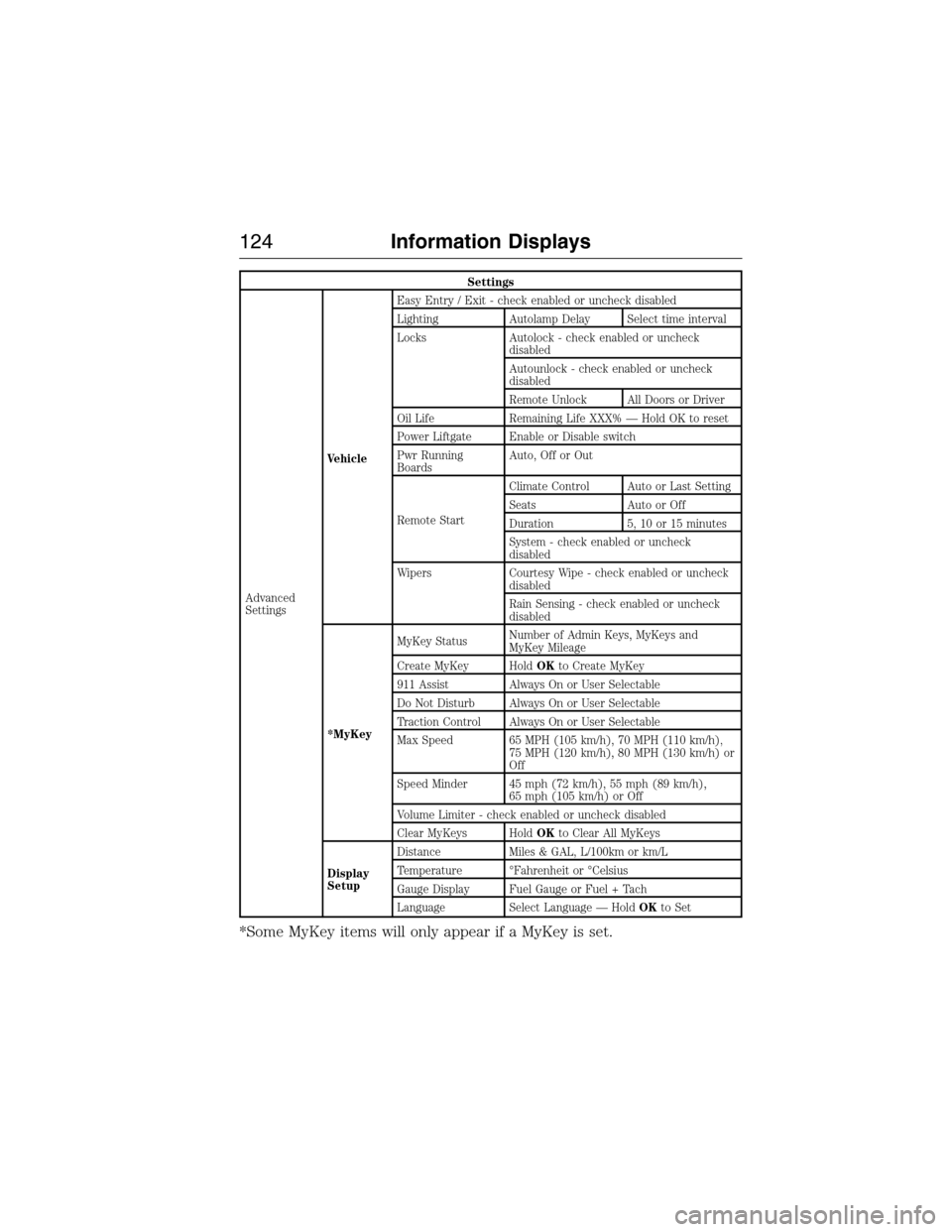
Settings
Advanced
SettingsVehicleEasy Entry / Exit - check enabled or uncheck disabled
Lighting Autolamp Delay Select time interval
Locks Autolock - check enabled or uncheck
disabled
Autounlock - check enabled or uncheck
disabled
Remote Unlock All Doors or Driver
Oil Life Remaining Life XXX% — Hold OK to reset
Power Liftgate Enable or Disable switch
Pwr Running
BoardsAuto, Off or Out
Remote StartClimate Control Auto or Last Setting
Seats Auto or Off
Duration 5, 10 or 15 minutes
System - check enabled or uncheck
disabled
Wipers Courtesy Wipe - check enabled or uncheck
disabled
Rain Sensing - check enabled or uncheck
disabled
*MyKeyMyKey StatusNumber of Admin Keys, MyKeys and
MyKey Mileage
Create MyKey HoldOKto Create MyKey
911 Assist Always On or User Selectable
Do Not Disturb Always On or User Selectable
Traction Control Always On or User Selectable
Max Speed 65 MPH (105 km/h), 70 MPH (110 km/h),
75 MPH (120 km/h), 80 MPH (130 km/h) or
Off
Speed Minder 45 mph (72 km/h), 55 mph (89 km/h),
65 mph (105 km/h) or Off
Volume Limiter - check enabled or uncheck disabled
Clear MyKeys HoldOKto Clear All MyKeys
Display
SetupDistance Miles & GAL, L/100km or km/L
Temperature °Fahrenheit or °Celsius
Gauge Display Fuel Gauge or Fuel + Tach
Language Select Language — HoldOKto Set
*Some MyKey items will only appear if a MyKey is set.
124Information Displays
2015 Expedition(exd)
Owners Guide gf, 1st Printing, July 2014
USA(fus)
Page 137 of 564
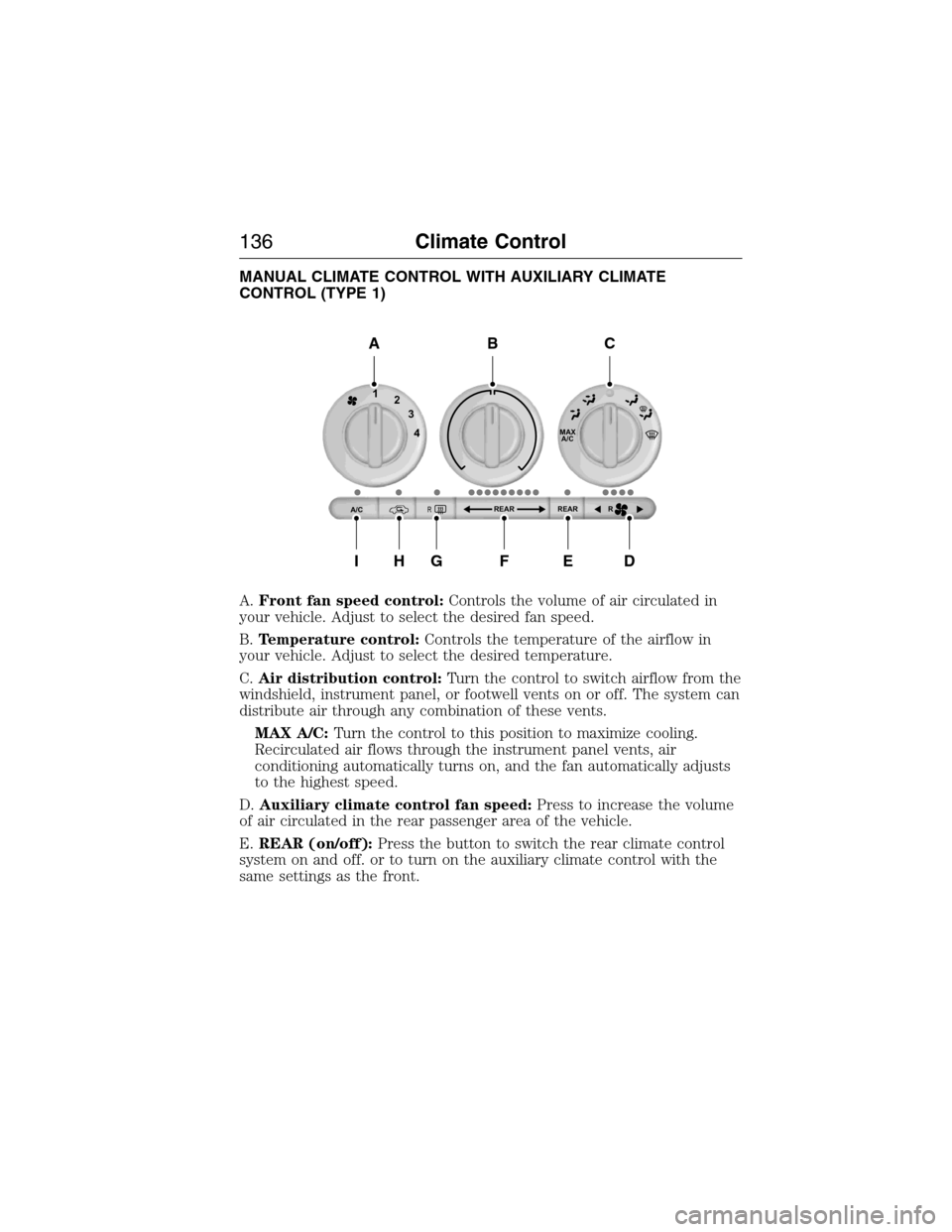
MANUAL CLIMATE CONTROL WITH AUXILIARY CLIMATE
CONTROL (TYPE 1)
A.Front fan speed control:Controls the volume of air circulated in
your vehicle. Adjust to select the desired fan speed.
B.Temperature control:Controls the temperature of the airflow in
your vehicle. Adjust to select the desired temperature.
C.Air distribution control:Turn the control to switch airflow from the
windshield, instrument panel, or footwell vents on or off. The system can
distribute air through any combination of these vents.
MAX A/C:Turn the control to this position to maximize cooling.
Recirculated air flows through the instrument panel vents, air
conditioning automatically turns on, and the fan automatically adjusts
to the highest speed.
D.Auxiliary climate control fan speed:Press to increase the volume
of air circulated in the rear passenger area of the vehicle.
E.REAR (on/off):Press the button to switch the rear climate control
system on and off. or to turn on the auxiliary climate control with the
same settings as the front.
MAX
A/C
REAR R REAR
1
2
3
4
A/CR
A
IHGFED
BC
136Climate Control
2015 Expedition(exd)
Owners Guide gf, 1st Printing, July 2014
USA(fus)
Page 143 of 564
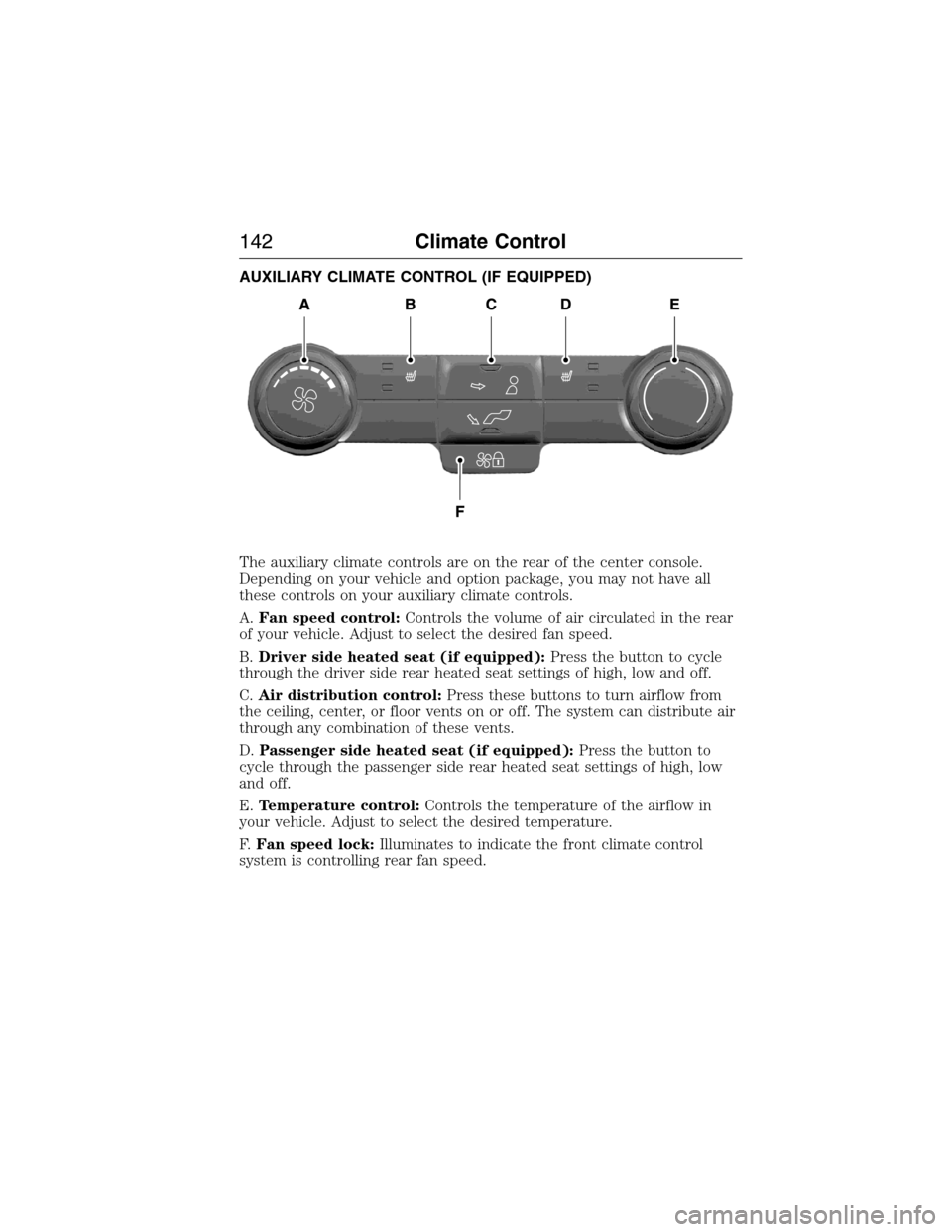
AUXILIARY CLIMATE CONTROL (IF EQUIPPED)
The auxiliary climate controls are on the rear of the center console.
Depending on your vehicle and option package, you may not have all
these controls on your auxiliary climate controls.
A.Fan speed control:Controls the volume of air circulated in the rear
of your vehicle. Adjust to select the desired fan speed.
B.Driver side heated seat (if equipped):Press the button to cycle
through the driver side rear heated seat settings of high, low and off.
C.Air distribution control:Press these buttons to turn airflow from
the ceiling, center, or floor vents on or off. The system can distribute air
through any combination of these vents.
D.Passenger side heated seat (if equipped):Press the button to
cycle through the passenger side rear heated seat settings of high, low
and off.
E.Temperature control:Controls the temperature of the airflow in
your vehicle. Adjust to select the desired temperature.
F.Fan speed lock:Illuminates to indicate the front climate control
system is controlling rear fan speed.
142Climate Control
2015 Expedition(exd)
Owners Guide gf, 1st Printing, July 2014
USA(fus)
Page 144 of 564
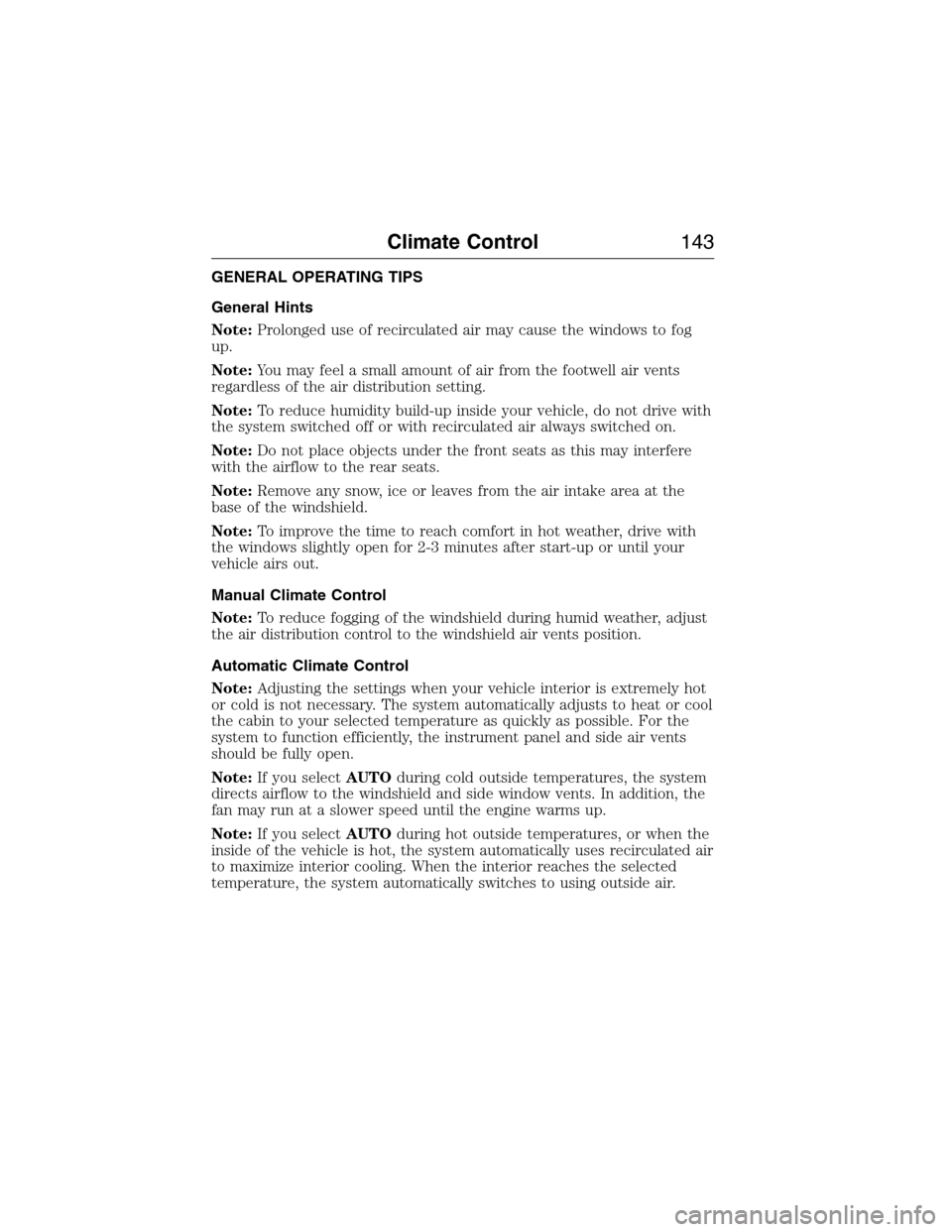
GENERAL OPERATING TIPS
General Hints
Note:Prolonged use of recirculated air may cause the windows to fog
up.
Note:You may feel a small amount of air from the footwell air vents
regardless of the air distribution setting.
Note:To reduce humidity build-up inside your vehicle, do not drive with
the system switched off or with recirculated air always switched on.
Note:Do not place objects under the front seats as this may interfere
with the airflow to the rear seats.
Note:Remove any snow, ice or leaves from the air intake area at the
base of the windshield.
Note:To improve the time to reach comfort in hot weather, drive with
the windows slightly open for 2-3 minutes after start-up or until your
vehicle airs out.
Manual Climate Control
Note:To reduce fogging of the windshield during humid weather, adjust
the air distribution control to the windshield air vents position.
Automatic Climate Control
Note:Adjusting the settings when your vehicle interior is extremely hot
or cold is not necessary. The system automatically adjusts to heat or cool
the cabin to your selected temperature as quickly as possible. For the
system to function efficiently, the instrument panel and side air vents
should be fully open.
Note:If you selectAUTOduring cold outside temperatures, the system
directs airflow to the windshield and side window vents. In addition, the
fan may run at a slower speed until the engine warms up.
Note:If you selectAUTOduring hot outside temperatures, or when the
inside of the vehicle is hot, the system automatically uses recirculated air
to maximize interior cooling. When the interior reaches the selected
temperature, the system automatically switches to using outside air.
Climate Control143
2015 Expedition(exd)
Owners Guide gf, 1st Printing, July 2014
USA(fus)
Page 145 of 564
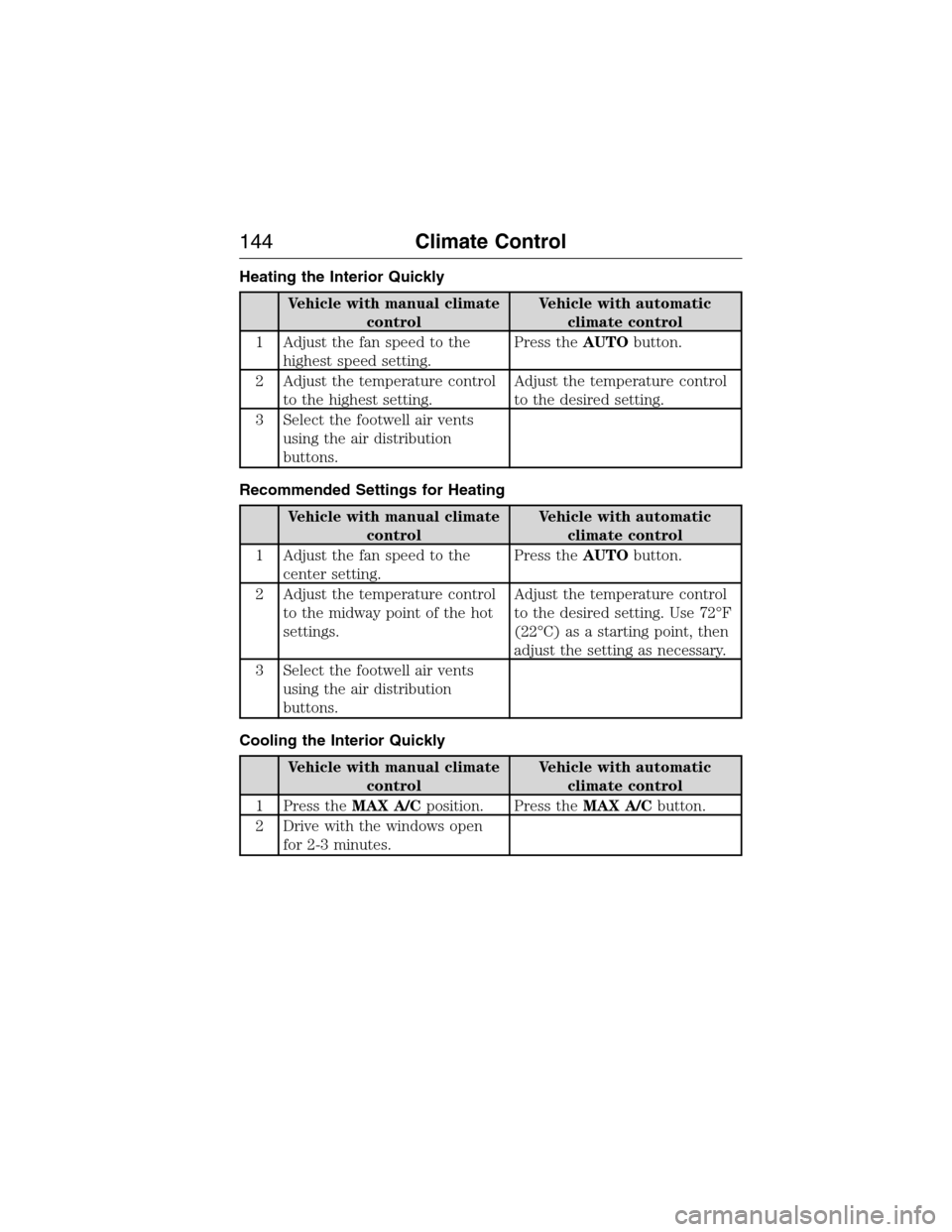
Heating the Interior Quickly
Vehicle with manual climate
controlVehicle with automatic
climate control
1 Adjust the fan speed to the
highest speed setting.Press theAUTObutton.
2 Adjust the temperature control
to the highest setting.Adjust the temperature control
to the desired setting.
3 Select the footwell air vents
using the air distribution
buttons.
Recommended Settings for Heating
Vehicle with manual climate
controlVehicle with automatic
climate control
1 Adjust the fan speed to the
center setting.Press theAUTObutton.
2 Adjust the temperature control
to the midway point of the hot
settings.Adjust the temperature control
to the desired setting. Use 72°F
(22°C) as a starting point, then
adjust the setting as necessary.
3 Select the footwell air vents
using the air distribution
buttons.
Cooling the Interior Quickly
Vehicle with manual climate
controlVehicle with automatic
climate control
1 Press theMAX A/Cposition. Press theMAX A/Cbutton.
2 Drive with the windows open
for 2-3 minutes.
144Climate Control
2015 Expedition(exd)
Owners Guide gf, 1st Printing, July 2014
USA(fus)
Page 146 of 564
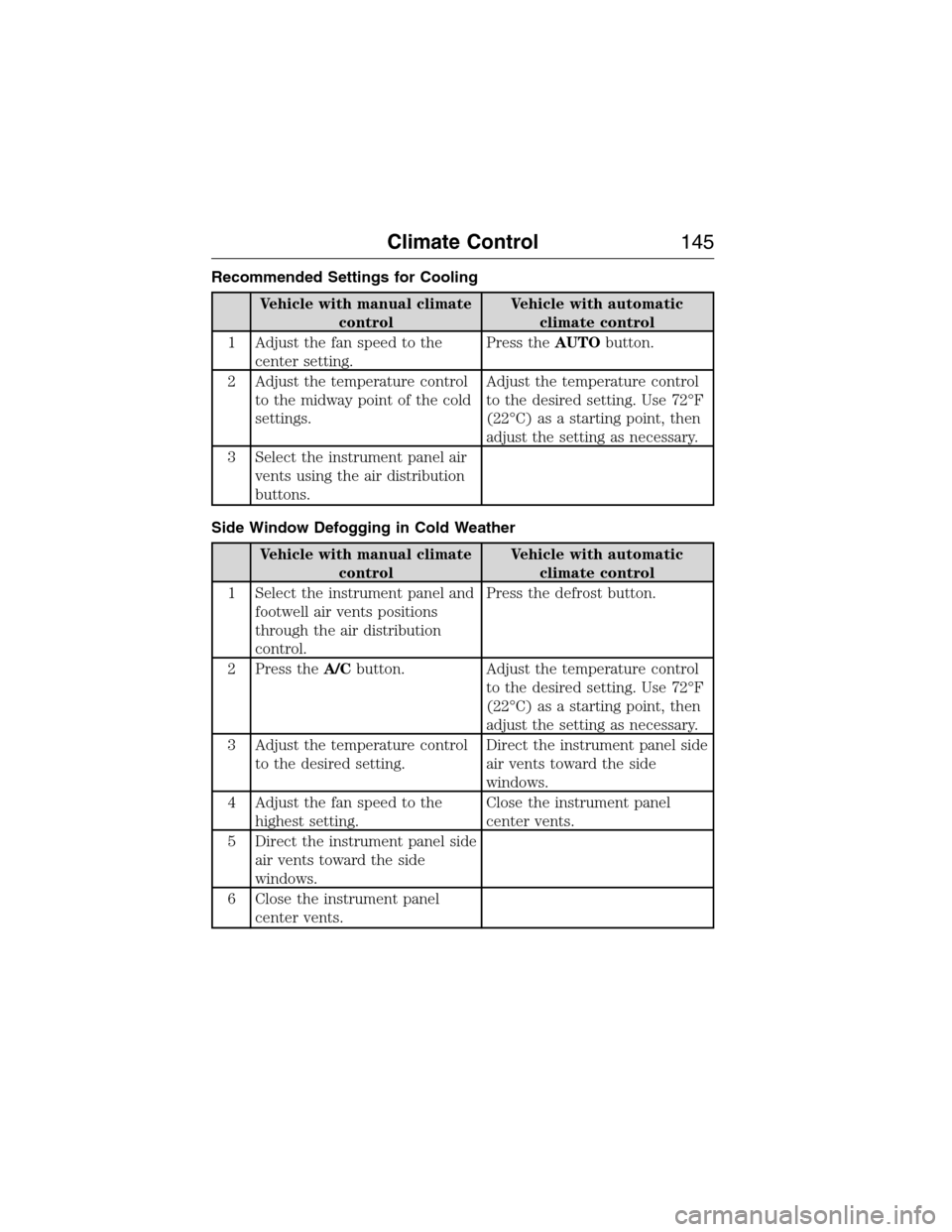
Recommended Settings for Cooling
Vehicle with manual climate
controlVehicle with automatic
climate control
1 Adjust the fan speed to the
center setting.Press theAUTObutton.
2 Adjust the temperature control
to the midway point of the cold
settings.Adjust the temperature control
to the desired setting. Use 72°F
(22°C) as a starting point, then
adjust the setting as necessary.
3 Select the instrument panel air
vents using the air distribution
buttons.
Side Window Defogging in Cold Weather
Vehicle with manual climate
controlVehicle with automatic
climate control
1 Select the instrument panel and
footwell air vents positions
through the air distribution
control.Press the defrost button.
2 Press theA/Cbutton. Adjust the temperature control
to the desired setting. Use 72°F
(22°C) as a starting point, then
adjust the setting as necessary.
3 Adjust the temperature control
to the desired setting.Direct the instrument panel side
air vents toward the side
windows.
4 Adjust the fan speed to the
highest setting.Close the instrument panel
center vents.
5 Direct the instrument panel side
air vents toward the side
windows.
6 Close the instrument panel
center vents.
Climate Control145
2015 Expedition(exd)
Owners Guide gf, 1st Printing, July 2014
USA(fus)
Page 147 of 564
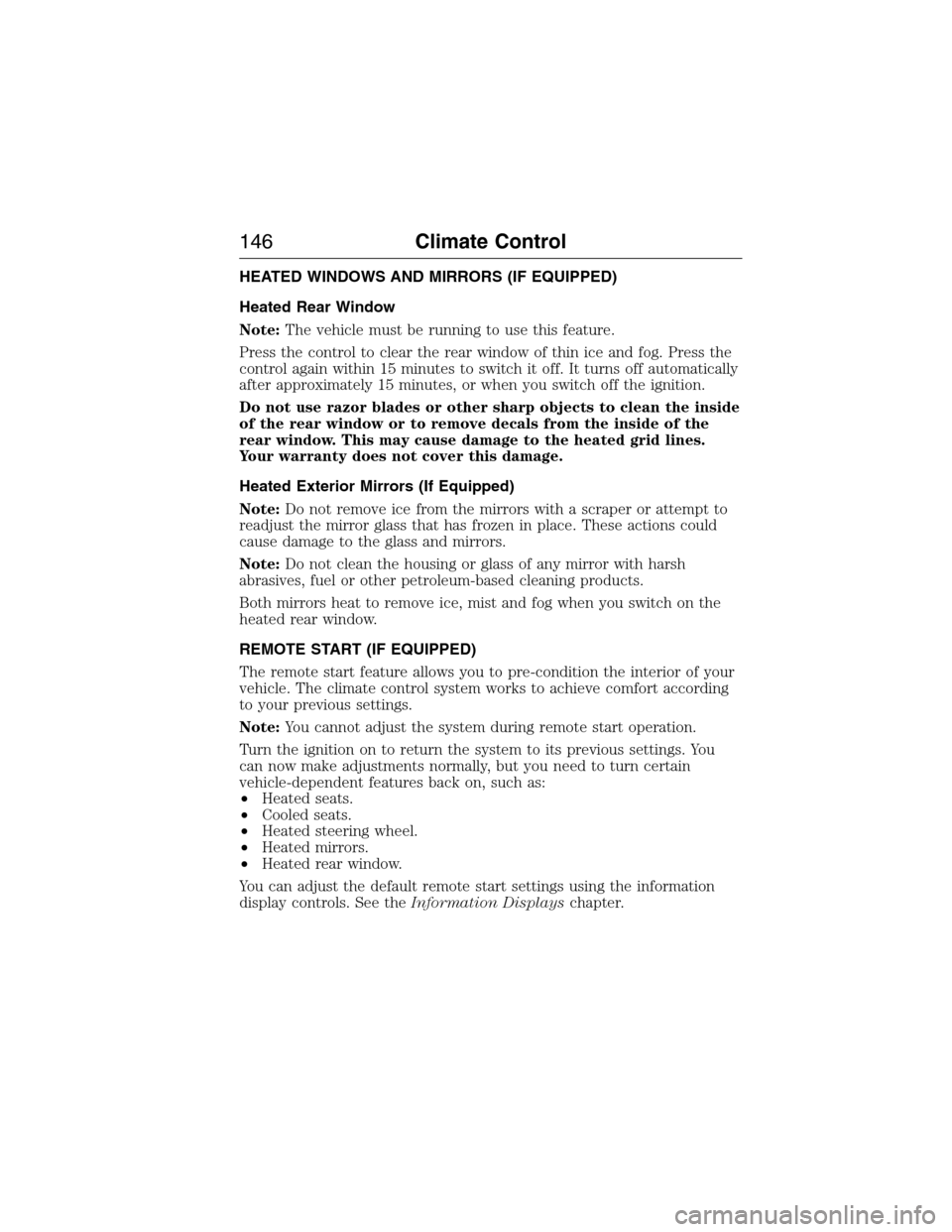
HEATED WINDOWS AND MIRRORS (IF EQUIPPED)
Heated Rear Window
Note:The vehicle must be running to use this feature.
Press the control to clear the rear window of thin ice and fog. Press the
control again within 15 minutes to switch it off. It turns off automatically
after approximately 15 minutes, or when you switch off the ignition.
Do not use razor blades or other sharp objects to clean the inside
of the rear window or to remove decals from the inside of the
rear window. This may cause damage to the heated grid lines.
Your warranty does not cover this damage.
Heated Exterior Mirrors (If Equipped)
Note:Do not remove ice from the mirrors with a scraper or attempt to
readjust the mirror glass that has frozen in place. These actions could
cause damage to the glass and mirrors.
Note:Do not clean the housing or glass of any mirror with harsh
abrasives, fuel or other petroleum-based cleaning products.
Both mirrors heat to remove ice, mist and fog when you switch on the
heated rear window.
REMOTE START (IF EQUIPPED)
The remote start feature allows you to pre-condition the interior of your
vehicle. The climate control system works to achieve comfort according
to your previous settings.
Note:You cannot adjust the system during remote start operation.
Turn the ignition on to return the system to its previous settings. You
can now make adjustments normally, but you need to turn certain
vehicle-dependent features back on, such as:
•Heated seats.
•Cooled seats.
•Heated steering wheel.
•Heated mirrors.
•Heated rear window.
You can adjust the default remote start settings using the information
display controls. See theInformation Displayschapter.
146Climate Control
2015 Expedition(exd)
Owners Guide gf, 1st Printing, July 2014
USA(fus)
Page 148 of 564
Automatic Settings
In hot weather, the system is set to 72°F (22°C). The cooled seats are
set to high (if available, and selected to AUTO in the information
display).
In moderate weather, the system either heats or cools (based on
previous settings). The rear defroster, heated mirrors and heated seats
do not automatically turn on.
In cold weather, the system is set to 72°F (22°C). The heated seats are
set to high (if available, and selected to AUTO in the information
display). The rear defroster and heated mirrors automatically turn on.
Climate Control147
2015 Expedition(exd)
Owners Guide gf, 1st Printing, July 2014
USA(fus)
Page 157 of 564
Easy Entry and Exit Feature (If Equipped)
The Easy Entry and Exit feature adjusts the position of the seat and
steering column to allow easier exit and entry to the vehicle.
The driver seat automatically moves 2 inches (5 centimeters) rearward
when the transmission is in park (P) and you remove the key from the
ignition or you switch the ignition off.
The driver seat returns to the previous position when you put the key in
the ignition or switch the ignition on.
Enable or disable this feature through the information display. See the
Information Displayschapter.
Climate Controlled Seats (If Equipped)
Heated Seats
WARNING:Persons who are unable to feel pain to the skin
because of advanced age, chronic illness, diabetes, spinal cord
injury, medication, alcohol use, exhaustion, or other physical conditions,
must exercise care when using the seat heater. The seat heater may
cause burns even at low temperatures, especially if used for long
periods of time. Do not place anything on the seat that insulates against
heat, such as a blanket or cushion, because this may cause the seat
heater to overheat. Do not puncture the seat with pins, needles, or
other pointed objects because this may damage the heating element
which may cause the seat heater to overheat. An overheated seat may
cause serious personal injury.
Note:Do not do the following:
•Place heavy objects on the seat.
•Operate the seat heater if water or any other liquid is spilled on the
seat. Allow the seat to dry thoroughly.
The heated seats will only function when the engine is running.
To operate the heated seats:
Press the heated seat symbol to cycle through the various
heat settings and off. Warmer settings are indicated by
more indicator lights.
156Seats
2015 Expedition(exd)
Owners Guide gf, 1st Printing, July 2014
USA(fus)