audio FORD EXPEDITION 2016 3.G Owners Manual
[x] Cancel search | Manufacturer: FORD, Model Year: 2016, Model line: EXPEDITION, Model: FORD EXPEDITION 2016 3.GPages: 421, PDF Size: 6.3 MB
Page 5 of 421
Adjusting the Steering Wheel - Vehicles
With: Power Adjustable Steering
Column...........................................................67
Audio Control..................................................68
Voice Control...................................................69
Cruise Control..................................................70
Information Display Control
.......................70
Heated Steering Wheel
................................70
Pedals
Adjusting the Pedals
......................................71
Wipers and Washers
Windshield Wipers.........................................72
Autowipers
........................................................72
Windshield Washers......................................73
Rear Window Wiper and Washers...........73
Lighting
General Information......................................74
Lighting Control...............................................74
Autolamps .........................................................
75
Instrument Lighting Dimmer
......................76
Daytime Running Lamps
.............................76
Front Fog Lamps.............................................77
Direction Indicators
........................................77
Interior Lamps
.................................................78
Ambient Lighting
............................................79
Windows and Mirrors
Power Windows
.............................................80
Exterior Mirrors
.................................................81
Interior Mirror
...................................................82
Childminder Mirror.........................................82
Rear Quarter Windows
................................83
Sun Visors
.........................................................83
Moonroof...........................................................83
Instrument Cluster
Gauges...............................................................85 Warning Lamps and Indicators................88
Audible Warnings and Indicators..............91
Information Displays
General Information......................................92
Information Messages
................................103
Climate Control
Manual Climate Control..............................113
Manual Climate Control - Vehicles With: Electronic Manual Temperature
Control (EMTC)
..........................................114
Automatic Climate Control
.......................116
Hints on Controlling the Interior Climate..........................................................117
Rear Passenger Climate Controls..........120
Heated Windows and Mirrors
....................121
Remote Start
...................................................121
Seats
Sitting in the Correct Position..................122
Head Restraints.............................................122
Manual Seats.................................................124
Power Seats
....................................................125
Memory Function.........................................126
Rear Seats
........................................................127
Heated Seats
..................................................134
Climate Controlled Seats
..........................135
Universal Garage Door Opener
Universal Garage Door Opener................137
Auxiliary Power Points
Auxiliary Power Points................................142
Storage Compartments
Center Console
..............................................144
Overhead Console
.......................................144
2
Expedition (TB7) Canada/United States of America, enUSA, First Printing Table of Contents
Page 8 of 421
Motorcraft Parts..........................................303
Vehicle Identification Number...............305
Vehicle Certification Label
......................306
Transmission Code Designation...........306
Capacities and Specifications - 3.5L Ecoboost™................................................307
Audio System
General Information
....................................312
Audio Unit - Vehicles With: AM/FM/CD/ SYNC/Satellite Radio
.............................313
Audio Unit - Vehicles With: Sony AM/FM/ CD...................................................................315
Digital Radio
....................................................317
Satellite Radio...............................................319
USB Port
..........................................................322
Media Hub......................................................322
SYNC™
General Information
...................................323
Using Voice Recognition...........................325
Using SYNC™ With Your Phone............328
SYNC™ Applications and Services......340
SYNC™ AppLink ™
.....................................348
Using SYNC™ With Your Media Player...........................................................349
SYNC™ Troubleshooting
.........................359
Accessories
Accessories....................................................368
Extended Service Plan (ESP)
Extended Service Plan (ESP).................370
Scheduled Maintenance
General Maintenance Information
........372
Normal Scheduled Maintenance...........375
Special Operating Conditions Scheduled Maintenance.............................................378
Scheduled Maintenance Record
............381 Appendices
End User License Agreement..................391
5
Expedition (TB7) Canada/United States of America, enUSA, First Printing Table of Contents
Page 49 of 421
PRINCIPLE OF OPERATION
MyKey allows you to program keys with
restricted driving modes to promote good
driving habits. All but one of the keys
programmed to the vehicle can be
activated with these restricted modes.
Any keys that have not been programmed
are referred to as administrator keys or
admin keys. They can be used to:
•
Create a MyKey.
• Program configurable MyKey settings.
• Clear all MyKey features.
When you have programmed a MyKey, you
can access the following information using
the information display:
• How many admin keys and MyKeys are
programmed to your vehicle.
• The total distance your vehicle has
traveled using a MyKey.
Note: All MyKeys are programmed to the
same settings. You cannot program them
individually.
Non-configurable Settings
The following settings cannot be changed
by an admin key user:
• Belt-Minder or safety belt reminder.
You cannot disable this feature. The
audio system will mute when the front
seat occupants’ safety belts are not
fastened.
• Early low fuel. The low fuel warning is
activated earlier, giving the MyKey user
more time to refuel. •
Driver assist features, if equipped on
your vehicle, are forced on: parking aid,
blind spot information system (BLIS)
with cross traffic alert, lane departure
warning and forward collision warning
system.
• Satellite radio adult content
restrictions (available only in some
markets).
Configurable Settings
With an admin key, you can configure
certain MyKey settings when you first
create a MyKey and before you recycle the
key or restart the vehicle. You can also
change the settings afterward with an
admin key:
• A vehicle speed limit can be set.
Warnings will be shown in the display,
followed by an audible tone when your
vehicle reaches the set speed. You
cannot override the set speed by fully
depressing the accelerator pedal or by
setting cruise control. WARNING
Do not set MyKey maximum speed
limit to a limit that will prevent the
driver from maintaining a safe speed
considering posted speed limits and
prevailing road conditions. The driver is
always responsible to drive in accordance
with local laws and prevailing conditions.
Failure to do so could result in accident or
injury. 46
Expedition (TB7) Canada/United States of America, enUSA, First Printing MyKey
™
Page 50 of 421
•
Various vehicle speed minders can be
set. Once you select a speed, it will be
shown in the display, followed by an
audible tone when the preselected
vehicle speed is exceeded.
• Audio system maximum volume of
45%. A message will be shown in the
display when you attempt to exceed
the limited volume. Also, the
speed-sensitive or compensated
automatic volume control will be
disabled.
• Always on setting. When this is
selected, you will not be able to turn
off Advance Trac or traction control,
911 Assist or Emergency Assistance, or
Do Not Disturb (if your vehicle is
equipped with these features). CREATING A MYKEY
Use the information display to create a
MyKey:
1.
Insert the key you want to program into
the ignition. If your vehicle is equipped
with a push-button start, place the
remote control into the backup slot.
The location of your backup slot is in
another chapter. See Starting a
Gasoline Engine (page 146).
2. Switch the ignition on.
3. Access the main menu on the information display controls. Use the
arrow keys to get to the following menu
selections: Action and Description
Message
Press the OK button or the right arrow key.
Settings
Press the OK button or the right arrow key.
MyKey
Press the OK button or the right arrow key.
Create MyKey
When prompted, hold the OK button until
you see a message informing you to label
this key as a MyKey. The key will be
restricted at the next start.
MyKey is successfully created. Make sure
you label it so you can distinguish it from
the admin keys.
You can also program configurable
settings for the key(s). See
Programming/Changing Configurable
Settings
. Programming/Changing
Configurable Settings
Use the information display to access your
configurable MyKey settings.
1. Switch the ignition on using an admin
key or remote control.
2. Access the main menu on the information display controls. Use the
arrow keys to get to the following menu
selections: Action and Description
Message
Press the OK button or the right arrow key.
Settings
Press the OK button or the right arrow key.
MyKey
47
Expedition (TB7) Canada/United States of America, enUSA, First Printing MyKey
™
Page 71 of 421
End of Travel Position
The steering column sets a stopping
position just short of the end of the column
position to prevent damage to the steering
column. A new stopping position sets if the
steering column encounters an object
when tilting or telescoping.
To reset the steering column to its normal
stopping position:
1. Confirm there is nothing obstructing
the motion of the steering column.
2. Press and hold the steering column control until the steering column stops
moving.
3. Press the steering column control again. The steering column may begin
to move again.
4. When the steering column stops, continue holding the control for an
additional few seconds.
5. Repeat for each direction as necessary.
A new stopping position is set. The next
time you tilt or telescope the steering
column, it will stop just short of the end of
the column position.
Memory Feature
You can save and recall the steering
column position with the memory function.
See Memory Function (page 126).
Note: Pressing the adjustment control
during memory recall cancels the operation.
Easy Entry and Exit Feature
When you switch the ignition off, the
steering column will move to allow extra
room to exit your vehicle. The column will
return to the previous setting when you
switch the ignition on. You can enable or
disable this feature in the information
display. See Information Displays (page
92
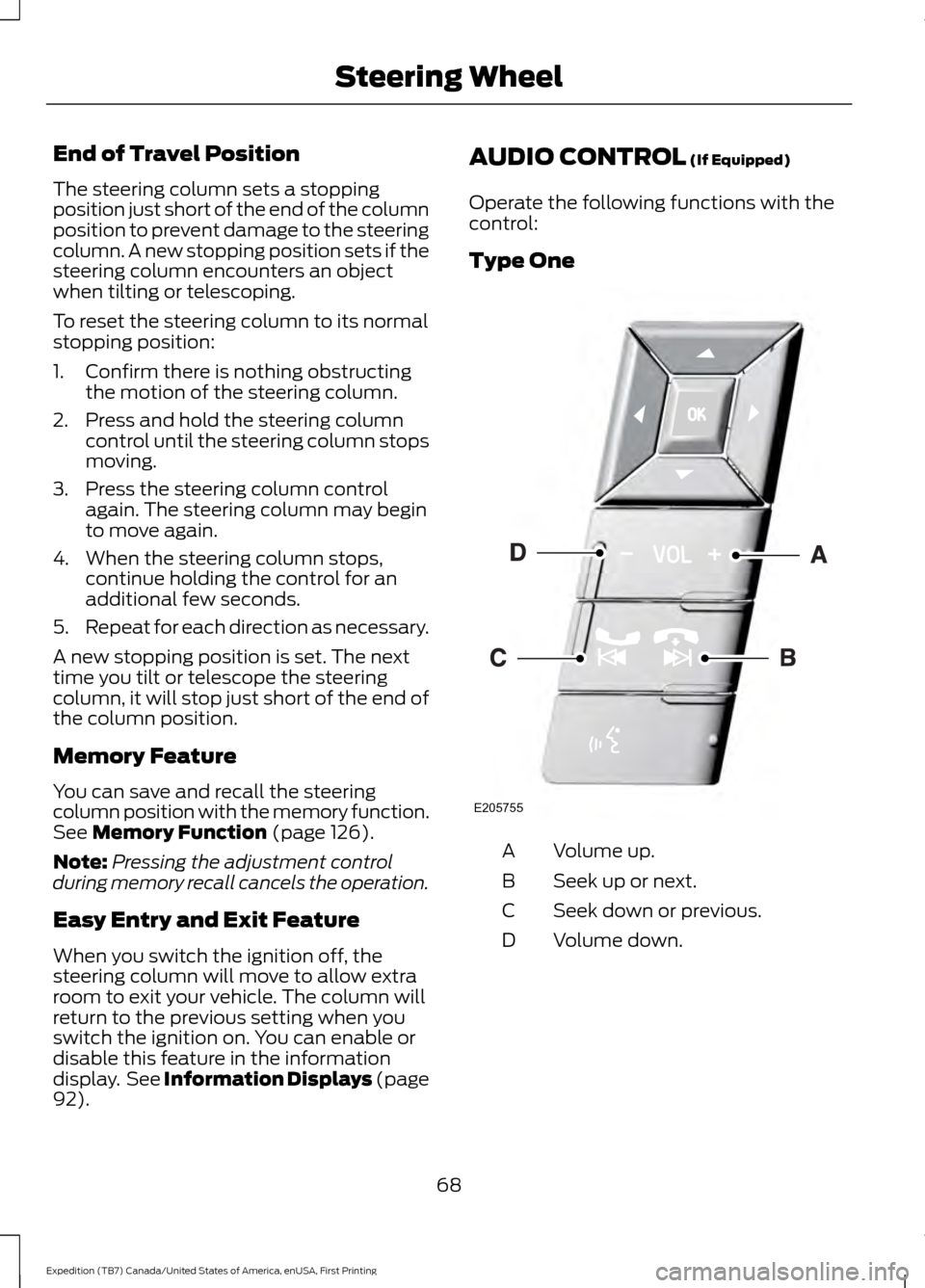
). AUDIO CONTROL
(If Equipped)
Operate the following functions with the
control:
Type One Volume up.
A
Seek up or next.
B
Seek down or previous.
C
Volume down.
D
68
Expedition (TB7) Canada/United States of America, enUSA, First Printing Steering WheelE205755
Page 72 of 421
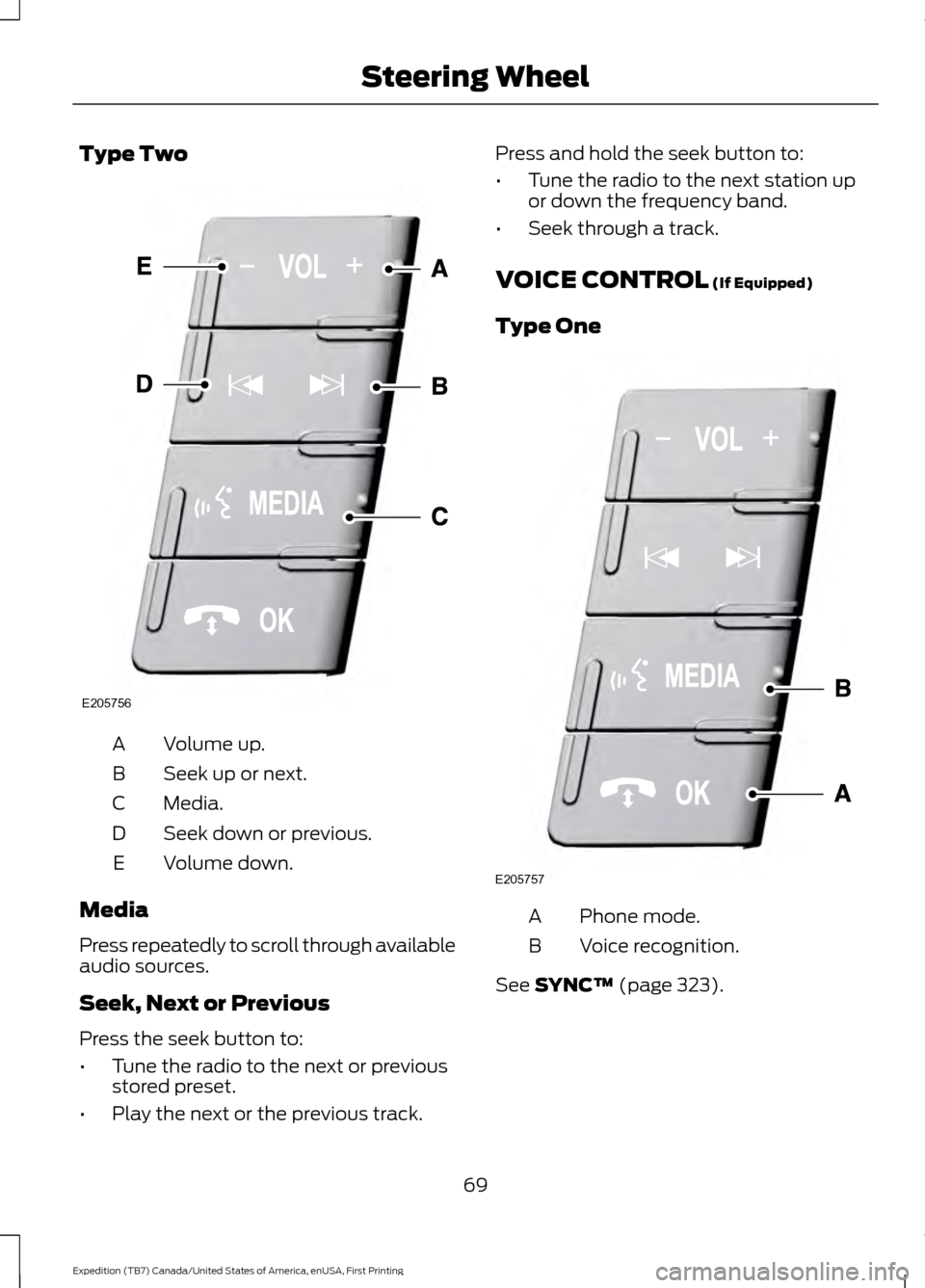
Type Two
Volume up.
A
Seek up or next.
B
Media.
C
Seek down or previous.
D
Volume down.
E
Media
Press repeatedly to scroll through available
audio sources.
Seek, Next or Previous
Press the seek button to:
• Tune the radio to the next or previous
stored preset.
• Play the next or the previous track. Press and hold the seek button to:
•
Tune the radio to the next station up
or down the frequency band.
• Seek through a track.
VOICE CONTROL (If Equipped)
Type One Phone mode.
A
Voice recognition.
B
See
SYNC™ (page 323).
69
Expedition (TB7) Canada/United States of America, enUSA, First Printing Steering WheelE205756 E205757
Page 111 of 421
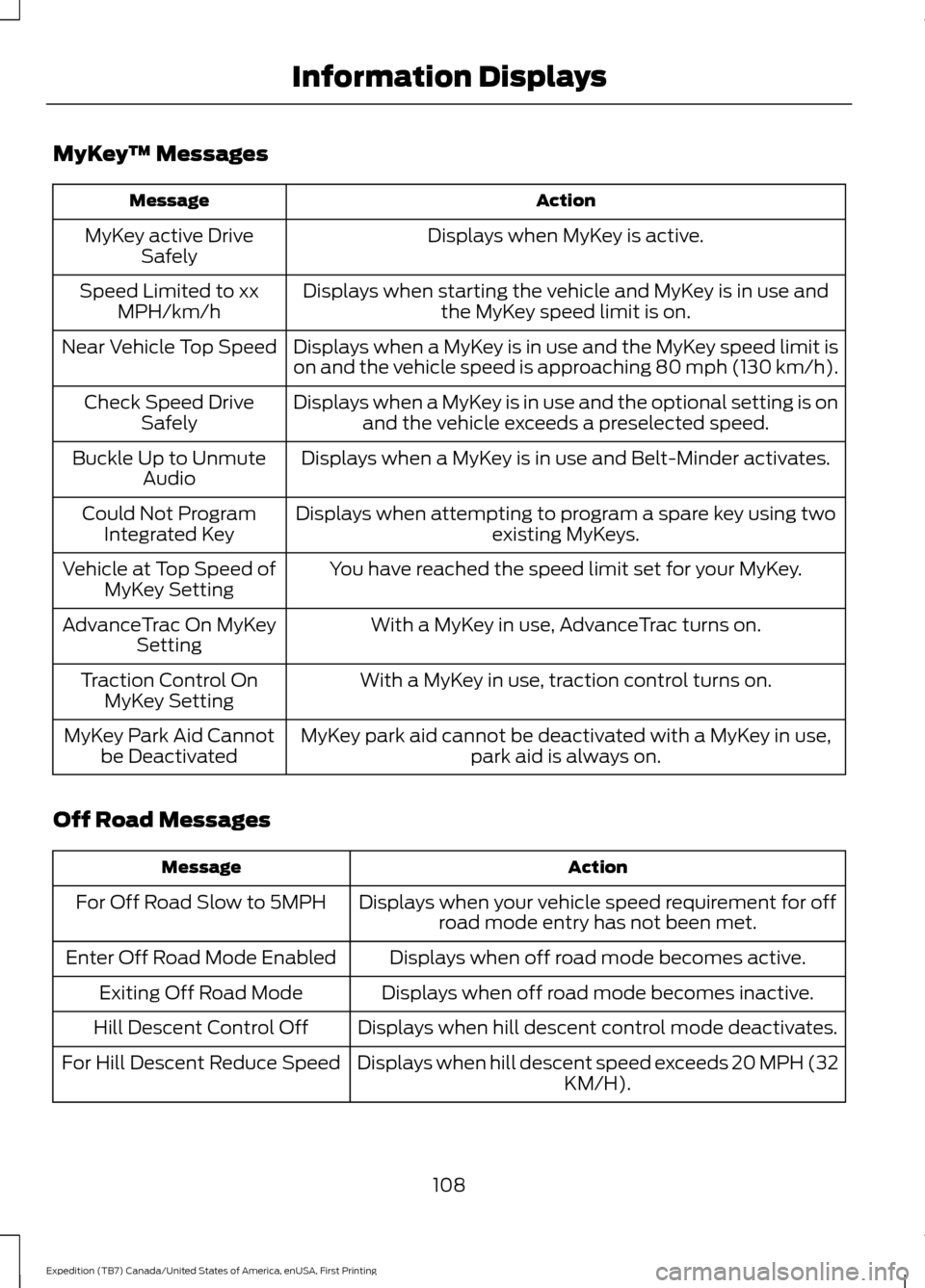
MyKey
™ Messages Action
Message
Displays when MyKey is active.
MyKey active Drive
Safely
Displays when starting the vehicle and MyKey is in use andthe MyKey speed limit is on.
Speed Limited to xx
MPH/km/h
Displays when a MyKey is in use and the MyKey speed limit is
on and the vehicle speed is approaching 80 mph (130 km/h).
Near Vehicle Top Speed
Displays when a MyKey is in use and the optional setting is onand the vehicle exceeds a preselected speed.
Check Speed Drive
Safely
Displays when a MyKey is in use and Belt-Minder activates.
Buckle Up to Unmute
Audio
Displays when attempting to program a spare key using two existing MyKeys.
Could Not Program
Integrated Key
You have reached the speed limit set for your MyKey.
Vehicle at Top Speed of
MyKey Setting
With a MyKey in use, AdvanceTrac turns on.
AdvanceTrac On MyKey
Setting
With a MyKey in use, traction control turns on.
Traction Control On
MyKey Setting
MyKey park aid cannot be deactivated with a MyKey in use,park aid is always on.
MyKey Park Aid Cannot
be Deactivated
Off Road Messages Action
Message
Displays when your vehicle speed requirement for offroad mode entry has not been met.
For Off Road Slow to 5MPH
Displays when off road mode becomes active.
Enter Off Road Mode Enabled
Displays when off road mode becomes inactive.
Exiting Off Road Mode
Displays when hill descent control mode deactivates.
Hill Descent Control Off
Displays when hill descent speed exceeds 20 MPH (32KM/H).
For Hill Descent Reduce Speed
108
Expedition (TB7) Canada/United States of America, enUSA, First Printing Information Displays
Page 256 of 421
WARNINGS
Keep batteries out of reach of
children. Batteries contain sulfuric
acid. Avoid contact with skin, eyes or
clothing. Shield your eyes when working
near the battery to protect against possible
splashing of acid solution. In case of acid
contact with skin or eyes, flush
immediately with water for a minimum of
15 minutes and get prompt medical
attention. If acid is swallowed, call a
physician immediately. Battery posts, terminals and related
accessories contain lead and lead
compounds. Wash hands after
handling. This vehicle may be fitted with more
than one battery. Removing the
battery cables from only one battery
does not disconnect your vehicle electrical
system. Make sure you disconnect the
battery cables from all batteries when
disconnecting power. Failure to do so may
cause serious personal injury or property
damage. Your vehicle is fitted with a Motorcraft
maintenance-free battery which normally
does not require additional water.
When a battery replacement is required,
you must use a recommended
replacement battery that matches the
electrical requirements of the vehicle.
Note:
After cleaning or replacing the
battery, make sure you reinstall the battery
cover or shield.
Note: If you add electrical accessories or
components to the vehicle, it may adversely
affect the low voltage battery performance
and durability. This may also affect the
performance of other electrical systems in
the vehicle.
For longer, trouble-free operation, keep the
top of the battery clean and dry. If you see any corrosion on the battery or
terminals, remove the cables from the
terminals and clean with a wire brush. You
can neutralize the acid with a solution of
baking soda and water.
Because your vehicle
’s engine is
electronically controlled by a computer,
some control conditions are maintained
by power from the battery. When the
battery is disconnected or a new battery
is installed, the engine must relearn its idle
and fuel trim strategy for optimum
driveability and performance. Flexible fuel
vehicles (FFV) must also relearn the
ethanol content of the fuel for optimum
driveability and performance.
To restore the settings, do the following:
1. Apply the parking brake.
2. Shift into park (P) or neutral (N).
3. Switch off all accessories.
4. Press the brake pedal and start your vehicle.
5. Run the engine until it reaches normal operating temperature. While the
engine is warming up, complete the
following: Reset the clock. See Audio
System (page 312). Reset the power
windows bounce-back feature. See
Windows and Mirrors
(page 80).
Reset the radio station presets. See
Audio System
(page 312).
6. Allow the engine to idle for at least one
minute.
7. Drive the vehicle at least 10 mi (16 km)
to completely relearn the idle trim and
fuel trim strategy.
Note: If you do not allow the engine to
relearn the idle and fuel trim strategy, the
idle quality of your vehicle may be adversely
affected until the engine computer
eventually relearns the idle trim and fuel
trim strategy.
253
Expedition (TB7) Canada/United States of America, enUSA, First Printing Maintenance
Page 257 of 421
Note:
For flexible fuel vehicles, if you are
operating on E85, you may experience poor
starts or an inability to start the engine and
driveability problems until the fuel trim and
ethanol content have been relearned.
Make sure that you dispose of old batteries
in an environmentally friendly way. Seek
advice from your local authority about
recycling old batteries.
If storing your vehicle for more than 30
days without recharging the battery, we
recommend that you disconnect the
battery cables to maintain battery charge
for quick starting.
Battery Management System (If
Equipped)
The battery management system monitors
battery conditions and takes actions to
extend battery life. If excessive battery
drain is detected, the system temporarily
disables some electrical systems to
protect the battery.
Systems included are:
• Heated rear window.
• Heated seats.
• Climate control.
• Heated steering wheel.
• Audio unit.
• Navigation system.
A message may appear in the information
displays to alert you that battery
protection actions are active. These
messages are only for notification that an
action is taking place, and not intended to
indicate an electrical problem or that the
battery requires replacement. After battery replacement, or in some
cases after charging the battery with an
external charger, the battery management
system requires eight hours of vehicle sleep
time to relearn the battery state of charge.
During this time your vehicle must remain
fully locked with the ignition switched off.
Note:
Prior to relearning the battery state
of charge, the battery management system
may temporarily disable some electrical
systems.
Electrical Accessory Installation
To make sure the battery management
system works correctly, do not connect an
electrical device ground connection
directly to the battery negative post. This
can cause inaccurate measurements of
the battery condition and potential
incorrect system operation.
Note: If you add electrical accessories or
components to the vehicle, it may adversely
affect battery performance and durability.
This may also affect the performance of
other electrical systems in the vehicle.
CHECKING THE WIPER
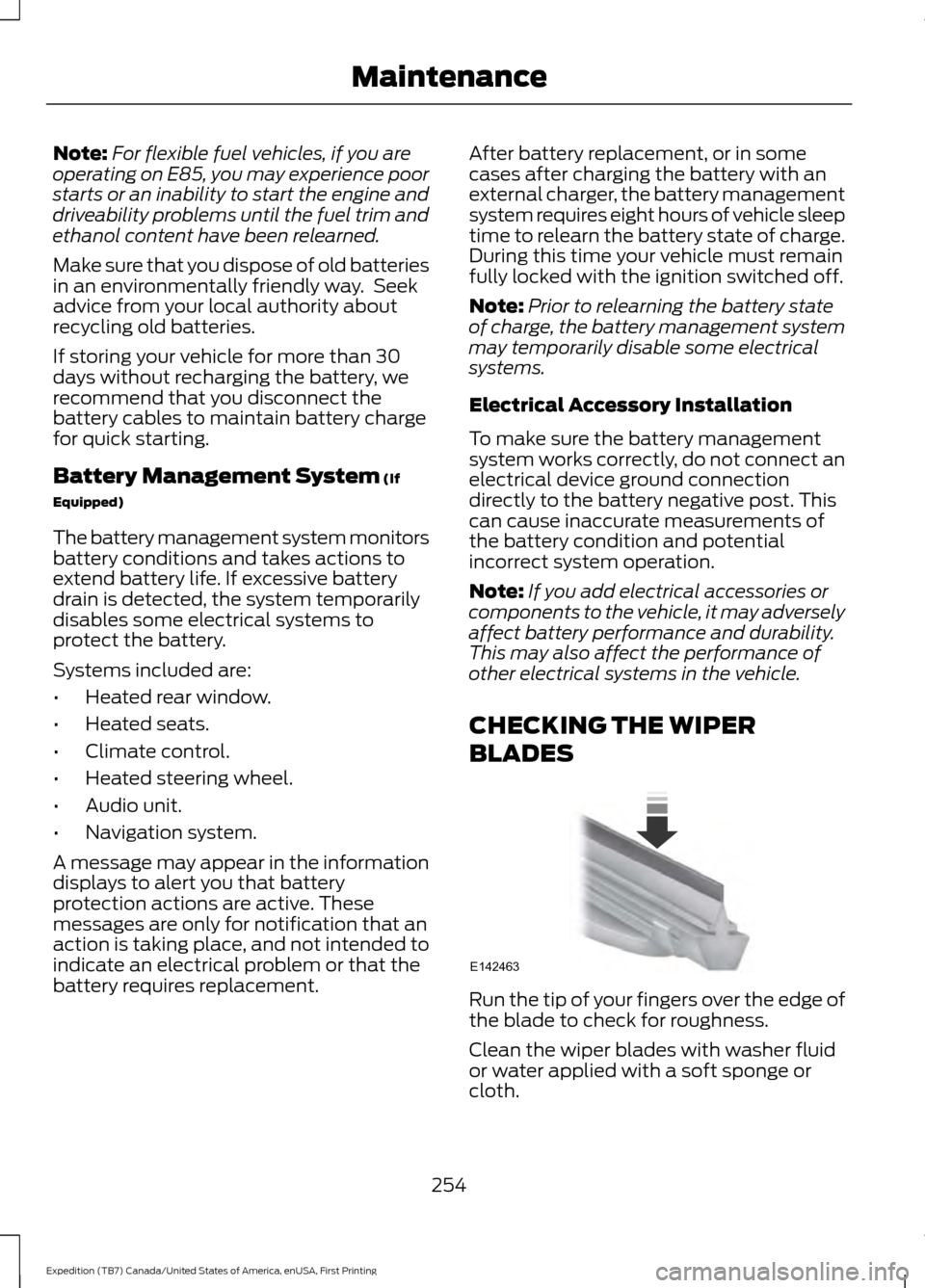
BLADES Run the tip of your fingers over the edge of
the blade to check for roughness.
Clean the wiper blades with washer fluid
or water applied with a soft sponge or
cloth.
254
Expedition (TB7) Canada/United States of America, enUSA, First Printing MaintenanceE142463
Page 315 of 421
GENERAL INFORMATION
Radio Frequencies and Reception
Factors
AM and FM frequencies are established by
the Federal Communications Commission
(FCC) and the Canadian Radio and
Telecommunications Commission (CRTC).
Those frequencies are:
•
AM: 530, 540-1700, 1710 kHz
• FM: 87.9-107.7, 107.9 MHz Radio Reception Factors
The further you travel from an AM or FM station, the
weaker the signal and the weaker the reception.
Distance and strength
Hills, mountains, tall buildings, bridges, tunnels, freeway
overpasses, parking garages, dense tree foliage and
thunderstorms can interfere with the reception.
Terrain
When you pass a ground-based broadcast repeating
tower, a stronger signal may overtake a weaker one and
result in the audio system muting.
Station overload
CD and CD Player Information
Note: CD units play commercially pressed
4.75-inch (12 centimeter) audio compact
discs only. Due to technical incompatibility,
certain recordable and re-recordable
compact discs may not function correctly
when used in Ford CD players.
Note: Do not insert CDs with homemade
paper (adhesive) labels into the CD player
as the label may peel and cause the CD to
become jammed. You should use a
permanent felt tip marker rather than
adhesive labels on your homemade CDs.
Ballpoint pens may damage CDs. Please
contact an authorized dealer for further
information.
Note: Do not use any irregularly shaped
discs or discs with a scratch protection film
attached.
Always handle discs by their edges only.
Clean the disc with an approved CD
cleaner only. Wipe it from the center of the
disc toward the edge. Do not clean in a
circular motion. Do not expose discs to direct sunlight or
heat sources for extended periods.
MP3 and WMA Track and Folder
Structure
Audio systems capable of recognizing and
playing MP3 and WMA individual tracks
and folder structures work as follows:
•
There are two different modes for MP3
and WMA disc playback: MP3 and
WMA track mode (system default) and
MP3 and WMA folder mode.
• MP3 and WMA track mode ignores any
folder structure on the MP3 and WMA
disc. The player numbers each MP3
and WMA track on the disc (noted by
the MP3 or WMA file extension) from
T001 to a maximum of T255. The
maximum number of playable MP3 and
WMA files may be less depending on
the structure of the CD and exact
model of radio present.
312
Expedition (TB7) Canada/United States of America, enUSA, First Printing Audio System