oil reset FORD EXPEDITION 2016 3.G Owners Manual
[x] Cancel search | Manufacturer: FORD, Model Year: 2016, Model line: EXPEDITION, Model: FORD EXPEDITION 2016 3.GPages: 421, PDF Size: 6.3 MB
Page 7 of 421
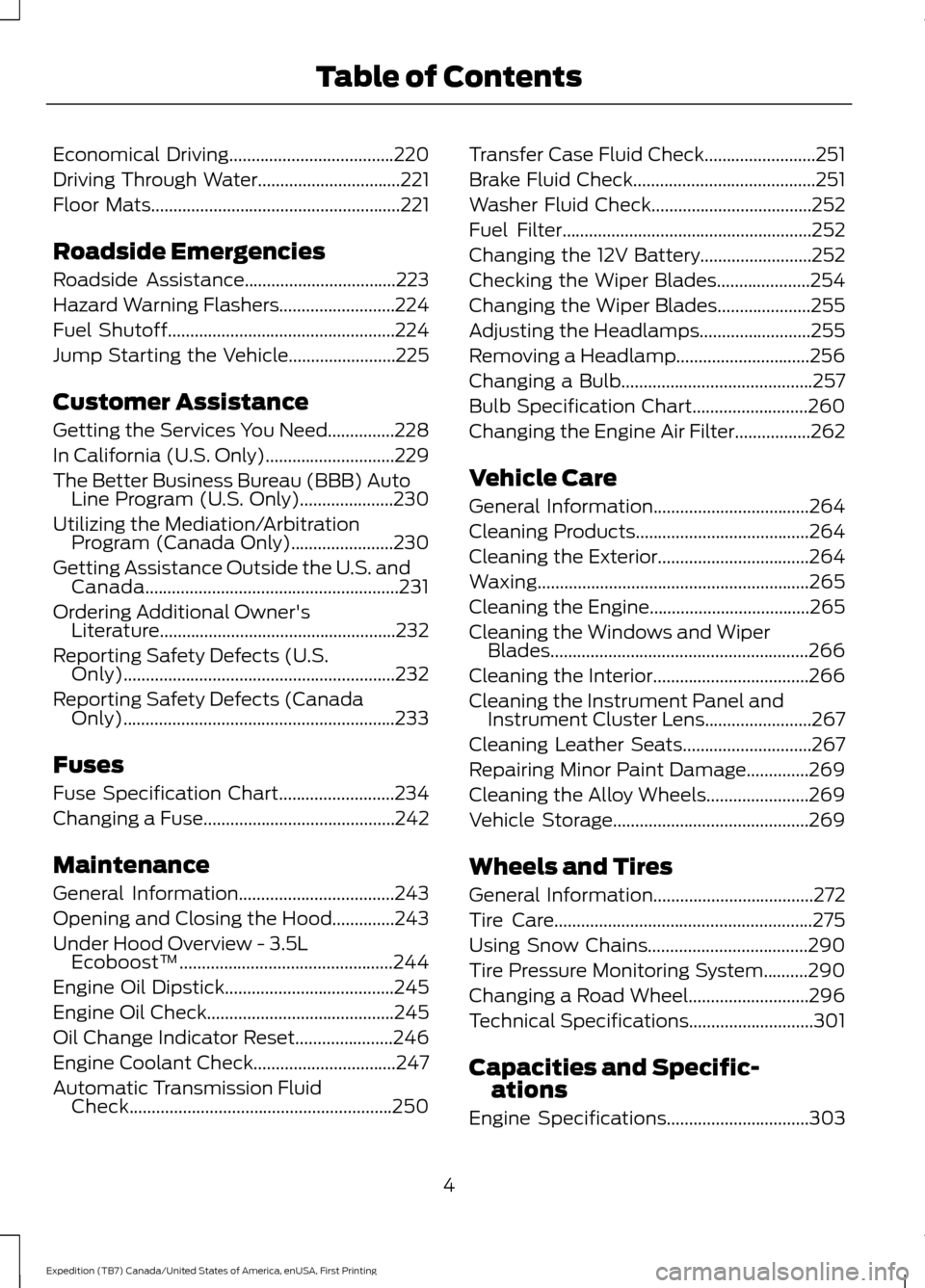
Economical Driving.....................................220
Driving Through Water
................................221
Floor Mats
........................................................221
Roadside Emergencies
Roadside Assistance..................................223
Hazard Warning Flashers..........................224
Fuel Shutoff
...................................................224
Jump Starting the Vehicle........................225
Customer Assistance
Getting the Services You Need...............228
In California (U.S. Only)
.............................229
The Better Business Bureau (BBB) Auto Line Program (U.S. Only).....................230
Utilizing the Mediation/Arbitration Program (Canada Only)
.......................230
Getting Assistance Outside the U.S. and Canada.........................................................231
Ordering Additional Owner's Literature.....................................................232
Reporting Safety Defects (U.S. Only).............................................................232
Reporting Safety Defects (Canada Only).............................................................233
Fuses
Fuse Specification Chart..........................234
Changing a Fuse...........................................242
Maintenance
General Information
...................................243
Opening and Closing the Hood..............243
Under Hood Overview - 3.5L Ecoboost™................................................244
Engine Oil Dipstick......................................245
Engine Oil Check
..........................................245
Oil Change Indicator Reset......................246
Engine Coolant Check................................247
Automatic Transmission Fluid Check...........................................................250 Transfer Case Fluid Check.........................251
Brake Fluid Check.........................................251
Washer Fluid Check
....................................252
Fuel Filter
........................................................252
Changing the 12V Battery.........................252
Checking the Wiper Blades.....................254
Changing the Wiper Blades.....................255
Adjusting the Headlamps.........................255
Removing a Headlamp..............................256
Changing a Bulb...........................................257
Bulb Specification Chart..........................260
Changing the Engine Air Filter.................262
Vehicle Care
General Information
...................................264
Cleaning Products
.......................................264
Cleaning the Exterior..................................264
Waxing.............................................................265
Cleaning the Engine
....................................265
Cleaning the Windows and Wiper Blades..........................................................266
Cleaning the Interior
...................................266
Cleaning the Instrument Panel and Instrument Cluster Lens........................267
Cleaning Leather Seats.............................267
Repairing Minor Paint Damage..............269
Cleaning the Alloy Wheels.......................269
Vehicle Storage
............................................269
Wheels and Tires
General Information
....................................272
Tire Care..........................................................275
Using Snow Chains....................................290
Tire Pressure Monitoring System..........290
Changing a Road Wheel...........................296
Technical Specifications
............................301
Capacities and Specific- ations
Engine Specifications
................................303
4
Expedition (TB7) Canada/United States of America, enUSA, First Printing Table of Contents
Page 11 of 421
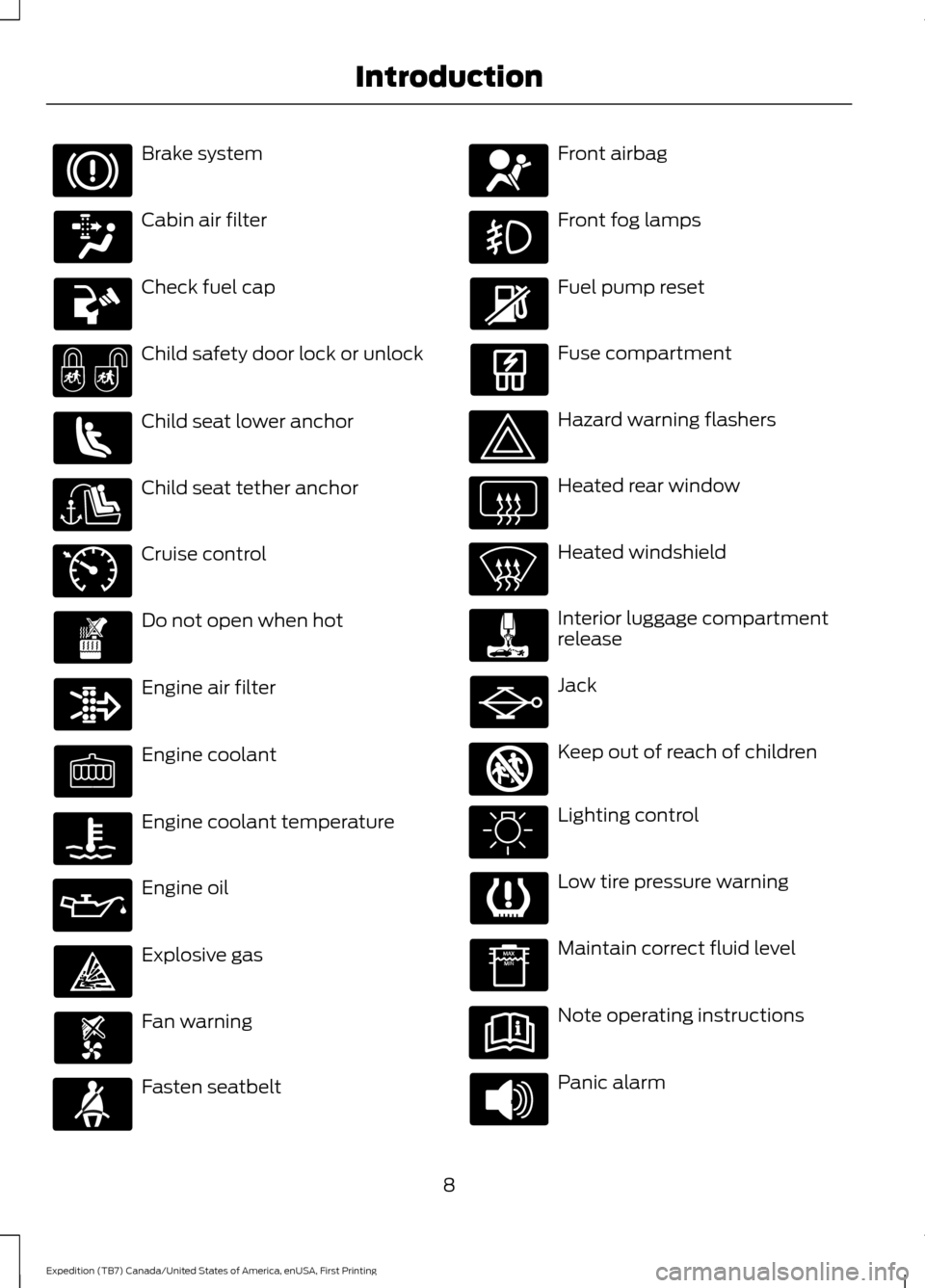
Brake system
Cabin air filter
Check fuel cap
Child safety door lock or unlock
Child seat lower anchor
Child seat tether anchor
Cruise control
Do not open when hot
Engine air filter
Engine coolant
Engine coolant temperature
Engine oil
Explosive gas
Fan warning
Fasten seatbelt Front airbag
Front fog lamps
Fuel pump reset
Fuse compartment
Hazard warning flashers
Heated rear window
Heated windshield
Interior luggage compartment
release
Jack
Keep out of reach of children
Lighting control
Low tire pressure warning
Maintain correct fluid level
Note operating instructions
Panic alarm
8
Expedition (TB7) Canada/United States of America, enUSA, First Printing Introduction E71340 E161353
Page 96 of 421
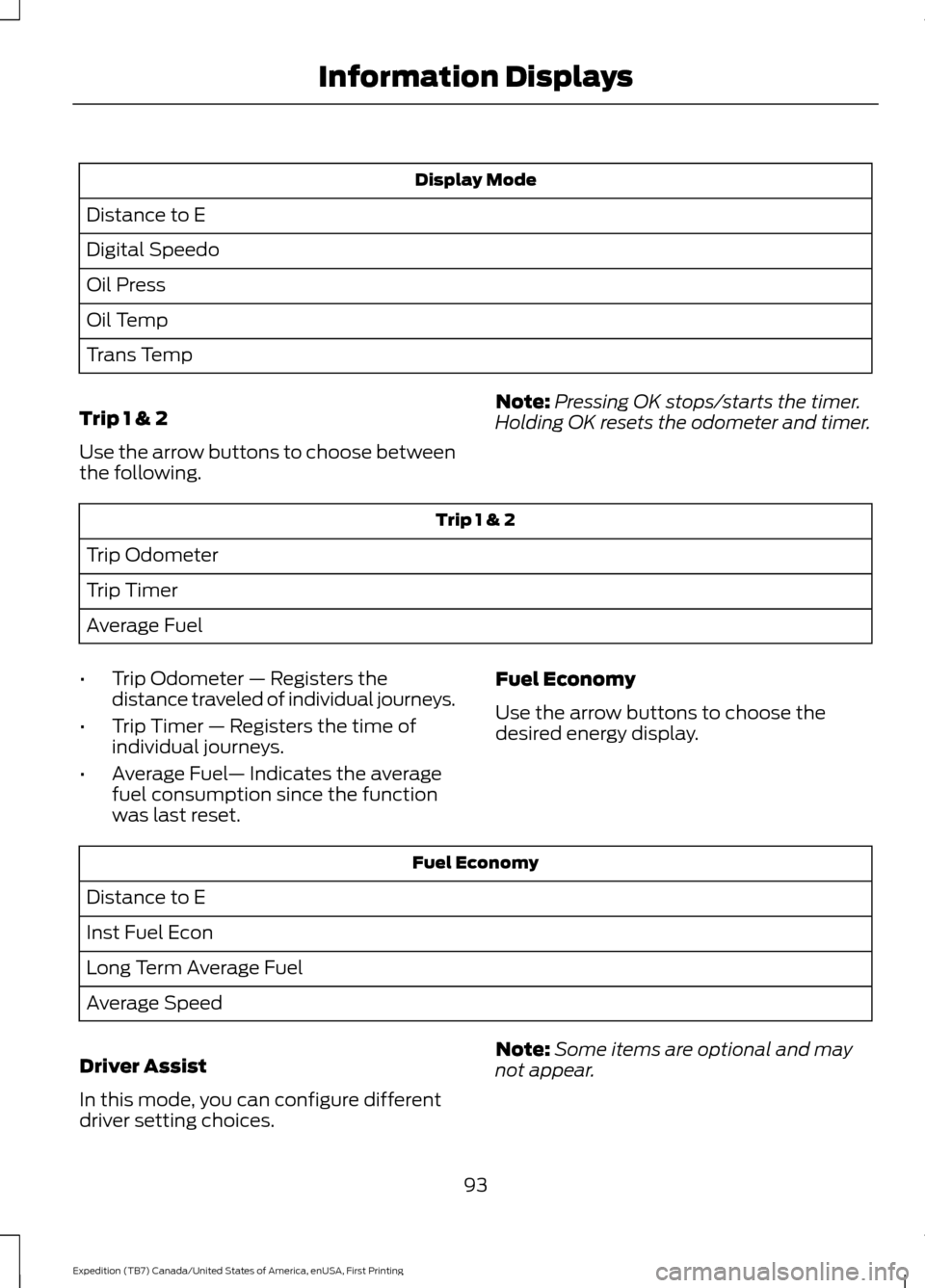
Display Mode
Distance to E
Digital Speedo
Oil Press
Oil Temp
Trans Temp
Trip 1 & 2
Use the arrow buttons to choose between
the following. Note:
Pressing OK stops/starts the timer.
Holding OK resets the odometer and timer. Trip 1 & 2
Trip Odometer
Trip Timer
Average Fuel
• Trip Odometer — Registers the
distance traveled of individual journeys.
• Trip Timer — Registers the time of
individual journeys.
• Average Fuel — Indicates the average
fuel consumption since the function
was last reset. Fuel Economy
Use the arrow buttons to choose the
desired energy display. Fuel Economy
Distance to E
Inst Fuel Econ
Long Term Average Fuel
Average Speed
Driver Assist
In this mode, you can configure different
driver setting choices. Note:
Some items are optional and may
not appear.
93
Expedition (TB7) Canada/United States of America, enUSA, First Printing Information Displays
Page 97 of 421
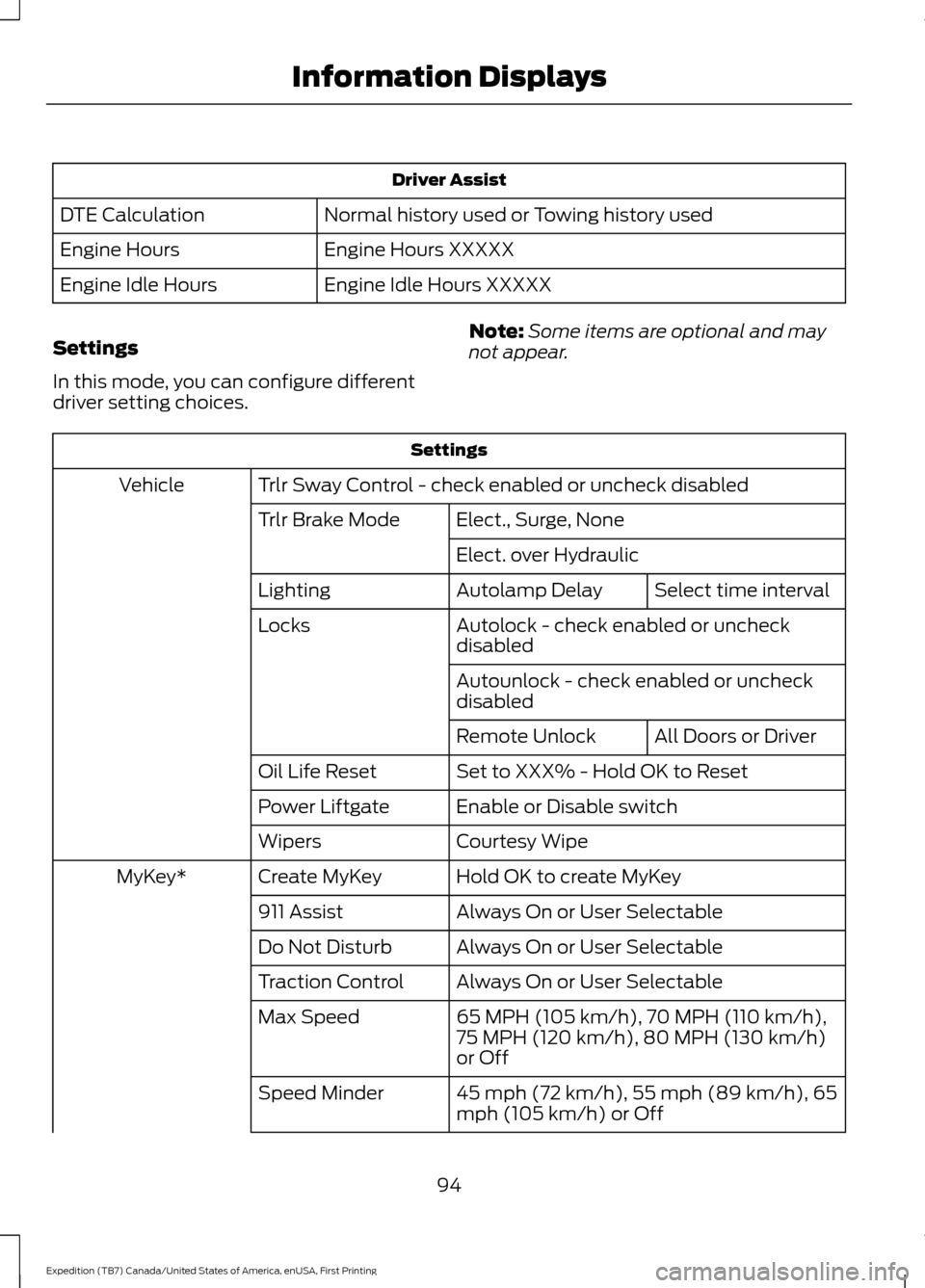
Driver Assist
Normal history used or Towing history used
DTE Calculation
Engine Hours XXXXX
Engine Hours
Engine Idle Hours XXXXX
Engine Idle Hours
Settings
In this mode, you can configure different
driver setting choices. Note:
Some items are optional and may
not appear. Settings
Trlr Sway Control - check enabled or uncheck disabled
Vehicle
Elect., Surge, None
Trlr Brake Mode
Elect. over HydraulicSelect time interval
Autolamp Delay
Lighting
Autolock - check enabled or uncheck
disabled
Locks
Autounlock - check enabled or uncheck
disabledAll Doors or Driver
Remote Unlock
Set to XXX% - Hold OK to Reset
Oil Life Reset
Enable or Disable switch
Power Liftgate
Courtesy Wipe
Wipers
Hold OK to create MyKey
Create MyKey
MyKey*
Always On or User Selectable
911 Assist
Always On or User Selectable
Do Not Disturb
Always On or User Selectable
Traction Control
65 MPH (105 km/h), 70 MPH (110 km/h),
75 MPH (120 km/h), 80 MPH (130 km/h)
or Off
Max Speed
45 mph (72 km/h), 55 mph (89 km/h), 65
mph (105 km/h) or Off
Speed Minder
94
Expedition (TB7) Canada/United States of America, enUSA, First Printing Information Displays
Page 98 of 421
Settings
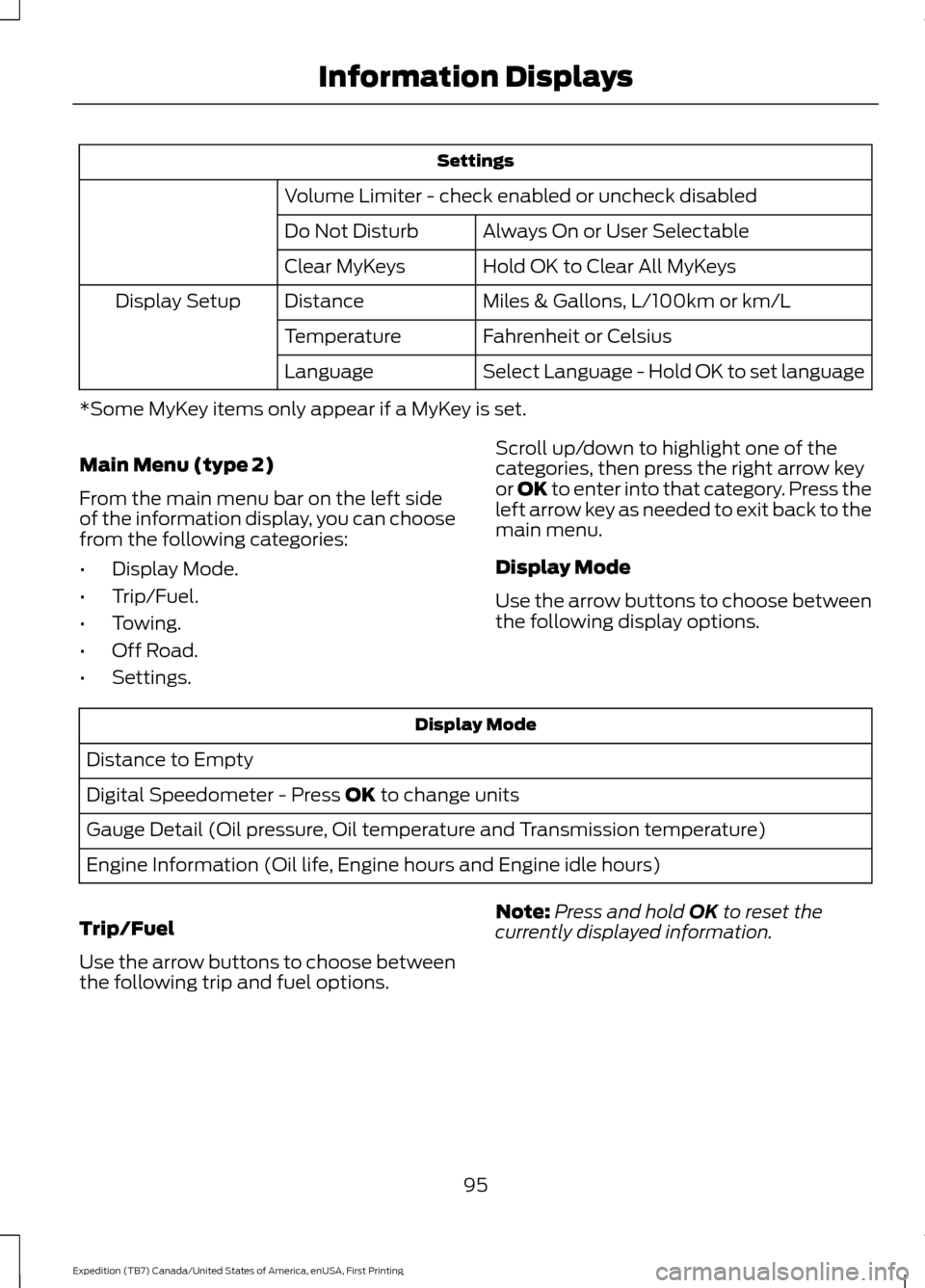
Volume Limiter - check enabled or uncheck disabled Always On or User Selectable
Do Not Disturb
Hold OK to Clear All MyKeys
Clear MyKeys
Miles & Gallons, L/100km or km/L
Distance
Display Setup
Fahrenheit or Celsius
Temperature
Select Language - Hold OK to set language
Language
*Some MyKey items only appear if a MyKey is set.
Main Menu (type 2)
From the main menu bar on the left side
of the information display, you can choose
from the following categories:
• Display Mode.
• Trip/Fuel.
• Towing.
• Off Road.
• Settings. Scroll up/down to highlight one of the
categories, then press the right arrow key
or OK to enter into that category. Press the
left arrow key as needed to exit back to the
main menu.
Display Mode
Use the arrow buttons to choose between
the following display options. Display Mode
Distance to Empty
Digital Speedometer - Press OK to change units
Gauge Detail (Oil pressure, Oil temperature and Transmission temperature)
Engine Information (Oil life, Engine hours and Engine idle hours)
Trip/Fuel
Use the arrow buttons to choose between
the following trip and fuel options. Note:
Press and hold
OK to reset the
currently displayed information.
95
Expedition (TB7) Canada/United States of America, enUSA, First Printing Information Displays
Page 101 of 421
Settings
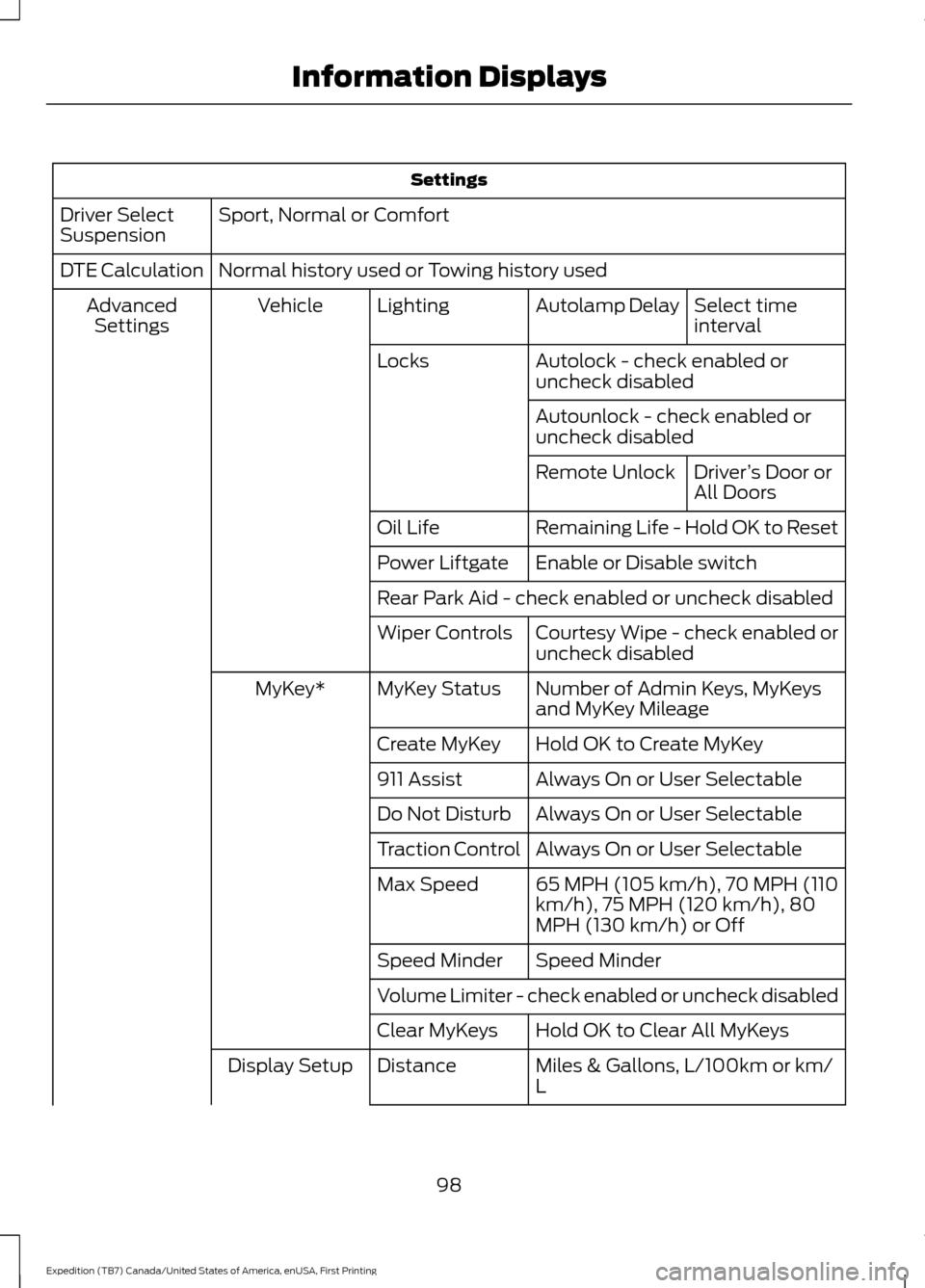
Sport, Normal or Comfort
Driver Select
Suspension
Normal history used or Towing history used
DTE Calculation
Select time
interval
Autolamp Delay
Lighting
Vehicle
Advanced
Settings
Autolock - check enabled or
uncheck disabled
Locks
Autounlock - check enabled or
uncheck disabledDriver’s Door or
All Doors
Remote Unlock
Remaining Life - Hold OK to Reset
Oil Life
Enable or Disable switch
Power Liftgate
Rear Park Aid - check enabled or uncheck disabled
Courtesy Wipe - check enabled or
uncheck disabled
Wiper Controls
Number of Admin Keys, MyKeys
and MyKey Mileage
MyKey Status
MyKey*
Hold OK to Create MyKey
Create MyKey
Always On or User Selectable
911 Assist
Always On or User Selectable
Do Not Disturb
Always On or User Selectable
Traction Control
65 MPH (105 km/h), 70 MPH (110
km/h), 75 MPH (120 km/h), 80
MPH (130 km/h) or Off
Max Speed
Speed Minder
Speed Minder
Volume Limiter - check enabled or uncheck disabled
Hold OK to Clear All MyKeys
Clear MyKeys
Miles & Gallons, L/100km or km/
L
Distance
Display Setup
98
Expedition (TB7) Canada/United States of America, enUSA, First Printing Information Displays
Page 103 of 421
Display Mode
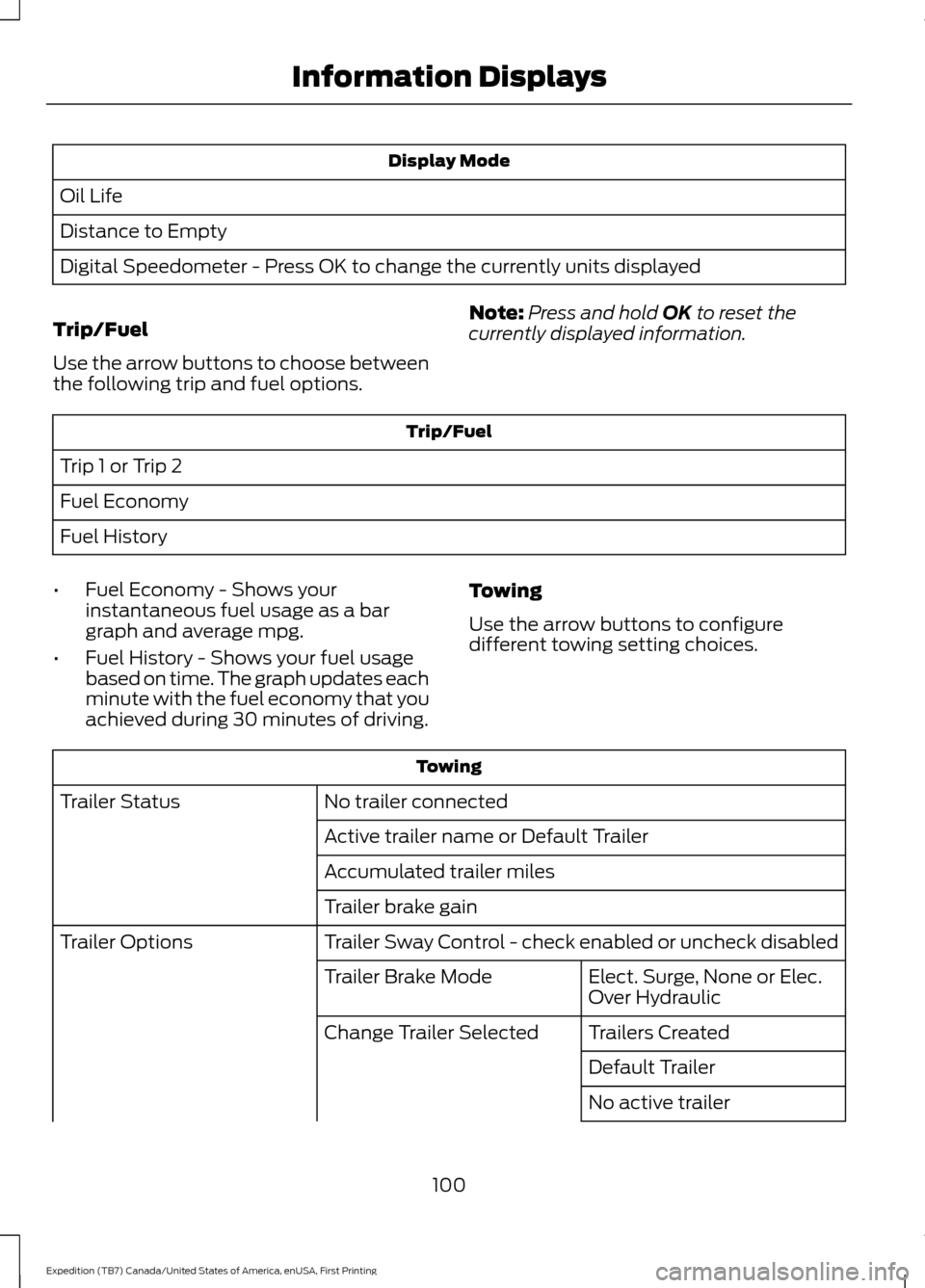
Oil Life
Distance to Empty
Digital Speedometer - Press OK to change the currently units displayed
Trip/Fuel
Use the arrow buttons to choose between
the following trip and fuel options. Note:
Press and hold OK to reset the
currently displayed information. Trip/Fuel
Trip 1 or Trip 2
Fuel Economy
Fuel History
• Fuel Economy - Shows your
instantaneous fuel usage as a bar
graph and average mpg.
• Fuel History - Shows your fuel usage
based on time. The graph updates each
minute with the fuel economy that you
achieved during 30 minutes of driving. Towing
Use the arrow buttons to configure
different towing setting choices. Towing
No trailer connected
Trailer Status
Active trailer name or Default Trailer
Accumulated trailer miles
Trailer brake gain
Trailer Sway Control - check enabled or uncheck disabled
Trailer Options
Elect. Surge, None or Elec.
Over Hydraulic
Trailer Brake Mode
Trailers Created
Change Trailer Selected
Default Trailer
No active trailer
100
Expedition (TB7) Canada/United States of America, enUSA, First Printing Information Displays
Page 105 of 421
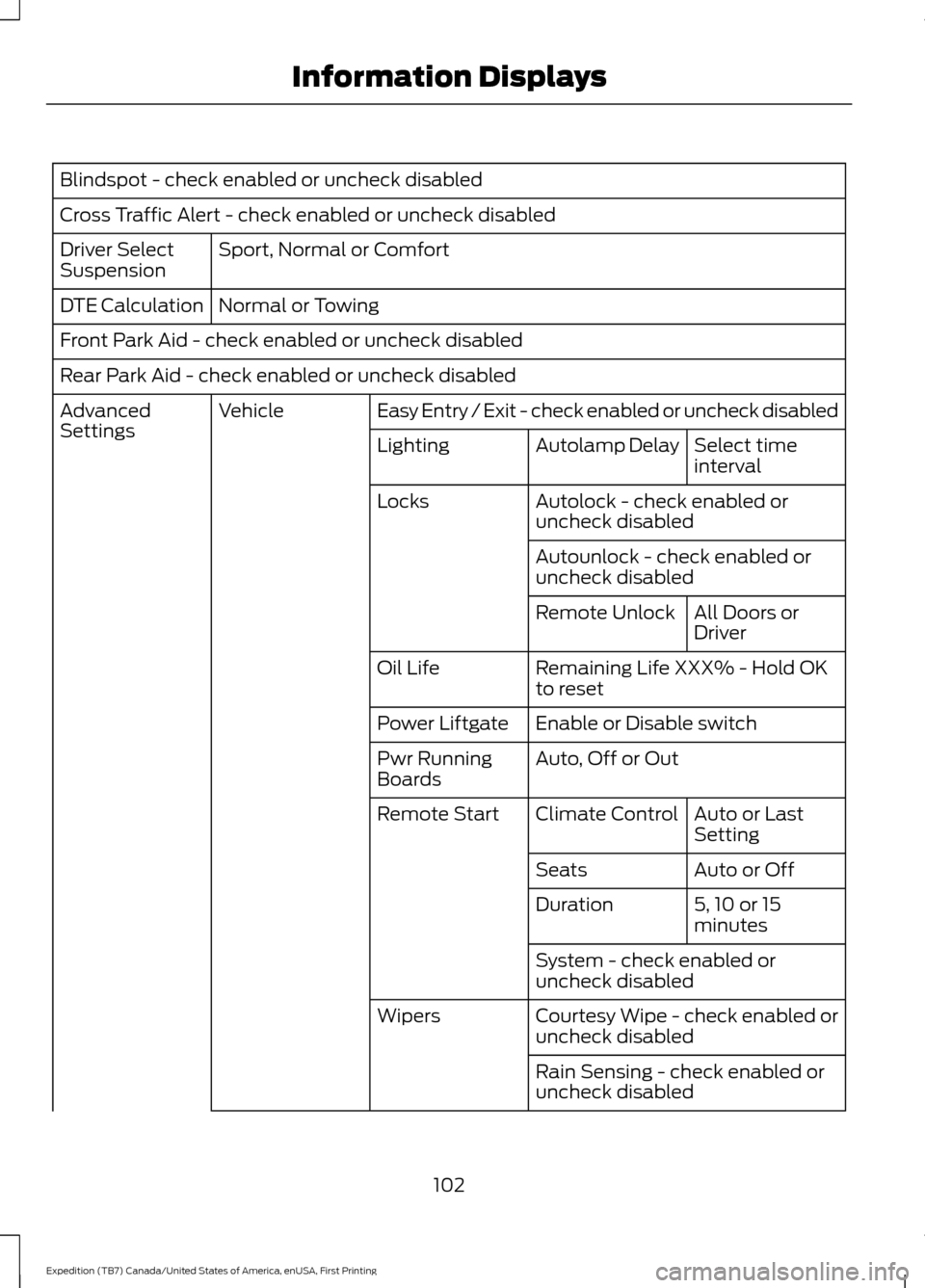
Blindspot - check enabled or uncheck disabled
Cross Traffic Alert - check enabled or uncheck disabled
Sport, Normal or Comfort
Driver Select
Suspension
Normal or Towing
DTE Calculation
Front Park Aid - check enabled or uncheck disabled
Rear Park Aid - check enabled or uncheck disabled
Easy Entry / Exit - check enabled or uncheck disabled
Vehicle
Advanced
Settings
Select time
interval
Autolamp Delay
Lighting
Autolock - check enabled or
uncheck disabled
Locks
Autounlock - check enabled or
uncheck disabledAll Doors or
Driver
Remote Unlock
Remaining Life XXX% - Hold OK
to reset
Oil Life
Enable or Disable switch
Power Liftgate
Auto, Off or Out
Pwr Running
Boards
Auto or Last
Setting
Climate Control
Remote Start
Auto or Off
Seats
5, 10 or 15
minutes
Duration
System - check enabled or
uncheck disabled
Courtesy Wipe - check enabled or
uncheck disabled
Wipers
Rain Sensing - check enabled or
uncheck disabled
102
Expedition (TB7) Canada/United States of America, enUSA, First Printing Information Displays
Page 249 of 421
Only use oils certified for gasoline engines
by the American Petroleum Institute (API).
An oil with this trademark symbol
conforms to the current engine and
emission system protection standards and
fuel economy requirements of the
International Lubricants Specification
Advisory Council (ILSAC), comprised of
U.S. and Japanese automobile
manufacturers.
1. Check the engine oil level.
2. If the engine oil level is not within the
normal range, add engine oil that
meets Ford specifications. See
Capacities and Specifications (page
303
).
3. Remove the engine oil filler cap and use a funnel to pour the engine oil into
the opening.
4. Wipe off any spilled oil.
5. Recheck the engine oil level. Make sure
the oil level is not above the normal
operating range on the engine oil level
dipstick.
6. Install the engine oil level dipstick and ensure it is fully seated.
7. Fully install the engine oil filler cap by turning the filler cap clockwise until
three clicks are heard or until the cap
is fully seated. OIL CHANGE INDICATOR
RESET
Use the information display controls on
the steering wheel to reset the oil change
indicator.
From the main menu scroll to:
Action and description
Message
Press the right arrow button,
then from this menu scroll
to the following message.
Settings
Press the right arrow button,
then from this menu scroll
to the following message.
Vehicle
Press the right arrow button,
then from this menu scroll
to the following message.
Oil Life
Press and hold the
OK
button until the instrument
cluster displays the
following message.
Hold OK to
Reset
Reset Successful
When the oil change indic-
ator resets the instrument
cluster displays 100%.
Remaining Life
{00}%
If the instrument cluster
displays one of the following
messages, repeat the
process.
Not Reset
Reset Cancelled
246
Expedition (TB7) Canada/United States of America, enUSA, First Printing MaintenanceE142732
Page 273 of 421
•
Touch-up exposed or primed metal to
prevent rust.
• Cover chrome and stainless steel parts
with a thick coat of auto wax to prevent
discoloration. Re-wax as necessary
when you wash your vehicle.
• Lubricate all hood, door and luggage
compartment hinges and latches with
a light grade oil.
• Cover interior trim to prevent fading.
• Keep all rubber parts free from oil and
solvents.
Engine
• Change the engine oil and filter prior to
storage because used engine oil
contains contaminates which may
cause engine damage.
• Start the engine every 15 days for a
minimum of 15 minutes. Run at fast idle
with the climate controls set to defrost
until the engine reaches normal
operating temperature.
• With your foot on the brake, shift
through all the gears while the engine
is running.
• We recommend that you change the
engine oil before you use your vehicle
again.
Fuel system
• Fill the fuel tank with high-quality fuel
until the first automatic shutoff of the
fuel pump nozzle.
Cooling system
• Protect against freezing temperatures.
• When removing your vehicle from
storage, check coolant fluid level.
Confirm that there are no cooling
system leaks and that fluid is at the
recommended level. Battery
•
Check and recharge as necessary. Keep
connections clean.
• If storing your vehicle for more than 30
days without recharging the battery,
we recommend that you disconnect
the battery cables to maintain battery
charge for quick starting.
Note: It is necessary to reset memory
features if battery cables are disconnected.
Brakes
• Make sure the brakes and parking brake
release fully.
Tires
• Maintain recommended air pressure.
Miscellaneous
• Make sure all linkages, cables, levers
and pins under your vehicle are covered
with grease to prevent rust.
• Move vehicles at least 25 ft (7.5 m)
every 15 days to lubricate working parts
and prevent corrosion.
Removing Vehicle From Storage
When your vehicle is ready to come out of
storage, do the following:
• Wash your vehicle to remove any dirt
or grease film build-up on window
surfaces.
• Check windshield wipers for any
deterioration.
• Check under the hood for any foreign
material that may have collected
during storage such as mice or squirrel
nests.
• Check the exhaust for any foreign
material that may have collected
during storage.
270
Expedition (TB7) Canada/United States of America, enUSA, First Printing Vehicle Care