turn signal FORD EXPEDITION 2016 3.G Owners Manual
[x] Cancel search | Manufacturer: FORD, Model Year: 2016, Model line: EXPEDITION, Model: FORD EXPEDITION 2016 3.GPages: 421, PDF Size: 6.3 MB
Page 85 of 421
Heated Exterior Mirrors
See Heated Windows and Mirrors (page
121).
Memory Mirrors
(If Equipped)
You can save and recall the mirror
positions through the memory function.
See
Memory Function (page 126).
Auto-Dimming Feature
The driver exterior mirror automatically
dims with the auto-dimming interior mirror.
Signal Indicator Mirrors
(If Equipped)
The outer portion of the appropriate mirror
housing blinks when you switch on the
direction indicator.
Blind Spot Monitor
(If Equipped)
See
Blind Spot Information System
(page 188).
INTERIOR MIRROR WARNING
Do not adjust the mirror when your
vehicle is moving.
Note:
Do not clean the housing or glass of
any mirror with harsh abrasives, fuel or other
petroleum or ammonia-based cleaning
products.
You can adjust the interior mirror to your
preference. Some mirrors also have a
second pivot point. This lets you move the
mirror head up or down and from side to
side. Auto-Dimming Mirror
Note:
Do not block the sensors on the front
and back of the mirror. Mirror performance
may be affected. A rear center passenger or
raised rear center head restraint may also
block light from reaching the sensor.
The mirror will dim automatically to reduce
glare when bright lights are detected from
behind your vehicle. It will automatically
return to normal reflection when you select
reverse gear to make sure you have a clear
view when backing up.
CHILDMINDER MIRROR
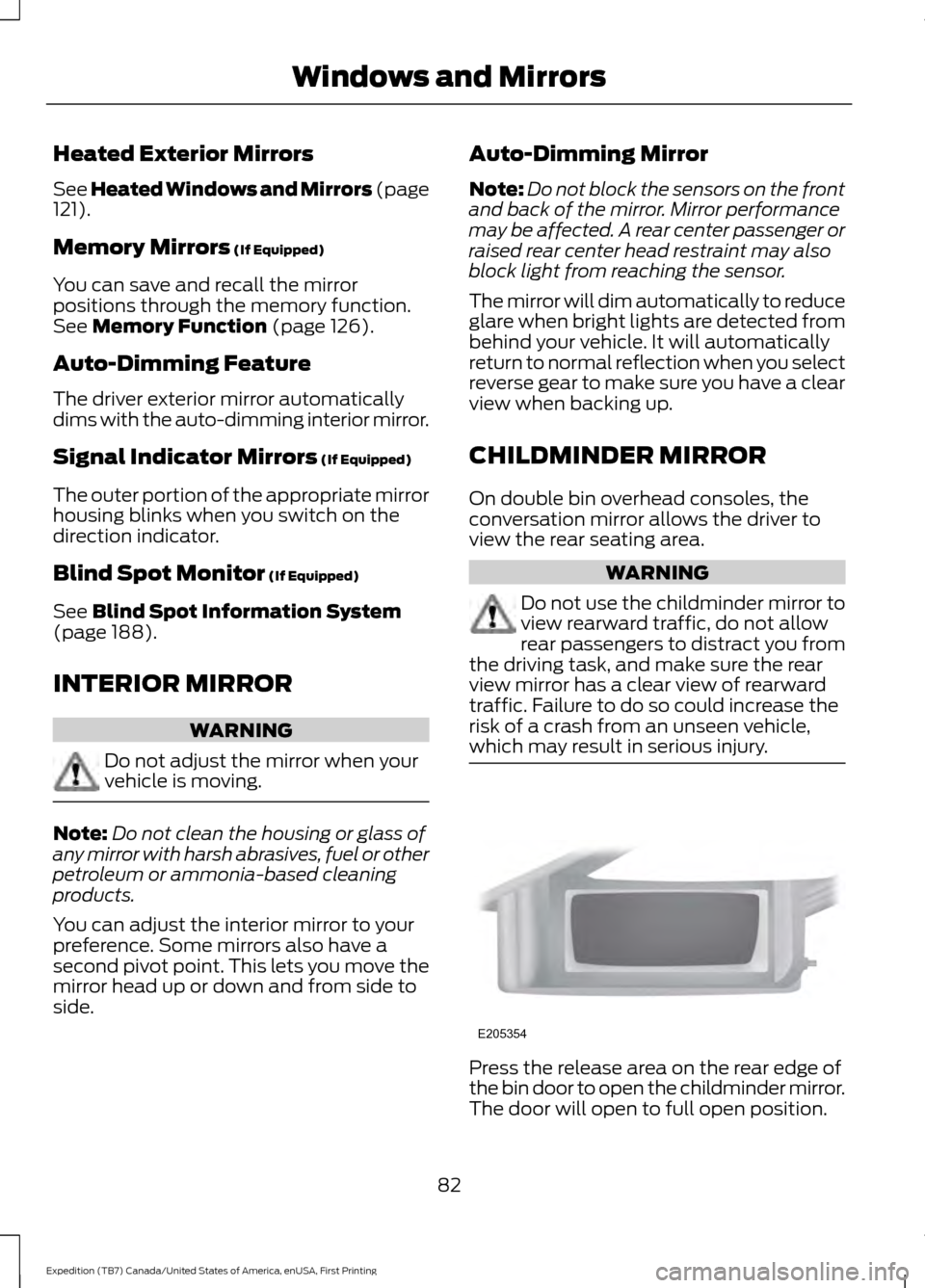
On double bin overhead consoles, the
conversation mirror allows the driver to
view the rear seating area. WARNING
Do not use the childminder mirror to
view rearward traffic, do not allow
rear passengers to distract you from
the driving task, and make sure the rear
view mirror has a clear view of rearward
traffic. Failure to do so could increase the
risk of a crash from an unseen vehicle,
which may result in serious injury. Press the release area on the rear edge of
the bin door to open the childminder mirror.
The door will open to full open position.
82
Expedition (TB7) Canada/United States of America, enUSA, First Printing Windows and MirrorsE205354
Page 94 of 421
4X4 LOW
Illuminates when you engage
four-wheel drive low. If the light
fails to display or remains on
when the ignition is on, have the system
serviced immediately by an authorized
dealer.
4X4 HIGH Illuminates when you engage
four-wheel drive high. If the light
fails to display or remains on
when the ignition is turned on, have the
system serviced immediately by an
authorized dealer.
AUDIBLE WARNINGS AND
INDICATORS
Key in Ignition Warning Chime
Sounds when you leave the key in the
ignition and the driver door open.
Headlamps On Warning Chime
Sounds when the headlamps or parking
lamps are on, the ignition is off (the key is
not in the ignition) and the driver door is
open.
Parking Brake On Warning Chime
Sounds when you have left the parking
brake on and drive your vehicle. If the
warning chime remains on after you have
released the parking brake, have the
system checked by an authorized dealer
immediately.
Direction Indicator Chime
Sounds when you leave the direction
indicator on after signaling a turn and
driving the vehicle more than 1.5 miles (2.4
km).
91
Expedition (TB7) Canada/United States of America, enUSA, First Printing Instrument ClusterE163174 E163175
Page 192 of 421
The Blind Spot Information System
illuminates an amber alert indicator in the
outside mirror on the side of your vehicle
the approaching vehicle is coming from.
When the Blind Spot Information System
is alerting on a vehicle and the
corresponding turn signal is ON, the Blind
Spot Information System alert indicator
flashes as an increased warning level.
The alert indicator dims when the system
detects nighttime darkness.
Note:
The alert indicator flashes in case of
an alert and the turn signal is set to that side
at the same time.
System Sensor Blockage WARNING
To help avoid injuries, NEVER use the
Blind Spot Information System as a
replacement for using the interior
and exterior mirrors or looking over your
shoulder before changing lanes. The Blind
Spot Information System is not a
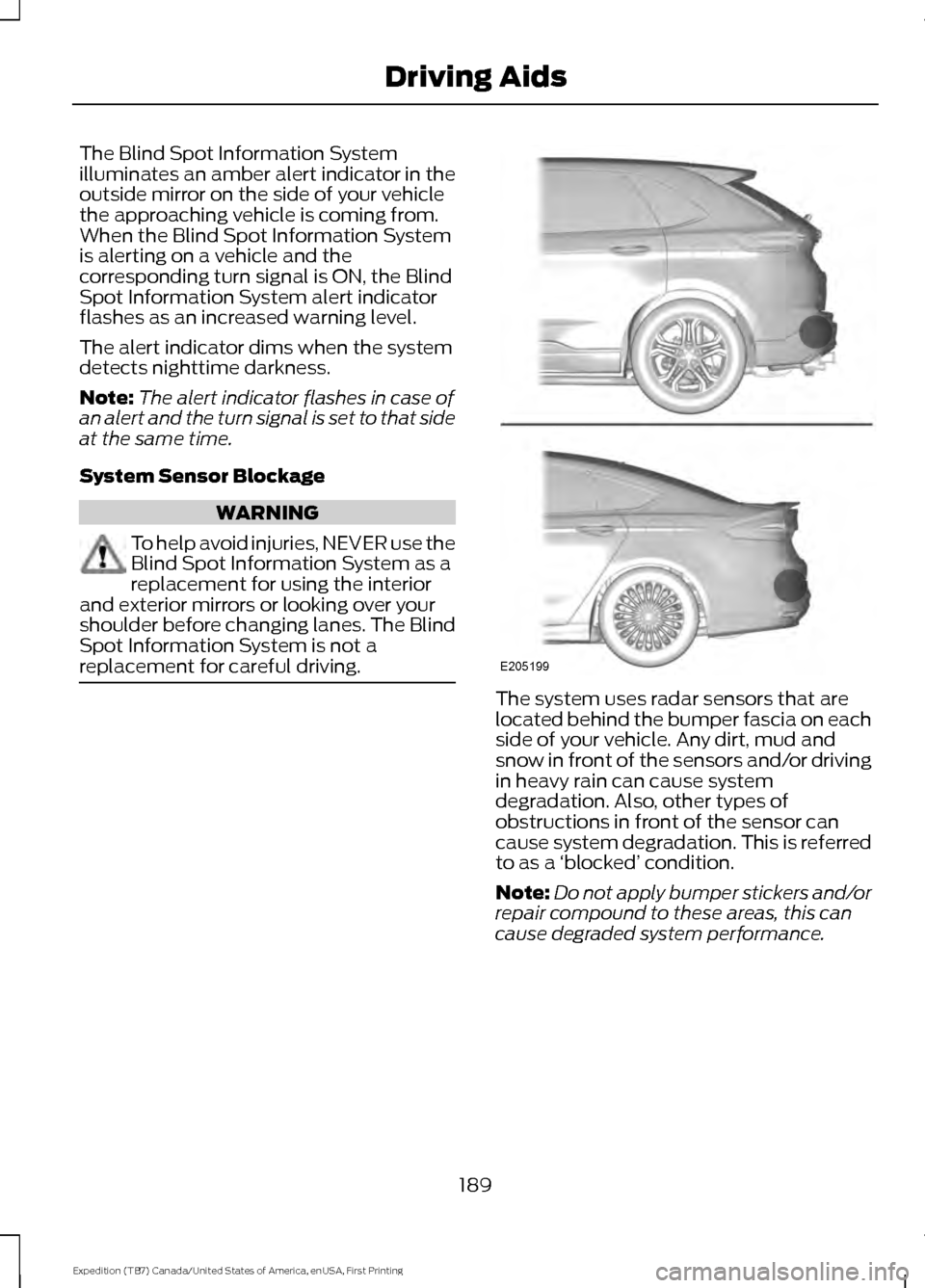
replacement for careful driving. The system uses radar sensors that are
located behind the bumper fascia on each
side of your vehicle. Any dirt, mud and
snow in front of the sensors and/or driving
in heavy rain can cause system
degradation. Also, other types of
obstructions in front of the sensor can
cause system degradation. This is referred
to as a
‘blocked ’ condition.
Note: Do not apply bumper stickers and/or
repair compound to these areas, this can
cause degraded system performance.
189
Expedition (TB7) Canada/United States of America, enUSA, First Printing Driving AidsE205199
Page 211 of 421
ESSENTIAL TOWING CHECKS
Follow these guidelines for safe towing:
•
Do not tow a trailer until you drive your
vehicle at least 1000 miles (1600
kilometers).
• Consult your local motor vehicle laws
for towing a trailer.
• See the instructions included with
towing accessories for the proper
installation and adjustment
specifications.
• Service your vehicle more frequently if
you tow a trailer. See your scheduled
maintenance information.
• If you use a rental trailer, follow the
instructions the rental agency gives
you.
See Load limits in the Load Carrying
chapter for load specification terms found
on the tire label and Safety Compliance
label and instructions on calculating your
vehicle's load.
Remember to account for the trailer
tongue weight as part of your vehicle load
when calculating the total vehicle weight.
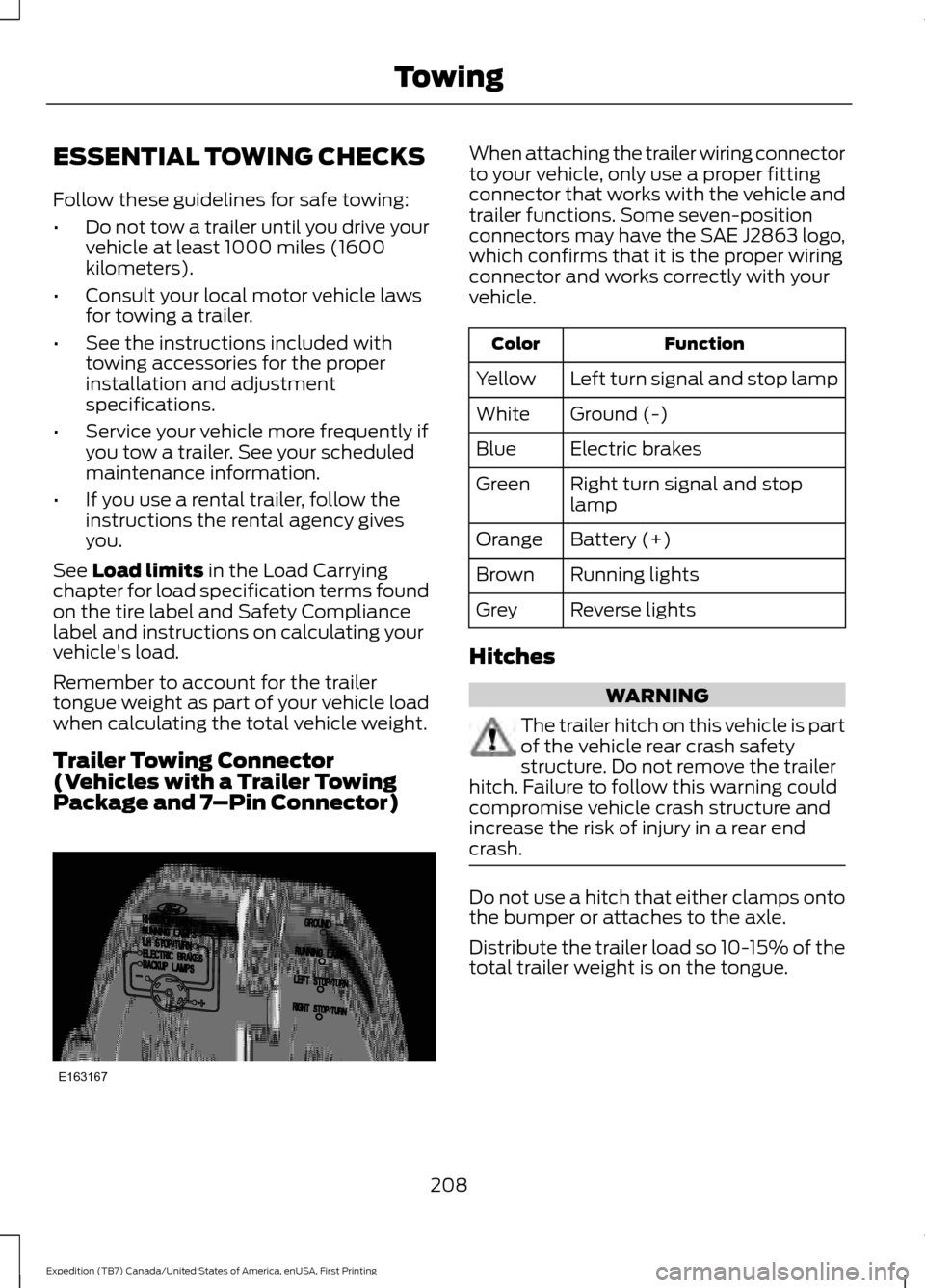
Trailer Towing Connector
(Vehicles with a Trailer Towing
Package and 7 –Pin Connector) When attaching the trailer wiring connector
to your vehicle, only use a proper fitting
connector that works with the vehicle and
trailer functions. Some seven-position
connectors may have the SAE J2863 logo,
which confirms that it is the proper wiring
connector and works correctly with your
vehicle.
Function
Color
Left turn signal and stop lamp
Yellow
Ground (-)
White
Electric brakes
Blue
Right turn signal and stop
lamp
Green
Battery (+)
Orange
Running lights
Brown
Reverse lights
Grey
Hitches WARNING
The trailer hitch on this vehicle is part
of the vehicle rear crash safety
structure. Do not remove the trailer
hitch. Failure to follow this warning could
compromise vehicle crash structure and
increase the risk of injury in a rear end
crash. Do not use a hitch that either clamps onto
the bumper or attaches to the axle.
Distribute the trailer load so 10-15% of the
total trailer weight is on the tongue.
208
Expedition (TB7) Canada/United States of America, enUSA, First Printing TowingE163167
Page 217 of 421
•
Your vehicle's brake system and the
trailer brake system work
independently of each other. Changing
the gain setting on the controller does
not affect the operation of your
vehicle's brakes whether you attach a
trailer or not.
• When you switch the engine off, the
controller output is disabled and the
display and module shut down. The
controller module and display turn on
when you switch the ignition on.
• The trailer brake controller is only a
factory-installed or dealer-installed
item. Ford is not responsible for
warranty or performance of the
controller due to misuse or customer
installation.
Trailer Lamps WARNING
Never connect any trailer lamp wiring
to the vehicle's tail lamp wiring; this
may damage the electrical system
resulting in fire. Contact your authorized
dealer as soon as possible for assistance
in proper trailer tow wiring installation.
Additional electrical equipment may be
required. Trailer lamps are required on most towed
vehicles. Make sure all running lights, brake
lights, turn signals and hazard lights are
working.
Before Towing a Trailer
Practice turning, stopping and backing up
to get the feel of your vehicle-trailer
combination before starting on a trip.
When turning, make wider turns so the
trailer wheels clear curbs and other
obstacles. When Towing a Trailer
•
Do not drive faster than 70 mph (113
km/h) during the first 500 miles (800
kilometers).
• Do not make full-throttle starts.
• Check your hitch, electrical connections
and trailer wheel lug nuts thoroughly
after you have traveled 50 miles (80
kilometers).
• When stopped in congested or heavy
traffic during hot weather, place the
gearshift in position P to aid engine and
transmission cooling and to help A/C
performance.
• Turn off the speed control with heavy
loads or in hilly terrain. The speed
control may turn off automatically
when you are towing on long, steep
grades.
• Shift to a lower gear when driving down
a long or steep hill. Do not apply the
brakes continuously, as they may
overheat and become less effective.
• If your transmission is equipped with a
Grade Assist or Tow/Haul feature, use
this feature when towing. This provides
engine braking and helps eliminate
excessive transmission shifting for
optimum fuel economy and
transmission cooling.
• If your vehicle is equipped with
AdvanceTrac with RSC, this system
may turn on during typical cornering
maneuvers with a heavily loaded trailer.
This is normal. Turning the corner at a
slower speed while towing may reduce
this tendency.
• If you are towing a trailer frequently in
hot weather, hilly conditions, at the
gross combined weight rating (or any
combination of these factors), consider
refilling your rear axle with synthetic
gear lubricant (if the axle is not already
filled with it). See Capacities and
Specifications (page 303).
214
Expedition (TB7) Canada/United States of America, enUSA, First Printing Towing
Page 243 of 421
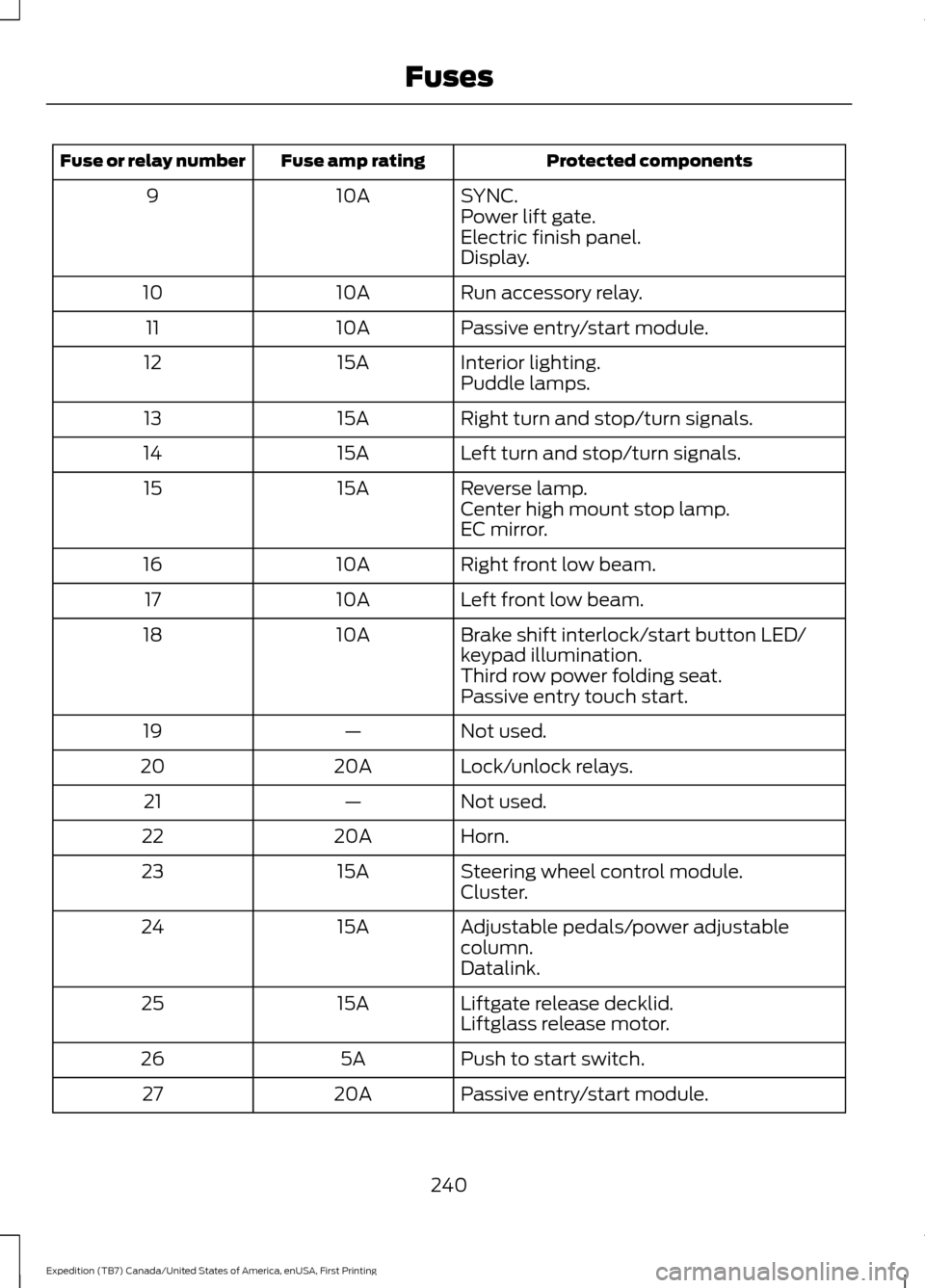
Protected components
Fuse amp rating
Fuse or relay number
SYNC.
10A
9
Power lift gate.
Electric finish panel.
Display.
Run accessory relay.
10A
10
Passive entry/start module.
10A
11
Interior lighting.
15A
12
Puddle lamps.
Right turn and stop/turn signals.
15A
13
Left turn and stop/turn signals.
15A
14
Reverse lamp.
15A
15
Center high mount stop lamp.
EC mirror.
Right front low beam.
10A
16
Left front low beam.
10A
17
Brake shift interlock/start button LED/
keypad illumination.
10A
18
Third row power folding seat.
Passive entry touch start.
Not used.
—
19
Lock/unlock relays.
20A
20
Not used.
—
21
Horn.
20A
22
Steering wheel control module.
15A
23
Cluster.
Adjustable pedals/power adjustable
column.
15A
24
Datalink.
Liftgate release decklid.
15A
25
Liftglass release motor.
Push to start switch.
5A
26
Passive entry/start module.
20A
27
240
Expedition (TB7) Canada/United States of America, enUSA, First Printing Fuses
Page 321 of 421
When HD Radio broadcasts are active, you
can access the following functions:
•
Scan allows you to hear a brief
sampling of all available stations. This
feature still works when HD Radio
reception is on, although it does not
scan for HD2-HD7 channels. You may
see the HD logo appear if the station
has a digital broadcast. •
Memory presets
allow you to save an
active channel as a memory preset.
Touch and hold a memory preset slot
until the sound returns. There is a brief
mute while the radio saves the station.
Sound returns when finished. When
switching to an HD2 or HD3 memory
preset, the sound mutes before the
digital audio plays, because the system
has to reacquire the digital signal.
Note: As with any saved radio station, you
cannot access the saved station if your
vehicle is outside the station ’s reception
area.
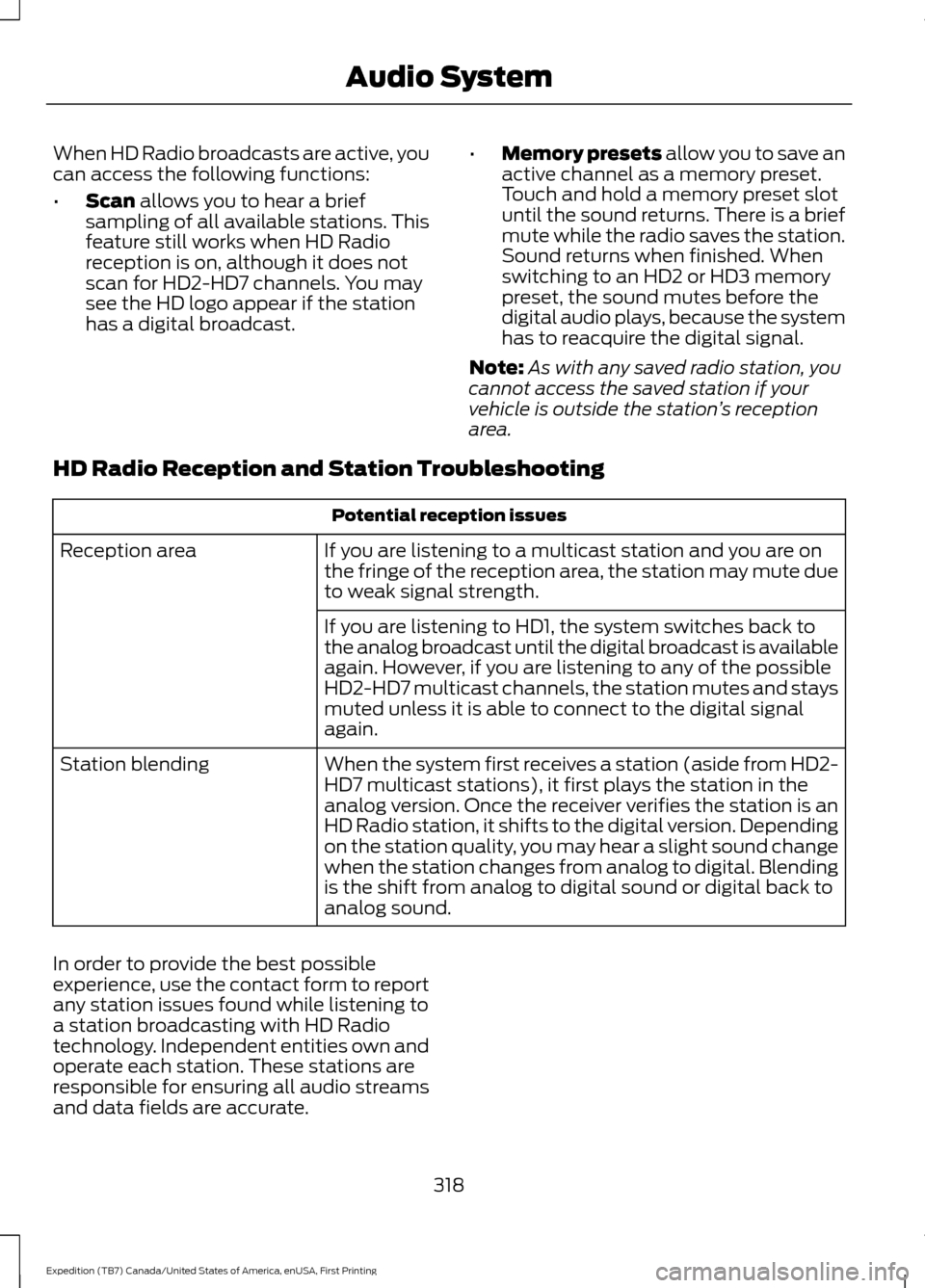
HD Radio Reception and Station Troubleshooting Potential reception issues
If you are listening to a multicast station and you are on
the fringe of the reception area, the station may mute due
to weak signal strength.
Reception area
If you are listening to HD1, the system switches back to
the analog broadcast until the digital broadcast is available
again. However, if you are listening to any of the possible
HD2-HD7 multicast channels, the station mutes and stays
muted unless it is able to connect to the digital signal
again.
When the system first receives a station (aside from HD2-
HD7 multicast stations), it first plays the station in the
analog version. Once the receiver verifies the station is an
HD Radio station, it shifts to the digital version. Depending
on the station quality, you may hear a slight sound change
when the station changes from analog to digital. Blending
is the shift from analog to digital sound or digital back to
analog sound.
Station blending
In order to provide the best possible
experience, use the contact form to report
any station issues found while listening to
a station broadcasting with HD Radio
technology. Independent entities own and
operate each station. These stations are
responsible for ensuring all audio streams
and data fields are accurate. 318
Expedition (TB7) Canada/United States of America, enUSA, First Printing Audio System
Page 324 of 421
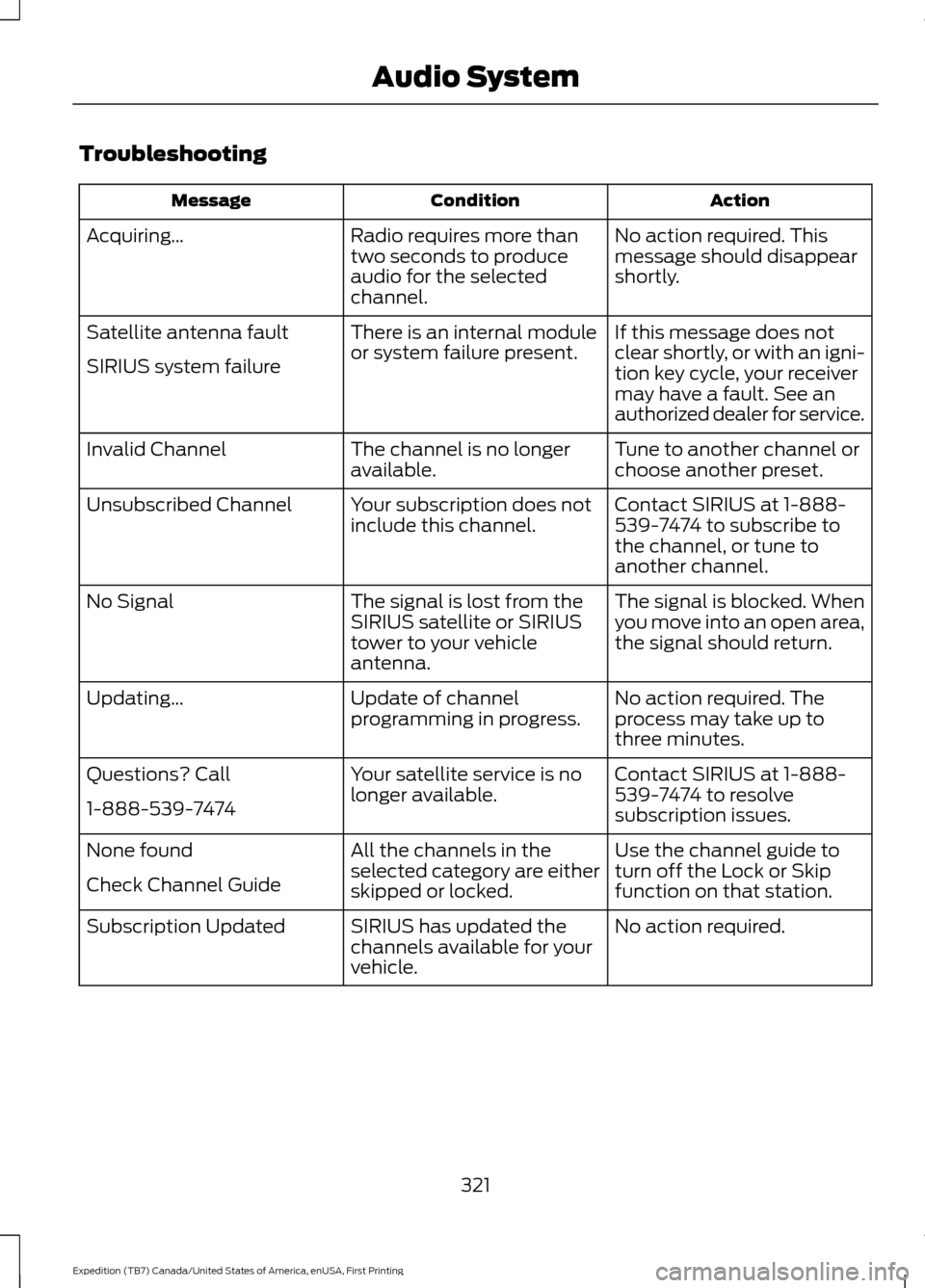
Troubleshooting
Action
Condition
Message
No action required. This
message should disappear
shortly.
Radio requires more than
two seconds to produce
audio for the selected
channel.
Acquiring\b
If this message does not
clear shortly, or with an igni-
tion key cycle, your receiver
may have a fault. See an
authorized dealer for service.
There is an internal module
or system failure present.
Satellite antenna fault
SIRIUS system failure
Tune to another channel or
choose another preset.
The channel is no longer
available.
Invalid Channel
Contact SIRIUS at 1-888-
539-7474 to subscribe to
the channel, or tune to
another channel.
Your subscription does not
include this channel.
Unsubscribed Channel
The signal is blocked. When
you move into an open area,
the signal should return.
The signal is lost from the
SIRIUS satellite or SIRIUS
tower to your vehicle
antenna.
No Signal
No action required. The
process may take up to
three minutes.
Update of channel
programming in progress.
Updating\b
Contact SIRIUS at 1-888-
539-7474 to resolve
subscription issues.
Your satellite service is no
longer available.
Questions? Call
1-888-539-7474
Use the channel guide to
turn off the Lock or Skip
function on that station.
All the channels in the
selected category are either
skipped or locked.
None found
Check Channel Guide
No action required.
SIRIUS has updated the
channels available for your
vehicle.
Subscription Updated
321
Expedition (TB7) Canada/United States of America, enUSA, First Printing Audio System
Page 339 of 421
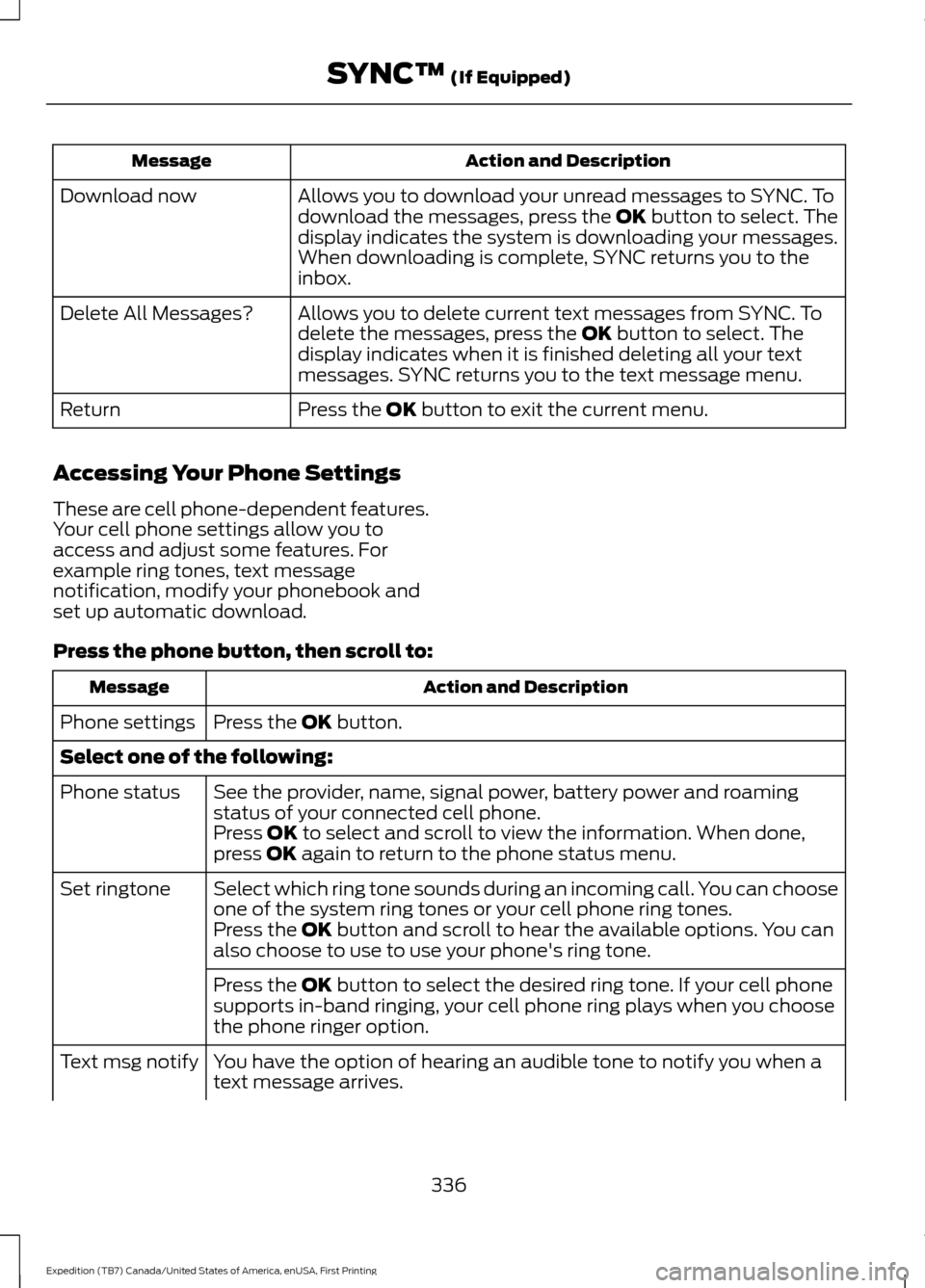
Action and Description
Message
Allows you to download your unread messages to SYNC. To
download the messages, press the OK button to select. The
display indicates the system is downloading your messages.
When downloading is complete, SYNC returns you to the
inbox.
Download now
Allows you to delete current text messages from SYNC. To
delete the messages, press the
OK button to select. The
display indicates when it is finished deleting all your text
messages. SYNC returns you to the text message menu.
Delete All Messages?
Press the
OK button to exit the current menu.
Return
Accessing Your Phone Settings
These are cell phone-dependent features.
Your cell phone settings allow you to
access and adjust some features. For
example ring tones, text message
notification, modify your phonebook and
set up automatic download.
Press the phone button, then scroll to: Action and Description
Message
Press the
OK button.
Phone settings
Select one of the following:
See the provider, name, signal power, battery power and roaming
status of your connected cell phone.
Phone status
Press
OK to select and scroll to view the information. When done,
press OK again to return to the phone status menu.
Select which ring tone sounds during an incoming call. You can choose
one of the system ring tones or your cell phone ring tones.
Set ringtone
Press the
OK button and scroll to hear the available options. You can
also choose to use to use your phone's ring tone.
Press the
OK button to select the desired ring tone. If your cell phone
supports in-band ringing, your cell phone ring plays when you choose
the phone ringer option.
You have the option of hearing an audible tone to notify you when a
text message arrives.
Text msg notify
336
Expedition (TB7) Canada/United States of America, enUSA, First Printing SYNC™
(If Equipped)
Page 365 of 421
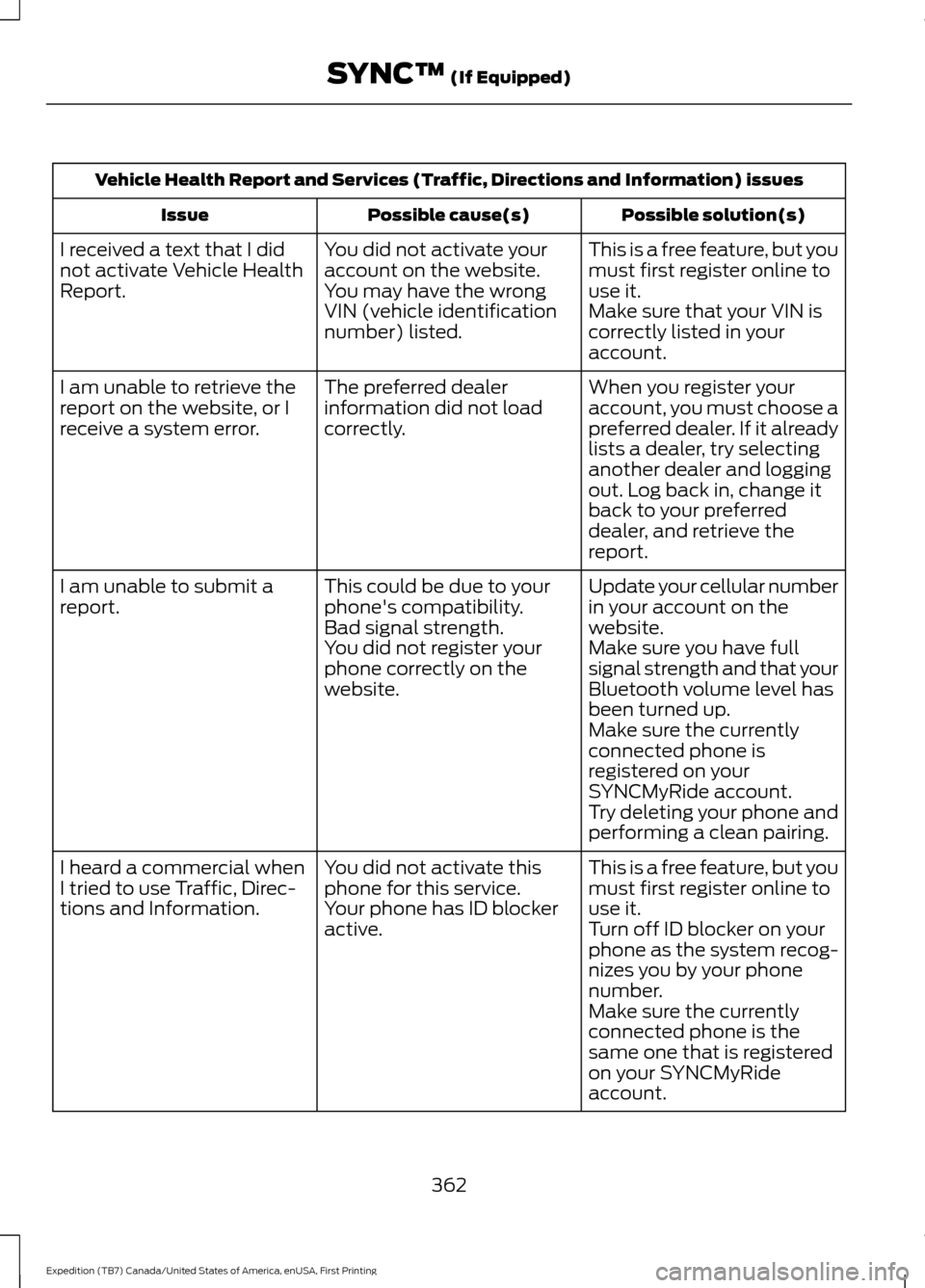
Vehicle Health Report and Services (Traffic, Directions and Information) issues
Possible solution(s)
Possible cause(s)
Issue
This is a free feature, but you
must first register online to
use it.
You did not activate your
account on the website.
You may have the wrong
VIN (vehicle identification
number) listed.
I received a text that I did
not activate Vehicle Health
Report.
Make sure that your VIN is
correctly listed in your
account.
When you register your
account, you must choose a
preferred dealer. If it already
lists a dealer, try selecting
another dealer and logging
out. Log back in, change it
back to your preferred
dealer, and retrieve the
report.
The preferred dealer
information did not load
correctly.
I am unable to retrieve the
report on the website, or I
receive a system error.
Update your cellular number
in your account on the
website.
This could be due to your
phone's compatibility.
Bad signal strength.
I am unable to submit a
report.
Make sure you have full
signal strength and that your
Bluetooth volume level has
been turned up.
You did not register your
phone correctly on the
website.
Make sure the currently
connected phone is
registered on your
SYNCMyRide account.
Try deleting your phone and
performing a clean pairing.
This is a free feature, but you
must first register online to
use it.
You did not activate this
phone for this service.
Your phone has ID blocker
active.
I heard a commercial when
I tried to use Traffic, Direc-
tions and Information.
Turn off ID blocker on your
phone as the system recog-
nizes you by your phone
number.
Make sure the currently
connected phone is the
same one that is registered
on your SYNCMyRide
account.
362
Expedition (TB7) Canada/United States of America, enUSA, First Printing SYNC™ (If Equipped)