brake FORD EXPEDITION 2017 3.G User Guide
[x] Cancel search | Manufacturer: FORD, Model Year: 2017, Model line: EXPEDITION, Model: FORD EXPEDITION 2017 3.GPages: 500, PDF Size: 4.83 MB
Page 78 of 500
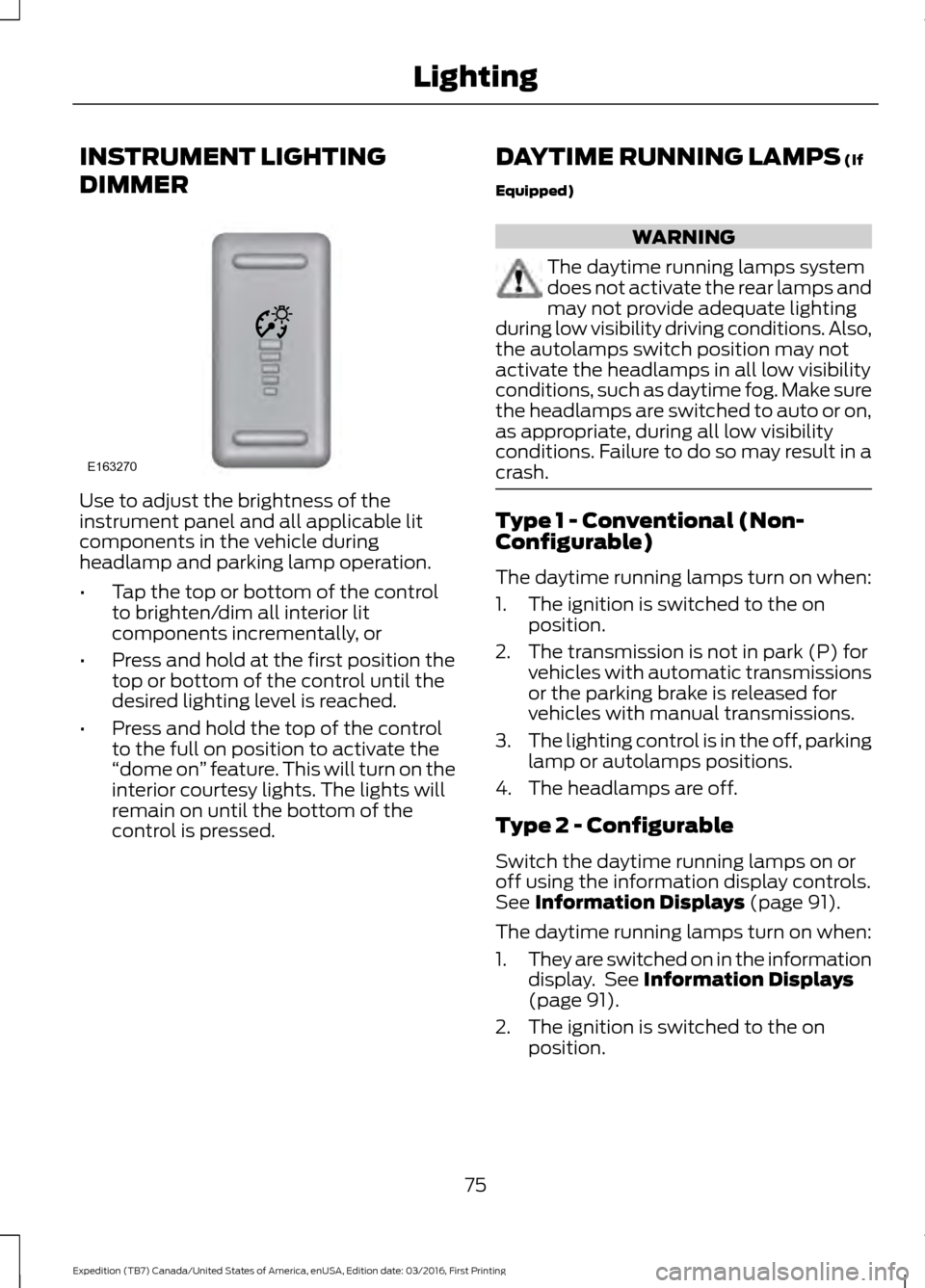
INSTRUMENT LIGHTING
DIMMER
Use to adjust the brightness of the
instrument panel and all applicable lit
components in the vehicle during
headlamp and parking lamp operation.
•
Tap the top or bottom of the control
to brighten/dim all interior lit
components incrementally, or
• Press and hold at the first position the
top or bottom of the control until the
desired lighting level is reached.
• Press and hold the top of the control
to the full on position to activate the
“dome on ” feature. This will turn on the
interior courtesy lights. The lights will
remain on until the bottom of the
control is pressed. DAYTIME RUNNING LAMPS (If
Equipped) WARNING
The daytime running lamps system
does not activate the rear lamps and
may not provide adequate lighting
during low visibility driving conditions. Also,
the autolamps switch position may not
activate the headlamps in all low visibility
conditions, such as daytime fog. Make sure
the headlamps are switched to auto or on,
as appropriate, during all low visibility
conditions. Failure to do so may result in a
crash. Type 1 - Conventional (Non-
Configurable)
The daytime running lamps turn on when:
1. The ignition is switched to the on
position.
2. The transmission is not in park (P) for vehicles with automatic transmissions
or the parking brake is released for
vehicles with manual transmissions.
3. The lighting control is in the off, parking
lamp or autolamps positions.
4. The headlamps are off.
Type 2 - Configurable
Switch the daytime running lamps on or
off using the information display controls.
See
Information Displays (page 91).
The daytime running lamps turn on when:
1. They are switched on in the information
display. See
Information Displays
(page 91).
2. The ignition is switched to the on position.
75
Expedition (TB7) Canada/United States of America, enUSA, Edition date: 03/2016, First Printing LightingE163270
Page 79 of 500
3. The transmission is not in park (P) for
vehicles with automatic transmissions
or the parking brake is released for
vehicles with manual transmissions.
4. The lighting control is in the autolamps
position.
5. The headlamps are off.
The other lighting control switch positions
do not activate the daytime running lamps,
and you can use them to temporarily
override autolamp control.
When switched off in the information
display, the daytime running lamps are off
in all lighting control switch positions.
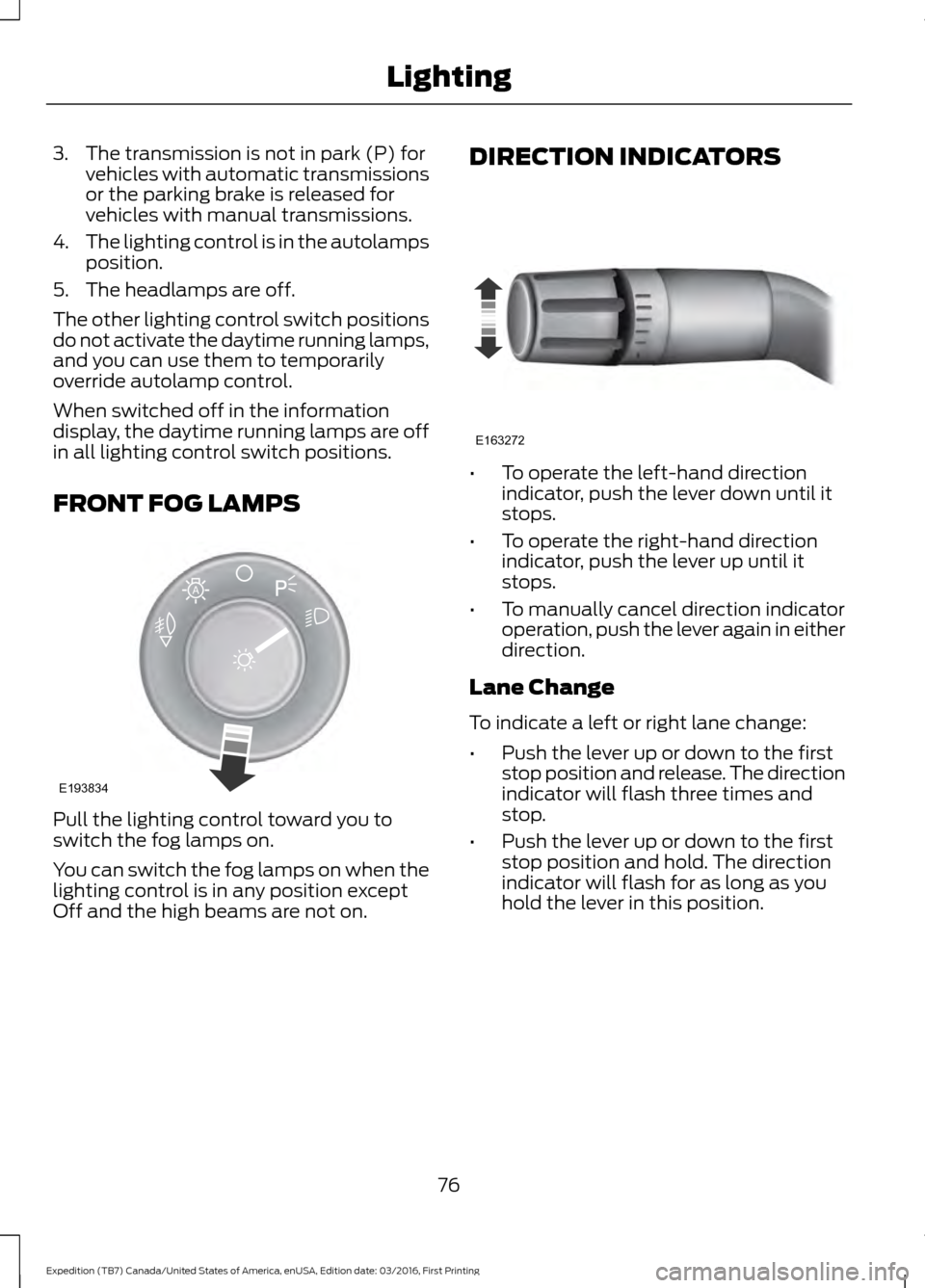
FRONT FOG LAMPS Pull the lighting control toward you to
switch the fog lamps on.
You can switch the fog lamps on when the
lighting control is in any position except
Off and the high beams are not on. DIRECTION INDICATORS •
To operate the left-hand direction
indicator, push the lever down until it
stops.
• To operate the right-hand direction
indicator, push the lever up until it
stops.
• To manually cancel direction indicator
operation, push the lever again in either
direction.
Lane Change
To indicate a left or right lane change:
• Push the lever up or down to the first
stop position and release. The direction
indicator will flash three times and
stop.
• Push the lever up or down to the first
stop position and hold. The direction
indicator will flash for as long as you
hold the lever in this position.
76
Expedition (TB7) Canada/United States of America, enUSA, Edition date: 03/2016, First Printing LightingE193834
A E163272
Page 90 of 500
WARNING LAMPS AND
INDICATORS
The following warning lamps and
indicators alert you to a vehicle condition
that may become serious. Some lamps
illuminate when you start your vehicle to
make sure they work. If any lamps remain
on after starting your vehicle, refer to the
respective system warning lamp for further
information.
Note:
Some warning indicators appear in
the information display and function the
same as a warning lamp but do not display
when you start your vehicle.
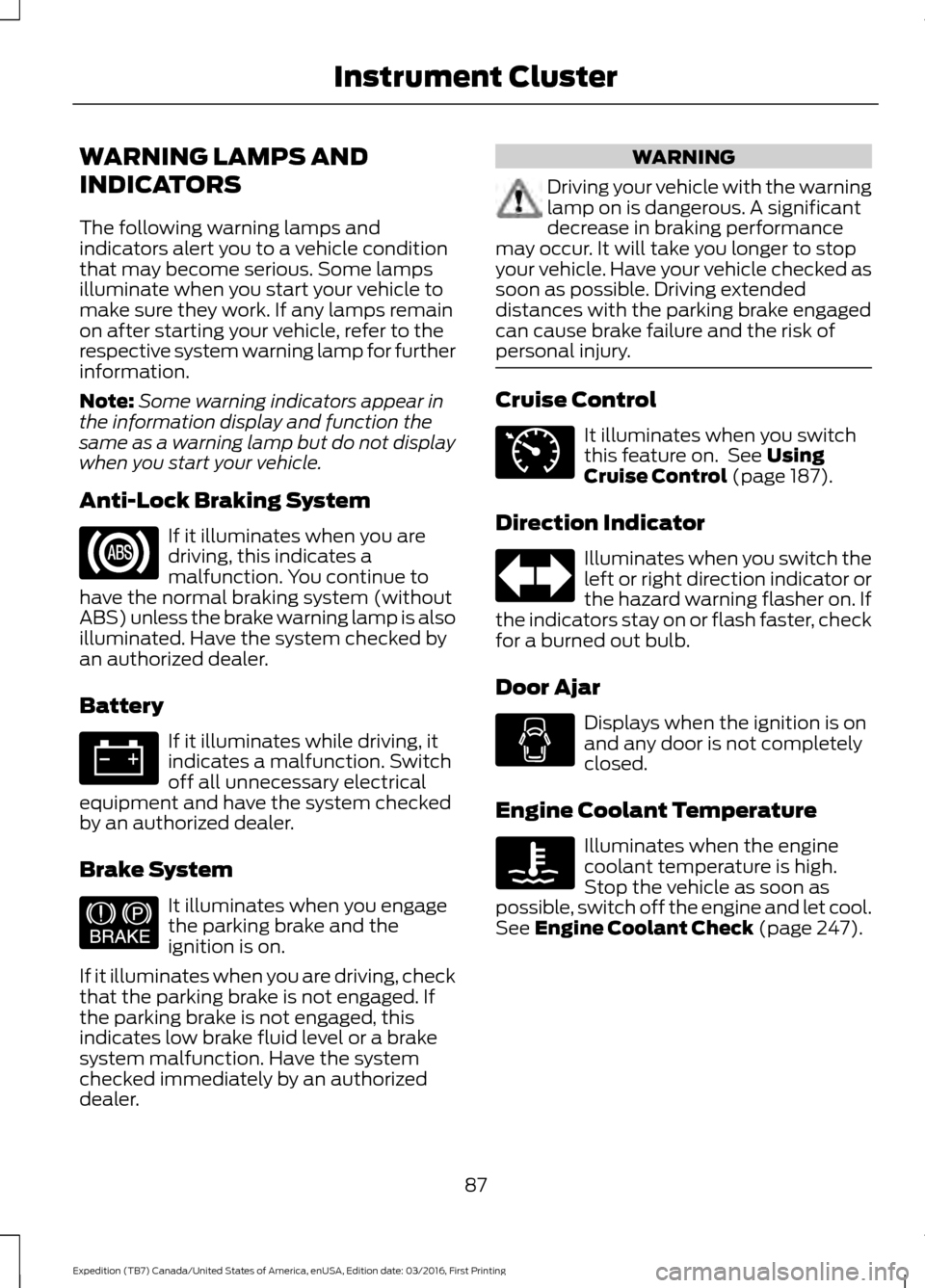
Anti-Lock Braking System If it illuminates when you are
driving, this indicates a
malfunction. You continue to
have the normal braking system (without
ABS) unless the brake warning lamp is also
illuminated. Have the system checked by
an authorized dealer.
Battery If it illuminates while driving, it
indicates a malfunction. Switch
off all unnecessary electrical
equipment and have the system checked
by an authorized dealer.
Brake System It illuminates when you engage
the parking brake and the
ignition is on.
If it illuminates when you are driving, check
that the parking brake is not engaged. If
the parking brake is not engaged, this
indicates low brake fluid level or a brake
system malfunction. Have the system
checked immediately by an authorized
dealer. WARNING
Driving your vehicle with the warning
lamp on is dangerous. A significant
decrease in braking performance
may occur. It will take you longer to stop
your vehicle. Have your vehicle checked as
soon as possible. Driving extended
distances with the parking brake engaged
can cause brake failure and the risk of
personal injury. Cruise Control
It illuminates when you switch
this feature on. See Using
Cruise Control (page 187).
Direction Indicator Illuminates when you switch the
left or right direction indicator or
the hazard warning flasher on. If
the indicators stay on or flash faster, check
for a burned out bulb.
Door Ajar Displays when the ignition is on
and any door is not completely
closed.
Engine Coolant Temperature Illuminates when the engine
coolant temperature is high.
Stop the vehicle as soon as
possible, switch off the engine and let cool.
See
Engine Coolant Check (page 247).
87
Expedition (TB7) Canada/United States of America, enUSA, Edition date: 03/2016, First Printing Instrument Cluster E144522 E71340
Page 93 of 500
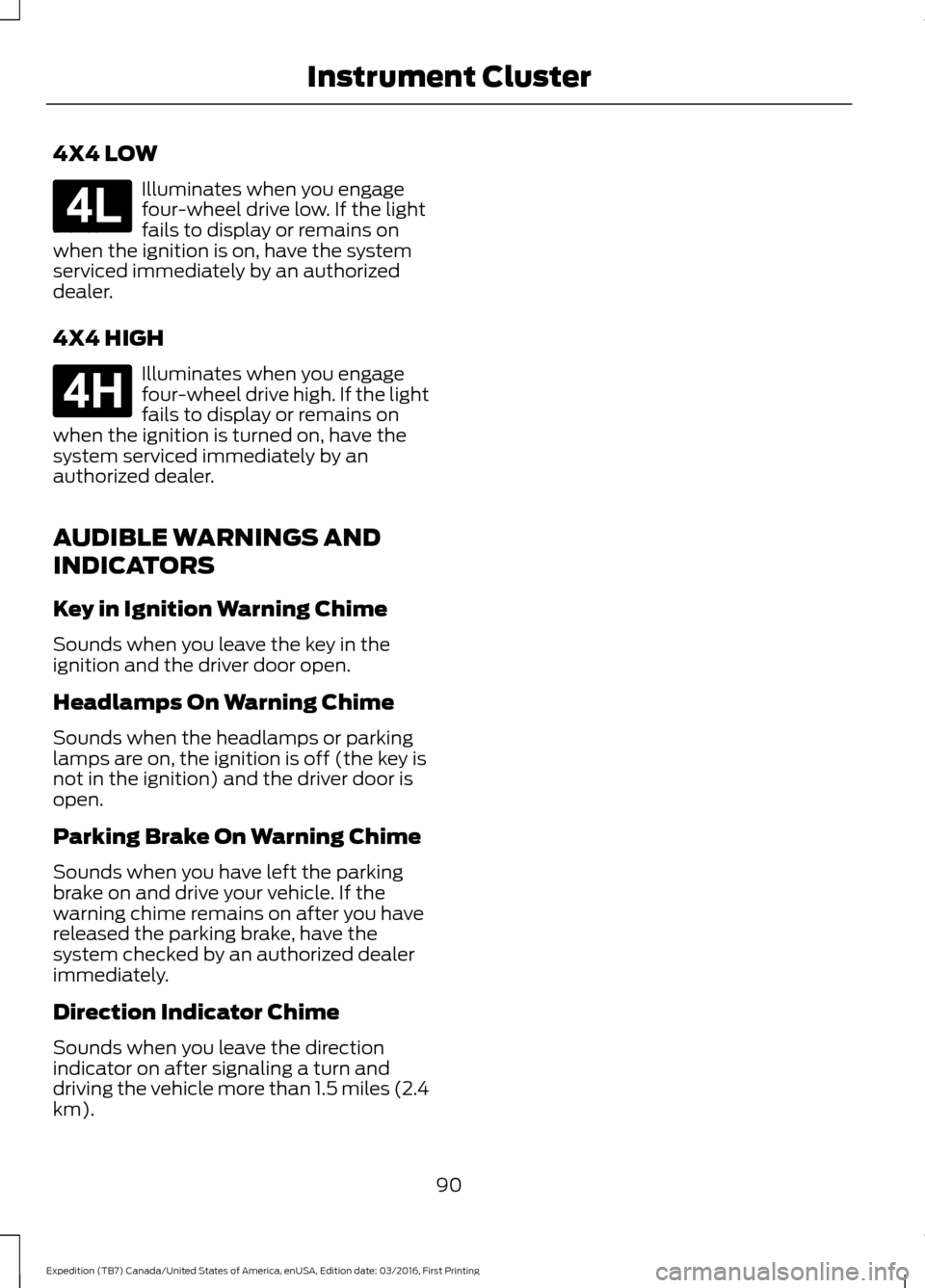
4X4 LOW
Illuminates when you engage
four-wheel drive low. If the light
fails to display or remains on
when the ignition is on, have the system
serviced immediately by an authorized
dealer.
4X4 HIGH Illuminates when you engage
four-wheel drive high. If the light
fails to display or remains on
when the ignition is turned on, have the
system serviced immediately by an
authorized dealer.
AUDIBLE WARNINGS AND
INDICATORS
Key in Ignition Warning Chime
Sounds when you leave the key in the
ignition and the driver door open.
Headlamps On Warning Chime
Sounds when the headlamps or parking
lamps are on, the ignition is off (the key is
not in the ignition) and the driver door is
open.
Parking Brake On Warning Chime
Sounds when you have left the parking
brake on and drive your vehicle. If the
warning chime remains on after you have
released the parking brake, have the
system checked by an authorized dealer
immediately.
Direction Indicator Chime
Sounds when you leave the direction
indicator on after signaling a turn and
driving the vehicle more than 1.5 miles (2.4
km).
90
Expedition (TB7) Canada/United States of America, enUSA, Edition date: 03/2016, First Printing Instrument ClusterE181780 E181779
Page 96 of 500
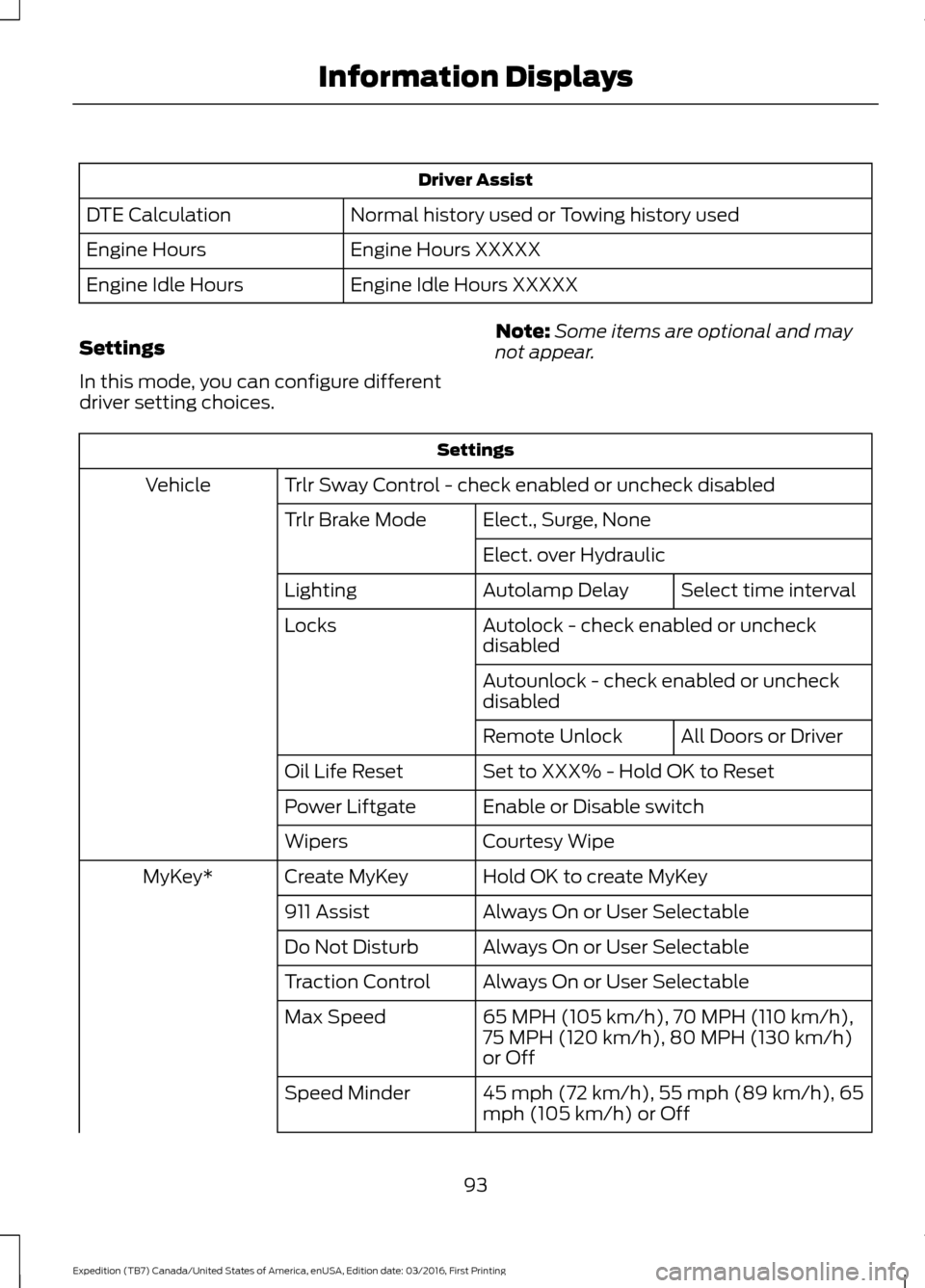
Driver Assist
Normal history used or Towing history used
DTE Calculation
Engine Hours XXXXX
Engine Hours
Engine Idle Hours XXXXX
Engine Idle Hours
Settings
In this mode, you can configure different
driver setting choices. Note:
Some items are optional and may
not appear. Settings
Trlr Sway Control - check enabled or uncheck disabled
Vehicle
Elect., Surge, None
Trlr Brake Mode
Elect. over HydraulicSelect time interval
Autolamp Delay
Lighting
Autolock - check enabled or uncheck
disabled
Locks
Autounlock - check enabled or uncheck
disabledAll Doors or Driver
Remote Unlock
Set to XXX% - Hold OK to Reset
Oil Life Reset
Enable or Disable switch
Power Liftgate
Courtesy Wipe
Wipers
Hold OK to create MyKey
Create MyKey
MyKey*
Always On or User Selectable
911 Assist
Always On or User Selectable
Do Not Disturb
Always On or User Selectable
Traction Control
65 MPH (105 km/h), 70 MPH (110 km/h),
75 MPH (120 km/h), 80 MPH (130 km/h)
or Off
Max Speed
45 mph (72 km/h), 55 mph (89 km/h), 65
mph (105 km/h) or Off
Speed Minder
93
Expedition (TB7) Canada/United States of America, enUSA, Edition date: 03/2016, First Printing Information Displays
Page 98 of 500
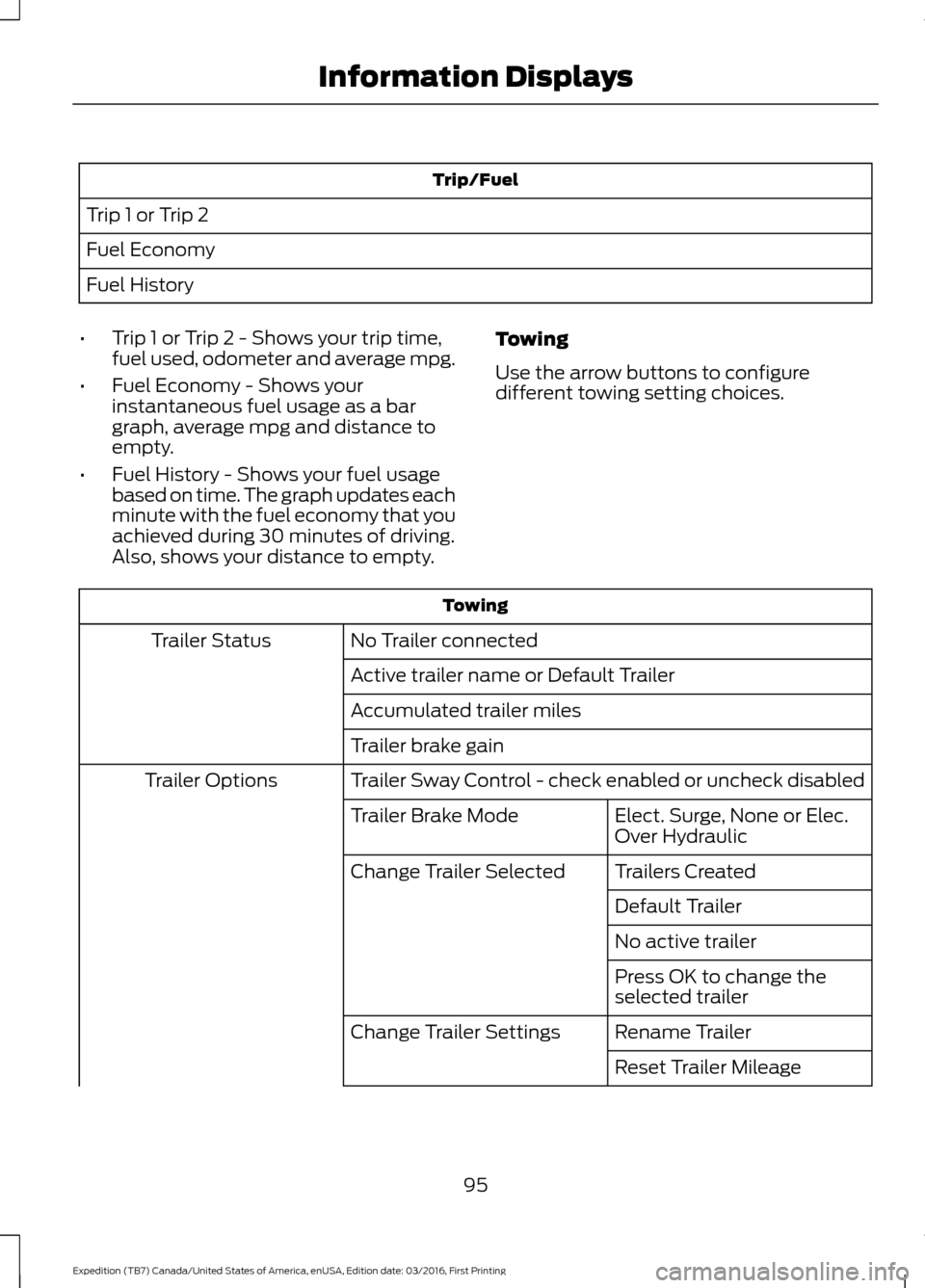
Trip/Fuel
Trip 1 or Trip 2
Fuel Economy
Fuel History
• Trip 1 or Trip 2 - Shows your trip time,
fuel used, odometer and average mpg.
• Fuel Economy - Shows your
instantaneous fuel usage as a bar
graph, average mpg and distance to
empty.
• Fuel History - Shows your fuel usage
based on time. The graph updates each
minute with the fuel economy that you
achieved during 30 minutes of driving.
Also, shows your distance to empty. Towing
Use the arrow buttons to configure
different towing setting choices. Towing
No Trailer connected
Trailer Status
Active trailer name or Default Trailer
Accumulated trailer miles
Trailer brake gain
Trailer Sway Control - check enabled or uncheck disabled
Trailer Options
Elect. Surge, None or Elec.
Over Hydraulic
Trailer Brake Mode
Trailers Created
Change Trailer Selected
Default Trailer
No active trailer
Press OK to change the
selected trailer
Rename Trailer
Change Trailer Settings
Reset Trailer Mileage
95
Expedition (TB7) Canada/United States of America, enUSA, Edition date: 03/2016, First Printing Information Displays
Page 102 of 500
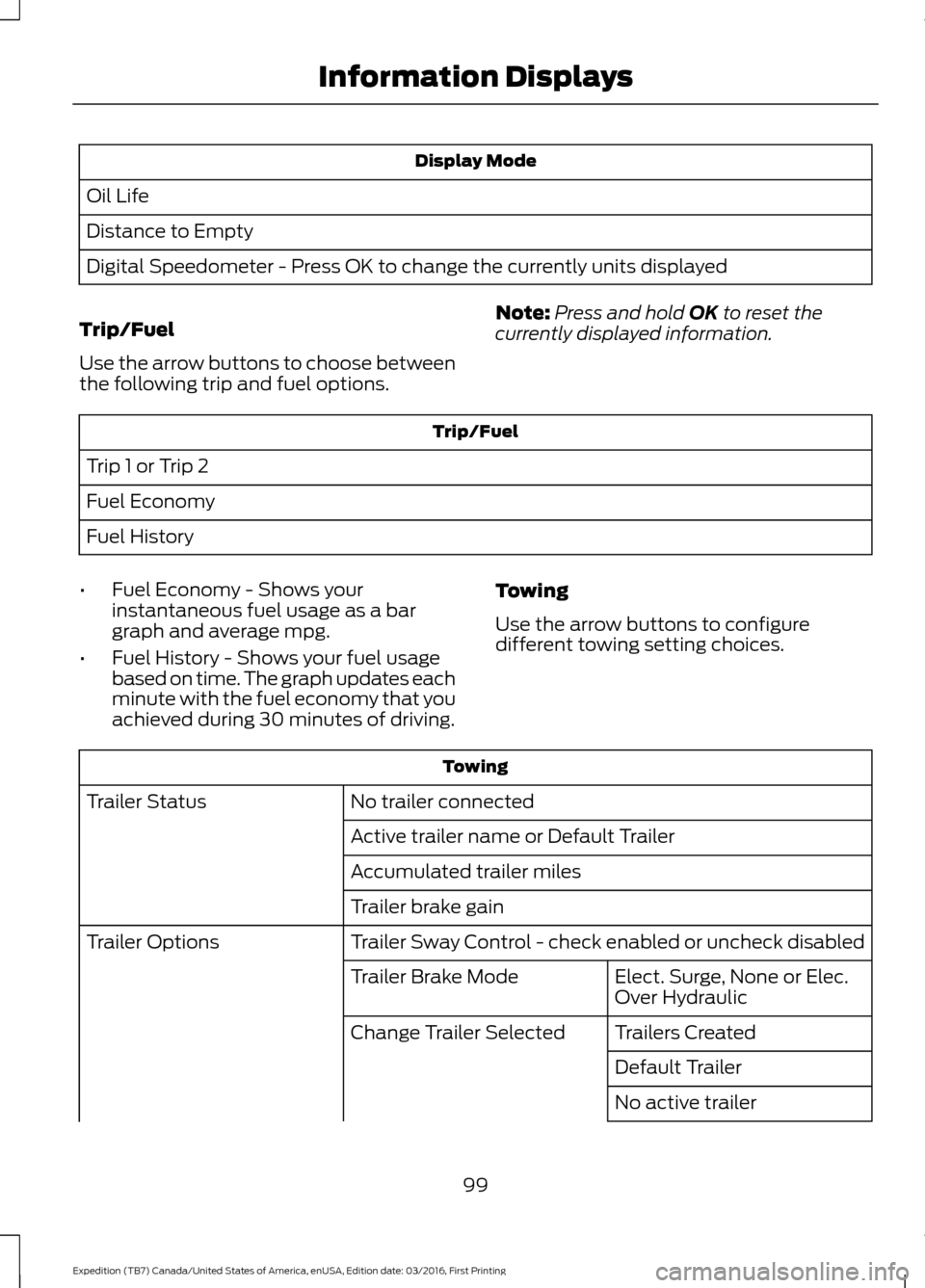
Display Mode
Oil Life
Distance to Empty
Digital Speedometer - Press OK to change the currently units displayed
Trip/Fuel
Use the arrow buttons to choose between
the following trip and fuel options. Note:
Press and hold OK to reset the
currently displayed information. Trip/Fuel
Trip 1 or Trip 2
Fuel Economy
Fuel History
• Fuel Economy - Shows your
instantaneous fuel usage as a bar
graph and average mpg.
• Fuel History - Shows your fuel usage
based on time. The graph updates each
minute with the fuel economy that you
achieved during 30 minutes of driving. Towing
Use the arrow buttons to configure
different towing setting choices. Towing
No trailer connected
Trailer Status
Active trailer name or Default Trailer
Accumulated trailer miles
Trailer brake gain
Trailer Sway Control - check enabled or uncheck disabled
Trailer Options
Elect. Surge, None or Elec.
Over Hydraulic
Trailer Brake Mode
Trailers Created
Change Trailer Selected
Default Trailer
No active trailer
99
Expedition (TB7) Canada/United States of America, enUSA, Edition date: 03/2016, First Printing Information Displays
Page 107 of 500
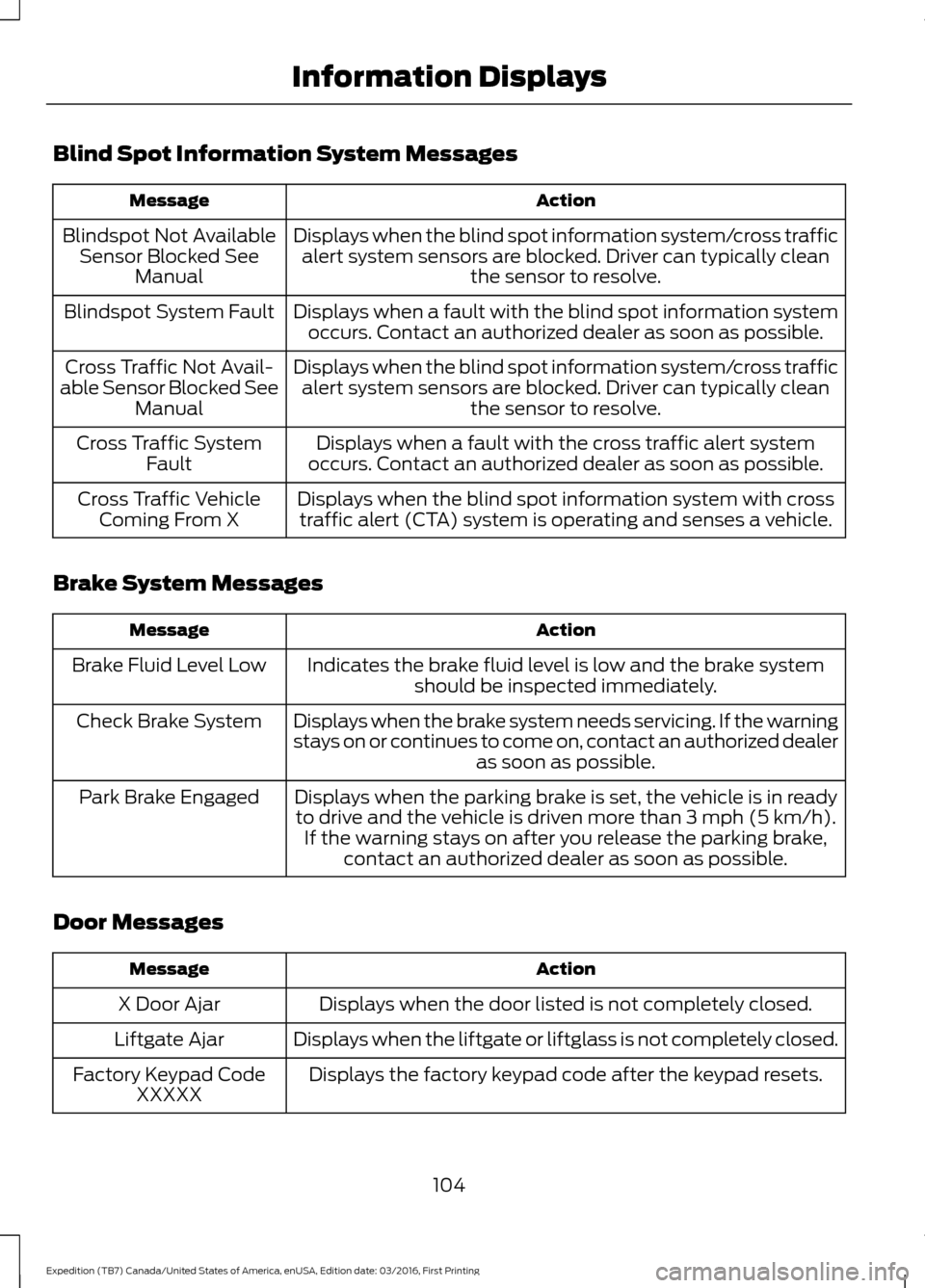
Blind Spot Information System Messages
Action
Message
Displays when the blind spot information system/cross trafficalert system sensors are blocked. Driver can typically clean the sensor to resolve.
Blindspot Not Available
Sensor Blocked See Manual
Displays when a fault with the blind spot information systemoccurs. Contact an authorized dealer as soon as possible.
Blindspot System Fault
Displays when the blind spot information system/cross trafficalert system sensors are blocked. Driver can typically clean the sensor to resolve.
Cross Traffic Not Avail-
able Sensor Blocked See Manual
Displays when a fault with the cross traffic alert system
occurs. Contact an authorized dealer as soon as possible.
Cross Traffic System
Fault
Displays when the blind spot information system with crosstraffic alert (CTA) system is operating and senses a vehicle.
Cross Traffic Vehicle
Coming From X
Brake System Messages Action
Message
Indicates the brake fluid level is low and the brake systemshould be inspected immediately.
Brake Fluid Level Low
Displays when the brake system needs servicing. If the warning
stays on or continues to come on, contact an authorized dealeras soon as possible.
Check Brake System
Displays when the parking brake is set, the vehicle is in readyto drive and the vehicle is driven more than 3 mph (5 km/h). If the warning stays on after you release the parking brake, contact an authorized dealer as soon as possible.
Park Brake Engaged
Door Messages Action
Message
Displays when the door listed is not completely closed.
X Door Ajar
Displays when the liftgate or liftglass is not completely closed.
Liftgate Ajar
Displays the factory keypad code after the keypad resets.
Factory Keypad Code
XXXXX
104
Expedition (TB7) Canada/United States of America, enUSA, Edition date: 03/2016, First Printing Information Displays
Page 108 of 500
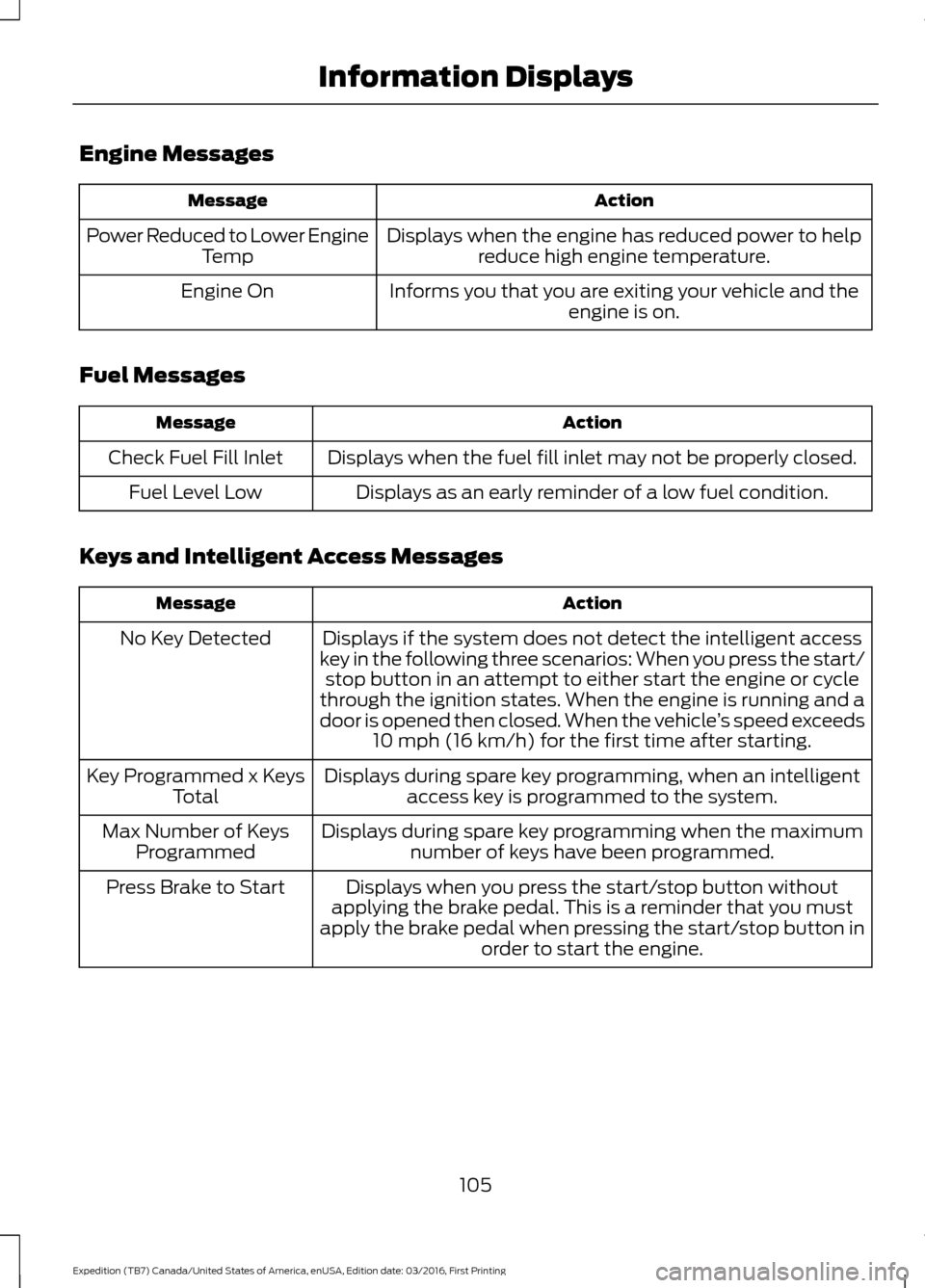
Engine Messages
Action
Message
Displays when the engine has reduced power to helpreduce high engine temperature.
Power Reduced to Lower Engine
Temp
Informs you that you are exiting your vehicle and theengine is on.
Engine On
Fuel Messages Action
Message
Displays when the fuel fill inlet may not be properly closed.
Check Fuel Fill Inlet
Displays as an early reminder of a low fuel condition.
Fuel Level Low
Keys and Intelligent Access Messages Action
Message
Displays if the system does not detect the intelligent access
key in the following three scenarios: When you press the start/ stop button in an attempt to either start the engine or cycle
through the ignition states. When the engine is running and a
door is opened then closed. When the vehicle ’s speed exceeds
10 mph (16 km/h) for the first time after starting.
No Key Detected
Displays during spare key programming, when an intelligentaccess key is programmed to the system.
Key Programmed x Keys
Total
Displays during spare key programming when the maximumnumber of keys have been programmed.
Max Number of Keys
Programmed
Displays when you press the start/stop button without
applying the brake pedal. This is a reminder that you must
apply the brake pedal when pressing the start/stop button in order to start the engine.
Press Brake to Start
105
Expedition (TB7) Canada/United States of America, enUSA, Edition date: 03/2016, First Printing Information Displays
Page 111 of 500
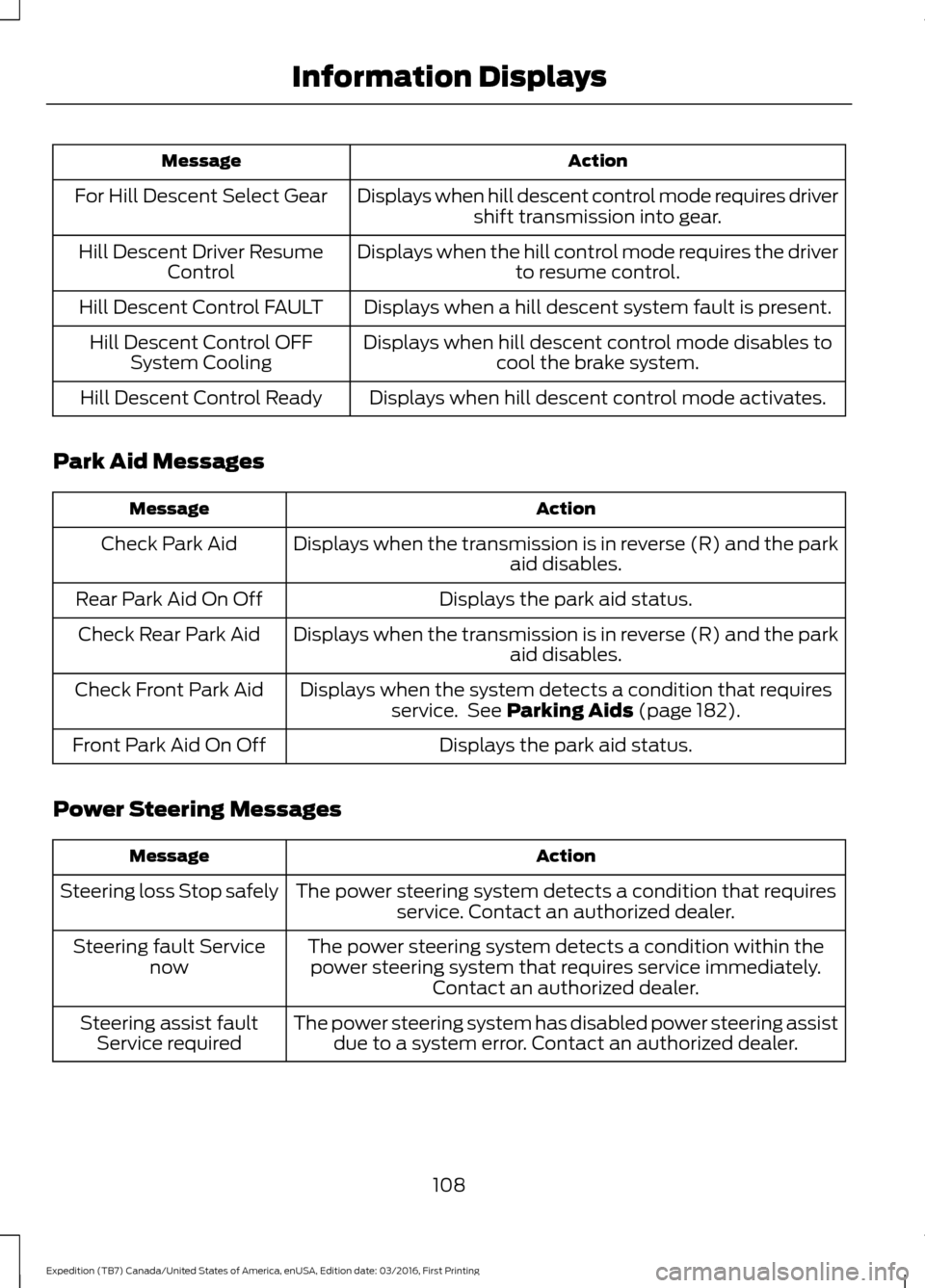
Action
Message
Displays when hill descent control mode requires drivershift transmission into gear.
For Hill Descent Select Gear
Displays when the hill control mode requires the driverto resume control.
Hill Descent Driver Resume
Control
Displays when a hill descent system fault is present.
Hill Descent Control FAULT
Displays when hill descent control mode disables tocool the brake system.
Hill Descent Control OFF
System Cooling
Displays when hill descent control mode activates.
Hill Descent Control Ready
Park Aid Messages Action
Message
Displays when the transmission is in reverse (R) and the park aid disables.
Check Park Aid
Displays the park aid status.
Rear Park Aid On Off
Displays when the transmission is in reverse (R) and the parkaid disables.
Check Rear Park Aid
Displays when the system detects a condition that requiresservice. See Parking Aids (page 182).
Check Front Park Aid
Displays the park aid status.
Front Park Aid On Off
Power Steering Messages Action
Message
The power steering system detects a condition that requiresservice. Contact an authorized dealer.
Steering loss Stop safely
The power steering system detects a condition within thepower steering system that requires service immediately. Contact an authorized dealer.
Steering fault Service
now
The power steering system has disabled power steering assistdue to a system error. Contact an authorized dealer.
Steering assist fault
Service required
108
Expedition (TB7) Canada/United States of America, enUSA, Edition date: 03/2016, First Printing Information Displays